You deploy a perfectly good manifest, and the pod sits in ImagePullBackOff. kubectl get pods shows it stuck, READY 0/1, restart count climbing slowly. The image built fine, it pushed to Azure Container Registry (ACR) without complaint, and it ran on your laptop ten minutes ago. Yet the kubelet on the AKS node cannot pull it, and the only clue is a one-line event buried in kubectl describe. This is one of the most common day-one (and day-five-hundred) failures on Azure Kubernetes Service — the managed control plane that runs your Kubernetes workloads on a pool of Azure VMs — and it is frustrating precisely because the deployment looks correct. The manifest is valid; the failure is in the invisible handshake between the node and the registry.
This is the diagnostic playbook for that handshake. ImagePullBackOff and its sibling ErrImagePull are not one bug but a symptom class with roughly a dozen root causes, and they fall into two buckets you must separate first: authorization failures (the registry and image exist, but the node has no right to pull) and resolution failures (the node cannot find the image, the tag, or the registry at all). A 401 Unauthorized from ACR and a manifest unknown for a typo’d tag look almost identical at the pod level — both end in ImagePullBackOff — but they have opposite fixes. You will learn to read the kubelet’s pull error, localise it to the identity/RBAC path or the name/network path, and confirm which with one command — each diagnosis paired with the exact kubectl/az confirmation and the precise fix, in CLI and Bicep, because mid-incident you want the table, not a tutorial.
By the end you will stop guessing. When a pod won’t start you will know in ninety seconds whether you face a registry that was never attached, a managed identity that lost its AcrPull role, a tag that doesn’t exist, a private endpoint whose DNS the node can’t resolve, or an imagePullSecret that expired — and you will fix the cause, not restart the pod and hope. Knowing which, fast, is the difference between a five-minute fix and an afternoon of kubectl delete pod cargo-culting.
What problem this solves
AKS hides enormous plumbing so you can kubectl apply a manifest and have containers running. The image pull is the seam where that abstraction leaks. When the kubelet asks ACR for an image it must authenticate (prove the cluster may pull) and resolve (find the exact registry, repository and tag). If either step fails, Kubernetes backs off and retries with exponential delay, parking the pod in ImagePullBackOff. The status is deliberately terse — Kubernetes can’t know why the registry said no, only that it did — so the real reason lives one layer down, in kubectl describe, the kubelet logs, and ACR’s audit logs.
What breaks without this knowledge: an engineer sees ImagePullBackOff, deletes the pod (the new pod hits the same wall), re-pushes the image (irrelevant if it’s auth), or drops a hand-managed imagePullSecret into the namespace — trading a rotation-free managed-identity attachment for a secret that silently expires in 90 days and pages someone at 2am. Meanwhile the actual cause — an --attach-acr never run, a role assignment deleted by a cleanup script, a tag typo’d in CD, or a private-endpoint DNS record that doesn’t exist — sits there, perfectly diagnosable, ignored.
Who hits this: essentially everyone running AKS with a private registry, which is most production clusters. It bites hardest on first deployments (registry never attached), on private ACR with private endpoints (DNS failures dominate), on teams that rebuilt a cluster and forgot to re-grant AcrPull to the new kubelet identity, and on anyone still using static imagePullSecret credentials. The fix is almost never “redeploy the pod” — it’s “find which half of the handshake failed and repair that half.”
To frame the field before the deep dive, here is every symptom this article covers, its bucket, and the one place to look first:
| Symptom | Bucket | What the kubelet is saying | First question | First place to look |
|---|---|---|---|---|
ImagePullBackOff + 401 Unauthorized |
Authorization | “The registry refused my credentials” | Is the cluster attached to this ACR? | kubectl describe pod events |
ImagePullBackOff + manifest unknown |
Resolution | “That tag/repo doesn’t exist” | Is the image:tag spelled right and pushed? | az acr repository show-tags |
ErrImagePull + no such host / timeout |
Resolution (network) | “I can’t even reach the registry” | Can the node resolve the ACR FQDN? | kubectl run debug + nslookup |
ImagePullBackOff after a working deploy |
Authorization | “Credentials that worked yesterday now fail” | Did a role/secret get deleted or expire? | az role assignment list |
ImagePullBackOff only on some nodes |
Authorization (identity) | “Some nodes have the right, some don’t” | Right kubelet identity on every pool? | az aks show identity profile |
Learning objectives
By the end of this article you can:
- Split an
ImagePullBackOffinto an authorization failure (401/403) or a resolution failure (manifest unknown,no such host) usingkubectl describe podand the kubelet error string. - Explain how AKS authenticates to ACR — the kubelet managed identity, the AcrPull role, and what
az aks update --attach-acractually wires up. - Diagnose and fix the five highest-frequency causes: registry never attached, missing/deleted AcrPull role, wrong image name or tag, private-endpoint DNS failure, and an expired
imagePullSecret. - Confirm a fix with the exact command —
kubectl describe pod,az aks check-acr,az acr repository show-tags,az role assignment list, and an in-clusternslookupdebug pod. - Choose between the three ACR-auth models —
--attach-acr, a KubernetesimagePullSecret, and a service principal — by trade-off, rotation cost and security posture. - Harden the pull path: private ACR with a private endpoint, the correct Private DNS zone (
privatelink.azurecr.io), least-privilege AcrPull (neverContributor), and digest pinning. - Map these failures to AZ-104 (manage AKS, manage ACR) and answer the interview questions that probe whether you understand the identity handshake.
Prerequisites & where this fits
You should understand the AKS and ACR basics: an AKS cluster runs pods on one or more node pools (VM scale sets), each node running a kubelet that pulls images and starts containers; ACR is Azure’s managed private Docker/OCI registry, addressed as <name>.azurecr.io. You should be comfortable running kubectl (az aks get-credentials), reading kubectl describe, and running az in Cloud Shell. Familiarity with Azure RBAC (role assignments, scopes) and managed identity (an Azure-managed credential attached to a resource, no secret to handle) makes every fix obvious rather than magical.
This sits in the AKS Operations & Troubleshooting track. It assumes the fundamentals from Azure AKS Cluster Architecture: Control Plane vs Data Plane Explained and the auth model from AKS Managed Identity vs Service Principal: Cluster Authentication — the kubelet identity there is the exact identity that pulls images. It pairs with Azure Container Registry: Secure Supply Chain, Private ACR Tasks & Zone Redundancy (the registry side of this handshake) and Azure Private Endpoint vs Service Endpoint (the network-path failures on private registries). If you are deploying your first containerised app, Containerise and Deploy Your First App to AKS is upstream — and where most first-pull failures happen.
A quick map of who owns what during a pull incident, so you call the right person fast:
| Layer | What lives here | Who usually owns it | Failure classes it can cause |
|---|---|---|---|
| Manifest / image ref | image: field, tag, digest |
App / dev team | manifest unknown, wrong repo, wrong tag |
| Kubelet (node) | Pulls the image, starts container | Microsoft (managed) + platform | Backoff, surfaces all pull errors |
| Kubelet identity / RBAC | The identity that authenticates to ACR | Platform / cluster admin | 401/403 (no AcrPull, not attached) |
| ACR registry | Repos, tags, auth, network rules | Platform / registry owner | manifest unknown, 401, firewall block |
| Network / DNS | Private endpoint, Private DNS, egress | Network team | no such host, timeout, connection refused |
Core concepts
Five mental models make every later diagnosis obvious.
ImagePullBackOff names the back-off, not the cause. When the kubelet fails to pull it enters ErrImagePull immediately, then — because Kubernetes retries with exponential delay rather than hammering the registry — parks the pod in ImagePullBackOff (literally backing off between attempts). The status tells you only that the pull failed, repeatedly, not why. The real reason is always in the Events of kubectl describe pod and the kubelet error string. Reading the status as the problem is the trap; the status is the symptom, the event is the diagnosis.
Every pull is authenticate then resolve. The kubelet authenticates to the registry (proves the cluster may pull) and resolves the image (finds the exact registry/repository:tag or @digest). Auth failures return 401 Unauthorized / 403 Forbidden; resolution failures return manifest unknown (tag/repo not found) or, at the network layer, no such host / i/o timeout (can’t reach the registry). These are opposite problems — granting AcrPull does nothing for a typo’d tag, fixing a tag does nothing for a missing role. The first move in every incident is to read the error and decide: auth, or resolution?
AKS pulls with a managed identity, not a password. Modern clusters authenticate to ACR using the kubelet identity (the managed identity attached to the node pool). az aks update --attach-acr does one thing under the hood: it grants that identity the AcrPull role on the registry — it’s a convenience wrapper around an RBAC role assignment. If the role is missing (never granted, or deleted), the pull returns 401 no matter how healthy the cluster and image. No password is stored anywhere; the identity proves itself to Entra ID and ACR honours the AcrPull grant.
A private registry adds a network handshake before the auth one. A public ACR is internet-reachable, so the only question is auth. A private ACR (public access disabled, reached via a private endpoint) adds a prerequisite: the node must resolve the registry FQDN to its private IP and route to it. That requires a Private DNS zone named exactly privatelink.azurecr.io, linked to the cluster’s VNet, with an A record. Miss the link and the node resolves to the public IP (or nothing), the connection is refused or times out, and you get no such host/i/o timeout — an error that looks like auth but is pure networking. Private registries also pull layers through a data endpoint (<region>.data.azurecr.io), which needs its own DNS record.
imagePullSecret is the old way, and a liability. Before managed-identity attachment you created a docker-registry Kubernetes secret (an imagePullSecret) holding ACR credentials and referenced it from the pod/service account. It still works and is sometimes necessary (cross-tenant, non-AKS Kubernetes), but it’s a static credential someone must rotate. ACR admin and service-principal secrets expire; when they do, every pull in that namespace starts 401-ing with no code change. If you can use --attach-acr, you should — it removes the secret and the rotation problem entirely.
The vocabulary in one table
Before the deep sections, pin down every moving part. The glossary at the end repeats these for lookup; this table is the mental model side by side:
| Concept | One-line definition | Where it lives | Why it matters to ImagePullBackOff |
|---|---|---|---|
ImagePullBackOff |
Pod state: kubelet is backing off after failed pulls | Pod status | The symptom you see; not the cause |
ErrImagePull |
The pull just failed (precedes the back-off) | Pod event | The immediate failure before retries |
| Kubelet identity | Managed identity the node uses to auth to ACR | Node pool / cluster | Needs AcrPull or every pull is 401 |
| AcrPull | The RBAC role that allows pulling images | Role assignment on the ACR | Missing → 401 Unauthorized |
--attach-acr |
az aks flag that grants AcrPull to the kubelet identity |
Cluster config | The one command that wires auth |
imagePullSecret |
A docker-registry Kubernetes secret |
Namespace / service account | Static creds that expire → 401 |
| Private endpoint | Private IP for the registry inside your VNet | VNet subnet | Wrong DNS → no such host/timeout |
privatelink.azurecr.io |
The Private DNS zone for private ACR | Private DNS zone | Must be linked to the cluster VNet |
| Data endpoint | Where image layers (blobs) are pulled from | <region>.data.azurecr.io |
Needs its own private DNS record |
manifest unknown |
The registry has no such tag/repo | Pull error | Wrong/missing tag — a resolution bug |
az aks check-acr |
Built-in command that tests the pull path | CLI | One-shot diagnosis of attach + reach |
How AKS authenticates to ACR — the handshake in detail
Everything in this article hinges on what happens when the kubelet pulls an image. Walk it once and every later fix is obvious.
When you kubectl apply a Deployment whose container image: is myregistry.azurecr.io/api:1.4.2, the scheduler places the pod on a node and that node’s kubelet tries to pull the image. It needs a credential for myregistry.azurecr.io, which on a modern cluster comes from the kubelet managed identity — the user-assigned identity attached to the node pool (its object ID is in az aks show under identityProfile.kubeletidentity). The kubelet uses it to get an Entra ID token, exchanges that with ACR for a registry-scoped token, and ACR checks whether the identity holds the AcrPull role. If yes, the pull proceeds; if no, ACR returns 401 Unauthorized and the kubelet reports ErrImagePull → ImagePullBackOff.
The command that makes this work is az aks update --attach-acr. It looks like it “connects” the cluster to the registry, but mechanically it performs one Azure RBAC role assignment: it grants the kubelet identity AcrPull, scoped to that registry. That is the entire integration — no secret, no network tunnel, no special “link” object, just an identity and a role. Missing the role assignment, every pull 401s; with it present, every pull from a reachable registry succeeds.
Attaching ACR at create time and after the fact
Wire the AcrPull grant at cluster creation or add it later — both produce the same role assignment.
# At cluster creation — attach the registry by name (same subscription)
az aks create -g rg-aks-prod -n aks-prod \
  --attach-acr myregistry \
  --enable-managed-identity --generate-ssh-keys -o table

# After the fact — attach (or re-attach) an existing cluster to an ACR
az aks update -g rg-aks-prod -n aks-prod --attach-acr myregistry
If the ACR lives in a different subscription or resource group, pass the full resource ID, or the lookup fails:
ACR_ID=$(az acr show -n myregistry -g rg-shared --query id -o tsv)
az aks update -g rg-aks-prod -n aks-prod --attach-acr "$ACR_ID"
To grant explicitly (useful when an identity owner grants the role on your behalf), assign AcrPull to the kubelet object ID directly:
# Get the kubelet identity's object ID and the ACR resource ID
KUBELET_ID=$(az aks show -g rg-aks-prod -n aks-prod \
  --query identityProfile.kubeletidentity.objectId -o tsv)
ACR_ID=$(az acr show -n myregistry -g rg-shared --query id -o tsv)

# Grant least-privilege pull — AcrPull, NOT Contributor or AcrPush
az role assignment create --assignee "$KUBELET_ID" --role AcrPull --scope "$ACR_ID"
In Bicep, the same grant is a role-assignment resource scoped to the registry — declarative, reviewable, idempotent:
@description('AcrPull role definition ID (built-in, well-known GUID).')
var acrPullRoleId = '7f951dda-4ed3-4680-a7ca-43fe172d538d'

resource acr 'Microsoft.ContainerRegistry/registries@2023-07-01' existing = {
  name: 'myregistry'
}

// Grant the AKS kubelet identity AcrPull on the registry
resource acrPull 'Microsoft.Authorization/roleAssignments@2022-04-01' = {
  scope: acr
  name: guid(acr.id, kubeletObjectId, acrPullRoleId)
  properties: {
    roleDefinitionId: subscriptionResourceId('Microsoft.Authorization/roleDefinitions', acrPullRoleId)
    principalId: kubeletObjectId          // identityProfile.kubeletidentity.objectId
    principalType: 'ServicePrincipal'
  }
}
The three ACR-auth models, side by side, so you pick deliberately:
| Auth model | How it works | Rotation burden | Security posture | When to use |
|---|---|---|---|---|
--attach-acr (managed identity) |
Kubelet identity granted AcrPull on the registry | None — no secret to rotate | Best: no stored secret, least-privilege role | The default for AKS + ACR in the same tenant |
imagePullSecret (service principal) |
docker-registry secret holds an SP’s client ID + secret |
You rotate the SP secret before expiry | Weaker: a secret in the cluster that expires | Cross-tenant pulls; non-AKS Kubernetes |
imagePullSecret (ACR admin user) |
Secret holds the registry’s admin username/password | Rotate admin creds; shared across all callers | Worst: a shared god-credential | Quick demos only — disable in production |
The AcrPull role versus the roles people accidentally use
AcrPull is the only role a cluster needs to pull. People over-grant Contributor/Owner “to make it work”, which does work — and quietly hands the cluster identity rights to delete the registry. AcrPull is the precise grant. The registry-scoped roles and what each allows:
| Role | Allows | Use for | Don’t use it to… |
|---|---|---|---|
| AcrPull | Pull images (read manifests + blobs) | AKS kubelet identity, any puller | (this is the right one) |
| AcrPush | Pull and push images | CI/CD build agents | …grant to a cluster that only pulls |
| AcrDelete | Delete images / repositories | Cleanup automation | …grant to a pull-only workload |
| AcrImageSigner | Sign images (content trust) | Signing pipelines | …confuse with pull permission |
| Contributor / Owner | Everything on the registry | (avoid for pull) | …use as a lazy substitute for AcrPull |
Anatomy of an authorization failure (401 / 403)
An authorization failure means the registry and image exist, but the cluster has no right to pull. The event string contains 401 Unauthorized (no valid credential) or 403 Forbidden (authenticated but blocked, e.g. a network rule). Five causes — scan the matrix, then read the matching detail:
| # | Auth cause | Tell-tale signal | Confirm with | Real fix |
|---|---|---|---|---|
| 1 | Registry never attached to the cluster | 401 on the very first deploy to this ACR |
az role assignment list --scope <acrId> (no AcrPull) |
az aks update --attach-acr |
| 2 | AcrPull role deleted after the fact | Worked, then 401 cluster-wide with no code change |
az role assignment list shows the grant gone |
Re-create the AcrPull assignment |
| 3 | Wrong kubelet identity (rebuilt cluster / new pool) | 401 only on some nodes, or after a cluster recreate |
az aks show --query identityProfile.kubeletidentity |
Grant AcrPull to the current kubelet ID |
| 4 | Stale/expired imagePullSecret |
401 in one namespace; others fine |
kubectl get secret -o yaml; decode + test login |
Re-create secret or move to --attach-acr |
| 5 | ACR firewall / public access blocking the node | 403 “denied” though identity is correct |
az acr show --query "networkRuleSet,publicNetworkAccess" |
Allow the egress IP / use private endpoint + DNS |
Cause 1 — The registry was never attached to the cluster
The most common first-deploy failure. You created the cluster and registry and pushed the image, but never ran --attach-acr, so the kubelet identity has no AcrPull role and every pull returns 401.
Confirm. Read the pod event, then check the registry’s role assignments for the kubelet identity:
kubectl describe pod api-7d9f -n prod | sed -n '/Events/,$p'
# Look for: Failed to pull image "...": ... 401 Unauthorized

ACR_ID=$(az acr show -n myregistry -g rg-shared --query id -o tsv)
KUBELET_ID=$(az aks show -g rg-aks-prod -n aks-prod \
  --query identityProfile.kubeletidentity.objectId -o tsv)
az role assignment list --assignee "$KUBELET_ID" --scope "$ACR_ID" -o table
# Empty result → no AcrPull → this is your cause
The fastest confirmation is the purpose-built command, which tests the whole pull path from inside the cluster:
az aks check-acr -g rg-aks-prod -n aks-prod --acr myregistry.azurecr.io
# Reports whether the cluster can authenticate to and reach the registry
Fix. Attach the registry (grants AcrPull):
az aks update -g rg-aks-prod -n aks-prod --attach-acr myregistry
# Then delete the stuck pod so it re-pulls (or let the next reconcile retry)
kubectl delete pod api-7d9f -n prod
Cause 2 — The AcrPull role assignment was deleted
It worked for months, then every pod started failing with 401, no deployment in between. Usual culprit: a governance/cleanup script pruned the “orphaned” AcrPull grant, or someone re-created the registry (new resource ID, so the old assignment no longer applies).
Confirm. The grant is simply gone — the az role assignment list from Cause 1 now returns empty. Cross-check the Activity Log for a role-assignment delete:
az monitor activity-log list -g rg-shared --offset 7d \
  --query "[?contains(operationName.value,'roleAssignments/delete')].{time:eventTimestamp, by:caller}" -o table
Fix. Re-create the assignment (or re-run --attach-acr). To stop it recurring, manage the role assignment as Bicep/Terraform so a drift-correcting deploy restores it and a reviewer sees any attempt to remove it.
Cause 3 — Wrong kubelet identity after a rebuild or a new node pool
You recreated the cluster and the old identity still has AcrPull but the new one does not. (The kubelet identity is per-cluster, so node pools share it — but a pool created against a custom identity profile can leave some nodes ungranted.) The tell is 401 that’s inconsistent across nodes, or that appears immediately after a cluster recreate.
Confirm. Print the current kubelet identity and verify the grant targets it:
az aks show -g rg-aks-prod -n aks-prod \
  --query "identityProfile.kubeletidentity.{objectId:objectId, clientId:clientId, resourceId:resourceId}" -o json
# Compare this objectId to the assignee on the AcrPull role assignment
Fix. Grant AcrPull to the current kubelet object ID (az role assignment create --role AcrPull as above), or simply re-run az aks update --attach-acr myregistry, which always targets the cluster’s live identity.
Cause 4 — Stale or expired imagePullSecret
If a namespace authenticates via a docker-registry secret built from a service principal or ACR admin credential, that credential expires. When it does, every pull in that namespace 401s while managed-identity namespaces are unaffected — a strong tell.
Confirm. Inspect the secret and test the credential it holds:
kubectl get secret acr-pull -n legacy -o jsonpath='{.data.\.dockerconfigjson}' | base64 -d
# Shows the registry, username and (base64) password it will present

# Test that credential against ACR directly
az acr login -n myregistry --username <sp-app-id> --password <sp-secret>
# 401 here confirms the credential itself is dead/expired
Fix. Re-create the secret with fresh credentials, or — far better — delete it and switch the namespace to managed-identity attachment so there’s no credential to expire:
# Recreate (short-term): rebuild the docker-registry secret with new SP creds
kubectl create secret docker-registry acr-pull -n legacy \
  --docker-server=myregistry.azurecr.io \
  --docker-username=<sp-app-id> --docker-password=<new-sp-secret> \
  --dry-run=client -o yaml | kubectl apply -f -

# Long-term: attach ACR and drop the imagePullSecret reference from manifests
az aks update -g rg-aks-prod -n aks-prod --attach-acr myregistry
Cause 5 — ACR firewall or public-access rules blocking the node
The identity has AcrPull, but ACR’s network rules (or publicNetworkAccess: Disabled) reject the node — you see 403 denied or a refused connection. Common when someone locks the registry to private access without wiring the cluster’s private path.
Confirm. Check the registry’s network posture and SKU (network rules require Premium):
az acr show -n myregistry -g rg-shared \
  --query "{sku:sku.name, publicAccess:publicNetworkAccess, rules:networkRuleSet}" -o json
Fix. Either add the cluster’s egress IP to the allow-list (for IP-restricted public access) or — the production-correct path — use a private endpoint with the right Private DNS zone (covered in the next section). The network-layer failure modes and how each presents:
| Network posture | What the node sees | Confirm | Fix |
|---|---|---|---|
| Public, no rules | Works (auth still applies) | publicNetworkAccess: Enabled, empty rules |
(nothing) |
| Public + IP allow-list, node IP missing | 403 denied / refused |
networkRuleSet.ipRules lacks egress IP |
Add the cluster egress IP/CIDR |
| Public access Disabled, no private endpoint | no such host / timeout |
publicNetworkAccess: Disabled, no PE |
Create a private endpoint + DNS |
| Private endpoint present, DNS not linked | no such host (resolves to public) |
No A record in privatelink.azurecr.io |
Link the Private DNS zone to the VNet |
Anatomy of a resolution failure (manifest unknown / not found / no such host)
A resolution failure means the cluster cannot find the image — wrong name, wrong tag, or can’t reach the registry at all. The errors are manifest unknown (the tag/repo doesn’t exist) and, at the network layer, no such host / i/o timeout / connection refused (can’t reach the registry). Four causes — scan, then read the matching detail:
| # | Resolution cause | Tell-tale signal | Confirm with | Real fix |
|---|---|---|---|---|
| 1 | Wrong image name or registry FQDN | manifest unknown or repo not found |
az acr repository list; diff the image: field |
Correct the registry/repository in the manifest |
| 2 | Wrong or missing tag (typo, never pushed) | manifest unknown for a specific tag |
az acr repository show-tags |
Push the tag, or fix the tag in the manifest |
| 3 | Private endpoint DNS not resolving | no such host / i/o timeout |
in-cluster nslookup <acr>.azurecr.io |
Link privatelink.azurecr.io to the VNet |
| 4 | Egress blocked (firewall/NSG/UDR) | i/o timeout / connection refused |
kubectl run curl test; check NSG/firewall |
Allow 443 egress to ACR (or service tag) |
Cause 1 — Wrong image name or registry FQDN
A common slip: the image: references the wrong registry (myregistry vs myreg), the wrong repository path, or a public-hub name when you meant your private one. The kubelet gets manifest unknown because that exact path doesn’t exist.
Confirm. List what the registry actually contains and compare to the manifest:
az acr repository list -n myregistry -o table
kubectl get deploy api -n prod -o jsonpath='{.spec.template.spec.containers[0].image}{"\n"}'
# Eyeball the registry FQDN and repository path for typos
Fix. Correct the image: field to the exact registry/repository:tag and re-apply.
Cause 2 — Wrong or missing tag
The repository exists but the tag doesn’t — a typo (:lastest), a tag the CD pipeline never pushed, or a :latest that was overwritten/deleted. The error is manifest unknown for that reference.
Confirm. Show the tags that exist and check whether yours is among them:
az acr repository show-tags -n myregistry --repository api --output table
# Or check one exact reference:
az acr repository show -n myregistry --image api:1.4.2 -o table   # errors if absent
Fix. Push the missing tag, or fix the tag in the manifest. The deeper fix for “the tag moved” is to pin by digest (api@sha256:…) so the deployed image is immutable and can’t be deleted out from under you:
# Resolve a tag to its immutable digest, then deploy by digest
DIGEST=$(az acr repository show -n myregistry --image api:1.4.2 \
  --query "digest" -o tsv)
echo "myregistry.azurecr.io/api@$DIGEST"
Cause 3 — Private endpoint DNS not resolving (the private-ACR classic)
The failure that eats the most hours, because it looks like auth but is pure DNS. You disabled public access and created a private endpoint, but the Private DNS zone privatelink.azurecr.io is missing, not linked to the cluster’s VNet, or lacks the A record. The node resolves myregistry.azurecr.io to its public IP (now firewalled off) or to nothing, and the pull dies with no such host or i/o timeout.
Confirm. Resolve the registry FQDN from inside the cluster — host-level DNS is irrelevant; what matters is what a pod’s node sees:
# Spin up a throwaway pod and resolve the registry from the node's DNS
kubectl run dnscheck --rm -it --restart=Never --image=busybox -- \
  nslookup myregistry.azurecr.io
# HEALTHY: resolves to a 10.x private IP via privatelink.azurecr.io
# BROKEN:  resolves to a public IP, or "can't resolve" → DNS not wired
Then confirm the zone exists and is linked to the VNet:
az network private-dns link vnet list -g rg-network \
  -z privatelink.azurecr.io -o table   # must list the AKS cluster's VNet
Fix. Link the privatelink.azurecr.io zone to the cluster VNet and ensure the private endpoint registered its A records (including the data endpoint <region>.data.azurecr.io):
# Link the Private DNS zone to the AKS VNet so nodes resolve to the private IP
az network private-dns link vnet create -g rg-network \
  -z privatelink.azurecr.io -n aks-vnet-link \
  --virtual-network <aks-vnet-id> --registration-enabled false
The private-ACR DNS records that must exist, and what breaks if each is missing:
| Record | FQDN | Purpose | If missing |
|---|---|---|---|
| Registry A record | myregistry.privatelink.azurecr.io |
Resolve the registry login endpoint | no such host on auth |
| Data endpoint A record | <region>.data.privatelink.azurecr.io |
Pull image layers (blobs) | Auth OK, layer pull times out |
| VNet link | (zone → AKS VNet) | Make the zone visible to nodes | Node uses public DNS → public IP |
| Private endpoint NIC | (PE in a subnet) | The actual private IP target | Nothing to resolve to |
Cause 4 — Egress to the registry is blocked by firewall, NSG or UDR
Even with correct DNS, the node must reach the registry on 443. An NSG denying outbound, or a UDR forcing traffic through an Azure Firewall that doesn’t allow ACR, produces i/o timeout or connection refused after a correct DNS resolution — the packets simply don’t arrive.
Confirm. From inside the cluster, try the actual TCP connection (not just DNS):
kubectl run nettest --rm -it --restart=Never --image=curlimages/curl -- \
  curl -sS -o /dev/null -w "%{http_code}\n" https://myregistry.azurecr.io/v2/
# 401 here is GOOD — it means you reached ACR (auth challenge). Timeout = egress blocked.
A 401 from /v2/ is the success signal for reachability — it proves you reached the registry and got its auth challenge. A timeout means egress is blocked.
Fix. Allow outbound 443 to the registry. With Azure Firewall, allow the AzureContainerRegistry and AzureActiveDirectory / MicrosoftContainerRegistry FQDN tags (and MicrosoftContainerRegistry for mcr.microsoft.com if you also pull base images), or the AzureContainerRegistry service tag on an NSG. The egress requirements at a glance:
| Destination | Port | Why the node needs it | Where to allow it |
|---|---|---|---|
<acr>.azurecr.io (registry) |
443 | Authenticate + read manifests | NSG / firewall egress |
<region>.data.azurecr.io |
443 | Pull image layers (blobs) | NSG / firewall egress |
login.microsoftonline.com |
443 | Entra ID token for the identity | Firewall (AzureActiveDirectory tag) |
mcr.microsoft.com + *.data.mcr.microsoft.com |
443 | Base images / system images | Firewall (MicrosoftContainerRegistry tag) |
Architecture at a glance
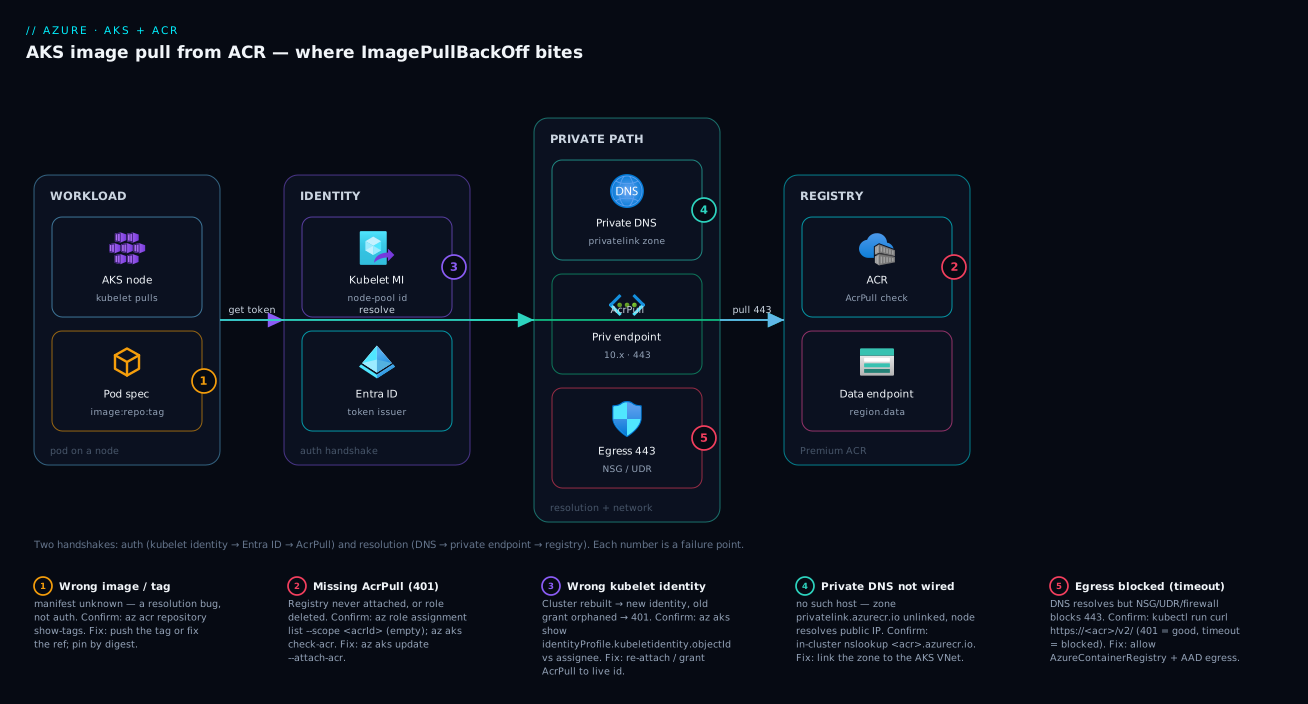
The diagram traces an image pull as it flows, then maps each failure class as a numbered badge onto the exact hop where it bites. Read it left to right. A pod is scheduled onto an AKS node whose kubelet does the pulling. To authenticate, the kubelet uses the kubelet managed identity attached to the node pool; that identity gets a token from Entra ID and presents it to Azure Container Registry, which checks for the AcrPull role (badge 2 — the role --attach-acr grants; missing it returns 401). For a private registry the path detours through a private endpoint in the VNet, which only works if the Private DNS zone privatelink.azurecr.io is linked to that VNet (badge 4 — wrong DNS resolves to the public IP and the pull times out).
The diagram separates two handshakes: the auth path (kubelet identity → Entra ID → AcrPull) and the resolution/network path (DNS → private endpoint → registry, plus the data endpoint serving image layers). Badge 1 sits on the pod’s image: reference — a wrong tag fails resolution before auth matters; badge 3 on the AcrPull grant being deleted; badge 5 on the egress hop, where an NSG or firewall blocks 443 even when identity and DNS are perfect. The whole method is in the picture: decide auth path or resolution/network path, then walk to the badge on that hop.
Real-world scenario
Finmark Lending runs its loan-origination microservices on a private AKS cluster in Central India: a 5-node Standard_D4s_v5 pool, images in a Premium ACR with public access disabled, reached over a private endpoint. The platform team is three engineers; the cluster has run cleanly for eight months. Their Azure DevOps pipeline builds, pushes to ACR, and kubectl applys to prod.
The incident began after a routine Terraform refactor: the networking team consolidated Private DNS zones into a central rg-network-hub and re-applied. Within an hour, every new deployment to prod got stuck in ImagePullBackOff — existing pods (already pulled) kept serving, so monitoring stayed green and nobody noticed until a release went out. The on-call engineer’s first reflex, kubectl delete pod, hit the same wall; the second, re-running the pipeline, was pointless because the image was fine in ACR. Forty minutes in, a release was blocked and the bridge was open.
The breakthrough came from reading the event, not the status. kubectl describe pod showed Failed to pull image "finmarkacr.azurecr.io/origination:2026.6.2": ... dial tcp: lookup finmarkacr.azurecr.io: no such host. That is not 401 — it’s a resolution failure, specifically DNS. An in-cluster kubectl run dnscheck --rm -it --image=busybox -- nslookup finmarkacr.azurecr.io returned a public IP, not the expected 10.x private address. The registry hadn’t moved and AcrPull was intact; the privatelink.azurecr.io zone link to the AKS VNet had been dropped during the consolidation, so nodes resolved the registry to its public IP, which the disabled-public-access firewall then refused.
Why older pods kept working was the confirming clue: they had pulled before the DNS link broke and never needed to resolve the registry again — only new pulls failed. That is the signature of an infrastructure change breaking the pull path: existing workloads fine, every new pod stuck.
The fix landed in two parts. Immediately: re-link the zone to the AKS VNet — az network private-dns link vnet create … -z privatelink.azurecr.io --virtual-network <aks-vnet-id>. Within two minutes the in-cluster nslookup returned 10.20.0.6, az aks check-acr went green, and the stuck pods started. The durable fix next day: the DNS-zone VNet links moved into the same Terraform module as the cluster (so a consolidation can’t silently orphan them), and a synthetic az aks check-acr CronJob was added to alert before a release if the pull path breaks. Total time 55 minutes; with the event read first it would have been five. The lesson on the wall: “ImagePullBackOff is never the bug. Read the event — 401 (auth) or no such host (DNS)? Opposite fixes.”
The incident as a timeline, because the order of moves is the lesson:
| Time | Symptom | Action taken | Effect | What it should have been |
|---|---|---|---|---|
| 10:05 | New pods ImagePullBackOff |
(release blocked) | — | Read kubectl describe pod events |
| 10:12 | Still stuck | kubectl delete pod |
New pod, same wall | Don’t delete blind |
| 10:20 | Still stuck | Re-run CD pipeline | Image was already fine | Don’t re-push blind |
| 10:40 | Root cause hunt | Read the event: no such host |
It’s DNS, not auth | The breakthrough |
| 10:45 | Confirmed | In-cluster nslookup → public IP |
Private DNS link missing | — |
| 10:50 | Mitigated | Re-link privatelink.azurecr.io to VNet |
Pulls succeed in 2 min | Correct fix |
| +1 day | Fixed | DNS links into the AKS Terraform module + synthetic check | Can’t silently orphan again | The durable fix |
Advantages and disadvantages
The managed-identity-plus-RBAC model both prevents a class of secret-rotation pain and introduces its own failure surface. Weigh it honestly:
| Advantages (why this model helps you) | Disadvantages (why it bites) |
|---|---|
| No stored secret — the kubelet identity authenticates via Entra ID, nothing to leak or rotate | The auth is invisible: a deleted AcrPull role looks like a random 401 with no obvious “what changed” |
--attach-acr is one command and is idempotent — easy to wire and re-wire |
It hides that it’s just a role assignment, so people don’t think to check RBAC when it breaks |
| Least privilege is natural — AcrPull only, no push/delete rights on the cluster | People over-grant Contributor “to fix it”, silently widening blast radius |
| The pod error always carries the real cause in its Events | The pod status (ImagePullBackOff) is uninformative, so people fix the symptom |
az aks check-acr gives a one-shot diagnosis of the whole path |
On private registries the failure shifts to DNS/network, which check-acr flags but newcomers misread as auth |
| Works uniformly across all node pools (per-cluster identity) | A cluster rebuild creates a new identity, orphaning the old AcrPull grant — a silent post-recreate 401 |
Removes the 90-day imagePullSecret expiry landmine entirely |
Cross-tenant or non-AKS pulls still need an imagePullSecret, reintroducing rotation |
The model is right for the overwhelming majority of single-tenant AKS-plus-ACR deployments: identity-based pulls with nothing to rotate. It bites hardest on private-networking setups (DNS becomes the dominant failure) and on infrastructure churn (cluster rebuilds, RBAC cleanups, DNS-zone consolidations) that silently break a path nobody watches. Every disadvantage is manageable — manage the role assignment and DNS links as code, probe the pull path synthetically, and read the event not the status — which is the point of this article.
Hands-on lab
Reproduce an ImagePullBackOff from a missing AcrPull role, confirm it from the pod event, and fix it with --attach-acr — on a small cluster you delete at the end. Run in Cloud Shell (Bash).
Step 1 — Variables and resource group.
RG=rg-aks-acr-lab
LOC=centralindia
ACR=acrlab$RANDOM        # globally-unique registry name
AKS=aks-lab
az group create -n $RG -l $LOC -o table
Step 2 — Create an ACR and a small AKS cluster, deliberately NOT attached.
az acr create -g $RG -n $ACR --sku Basic -o table
# Create the cluster WITHOUT --attach-acr so we can reproduce the failure
az aks create -g $RG -n $AKS --node-count 1 --node-vm-size Standard_B2s \
  --enable-managed-identity --generate-ssh-keys -o table
az aks get-credentials -g $RG -n $AKS --overwrite-existing
Step 3 — Build and push a tiny image into the registry.
# ACR Tasks builds in the cloud — no local Docker needed
az acr build -r $ACR -t hello:1.0 \
  --image hello:1.0 - <<'EOF'
FROM mcr.microsoft.com/cbl-mariner/busybox:2.0
CMD ["sh","-c","echo hello from acr; sleep 3600"]
EOF
Step 4 — Deploy it and watch the pull fail. Because the cluster was never attached, the kubelet identity has no AcrPull role:
ACR_LOGIN=$(az acr show -n $ACR -g $RG --query loginServer -o tsv)
kubectl run hello --image=$ACR_LOGIN/hello:1.0
kubectl get pod hello -w     # watch it go ErrImagePull → ImagePullBackOff (Ctrl-C)
Confirm the cause from the event — this is the habit the whole article teaches:
kubectl describe pod hello | sed -n '/Events/,$p'
# Expect: Failed to pull image "...": ... 401 Unauthorized
The 401 proves it’s an authorization failure, not a typo or DNS.
Step 5 — Fix it by attaching the registry (grants AcrPull).
az aks update -g $RG -n $AKS --attach-acr $ACR
# Verify the pull path is now healthy end to end
az aks check-acr -g $RG -n $AKS --acr $ACR_LOGIN
kubectl delete pod hello && kubectl run hello --image=$ACR_LOGIN/hello:1.0
kubectl get pod hello -w     # now Running
Expected: az aks check-acr reports success, and the pod reaches Running.
Step 6 — Prove it’s a role assignment, not magic. Show the AcrPull grant --attach-acr created:
KUBELET_ID=$(az aks show -g $RG -n $AKS \
  --query identityProfile.kubeletidentity.objectId -o tsv)
ACR_ID=$(az acr show -n $ACR -g $RG --query id -o tsv)
az role assignment list --assignee "$KUBELET_ID" --scope "$ACR_ID" \
  --query "[].roleDefinitionName" -o tsv
# Expect: AcrPull
Validation checklist. You reproduced a 401-driven ImagePullBackOff purely from a missing role, confirmed it from the pod event (not the status), fixed it with one --attach-acr, and saw that the fix is literally an AcrPull role assignment. The lab steps mapped to what each proves:
| Step | What you did | What it proves | Real-world analogue |
|---|---|---|---|
| 2 | Create cluster without attach | The registry is not auto-trusted | The classic first-deploy failure |
| 4 | Read the 401 in the event |
The cause is in Events, not status | The 90-second diagnosis |
| 5 | az aks update --attach-acr |
The one command that wires auth | The actual production fix |
| 6 | Show the AcrPull assignment | Attach == an RBAC role grant | Demystifies the whole handshake |
Cleanup (avoid lingering charges).
az group delete -n $RG --yes --no-wait
Cost note. A single Standard_B2s node plus a Basic ACR for an hour is well under ₹50; deleting the resource group stops everything. The control plane on the Free tier costs nothing — you pay only for the one small node.
Common mistakes & troubleshooting
This is the playbook — the part you bookmark. First a scannable table you can read at 02:14, then the same entries with full confirm-command detail. The first thing to read is always which bucket (auth or resolution) — it decides everything.
| # | Symptom | Root cause | Confirm (exact cmd / portal path) | Fix |
|---|---|---|---|---|
| 1 | ImagePullBackOff, event says 401 Unauthorized, first deploy to this ACR |
Registry never attached — no AcrPull on kubelet identity | kubectl describe pod; az role assignment list --assignee <kubeletId> --scope <acrId> (empty) |
az aks update --attach-acr <name> |
| 2 | Pulls worked for months, now cluster-wide 401, no code change |
AcrPull role assignment deleted (cleanup script / registry recreated) | az role assignment list shows grant gone; Activity Log roleAssignments/delete |
Re-create the AcrPull assignment; manage it as code |
| 3 | 401 right after a cluster recreate or migration |
New cluster’s kubelet identity never granted AcrPull | az aks show --query identityProfile.kubeletidentity.objectId vs the assignee |
Grant AcrPull to the current kubelet ID / re-run attach |
| 4 | 401 in one namespace only, others fine |
Stale/expired imagePullSecret (SP or admin creds) |
kubectl get secret -o jsonpath decode; az acr login with those creds → 401 |
Recreate secret or switch namespace to --attach-acr |
| 5 | 403 denied though identity has AcrPull |
ACR firewall / public access disabled blocks the node | az acr show --query "publicNetworkAccess,networkRuleSet" |
Allow egress IP, or private endpoint + DNS |
| 6 | ImagePullBackOff, event says manifest unknown |
Wrong tag (typo, never pushed, :latest overwritten) |
az acr repository show-tags -n <acr> --repository <repo> |
Push the tag, or fix the tag; pin by digest |
| 7 | manifest unknown / repo not found |
Wrong registry FQDN or repository in the manifest | az acr repository list; diff the image: field |
Correct registry/repository:tag in the manifest |
| 8 | ErrImagePull, no such host for the ACR FQDN |
Private endpoint DNS not wired (privatelink.azurecr.io unlinked) |
In-cluster nslookup <acr>.azurecr.io → public IP / fail |
Link privatelink.azurecr.io zone to the AKS VNet |
| 9 | Auth OK, then image-layer pull times out | Data endpoint DNS missing (<region>.data.azurecr.io) |
nslookup <region>.data.<acr-fqdn>; check data A record |
Add the data-endpoint A record / re-register PE |
| 10 | i/o timeout / connection refused, DNS resolves fine |
Egress blocked — NSG/UDR/firewall on 443 to ACR | kubectl run curl … https://<acr>/v2/ → timeout (401 = good) |
Allow 443 egress / AzureContainerRegistry FQDN tag |
| 11 | ImagePullBackOff with 429 Too Many Requests |
ACR throttling under a burst of parallel pulls | Event shows 429/toomanyrequests; ACR metrics |
Stagger rollouts; upgrade ACR SKU; cache base images |
| 12 | ImagePullBackOff pulling a public image (e.g. Docker Hub) |
Docker Hub anonymous rate limit hit | Event: toomanyrequests from registry-1.docker.io |
Import the image into ACR; pull from ACR instead |
| 13 | ImagePullBackOff only on a Windows or new node pool |
Image architecture/OS mismatch (arm64/amd64, linux/windows) | az acr manifest list-metadata; check os/architecture |
Build a multi-arch image / match the node OS |
| 14 | ErrImagePull with x509/certificate error |
Egress via a TLS-inspecting proxy breaks ACR TLS | Event mentions certificate; check firewall/proxy | Exempt ACR from TLS inspection; trust the CA |
The expanded form, with the full reasoning for the entries that bite hardest:
1. ImagePullBackOff with 401 Unauthorized on the first deploy to a registry. The cluster was never attached — the kubelet identity has no AcrPull role, so ACR refuses the credential. Confirm: kubectl describe pod events show 401; az role assignment list --assignee <kubeletObjectId> --scope <acrId> is empty; az aks check-acr flags it. Fix: az aks update --attach-acr <registry>, then delete the stuck pod.
2. Cluster-wide 401 after months of working pulls, no deployment in between. The AcrPull role assignment was deleted — a cleanup script pruned it, or the registry was re-created with a new resource ID. Confirm: the grant is gone from az role assignment list; az monitor activity-log list --query "[?contains(operationName.value,'roleAssignments/delete')]" shows when and by whom. Fix: re-create it (or re-run --attach-acr) and manage it as Bicep/Terraform so drift correction restores it.
3. 401 immediately after recreating or migrating the cluster. The new cluster has a new kubelet identity; AcrPull was granted to the old one. Confirm: az aks show --query identityProfile.kubeletidentity.objectId doesn’t match the AcrPull assignee. Fix: grant AcrPull to the current object ID, or re-run --attach-acr (always targets the live identity).
4. 401 confined to a single namespace while others pull fine. That namespace uses an imagePullSecret (service principal or admin credential) that expired; managed-identity namespaces are unaffected — the strong tell. Confirm: kubectl get secret <name> -n <ns> -o jsonpath='{.data.\.dockerconfigjson}' | base64 -d reveals the creds; az acr login --username … --password … returns 401. Fix: recreate the secret short-term; long-term delete it and attach ACR so there’s no credential to expire.
5. 403 denied even though the identity has AcrPull. ACR’s network rules block the node — publicNetworkAccess: Disabled with no private path, or an IP allow-list missing the egress IP. Confirm: az acr show --query "{access:publicNetworkAccess, rules:networkRuleSet}". Fix: add the egress IP, or use a private endpoint with the right Private DNS zone.
6. ImagePullBackOff with manifest unknown for a specific tag. The tag doesn’t exist — a typo (:lastest), a tag the pipeline never pushed, or a mutable tag overwritten/deleted. Confirm: az acr repository show-tags -n <acr> --repository <repo> — your tag isn’t listed. Fix: push or correct the tag; pin by digest (repo@sha256:…) so it can’t be deleted under the Deployment.
8. ErrImagePull with no such host on a private registry. The privatelink.azurecr.io zone is missing, not linked to the cluster VNet, or lacks the registry A record, so the node resolves to the public IP (now firewalled) or nothing. Confirm: in-cluster nslookup <acr>.azurecr.io returns a public IP or fails; az network private-dns link vnet list -z privatelink.azurecr.io omits the AKS VNet. Fix: create/link the zone to the AKS VNet and verify the PE registered its A records.
9. Authentication succeeds but the image-layer pull stalls/times out. The data endpoint (<region>.data.azurecr.io) has no private DNS record, so the node authenticates but can’t fetch the blob layers. Confirm: nslookup <region>.data.<acr>.azurecr.io fails while the registry A record resolves. Fix: ensure the PE created the data-endpoint A record (re-register if needed).
10. i/o timeout / connection refused although DNS resolves correctly. Egress is blocked — an NSG denying outbound 443, or a UDR forcing traffic through an Azure Firewall that doesn’t allow ACR. Confirm: kubectl run nettest --rm -it --image=curlimages/curl -- curl -sS https://<acr>.azurecr.io/v2/ times out (a 401 here means reachable — the good outcome). Fix: allow outbound 443 to the registry and data endpoint; with Azure Firewall, permit the AzureContainerRegistry and AzureActiveDirectory tags.
11. ImagePullBackOff with 429 Too Many Requests during a big rollout. A burst of parallel pulls (mass scale-out) hit ACR’s throttling limits. Confirm: the event shows 429/toomanyrequests; ACR throttling metrics spike. Fix: stagger the rollout (surge settings), upgrade the ACR SKU, and cache base images. The same toomanyrequests from registry-1.docker.io instead means Docker Hub’s anonymous limit — fix by az acr import-ing the image and pulling from ACR.
Best practices
- Read the event, never the status.
ImagePullBackOffis the symptom; the cause is the one-line error inkubectl describe podEvents. Decide auth (401/403) vs resolution (manifest unknown/no such host) before touching anything — opposite fixes. - Use
--attach-acr(managed identity), notimagePullSecret, whenever you can. It removes the stored secret and the rotation problem entirely. ReserveimagePullSecretfor cross-tenant or non-AKS pulls. - Grant AcrPull and nothing more. Never use
Contributor/Owner“to make the pull work” — that hands the cluster identity rights to modify or delete your registry. - Manage the AcrPull role assignment as code (Bicep/Terraform) so a drift-correcting deploy restores it after a cleanup script removes it and any removal is reviewed.
- For private ACR, own the DNS. Keep the
privatelink.azurecr.iozone and its VNet links in the same module as the cluster, including the data-endpoint record. A consolidated/orphaned DNS link is the number-one private-registry outage. - Pin images by digest in production.
repo@sha256:…is immutable — it can’t be overwritten or deleted under a running Deployment, eliminating the moved-:latestclass ofmanifest unknown. - Run
az aks check-acrbefore releases and as a synthetic probe. It tests the whole pull path (attach + reach) in one shot, so you learn the path broke before a deploy does. - Import public base images into ACR (
az acr import) to remove the Docker Hub anonymous-rate-limit failure and keep the supply chain in a registry you control and scan. - Allow ACR + AAD + MCR egress explicitly on egress-locked clusters — the
AzureContainerRegistry,AzureActiveDirectoryandMicrosoftContainerRegistrytags — so pulls and tokens aren’t silently blocked. - Watch
ImagePullBackOffcount by namespace as a metric, not just pod health; stagger large rollouts with surge settings so a mass scale-out doesn’t trip ACR429throttling.
Security notes
- Managed identity over secrets. The kubelet identity with AcrPull is the most secure pull model — nothing stored, nothing to expire or leak. Prefer it to every
imagePullSecretvariant. - Least privilege on the registry. The cluster identity gets AcrPull only; push agents get AcrPush; nobody pulling gets
Contributor. The narrower the role, the smaller the blast radius if the cluster is compromised. - Disable the ACR admin user (
az acr update --admin-enabled false) so a leakedimagePullSecretcan’t become full registry access via the shared god-credential. - Private endpoint for the registry. Disable public access and reach ACR over a private endpoint so pulls never traverse the internet — paired with the correct
privatelink.azurecr.iozone so it actually works. - Pin and scan images. Deploy by digest, scan for vulnerabilities (Defender for Containers / Trivy) before images are pullable, and consider signing so the cluster only runs images you produced.
- Lock egress narrowly. An egress-controlled cluster should allow only the ACR, data-endpoint, AAD and MCR destinations on 443 — pulls work, exfiltration paths don’t.
- Don’t leak credentials in manifests. Never inline registry passwords or commit a
dockerconfigjson; if you must use animagePullSecret, source it from Key Vault via the Secrets Store CSI driver.
The security controls that also prevent these incidents — secure and reliable pull in the same direction:
| Control | Mechanism | Secures against | Also prevents |
|---|---|---|---|
| Managed-identity pull | Kubelet identity + AcrPull | Stored/leaked registry secrets | imagePullSecret expiry 401s |
| Least-privilege AcrPull | Scoped role assignment | Cluster modifying/deleting the registry | Over-grant drift confusion |
| Admin user disabled | --admin-enabled false |
Shared god-credential leakage | A leaked secret becoming push/delete |
| Private endpoint + DNS | PE + privatelink.azurecr.io |
Pulls over the public internet | Public-IP resolution no such host |
| Digest pinning | repo@sha256:… in manifests |
Tampered / swapped tags | Moved-:latest manifest unknown |
| Narrow egress allow-list | Firewall FQDN/service tags | Data exfiltration paths | Silent 443-egress pull blocks |
Cost & sizing
Image-pull auth itself is free — managed-identity attachment and AcrPull assignments cost nothing. The bill drivers around the pull path are the registry SKU, network egress, and the cluster you pull onto.
- ACR SKU drives throughput and features, not pull-success. Basic/Standard/Premium differ in storage, throughput (which affects
429throttling on big rollouts), and capabilities; private endpoints, network rules and geo-replication require Premium, so a private-registry setup is implicitly a Premium decision (~₹3,500–4,000/month base). A private endpoint adds a small hourly + per-GB charge; the Private DNS zone is effectively free. - Egress and the cluster. Pull egress is normally intra-region and cheap; cross-region pulls incur egress charges and latency, so co-locate or geo-replicate (Premium). The cluster is the real spend — per node-hour regardless of pulls — with a free control plane on the Free tier (paid on the uptime-SLA tiers).
A rough monthly picture: a Premium ACR (~₹3,500–4,000) with a private endpoint (~₹500–1,000), pulling onto a 3-node Standard_D4s_v5 pool (the dominant cost, tens of thousands of rupees). The auth/DNS plumbing this article is about is a rounding error on the bill — but getting it wrong costs releases, which is the expensive part. The cost drivers and what each buys you:
| Cost driver | What you pay for | Rough INR / month | What it buys | Watch-out |
|---|---|---|---|---|
| ACR Basic | Small private registry | ~₹400–500 | Dev/test pulls | No private endpoint / network rules |
| ACR Premium | Throughput, PE, geo-replication | ~₹3,500–4,000 + storage | Production private registry | Required for private endpoint |
| Private endpoint | Hourly + per-GB processing | ~₹500–1,000 | Pulls off the public internet | Needs the DNS zone wired |
| Cross-region pull egress | Data out of the registry region | Variable | (avoid) | Geo-replicate or co-locate instead |
| AKS node pool | Per node-hour (dominant) | tens of thousands | The cluster itself | Right-size to workload |
| AKS uptime SLA tier | Control-plane SLA | ~₹0 (Free) / paid (Standard) | Guaranteed API uptime | Free tier has no SLA |
Interview & exam questions
1. A pod is stuck in ImagePullBackOff. What is the first thing you do, and why not just delete the pod? Run kubectl describe pod <pod> and read the Events — the status only means the kubelet is backing off; the cause is the error string (401 Unauthorized vs manifest unknown). Deleting the pod changes nothing because the replacement hits the identical wall; the event tells you whether it’s an auth or a resolution problem, which have opposite fixes.
2. How does an AKS cluster authenticate to ACR, and what does az aks update --attach-acr actually do? The cluster uses its kubelet managed identity to get an Entra ID token and present it to ACR, which checks for the AcrPull role. --attach-acr performs exactly one thing: it grants that identity AcrPull scoped to the registry. No stored secret — it’s purely an RBAC role assignment.
3. You see ImagePullBackOff with 401 Unauthorized on the first deploy to a new registry. Most likely cause and fix? The cluster was never attached — the kubelet identity has no AcrPull role. Confirm with az role assignment list --assignee <kubeletObjectId> --scope <acrId> (empty) or az aks check-acr. Fix with az aks update --attach-acr <registry> and delete the stuck pod.
4. A pod shows ImagePullBackOff with no such host for a private ACR. Is this auth or networking, and how do you confirm? Networking/DNS, not auth. The node can’t resolve the registry FQDN to its private IP, usually because the privatelink.azurecr.io zone isn’t linked to the cluster VNet. Confirm with nslookup <acr>.azurecr.io from an in-cluster pod — a public IP or a failure proves the link is missing. Fix by linking the zone to the AKS VNet.
5. Pulls worked for months, then every pod cluster-wide started returning 401 with no code change. What happened? The AcrPull role assignment was deleted — a cleanup script pruned it, or the registry was re-created with a new resource ID. Confirm via az role assignment list (grant gone) and the Activity Log for roleAssignments/delete. Re-create it and manage it as code so it can’t silently disappear.
6. What’s the difference between an imagePullSecret and --attach-acr, and which should you use? An imagePullSecret is a docker-registry secret holding static credentials that someone must rotate before they expire; --attach-acr uses the managed identity with nothing to rotate. Prefer --attach-acr for AKS-plus-ACR in one tenant; reserve imagePullSecret for cross-tenant or non-AKS pulls.
7. A pull fails with manifest unknown. Is this an authorization problem? How do you confirm? No — it’s a resolution problem: no such tag/repository. Confirm with az acr repository show-tags -n <acr> --repository <repo> — your tag isn’t listed. Fix or push the tag; pin by digest to prevent a mutable tag being overwritten.
8. After locking ACR down to private access, all pulls fail with no such host even though AcrPull is intact. Walk through the fix. Disabling public access requires a private endpoint and the privatelink.azurecr.io zone linked to the cluster’s VNet, plus an A record for the data endpoint (<region>.data.azurecr.io). Create the PE, link the zone, and verify with an in-cluster nslookup returning the private IP and az aks check-acr going green.
9. Which RBAC role should the cluster identity have on the registry, and what’s the common mistake? AcrPull, and only AcrPull. The common mistake is granting Contributor/Owner “to make it work” — which works but hands the cluster identity rights to modify or delete the registry, widening blast radius.
10. A rollout fails on some pods with 429 Too Many Requests. Cause and mitigation? A burst of parallel pulls hit ACR’s throttling limits. Mitigate by staggering the rollout (surge settings), upgrading the ACR SKU, and caching base images. The same toomanyrequests from registry-1.docker.io means Docker Hub’s anonymous limit — fix by importing the image into ACR.
11. az aks check-acr — what does it test and when do you reach for it? It validates the whole pull path: that the cluster can authenticate (attach/AcrPull) and reach the registry over the network (DNS + connectivity). Use it as the one-shot diagnosis when a pull fails, and as a synthetic probe before releases.
12. You recreated a cluster and now every pull 401s, though the registry and image are unchanged. Why? The recreated cluster has a new kubelet identity, and the AcrPull grant still points at the old one. Confirm by comparing az aks show --query identityProfile.kubeletidentity.objectId to the AcrPull assignee. Fix by re-running --attach-acr or granting AcrPull to the new object ID.
These map to AZ-104 (Azure Administrator) — manage AKS (cluster identity, integrations) and manage container registries (access, networking) — and to real AKS operations. The networking-side failures (private endpoint, Private DNS, egress) touch AZ-700, and the identity/RBAC mechanics touch AZ-500. A compact cert-mapping for revision:
| Question theme | Primary cert | Exam objective area |
|---|---|---|
| AKS↔ACR attach, AcrPull, kubelet identity | AZ-104 | Manage AKS; manage container registries |
imagePullSecret vs managed identity |
AZ-104 / AZ-500 | Secure container workloads; identities |
Private endpoint, privatelink.azurecr.io, DNS |
AZ-700 | Design & implement private access |
| Least-privilege roles on the registry | AZ-500 | Manage RBAC; least privilege |
| Throttling, rollout, supply chain | AZ-104 | Manage container registries & AKS |
Quick check
- A pod is stuck in
ImagePullBackOff. Before doing anything else, what one command tells you the cause, and what two buckets are you trying to decide between? - What does
az aks update --attach-acractually do under the hood — what Azure object does it create? - A private-ACR pull fails with
no such host. Is this an authorization or a resolution problem, and what’s the single most likely cause? - True or false: granting the cluster identity
Contributoron the registry is a reasonable way to fix a401pull failure. - Pulls in one namespace
401while every other namespace is fine. What’s the most likely cause and the durable fix?
Answers
kubectl describe pod <pod>and read the Events — the status is just the back-off; the event carries the real error. You’re deciding between authorization (401/403— no AcrPull, not attached, firewall) and resolution (manifest unknownfor a bad tag, orno such hostfor DNS/network). They have opposite fixes.- It performs an Azure RBAC role assignment — it grants the cluster’s kubelet managed identity the AcrPull role, scoped to that registry. No secret is stored; the integration is purely that role grant.
- A resolution problem (networking/DNS), not authorization. The most likely cause is that the
privatelink.azurecr.ioPrivate DNS zone isn’t linked to the cluster’s VNet, so the node resolves the registry to its public IP (now firewalled) or to nothing. Confirm with an in-clusternslookup. - False. AcrPull is the correct, least-privilege role;
Contributorworks but hands the cluster identity rights to modify or delete the registry, widening blast radius. Grant AcrPull only — via--attach-acror an explicit role assignment. - That namespace almost certainly uses a static
imagePullSecret(service principal or admin credential) that expired; managed-identity namespaces are unaffected. The durable fix is to delete the secret and switch the namespace to--attach-acrso there’s no credential to expire.
Glossary
ImagePullBackOff— pod state: the kubelet repeatedly failed to pull and is backing off between retries; the symptom, not the cause.ErrImagePull— the immediate “the pull just failed” event that precedes the back-off.- Kubelet — the agent on each AKS node that pulls images and starts containers; the actor that hits ACR.
- Kubelet (managed) identity — the managed identity attached to the node pool that authenticates to ACR; its object ID is in
az aks showunderidentityProfile.kubeletidentity. - AcrPull — the built-in RBAC role that permits pulling images (manifests + layers); the only role a cluster needs to pull.
--attach-acr— theaz aks create/updateflag that grants the kubelet identity AcrPull on a registry; mechanically just a role assignment.imagePullSecret— adocker-registryKubernetes secret holding registry credentials; a static credential that can expire.- ACR (Azure Container Registry) — Azure’s managed private Docker/OCI registry, addressed as
<name>.azurecr.io. - Private endpoint — a NIC giving ACR a private IP inside your VNet so traffic never traverses the internet.
privatelink.azurecr.io— the Private DNS zone that must be linked to the cluster’s VNet so the registry FQDN resolves to its private IP.- Data endpoint —
<region>.data.azurecr.io, which serves image layers; needs its own private DNS A record. manifest unknown— the registry’s “no such tag/repository” error; a resolution failure, not auth.401/403— ACR’s authorization errors: no valid credential (401) or authenticated-but-blocked, e.g. by a network rule (403).az aks check-acr— a command that tests whether the cluster can authenticate to and reach a registry, diagnosing the whole pull path in one shot.- Digest pinning — referencing an image immutably as
repo@sha256:…so it can’t be overwritten or deleted, preventing moved-tag failures.
Next steps
You can now split any ImagePullBackOff into auth or resolution and fix the cause. Build outward:
- Next: AKS Managed Identity vs Service Principal: Cluster Authentication — the identity that pulls your images, in full depth.
- Related: Azure Container Registry: Secure Supply Chain, Private ACR Tasks & Zone Redundancy — the registry side of this handshake: scanning, signing, geo-replication.
- Related: Azure AKS Cluster Architecture: Control Plane vs Data Plane Explained — where the kubelet and node pools fit in the bigger picture.
- Related: Azure Private Endpoint vs Service Endpoint — get private-registry networking and DNS right so pulls never
no such host. - Related: Containerise and Deploy Your First App to AKS — the first-deploy walkthrough where most pull failures first appear.