Someone runs a script that was meant for staging against your production storage account. Ten thousand blobs are overwritten with empty files, or a container is deleted, or a finance team’s Azure Files share gets encrypted by ransomware that walked in through a compromised VM. The first question your CISO asks is not “did we have backups?” — it’s “how far back can we go, and is that backup somewhere the attacker couldn’t also reach?” For Azure Blob Storage and Azure Files, Azure Backup answers that question with two genuinely different mechanisms, and the most common architecture mistake is treating them as one feature with a slider. They are not. Operational backup keeps protection inside the source storage account using soft delete, change feed and versioning, giving you near-zero RPO and instant restores — but it shares the blast radius of the account it protects. Vaulted backup copies your data out to an isolated Backup vault on a schedule, surviving the loss, deletion or encryption of the entire source account — at the cost of a coarser RPO and a real per-GB bill.
This is a concept-first article. We are not going to bury you in flags before you have the model. We treat operational and vaulted backup as two points on a recovery spectrum — one optimised for “I fat-fingered a file ten minutes ago,” the other for “the account is gone and an attacker had Contributor.” You will learn exactly what each tier stores, where it stores it, what it can and cannot recover, the RPO and retention each gives you, and — the part most docs skip — how to combine them so one container or share gets both: instant local recovery for everyday mistakes and an isolated copy for the disaster. Every decision comes with a table you can scan at design time, and every operation comes with both az CLI and Bicep so the policy lands in your IaC, not in a portal click someone forgets.
By the end you will stop asking “should I use Azure Backup for storage?” and start asking the right question: “for this data, against which failure, what RPO and isolation do I need — and which tier (or both) delivers it within budget?” Getting that right is the difference between a fifteen-minute self-service restore and explaining to the board why three days of customer data is unrecoverable.
What problem this solves
Storage feels durable, so teams assume it is protected. It is not the same thing. Locally redundant storage (LRS) keeps three copies inside one datacentre; geo-redundant storage (GRS) adds a copy in a paired region. That redundancy defends against hardware failure — a disk dies, Azure serves from another copy and you never notice. It does nothing against logical loss: an overwrite, a delete, a bad migration, an expired lifecycle rule that tiered data to archive and then deleted it, or ransomware. Redundancy faithfully replicates the deletion to all three copies. The thing that defends against logical loss is backup, and for Blob and Files that means Azure Backup’s two tiers.
What breaks without this knowledge: a team enables GRS, ticks a mental “backed up” box, and discovers during an incident that there is no point-in-time to restore to. Or a team enables operational backup, feels safe, and then an attacker with Storage Account Contributor disables soft delete and purges everything — operational backup lived in the account they controlled, so it died with it. Or a team enables vaulted backup with a daily schedule and is shocked that a file deleted at 14:00 and noticed at 14:10 can only be recovered to the prior midnight, losing the day’s edits — they bought isolation but not a tight RPO. Each of these is a tier-selection error, not a product bug.
Who hits this: anyone running stateful storage that matters — application blob data, user uploads, static-site content, Azure Files shares backing line-of-business apps or FSLogix profiles, data-lake landing zones. It bites hardest where the data is mutable and human-touched (someone will eventually delete the wrong thing) and where compliance or ransomware risk demands a copy outside the source’s blast radius. The fix is never “just turn on backup” — it’s choosing the tier whose recovery characteristics (what it can restore, how far back, and from where) match the failure you are actually defending against. To frame the whole field before the deep dive, here is the failure-to-defence map this article builds out:
| Failure you are defending against | Redundancy (LRS/GRS) helps? | Operational backup helps? | Vaulted backup helps? | Tightest practical RPO |
|---|---|---|---|---|
| Single disk / rack hardware failure | Yes | n/a (data still there) | n/a | 0 (transparent) |
| Region-wide outage (read access) | Yes (RA-GRS) | No | Restore to another account | Replication lag |
| Accidental blob overwrite (noticed fast) | No | Yes — restore to instant before | Yes (coarser) | Continuous |
| Accidental blob/file delete | No | Yes (within retention) | Yes | Continuous (op) |
| Container / file-share deletion | No | Container soft delete only | Yes — vaulted restores the set | Last backup point |
| Source storage account deleted | No | No — backup died with it | Yes — copy is isolated | Last backup point |
| Ransomware encrypts blobs/files | No (replicates it) | Partly (if soft delete survives) | Yes — immutable vault copy | Last backup point |
| Malicious admin disables protection | No | No — same control plane | Yes with immutability + MUA | Last backup point |
Learning objectives
By the end of this article you can:
- Explain the difference between redundancy and backup, and why GRS is not a substitute for either backup tier.
- Describe precisely what operational backup stores (it uses soft delete + change feed + versioning in the source account) and what it can and cannot recover.
- Describe what vaulted backup stores (a copied recovery point in an isolated Backup vault) and the failure classes only it survives.
- Map any data-loss scenario — overwrite, delete, container drop, account deletion, ransomware, malicious admin — to the tier (or combination) that recovers it, and state the RPO each gives.
- Configure both tiers for Blob and for Azure Files with
azCLI and Bicep, including a Backup vault, a Backup Policy, soft-delete and immutable vault hardening, and Multi-User Authorization (MUA). - Right-size cost: name what drives the bill for each tier (operational is near-free; vaulted is per-GB protected-instance + storage) and estimate it in INR/USD.
- Avoid the classic traps: thinking operational backup survives account deletion, leaving vaulted soft delete off, point-in-time restore being blocked by versioning being disabled, and over-broad retention inflating the bill.
Prerequisites & where this fits
You should already understand storage fundamentals: a storage account holds blob containers and file shares, and you’ve seen access tiers and redundancy options. If those are fuzzy, read Azure Storage Account Fundamentals: Blobs, Files, Queues and Tables and Azure Storage Redundancy Decoded: LRS vs ZRS vs GRS vs RA-GRS and How to Choose first — this article assumes you know redundancy defends hardware, not logical loss. Familiarity with running az in Cloud Shell, reading JSON output, and the idea of an Azure resource ID and managed identity is assumed. You should know what a blob version and a soft delete retention window are at a basic level; we define them precisely below.
This sits in the Data Protection & BCDR track. It is the storage-data counterpart to VM protection — if you’ve read Protect Your First Azure VM with Azure Backup: A Guided Walkthrough, you’ll recognise the Backup vault / Backup Policy shape, though storage uses the newer Backup vault (not the classic Recovery Services vault that VMs use). It pairs with the resilience framing in BCDR Foundations on Azure: Making Sense of RTO, RPO, and the Resilience Spectrum: backup tiers are how you meet an RPO target for storage. For the broader picture of where backup fits among DR tools, see Azure Backup and Site Recovery: Protecting Workloads from Loss. When things go wrong at restore time, the storage-access errors in Fixing Azure Storage 403 Errors: Firewalls, Private Endpoints, RBAC & SAS are often the real cause.
A quick map of who owns and confirms what, so you involve the right person fast:
| Layer | What lives here | Who usually owns it | What it protects against |
|---|---|---|---|
| Storage account (LRS/ZRS/GRS) | The live data + redundancy | App / platform team | Hardware, datacentre, region failure |
| Data-protection settings on the account | Soft delete, versioning, change feed | Platform / storage admin | Powers operational backup |
| Operational backup config | PITR + retention in the account | Backup admin (delegated) | Everyday delete/overwrite, fast |
| Backup vault | Isolated copies, policies, immutability | Backup / security team | Account loss, ransomware, malice |
| Multi-User Authorization (MUA) | Approval gate on destructive ops | Security / Resource Guard owner | Malicious or accidental admin |
Core concepts
Five mental models make every later decision obvious.
Redundancy copies the data; backup copies the data plus time. Redundancy (LRS/ZRS/GRS) gives you multiple current copies — it answers “is the latest version still readable if hardware fails?” Backup gives you past copies — it answers “can I get the version from before the bad thing happened?” Redundancy has no concept of “yesterday.” Every backup tier exists to add the time axis that redundancy lacks. If you remember one sentence, remember this one: redundancy defends the bits against hardware; backup defends the bits against people and code.
Operational backup lives inside the account it protects. For Blob, operational backup is not a copy anywhere — it is Azure Backup managing three native account features on your behalf: blob soft delete (deleted blobs are retained, recoverable, for a window), blob versioning (every overwrite keeps the prior version), and change feed (an ordered log of every change, which powers point-in-time restore). Backup configures and pins these so you can restore a container or the whole account to any instant within the retention window. For Azure Files, the operational tier is share snapshots — read-only point-in-time copies of the share, taken on schedule and managed by Backup. The defining property: this protection sits in the same storage account and the same control plane as the data. It is fast, continuous (for Blob) and cheap, but it shares the source’s blast radius — delete the account, and the operational backup goes with it.
Vaulted backup copies the data out to a Backup vault. Vaulted backup reads your blobs or files on a schedule and writes a recovery point into a Backup vault — a separate Azure resource, in a separate fault and security domain, managed by Azure Backup, that the source account’s data-plane credentials cannot touch. The vault has its own RBAC, its own soft delete, and can be made immutable (recovery points cannot be deleted or shortened before expiry) and gated by Multi-User Authorization. The defining property: a vaulted recovery point survives the deletion, corruption or encryption of the entire source account, because it is not in that account. The trade-off: it is a scheduled point-in-time (coarser RPO than operational’s continuous), it costs per protected GB plus per protected instance, and restore copies data back, so RTO is longer.
RPO and RTO are the language you choose tiers in. RPO (Recovery Point Objective) is how much data you can afford to lose — the gap between “now” and the last recoverable point. RTO (Recovery Time Objective) is how long recovery may take. Operational backup gives Blob a continuous RPO (restore to any instant) and a fast RTO (restore is in-account). Vaulted backup gives an RPO equal to your backup frequency (e.g. daily) and a slower RTO (data is copied back). You don’t pick a tier in the abstract; you pick the one whose RPO/RTO envelope contains the target the business signed off on for that data.
The two tiers are layers, not alternatives. The senior move is rarely “operational or vaulted.” It’s “operational for the everyday — instant, continuous, cheap — and vaulted for the disaster — isolated, immutable, survivable.” A single container can have both: operational PITR catches the 10:00 overwrite you noticed at 10:05; the nightly vaulted point catches the morning the account itself was deleted. Thinking in layers is what separates a backup strategy from a backup checkbox.
The vocabulary in one table
Pin down every moving part before the deep sections. The glossary repeats these for lookup; this is the mental model side by side:
| Concept | One-line definition | Where it lives | Why it matters |
|---|---|---|---|
| Backup vault | Isolated resource holding vaulted recovery points + policies | Its own resource group | The thing that survives account loss |
| Backup Policy | Schedule + retention rules for a backup type | In the vault (or account, for op) | Defines RPO and how long you keep points |
| Backup instance | One protected resource (a container/share) under a policy | In the vault | The unit you bill and restore |
| Operational backup (Blob) | PITR via soft delete + versioning + change feed | In the source account | Continuous RPO, fast, cheap, same blast radius |
| Operational backup (Files) | Managed share snapshots | In the source account | Scheduled snapshots, fast restore, same account |
| Vaulted backup | Copied recovery point in the Backup vault | In the vault | Survives account deletion / ransomware |
| Point-in-time restore (PITR) | Restore blobs to any instant in window | Blob op backup | Near-zero RPO for overwrites/deletes |
| Blob soft delete | Deleted blobs retained for a window | Account data-protection | Recovers deletes; underpins op backup |
| Blob versioning | Every overwrite keeps prior version | Account data-protection | Recovers overwrites; required for PITR |
| Change feed | Ordered log of blob changes | Account data-protection | Engine behind PITR |
| Immutable vault | Vault recovery points can’t be deleted early | Vault setting | Ransomware/insider resilience |
| Multi-User Authorization | Approval gate (Resource Guard) on destructive ops | Vault + Resource Guard | Stops a single rogue admin |
How operational backup actually works
Operational backup is the tier people misunderstand most, because the word “backup” implies a copy somewhere else and operational backup makes no separate copy at all. Understanding what it really is — Azure Backup orchestrating native account features — is what lets you reason about its limits.
Blob: PITR from soft delete + versioning + change feed
For block blobs, operational backup turns on and pins three account-level features, and gives you point-in-time restore (PITR) on top of them. Each feature does one job:
| Feature | What it does | What it recovers | Required for PITR? |
|---|---|---|---|
| Blob soft delete | Retains deleted blobs/versions for N days | Accidentally deleted blobs and versions | Yes |
| Container soft delete | Retains deleted containers for N days | A deleted container (and its blobs) | Recommended |
| Blob versioning | Keeps a version on every overwrite/delete | Overwritten or modified blobs | Yes (mandatory) |
| Change feed | Ordered, durable log of all changes | (Engine) lets PITR replay to an instant | Yes (mandatory) |
With all four on, PITR can restore one or more containers (or blob path ranges) to any timestamp within the retention window — Azure replays the change feed to reverse-engineer the state at that instant. The defining capability and its hard edges:
| Property | Operational backup for Blob |
|---|---|
| RPO | Continuous — restore to any instant in window |
| Max PITR retention | Up to 360 days |
| Restore granularity | Whole account, specific containers, or blob prefixes |
| Restore target | In place, same account (overwrites current state in range) |
| Blob types supported | Block blobs only (not append/page blobs) |
| Account types | General-purpose v2 and premium block blob |
| Survives account deletion? | No — protection is in the account |
| Survives versioning being turned off? | No — PITR breaks if versioning/change feed disabled |
| Cost driver | Storage of versions/soft-deleted data + change-feed |
The two facts that surprise teams: PITR restores in place (it rewinds the live account in the chosen range — it does not produce a side copy you diff), and it covers block blobs only. If your workload writes page blobs (e.g. unmanaged VHDs) or append blobs (some logging patterns), those are not protected by Blob operational backup.
Files: managed share snapshots
Azure Files operational protection is share snapshots — read-only, point-in-time, incremental copies of an entire file share, stored in the same account, taken on the schedule in your backup policy and (with Backup configured) retained and pruned for you. A snapshot is near-instant to create and to restore from, and individual files or whole shares can be recovered.
| Property | Operational backup for Azure Files |
|---|---|
| Mechanism | Managed share snapshots |
| RPO | = snapshot frequency (e.g. hourly/daily) — not continuous |
| Snapshot retention | Per policy; daily/weekly/monthly/yearly tiers |
| Restore granularity | Individual files/folders or the whole share |
| Restore target | Original location or alternate, same or new share |
| Share types | Standard and Premium file shares |
| Survives account deletion? | No — snapshots live in the account |
| Cost driver | Incremental snapshot storage (only changed data) |
Note the asymmetry with Blob: Blob operational backup is continuous (change feed gives any-instant PITR), but Files operational backup is scheduled snapshots (RPO equals snapshot frequency). Both share the critical limit — they live in the source account and do not survive its deletion.
How vaulted backup actually works
Vaulted backup is the tier that exists to survive the loss of everything operational backup depends on. Its whole value is separation.
The Backup vault and the copy
A Backup vault is a first-class Azure resource you create in its own resource group, ideally in a subscription with tighter RBAC than the workload. Azure Backup, on the policy’s schedule, reads your blobs or files and writes a recovery point into the vault’s managed storage. That recovery point is governed by the vault’s own redundancy (LRS/ZRS/GRS for the vault itself), its own soft delete, and — critically — its own immutability and MUA controls. The data-plane keys and SAS tokens of the source account have no authority over the vault.
| Property | Vaulted backup for Blob / Files |
|---|---|
| Where copies live | Backup vault (separate resource/blast radius) |
| RPO | = backup frequency (e.g. daily; some hourly options) |
| Max vaulted retention | Up to 10 years (long-term retention tiers) |
| Vault redundancy | LRS / ZRS / GRS (independent of source) |
| Restore target | Alternate account (and, with GRS, paired region) |
| Survives source account deletion? | Yes — the copy is in the vault |
| Survives source ransomware? | Yes (vault copy is separate; immutable if set) |
| Hardening | Vault soft delete, immutable vault, MUA |
| Cost driver | Protected-instance fee + per-GB vault storage |
The standout properties are restore to an alternate account (so you can rebuild even if the original is gone, or restore into another region with a GRS vault) and survival of source-side disasters. The cost of that isolation: you pay a protected-instance fee per backed-up resource and per-GB for the vault storage, and RTO is longer because data is copied back.
Soft delete, immutability and MUA — the three vault hardening layers
A vault copy is only as safe as the controls around deleting that copy. Three layers, in increasing strength:
| Hardening layer | What it stops | Default / how set | Reversible? |
|---|---|---|---|
| Vault soft delete | Deleted backups recoverable for 14–180 days | On by default (14 days) | Enabled by default; can extend |
| Immutable vault | Anyone shortening retention or deleting points early | Off — opt in; can be locked | Lockable = irreversible |
| Multi-User Authorization (MUA) | A single admin doing destructive ops alone | Off — add a Resource Guard | Requires approver to undo |
Vault soft delete means even a “deleted” backup is recoverable for a window — a stolen credential that deletes your recovery points hasn’t actually destroyed them yet. Immutable vault goes further: recovery points cannot be deleted or have their retention shortened before they naturally expire; locked immutability cannot even be turned off, defeating the “disable protection then delete” ransomware playbook. Multi-User Authorization puts a Resource Guard (often in a different subscription/tenant owned by security, not the backup operator) between an admin and destructive operations — disabling soft delete, reducing retention, deleting the vault all now require a second party’s approval. Stacked, these turn the vault into something a single compromised identity cannot quietly empty.
Operational vs vaulted: the decision
This is the heart of the article. Put the two tiers side by side, then read the decision tables.
| Dimension | Operational backup | Vaulted backup |
|---|---|---|
| Where data lives | In the source account | In a Backup vault (isolated) |
| Blob RPO | Continuous (any instant) | = frequency (e.g. daily) |
| Files RPO | = snapshot frequency | = backup frequency |
| Max retention | 360 days (Blob PITR) | 10 years |
| Restore target | In place (Blob) / same or alt share (Files) | Alternate account / region |
| Survives account deletion | No | Yes |
| Survives ransomware | Only if soft delete survives | Yes (immutable vault) |
| Survives malicious admin | No (same control plane) | Yes (MUA + immutability) |
| RTO | Fast (in-account) | Slower (copy back) |
| Cost | Near-free (storage of versions only) | Protected-instance + per-GB |
| Best for | Everyday human error, fast self-service | Compliance, DR, ransomware floor |
Now the decision tables. First, by failure mode — what to reach for when a specific thing has gone wrong (or you’re designing to prevent it):
| If you need to recover from… | Reach for… | Why |
|---|---|---|
| A blob overwritten minutes ago | Operational (PITR) | Continuous RPO; restore to the second before |
| A blob/file deleted within days | Operational (soft delete / snapshot) | Fast, in-account, no vault round-trip |
| A container deleted | Vaulted (or container soft delete if on) | Vaulted holds the set independently |
| The source storage account deleted | Vaulted only | Operational died with the account |
| Ransomware encrypted blobs/files | Vaulted (immutable) | Isolated, tamper-proof copy |
| A malicious admin disabling protection | Vaulted + MUA + lock | Second-party approval blocks them |
| A 7-year compliance retention mandate | Vaulted (LTR) | Operational caps at 360 days |
| Restoring into a different region | Vaulted (GRS) | Operational is single-account |
Second, by data characteristic — pick a baseline posture from the nature of the data:
| Data characteristic | Baseline posture | Add vaulted when… |
|---|---|---|
| Static website / CDN origin (regenerable) | Operational only (cheap, fast) | Regeneration is slow/costly |
| User-uploaded content (irreplaceable) | Operational + vaulted | Always — it’s irreplaceable |
| Application state blobs (mutable, hot) | Operational (continuous RPO) | Compliance or ransomware concern |
| Azure Files for FSLogix profiles | Operational snapshots | RTO allows; profiles are recreatable |
| Azure Files backing an LOB app | Operational + vaulted | The app’s data is business-critical |
| Data-lake landing zone (raw, re-ingestible) | Operational or none | Re-ingest is impractical |
| Regulated / financial records | Vaulted (LTR + immutable + MUA) | Always — compliance mandates it |
Third — the combine-both pattern, because that’s the real-world answer for important data:
| Layer | Tier | Catches | RPO | Lives where |
|---|---|---|---|---|
| Everyday | Operational | Fat-finger delete/overwrite | Continuous (Blob) | Source account |
| Disaster | Vaulted (daily) | Account loss, ransomware | 24 h | Backup vault |
| Compliance | Vaulted (LTR) | Audit / legal hold | Per schedule | Backup vault (10 yr) |
Retention, scheduling and the policy model
Both tiers are driven by a Backup Policy — the object that encodes how often (schedule) and how long (retention). Getting retention right is where cost and recoverability collide.
Retention tiers and what they mean
Vaulted policies support tiered long-term retention. Each rule says “keep the backup taken on this cadence for this long”:
| Retention tier | Typical rule | Common use | Cost impact |
|---|---|---|---|
| Daily | Keep daily points for 7–30 days | Operational recovery | Lowest per point, most points |
| Weekly | Keep one per week for N weeks | Medium-term recovery | Moderate |
| Monthly | Keep one per month for N months | Quarterly/audit recall | Fewer points, longer life |
| Yearly | Keep one per year for up to 10 yrs | Compliance/legal hold | Few points, long storage |
The classic mistake is setting a long daily retention (e.g. daily for 365 days) when a yearly tier would meet the audit need with a fraction of the stored data. Retention is multiplicative against your data size — model it before you commit.
Schedule and RPO by tier
| Tier / data | Schedule options | Resulting RPO | Retention max |
|---|---|---|---|
| Operational — Blob | Continuous (change feed) | Any instant | 360 days |
| Operational — Files | Hourly / daily snapshots | = snapshot interval | Per policy |
| Vaulted — Blob | Daily | 24 h | 10 years |
| Vaulted — Files | Daily (and offered intervals) | = interval | 10 years |
The takeaway: if your RPO target for Blob is “minutes,” only operational delivers it; vaulted’s daily cadence cannot. If your RPO is “a day is fine but I must survive account loss,” vaulted is exactly right. Most important data wants both, as above.
Architecture at a glance
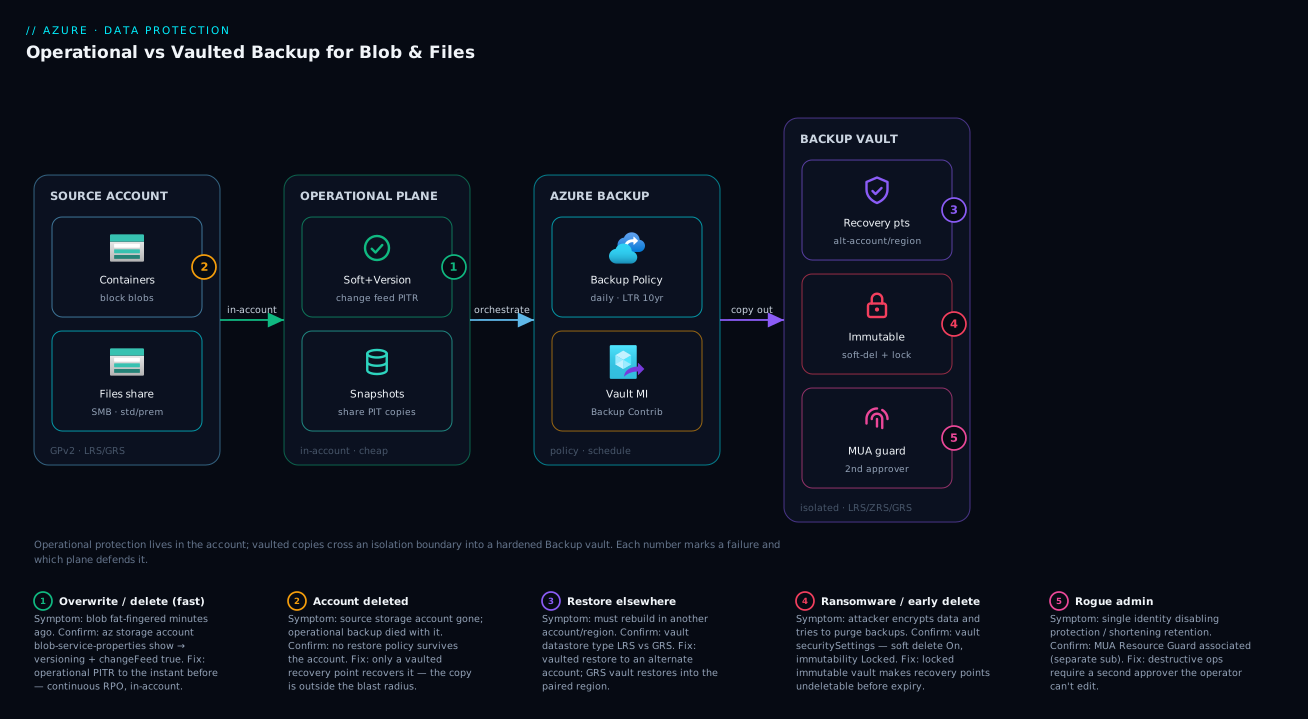
Picture the data flowing left to right through two protection planes. On the far left sits your source storage account — the live blob containers and file shares your apps read and write. Bolted onto that same account is the operational plane: blob soft delete, versioning and change feed (for Blob) and managed share snapshots (for Files). This plane never leaves the account, which is exactly why it is instant and cheap — and exactly why it shares the account’s fate. A continuous change feed lets Blob rewind to any instant; share snapshots give Files scheduled restore points. This is your first line of defence against the 10:05 “oops.”
To the right, crossing a hard isolation boundary, is the vault plane. On the policy’s schedule, Azure Backup reads from the source and writes a recovery point into a Backup vault — a separate resource, separate RBAC, separate redundancy (its own LRS/ZRS/GRS), hardened with vault soft delete, an immutable vault lock, and Multi-User Authorization via a Resource Guard. Because nothing in the source account’s data plane can reach across that boundary, this copy survives the account being deleted, corrupted, or ransomware-encrypted. The numbered badges in the diagram mark where each failure class bites and which plane defends it: an overwrite (caught by operational PITR), a container/account deletion (caught only by the vault), a ransomware attempt (defeated by the immutable vault), and a rogue-admin delete (blocked by MUA). Follow the flow and you can see at a glance which line of defence each disaster lands on.
Real-world scenario
Northwind Cargo, a freight-logistics SaaS, runs its customer document store — bills of lading, signed PODs, customs paperwork — in a single general-purpose v2 storage account, stnwcargodocs, with about 9 TB of blobs across a documents container and a 1.2 TB Azure Files share, ops-share, backing an internal claims app. They were GRS, and the platform lead genuinely believed that meant “backed up.” Their RPO/RTO had never been written down.
The incident arrived as incidents do. A new engineer, cleaning up a staging account, had the wrong subscription selected and ran a script that recursively deleted blobs under a prefix in production documents. It deleted roughly 40,000 customer documents over eleven minutes before a monitoring alert on blob count fired. Simultaneously — unrelated and far worse in potential — the security team flagged that the same storage account’s access keys had appeared in a public Git repo three weeks earlier and had not been rotated, meaning anyone could have had data-plane control, including the ability to delete the entire account.
Here is where tier selection decided the outcome. The team had, six months earlier and almost by accident, enabled operational backup on the account (someone followed a quickstart). So blob soft delete, versioning and change feed were on, and PITR was available. The on-call ran a point-in-time restore of the documents container to a timestamp two minutes before the rogue script started, and within about forty minutes the 40,000 documents were back — continuous RPO meant zero lost edits, and the restore was in-account so there was no data egress. The everyday-mistake layer did exactly its job.
But the leaked-key finding exposed the gap: operational backup lived in the account the leaked keys controlled. If the attacker had deleted the account (or disabled soft delete and purged), operational backup would have died with it, and there was no second copy. The team had bought instant recovery but no survivable floor. In the post-incident review they added the missing layer: a Backup vault in a separate, tightly-RBAC’d subscription owned by security; vaulted backup of both the documents container and ops-share on a daily schedule with 30-day daily and 7-year yearly retention; the vault set to GRS; immutable vault locked; and MUA wired to a Resource Guard the backup operators could not themselves edit. They also rotated the keys and moved the app to managed identity, per Azure Key Vault: Secrets, Keys and Certificates Done Right.
The lesson the team wrote down: operational backup saved them this time because the failure was an in-account mistake. It would not have saved them from the disaster they were one leaked key away from. The right architecture was never one tier — it was operational for the everyday and vaulted-immutable for the survivable floor. The combined monthly cost of the vault layer turned out to be a small fraction of one hour of the outage it now prevents.
Advantages and disadvantages
Operational and vaulted backup each buy something real and cost something real. The explicit trade-off:
| Advantages | Disadvantages | |
|---|---|---|
| Operational | Continuous RPO (Blob); instant, in-account restore; near-free; no egress | Shares source blast radius; dies with the account; block blobs only; PITR is in-place |
| Vaulted | Survives account loss/ransomware; isolated + immutable; restore to alt account/region; 10-yr retention | Coarser RPO (daily); per-GB + instance cost; slower RTO; restore copies data back |
When each matters: operational is the right default for any mutable, human-touched data because the overwhelmingly common failure is a person or script deleting/overwriting something and noticing soon — and for that, continuous RPO and a forty-minute in-account restore beat everything. Where it falls short is precisely the catastrophic, rare end of the spectrum: account deletion, full encryption, a malicious admin. Vaulted is the right floor for any data whose loss is unacceptable, and it is mandatory for regulated data (its 10-year retention and immutability map directly to compliance language). Its weaknesses — cost and RPO — are why you don’t make it your only tier for hot, mutable data: you’d be paying vault prices for everyday recoveries that operational does better and cheaper. The architecture that wins almost always layers both, sizing vaulted retention to the compliance need and leaning on operational for day-to-day.
Hands-on lab
This lab is free-tier-friendly in compute (everything is az/Bicep against a tiny amount of data) though vaulted backup itself is a paid service — keep the data and retention tiny and tear down at the end. You will: create a storage account, enable operational backup for Blob, create a Backup vault, enable vaulted backup for a container, harden the vault, then teardown. Run in Cloud Shell.
1. Variables and resource group
LOC=centralindia
RG=rg-backup-lab
SA=stbkuplab$RANDOM        # must be globally unique, lowercase
VAULT=bv-backup-lab
CONTAINER=documents

az group create -n $RG -l $LOC -o table
2. Create the storage account and a container
az storage account create -n $SA -g $RG -l $LOC \
  --sku Standard_LRS --kind StorageV2 -o table

az storage container create --account-name $SA -n $CONTAINER \
  --auth-mode login -o table
3. Enable operational backup (the three account features + PITR)
Operational backup for Blob is enabling soft delete, versioning, change feed and restore-policy on the account. Versioning and change feed are mandatory for PITR:
# Blob versioning + change feed + soft delete (blob & container) + PITR window
az storage account blob-service-properties update \
  --account-name $SA -g $RG \
  --enable-versioning true \
  --enable-change-feed true \
  --enable-delete-retention true --delete-retention-days 7 \
  --enable-container-delete-retention true --container-delete-retention-days 7 \
  --enable-restore-policy true --restore-days 6 -o table
Note --restore-days (the PITR window) must be less than the soft-delete retention — Azure rejects a PITR window equal to or larger than the delete-retention days. Confirm:
az storage account blob-service-properties show \
  --account-name $SA -g $RG \
  --query "{versioning:isVersioningEnabled, changeFeed:changeFeed.enabled, restore:restorePolicy}" -o json
Expected: versioning: true, changeFeed.enabled: true, and a restorePolicy with enabled: true and your day count.
4. Create a Backup vault
az dataprotection backup-vault create \
  --vault-name $VAULT -g $RG -l $LOC \
  --type SystemAssigned \
  --storage-settings datastore-type="VaultStore" type="LocallyRedundant" \
  -o table
(Use type="GeoRedundant" in production for cross-region restore. The vault gets a system-assigned managed identity which Backup uses to read the source.)
5. Grant the vault’s identity read on the storage account
Vaulted backup needs the vault’s managed identity to have Storage Account Backup Contributor (or Reader + Storage Blob Data roles per the backup type) on the source:
VAULT_PID=$(az dataprotection backup-vault show -n $VAULT -g $RG --query identity.principalId -o tsv)
SA_ID=$(az storage account show -n $SA -g $RG --query id -o tsv)

az role assignment create --assignee "$VAULT_PID" \
  --role "Storage Account Backup Contributor" --scope "$SA_ID" -o table
6. Create a vaulted Backup Policy and protect the container
# Get a built-in blob vaulted policy template, then create the policy
az dataprotection backup-policy get-default-policy-template \
  --datasource-type AzureBlob > blobpolicy.json

az dataprotection backup-policy create \
  --vault-name $VAULT -g $RG --name blob-daily-30 \
  --policy blobpolicy.json -o table
Then configure a backup instance for the container under that policy (the portal’s + Backup wizard is the simpler path; CLI uses az dataprotection backup-instance initialize then create). The backup instance is the unit you restore and bill.
7. Harden the vault
# Vault soft delete is on by default; verify and (optionally) extend
az dataprotection backup-vault update -n $VAULT -g $RG \
  --soft-delete-state On --soft-delete-retention-duration-in-days 30 -o table

# Turn on immutability (Unlocked first; lock only when confident — locking is irreversible)
az dataprotection backup-vault update -n $VAULT -g $RG \
  --immutability-state Unlocked -o table
For MUA, you create a Resource Guard (ideally in a separate subscription) and associate it with the vault — that gates destructive operations behind an approver.
8. Teardown
# Disable immutability if you set it (cannot delete an immutable-locked vault)
az dataprotection backup-vault update -n $VAULT -g $RG --immutability-state Disabled -o table
# Delete the resource group (removes SA, vault, role assignments)
az group delete -n $RG --yes --no-wait
The same, as Bicep
A trimmed Bicep showing the storage data-protection block and a Backup vault — drop into your IaC so the posture is declared, reviewed and reproducible:
param location string = resourceGroup().location
param saName string
param vaultName string

resource sa 'Microsoft.Storage/storageAccounts@2023-05-01' = {
  name: saName
  location: location
  sku: { name: 'Standard_LRS' }
  kind: 'StorageV2'
}

// Operational backup = the blob service data-protection block
resource blobSvc 'Microsoft.Storage/storageAccounts/blobServices@2023-05-01' = {
  parent: sa
  name: 'default'
  properties: {
    isVersioningEnabled: true
    changeFeed: { enabled: true }
    deleteRetentionPolicy: { enabled: true, days: 7 }
    containerDeleteRetentionPolicy: { enabled: true, days: 7 }
    restorePolicy: { enabled: true, days: 6 }   // < deleteRetention days
  }
}

// Backup vault for vaulted backup, with soft delete + immutability
resource vault 'Microsoft.DataProtection/backupVaults@2023-11-01' = {
  name: vaultName
  location: location
  identity: { type: 'SystemAssigned' }
  properties: {
    storageSettings: [
      { datastoreType: 'VaultStore', type: 'LocallyRedundant' }
    ]
    securitySettings: {
      softDeleteSettings: { state: 'On', retentionDurationInDays: 30 }
      immutabilitySettings: { state: 'Unlocked' }
    }
  }
}
Common mistakes & troubleshooting
The failure modes here are mostly design errors that surface as “I can’t restore what I expected.” Match yours:
| # | Symptom | Root cause | How to confirm | Fix |
|---|---|---|---|---|
| 1 | “We had GRS, why is the data gone?” | Confused redundancy with backup | No restore policy / vault exists | Enable operational and/or vaulted backup |
| 2 | PITR option greyed out / failing | Versioning or change feed off | blob-service-properties show |
Enable versioning + change feed |
| 3 | Restore-policy create rejected | PITR window ≥ soft-delete days | Compare restore-days vs delete-retention-days |
Set restore window strictly less |
| 4 | Account deleted — no recovery | Only operational backup was on | No Backup vault / instances | Add vaulted backup going forward |
| 5 | Page/append blob not restored | Operational covers block blobs only | Check blob type | Use a copy/export for non-block blobs |
| 6 | Ransomware also hit the backup | Vault soft delete off / not immutable | Vault security settings | Enable soft delete + immutable vault |
| 7 | Admin deleted recovery points | No MUA / Resource Guard | Vault MUA settings | Add MUA with a separate-sub Resource Guard |
| 8 | Vaulted backup job fails — auth | Vault MI lacks role on source | az role assignment list for the MI |
Grant Storage Account Backup Contributor |
| 9 | Restore can’t write to target | Target account firewall/RBAC blocks it | 403 on restore; storage firewall | See storage 403 article; allow + RBAC |
| 10 | Bill jumped after enabling backup | Long daily retention on large data | Vault → backup-instance size × days | Move long retention to yearly tier |
Greyed-out / failing PITR
If point-in-time restore is unavailable, the cause is almost always that versioning or change feed is off, or a restore policy was never enabled. PITR is built on top of those features; without them there is nothing to replay.
Confirm. az storage account blob-service-properties show ... --query "{versioning:isVersioningEnabled, changeFeed:changeFeed.enabled, restore:restorePolicy}". Any false/null is your culprit. Fix. Enable all three (step 3 of the lab). Remember the restore window must be strictly less than the soft-delete retention days, or the enable call is rejected.
“We had GRS — why couldn’t we restore?”
The single most common and most expensive misconception. GRS replicates the current state to a paired region; it has no past versions. If someone deleted or overwrote data, GRS dutifully replicated the deletion. There is no “yesterday” in redundancy.
Confirm. Check whether any restore policy or Backup vault instance exists for the account — if not, you had redundancy, not backup. Fix. Enable operational backup (for everyday recovery) and/or vaulted backup (for survivable recovery). Treat this as the lesson that justifies the whole article.
The account was deleted and operational backup didn’t save you
Operational backup lives in the account. Delete the account (or have an attacker do it) and the soft-deleted blobs, versions and change feed go with it. This is by design — and it is exactly why operational must not be your only tier for important data.
Confirm. After an account deletion, there is nothing to PITR against; only a Backup vault with prior recovery points can help. Fix. Ensure critical data has a vaulted layer before the disaster; a vault copy is the only thing that survives source-account loss.
Cost spike after enabling vaulted backup
Vaulted backup bills a protected-instance fee plus per-GB vault storage, and storage scales with data size × retention × change rate. A long daily retention on multi-TB data is the usual shock.
Confirm. In the vault, inspect each backup instance’s protected size and the policy’s retention; multiply. Fix. Keep daily retention short (days, not a year) and push long-horizon needs to monthly/yearly tiers, which store far fewer points for the same compliance coverage.
Best practices
- Layer the two tiers; don’t choose between them for important data. Operational for everyday speed, vaulted for the survivable floor.
- Enable operational backup as the default on any account with mutable, human-touched blobs — it is near-free and turns the common “oops” into a self-service restore.
- Put the Backup vault in a separate, tightly-RBAC’d subscription owned by security, not in the workload subscription whose admins you’re protecting against.
- Turn vault soft delete on (it is by default) and extend it for high-value data; verify it rather than assuming.
- Enable immutable vault for ransomware-class risk, and lock it once confident — locked immutability defeats the “disable protection, then delete” attack.
- Wire Multi-User Authorization with a Resource Guard the backup operators cannot edit, so no single identity can quietly empty the vault.
- Choose the right blob type expectations: operational backup covers block blobs only — protect page/append blob workloads another way.
- Keep the PITR restore window strictly less than soft-delete retention, or the enable call fails.
- Right-size retention by tier: short daily, longer weekly/monthly, yearly only for compliance — retention multiplies against data size.
- Use GRS on the vault when you must restore into a different region after a regional event.
- Declare all of this in Bicep/Terraform — soft delete, versioning, change feed, vault, immutability — so the posture is reviewed and reproducible, not a forgotten portal click.
- Test a restore quarterly. A backup you’ve never restored is a hypothesis, not a backup.
Security notes
The security story for storage backup is about who can destroy the recovery path, because attackers and rogue insiders target backups first. Least privilege on the vault: grant Backup Operator-style roles for day-to-day work and reserve vault-deletion / policy-shortening rights to a tiny group — ideally gated by MUA so even they need a second approver. The vault’s managed identity needs only enough role on the source to read for backup (Storage Account Backup Contributor), nothing broader. Isolation is the control, not an add-on: the entire premise of vaulted backup is that the source account’s data-plane credentials (keys, SAS) cannot reach the vault — so protect those keys (rotate, prefer managed identity over keys, see the Key Vault article) and keep the vault out of the workload’s identity blast radius.
Immutability + soft delete + MUA are a defence-in-depth stack against ransomware and insiders, and they only help if turned on before the incident. Locked immutability is the strongest single control — it makes recovery points undeletable until expiry, so an attacker who gains admin still cannot erase your floor. For data confidentiality, recovery points inherit encryption at rest in the vault; for regulated data, pair vaulted long-term retention with the immutability lock to satisfy WORM-style mandates. Finally, restore is a security event too: restoring to an alternate account with correct RBAC and firewall (not blindly back to a possibly-compromised original) keeps you from re-infecting; the storage 403 patterns in Fixing Azure Storage 403 Errors: Firewalls, Private Endpoints, RBAC & SAS are the errors you’ll hit if the restore target’s access isn’t set up.
Cost & sizing
The two tiers have very different cost shapes, and knowing which is which keeps the bill honest. Operational backup is essentially free as a feature — there is no protected-instance fee. You pay only for the extra storage it consumes: retained blob versions, soft-deleted blobs and the change-feed log, all billed at normal blob storage rates. For data with a modest change rate this is a small uplift on your existing storage bill. Vaulted backup costs real money: a protected-instance fee per backed-up resource (per account/share, billed monthly) plus per-GB vault storage for the recovery points, at the vault’s redundancy rate (GRS costs more than LRS).
| Cost element | Tier | What drives it | Rough magnitude |
|---|---|---|---|
| Retained versions / soft delete | Operational | Change rate × retention days | Small % uplift on storage bill |
| Change-feed log | Operational | Write volume | Minor |
| Protected-instance fee | Vaulted | # of protected accounts/shares | Flat monthly per instance |
| Vault storage (LRS) | Vaulted | Protected GB × retention | Per-GB-month |
| Vault storage (GRS) | Vaulted | Same, geo-replicated | ~2× LRS per-GB |
| Restore egress | Vaulted | Cross-region restores | Egress rates |
Sizing guidance and rough figures (treat as ballpark — confirm current rates in the Azure Pricing Calculator; vaulted storage is on the order of a couple of rupees per GB-month, ~US$0.02–0.05/GB-month depending on redundancy):
| Scenario | Operational cost | Vaulted cost (rough) |
|---|---|---|
| 100 GB blobs, low change, op only | A few ₹ / mo extra storage | — |
| 1 TB blobs, 30-day vaulted daily, LRS | Small uplift | ~₹1,700–2,500/mo storage + instance fee |
| 1 TB blobs, GRS vault, 7-yr yearly LTR | Small uplift | Higher per-GB (GRS) + few yearly points |
| 1.2 TB Files share, op snapshots only | Incremental snapshot storage | — |
The right-sizing levers: keep operational as your cheap everyday tier; for vaulted, the dominant knob is retention × data size, so cap daily retention tightly and move long horizons to yearly tiers; pick LRS vault unless cross-region restore is a stated requirement; and remember every protected instance carries a flat fee, so consolidating shares/containers where sensible reduces instance count. Always model it in the calculator with your real protected GB and change rate before committing a policy — the surprises come from long daily retention on large, high-churn data.
Interview & exam questions
Q1. What is the core difference between operational and vaulted backup for Azure Blob? Operational backup keeps protection inside the source account (soft delete + versioning + change feed, giving continuous-RPO point-in-time restore), so it’s fast and cheap but dies with the account. Vaulted backup copies recovery points to an isolated Backup vault, surviving account deletion and ransomware, at a coarser (daily) RPO and per-GB cost.
Q2. Why is GRS not a backup? GRS replicates the current state to a paired region for hardware/regional resilience; it has no past versions. A delete or overwrite is faithfully replicated, so GRS cannot recover from logical loss. Backup adds the time axis redundancy lacks. Relevant to AZ-104 and AZ-305 resilience design.
Q3. Which features must be enabled for blob point-in-time restore, and what’s the ordering rule? Blob versioning and change feed are mandatory, plus soft delete and a restore policy. The PITR restore window must be strictly less than the soft-delete retention in days, or enabling the restore policy is rejected.
Q4. A storage account is deleted by an attacker with leaked keys. Which tier could recover it? Only vaulted backup, because its recovery points live in a separate Backup vault outside the account’s blast radius. Operational backup lived in the deleted account and is gone with it. This is the canonical “why you need both tiers” case.
Q5. What does operational backup not protect for Blob? Page blobs and append blobs — operational backup covers block blobs only. It also does not survive deletion of the source account, since it lives in that account.
Q6. How do you make a Backup vault ransomware-resilient? Enable vault soft delete (recover deleted backups for a window), turn on immutable vault and lock it (recovery points can’t be deleted/shortened before expiry), and add Multi-User Authorization via a Resource Guard so destructive operations need a second approver — ideally owned in a different subscription.
Q7. What is the RPO of vaulted backup versus operational backup for Blob? Vaulted is the backup frequency (typically daily). Operational for Blob is continuous — restore to any instant in the window via change-feed replay. For Azure Files, operational is the snapshot interval, not continuous.
Q8. What is a Backup vault, and how does it differ from a Recovery Services vault? A Backup vault is the newer vault type used by Azure Backup for Blob, Files (vaulted), disks, PostgreSQL, etc., managed via the dataprotection APIs. The classic Recovery Services vault backs up VMs, on-prem agents and Azure Files (snapshot) historically. Storage vaulted backup uses the Backup vault.
Q9. You must keep records for 7 years for compliance. Which tier and configuration? Vaulted backup with a yearly long-term-retention rule (up to 10 years), an immutable, locked vault, and MUA. Operational backup caps at 360 days and cannot meet a 7-year mandate, and it isn’t immutable against insiders.
Q10. Restore target for each tier? Operational Blob restores in place in the same account (block blobs only); operational Files restores to the same or an alternate share. Vaulted restores to an alternate account, and with a GRS vault into the paired region — which is why vaulted is the tier for “restore somewhere else after a regional or account-level disaster.”
Q11. How do you keep vaulted backup cost under control on large data? Cost is protected size × retention plus a per-instance fee. Keep daily retention short, push long horizons to monthly/yearly tiers (far fewer points), choose LRS unless cross-region restore is required, and model it in the pricing calculator before committing.
Q12. Why does the vault need a managed identity, and what role on the source? Vaulted backup uses the vault’s system-assigned managed identity to read the source for backup; it needs Storage Account Backup Contributor (or the equivalent reader + data roles) on the source account. Missing this is the usual cause of failing backup jobs.
Quick check
- True or false: enabling GRS means your blob data is backed up.
- Which tier survives deletion of the source storage account — operational, vaulted, or both?
- Name the three account features operational backup uses to give blob point-in-time restore.
- What is the maximum retention for blob operational backup (PITR) versus vaulted backup?
- Which single vault control most directly defeats a “disable protection then delete” ransomware play?
Answers
- False. GRS replicates the current state for hardware/regional resilience; it has no past versions and cannot recover logical loss. You need backup (operational and/or vaulted) for that.
- Vaulted only. Its recovery points live in a separate Backup vault outside the account’s blast radius. Operational backup lives in the account and dies with it.
- Blob soft delete, blob versioning, and change feed (with a restore policy on top). Versioning and change feed are mandatory for PITR.
- Operational (PITR) up to 360 days; vaulted up to 10 years (via long-term-retention yearly tiers).
- The immutable vault (locked) — recovery points cannot be deleted or have retention shortened before expiry, so an attacker with admin still can’t erase your floor. Pair with MUA and soft delete for depth.
Glossary
- Backup vault — A first-class Azure resource (DataProtection) holding vaulted recovery points and policies, isolated from the source account’s blast radius.
- Backup Policy — The object defining schedule (how often) and retention (how long) for a backup type.
- Backup instance — One protected resource (a container or share) under a policy; the unit you bill and restore.
- Operational backup — In-account protection: for Blob, soft delete + versioning + change feed enabling continuous PITR; for Files, managed share snapshots.
- Vaulted backup — Scheduled recovery points copied to a Backup vault; survives source-account loss and ransomware.
- Point-in-time restore (PITR) — Restoring blobs to any instant within the retention window by replaying the change feed.
- Blob soft delete — Retains deleted blobs/versions for a configurable window so they can be recovered.
- Blob versioning — Automatically keeps a prior version on every overwrite or delete; mandatory for PITR.
- Change feed — A durable, ordered log of all blob changes; the engine behind PITR.
- Share snapshot — A read-only, incremental, point-in-time copy of an Azure Files share.
- RPO (Recovery Point Objective) — How much data you can afford to lose; the gap to the last recoverable point.
- RTO (Recovery Time Objective) — How long recovery may take.
- Immutable vault — A vault setting making recovery points undeletable/unshortenable before expiry; can be locked (irreversible).
- Vault soft delete — Recovers deleted backups for a window (14–180 days) before they’re purged.
- Multi-User Authorization (MUA) — A Resource Guard that gates destructive vault operations behind a second approver.
- Resource Guard — The resource MUA uses to require cross-party approval, ideally owned in a separate subscription.
Next steps
- Solidify the storage substrate this all sits on with Azure Storage Account Fundamentals: Blobs, Files, Queues and Tables and the redundancy-vs-backup distinction in Azure Storage Redundancy Decoded: LRS vs ZRS vs GRS vs RA-GRS and How to Choose.
- Frame your RPO/RTO targets first with BCDR Foundations on Azure: Making Sense of RTO, RPO, and the Resilience Spectrum, then see where backup fits among DR tools in Azure Backup and Site Recovery: Protecting Workloads from Loss.
- Apply the same vault muscle to compute with Protect Your First Azure VM with Azure Backup: A Guided Walkthrough.
- Harden the identities that can reach your data and vault with Azure Key Vault: Secrets, Keys and Certificates Done Right and Enabling Defender for Storage: On-Upload Malware Scanning and Sensitive Data Threat Detection.
- When a restore can’t write to its target, work the access path with Fixing Azure Storage 403 Errors: Firewalls, Private Endpoints, RBAC & SAS.