A developer runs DELETE FROM Orders without a WHERE clause at 14:52. Nobody notices until 15:20 when the support queue fills with “my order vanished” tickets. The nightly VM snapshot from 02:00 exists, but restoring it loses thirteen hours of trading and rolls back every other table too. What you actually want is to rewind this one database to 14:51:30, a minute before the bad statement, and lose nothing else. That capability — restore a SQL Server database to a specific second, not just to last night — is what Azure Backup for SQL Server in Azure VMs gives you, and it is a fundamentally different product from the VM-level backup that copies disks.
This guide is about backing up SQL Server installed inside an Azure VM (the IaaS pattern: you run the SQL Server engine on a Windows or Linux VM you manage), not Azure SQL Database (the PaaS service, which has its own built-in point-in-time restore). Azure Backup treats the SQL instance as a first-class workload: a lightweight extension and coordinator agent inside the VM call SQL Server’s native VSS/VDI streaming backup APIs to take full, differential and transaction-log backups, stream them straight into a Recovery Services vault, and stitch the log chain together so you can restore to any instant covered by that chain — typically down to a 15-minute RPO. No backup server, no BACKUP DATABASE … TO DISK, no managing .bak files on a share, no agent licence.
By the end you will register a SQL VM with a vault, author a policy with the right mix of full, differential and log backups for your recovery objective, run it, and — the part that matters when the pager goes off — restore a database to an exact point in time, over the original and as an alternate copy, in the portal and from az CLI, with a Bicep definition for the vault and policy. You will also learn the failure modes that bite real teams: a broken log chain, the wrong recovery model, the autoprotect surprise, and the cost of keeping logs too long.
What problem this solves
A plain Azure VM backup is crash-consistent or file-system-consistent: it snapshots the disks. For a database engine that is the worst kind of backup, because SQL Server may have transactions in flight, dirty pages in memory, and a transaction log mid-write at the snapshot instant. Restoring such a snapshot can leave the database needing recovery, or — worse — subtly inconsistent. You need an application-consistent backup that involves SQL Server itself, quiescing I/O and capturing a transactionally clean image. That is what the SQL workload backup does and disk snapshots do not.
The second problem is granularity of recovery in time. Disk snapshots give you the points you scheduled — last night, the night before. Real data-loss incidents (a bad DELETE, a runaway batch job, a faulty deployment) happen at a specific minute, and you want to land just before them. Only a chain of transaction-log backups lets you “roll forward” from the last full/differential to an arbitrary second; without it your blast radius is “everything since the last snapshot.”
The third problem is operational ownership. The traditional answer — DBAs writing BACKUP DATABASE jobs, managing .bak files on a share, monitoring chains, copying to a second site — is a job nobody wants and everybody under-tests. Azure Backup moves it into the platform: central policy, monitoring, vault-side retention and immutability, restore from a console. It is the difference between “I think we have backups” and “I restored prod to 14:51:30 in twenty minutes.”
Who hits this: anyone running SQL Server on Azure IaaS — lift-and-shift estates, apps needing a SQL feature not in Azure SQL Database, or teams who want OS-level control. It bites hardest when an audit asks “show me a point-in-time restore,” when ransomware makes immutable backups non-negotiable, and when a single fat-fingered statement turns a normal Tuesday into an incident.
| Backup approach | Consistency for SQL | Smallest restore unit | Time granularity | Who runs it |
|---|---|---|---|---|
| Azure VM (disk) backup | File-system / crash-consistent | Whole VM (or disk) | Last snapshot only | Platform, VM-level |
BACKUP DATABASE to share |
Application-consistent | One database | Whatever you script | You / the DBA |
| SQL-in-VM workload backup | Application-consistent | One database | To the second (log chain) | Platform, SQL-aware |
| Azure SQL Database (PaaS) PITR | Built-in, automatic | One database | To the second | Platform (different product) |
Learning objectives
By the end of this article you can:
- Explain how Azure Backup protects SQL Server inside an Azure VM using the workload extension and SQL Server’s native streaming backup APIs, and how it differs from VM-disk backup and from Azure SQL Database PITR.
- Register a SQL VM with a Recovery Services vault, discover its databases, and enable protection — in the portal and with
azCLI. - Author a backup policy with the correct mix of full, differential and transaction-log backups, choosing a log frequency that meets a target RPO.
- Describe the log chain, the recovery models (full / bulk-logged / simple) that gate log backups, and why
simplesilently disables point-in-time recovery. - Run on-demand backups and restore a database to an exact point in time — over the original database and as an alternate-location copy.
- Diagnose the common failures: broken log chain, autoprotect surprises, extension registration errors, restore failures, and exclusion of system databases.
- Size and cost the solution: protected-instance fees, vault storage with compression, log retention drivers, and where the bill actually grows.
Prerequisites & where this fits
You should already understand Azure VM basics — that a VM is an IaaS machine you manage, with disks, an OS, and an agent (covered in Your First Azure Virtual Machine: A Step-by-Step Deployment in Portal, CLI and PowerShell). You should know what a Recovery Services vault is from VM backup; if not, Protect Your First Azure VM with Azure Backup: A Guided Walkthrough is the gentle on-ramp and this article is the SQL-aware sequel. Comfort with running az in Cloud Shell, reading JSON, and basic SQL Server concepts (databases, the transaction log, recovery models) is assumed.
This sits in the Backup & Recovery track, one rung above VM-level backup. The broader resilience picture — RTO/RPO, replication vs backup, orchestrated failover — is covered in Azure Backup and Site Recovery: Protecting Workloads from Loss and the foundations in BCDR Foundations on Azure: Making Sense of RTO, RPO, and the Resilience Spectrum. Backup is not high availability — it does not keep the database serving during an outage; it lets you recover its data after one. Keep that distinction sharp.
A quick map of the moving parts and who owns each during setup and an incident:
| Layer | What lives here | Who usually owns it | Failure it can cause |
|---|---|---|---|
| Recovery Services vault | Policies, recovery points, retention, immutability | Platform / backup admin | Wrong region; missing soft-delete |
SQL VM extension (AzureBackupWindowsWorkload) |
The agent doing the streaming backup | Backup admin (auto-installed) | Registration fails → no discovery |
| SQL Server instance | The databases, recovery models, log chain | DBA / app team | simple model breaks log backups |
| Backup policy | Full + differential + log schedule and retention | Backup admin | RPO too loose; log retention costs |
| Restore target | Original or alternate VM/instance | DBA + backup admin | No headroom; chain gap blocks PITR |
Core concepts
Five mental models make every later step obvious.
This is a workload backup, not a disk backup. Azure Backup has two different code paths for a SQL VM. The VM (disk) backup snapshots the OS and data disks via the VM agent — it knows nothing about SQL. The SQL workload backup installs a workload extension in the VM, registers the SQL Server instance as a protectable item, and drives SQL Server’s own backup engine. The two can coexist (disk backup for the machine, SQL backup for the databases) but are configured separately and stored as separate recovery points. Everything here is the second path.
Stream backups go straight to the vault. The extension calls SQL Server’s VDI (Virtual Device Interface) to stream a native backup — the same bytes BACKUP DATABASE would produce — directly into vault storage, without writing a .bak to local disk first. That is why you provision no backup share and why local free space is not the constraint it is for scripted backups. The backup is application-consistent because SQL Server performs it.
Three backup types form a recovery chain. A full backup is a complete copy of the database. A differential backup captures only what changed since the last full (small, fast). A transaction-log backup captures the log records since the last log backup and, crucially, truncates the log. To restore to an arbitrary time you restore the most recent full, then the most recent differential before your target, then every log backup from there up to your target time, replaying transactions. That ordered set is the log chain; a missing link breaks point-in-time recovery past the gap.
The recovery model decides whether logs even exist. A database in the full (or bulk-logged) recovery model keeps log records until a log backup truncates them — so log backups are possible and PITR works. A database in the simple recovery model truncates the log automatically at each checkpoint, so transaction-log backups are impossible and your finest restore granularity is the last full/differential. Azure Backup will happily protect a simple-model database, but it silently gives you no log backups and no point-in-time recovery — a trap covered later.
RPO is set by your log frequency. Your worst-case data loss is roughly the time since the last successful log backup. Schedule log backups every 15 minutes and your RPO is ~15 minutes; every hour and it is ~1 hour. Full and differential frequency drive restore speed (fewer logs to replay) and storage, not RPO. The minimum log-backup interval Azure Backup supports is 15 minutes; you cannot get a 1-minute RPO this way (that is what Always On availability groups or synchronous replication are for).
The vocabulary in one table
Pin down every term before the deep sections; the glossary repeats these for lookup.
| Concept | One-line definition | Where it lives | Why it matters |
|---|---|---|---|
| Recovery Services vault | The container for policies and recovery points | Resource group / region | All SQL backups land here |
| Workload extension | In-VM agent that drives SQL backup | Installed on the VM | Without it, no discovery/backup |
| Protectable item | A SQL instance/database the vault can see | Discovered in the vault | You select these to protect |
| Full backup | Complete copy of a database | Vault storage | The base of every restore |
| Differential | Changes since the last full | Vault storage | Speeds restore; small |
| Log backup | Log records since the last log backup | Vault storage | Enables PITR; sets RPO |
| Log chain | Ordered full→diff→logs that replays to a time | Conceptual / vault | A gap blocks PITR past it |
| Recovery model | full / bulk-logged / simple | Per database (SQL setting) | simple = no log backups |
| RPO | Worst-case data loss window | Driven by log frequency | 15 min minimum here |
| Autoprotect | Auto-enroll new DBs on an instance | Instance-level toggle | Convenience vs surprise cost |
| Compressed backup | Vault stores compressed bytes | Vault storage | Drives the storage bill down |
How SQL-in-VM backup works end to end
Walk the lifecycle once and the configuration steps stop feeling arbitrary.
Registration and discovery. When you point a vault at a SQL VM, Azure Backup installs the workload extension (on Windows, AzureBackupWindowsWorkload) and a coordinator into the VM. The extension enumerates SQL Server instances and databases and reports them as protectable items. For backups to run, the extension’s account needs SQL sysadmin on the instance — Azure Backup can grant this automatically, or you grant it manually (in the lab). Discovery is also how the vault learns about new databases later.
Policy association. You attach a backup policy to each database (or to the instance with autoprotect). The policy defines the full schedule and retention, an optional differential schedule, an optional log schedule (the PITR enabler), and the compression setting. One policy can protect many databases.
The backup jobs. On schedule, the extension streams the backup into the vault. Full and differential are point-in-time images; log backups run on their own (more frequent) cadence and truncate the log. Each successful backup becomes a recovery point (full/diff) or extends the restorable time range (logs).
Restore. You pick either a discrete recovery point (a specific full/diff) or a point in time within the log-covered range. Azure Backup assembles the chain — base full, intervening differential, the run of logs — and restores it in order to the target you choose: overwrite the original, restore as a new database name on the same or a different instance, or restore the underlying files to a path for manual handling.
The three backup types, side by side, are the heart of policy design:
| Backup type | What it captures | Typical schedule | Effect on log | Role in restore |
|---|---|---|---|---|
| Full | Entire database | Weekly or daily | None | The base of the chain |
| Differential | Changes since last full | Daily (if weekly full) | None | Skips replaying many logs |
| Transaction log | Log records since last log backup | Every 15 min–1 h | Truncates the log | Rolls forward to exact time |
| Copy-only (concept) | Full without breaking diff base | Ad-hoc | None | Out-of-band copy; not the chain |
Backup policy design: full, differential, and log
A policy is where your recovery objective becomes concrete. Each knob has a default, a trade-off, and a cost.
Full backup frequency and retention
The full backup is the base of every restore chain. You choose daily or weekly fulls, a time, and retention (daily/weekly/monthly/yearly tiers, each with its own keep-duration). Daily fulls mean shorter chains (faster restore, more storage); weekly fulls plus daily differentials mean less storage but a longer roll-forward.
# A SQL backup policy is JSON; the simplest path is: get the default template, edit, set.
# Retrieve the default SQL template to a file you can edit:
az backup policy get-default-for-vm  # (VM template, for reference) ...
# For SQL workloads, export an existing/default policy as JSON, edit schedule + retention, then:
az backup policy set --vault-name rsv-sql-prod --resource-group rg-sql-prod \
  --policy @sqlpolicy.json --name SqlDailyPolicy
Retention tiers let you keep, say, daily points for 30 days, weekly for 12 weeks, monthly for 12 months, yearly for 7 years — common for compliance.
| Setting | Values | Default (template) | When to change | Trade-off / limit |
|---|---|---|---|---|
| Full frequency | Daily / Weekly | Daily | Weekly + diff to cut storage | Weekly = longer restore chain |
| Full time | Any 30-min slot | A daily slot | Off-peak window | Long backups can overlap load |
| Daily retention | 7–9999 days | 30 days | Compliance / RPO history | More days = more storage |
| Weekly retention | weeks | off | Medium-term keep | Adds storage |
| Monthly retention | months (pick day) | off | Audit horizons | Adds storage |
| Yearly retention | years (pick week/day) | off | 7-yr regulatory | Largest storage driver |
Differential backups
A differential captures everything changed since the last full. With weekly fulls, a daily differential means a restore replays the weekly full + one differential + a few hours of logs instead of a week of logs — far faster. Do not mix daily fulls with daily differentials (pointless), and note differentials grow over the week as changes accumulate.
# Differential is one stanza inside the SQL policy JSON: a weekly/daily schedule + retention.
# Validate the edited policy renders both Full and Differential schedules:
az backup policy show --vault-name rsv-sql-prod --resource-group rg-sql-prod \
  --name SqlDailyPolicy --query "properties.subProtectionPolicy[].policyType" -o tsv
| Setting | Values | Default | When to change | Trade-off / limit |
|---|---|---|---|---|
| Differential enabled | On / Off | Off | Weekly-full policies | Pointless with daily fulls |
| Frequency | Daily / weekly days | Daily | Match restore-speed need | Grows over the week |
| Retention | days/weeks | Tied to full | Keep until next full cycle | Cannot exceed full retention sensibly |
| Conflict rule | — | — | — | Cannot fully overlap log schedule |
Transaction-log backups — the PITR enabler
This is the knob that buys point-in-time restore. Enable log backups and choose a frequency between 15 minutes and 24 hours; your RPO is approximately that interval. Log backups require full (or bulk-logged) recovery model — for a simple-model database Azure Backup produces no logs and the restore range stays pinned to full/diff points. Log backups also truncate the log (keeping it from growing unbounded), which means Azure Backup now owns your log truncation — do not also run your own log backups or you fight over the chain.
# Confirm a database's recovery model from inside the VM (sqlcmd), BEFORE expecting log backups:
# (run on the SQL VM)
sqlcmd -S localhost -Q "SELECT name, recovery_model_desc FROM sys.databases;"
# FULL or BULK_LOGGED → log backups possible; SIMPLE → no PITR.
| Setting | Values | Default | When to change | Trade-off / limit |
|---|---|---|---|---|
| Log backup enabled | On / Off | On (full template) | Off only if no PITR needed | Off = restore only to full/diff |
| Frequency | 15 min – 24 h | 15 min minimum allowed | Loosen to cut cost/RPO history | RPO ≈ this interval; 15 min floor |
| Log retention | days | typically 15–30 | Compliance / restore window | Each log kept = storage |
| Recovery model required | full / bulk-logged | — | — | simple silently yields no logs |
| Truncation | Automatic on log backup | — | — | Don’t run a second log-backup job |
One policy, many databases — and autoprotect
A single policy protects many databases. Autoprotect auto-enrolls every current and future database on an instance — convenient where new databases appear often, dangerous because a new database silently starts incurring storage cost (and a freshly restored or attached one may not be ready for backup). Autoprotect plus a simple-model database equals a protected item that never produces log backups and quietly costs money.
| Behaviour | Autoprotect ON | Autoprotect OFF |
|---|---|---|
| New database on instance | Auto-enrolled into the policy | Must enroll manually |
| Cost predictability | Lower (surprises possible) | Higher (you choose) |
simple-model DBs |
Protected but no log backups | You decide per DB |
| Best for | Multi-tenant / churny instances | Stable, known database sets |
The log chain and recovery models
The single concept that separates “I restored to 14:51:30” from “I lost half a day” is the log chain; the single setting that silently disables it is the recovery model.
Why the chain matters
To reach an arbitrary point in time T, SQL Server restores the most recent full before T, then the most recent differential before T (optional but faster), then applies every log backup in order from that base up to T, then STOP AT exactly T. If any log between the base and T is missing, you can only roll forward to the gap — past it PITR is impossible until the next full re-bases the chain. Hence: logs must be unbroken, and no second tool may also truncate them.
| Restore target | What the chain needs | If a log is missing |
|---|---|---|
| Last full backup | Just the full | Unaffected |
| Last differential | Full + that differential | Unaffected |
| Exact point in time T | Full + (diff) + all logs up to T | Can only reach the gap |
| After a re-base (new full) | The new full restarts the chain | Old gap no longer blocks you |
Recovery models — the gate on log backups
The database’s recovery model decides whether log backups (and thus PITR) are even possible. This is a per-database SQL Server setting, independent of Azure Backup.
| Recovery model | Log behaviour | Log backups possible? | PITR possible? | Use when |
|---|---|---|---|---|
| Full | Log retained until backed up | Yes | Yes | Production OLTP; you need PITR |
| Bulk-logged | Minimal logging for bulk ops | Yes (with caveats) | Mostly (not into a bulk op) | Heavy bulk loads + PITR |
| Simple | Log auto-truncated at checkpoint | No | No | Dev/test; data you can re-derive |
The trap: a database in simple recovery model is perfectly backable by Azure Backup, but you will only ever get full/differential recovery points — no logs, no point-in-time. Teams discover this during an incident, which is the worst time. Always confirm production databases are in full model before relying on PITR:
# Switch a database to FULL recovery model (run on the SQL VM), then take a fresh full
# so the log chain has a base to build on:
sqlcmd -S localhost -Q "ALTER DATABASE Orders SET RECOVERY FULL;"
System databases and what is excluded
Azure Backup for SQL VMs can protect user databases; the master, model, msdb system databases and tempdb are treated specially — tempdb is never backed up (it is recreated on restart), and the SQL workload backup focuses on user databases. Protect system databases through SQL Server’s own maintenance or VM-disk backup if you need them. Always Encrypted, TDE-encrypted databases back up fine (the backup carries encrypted pages), but restoring a TDE database elsewhere requires the certificate, so back up the TDE certificate separately or restore fails with a missing-cert error.
| Database | Backed up by SQL workload backup? | How to protect it instead |
|---|---|---|
| User databases | Yes (the whole point) | This policy |
tempdb |
No (transient) | Not needed |
master / model / msdb |
Not the focus | SQL maintenance / VM-disk backup |
| TDE-encrypted user DB | Yes (encrypted pages) | Also back up the TDE certificate |
Architecture at a glance
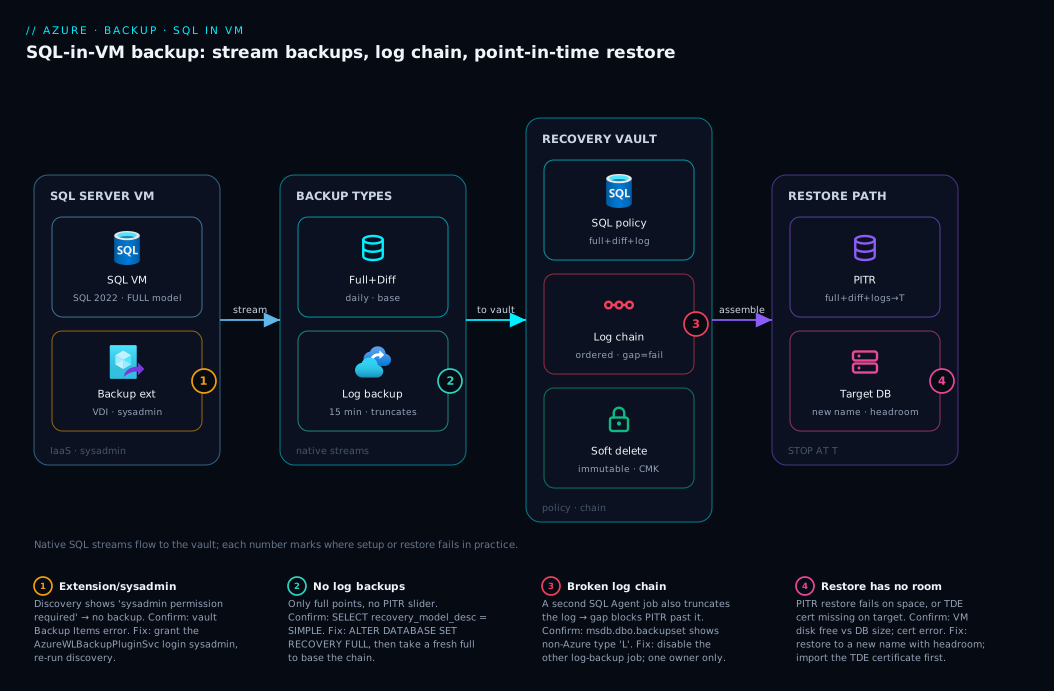
Read the diagram left to right as the path a backup byte and a restore both travel. On the left, a SQL Server VM runs your databases; inside it the Azure Backup workload extension holds sysadmin on the instance and calls SQL Server’s VDI streaming API to produce native full, differential and transaction-log backups — no .bak ever touches local disk. Those streams flow into the Recovery Services vault in the middle, where the backup policy governs the full/differential/log schedule and retention, and soft delete plus immutability harden the recovery points against accidental or malicious deletion. The vault’s storage holds the log chain — the ordered full → differential → logs that make point-in-time restore possible.
On the right is the restore path: when you ask for a point in time, the vault assembles the base full, the latest differential, and the run of logs up to your STOP AT second, and streams them back either over the original database or as a new database on the same or a different SQL instance. The numbered badges mark the spots that fail in practice — extension/sysadmin registration, the simple-model trap that yields no logs, a broken log chain, and a restore with no headroom on the target. Follow the arrows and you can see why each failure bites exactly where it does.
Real-world scenario
Saffron Logistics runs its freight-booking platform on a single SQL Server 2022 Enterprise instance inside an Azure VM (a Standard_E8s_v5, 64 GB RAM) in Central India, with one 1.2 TB OLTP database, Freight, and four smaller reference databases. They had “backups”: a SQL Agent job wrote .bak files nightly to a local data disk and an AzCopy task pushed them to a blob container each morning. It had never been used for a real recovery. Monthly Azure spend for the VM was about ₹62,000; backups were “free” because nobody costed the disk and egress.
The incident: a release at 11:40 shipped a migration that, over twenty minutes, overwrote the shipment_status column on 380,000 rows with a default value. It surfaced at 12:25 when carriers began rejecting manifests. The nightly .bak was from 02:00 — restoring it would lose ten hours of bookings across every table, and the local .bak had not yet been copied to blob (the AzCopy ran at 06:00). The only clean copy was last night’s full, on the same disk as the live database. Every recovery option was bad.
They got the data back, but it took nine hours: restore the 02:00 full into a scratch instance, manually extract and reconcile the affected rows, and replay the day’s legitimate bookings from application logs. The post-mortem verdict was blunt — they had bytes, not a recovery capability, and zero ability to land on a specific minute.
The rebuild used Azure Backup for SQL in Azure VMs. They registered the VM with a new Recovery Services vault, set Freight to full recovery model, and applied a daily full + hourly differential + 15-minute log policy, daily points kept 30 days, weekly 12 weeks, monthly 12 months. Compression brought the 1.2 TB full to roughly 0.4 TB stored; total vault storage settled near 0.9 TB including diffs and a fortnight of logs. Soft delete (14 days) and an immutable vault guarded against ransomware. They turned off the old SQL Agent backup job so only one tool owned the log chain.
Six weeks later a near-identical bug shipped at 15:10. This time the on-call DBA opened the vault, restored to point in time 15:08:45 as a new database Freight_recovered, validated it, swapped it in, and the platform was correct again in 34 minutes with under 15 minutes of data loss. The SQL backup — one protected instance plus ~0.9 TB vault storage — cost about ₹4,800/month, less than the disk and egress of the old .bak-to-blob scheme once honestly accounted. The runbook line now reads: “Don’t reconstruct data by hand. Restore the database to the minute before the mistake.”
| Time | Event (old world) | Outcome |
|---|---|---|
| 02:00 | Nightly .bak to local disk |
Single nightly point, not yet in blob |
| 11:40 | Buggy migration corrupts 380k rows | Damage begins |
| 12:25 | Detected | Only a 10-hour-old copy exists |
| 12:25–21:30 | Restore full + hand-reconcile + replay | 9-hour recovery, error-prone |
| (rebuild) | Daily full + hourly diff + 15-min log, immutable vault | PITR capability in place |
| 15:10 (later) | Same class of bug | Restore to 15:08:45 as new DB → 34 min, <15 min loss |
Advantages and disadvantages
The SQL-aware workload model buys real recovery power but adds moving parts and cost. Weigh it honestly.
| Advantages | Disadvantages |
|---|---|
| Application-consistent, native SQL backups — not crash-consistent disk snapshots | More moving parts: an in-VM extension that needs sysadmin and can fail to register |
| Point-in-time restore to the second via the log chain (15-min RPO) | Requires databases in full recovery model; simple silently yields no PITR |
No backup server, no .bak files, no share — streams straight to the vault |
You no longer own log truncation casually — a rogue second log-backup job breaks the chain |
| Central policy, monitoring, retention, soft delete + immutability | Per-protected-instance fee plus vault storage — not free like a script “felt” |
| Restore over original, as a new DB, or to files — flexible recovery | Restore needs headroom on the target; a 1 TB restore needs ~1 TB free |
| TDE / encrypted databases back up fine | TDE restore elsewhere needs the certificate managed separately |
| Works alongside VM-disk backup for full-machine recovery | Two backups to reason about (machine vs databases) if you run both |
The model is right when you run real SQL Server on IaaS and need database-grained, point-in-time recovery you can prove in an audit. It is overkill for throwaway dev databases (use simple and a nightly full, or just VM-disk backup). It bites teams who enable it but never check the recovery model, never test a restore, or let a legacy SQL Agent job keep truncating logs underneath it. Every disadvantage is manageable — but only if you know it exists, which is the point of the troubleshooting section.
Hands-on lab
This is the centerpiece. You will stand up a SQL Server VM (or reuse one), register it with a vault, enable protection with a full + log policy, run an on-demand backup, and — the part that matters — restore a database to a point in time, then tear it all down. Do it once in the portal and once with az CLI; a Bicep definition for the vault and policy is at the end. Run the CLI in Cloud Shell (Bash). Budget ~₹200–400 if you create a fresh VM for an hour and delete it.
Region note: keep the VM and the vault in the same region (e.g.
centralindia). A vault can only protect VMs in its own region.
Part A — Prerequisites and a SQL VM
Step 1 — Variables.
RG=rg-sqlbk-lab
LOC=centralindia
VM=sqlvm-lab
VAULT=rsv-sqlbk-lab
ADMIN=azureuser
az group create -n $RG -l $LOC -o table
Expected: a resource-group row with provisioningState: Succeeded.
Step 2 — Create a SQL Server VM from a marketplace image. The SQL Server 2022 on Windows images include the engine pre-installed.
az vm create -n $VM -g $RG -l $LOC \
  --image MicrosoftSQLServer:sql2022-ws2022:sqldev-gen2:latest \
  --size Standard_D2s_v5 \
  --admin-username $ADMIN \
  --admin-password 'Lab!Passw0rd-Change-Me-2026' \
  --public-ip-sku Standard -o table
Expected: a JSON/table block with powerState: VM running and a public IP. The sqldev (Developer) edition is free for non-production and perfect for a lab. Give it ~5 minutes for SQL Server to finish first-boot configuration.
Step 3 — Confirm SQL Server is up and create a test database. RDP in (or use az vm run-command) and run sqlcmd:
# Create a small test DB and put it in FULL recovery model so log backups are possible:
az vm run-command invoke -n $VM -g $RG --command-id RunPowerShellScript --scripts \
  "sqlcmd -S localhost -Q \"CREATE DATABASE LabOrders; ALTER DATABASE LabOrders SET RECOVERY FULL; CREATE TABLE LabOrders..Orders(id INT IDENTITY, note NVARCHAR(50)); INSERT LabOrders..Orders(note) VALUES ('seed-row');\""
Expected: CREATE DATABASE, ALTER DATABASE, table and insert succeed (no error text in the command output). The RECOVERY FULL line is what makes point-in-time restore possible — without it, the database is in simple and you would get no log backups.
Part B — Register the VM and enable SQL backup (portal)
Step 4 — Create the Recovery Services vault. Portal → search Recovery Services vaults → Create → choose rg-sqlbk-lab, name rsv-sqlbk-lab, region Central India → Review + create. (CLI users: created in Step 9.)
Step 5 — Configure backup for the SQL workload. In the vault → Backup → Backup goal: Where is your workload running? = Azure, What do you want to back up? = SQL Server in Azure VM → Backup.
Step 6 — Register the VM and discover databases. Click Start Discovery. Azure Backup installs the workload extension into the VM and enumerates SQL instances and databases. Expected: after a minute or two the VM appears with its instances; if it shows “sysadmin permission required”, use the inline Grant permission action (or grant it manually — see troubleshooting). Then Configure Backup → select the LabOrders database (a protectable item).
Step 7 — Create the policy. Choose Create new policy:
- Full backup: Daily, a time in your off-peak window, retain 30 days.
- Differential: leave off for the lab (or enable Daily for practice).
- Log backup: Enable, every 15 minutes, retain 15 days. (This is the PITR enabler.)
- Compression: leave enabled (default).
Click Enable backup. Expected: a “Configure protection” job runs to success in Backup jobs, and the database moves to Backup status: Enabled. The first full runs on schedule; trigger one now in the next step.
Step 8 — Run an on-demand full backup and watch it. On the protected database → Backup now → choose the full type → OK. Watch Backup jobs for the job to reach Completed. Expected: a recovery point appears; once a log backup has also run (≥15 min later), the point-in-time restore range opens up.
Part C — The same flow in az CLI
If you did Part B in the portal, you can skip to Part D; otherwise drive it all from the CLI.
Step 9 — Create the vault (CLI).
az backup vault create -n $VAULT -g $RG -l $LOC -o table
Expected: a vault row, provisioningState: Succeeded.
Step 10 — Register the SQL VM as a workload container. This installs the extension and registers the instance:
az backup container register \
  --vault-name $VAULT -g $RG \
  --workload-type MSSQL \
  --backup-management-type AzureWorkload \
  --resource-id $(az vm show -n $VM -g $RG --query id -o tsv)
Expected: the command returns a container; if it reports a permissions issue, grant the extension sysadmin (troubleshooting section). Then list what was discovered:
az backup protectable-item list \
  --vault-name $VAULT -g $RG \
  --workload-type MSSQL --backup-management-type AzureWorkload \
  --query "[].{name:properties.friendlyName, type:properties.protectableItemType, server:properties.serverName}" -o table
Expected: rows for the SQL instance and the LabOrders database (a SQLDataBase protectable item).
Step 11 — Get/define a SQL policy. Export an existing SQL policy as a JSON template, or use the default the portal would create. List policies and inspect the sub-policies (full/diff/log):
az backup policy list --vault-name $VAULT -g $RG \
  --query "[?properties.backupManagementType=='AzureWorkload'].name" -o tsv

# Inspect which backup types a policy defines:
az backup policy show --vault-name $VAULT -g $RG --name <PolicyName> \
  --query "properties.subProtectionPolicy[].policyType" -o tsv
# Expect: Full, Differential, Log (depending on the policy)
Step 12 — Enable protection on the database.
az backup protection enable-for-azurewl \
  --vault-name $VAULT -g $RG \
  --policy-name <PolicyName> \
  --protectable-item-name LabOrders \
  --protectable-item-type SQLDataBase \
  --server-name $VM --workload-type MSSQL
Expected: a “ConfigureBackup” job; confirm it succeeded:
az backup job list --vault-name $VAULT -g $RG \
  --query "[0].{op:properties.operation, status:properties.status, entity:properties.entityFriendlyName}" -o table
Step 13 — Trigger an on-demand full backup.
ITEM=$(az backup item list --vault-name $VAULT -g $RG \
  --backup-management-type AzureWorkload --workload-type MSSQL \
  --query "[?contains(properties.friendlyName,'LabOrders')].name" -o tsv)

az backup protection backup-now \
  --vault-name $VAULT -g $RG \
  --container-name $(az backup item show --vault-name $VAULT -g $RG --name "$ITEM" --query containerName -o tsv) \
  --item-name "$ITEM" \
  --backup-type Full --retain-until 30-06-2026
Expected: a backup job that reaches Completed in az backup job list. Wait 15+ minutes and confirm a log backup has run automatically so a point-in-time range exists.
Part D — Restore to a point in time (the payoff)
Step 14 — Simulate the data-loss event. Note the time, then “fat-finger” a delete:
# Record the safe time, then corrupt the data ~1 minute later:
az vm run-command invoke -n $VM -g $RG --command-id RunPowerShellScript --scripts \
  "Get-Date -Format o; Start-Sleep 60; sqlcmd -S localhost -Q \"DELETE FROM LabOrders..Orders;\""
Note the timestamp printed first — your restore target is a few seconds after it and before the delete. (In a real incident you would read this from the application/audit log.)
Step 15 — Find the restorable time range. Wait for the next 15-minute log backup to capture the state around your event, then:
# Portal: protected DB → Restore → Point in time → pick a time on the slider.
# CLI: list recovery points / the log-recovery range for the item:
az backup recoverypoint list \
  --vault-name $VAULT -g $RG \
  --container-name $(az backup item show --vault-name $VAULT -g $RG --name "$ITEM" --query containerName -o tsv) \
  --item-name "$ITEM" --backup-management-type AzureWorkload --workload-type MSSQL \
  --query "[].{id:name, time:properties.recoveryPointTime, type:properties.recoveryPointType}" -o table
Expected: full/differential recovery points plus a log-covered range that includes the minute before your delete.
Step 16 — Restore as a NEW database (safest). Restore to a new name on the same instance so you never overwrite live data while validating. In the portal: Restore → Alternate location → target the same VM/instance → new database name LabOrders_recovered → Point in time = the second before your delete → specify the data/log file paths → Restore. With CLI, generate the restore config, set the point in time and an alternate name, then trigger:
# Generate a restore config for the item, then edit it (alternate DB name + point-in-time):
az backup recoveryconfig show \
  --vault-name $VAULT -g $RG \
  --container-name $(az backup item show --vault-name $VAULT -g $RG --name "$ITEM" --query containerName -o tsv) \
  --item-name "$ITEM" --restore-mode AlternateWorkloadRestore \
  --target-item-name LabOrders_recovered \
  --target-server-name $VM --target-server-type SQLInstance \
  --workload-type MSSQL --log-point-in-time "2026-06-24 11:51:30" \
  > restorecfg.json

az backup restore restore-azurewl \
  --vault-name $VAULT -g $RG \
  --recovery-config restorecfg.json
Expected: a Restore job that reaches Completed. The --log-point-in-time is your STOP AT; Azure Backup assembles the base full + latest differential + the run of logs up to that instant.
Step 17 — Validate the restore. Query the recovered database — your deleted row should be present:
az vm run-command invoke -n $VM -g $RG --command-id RunPowerShellScript --scripts \
  "sqlcmd -S localhost -Q \"SELECT COUNT(*) AS rows_recovered FROM LabOrders_recovered..Orders;\""
Expected: rows_recovered = 1 (the seed row is back), proving you restored to before the delete. In production you would now swap LabOrders_recovered in (rename, or repoint the app) rather than overwrite blindly.
Part E — Teardown
Step 18 — Stop protection and delete backup data, then the resources. You must stop protection (with delete-backup-data) before the vault and VM can be removed.
# Stop protection and delete recovery points for the item:
az backup protection disable \
  --vault-name $VAULT -g $RG \
  --container-name $(az backup item show --vault-name $VAULT -g $RG --name "$ITEM" --query containerName -o tsv) \
  --item-name "$ITEM" --backup-management-type AzureWorkload --workload-type MSSQL \
  --delete-backup-data true --yes

# Then delete the whole resource group (VM, vault, disks, NIC, IP):
az group delete -n $RG --yes --no-wait
Expected: the disable job completes, then the resource group deletes asynchronously. Verify with az group exists -n $RG (eventually false). Note: if soft delete is enabled on the vault, deleted backup items sit in a soft-deleted state for 14 days; for a lab you can disable soft delete first or undelete/purge as needed.
| Lab step | Command/Action | Expected result |
|---|---|---|
| Create SQL VM | az vm create … sql2022-ws2022 |
VM running, SQL pre-installed |
| Set FULL recovery | ALTER DATABASE … SET RECOVERY FULL |
Log backups now possible |
| Register VM | az backup container register --workload-type MSSQL |
Extension installed, instance discovered |
| Discover DBs | az backup protectable-item list |
LabOrders listed as SQLDataBase |
| Enable protection | az backup protection enable-for-azurewl |
ConfigureBackup job succeeds |
| Backup now | az backup protection backup-now --backup-type Full |
Recovery point created |
| Restore PITR | az backup restore restore-azurewl |
New DB restored to the second |
| Validate | SELECT COUNT(*) … _recovered |
Deleted row present again |
| Teardown | disable … --delete-backup-data + group delete |
Resources removed |
Bicep: the vault and a SQL backup policy
Declare the vault and a daily-full + 15-minute-log SQL workload policy as code (associate databases via the data-plane CLI above, since protectable-item enrollment is a runtime operation):
param location string = resourceGroup().location

resource vault 'Microsoft.RecoveryServices/vaults@2024-04-01' = {
  name: 'rsv-sqlbk-lab'
  location: location
  sku: { name: 'RS0', tier: 'Standard' }
  properties: {}
}

// SQL-in-VM workload policy: daily full + transaction-log every 15 min
resource sqlPolicy 'Microsoft.RecoveryServices/vaults/backupPolicies@2024-04-01' = {
  parent: vault
  name: 'SqlDailyFullLog'
  properties: {
    backupManagementType: 'AzureWorkload'
    workLoadType: 'SQLDataBase'
    settings: { timeZone: 'India Standard Time', issqlcompression: true }
    subProtectionPolicy: [
      {
        policyType: 'Full'
        schedulePolicy: {
          schedulePolicyType: 'SimpleSchedulePolicy'
          scheduleRunFrequency: 'Daily'
          scheduleRunTimes: [ '2026-06-24T20:00:00Z' ]
        }
        retentionPolicy: {
          retentionPolicyType: 'LongTermRetentionPolicy'
          dailySchedule: {
            retentionTimes: [ '2026-06-24T20:00:00Z' ]
            retentionDuration: { count: 30, durationType: 'Days' }
          }
        }
      }
      {
        policyType: 'Log'
        schedulePolicy: {
          schedulePolicyType: 'LogSchedulePolicy'
          scheduleFrequencyInMins: 15
        }
        retentionPolicy: {
          retentionPolicyType: 'SimpleRetentionPolicy'
          retentionDuration: { count: 15, durationType: 'Days' }
        }
      }
    ]
  }
}
Deploy and confirm:
az deployment group create -g rg-sqlbk-lab --template-file sqlbackup.bicep -o table
az backup policy show --vault-name rsv-sqlbk-lab -g rg-sqlbk-lab --name SqlDailyFullLog \
  --query "properties.subProtectionPolicy[].policyType" -o tsv   # Full, Log
Common mistakes & troubleshooting
The failures below are the ones that actually generate support tickets. Each is symptom → root cause → how to confirm → fix.
| # | Symptom | Root cause | Confirm with | Fix |
|---|---|---|---|---|
| 1 | No point-in-time restore range, only full points | DB is in simple recovery model |
sqlcmd -Q "SELECT recovery_model_desc …" |
ALTER DATABASE … SET RECOVERY FULL; take a fresh full |
| 2 | Discovery shows “sysadmin permission required” | Extension account lacks SQL sysadmin | Vault → Backup Items shows the error | Grant via portal action, or add the account to sysadmin |
| 3 | Log backups fail after working for weeks | A second job (SQL Agent) is also taking logs → chain split | msdb..backupset shows non-Azure log backups |
Disable the other log-backup job; let one tool own logs |
| 4 | Backup fails: “another backup is running” | Overlapping on-demand + scheduled, or VSS conflict | Backup jobs error detail | Serialise; avoid manual BACKUP during the window |
| 5 | Restore fails: not enough disk space | Target lacks headroom for data + log files | VM disk free space vs DB size | Free/extend disk; restore to a bigger target |
| 6 | TDE database restore fails on another instance | TDE certificate missing on target | Error names the missing cert/thumbprint | Restore the TDE cert to the target instance first |
| 7 | New database silently costing money | Autoprotect enrolled it automatically | Backup items list shows it protected | Disable autoprotect, or accept and budget it |
| 8 | First full never runs | Backup window not yet reached, or extension unhealthy | Backup jobs empty; extension status | Run Backup now; reinstall/repair the extension |
| 9 | Restore range shorter than expected | Log retention shorter than you think | Policy log retention value | Raise log retention in the policy |
| 10 | simple-model DB protected with autoprotect on |
Convenience plus no log support | Recovery model + autoprotect both checked | Set FULL model or exclude the DB |
| 11 | Backups stop after the VM is resized/migrated | Extension lost or instance name changed | Backup jobs failing post-change | Re-register the container; re-run discovery |
| 12 | Cannot delete vault | Protected items still enrolled (and soft delete) | az backup item list non-empty |
Stop protection with --delete-backup-data; wait out/disable soft delete |
The recovery-model trap (mistake 1), the sysadmin grant (2), and the split chain (3)
These three account for most tickets. The recovery-model trap is the most common surprise: Azure Backup protects a simple-model database without complaint and produces only full/differential points — the point-in-time slider never appears — yet teams assume PITR is on because backups are green. The sysadmin grant: the extension runs backups through a SQL login that must hold sysadmin (a VDI requirement); Azure Backup tries to grant it at discovery, but a hardened instance can block the auto-grant. The split chain: if two tools take log backups, each truncates the log and the chain forks, so Azure Backup’s chain develops gaps and PITR breaks past them — exactly one owner of log backups is the rule. The three confirm/fix commands:
# (1) Find SIMPLE-model production DBs → switch to FULL, then take a fresh full to base the chain:
az vm run-command invoke -n $VM -g $RG --command-id RunPowerShellScript --scripts \
  "sqlcmd -S localhost -Q \"SELECT name, recovery_model_desc FROM sys.databases WHERE database_id > 4;\""

# (2) Manually grant the backup service login sysadmin (login name is shown in the portal error),
#     then re-run Start Discovery / 'az backup container register':
az vm run-command invoke -n $VM -g $RG --command-id RunPowerShellScript --scripts \
  "sqlcmd -S localhost -Q \"CREATE LOGIN [NT SERVICE\\AzureWLBackupPluginSvc] FROM WINDOWS; ALTER SERVER ROLE sysadmin ADD MEMBER [NT SERVICE\\AzureWLBackupPluginSvc];\""

# (3) Spot a second job fighting for the chain — non-Azure log (type 'L') backups appearing here:
az vm run-command invoke -n $VM -g $RG --command-id RunPowerShellScript --scripts \
  "sqlcmd -S localhost -Q \"SELECT TOP 20 database_name, type, backup_finish_date FROM msdb.dbo.backupset WHERE type='L' ORDER BY backup_finish_date DESC;\""
Best practices
- Verify the recovery model first. Every production database that needs PITR must be in full (or bulk-logged); audit with
sys.databasesbefore you trust the slider. - One owner of log backups. When Azure Backup takes logs, disable all other log-backup jobs so the chain stays unbroken.
- Match log frequency to RPO. 15-minute logs for tier-1 OLTP; loosen to hourly for less critical databases to cut storage and noise.
- Use weekly full + daily differential for large databases to cut storage, but keep daily full for the most critical so restore chains stay short.
- Restore-test on a schedule. A backup you have never restored is a hope, not a capability — restore to an alternate name quarterly and validate row counts.
- Restore to a new database name first during incidents; validate, then swap. Never overwrite the only live copy under pressure.
- Enable soft delete and consider immutability on the vault so ransomware or a rogue admin cannot purge your recovery points.
- Be deliberate about autoprotect — turn it on only for instances where new databases genuinely should always be protected, and budget for the cost.
- Back up the TDE certificate separately for any encrypted database, or cross-instance restore will fail.
- Keep the VM and vault in the same region, and choose vault redundancy (LRS/ZRS/GRS) to match your DR requirement.
- Monitor backup jobs and configure alerts so a silently failing log backup does not quietly shrink your restore window.
- Right-size the restore target — ensure the destination has free space for both data and log files before you start.
Security notes
The backup path touches credentials, encryption, network, and identity — harden each.
- Least privilege for the extension. The backup login needs sysadmin on the instance (a SQL requirement for VDI streaming backups), but scope everything else tightly; do not reuse this login for anything application-facing.
- Encryption in the vault. Recovery points are encrypted at rest with platform-managed keys by default; use customer-managed keys (CMK) on the vault for regulated data so you control the key. Pair this with Azure Key Vault: Secrets, Keys and Certificates Done Right for the key lifecycle.
- TDE end to end. TDE-encrypted databases back up as encrypted pages; manage the TDE certificate as a first-class secret (back it up, store it in Key Vault), because restoring to a new instance without it fails.
- Immutability and soft delete turn the vault into a ransomware-resistant last line of defence — recovery points cannot be deleted before their retention even by an admin. Enable both for production.
- Identity for the VM. Prefer a managed identity for any Azure-resource access from inside the VM (see Managed Identities Demystified: System vs User-Assigned and When to Use Each); the backup extension authenticates to the vault through the platform.
- Network isolation. Backup traffic uses Azure’s backbone; for strict environments, private endpoints for the vault keep backup/restore traffic off the public internet.
- Vault redundancy as a control. GRS (geo-redundant) storage protects recovery points against a regional loss — a deliberate trade-off of cost for resilience.
Cost & sizing
Two line items drive the bill: protected-instance fees and vault storage. Understand both before you scale.
Protected-instance fee. Azure Backup charges per protected SQL instance per month, tiered by the size of data protected (under-50 GB, 50–500 GB, then per additional 500 GB). One instance with several databases is billed by its combined protected size, not per database — the fee people forget when they assume “backups are free.”
Vault storage with compression. You pay for the compressed bytes across all recovery points — fulls, differentials, retained logs. Compression is substantial (a 1 TB database often stores in 0.3–0.5 TB), but logs accumulate: 15-minute logs over 30 days add up, and long monthly/yearly retention on large fulls is the biggest single driver. Storage is cheaper on LRS than GRS; choose redundancy by DR need.
What you can control:
| Lever | Effect on cost | Effect on recovery | Recommendation |
|---|---|---|---|
| Log retention (days) | More days = more storage | Longer restore window | Keep only as long as you’d ever PITR (15–30 d) |
| Log frequency | Tighter = more, smaller logs | Better RPO | 15 min for tier-1; hourly for the rest |
| Full vs weekly+diff | Daily full = more storage | Faster, shorter chains | Daily full for critical; weekly+diff for large |
| Yearly/monthly retention | Largest storage driver | Compliance horizon | Only where regulation requires it |
| Vault redundancy | GRS > ZRS > LRS in cost | Regional DR | Match to RPO/DR, not by default |
| Compression | Lowers storage | None | Leave on (default) |
Rough figures (indicative, INR). A single SQL instance with a ~1 TB protected database, daily full + 15-minute logs, ~0.9 TB stored on LRS lands on the order of ₹4,000–6,000/month all-in — far less than people fear, and typically cheaper than self-managed .bak-to-blob once disk and egress are honestly counted. A small dev database (<50 GB) in simple model with a nightly full is a few hundred rupees. There is no permanent free tier for SQL workload backup; the protected-instance fee starts at the first instance. Budget it with Set Up Azure Budgets: Threshold Alerts to Email, Action Groups, and Automation.
Interview & exam questions
Mapped to AZ-104 (Azure Administrator) and AZ-305 (Solutions Architect) backup/resilience objectives.
Q1. How does backing up SQL Server in an Azure VM differ from backing up the VM itself? VM backup snapshots the disks (crash/file-system-consistent, whole-machine restore). SQL-in-VM workload backup installs an extension that drives SQL Server’s native streaming backups (application-consistent, per-database, point-in-time restore). They are separate configurations and recovery points.
Q2. What makes point-in-time restore possible, and what is the minimum RPO?
An unbroken log chain — a base full, optional differential, and every transaction-log backup up to the target time — lets SQL Server roll forward and STOP AT an exact second. The minimum log-backup interval Azure Backup supports is 15 minutes, so the practical RPO floor is ~15 minutes.
Q3. A database shows only full recovery points, no point-in-time slider. Why? It is in the simple recovery model, which auto-truncates the log so transaction-log backups are impossible. Switch it to full recovery model and take a fresh full to base the chain.
Q4. What does a differential backup buy you over more frequent logs? A differential captures all changes since the last full, so a restore replays the full + one differential + a short run of logs instead of a long run of logs — faster restore. It does not improve RPO (that is the log frequency’s job).
Q5. You enable Azure Backup but logs start failing after weeks. What’s the likely cause? A second tool (often a SQL Agent job) is also taking log backups and truncating the log, splitting the chain. Ensure exactly one owner of log backups; disable the legacy job.
Q6. What permission does the backup extension need, and why? sysadmin on the SQL instance, because VDI streaming backups require it. Azure Backup tries to grant it at discovery; on hardened instances you grant it manually to the backup service login.
Q7. How do you restore without risking the live database? Restore to an alternate location / new database name (same or different instance), validate it, then swap it in. Never overwrite the only live copy during an incident.
Q8. What is autoprotect and what’s the risk?
Autoprotect auto-enrolls all current and future databases on an instance into a policy. The risk is silent cost (new databases start billing) and protecting simple-model databases that yield no PITR.
Q9. A TDE-encrypted database won’t restore on another instance. Why? The target instance lacks the TDE certificate used to encrypt the database. Restore/import the TDE certificate to the target first, then restore.
Q10. Which system databases does the SQL workload backup protect?
It focuses on user databases; tempdb is never backed up, and master/model/msdb are handled through SQL maintenance or VM-disk backup rather than this workload path.
Q11. What are the two main cost drivers? The per-protected-instance fee (tiered by protected data size) and vault storage for compressed recovery points (fulls, diffs, retained logs). Long log/yearly retention on large databases is the biggest storage driver.
Q12. Is this backup a substitute for high availability? No. Backup recovers data after an outage; it does not keep the database serving during one. For continuous availability use Always On availability groups or zone/region replication; pair them with backup for data recovery.
Quick check
- Which recovery model must a database be in for transaction-log backups (and therefore PITR) to work?
- What is the minimum transaction-log backup frequency Azure Backup supports, and what does that make the RPO floor?
- Name the three backup types that form a restore chain, and which one truncates the log.
- Why should you restore to a new database name during an incident rather than over the original?
- What permission does the in-VM backup extension require on the SQL instance?
Answers
- Full (or bulk-logged). In simple model the log is auto-truncated, so log backups — and point-in-time restore — are impossible.
- 15 minutes, which makes the practical RPO floor ~15 minutes (worst-case loss is roughly the time since the last log backup).
- Full, differential, and transaction-log; the transaction-log backup truncates the log. A restore applies full → latest differential → the run of logs up to the target time.
- To avoid overwriting the only live copy before you have validated the restore — restore to an alternate name, confirm the data, then swap it in.
- sysadmin on the SQL instance, required for the VDI streaming backup API; Azure Backup tries to grant it at discovery, or you grant it manually to the backup service login.
Glossary
- Recovery Services vault — the Azure container that stores backup policies and recovery points for VMs and SQL workloads.
- Workload extension — the in-VM agent (
AzureBackupWindowsWorkloadon Windows) that drives application-consistent SQL backups. - Protectable item — a SQL instance or database that the vault has discovered and can enroll into protection.
- Full backup — a complete copy of a database; the base of every restore chain.
- Differential backup — a backup of all changes since the last full; speeds restore by shortening the log run.
- Transaction-log backup — a backup of log records since the last log backup; enables PITR and truncates the log.
- Log chain — the ordered sequence (full → differential → logs) that, replayed in order, restores a database to an exact time.
- Recovery model — a per-database SQL setting (full / bulk-logged / simple) that governs log behaviour and whether log backups are possible.
- Point-in-time restore (PITR) — restoring a database to a specific second by replaying logs up to a
STOP ATtime. - RPO (Recovery Point Objective) — the maximum acceptable data loss; here driven by log-backup frequency (15-minute floor).
- Autoprotect — an instance-level setting that automatically enrolls current and future databases into a backup policy.
- VDI (Virtual Device Interface) — SQL Server’s API the extension uses to stream native backups straight into the vault.
- TDE (Transparent Data Encryption) — at-rest database encryption; restoring elsewhere requires the TDE certificate.
- Soft delete / immutability — vault features that retain or lock recovery points against accidental or malicious deletion.
- Protected-instance fee — the per-SQL-instance monthly charge, tiered by the size of protected data.
Next steps
- Start with the vault and VM fundamentals if they are not yet solid: Protect Your First Azure VM with Azure Backup: A Guided Walkthrough and Your First Azure Virtual Machine: A Step-by-Step Deployment in Portal, CLI and PowerShell.
- Put backup in its place in the resilience picture: Azure Backup and Site Recovery: Protecting Workloads from Loss and BCDR Foundations on Azure: Making Sense of RTO, RPO, and the Resilience Spectrum.
- Harden the vault’s keys and the TDE certificate with Azure Key Vault: Secrets, Keys and Certificates Done Right.
- Choose vault redundancy deliberately using Azure Storage Redundancy Decoded: LRS vs ZRS vs GRS vs RA-GRS and How to Choose.
- Keep the bill honest with Set Up Azure Budgets: Threshold Alerts to Email, Action Groups, and Automation.