You have a folder of index.html, some CSS, a bit of JavaScript — or a dist/ from a React, Vue or Angular build — and you want it on the internet, on your own domain, over HTTPS, cheaply, without running a single server. Azure Blob Storage static website hosting does exactly this: a storage account can serve the contents of a special container named $web straight to browsers over HTTP/S, with an index document and a custom error page, for the price of storage plus egress (cents, not rupees-per-hour). No VM, no App Service plan, no patching.
But the raw static-website endpoint has three gaps that stop it being production-ready on its own: it gives you an ugly auto-generated hostname (https://mystorageacct.z13.web.core.windows.net/), it cannot serve your own custom domain over HTTPS by itself, and it has no global edge cache, so a visitor in Singapore pulls bytes from your storage account in Central India every time. The fix for all three is to put Azure Front Door — Microsoft’s global content delivery and application-acceleration network — in front of the storage endpoint. Front Door gives you a free, auto-renewing managed TLS certificate on your custom domain, caches your assets at hundreds of edge points of presence worldwide, and lets you rewrite paths so a single-page app’s client-side routes don’t 404.
By the end you will have done the whole thing twice — once in the portal, once in az CLI — plus a repeatable Bicep template, and you will understand why each setting is what it is. This is a Basic, implementation-first guide: the hands-on lab is the centerpiece, with numbered steps, expected output at each one, validation, and a clean teardown. We still cover the option matrices, cost math and the common 404/CORS/cache mistakes, because a site that is live but mis-cached or wide-open is not actually done.
What problem this solves
Static front ends — marketing sites, docs, blogs, SPA builds, landing pages — do not need a running application server. Renting a web server by the hour is pure waste: you pay for idle compute, patch an OS, and carry an availability risk a static file does not have, with one origin in one region making every far-away user pay the round-trip.
Blob static hosting removes the server entirely: Azure Storage serves your files directly, scales to whatever traffic arrives, and costs only for the gigabytes stored and served out. What it cannot do alone is the part users notice — your brand domain (www.kloudvin.com, not a random storage hostname), a green-padlock HTTPS certificate on that domain, and fast loads for users far from your storage region. Without those you have a technically-working site that looks unprofessional, throws certificate warnings, and feels slow abroad.
Who hits this: anyone shipping a front end without a back end (or with the back end elsewhere on App Service/Functions) while the UI is pure static assets — front-end teams deploying a CI build of dist/, or small teams wanting a real domain on a real certificate for almost nothing. The combination here — Blob $web + Front Door — is the standard, cheap, production pattern for “host my static site properly.”
Learning objectives
By the end of this guide you can:
- Enable static website hosting on a Standard general-purpose v2 storage account and identify the
$webcontainer and the primary web endpoint. - Upload an
index.html, CSS/JS and an SPA build to$webwith the right content types so browsers render rather than download them. - Stand up an Azure Front Door profile, endpoint, origin group and origin pointing at the storage static-website host, in both portal and
az. - Add a custom domain to Front Door, validate it with a DNS TXT record, and bind a free Azure-managed HTTPS certificate that auto-renews.
- Point your domain at Front Door with the correct CNAME (or apex/alias) record and verify end-to-end HTTPS.
- Configure caching and an SPA URL-rewrite rule so deep links to client-side routes return
index.htmlinstead of 404. - Diagnose the usual failures — 404s, the “downloads instead of renders” content-type trap, stale cache after a deploy, CORS, and
$webaccess errors — using exact commands. - Estimate the monthly bill and apply the right redundancy, security and cache settings for a small production site.
Prerequisites & where this fits
You need an Azure subscription (the free account works), the Azure CLI (az) signed in with az login, and a custom domain whose DNS you control — registered anywhere (GoDaddy, Namecheap, Cloudflare, Azure App Service Domains) — because adding it requires DNS records to prove ownership and route traffic. Be comfortable running az in Cloud Shell or locally and know what a CNAME and TXT record are. No coding beyond an index.html.
This sits in the Storage track, the natural next step after Azure Storage Account Fundamentals — static hosting is a feature of the same v2 account. It pairs with Azure DNS: Public Zones, Delegation & Alias Records if your domain’s DNS is in Azure (the apex/alias section matters for a root domain). Front Door is the global cousin of the regional edge service in Application Gateway with WAF, mTLS & End-to-End TLS. If your site is the UI for an API, the back end typically lives on Azure App Service vs Container Apps vs AKS.
The full set of resources this guide creates, so the moving parts are clear before you start:
| Resource | Purpose | Approx. cost driver | Created in |
|---|---|---|---|
| Storage account (StorageV2) | Holds your files; serves $web |
GB stored + GB egress | Lab step 1 |
$web container |
The special container served as a website | (part of the account) | Auto on enable |
| Front Door profile | The edge service (Standard or Premium SKU) | Base fee + per-GB + requests | Lab step 5 |
| Front Door endpoint | The *.azurefd.net hostname |
(part of profile) | Lab step 5 |
| Origin group + origin | Tells Front Door where the bytes are (your storage host) | (part of profile) | Lab step 6 |
| Custom domain + managed cert | Your brand domain on free HTTPS | Free cert; domain reg elsewhere | Lab step 7 |
| DNS records (TXT, CNAME) | Prove ownership + route traffic | (in your DNS provider) | Lab step 8 |
Core concepts
A handful of mental models make every later step obvious.
The $web container is special. Enabling static website hosting creates a container literally named $web, served over a dedicated web endpoint — https://<account>.<zone>.web.core.windows.net/ — different from the normal blob endpoint. The web endpoint applies your index document (index.html, for / and “directory” requests) and error document (on 404); the blob endpoint does neither. Always use the web endpoint for the site.
Static hosting alone can’t do custom-domain HTTPS. The storage static-website endpoint does not manage your own TLS certificate for a custom domain. To get your brand domain on a trusted certificate you put a CDN/edge service in front — that is the entire reason Front Door (or Azure CDN) is here: it terminates TLS for your domain with a certificate it manages for free, then fetches from your storage origin.
Front Door is a global reverse proxy + cache. A Front Door profile contains an endpoint (name.azurefd.net), origin groups (backends with health probes), and origins (here, your storage web host). A user hits the nearest edge POP; Front Door serves from cache or fetches from the origin, caches, and returns it. You attach a custom domain and a route mapping incoming paths to the origin group. Standard is the right tier for static sites; Premium adds a managed WAF and Private Link to origins.
Caching is the whole point — and the whole footgun. Front Door caches assets at the edge so far-away users are fast and storage egress drops. But a freshly deployed file keeps serving the old version until the cache expires or you purge it. You control freshness with Cache-Control headers on blobs plus Front Door’s cache settings, and force an immediate refresh with a purge — the number-one “I deployed but don’t see my change” surprise, addressed in the lab and troubleshooting.
The two endpoints, side by side
The most common confusion is which hostname does what:
| Endpoint | Looks like | Serves index doc? | Applies 404 page? | Use it for |
|---|---|---|---|---|
| Web (static website) | https://acct.z13.web.core.windows.net/ |
Yes | Yes | The site; Front Door’s origin |
| Blob (object store) | https://acct.blob.core.windows.net/$web/... |
No | No | Raw blob access / uploads via SDK |
| Front Door endpoint | https://name-hash.azurefd.net/ |
Yes (proxied) | Yes (proxied) | Public access before custom domain |
| Custom domain | https://www.kloudvin.com/ |
Yes (proxied) | Yes (proxied) | What users actually visit |
Enabling static website hosting
Static website hosting is a property of a Standard general-purpose v2 (StorageV2) account, and interacts with a few account-level settings worth knowing before you flip it on.
The account requirements
| Requirement | Value | Why | Gotcha if wrong |
|---|---|---|---|
| Account kind | StorageV2 (general-purpose v2) | Static website is a v2 feature | Classic/GPv1 won’t show the option |
| Performance tier | Standard | Premium (block-blob) doesn’t support $web static hosting |
Premium accounts hide the toggle |
| Replication | LRS / ZRS / GRS / RA-GRS (your choice) | Durability vs cost | RA-GRS gives a read-only secondary web endpoint |
| Public network access | Reachable by Front Door | Front Door must fetch from the origin | Locked-down firewall blocks the origin (502) |
AllowBlobPublicAccess |
Not required for $web |
$web is served via the web endpoint, not anonymous blob ACLs |
Don’t confuse with container public access |
A subtle but important point: enabling static website hosting does not require anonymous “blob public access.” The $web content is exposed through the dedicated web endpoint, independent of the AllowBlobPublicAccess flag and per-container public-access levels — so you can keep AllowBlobPublicAccess = false for safety and still serve the site.
Index and error documents
Two settings define behaviour. The index document name (almost always index.html) is returned for / and any “directory” path. The error document path is returned on a 404: 404.html for a content site, or index.html for an SPA — though at this layer that returns HTTP 404 with the index body, which is why the cleaner SPA fix is a Front Door rewrite rule (later) returning 200.
| Setting | Typical value | Effect | When to change |
|---|---|---|---|
| Index document | index.html |
Served for / and folder paths |
Rename only if your build emits a different entry file |
| Error document path | 404.html (content) or index.html (SPA) |
Served on 404 | SPA → prefer a Front Door rewrite returning 200 |
Putting Front Door in front
With files in $web you have a bare site on the storage web endpoint. Front Door adds the custom domain, HTTPS, edge caching and routing — three concepts to get right.
Origin: point at the WEB host, not the blob host
The Front Door origin must be the storage static-website host — acct.z13.web.core.windows.net — not acct.blob.core.windows.net. The blob host returns raw blobs with no index-document behaviour, so / returns nothing useful. Set both the origin’s host name and origin host header to the web host so storage routes correctly.
| Origin setting | Correct value for static website | Why |
|---|---|---|
| Host name | acct.z13.web.core.windows.net |
The web endpoint that applies the index doc |
| Origin host header | acct.z13.web.core.windows.net |
Storage routes by Host; must match the web host |
| HTTPS port | 443 | Fetch over TLS |
| Certificate subject validation | Enabled | Storage presents a valid *.web.core.windows.net cert |
| Priority / weight | 1 / 1000 | Single origin — defaults are fine |
Route: caching + HTTPS redirect
A route ties the endpoint’s domains to the origin group and controls protocol and caching: accept HTTP and HTTPS, redirect to HTTPS, forward over HTTPS to the origin, and enable caching — this is where the edge cache turns on.
| Route setting | Recommended | Effect |
|---|---|---|
| Accepted protocols | HTTP and HTTPS | Catch both, then redirect |
| Redirect | HTTP → HTTPS (301) | Force secure |
| Forwarding protocol | HTTPS only | Encrypt origin fetch |
| Caching | Enabled | Edge-cache assets |
| Query string behaviour | Ignore (for static assets) | Better hit ratio; use “include” only if content varies by query |
| Compression | Enabled | gzip/Brotli text assets |
Custom domain + managed certificate
You add the custom domain, prove ownership with a DNS TXT record Front Door supplies, choose Azure-managed certificate (free, auto-renewing), associate the domain with the route, and create the CNAME pointing your domain at the azurefd.net endpoint. Apex/root domains need special handling — DNS forbids a strict CNAME at the apex, so use your provider’s ALIAS/ANAME or an Azure DNS alias record, or host on www and redirect the apex.
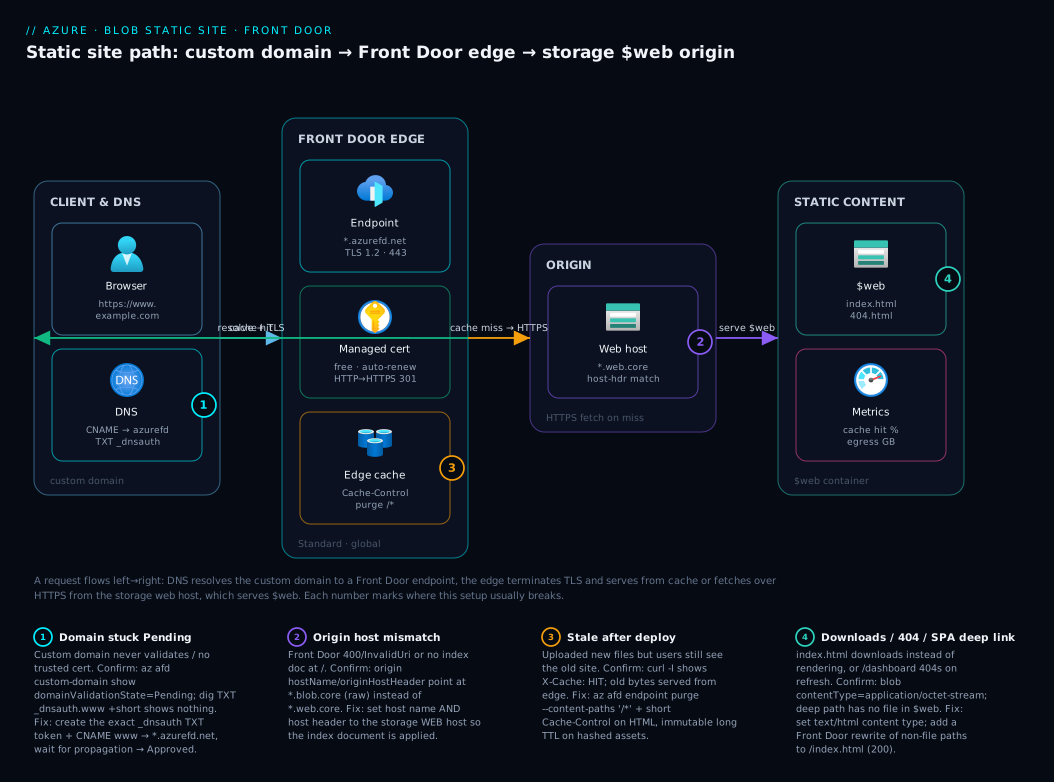
Architecture at a glance
Trace a request left to right. A browser resolves www.kloudvin.com, whose CNAME points at the Front Door endpoint (name-hash.azurefd.net), landing on the nearest edge POP. Front Door terminates TLS with the free Azure-managed certificate, then checks its edge cache. On a hit it returns the asset immediately — the request never touches storage, so a far-away user still loads fast and egress stays low. On a miss it fetches over HTTPS from the origin, your storage static-website host (acct.z13.web.core.windows.net), which serves the file from $web, applying your index document for / and folder paths and your error document on 404. Front Door then caches the response per your Cache-Control headers and serves subsequent edge requests from cache until expiry or a purge.
Two control flows ride alongside: DNS validation (a TXT record proves domain ownership so Front Door issues the managed cert) and an optional URL-rewrite rule mapping unknown deep paths back to /index.html for SPA routing (200, not 404). The numbered badges mark the four spots this setup most often breaks; the legend narrates each.
Real-world scenario
Lumio Labs, a six-person SaaS startup in Pune, shipped its marketing site and product docs on a single B1 App Service running a tiny Node static-file server — roughly ₹4,500/month for what was, in effect, three folders of HTML, CSS and a React docs build. Every overseas prospect (their traction was in Singapore and Dubai) found the site sluggish: one origin in Central India, no edge cache, 200–300 ms per asset. And twice the “server” went down during a deploy, taking the public site offline for minutes — an avoidable outage for content that never changes between deploys.
Their new architect moved the whole front end to Blob $web + Front Door Standard in an afternoon. The React docs build (dist/) and marketing HTML went into the $web container of a single StorageV2 LRS account, fronted by a Front Door Standard profile with the origin set to the storage web host, caching on, and HTTP-to-HTTPS redirect. They added docs.lumio.io and www.lumio.io as custom domains, validated each with a TXT record, and bound free Azure-managed certificates — nothing to buy, rotate or babysit. The apex lumio.io used an Azure DNS alias record; www a plain CNAME.
The first deploy produced the canonical gotcha: a writer pushed an updated index.html, refreshed, and saw the old page — Front Door was serving the cached copy. The architect set Cache-Control: max-age=300 on HTML (short TTL) and max-age=31536000, immutable on the fingerprinted JS/CSS bundles, and wired az afd endpoint purge into the pipeline. The second surprise was a docs deep link — https://docs.lumio.io/guides/setup — returning 404, because that path only exists in the SPA’s client-side router. A Front Door rewrite rule mapping non-file paths to /index.html (returning 200) fixed it without touching the build.
The result: the site now loads in tens of milliseconds off the local edge POP for Singapore and Dubai users, deploys are a blob upload plus a cache purge with zero downtime, and the monthly bill fell to roughly ₹900–1,400 — down from ₹4,500, for a faster, more reliable site. The App Service plan was deleted. The lesson: static content does not belong on a running server, and the custom-domain-HTTPS gap that pushes people toward App Service is solved for free by Front Door.
Advantages and disadvantages
The trade-off at a glance, then the nuance:
| Advantages | Disadvantages |
|---|---|
| No server to run, patch or scale | No server-side code (static only) |
| Very cheap — storage + egress + small FD base | Two services to wire (storage + Front Door) |
| Free, auto-renewing managed HTTPS on your domain | Custom-domain HTTPS requires the CDN/Front Door layer |
| Global edge cache → fast worldwide, low egress | Cache staleness after deploy (must purge / set TTLs) |
| Zero-downtime deploys (upload + purge) | SPA deep links need a rewrite rule |
| Scales to traffic spikes automatically | No dynamic personalization at the origin |
| Optional WAF (Front Door Premium) | WAF/Private Link only on the pricier Premium SKU |
The advantages dominate for genuinely static front ends — a tiny amount of one-time wiring buys permanently lower cost, better global performance, free TLS and no operational burden. The disadvantages bite only when your “static” site is secretly dynamic: if you need per-user server-rendered content, request-time secrets or logic-driven redirects, you have outgrown this pattern and want App Service, Container Apps or Azure Static Web Apps (which bundles a managed Functions back end). For a marketing site, docs, blog or SPA talking to a separate API, none apply.
Hands-on lab
This is the centerpiece. You will host a static site end to end twice — in the portal, then in az CLI — and finally see the Bicep equivalent. Everything is free-tier-friendly; Front Door Standard has a small monthly base fee, so run the teardown if you are only experimenting. Set the variables you will reuse (CLI path); pick a globally-unique storage name and a region near you.
# Shared variables (CLI lab) — edit these
RG=rg-staticsite-demo
LOCATION=centralindia
STG=kvstaticsite$RANDOM      # must be globally unique, 3-24 lowercase alphanumerics
FD_PROFILE=fd-staticsite
FD_ENDPOINT=kvstatic         # becomes kvstatic-<hash>.azurefd.net
CUSTOM_DOMAIN=www.example.com   # a domain whose DNS you control
Part A — Portal walk-through
Step 1 — Create the storage account.
Portal → Create a resource → Storage account. Set: Subscription, Resource group rg-staticsite-demo (create new), Storage account name (globally unique, lowercase), Region near you, Performance = Standard, Redundancy = LRS (cheapest; bump to ZRS/GRS for production). Leave the rest default → Review + create → Create.
Expected output: deployment succeeds; the account appears as kind StorageV2.
Step 2 — Enable static website hosting.
Open the storage account → left menu → Data management → Static website → toggle Enabled → set Index document name = index.html, Error document path = 404.html → Save.
Expected output: the blade shows a Primary endpoint like https://<account>.z13.web.core.windows.net/ and confirms a $web container was created. Copy that endpoint — it is your Front Door origin.
Step 3 — Upload your site.
Left menu → Data storage → Containers → open $web → Upload. Drag your index.html, 404.html, CSS, JS, images (or a built dist/). For an SPA, upload the entire build output preserving folder structure.
Expected output: files listed in $web. Browse to the web endpoint from Step 2 — index.html should render. If it downloads instead, the content type is wrong (see Troubleshooting).
Step 4 — Validate the bare site.
Visit the web endpoint — you should see your homepage over HTTPS (storage’s own wildcard cert). Visit a nonexistent path — you should get 404.html.
Checkpoint: the site works on the storage endpoint. Now add Front Door for the custom domain, HTTPS and the cache.
Step 5 — Create the Front Door profile and endpoint.
Portal → Create a resource → search Front Door and CDN profiles → Create → choose Azure Front Door → Custom create. Set Resource group, Name fd-staticsite, Tier = Standard. Add an Endpoint name (e.g. kvstatic). You can add origin/route here or after — we will configure them next.
Expected output: a Front Door Standard profile with an endpoint hostname kvstatic-<hash>.azurefd.net.
Step 6 — Add the origin (the storage web host).
In the profile → Origin groups → Add → name it og-storage. Add an origin: Origin type = Custom, Host name = your storage web host from Step 2 (the *.web.core.windows.net value, without https://), Origin host header = the same web host, HTTPS port = 443, Certificate subject name validation = Enabled. Save. Add a route: associate the endpoint, origin group og-storage, Accepted protocols = HTTP and HTTPS, Redirect → HTTPS, Forwarding protocol = HTTPS only, Caching = Enabled.
Expected output: browsing https://kvstatic-<hash>.azurefd.net/ serves your homepage through Front Door — proving the origin and route before you involve DNS.
Step 7 — Add the custom domain and managed certificate.
Profile → Domains → Add a domain → Domain type = Non-Azure validated (or Azure DNS if your zone is in Azure) → enter www.example.com → DNS management = your provider → Certificate = Azure managed. Front Door shows a TXT record value for validation.
Expected output: the domain appears in Pending validation with a _dnsauth.www TXT record to create.
Step 8 — Create DNS records and validate.
In your DNS provider, create the TXT record exactly as shown (_dnsauth.www → the given value), then a CNAME www → kvstatic-<hash>.azurefd.net. For an apex/root domain, use an ALIAS/ANAME (or Azure DNS alias record) to the endpoint instead of a CNAME. Back in Front Door, wait for validation to flip to Approved and the certificate state to Provisioned, then associate the domain with your route.
Expected output: domain Approved, certificate Provisioned, and https://www.example.com/ serves your site on a trusted certificate — typically within minutes once DNS propagates.
Step 9 — (SPA only) Add a URL-rewrite rule.
Profile → Rule sets → add a rule: If request path does not match a file (no extension) and the path is not an existing asset, then Override the route’s origin path to /index.html. Associate the rule set with the route.
Expected output: deep links like https://www.example.com/dashboard return 200 with your app shell, and the SPA router renders the right view instead of a 404.
Part B — az CLI walk-through
The same outcome, scriptable. az prompts to install the afd extension on first use.
# 1) Resource group + storage account (StorageV2, Standard, LRS)
az group create -n $RG -l $LOCATION

az storage account create -n $STG -g $RG -l $LOCATION \
  --sku Standard_LRS --kind StorageV2 --min-tls-version TLS1_2

# 2) Enable static website hosting (creates the $web container)
az storage blob service-properties update --account-name $STG \
  --static-website --index-document index.html --404-document 404.html

# Grab the primary web endpoint — this is the Front Door origin host
WEB_HOST=$(az storage account show -n $STG -g $RG \
  --query "primaryEndpoints.web" -o tsv | sed 's#https://##; s#/##')
echo "Web host: $WEB_HOST"
Expected output: Web host: kvstaticsite12345.z13.web.core.windows.net (your zone digits vary by region).
# 3) Upload the site to $web (point --source at your build/static folder)
az storage blob upload-batch --account-name $STG \
  -s ./public -d '$web' --overwrite

# Validate the bare site over the storage endpoint
curl -sI "https://$WEB_HOST/" | head -n 1   # expect: HTTP/1.1 200 OK or HTTP/2 200
Expected output: HTTP/2 200. If you instead see the file download in a browser, fix content types (Step 3b below).
# 3b) (If needed) set correct content types so files render, not download
az storage blob update --account-name $STG -c '$web' -n index.html \
  --content-type "text/html"
# Batch example for CSS/JS if a bulk upload guessed wrong:
# az storage blob upload-batch ... --content-type is set per-blob; prefer correct
# extensions so the SDK infers text/html, text/css, application/javascript.
# 4) Create the Front Door Standard profile and endpoint
az afd profile create -g $RG --profile-name $FD_PROFILE --sku Standard_AzureFrontDoor

az afd endpoint create -g $RG --profile-name $FD_PROFILE \
  --endpoint-name $FD_ENDPOINT --enabled-state Enabled

EP_HOST=$(az afd endpoint show -g $RG --profile-name $FD_PROFILE \
  --endpoint-name $FD_ENDPOINT --query hostName -o tsv)
echo "Front Door endpoint: $EP_HOST"   # e.g. kvstatic-abc123.azurefd.net
Expected output: Front Door endpoint: kvstatic-<hash>.azurefd.net.
# 5) Origin group + origin pointing at the STORAGE WEB HOST (not blob host)
az afd origin-group create -g $RG --profile-name $FD_PROFILE \
  --origin-group-name og-storage \
  --probe-request-type GET --probe-protocol Https --probe-path / \
  --probe-interval-in-seconds 120 \
  --sample-size 4 --successful-samples-required 3 --additional-latency-in-milliseconds 50

az afd origin create -g $RG --profile-name $FD_PROFILE \
  --origin-group-name og-storage --origin-name storage-web \
  --host-name "$WEB_HOST" --origin-host-header "$WEB_HOST" \
  --https-port 443 --priority 1 --weight 1000 \
  --enable-certificate-name-check true --enabled-state Enabled
Expected output: origin group and origin created; no error. The host header must equal the web host or storage returns the wrong content (often an InvalidUri/400).
# 6) Route: accept HTTP+HTTPS, redirect to HTTPS, forward HTTPS, enable caching
az afd route create -g $RG --profile-name $FD_PROFILE \
  --endpoint-name $FD_ENDPOINT --route-name route-web \
  --origin-group og-storage \
  --supported-protocols Http Https \
  --https-redirect Enabled --forwarding-protocol HttpsOnly \
  --link-to-default-domain Enabled \
  --enable-caching true --query-string-caching-behavior IgnoreQueryString

# Validate THROUGH Front Door (before DNS) using the azurefd.net hostname
curl -sI "https://$EP_HOST/" | head -n 1     # expect HTTP/2 200
Expected output: HTTP/2 200 from the azurefd.net endpoint — origin + route are correct.
# 7) Add the custom domain with a free Azure-managed certificate
az afd custom-domain create -g $RG --profile-name $FD_PROFILE \
  --custom-domain-name www-example-com \
  --host-name "$CUSTOM_DOMAIN" \
  --minimum-tls-version TLS12 \
  --certificate-type ManagedCertificate

# Read the TXT validation token Front Door wants you to publish
az afd custom-domain show -g $RG --profile-name $FD_PROFILE \
  --custom-domain-name www-example-com \
  --query "{state:domainValidationState, token:validationProperties.validationToken}" -o json
Expected output: state: Pending, plus a token value. Create a DNS TXT record _dnsauth.www → that token.
# 8) In your DNS provider, create:
#    TXT   _dnsauth.www   <token>            (ownership validation)
#    CNAME www            $EP_HOST           (route traffic to Front Door)
# Then associate the validated domain with the route:
az afd route update -g $RG --profile-name $FD_PROFILE \
  --endpoint-name $FD_ENDPOINT --route-name route-web \
  --custom-domains www-example-com

# Poll validation until Approved
az afd custom-domain show -g $RG --profile-name $FD_PROFILE \
  --custom-domain-name www-example-com \
  --query "{domain:domainValidationState, cert:tlsSettings.certificateType}" -o table
Expected output: domainValidationState becomes Approved and the managed cert provisions within minutes. Then curl -sI https://www.example.com/ returns 200 on a trusted certificate.
# 9) After a deploy, purge the edge cache so users see the new files immediately
az afd endpoint purge -g $RG --profile-name $FD_PROFILE \
  --endpoint-name $FD_ENDPOINT --domains "$CUSTOM_DOMAIN" --content-paths '/*'
Expected output: purge accepted; the next request re-fetches from origin and re-caches.
Part C — Bicep version
The storage account, static website (via a deployment script, since the property is data-plane) and the full Front Door stack as infrastructure-as-code. New to Bicep? See Deploy Your First Bicep File From Scratch.
@description('Globally-unique storage account name (3-24 lowercase alphanumerics).')
param storageName string
param location string = resourceGroup().location
param frontDoorProfileName string = 'fd-staticsite'
param endpointName string = 'kvstatic'

// 1) Storage account (StorageV2, Standard_LRS)
resource stg 'Microsoft.Storage/storageAccounts@2023-05-01' = {
  name: storageName
  location: location
  sku: { name: 'Standard_LRS' }
  kind: 'StorageV2'
  properties: {
    minimumTlsVersion: 'TLS1_2'
    allowBlobPublicAccess: false   // $web does NOT need anonymous blob access
    supportsHttpsTrafficOnly: true
  }
}

// NOTE: enabling the static website (index/error docs) is a data-plane operation;
// drive it post-deploy with: az storage blob service-properties update --static-website ...
// or a deploymentScripts resource. The web endpoint becomes stg.properties.primaryEndpoints.web.

// 2) Front Door Standard profile
resource fd 'Microsoft.Cdn/profiles@2024-02-01' = {
  name: frontDoorProfileName
  location: 'global'
  sku: { name: 'Standard_AzureFrontDoor' }
}

resource endpoint 'Microsoft.Cdn/profiles/afdEndpoints@2024-02-01' = {
  parent: fd
  name: endpointName
  location: 'global'
  properties: { enabledState: 'Enabled' }
}

resource originGroup 'Microsoft.Cdn/profiles/originGroups@2024-02-01' = {
  parent: fd
  name: 'og-storage'
  properties: {
    loadBalancingSettings: { sampleSize: 4, successfulSamplesRequired: 3, additionalLatencyInMilliseconds: 50 }
    healthProbeSettings: { probePath: '/', probeRequestType: 'GET', probeProtocol: 'Https', probeIntervalInSeconds: 120 }
  }
}

// Origin MUST be the storage WEB host, and host header must match it
var webHost = replace(replace(stg.properties.primaryEndpoints.web, 'https://', ''), '/', '')
resource origin 'Microsoft.Cdn/profiles/originGroups/origins@2024-02-01' = {
  parent: originGroup
  name: 'storage-web'
  properties: {
    hostName: webHost
    originHostHeader: webHost
    httpsPort: 443
    priority: 1
    weight: 1000
    enforceCertificateNameCheck: true
    enabledState: 'Enabled'
  }
}

resource route 'Microsoft.Cdn/profiles/afdEndpoints/routes@2024-02-01' = {
  parent: endpoint
  name: 'route-web'
  dependsOn: [ origin ]
  properties: {
    originGroup: { id: originGroup.id }
    supportedProtocols: [ 'Http', 'Https' ]
    httpsRedirect: 'Enabled'
    forwardingProtocol: 'HttpsOnly'
    linkToDefaultDomain: 'Enabled'
    cacheConfiguration: { queryStringCachingBehavior: 'IgnoreQueryString' }
  }
}

output frontDoorEndpoint string = endpoint.properties.hostName
output storageWebHost string = webHost
Deploy and read the outputs:
az deployment group create -g $RG \
  --template-file staticsite.bicep \
  --parameters storageName=$STG
# Then run the data-plane enable + upload + custom-domain steps from Part B.
Part D — Teardown
Delete everything in one shot so nothing keeps billing (Front Door Standard has a small base fee; storage bills for stored GB):
az group delete -n $RG --yes --no-wait
# Also remove the DNS TXT/CNAME records you created at your DNS provider.
Expected output: the resource group (storage + Front Door) deletes asynchronously. Confirm with az group exists -n $RG returning false.
Common mistakes & troubleshooting
The failure modes you will actually hit — symptom, root cause, exact confirm, fix:
| # | Symptom | Root cause | Confirm with | Fix |
|---|---|---|---|---|
| 1 | Page downloads instead of rendering | Blob Content-Type is application/octet-stream, not text/html |
az storage blob show -c '$web' -n index.html --query properties.contentType |
Set correct content type; upload with proper file extensions |
| 2 | https://...azurefd.net/ returns 404 / nothing at / |
Origin points at the blob host, not the web host (no index doc) | Check origin hostName / originHostHeader |
Set both to *.web.core.windows.net |
| 3 | Front Door returns 400 / InvalidUri from origin | Origin host header doesn’t match the web host | az afd origin show ... --query originHostHeader |
Make host header equal the web host exactly |
| 4 | Deployed new files but still see the old site | Edge cache serving stale copy | `curl -sI https://www.example.com/ | grep -i x-cache` (HIT) |
| 5 | Custom domain stuck in Pending | TXT validation record missing/wrong/not propagated | dig TXT _dnsauth.www.example.com +short |
Recreate the exact _dnsauth TXT token; wait for propagation |
| 6 | Certificate error / not trusted on custom domain | Cert not yet provisioned, or CNAME not pointing at FD | Domain blade cert state; dig CNAME www.example.com |
Wait for managed cert; ensure CNAME → *.azurefd.net |
| 7 | CORS errors when an SPA calls an API | Browser blocks cross-origin; storage/API not sending CORS headers | Browser console; OPTIONS preflight response |
Set CORS on the API; for fonts/assets set CORS on the storage account |
| 8 | SPA deep link 404s (e.g. /dashboard) |
No server route; that path only exists client-side | Visit the path directly → 404 | Front Door rewrite of non-file paths to /index.html |
| 9 | Apex domain (example.com) won’t take a CNAME |
DNS forbids CNAME at the zone apex | Provider rejects the record | Use ALIAS/ANAME or Azure DNS alias record to the FD endpoint |
| 10 | Origin returns 403 / 502 to Front Door | Storage firewall blocks public access / wrong access | Storage Networking blade; firewall rules | Allow public access to the web endpoint (or use Premium Private Link) |
| 11 | Site loads but mixed-content warnings | Page hardcodes http:// asset URLs |
Browser console mixed-content errors | Use protocol-relative or https:// URLs; rely on FD HTTPS redirect |
| 12 | $web container missing |
Static website never enabled | az storage blob service-properties show --query staticWebsite.enabled |
Enable static website hosting first |
Three deserve extra colour. The content-type trap (#1) is the most common first-timer bug: upload index.html as application/octet-stream and every browser downloads it rather than rendering. az storage blob upload-batch infers types from extensions, so .html → text/html usually works — a renamed file without an extension breaks it. Cache staleness (#4) is Front Door doing its job; fix it by purging after deploy and setting sensible TTLs (short for HTML, long+immutable for fingerprinted bundles). The SPA deep-link 404 (#8) catches every React/Vue/Angular team — client-side routes have no file in $web, so a hard refresh on a sub-route 404s until you add the rewrite-to-index.html rule.
Best practices
- Always front the static site with Front Door (or Azure CDN) for production — the only way to get your custom domain on free, managed, auto-renewing HTTPS plus the global cache.
- Point the origin at the web host, never the blob host, and set the origin host header to match it exactly — prevents the no-index-doc and InvalidUri failures.
- Set
Cache-Controldeliberately: short TTL (max-age=300) on HTML so deploys appear quickly; long+immutable (max-age=31536000, immutable) on fingerprinted JS/CSS so they cache forever and bust by filename. - Purge the Front Door cache as a deploy step (
az afd endpoint purge) so users see new content immediately, not after TTL expiry. - Use fingerprinted asset filenames (e.g.
app.4f3a.js) so cache-busting is automatic and you only purge HTML. - Add the SPA rewrite rule mapping non-file paths to
/index.htmlso client-side routing and hard refreshes work, returning 200 (unlike the storage error-document 404). - Enable HTTP→HTTPS redirect and minimum TLS 1.2 on the route/custom domain; never serve the site over plain HTTP in production.
- Keep
AllowBlobPublicAccess = false—$webdoes not need anonymous blob access, so leave the account locked down. - Pick redundancy by content value: LRS for cheap/recreatable sites, ZRS/GRS where a regional incident must not take the site down (RA-GRS even exposes a secondary web endpoint).
- Automate the whole stack in Bicep/CLI so storage + Front Door + DNS is reproducible and reviewable, not manual portal clicks.
- Enable compression on the route so text assets ship gzip/Brotli, cutting transfer size.
Security notes
- TLS everywhere. Bind the free Azure-managed certificate, set minimum TLS 1.2, and enable the HTTP→HTTPS redirect so no request is served in clear text. The managed cert auto-renews — no expiry outage.
- Lock the storage account down. Keep
allowBlobPublicAccess: false;$webis served via the web endpoint and needs no anonymous blob ACLs. Do not loosen account-wide public access just to host the site. - Prefer Premium + Private Link if the origin must be private. Front Door Premium reaches the storage origin over Private Link so the account is not publicly reachable — appropriate for regulated content. Standard fetches over the public web endpoint.
- Turn on the WAF for anything high-profile (Premium). Premium adds a managed WAF with bot protection and managed rule sets at the edge — worth it even for static content, to absorb scanning and abusive traffic.
- Never put secrets in static files. Anything in
$webis public by design — no API keys, connection strings or tokens in the HTML/JS. Client code calls APIs that enforce their own auth. - Set CORS narrowly. If your SPA’s assets or fonts need CORS, scope storage CORS rules to your real domains, not
*. - Restrict who can write to
$web. Use RBAC (Storage Blob Data Contributor) and deploy via a CI identity rather than account keys; rotate or disable account keys where possible.
Cost & sizing
This is one of the cheapest things you can run on Azure. The bill has three small parts: storage (GB stored at a few rupees per GB-month plus transactions — pennies for tens of MB); data transfer (bytes served, mostly leaving the edge at Front Door’s per-GB rate, so storage egress stays tiny thanks to cache hits); and the Front Door Standard base fee plus per-GB/per-request charges — the largest line item for low traffic, and what buys the custom domain, free cert and global cache.
| Cost driver | What you pay for | Rough scale (small site) | How to keep it low |
|---|---|---|---|
| Blob storage (hot) | GB stored / month | Pennies (tens of MB) | Don’t store huge unoptimised media |
| Storage transactions | Read/write operations | Negligible | Cache absorbs reads |
| Front Door Standard base | The profile/endpoint | Small fixed monthly fee | One profile can serve many domains |
| Front Door data transfer | GB served from edge | Scales with traffic | High cache-hit ratio; compress assets |
| Front Door requests | Per-request charge | Scales with traffic | Cache static assets aggressively |
| Egress from storage | Origin → edge fetches | Tiny with good caching | Long TTLs on immutable assets |
Sizing: a small marketing/docs/SPA site typically lands around ₹800–1,500/month all-in, as Lumio saw — far cheaper than a B1 App Service and far faster globally. Redundancy nudges storage cost: LRS cheapest, ZRS adds intra-region resilience, GRS/RA-GRS roughly doubles it for cross-region durability. The Azure free account covers a generous slice of storage for the first year; Front Door’s base fee is the part you cannot zero out, so tear down the lab if you are only experimenting. Wire a budget alert as in Azure Cost Management: Budgets & Email/Action-Group Alerts.
Interview & exam questions
1. How do you host a static website on Azure Storage, and which container serves it? Enable static website hosting on a StorageV2 (Standard) account; Azure creates a container named $web served over a dedicated web endpoint (*.web.core.windows.net) with a configurable index and error document. The web endpoint — not the blob endpoint — applies index/404 behaviour.
2. Why can’t Blob static hosting serve your custom domain over HTTPS on its own? It does not manage your own TLS certificate for a custom domain. To get a brand domain on trusted HTTPS you front it with Front Door (or Azure CDN), which terminates TLS with a free Azure-managed certificate and fetches from the storage origin.
3. What must the Front Door origin point at for a static website, and why does the host header matter? The origin’s host name and host header must be the storage web host (*.web.core.windows.net), not the blob host. Storage routes by the Host header; a mismatch gives no index-document behaviour or an InvalidUri/400.
4. How does Front Door give you HTTPS on a custom domain for free? You add the domain, prove ownership with a DNS TXT record, and choose an Azure-managed certificate, which Front Door issues and auto-renews at no cost. Nothing to buy or rotate.
5. After deploying new files you still see the old site. Why, and how do you fix it? Front Door is serving the cached copy from the edge. Fix by purging the endpoint cache (az afd endpoint purge --content-paths '/*') after deploy and by setting sensible Cache-Control TTLs — short on HTML, long+immutable on fingerprinted assets.
6. An SPA deep link like /dashboard returns 404 on a hard refresh. Cause and fix? That path exists only in the SPA’s client-side router; there is no matching file in $web. Add a Front Door rewrite rule mapping non-file paths to /index.html (returning HTTP 200), so the app shell loads and the router renders the view.
7. Why does a static file sometimes download instead of rendering, and how do you correct it? The blob’s Content-Type is wrong (often application/octet-stream instead of text/html), and browsers download unknown types. Fix by setting the type (az storage blob update --content-type text/html) or uploading with proper extensions so it is inferred.
8. How do you serve a root/apex domain (example.com) through Front Door when DNS forbids a CNAME at the apex? Use your provider’s ALIAS/ANAME record or an Azure DNS alias record pointing the apex at the endpoint, or host on www with a CNAME and redirect the apex to it.
9. When would you choose Front Door Premium over Standard for a static site? Choose Premium when you need the managed WAF (bot/managed rule sets), Private Link to keep the storage origin non-public, or security analytics. For a normal public static site, Standard is the cost-effective default.
10. What storage redundancy options exist for the hosting account and how do they differ? LRS (cheapest, single datacentre), ZRS (across availability zones in a region), GRS (replicated to a paired region), and RA-GRS (GRS plus a read-only secondary endpoint — including a secondary web endpoint). See Azure Storage Redundancy: LRS, ZRS, GRS & RA-GRS Explained.
11. Does enabling static website hosting require turning on anonymous blob public access? No. $web is served through the dedicated web endpoint, independent of the account’s allowBlobPublicAccess flag and per-container public access. You can keep allowBlobPublicAccess = false and still serve the site, which is the secure default.
12. Where does TLS terminate in this architecture, and what fetches from storage? TLS terminates at the Front Door edge using the managed certificate for the custom domain. On a cache miss, Front Door fetches over HTTPS from the storage web host origin; cache hits are served entirely from the edge and never touch storage.
These map to AZ-104 (Administrator) — configure storage accounts and static website hosting, Front Door/CDN, custom domains and TLS — and to AZ-204 (Developer) for the deployment/caching mechanics. The networking and edge-routing angle touches AZ-700. A compact mapping:
| Question theme | Primary cert | Objective area |
|---|---|---|
Static website, $web, redundancy |
AZ-104 | Configure & manage storage |
| Front Door, custom domain, managed cert | AZ-104 / AZ-700 | Edge delivery & TLS |
| Caching, purge, content types | AZ-204 | Deploy & optimize solutions |
| SPA rewrite, CORS, deep links | AZ-204 | Front-end deployment patterns |
Quick check
- Which container does enabling static website hosting create, and which endpoint serves it — the blob endpoint or the web endpoint?
- You added a custom domain in Front Door and it’s stuck in Pending validation. What DNS record proves ownership, and how do you check it?
- You deployed an updated
index.htmlbut still see the old page through your custom domain. What is happening and what’s the one command that forces the new version out? - Your React app’s deep link
https://www.example.com/settingsreturns 404 on a hard refresh. What’s the cause and the fix? - True or false: to host a static website on
$web, you must set the account’sallowBlobPublicAccesstotrue.
Answers
- It creates the
$webcontainer, served over the dedicated web endpoint (*.web.core.windows.net) — which applies the index and error documents. The blob endpoint (*.blob.core.windows.net) is the raw object store and does not apply index/404 behaviour. - A TXT record at
_dnsauth.<subdomain>containing the validation token Front Door shows you. Check it withdig TXT _dnsauth.www.example.com +short(or your provider’s UI) and wait for propagation; validation flips to Approved once it’s visible. - Front Door is serving the cached copy from the edge. Force the new version with a purge:
az afd endpoint purge --content-paths '/*'(and set a shortCache-Controlon HTML so future deploys appear faster). - The path exists only in the SPA’s client-side router — there’s no matching file in
$web, so storage returns 404. Fix with a Front Door rewrite rule mapping non-file paths to/index.html(returns 200), letting the router render the view. - False.
$webis served through the web endpoint, independent ofallowBlobPublicAccess. Keep itfalse(the secure default) and the site still works.
Glossary
- Static website hosting — a StorageV2 feature serving the
$webcontainer directly over a web endpoint with an index and error document. $webcontainer — the specially-named container whose contents are published as the static website.- Web vs blob endpoint — the web endpoint (
*.web.core.windows.net) applies index/404 behaviour and is what you use; the blob endpoint (*.blob.core.windows.net) is the raw object store with no such behaviour. - Index / error document — the file returned for
/and folder paths (index.html), and the blob returned on a 404 (404.html, orindex.htmlfor an SPA). - Azure Front Door — Microsoft’s global edge service: reverse proxy, CDN cache, TLS termination, custom domains, rules engine.
- Front Door profile / endpoint / origin group / origin / route — the resource hierarchy: a profile holds an endpoint (
*.azurefd.net), origin groups of backends, origins (your storage web host), and routes mapping domains→origin with caching. - Standard vs Premium (Front Door) — Standard = caching + custom domains + managed certs; Premium adds WAF, Private Link to origins, and security analytics.
- Custom domain — your brand hostname (e.g.
www.kloudvin.com) bound to a Front Door endpoint. - Managed certificate — a free, Azure-issued, auto-renewing TLS certificate for a custom domain on Front Door.
- CNAME — a DNS record aliasing a subdomain to another hostname (here,
www→*.azurefd.net). - Alias / ANAME record — apex-domain equivalent of a CNAME, used because DNS forbids a true CNAME at the zone apex.
- TXT validation record — a
_dnsauth.*DNS record carrying the token that proves domain ownership for certificate issuance. - Cache purge — forcing Front Door to drop cached content so the next request re-fetches from the origin.
Cache-Control— the HTTP header (set on blobs) telling caches how long to keep a response (max-age,immutable).- CORS — Cross-Origin Resource Sharing; headers that let a browser on one origin call resources on another.
Next steps
You can now host any static front end on Blob $web behind Front Door — your own domain, free HTTPS, cached globally. Build outward:
- Foundation: Azure Storage Account Fundamentals — the account types, tiers and endpoints underneath static hosting.
- Related: Azure Storage Redundancy: LRS, ZRS, GRS & RA-GRS Explained — pick the right durability for your site.
- Related: Azure DNS: Public Zones, Delegation & Alias Records — get the apex/alias and CNAME records right.
- Related: Application Gateway with WAF, mTLS & End-to-End TLS — the regional cousin of Front Door for inbound app traffic.
- Related: Azure Cost Management: Budgets & Email/Action-Group Alerts — put a budget alert on the storage + Front Door spend.