The most expensive architecture decision is the one nobody made on purpose. A team picks microservices because the last team did, or N-tier because that is what the on-prem app already looked like, and then spends two years paying for constraints they never chose. An architecture style is not a logo on a slide — it is a family of constraints you accept up front so that some properties become easy and others become hard. The job of the architect is to choose the style whose hard things you can live with and whose easy things you actually need.
This lesson treats Microsoft’s six canonical architecture styles the way they are meant to be read in the Azure Architecture Center: as constraint systems, each with a benefit it buys and a tax it levies. Then it covers the ten design principles for Azure applications — the principles that hold true whichever style you pick, because they encode how the cloud actually behaves. Finally it gives you a repeatable method for going from a requirements document to a defensible style choice, which is exactly the skill AZ-305 tests and exactly the skill that separates an architect from a service operator.
If you have already worked through the Well-Architected Framework and the Cloud Adoption Framework lessons in this module, this is the bridge between them: WAF tells you the qualities a workload must have, CAF tells you the organisational landing zone it runs in, and architecture styles tell you the shape of the workload itself. Get the shape wrong and no amount of pillar tuning will save you.
Learning objectives
By the end of this lesson you will be able to:
- Explain what an architecture style is — a chosen set of constraints — and why the choice is a tradeoff rather than a ranking.
- Describe each of the six Azure architecture styles (N-tier, Web-Queue-Worker, Microservices, Event-driven, Big data, Big compute), the problem each solves, and the Azure services that realise it.
- Use a fit / when-to-use table to match a workload’s dominant requirement to a style, and recognise when a system is genuinely a hybrid of two.
- State and apply the ten design principles for Azure applications verbatim, and connect each one to the Well-Architected pillars and concrete Azure features.
- Run a requirements-to-style selection process: extract the dominant forces, score the candidates, and write down the constraints you are accepting.
- Avoid the common mistakes — choosing a style for the wrong reason, fighting a style’s constraints, and confusing a style with a pattern.
Prerequisites & where this fits
This is an Advanced lesson in the Architecture & Design Mastery module. You will get the most from it if you already understand:
- The Well-Architected Framework pillars as a tradeoff system (the previous-but-one lesson, The Azure Well-Architected Framework, In Depth). Styles are evaluated against the pillars, so you need the pillars in your head.
- The Cloud Adoption Framework and Azure Landing Zones (the previous lesson, Cloud Adoption Framework & Azure Landing Zones, In Depth). A workload always lands inside an application landing zone; the style decides what goes into that landing zone.
- Working familiarity with the core compute, messaging and data services: App Service, AKS, Azure Functions, Service Bus, Event Hubs, Event Grid, Azure SQL, Cosmos DB, Storage, Synapse/Fabric. You do not need to be expert in each — but you should know what category each belongs to.
Where this sits in the arc: WAF (qualities) → CAF (organisation) → styles + principles (workload shape) → the cloud design patterns catalogue (the tactical moves inside a style) → Mission-Critical / AlwaysOn (where styles, patterns and landing zones converge at the top of the difficulty curve). Styles are the macro decision; patterns are the micro decisions you make once the style is fixed. Do not confuse the two — a confusion this lesson will return to more than once.
What an architecture style actually is
A useful definition: an architecture style is a family of architectures that share a set of constraints on the components and the way they communicate. The constraints are the whole point. By agreeing that, say, every component will be stateless and talk only through a message broker, you give up the ability to make a synchronous in-process call — and in exchange you gain independent scaling and failure isolation. There is no free lunch. Each style buys you something specific and charges you something specific.
This reframing matters because beginners rank styles (“microservices are the modern way, N-tier is legacy”) while architects fit them. A monolithic N-tier app on App Service with a zone-redundant SQL database is the correct, boring, cheap answer for the overwhelming majority of line-of-business systems, and reaching for microservices there is not sophistication — it is an own goal that imports a distributed-systems tax for no domain that needs it.
Three lenses to keep in mind as we go through each style:
- The benefit it buys. What gets easy under this constraint set — the property you would struggle to achieve otherwise.
- The challenge / tax it levies. What gets hard — the cost you sign up for, usually paid in operational complexity, consistency, or money.
- The dominant force that selects it. The single requirement that, when it dominates, makes this style the right answer. Read a requirements document looking for the dominant force and the style usually falls out.
Microsoft’s catalogue is deliberately small — six styles — because they are meant to be coarse buckets, not a taxonomy of every system ever built. Real systems frequently combine two (an event-driven core with a big-data analytics tail is the classic pair). The point of the six is to give you a shared vocabulary and a starting fit, not to box you in.
The six architecture styles
N-tier
The idea. Divide the application into logical tiers — classically presentation, business logic, and data — where each tier calls only the tier below it. The canonical three-tier web app (web → application → database) is the archetype. It is the most traditional style and maps almost one-to-one onto how on-premises applications were built, which is exactly why it is the natural target for a lift-and-shift migration.
On Azure. Web/app tiers on Azure Virtual Machines in availability zones behind a Load Balancer or Application Gateway — or, far better, collapsed onto Azure App Service or Azure Container Apps — with Azure SQL Database (zone-redundant) or SQL Managed Instance as the data tier and Azure Cache for Redis in front of it. Lift-and-shift of an IaaS three-tier estate is the textbook deployment; the PaaS variant is the same style with the heavy lifting handed to Azure.
Benefit it buys. Familiarity and simplicity — a decades-old mental model, mature tooling, and the shortest migration path of any style. Quick to stand up, easy to staff.
Tax it levies. Tiers scale and deploy as a unit: the business tier is usually one deployable, so a change to one feature redeploys everything and a spike on one feature scales the whole tier. Synchronous chains mean a slow database tier stalls the whole request path. Robust but not elastic, and poor at isolating failure — a bad release takes the whole tier down.
Dominant force that selects it. “Migrate this app with minimal change,” or “build a straightforward CRUD-heavy line-of-business app and keep it cheap and boring.” For a modest domain and a small team, N-tier (ideally PaaS N-tier) is very often the right and underrated answer.
Web-Queue-Worker
The idea. A web front end handles synchronous user requests and does the fast work; anything slow, expensive, or bursty is dropped onto a queue and processed asynchronously by a separate worker tier. Front end and worker share a database and storage but are otherwise decoupled and scale independently. This is the natural next step beyond N-tier the moment you have meaningful background work — image processing, report generation, order fulfilment, email — that you do not want blocking the request thread.
On Azure. Azure App Service (web front end) + Azure Functions or a Container Apps worker + Azure Service Bus or Storage Queues (the queue) + Azure SQL / Cosmos DB and Blob Storage (shared data) + Azure Cache for Redis. The serverless variant — Functions front and back with a queue between — is one of the most cost-effective architectures Azure offers, and it is squarely this style.
Benefit it buys. The queue decouples producer from consumer, giving you load levelling (the worker drains the queue at its own pace while the front end stays responsive) and independent scale (workers on queue depth, web tier on request rate). It absorbs bursts gracefully and keeps the user-facing path fast.
Tax it levies. You inherit asynchronous processing: the user gets an acknowledgement, not a result, so you need a way to report completion (polling, push, status endpoint), and because messages can be delivered more than once workers must be idempotent. Over time, if every new behaviour becomes “another worker reading another queue,” it quietly drifts toward an ungoverned event-driven sprawl.
Dominant force that selects it. “There is significant background or deferred work, and the user-facing path must stay fast and survive spikes.” E-commerce checkout that fans out to fulfilment, heavy media/document processing, anything bursty.
Microservices
The idea. Decompose the application vertically into many small, independently deployable services, each owning one business capability and its own data store, communicating over the network through well-defined APIs or messaging. The defining word is independent — deployment, scaling, technology choice, and team ownership. This is decomposition by business capability, not by technical layer, which is what distinguishes it from N-tier.
On Azure. Azure Kubernetes Service (AKS) or Azure Container Apps as the runtime, Azure API Management or an ingress gateway at the edge, Service Bus / Event Grid for inter-service messaging, a database per service (Cosmos DB, Azure SQL, PostgreSQL flexible server, chosen per service), Dapr for building-block abstractions, and a full observability stack (Azure Monitor, Application Insights, distributed tracing) because you cannot operate this style blind.
Benefit it buys. Independent deployability and team autonomy at scale: many teams ship on their own cadence without a coordinated release, each service scales to its own load, and a failure can be contained to one service if you designed the isolation. For a genuinely complex domain with many teams, this is the only style that lets the org move in parallel.
Tax it levies. The most demanding style by a wide margin. You take on the full weight of distributed systems — network latency and partial failure between every call, eventual consistency (you gave up the shared database), distributed tracing just to debug one request, service discovery, contract versioning across teams, and an ongoing platform-engineering burden. Microservices trade development-time complexity (removed) for operational and runtime complexity (much added). Choose it for the domain, never for the buzzword.
Dominant force that selects it. “A complex domain with many sub-domains, multiple teams that must ship independently, and parts of the system with wildly different scaling or availability needs.” With one team and a moderate domain it is almost always the wrong answer — and saying so in an interview signals seniority, not ignorance.
Event-driven
The idea. Components communicate by producing and consuming events through a broker rather than calling each other directly. Producers emit events and do not know who consumes them; consumers subscribe and react. Two sub-flavours matter: discrete events (a thing happened — “order placed” — pub/sub via Event Grid) and event streams (a continuous high-volume flow — telemetry, clickstream — ingested with Event Hubs). Producer and consumer are fully decoupled in time and in knowledge of each other.
On Azure. Azure Event Grid (discrete event routing, reactive pub/sub), Azure Event Hubs (high-throughput stream ingestion, the Kafka-shaped workhorse), Azure Stream Analytics / Functions / Spark on Fabric/Databricks (stream processing), Azure IoT Hub (device telemetry), and Service Bus where you need richer semantics (ordering, sessions, transactions) alongside the eventing.
Benefit it buys. Extreme decoupling and the ability to add consumers without touching producers — bolt on a new reaction to “order placed” without the order service ever knowing. It excels at high throughput, real-time reaction, and fan-out; the natural fit for IoT, telemetry, and any system where many independent things react to a stream of facts.
Tax it levies. Reasoning about the whole gets hard: control flow is implicit and scattered across subscriptions, so “what happens when an order is placed?” has no single place to read. You must handle ordering, duplicate delivery, and at-least-once semantics, design for eventual consistency, and invest heavily in observability to trace a fact through the web of consumers. An unstructured event-driven system can become a distributed monolith where everything implicitly depends on everything.
Dominant force that selects it. “Many independent consumers must react to a high-volume stream of events in near-real-time, and producers should not be coupled to consumers.” IoT and telemetry ingestion, real-time analytics, reactive integration, anything streaming.
Big data
The idea. The system exists to ingest, store, and process very large, partitioned datasets too big for a single conventional database, dividing the data into partitions processed in parallel. It spans the classic batch path (large volumes on a schedule) and the stream/real-time path (data processed as it arrives); the well-known lambda and kappa architectures are ways of combining or unifying those two paths. The defining characteristic is data volume and massively parallel, partitioned processing — analytics, not transactions.
On Azure. Azure Data Lake Storage Gen2 as the partitioned store, Microsoft Fabric / Azure Synapse Analytics / Azure Databricks for distributed batch and stream processing (Spark), Azure Data Factory / Fabric pipelines for ingestion and orchestration, Event Hubs + Stream Analytics for the streaming path, and a serving layer for BI (Power BI, a SQL/lakehouse warehouse). The medallion (bronze/silver/gold) lakehouse layout is the common physical realisation.
Benefit it buys. The ability to work with datasets and volumes no single transactional database could hold, with horizontal scale across a cluster and a cost model that separates cheap storage from on-demand compute. It turns “we cannot even hold this data” into a tractable, parallelised pipeline.
Tax it levies. A specialised world with its own skills: data engineering, partition and file-layout design (small-file problems, skew), schema-on-read discipline, pipeline orchestration and data-quality handling, and latency higher than transactional systems (even “real-time” here means seconds, not milliseconds). It is an analytics-and-insight engine, not a system of record, and treating it like OLTP ends badly.
Dominant force that selects it. “The workload is fundamentally about large-scale data — ingesting, transforming, and analysing volumes a normal database cannot handle.” Data platforms, analytics, ML feature pipelines, log and telemetry analytics at scale.
Big compute
The idea. Also called high-performance computing (HPC): run a single large computational job across a large number of cores in parallel, where the work is compute-bound rather than data- or I/O-bound. Think thousands of cores chewing through simulations, rendering, or numerical modelling — throwing a large, tightly- or loosely-coupled parallel computation at a problem and getting the answer back.
On Azure. Azure Batch (managed job-scheduling and pool management for parallel/HPC workloads), HPC-optimised VM SKUs (the H-series, plus GPU N-series), InfiniBand / RDMA networking for tightly-coupled MPI jobs, Azure CycleCloud for orchestrating HPC clusters, and low-priority / Spot VMs to run the embarrassingly-parallel parts cheaply.
Benefit it buys. Massive parallel compute on demand, sized to the job and torn down after — you rent a supercomputer for an afternoon instead of buying one. For genuinely compute-bound, parallelisable work, nothing comes close on cost-per-result.
Tax it levies. A narrow, specialised style: the work must actually parallelise, tightly-coupled jobs need low-latency RDMA and careful tuning, and you manage job scheduling, data staging, and the economics of expensive SKUs. Outside the simulation/rendering/modelling niche it is the wrong tool, and most business applications never need it.
Dominant force that selects it. “A large, parallelisable, compute-bound job — simulation, modelling, rendering, scientific computing.” Engineering simulation, financial-risk Monte Carlo, genomics, media rendering, CFD.
The fit / when-to-use table
Read this table by finding the dominant force in your requirements first, then look across to the benefit you are buying and the tax you are accepting. The style is the consequence of the dominant force, not the starting point.
| Style | Dominant force (pick it when…) | Benefit it buys | Tax it levies | Representative Azure stack |
|---|---|---|---|---|
| N-tier | Migrating an existing app with minimal change, or a simple CRUD line-of-business app | Familiarity, fastest path, lowest cost, easy to staff | Scales/deploys as a unit; poor failure isolation; synchronous chains | App Service / VMs in zones → Azure SQL (ZR) → Redis |
| Web-Queue-Worker | Significant background/deferred work; user path must stay fast under bursts | Load levelling + independent scale of web vs worker | Async result reporting; idempotency; can drift to event sprawl | App Service + Functions/Container Apps worker + Service Bus + SQL/Blob |
| Microservices | Complex domain, many teams shipping independently, divergent scaling needs | Independent deploy/scale/tech per service; team autonomy | Full distributed-systems cost; eventual consistency; heavy platform/ops burden | AKS / Container Apps + APIM + Service Bus + DB-per-service + Dapr |
| Event-driven | Many consumers reacting to a high-volume stream in near-real-time | Extreme decoupling; add consumers without touching producers; high throughput | Implicit flow; ordering/duplicates; eventual consistency; hard to trace | Event Grid (discrete) / Event Hubs (streams) + Stream Analytics/Functions + IoT Hub |
| Big data | Datasets too large for one database; parallel batch + stream processing | Scale-out over huge data; cheap storage / elastic compute split | Specialist data-engineering skills; partition design; higher latency; not a SoR | ADLS Gen2 + Fabric/Synapse/Databricks (Spark) + Data Factory + Event Hubs |
| Big compute | Large, parallelisable, compute-bound job (HPC) | Massive on-demand parallel compute, rent-and-release | Narrow niche; must parallelise; RDMA tuning; expensive SKUs | Azure Batch + H-series/GPU VMs + InfiniBand + CycleCloud + Spot |
A practical reading tip for exams and design reviews: the words in a requirements document map to the dominant-force column almost mechanically. “Lift and shift” → N-tier. “Background jobs / spiky” → Web-Queue-Worker. “Many teams / independent deployment” → Microservices. “React to events / IoT / telemetry” → Event-driven. “Petabytes / analytics / batch” → Big data. “Simulation / parallel compute” → Big compute. The skill is spotting when two forces are both strong, which signals a hybrid.
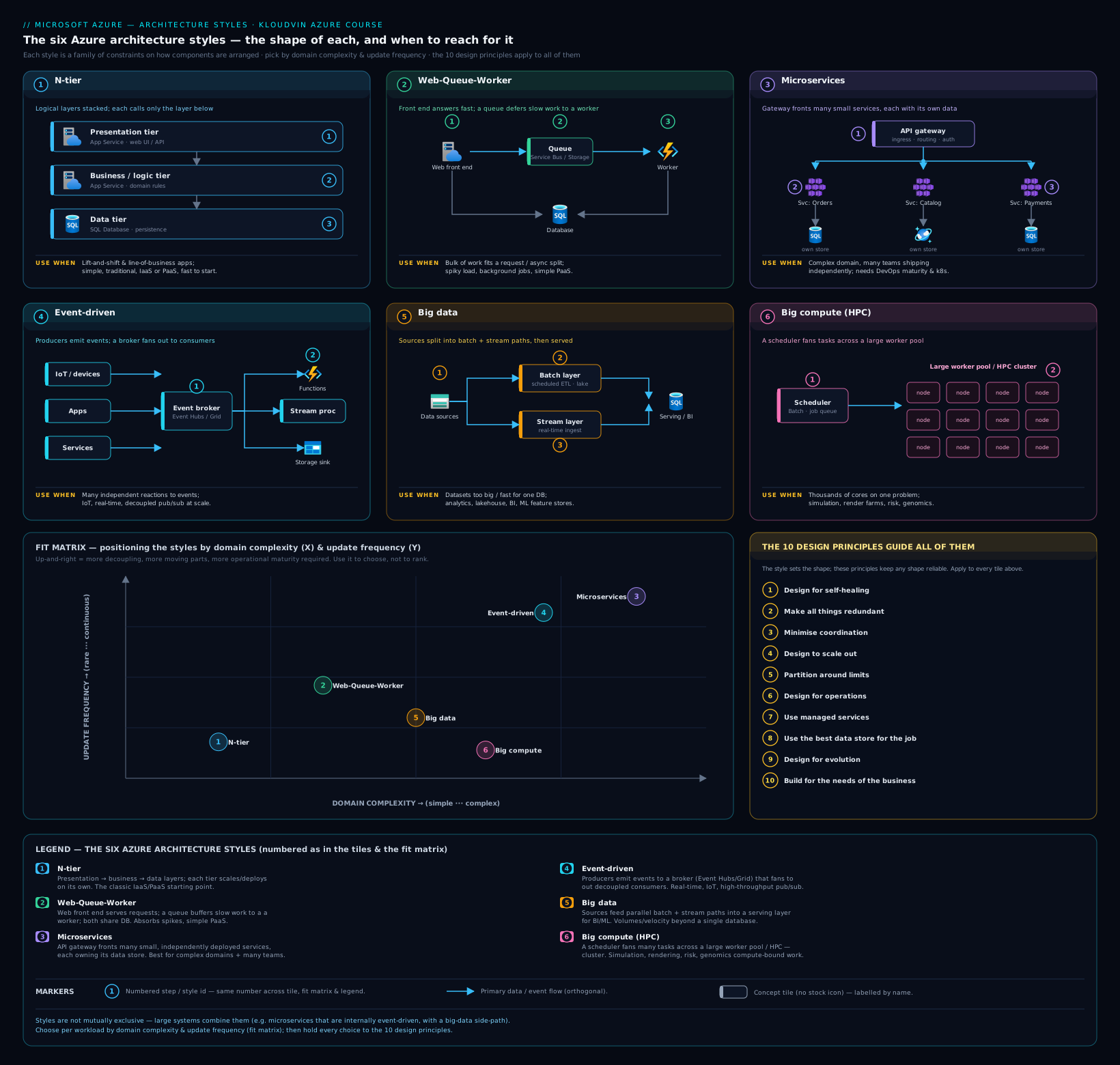
The diagram lays the six styles out side by side so you can compare their shapes at a glance — the synchronous tiering of N-tier next to the broker-decoupled event-driven style, and the data-parallel shape of Big data next to the compute-parallel shape of Big compute — with the common hybrid pairings (event-driven core feeding a big-data tail; microservices fronted by a web-queue-worker edge) drawn as the seams between them.
Combining styles: most real systems are hybrids
The six styles are buckets, not boxes — production systems routinely combine them, and recognising the combination is part of the skill.
- Event-driven core + Big data tail. The most common pairing on Azure: operational events flow through Event Hubs in real time (event-driven) and simultaneously land in the data lake for batch analytics and ML (big data). One backbone serves both the live reaction and the analytical pipeline.
- Microservices fronted by Web-Queue-Worker edges. Inside a microservices estate, individual services very often are web-queue-worker shaped — a synchronous API plus a queue and an async worker. The macro style is microservices; the micro shape of a service is web-queue-worker.
- N-tier with a Web-Queue-Worker offload. A three-tier app whose slow operations have moved onto a queue and worker — the natural, healthy, incremental evolution path. You do not have to leap to microservices to get async behaviour.
- Microservices with an event-driven fabric. Services communicating primarily through events rather than synchronous calls — microservices and event-driven at once, which is how mature distributed systems usually look.
The lesson: do not force a system into a single label. Identify the dominant style for the whole, then note where a subsystem follows a different one. The label is a thinking aid, not a contract.
The ten design principles for Azure applications
The six styles answer what shape. The ten design principles for Azure applications answer how to build well within any shape — they encode how the cloud actually behaves (commodity hardware fails, scale comes from adding instances not buying bigger ones, distributed components must coordinate sparingly) and they hold regardless of which style you chose. These are canonical Microsoft principles and worth knowing by name; AZ-305 questions lean on them constantly. Here they are, each with what it means and how it lands on Azure.
1. Design for self-healing
In a distributed system, failures happen — they are a routine operating condition, not an exception. Design the application to detect and recover from failures automatically: retry transient failures (exponential back-off with jitter), circuit breakers to stop hammering a failing dependency, health probes so the platform replaces unhealthy instances, graceful degradation so a failed non-critical dependency degrades rather than crashes the request, and idempotent operations so a retry is safe. On Azure: liveness/readiness probes in AKS and Container Apps, Front Door / Application Gateway probes pulling bad instances out of rotation, SDK retry-with-back-off, and Azure Monitor automation. Maps straight to the Reliability pillar.
2. Make all things redundant
Build redundancy in so that a single point of failure does not take the system down: run multiple instances and replicate across availability zones (and, for critical workloads, regions) at every layer — compute, data, and networking. On Azure: zones for VMs/AKS/App Service, zone-redundant Azure SQL and storage (ZRS), Front Door for global redundancy, Cosmos DB multi-region writes. The tradeoff is explicit and lives in the Cost pillar — make each layer as redundant as the workload’s reliability target justifies, not more. Reliability, in tension with Cost.
3. Minimize coordination
Coordination between instances — distributed locks, two-phase commit, chatty synchronous consensus — is the enemy of scale: it serialises work and creates contention that worsens as you add instances. Design so instances operate independently: prefer eventual consistency where the business tolerates it, partition data so instances own disjoint slices, use idempotent and commutative operations, and lean on asynchronous messaging instead of synchronous coordination. The less instances must talk to agree on something, the more linearly the system scales. Performance Efficiency — it is what makes scale-out actually work.
4. Design to scale out
Plan for horizontal scaling (more instances), not vertical (a bigger machine): horizontal scale is elastic and effectively unbounded, while vertical hits a ceiling and forces downtime to resize. The prerequisite is statelessness — any instance can serve any request, so you add or remove instances freely; externalise session/state to a shared store (Redis, a database, durable storage) and let autoscale do the rest. On Azure: VM Scale Sets, AKS autoscaler + HPA/KEDA, App Service autoscale, Container Apps scale rules (including scale-to-zero). Performance Efficiency and Cost — you pay only for the instances you currently need.
5. Partition around limits
Every resource has limits — quotas, throughput caps, connection limits, size ceilings — and you design around them rather than discovering them in production. Use partitioning to get past a single resource’s ceiling: shard a database, partition an event hub, split across storage accounts or even subscriptions when you would otherwise hit a quota. Treat the documented service limit as a design input. On Azure: Cosmos DB partition keys, Event Hubs partitions, Service Bus partitioned entities, storage-account scale targets, subscription/region quotas. Tied to Performance Efficiency and Reliability — and exactly why scale-unit / deployment-stamp thinking (the Mission-Critical lesson) exists.
6. Design for operations
Build the system so the operations team can see and manage it in production: rich telemetry (logs, metrics, distributed traces), health/status endpoints, correlation IDs to follow a request across services, actionable alerts, and infrastructure-as-code for reproducible environments. Observability is designed in from the start, not bolted on — a system you cannot observe is one you cannot operate or improve. On Azure: Azure Monitor, Application Insights, Log Analytics, distributed tracing, Health Endpoint Monitoring, Bicep/Terraform. The Operational Excellence pillar.
7. Use managed services
Prefer platform-as-a-service over infrastructure-as-a-service whenever it fits. Managed services hand the undifferentiated heavy lifting — patching, OS maintenance, HA plumbing, scaling, backups — to Azure, lowering operational burden, often improving reliability and security, and freeing your team for the business logic that differentiates you. The rule: do not run a VM to do something a managed service already does. On Azure: App Service over web VMs, Azure SQL over SQL-on-a-VM, AKS over hand-rolled Kubernetes, Functions/Container Apps over bespoke compute, Service Bus over self-hosted brokers. Serves Operational Excellence, Reliability, Security, and Cost at once — one of the highest-leverage principles.
8. Use the best data store for the job
Reject the one-size-fits-all database. Use polyglot persistence — pick the store whose model fits each part of the workload instead of forcing relational, document, key-value, graph, time-series and analytical patterns through one engine. Relational for transactional integrity and complex queries; document/NoSQL for flexible schema and horizontal scale; key-value for caching; graph for relationships; analytical stores for OLAP. Microservices takes this furthest with database-per-service. On Azure: Azure SQL / PostgreSQL (relational), Cosmos DB (document/NoSQL, multi-model, global), Cache for Redis (key-value), Cosmos DB Gremlin (graph), Data Explorer (time-series), Synapse/Fabric (analytical). Performance Efficiency and Cost — the right store is faster and usually cheaper for its access pattern.
9. Design for evolution
All successful applications change over time, so design so they evolve without a rewrite. Favour loose coupling and versioned interfaces/contracts; encapsulate domain knowledge behind them; use asynchronous messaging to decouple producers from consumers; and isolate volatile dependencies (the Anti-Corruption Layer and Strangler Fig patterns exist for this). The goal: replace, upgrade, or add a component without a coordinated big-bang change. On Azure: API Management for versioned contracts, Service Bus/Event Grid for async decoupling, App Configuration feature flags, and incremental migration patterns. Serves Operational Excellence and protects long-term Cost.
10. Build for the needs of the business
Every design decision must be justified by a business requirement — the principle that governs all the others. Reliability targets, performance targets, and spend all flow from what the business needs and will pay for: define RPO/RTO from business impact, set SLAs from real cost-of-downtime, and resist gold-plating (four nines on a back-office report is waste; under-engineering the revenue path is negligence). It is the through-line of the entire Well-Architected Framework, whose reliability principle is literally “design for business requirements.” All pillars — this is the principle that keeps the other nine honest.
The ten at a glance, mapped to the pillars
| # | Principle | Primary intent | WAF pillar(s) |
|---|---|---|---|
| 1 | Design for self-healing | Detect and recover from failure automatically | Reliability |
| 2 | Make all things redundant | No single point of failure | Reliability ↔ Cost |
| 3 | Minimize coordination | Independence enables scale | Performance Efficiency |
| 4 | Design to scale out | Horizontal, elastic, stateless | Performance Efficiency, Cost |
| 5 | Partition around limits | Design past resource ceilings | Performance Efficiency, Reliability |
| 6 | Design for operations | Observe and manage in production | Operational Excellence |
| 7 | Use managed services | Offload undifferentiated heavy lifting | Ops Excellence, Reliability, Security, Cost |
| 8 | Use the best data store for the job | Polyglot persistence by access pattern | Performance Efficiency, Cost |
| 9 | Design for evolution | Loose coupling, versioned contracts | Operational Excellence, Cost |
| 10 | Build for the needs of the business | Every choice justified by a requirement | All pillars |
Notice that the principles are not independent of the styles — they bias you. “Design to scale out” and “minimize coordination” reward the decoupled styles (web-queue-worker, event-driven, microservices) and quietly punish a tightly-tiered synchronous N-tier app. That is not a reason to abandon N-tier; it is a reason, if you choose N-tier, to apply the principles where they fit (stateless web tier, externalised state, redundancy across zones) and to consciously accept the constraints you cannot escape.
How to choose a style from requirements
Selecting a style is not pattern-matching on technology preferences — it is extracting the forces from the requirements and letting them point at a style. Here is the process I use, and the one that answers AZ-305 case-study questions cleanly.
Step 1 — Extract the dominant forces. Read the requirements and pull out the load-bearing facts, ignoring the noise. What you are hunting for:
- Domain complexity and team shape. One team and a modest domain, or many teams and many sub-domains? (Drives the microservices decision more than anything else.)
- Workload character. Request/response CRUD? Background and deferred work? Reaction to a stream of events? Large-scale data processing? Heavy parallel computation?
- Scale and elasticity. Steady, or spiky? Modest, or extreme? Does load on one feature differ wildly from another?
- Latency and consistency tolerance. Does the business need strong consistency and millisecond latency, or can it tolerate eventual consistency and seconds?
- Origin and constraints. Greenfield, or migrating an existing system? Time and budget pressure? Skills available in the team?
Step 2 — Match the dominant force to a candidate style using the fit table. Usually one style is the obvious primary. If two forces are both strong (e.g. “react to high-volume events” and “analyse petabytes”), you have a hybrid — name both.
Step 3 — Stress-test against the tax. Look at the candidate’s tax column and ask honestly: can this team and this business actually pay it? Microservices’ operational tax is the classic trap — the domain may justify it but the team’s platform-engineering maturity may not, in which case a modular monolith (N-tier done well) is the honest answer for now, with an evolution path later. This is where “build for the needs of the business” and “design for evolution” do their work.
Step 4 — Apply the ten principles within the chosen style. The style sets the shape; the principles make it good. Scale out, minimise coordination, make it redundant to the level the business justifies, use managed services, pick the right data store, design for operations and evolution.
Step 5 — Write down the constraints you are accepting. The step beginners skip and architects never do. Record in the design doc what the style makes hard — “eventual consistency on the read model,” “single-region because RTO is 4 hours and cost dominates,” “a release redeploys the whole business tier.” Naming the accepted constraints is what turns an accidental architecture into a chosen one, and it is the artefact that makes an ARB conversation productive instead of religious.
A quick worked sketch of the process. Requirement: a retailer’s new e-commerce checkout, traffic spiky around sales events, checkout must stay responsive while fulfilment/fraud/email happen behind the scenes, one product team, moderate domain, ship in a quarter, cost-sensitive. The dominant force is clearly background-work-plus-bursts, which points at Web-Queue-Worker — not microservices, because one team and a moderate domain leave that tax unjustified. Apply the principles (stateless scale-out web tier, idempotent workers, zone redundancy to the level cost justifies, Service Bus for decoupling, managed services throughout) and write down the accepted constraints: asynchronous order confirmation, eventual consistency between checkout and fulfilment, single region with zone redundancy because the RTO does not justify multi-region spend. A defensible, senior answer — and note the most sophisticated-sounding style was the wrong one. (The Exercise below works a richer, multi-style scenario end to end.)
Real-world application
How this shows up when you are doing the job, not the exam:
-
In an Architecture Review Board. The first slide of any good design doc names the style and the constraints being accepted. When a reviewer asks “why not microservices?”, the answer is the fit table and the tax column, not opinion. ARBs that argue about style endlessly are usually arguing because nobody wrote down the dominant force and the accepted constraints.
-
In a brownfield migration. Most enterprise reality is N-tier apps moving to Azure, and the right move is almost never “rewrite as microservices on day one.” It is lift-and-shift to PaaS N-tier, then incrementally offload slow operations to a queue and worker (toward web-queue-worker), then — only where a sub-domain genuinely demands independent scaling and ownership — strangle a service out. The styles describe an evolution path, and “design for evolution” keeps it open.
-
In a landing zone. Whatever style you pick lands inside an application landing zone (from the CAF lesson). The platform team gives you identity, networking, and policy guardrails; the style decides what compute, messaging, and data resources go into your subscription — a microservices workload asks for an AKS-shaped landing zone, an N-tier workload for a much simpler one. The style is a major input to the landing-zone request.
-
In cost reviews. “Make all things redundant” and “design to scale out” are where cloud bills are won and lost. Overspenders usually bought multi-region active-active (see active-active multi-region DR) for a workload whose business RTO was hours, or scaled up instead of out and pay for idle capacity. “Build for the needs of the business,” applied honestly, deletes the most line items.
-
In an incident review. “Design for self-healing” and “design for operations” decide whether a 3 a.m. page even happens. Systems built on them ride out a zone failure or a transient blip without human involvement and surface a clean trace when something breaks; systems that skipped them turn every blip into an outage and every outage into an archaeology dig.
Common mistakes & anti-patterns
-
Choosing a style for fashion, résumé, or what the last team did. The most common and most expensive mistake — microservices because it sounds modern, serverless because it is trendy, whatever the previous project used. The cost is paid for years. The fix: choose from the dominant force, every time.
-
Microservices when the domain (or the team) does not justify it. A moderate domain and one team need a well-structured monolith, not a distributed system. Reaching for microservices here imports the entire distributed-systems tax — network failure, eventual consistency, distributed tracing, a platform-engineering team you do not have — to solve a problem you do not have. The honest answer is often “modular monolith now, decompose later if a sub-domain demands it.”
-
Fighting the style’s constraints instead of accepting them. Picking event-driven and then bolting synchronous request/reply onto everything “to make it easier to reason about” — now you have paid the event-driven tax and lost its benefit. If you chose the style, live inside its constraints; if they are intolerable, you chose the wrong style.
-
Confusing a style with a pattern. “We use the CQRS architecture.” CQRS, Saga, Circuit Breaker, Strangler Fig are patterns — tactical moves applied within a style (see the patterns catalogue). The style is the macro shape; the pattern is a localised solution inside it. Mixing the vocabulary is a tell that the macro decision was never made.
-
Treating a big-data platform as a system of record, or a transactional database as an analytics engine. The big-data style is for analytics at volume, not OLTP. Running operational transactions through a data lake, or heavy analytical scans against your production OLTP database (the “Busy Database” anti-pattern), are both the wrong store for the job — principle 8 exists to prevent exactly this.
-
Skipping the “accepted constraints” step. If the design doc does not say what the architecture makes hard, it was not chosen — it accreted. An architecture document that lists only benefits is marketing, not engineering.
-
Ignoring the ten principles because “we picked a good style.” The style is necessary, not sufficient. A microservices system with stateful instances, chatty coordination, and no observability is worse than a well-built N-tier app. The principles are what make any style work in production.
Interview & exam questions
These concepts dominate AZ-305 case studies and senior-architect interviews. Work through them out loud.
1. What is an architecture style, and why is choosing one a tradeoff rather than a ranking? A style is a family of architectures sharing a set of constraints on components and their communication. The constraints make some properties easy and others hard, so there is no globally “best” style — only a best fit for a given set of dominant forces. A boring PaaS N-tier app is the correct answer far more often than microservices; sophistication is choosing the right constraints, not the most constraints.
2. Name the six Azure architecture styles and the dominant force that selects each. N-tier (migrate/simple CRUD); Web-Queue-Worker (background work + bursty load with a fast user path); Microservices (complex domain, many teams, divergent scaling); Event-driven (many consumers reacting to a high-volume stream); Big data (datasets too large for one database, parallel batch+stream); Big compute / HPC (large parallelisable compute-bound job).
3. A startup with one team and a moderate domain wants microservices “to be future-proof.” What is your recommendation? Push back. The microservices tax — network failure, eventual consistency, distributed tracing, service discovery, a platform-engineering burden — is not justified by one team and a moderate domain. Recommend a well-structured modular monolith (PaaS N-tier or web-queue-worker) with clean module boundaries and “design for evolution” applied, so a sub-domain can be strangled out later if and when it genuinely needs independent scaling or ownership. Resisting the buzzword is what demonstrates seniority here.
4. What is the difference between an architecture style and a design pattern? Give an example of each. A style is the macro shape of the whole system (e.g. event-driven); a pattern is a tactical, reusable solution to a recurring problem applied within a style (e.g. Circuit Breaker, CQRS, Strangler Fig, Saga). You choose one style and apply many patterns inside it. Saying “our architecture is CQRS” confuses the two.
5. State the ten design principles for Azure applications. Design for self-healing; make all things redundant; minimize coordination; design to scale out; partition around limits; design for operations; use managed services; use the best data store for the job; design for evolution; build for the needs of the business. (Know these verbatim — they recur across the exam.)
6. “Minimize coordination” and “design to scale out” — how are they related? Scaling out means adding instances; coordination between instances (locks, two-phase commit, synchronous consensus) serialises work and creates contention that worsens as you add instances, which throttles scale-out. So minimising coordination — via partitioning, idempotent/commutative operations, eventual consistency, and async messaging — is what lets scale-out actually deliver more throughput rather than just more contention.
7. The business requires RPO of 1 hour and RTO of 4 hours for an internal app, and is cost-sensitive. Which principle governs the redundancy decision, and what does it imply? “Build for the needs of the business” governs it, in tension with “make all things redundant.” A 4-hour RTO and cost sensitivity do not justify multi-region active-active; a single region with zone redundancy and a tested backup/restore or warm-standby path meets the requirement at a fraction of the cost. Buying active-active here is gold-plating — over-engineering reliability the business has not asked for.
8. A workload must ingest IoT telemetry from 100,000 devices in real time, react to anomalies immediately, and retain everything for ML training on petabytes of history. What style(s) apply and what is the Azure shape? A hybrid: event-driven for the real-time ingest-and-react path (IoT Hub → Event Hubs → Stream Analytics/Functions for anomaly reaction) and big data for the analytical/ML tail (Event Hubs Capture / pipelines → ADLS Gen2 → Fabric/Databricks for batch ML). Recognising and naming both styles — not forcing one label — is the point.
9. When would you choose Web-Queue-Worker over plain N-tier, and over microservices? Over N-tier: when there is significant background or deferred work and a bursty load profile, so you want load levelling and independent scaling of the worker tier — without the user-facing path stalling. Over microservices: when one team and a moderate domain mean the microservices tax is unjustified; web-queue-worker gives you async decoupling and independent web/worker scaling without a fleet of independently deployed services.
10. “Use managed services” touches four of the five WAF pillars. Explain. Offloading patching, HA plumbing, scaling, and backups to Azure improves Reliability (the platform’s HA is battle-tested), Security (the platform patches and hardens), Operational Excellence (far less to run and observe), and Cost (no idle capacity, no ops headcount on undifferentiated work). The classic counter-tradeoff is reduced control and possible lock-in — but for most workloads the four-pillar win dominates.
11. What does “partition around limits” protect you from, and name two Azure limits it addresses. It protects you from hitting a single resource’s ceiling in production — throughput caps, connection limits, quotas, size limits. Examples: partitioning a Cosmos DB container to exceed a single logical-partition’s throughput/storage limit; spreading load across storage accounts or Event Hubs partitions to beat per-account scale targets; splitting across subscriptions to beat subscription-level quotas. It is the principle behind scale-unit / deployment-stamp design.
12. You inherit a three-tier monolith on VMs that the business wants on Azure within a quarter, then modernised over two years. Outline the style trajectory. Phase 1: lift-and-shift to PaaS N-tier (App Service + zone-redundant Azure SQL + Redis) — fastest path, lowest risk, satisfies the quarter deadline. Phase 2: offload slow operations to a queue and worker, evolving toward Web-Queue-Worker for responsiveness and independent scaling. Phase 3: where a sub-domain genuinely needs independent deployment or scaling, strangle it out into its own service — selectively microservices, not a big-bang rewrite. “Design for evolution” keeps each phase’s interfaces clean enough to enable the next.
Quick check
Q1. True or false: there is a single best architecture style, and more modern styles are generally better. A1. False. A style is a set of constraints; the “best” one is the best fit for the dominant forces in the requirements. N-tier is frequently the correct choice; microservices is frequently the wrong one.
Q2. Which style is selected by the dominant force “many independent teams must deploy independently, and a complex domain has parts with very different scaling needs”? A2. Microservices — and only when the team can actually pay its operational tax.
Q3. Name three taxes you accept when you choose the event-driven style. A3. Implicit/scattered control flow that is hard to reason about; ordering and duplicate-delivery handling (at-least-once); eventual consistency and heavy observability needs to trace a fact through many consumers.
Q4. Which design principle says to prefer horizontal scaling and keep instances stateless, and which Azure features realise it? A4. “Design to scale out.” Realised by VM Scale Sets, AKS autoscaler + HPA/KEDA, App Service autoscale, and Container Apps scale rules — with state externalised to Redis or a database.
Q5. A team built an event-driven system but added synchronous request/reply across all of it to make debugging easier. What mistake is this, and what principle does it violate? A5. Fighting the style’s constraints — they now pay the event-driven tax and lose its decoupling benefit. It works against “minimize coordination” and “design for evolution,” and signals the style choice should be revisited.
Exercise
The thought experiment. You are the architect for “FleetSense,” a new platform for a national logistics carrier. Requirements, verbatim from the brief:
Every delivery vehicle (about 40,000 of them) streams GPS, temperature (cold-chain), and engine telemetry every 5 seconds. Operations staff need a live map and immediate alerts when a refrigerated unit drifts out of range. Separately, the data-science team must retain all telemetry indefinitely to train route-optimisation and predictive-maintenance models over years of history. A customer-facing tracking portal lets recipients see their parcel’s live location; traffic on it is extremely spiky around delivery windows and public holidays. The platform is being built by three teams — a telemetry/ingest team, a customer-portal team, and a data-science team — who want to release on independent schedules. The business RTO for the live operations path is 15 minutes; for the analytics platform it is 24 hours. Budget is real but not unlimited.
Produce: (a) the architecture style(s) you choose and the dominant force behind each; (b) a representative Azure stack; © at least four of the ten design principles applied with a concrete decision each; (d) the accepted constraints you would write into the design doc.
Model answer.
(a) Styles and dominant forces. This is a hybrid of three styles, and naming all three is the mark of a strong answer:
- Event-driven for the telemetry ingest-and-react path. Dominant force: 40,000 devices streaming every 5 seconds with the need for immediate reaction to anomalies — high-volume stream, many reactions, producers decoupled from consumers.
- Big data for the indefinite-retention analytics and ML platform. Dominant force: “retain all telemetry indefinitely… train models over years of history” — datasets far too large for a transactional store, batch ML over petabytes.
- Microservices (with a Web-Queue-Worker edge on the portal) for the overall service decomposition. Dominant force: three teams releasing on independent schedules with genuinely divergent scaling (steady ingest vs spiky customer portal). The customer portal itself is web-queue-worker shaped under bursty load.
(b) Representative Azure stack.
- Ingest/event-driven: Azure IoT Hub (device connectivity and management for 40,000 devices) → Event Hubs (high-throughput stream) → Stream Analytics / Functions for real-time cold-chain anomaly detection and alerting → SignalR / Web PubSub to push the live map to operations.
- Big data: Event Hubs Capture / Fabric pipelines → ADLS Gen2 (medallion lakehouse, indefinite retention) → Microsoft Fabric / Databricks (Spark) for route-optimisation and predictive-maintenance ML → serving via a lakehouse warehouse and Power BI.
- Services/portal: services on AKS or Container Apps behind API Management / Front Door; the customer tracking portal as App Service + a Service Bus queue + worker for the spiky read path, with Cosmos DB holding current parcel location for fast global reads and Redis caching hot lookups. Inter-service communication primarily via events (Event Grid / Service Bus).
© Principles applied (four+).
- Partition around limits: partition Event Hubs and Cosmos DB by device/region so the 40k-device firehose and the portal read load each stay within per-resource scale targets; this is also the seam for scale units.
- Design to scale out: stateless ingest and portal services with state in Cosmos/Redis; autoscale the portal on queue depth and request rate to absorb holiday spikes (scale-to-zero on quiet services to control cost).
- Make all things redundant — to the level the business justifies: the live operations path (RTO 15 min) gets zone redundancy and a warm cross-region capability; the analytics platform (RTO 24 h) gets zone redundancy and geo-redundant storage but not expensive active-active — straight application of “build for the needs of the business.”
- Use the best data store for the job: Event Hubs for the stream, ADLS Gen2 for the analytical lake, Cosmos DB for low-latency global current-location reads, Redis for hot caching — explicitly not one database for all of it.
- (Bonus) Design for self-healing & for operations: idempotent stream processors, dead-letter queues, health probes, and end-to-end distributed tracing from device to portal so an anomaly is traceable.
(d) Accepted constraints (written into the doc).
- The live map and alerts run on eventual consistency and at-least-once delivery; cold-chain alerts are deduplicated and idempotent, and may arrive seconds after the underlying reading.
- The analytics platform is an insight engine, not a system of record, with higher latency (minutes to hours) and a 24-hour RTO; it is not multi-region active-active, by deliberate cost choice.
- The three teams deploy independently, which means we accept the distributed-systems tax (network failure, contract versioning, distributed tracing) and commit to the platform-engineering investment — AKS/Container Apps platform, observability, CI/CD — that this requires. If that investment is not fundable, the fallback is to consolidate the ingest and analytics ownership and run a more modular, less-distributed shape until it is.
Anyone who answers with a single style, or who forgets to write down the accepted constraints, has missed the point of the exercise — and of the lesson.
Certification mapping
AZ-305 — Designing Microsoft Azure Infrastructure Solutions (primary). This lesson sits at the heart of AZ-305, whose entire premise is choosing the right design from a set of requirements:
- Design infrastructure solutions. Selecting compute, messaging, and data services flows directly from the architecture style — N-tier vs web-queue-worker vs microservices vs event-driven each implies a different service mix. AZ-305 case studies hand you a scenario and expect you to land on the right shape.
- Design data storage solutions. “Use the best data store for the job” is examined constantly — relational vs document vs key-value vs analytical, and choosing Azure SQL vs Cosmos DB vs Storage vs Synapse/Fabric for a given access pattern.
- Design business continuity solutions. “Make all things redundant” and “build for the needs of the business” map to RPO/RTO-driven redundancy decisions — zones vs regions vs active-active — and the discipline of not over-engineering.
- Design for identity, governance, and monitoring. “Design for operations” underpins the monitoring/observability design questions; the governance side ties back to the CAF/landing-zone lesson.
- The ten design principles are the rubric the exam silently grades against — when a question asks “what should you recommend,” the defensible answer is almost always the option that best honours scale-out, managed services, the right data store, and business-justified redundancy.
AZ-204 — Developing Solutions for Microsoft Azure (where relevant). The web-queue-worker and event-driven styles map onto AZ-204’s messaging topics (Service Bus, Event Grid, Event Hubs, Storage Queues), and “design for self-healing” maps onto the SDK retry/transient-fault-handling and idempotency material. AZ-204 tests the implementation; AZ-305 tests the choice.
AZ-104 — Microsoft Azure Administrator (where relevant). The scale-out and redundancy principles surface as VM Scale Sets, availability zones, load balancing, and autoscale configuration. AZ-104 is the operator’s view of the same principles this lesson frames at the architect’s altitude.
Glossary
- Architecture style — A family of architectures sharing a set of constraints on components and their communication; the macro shape of a system. The choice is a tradeoff (benefit bought vs tax levied), not a ranking.
- Constraint system — The framing of a style as a set of accepted constraints that make some properties easy and others hard.
- Dominant force — The single requirement that, when it dominates the others, selects a particular architecture style.
- N-tier — Layered style (presentation/business/data) where each tier calls only the tier below; the natural target for lift-and-shift and simple CRUD apps.
- Web-Queue-Worker — A web front end for synchronous requests plus a queue and a background worker for asynchronous work; gives load levelling and independent web/worker scaling.
- Microservices — Vertical decomposition into many small, independently deployable services each owning its data; high autonomy at the cost of the full distributed-systems tax.
- Event-driven — Components communicate via events through a broker (discrete events via Event Grid, streams via Event Hubs); extreme decoupling, implicit flow.
- Big data — A style for ingesting/storing/processing very large partitioned datasets in parallel (batch + stream; lambda/kappa); analytics, not transactions.
- Big compute (HPC) — Running a large, parallelisable, compute-bound job across many cores (Azure Batch, H-series VMs, RDMA).
- Polyglot persistence — Using multiple, purpose-fit data stores rather than one database for everything (principle 8).
- Scale out (horizontal scaling) — Adding more instances rather than a bigger machine; requires stateless instances (principle 4).
- Minimize coordination — Designing so instances operate independently, avoiding locks/consensus that throttle scale-out (principle 3).
- Partition around limits — Designing past a single resource’s ceiling via sharding/partitioning (principle 5); the basis of scale-unit/stamp design.
- Self-healing — Detecting and recovering from failure automatically (retry, circuit breaker, health probes, graceful degradation, idempotency) (principle 1).
- Eventual consistency — A consistency model where replicas converge over time rather than instantly; the common cost of the decoupled styles.
- Idempotency — The property that performing an operation more than once has the same effect as performing it once; essential under at-least-once delivery.
- Hybrid architecture — A system that deliberately combines two or more styles (e.g. event-driven core + big-data tail).
Next steps
You now have the macro decision — the style — and the principles that make any style good. The next lesson zooms into the tactical layer: The 43 Azure Cloud Design Patterns: A Complete, Practical Catalogue — the reusable moves (Retry, Circuit Breaker, CQRS, Saga, Strangler Fig, Gateway Aggregation, Deployment Stamps, and the rest) you apply inside the style you just chose, grouped by the problem they solve and the Well-Architected pillar they serve.
To go deeper on the surrounding material:
- Revisit The Azure Well-Architected Framework, In Depth — the pillars are the rubric you score every style choice against, and the tradeoffs there (security adds latency, redundancy adds cost) are the same tradeoffs the ten principles encode.
- Revisit Cloud Adoption Framework & Azure Landing Zones, In Depth and Azure Landing Zones with CAF — every workload lands inside an application landing zone, and the style is a major input to what that landing zone must provide.
- Read Multi-region active-active disaster recovery to see “make all things redundant” and “build for the needs of the business” colliding in a real redundancy-vs-cost decision.
- Read The Reliability pillar in practice and the Security pillar in practice to see “design for self-healing,” “make all things redundant,” and the security tradeoffs operationalised end-to-end.
- Then continue to the module capstone, Mission-Critical (AlwaysOn) Architecture on Azure, where styles, the ten principles, and patterns converge in the apex design — scale units, active/active, composite SLAs, and health modelling.