Your order service needs to tell five other things when an order is placed: charge the card, decrement inventory, email a receipt, update the analytics warehouse, and notify the warehouse pick-list. The naive way is to make the order service call all five directly — five HTTP calls in the hot path, five things that can fail your checkout, five teams you have to coordinate with every time a new consumer appears. The event-driven way is to have the order service publish one event — “OrderPlaced” — to a broker and walk away. Whoever cares subscribes. The order service never knows or cares who is listening, and adding a sixth consumer next quarter requires zero changes to checkout. Azure Event Grid custom topics are that broker: a publish endpoint you own, that your code posts events to, fanning each event out to every subscriber that matches a filter, with retries and dead-lettering built in.
This is different from the other Event Grid story you may have read. System topics (covered in Event Grid System Topics Explained) are Azure telling you that a blob landed or a VM started — Azure is the publisher. A custom topic flips that: your application is the source, you define the event shape, and you hold the keys to the publish endpoint. That changes how you build it — you pick a schema, authenticate the publisher, design the subject so subscribers can filter on it, and if a subscriber is a plain HTTP endpoint you must satisfy the webhook validation handshake before Event Grid delivers a single event to it. That handshake trips up almost everyone the first time, and a whole section here is devoted to it.
By the end you’ll have built a working custom topic end to end — in the portal, with az CLI, and as Bicep — published real events, attached a filtered Azure Function subscriber and a raw webhook subscriber, watched the handshake succeed (and fail), configured retry and dead-letter, and torn it down. You’ll understand the two schemas, the filtering model, the auth options, and the metrics that tell you whether events are arriving. This maps directly to the AZ-204 “Develop event-based solutions” objective and the integration portions of AZ-305.
What problem this solves
Point-to-point integration rots. Every time service A must notify service B, someone writes a direct call, hard-codes B’s URL, handles B’s retries, and now A’s deployment is coupled to B being up. Do that across a dozen services and you have a distributed monolith: a mesh of synchronous calls where one slow consumer stalls the producer, and nobody can add a listener without touching the producer’s code, tests and on-call. The producer ends up owning failures it didn’t cause.
Event Grid custom topics break that coupling. The producer publishes a fact (“this happened”) to one endpoint and is done in milliseconds — it doesn’t wait for consumers, doesn’t know how many there are, and is unaffected when one is down or slow. Event Grid takes custody of the event: it retries with exponential backoff for up to 24 hours, and dead-letters anything it ultimately can’t deliver so nothing is silently lost. New consumers self-serve by creating a subscription with a filter; the producer never finds out.
What breaks without this: teams build the synchronous mesh, then spend two years untangling it; or reach for a queue and hand-roll fan-out (which queues do poorly, since a message is consumed once); or poll. The custom topic fits specifically when your own code is the event source and you want many independent push-based subscribers, each filtering for its slice.
To frame the field, here is what you’re building and which decision each piece forces:
| Building block | What it is | The decision it forces | Where it’s set |
|---|---|---|---|
| Custom topic | The publish endpoint you own | Region, schema, name | Resource, created once |
| Event schema | The JSON envelope shape | EventGridSchema vs CloudEvents 1.0 | Topic property (--input-schema) |
| Publisher auth | How your code proves it may publish | Access key vs SAS token vs Entra RBAC | Per request / role assignment |
| Event subscription | A subscriber + its filter + retry | Which handler, what filter, how to retry | Child of the topic |
| Handler (endpoint type) | Where matched events go | Function, webhook, Service Bus, etc. | Subscription property |
| Webhook validation | The handshake for raw HTTP endpoints | Echo the validationCode, or use validation URL |
Handler code / subscription |
| Dead-letter | Where undeliverable events land | Which Blob container, and the identity to write it | Subscription property |
Learning objectives
By the end of this article you can:
- Create an Event Grid custom topic in the portal, with
az eventgrid topic create, and as a Bicep resource, choosing the right region and input schema. - Choose deliberately between the EventGridSchema and CloudEvents 1.0 envelopes, and explain what changes downstream when you pick one.
- Publish events to a topic three ways — with the access key in the
aeg-sas-keyheader, with a SAS token, and with Entra ID RBAC (EventGrid Data Sender) — and know when each is appropriate. - Design the event
subjectso subscribers can filter on it, and build subscriptions usingsubjectBeginsWith,subjectEndsWith, event-type and advanced filters. - Wire an Azure Function subscriber (which auto-validates) and a raw webhook subscriber, and implement the synchronous and asynchronous validation handshake correctly.
- Configure the retry policy (max attempts, event TTL) and a dead-letter destination, and read the
Published,Matched,Delivered,DeliveryFailedandDeadLetteredmetrics to prove delivery. - Diagnose the common failures — 401 on publish, “webhook validation handshake failed”, events matching nothing, and silently dropped events — with the exact command or blade to confirm each.
Prerequisites & where this fits
You need an Azure subscription with rights to create resources in a resource group, the az CLI (az login, or Cloud Shell where it’s preinstalled), and the Event Grid CLI extension (az extension add --name eventgrid, or let it auto-install). Be comfortable reading JSON and making an HTTP POST with curl; you’ll get the most from the Function subscriber if you’ve met Azure Functions — the Azure Functions triggers and bindings primer is the on-ramp. Knowing what a managed identity is helps for the RBAC and dead-letter parts (system vs user-assigned).
This sits in the Integration / event-driven track. Upstream is the publish/subscribe mental model from Event Grid System Topics Explained — read that first if “publisher / topic / subscription” is new. Event Grid is one of three Azure messaging services: it’s for reactive, push-based, many-subscriber notification; Service Bus for ordered, transactional command/queue workloads (queues vs topics); Event Hubs for high-throughput telemetry (partitions and consumer groups). They’re complementary, and real systems chain them.
Where each fits, so you don’t reach for the wrong one:
| Service | Shape | Best for | Delivery model | Retention |
|---|---|---|---|---|
| Event Grid (this article) | Discrete events, fan-out | “X happened, many should react” | Push to handlers (or pull on namespaces) | 24h retry, then dead-letter |
| Service Bus | Commands / messages, queues + topics | Ordered, transactional, exactly-once-ish work | Pull (competing consumers) | Until consumed (days+) |
| Event Hubs | High-volume event stream | Telemetry, logs, clickstream at MB/s | Pull from offsets | Configurable (1–90 days) |
| Storage Queue | Simple work queue | Cheap, basic decoupling | Pull | 7 days max per message |
A note on naming: the original, GA model is the custom topic (Microsoft.EventGrid/topics) — what this article builds. A newer namespace model (Microsoft.EventGrid/namespaces) adds MQTT and a pull delivery mode; it’s a different resource with different CLI verbs. Everything below targets the classic custom topic, which is what AZ-204 expects and what most production push-based fan-out uses today.
Core concepts
Five ideas make every later step obvious.
A custom topic is an endpoint plus a key. Creating a topic returns an endpoint URL (https://<topic>.<region>-1.eventgrid.azure.net/api/events) your code POSTs to, and two access keys (key1, key2). Anyone with the endpoint and a valid key can publish — that’s the entire contract: no SDK, no connection-string ceremony, just an HTTPS POST with the key in a header. Two keys exist so you can rotate one while the other keeps working.
An event is a small JSON envelope, not a payload dump. Events are lightweight notifications — “OrderPlaced, id 8842, here’s where to look” — carrying metadata (id, eventType, subject, eventTime, dataVersion) and a small data object. The convention is thin events: enough for a subscriber to decide whether it cares and fetch the full record if so, not the 50 KB order. The size limit is soft (64 KB included in the base price; up to 1 MB supported but billed and discouraged routinely).
The subject is your routing handle. Every event has a subject you set — the most important field you design, because subscriptions filter on it with subjectBeginsWith/subjectEndsWith. A good subject is a path hierarchy (orders/8842/placed, inventory/sku-12/low) so a subscriber can grab “everything under orders/” with a prefix. A random-GUID subject makes useful filtering impossible, so every subscriber gets everything.
A subscription binds a handler, a filter, and a retry policy. The event subscription is a child of the topic naming a handler (Function, webhook URL, Service Bus queue, Event Hub, Storage Queue, Logic App), a filter (which events), and a retry/dead-letter policy. One topic can have many subscriptions, each with its own filter — that’s the fan-out. Event Grid pushes; the handler doesn’t poll.
Raw webhooks must prove they own the URL. If a subscriber is an arbitrary HTTPS endpoint (not a first-class Azure handler, which Event Grid trusts implicitly), Event Grid won’t deliver until that endpoint passes a validation handshake — stopping Event Grid from being abused to flood a victim URL. The handshake is what people get wrong; it’s covered in full below.
The vocabulary in one table
Pin down every moving part before the deep sections. The glossary repeats these for lookup:
| Term | One-line definition | Where it lives | Why it matters |
|---|---|---|---|
| Custom topic | Publish endpoint + keys you own | Microsoft.EventGrid/topics |
The thing your code posts to |
| Topic endpoint | The HTTPS URL events POST to | Topic property | Half of the publish contract |
| Access key | key1/key2 that authorize publish |
Topic keys | The other half; rotate in pairs |
| Event schema | Envelope shape (EventGrid / CloudEvents) | Topic --input-schema |
Determines the JSON your code sends |
subject |
Your routing/filter handle on each event | Event field you set | Subscribers filter on it |
eventType |
The category of the event | Event field you set | Filter by type; route by it |
| Event subscription | Handler + filter + retry binding | Child of the topic | The fan-out unit |
| Handler / endpoint | Where matched events are delivered | Subscription property | Function, webhook, queue, etc. |
| Validation handshake | Proof a raw webhook owns its URL | Handler code / validation URL | Without it, no delivery to webhooks |
| Retry policy | Max attempts + event TTL | Subscription property | How hard EG tries before DLQ |
| Dead-letter | Blob target for undeliverable events | Subscription property | Where lost events are preserved |
Choosing the event schema: EventGridSchema vs CloudEvents 1.0
A custom topic carries events in one input schema, chosen at creation and effectively fixed for the topic’s life. Two real choices.
EventGridSchema is Azure’s native envelope — a flat JSON object with fixed top-level fields (id, topic, subject, eventType, eventTime, data, dataVersion, metadataVersion). Every Azure sample and Event Grid trigger understands it natively; it’s the path of least resistance inside Azure.
CloudEvents 1.0 is the CNCF vendor-neutral standard for describing events across clouds and systems. Its fields differ — id, source, type, subject, time, data, specversion, datacontenttype. If events cross system boundaries (other clouds, Knative, a partner expecting the standard), CloudEvents is the interoperable choice and increasingly the default for new work.
They carry the same information; field names and a couple of semantics differ. The mapping is worth memorizing because filters and handler code reference these names directly:
| Concept | EventGridSchema field | CloudEvents 1.0 field | Notes |
|---|---|---|---|
| Unique id | id |
id |
You set it; used for at-least-once dedup hints |
| Event category | eventType |
type |
e.g. Contoso.Orders.Placed |
| Routing handle | subject |
subject |
Same field, same filtering |
| Source identifier | topic (set by EG) |
source (you set) |
CloudEvents requires source |
| Timestamp | eventTime |
time |
RFC 3339 / ISO 8601 |
| Payload | data |
data |
Your small object |
| Schema version | dataVersion |
dataschema (optional) |
Version your data shape |
| Spec version | metadataVersion |
specversion ("1.0") |
Fixed by the spec |
| Content type | (implicit JSON) | datacontenttype |
CloudEvents can carry non-JSON |
How to decide, in one table:
| If… | Choose | Because |
|---|---|---|
| Everything stays inside Azure and you want the smoothest path | EventGridSchema | Native to every trigger/sample; least friction |
| Events leave Azure or hit standards-based consumers | CloudEvents 1.0 | Vendor-neutral; partners expect it |
| You’re starting fresh with no legacy consumers | CloudEvents 1.0 | Future-proof, increasingly the default |
| You must publish binary / non-JSON payloads | CloudEvents 1.0 | Supports datacontenttype and binary mode |
| You have existing EventGridSchema subscribers to match | EventGridSchema | Don’t fracture your consumers |
Two cautions. The schema is a creation-time decision — you can’t toggle a live topic; create a new one to switch. And an Event Grid-triggered Function receives the EventGridEvent shape regardless (the runtime normalizes it), but a raw webhook receives exactly the wire schema you chose — so your webhook must parse the right field names. Reading eventType from a CloudEvents payload that calls it type is a quiet, common bug.
Authenticating the publisher: keys, SAS, and Entra RBAC
Publishing is an HTTPS POST to the topic endpoint, and the request must be authorized. Three mechanisms, in increasing operational maturity:
- Access key — put
key1/key2in theaeg-sas-keyheader. Simplest; perfect for trusted server-side code, but the key is long-lived and grants full publish rights, so treat it like a password and store it in Key Vault, never in source. - SAS token — a time-limited signed token computed from a key, sent in
aeg-sas-token. It expires, making it safer for a less-trusted or short-lived publisher. - Entra ID RBAC — the recommended path: no keys. The publisher authenticates as an Entra identity (ideally a managed identity) granted
EventGrid Data Senderon the topic. The right answer for production — secretless, auditable, revocable per-principal, nothing to rotate.
The three side by side:
| Mechanism | Header / method | Lifetime | Granularity | Best for | Trade-off |
|---|---|---|---|---|---|
| Access key | aeg-sas-key: <key> |
Long-lived until rotated | Full publish on the topic | Quick start, trusted servers | A leaked key publishes freely |
| SAS token | aeg-sas-token: <token> |
Expires (you set it) | Full publish until expiry | Short-lived / less-trusted publishers | Must regenerate before expiry |
| Entra RBAC | Authorization: Bearer <jwt> |
Token lifetime; role persists | Per-principal, revocable | Production | Slight token-acquisition setup |
The two keys exist for zero-downtime rotation. Never regenerate the key clients are actively using — that’s an instant outage. Rotate by the swap dance:
| Step | Action | Why |
|---|---|---|
| 1 | Clients are using key1 |
Starting state |
| 2 | Update clients to use key2 (already valid) |
key2 was live all along |
| 3 | Confirm all clients now publish with key2 |
No client still on key1 |
| 4 | Regenerate key1 |
The old, now-unused key is invalidated |
| 5 | (Optional) repeat to rotate key2 later |
Keep a rotation cadence |
For RBAC, the relevant built-in roles:
| Role | Grants | Use it for |
|---|---|---|
| EventGrid Data Sender | Publish events to topics | The publisher’s identity (least privilege) |
| EventGrid Contributor | Manage topics + subscriptions | Operators / IaC pipelines |
| EventGrid EventSubscription Contributor | Manage subscriptions only | Teams self-serving subscriptions |
| Reader | View config (no publish) | Auditors / dashboards |
Designing subscriptions and filters
A subscription decides which events it receives. Event Grid evaluates filters server-side, so a well-filtered subscriber only ever sees its slice — saving the handler from receiving and discarding noise. There are three filtering layers:
- Subject prefix/suffix (
subjectBeginsWith,subjectEndsWith) — the workhorse: simple string matches on thesubjectyou designed.subjectBeginsWith: "orders/"catches every order event. Case-sensitive — a frequent gotcha. - Event-type (
includedEventTypes) — matcheventType/typeagainst an allow-list to route by category. - Advanced filters — match fields inside the event (including your
data) with operators likeNumberGreaterThan,StringIn,BoolEquals.data.amount NumberGreaterThan 1000routes only high-value orders to fraud. Bounded: up to 5 per subscription, each with a bounded value list.
The filtering toolkit at a glance:
| Filter type | Matches on | Operators / form | Example | Limit / gotcha |
|---|---|---|---|---|
| subjectBeginsWith | Start of subject |
Prefix string | orders/ |
Case-sensitive; one value |
| subjectEndsWith | End of subject |
Suffix string | /placed |
Case-sensitive; one value |
| includedEventTypes | eventType / type |
Allow-list of strings | ["Contoso.Orders.Placed"] |
Exact match, case-sensitive |
| Advanced (number) | Any field incl. data.* |
NumberGreaterThan, NumberIn, … |
data.amount > 1000 |
≤5 advanced filters |
| Advanced (string) | Any field incl. data.* |
StringContains, StringIn, StringBeginsWith |
data.region StringIn ["eu","uk"] |
Up to a bounded value list |
| Advanced (bool) | Any field incl. data.* |
BoolEquals |
data.isPriority = true |
One value |
| isSubjectCaseSensitive | Toggle subject casing | true/false |
match Orders/ ≈ orders/ |
Default true |
A worked subject design: for orders, set subject to orders/{orderId}/{action} (e.g. orders/8842/placed). Now the receipt service subscribes with subjectBeginsWith: "orders/" + includedEventTypes: ["Contoso.Orders.Placed"], fraud adds data.amount NumberGreaterThan 1000, and audit takes everything with no filter — three independent consumers from one event. A bare-GUID subject would make none of that prefix routing work.
Other subscription knobs you’ll set:
| Setting | What it controls | Default | When to change |
|---|---|---|---|
--endpoint-type |
Handler kind (webhook, azurefunction, servicebusqueue, eventhub, storagequeue, …) | webhook | Match your handler |
--event-delivery-schema |
Schema delivered to the handler | Topic’s input schema | Deliver CloudEvents from an EventGrid topic, etc. |
--max-delivery-attempts |
Retry attempts before dead-letter | 30 | Lower for fast-fail; you rarely raise it |
--event-ttl |
Max minutes EG keeps retrying | 1440 (24h) | Shorten for time-sensitive events |
--deadletter-endpoint |
Blob container for undeliverable events | none | Always set in production |
--labels |
Free-text tags on the subscription | none | Inventory / ownership |
The webhook validation handshake — in full
This is the section everyone needs. When a subscription’s handler is a raw webhook (endpoint type webhook, an arbitrary HTTPS URL — not an Azure Function, Service Bus, Event Hub, Storage Queue, or Hybrid Connection, which Event Grid trusts implicitly), Event Grid first runs an ownership-proof handshake so nobody can subscribe a victim’s URL and use Event Grid as a traffic cannon. Until it succeeds, zero events are delivered and the subscription create fails or sits unvalidated. There are two modes; you implement one.
Synchronous validation. At create time, Event Grid POSTs a single event of type Microsoft.EventGrid.SubscriptionValidationEvent whose data holds a validationCode (a GUID) and a validationUrl. To pass, your endpoint returns HTTP 200 within 30 seconds with a body echoing the code:
{ "validationResponse": "<the validationCode you received>" }
Echo the GUID back and you’re validated; Event Grid then delivers real events to the same URL.
Asynchronous (manual) validation. If your endpoint can’t echo at create time (e.g. a third-party system), Event Grid also gives you the validationUrl in that event. An HTTP GET on it within the window (~5 minutes) completes the handshake out-of-band — the escape hatch for endpoints that can receive but not echo on demand.
Crucially, distinguish the validation event from real events — they arrive at the same URL. The validation event has the reserved eventType Microsoft.EventGrid.SubscriptionValidationEvent; everything else is your traffic.
The handshake, step by step:
| Step | Who | What happens | Your job |
|---|---|---|---|
| 1 | You | Create the subscription pointing at your URL | Endpoint must be reachable over HTTPS |
| 2 | Event Grid | POSTs a SubscriptionValidationEvent with validationCode + validationUrl |
— |
| 3 | Your endpoint | Receives the POST; detects the validation eventType |
Branch on eventType |
| 4a | Your endpoint (sync) | Returns 200 + { "validationResponse": code } within 30s |
Echo the code |
| 4b | Your endpoint (async) | Returns 200; you later GET the validationUrl |
GET it within ~5 min |
| 5 | Event Grid | Marks the subscription validated | — |
| 6 | Event Grid | Begins delivering real events to the URL | Handle real events |
A minimal, correct webhook handler (Node/Express) showing the branch:
app.post('/api/eventgrid', (req, res) => {
  const events = req.body;                 // Event Grid sends an array
  for (const e of events) {
    if (e.eventType === 'Microsoft.EventGrid.SubscriptionValidationEvent') {
      // Synchronous handshake: echo the code back
      return res.status(200).json({ validationResponse: e.data.validationCode });
    }
  }
  // Real events — process them, then 200 to ACK
  // ... your handling ...
  return res.sendStatus(200);
});
The same logic in C# inside an HTTP-triggered Function inspects eventGridEvent.EventType and returns new { validationResponse = data.ValidationCode }. (If you use the Event Grid trigger binding instead, the SDK does the handshake for you — the hand-rolled version is only for raw webhook endpoints.)
What makes the handshake fail, and how to tell:
| Symptom | Cause | Confirm | Fix |
|---|---|---|---|
| Create fails: “validation handshake failed” | Endpoint didn’t return 200 + correct validationResponse in time |
The create error text; your endpoint logs | Echo validationResponse exactly; respond <30s |
| Endpoint returns 200 but still not validated | Wrong body shape (missing validationResponse, wrong casing) |
Inspect the exact JSON you return | Body must be { "validationResponse": "<code>" } |
| Validation event treated as a real event | No branch on the validation eventType |
Your handler errors on data.validationCode |
Branch on Microsoft.EventGrid.SubscriptionValidationEvent |
| Times out at create | Endpoint slow / cold start > 30s | Endpoint cold-start latency | Warm the endpoint, or use async validationUrl GET |
| Works in dev, fails in cloud | Endpoint not reachable over public HTTPS | curl the URL from outside |
Public HTTPS, valid cert, no IP block |
| Self-signed / invalid TLS | Event Grid requires a valid cert | Browser cert warning | Use a CA-trusted certificate |
You do not hand-roll a handshake for Azure Functions with the Event Grid trigger or the first-class handlers (Service Bus, Event Hubs, Storage Queue, Hybrid Connections, Relay) — Event Grid validates them implicitly. Use those where you can and the handshake disappears.
Retry, delivery and dead-lettering
Once validated, Event Grid owns delivery. Success: 200/202 within the timeout. Retry: timeouts, 5xx, 408, 429 (throttling). Terminal — not retried: 400, 401, 403, 404, 413 — config/permission problems it won’t bang its head against, so the event goes straight to dead-letter (or is dropped if no DLQ).
Retry schedule: exponential backoff, up to 30 attempts by default, spread over a 24-hour event TTL; under sustained failures it slows down to spare a struggling endpoint. When both attempts and TTL are exhausted, the event is dead-lettered if you configured a destination, or dropped if you didn’t.
Dead-lettering sends the undeliverable event to a Blob Storage container you nominate, with the failure reason attached. Subtlety: dead-lettering is itself retried for ~4 hours, and if the Blob target is unreachable (wrong identity, deleted container) the event is lost — so the DLQ target’s permissions matter as much as the handler’s.
The delivery/retry rules in one table:
| Aspect | Behaviour | Default | Configurable? |
|---|---|---|---|
| Success codes | 200, 202 |
— | No |
| Retryable codes | timeout, 408, 429, 5xx |
— | No |
| Terminal (no retry) | 400, 401, 403, 404, 413 |
— | No |
| Max delivery attempts | Tries before dead-letter | 30 | Yes (--max-delivery-attempts) |
| Event TTL | Window to keep retrying | 1440 min (24h) | Yes (--event-ttl) |
| Backoff | Exponential, then batched/slowed | platform-managed | No |
| Dead-letter target | Blob container | none (events dropped!) | Yes (--deadletter-endpoint) |
| Dead-letter retry | EG retries writing to DLQ | ~4h | No |
| Ordering | Not guaranteed | — | No (use Service Bus if you need order) |
Two facts that surprise people: Event Grid is at-least-once (a handler can receive the same event twice — a retry after a lost 200 — so dedupe on id), and order is not guaranteed. If you need ordering or exactly-once, that’s a Service Bus job.
The metrics that tell you whether delivery is healthy — keep these on a dashboard:
| Metric | Meaning | Healthy | Alarm when |
|---|---|---|---|
| Published Events | Events accepted at the topic | tracks your publish rate | Drops to 0 unexpectedly |
| Matched Events | Events that matched ≥1 subscription | ≤ Published | Far below Published (filters too strict) |
| Delivered Events | Successfully delivered to a handler | ≈ Matched | Lags Matched (handler failing) |
| Delivery Failed | Attempts that failed (pre-retry-exhaustion) | low / zero | Sustained non-zero |
| Dead-Lettered | Events sent to the DLQ | zero | Any non-zero = lost-then-saved |
| Dropped Events | Events discarded (no DLQ, TTL expired) | zero | Any non-zero = data loss |
| Unmatched Events | Published but matched no subscription | depends | Unexpected = filter/subject bug |
| Publish Failed | Publish requests rejected | zero | 401/403 (auth) or throttling |
Architecture at a glance
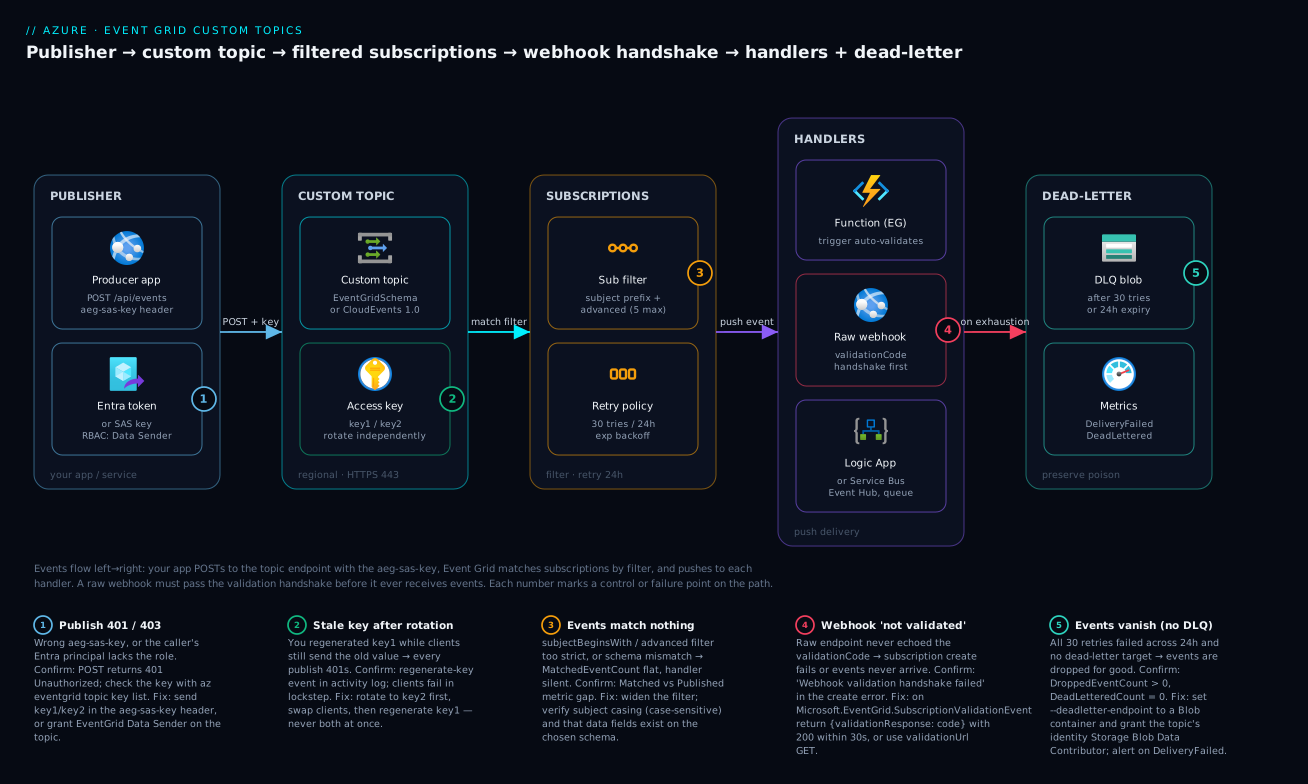
Trace one event through the whole system, left to right. Your producer app builds a thin event — subject: "orders/8842/placed", eventType: "Contoso.Orders.Placed", a small data object — and POSTs it to the custom topic endpoint, authenticating with either the aeg-sas-key header (key1/key2) or, better, an Entra bearer token whose principal holds EventGrid Data Sender. The topic accepts it (counting one Published event) and immediately evaluates every subscription’s filter against it. The receipt subscription’s subjectBeginsWith: "orders/" matches, the fraud subscription’s advanced filter data.amount > 1000 matches only if the order is large, the audit subscription matches everything. For each match, Event Grid pushes the event to that subscription’s handler.
The handlers are the interesting part. An Event Grid-triggered Function is trusted implicitly — no handshake — and just runs. A raw webhook had to pass the validation handshake when its subscription was created: Event Grid POSTed a SubscriptionValidationEvent, the endpoint echoed the validationCode in validationResponse, and only then did delivery begin. If a handler is down, Event Grid retries with exponential backoff (up to 30 attempts across 24 hours) and, failing that, dead-letters the event to a Blob container — or fatally drops it if you never configured one. Throughout, the metrics (Published, Matched, Delivered, DeliveryFailed, DeadLettered) prove at a glance whether events are flowing or stuck.
The diagram shows that path with five failure points numbered: publish auth (1), key rotation (2), the subscription filter (3), the webhook handshake (4), and the dead-letter safety net (5). Each legend badge names the symptom, how to confirm it, and the fix.
Real-world scenario
Northwind Retail runs an e-commerce platform on Azure. Their checkout was a synchronous call chain: the order API, on each placed order, called payment, then inventory, then email, then pushed a row to the analytics ETL — all in-line, all blocking the customer’s “Place Order” click. During a Diwali sale the email service slowed under load; because it sat in the checkout chain, checkout latency tripled and abandoned carts spiked — a non-critical email lag directly costing sales. Worse, the analytics team had spent six weeks asking for order events, and every attempt meant a code change and redeploy of the order API, the most safety-critical service they had.
The platform architect, Meera, re-platformed the order API onto an Event Grid custom topic. Its only new responsibility per order: build a thin event (subject: "orders/{id}/placed", eventType: "Northwind.Orders.Placed", data with orderId, amount, region — not the full basket) and POST it to the topic using a managed identity with EventGrid Data Sender. That call returns in single-digit milliseconds and doesn’t wait for any consumer, so checkout latency went flat regardless of any downstream’s speed.
Each consumer became an independent subscription. Payment (an Event Grid-triggered Function) and email (a Logic App) subscribed with subjectBeginsWith: "orders/" and includedEventTypes: ["Northwind.Orders.Placed"]. Fraud review added an advanced filter data.amount NumberGreaterThan 50000 so only high-value orders hit it. Analytics finally self-served — the data team created their own subscription to a Storage Queue, zero changes to the order API. A partner logistics provider consumed via their public HTTPS endpoint as a raw webhook; their first three attempts failed with “validation handshake failed” because the endpoint returned 202 without echoing validationResponse. Once they branched on Microsoft.EventGrid.SubscriptionValidationEvent and echoed the validationCode, it validated immediately.
Two incidents taught the operational lessons. First, during a deploy an engineer regenerated key1 to “rotate secrets” while the order API still used it — every publish 401’d and orders stopped flowing to all consumers for four minutes. They moved to the key2-swap discipline and soon to pure Entra RBAC, removing the key to fumble. Second, the partner webhook went down for an over-long maintenance window; Event Grid retried for 24 hours then dead-lettered the events to a Blob container Meera had wired up on day one. When the partner returned, the team replayed them from Blob — zero lost orders, with DroppedEventCount at zero throughout. That was the entire point of configuring the DLQ before they needed it.
Advantages and disadvantages
Event Grid custom topics are excellent at one shape of problem and a poor fit for others. Be honest about both:
| Advantages | Disadvantages |
|---|---|
| Producer fully decoupled from consumers (publish and forget) | At-least-once delivery — handlers must be idempotent |
| Native fan-out: one event, many independent subscribers | No ordering guarantee — wrong tool if you need sequence |
| Push-based — no polling, low latency (sub-second typically) | Raw webhooks need the validation handshake (a gotcha) |
| Built-in retry (30×/24h) + dead-letter — durable by default | Events are thin notifications, not a payload/data bus |
| Server-side filtering keeps handlers clean and cheap | Advanced filters are limited (≤5) and case-sensitive |
| Serverless, consumption-priced — pennies at low volume | Not a queue: no transactional sessions, no FIFO |
| Self-service subscriptions — consumers add themselves | Per-subscriber back-pressure is the handler’s problem |
The advantages matter for reactive microservices where many teams react to one business fact, SaaS webhook integrations, and anywhere adding a consumer shouldn’t touch the producer. The disadvantages bite when you need strict ordering or exactly-once (use Service Bus sessions), a high-throughput telemetry firehose (Event Hubs), or the full payload reliably and in order (a queue or database). A healthy pattern combines them — Event Grid notifies, the handler reads the authoritative record from a database or Service Bus.
Hands-on lab
This is the centerpiece: build a custom topic end to end, publish, attach a filtered subscriber, and prove delivery — first with az CLI, then in the portal, then as Bicep, then teardown. It’s free-tier-friendly: Event Grid’s first 100,000 operations/month are free, so this costs effectively nothing.
Prerequisites for the lab
| Need | Check |
|---|---|
| Azure subscription with Contributor on a resource group | az account show |
az CLI logged in (or Cloud Shell) |
az login |
| Event Grid CLI extension | az extension add --name eventgrid (auto-installs on first use) |
| A way to receive events for testing | We’ll use a free webhook tester site, then a Function |
Set up shell variables once (pick a region near you; topics are regional):
RG=rg-eventgrid-lab
LOC=eastus
TOPIC=egtopic-lab-$RANDOM      # topic names must be globally unique within the region
az group create --name $RG --location $LOC
Expected output: JSON with "provisioningState": "Succeeded".
Part A — CLI: create the topic
Step 1. Register the resource provider (only needed once per subscription; harmless if already registered):
az provider register --namespace Microsoft.EventGrid
az provider show --namespace Microsoft.EventGrid --query registrationState -o tsv
Expected: Registered.
Step 2. Create the custom topic. We’ll use the native EventGridSchema here (the simplest); swap --input-schema cloudeventschemav1_0 to use CloudEvents.
az eventgrid topic create \
  --name $TOPIC \
  --resource-group $RG \
  --location $LOC \
  --input-schema eventgridschema
Expected output includes "provisioningState": "Succeeded" and an "endpoint" like https://egtopic-lab-1234.eastus-1.eventgrid.azure.net/api/events.
Step 3. Capture the endpoint and key into variables — you’ll publish with these:
TOPIC_ENDPOINT=$(az eventgrid topic show --name $TOPIC -g $RG --query endpoint -o tsv)
TOPIC_KEY=$(az eventgrid topic key list --name $TOPIC -g $RG --query key1 -o tsv)
echo "Endpoint: $TOPIC_ENDPOINT"
Expected: the endpoint prints; $TOPIC_KEY holds a base64-looking secret (don’t echo it in shared terminals).
Part B — CLI: subscribe a webhook and watch the handshake
For a zero-code receiver, use a public webhook-inspection site (one that gives a unique URL and shows incoming requests). Many auto-handle the Event Grid validation handshake, letting you see delivery before writing handler code.
Step 4. Open a webhook-tester site, copy its unique HTTPS URL into ENDPOINT, and create the subscription:
ENDPOINT="https://<your-unique-webhook-url>"
az eventgrid event-subscription create \
  --name sub-webhook-lab \
  --source-resource-id $(az eventgrid topic show -n $TOPIC -g $RG --query id -o tsv) \
  --endpoint $ENDPOINT \
  --endpoint-type webhook \
  --subject-begins-with "orders/" \
  --included-event-types "Contoso.Orders.Placed"
Expected: "provisioningState": "Succeeded" only if the endpoint passed validation. If the tester doesn’t auto-validate, you’ll see a validation handshake failed error — that’s your cue that real endpoints need the handshake code from the webhook section. (Watch the tester: you’ll see the SubscriptionValidationEvent arrive.)
Step 5. Publish a test event. The payload shape must match your input schema (EventGridSchema here). Event Grid expects an array of events:
curl -s -X POST "$TOPIC_ENDPOINT" \
  -H "aeg-sas-key: $TOPIC_KEY" \
  -H "Content-Type: application/json" \
  -d '[
    {
      "id": "8842",
      "eventType": "Contoso.Orders.Placed",
      "subject": "orders/8842/placed",
      "eventTime": "2026-06-24T10:00:00Z",
      "dataVersion": "1.0",
      "data": { "orderId": "8842", "amount": 4200, "region": "uk" }
    }
  ]'
Expected: an empty body with HTTP 200 (Event Grid acks with no content). Within a second or two, your webhook tester shows the event delivered. If you instead get 401, your key is wrong; 400, your payload doesn’t match the schema (e.g. missing eventType); confirm with the response body.
Step 6. Prove filtering works. Publish an event whose subject does not start with orders/:
curl -s -X POST "$TOPIC_ENDPOINT" \
  -H "aeg-sas-key: $TOPIC_KEY" -H "Content-Type: application/json" \
  -d '[{"id":"9","eventType":"Contoso.Inventory.Low","subject":"inventory/sku-12/low","eventTime":"2026-06-24T10:01:00Z","dataVersion":"1.0","data":{"sku":"sku-12"}}]'
Expected: HTTP 200 at the topic, but nothing arrives at the webhook — it was published but didn’t match the subjectBeginsWith: "orders/" filter. That gap between Published and Matched is the filter doing its job.
Part C — CLI: a real Function subscriber (auto-validated)
A webhook tester is fine for a demo; the production-realistic subscriber is an Event Grid-triggered Function, which validates automatically.
Step 7. Create a consumption Function app (storage account + app), still free-tier-friendly:
STG=egfunc$RANDOM
az storage account create -n $STG -g $RG -l $LOC --sku Standard_LRS
az functionapp create -n egfunc-lab-$RANDOM -g $RG \
  --storage-account $STG --consumption-plan-location $LOC \
  --runtime node --functions-version 4
Expected: the Function app provisions ("state": "Running").
Step 8. Deploy a trivial Event Grid-triggered function (one EventGridTrigger logging eventType and subject) via func azure functionapp publish <app>. The eventGridTrigger binding is what makes Event Grid validate it implicitly — no handshake code needed.
Step 9. Subscribe the Function. The endpoint type is azurefunction, and the resource id points at the specific function:
FUNC_ID=$(az functionapp function show -g $RG -n <funcapp> --function-name OrderHandler --query id -o tsv)
az eventgrid event-subscription create \
  --name sub-func-lab \
  --source-resource-id $(az eventgrid topic show -n $TOPIC -g $RG --query id -o tsv) \
  --endpoint $FUNC_ID \
  --endpoint-type azurefunction \
  --subject-begins-with "orders/"
Expected: "provisioningState": "Succeeded" with no handshake step — the Function is trusted. Re-run the Step 5 publish; the Function’s logs (az webapp log tail or Application Insights — see Azure Monitor and Application Insights) show the event.
Part D — Add retry tuning and a dead-letter target
Step 10. Create a Blob container for dead-lettered events and a subscription using it, with tightened retry:
DLQ_STG=egdlq$RANDOM
az storage account create -n $DLQ_STG -g $RG -l $LOC --sku Standard_LRS
az storage container create --account-name $DLQ_STG --name deadletter

az eventgrid event-subscription create \
  --name sub-dlq-lab \
  --source-resource-id $(az eventgrid topic show -n $TOPIC -g $RG --query id -o tsv) \
  --endpoint $ENDPOINT --endpoint-type webhook \
  --subject-begins-with "orders/" \
  --max-delivery-attempts 10 \
  --event-ttl 720 \
  --deadletter-endpoint "$(az storage account show -n $DLQ_STG -g $RG --query id -o tsv)/blobServices/default/containers/deadletter"
Expected: "provisioningState": "Succeeded". To see dead-lettering, point this at a deliberately failing endpoint (returns 500), publish, wait out the retries, then check the deadletter container for a JSON blob holding the original event plus a deadLetterReason.
Part E — The portal walkthrough (same thing, clicked)
To build the identical topic in the Azure portal:
| Step | Portal action | What you set / expect |
|---|---|---|
| 1 | Create a resource → search “Event Grid Topic” → Create | The custom-topic create blade |
| 2 | Basics: Subscription, Resource group, Name, Region | Name unique in region |
| 3 | Advanced tab → Event Schema | Event Grid Schema or Cloud Event Schema v1.0 |
| 4 | Review + create → Create | Deployment succeeds; open the topic |
| 5 | Topic Overview → copy the Topic Endpoint | The publish URL |
| 6 | Access keys blade → copy Key 1 | The publish key (or set up RBAC under Access control) |
| 7 | + Event Subscription | The subscription create blade |
| 8 | Name, Event Schema, Endpoint Type (Web Hook / Azure Function / …) | Pick handler; for Web Hook, paste URL |
| 9 | Filters tab → enable subject filtering → Subject Begins With orders/ |
Server-side filter |
| 10 | Additional Features tab → Dead-lettering → pick Blob | The DLQ container |
| 11 | Create | Validation runs (for Web Hook); status Succeeded when validated |
| 12 | Topic → Metrics → plot Published / Matched / Delivered | Confirm events flow |
If a Web Hook subscription create fails in the portal with a validation error, that’s the handshake — it can’t validate an endpoint that won’t echo the validationCode. Use a Function, or implement the handshake.
Part F — Bicep: the whole thing as code
For repeatable, reviewable deployments, here is the topic plus a webhook subscription with dead-letter and tuned retry as Bicep:
@description('Region for the custom topic')
param location string = resourceGroup().location
@description('Globally-unique topic name within the region')
param topicName string
@description('Public HTTPS endpoint that passes the Event Grid validation handshake')
param webhookUrl string

resource topic 'Microsoft.EventGrid/topics@2024-06-01-preview' = {
  name: topicName
  location: location
  properties: {
    inputSchema: 'EventGridSchema'        // or 'CloudEventSchemaV1_0'
    publicNetworkAccess: 'Enabled'        // restrict with private endpoints in prod
  }
}

// Storage account + container for dead-lettered events
resource dlqStorage 'Microsoft.Storage/storageAccounts@2023-05-01' = {
  name: 'egdlq${uniqueString(resourceGroup().id)}'
  location: location
  sku: { name: 'Standard_LRS' }
  kind: 'StorageV2'
}
resource dlqContainer 'Microsoft.Storage/storageAccounts/blobServices/containers@2023-05-01' = {
  name: '${dlqStorage.name}/default/deadletter'
}

resource sub 'Microsoft.EventGrid/topics/eventSubscriptions@2024-06-01-preview' = {
  parent: topic
  name: 'sub-webhook'
  properties: {
    destination: {
      endpointType: 'WebHook'
      properties: { endpointUrl: webhookUrl }
    }
    filter: {
      subjectBeginsWith: 'orders/'
      includedEventTypes: [ 'Contoso.Orders.Placed' ]
      isSubjectCaseSensitive: true
    }
    retryPolicy: {
      maxDeliveryAttempts: 10            // default 30
      eventTimeToLiveInMinutes: 720      // default 1440 (24h)
    }
    deadLetterDestination: {
      endpointType: 'StorageBlob'
      properties: {
        resourceId: dlqStorage.id
        blobContainerName: 'deadletter'
      }
    }
  }
}

output topicEndpoint string = topic.properties.endpoint
Deploy and verify:
az deployment group create -g $RG --template-file topic.bicep \
  --parameters topicName=$TOPIC webhookUrl="$ENDPOINT"
Expected: deployment Succeeded; the subscription create inside it implies the webhook passed validation — if it can’t validate, the subscription resource fails, a useful CI signal. The Bicep from-scratch guide covers the broader workflow.
Part G — Validate, then teardown
Validate end to end:
# 1. List subscriptions on the topic
az eventgrid event-subscription list \
  --source-resource-id $(az eventgrid topic show -n $TOPIC -g $RG --query id -o tsv) \
  --query "[].{name:name, endpoint:destination.endpointType, state:provisioningState}" -o table

# 2. Publish a known event (Step 5) and confirm receipt at the handler

# 3. Check the metrics to prove the path
az monitor metrics list \
  --resource $(az eventgrid topic show -n $TOPIC -g $RG --query id -o tsv) \
  --metric PublishSuccessCount MatchedEventCount DeliverySuccessCount \
  --interval PT1M --aggregation Total -o table
Expected: the subscriptions list shows your subs Succeeded; the metrics show PublishSuccessCount and DeliverySuccessCount rising together (with MatchedEventCount between them reflecting your filters).
Teardown — delete the resource group to remove everything (topic, subscriptions, Functions, storage):
az group delete --name $RG --yes --no-wait
Expected: the command returns immediately; deletion completes in the background. Confirm later with az group exists -n $RG returning false.
Common mistakes & troubleshooting
The failure modes you’ll actually hit, with the exact way to confirm and fix each:
| # | Symptom | Root cause | Confirm (command / blade) | Fix |
|---|---|---|---|---|
| 1 | 401 Unauthorized on publish | Wrong/old key, or key in wrong header | Response body; az eventgrid topic key list |
Send key1/key2 in aeg-sas-key; or use RBAC |
| 2 | 403 Forbidden on publish (RBAC) | Principal lacks EventGrid Data Sender | az role assignment list --assignee <id> --scope <topicId> |
Assign EventGrid Data Sender on the topic |
| 3 | All publishes 401 after a “rotation” | Regenerated the key clients use | Activity log shows regenerateKey; clients fail in lockstep |
Rotate via key2-swap; never regenerate the live key |
| 4 | 400 Bad Request on publish | Payload doesn’t match input schema | Response body names the bad field | Match EventGridSchema fields (array; eventType, subject, data, …) |
| 5 | “Webhook validation handshake failed” | Endpoint didn’t echo validationResponse in time |
The create error; endpoint logs | Branch on the validation eventType; return {validationResponse: code} <30s |
| 6 | Events never arrive at a webhook | Subscription unvalidated or filter mismatch | Subscription provisioningState; subject casing |
Validate the endpoint; check subjectBeginsWith exact case |
| 7 | Function gets nothing | Wrong endpoint type or filter too tight | az ...event-subscription show; Function logs |
Use --endpoint-type azurefunction; widen filter |
| 8 | Subscriber receives the same event twice | At-least-once delivery (retry after lost 200) | Duplicate id in handler logs |
Make the handler idempotent; dedupe on id |
| 9 | Events out of order | Event Grid does not guarantee order | Compare eventTime to arrival order |
Don’t rely on order; use Service Bus sessions if needed |
| 10 | DeadLetteredCount climbing | Handler returns 5xx / times out repeatedly | Metrics; DLQ blob deadLetterReason |
Fix the handler; replay from the DLQ blob |
| 11 | DroppedEventCount > 0 (events lost) | No dead-letter target, TTL/attempts exhausted | DroppedEventCount metric |
Configure --deadletter-endpoint; alert at zero tolerance |
| 12 | Dead-letter container stays empty despite failures | Topic/EG identity can’t write to Blob | DLQ storage RBAC; container exists | Grant Storage Blob Data Contributor; recreate container |
| 13 | CloudEvents webhook parses wrong fields | Reading eventType from a CloudEvents payload |
Inspect raw body field names | Read type/source/time for CloudEvents schema |
| 14 | Handler 413 / events rejected | Event payload too large | Event size; terminal 413 (no retry) |
Keep events thin (<64 KB); fetch full data by reference |
Three confirm-it-fast snippets you’ll reuse:
# Is the subscription actually validated and where does it point?
az eventgrid event-subscription show --name sub-webhook-lab \
  --source-resource-id $(az eventgrid topic show -n $TOPIC -g $RG --query id -o tsv) \
  --query "{state:provisioningState, type:destination.endpointType, retry:retryPolicy, dlq:deadLetterDestination}" -o json
# Did events actually match a subscription? (gap = filter too strict)
az monitor metrics list \
  --resource $(az eventgrid topic show -n $TOPIC -g $RG --query id -o tsv) \
  --metric PublishSuccessCount MatchedEventCount --interval PT1M --aggregation Total -o table
# Confirm the publisher's RBAC for the secretless path
az role assignment list --assignee <publisher-principal-id> \
  --scope $(az eventgrid topic show -n $TOPIC -g $RG --query id -o tsv) -o table
Best practices
- Publish thin events. Carry
id,subject,eventTypeand a smalldatafor the consumer to decide and fetch the full record. Don’t ship the 50 KB entity; events are notifications, not a data bus. - Design the
subjectas a hierarchy (domain/{id}/{action}) from day one — it’s the routing handle every subscriber filters on, and you can’t retrofit good routing onto bad subjects. - Prefer Entra RBAC over keys for publishing. EventGrid Data Sender on a managed identity is secretless, per-principal, and revocable; reserve keys for quick starts.
- If you must use keys, rotate via the key2-swap — move clients to key2, confirm, then regenerate key1. Never regenerate the key clients are using.
- Always configure a dead-letter destination before you go live. Without it, exhausted events are silently dropped — the one truly unrecoverable failure mode.
- Make every handler idempotent. Delivery is at-least-once; dedupe on the event
idso a redelivery can’t double-charge a card. - Use the Event Grid trigger / first-class handlers (Functions, Service Bus, Event Hubs, Storage Queue) where possible — they skip the webhook handshake entirely.
- Filter server-side, not in the handler — a
subjectBeginsWithor advanced filter keeps unwanted events from ever reaching (and costing) your compute. - Pick CloudEvents 1.0 for new, cross-boundary work; pick EventGridSchema for all-Azure simplicity — and never mix field-name assumptions in raw webhook code.
- Alarm on
DroppedEventCount(zero tolerance),DeadLetteredCountandDeliveryFailed— your data-loss and handler-health canaries. - Lock down the topic with private endpoints and IP firewall rules in production rather than leaving
publicNetworkAccessopen to the internet. - Version your
datashape (dataVersion) so you can evolve the payload without breaking consumers.
Security notes
The publish endpoint is internet-reachable by default, so treat it as an attack surface. The strongest posture is Entra RBAC with managed identities: grant the publisher only EventGrid Data Sender on the specific topic — no shared secret to leak, per-principal auditing, instant revocation. If you use access keys, store them in Key Vault (see Key Vault secrets, keys and certificates), never in code, and rotate via the key2-swap. SAS tokens suit publishers that should have time-boxed rights.
Restrict the network: enable the topic’s IP firewall for known publisher ranges, or better, put the topic behind a private endpoint so the endpoint isn’t on the public internet at all. The dead-letter target’s permissions are part of your boundary too: the topic’s identity needs Storage Blob Data Contributor on the DLQ container, which may hold event payloads — protect it like the data it carries. For webhook handlers, the handshake proves URL ownership but not payload authenticity, so add your own check (a shared secret in the URL/header, and verify the source is really Event Grid). Finally, prefer managed-identity delivery (deliveryWithResourceIdentity) for Service Bus / Event Hub / Storage targets so there are no connection strings in the subscription — granting that identity Azure Service Bus Data Sender or Storage Blob Data Contributor on the target, alongside the publisher’s EventGrid Data Sender and operators’ EventGrid Contributor from the role table above.
Cost & sizing
Event Grid custom topics are consumption-priced on operations — you pay per operation (an event ingress, a delivery attempt, an advanced-filter match, a dead-letter write). There’s no hourly charge for the topic and no provisioned throughput to size. The headline that makes labs free: the first 100,000 operations/month are free, and beyond that the price is a fraction of a US dollar per million (roughly ₹50–₹60 / ~US$0.60 per million in the GA tier — check current pricing for your region).
What drives the bill: events published × how many subscriptions match each (each delivery is an operation), plus retries (a failing handler hitting 30 attempts costs ~30 delivery operations for that one event), filter evaluations and dead-letter writes. So the cost levers are volume and fan-out, with the hidden one being failing handlers, since retries multiply operations. Idempotent handlers and tight filters stay cheap; a flapping handler or a too-broad subject inflates the count.
Rough sizing for intuition (illustrative — verify against current pricing):
| Scenario | Events/month | Avg matches/event | Approx operations | Rough cost |
|---|---|---|---|---|
| Lab / dev | 10,000 | 1 | ~20k | Free (under 100k) |
| Small app | 1,000,000 | 2 | ~3M | ~₹150 / ~US$1.8 |
| Busy SaaS | 50,000,000 | 3 | ~200M | ~₹10k / ~US$120 |
| Failing handler (anti-pattern) | 1,000,000 | 1, ×30 retries | ~30M | ~₹1.5k / ~US$18 (wasted) |
Free-tier and right-sizing notes: stay under 100k operations/month and the lab is genuinely free. To control cost: keep filters tight so events fan out only to subscribers that need them, fix failing handlers fast (retries are pure waste), keep events thin (size affects nothing on price directly but keeps you under the 64 KB included tier and your handlers fast), and prefer first-class handlers that don’t incur webhook retry storms. There’s nothing to over-provision here — the discipline is operational, not capacity planning. For broader cost guardrails, Azure Cost Management budgets and alerts lets you alarm before a runaway retry loop shows up on the invoice.
Interview & exam questions
Q1. What is the difference between an Event Grid system topic and a custom topic? A system topic is created and published by an Azure service (Storage, resource groups, etc.) — Azure is the event source. A custom topic is published by your own application to an endpoint you own, with an event shape and keys you control. Maps to AZ-204 “Develop event-based solutions.”
Q2. How does a publisher authenticate to a custom topic, and which is best for production?
Three ways: the access key in the aeg-sas-key header, a time-limited SAS token in aeg-sas-token, or Entra ID RBAC with the EventGrid Data Sender role. RBAC (with a managed identity) is best for production — secretless, per-principal, revocable, nothing to rotate.
Q3. Explain the webhook validation handshake. When is it required and how do you pass it synchronously?
For raw webhook handlers (not Functions or first-class Azure handlers), Event Grid POSTs a Microsoft.EventGrid.SubscriptionValidationEvent with a validationCode. To pass synchronously, return HTTP 200 within ~30 seconds with { "validationResponse": "<code>" }. It prevents Event Grid being abused to flood arbitrary URLs.
Q4. Your webhook subscription fails to create with “validation handshake failed.” What’s the most likely cause?
The endpoint didn’t echo the validationResponse (wrong body, wrong code, or it didn’t branch on the validation eventType), or it didn’t respond within the timeout, or it isn’t reachable over public HTTPS with a valid cert. Fix the handshake code or use the async validationUrl GET.
Q5. What delivery guarantee does Event Grid provide, and what must handlers do about it?
At-least-once delivery — a handler can receive the same event more than once (a retry after a lost ACK). Handlers must be idempotent, typically deduping on the event id. Event Grid also does not guarantee ordering.
Q6. Compare EventGridSchema and CloudEvents 1.0. When pick which?
Both carry the same info; field names differ (eventType→type, eventTime→time, plus source/specversion in CloudEvents). Use EventGridSchema for all-Azure simplicity; use CloudEvents 1.0 for vendor-neutral interoperability and new/cross-boundary work. It’s a creation-time choice per topic.
Q7. What happens when Event Grid can’t deliver an event?
It retries with exponential backoff up to 30 attempts over a 24-hour TTL (both tunable). If still undeliverable, it dead-letters to a configured Blob container — or drops the event if no dead-letter target is set. Terminal codes (400/401/403/404/413) aren’t retried.
Q8. How do you filter which events a subscription receives?
Three layers: subjectBeginsWith/subjectEndsWith (string match on subject), includedEventTypes (allow-list of types), and advanced filters (operators on any field incl. data.*, up to 5). All are server-side and (subject) case-sensitive by default.
Q9. How do you rotate a custom topic’s access key without downtime? Topics have two keys. Move clients to key2, confirm none still use key1, then regenerate key1. Never regenerate the key clients are actively using — that’s an instant 401 outage for all publishers.
Q10. When would you choose Service Bus or Event Hubs over an Event Grid custom topic? Use Service Bus when you need ordering, sessions, transactions, or exactly-once-style competing-consumer processing. Use Event Hubs for high-throughput telemetry streaming with offset-based consumers. Use Event Grid for reactive, push-based, many-subscriber notification of discrete events.
Q11. A subscriber suddenly stops receiving events though publishing still succeeds. Where do you look first?
Check the subscription’s provisioningState (still validated?), the filter (did the subject scheme or casing change?), and the MatchedEventCount vs PublishSuccessCount metrics — a gap means events published but matched nothing. Then check DeliveryFailed/DeadLettered for handler errors.
Q12. Why keep Event Grid events thin, and how does a consumer get the full data?
Events are notifications, capped (64 KB included), and fan out to many subscribers — shipping full payloads is costly and couples the schema to consumers. The event carries an identifier (in subject/data), and the consumer fetches the authoritative record from the source system (DB/API) when it decides it cares.
Quick check
- Which HTTP header carries the access key when you publish to a custom topic?
- What event type does Event Grid send to a raw webhook to validate it, and what must you return synchronously?
- What is the default max delivery attempts and event TTL before an event is dead-lettered?
- Name the RBAC role a publisher’s managed identity needs to publish without keys.
- Event Grid delivers at-least-once — what one property must every handler have as a result?
Answers
aeg-sas-key(with the key value). For a SAS token it’saeg-sas-token; for RBAC it’s a bearer token inAuthorization.Microsoft.EventGrid.SubscriptionValidationEvent— return HTTP 200 with{ "validationResponse": "<validationCode>" }within ~30 seconds (or GET thevalidationUrlasynchronously).- 30 attempts over a 24-hour (1440-minute) TTL; after both are exhausted the event is dead-lettered (or dropped if no DLQ is set). Both are tunable.
- EventGrid Data Sender, scoped to the topic.
- Idempotency — dedupe on the event
idso a redelivery is harmless.
Glossary
| Term | Definition |
|---|---|
| Custom topic | An Event Grid resource (Microsoft.EventGrid/topics) your application publishes events to; you own the endpoint and keys. |
| System topic | An Event Grid topic published by an Azure service (Storage, resource events) rather than your code. |
| Topic endpoint | The HTTPS URL (.../api/events) that publishers POST events to. |
| Access key | One of two keys (key1/key2) that authorize publishing in the aeg-sas-key header. |
| SAS token | A time-limited signed token derived from a key, sent in aeg-sas-token. |
| EventGrid Data Sender | The Entra RBAC role that lets a principal publish to a topic without keys. |
| EventGridSchema | Azure’s native event envelope (eventType, subject, eventTime, data, …). |
| CloudEvents 1.0 | The CNCF vendor-neutral event envelope (type, source, time, specversion, …). |
| Event subscription | A child resource binding a handler, a filter, and a retry/dead-letter policy to a topic. |
| Handler / endpoint | The delivery target: webhook, Azure Function, Service Bus, Event Hub, Storage Queue, Logic App, etc. |
subject |
A string you set on each event used as the primary filtering/routing handle. |
| Validation handshake | The ownership-proof exchange a raw webhook must pass (echo the validationCode) before delivery. |
| Advanced filter | A subscription filter matching operators against any event field, including data.* (≤5 per subscription). |
| Retry policy | Max delivery attempts (default 30) and event TTL (default 24h) governing redelivery. |
| Dead-letter | Sending undeliverable events to a Blob container with a failure reason, instead of dropping them. |
| At-least-once | A delivery guarantee where a handler may receive the same event more than once. |
Next steps
- Contrast the publisher-flipped story you just built with Azure as the source in Event Grid System Topics Explained: Reacting to Storage, Resource and Subscription Events.
- Build the auto-validating Function subscriber properly in Azure Functions Triggers and Bindings Explained, then wire storage/queue bindings in Azure Functions Bindings: Storage, Queue and Cosmos DB Tutorial.
- Decide when you actually want a queue instead in Azure Service Bus Queues vs Topics: When to Use Which.
- Make the publisher secretless with the patterns in Managed Identity: System vs User-Assigned.
- Put delivery health on a dashboard and alert on dropped/dead-lettered events with Azure Monitor and Application Insights for Observability.