You ship a chatbot that answers questions about orders. It works in the demo. Then a customer asks “where’s order 41982?” and the model replies, in fluent prose, that the order shipped Tuesday and will arrive Friday — a complete fabrication, because the model has no idea where that order is. It just sounds certain. The fix is not a better prompt. The fix is to stop asking the model to know the answer and start asking it to call your code that knows the answer. That is function calling (also called tool use): you describe the functions your app can run, the model decides which one to call and with what arguments, your code runs it, and you hand the result back for the model to phrase. The model becomes the router and the writer; your code stays the source of truth.
The second half of the problem is the shape of what comes back. Even when the model picks the right tool, it has historically returned arguments as best-effort JSON — usually valid, occasionally with a trailing comment, a markdown fence, an extra field, or a number where you wanted a string. One malformed response in a thousand is a 3 a.m. page. Structured Outputs closes that gap: you attach a JSON Schema and turn on strict mode, and the platform constrains generation so the output is guaranteed to match your schema — every required field present, no extras, the right types. Together, function calling and structured outputs turn a probabilistic text generator into something you can wire into a transactional system without a defensive parser around every call.
This article is a step-by-step implementation guide for Azure OpenAI. You will declare tools the model can call, force its arguments and its final answers to be schema-valid, build the full call → execute → feed-back loop, handle parallel tool calls and refusals, and deploy the whole thing with managed identity instead of keys. The centrepiece is a hands-on lab you run end to end in both the Azure portal and the az CLI, with a Bicep version, expected output at each step, validation and teardown. By the end you will know exactly which knobs (tools, tool_choice, response_format, strict, parallel_tool_calls) do what, where each one bites, and how to keep the bill and the blast radius small.
What problem this solves
A raw chat completion is a text predictor. Ask it for live data and it hallucinates; ask it for JSON and it usually complies but gives you no contract. Both failure modes are silent — the response looks fine until a downstream parser chokes or a customer reads a fabricated fact. Teams paper over this with regex extraction, “respond ONLY with JSON” prompts, retry loops that re-ask on parse failure, and brittle string matching to detect intent. All of it is wasted effort that function calling and structured outputs make unnecessary.
What breaks without this: the model invents data it cannot know (order status, account balance, today’s price); JSON parsing fails intermittently under load because the model wrapped the object in ```json or added a chatty preamble; intent detection done with keyword matching misroutes edge cases; and an “agent” that should call a search API instead answers from stale training data. Each of these is a correctness bug that hides until production traffic finds it.
Who hits this: anyone building a chatbot over private data, an internal copilot that takes actions, a retrieval-augmented assistant that needs to call search, a workflow that extracts structured fields from documents or emails, or any agent that orchestrates tools. The moment your LLM output feeds another system — a database write, an API call, a UI that renders specific fields — you need the model’s output to be a contract, not a suggestion. That is precisely what this pair of features delivers.
Here is the field at a glance — the two mechanisms, what each guarantees, and when you reach for it:
| Mechanism | What you declare | What it guarantees | Reach for it when |
|---|---|---|---|
| Function / tool calling | A list of callable functions with JSON-schema parameters | The model returns which function + arguments (you run it) | The model must fetch live data or take an action |
| Structured Outputs (response_format) | A JSON schema for the model’s final answer | The reply is schema-valid JSON, every time | You need the answer itself as typed data |
Strict mode (strict: true) |
The same schemas, with additionalProperties:false |
Constrained decoding — no drift, no extra keys | Output feeds a parser/DB and must never break |
tool_choice |
auto / required / a named tool / none |
Forces, frees or forbids tool use | You must control whether/which tool runs |
Learning objectives
By the end of this article you can:
- Explain the difference between function calling (the model picks a tool and arguments; you execute) and Structured Outputs (the model’s final answer is schema-valid JSON), and pick the right one per use case.
- Declare a
toolsarray, settool_choicetoauto,required,noneor a named function, and read thetool_callsthe model returns. - Build the complete call → execute → feed-back loop: detect a tool call, run your code, append a
role:"tool"message with the result and the matchingtool_call_id, and get the model’s final phrased answer. - Turn on strict mode with
additionalProperties:falseand all keysrequired, and know exactly which JSON-Schema keywords the supported subset allows and which it rejects. - Handle parallel tool calls, model refusals (the
refusalfield), and the failure modes that show up at scale — token bloat, schema-too-complex errors, and staletool_call_idmismatches. - Deploy an Azure OpenAI resource and a model deployment that supports tools (e.g. a recent GPT-4o/GPT-4.1 family deployment), call it with Microsoft Entra ID auth and managed identity rather than API keys.
- Estimate token cost for tool definitions and the multi-turn loop, and right-size your deployment so a chatty agent does not quietly multiply your bill.
Prerequisites & where this fits
You should have an Azure subscription with access to Azure OpenAI (the service is access-gated; if you have a working resource you are set) and the ability to create resources in a resource group. You should be comfortable running az in Cloud Shell, reading JSON, and reading basic Python or a curl request. You need a model deployment whose model supports tools — the GPT-4o, GPT-4o mini and GPT-4.1 families do; older gpt-35-turbo builds support a legacy form. Structured Outputs (strict mode) requires a model and API version new enough to support response_format: json_schema — use a recent 2024-08-01-preview or later API version and a current model.
This sits in the AI/ML application track, one layer above raw model calls. It assumes you have already deployed a model and made a first call — if not, start with Deploy your first Azure OpenAI chat model with REST and the SDK. It builds directly on token mechanics from Azure OpenAI tokens, context windows and pricing explained, and your choice of deployment type (Standard vs Global vs Provisioned) from Azure OpenAI deployment types: Standard, Global, Provisioned determines the throughput and price of every tool-calling round-trip. For the auth pattern you will use system-assigned vs user-assigned managed identity, and if your tool is a retrieval call you will likely point it at Azure AI Search.
A quick map of where each moving part lives, so you know which layer owns a failure:
| Layer | What lives here | Who owns it | What it can break |
|---|---|---|---|
| Your app | The loop, the actual tool code, the schemas | App / dev team | Wrong loop, stale tool_call_id, bad schema |
| Azure OpenAI deployment | The model, API version, quota (TPM) | Platform owner | 429 throttling, unsupported feature for old API version |
| Tool backends | The DB/API your functions call | Backend team | Tool throws → you must feed back an error |
| Identity (Entra ID) | Token to call the endpoint | Platform + identity | 401 if RBAC/MI missing |
| Monitoring | Token counts, latency, errors | Platform / SRE | Blind to cost blow-ups without it |
Core concepts
Five mental models make every later step obvious.
The model never runs your code — it only asks you to. When you pass a tools array, the model can respond with a tool_calls object naming a function and a JSON string of arguments. That is all it does. It does not execute anything, reach any network, or see any result unless you run the function yourself and feed the output back as a new message. The model is a router that emits intent; your application is the runtime. This separation is the whole security story: the model can only invoke functions you explicitly declared, and you decide whether to honour the call.
A “tool” is a JSON-schema description, not a code reference. You describe each function with a name, a description (this is the prompt the model reads to decide when to call it — write it like documentation), and a parameters object that is a JSON Schema. The model matches the user’s intent against those descriptions. The quality of your description and parameter names directly drives whether the model calls the right tool with the right arguments — a vague description is the single most common cause of “it called the wrong function.”
The conversation is a growing list of messages with roles. Tool use is multi-turn within a single logical request. The message list grows: system → user → assistant (with tool_calls) → tool (your result, tagged with the tool_call_id) → assistant (final answer). Every tool result you append must carry the tool_call_id that the model assigned to that call, or the model cannot match result to request. Get the IDs wrong and you get errors or nonsense.
Structured Outputs constrains the generation, not just validates after. With response_format: { type: "json_schema", json_schema: { ..., strict: true } }, the platform restricts which tokens the model may emit so the output cannot violate the schema. This is constrained decoding — fundamentally different from “ask nicely then validate.” In strict mode you get a hard guarantee: required keys present, no extra keys (additionalProperties:false is mandatory), correct types and enum values. Function arguments can also be made strict (strict:true inside the tool’s function object) so the arguments the model hands you are schema-valid too.
The model can refuse, and that is a first-class outcome. A safety-trained model may decline a request (for example, asked to produce disallowed content in your strict schema). With Structured Outputs the SDK surfaces a refusal field on the message instead of content. You must check for it — a refusal is not an error and not your JSON; treating it as parseable JSON is a bug. Plan the branch.
The vocabulary in one table
Pin down every term before the deep sections. The glossary at the end repeats these for lookup; this table is the mental model side by side.
| Term | One-line definition | Where it appears | Why it matters |
|---|---|---|---|
| Tool / function | A callable you describe with JSON schema | tools array in the request |
The unit the model can invoke |
tool_choice |
Policy: auto / required / none / named | Request body | Controls whether & which tool runs |
tool_calls |
The model’s request to call function(s) | assistant message in the response |
What you detect and execute |
tool_call_id |
Unique id linking a call to its result | On each call & your tool reply |
Mis-link → error / wrong mapping |
role:"tool" message |
Your function’s result fed back | The follow-up request | Closes the loop |
response_format |
Output contract for the final answer | Request body | json_object or json_schema |
strict |
Constrained decoding to a schema | Inside json_schema or a tool | Hard guarantee, no drift |
additionalProperties |
Allow keys beyond those declared | Inside a JSON schema | Must be false for strict |
parallel_tool_calls |
Allow multiple calls in one turn | Request body | Many tools at once; default on |
refusal |
Model declined the request | Response message | Branch, don’t parse as JSON |
finish_reason |
Why generation stopped | Each choice | tool_calls vs stop vs length |
The request contract: tools, tool_choice and response_format
Before any code, here is the surface area you are programming against. Three request fields and a few response fields do almost everything.
Declaring tools
A tool is one entry in the tools array. The shape is fixed:
{
  "type": "function",
  "function": {
    "name": "get_order_status",
    "description": "Look up the live status of a customer order by its numeric order ID. Use this whenever the user asks where an order is, when it will arrive, or whether it shipped.",
    "parameters": {
      "type": "object",
      "properties": {
        "order_id": { "type": "integer", "description": "The numeric order ID, e.g. 41982" }
      },
      "required": ["order_id"],
      "additionalProperties": false
    },
    "strict": true
  }
}
Every field earns its place. The breakdown:
| Field | Required | Purpose | Gotcha |
|---|---|---|---|
type |
Yes | Always "function" today |
Reserved for future tool types |
function.name |
Yes | Identifier you match in your switch | ^[a-zA-Z0-9_-]{1,64}$; must be unique |
function.description |
Strongly advised | The prompt that tells the model when to call it | Vague text → wrong-tool calls |
function.parameters |
Yes (object schema) | JSON Schema for the arguments | Strict mode forbids many keywords |
function.strict |
No (default false) | Constrain argument generation to the schema | Requires all keys required + additionalProperties:false |
Controlling whether a tool runs: tool_choice
tool_choice is the policy knob. It decides whether the model may, must, or must not call a tool on this turn.
tool_choice value |
Behaviour | Use when |
|---|---|---|
"auto" (default when tools present) |
Model decides: call a tool or answer directly | General chat that sometimes needs a tool |
"required" |
Model must call at least one tool | You know a tool is needed (e.g. data extraction) |
"none" |
Model may not call any tool; answers in text | Temporarily disable tools without removing them |
{ "type":"function", "function":{"name":"X"} } |
Force this specific tool | You want the model to call exactly X |
A subtle but important point: auto lets the model answer from its own knowledge when it judges a tool unnecessary, which is usually what you want for conversation. For a pure extraction or classification job where you always want structured tool output, set required (or force the named function) so the model can never “chat back” instead.
Shaping the final answer: response_format
response_format constrains the model’s own reply (not a tool’s arguments). Three modes:
response_format |
What you get | Schema enforced? | Notes |
|---|---|---|---|
| (omitted) — text | Free-form natural language | No | Default; fine for chat |
{ "type": "json_object" } |
Valid JSON (any shape) | No (valid JSON only) | “JSON mode” — must also instruct JSON in the prompt |
{ "type": "json_schema", "json_schema": { "name":..., "schema":..., "strict": true } } |
JSON matching your schema | Yes, with strict:true |
Structured Outputs; the strong guarantee |
The trap with plain json_object mode: it guarantees parseable JSON but not your JSON — you can still get an unexpected shape, and you must mention “JSON” in your prompt or you risk an error. json_schema with strict:true is the one that gives a real contract. Reach for json_object only on older models that do not support json_schema.
What comes back
The response carries the signals you branch on:
| Response field | Meaning | What you do |
|---|---|---|
choices[0].finish_reason = "tool_calls" |
The model wants to call tools | Execute them, loop |
choices[0].finish_reason = "stop" |
The model gave a final answer | Done — read content |
choices[0].finish_reason = "length" |
Hit max_tokens mid-output |
Raise the limit; output is truncated |
message.tool_calls[] |
The calls (name + JSON args + id) | Parse args, run code, feed back |
message.content |
Final text/JSON (null during a tool turn) | Render it / parse it |
message.refusal |
The model declined | Show a safe message; do not parse |
The tool-calling loop, step by step
The single most important thing to internalise is the loop. It is the same five-message dance every time, regardless of language or SDK. Walk it once in plain terms; the lab makes it concrete.
- You send the message list plus
tools(and atool_choice). The list starts with asystemmessage and theuserturn. - The model responds with either a normal answer (
finish_reason: "stop"— you’re done) or a request to call tools (finish_reason: "tool_calls"). - You append that assistant message verbatim (including its
tool_calls) to your list. This is easy to forget and breaks the loop if you skip it — the model needs to see its own request in the history. - For each tool call, parse the JSON
arguments, run the real function, and append a new message withrole: "tool", thetool_call_idfrom that call, and the function’s result serialised as a string incontent. - You send the whole list back. Now the model sees the tool result and produces the final natural-language answer (
finish_reason: "stop"), which you render.
A few rules that turn this from “works in the demo” to “works at 3 a.m.”:
| Rule | Why | What happens if you ignore it |
|---|---|---|
Append the assistant’s tool_calls message before the tool result |
The model must see its own call | API error or the model re-asks |
Every tool message carries the exact tool_call_id |
Maps result → request | Error: “tool_call_id did not match” |
Tool content is always a string |
The API expects text | Serialise objects with json.dumps |
| Handle all calls before re-sending | Parallel calls expect all results | Model stalls waiting for a missing result |
| Cap the loop iterations | A tool can trigger another tool | Runaway loop, runaway bill |
Parallel tool calls
By default the model may return several tool calls in one assistant turn — e.g. “compare the weather in Mumbai and Delhi” yields two get_weather calls. They arrive together in tool_calls[], each with its own tool_call_id. You run all of them (ideally concurrently), append one role:"tool" message per call with the matching id, then re-send once. Set parallel_tool_calls: false if your tools must run strictly one at a time (e.g. they mutate shared state and ordering matters) — that forces the model to call them sequentially across turns.
parallel_tool_calls |
Behaviour | Choose when |
|---|---|---|
true (default) |
Multiple calls can return in one turn | Read-only tools; you can fan out |
false |
At most one tool call per turn | Tools mutate state; order matters; simpler loop |
Structured Outputs and the JSON-Schema subset
Structured Outputs is where most teams trip, because the schema you can use under strict:true is a subset of full JSON Schema. The platform compiles your schema into a constrained-decoding grammar, and that compilation only supports specific keywords. Learn the subset once and you stop fighting “schema not supported” errors.
The non-negotiable rules of strict mode
| Rule | Requirement | Why |
|---|---|---|
| Root is an object | "type": "object" at the top |
The grammar needs a keyed root |
additionalProperties: false |
On every object | Otherwise extra keys could appear |
All properties required |
List every key in required |
Strict mode has no truly optional keys |
| Optional fields → nullable union | Use "type": ["string","null"] |
“Optional” is expressed as may-be-null, still required |
| Bounded nesting & size | Stay within depth/property limits | Very large/deep schemas are rejected |
The “all keys required” rule surprises everyone. In strict mode you cannot mark a property optional in the usual sense — if a field may be absent, you make it required but allow null as a type (["string","null"]), and your code treats null as “not provided.” This is the correct mental model: the shape is fixed; values may be null.
Which JSON-Schema keywords are supported
A practical cut of what works under strict:true and what to avoid. Treat unsupported keywords as “will error or be ignored — don’t rely on them.”
| Keyword | Supported under strict | Notes |
|---|---|---|
type (object/string/number/integer/boolean/array/null) |
Yes | Unions allowed for nullability |
properties + required |
Yes | All keys must be in required |
additionalProperties: false |
Yes (mandatory) | Must be present on every object |
enum |
Yes | Great for closed value sets |
description |
Yes | Helps the model fill fields correctly |
items (typed arrays) |
Yes | Element schema follows the same rules |
anyOf |
Yes (for branching shapes) | Each branch is itself a strict object |
$ref / $defs |
Yes (for reuse/recursion) | Reference within the same schema |
minLength / maxLength / pattern |
Limited / often unsupported | Do not depend on string constraints |
minimum / maximum / multipleOf |
Limited / often unsupported | Validate numbers in your code |
format (email, date-time, …) |
Not enforced | Advisory only; validate yourself |
oneOf, not, if/then/else |
Unsupported | Restructure with anyOf/enum |
The takeaway: use the schema to lock shape and enums, and enforce value ranges and formats in your own code after parsing. The model gives you the structure; you still own validation of business rules.
Function-argument strict mode vs response strict mode
Two independent places to turn on strict, easy to conflate:
| Where | Field | Constrains | Use for |
|---|---|---|---|
| Inside a tool | function.strict: true |
The arguments the model passes to your function | Guarantee your function gets well-typed inputs |
| On the response | response_format.json_schema.strict: true |
The model’s final answer | Guarantee the reply is typed data |
You can use either, both, or neither. A common solid pattern: strict:true on tools (so your code never parses garbage arguments) and free-text final answers (so the assistant can chat). For a pure extraction endpoint, you often want response_format strict and may not need tools at all.
Architecture at a glance
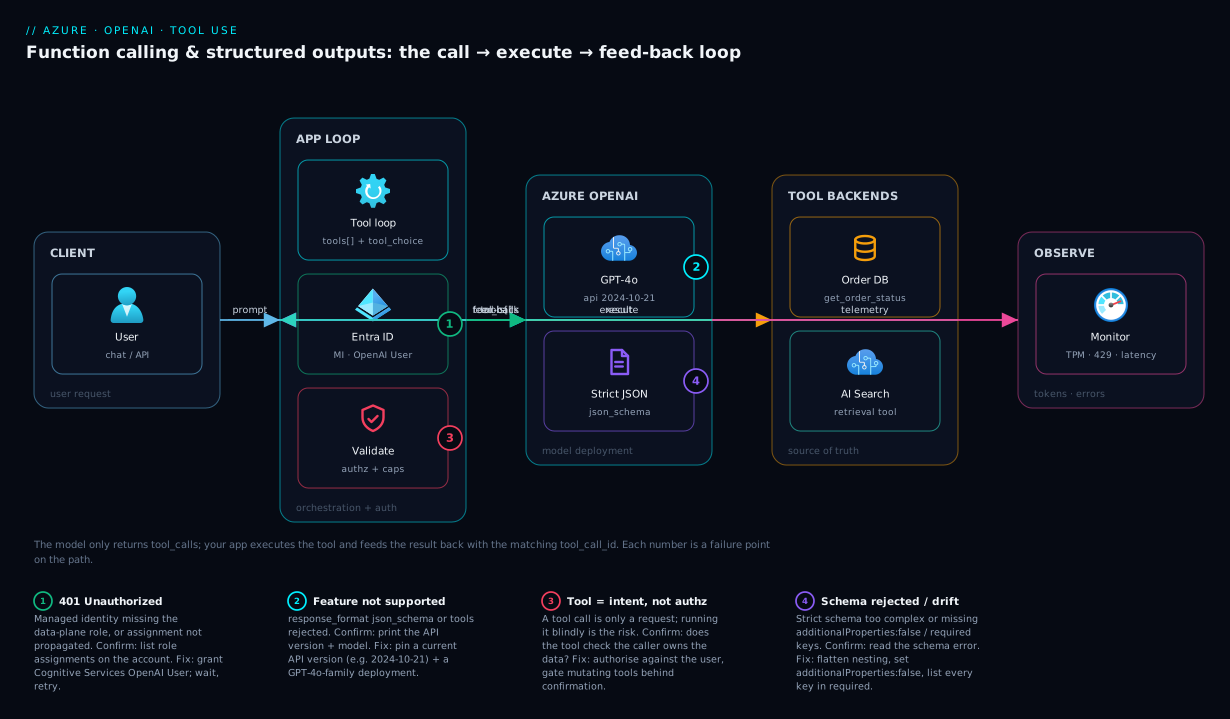
Trace a single user request from left to right. A user message arrives at your application — a web API, a function, or a chat backend. Your app authenticates to Azure OpenAI using a Microsoft Entra ID token from its managed identity (no key in code), and sends the chat completion with a tools array describing what it can do. The model deployment reasons over the request and, instead of guessing, returns a tool_calls request: “call get_order_status with order_id=41982.” Your app — the orchestration loop — parses those arguments (strict mode guarantees they are typed) and executes the real tool: a query against your order database, a call to Azure AI Search, or any backend API. The tool returns data. Your app appends that result as a role:"tool" message carrying the original tool_call_id and re-sends the conversation.
On the second pass the model has ground truth. It produces the final answer — and if you attached a response_format schema, that answer is schema-valid JSON your UI can render field by field. Throughout, Azure Monitor captures token counts, latency and errors so a chatty loop cannot silently inflate the bill. The numbered hot spots on the diagram are the four places this goes wrong in production: a missing role assignment (401), an unsupported feature on an old API version, a tool that throws (which you must feed back as an error, not crash on), and a schema the platform rejects as too complex.
Real-world scenario
Northwind Retail runs a customer-service chatbot for order queries — roughly 12,000 conversations a day. The first version was a plain chat completion with the order data stuffed into the system prompt as “context.” It hallucinated constantly: customers were told orders had shipped when they had not, because the model pattern-matched plausible-sounding statuses. Worse, a nightly batch that “extracted” return reasons from chat transcripts into a warehouse table failed about twice a week when the model wrapped its JSON in a markdown fence or added a comment, breaking the parser and silently dropping that night’s data.
The team re-architected around function calling and structured outputs. They declared three tools: get_order_status(order_id), initiate_return(order_id, reason_code) and search_help_articles(query). tool_choice stayed auto so the bot could still chit-chat (“thanks!”) without a tool. All three tools used strict:true, so order_id always arrived as an integer and reason_code was constrained to an enum of their real return codes — the model could not invent a code. For the nightly extraction job they switched to response_format: json_schema with strict:true and a schema of { order_id, return_reason (enum), sentiment (enum), follow_up_needed (boolean) }. Parse failures went to zero because the output was no longer best-effort JSON; it was constrained to the schema.
Two things bit them in the rollout, both instructive. First, an engineer tested against an older API version and got response_format json_schema is not supported — fixed by pinning a current API version and a current GPT-4o deployment. Second, their initial extraction schema nested return-line-item objects four levels deep with free-form string maps, and the platform rejected it as too complex; flattening it (and replacing the open string map with a typed array and enums) made it compile. After that, the initiate_return tool got an extra guard: because a tool call is just intent, the app required a human confirmation step before actually executing the return — the model could propose a refund, but only a confirmed click executed it. That last point is the security lesson the whole team internalised: the model asking to call a function is never authorisation to perform it.
The numbers after a month: hallucinated order statuses dropped to effectively zero (the bot now either has real data or says it cannot find the order), the extraction job ran 30 nights without a parse failure, and average tokens per conversation rose about 18% (tool definitions and the extra round-trip are not free) — a cost they happily paid for correctness, and later trimmed by pruning verbose tool descriptions and dropping unused tools from low-intent flows.
Advantages and disadvantages
The trade-off is real and worth stating plainly before you commit.
| Advantages | Disadvantages |
|---|---|
| Model output becomes a contract you can parse safely | More tokens per request (tool defs + round-trips) |
| Eliminates a class of hallucinations (data comes from your code) | Added latency: at least two model calls per tool use |
| Strict mode guarantees schema-valid JSON — no defensive parser | Strict schema is a subset of JSON Schema (learning curve) |
enums stop the model inventing codes/categories |
A tool that throws still needs explicit error feed-back |
| Clean separation: model routes, your code is source of truth | Loop bugs (IDs, ordering) are subtle and easy to introduce |
| Parallel tool calls fan out reads efficiently | Runaway loops can inflate cost if you forget an iteration cap |
When the advantages dominate: any time the output feeds another system, any time the model must use live or private data, and any data-extraction or classification job where shape must be guaranteed. When the disadvantages matter most: ultra-latency-sensitive single-turn chat where a second round-trip hurts, and very high-volume flows where the extra tokens move the bill — there, prune tools aggressively and consider a smaller model (GPT-4o mini) for the routing step. For the throughput/latency profile of each option see Azure OpenAI deployment types: Standard, Global, Provisioned.
Hands-on lab
This is the centrepiece. You will stand up an Azure OpenAI resource and a tool-capable model deployment, then call it three ways — the portal playground to see a tool call, the az CLI + a small Python loop to build the real call → execute → feed-back cycle, and a Bicep template for the infrastructure. You will reproduce a hallucination, fix it with a tool, force a structured output, and validate each step. Everything is small and you delete it at the end.
Region note: Azure OpenAI model availability varies by region. This lab uses eastus, which broadly carries the GPT-4o family; if your subscription’s quota lives elsewhere, substitute your region. Run the CLI parts in Cloud Shell (Bash).
Part A — Provision the resource and a deployment (az CLI)
Step 1 — Variables and resource group.
RG=rg-aoai-fc-lab
LOC=eastus
AOAI=aoai-fc-$RANDOM        # globally-unique resource name
DEPLOY=gpt4o-tools          # your deployment name (you choose this)
MODEL=gpt-4o               # model; version set below
az group create -n $RG -l $LOC -o table
Expected: a table row showing provisioningState = Succeeded.
Step 2 — Create the Azure OpenAI account (kind OpenAI).
az cognitiveservices account create \
  -n $AOAI -g $RG -l $LOC \
  --kind OpenAI --sku S0 \
  --custom-domain $AOAI \
  --yes -o table
Expected: an account row, kind = OpenAI, provisioningState = Succeeded. The --custom-domain gives you a stable https://$AOAI.openai.azure.com/ endpoint (also required for Entra ID token auth later).
Step 3 — Deploy a tool-capable model. Pick a model version your region offers; list them first if unsure.
# See available GPT-4o versions in this region/subscription
az cognitiveservices account list-models -n $AOAI -g $RG \
  --query "[?contains(name,'gpt-4o')].{name:name, version:version}" -o table

# Create the deployment (substitute a version the list shows)
az cognitiveservices account deployment create \
  -n $AOAI -g $RG \
  --deployment-name $DEPLOY \
  --model-name $MODEL --model-version "2024-08-06" \
  --model-format OpenAI \
  --sku-name Standard --sku-capacity 10 -o table
Expected: a deployment row with provisioningState = Succeeded. --sku-capacity 10 means 10K tokens-per-minute (TPM) of quota — plenty for the lab. If you get a quota error, lower the capacity or pick a region where you have quota.
Step 4 — Capture the endpoint and (for now) a key. You will switch to managed identity in Part D; a key keeps the first call simple.
ENDPOINT=$(az cognitiveservices account show -n $AOAI -g $RG --query properties.endpoint -o tsv)
KEY=$(az cognitiveservices account keys list -n $AOAI -g $RG --query key1 -o tsv)
echo "Endpoint: $ENDPOINT"
API_VERSION=2024-10-21   # a version that supports tools + json_schema
Expected: the endpoint prints as https://aoai-fc-xxxxx.openai.azure.com/. Keep API_VERSION current — an old one is the number-one cause of “feature not supported.”
Part B — See a tool call (and a structured output) in the portal
Step 5 — Open the playground. In the Azure portal, go to your Azure OpenAI resource → Go to Azure AI Foundry portal → Chat playground. Select the gpt4o-tools deployment.
Step 6 — Reproduce the hallucination. With no tools defined, ask: “Where is order 41982?” The model invents a status — note how confident and wrong it is. This is the problem you are about to fix.
Step 7 — Add a tool. In the playground’s Tools (or Functions) panel, add a function definition:
{
  "type": "function",
  "function": {
    "name": "get_order_status",
    "description": "Look up the live status of an order by its numeric ID.",
    "parameters": {
      "type": "object",
      "properties": { "order_id": { "type": "integer" } },
      "required": ["order_id"],
      "additionalProperties": false
    },
    "strict": true
  }
}
Ask again: “Where is order 41982?” This time the playground shows the model requesting a tool call — get_order_status with {"order_id": 41982} — and pauses. The playground does not run your code; it shows you the tool_calls payload. That payload is exactly what your app receives. Paste a fake result back (the playground lets you supply a tool response) and watch the model phrase a grounded answer.
Step 8 — Force a structured output. In the playground’s response format control, switch to JSON schema and paste a small schema (object with status enum and eta string, additionalProperties:false, both required). Ask a question that yields that shape and confirm the reply is strict JSON. You have now seen both features without writing a line of code. The matrix of what the playground demonstrates:
| Playground step | What you observe | Real-world equivalent |
|---|---|---|
| 6 (no tools) | Confident hallucination | The bug you are replacing |
| 7 (tool added) | tool_calls payload, model pauses |
What your app receives to execute |
| 7 (paste result) | Grounded final answer | The feed-back step in your loop |
| 8 (json schema) | Strict-typed reply | Structured Outputs in production |
Part C — Build the real loop (Python)
Now the actual implementation. Install the SDK and write the five-message loop with a real (mock) tool.
Step 9 — Install the SDK in Cloud Shell.
pip install --quiet "openai>=1.40" azure-identity
Step 10 — Write the tool and the loop. Create fc.py. The tool is mocked (a dict lookup) so the lab needs no database — in production this function body is your real DB/API call.
import os, json
from openai import AzureOpenAI

client = AzureOpenAI(
    azure_endpoint=os.environ["ENDPOINT"],
    api_key=os.environ["KEY"],
    api_version=os.environ["API_VERSION"],
)
DEPLOY = os.environ["DEPLOY"]

# --- the real tool (mocked here) ---
ORDERS = {41982: {"status": "in_transit", "eta": "2026-06-27"}}
def get_order_status(order_id: int) -> dict:
    return ORDERS.get(order_id, {"status": "not_found", "eta": None})

tools = [{
    "type": "function",
    "function": {
        "name": "get_order_status",
        "description": "Look up the live status of an order by its numeric ID. "
                       "Use whenever the user asks where an order is or when it arrives.",
        "parameters": {
            "type": "object",
            "properties": {"order_id": {"type": "integer",
                            "description": "Numeric order ID, e.g. 41982"}},
            "required": ["order_id"],
            "additionalProperties": False,
        },
        "strict": True,
    },
}]

messages = [
    {"role": "system", "content": "You are Northwind's order assistant. "
                                   "Never guess order status; always use the tool."},
    {"role": "user", "content": "Where is order 41982 and when will it arrive?"},
]

for _ in range(5):  # hard cap on loop iterations
    resp = client.chat.completions.create(
        model=DEPLOY, messages=messages, tools=tools, tool_choice="auto",
    )
    msg = resp.choices[0].message
    if not msg.tool_calls:
        print("ASSISTANT:", msg.content)
        break
    # 1) append the assistant's tool-call message verbatim
    messages.append(msg)
    # 2) run each tool, append a result tagged with its tool_call_id
    for call in msg.tool_calls:
        args = json.loads(call.function.arguments)  # strict => valid
        result = get_order_status(**args)
        messages.append({
            "role": "tool",
            "tool_call_id": call.id,
            "content": json.dumps(result),
        })
    # loop re-sends with the tool result included
Step 11 — Run it.
ENDPOINT=$ENDPOINT KEY=$KEY API_VERSION=$API_VERSION DEPLOY=$DEPLOY python fc.py
Expected output: a grounded sentence such as “Order 41982 is in transit and is expected to arrive on 27 June 2026.” If you ask about an unknown order, you get the honest not_found answer — no hallucination. You just built the full loop.
Step 12 — Add a Structured Output for extraction. Append a second script extract.py that uses response_format instead of (or alongside) tools — the classic “give me typed data” pattern:
import os, json
from openai import AzureOpenAI
client = AzureOpenAI(azure_endpoint=os.environ["ENDPOINT"], api_key=os.environ["KEY"],
                     api_version=os.environ["API_VERSION"])

schema = {
    "name": "return_record",
    "strict": True,
    "schema": {
        "type": "object",
        "properties": {
            "order_id": {"type": "integer"},
            "reason": {"type": "string",
                       "enum": ["damaged", "wrong_item", "no_longer_needed", "late"]},
            "sentiment": {"type": "string", "enum": ["positive", "neutral", "negative"]},
            "follow_up_needed": {"type": "boolean"},
        },
        "required": ["order_id", "reason", "sentiment", "follow_up_needed"],
        "additionalProperties": False,
    },
}

resp = client.chat.completions.create(
    model=os.environ["DEPLOY"],
    messages=[
        {"role": "system", "content": "Extract the return record from the message."},
        {"role": "user", "content":
            "Order 41982 arrived smashed to bits, I'm furious, I want a refund now."},
    ],
    response_format={"type": "json_schema", "json_schema": schema},
)
msg = resp.choices[0].message
if msg.refusal:                       # always check first
    print("REFUSED:", msg.refusal)
else:
    print(json.loads(msg.content))    # guaranteed to match the schema
Run it:
ENDPOINT=$ENDPOINT KEY=$KEY API_VERSION=$API_VERSION DEPLOY=$DEPLOY python extract.py
Expected: a dict exactly matching the schema, e.g. {'order_id': 41982, 'reason': 'damaged', 'sentiment': 'negative', 'follow_up_needed': True}. reason can only be one of your four codes — the model cannot invent one. That is constrained decoding doing its job.
Part D — The infrastructure as Bicep (and managed identity)
Step 13 — Author the Bicep. Create aoai.bicep. It provisions the account, a deployment, and grants a Web App’s system-assigned identity the data-plane role so production code uses no keys.
param location string = resourceGroup().location
param aoaiName string
param deploymentName string = 'gpt4o-tools'
@description('Principal ID of the app that will call the model (e.g. a Web App MI)')
param callerPrincipalId string

resource aoai 'Microsoft.CognitiveServices/accounts@2024-10-01' = {
  name: aoaiName
  location: location
  kind: 'OpenAI'
  sku: { name: 'S0' }
  properties: {
    customSubDomainName: aoaiName
    publicNetworkAccess: 'Enabled'   // lock down with private endpoint in prod
  }
}

resource deployment 'Microsoft.CognitiveServices/accounts/deployments@2024-10-01' = {
  parent: aoai
  name: deploymentName
  sku: { name: 'Standard', capacity: 10 }   // 10K TPM
  properties: {
    model: { format: 'OpenAI', name: 'gpt-4o', version: '2024-08-06' }
  }
}

// Built-in role: Cognitive Services OpenAI User (data-plane inference)
var openAiUserRoleId = '5e0bd9bd-7b93-4f28-af87-19fc36ad61bd'
resource roleAssign 'Microsoft.Authorization/roleAssignments@2022-04-01' = {
  name: guid(aoai.id, callerPrincipalId, openAiUserRoleId)
  scope: aoai
  properties: {
    roleDefinitionId: subscriptionResourceId('Microsoft.Authorization/roleDefinitions', openAiUserRoleId)
    principalId: callerPrincipalId
    principalType: 'ServicePrincipal'
  }
}

output endpoint string = aoai.properties.endpoint
Step 14 — Deploy the Bicep. Pass the principal ID of whatever identity will call the model (for the lab you can use your own user object id to test keyless from Cloud Shell).
MY_OID=$(az ad signed-in-user show --query id -o tsv)
az deployment group create -g $RG \
  --template-file aoai.bicep \
  --parameters aoaiName=aoaibicep$RANDOM callerPrincipalId=$MY_OID -o table
Expected: provisioningState = Succeeded and an endpoint output. Role assignments can take a minute or two to propagate.
Step 15 — Call it keyless with managed identity / Entra token. Swap the SDK auth from a key to a token provider. No secret in code:
from azure.identity import DefaultAzureCredential, get_bearer_token_provider
from openai import AzureOpenAI

token_provider = get_bearer_token_provider(
    DefaultAzureCredential(), "https://cognitiveservices.azure.com/.default")
client = AzureOpenAI(
    azure_endpoint=os.environ["ENDPOINT"],
    azure_ad_token_provider=token_provider,
    api_version=os.environ["API_VERSION"],
)
Re-run fc.py with this client (drop the KEY env var). Expected: identical grounded answer, but now authenticated via Entra ID — the production-grade pattern. If you get a 401, the role assignment has not propagated or the principal lacks Cognitive Services OpenAI User; wait and retry, then verify the assignment. The auth options compared:
| Auth method | Secret in code? | Setup | Use when |
|---|---|---|---|
| API key | Yes (a secret to rotate/leak) | Zero | Quick local test only |
| Entra ID + managed identity | No | Assign Cognitive Services OpenAI User | All production workloads |
| Entra ID + user credential | No | Your account needs the role | Keyless local dev |
Step 16 — Validation checklist
You should now be able to tick every box:
| Check | How to confirm | Expected |
|---|---|---|
| Deployment is tool-capable | Playground showed a tool_calls payload |
Tool call rendered |
| The loop closes correctly | fc.py returns a grounded answer |
Real order data, no hallucination |
| Unknown input is honest | Ask about a missing order | not_found, not invented |
| Structured Output is enforced | extract.py prints a schema-shaped dict |
All keys present, enum respected |
| Refusals are handled | refusal branch exists |
No crash on a declined request |
| Keyless auth works | Re-run with the token provider | Same answer, no key |
Step 17 — Teardown
az group delete -n $RG --yes --no-wait
Expected: the command returns immediately; the resource group and everything in it (account, deployments, role assignment) are removed in the background. There is no lingering charge once the account is gone — Standard deployments bill per token, so with no traffic the cost was only the few requests you made (well under ₹50 for the whole lab).
Common mistakes & troubleshooting
These are the failure modes that actually show up. Symptom → root cause → how to confirm → fix.
| # | Symptom | Root cause | Confirm | Fix |
|---|---|---|---|---|
| 1 | response_format json_schema is not supported |
API version or model too old | Print the API version; check model | Pin a current API version + GPT-4o family deployment |
| 2 | Invalid schema ... additionalProperties must be false |
Strict schema missing the rule | Read the error; inspect the schema | Add additionalProperties:false to every object |
| 3 | ... is not in 'required' under strict |
A property left out of required |
Compare properties vs required |
List every key in required; nullable for optional |
| 4 | Schema rejected as too complex | Too deep/large for the grammar | Note the depth/property count | Flatten nesting; replace open string maps with typed arrays + enums |
| 5 | tool_call_id did not match / loop errors |
Result fed back with wrong/missing id, or assistant message not appended | Inspect your message list order | Append assistant tool_calls first; copy the exact tool_call_id |
| 6 | Model answers in prose instead of calling the tool | tool_choice:auto and weak description |
Read the tool description |
Sharpen the description; or set tool_choice:"required"/named |
| 7 | Model calls the wrong tool | Overlapping/vague descriptions | Two tools sound similar | Disambiguate descriptions; remove unused tools |
| 8 | Model invents a category/code | No enum constraint |
Output has off-list values | Add an enum to that property (strict) |
| 9 | finish_reason: "length", truncated JSON |
max_tokens too low for the output |
Check finish_reason |
Raise max_tokens; shrink the schema |
| 10 | 401 Unauthorized on keyless call |
Missing role / not propagated | List role assignments on the account | Assign Cognitive Services OpenAI User; wait, retry |
| 11 | 429 Too Many Requests |
TPM/RPM quota exceeded | Check rate-limit headers / quota | Raise deployment capacity; add ret/backoff; use Global/PTU |
| 12 | Crash when a tool throws | You didn’t feed back an error result | Tool exception bubbles up | Catch it; append role:"tool" with an error string for the model to handle |
| 13 | Runaway cost / infinite tool loop | A tool result triggers another call forever | Token usage spikes; same call repeats | Cap loop iterations (e.g. 5); log each turn |
| 14 | refusal content parsed as JSON |
Didn’t check the refusal field | json.loads throws on a refusal |
Check message.refusal before parsing content |
| 15 | Parallel tools stall | Re-sent before all results appended | Some tool_call_ids have no reply |
Append a result for every call before re-sending |
A few decision shortcuts to keep on hand:
| If you see… | It’s probably… | Do this |
|---|---|---|
| Confident but wrong facts | No tool / model answering from training data | Add a tool; set tool_choice so it must use it for data |
| Intermittent parse failures | Best-effort JSON, not strict | Move to response_format: json_schema, strict:true |
| “not supported” errors | Stale API version | Pin a current API version |
| Off-list values | Open string field | Constrain with enum |
| Costs creeping up | Verbose tool defs / extra round-trips | Prune descriptions, drop unused tools, cap loops |
Best practices
- Write tool
descriptions like documentation. The description is the prompt the model reads to choose a tool. Say what it does, when to call it, and what each argument means. Vague descriptions are the top cause of wrong-tool and no-tool behaviour. - Turn on
strict:truefor tool arguments. It costs nothing and guarantees your function never has to defensively parse a malformed argument string. Pair it withadditionalProperties:falseand all-keys-required. - Use
enums for every closed value set. Status codes, categories, reason codes, country lists — anenummakes it impossible for the model to invent a value, which removes a whole class of bugs downstream. - Always check
refusalbefore parsingcontent. A refusal is a valid outcome, not your JSON. Oneif msg.refusal:branch prevents a crash class. - Cap loop iterations. A tool result can prompt another tool call. A hard ceiling (e.g. 5) bounds both runaway behaviour and runaway cost.
- Feed tool errors back, don’t crash. When your function throws or returns nothing, append a
role:"tool"message describing the failure so the model can apologise or try an alternative — far better UX than a 500. - Keep the tool set small per request. More tools = more tokens and more chances to mis-route. Send only the tools relevant to the current flow.
- Validate business rules in code after parsing. The schema locks shape and enums, not number ranges or formats. Re-check ranges, ownership and permissions yourself.
- A tool call is intent, not authorisation. For any mutating action (refund, delete, send), require an explicit confirmation step before your code executes — never let the model’s request directly trigger a side effect.
- Pin a current API version centrally. Make it one constant. Most “feature not supported” tickets are a stale version copied from an old sample.
- Right-size the routing model. A smaller model (GPT-4o mini) often routes tools well at a fraction of the cost; reserve the larger model for the final phrasing if needed.
Security notes
Tool use widens the blast radius because the model now influences which of your functions run — so the controls are about constraining what can happen and who is calling.
- Identity, not keys. Authenticate the app to Azure OpenAI with Microsoft Entra ID and a managed identity, granting the least-privilege built-in role Cognitive Services OpenAI User (data-plane inference only). See managed identity: system- vs user-assigned patterns. If you must use a key, store it in Key Vault, never in code or app settings in plaintext.
- Treat tool calls as untrusted intent. The model proposes arguments; your code must authorise and validate them against the caller’s permissions, not the model’s.
get_order_status(order_id)must check the signed-in user actually owns that order — the model has no concept of authorisation. - Guard mutating tools with confirmation. Read tools can be auto-executed; write/delete/payment tools should require a human confirmation step. The model asking to refund is never the same as a refund being approved.
- Network-isolate the endpoint. In production set
publicNetworkAccess: 'Disabled'and reach Azure OpenAI over a private endpoint so inference traffic stays on your VNet; pair with Private Link and private DNS for PaaS. - Mind data in prompts and tool results. Anything you put in the message list (PII, secrets) is sent to the model. Pass only what the tool needs; redact where possible. Tool results you feed back are also sent — sanitise them.
- Log and monitor inference. Send diagnostic logs and token metrics to Log Analytics; an unexpected spike in tool-calling turns can indicate a prompt-injection loop or a cost attack. Tie this into Azure Monitor and Application Insights.
- Defend against prompt injection through tool results. A tool that returns attacker-controlled text (e.g. a web page, a user-submitted field) can carry instructions the model may follow. Treat tool output as data, constrain the final answer with a schema, and never let tool text silently expand the model’s authority.
Cost & sizing
Function calling and structured outputs are billed the same way as any chat completion — per token, input + output — but the pattern changes your token profile in three ways, and that is what to size for.
| Cost driver | Effect on tokens | How to control |
|---|---|---|
| Tool definitions | Sent as input on every request | Keep descriptions tight; send only relevant tools |
| The feed-back round-trip | A second (or third) full call per tool use | Cache where possible; cap loop iterations |
| Tool results in the history | Large results inflate input on the next turn | Return only the fields the model needs |
| Schema complexity | Bigger schemas add input tokens | Flatten; reuse with $ref |
| Parallel tool calls | Several results appended at once | Trim each result’s payload |
For the per-1K-token rates and how context windows bound all of this, see Azure OpenAI tokens, context windows and pricing explained. Sizing guidance:
| Knob | Option | When to choose | Cost note |
|---|---|---|---|
| Deployment type | Standard (pay-per-token) | Variable/spiky traffic | Pay only for tokens used |
| Deployment type | Global Standard | Best price-throughput, no data-residency need | Often cheapest per token |
| Deployment type | Provisioned (PTU) | High, steady volume; latency SLA | Fixed monthly; predictable |
| Capacity (TPM) | Raise on 429s | Throttling under load | Quota, not direct charge |
| Routing model | GPT-4o mini | High-volume tool routing | Fraction of GPT-4o cost |
Rough mental model: a tool-using conversation typically costs 1.5–2× a single-turn answer because of the tool definitions plus the extra round-trip. At 12,000 conversations/day on a mini-class model that is small money; on a flagship model with verbose tools it adds up — which is why pruning tool descriptions and using a smaller routing model are the two highest-leverage cost levers. Standard deployments have no idle charge: with no traffic, you pay nothing, so a dev resource left running between sessions costs only the requests you make. Choose Provisioned only once steady volume justifies the fixed commitment — see Azure OpenAI deployment types.
Interview & exam questions
1. What is function calling in Azure OpenAI, and what does the model actually do?
You pass a tools array describing callable functions with JSON-schema parameters. The model decides which function to call and with what arguments and returns that intent as tool_calls — it does not execute anything. Your application runs the function and feeds the result back for the model to phrase. Maps to AI-102.
2. How does tool_choice differ from response_format?
tool_choice controls whether and which tool the model may call (auto/required/none/named). response_format controls the shape of the model’s own final answer (text, json_object, or schema-validated json_schema). One governs tool invocation; the other governs the reply’s structure.
3. What does strict: true guarantee, and what must the schema include?
It enables constrained decoding so output cannot violate the schema. The schema must have additionalProperties:false on every object and list every property in required; optional fields are expressed as nullable type unions. It guarantees required keys, no extra keys, and correct types/enums.
4. Walk through the tool-calling loop.
Send messages + tools → model returns tool_calls (finish_reason:"tool_calls") → append that assistant message → run each function and append a role:"tool" message with the matching tool_call_id → re-send → model returns the final answer (finish_reason:"stop"). The tool_call_id linkage and appending the assistant message are the two easy-to-miss steps.
5. Why is appending the assistant’s tool-call message before the tool result necessary? The model needs its own request in the conversation history to associate the incoming tool result with the call it made. Skipping it causes an API error or makes the model re-issue the call, breaking the loop.
6. How do you handle parallel tool calls?
The model may return several calls in one turn, each with its own tool_call_id. Execute all of them (concurrently if safe), append one role:"tool" result per call with the correct id, then re-send once. Set parallel_tool_calls:false if tools mutate shared state and ordering matters.
7. What is a model refusal and how do you handle it?
A safety-trained model can decline a request; with Structured Outputs the message carries a refusal field instead of content. It is a valid outcome, not an error — branch on it and show a safe message; never feed a refusal into json.loads.
8. Name three JSON-Schema keywords that are not reliably supported under strict mode.
oneOf, if/then/else/not, and numeric/string constraints like minimum/maximum/pattern/format are not reliably enforced. Lock shape and enums in the schema; validate ranges and formats in your own code afterward.
9. How should you authenticate a production app to Azure OpenAI? With Microsoft Entra ID using the app’s managed identity, granted the Cognitive Services OpenAI User role on the resource (data-plane inference). Avoid API keys; if unavoidable, keep them in Key Vault, never in code.
10. Why might response_format: json_schema return “not supported,” and how do you fix it?
The API version or model deployment is too old. Pin a current API version (e.g. 2024-10-21 or later) and use a current GPT-4o/GPT-4.1 family deployment. The single most common cause is a stale API version copied from an old sample.
11. How does function calling reduce hallucinations? It moves the source of truth from the model’s training data to your code. Instead of guessing an answer, the model requests a function call; your function returns real data, which the model then phrases. For unknown inputs the function returns “not found,” so the model says it cannot find the item rather than inventing one.
12. What are the main cost implications of tool use, and how do you control them? Tool definitions are sent on every request, each tool use adds a round-trip, and tool results inflate later input. Control cost by keeping descriptions tight, sending only relevant tools, returning minimal result fields, capping loop iterations, and using a smaller routing model (GPT-4o mini).
Quick check
- The model returns
finish_reason: "tool_calls". What two things must you append to the message list before re-sending, and in what order? - Under strict mode, how do you express a field that may be absent, given that all keys must be
required? - Which request field forces the model to call a specific named tool, and what value do you pass?
- You get
response_format json_schema is not supported. What is the most likely cause? - A tool you call throws an exception. What should your loop do instead of crashing?
Answers
- First append the assistant message containing the
tool_calls(verbatim), then for each call append arole:"tool"message carrying that call’stool_call_idand the result. Order matters: assistant message first, then the tool results. - Make the field
requiredbut give it a nullable type union (e.g."type": ["string","null"]); your code treatsnullas “not provided.” Strict mode has no truly optional keys — the shape is fixed, values may be null. tool_choice, set to{"type":"function","function":{"name":"your_tool"}}. ("required"forces some tool; the named form forces that tool.)- A stale API version (or a model deployment that doesn’t support
json_schema). Pin a current API version and a current GPT-4o-family deployment. - Catch the exception and append a
role:"tool"message with the matchingtool_call_idwhose content is an error string, so the model can apologise or try an alternative. Never let the tool exception bubble up and crash the request.
Glossary
- Function calling / tool use — The mechanism where you describe callable functions and the model returns which to call with what arguments; you execute them.
- Tool — One declared function: a
name, adescription, and aparametersJSON Schema. tools— The request array listing every tool the model may call on this turn.tool_choice— Policy field:auto,required,none, or a named function, controlling tool invocation.tool_calls— The model’s response object naming function(s) and JSON-string arguments to run.tool_call_id— A unique identifier linking a specific tool call to the result you feed back.role:"tool"message — The message you append carrying a function’s result and itstool_call_id.- Structured Outputs — Constraining the model’s final answer to a JSON Schema via
response_format. response_format— Request field selecting text,json_object, or schema-validatedjson_schemaoutput.- Strict mode (
strict:true) — Constrained decoding so output cannot violate the schema; requiresadditionalProperties:falseand all keysrequired. additionalProperties— JSON-Schema keyword; must befalseunder strict mode to forbid undeclared keys.enum— A closed set of allowed values for a property; stops the model inventing values.parallel_tool_calls— Whether the model may return multiple tool calls in one turn (default true).refusal— A response field present when the model declines the request; not an error and not JSON.finish_reason— Why generation stopped:tool_calls,stop, orlength.- Constrained decoding — Restricting which tokens the model can emit so output matches a grammar/schema.
- Managed identity — An Azure identity your app uses to authenticate without storing secrets.
- Cognitive Services OpenAI User — The built-in RBAC role granting data-plane inference on an Azure OpenAI resource.
Next steps
- If you have not made a first call yet, start with Deploy your first Azure OpenAI chat model with REST and the SDK.
- Right-size and price every tool-calling round-trip with Azure OpenAI tokens, context windows and pricing explained.
- Choose the throughput and cost profile for your loop in Azure OpenAI deployment types: Standard, Global, Provisioned.
- When your tool is retrieval, build the backend in Azure AI Search: create your first index, indexer and skillset.
- Lock down auth with managed identity: system- vs user-assigned patterns and observe cost and errors via Azure Monitor and Application Insights.