You assigned a policy that says “every storage account must have a diagnostic setting sending logs to Log Analytics.” You picked the DeployIfNotExists effect so Azure would create the setting for you. You waited. The compliance dashboard still shows 312 non-compliant storage accounts, and not one of them sprouted a diagnostic setting. Nothing is broken — this is Azure Policy working exactly as designed, and it is the single most common surprise people hit with governance at scale. DeployIfNotExists and Modify policies evaluate during a deployment. They fire when a resource is created or updated through Resource Manager. The 312 accounts that already existed before you assigned the policy were never re-deployed, so the policy never got a chance to act on them. They sit there, flagged non-compliant, untouched, forever — until you do one more thing.
That one more thing is a remediation task: an on-demand sweep you trigger that finds every resource a DeployIfNotExists or Modify assignment marked non-compliant and runs the policy’s deployment (or operations) against each one, now, without anyone having to redeploy anything. It is the bridge between “I wrote a policy that auto-fixes drift” and “the drift that already existed actually got fixed.” And it has one hard prerequisite that trips up nearly everyone the first time: the assignment needs a managed identity with the right RBAC role at the right scope, because something has to authenticate to Azure and actually write the change. A policy definition with no identity, or an identity missing the role, produces a remediation task that runs, reports success on the orchestration, and silently changes nothing — or fails every resource with a 403.
This article is the end-to-end implementation. You will learn the mechanics — what a remediation task is, how the identity and role are derived from the policy’s roleDefinitionIds, and the --resource-discovery-mode that decides whether Azure trusts the compliance cache or rescans. Then the centerpiece: a full hands-on lab that assigns a real DeployIfNotExists policy, provisions the managed identity and role three ways (portal, az CLI, Bicep), deliberately leaves a resource non-compliant, runs the remediation task, and confirms the fix landed — with the exact command and expected output at every step. By the end, a dashboard full of red “non-compliant” rows is something you clear in minutes, not something you stare at wondering why your policy did nothing.
What problem this solves
Azure Policy has two distinct jobs that people conflate. The first is prevention and detection at deployment time: when someone deploys a resource, the policy engine evaluates the request and can block it (Deny), flag it (Audit), rewrite it in flight (Modify), or schedule a follow-on deployment (DeployIfNotExists). The second is fixing what is already there — the resources that were deployed before the policy existed, or that drifted out of compliance, or that were created by a path the deployment-time hook didn’t cover. Those two jobs use the same policy definition but completely different execution moments, and remediation is the only thing that does the second job.
What breaks without it is subtle because nothing throws an error. You assign a well-written DeployIfNotExists policy across a subscription with 400 existing resources. New resources start coming out compliant — the hook fires on every fresh deployment — but the 400 already there stay non-compliant, and your compliance score is stuck at 12%. An auditor asks why, and the honest answer is “the policy only fixes things going forward, and we never ran remediation.” Meanwhile the security control the policy was supposed to enforce — diagnostic logging, a required tag, TLS 1.2 minimum, a backup configuration — is simply absent on the majority of your estate, even though the dashboard makes it look covered.
The people who hit this hardest are teams adopting governance on a brownfield subscription — an environment full of resources that predate any policy. (If that’s you, pair this with Import Existing Azure Resources: Brownfield Terraform Adoption, the IaC-state version of the same “it already exists” problem.) It also bites anyone who assumes “DeployIfNotExists = auto-remediation” without realising the auto part only applies to the deployment-time path. And it bites on the identity wiring most of all: people assign a Modify or DINE policy, skip or fumble the managed identity, and get remediation tasks that fail every resource with AuthorizationFailed — because the identity that would have done the writing either doesn’t exist or was never granted the role.
Here is the whole field on one page — the four moments a policy can act, and which one each effect actually uses:
| Moment | What triggers it | Effects that act here | Touches existing resources? |
|---|---|---|---|
| Deployment-time evaluation | A PUT/PATCH through Resource Manager |
Deny, Audit, Modify, DeployIfNotExists, Append | No — only the resource being deployed |
| Periodic compliance scan | Azure’s ~24h background evaluation | All effects (updates the complianceState) |
Read-only — it flags, never fixes |
| On-demand compliance scan | You run az policy state trigger-scan |
All effects (refreshes flags now) | Read-only — flags only |
| Remediation task | You create a remediation task | Modify, DeployIfNotExists only | Yes — this is the one that fixes the back catalogue |
Learning objectives
By the end of this article you can:
- Explain why DeployIfNotExists and Modify policies leave pre-existing non-compliant resources untouched, and name the exact mechanism (deployment-time evaluation) that causes it.
- Create a remediation task that sweeps every existing non-compliant resource for a given assignment, in the portal, with
az policy remediation create, and in Bicep/ARM. - Provision the managed identity a remediation-capable assignment needs — system-assigned or user-assigned — and grant it the precise RBAC roles the policy’s
roleDefinitionIdsdeclare, at the correct scope. - Diagnose the three failure classes that produce a remediation task which “succeeds” but changes nothing: missing identity, missing role assignment, and an evaluation/cache mismatch.
- Choose between system-assigned and user-assigned identities for policy remediation and explain the operational trade-off (especially for initiatives and multi-assignment estates).
- Drive the resource-discovery and failure-threshold knobs (
--resource-discovery-mode,--failure-threshold,--parallel-deployments) and read a remediation task’s per-resource deployment results. - Wire the whole thing as repeatable infrastructure-as-code so a new subscription gets the assignment, the identity, the role, and an initial remediation with no portal clicks.
Prerequisites & where this fits
You should already understand what an Azure Policy definition, assignment and effect are. If “DeployIfNotExists” and “Modify” are not yet concrete to you, read Azure Policy Effects Decoded: Deny vs Audit vs Modify vs DeployIfNotExists first — this article is the hands-on sequel to it, the part where the auto-remediation those effects promise actually gets applied to resources that already exist. You should also know what an initiative is versus a single definition; Azure Policy Initiatives vs Definitions: When to Group covers that, and it matters here because an initiative with several DeployIfNotExists policies needs an identity that holds every role across all of them.
On the identity side, you need a working mental model of managed identities. Managed Identity: System-Assigned vs User-Assigned Patterns is the reference; the short version is that the assignment will carry an identity that Azure authenticates as when it runs the remediation deployment, and that identity needs roles granted via Azure RBAC. A basic grasp of Azure RBAC Fundamentals: Roles, Scope, Assignments is essential, because the single most common remediation failure is a role assignment missing or scoped too narrowly. Finally, because policy and remediation usually live at management group or subscription scope, Azure Management Groups: Hierarchy Design Fundamentals gives you the scope picture.
This sits in the Governance track, downstream of “how do I write a policy” and upstream of “how do I report compliance to an auditor.” Where it fits operationally:
| You are here if… | The upstream skill | The downstream skill |
|---|---|---|
| You wrote a DINE/Modify policy and existing resources stay red | Policy effects & definitions | Reading the compliance dashboard for reporting |
| You’re rolling governance onto a brownfield subscription | Management-group scope design | Continuous compliance / drift alerting |
| Your remediation task ran but nothing changed | RBAC + managed identity basics | Auditing role assignments for least privilege |
| You want remediation to be IaC, not clicks | Bicep/Terraform fundamentals | A policy-as-code pipeline |
Core concepts
Six ideas make every later step obvious.
A policy effect decides when a policy can write, not just what it writes. Deny and Audit never write. Append and Modify alter the resource payload as it is being deployed. DeployIfNotExists (DINE) runs a separate ARM deployment (the deployment block in then) after the triggering resource is created, to deploy a related resource — a diagnostic setting, a backup config, a defender plan. The crucial detail: Modify and DINE only get their chance during a Resource Manager write. No write, no effect — which is why pre-existing resources, never re-written since the assignment, are skipped.
A remediation task is a manual replay of the effect against resources that already exist. When you create one for a DINE or Modify assignment, Azure enumerates the resources the assignment flagged non-compliant and, for each, executes the policy’s remediation action now — the same deployment (DINE) or operations (Modify) it would have run at deployment time. It is not a new policy; it is the existing assignment’s logic fired on demand against the back catalogue. Only Modify and DeployIfNotExists are remediable; Audit and Deny have no write action to replay.
The managed identity is who Azure becomes to do the writing. A remediation deployment has to authenticate and call PUT, and it does that as the managed identity attached to the assignment. Azure Policy requires a DINE/Modify assignment to have an identity (system- or user-assigned), and that identity must hold the RBAC roles the policy declares. Without the identity you can’t create the assignment cleanly; with the identity but no role, every remediation deployment fails with 403 AuthorizationFailed.
The roles come from the policy, not from you guessing. Every DINE/Modify definition declares, in then.details.roleDefinitionIds, the exact role IDs the remediation needs — a diagnostic-settings policy declares Monitoring Contributor and Log Analytics Contributor; a backup policy declares Backup Contributor and Virtual Machine Contributor. Grant those to the identity at a scope covering the resources being remediated. Grant less and remediation fails; grant Owner and you’ve over-privileged a robot.
Scope is two things that must line up. The assignment scope (MG, subscription, or RG) defines which resources are eligible for remediation. The role-assignment scope defines where remediation deployments are allowed to act. If the role is scoped to one resource group but the policy is assigned at subscription scope, remediation succeeds only in that group and 403s everywhere else. The portal toggle handles the common case; at scale you grant the role at the assignment scope yourself.
Compliance state is a cache, and remediation reads it. The “non-compliant” flags come from periodic (~24h) and on-demand scans stored as compliance state. A remediation task by default targets the resources currently flagged non-compliant (existingNonCompliant). Remediate immediately after assigning — before a scan has run — and the cache may be empty, so the task finds nothing. The fix is an on-demand scan first, or --resource-discovery-mode ReEvaluateCompliance so the task re-checks each resource as it goes.
The vocabulary in one table
| Term | One-line definition | Where it lives | Why it matters here |
|---|---|---|---|
| Policy definition | The rule + effect + (for DINE/Modify) the remediation action | Subscription / management group | Declares roleDefinitionIds you must grant |
| Assignment | A definition applied at a scope, with parameters + identity | A scope (MG/sub/RG) | Carries the identity; is what you remediate |
| Effect | What the policy does (Deny/Audit/Modify/DINE/…) | In the definition | Only Modify & DINE are remediable |
| Remediation task | On-demand replay of the effect on existing non-compliant resources | A child of the assignment | The thing that fixes the back catalogue |
| Managed identity | The identity Azure authenticates as to write the fix | Attached to the assignment | No identity → no remediation |
roleDefinitionIds |
Roles the remediation needs, declared by the policy | then.details of the definition |
The exact roles to grant the identity |
| Compliance state | Cached per-resource compliant/non-compliant flag | Policy Insights store | Remediation targets non-compliant by default |
| Resource discovery mode | Whether the task trusts the cache or re-evaluates | Remediation task setting | Fixes “task found nothing” surprises |
existingNonCompliant |
Default discovery mode: act on currently flagged resources | Remediation task | The normal mode |
ReEvaluateCompliance |
Discovery mode: re-check each resource live, then act | Remediation task | Use right after assigning |
Why existing resources stay non-compliant
This is the conceptual heart, so it gets its own section. A DINE or Modify policy is wired to the Resource Manager request pipeline. When a PUT/PATCH arrives for a resource in the assignment’s scope, the engine evaluates the if; if it matches and the effect is DINE, it schedules the deployment defined in then. That scheduling is attached to the deployment event — and there is no deployment event for a resource that already exists and isn’t being touched, so there is nothing to attach to. The periodic scan will flag that resource non-compliant (it evaluates the if against current state), but a scan is read-only: it updates the dashboard, it never calls PUT.
So a freshly-assigned DINE policy produces exactly the pattern people find baffling: every new resource is compliant (the hook fired on its deployment), while every old resource stays non-compliant (no deployment, no hook). The table below maps each path a resource can take and whether the DINE/Modify effect actually runs:
| How the resource reaches the policy | Does the DINE/Modify effect run automatically? | Why |
|---|---|---|
| Created after assignment, via ARM/Bicep/portal/CLI | Yes | Deployment-time hook fires on the PUT |
Updated after assignment (any PUT/PATCH) |
Yes | The update is a deployment event |
| Existed before the assignment, never touched since | No | No deployment event to hook |
| Flagged non-compliant by the periodic scan | No | Scans are read-only; they flag, never write |
| Targeted by a remediation task | Yes | The task replays the effect on demand |
| Changed outside ARM (rare; e.g. some data-plane paths) | No | The control plane never saw a write |
The practical consequence: after you assign any DINE or Modify policy to an existing environment, you must run at least one remediation task to bring the back catalogue into line. From then on the deployment-time hook keeps new resources compliant, and you only re-run remediation when something drifts or a new batch of pre-existing resources comes into scope (for example when you move a subscription under a management group that already has the assignment). A common misconception is that DINE “continuously enforces” — it does not loop and re-fix drift on its own; if a diagnostic setting is deleted later, the next scan flags that resource non-compliant again, and you (or an automated pipeline) must remediate again. Enforcement of the back catalogue is always an explicit action.
Anatomy of a remediation task
A remediation task is a first-class Azure resource (Microsoft.PolicyInsights/remediations) and a child of a policy assignment. You specify, at minimum, which assignment it remediates; optionally you narrow it to one policy definition reference inside an initiative, restrict its scope, and tune how it discovers and paces work. It enumerates the target resources and, for each, kicks off the policy’s remediation deployment, tracking a per-resource result you can query. The fields you set, what they do, and their defaults:
Field (az flag / property) |
What it controls | Default | When to change |
|---|---|---|---|
--policy-assignment (policyAssignmentId) |
Which assignment to remediate | required | Always |
--definition-reference-id (policyDefinitionReferenceId) |
Which policy inside an initiative | all remediable in the initiative | Initiatives with multiple DINE/Modify policies |
--resource-group / --scope |
Narrow remediation to a sub-scope | the assignment’s scope | Pilot on one RG before a full sweep |
--resource-discovery-mode |
Trust the cache vs re-evaluate live | ExistingNonCompliant |
Right after assigning, or after drift |
--failure-threshold (failureThreshold.percentage) |
Abort the task if too many deployments fail | 100% (never aborts) | Stop a misconfigured sweep early |
--parallel-deployments |
How many resource deployments run at once | service-managed (~10) | Rarely; throttle to ease load |
--resource-count |
Cap total resources remediated in this task | service limit (~500) | Batch very large sweeps |
--location-filters |
Only remediate resources in these regions | all regions | Region-phased rollouts |
Two deserve emphasis. --resource-discovery-mode defaults to ExistingNonCompliant — “act on whatever the compliance store currently flags non-compliant” — which is right normally but wrong immediately after assignment, before a scan has populated the store; in that window the task finds zero resources. ReEvaluateCompliance re-checks each in-scope resource live: slower and more evaluations, but correct when the cache is cold or stale. --failure-threshold is the safety valve: set it to 10 and the task aborts if more than 10% of deployments fail, so a wrong role assignment doesn’t burn through 500 failed deployments before you notice.
The per-resource result is where you confirm what really happened. Each remediated resource gets a deployment whose status you list — and “the task completed” is not the same as “every resource succeeded”:
| Remediation task / deployment status | What it means | Your next move |
|---|---|---|
Task Evaluating |
Discovering which resources are in scope | Wait |
Task Accepted / InProgress |
Deployments are running | Watch deployment results |
Task Succeeded |
The orchestration finished | Check per-resource deployments — some may have failed |
Task Failed |
The orchestration itself failed | Read the error; usually identity/scope |
Task Canceled |
You (or the failure threshold) stopped it | Inspect failures before re-running |
Deployment Succeeded (per resource) |
That resource was fixed | Validate the actual setting exists |
Deployment Failed (per resource) |
That resource was not fixed | Read the deployment error (often 403) |
Deployment Conflict |
Concurrent write / locked resource | Re-run; check resource locks |
Wiring the managed identity and roles
The identity is where remediation lives or dies, so be deliberate. A DINE or Modify assignment must carry a managed identity holding the roles the policy declares, and the choice of type has real operational weight.
A system-assigned identity is tied to the assignment’s lifecycle — born when the assignment is created, deleted with it — and is the simplest path and portal default. A user-assigned identity is a standalone resource you create once and attach to many assignments; it survives independently, so you grant it roles once and reuse it across assignments, subscriptions and re-creations. For a single policy in one subscription, system-assigned is fine. For an initiative with several remediable policies, or a fleet of subscriptions sharing a baseline, user-assigned is far less painful — grant the union of all required roles once and point every assignment at it.
| Aspect | System-assigned | User-assigned |
|---|---|---|
| Lifecycle | Born and dies with the assignment | Independent; you manage it |
| Role grants | Re-granted each time the assignment is recreated | Granted once, reused everywhere |
| Best for | A single policy in one scope | Initiatives, multi-sub baselines, IaC |
| Re-create assignment | New identity → re-grant all roles | Same identity → roles persist |
| Portal default | Yes (it offers to create roles too) | Must pre-create and select it |
| Cleanup risk | Auto-cleaned with the assignment | Orphan identities if not tracked |
| Cross-assignment reuse | No | Yes — the main reason to choose it |
Whichever you pick, the roles are dictated by the policy. You read them from the definition and grant exactly those. Common built-in policies and the roles they declare (always confirm against the live definition, since Microsoft can revise them):
| Policy intent (built-in family) | Effect | Roles the policy declares (roleDefinitionIds) |
|---|---|---|
| Deploy diagnostic settings to Log Analytics | DeployIfNotExists | Monitoring Contributor; Log Analytics Contributor |
| Deploy diagnostic settings to Event Hub / Storage | DeployIfNotExists | Monitoring Contributor |
| Configure backup on VMs | DeployIfNotExists | Backup Contributor; Virtual Machine Contributor |
| Deploy Microsoft Defender for Cloud plans | DeployIfNotExists | Security Admin / Contributor (varies by plan) |
| Add or replace a tag on resources | Modify | Contributor (Tag Contributor for tag-only) |
| Enforce HTTPS / minimum TLS on storage | Modify | Storage Account Contributor |
| Associate a subnet with an NSG / route table | DeployIfNotExists | Network Contributor |
| Deploy the Azure Monitor Agent | DeployIfNotExists | Virtual Machine Contributor; Monitoring Contributor |
The reliable way to discover the roles for your policy, not a remembered list, is to read them straight from the definition. Pull the assignment, find its policy definition, and extract the role IDs the remediation needs:
# 1) Get the policy definition id behind an assignment
DEF_ID=$(az policy assignment show \
  --name deploy-diag-storage \
  --scope "/subscriptions/$(az account show --query id -o tsv)" \
  --query policyDefinitionId -o tsv)

# 2) Read the roleDefinitionIds the policy's remediation needs
az policy definition show --name "$(basename "$DEF_ID")" \
  --query "policyRule.then.details.roleDefinitionIds" -o tsv
# → /providers/Microsoft.Authorization/roleDefinitions/749f88d5-...  (Monitoring Contributor)
#   /providers/Microsoft.Authorization/roleDefinitions/92aaf0da-...  (Log Analytics Contributor)
Those GUIDs are the role definition IDs you grant to the identity. Map a few of the most common so you recognise them on sight:
| Role | Role definition ID (GUID) | Typical remediation use |
|---|---|---|
| Monitoring Contributor | 749f88d5-cbae-40b8-bcfc-e573ddc772fa |
Create diagnostic settings |
| Log Analytics Contributor | 92aaf0da-9dab-42b6-94a3-d43ce8d16293 |
Wire diagnostics to a workspace |
| Backup Contributor | 5e467623-bb1f-42f4-a55d-6e525e11384b |
Configure VM backup |
| Virtual Machine Contributor | 9980e02c-c2be-4d73-94e8-173b1dc7cf3c |
Install agents / configure VMs |
| Network Contributor | 4d97b98b-1d4f-4787-a291-c67834d212e7 |
Associate NSGs / route tables |
| Storage Account Contributor | 17d1049b-9a84-46fb-8f53-869881c3d3ab |
Enforce TLS / HTTPS on storage |
| Tag Contributor | 4a9ae827-6dc8-4573-8ac7-8239d42aa03f |
Add/replace tags (Modify, tag-only) |
Architecture at a glance
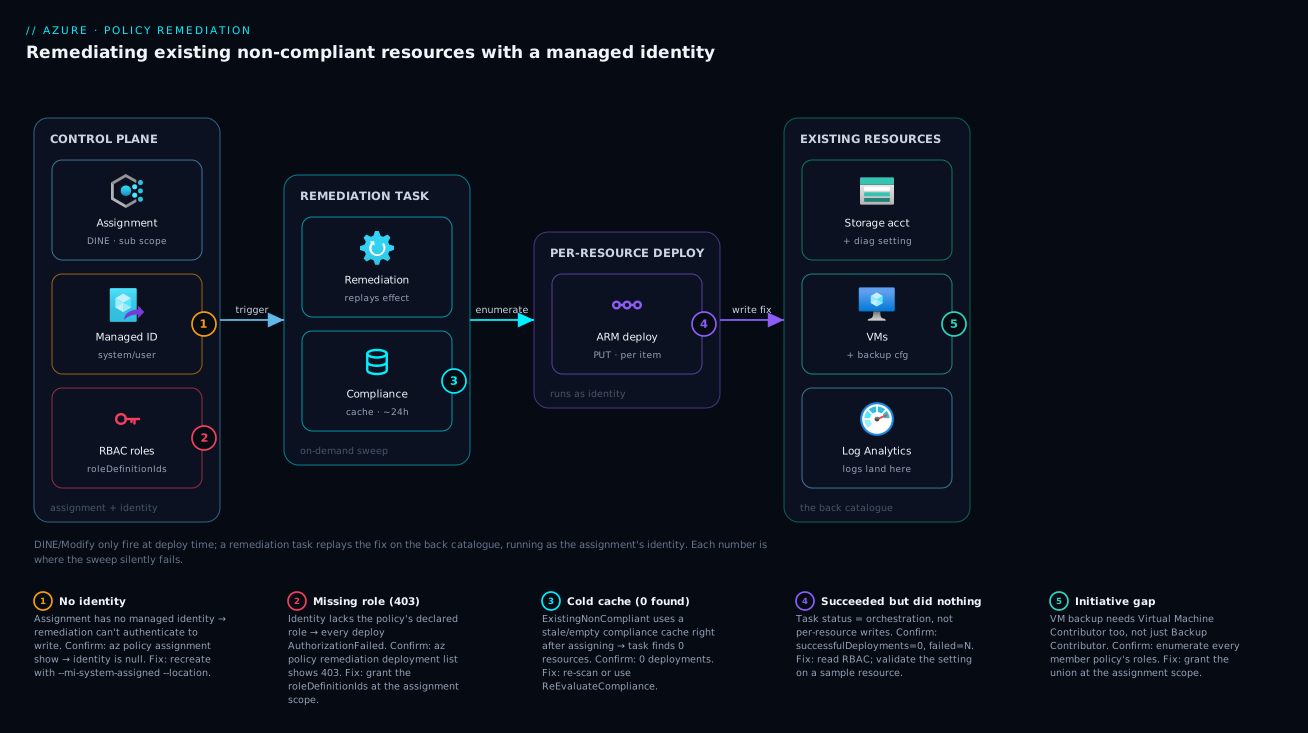
Trace the path a single existing storage account takes from “flagged red” to “fixed and green.” It begins on the control plane: you (or your IaC) created a policy assignment at subscription scope with the DeployIfNotExists effect, carrying a managed identity that was granted Monitoring Contributor and Log Analytics Contributor at the subscription scope — the two roles the diagnostic-settings policy declared in its roleDefinitionIds. So far nothing has touched the 312 existing accounts; the periodic compliance scan has merely flagged them non-compliant in the Policy Insights store.
Now you create a remediation task. It reads the compliance store, enumerates the non-compliant accounts, and for each launches the policy’s remediation deployment — an ARM deployment that runs as the managed identity. Because the identity holds the right roles at the right scope, each deployment calls PUT on a new diagnostic setting pointing at the Log Analytics workspace; the resource’s compliance state flips to compliant on the next evaluation and the dashboard count drops. The three places this breaks — no identity, missing role, cold cache — are marked on the diagram as numbered badges so you can see which hop fails and why.
Real-world scenario
Northwind Logistics runs a single Azure subscription with about 280 resources accumulated over three years — storage accounts, VMs, SQL databases, key vaults — almost none created with any governance in place. A new security lead, preparing for an ISO 27001 audit, needs diagnostic logging on every storage account and SQL database, shipped to a central Log Analytics workspace, and backup configured on every production VM. She assigns two built-in DeployIfNotExists initiatives at the subscription scope, parameterised to the central workspace, expecting compliance to climb over the next day.
It doesn’t. Twenty-four hours later the new initiatives show 9% and 14% compliant — the only compliant resources are a handful created that week, everything older is red. Her first instinct is that the policies are misconfigured, and she spends an afternoon re-reading definitions before realising they’re fine: DeployIfNotExists never ran on the 250 pre-existing resources because none had been redeployed since the assignment. The dashboard is honest; the back catalogue was simply never swept.
She moves to remediation and hits the second wall. She creates a remediation task for the diagnostics initiative in the portal; it runs and reports Succeeded — but the per-resource deployments are nearly all Failed with AuthorizationFailed. The assignment had a system-assigned identity (the portal created it), but the role assignments the portal offered to create had been skipped in the wizard, so the identity held no roles and 403’d on every PUT. She grants Monitoring Contributor and Log Analytics Contributor to the identity at subscription scope (reading the exact roles from the policy’s roleDefinitionIds), re-runs, and this time every deployment succeeds.
The third subtlety appears on the VM backup initiative. The task finds the VMs, but several deployments fail because the identity has Backup Contributor while the policy also declares Virtual Machine Contributor, which the team forgot to grant — backup configuration touches the VM itself, not just the vault. Granting the second role clears it. She also finds that running remediation immediately after assignment returned “0 resources” until she switched the discovery mode to ReEvaluateCompliance for the first pass. After a week she scripts the whole thing — assignment, user-assigned identity, both role grants at subscription scope, an initial remediation per initiative — as Bicep, so the company’s next two subscriptions onboard with the back catalogue fixed from day one. Diagnostics compliance settles at 100% of in-scope resources, and the audit evidence is a clean remediation history rather than a wall of red.
The lesson Northwind takes away: DeployIfNotExists buys you compliance going forward; a remediation task with a correctly-roled identity buys you compliance for everything that already exists — and the two are separate, explicit acts.
Advantages and disadvantages
| Advantages | Disadvantages |
|---|---|
| Fixes the entire back catalogue without redeploying anything | Requires a managed identity + correct RBAC — the main failure source |
| Reuses the policy’s existing remediation logic (no new code) | Only Modify and DeployIfNotExists are remediable; not Audit/Deny |
| Runs on demand and at scale (hundreds of resources per task) | Not continuous — drift requires re-running remediation |
| Per-resource deployment results give precise success/failure visibility | “Task succeeded” can hide many per-resource 403 failures |
| Fully scriptable as IaC (assignment + identity + role + task) | Cold/stale compliance cache can make a task find “0 resources” |
| Scope-narrowing lets you pilot on one RG before a full sweep | Role granted too broadly (Owner) over-privileges a robot identity |
| Same identity reused across an initiative (user-assigned) | Initiatives need the union of all policies’ roles — easy to miss one |
When the advantages dominate: brownfield adoption, audit prep, and any “we have a good policy but the dashboard is stuck” situation — remediation is the only tool that closes the gap, and scripting it makes onboarding new subscriptions trivial. When the disadvantages bite: if you treat remediation as fire-and-forget. Drift after remediation is silent until the next scan, “Succeeded” tasks can mask widespread 403s, and a sloppy role grant either fails everything (too little) or hands a non-human identity sweeping write access (too much). The mitigation is discipline: read the roles from the policy, grant exactly those at the assignment scope, set a failure threshold, and check per-resource deployments — never trust the task-level status alone.
Hands-on lab
This is the centerpiece. You will assign a real built-in DeployIfNotExists policy that deploys a diagnostic setting to a Log Analytics workspace, deliberately create a storage account that the policy leaves non-compliant, then provision the managed identity and roles, run a remediation task, and confirm the diagnostic setting actually lands. Everything uses cheap/free resources (a Log Analytics workspace and a Standard LRS storage account; delete both at the end). You’ll do it three ways: portal, az CLI (the primary path, fully scripted), and Bicep.
What you need: an Azure subscription where you have Owner or User Access Administrator (you must be able to create role assignments), az CLI ≥ 2.50 (Cloud Shell is ideal — it has everything), and about 30 minutes. All resource names below assume you substitute your own where they must be globally unique (the storage account).
The shape of the lab:
| Step | What you do | How you confirm it |
|---|---|---|
| 0 | Set variables, pick the region and subscription | az account show |
| 1 | Create a resource group + Log Analytics workspace | az monitor log-analytics workspace show |
| 2 | Create a storage account before the assignment (the non-compliant one) | az storage account show |
| 3 | Assign the built-in DINE diagnostics policy with an identity | az policy assignment show shows an identity |
| 4 | Read the roles the policy needs; grant them to the identity | az role assignment list shows both roles |
| 5 | Trigger a compliance scan; confirm the account is non-compliant | az policy state list shows NonCompliant |
| 6 | Create and run a remediation task | az policy remediation show → Succeeded |
| 7 | Confirm the diagnostic setting now exists on the account | az monitor diagnostic-settings list returns it |
| 8 | Teardown | resources deleted |
Step 0 — Set variables
# Pick your subscription and region
az account set --subscription "<your-subscription-id>"
SUB_ID=$(az account show --query id -o tsv)
LOCATION="eastus"
RG="rg-policy-remediation-lab"
LAW="law-remediation-lab"
# Storage account name must be globally unique, 3-24 lowercase alphanumerics
SA="stremlab$RANDOM"
ASSIGN="deploy-diag-storage-lab"

echo "Subscription: $SUB_ID"
echo "Storage account: $SA"
Expected output: your subscription GUID and a generated storage account name like stremlab28344. Note the $SA value — you’ll need it throughout.
Step 1 — Create the resource group and Log Analytics workspace
az group create --name "$RG" --location "$LOCATION"

az monitor log-analytics workspace create \
  --resource-group "$RG" --workspace-name "$LAW" \
  --location "$LOCATION"

LAW_ID=$(az monitor log-analytics workspace show \
  --resource-group "$RG" --workspace-name "$LAW" --query id -o tsv)
echo "Workspace resource id: $LAW_ID"
Expected output: the workspace JSON, ending with a "provisioningState": "Succeeded", and a LAW_ID like /subscriptions/.../resourceGroups/rg-policy-remediation-lab/providers/Microsoft.OperationalInsights/workspaces/law-remediation-lab. This workspace is where the diagnostic logs will land.
Step 2 — Create the non-compliant storage account first
Order matters. Create the storage account before assigning the policy, so it is a pre-existing resource the DINE effect will never touch on its own — exactly the situation this article is about.
az storage account create \
  --name "$SA" --resource-group "$RG" --location "$LOCATION" \
  --sku Standard_LRS --kind StorageV2 \
  --min-tls-version TLS1_2 --allow-blob-public-access false

SA_ID=$(az storage account show --name "$SA" --resource-group "$RG" --query id -o tsv)
echo "Storage account id: $SA_ID"
Expected output: storage account JSON with "provisioningState": "Succeeded". Right now this account has no diagnostic settings — verify that baseline so the “after” is meaningful:
az monitor diagnostic-settings list --resource "$SA_ID" -o table
# Expected: an empty result (no diagnostic settings yet)
Step 3 — Assign the built-in DeployIfNotExists diagnostics policy
We’ll use the built-in policy “Configure diagnostic settings for Storage Accounts to Log Analytics workspace” (a DeployIfNotExists policy). First find its definition ID, then assign it at subscription scope with a managed identity. The --mi-system-assigned flag (with --location, which system-assigned identities require) creates the system-assigned identity on the assignment.
# Find the built-in DINE policy that configures storage diagnostic settings to LAW
DEF_ID=$(az policy definition list --query \
  "[?policyType=='BuiltIn' && contains(displayName,'diagnostic settings for Storage Accounts to Log Analytics')].id | [0]" -o tsv)
echo "Definition: $DEF_ID"

# Assign it at subscription scope, with a system-assigned identity, passing the workspace
az policy assignment create \
  --name "$ASSIGN" \
  --display-name "Deploy diag settings to LAW (lab)" \
  --policy "$DEF_ID" \
  --scope "/subscriptions/$SUB_ID" \
  --mi-system-assigned --location "$LOCATION" \
  --params "{\"logAnalytics\":{\"value\":\"$LAW_ID\"}}"
Expected output: assignment JSON. Critically, confirm it carries an identity — this is what remediation will run as:
az policy assignment show --name "$ASSIGN" --scope "/subscriptions/$SUB_ID" \
  --query "{name:name, identityType:identity.type, principalId:identity.principalId}" -o json
# Expected:
# { "name": "deploy-diag-storage-lab",
#   "identityType": "SystemAssigned",
#   "principalId": "00000000-aaaa-bbbb-cccc-1111..." }
Capture that principalId — it is the object ID of the identity you’ll grant roles to:
PRINCIPAL_ID=$(az policy assignment show --name "$ASSIGN" \
  --scope "/subscriptions/$SUB_ID" --query identity.principalId -o tsv)
echo "Identity principalId: $PRINCIPAL_ID"
Common parameter pitfalls at this step, so the assignment doesn’t fail:
| Symptom at assignment time | Cause | Fix |
|---|---|---|
--location is required |
System-assigned identity needs a location | Add --location "$LOCATION" |
InvalidPolicyParameters |
Missing required logAnalytics param |
Pass --params with the workspace id |
Assignment has no identity |
Forgot --mi-system-assigned |
Recreate with the identity flag |
| Wrong definition picked | Display-name filter matched another policy | Print $DEF_ID and verify the name |
Step 4 — Read the required roles, then grant them to the identity
Don’t guess the roles — read them from the policy definition, then grant exactly those at subscription scope so the identity can write diagnostic settings across the subscription.
# Roles the policy's remediation declares it needs
az policy definition show --name "$(basename "$DEF_ID")" \
  --query "policyRule.then.details.roleDefinitionIds" -o tsv
# Expected (two lines):
#   /providers/Microsoft.Authorization/roleDefinitions/749f88d5-cbae-40b8-bcfc-e573ddc772fa  (Monitoring Contributor)
#   /providers/Microsoft.Authorization/roleDefinitions/92aaf0da-9dab-42b6-94a3-d43ce8d16293  (Log Analytics Contributor)

# Grant both to the assignment's identity at subscription scope
for ROLE in "Monitoring Contributor" "Log Analytics Contributor"; do
  az role assignment create \
    --assignee-object-id "$PRINCIPAL_ID" \
    --assignee-principal-type ServicePrincipal \
    --role "$ROLE" \
    --scope "/subscriptions/$SUB_ID"
done
Expected output: two role-assignment JSON objects. The --assignee-principal-type ServicePrincipal flag matters: a brand-new managed identity may not have replicated to Microsoft Entra ID yet, and specifying the type avoids the “principal not found” error that retries otherwise hit. Confirm both roles landed on the identity:
az role assignment list --assignee "$PRINCIPAL_ID" \
  --scope "/subscriptions/$SUB_ID" \
  --query "[].{role:roleDefinitionName, scope:scope}" -o table
# Expected: two rows — Monitoring Contributor and Log Analytics Contributor,
# both scoped to /subscriptions/<SUB_ID>
If you see only one role, or none, remediation will partially or fully 403 — fix it here before proceeding. This is the step that silently breaks more remediations than any other.
Step 5 — Trigger a compliance scan and confirm non-compliance
The compliance store may not yet reflect the storage account. Trigger an on-demand scan, wait for it, then confirm the account shows as non-compliant for this assignment — that’s what makes it eligible for remediation.
# Kick an on-demand compliance scan for the subscription (blocks until done)
az policy state trigger-scan --resource-group "$RG"

# Confirm the storage account is NonCompliant for our assignment
az policy state list \
  --resource-group "$RG" \
  --filter "PolicyAssignmentName eq '$ASSIGN'" \
  --query "[?contains(resourceId,'$SA')].{resource:resourceId, state:complianceState}" -o table
# Expected: one row with complianceState = NonCompliant
Expected output: a single row whose complianceState is NonCompliant, for your storage account. If it’s empty, the scan may still be propagating — wait a minute and re-run the policy state list. (This propagation delay is exactly why ReEvaluateCompliance exists for the remediation task; we’ll use the explicit scan here for clarity.)
Step 6 — Create and run the remediation task
Now the actual fix. Create a remediation task for the assignment. Because we already scanned, the default ExistingNonCompliant discovery mode will find the account; we’ll set a failure threshold as a safety valve.
az policy remediation create \
  --name "remediate-diag-storage-lab" \
  --policy-assignment "$ASSIGN" \
  --resource-group "$RG" \
  --resource-discovery-mode ExistingNonCompliant

# Poll the task until it finishes
az policy remediation show \
  --name "remediate-diag-storage-lab" --resource-group "$RG" \
  --query "{state:provisioningState, deployed:deploymentStatus.totalDeployments, success:deploymentStatus.successfulDeployments, failed:deploymentStatus.failedDeployments}" -o json
Expected output (after it completes, ~1-3 minutes):
{
  "state": "Succeeded",
  "deployed": 1,
  "success": 1,
  "failed": 0
}
The key numbers are success: 1, failed: 0. If you instead see failed: 1, the task “succeeded” at the orchestration level but the deployment failed — almost always a missing role from Step 4. Inspect the per-resource deployment to see the real error:
# List the per-resource deployments this task launched, with their status
az policy remediation deployment list \
  --name "remediate-diag-storage-lab" --resource-group "$RG" \
  --query "[].{resource:resourceId, status:status, error:error.code}" -o table
A clean run shows status = Succeeded and an empty error. A 403 here points straight back to RBAC.
If
policy remediationis not present in yourazbuild, install the policy-insights extension:az extension add --name policyinsights. On current Azure CLI the commands are built in.
Step 7 — Confirm the diagnostic setting actually exists
The whole point. The pre-existing storage account — which had no diagnostic settings in Step 2 — should now have one, created by the remediation deployment, pointing at the workspace:
az monitor diagnostic-settings list --resource "$SA_ID" \
  --query "[].{name:name, workspace:workspaceId}" -o table
# Expected: one diagnostic setting whose workspaceId is your LAW_ID
Expected output: a row with a diagnostic setting (the policy names it setByPolicy-LogAnalytics or similar) whose workspaceId matches $LAW_ID. That setting was written by the managed identity during remediation — proof the back-catalogue resource was fixed without anyone redeploying the storage account. A follow-up compliance scan will now flip it to Compliant:
az policy state trigger-scan --resource-group "$RG"
az policy state list --resource-group "$RG" \
  --filter "PolicyAssignmentName eq '$ASSIGN'" \
  --query "[?contains(resourceId,'$SA')].complianceState" -o tsv
# Expected: Compliant
The Bicep version
To make this repeatable, here is the assignment and a user-assigned identity wired as IaC. (Bicep can declare the assignment, the identity, and the role assignment; the remediation task itself is best fired by az policy remediation create afterwards or via a deployment script, because it is an action, not desired state.) This uses a user-assigned identity so the roles persist across re-deployments.
targetScope = 'subscription'

@description('Region for the user-assigned identity')
param location string = 'eastus'

@description('Resource id of the Log Analytics workspace diagnostics target')
param workspaceId string

@description('Resource group that holds the identity')
param identityRgName string = 'rg-policy-identity'

// Built-in: Configure diagnostic settings for Storage Accounts to Log Analytics workspace
var policyDefinitionId = subscriptionResourceId(
  'Microsoft.Authorization/policyDefinitions',
  '<built-in-definition-guid>') // resolve via: az policy definition list

// Built-in role definition IDs the policy declares it needs
var monitoringContributor = subscriptionResourceId(
  'Microsoft.Authorization/roleDefinitions','749f88d5-cbae-40b8-bcfc-e573ddc772fa')
var logAnalyticsContributor = subscriptionResourceId(
  'Microsoft.Authorization/roleDefinitions','92aaf0da-9dab-42b6-94a3-d43ce8d16293')

resource identityRg 'Microsoft.Resources/resourceGroups@2024-03-01' = {
  name: identityRgName
  location: location
}

module uami 'modules/uami.bicep' = {
  scope: identityRg
  name: 'uami-policy-remediation'
  params: {
    name: 'id-policy-remediation'
    location: location
  }
}

resource assignment 'Microsoft.Authorization/policyAssignments@2024-04-01' = {
  name: 'deploy-diag-storage'
  location: location
  identity: {
    type: 'UserAssigned'
    userAssignedIdentities: {
      '${uami.outputs.resourceId}': {}
    }
  }
  properties: {
    displayName: 'Deploy diag settings to LAW'
    policyDefinitionId: policyDefinitionId
    parameters: {
      logAnalytics: { value: workspaceId }
    }
  }
}

// Grant the two declared roles to the user-assigned identity at subscription scope
resource roleMon 'Microsoft.Authorization/roleAssignments@2022-04-01' = {
  name: guid(subscription().id, uami.outputs.principalId, monitoringContributor)
  properties: {
    principalId: uami.outputs.principalId
    principalType: 'ServicePrincipal'
    roleDefinitionId: monitoringContributor
  }
}

resource roleLaw 'Microsoft.Authorization/roleAssignments@2022-04-01' = {
  name: guid(subscription().id, uami.outputs.principalId, logAnalyticsContributor)
  properties: {
    principalId: uami.outputs.principalId
    principalType: 'ServicePrincipal'
    roleDefinitionId: logAnalyticsContributor
  }
}
With that deployed, trigger the initial sweep once:
az policy remediation create --name "remediate-diag-storage" \
  --policy-assignment "deploy-diag-storage" \
  --scope "/subscriptions/$SUB_ID" \
  --resource-discovery-mode ReEvaluateCompliance
The portal version (same flow, clicked)
If you prefer the portal for the assignment and role wiring:
| # | Portal action | Where | What to confirm |
|---|---|---|---|
| 1 | Policy → Assignments → Assign policy | Azure Policy blade | Scope = your subscription |
| 2 | Pick the “Configure diagnostic settings for Storage Accounts to Log Analytics workspace” definition | Assignment wizard | It’s the DeployIfNotExists one |
| 3 | On Parameters, set the Log Analytics workspace | Parameters tab | Your law-remediation-lab |
| 4 | On Remediation, tick “Create a managed identity”, choose System/User-assigned, set the location | Remediation tab | The role(s) the policy needs are listed here |
| 5 | Leave the role-assignment checkbox enabled (the wizard offers to grant the declared roles) | Remediation tab | This is the step people skip → 403 later |
| 6 | Review + create | Wizard | Assignment shows an identity afterwards |
| 7 | After a scan, open the assignment → Create remediation task | Assignment → Remediate | Or Policy → Remediation → New remediation task |
| 8 | Watch the task; open it to see per-resource deployment results | Remediation blade | Each resource = Succeeded |
The portal’s one genuine trap is step 5: the wizard offers to create the role assignments the policy declares, and if you (or a colleague) untick it or click past it, the identity ends up with no roles and every remediation deployment 403s — the exact failure from the Northwind scenario.
Step 8 — Teardown
# Remove the remediation task, role assignments, policy assignment, then the RG
az policy remediation delete --name "remediate-diag-storage-lab" --resource-group "$RG"

for ROLE in "Monitoring Contributor" "Log Analytics Contributor"; do
  az role assignment delete --assignee "$PRINCIPAL_ID" --role "$ROLE" \
    --scope "/subscriptions/$SUB_ID"
done

az policy assignment delete --name "$ASSIGN" --scope "/subscriptions/$SUB_ID"
az group delete --name "$RG" --yes --no-wait
Expected output: the role and policy assignments are removed, and the resource group deletion runs in the background. Deleting the assignment also removes its system-assigned identity automatically (a user-assigned identity, if you used the Bicep path, lives in its own RG and must be deleted separately). Confirm the policy assignment is gone:
az policy assignment show --name "$ASSIGN" --scope "/subscriptions/$SUB_ID" 2>/dev/null \
  || echo "Assignment deleted."
Common mistakes & troubleshooting
The failure modes here are concentrated and predictable — almost all are identity, role, scope, or cache. Scan the playbook, then read the detail for your row.
| # | Symptom | Root cause | Confirm (exact path/command) | Fix |
|---|---|---|---|---|
| 1 | Existing resources stay non-compliant; nothing changes | DINE/Modify only fire at deployment time | Dashboard: old resources red, new ones green | Run a remediation task |
| 2 | Remediation task Succeeded but resources unchanged |
Identity missing the required role → per-resource 403 |
az policy remediation deployment list shows 403 |
Grant the policy’s roleDefinitionIds to the identity |
| 3 | Every deployment AuthorizationFailed |
No role assignment at all on the identity | az role assignment list --assignee <principalId> empty |
Create the role assignments at the assignment scope |
| 4 | Some resources fixed, some 403 |
Role scoped too narrowly (one RG, not the sub) | Compare role scope vs failing resources’ scope | Grant the role at the assignment scope |
| 5 | Task finds 0 resources to remediate | Cold/stale compliance cache (ExistingNonCompliant) |
Task shows 0 deployments right after assigning | Re-scan, or use --resource-discovery-mode ReEvaluateCompliance |
| 6 | Cannot create the assignment (identity error) |
Forgot --mi-system-assigned/--location |
Assignment JSON has no identity block |
Recreate with the identity flag + location |
| 7 | Initiative: some policies remediate, one never does | Identity missing that policy’s role | Read each member policy’s roleDefinitionIds |
Grant the union of all required roles |
| 8 | “No remediation task option” on an Audit policy | Audit/Deny are not remediable | Effect in the definition is audit/deny |
Only Modify/DINE can be remediated |
| 9 | Per-resource deployment Conflict |
Concurrent write or a resource lock | Check resource locks; activity log | Remove/redo; re-run the task |
| 10 | principal not found when granting the role |
New identity not yet replicated in Entra ID | Role create retries/fails immediately | Pass --assignee-principal-type ServicePrincipal |
| 11 | Remediation works once, drift returns later | DINE doesn’t loop; it’s not continuous | Next scan re-flags the deleted setting | Re-run remediation (or automate it on a schedule) |
| 12 | Task aborts partway | Failure threshold tripped by many 403s |
Task Canceled; failed % over threshold |
Fix RBAC, then re-run |
The “succeeded but did nothing” trap (rows 2-4)
This is the defining remediation bug. The task status (the orchestration) is independent of whether each per-resource deployment succeeded — a task reports Succeeded while every deployment under it failed with 403, because the orchestration ran fine: it launched the deployments, it just can’t see that your identity lacks permission. The error-to-cause map:
| What you see | What it actually means | The real signal to check |
|---|---|---|
Task provisioningState: Succeeded |
The orchestration completed | Not that resources were fixed |
successfulDeployments: 0, failedDeployments: N |
Every per-resource deploy failed | The role/scope is wrong |
Per-resource error.code: AuthorizationFailed |
The identity couldn’t PUT |
Missing role at this scope |
setting still absent after a green task |
Deployment never wrote | Same — RBAC, confirmed by deployment list |
Always validate remediation by two signals: the task’s successfulDeployments count and the actual target setting existing on a sample resource. Never declare victory on the task status alone.
Reading the roles correctly for initiatives (row 7)
For a single definition you grant one or two roles. For an initiative, you must grant the union of roleDefinitionIds across every remediable member policy, or the members whose roles you missed 403 while the others succeed — the partial-success pattern that’s maddening to debug. Enumerate them:
# For an initiative assignment, list the role IDs every member DINE/Modify policy needs
SETDEF_ID=$(az policy assignment show --name <initiative-assignment> \
  --scope "/subscriptions/$SUB_ID" --query policyDefinitionId -o tsv)

az policy set-definition show --name "$(basename "$SETDEF_ID")" \
  --query "policyDefinitions[].policyDefinitionId" -o tsv \
  | while read -r d; do
      az policy definition show --name "$(basename "$d")" \
        --query "policyRule.then.details.roleDefinitionIds" -o tsv 2>/dev/null
    done | sort -u
# → the deduplicated set of roles to grant the identity
Grant every role in that deduplicated list to the assignment’s identity at the assignment scope. This is the single most-missed step for initiative remediation.
Best practices
- Treat remediation as a required follow-up to every DINE/Modify assignment on existing resources — assigning the policy is only half the job; sweeping the back catalogue is the other half.
- Read the roles from the policy’s
roleDefinitionIds, never from memory. Microsoft revises built-in policies; the definition is the source of truth. - Grant the least privilege the policy declares — and nothing more.
Contributor/Owner“to be safe” is a standing write credential a non-human holds across your scope. - Prefer a user-assigned identity for initiatives and multi-subscription baselines — grant the union of roles once and reuse it instead of re-granting on every re-create.
- Grant the role at the assignment scope, not a sub-scope, or remediation
403s outside the granted RG. - Use
ReEvaluateCompliancefor the first remediation after assigning, before a scan has populated the cache, so the task doesn’t find “0 resources.” - Set a
--failure-thresholdon large sweeps so a wrong role doesn’t burn 500 failed deployments before you notice. - Always validate with two signals: the task’s
successfulDeploymentscount and the actual setting existing on a sample resource — never the task status alone. - Pilot on one resource group (
--resource-group/--scope) before a subscription-wide sweep, to confirm identity, roles and parameters on a small blast radius. - Automate re-remediation for drift. DINE doesn’t loop; schedule a recurring remediation (or alert on the non-compliant scan) so a deleted setting doesn’t sit unfixed.
- Make the whole thing IaC — assignment, identity, role grant, initial remediation trigger — so new subscriptions onboard with the back catalogue fixed from day one.
- Track user-assigned identities; tag them and tie them to the assignments they serve so cleanup is obvious and orphans don’t accumulate.
Security notes
The remediation identity is a non-human principal with standing write access to whatever its roles allow across the assignment scope, so it deserves the same least-privilege scrutiny as any privileged service principal. Grant exactly the roles the policy declares in roleDefinitionIds, at the assignment scope and no wider. The shortcut of granting Contributor or Owner “so it just works” turns a narrow diagnostic-settings writer into an identity that can modify or delete most of the subscription — a real privilege-escalation and blast-radius problem if it is ever compromised or misconfigured.
| Risk | Why it matters | Mitigation |
|---|---|---|
Over-privileged identity (Owner/Contributor) |
Standing broad write access for a robot | Grant only the declared roleDefinitionIds |
| Role scoped too broadly (tenant root MG) | Remediation can write across the whole org | Scope the grant to the assignment scope |
| User-assigned identity reused too widely | One identity holds the union of many roles | Separate identities per governance domain |
| Orphaned identities after assignment deletion | Lingering credentials nobody tracks | Tag identities; clean up with the assignment |
| Remediation writing into prod unaudited | Bulk changes with no record | Use per-resource deployment history as evidence |
| Modify policy rewriting security settings | A bad Modify could weaken config at scale | Review the operations; pilot on one RG first |
Two more identity-hygiene points. First, prefer system-assigned when an identity serves a single assignment — its lifecycle is bounded and it’s auto-cleaned, so there’s no orphan to forget; use user-assigned deliberately, for initiatives and reuse, and track it. Second, the remediation deployment history is genuine audit evidence: each per-resource deployment is recorded, so a run is a defensible record of “we brought these N resources into compliance on this date as this identity” — far better material than a dashboard that merely flipped to green. Managed Identity: System-Assigned vs User-Assigned Patterns and Azure RBAC Fundamentals: Roles, Scope, Assignments are the companions to this section.
Cost & sizing
Remediation itself is free — Azure Policy, assignments, compliance evaluation, and remediation tasks carry no per-operation charge. What can cost money is what the remediation deploys and the resources it touches, plus a little operational overhead.
| Cost driver | Charged? | Notes |
|---|---|---|
| Azure Policy assignments & evaluation | Free | No charge for definitions, assignments, scans |
| Remediation tasks & per-resource deployments | Free | The orchestration and ARM deployments are free |
| Managed identity (system or user-assigned) | Free | Identities themselves cost nothing |
| What the policy deploys (e.g. diagnostic settings → Log Analytics) | Yes | Log ingestion + retention is the real bill |
| Resources the remediation configures (e.g. backup vault) | Yes | Backup storage, agents, etc. are billed |
| Log Analytics workspace (lab) | Yes (small) | Pay-per-GB ingestion; the lab’s volume is negligible |
| Storage account (lab) | Yes (tiny) | Standard LRS, no data → effectively free |
The number that matters at scale is log ingestion. A diagnostic-settings remediation that switches on logging for 300 storage accounts starts ingesting their logs into Log Analytics — and at roughly the standard pay-as-you-go rate (on the order of a couple of US dollars per GB; varies by region and commitment tier), a large estate can move the monitoring bill meaningfully. That’s a feature, not a surprise, if you anticipate it: size the workspace, set retention deliberately, and consider a commitment tier if volume is high. For this lab the volumes are trivial and teardown removes everything; in production, model the downstream ingestion before remediating hundreds of resources at once. Azure Monitor & Application Insights for Observability covers the ingestion and retention economics.
A sizing rule of thumb: remediation is free to run, so the question is never “can I afford to remediate” but “can I afford the steady-state cost of the control I’m switching on across the estate” — model that, not the remediation.
Interview & exam questions
Q1. Why do DeployIfNotExists policies leave pre-existing resources non-compliant?
DINE evaluates at deployment time — it hooks the Resource Manager PUT/PATCH of a resource. Resources that existed before the assignment and aren’t redeployed never trigger that hook. The periodic scan flags them non-compliant but is read-only, so they stay unfixed until a remediation task replays the effect on demand.
Q2. What is a remediation task and which effects can it run?
A remediation task is an on-demand replay of an assignment’s remediation action against existing non-compliant resources, launching the policy’s deployment (DINE) or operations (Modify) for each. Only Modify and DeployIfNotExists are remediable; Audit and Deny have no write action to replay.
Q3. Why does a remediation task need a managed identity, and how do you know which roles to grant it?
The remediation deployment authenticates to Azure as the assignment’s managed identity to write the fix. The exact roles are declared in the policy definition’s then.details.roleDefinitionIds — you read those and grant precisely them to the identity at the assignment scope. Missing roles cause 403 AuthorizationFailed on every deployment.
Q4. A remediation task reports Succeeded but no resources changed. What happened and how do you confirm?
The task status reflects the orchestration, not per-resource success. The deployments almost certainly failed with AuthorizationFailed because the identity lacks the required role. Confirm with az policy remediation deployment list, which shows each resource’s deployment status and error code; the fix is granting the policy’s declared roles.
Q5. When would you choose a user-assigned identity over a system-assigned one for remediation? For initiatives with multiple remediable policies, and for governance baselines spanning many subscriptions or frequent re-creations. A user-assigned identity is granted the union of all required roles once and reused, so you don’t re-grant roles every time an assignment is recreated. System-assigned is simpler for a single policy in one scope.
Q6. What is --resource-discovery-mode and when do you change it from the default?
It controls whether the task acts on the cached non-compliant list (ExistingNonCompliant, the default) or re-evaluates each in-scope resource live (ReEvaluateCompliance). Use ReEvaluateCompliance right after assigning a policy — before a scan has populated the compliance cache — otherwise the task may find zero resources.
Q7. For an initiative with several DINE policies, what’s the identity gotcha?
The identity must hold the union of roleDefinitionIds across every remediable member policy. If you grant only some, those policies’ remediations 403 while the rest succeed — a partial-success pattern. Enumerate every member’s roles and grant the deduplicated set.
Q8. Does DeployIfNotExists continuously enforce compliance? No. DINE acts at deployment time and via on-demand remediation; it does not loop and auto-fix drift. If a remediated setting is later deleted, the next scan re-flags the resource non-compliant and you must remediate again — drift handling has to be an explicit re-run or an automated pipeline.
Q9. Your remediation fixes resources in one resource group but 403s elsewhere in the subscription. Why?
The identity’s role assignment is scoped to that one resource group, while the policy is assigned at subscription scope. Remediation can only write where the identity has the role; grant the role at the assignment scope (the subscription) so it covers all in-scope resources.
Q10. How do you make policy remediation repeatable as infrastructure-as-code?
Declare the assignment (with its identity), the user-assigned identity, and the role assignment(s) at the assignment scope in Bicep/Terraform, then trigger the initial remediation via az policy remediation create (or a deployment script). The assignment, identity and roles are desired state; the remediation task is an action you fire after they exist.
Q11. What two signals prove a remediation actually worked?
The task’s successfulDeployments count being non-zero with failedDeployments: 0, and the actual target setting existing on a sample resource. The task’s overall provisioningState: Succeeded alone is insufficient because it reflects the orchestration, not per-resource writes.
Q12. (AZ-500 / AZ-104 framing) Where do remediation tasks and identities map on the exams? AZ-104 covers governance: assigning policy, interpreting compliance, and remediation. AZ-500 emphasises the security angle: the remediation identity as a privileged non-human principal, least-privilege role grants, and remediation history as audit evidence. Both expect you to know that DINE/Modify need an identity and that only those two effects are remediable.
Quick check
- You assign a DeployIfNotExists policy to a subscription with 200 existing resources. A day later, why are most still non-compliant, and what single action fixes them?
- A remediation task shows
provisioningState: Succeededbut the target setting is missing on every resource. What is the most likely cause and the one command that confirms it? - You’re remediating an initiative with three DINE policies; two remediate fine, one always
403s. What did you miss? - Right after assigning a policy you run a remediation task and it reports “0 resources.” What setting changes that, and why?
- Which two policy effects can a remediation task act on, and where in the definition do you find the roles the identity needs?
Answers
- DeployIfNotExists only fires at deployment time, so resources that existed before the assignment were never re-deployed and stay non-compliant; the periodic scan flags them but never writes. The single fix is to create a remediation task for the assignment, which replays the effect against the existing non-compliant resources.
- The assignment’s managed identity is missing the required RBAC role, so each per-resource deployment fails with
403 AuthorizationFailedeven though the task orchestration “succeeded.” Confirm withaz policy remediation deployment list, which shows each deployment’s status anderror.code. - You granted only some of the roles. An initiative needs the union of
roleDefinitionIdsacross all remediable member policies; the one that403s declares a role you didn’t grant the identity. Enumerate every member’s roles and grant the deduplicated set at the assignment scope. - Switch
--resource-discovery-modetoReEvaluateCompliance. The defaultExistingNonCompliantuses the cached compliance list, which is empty/stale immediately after assignment because no scan has run yet;ReEvaluateCompliancere-checks each in-scope resource live so the task finds the non-compliant ones. - Modify and DeployIfNotExists only. The roles are declared in the definition at
policyRule.then.details.roleDefinitionIds, and you grant exactly those to the assignment’s identity at the assignment scope.
Glossary
- Remediation task — An on-demand operation (
Microsoft.PolicyInsights/remediations) that replays a DINE/Modify assignment’s remediation action against existing non-compliant resources. - DeployIfNotExists (DINE) — A policy effect that, at deployment time, runs a separate ARM deployment to deploy a related resource if it’s missing; remediable.
- Modify — A policy effect that adds, updates, or removes properties on a resource during deployment (or via remediation
operations); remediable. - Managed identity — The Azure-managed principal an assignment authenticates as to perform remediation writes; system-assigned or user-assigned.
- System-assigned identity — An identity created with, and deleted alongside, a single assignment.
- User-assigned identity — A standalone identity resource you create once and attach to many assignments, retaining its role grants across them.
roleDefinitionIds— The list, in a policy definition’sthen.details, of RBAC role IDs the remediation deployment requires.- Compliance state — The cached per-resource compliant/non-compliant flag produced by periodic and on-demand scans.
- Resource discovery mode — A remediation-task setting choosing between acting on the cached non-compliant list (
ExistingNonCompliant) and live re-evaluation (ReEvaluateCompliance). existingNonCompliant— Default discovery mode: remediate resources currently flagged non-compliant.ReEvaluateCompliance— Discovery mode that re-checks each in-scope resource live before remediating, used when the cache is cold/stale.- Failure threshold — A remediation-task safety valve that aborts the task if the failed-deployment percentage exceeds a set value.
- Per-resource deployment — The individual ARM deployment a remediation task launches for one resource; its status (not the task’s) proves that resource was fixed.
- Assignment scope — The management group, subscription, or resource group where a policy applies and thus where resources are eligible for remediation.
- AuthorizationFailed — The
403error a remediation deployment returns when the identity lacks the required role at the required scope.
Next steps
- Azure Policy Effects Decoded: Deny vs Audit vs Modify vs DeployIfNotExists — the prequel: how each effect behaves and why only Modify/DINE are remediable.
- Azure Policy Initiatives vs Definitions: When to Group — grouping policies, and why an initiative’s identity needs the union of all member roles.
- Managed Identity: System-Assigned vs User-Assigned Patterns — choosing and operating the identity that does the remediation writing.
- Azure RBAC Fundamentals: Roles, Scope, Assignments — the role/scope model that makes or breaks every remediation task.
- Import Existing Azure Resources: Brownfield Terraform Adoption — the IaC-state counterpart to fixing resources that already exist.