Quick take: Private Link is only half the solution. Without Private DNS, clients still resolve PaaS names to public IPs and the connection either fails or — worse — quietly egresses over the internet. You need both, wired together, on every VNet that resolves.
A security team mandated Private Endpoint for every Azure SQL database in the estate. The database team deployed the endpoints in an afternoon, flipped Public network access to Disabled, and went home. By 09:00 the next morning every application was throwing connection timeouts. The endpoints were healthy, the NSGs were open, the credentials were fine — and the apps still could not connect. The cause was not networking at all. It was DNS: the applications kept resolving mydb.database.windows.net to the public IP (which was now firewalled off), because nobody had created the Azure Private DNS zone that maps the public FQDN to the endpoint’s private IP. The fix was three az commands and zero application changes. This is the single most common Private Link incident, and it is entirely avoidable once you understand that Private Endpoint moves the IP, but Private DNS moves the name — and a client connects to a name.
This article is the practitioner’s deep dive into the pair. Azure Private Link is the umbrella feature; a Private Endpoint is the concrete object — a network interface (NIC) with a private IP from your subnet that maps to one specific PaaS resource (one SQL server, one storage account’s blob service, one Key Vault) over the Microsoft backbone, never the public internet. Azure Private DNS is the resolution layer that makes the public service FQDN return that private IP, so existing connection strings keep working untouched. You will learn every moving part: the group ID that selects which sub-resource an endpoint targets, the exact privatelink.* zone names per service, the privateDnsZoneGroup that auto-creates and lifecycle-manages the A record (and why you should almost never create that record by hand), how name resolution actually resolves through the platform’s 168.63.129.16 resolver, how to extend it to on-premises with DNS Private Resolver or a forwarder VM, and the data-exfiltration story that is the real reason security teams care.
Because this is a reference you will return to mid-incident, the playbook, the group IDs, the zone names, the limits and the failure modes are all laid out as scannable tables — read the prose once, then keep the tables open when nslookup returns the wrong IP and production is down. By the end you will stop guessing whether a Private Link problem is “networking” or “DNS” (it is almost always DNS), and you will be able to confirm which in under two minutes with a single resolution check.
What problem this solves
PaaS services — Azure SQL, Storage, Key Vault, Cosmos DB, App Service, Service Bus — are born with public endpoints. mydb.database.windows.net resolves to a public IP and accepts connections from anywhere your firewall rules allow. For a great many workloads that is fine, gated by service firewalls and Service Endpoints. But for regulated, sensitive, or zero-trust workloads it is unacceptable on two counts. First, the data plane traverses the public internet (even if encrypted, the path is public, and many compliance regimes forbid it). Second, and more subtly, a public endpoint is a data-exfiltration vector: a compromised VM or a malicious insider can copy data to their own storage account, because outbound to *.blob.core.windows.net is allowed wholesale — the firewall protects your account, not the service.
Private Link solves both. The Private Endpoint gives the service a private IP inside your VNet, so traffic stays on the Microsoft backbone and the service can have its public endpoint disabled entirely. Private Link policies then let you allow your own storage account’s private endpoint while the platform blocks egress to other tenants’ resources, closing the exfiltration hole. The catch — the thing this entire article exists to drive home — is that none of it works until DNS resolves the public FQDN to the private IP. A Private Endpoint with no DNS plan is a NIC nobody can find.
What breaks without this knowledge, in production terms: applications time out after the public endpoint is disabled (the headline incident above); on-premises clients keep resolving public IPs because the Private DNS zone is invisible to corporate DNS; a hub-and-spoke estate ends up with the zone linked to one VNet but not the twenty spokes that actually need it; somebody creates the A record by hand, the endpoint is later re-created with a new private IP, and the stale record blackholes traffic; or a forced-tunnel 0.0.0.0/0 route sends the endpoint’s return traffic to a firewall that drops it. Every one of these looks like a connectivity problem and is a name-resolution or routing problem.
Who hits this: anyone running sensitive PaaS in production, especially in hub-and-spoke topologies with centralized DNS, hybrid estates with on-premises clients, and landing zones where the platform team owns DNS and app teams own endpoints. The decision of which private-access technology to use at all — Private Endpoint versus the older Service Endpoint — is upstream of this and covered in Azure Private Endpoint vs Service Endpoint: Secure PaaS Access; this article assumes you have chosen Private Endpoint and need to make it actually resolve.
To frame the whole field before the deep dive, here is every failure class this article covers, the question it forces, and the one check to run first:
| Failure class | What the symptom looks like | First question to ask | First check to run | Most common single cause |
|---|---|---|---|---|
| Resolves to public IP | Timeout after public access disabled | Does the client get a private or public IP? | nslookup mydb.database.windows.net |
Private DNS zone not linked to this VNet |
| No / stale A record | NXDOMAIN or wrong private IP | Is there a record, and is it the current PE IP? | az network private-dns record-set a list |
No privateDnsZoneGroup; manual record drifted |
| NSG / route blocks the leg | Resolves right, still no connect | Is the PE NIC reachable on the port? | Network Watcher effective routes + NSG | 0.0.0.0/0 UDR blackholes; NSG drops the port |
| Public path still open | Works, but exfil still possible | Is publicNetworkAccess actually Disabled? |
az sql server show … publicNetworkAccess |
Endpoint added but public never turned off |
| Hybrid resolves public | On-prem clients fail, Azure clients fine | Where does the query resolve — Azure or on-prem? | nslookup from on-prem vs from a VNet VM |
No conditional forwarder to a DNS resolver |
| Wrong group ID | PE created against the wrong sub-resource | Is the endpoint for blob, or for file/dfs? | az network private-endpoint show … groupIds |
One PE assumed to cover all storage sub-resources |
Learning objectives
By the end of this article you can:
- Explain precisely what a Private Endpoint, Private Link service, Private DNS zone, and
privateDnsZoneGroupeach are, and how the four combine into one working private path. - Choose the correct group ID (sub-resource) for any service —
sqlServer,blob,file,vault,sites,Sql(Cosmos),namespace— and know that one PE targets exactly one sub-resource. - Name the exact
privatelink.*Private DNS zone for the common services and create it, link it to the right VNets, and let the platform auto-manage the A record. - Diagnose a Private Link failure as a DNS problem versus a routing problem in under two minutes with a single resolution check, and confirm the root cause with the exact
az/nslookuppath. - Extend private resolution to on-premises using Azure DNS Private Resolver (or a forwarder VM) with conditional forwarders, and explain why
168.63.129.16is not reachable cross-premises. - Design DNS for a hub-and-spoke estate so a single set of Private DNS zones serves all spokes, and automate zone-group creation with Azure Policy so app teams cannot forget it.
- Close the data-exfiltration hole with Private Link, disable public network access safely, and reason about the cost of each endpoint.
Prerequisites & where this fits
You should already understand Azure networking fundamentals: that a VNet is your private address space carved into subnets, that NSGs filter traffic and UDRs (user-defined routes) steer it, and how name resolution works at a basic level (an FQDN resolves to an IP via DNS, possibly through a CNAME chain). Those fundamentals are covered in Azure Virtual Network, Subnets and NSGs: Networking Fundamentals. You should be comfortable running az in Cloud Shell, reading JSON output, and you should know what a PaaS service’s public FQDN looks like (e.g. *.database.windows.net, *.blob.core.windows.net).
This sits in the Networking & Security track and is the practical follow-on to the Private Endpoint-vs-Service-Endpoint decision. It pairs tightly with VNet routing troubleshooting — when DNS is right but traffic still won’t flow, you are in Diagnosing Azure VNet Connectivity: NSGs, UDRs, Effective Routes & Network Watcher territory — and with the storage-specific access failures in Fixing Azure Storage 403 Errors: Firewalls, Private Endpoints, RBAC & SAS. In a large org the zone-and-link design is part of the platform foundation described in Azure Enterprise-Scale Landing Zone: Foundation for Large Organizations.
A quick map of who owns and confirms what during a Private Link incident, so you call the right person fast:
| Layer | What lives here | Who usually owns it | Failure classes it can cause |
|---|---|---|---|
| Application / connection string | The FQDN the client dials | App / dev team | None directly — but a hard-coded private IP is a landmine |
| Private DNS zone + links | The name→private-IP mapping | Platform / network team | Resolves public, NXDOMAIN, stale record (most failures) |
privateDnsZoneGroup |
Auto-managed A record on the PE | Whoever deploys the PE | Stale/missing record if omitted |
| Private Endpoint (NIC) | The private IP + sub-resource | App team (often) | Wrong group ID; NIC in a subnet with bad routes |
| NSG / UDR on the PE subnet | Filtering + routing of the leg | Network team | 0.0.0.0/0 blackhole; port dropped |
| PaaS service firewall | Public access on/off | App + security | Public still open (exfil); or over-locked, blocking the PE |
| On-prem DNS / forwarders | Cross-premises resolution | Corporate IT / network | Hybrid clients resolve public |
Core concepts
Six mental models make every later diagnosis obvious. Read them once; they are the spine of the whole article.
Private Endpoint moves the IP; Private DNS moves the name — and a client connects to a name. This is the thesis. A Private Endpoint is a NIC with a private IP (say 10.20.1.5) that maps to one PaaS resource over the backbone. But your app dials mydb.database.windows.net, not 10.20.1.5. Unless DNS returns the private IP for that public name, the app resolves the public IP and either egresses publicly (if public access is on) or times out (if it’s off). The Private Endpoint is necessary but useless without the matching DNS answer. Ninety percent of “Private Link doesn’t work” tickets are this one fact, not understood.
A Private Endpoint targets exactly one sub-resource, named by a group ID. A storage account has multiple services — blob, file, queue, table, dfs, web — each with its own FQDN (*.blob.*, *.file.*, …). A single Private Endpoint connects to one of them, selected by a group ID (also called the sub-resource). blob gets you the blob service; you need a separate endpoint (and a separate DNS zone) for file. Azure SQL uses sqlServer; Key Vault uses vault; App Service uses sites; Cosmos DB uses Sql/MongoDB/etc. Assuming one endpoint covers a whole service family is a classic mistake.
The public FQDN CNAMEs into the privatelink zone, which holds the private A record. When you enable a Private Endpoint, the public name (mydb.database.windows.net) is reconfigured so that, from a network that resolves the private zone, it CNAMEs to mydb.privatelink.database.windows.net, and that name has an A record to the private IP. So you don’t override the public name directly — you create the privatelink.database.windows.net zone, link it to your VNet, and the CNAME chain lands on your private A record. From a network without the zone, the same name resolves to the public IP. The zone name is service-specific and must be exact.
The privateDnsZoneGroup auto-creates and lifecycle-manages the A record — use it. You can create the A record by hand, but you almost never should. A privateDnsZoneGroup is a small object you attach to the Private Endpoint that says “keep this privatelink zone’s A record in sync with this endpoint’s IP.” Create it, and the record appears automatically, updates if the IP ever changes, and is deleted when the endpoint is deleted. Skip it and create the record manually, and you own a brittle mapping that silently drifts the day someone re-creates the endpoint with a new IP. The zone-group is the difference between “set and forget” and “stale-record outage in six months.”
Resolution flows through the platform resolver at 168.63.129.16 — which is VNet-local. Inside a VNet, Azure-provided DNS is the magic IP 168.63.129.16. It knows about Private DNS zones linked to that VNet and returns the private A record. This is why a VNet-linked zone “just works” for VNet clients. The crucial limit: 168.63.129.16 is not reachable from on-premises (it’s link-local to the VNet). So hybrid clients can’t use it directly — they need a forwarder inside Azure (a DNS Private Resolver inbound endpoint, or a DNS VM) that on-prem conditionally forwards to. Misunderstanding this single fact is the root of nearly every hybrid Private Link failure.
Private DNS without Private Endpoint, or vice versa, is a partial solution that fails quietly. The two are independent objects you must wire together. A Private Endpoint with no zone → resolves public. A zone with no endpoint (or pointing at a deleted endpoint) → resolves to a private IP nobody answers on → timeout. Disabling public access without first proving private resolution → instant outage. The pair is the unit of work; deploying one without the other is the bug.
The vocabulary in one table
Before the deep sections, pin down every moving part. The glossary at the end repeats these for lookup; this table is the mental model side by side:
| Concept | One-line definition | Where it lives | Why it matters to connectivity |
|---|---|---|---|
| Private Link | Umbrella feature for private PaaS access over the backbone | Platform feature | The “why” — private path, no public internet |
| Private Endpoint | A NIC with a private IP mapping to one PaaS sub-resource | Your subnet | The private IP the client must reach |
| Group ID (sub-resource) | Which service the endpoint targets (blob, sqlServer, …) |
On the PE | One PE = one sub-resource; wrong ID = wrong service |
| Private Link service | Your service exposed privately to consumer VNets | Behind your Standard LB | Provider side of Private Link (you publish) |
| Private DNS zone | The privatelink.* zone holding the private A record |
Resource group, linked to VNets | Maps the public FQDN to the private IP |
privatelink.* name |
The exact zone name per service (e.g. privatelink.blob.core.windows.net) |
The zone’s name | Must match the service or resolution fails |
privateDnsZoneGroup |
Auto-manages the A record for a PE | On the PE | Prevents stale-record drift; the safe default |
| Virtual network link | Connects a Private DNS zone to a VNet | On the zone | A VNet resolves the zone only if linked |
168.63.129.16 |
Azure platform DNS resolver (VNet-local) | Every VNet | Returns the private A record; not reachable on-prem |
| DNS Private Resolver | Managed DNS forwarder with inbound/outbound endpoints | A subnet in the hub | Lets on-prem and spokes resolve private zones |
| Public network access | The service-firewall switch for the public endpoint | On the PaaS resource | Must be Disabled to truly close the public path |
| Data exfiltration | Copying data to an attacker’s PaaS account | Threat model | Private Link + policy blocks egress to other tenants |
The fastest way to internalise the model is to nail down what each object is not — every one of these confusions is a real ticket:
| Belief that causes outages | Why it’s wrong | The correct mental model |
|---|---|---|
| “A Private Endpoint overrides the public DNS name.” | The PE only creates a NIC + private IP; it touches no DNS by itself. | You must create the privatelink zone and link it; the PE just provides the IP the record points at. |
| “One Private Endpoint secures the whole storage account.” | A PE binds to one sub-resource (group ID), not the account. | One PE + one zone per sub-resource (blob, file, queue, …) you actually use. |
| “Disabling public access makes it private.” | It only shuts the public door; private resolution is separate. | Private DNS must already return the private IP before you disable public, or you self-inflict an outage. |
| “The hub VNet resolving means the spokes resolve.” | Each VNet resolves only the zones linked to it. | Link the zone (or point DNS at a resolver) for every spoke that dials the PaaS name. |
“168.63.129.16 works everywhere.” |
It is link-local to each VNet, unreachable across ExpressRoute/VPN. | On-prem needs a forwarder to an in-Azure resolver; it cannot hit the platform IP directly. |
| “A correct-looking A record means it’s fine.” | A manually created record drifts when the PE is re-created with a new IP. | Use a privateDnsZoneGroup; only it stays in sync with the endpoint’s lifecycle. |
And because the four objects only work as a set, here is exactly what must exist for each outcome — read it as a truth table for “why is the answer wrong”:
| PE exists? | Zone created? | Zone linked to client VNet? | A record (zone-group)? | Public access | What the client gets |
|---|---|---|---|---|---|
| No | — | — | — | Enabled | Public IP — no private path at all |
| Yes | No | — | — | Enabled | Public IP — endpoint unused, egress public |
| Yes | Yes | No | Yes | Enabled | Public IP — zone invisible to this VNet |
| Yes | Yes | Yes | No | Enabled | NXDOMAIN on privatelink, falls back to public |
| Yes | Yes | Yes | Yes | Enabled | Private IP — works, but exfil door still open |
| Yes | Yes | Yes | Yes | Disabled | Private IP — works and fully locked (the goal) |
| Yes | Yes | No | Yes | Disabled | Timeout — resolves public, public is closed (the classic outage) |
Group IDs and privatelink zone names — the canonical reference
Two pieces of trivia decide whether a Private Endpoint works at all: the group ID (which sub-resource the endpoint targets) and the exact privatelink zone name (where the A record lives). Get either wrong and the endpoint deploys cleanly but never resolves or never connects. There is no way to “figure these out” at the keyboard — you look them up. This is that lookup. Treat it as the single most-referenced table in the article.
| Service | Group ID (--group-id) |
Private DNS zone name | Public FQDN pattern |
|---|---|---|---|
| Azure SQL Database / SQL MI | sqlServer |
privatelink.database.windows.net |
*.database.windows.net |
| Azure Synapse (SQL) | Sql |
privatelink.sql.azuresynapse.net |
*.sql.azuresynapse.net |
| Storage — Blob | blob |
privatelink.blob.core.windows.net |
*.blob.core.windows.net |
| Storage — File | file |
privatelink.file.core.windows.net |
*.file.core.windows.net |
| Storage — Queue | queue |
privatelink.queue.core.windows.net |
*.queue.core.windows.net |
| Storage — Table | table |
privatelink.table.core.windows.net |
*.table.core.windows.net |
| Storage — Data Lake Gen2 | dfs |
privatelink.dfs.core.windows.net |
*.dfs.core.windows.net |
| Storage — Static Web | web |
privatelink.web.core.windows.net |
*.web.core.windows.net |
| Key Vault | vault |
privatelink.vaultcore.azure.net |
*.vault.azure.net |
| Cosmos DB (Core/SQL) | Sql |
privatelink.documents.azure.com |
*.documents.azure.com |
| Cosmos DB (MongoDB) | MongoDB |
privatelink.mongo.cosmos.azure.com |
*.mongo.cosmos.azure.com |
| App Service / Functions | sites |
privatelink.azurewebsites.net |
*.azurewebsites.net |
| Service Bus / Event Hubs | namespace |
privatelink.servicebus.windows.net |
*.servicebus.windows.net |
| Azure Container Registry | registry |
privatelink.azurecr.io |
*.azurecr.io (+ regional data) |
| Azure App Configuration | configurationStores |
privatelink.azconfig.io |
*.azconfig.io |
| Azure Monitor (AMPLS) | azuremonitor |
several (privatelink.monitor.azure.com, …) |
multiple |
The same lookup for the next tier of services people wire up — AKS, AI, databases and messaging — because guessing these is the same silent failure:
| Service | Group ID (--group-id) |
Private DNS zone name | Public FQDN pattern |
|---|---|---|---|
| AKS API server (private cluster) | management |
privatelink.<region>.azmk8s.io |
*.azmk8s.io |
| Azure Cache for Redis | redisCache |
privatelink.redis.cache.windows.net |
*.redis.cache.windows.net |
| Azure Database for PostgreSQL (Flexible) | postgresqlServer |
privatelink.postgres.database.azure.com |
*.postgres.database.azure.com |
| Azure Database for MySQL (Flexible) | mysqlServer |
privatelink.mysql.database.azure.com |
*.mysql.database.azure.com |
| Event Grid topic | topic |
privatelink.eventgrid.azure.net |
*.eventgrid.azure.net |
| Azure Data Factory | dataFactory |
privatelink.datafactory.azure.net |
*.datafactory.azure.net |
| Azure AI Search | searchService |
privatelink.search.windows.net |
*.search.windows.net |
| Azure OpenAI / AI Services | account |
privatelink.openai.azure.com |
*.openai.azure.com |
| Azure Batch | batchAccount |
privatelink.<region>.batch.azure.com |
*.batch.azure.com |
| SignalR Service | signalr |
privatelink.service.signalr.net |
*.service.signalr.net |
| Azure Backup (Recovery Vault) | AzureBackup |
privatelink.<geo>.backup.windowsazure.com |
*.backup.windowsazure.com |
| Azure Web PubSub | webpubsub |
privatelink.webpubsub.azure.com |
*.webpubsub.azure.com |
When a service isn’t in either table, you discover its group IDs rather than guess — the platform will tell you:
| What you need | Command | Note |
|---|---|---|
| List valid group IDs for a resource type | az network private-link-resource list --id <resourceId> |
Returns every sub-resource the service supports |
| The required zone name(s) for a group ID | az network private-link-resource list --id <resourceId> --query "[].properties.requiredZoneNames" |
The exact privatelink.* names to create |
| What an existing PE actually targets | az network private-endpoint show … --query "privateLinkServiceConnections[].groupIds" |
The group ID you really deployed |
| Records the platform wants to manage | az network private-endpoint show … --query "customDnsConfigs" |
FQDNs + IPs the zone-group should hold |
Three reading notes that save the most time:
| Trap | Why it bites | How to avoid it |
|---|---|---|
Key Vault’s zone is not privatelink.vault.azure.net |
The data-plane zone is vaultcore.azure.net — a near-universal typo |
Copy the exact name from this table; a wrong zone resolves nothing |
| Storage needs one PE + one zone per sub-resource | blob and file are different services with different FQDNs |
Deploy separate endpoints/zones for each sub-resource you use |
| Some services have multiple FQDNs / regional records | ACR has a regional data endpoint; AMPLS spans several zones | Verify all records resolve privately, not just the primary |
The group ID is also the thing you confirm when an endpoint “exists but doesn’t work” — it may target the wrong sub-resource entirely:
# What sub-resource(s) does this Private Endpoint actually target?
az network private-endpoint show -n pe-sql-prod -g rg-net-prod \
  --query "privateLinkServiceConnections[].groupIds" -o tsv
# Expect: sqlServer   (if this prints 'blob', you built the wrong endpoint)
Building the private path — option by option
Here is the end-to-end build, each step with its choices, defaults, trade-offs and gotchas. The order matters: endpoint → zone → link → zone-group → disable public, validated at each step.
Step 1 — Create the Private Endpoint (and pick the group ID)
The endpoint needs a target resource ID, a group ID, and a subnet to place the NIC. The subnet must have privateEndpointNetworkPolicies considered (historically NSGs/UDRs didn’t apply to PE NICs unless this was enabled; modern subnets support it — see the routing section).
# Create a Private Endpoint for Azure SQL (group-id sqlServer)
SQLID=$(az sql server show -n sql-shop-prod -g rg-data-prod --query id -o tsv)
az network private-endpoint create \
  --name pe-sql-prod --resource-group rg-net-prod \
  --vnet-name vnet-hub --subnet snet-privatelink \
  --private-connection-resource-id "$SQLID" \
  --group-id sqlServer \
  --connection-name pe-sql-conn -o table
resource pe 'Microsoft.Network/privateEndpoints@2023-11-01' = {
  name: 'pe-sql-prod'
  location: location
  properties: {
    subnet: { id: privateLinkSubnetId }
    privateLinkServiceConnections: [ {
      name: 'pe-sql-conn'
      properties: {
        privateLinkServiceId: sqlServerId
        groupIds: [ 'sqlServer' ]   // exactly one sub-resource per endpoint
      }
    } ]
  }
}
The endpoint placement and approval options, each with its trade-off:
| Option | Values | Default | When to change | Trade-off / gotcha |
|---|---|---|---|---|
| Group ID | service-specific (table above) | none (required) | per sub-resource | Wrong ID → endpoint targets the wrong service |
| Subnet | any subnet in the VNet | required | dedicate a PE subnet | Mixing PEs with VMs complicates NSG/route design |
| Connection approval | Auto / Manual | Auto (same tenant, owner) | cross-tenant, or governance gate | Manual leaves the PE in Pending until approved |
| Static vs dynamic PE IP | Dynamic / Static | Dynamic | when firewalls pin the IP | Static IP survives re-create; dynamic can change |
privateEndpointNetworkPolicies |
Disabled / Enabled | varies by age | enable to apply NSG/UDR to the PE NIC | Disabled means NSGs/UDRs are ignored on the NIC |
The connection state is the first thing to check if a cross-tenant or governed endpoint isn’t working:
| Connection state | Meaning | What to do |
|---|---|---|
Approved |
Live and serving | Nothing — proceed to DNS |
Pending |
Awaiting manual approval on the resource owner’s side | Approve via az network private-endpoint-connection approve |
Rejected |
Owner declined | Re-request; fix whatever policy rejected it |
Disconnected |
Target resource was deleted/moved | Re-create the endpoint against the current resource |
Step 2 — Create the Private DNS zone (exact name)
The zone name must match the service exactly (from the canonical table). Create it once per service per DNS scope (usually once in the hub).
# Create the Private DNS zone for Azure SQL
az network private-dns zone create \
  --resource-group rg-net-prod \
  --name privatelink.database.windows.net -o table
resource zone 'Microsoft.Network/privateDnsZones@2020-06-01' = {
  name: 'privatelink.database.windows.net'   // EXACT — see the canonical table
  location: 'global'                          // Private DNS zones are always 'global'
}
Zone-creation choices and the gotchas:
| Setting | Values | Default | When to change | Gotcha |
|---|---|---|---|---|
| Zone name | privatelink.<service> (exact) |
required | per service | A wrong name resolves nothing; no error at create time |
| Location | always global |
global |
never | Private DNS zones are not regional |
| Resource group | any (usually a central DNS RG) | required | centralize in the hub | Scattering zones makes hub-spoke DNS unmanageable |
| Registration vs resolution link | Resolution (for PaaS) | per link | almost always resolution-only | Auto-registration is for VM records, not PaaS PEs |
Step 3 — Link the zone to every VNet that must resolve
A VNet resolves a Private DNS zone only if a virtual-network link exists. In hub-and-spoke, this is the step teams forget for the spokes — the hub resolves, the spokes don’t, and half the estate fails.
# Link the zone to the VNet whose clients must resolve privately
VNETID=$(az network vnet show -n vnet-spoke-app -g rg-net-prod --query id -o tsv)
az network private-dns link vnet create \
  --resource-group rg-net-prod \
  --zone-name privatelink.database.windows.net \
  --name link-spoke-app --virtual-network "$VNETID" \
  --registration-enabled false -o table
resource link 'Microsoft.Network/privateDnsZones/virtualNetworkLinks@2020-06-01' = {
  parent: zone
  name: 'link-spoke-app'
  location: 'global'
  properties: {
    virtualNetwork: { id: spokeVnetId }
    registrationEnabled: false   // resolution only for PaaS PEs
  }
}
The linking model and its limits — the numbers matter in big estates:
| Link property | Value / limit | Why it matters |
|---|---|---|
registrationEnabled |
false for PaaS PEs |
true only when you want VM auto-registration (not here) |
| Links per Private DNS zone | up to ~1,000 | A single zone can serve a very large hub-and-spoke estate |
| A VNet → zones | many | One VNet links to all the privatelink.* zones it needs |
| Cross-subscription links | supported | The zone in the hub can link to spokes in other subscriptions |
| Resolution scope | the linked VNet only | An unlinked VNet resolves the public IP — the #1 spoke bug |
Step 4 — Attach the privateDnsZoneGroup (auto A record) — the safe default
This is the step that makes the whole thing robust. Attaching a privateDnsZoneGroup to the endpoint tells Azure to create and maintain the A record in the named zone, tied to the endpoint’s lifecycle.
# Auto-create + lifecycle-manage the A record for this endpoint
az network private-endpoint dns-zone-group create \
  --resource-group rg-net-prod \
  --endpoint-name pe-sql-prod \
  --name pdzg-sql \
  --private-dns-zone privatelink.database.windows.net \
  --zone-name sql -o table
resource zoneGroup 'Microsoft.Network/privateEndpoints/privateDnsZoneGroups@2023-11-01' = {
  parent: pe
  name: 'pdzg-sql'
  properties: {
    privateDnsZoneConfigs: [ {
      name: 'sql'
      properties: { privateDnsZoneId: zone.id }
    } ]
  }
}
Auto-managed versus manual A record — pick auto every time you can:
| Approach | Record lifecycle | Drift risk | When it’s acceptable | Verdict |
|---|---|---|---|---|
privateDnsZoneGroup (auto) |
Created/updated/deleted with the PE | None | Almost always | Default — use this |
Manual A record (record-set a add-record) |
You own it forever | High — stale on re-create | Cross-cloud edge cases, custom zones | Avoid unless forced |
| No record at all | — | — | Never | Resolution fails (NXDOMAIN) |
After this step, resolution from a linked VNet should return the private IP. Validate before touching public access:
# From a VM inside a linked VNet (NOT Cloud Shell, which isn't in your VNet):
nslookup sql-shop-prod.database.windows.net
# Expect a CNAME to sql-shop-prod.privatelink.database.windows.net → A 10.20.1.5 (private)
Step 5 — Disable public network access (only after private is proven)
Now, and only now, close the public door. Disabling it before DNS resolves privately is the classic self-inflicted outage.
# Azure SQL: disable the public endpoint entirely
az sql server update -n sql-shop-prod -g rg-data-prod \
  --set publicNetworkAccess=Disabled -o table
The public-access switch differs by service in name and granularity:
| Service | How to disable public | Granularity | Note |
|---|---|---|---|
| Azure SQL | publicNetworkAccess=Disabled |
All-or-nothing public | Firewall rules ignored once disabled |
| Storage | --public-network-access Disabled (+ default-action Deny) |
Per-account, plus network rules | “Allow trusted services” still applies |
| Key Vault | --public-network-access Disabled |
Per-vault | Combine with --default-action Deny |
| Cosmos DB | --public-network-access Disabled |
Per-account | Also --ip-range-filter for exceptions |
| App Service | --public-network-access Disabled |
Per-app inbound | Use with access restrictions for fine control |
A pre-flight checklist before you flip the switch — each row is an outage you avoid:
| Pre-flight check | Command / portal | Must be true |
|---|---|---|
| PE connection approved | az network private-endpoint show … connectionState |
Approved |
| Zone linked to the client’s VNet | az network private-dns link vnet list |
A link exists |
| A record present + correct IP | az network private-dns record-set a list |
Points at the PE IP |
| Resolution returns private IP | nslookup from a VNet VM |
Private IP, not public |
| On-prem clients (if any) resolve private | nslookup from on-prem |
Private IP via forwarder |
DNS resolution: how the name actually resolves
Understanding the resolution path turns “it doesn’t work” into “I know exactly which hop is wrong.” Here is the chain a VNet client walks, and the three scopes (VNet-only, hub-and-spoke, hybrid) that each change one link in it.
The CNAME chain and the platform resolver
From a client in a linked VNet, dialing sql-shop-prod.database.windows.net:
- The client asks Azure DNS (
168.63.129.16, the VNet’s default resolver). - The public name CNAMEs to
sql-shop-prod.privatelink.database.windows.net. - The resolver checks Private DNS zones linked to this VNet, finds
privatelink.database.windows.net, and returns the A record →10.20.1.5(private). - The client connects to
10.20.1.5— the Private Endpoint NIC — over the backbone.
From a network without the zone linked, step 3 has no private zone to consult, the privatelink name resolves via public DNS to a public IP, and the client connects publicly (or fails if public is disabled). The entire difference is whether the resolving VNet has the link.
Each hop in that chain has its own failure and its own one-line check — when resolution is wrong you walk this table top to bottom and stop at the first surprise:
| Hop | What happens | Goes wrong when… | Confirm at this hop |
|---|---|---|---|
| 1. Client → resolver | Query goes to 168.63.129.16 (or custom DNS) |
VNet DNS overridden to an on-prem server with no forwarder | Get-DnsClientServerAddress / check VNet DNS settings |
| 2. Public name → CNAME | …database.windows.net CNAMEs to …privatelink.… |
Nothing usually — this CNAME is platform-managed | nslookup -type=cname <fqdn> shows the privatelink target |
3. privatelink → zone |
Resolver checks zones linked to this VNet | Zone not created, or not linked to this VNet | az network private-dns link vnet list |
| 4. Zone → A record | The privatelink name returns the private A record |
No privateDnsZoneGroup, so no record exists (NXDOMAIN) |
az network private-dns record-set a list |
| 5. A record → correct IP | Record holds the current PE NIC IP | Manual record drifted after a PE re-create | Compare record IP vs customDnsConfigs IP |
The resolution outcomes you’ll see, and what each tells you:
nslookup result |
What it means | Verdict |
|---|---|---|
CNAME → *.privatelink.* → private A record |
Zone linked, record present, working | Correct |
| Resolves straight to a public IP | Zone not linked to this VNet (or not created) | Link the zone here |
NXDOMAIN on the privatelink name |
Zone exists but no A record | Add privateDnsZoneGroup |
| Private A record with the wrong IP | Stale manual record after PE re-create | Switch to auto zone-group |
| Resolves private on a VM but public from on-prem | No cross-prem forwarder to a resolver | Add conditional forwarder |
The three resolution scopes differ in exactly one variable — who needs to reach the zone — and that drives every design choice below:
| Dimension | Scope A — single VNet | Scope B — hub-and-spoke | Scope C — hybrid (on-prem) |
|---|---|---|---|
| Who resolves | One VNet’s clients | All spokes’ clients | On-prem + all spokes |
| Where zones live | That VNet’s RG | Centralised in the hub | Centralised in the hub |
| What links the zone | One VNet link | A link per spoke (or central resolver) | Central resolver + per-VNet links |
| Resolver needed? | No — 168.63.129.16 |
Optional (links suffice) | Yes — DNS Private Resolver inbound |
| On-prem story | None | None | Conditional forwarders → resolver |
| Automation lever | Manual is fine | Azure Policy auto-link | Policy + resolver IaC |
| Typical scale | Lab / single app | Enterprise landing zone | Regulated hybrid estate |
Scope A — single VNet (the simple case)
One VNet, the zone linked to it, the zone-group on the endpoint. 168.63.129.16 does everything. Nothing else required. This is the lab and the small-deployment case.
Scope B — hub-and-spoke (the common enterprise case)
Centralize the privatelink.* zones in the hub and link them to every spoke that resolves PaaS. There is no need for a DNS server in the hub for VNet clients — peering plus the per-spoke links is enough, because each spoke’s own 168.63.129.16 consults zones linked to that spoke. (A common refinement is to point all VNets at a central DNS resolver so on-prem and custom DNS share one path — see Scope C.)
# Link the central zone to each spoke (run per spoke, or loop in a pipeline)
for SPOKE in vnet-spoke-app vnet-spoke-data vnet-spoke-web; do
  VID=$(az network vnet show -n $SPOKE -g rg-net-prod --query id -o tsv)
  az network private-dns link vnet create -g rg-net-prod \
    --zone-name privatelink.database.windows.net \
    --name link-$SPOKE --virtual-network "$VID" --registration-enabled false
done
Hub-and-spoke DNS design choices:
| Design choice | Option A | Option B | Recommendation |
|---|---|---|---|
| Where the zones live | One set in the hub | Per-spoke duplicates | Hub — single source of truth |
| How spokes resolve | Per-spoke link to hub zones | Custom DNS → resolver | Either; resolver scales better with on-prem |
| Who creates the link | Manual per spoke | Azure Policy auto-link | Policy — app teams forget links |
| New PaaS service added | Add zone once, links auto via policy | Add zone + N links by hand | Policy-driven zone management |
Scope C — hybrid (on-premises clients)
On-premises clients cannot reach 168.63.129.16. To resolve privatelink.* privately from on-prem, deploy an Azure DNS Private Resolver in the hub with an inbound endpoint, and configure your corporate DNS to conditionally forward the public PaaS suffixes to that inbound endpoint’s IP. The resolver, being in Azure, can consult the linked Private DNS zones and return the private answer to on-prem.
# DNS Private Resolver inbound endpoint IP becomes the conditional-forward target
az dns-resolver inbound-endpoint create \
  --resolver-name dnspr-hub --resource-group rg-net-prod \
  --name inbound --location centralindia \
  --ip-configurations '[{"privateIpAllocationMethod":"Dynamic","subnet":{"id":"<inbound-subnet-id>"}}]' \
  -o table
# On-prem DNS: conditional-forward database.windows.net (etc.) → this inbound IP
The hybrid resolution options compared:
| Option | What it is | Pros | Cons / cost |
|---|---|---|---|
| DNS Private Resolver | Managed inbound/outbound DNS endpoints | No VM to patch, HA built-in, scales | Hourly per endpoint + per-query |
| DNS forwarder VM(s) | IaaS VM running DNS, forwarding to 168.63.129.16 | Full control, familiar | You patch/HA/scale it yourself |
| Per-spoke links only | No on-prem story | Simple for VNet-only | On-prem clients still resolve public |
The conditional forwarders you configure on-prem (one per service suffix you use), so the picture is concrete:
| On-prem conditional-forward zone | Forwards to | For which service |
|---|---|---|
database.windows.net |
Resolver inbound IP | Azure SQL |
blob.core.windows.net |
Resolver inbound IP | Storage (blob) |
vaultcore.azure.net |
Resolver inbound IP | Key Vault |
azurewebsites.net |
Resolver inbound IP | App Service |
(forward the public suffix, not the privatelink one) |
— | The CNAME chain handles the rest |
Routing and NSGs: when DNS is right but traffic still won’t flow
Once nslookup returns the private IP, DNS is exonerated — any remaining failure is routing or filtering on the Private Endpoint’s leg. This is the second-largest bucket of Private Link incidents and the one most often misattributed to DNS.
Forced tunneling and the 0.0.0.0/0 blackhole
In hub-and-spoke with a central firewall, a UDR sends 0.0.0.0/0 to the firewall. If the Private Endpoint’s subnet inherits that route, the return traffic (or the path to the PE) can be black-holed or asymmetrically routed through the firewall, which may drop it. The PE NIC’s effective routes tell the truth:
# Effective routes on the PE NIC — look for a 0.0.0.0/0 to a firewall that shouldn't apply
NICID=$(az network private-endpoint show -n pe-sql-prod -g rg-net-prod \
  --query "networkInterfaces[0].id" -o tsv)
az network nic show-effective-route-table --ids "$NICID" -o table
Read the next-hop column against this decision table — it tells you instantly whether the PE leg is healthy or hijacked:
If the 0.0.0.0/0 next-hop is… |
It means… | For the PE leg, do this |
|---|---|---|
VnetLocal / Internet (system) |
No forced tunnel — default egress | Nothing; the leg is fine |
VirtualAppliance (firewall IP) |
Forced tunnel applies to this subnet | Add a /32 route for the PE IP as VnetLocal, or exclude the prefix |
VirtualNetworkGateway |
Routes pushed from on-prem/VPN | Confirm the PE prefix isn’t advertised back on-prem (asymmetry) |
None (route present, no hop) |
Traffic to that prefix is dropped | A blackhole route is shadowing the PE — remove/scope it |
A more-specific /32 to VnetLocal for the PE IP |
Your fix is in place | Confirmed healthy; PE bypasses the firewall |
The routing failure modes on the PE leg:
| Symptom | Root cause | Confirm | Fix |
|---|---|---|---|
| Resolves private, connection times out | 0.0.0.0/0 UDR blackholes the PE return path |
show-effective-route-table shows the route |
Add a /32 (PE IP) route as VnetLocal, or exclude from forced tunnel |
| Works from hub, fails from spoke | Spoke has the UDR but no return path | Effective routes on the spoke side | Symmetric routing; route the PE prefix locally |
| Intermittent / asymmetric | Firewall sees one direction only | Firewall flow logs | Ensure both directions traverse the same path or neither |
NSGs on the Private Endpoint subnet
Historically NSGs and UDRs did not apply to Private Endpoint NICs at all — a frequent source of “my NSG isn’t blocking it” and “my NSG isn’t protecting it” confusion. Modern subnets support applying them when privateEndpointNetworkPolicies is enabled. Know which mode your subnet is in:
privateEndpointNetworkPolicies |
NSG on PE NIC | UDR on PE NIC | Implication |
|---|---|---|---|
Disabled (legacy default) |
Ignored | Ignored | You can’t filter the PE; forced-tunnel doesn’t catch it |
NetworkSecurityGroupEnabled |
Applied | Ignored | NSG can allow/deny the port to the PE |
RouteTableEnabled |
Ignored | Applied | UDRs steer PE traffic (forced tunnel applies) |
Enabled |
Applied | Applied | Full control — modern recommended setting |
# Turn on full network policies for the PE subnet so NSG + UDR apply
az network vnet subnet update -g rg-net-prod --vnet-name vnet-hub \
  --name snet-privatelink --private-endpoint-network-policies Enabled -o table
The ports each service’s Private Endpoint needs open (if you do apply an NSG):
| Service | Port(s) the PE serves | Protocol |
|---|---|---|
| Azure SQL | 1433 (TDS) | TCP |
| Storage (blob/file/…) | 443 | TCP |
| Key Vault | 443 | TCP |
| Cosmos DB | 443 (+ 10250–10256 for direct mode) | TCP |
| App Service | 443 | TCP |
| Service Bus / Event Hubs | 443 / 5671–5672 (AMQP) | TCP |
Data exfiltration: the security reason this exists
Disabling the public endpoint and going private is partly about the path (compliance), but the deeper security win is data-exfiltration control. A public storage endpoint lets a compromised VM azcopy your data to the attacker’s storage account, because outbound to *.blob.core.windows.net is allowed wholesale — your firewall guards your account, not the service namespace. Private Link, combined with restricting outbound, changes the calculus.
The exfiltration paths and what closes each:
| Exfiltration path | Open by default? | What closes it |
|---|---|---|
| Copy to attacker’s storage over public blob endpoint | Yes | Restrict outbound to only your PE; egress firewall on *.blob.* |
| Read your data over your public endpoint | Yes (if firewall allows) | publicNetworkAccess=Disabled + Private Endpoint |
| DNS exfiltration / unexpected resolution | Possible | Central DNS + monitoring of zone queries |
| SAS-token leak used from anywhere | Yes | Combine PE with stored-access-policy + IP/PE scoping |
The layered controls, from weakest to strongest, so you know where Private Link sits:
| Control | Protects | Strength | Gap it leaves |
|---|---|---|---|
| Service firewall (IP allow-list) | Your account from unknown IPs | Weak | Path still public; SAS from allowed IP still works |
| Service Endpoint | Your account from your VNet | Medium | Service still has a public IP; no exfil-to-other-tenant block |
| Private Endpoint + private DNS | Path + your account | Strong | Needs DNS done right; per-endpoint cost |
| PE + public Disabled + egress firewall | Path + account + exfil to other tenants | Strongest | Most setup; central egress inspection |
Mapped to the way an attacker actually moves data out — and how you both detect and block each — the picture is concrete:
| Attacker technique | What they exploit | How to detect it | Control that blocks it |
|---|---|---|---|
azcopy to attacker storage |
Outbound to *.blob.core.windows.net allowed wholesale |
Firewall flow logs to unknown storage FQDNs | Egress firewall: allow only your PE prefixes / FQDNs |
| Read over your public endpoint | publicNetworkAccess still Enabled |
Storage/SQL diagnostic logs show public source IPs | publicNetworkAccess=Disabled + --default-action Deny |
| Stolen SAS replayed externally | SAS valid from any IP | Storage analytics: SAS auth from off-net IPs | Stored-access policy + IP/PE scoping; short expiry |
| DNS-tunnel / rogue zone record | Edit rights on the Private DNS zone | Activity log on zone record changes | RBAC zone tightly; alert on record-set writes |
| Cross-tenant Private Endpoint | Approving a PE from another tenant | Pending PE connections from unknown subs | Private Link service auto-approval allow-list |
| Hairpin via mis-routed UDR | Forced tunnel exfiltrating PE traffic | Effective routes show firewall hop on PE | /32 local route + egress inspection on the firewall |
For the storage-specific firewall, SAS and RBAC interplay — the most common 403 maze on top of Private Link — see Fixing Azure Storage 403 Errors: Firewalls, Private Endpoints, RBAC & SAS. For secret-store specifics, Azure Key Vault: Secrets, Keys and Certificates Done Right covers the vault firewall and trusted-services angle.
Limits, quotas and the numbers that bite
Real numbers you size against and hit in big estates:
| Resource / limit | Value (approx) | Why it matters |
|---|---|---|
| Private Endpoints per VNet | ~1,000 | Large estates with many services can approach this |
| Private Endpoints per subnet | bounded by subnet IP space | Each PE consumes one IP; size the subnet generously |
| Private DNS zones per subscription | ~1,000 | One privatelink.* per service; estates stay well under |
| Records per Private DNS zone | ~25,000 | Effectively unbounded for PE use |
| VNet links per Private DNS zone | ~1,000 | Caps how many spokes one zone serves directly |
| Group IDs per Private Endpoint | 1 (effectively) | One sub-resource per endpoint — the core constraint |
| DNS Private Resolver inbound/outbound endpoints | small per-resolver cap | Plan endpoints per hub region |
| PE NIC IP allocation | Dynamic or Static | Static survives re-create; dynamic can shift |
customDnsConfigs entries per PE |
1+ (service-dependent) | ACR/AMPLS emit several FQDNs the zone-group must cover |
| Conditional forwarders per resolver ruleset | ~25 per ruleset | Cap on how many PaaS suffixes one ruleset forwards |
| DNS Private Resolver QPS (inbound) | high, per-endpoint | Sized for estate-wide resolution, not a bottleneck in practice |
The same limits, but framed as the planning question each one forces — this is how you turn a number into a subnet size or an endpoint count:
| Planning question | Driven by limit | Rule of thumb |
|---|---|---|
| How big should the PE subnet be? | One IP per PE; PEs per subnet | Size for 2–3× current PE count; a /26 is comfortable for most |
| How many zones do I create? | One privatelink.* per sub-resource |
Enumerate sub-resources in use; typically 3–8 zones |
| Can one zone serve the whole estate? | ~1,000 VNet links per zone | Yes for nearly everyone; a single hub zone set scales |
| Do I need a second resolver? | Per-resolver endpoint cap; region locality | One resolver per hub region; co-locate with the firewall |
| How many endpoints will I run? | One PE per sub-resource per VNet scope | Count = (services × sub-resources used), not service families |
| Will data-processing cost dominate? | Per-GB through the PE | Yes for large blob/data-lake transfers; model against throughput |
The error and status strings you’ll actually see, what they mean, and the fix:
| Symptom / string | Where it appears | Likely cause | Fix |
|---|---|---|---|
A network-related or instance-specific error (SQL) |
App / sqlcmd |
Resolves public IP, public disabled | Link the zone; confirm nslookup |
| Connection timeout, no error detail | Any client | Stale/missing A record or route blackhole | Check record + effective routes |
NXDOMAIN on *.privatelink.* |
nslookup |
Zone exists, no record | Attach privateDnsZoneGroup |
403 AuthorizationFailure (storage) |
Storage SDK | Firewall denies (PE leg not used) or RBAC | Confirm private resolution; check RBAC/firewall |
PE stuck Pending |
Portal / az … show |
Manual approval not granted | Approve the connection |
| On-prem fails, Azure works | Split testing | No conditional forwarder to resolver | Add forwarder for the public suffix |
| Wrong service responds / cert mismatch | Client TLS error | Wrong group ID on the endpoint | Re-create PE with the correct sub-resource |
Architecture at a glance
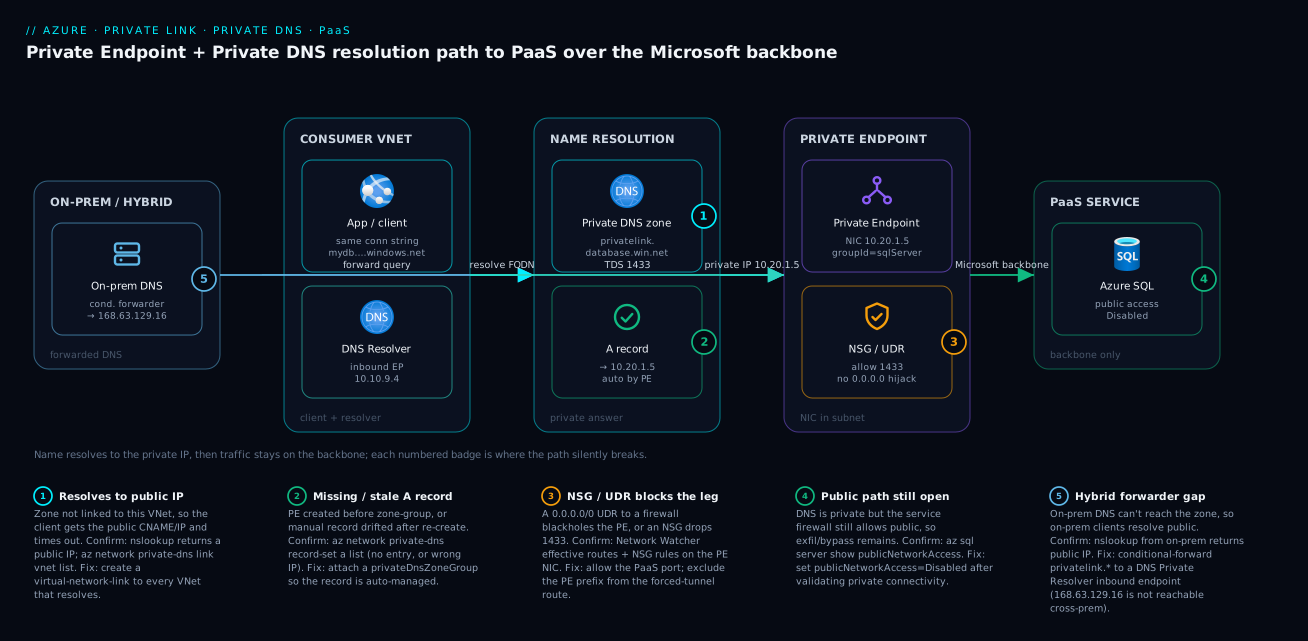
The diagram traces the request exactly as it resolves and flows, then marks where the path silently breaks. Read it left to right. On the far left, an on-premises DNS server conditionally forwards privatelink-suffixed queries into Azure (badge 5 — the hybrid forwarder gap, because 168.63.129.16 is not reachable cross-premises). In the consumer VNet, the application dials the same connection string it always used (mydb…database.windows.net) and a DNS Private Resolver inbound endpoint (10.10.9.4) handles resolution for both spokes and on-prem. The query lands on name resolution: the privatelink.database.windows.net Private DNS zone (badge 1 — if it isn’t linked to this VNet, the client gets the public IP and times out) and its auto-managed A record → 10.20.1.5 (badge 2 — missing or stale if you skipped the privateDnsZoneGroup). With the private IP in hand, the client opens a TDS 1433 connection to the Private Endpoint NIC at 10.20.1.5 (group ID sqlServer), guarded by an NSG/UDR (badge 3 — a 0.0.0.0/0 forced-tunnel route or a dropped port black-holes the leg even when DNS is perfect). From the endpoint, traffic crosses the Microsoft backbone to Azure SQL with public access Disabled (badge 4 — if you never disabled it, the data is private but the exfiltration door is still open).
The lesson the diagram teaches is the diagnostic order: resolve first, route second. Every failure is one numbered hop. If nslookup returns a public IP you are at badge 1 or 5 (a missing link or a missing forwarder); if it returns a private IP but the connection still times out you are at badge 3 (routing) or badge 2 (a stale record pointing at the wrong NIC); and badge 4 is the security check you run after connectivity works, never before. The whole method is: run one resolution check, land on a badge, apply its fix.
Real-world scenario
Meridian Bank runs a customer-statements API on Azure App Service (Central India) backed by Azure SQL and an Azure Storage account holding generated PDF statements. A regulator audit mandated that no customer data traverse the public internet and that the storage account not be reachable publicly. The platform team — five engineers — owned a hub-and-spoke network: one hub VNet, six spoke VNets (app, data, integration, two test, one shared-services), an Azure Firewall in the hub with a 0.0.0.0/0 forced-tunnel UDR on the spokes, and roughly 40 on-premises analyst workstations that queried the SQL database directly for reporting.
The rollout looked done in an afternoon. The data team created a Private Endpoint for the SQL server (group ID sqlServer) and one for the storage blob sub-resource, created the two privatelink zones, linked them to the app spoke, and flipped publicNetworkAccess=Disabled on both. They tested from an app-spoke VM — nslookup returned the private IPs, the API worked — and declared victory at 17:00.
Three failures surfaced over the next eighteen hours. First, at 17:40 the integration spoke’s nightly reconciliation job started timing out against SQL. The zone was linked to the app spoke but not the integration spoke, so its clients resolved the now-disabled public IP. nslookup from an integration VM returned a public IP — badge 1. Fix: link both zones to every spoke (they scripted it). Second, at 02:15 the storage path failed even though SQL worked from the same spoke. They had created the blob endpoint but the statements service also wrote to file shares — a different sub-resource needing its own endpoint and privatelink.file.core.windows.net zone. The blob endpoint resolved; the file FQDN resolved public and was now firewalled off — the “one PE per sub-resource” trap. Fix: a second endpoint and zone for file. Third, and the slowest to find, at 09:00 the 40 on-prem analysts all failed to connect to SQL. Their corporate DNS had no idea about the privatelink zone, so they resolved the public IP. The team’s first instinct was “open the firewall” — exactly wrong. The correct fix was a DNS Private Resolver in the hub with an inbound endpoint, and a conditional forwarder on the corporate DNS for database.windows.net and *.core.windows.net pointing at the resolver’s inbound IP. nslookup from a workstation then returned the private IP, and traffic flowed over ExpressRoute to the resolver to the zone to the endpoint.
A fourth, quieter issue emerged in week two during a routing review: the SQL endpoint’s NIC inherited the spoke’s 0.0.0.0/0 forced-tunnel route, and although connectivity worked, return traffic was hairpinning through the firewall, adding ~8 ms and showing up oddly in flow logs. They enabled privateEndpointNetworkPolicies=Enabled on the PE subnet and added a /32 local route for each endpoint IP so the PE legs bypassed the firewall — latency dropped and the asymmetry cleared.
The end state: every spoke linked to both zones (via Azure Policy so new spokes auto-link), separate endpoints for sqlServer, blob and file, a DNS Private Resolver serving on-prem, public access disabled on both services, and PE subnets with full network policies and local routes. Monthly Private Link cost landed around ₹2,400 (six endpoints + resolver), a rounding error against the audit finding it cleared. The lesson on the wall: “Private Endpoint is a five-minute job; Private DNS, on every VNet and on-prem, is the actual project. Resolve before you disable.”
The incident as a timeline, because the order of failures is the lesson:
| Time | Symptom | Root cause | Fix applied |
|---|---|---|---|
| 17:00 | App spoke works, victory declared | (only app spoke linked) | — |
| 17:40 | Integration job times out to SQL | Zone not linked to integration spoke | Link both zones to every spoke |
| 02:15 | Storage file path fails, blob fine |
file is a separate sub-resource/zone |
Add PE + zone for file |
| 09:00 | All 40 on-prem analysts fail SQL | On-prem resolves public; no forwarder | DNS Private Resolver + conditional forwarder |
| +1 wk | PE leg hairpins through firewall | 0.0.0.0/0 UDR on PE subnet |
privateEndpointNetworkPolicies + /32 local route |
Advantages and disadvantages
The Private Link + Private DNS model both delivers true private PaaS and imposes a real DNS discipline. Weigh it honestly:
| Advantages (why this model wins) | Disadvantages (why it bites) |
|---|---|
| True private connectivity — traffic on the Microsoft backbone, public endpoint disabled | DNS is the hard part — hybrid and multi-VNet resolution must be designed, not assumed |
| No code changes — existing connection strings keep working unchanged | A skipped VNet link silently resolves public; the failure is non-obvious |
| Data-exfiltration control — block egress to other tenants’ PaaS, not just your account | Per-endpoint cost — each PE has an hourly + per-GB charge that adds up across services/sub-resources |
| Granular — one endpoint per sub-resource means least-privilege network exposure | The same granularity means more objects (a PE + zone per sub-resource) |
Lifecycle-safe with privateDnsZoneGroup — the A record can’t drift |
Created manually, the A record does drift on re-create — a six-month time bomb |
| Works across subscriptions and tenants (Private Link service) | Cross-tenant adds manual approval state to manage |
| Centralizable in a hub with one zone set for the whole estate | DNS caching can hide a fix or a break for the TTL window, confusing diagnosis |
The model is right for any sensitive PaaS in production, regulated data, and zero-trust estates. It is overkill for a dev sandbox where a Service Endpoint or even the public firewall suffices — and that lighter choice is exactly the Azure Private Endpoint vs Service Endpoint: Secure PaaS Access decision. The disadvantages are all manageable, but only if you treat DNS as the project and the endpoint as the easy part — the inverse of how most teams scope it.
Hands-on lab
Stand up Azure SQL with a Private Endpoint, wire Private DNS, prove private resolution, disable public access, and tear it all down — free-tier-friendly (we use a Basic SQL DB and a small VM; delete at the end). Run in Cloud Shell (Bash), but do the resolution test from the VM, because Cloud Shell is not inside your VNet.
Step 1 — Variables and resource group.
RG=rg-pl-lab
LOC=centralindia
VNET=vnet-pl-lab
SQL=sqlpl$RANDOM           # globally-unique server name
PWD='P@ssw0rd-'$RANDOM'!'  # lab only — never reuse
az group create -n $RG -l $LOC -o table
Step 2 — VNet with two subnets (one for the VM, one for the PE).
az network vnet create -g $RG -n $VNET --address-prefix 10.50.0.0/16 \
  --subnet-name snet-vm --subnet-prefix 10.50.1.0/24 -o table
az network vnet subnet create -g $RG --vnet-name $VNET \
  --name snet-pe --address-prefix 10.50.2.0/24 \
  --private-endpoint-network-policies Enabled -o table
Step 3 — A SQL server + Basic database, public for now (we’ll lock it).
az sql server create -g $RG -n $SQL -l $LOC \
  --admin-user sqladmin --admin-password "$PWD" -o table
az sql db create -g $RG --server $SQL -n statementsdb \
  --service-objective Basic -o table
Step 4 — Create the Private Endpoint (group ID sqlServer).
SQLID=$(az sql server show -g $RG -n $SQL --query id -o tsv)
az network private-endpoint create -g $RG -n pe-sql \
  --vnet-name $VNET --subnet snet-pe \
  --private-connection-resource-id "$SQLID" \
  --group-id sqlServer --connection-name pe-sql-conn -o table
Step 5 — Private DNS zone, link to the VNet, and the auto A record.
az network private-dns zone create -g $RG -n privatelink.database.windows.net -o table
VID=$(az network vnet show -g $RG -n $VNET --query id -o tsv)
az network private-dns link vnet create -g $RG \
  --zone-name privatelink.database.windows.net \
  --name link-lab --virtual-network "$VID" --registration-enabled false -o table
az network private-endpoint dns-zone-group create -g $RG \
  --endpoint-name pe-sql --name pdzg \
  --private-dns-zone privatelink.database.windows.net --zone-name sql -o table
Confirm the auto-created record points at the PE IP:
az network private-dns record-set a list -g $RG \
  --zone-name privatelink.database.windows.net \
  --query "[].{name:name, ip:aRecords[0].ipv4Address}" -o table
# Expect: a record for the server name → an IP in 10.50.2.0/24
Step 6 — A tiny VM in the VNet to test resolution from inside.
az vm create -g $RG -n vm-test --image Ubuntu2204 \
  --vnet-name $VNET --subnet snet-vm \
  --admin-username azureuser --generate-ssh-keys --size Standard_B1s -o table
az vm run-command invoke -g $RG -n vm-test --command-id RunShellScript \
  --scripts "nslookup $SQL.database.windows.net"
Expected: the output shows a CNAME to $SQL.privatelink.database.windows.net resolving to a private 10.50.2.x address — DNS is working privately.
Step 7 — Now disable public access (safe, because private resolves).
az sql server update -g $RG -n $SQL --set publicNetworkAccess=Disabled -o table
Re-run the nslookup from the VM (still private) — connectivity from the VNet is unaffected; only the public door is shut.
Validation checklist. You created a Private Endpoint, wired a Private DNS zone with an auto-managed record, proved the name resolves to a private IP from inside the VNet, and only then disabled public access. The mapping of step to lesson:
| Step | What you did | What it proves |
|---|---|---|
| 4 | PE with --group-id sqlServer |
The endpoint targets exactly one sub-resource |
| 5 | Zone + link + dns-zone-group |
Resolution needs all three, and the record auto-manages |
| 6 | nslookup from the VM |
Private resolution is real and VNet-scoped (not Cloud Shell) |
| 7 | Disable public after validating | The correct order that avoids the classic outage |
Cleanup (avoid lingering charges).
az group delete -n $RG --yes --no-wait
Cost note. A Basic SQL DB and a B1s VM for an hour are a few rupees; the Private Endpoint is a fraction of a rupee per hour. Deleting the resource group stops everything. Total lab cost well under ₹50.
Common mistakes & troubleshooting
This is the playbook — the part you bookmark. First as a scannable table you can read mid-incident, then the same entries with full confirm-command detail underneath.
| # | Symptom | Root cause | Confirm (exact cmd / portal path) | Fix |
|---|---|---|---|---|
| 1 | App times out right after public access disabled | Private DNS zone not linked to the client’s VNet | nslookup <fqdn> returns a public IP; az network private-dns link vnet list |
Create a link vnet to every VNet that resolves |
| 2 | NXDOMAIN on *.privatelink.*, or no private IP |
No A record (skipped privateDnsZoneGroup) |
az network private-dns record-set a list (empty) |
Attach a privateDnsZoneGroup to the PE |
| 3 | Resolves to a private IP but the wrong one | Stale manual A record after PE re-create | record-set a list IP ≠ private-endpoint show NIC IP |
Delete manual record; use auto zone-group |
| 4 | Storage blob works, file/queue fails |
One PE only covers one sub-resource | private-endpoint show … groupIds shows only blob |
Add a PE + zone per sub-resource you use |
| 5 | On-prem clients fail, Azure clients fine | No conditional forwarder to a resolver | nslookup from on-prem returns public; from VM returns private |
DNS Private Resolver inbound + on-prem conditional forwarder |
| 6 | Resolves private, connection still times out | 0.0.0.0/0 UDR black-holes the PE leg |
nic show-effective-route-table on the PE NIC |
/32 local route for the PE IP; or exclude from forced tunnel |
| 7 | Wrong service / TLS cert mismatch on connect | Wrong group ID on the endpoint | private-endpoint show … groupIds ≠ intended |
Re-create PE with the correct sub-resource |
| 8 | PE stuck, never serves | Connection in Pending (manual approval) |
private-endpoint show … connectionState = Pending |
Approve via private-endpoint-connection approve |
| 9 | Key Vault PE resolves nothing | Wrong zone name (vault.azure.net not vaultcore) |
private-dns zone list shows the wrong name |
Create privatelink.vaultcore.azure.net |
| 10 | Fix applied but still broken for minutes | DNS caching (client/forwarder TTL) | ipconfig /flushdns; compare fresh nslookup |
Wait out TTL; flush caches; verify on a fresh client |
| 11 | NSG “isn’t blocking/protecting” the PE | privateEndpointNetworkPolicies Disabled |
vnet subnet show … privateEndpointNetworkPolicies |
Set to Enabled so NSG/UDR apply |
| 12 | New spoke can’t resolve PaaS | New VNet never linked to the central zones | private-dns link vnet list lacks the new VNet |
Link it; better, enforce links via Azure Policy |
The expanded form, with full reasoning for the entries that bite hardest:
1. App times out the moment public access is disabled.
Root cause: The Private DNS zone is not linked to the VNet the client resolves from, so it gets the (now firewalled) public IP.
Confirm: From a client/VM in that VNet, nslookup <fqdn> returns a public IP; az network private-dns link vnet list -g rg-net-prod --zone-name privatelink.database.windows.net does not list that VNet.
Fix: az network private-dns link vnet create … --virtual-network <vnetId> --registration-enabled false for every VNet that must resolve. In hub-and-spoke, that’s all the spokes.
2. NXDOMAIN on the privatelink name, or it never returns a private IP.
Root cause: The zone exists and is linked, but there is no A record — you created the endpoint and zone but skipped the privateDnsZoneGroup.
Confirm: az network private-dns record-set a list -g rg-net-prod --zone-name privatelink.database.windows.net is empty.
Fix: Attach a zone-group: az network private-endpoint dns-zone-group create … --private-dns-zone privatelink.database.windows.net. The record appears and self-manages.
3. Resolves to a private IP, but the wrong one — connection blackholes.
Root cause: A manually created A record that drifted after the endpoint was deleted and re-created with a new dynamic IP.
Confirm: Compare record-set a list (the IP in DNS) against az network private-endpoint show -n pe-sql-prod -g rg-net-prod --query "customDnsConfigs[0].ipAddresses" (the real NIC IP). They differ.
Fix: Delete the manual record and attach a privateDnsZoneGroup so the platform keeps it correct; or pin the PE to a static IP if you truly must manage the record by hand.
4. One storage sub-resource works, another doesn’t.
Root cause: A Private Endpoint targets exactly one sub-resource (group ID). A blob endpoint does nothing for file, queue, table, dfs, or web.
Confirm: az network private-endpoint show -n pe-stg-blob -g rg-net-prod --query "privateLinkServiceConnections[].groupIds" shows only blob.
Fix: Create a separate endpoint and matching privatelink.<sub>.core.windows.net zone for each sub-resource the app uses.
5. On-prem clients resolve public; Azure clients resolve private.
Root cause: On-premises DNS cannot reach 168.63.129.16, so without a forwarder it resolves the public name publicly.
Confirm: nslookup <fqdn> from an on-prem workstation returns a public IP, while the same command on an Azure VM returns the private IP.
Fix: Deploy a DNS Private Resolver (inbound endpoint) in the hub and configure on-prem DNS to conditionally forward the public suffix (e.g. database.windows.net) to the resolver’s inbound IP. Forward the public suffix, not the privatelink one.
6. DNS is right (private IP) but the connection still times out.
Root cause: A 0.0.0.0/0 forced-tunnel UDR on the PE subnet black-holes or asymmetrically routes the endpoint’s traffic through a firewall that drops it.
Confirm: az network nic show-effective-route-table --ids <pe-nic-id> shows the 0.0.0.0/0 next-hop to a firewall applying to the PE.
Fix: Add a /32 route for the PE IP with next-hop VnetLocal (or exclude the PE prefix from the forced-tunnel route), and ensure privateEndpointNetworkPolicies is Enabled so the route table actually applies.
7. Connects to the wrong thing / TLS certificate name mismatch.
Root cause: The endpoint was created against the wrong group ID, so it maps to a different sub-resource than the client expects.
Confirm: az network private-endpoint show … --query "privateLinkServiceConnections[].groupIds" doesn’t match the intended sub-resource.
Fix: You can’t change a PE’s group ID in place — delete and re-create with the correct --group-id, and fix the matching zone.
8. The endpoint exists but never serves traffic.
Root cause: The private-link connection is Pending (manual approval), common cross-tenant or under governance.
Confirm: az network private-endpoint show … --query "privateLinkServiceConnections[].privateLinkServiceConnectionState.status" returns Pending.
Fix: Approve it from the resource owner side: az network private-endpoint-connection approve ….
9. Key Vault Private Endpoint resolves nothing.
Root cause: The zone was created as privatelink.vault.azure.net (the public suffix) instead of the data-plane zone privatelink.vaultcore.azure.net.
Confirm: az network private-dns zone list -g rg-net-prod -o table shows the wrong name.
Fix: Create privatelink.vaultcore.azure.net, link it, and attach the zone-group to the vault’s PE.
10. You fixed it, but it’s still broken for several minutes.
Root cause: DNS caching — the client or an intermediate forwarder is serving the old answer for the TTL window.
Confirm: A fresh nslookup (or one from a different machine) returns the correct private IP while the affected client still shows the old one.
Fix: Flush the client cache (ipconfig /flushdns / restart resolver), wait out the TTL on forwarders, and verify from a clean client before concluding the fix failed.
11. The NSG on the PE subnet seems to do nothing.
Root cause: privateEndpointNetworkPolicies is Disabled (the legacy default), so NSGs and UDRs are ignored on the PE NIC.
Confirm: az network vnet subnet show -g rg-net-prod --vnet-name vnet-hub -n snet-privatelink --query privateEndpointNetworkPolicies.
Fix: Set it to Enabled (or the specific NSG/RouteTable mode you need).
12. A newly added spoke can’t reach any PaaS.
Root cause: The new VNet was never linked to the central privatelink.* zones, so it resolves public.
Confirm: az network private-dns link vnet list … lacks the new VNet.
Fix: Link it to each zone; enforce link creation with Azure Policy so new spokes are auto-linked and humans can’t forget.
Best practices
- Treat DNS as the project, the endpoint as the easy part. A Private Endpoint is one command; correct resolution on every VNet and on-premises is the real work — scope it that way.
- Always use
privateDnsZoneGroup; never hand-craft A records. Auto-managed records can’t drift; manual ones become a stale-IP outage the day someone re-creates the endpoint. - Centralize the
privatelink.*zones in the hub and link them to every spoke. One source of truth beats per-spoke duplicates that drift apart. - Enforce VNet links and zone-groups with Azure Policy.
Deploy if not exists/Modifypolicies auto-create the zone-group and links so app teams cannot forget — the single highest-leverage control in a landing zone. - One Private Endpoint per sub-resource. Map out which sub-resources (blob, file, queue, …) your app actually uses and create a PE + zone for each — don’t assume one endpoint covers a service family.
- Validate private resolution before disabling public access.
nslookupfrom a real VNet client must return the private IP first; flipping the switch blind is the classic self-inflicted outage. - For hybrid, use Azure DNS Private Resolver (not a hand-rolled VM unless you must) and conditionally forward the public suffix to its inbound endpoint. Remember
168.63.129.16is unreachable from on-prem. - Enable
privateEndpointNetworkPolicieson PE subnets so NSGs and UDRs apply — and add/32local routes so forced-tunnel UDRs don’t hairpin PE traffic through the firewall. - Copy the exact zone name from a reference (especially Key Vault’s
vaultcore.azure.net) — a wrong zone name fails silently with no create-time error. - Dedicate a subnet to Private Endpoints, sized for growth (each PE consumes one IP), and keep it separate from VM subnets for clean NSG/route policy.
- Account for DNS TTL in every diagnosis. Always verify a fix from a fresh client and wait out forwarder caches before concluding it didn’t work.
- Document which zones each service needs and bake them into your landing-zone IaC so a new subscription inherits the full set.
Security notes
- Disable public network access — that’s the point. A Private Endpoint with the public endpoint still open is private plumbing without private security; set
publicNetworkAccess=Disabledonce resolution is proven. - Close the exfiltration path, not just the ingress. Private Link protects your account; pair it with egress filtering (an Azure Firewall rule restricting outbound to
*.blob.core.windows.netto only your endpoints) so a compromised VM can’t copy data to an attacker’s storage account. - Use Private Link service policies where available to block connections to PaaS resources outside your tenant/subscription boundary.
- Lock the PaaS firewall to
Denyby default (storage--default-action Deny, Key Vault--default-action Deny) so even a momentary public-access slip doesn’t expose data. - Apply NSGs to the PE subnet (with network policies enabled) to constrain which subnets can reach the endpoint port — least-privilege at the network layer, not just identity.
- Protect the DNS layer. Whoever can edit the Private DNS zone can redirect a public PaaS name to any IP for every linked VNet — RBAC the zone tightly (
Private DNS Zone Contributoronly for the platform team) and audit changes. - Monitor zone queries and changes. Log Private DNS resolutions and zone modifications; an unexpected record change is a redirection attack or a misconfiguration, and both matter.
- Combine with identity controls. Private connectivity is necessary, not sufficient — keep RBAC, managed identities and (for storage) SAS scoping in place; network isolation and identity are layers, not substitutes.
The security controls and what each closes:
| Control | Mechanism | Closes / mitigates |
|---|---|---|
| Private Endpoint + private DNS | NIC + privatelink zone |
Public data-plane path |
publicNetworkAccess=Disabled |
Service firewall | Inbound over the public endpoint |
| Egress firewall on PaaS suffixes | Azure Firewall application rules | Exfil to other tenants’ accounts |
| Private Link policies | Platform policy | Connecting to out-of-tenant PaaS |
| RBAC on the Private DNS zone | Private DNS Zone Contributor scope |
Malicious/accidental record redirection |
| NSG on the PE subnet | privateEndpointNetworkPolicies Enabled |
Lateral reach to the endpoint port |
Cost & sizing
The bill drivers for Private Link are small per object but multiply across services and sub-resources:
- Per Private Endpoint there is an hourly charge plus per-GB data processed. A single endpoint is a fraction of a rupee per hour; the cost story is how many you need — and “one per sub-resource” means a storage account using blob + file + queue is three endpoints, not one.
- Private DNS zones themselves are cheap: a small charge per zone per month plus a tiny per-query cost. Even a large estate’s full set of
privatelink.*zones is a rounding error. - DNS Private Resolver adds an hourly per-endpoint charge (inbound and outbound count separately) plus per-million-queries. For hybrid it’s still far cheaper — and far more reliable — than a self-managed forwarder VM you must patch and make HA.
- Data processing on endpoints scales with traffic volume; for chatty workloads (large blob transfers) the per-GB component can become the dominant line — worth modelling against your actual throughput.
A rough monthly picture for a typical sensitive workload: 3–6 Private Endpoints (SQL + storage sub-resources + Key Vault) at a few hundred rupees combined, the matching privatelink zones at tens of rupees, and (if hybrid) a DNS Private Resolver at roughly ₹1,500–2,500/month. Meridian Bank’s six endpoints plus resolver landed near ₹2,400/month — trivial against the compliance requirement it satisfied. The drivers and what each buys:
| Cost driver | What you pay for | Rough INR / month | What it fixes / enables | Watch-out |
|---|---|---|---|---|
| Private Endpoint (each) | Hourly + per-GB processed | ~₹150–300 + data | One sub-resource’s private path | Multiplies per sub-resource |
| Private DNS zone (each) | Per-zone + per-query | ~₹10–30 | The name→private-IP mapping | Many zones, but each is tiny |
| VNet link (each) | Included with the zone | ~₹0 | A spoke resolving the zone | Free, but easy to forget |
| DNS Private Resolver | Per-endpoint hourly + per-query | ~₹1,500–2,500 | Hybrid + central resolution | Inbound and outbound billed separately |
| Endpoint data processing | Per-GB through the PE | scales with traffic | (throughput) | Dominant for large blob transfers |
| Forwarder VM (alternative) | VM + ops | ~₹2,000+ and your time | Hybrid (the DIY way) | You patch/HA/scale it — prefer the resolver |
The right-sizing rule: you don’t size Private Link, you enumerate it — count the sub-resources you actually use, one endpoint and zone each, link to every resolving VNet, one resolver per hub region for hybrid. The cost follows the count, and the count follows your real data dependencies.
Interview & exam questions
1. Why does an application fail to connect to Azure SQL right after you disable public network access, even though the Private Endpoint is healthy? Because the application still resolves the public FQDN to the public IP — which is now firewalled off — since no Private DNS zone is linked to the client’s VNet. The endpoint moved the IP, but DNS still points the name at the public address. Fix by creating the privatelink.database.windows.net zone, linking it to the VNet, and attaching a privateDnsZoneGroup; confirm with nslookup returning the private IP.
2. What is a group ID (sub-resource) and why does it matter? It selects which service a Private Endpoint targets — sqlServer for SQL, blob/file/queue for the respective storage services, vault for Key Vault, sites for App Service. A single endpoint connects to exactly one sub-resource, so a blob endpoint does nothing for file. You must create a separate endpoint (and DNS zone) per sub-resource you use.
3. What does the privateDnsZoneGroup do, and why prefer it over a manual A record? It attaches to the Private Endpoint and tells Azure to create and lifecycle-manage the A record in the named privatelink zone — creating it on deploy, updating it if the IP changes, and deleting it when the endpoint is deleted. A manual A record drifts the day the endpoint is re-created with a new dynamic IP, causing a silent blackhole; the zone-group can’t drift.
4. A VNet client resolves the private IP but an on-premises client resolves the public IP. Why, and how do you fix it? On-premises clients cannot reach 168.63.129.16 (it’s link-local to the VNet), so they resolve the public name via corporate DNS. Fix by deploying an Azure DNS Private Resolver inbound endpoint in the hub and configuring corporate DNS to conditionally forward the public suffix (e.g. database.windows.net) to the resolver’s inbound IP.
5. DNS returns the correct private IP but the connection still times out. Where do you look? This is no longer a DNS problem — look at routing/filtering on the PE leg. A 0.0.0.0/0 forced-tunnel UDR may black-hole the endpoint through a firewall. Confirm with az network nic show-effective-route-table on the PE NIC; fix with a /32 local route for the PE IP (and ensure privateEndpointNetworkPolicies is Enabled so routes apply).
6. In a hub-and-spoke estate, where do the Private DNS zones live and how do spokes resolve? Centralize one set of privatelink.* zones in the hub and create a virtual-network link from each zone to every spoke that resolves PaaS. Each spoke’s own 168.63.129.16 then consults the zones linked to it. Enforce the links with Azure Policy so new spokes are auto-linked.
7. What’s the exact Private DNS zone name for Key Vault, and why is it a common mistake? It’s privatelink.vaultcore.azure.net — the data-plane suffix — not privatelink.vault.azure.net. People copy the public FQDN suffix (vault.azure.net) and create the wrong zone, which resolves nothing with no error at create time. Always copy the exact zone name from a reference.
8. How does Private Link help with data exfiltration, beyond just making the path private? A public PaaS endpoint allows outbound to the entire service namespace (*.blob.core.windows.net), so a compromised VM can copy data to an attacker’s account. Private Link plus egress filtering (restricting outbound to only your endpoints) and public access disabled blocks copying to other tenants’ resources — protecting the service, not just your account.
9. Do NSGs and UDRs apply to a Private Endpoint NIC? Only when privateEndpointNetworkPolicies is enabled on the subnet. The legacy default was Disabled, meaning NSGs and UDRs were ignored on the PE NIC — which surprises people both when their NSG “doesn’t protect” the PE and when a forced-tunnel route “doesn’t catch” it. Set it to Enabled for full control.
10. What is a Private Link service (as opposed to a Private Endpoint)? A Private Link service is the provider side: you put your own service behind a Standard Load Balancer and publish it so that consumers in other VNets (or other tenants) can create Private Endpoints to reach it privately. The Private Endpoint is the consumer side. Together they let you offer a SaaS-style private service across tenant boundaries.
11. You re-created a Private Endpoint and now traffic blackholes despite a correct-looking DNS record. What happened? The endpoint got a new dynamic private IP, but the A record was manually created and still points at the old IP. The fix is to use a privateDnsZoneGroup (which would have updated automatically) or pin the endpoint to a static IP. Confirm by comparing the DNS record IP against the endpoint’s current NIC IP.
12. When would you choose a Service Endpoint over a Private Endpoint? When you need to restrict a PaaS service to your VNet but don’t need a private IP or to disable the public endpoint — Service Endpoints are free and simpler, but the service keeps its public IP and they don’t block exfiltration to other tenants. For sensitive/regulated data or zero-trust, choose Private Endpoint. This is the Azure Private Endpoint vs Service Endpoint: Secure PaaS Access decision.
These map to AZ-700 (Network Engineer) — design and implement private access to Azure services (Private Link, Private Endpoint, Private DNS, DNS Private Resolver) — and AZ-500 (Security Engineer) — implement platform protection / secure PaaS (public access, exfiltration, network isolation). The hub-and-spoke DNS and landing-zone angles also touch AZ-305 (Solutions Architect). A compact cert-mapping for revision:
| Question theme | Primary cert | Exam objective area |
|---|---|---|
| Private Endpoint, group IDs, zones | AZ-700 | Design & implement private access to services |
| DNS Private Resolver, hybrid forwarding | AZ-700 | Design & implement name resolution |
| Public access disabled, exfiltration | AZ-500 | Secure PaaS; platform protection |
| Hub-and-spoke DNS, zone-group automation | AZ-305 | Design network & governance |
| NSG/UDR on PE, effective routes | AZ-700 | Implement & manage VNet routing |
| Private Link service (provider side) | AZ-700 | Design & implement service delivery |
Quick check
- You disable public access on Azure SQL and every app instantly times out, though the Private Endpoint is healthy. What is the one check you run first, and what does a public IP in the result tell you?
- A storage account’s
blobaccess works through its Private Endpoint, butfileshares fail. Why, and what’s the fix? - True or false: creating the A record by hand in the
privatelinkzone is the recommended way to wire a Private Endpoint. - On-premises analysts resolve the public IP while Azure VMs resolve the private IP for the same database. Name the root cause and the fix.
- DNS returns the correct private IP but connections still time out. Is this a DNS problem? Where do you look?
Answers
- Run
nslookup <fqdn>from a client inside the VNet. A public IP in the result means the Private DNS zone is not linked to that VNet, so the client resolves the now-firewalled public address. Fix by creating avirtual-network-linkfrom the zone to that VNet (and to every spoke in hub-and-spoke). - A Private Endpoint targets exactly one sub-resource (group ID). The
blobendpoint does nothing forfile— they are different services with different FQDNs and zones. Create a separate endpoint andprivatelink.file.core.windows.netzone for the file sub-resource. - False. Use a
privateDnsZoneGroupso the platform creates and lifecycle-manages the record. A manual record drifts the day the endpoint is re-created with a new dynamic IP, causing a silent blackhole. - On-premises clients cannot reach
168.63.129.16, so they resolve publicly. Fix by deploying an Azure DNS Private Resolver inbound endpoint and configuring corporate DNS to conditionally forward the public suffix (e.g.database.windows.net) to the resolver’s inbound IP. - No — DNS is exonerated once it returns the private IP. Look at routing/filtering on the PE leg: a
0.0.0.0/0forced-tunnel UDR black-holing the endpoint (confirm withnic show-effective-route-table), or an NSG dropping the port. Fix with a/32local route for the PE IP andprivateEndpointNetworkPolicies=Enabled.
Glossary
- Private Link — the umbrella Azure feature for reaching PaaS (or your own service) over private IPs on the Microsoft backbone, never the public internet.
- Private Endpoint — a NIC with a private IP in your subnet that maps to one PaaS sub-resource; the private IP a client connects to.
- Group ID (sub-resource) — the identifier (
sqlServer,blob,file,vault,sites, …) selecting which service a Private Endpoint targets; one endpoint targets exactly one. - Private Link service — the provider side: your own service behind a Standard Load Balancer, published so consumers can create Private Endpoints to it.
- Private DNS zone — the
privatelink.*zone that holds the private A record mapping the public FQDN to the endpoint’s private IP. privatelink.*zone name — the exact, service-specific zone name (e.g.privatelink.vaultcore.azure.netfor Key Vault); a wrong name resolves nothing.privateDnsZoneGroup— an object on the Private Endpoint that auto-creates and lifecycle-manages the A record; the safe default over manual records.- Virtual network link — connects a Private DNS zone to a VNet; a VNet resolves the zone only if a link exists.
168.63.129.16— Azure’s platform DNS resolver, link-local to each VNet; returns private A records for linked zones but is not reachable from on-premises.- DNS Private Resolver — a managed DNS service with inbound/outbound endpoints that lets on-premises and spokes resolve Private DNS zones via conditional forwarding.
- Conditional forwarder — a DNS rule that sends queries for a specific suffix to a chosen resolver (here, the public PaaS suffix → the resolver’s inbound endpoint).
- Public network access — the service-firewall switch (
publicNetworkAccess=Disabled) that closes the PaaS public endpoint entirely. privateEndpointNetworkPolicies— the subnet setting that controls whether NSGs and UDRs apply to Private Endpoint NICs.- Forced tunneling — a
0.0.0.0/0UDR sending egress to a firewall; can black-hole a Private Endpoint’s leg if it isn’t excluded. - Data exfiltration — copying data to an attacker-controlled PaaS account over a public service namespace; Private Link plus egress filtering blocks it.
- Hub-and-spoke — a topology with a central hub VNet and peered spokes; the standard place to centralize
privatelink.*zones.
Next steps
You can now build a Private Endpoint, wire Private DNS on every VNet and on-premises, and diagnose any resolution or routing failure to a single hop. Build outward:
- Next: Azure Private Endpoint vs Service Endpoint: Secure PaaS Access — the upstream decision of which private-access technology to use, and when the lighter Service Endpoint is enough.
- Related: Diagnosing Azure VNet Connectivity: NSGs, UDRs, Effective Routes & Network Watcher — the routing toolkit for the “DNS is right but traffic won’t flow” half of these incidents.
- Related: Fixing Azure Storage 403 Errors: Firewalls, Private Endpoints, RBAC & SAS — the storage-specific firewall/SAS/RBAC maze that sits on top of Private Link.
- Related: Azure Key Vault: Secrets, Keys and Certificates Done Right — the vault firewall, trusted services, and the
vaultcore.azure.netzone gotcha in context. - Related: Azure Enterprise-Scale Landing Zone: Foundation for Large Organizations — where centralized Private DNS zones, links and zone-group policy live in the platform foundation.