A single order event is published to a topic. The fraud service wants only high-value international orders. The warehouse wants only paid orders in its own region. The analytics sink wants everything. The naive design publishes the same message to three queues from the producer — and now the producer knows about three consumers, every new consumer is a code change, and a routing bug means re-deploying the publisher at 2am. Azure Service Bus topic filtering dissolves that coupling: the producer sends one message to one topic, and each subscription carries its own rule — a filter that decides whether a copy of the message lands in that subscription, optionally paired with an action that rewrites the message’s properties as it arrives. The producer never learns who is listening. Adding a consumer is a new subscription with a new filter, zero producer changes.
This article is the practical, end-to-end guide to that filtering layer. You will learn the three filter types Service Bus actually supports — the TrueFilter (the default “accept everything” rule), the SqlFilter (a SQL-92-like boolean expression over the message’s system and user properties), and the CorrelationFilter (a fast, indexed equality match on a fixed set of properties) — when each is the right tool, and the exact syntax, operators, limits and performance trade-offs of each. You will learn rule actions: the SET, REMOVE and EXISTS-style statements that mutate a message’s Properties per subscription, so two subscribers can receive the same logical event annotated differently. And because the silent failure mode here is brutal — a topic with subscriptions but no messages arriving, because every subscription still has its hidden default $Default rule plus your new one, or because your SQL filter references a property the producer never set — you’ll get the troubleshooting playbook and the option matrices to keep open while you build.
By the end you will design and deploy a working pub/sub fan-out — a topic, several subscriptions, a correlation filter where equality suffices, a SQL filter where you need ranges, and a rule action that stamps a routing label — three ways: the Azure portal, the az servicebus CLI, and Bicep. The mechanics are small; the leverage on your architecture is large.
What problem this solves
Without server-side filtering, routing logic lives in the wrong place. Either the producer decides who gets what (and is now coupled to every consumer, fanning out N sends and needing a redeploy whenever the topology changes), or every consumer reads every message off a shared queue and throws away the ~95% it doesn’t care about (burning receive operations, lock contention and compute to filter in code). Both are common, both are wrong, and both get worse as the number of event types and consumers grows.
Topic filtering moves the routing decision to the broker, where it belongs. The producer publishes a self-describing message once; each subscription declares, in data, the predicate that selects its slice — “messages where priority = 'high' and amount > 5000”, “messages where region = 'india'”, “the lot”. Service Bus evaluates those predicates as the message arrives and copies it into each matching subscription, so the consumer reads a pre-filtered stream and does no routing work. New requirement, new subscription, new filter — the publisher and every other consumer untouched.
Who hits the pain without it: any team building an event-driven or microservices system where one event has many interested parties with different interests — order pipelines, IoT telemetry routing by device type or threshold, multi-region workloads splitting traffic, command/notification systems where a label or subject decides the handler. If you’re currently doing if (msg.Type == "X") at the top of every consumer, or sending the same payload to three queues from one producer, this is the feature you’re missing. It also matters for cost: filtering server-side means a low-volume subscriber isn’t paying to receive and discard a high-volume firehose.
To frame the whole field before the deep dive, here is the routing problem, the anti-pattern teams reach for, and what topic filtering replaces it with:
| Routing need | Common anti-pattern | What topic filtering does instead | Who decides routing |
|---|---|---|---|
| One event, many interested consumers | Producer sends N copies to N queues | One send to a topic; subscriptions fan out | The broker (per-subscription rule) |
| Consumer wants a subset of events | Read everything, if-filter in code |
SqlFilter / CorrelationFilter selects server-side |
The broker, at enqueue time |
| Route by a single label/type | switch on a property in one big handler |
CorrelationFilter on Subject/Label per subscription |
The broker, indexed match |
| Annotate per-consumer | Each consumer recomputes derived fields | A rule action SETs a property on the copy |
The broker, in flight |
| Add a new consumer | Redeploy producer to add a send target | Create a subscription + filter; producer untouched | Ops / IaC, no producer change |
Learning objectives
By the end of this article you can:
- Explain the topic → subscription → rule model and how one published message becomes zero, one, or many delivered copies depending on the filters in play.
- Choose correctly between a
TrueFilter, aCorrelationFilterand aSqlFilterfor a given routing requirement, and justify the choice on performance and expressiveness. - Write SQL filter expressions against system properties (
sys.Label,sys.MessageId,sys.To) and custom user properties, using the supported operators (=,<>,>,LIKE,IN,IS NULL,AND/OR), and avoid theNULL-semantics traps. - Write correlation filters that match on
CorrelationId,Subject/Label,To,ReplyTo,MessageId,ContentTypeand customproperties, and explain why they outperform SQL filters. - Add rule actions that
SET,REMOVEor compute message properties per subscription, and reason about the order of filter-then-action. - Manage the hidden
$Defaultrule that every subscription is born with, and avoid the number-one beginner bug: messages duplicated or unexpectedly delivered because the default rule was never removed. - Build the whole topology end to end in the portal, in
az servicebusCLI, and in Bicep, then validate routing and tear it down.
Prerequisites & where this fits
You should be comfortable with the Service Bus basics: a namespace is the messaging container (a DNS endpoint like myns.servicebus.windows.net), a queue is point-to-point (one message → one competing consumer), and a topic is publish-subscribe (one message → a copy per subscription). If those terms are new, read Service Bus Queues vs Topics: When to Use Which first, and Create a Service Bus Namespace, Queue and a .NET Sender/Receiver for the connection and send/receive mechanics this article assumes. You should know how to run az in Cloud Shell, read JSON output, and edit a small Bicep file.
This sits in the Messaging & Integration track. Topic filtering is the layer above the namespace and below your consumers. Upstream of it, a producer (an App Service, a Functions app, or a Logic App) decides what to publish. Downstream, each subscription feeds a consumer that may itself dead-letter, defer, or session-process — the lifecycle patterns in Service Bus Sessions, Duplicate Detection & Dead-Letter Patterns. It is adjacent to, and frequently confused with, Event Grid System Topics: Event Grid is push-based reactive eventing with its own subject/event-type filtering, while Service Bus topics are pull-based, ordered, transactional messaging — both filter, but the engines and guarantees differ.
A quick map of the moving parts and who owns each, so you put your logic in the right layer:
| Layer | What lives here | Who owns it | Failure it can cause |
|---|---|---|---|
| Producer / sender | Sets Subject, CorrelationId, custom Properties on the message |
App / dev team | A filter that references a property the producer never set → never matches |
| Topic | The publish target; fan-out point | Platform / IaC | Wrong topic name → messages go nowhere consumers read |
| Subscription | A named copy-stream with its own rules | Platform / IaC | No subscription matches → message silently dropped (or dead-lettered) |
| Rule (filter + action) | The predicate + optional mutation | Platform / IaC | $Default left in place → duplicate/unwanted delivery |
| Consumer | Reads the pre-filtered stream | App / dev team | Assumes a property the action was supposed to set |
Core concepts
Five mental models make every later decision obvious.
A subscription is a durable copy-queue, and rules decide which copies it gets. When you publish to a topic, Service Bus does not store one message and let consumers share it. It evaluates every subscription’s rules against the incoming message and writes an independent copy into each subscription that matches. A subscription behaves exactly like a queue from the consumer’s side — same receive, lock, complete, dead-letter semantics — it just gets fed by topic fan-out instead of direct sends. Three subscriptions that all match one message hold three independent copies; completing one doesn’t affect the others.
A rule is a filter plus an optional action. Each subscription has one or more rules, and each rule is { filter, action }. The filter is a boolean predicate; if it evaluates true for the incoming message, that rule matches and a copy is enqueued. The optional action is a small statement that mutates the copy’s properties (set, remove). A message is enqueued into a subscription if any rule on it matches (rules are OR-ed). If two rules both match the same message, depending on configuration you can get the message twice in that subscription — a real and surprising behaviour controlled by a topic-level flag (covered below).
Every subscription is born with a $Default TrueFilter. When you create a subscription without specifying a filter, Service Bus silently adds a rule named $Default whose filter is a TrueFilter — it matches everything. This is so that a freshly created subscription is useful immediately (it receives all messages). The trap: when you later add a SqlFilter, you have not replaced $Default — you’ve added a second rule, so the subscription now matches “everything (via $Default) OR my-predicate”, i.e. still everything. To filter, you must delete $Default and add your rule. This single fact is behind the majority of “my filter isn’t working” tickets.
Filters read the message’s properties, not its body. Filters evaluate against the message’s system properties (the brokered metadata: MessageId, CorrelationId, Subject/Label, To, ReplyTo, ContentType, SessionId, TimeToLive, etc.) and its user/application properties (the custom key-value dictionary you set on the message, e.g. priority, region, amount). Filters cannot read the serialized body — Service Bus does not deserialize your payload. The design consequence is fundamental: anything you want to route on must be promoted to a property by the producer. Route on msg.ApplicationProperties["region"], never on a field buried inside the JSON body.
Correlation filters are fast; SQL filters are flexible. A CorrelationFilter is restricted to equality matches on a fixed set of system properties plus custom properties, and Service Bus indexes it — evaluation is roughly hash-lookup cheap and scales to many subscriptions. A SqlFilter is a full boolean expression (ranges, LIKE, IN, AND/OR, NULL checks) and is correspondingly more expensive to evaluate per message. The rule of thumb: if your routing is “this property equals that value” (possibly several ANDed equalities), use a correlation filter; reach for SQL only when you need ranges, pattern matching, or boolean logic a correlation filter can’t express.
The vocabulary in one table
Pin down every moving part before the deep sections. The glossary repeats these for lookup; this is the mental model side by side:
| Concept | One-line definition | Where it lives | Why it matters to filtering |
|---|---|---|---|
| Topic | Publish-subscribe entity; fan-out point | In a namespace | The single send target; subscriptions hang off it |
| Subscription | A durable copy-queue fed by the topic | On a topic | Each carries its own rules; consumers read here |
| Rule | { filter, action } on a subscription |
On a subscription | The unit of routing; OR-ed within a subscription |
| Filter | Boolean predicate over message properties | Inside a rule | Decides if a copy is enqueued |
TrueFilter |
Filter that always matches | The default rule | $Default uses it; accepts everything |
FalseFilter |
Filter that never matches | Rare | Temporarily disable a subscription’s intake |
SqlFilter |
SQL-92-like boolean expression | Inside a rule | Ranges, LIKE, IN, AND/OR |
CorrelationFilter |
Indexed equality match on fixed fields | Inside a rule | Fast; equality-only routing |
| Rule action | SET/REMOVE statement on the copy |
Inside a rule (with a SQL filter) | Mutates properties per subscription |
$Default |
The auto-created TrueFilter rule |
New subscriptions | Must be removed to actually filter |
| System property | Brokered metadata (Label, CorrelationId, …) |
On every message | Referenced as sys.<name> in SQL |
| User property | Custom key-value on the message | Set by the producer | Referenced by bare name in SQL |
The three filter types in depth
Service Bus supports exactly three filter types. Knowing the precise capability and cost of each is the whole game; pick wrong and you either can’t express the routing or you pay too much per message.
| Filter type | Matches on | Expressiveness | Relative cost | Use when |
|---|---|---|---|---|
TrueFilter |
Everything | n/a (always true) | Negligible | A subscription should receive all messages (audit/analytics sink) |
FalseFilter |
Nothing | n/a (always false) | Negligible | Temporarily quiesce a subscription without deleting it |
CorrelationFilter |
Equality on system + custom properties | Equality only, ANDed | Lowest (indexed/hashed) | Routing is “property == value”; high subscription counts |
SqlFilter |
Any properties | =,<>,>,<,>=,<=,LIKE,IN,IS [NOT] NULL,AND,OR,NOT |
Higher (expression eval) | You need ranges, patterns, or boolean logic |
TrueFilter and FalseFilter — the trivial cases
A TrueFilter always evaluates true: every message is copied in. It is what $Default uses, and what you’d set on an “everything” sink — an analytics or audit subscription that legitimately wants the full firehose. A FalseFilter always evaluates false: nothing is copied. Its honest use is operational — temporarily stop a subscription accumulating (e.g. during a downstream outage) without deleting it and losing its identity, then swap the rule back. Both take no expression; they’re the boolean constants of the system.
CorrelationFilter — fast equality routing
A CorrelationFilter matches when all of the fields you specify equal the message’s values. It is the right default for equality-based routing, because Service Bus evaluates it with an indexed lookup rather than parsing an expression per message. You can match a fixed set of system properties plus any number of custom properties; an unspecified field is simply unconstrained. Every specified field is ANDed — a correlation filter cannot express OR (use multiple rules, or a SQL filter, for that).
The system properties a correlation filter can match, and the custom-property bag:
| Correlation field | Message property it matches | Typical routing use |
|---|---|---|
correlationId |
CorrelationId |
Match a saga / request-reply correlation token |
messageId |
MessageId |
Route a specific message (rare) |
to |
To |
Address-style routing to a logical destination |
replyTo |
ReplyTo |
Route responses back to an origin |
subject (a.k.a. label) |
Subject / Label |
The most common: route by an event “type” label |
sessionId |
SessionId |
Route by session grouping |
replyToSessionId |
ReplyToSessionId |
Reply-session routing |
contentType |
ContentType |
Route by payload content type |
properties (map) |
Any custom user properties | Equality on region, priority, tenantId, … |
A correlation filter that says “subject is OrderPaid AND custom property region is india” enqueues only messages where both hold. Because it’s indexed, you can attach hundreds of such subscriptions to a topic and fan-out stays cheap — this is exactly the pattern for routing by event type to per-type handlers at scale.
SqlFilter — expressive boolean predicates
A SqlFilter carries a SQL-92-like boolean expression evaluated against the message’s properties. This is where you go when equality isn’t enough: amount ranges, string patterns, set membership, and combinations. The expression language is a subset of SQL WHERE-clause syntax — it is not full SQL, there is no SELECT, no joins, no functions beyond a small set.
How you reference properties inside the expression is the part people get wrong:
| Reference form | Refers to | Example |
|---|---|---|
| Bare identifier | A custom/user property | priority = 'high' |
sys.<Name> |
A system property | sys.Label = 'OrderPaid' |
<name> (quoted if needed) |
Custom property with awkward chars | [order-region] = 'india' |
The operators and constructs a SQL filter supports, with the gotcha that bites for each:
| Operator / construct | Meaning | Example | Gotcha |
|---|---|---|---|
=, <> |
Equality / inequality | region = 'india' |
String literals use single quotes |
>, <, >=, <= |
Numeric/datetime comparison | amount > 5000 |
Property must be numeric; a string "5000" won’t compare as a number |
AND, OR, NOT |
Boolean logic | priority = 'high' AND amount > 5000 |
Precedence: NOT > AND > OR; parenthesise to be safe |
LIKE, NOT LIKE |
Pattern match (%, _) |
region LIKE 'in%' |
Only on string properties |
IN (…), NOT IN (…) |
Set membership | region IN ('india','singapore') |
Cleaner than chained ORs |
IS NULL, IS NOT NULL |
Existence test | tenantId IS NOT NULL |
A missing property is NULL, not an error |
EXISTS(prop) |
Property is present | EXISTS(priority) |
Equivalent intent to IS NOT NULL |
Parameters @name |
Parameterised value | amount > @minAmount |
Set via the rule’s parameters map |
The single most important SQL-filter trap is three-valued logic. If a message does not have the property you reference, the expression evaluates to NULL (unknown), not to an error and not to false. A filter amount > 5000 will not match a message that has no amount property — which is usually what you want, but NOT (amount > 5000) also won’t match it (because NOT NULL is NULL), which surprises people expecting “everything not high-value.” When a property may be absent, guard it: EXISTS(amount) AND amount > 5000, or handle the missing case with amount IS NULL OR amount <= 5000.
A worked progression from simplest to most expressive, so you can see when each construct earns its place:
| Routing requirement | Correlation filter? | SQL filter expression |
|---|---|---|
Only OrderPaid events |
Yes (subject = OrderPaid) |
sys.Label = 'OrderPaid' |
OrderPaid in India |
Yes (subject + region) |
sys.Label = 'OrderPaid' AND region = 'india' |
| High-value orders (> ₹5000) | No (range) | amount > 5000 |
| India or Singapore | No (OR) | region IN ('india','singapore') |
Region codes starting in |
No (pattern) | region LIKE 'in%' |
| Has a tenant, any priority | No (existence) | tenantId IS NOT NULL |
| High-value and not test traffic | No (compound) | amount > 5000 AND (isTest IS NULL OR isTest = false) |
Rule actions — rewriting messages in flight
A rule action runs after a SQL filter matches and mutates the copy that lands in that subscription; the source message and other subscriptions’ copies are untouched. This lets two subscribers receive the same logical event annotated differently — one stamped tier = 'priority', another with a processedBy hint — without the producer knowing or the consumer recomputing it.
Actions use the same SQL-like expression language and support a small set of statements:
| Action statement | Effect | Example |
|---|---|---|
SET <prop> = <expr> |
Create or overwrite a user property | SET tier = 'priority' |
REMOVE <prop> |
Delete a user property from the copy | REMOVE internalDebugFlag |
SET sys.<Name> = <expr> |
Set a settable system property | SET sys.Label = 'routed-high' |
| Computed expressions | Derive from existing properties | SET score = amount * 2 |
Three rules govern actions and save you debugging time:
| Rule of behaviour | What it means | Why it matters |
|---|---|---|
| Actions require a SQL rule | An action is attached to a rule that has a SqlFilter (or you set both via the SDK/CLI) |
A correlation filter alone has no action slot; combine via SQL when you need one |
| Filter first, then action | The filter decides if the copy is made; the action mutates that copy | An action never affects whether the message matched |
| Action scope is the copy | Only this subscription’s copy changes | Other subscriptions and the source are unaffected |
A concrete shape: a subscription with filter amount > 5000 and action SET tier = 'priority' enqueues only high-value orders and stamps each with tier = priority, so the downstream consumer can prioritise without re-reading the amount or re-deriving the tier. Keep actions small and side-effect-free; they are routing-time annotations, not a place to embed business logic.
Managing the $Default rule (the #1 gotcha)
This earns its own section as the single most common reason “my filter doesn’t work.” Create a subscription without specifying a rule and Service Bus adds one named $Default with a TrueFilter, so it receives everything. When you later add a SQL or correlation filter you’re adding a second rule — and because rules are OR-ed, the subscription now matches “everything ($Default) OR your-predicate” = still everything. Your filter appears to do nothing.
The fix is to remove $Default so only your rule remains. The mechanics differ slightly by tool — and crucially, the az servicebus create command lets you supply the filter atomically so the default is never created in the first place:
| Tool | How $Default is handled |
The correct pattern |
|---|---|---|
| Portal | Subscription is created with $Default (TrueFilter); you add rules under it |
After adding your rule, delete the 1=1 / default rule explicitly |
az servicebus |
subscription create makes $Default; rule create adds another |
Either rule delete --name '$Default' after, or pass the filter on the rule and remove default |
SDK (ServiceBusAdministrationClient) |
CreateSubscriptionAsync with a CreateRuleOptions replaces the default |
Pass the rule at create time, or DeleteRuleAsync(RuleName.Default) |
| Bicep | A child rules resource named $Default lets you redefine it |
Declare the $Default rule with your filter — overwrites the true filter |
The symptoms and the confirm-step, because you’ll see one of these first:
| Symptom | Likely cause | Confirm | Fix |
|---|---|---|---|
| Subscription gets all messages despite a filter | $Default TrueFilter still present |
az servicebus topic subscription rule list shows $Default |
Delete $Default; keep only your rule |
| Subscription gets a message twice | Two rules both match + duplicate-on-filter behaviour | List rules; check topic flag | Remove the redundant rule, or disable duplicate-on-filter |
| Subscription gets nothing | Only rule is a non-matching filter; producer didn’t set the property | List rules; inspect a message’s properties | Fix the filter or have the producer set the property |
The Bicep angle is the cleanest: because a subscription’s rules are child resources, you simply declare a rule named $Default with the filter you actually want, and the deployment overwrites the platform-created true filter with yours — no separate delete step, fully idempotent. You’ll see this in the lab.
Architecture at a glance
The diagram traces a single order event from producer to consumers and shows exactly where each filter type bites. Read it left to right. On the left, a producer (an App Service or Functions app) builds one message: it sets the system property Subject = OrderPaid and user properties region and amount, then sends it once to the topic orders over AMQP/TLS on port 5671. In the centre sits the topic, the single fan-out point — the producer has no idea how many subscriptions exist. On the right, three subscriptions each carry their own rule: sub-fraud uses a SqlFilter (amount > 5000 AND region <> 'india') so only high-value international orders land there; sub-warehouse-in uses a CorrelationFilter (subject OrderPaid, region = india) — an indexed equality match — and a rule action SET tier = 'standard' that stamps each copy; sub-analytics keeps its $Default TrueFilter and receives every message for the audit sink.
Follow the flows: the published message is evaluated against all three subscriptions’ rules at enqueue time, and an independent copy is written into each that matches. A high-value Indian order lands in sub-warehouse-in (stamped) and sub-analytics, but not sub-fraud (region is India). The numbered badges mark the three failure points you’ll actually hit — a filter referencing a property the producer never set (silently never matches), $Default left in place (a “filtered” subscription still gets everything), and a SQL NULL-semantics surprise on an absent property — each narrated in the legend as symptom, confirm, and fix.
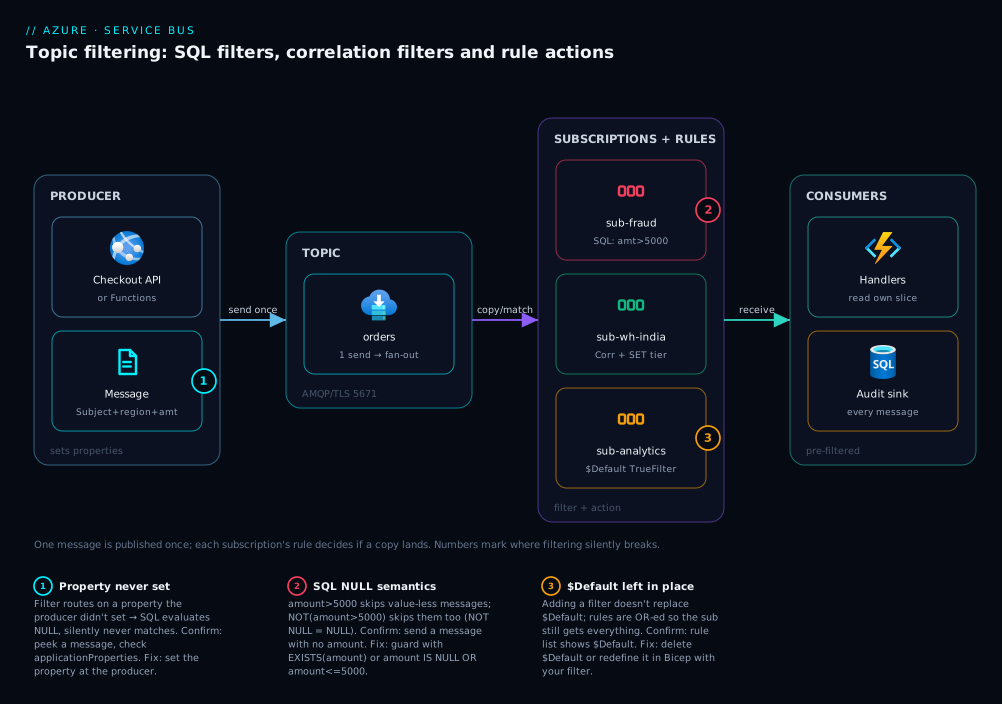
Real-world scenario
Saffron Logistics runs an order-processing platform on Azure: a checkout API on App Service publishes order lifecycle events, and a growing set of services consume them. Originally the checkout API sent each event to three separate queues — q-fraud, q-warehouse, q-analytics — fanning out three sends per event and embedding routing rules (which region, what value threshold) in the producer. The platform team is five engineers; Service Bus runs on a Standard namespace at roughly ₹1,200/month. The pain surfaced when a fourth consumer (a new loyalty service) needed a slice of events: adding it meant a producer code change and redeploy, a release freeze during the festival sale, and a bug where a typo in the producer’s region check sent EU orders to the India warehouse.
They moved to one topic, orders, with per-subscription filters. The checkout API now sets Subject to the event type (OrderPaid, OrderShipped, OrderCancelled) and user properties region and amount, and sends once. The fraud service got sub-fraud with a SQL filter amount > 5000 AND region <> 'india' (high-value international). The warehouse got per-region subscriptions with correlation filters (subject = OrderPaid, region = '<code>') — cheap, indexed, and trivially extended to new regions by adding a subscription. Analytics got sub-analytics with the default true filter. The loyalty service was added in fifteen minutes: one new subscription, one SQL filter (sys.Label = 'OrderPaid' AND amount > 2000), zero producer changes, no release freeze.
The first incident after migration was instructive. The loyalty subscription received nothing in staging, and the reflex was to suspect the filter syntax. The actual cause: the staging producer build hadn’t yet been updated to set amount, so amount > 2000 evaluated to NULL for every message and never matched — a textbook three-valued-logic miss. They confirmed it in ninety seconds: the rule list showed the filter was correct, but peeking a message’s ApplicationProperties showed no amount key. The fix was on the producer, not the filter. The lesson on the wall: “A filter that references a property the producer doesn’t set doesn’t error — it silently never matches. Check the message, not just the rule.”
The second lesson came from the warehouse subscriptions briefly receiving everything. Someone created sub-warehouse-eu in the portal, added the correlation filter, but forgot to delete the auto-created $Default rule — so the subscription matched “everything OR EU” = everything, and EU pickers saw India orders again. The rule list showing two rules confirmed it; deleting $Default fixed it. They closed the gap permanently by moving all subscription/rule definitions into Bicep, declaring each $Default rule with the real filter so the true filter is overwritten at deploy and the manual delete can never be forgotten. A year on, the topology has eleven subscriptions, the producer hasn’t been redeployed for a routing change since, and new consumers are a reviewed pull request against the Bicep.
The migration as a before/after, because the coupling is the real win:
| Dimension | Before (N queues from producer) | After (topic + filters) |
|---|---|---|
| Sends per event | 3 (one per queue) | 1 (to the topic) |
| Add a consumer | Producer code change + redeploy | New subscription + filter; producer untouched |
| Routing logic location | In the producer | In subscription rules (data/IaC) |
| Region split | if region == … in producer |
Per-region correlation-filter subscriptions |
| Festival-sale change freeze | Blocked new consumers | New consumer = a reviewed PR |
| Cost | 3 queues, producer compute to fan out | 1 topic, broker fans out |
Advantages and disadvantages
Server-side topic filtering is the right model for most multi-consumer event flows, but it has sharp edges worth naming.
| Advantages (why filtering helps you) | Disadvantages (why it bites) |
|---|---|
| Decouples producer from consumers — one send, broker fans out; new consumers need no producer change | Routing logic moves out of code into rules/IaC; you must manage rules as a first-class artifact |
| Consumers read a pre-filtered stream — no wasted receives or in-code discarding | Filters read only properties, never the body — the producer must promote routing fields |
| Correlation filters are indexed and cheap — scale to many subscriptions | SQL filters cost more to evaluate per message; heavy use on high throughput adds latency |
| Rule actions annotate per-subscriber without producer or consumer recompute | Actions are easy to over-use; embedding logic in rules hides it from code review |
Add/remove/disable routing live (add a subscription, swap a FalseFilter) without redeploying |
The hidden $Default rule silently breaks filtering until removed |
| Standard/Premium expressiveness is identical; portable across tiers | SQL three-valued logic on absent properties causes silent non-matches |
| Works with sessions, dead-letter, duplicate detection — composes with the rest of Service Bus | A message matching no subscription is simply dropped (unless you keep a catch-all) |
The model is right when one event has multiple parties with differing interests, when you want to add consumers without touching the producer, and when routing keys are clean properties. It is the wrong tool when routing must inspect the body (promote fields, or filter in the consumer), when you need content-based routing far richer than SQL-92 (use a stream processor), or when there’s genuinely one consumer (use a queue). The disadvantages — property promotion, $Default removal, NULL guards — are all manageable, but only if you know they exist, which is the point of the matrices above.
Hands-on lab
This is the centerpiece. You will build the exact topology from the diagram — a topic orders with three subscriptions using a SQL filter, a correlation filter with a rule action, and a true-filter sink — three ways: portal, az CLI, and Bicep. Then you’ll publish test messages and prove the right ones reach the right subscriptions, and tear it all down. Everything fits the Service Bus Standard tier (topics require Standard or Premium — Basic has queues only), and an hour of this lab costs a few rupees.
Prerequisites for the lab
- An Azure subscription and Cloud Shell (Bash) open, or local
az≥ 2.55 logged in (az login). - The
servicebuscommands are in the core CLI — no extension needed for namespaces/topics/subscriptions/rules. - Rights to create a resource group and a Service Bus namespace.
Set shared variables first (used by both the portal and CLI paths):
RG=rg-sbfilter-lab
LOC=centralindia
NS=sbfilter$RANDOM          # namespace name must be globally unique
TOPIC=orders
az group create -n $RG -l $LOC -o table
Part A — the portal walk-through
Step A1 — Create the namespace (Standard). In the portal, Create a resource → search Service Bus → Create. Choose your resource group, a unique Namespace name, region Central India, and Pricing tier = Standard (Basic does not support topics). Review + create. Expected: deployment succeeds and the namespace appears with status Active.
Step A2 — Create the topic. Open the namespace → Topics (left menu) → + Topic. Name it orders, leave defaults (Max topic size 1 GB, default message TTL 14 days). Create. Expected: orders listed under Topics.
Step A3 — Create the three subscriptions. Open the orders topic → Subscriptions → + Subscription, three times:
sub-fraud— Max delivery count 10, leave the rest default.sub-warehouse-in— same defaults.sub-analytics— same defaults.
Expected: three subscriptions listed, each showing Rules: 1 (the hidden $Default).
Step A4 — Add the SQL filter to sub-fraud and remove $Default. Open sub-fraud → Rules. You’ll see one rule, $Default, of type TrueFilter. Click + Add rule:
- Name:
high-value-intl - Filter type: SQL Filter
- SQL expression:
amount > 5000 AND region <> 'india'
Save. Now the critical step: select the $Default rule and Delete it. Expected: sub-fraud shows exactly one rule, high-value-intl. (Skip the delete and the subscription would still match everything via $Default.)
Step A5 — Add the correlation filter + action to sub-warehouse-in. Open sub-warehouse-in → Rules → + Add rule:
- Name:
paid-india - Filter type: Correlation Filter
- Label (Subject):
OrderPaid - Custom properties: add key
region, valueindia - Action (SQL action field):
SET tier = 'standard'
Save, then delete $Default. Expected: one rule, paid-india, with a correlation filter and an action.
Step A6 — Leave sub-analytics as-is. Its $Default TrueFilter is exactly what an audit sink wants — every message. Do nothing. Expected: sub-analytics keeps Rules: 1 ($Default).
Step A7 — Send test messages (portal Service Bus Explorer). Open the orders topic → Service Bus Explorer → Send messages. Send three messages, each with Custom Properties set (and Label/Subject where noted). Use Content = a short JSON string; routing is on properties, not body:
| Msg | Subject (Label) | region |
amount |
Expected to land in |
|---|---|---|---|---|
| 1 | OrderPaid |
india |
2000 |
sub-warehouse-in (stamped), sub-analytics |
| 2 | OrderPaid |
germany |
8000 |
sub-fraud, sub-analytics |
| 3 | OrderPaid |
india |
9000 |
sub-warehouse-in (stamped), sub-analytics |
Step A8 — Verify routing (Service Bus Explorer → Peek). For each subscription, open it → Service Bus Explorer → Peek from start. Confirm message counts match the table: sub-fraud has 1 (msg 2), sub-warehouse-in has 2 (msgs 1 and 3, each with a tier = standard property added by the action), sub-analytics has 3 (all). Peeking does not remove messages, so you can re-check.
That’s the full feature set proven by clicking: SQL range/inequality filter, correlation equality filter, a rule action mutating the copy, a true-filter sink, and the $Default removal that makes filtering actually filter.
Part B — the same thing in az CLI
This is the reproducible path. It builds the identical topology and, importantly, shows the explicit $Default deletion that the portal made you click.
Step B1 — Namespace and topic.
az servicebus namespace create -g $RG -n $NS -l $LOC --sku Standard -o table
az servicebus topic create -g $RG --namespace-name $NS -n $TOPIC -o table
Expected: namespace provisioningState: Succeeded; topic orders created.
Step B2 — Create the three subscriptions. Each is born with $Default.
for S in sub-fraud sub-warehouse-in sub-analytics; do
  az servicebus topic subscription create -g $RG --namespace-name $NS \
    --topic-name $TOPIC -n $S --max-delivery-count 10 -o none
done
az servicebus topic subscription list -g $RG --namespace-name $NS \
  --topic-name $TOPIC --query "[].name" -o table
Expected: the three subscription names listed.
Step B3 — sub-fraud: add the SQL filter, then delete $Default.
# Add the SQL rule
az servicebus topic subscription rule create -g $RG --namespace-name $NS \
  --topic-name $TOPIC --subscription-name sub-fraud -n high-value-intl \
  --filter-sql-expression "amount > 5000 AND region <> 'india'" -o none

# Remove the auto-created TrueFilter so only our rule remains
az servicebus topic subscription rule delete -g $RG --namespace-name $NS \
  --topic-name $TOPIC --subscription-name sub-fraud -n '$Default' -o none

az servicebus topic subscription rule list -g $RG --namespace-name $NS \
  --topic-name $TOPIC --subscription-name sub-fraud \
  --query "[].{name:name, sql:sqlFilter.sqlExpression}" -o table
Expected: exactly one rule, high-value-intl, with the SQL expression. If $Default still shows, the subscription would match everything.
Step B4 — sub-warehouse-in: correlation filter + action, then delete $Default. The CLI sets correlation fields with --correlation-id, --label (Subject), and custom properties via --filter-properties; the action via --action-sql-expression.
az servicebus topic subscription rule create -g $RG --namespace-name $NS \
  --topic-name $TOPIC --subscription-name sub-warehouse-in -n paid-india \
  --label OrderPaid \
  --filter-properties region=india \
  --action-sql-expression "SET tier = 'standard'" -o none

az servicebus topic subscription rule delete -g $RG --namespace-name $NS \
  --topic-name $TOPIC --subscription-name sub-warehouse-in -n '$Default' -o none

az servicebus topic subscription rule list -g $RG --namespace-name $NS \
  --topic-name $TOPIC --subscription-name sub-warehouse-in \
  --query "[].{name:name, label:correlationFilter.label, action:action.sqlExpression}" -o table
Expected: one rule paid-india with label = OrderPaid and action = SET tier = 'standard'.
Step B5 — sub-analytics: leave $Default. Nothing to do — the true filter is the audit-sink behaviour you want. Confirm:
az servicebus topic subscription rule list -g $RG --namespace-name $NS \
  --topic-name $TOPIC --subscription-name sub-analytics --query "[].name" -o table
Expected: $Default.
Step B6 — Send test messages. The CLI doesn’t send data-plane messages, so use a tiny Python snippet (the azure-servicebus SDK is pre-installed in Cloud Shell; if not, pip install azure-servicebus). Grab a connection string first:
CONN=$(az servicebus namespace authorization-rule keys list -g $RG \
  --namespace-name $NS -n RootManageSharedAccessKey \
  --query primaryConnectionString -o tsv)
# save as send.py, run: CONN="$CONN" python send.py
import os
from azure.servicebus import ServiceBusClient, ServiceBusMessage

msgs = [
    ("OrderPaid", {"region": "india",   "amount": 2000}),
    ("OrderPaid", {"region": "germany", "amount": 8000}),
    ("OrderPaid", {"region": "india",   "amount": 9000}),
]
with ServiceBusClient.from_connection_string(os.environ["CONN"]) as client:
    with client.get_topic_sender("orders") as sender:
        for subject, props in msgs:
            m = ServiceBusMessage("{}", subject=subject, application_properties=props)
            sender.send_messages(m)
print("sent", len(msgs))
Expected: sent 3. Note subject= sets the system Subject/Label the correlation filter matches; application_properties sets the custom region/amount the SQL filter reads.
Step B7 — Validate counts per subscription. Subscription message counts confirm routing without consuming:
for S in sub-fraud sub-warehouse-in sub-analytics; do
  C=$(az servicebus topic subscription show -g $RG --namespace-name $NS \
       --topic-name $TOPIC -n $S --query messageCount -o tsv)
  echo "$S = $C"
done
Expected:
| Subscription | messageCount |
Why |
|---|---|---|
sub-fraud |
1 |
Only msg 2 (amount 8000, region not India) |
sub-warehouse-in |
2 |
Msgs 1 and 3 (OrderPaid, region India) |
sub-analytics |
3 |
True filter — every message |
If sub-fraud shows 3, you forgot to delete $Default. If it shows 0, check that the producer actually set amount (the NULL-semantics trap).
Part C — the same thing as Bicep
Declaring the topology as Bicep makes it idempotent and reviewable — and elegantly solves $Default by redefining it with your real filter, so there’s no manual delete. Save as topic-filtering.bicep:
@description('Existing or new Service Bus namespace name')
param namespaceName string
param location string = resourceGroup().location

resource ns 'Microsoft.ServiceBus/namespaces@2022-10-01-preview' = {
  name: namespaceName
  location: location
  sku: { name: 'Standard', tier: 'Standard' }
}

resource topic 'Microsoft.ServiceBus/namespaces/topics@2022-10-01-preview' = {
  parent: ns
  name: 'orders'
  properties: {
    defaultMessageTimeToLive: 'P14D'
    maxSizeInMegabytes: 1024
  }
}

// sub-fraud: SQL filter; redefine $Default with our predicate (no separate delete)
resource subFraud 'Microsoft.ServiceBus/namespaces/topics/subscriptions@2022-10-01-preview' = {
  parent: topic
  name: 'sub-fraud'
  properties: { maxDeliveryCount: 10 }
}
resource fraudRule 'Microsoft.ServiceBus/namespaces/topics/subscriptions/rules@2022-10-01-preview' = {
  parent: subFraud
  name: '$Default'           // overwrite the platform TrueFilter with ours
  properties: {
    filterType: 'SqlFilter'
    sqlFilter: { sqlExpression: 'amount > 5000 AND region <> \'india\'' }
  }
}

// sub-warehouse-in: correlation filter + action
resource subWarehouse 'Microsoft.ServiceBus/namespaces/topics/subscriptions@2022-10-01-preview' = {
  parent: topic
  name: 'sub-warehouse-in'
  properties: { maxDeliveryCount: 10 }
}
resource warehouseRule 'Microsoft.ServiceBus/namespaces/topics/subscriptions/rules@2022-10-01-preview' = {
  parent: subWarehouse
  name: '$Default'
  properties: {
    filterType: 'CorrelationFilter'
    correlationFilter: {
      label: 'OrderPaid'
      properties: { region: 'india' }
    }
    action: { sqlExpression: 'SET tier = \'standard\'' }
  }
}

// sub-analytics: keep the TrueFilter — declare it explicitly for clarity
resource subAnalytics 'Microsoft.ServiceBus/namespaces/topics/subscriptions@2022-10-01-preview' = {
  parent: topic
  name: 'sub-analytics'
  properties: { maxDeliveryCount: 10 }
}
Deploy and validate:
az deployment group create -g $RG \
  --template-file topic-filtering.bicep \
  --parameters namespaceName=$NS -o table

# Re-run Step B7 to confirm identical routing counts
Expected: deployment Succeeded; sending the three test messages again yields the same 1 / 2 / 3 split. Note sub-analytics has no rules child, so it keeps its platform $Default TrueFilter — exactly the sink behaviour. Re-running the deployment is a no-op (idempotent), which is the whole point of managing rules as code.
Teardown
Delete the resource group to stop all charges:
az group delete -n $RG --yes --no-wait
Cost note. A Service Bus Standard namespace bills a base monthly charge plus per-operation charges above the included quota; an hour of this lab is a few rupees, and deleting the resource group removes the namespace entirely.
The lab steps mapped to what each proves:
| Step | What you did | What it proves |
|---|---|---|
| A4 / B3 | SQL filter + delete $Default |
A range/inequality predicate filters server-side; default must go |
| A5 / B4 | Correlation filter + action | Indexed equality routing; an action mutates the copy |
| A6 / B5 | Left the true filter | A legitimate “everything” sink |
| A8 / B7 | Counted per subscription | One send fanned to the right subscriptions only |
| Part C | Bicep $Default redefinition |
Idempotent rules-as-code with no manual delete step |
Common mistakes & troubleshooting
The failure modes you will actually hit, as a scannable table first, then the confirm-and-fix detail for the ones that bite hardest.
| # | Symptom | Root cause | Confirm (exact cmd / portal path) | Fix |
|---|---|---|---|---|
| 1 | Subscription receives everything despite a filter | $Default TrueFilter never deleted (rules are OR-ed) |
az servicebus topic subscription rule list … --query "[].name" shows $Default |
Delete $Default; keep only your rule (or redefine it in Bicep) |
| 2 | Subscription receives nothing | Filter references a property the producer never sets → NULL/never matches |
Peek a message; check applicationProperties; list the rule |
Have the producer set the property, or fix the expression |
| 3 | NOT (amount > 5000) doesn’t match value-less messages |
Three-valued logic: missing property → NULL, and NOT NULL = NULL |
Inspect a message lacking amount |
Guard: amount IS NULL OR amount <= 5000 |
| 4 | String comparison never matches | Quoting: double quotes / wrong identifier form | Read the rule’s sqlExpression |
Use single quotes for literals: region = 'india' |
| 5 | Numeric comparison behaves oddly | Property sent as a string, compared as number | Check the property type on a sent message | Send amount as a number, not "5000" |
| 6 | Rule create fails: action on a correlation filter | Actions attach to SQL filters / the rule’s action slot | CLI error on --action-sql-expression with corr filter |
Use a SQL filter, or set action where the API allows it |
| 7 | Message delivered twice to one subscription | Two matching rules + topic duplicate-on-filter behaviour | List rules; check overlap | Remove the redundant rule; consolidate predicates |
| 8 | Messages vanish entirely (no subscription has them) | No subscription’s filter matched → message dropped | Confirm a catch-all/analytics sub exists | Keep a TrueFilter sink, or widen a filter |
| 9 | LIKE never matches |
Pattern on a non-string, or wrong wildcard | Check property type; %/_ usage |
LIKE only on strings; % = many, _ = one |
| 10 | Filter “works in test, wrong in prod” | Producer sets properties differently per environment | Diff messages across environments | Standardise the producer’s property contract |
| 11 | Can’t create a topic at all | Namespace is Basic (queues only) | az servicebus namespace show --query sku.name |
Upgrade to Standard/Premium |
| 12 | Rule update doesn’t take effect on in-flight messages | Filters apply at enqueue; already-enqueued copies are unchanged | Compare send time to rule-change time | Filters affect new messages only; drain or resend |
The expanded detail for the ones worth the extra words:
1. Subscription receives everything despite a filter. The most common bug: you added a rule but the auto-created $Default TrueFilter is still there, and rules are OR-ed, so the subscription matches “everything OR your-predicate” = everything.
Confirm: az servicebus topic subscription rule list … --query "[].name" -o table — if you see $Default alongside your rule, that’s it.
Fix: Delete $Default (rule delete -n '$Default'), or in Bicep declare the rule named $Default with your filter so the deploy overwrites the true filter.
2. Subscription receives nothing. Usually the filter references a property the producer never set, so a SQL comparison evaluates to NULL and never matches (or a correlation filter’s expected value never appears). Occasionally the filter is simply more restrictive than current traffic.
Confirm: Peek a message in another subscription and inspect its application properties; verify the producer actually sets region/amount/the Subject. List the rule to confirm the expression.
Fix: Update the producer to set the property (the usual fix), or correct the filter to the property the producer actually sends.
4 & 5. Quoting and types. String literals use single quotes (region = 'india') — double quotes are wrong. And amount > 5000 requires amount to be a numeric property; if the producer sent the string "5000", the numeric comparison won’t behave. Confirm: read back the rule’s sqlExpression and check the property type on a sent message. Fix: single-quote literals; send numbers as numbers.
8. Messages vanish entirely. Unlike a queue, a topic message that matches no subscription is simply not stored — there’s no error, it’s just gone. Teams discover this when a new event type nobody subscribed to disappears.
Confirm: Verify whether any subscription has a matching (or true) filter for that message shape.
Fix: Keep a TrueFilter catch-all/audit subscription so nothing is silently lost, and widen or add filters as new event types appear.
Best practices
- Always remove (or redefine)
$Defaultthe moment you add a real filter — and prefer Bicep that declares$Defaultwith your predicate so the manual delete can never be forgotten. - Promote routing fields to properties at the producer. Filters can’t read the body; standardise a property contract (
Subject= event type, plusregion,tenantId,amount, …) and document it. - Prefer correlation filters for equality routing. They’re indexed and cheap; reserve SQL filters for ranges,
LIKE,IN, and boolean logic they can’t express. - Guard absent properties in SQL. Use
EXISTS(prop)orIS NULL/IS NOT NULLso three-valued logic never silently drops messages you meant to route. - Keep one
TrueFilteraudit/catch-all subscription. A topic message matching no subscription is gone with no error; a catch-all sink means nothing is lost and unexpected event types are visible. - Keep rule actions tiny.
SET/REMOVEfor routing-time annotation only — never business logic, which belongs in code where it’s reviewed and tested. - Manage subscriptions and rules as IaC (Bicep), reviewed in PRs. A filter is logic; it deserves version control, not a portal click an engineer forgets.
- Name rules meaningfully (
high-value-intl,paid-india), notrule1— the name is your only label when listing rules during an incident. - Validate after every change with
messageCount/peek, not by trusting the rule definition — confirm the right messages actually land where you expect. - Watch subscription counts and dead-letter depth. A subscription whose count is unexpectedly high (forgot
$Default) or zero (never-matching filter) is your earliest signal. - Use
FalseFilterto quiesce, not delete. When a downstream is down, swap a subscription’s rule to a false filter to stop intake without losing the subscription’s identity, then restore it.
Security notes
- Scope SAS / RBAC to the entity, not the namespace. Grant a producer Send on the topic and a consumer Listen on its subscription — not
RootManageSharedAccessKey. Use the built-in roles Azure Service Bus Data Sender / Data Receiver scoped narrowly. - Prefer managed identity over connection strings. Authenticate producers and consumers with a system- or user-assigned managed identity and Azure RBAC, so no SAS key sits in app settings; if you must use SAS, store it in Key Vault, never in code.
- Treat properties as semi-trusted routing input. Filters route on producer-set properties; a misbehaving or compromised producer can set
region/priorityto anything. Don’t make a security decision purely on a routable property — authorise at the consumer too. - Don’t leak sensitive data into properties. Properties are visible to anyone who can peek the subscription and are used by filters; keep secrets and PII in the (encrypted) body or out of the message entirely, not in
ApplicationProperties. - Lock down management vs data operations. The ability to create/modify rules is a management-plane permission (Contributor-level); separate who can change routing from who can send/receive, and audit rule changes.
- Network-isolate where required. On Premium, use Private Endpoints and IP firewall so the namespace isn’t publicly reachable; rules and topics are unaffected, but the data path is locked to your VNet.
- Enforce TLS. Service Bus AMQP is TLS on 5671 and HTTPS on 443; keep the namespace’s minimum TLS version current and never disable encryption in transit.
The security knobs that also keep routing honest:
| Control | Mechanism | Secures against | Also prevents |
|---|---|---|---|
| Per-entity SAS / RBAC | Send on topic, Listen on subscription |
Over-broad keys; lateral movement | A consumer accidentally sending/altering topology |
| Managed identity + Key Vault | Entra ID auth; no plaintext keys | Leaked connection strings | Key rotation breaking the app |
| Rule-change auditing | Activity log on management ops | Silent routing changes | Untracked filter edits causing misroutes |
| Private Endpoint + firewall | Premium networking | Public exposure of the namespace | Exfiltration via the data path |
| Property hygiene | Keep PII/secrets out of properties | Data leak via peek/filter | Sensitive values appearing in rule logic |
Cost & sizing
- Tier choice gates topics. Topics and subscriptions require Standard or Premium — Basic has queues only. Standard bills a modest base monthly charge plus per-operation charges (each send and each receive counts; fan-out to N subscriptions counts as N enqueue operations) above the included quota. Premium bills per Messaging Unit (reserved capacity) and is for high, predictable throughput with isolation and Private Endpoints.
- Fan-out multiplies operations, not storage. One publish matching three subscriptions creates three copies — three downstream deliveries to pay for. Filtering reduces this: a filter that excludes a subscription saves its enqueue+receive, so good filters lower cost on high-volume topics. Creating a subscription is effectively free; each matched one costs per delivered message, so design filters so only genuinely interested subscriptions match.
- Right-size the tier to throughput, not features. Filtering expressiveness is identical across Standard and Premium; move to Premium for scale, isolation and networking (and if SQL evaluation becomes a per-message bottleneck), never to “unlock” filters.
A rough monthly picture and what drives it:
| Cost driver | What you pay for | Rough INR / month | Notes |
|---|---|---|---|
| Standard base | Per-namespace base charge | ~₹800–1,200 | Includes a generous operation quota |
| Operations above quota | Per-million send+receive ops | scales with volume | Fan-out to N subs = N enqueues |
| Premium (1 MU) | Reserved Messaging Unit | ~₹50,000+ | Only for high/predictable throughput + isolation |
| Private Endpoint (Premium) | Hourly + per-GB | ~₹1,500–3,000 | Network isolation, not a filtering cost |
| Storage / TTL | Messages held until consumed/expired | minor | Long TTL + slow consumers grows backlog |
For this lab and most small-to-mid event systems, a single Standard namespace (~₹1,000/month) comfortably runs a topic with a dozen filtered subscriptions; graduate to Premium for sustained high throughput or VNet isolation, never merely to filter.
Interview & exam questions
1. What are the three filter types in Service Bus topics, and when do you use each? TrueFilter (matches everything — the $Default, used for audit/catch-all sinks), CorrelationFilter (indexed equality on a fixed set of system properties plus custom properties — use for “property == value” routing at scale), and SqlFilter (a SQL-92-like boolean expression — use when you need ranges, LIKE, IN, or AND/OR). Prefer correlation filters for equality because they’re cheaper to evaluate.
2. Why does a subscription sometimes receive every message even after you add a filter? Because creating a subscription auto-adds a $Default rule with a TrueFilter, and rules within a subscription are OR-ed. Adding your filter doesn’t replace $Default — the subscription now matches “everything OR your-predicate” = everything. Fix by deleting $Default (or redefining it with your filter in Bicep).
3. Can a filter route on a field inside the message body? No. Filters evaluate only system properties (Subject/Label, CorrelationId, To, etc.) and user/application properties; Service Bus never deserializes the body. Anything you route on must be promoted to a property by the producer.
4. What is a rule action and what can it do? An action is attached to a rule (with a SQL filter) and mutates the copy of the message that lands in that subscription — SET <prop> = <expr>, REMOVE <prop>, or computed expressions. It runs after the filter matches, scoped to that subscription’s copy, leaving the source and other subscriptions’ copies unchanged.
5. Explain the NULL-semantics trap in SQL filters. SQL filters use three-valued logic. If a message lacks the referenced property, the expression is NULL (unknown), not false. So amount > 5000 correctly skips value-less messages, but NOT (amount > 5000) also skips them (since NOT NULL is NULL). Guard with EXISTS(prop) or prop IS NULL OR … when a property may be absent.
6. Correlation filter vs SQL filter — performance and expressiveness? A correlation filter does indexed equality matching on a fixed field set, ANDed — fast, scales to many subscriptions, but equality-only. A SQL filter is a full boolean expression (ranges, patterns, set membership, OR) — more expressive but more expensive to evaluate per message. Choose correlation when equality suffices.
7. What happens to a published message that matches no subscription? It is dropped — not stored, no error. (Contrast a queue, where a message always lands.) Keep a TrueFilter catch-all/audit subscription so unexpected event types aren’t silently lost.
8. How do you express “region is India or Singapore, and amount over 5000” as a filter? A SQL filter: region IN ('india','singapore') AND amount > 5000. A correlation filter can’t express the OR or the range — it’s equality-and-only — so SQL is required here.
9. Which tier is required for topics, and why might you still choose Premium? Standard (or Premium) — Basic supports queues only. You choose Premium for reserved-capacity throughput (Messaging Units), predictable latency, isolation, and Private Endpoints — not to “unlock” filtering, which is identical across Standard and Premium.
10. How do you change routing without redeploying the producer? Add, remove, or modify subscriptions and their rules — the producer publishes one self-describing message and is unaware of consumers. A new consumer is a new subscription with a filter; a routing change is a rule edit (ideally a Bicep PR), with zero producer changes.
11. Do filter changes affect messages already in a subscription? No. Filters are evaluated at enqueue time; copies already placed in a subscription are unaffected by a later rule change. New rules apply only to subsequently published messages — drain or resend if you need the old ones re-routed.
12. How do you temporarily stop a subscription from receiving without deleting it? Swap its rule to a FalseFilter (matches nothing) so it stops accumulating while keeping its identity and consumers wired up; restore the real filter when the downstream is back. Deleting the subscription loses its state and any in-flight messages.
These map most directly to AZ-204 (Developer Associate) — develop message-based solutions; Azure Service Bus topics, subscriptions, filters — and touch AZ-305 (Solutions Architect) for choosing messaging/eventing patterns. A compact cert-mapping:
| Question theme | Primary cert | Objective area |
|---|---|---|
| Filter types, SQL/correlation syntax | AZ-204 | Develop message-based solutions (Service Bus) |
Rule actions, $Default, pub/sub design |
AZ-204 | Implement topics & subscriptions |
| Topic vs Event Grid vs queue choice | AZ-305 | Design messaging & eventing architecture |
| Tier sizing, networking, RBAC | AZ-104 / AZ-305 | Configure & secure messaging resources |
Quick check
- You add a SQL filter to a subscription but it still receives every message. What did you forget, and how do you confirm it?
- True or false: a SQL filter can route on a field inside the JSON body of the message.
- Write a filter that matches
OrderPaidevents withamountover 5000 in any region except India — and say whether it must be a SQL or correlation filter. - A subscription with filter
amount > 5000and a sibling withNOT (amount > 5000)both miss a particular message. What property condition explains it, and how do you fix the negation? - What happens to a message published to a topic when no subscription’s filter matches it?
Answers
- You forgot to delete the
$DefaultTrueFilterthat was auto-created with the subscription; because rules are OR-ed, the subscription matches everything OR your predicate = everything. Confirm withaz servicebus topic subscription rule list … --query "[].name"— if$Defaultis listed next to your rule, delete it (or redefine$Defaultwith your filter in Bicep). - False. Filters evaluate only system and user properties; the body is never deserialized. Promote any routing field to a property at the producer.
sys.Label = 'OrderPaid' AND amount > 5000 AND region <> 'india'. It must be a SQL filter — theamount > 5000range and the inequality can’t be expressed by a correlation filter (equality-only).- The message has no
amountproperty, soamount > 5000isNULLandNOT (amount > 5000)is alsoNULL(three-valued logic) — neither matches. Fix the negation withamount IS NULL OR amount <= 5000(or gate withEXISTS(amount)). - It is dropped — not stored and no error is raised. Keep a
TrueFiltercatch-all/audit subscription so nothing is silently lost.
Glossary
- Topic — a publish-subscribe Service Bus entity; the single send target from which subscriptions fan out copies.
- Subscription — a durable, queue-like copy-stream attached to a topic; consumers receive from it, and it carries its own rules.
- Rule — a
{ filter, action }pair on a subscription; the unit of routing. Multiple rules on a subscription are OR-ed. - Filter — the boolean predicate of a rule; if true for an incoming message, a copy is enqueued into the subscription.
TrueFilter— a filter that always matches; what the$Defaultrule uses and what an “everything” sink wants.FalseFilter— a filter that never matches; used to temporarily quiesce a subscription without deleting it.SqlFilter— a filter carrying a SQL-92-like boolean expression over message properties (=,>,LIKE,IN,AND/OR,IS NULL).CorrelationFilter— a filter that does indexed equality matching on a fixed set of system properties plus custom properties; fast, equality-only, ANDed.- Rule action — a
SET/REMOVE/computed statement attached to a rule that mutates the message copy in that subscription after the filter matches. $Default— the auto-created rule (aTrueFilter) added to a new subscription; must be removed or redefined for filtering to take effect.- System property — brokered metadata on every message (
Subject/Label,MessageId,CorrelationId,To,ReplyTo,ContentType, …); referenced assys.<Name>in SQL. - User / application property — a custom key-value the producer sets on the message; referenced by bare name in SQL filters.
- Three-valued logic — SQL filter semantics where a missing property yields
NULL(unknown), notfalse; the cause of silent non-matches. - Fan-out — the broker writing an independent copy of one published message into each matching subscription.
Next steps
You can now design and deploy a filtered pub/sub fan-out and debug it when a filter “does nothing.” Build outward:
- Next: Service Bus Sessions, Duplicate Detection & Dead-Letter Patterns — the consumer-side lifecycle (ordering, exactly-once, poison-message handling) on top of your filtered subscriptions.
- Related: Service Bus Queues vs Topics: When to Use Which — the decision upstream of this article: point-to-point vs publish-subscribe.
- Related: Create a Service Bus Namespace, Queue and a .NET Sender/Receiver — the connection, send and receive mechanics this guide assumes.
- Related: Event Grid System Topics & Event-Driven Storage/Resource Events — push-based eventing with its own subject/event-type filtering; know when to reach for it instead.
- Related: Azure Functions Triggers & Bindings Explained — the most common consumer for a filtered subscription, with a Service Bus trigger binding.