The industry consensus hardened a few years ago into a slogan: “Private Endpoints for everything, Service Endpoints are legacy.” It is a good default and a bad rule. A Service Endpoint is a route off your subnet plus a subnet identity the PaaS firewall recognises; a Private Endpoint is a private IP on a NIC inside your VNet that lets you switch the public endpoint off entirely. The Private Endpoint is unambiguously the stronger isolation primitive, and for regulated data it is the right answer. But “stronger isolation” is not the only axis a real design optimises. There is a third tool most teams never reach for — the Service Endpoint Policy — and once you understand it, a specific class of workloads stops being a Private Endpoint problem and becomes a much cheaper, much simpler one.
This article is the deep dive on Service Endpoints and, in particular, on Service Endpoint Policies: what the policy object is (a subnet-attached allow-list of exactly which Azure resources the Service Endpoint route may reach), how its alias model maps /services/Azure/storage onto real accounts, which services it covers today (Storage, with a regional-versus-global nuance that trips people), and the precise reasoning for when Service Endpoints plus a policy beat a Private Endpoint — large fleets of subnets, no-DNS environments, private-IP exhaustion, internal-only PaaS, high-throughput egress. It is the companion to Azure Private Endpoint vs Service Endpoint: Secure PaaS Access, which makes the broad choice; here we go to the bottom of the Service Endpoint half so the “exception” in that article is one you can build and defend. By the end you will know that a plain Service Endpoint is not an exfiltration control — it routes your subnet to the entire Storage service, an attacker’s account included — that a Service Endpoint Policy closes that gap with no private IP, DNS zone, or per-sub-resource NIC, and exactly where its hard limits (Storage-only; in-region by default; never “no public endpoint”) send you to a Private Endpoint instead.
What problem this solves
The default posture of Azure PaaS is a public endpoint: mystorage.blob.core.windows.net resolves to a Microsoft-owned public IP, reachable from anywhere, gated only by the service’s auth and an optional firewall. Two distinct risks fall out of that default, and people routinely conflate them. The first is inbound attack surface — the FQDN answers from the internet, so a leaked SAS or account key is a foothold. The second is outbound data exfiltration — a compromised workload or insider in your subnet writing your data out to a storage account in their subscription. Encryption does nothing for either; a “selected networks” firewall rule addresses the first but not the second.
A plain Service Endpoint makes the second risk worse in a way most engineers never notice. Turning on Microsoft.Storage pins the route and stamps the subnet identity — good — but it routes that subnet to all of Storage, every account in every tenant on the backbone; nothing stops the subnet from authenticating to a foreign account it should never touch. This is the gap a penetration tester loves.
What breaks without the right tool: a reviewer flags internal data services as exfiltration-reachable; a platform team rolls Private Endpoints to hundreds of subnets to close a gap that, for non-regulated data, never needed a private IP — burning address space, DNS zones, per-endpoint-hours and a NIC per Storage face; or a team without VNet-integrated DNS can’t make Private Endpoints resolve and quietly ships over the public endpoint anyway. The right tool for the internal-only, exfiltration-bounded, cost-sensitive case is a Service Endpoint Policy — and almost nobody knows it exists.
The field, framed before the deep dive — the three tools and the two risks, so you can see which tool closes which gap:
| Mechanism | Closes inbound surface? | Closes outbound exfiltration? | Private IP / DNS work? | Cost |
|---|---|---|---|---|
| Public endpoint + firewall (“selected networks”) | Narrows, never closes | No — subnet still reaches all accounts | None | Free |
| Service Endpoint (route + identity) | Narrows firewall only | No — routes to the whole service | None | Free |
| Service Endpoint + Service Endpoint Policy | Narrows firewall only | Yes — allow-list of specific accounts | None | Free |
| Private Endpoint (private IP + Private Link) | Yes — public can be Disabled |
Yes — targets one resource | Private IP + Private DNS | Hourly + per-GB |
The row that does not exist in most people’s mental model is the third one: exfiltration control with zero private-IP or DNS cost. That is the whole reason this article exists.
Learning objectives
By the end of this article you can:
- Explain the Service Endpoint mechanism precisely — it changes the route off a subnet and stamps a subnet identity the PaaS firewall recognises, while the service keeps its public IP and the FQDN still resolves public — and state exactly why that is not an exfiltration control on its own.
- Describe what a Service Endpoint Policy is at the object level: a subnet-attached allow-list of resource IDs (or
serviceResources) and an alias (/services/Azure/storage) that selects which Service Endpoint traffic the policy governs. - Author a Service Endpoint Policy that restricts a subnet to a named list of Storage accounts (or a whole resource group / subscription) with both
azand Bicep, and attach it to a subnet alongside theMicrosoft.StorageService Endpoint. - State the hard limits: which services support Service Endpoint Policies today (Storage), the in-region default versus
Microsoft.Storage.Global, what happens to traffic not on the allow-list, and why a policy never makes the service “private.” - Choose correctly between Service Endpoint + Policy and Private Endpoint per workload using a decision table that weighs cost, DNS complexity, private-IP consumption, on-prem reach and exfiltration posture.
- Reason about how Service Endpoints interact with NSGs (the
VirtualNetwork/service-tag rules), UDRs (the injected optimised routes), and a forced-tunnel-to-firewall design — and why a Service Endpoint can quietly bypass an Azure Firewall you thought all egress traversed. - Diagnose the canonical Service-Endpoint failures: firewall still denying after enabling SE, policy blocking your own account (missing alias or wrong resource ID), on-prem clients that can’t use SE at all, and the cross-region surprise.
Prerequisites & where this fits
You should already understand Azure VNet fundamentals — a virtual network is your private address space carved into subnets, with Network Security Groups (NSGs) filtering traffic and route tables (UDRs) steering it. If those are fuzzy, read Azure Virtual Network: Subnets, NSGs, and Routing and User-Defined Routes & Route Tables first. You should know that PaaS services have a service firewall (the “Networking” blade that allows selected networks/IPs), how to run az in Cloud Shell, and the basics of how a Storage account exposes separate sub-resources (blob, file, queue, table).
This article sits in the Networking & PaaS security track as the narrow companion to the broad decision guide. Read Azure Private Endpoint vs Service Endpoint: Secure PaaS Access for the high-level choice and Private Endpoint mechanics, and Azure Private Link & Private DNS for PaaS for the at-scale Private DNS architecture; here we go to the bottom of the Service Endpoint half — the policy object, the alias model, the cost/sprawl reasoning. It pairs with Azure Storage Account Fundamentals (the only service with policy support today) and Azure Network Security Groups: Rules & Priorities (service tags meeting Service Endpoints). When a path breaks, Troubleshooting Azure Storage: 403, Firewall, Private Endpoint, RBAC & SAS and Troubleshooting Azure VNet Connectivity are the playbooks.
Core concepts
Five mental models make every later decision obvious; hold them and the deep sections become bookkeeping.
A Service Endpoint is a route plus an identity — nothing is placed in your VNet. Enabling Microsoft.Storage on a subnet does exactly two things: it injects optimised system routes so traffic from that subnet to Storage goes over the Azure backbone instead of the internet, and it stamps packets with the subnet’s identity (VNet + subnet resource ID) that the PaaS firewall can match in an “allow subnet X” rule. The account keeps its public IP, the FQDN keeps resolving public, and not one byte of new infrastructure lands in your address space. You are pinning the route and narrowing who the still-public service trusts — not making it private.
A plain Service Endpoint routes you to the whole service, which is why it is not exfiltration control. The optimised route is for all of Storage, so a workload in the subnet can authenticate to any account on the backbone — an attacker’s tenant included — and the Service Endpoint carries it, fast and audited, straight out of your estate. It reduced inbound exposure to your account but did nothing about outbound reach. This is the single most misunderstood fact about Service Endpoints.
A Service Endpoint Policy is the allow-list that closes the outbound gap. It is a standalone Azure resource you attach to a subnet, containing policy definitions — each an alias (which service it governs, e.g. /services/Azure/storage) plus a list of serviceResources (the exact account / resource-group / subscription IDs the subnet may reach). On-list traffic is allowed; anything off-list over that Service Endpoint is refused. The policy adds zero private IPs, zero DNS zones, and costs nothing — pure egress allow-listing on the backbone route.
“Private” and “no public endpoint” are words you still cannot say. A Service Endpoint Policy bounds where the subnet may go; it does not change what the service exposes. The storage account still has a public IP, the FQDN still resolves public, and you cannot set publicNetworkAccess = Disabled and keep Service-Endpoint reachability. If your security baseline is literally “no data service may present a public endpoint,” only a Private Endpoint satisfies it. The policy is the right tool when the requirement is “bound exfiltration and pin the route,” not “eliminate the public surface.”
The choice is an optimisation, not a hierarchy. Private Endpoint wins on isolation; Service Endpoint + Policy wins on cost, simplicity and private-IP frugality. For regulated data the isolation axis dominates; for internal-only, high-fan-out workloads the cost and operational axes dominate and Service Endpoint + Policy is genuinely the better answer. Knowing which axis dominates is the entire skill.
The vocabulary in one table
Before the deep sections, pin every moving part. The glossary repeats these for lookup; this is the mental model side by side:
| Concept | One-line definition | Where it lives | Why it matters |
|---|---|---|---|
| Service Endpoint | Backbone route + subnet identity for a PaaS family | Subnet (serviceEndpoints) |
Pins route; narrows inbound; routes to whole service |
| Subnet identity | VNet+subnet ID stamped on egress packets | On the wire | What the PaaS firewall matches to allow you |
| Service firewall | “Selected networks” allow-list on the PaaS resource | The PaaS resource | Where you reference the subnet/VNet |
| Service Endpoint Policy | Subnet-attached allow-list of reachable resources | Standalone resource → subnet | Closes the outbound exfiltration gap |
| Policy definition | One alias + a list of serviceResources |
Inside the policy | The actual allow-list entry |
| Alias | Selects which service the definition governs | In the definition | /services/Azure/storage etc. |
serviceResources |
The resource IDs the subnet may reach | In the definition | Account / RG / subscription scope |
Microsoft.Storage (regional) |
SE for Storage in the same region | Subnet | Default; cross-region needs Global |
Microsoft.Storage.Global |
SE for Storage across regions | Subnet | Reach Storage in another region |
| Private Endpoint | Private IP on a NIC in your subnet | Subnet (NIC) | The isolation alternative (public can be off) |
How a Service Endpoint actually works
You enable a Service Endpoint on the subnet, not on the PaaS resource — the subnet’s serviceEndpoints collection lists the service families that get the optimised route and identity stamp. Two configurations must line up for traffic to be admitted: the subnet must carry the Service Endpoint, and the PaaS firewall must reference that subnet (or its VNet). Enabling one without the other is the most common “I turned it on and it still 403s” cause — the route is pinned but the firewall never learned to trust the subnet.
Enable the Service Endpoint on the subnet:
# Add the Microsoft.Storage service endpoint to a subnet
az network vnet subnet update \
  --resource-group rg-data --vnet-name vnet-spoke \
  --name snet-workload \
  --service-endpoints Microsoft.Storage
Then narrow the storage account’s firewall to that subnet — the half people forget:
# Tell the storage account to trust traffic from that subnet
SUBNET_ID=$(az network vnet subnet show \
  --resource-group rg-data --vnet-name vnet-spoke --name snet-workload \
  --query id -o tsv)

az storage account network-rule add \
  --resource-group rg-data --account-name mystorageacct \
  --subnet "$SUBNET_ID"

# And set the default action to Deny so only allowed networks pass
az storage account update --resource-group rg-data --name mystorageacct \
  --default-action Deny
The same two-sided wiring in Bicep, so it lives in source control:
resource vnet 'Microsoft.Network/virtualNetworks@2023-11-01' = {
  name: 'vnet-spoke'
  location: location
  properties: {
    addressSpace: { addressPrefixes: [ '10.20.0.0/16' ] }
    subnets: [
      {
        name: 'snet-workload'
        properties: {
          addressPrefix: '10.20.1.0/24'
          serviceEndpoints: [
            { service: 'Microsoft.Storage' }   // backbone route + subnet identity
          ]
        }
      }
    ]
  }
}

resource sa 'Microsoft.Storage/storageAccounts@2023-05-01' = {
  name: 'mystorageacct'
  location: location
  sku: { name: 'Standard_LRS' }
  kind: 'StorageV2'
  properties: {
    networkAcls: {
      defaultAction: 'Deny'               // close the firewall…
      virtualNetworkRules: [
        { id: vnet.properties.subnets[0].id, action: 'Allow' }  // …then trust the subnet
      ]
    }
  }
}
What “enabled” looks like — and what it still doesn’t change
After this, confirm the subnet carries the endpoint and the firewall trusts it:
# The subnet should now list the service endpoint
az network vnet subnet show \
  --resource-group rg-data --vnet-name vnet-spoke --name snet-workload \
  --query "serviceEndpoints[].service" -o tsv          # → Microsoft.Storage

# The account's firewall should list the subnet rule and Deny by default
az storage account show --resource-group rg-data --name mystorageacct \
  --query "networkAcls.{default:defaultAction, vnets:virtualNetworkRules[].id}" -o json
What changed and what did not — the table that prevents the two classic misreads (“it’s private now”, “exfiltration is closed”):
| After enabling a Service Endpoint… | True? | Why it matters |
|---|---|---|
| Traffic to Storage takes the Azure backbone, not the internet | Yes | Lower latency, no internet hop, audited path |
| The subnet’s identity is presented to the Storage firewall | Yes | Lets you allow “selected networks” by subnet |
| The storage account still has a public IP | Yes | The audit surface persists; not “private” |
| The FQDN still resolves to the public IP | Yes | No Private DNS needed — and none gained |
You can set publicNetworkAccess = Disabled and keep SE |
No | SE needs the public face; only PE survives that |
| The subnet can reach only your account now | No | It still routes to all of Storage |
| On-prem clients over VPN/ExpressRoute can use the SE | No | Service Endpoints are VNet-local |
Those “No” rows are the brief for the rest of the article: the exfiltration “No” is fixed by a Service Endpoint Policy (next); the on-prem and public-surface "No"s are the structural ceiling that pushes regulated workloads to Private Endpoints.
Service Endpoint coverage across PaaS
Service Endpoints exist for many PaaS families, but Service Endpoint Policies (the allow-list) exist for far fewer — knowing the difference per service stops you promising an exfiltration guard the platform can’t give yet:
| Service | Service Endpoint value | SE supported? | SE Policy (allow-list) today? |
|---|---|---|---|
| Azure Storage (Blob/File/Queue/Table) | Microsoft.Storage / Microsoft.Storage.Global |
Yes | Yes (the one rich case) |
| Azure SQL Database | Microsoft.Sql |
Yes | No (use firewall + PE) |
| Azure Key Vault | Microsoft.KeyVault |
Yes | No |
| Cosmos DB | Microsoft.AzureCosmosDB |
Yes | No |
| Service Bus | Microsoft.ServiceBus |
Yes | No |
| Event Hubs | Microsoft.EventHub |
Yes | No |
| Azure Database for MySQL/PostgreSQL | Microsoft.Sql (varies) |
Yes | No |
| App Service | Microsoft.Web |
Yes | No |
| Azure Container Registry | Microsoft.ContainerRegistry |
Limited | No |
The asymmetry is the headline: Service Endpoint Policies are, in practice, a Storage feature — but Storage is the most common exfiltration target (it is where data lands), so the policy is more useful than its narrow scope suggests. Don’t assume the same allow-list exists for SQL or Key Vault; for those, exfiltration control comes from the service firewall, a Private Endpoint, or an Azure Firewall FQDN rule.
Service Endpoint Policies, in depth
A Service Endpoint Policy is a first-class Azure resource (Microsoft.Network/serviceEndpointPolicies) you attach to a subnet to restrict which specific resources that subnet may reach over its Service Endpoint. Without it, Microsoft.Storage on a subnet is a route to all of Storage; with it, the subnet reaches only the accounts (or resource groups, or subscriptions) you enumerate, and everything else over that Service Endpoint is refused at the platform.
The object model: policy → definitions → alias → resources
A policy is a container of one or more policy definitions, each with two load-bearing parts:
- An alias — a platform string that says which service this definition governs. For Storage the alias is
/services/Azure/storage(with/services/Azure/storage/<region>regional forms). The alias is how a single subnet can carry multiple Service Endpoints but have policies scoped to just one of them. - A list of
serviceResources— the Azure resource IDs the subnet is allowed to reach. The scope can be a single storage account, a resource group (every account in it), or a whole subscription. Coarser scopes are convenient but weaker exfiltration guards; the tightest list is the strongest control.
The object model in one table, since the nesting is where people get lost:
| Layer | What it is | Cardinality | Example value |
|---|---|---|---|
| Service Endpoint Policy | The attachable resource | attached to a subnet | sep-storage-allowlist |
| Policy definition | One alias + a resource list | 1…n per policy | def-storage |
| Alias | Which service the definition governs | 1 per definition | /services/Azure/storage |
serviceResources |
The resource IDs allowed | 1…n per definition | account / RG / subscription ID |
| Subnet attachment | Where the policy takes effect | the subnet’s serviceEndpointPolicies |
snet-workload |
Authoring a policy: account-level allow-list
The tightest, most defensible form lists exactly the storage accounts the subnet legitimately uses:
# 1) Create the Service Endpoint Policy with a Storage definition
az network service-endpoint policy create \
  --resource-group rg-data --name sep-storage-allowlist \
  --location centralindia

# 2) Add a policy definition: alias = Storage, with the allowed account(s)
az network service-endpoint policy-definition create \
  --resource-group rg-data --policy-name sep-storage-allowlist \
  --name def-storage \
  --service "Microsoft.Storage" \
  --service-resources \
    /subscriptions/<sub>/resourceGroups/rg-data/providers/Microsoft.Storage/storageAccounts/mystorageacct \
    /subscriptions/<sub>/resourceGroups/rg-data/providers/Microsoft.Storage/storageAccounts/mylogsacct
Then attach the policy to the subnet that already carries the Microsoft.Storage Service Endpoint:
# 3) Attach the policy to the subnet (alongside the existing service endpoint)
az network vnet subnet update \
  --resource-group rg-data --vnet-name vnet-spoke --name snet-workload \
  --service-endpoint-policy sep-storage-allowlist
The same in Bicep, where it belongs:
resource sep 'Microsoft.Network/serviceEndpointPolicies@2023-11-01' = {
  name: 'sep-storage-allowlist'
  location: location
  properties: {
    serviceEndpointPolicyDefinitions: [
      {
        name: 'def-storage'
        properties: {
          service: 'Microsoft.Storage'
          serviceResources: [
            saAllowed.id                       // a specific storage account
            resourceGroup().id                 // …or scope to the whole RG
          ]
        }
      }
    ]
  }
}

resource subnet 'Microsoft.Network/virtualNetworks/subnets@2023-11-01' = {
  name: '${vnet.name}/snet-workload'
  properties: {
    addressPrefix: '10.20.1.0/24'
    serviceEndpoints: [ { service: 'Microsoft.Storage' } ]
    serviceEndpointPolicies: [ { id: sep.id } ]   // attach the allow-list
  }
}
Scope choices: account vs resource group vs subscription
The serviceResources list accepts three granularities — a direct trade between operational toil and exfiltration tightness:
Scope in serviceResources |
What the subnet may reach | Maintenance burden | Exfiltration tightness |
|---|---|---|---|
| Specific storage account ID | Only that account | High (edit on every new account) | Tightest — exactly the accounts you list |
| Resource group ID | Every account in that RG | Medium (new accounts in the RG auto-allowed) | Medium — RG is the trust boundary |
| Subscription ID | Every account in the subscription | Low (set once) | Loosest — any account in the sub |
A sound pattern is to scope the policy to a dedicated “approved data” resource group holding only sanctioned accounts, with Azure Policy deny blocking rogue creation — low maintenance (new sanctioned accounts auto-allowed) with a real boundary (the RG is the control point). Reserve account-level lists for the highest-sensitivity subnets where every reachable account must be explicit.
What happens to traffic that isn’t on the list
With a policy attached, the platform evaluates outbound Storage traffic against the allow-list: a listed resource proceeds over the backbone, an unlisted account over that Service Endpoint is refused. The policy governs traffic that uses the Service Endpoint — it is an egress allow-list on the optimised route, not a general-purpose firewall. The behaviours to remember:
| Situation | Behaviour with the policy attached |
|---|---|
| Subnet → a listed account (via SE) | Allowed — normal backbone path |
| Subnet → an unlisted account (via SE) | Refused — not reachable over the SE |
| Subnet → a listed account, but its firewall denies the subnet | Still 403 — the account firewall is a separate gate |
You attach a policy but the subnet has no Microsoft.Storage SE |
Policy has nothing to govern; enable the SE too |
| Definition has the wrong alias / missing service | Policy doesn’t apply to Storage traffic — your control is silently absent |
| You list your own account incorrectly (typo’d ID) | You lock yourself out — the #1 self-inflicted policy bug |
The regional vs global Storage nuance
Service Endpoints for Storage come in two flavours. The plain Microsoft.Storage is regional — it optimises the route to Storage in the VNet’s own region; to reach a different region over a Service Endpoint you use Microsoft.Storage.Global. This matters for policies: the policy only governs traffic on the SE path, so a cross-region account needs the Global endpoint for the traffic to be on that path at all.
| Endpoint | Reaches Storage in… | When to use | Policy interaction |
|---|---|---|---|
Microsoft.Storage (regional) |
The VNet’s own region | Same-region account (the common case) | Policy governs same-region SE traffic |
Microsoft.Storage.Global |
Any region | Cross-region account access over SE | Needed for the cross-region traffic to be on the SE path |
The common trip-up: a workload in Central India reaching a South India account over only the regional endpoint doesn’t take the cross-region SE path, so the firewall rule and policy don’t behave as expected. If data and compute span regions, add the Global endpoint deliberately.
When Service Endpoints (with a policy) beat Private Endpoints
The honest default in a modern enterprise landing zone is Private Endpoint, and for regulated data it is not negotiable. But several real workload shapes invert the trade, and a Service Endpoint plus a policy is the better engineering answer — cheaper, simpler, sufficient. The decisive factors, side by side, let you score a workload rather than argue by slogan:
| Factor | Service Endpoint + Policy | Private Endpoint | Who wins |
|---|---|---|---|
| Cost | Free (route + policy) | Per-endpoint hourly + per-GB, ×sub-resources | SE for cost |
| DNS work | None (FQDN stays public) | Private DNS zone per service, must be solved | SE for simplicity |
| Private IPs consumed | Zero | One per endpoint per sub-resource | SE for IP frugality |
| Inbound surface | Public IP persists | Public can be Disabled |
PE for isolation |
| Exfiltration control | Yes (allow-list of accounts) | Yes (targets one resource) | Tie (both close it) |
| On-prem reach | No (VNet-local) | Yes (over VPN/ExpressRoute) | PE for hybrid |
| Per-resource granularity | Account allow-list | One resource per endpoint | PE finer, SE simpler |
| Fan-out to many subnets | One policy, attach widely | One endpoint set per consuming VNet | SE for scale |
| Service coverage | Storage only (for the policy) | Most PaaS | PE for breadth |
Read the table as a scoring sheet: if the rows that matter for this workload cluster on the left, the cheaper tool is also the correct one. Five concrete workload shapes invert the default, each for a reason rooted in one of those rows:
| Shape | Why Private Endpoint hurts here | Why SE + Policy fits | Deciding row |
|---|---|---|---|
| High fan-out — 50 internal subnets needing bounded Storage | Endpoints/DNS/IPs replicated per consuming VNet | One policy (scoped to the sanctioned RG) attaches to all 50; adding a subnet is one line | Fan-out |
| No VNet-integrated DNS — hub with public DNS only, no DNS ownership | A PE that resolves public is worse than useless (silently public or fails) | Service Endpoints touch no DNS — nothing to misconfigure | DNS work |
Private-IP exhaustion — many accounts, tight 10.x space |
1 IP per endpoint per sub-resource (4 per account × N) | Zero private IPs — the control is a route + policy, not a NIC | Private IPs |
| Internal, lower-sensitivity data — exfil requirement, not “no public” | Pays for isolation the requirement never asked for | Bound the subnet to sanctioned accounts; requirement met exactly | Inbound surface |
| High-throughput Storage egress — analytics/media/backups | Per-GB data charge on terabytes is real money | Backbone carries it with no per-GB charge; policy bounds reach | Cost |
The common thread: the data is internal/non-regulated and the requirement is bound exfiltration, not eliminate the public surface. Match the control to the stated requirement, not to the strongest available control. The decision distilled to a table you can apply in a design review:
| If the workload is… | And the requirement is… | Choose |
|---|---|---|
| Regulated / sensitive data | “No public endpoint” | Private Endpoint |
| Reachable from on-premises | Hybrid access to the PaaS | Private Endpoint |
| Internal-only, many subnets | Bound exfiltration, pin route, low cost | SE + Policy |
| In a no-VNet-DNS environment | Any private-ish posture without DNS risk | SE + Policy |
| IP-constrained, many accounts | Avoid private-IP sprawl | SE + Policy |
| High-throughput Storage egress | Bounded reach without per-GB cost | SE + Policy |
| Non-Storage PaaS needing exfil control | Allow-list reach | Private Endpoint (no SE Policy for it) |
The honest summary: Private Endpoint is the default and the only answer for regulated, hybrid, or “no-public-endpoint” workloads; Service Endpoint + Policy is the correct answer — not a compromise — for internal-only, cost/IP-sensitive, high-fan-out Storage where the requirement is bounded exfiltration, not zero public surface.
Service Endpoints, NSGs and routing
Service Endpoints interact with NSGs and routing in ways that surprise people, especially with an Azure Firewall in the path.
NSGs and service tags. A Service Endpoint changes routing and identity, not NSG evaluation. Your egress NSG still applies; to allow the traffic cleanly, use the service tag for the destination (e.g. Storage or Storage.CentralIndia) in an outbound rule rather than chasing IP ranges, which change. Service tags and Service Endpoints are complementary: the tag is what the NSG allows, the Service Endpoint is how the traffic routes and identifies itself. See Azure Network Security Groups: Rules & Priorities for the tag mechanics.
UDRs and the forced-tunnel surprise. When you enable a Service Endpoint, Azure injects an optimised system route for that service’s prefixes with the Service Endpoint as the next hop. This route can take precedence over a 0.0.0.0/0 UDR that you installed to force all egress through an Azure Firewall — so Storage traffic from that subnet may go straight to Storage over the backbone, bypassing the firewall you believed inspected everything. That is fine (often desirable) if you intended it, and a silent hole in your egress-inspection story if you didn’t. The interaction worth memorising:
| You configured… | With a Service Endpoint on the subnet | Result |
|---|---|---|
0.0.0.0/0 UDR → Azure Firewall |
No SE for Storage | Storage egress goes through the firewall (inspected) |
0.0.0.0/0 UDR → Azure Firewall |
SE for Microsoft.Storage |
Storage egress may bypass the firewall via the optimised route |
| No forced tunnel | SE for Storage | Storage egress takes the backbone SE route (intended) |
Firewall FQDN allow-list for *.blob... |
SE bypassing the firewall | The FQDN rule is not consulted for that traffic |
If your egress-control design depends on all traffic traversing the firewall (FQDN allow-listing, logging, IDPS), a Service Endpoint on that subnet quietly carves out an exception. Either don’t enable it on firewalled subnets, or document that Storage egress is governed by the Service Endpoint Policy instead — when the SE bypasses the firewall, the policy is your exfiltration control for that traffic.
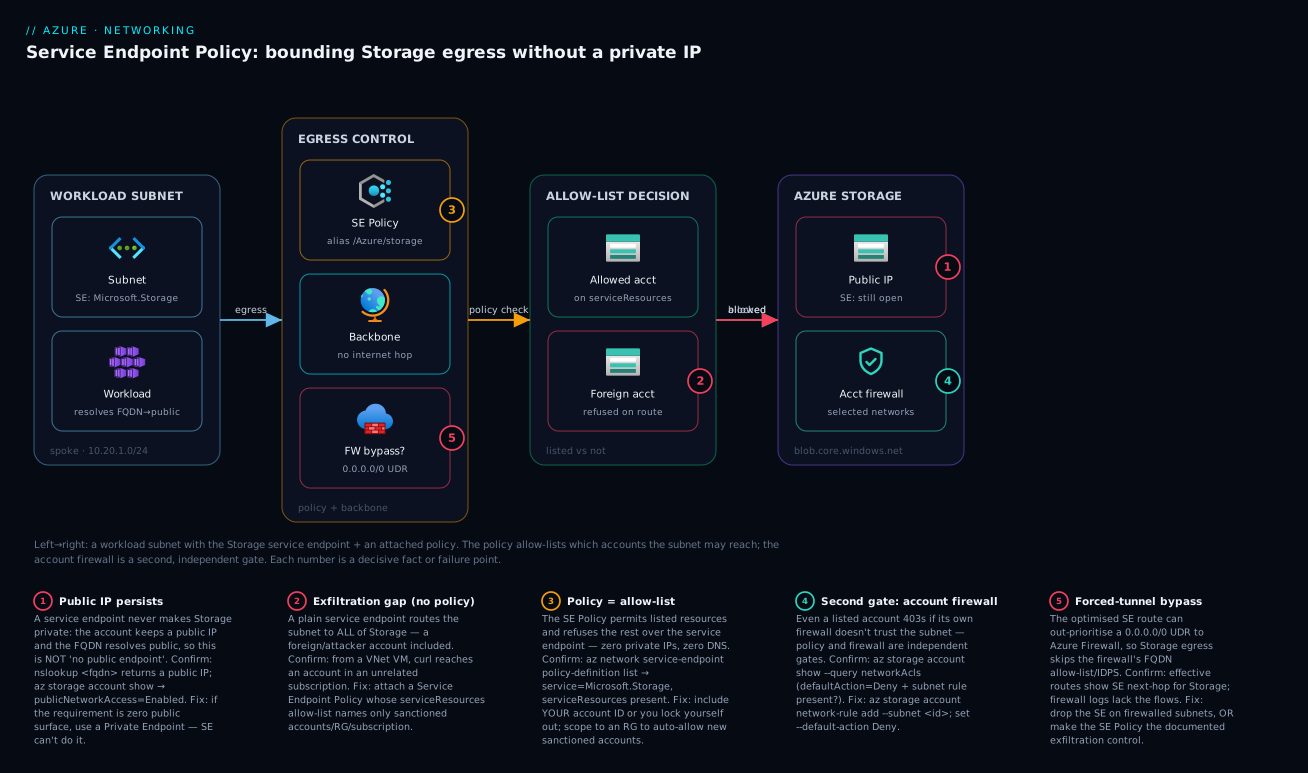
Architecture at a glance
Picture a single workload subnet in a spoke VNet with the Microsoft.Storage Service Endpoint enabled and a Service Endpoint Policy attached. A process there resolves mystorageacct.blob.core.windows.net — still the public IP (no Private DNS anywhere) — and sends its request, which leaves over the Azure backbone carrying the subnet’s identity. The Service Endpoint Policy checks the destination against its allow-list: the sanctioned mystorageacct is listed, so it proceeds; a reach to a foreign attacker.blob.core.windows.net over the same Service Endpoint is refused at the platform. The allowed request then meets the storage account’s own firewall, which admits it because a “selected networks” rule trusts the subnet. Two independent gates — the policy (where may the subnet go) and the firewall (which subnets do I admit) — must both pass.
The numbered badges mark the five decisive facts and failure points: (1) the persistent public IP (not private; public access can’t be disabled); (2) the exfiltration gap a plain Service Endpoint leaves and the policy closes; (3) the policy refusing the unlisted foreign account on the route; (4) the account firewall as a second, independent gate; (5) the forced-tunnel surprise where the optimised route bypasses an Azure Firewall — which is exactly why the policy becomes the control for that traffic. The legend narrates each as symptom, confirm, and fix.
Real-world scenario
Finlytics, a mid-size analytics SaaS in Central India, runs a multi-tenant data platform: an Azure Databricks workspace and a fleet of AKS batch jobs in fourteen spoke subnets, all staging large volumes of non-regulated event telemetry into a handful of Standard_LRS storage accounts in a rg-data-approved resource group. Their security baseline had one hard rule for this tier: the workload subnets must not be able to exfiltrate telemetry to any storage account the company does not own. Note what it did not say — it did not require “no public endpoint” for this non-regulated telemetry. Monthly spend was about ₹4.6 lakh.
The first design, dutifully following the “Private Endpoints for everything” slogan, put a Private Endpoint on each of the four sub-resources of every staging account, with Private DNS zones linked to all fourteen spokes via the hub. It worked, and it hurt in three ways: a per-GB data charge on terabytes of daily staging (~₹38,000/month, pure tax for isolation nobody required); Private DNS plumbing across fourteen spokes that became the team’s top break-glass ticket source (a new spoke onboarded without a zone link silently staged over the public path); and private-IP burn — four faces × a dozen accounts — crowding an already-tight 10.x space two acquisitions had to fit into.
A design review reframed it against the actual requirement: non-regulated data, no on-prem consumers, one hard control — “no exfiltration to foreign accounts.” That is the exact shape a Service Endpoint Policy fits. They enabled Microsoft.Storage on the fourteen subnets, authored one policy (alias /services/Azure/storage) scoped to the rg-data-approved resource group, and attached it to all fourteen — plus an Azure Policy deny so no account could be created there without review, making the RG a real trust boundary. The staging accounts’ firewalls were set to Deny with the fourteen subnets allowed.
Two things needed care during cutover. A forgotten 0.0.0.0/0 UDR on three subnets meant the new Service Endpoint route bypassed the Azure Firewall they used — fine functionally, but it moved the exfiltration control to the policy, which they documented so the next auditor wasn’t surprised. And one analytics job read a dataset from South India, which the regional endpoint didn’t cover, so they added Microsoft.Storage.Global to that subnet and the policy. The re-audit passed: a penetration tester confirmed the subnets could not write to a personal MSDN account, the per-GB charge vanished, the DNS tickets stopped, and IP pressure eased — spend on the tier’s network controls dropped about ₹41,000/month. The lesson, in their design guide: “no exfiltration” is a Service Endpoint Policy; “no public endpoint” is a Private Endpoint — don’t pay for the second when the requirement is the first.
Advantages and disadvantages
The explicit two-column trade-off, then the prose on when each side matters:
| Service Endpoint + Service Endpoint Policy | Private Endpoint | |
|---|---|---|
| Advantages | Free (route + policy, no per-GB, no hourly); zero DNS work (FQDN stays public); zero private IPs consumed; one policy attaches to many subnets (fan-out); exfiltration allow-list for Storage (account/RG/subscription scope); trivial to enable; uses service tags in NSGs cleanly | True private IP in your VNet; public endpoint can be Disabled (the only path to “no public surface”); reachable from on-premises over VPN/ExpressRoute; inherent per-resource isolation; supported across most PaaS; the answer for regulated data |
| Disadvantages | Service keeps a public IP (audit finding persists; not “private”); cannot disable public access; VNet-local — no on-prem reach; the policy allow-list is Storage-only today; coarse (subnet-level identity); can silently bypass a forced-tunnel firewall; cross-region needs the Global endpoint | Costs per hour and per GB; you must solve DNS (the #1 real-world failure); one endpoint per sub-resource (Storage gets pricey and IP-hungry); consumes private IPs; cross-tenant needs approval; more moving parts to operate at scale |
When each matters maps straight onto the decision table above: Service Endpoint + Policy is the sweet spot for internal-only, non-regulated, cost/IP/DNS-sensitive Storage at fan-out (dev/test estates, telemetry/log staging, high-throughput egress); Private Endpoint is mandatory the moment data is regulated, the baseline says “no public endpoints,” you need on-prem reach, or the service isn’t Storage. In an enterprise landing zone Private Endpoint is the default and Service Endpoint + Policy is the documented, justified exception — write the cost/IP/DNS justification down so the next reviewer doesn’t reflexively “upgrade” you back into the charges you deliberately avoided.
Hands-on lab
A free-tier-friendly walk-through: enable a Service Endpoint, lock a storage account to the subnet, then add a Service Endpoint Policy and prove it blocks a second (unlisted) account. You need an Azure subscription and Cloud Shell; the compute is a tiny B1s VM and the Storage is Standard_LRS, so teardown at the end keeps cost to a few rupees.
1. Set variables and a resource group.
RG=rg-se-lab; LOC=centralindia
ALLOWED=stallowed$RANDOM; BLOCKED=stblocked$RANDOM
az group create -n $RG -l $LOC -o none
2. Create a VNet with a workload subnet (no Service Endpoint yet).
az network vnet create -g $RG -n vnet-lab --address-prefix 10.50.0.0/16 \
  --subnet-name snet-workload --subnet-prefix 10.50.1.0/24 -o none
3. Create two storage accounts — one you’ll allow, one you’ll prove is blocked.
az storage account create -g $RG -n $ALLOWED -l $LOC --sku Standard_LRS -o none
az storage account create -g $RG -n $BLOCKED -l $LOC --sku Standard_LRS -o none
4. Enable the Service Endpoint on the subnet, and lock the ALLOWED account to it.
az network vnet subnet update -g $RG --vnet-name vnet-lab -n snet-workload \
  --service-endpoints Microsoft.Storage -o none

SUBNET_ID=$(az network vnet subnet show -g $RG --vnet-name vnet-lab -n snet-workload --query id -o tsv)

az storage account network-rule add -g $RG --account-name $ALLOWED --subnet "$SUBNET_ID" -o none
az storage account update -g $RG -n $ALLOWED --default-action Deny -o none
5. Author the Service Endpoint Policy allowing ONLY the ALLOWED account, and attach it.
ALLOWED_ID=$(az storage account show -g $RG -n $ALLOWED --query id -o tsv)

az network service-endpoint policy create -g $RG -n sep-lab -l $LOC -o none
az network service-endpoint policy-definition create -g $RG --policy-name sep-lab \
  -n def-storage --service Microsoft.Storage --service-resources "$ALLOWED_ID" -o none

az network vnet subnet update -g $RG --vnet-name vnet-lab -n snet-workload \
  --service-endpoint-policy sep-lab -o none
6. Deploy a tiny VM in the subnet to test from inside.
az vm create -g $RG -n vm-test --image Ubuntu2204 --size Standard_B1s \
  --vnet-name vnet-lab --subnet snet-workload --public-ip-address "" \
  --admin-username azureuser --generate-ssh-keys -o none
7. From the VM (via az vm run-command), prove the allow-list works. You’re verifying reachability, not auth — an anonymous blob request returns an auth error either way; the point is that the ALLOWED host answers while the BLOCKED host is not reachable over the Service Endpoint.
az vm run-command invoke -g $RG -n vm-test --command-id RunShellScript \
  --scripts "curl -s -o /dev/null -w 'ALLOWED:%{http_code}\n' https://$ALLOWED.blob.core.windows.net/ ; \
             curl -s -o /dev/null -w 'BLOCKED:%{http_code} (or timeout)\n' --max-time 10 https://$BLOCKED.blob.core.windows.net/" \
  --query "value[0].message" -o tsv
Expected: ALLOWED returns an HTTP status (e.g. 400/409 — it answered), while BLOCKED fails to complete over the Service Endpoint. That contrast is the policy working.
8. Confirm the configuration via control-plane.
az network vnet subnet show -g $RG --vnet-name vnet-lab -n snet-workload \
  --query "{se:serviceEndpoints[].service, policy:serviceEndpointPolicies[].id}" -o json
az network service-endpoint policy-definition list -g $RG --policy-name sep-lab \
  --query "[].{name:name, service:service, resources:serviceResources}" -o json
9. Teardown.
az group delete -n $RG --yes --no-wait
You have proven both halves: the Service Endpoint + firewall admit the listed account (ALLOWED works), and the policy refuses the unlisted one (BLOCKED is refused on the route) — with no private IP and no Private DNS.
Common mistakes & troubleshooting
The failure modes that actually bite, as a playbook — symptom, root cause, the exact command or portal path to confirm, and the fix:
| # | Symptom | Root cause | Confirm with | Fix |
|---|---|---|---|---|
| 1 | Enabled the Service Endpoint, still 403 from the subnet | Account firewall never told to trust the subnet | az storage account show --query networkAcls (no vnet rule / default Allow) |
az storage account network-rule add --subnet <id>; set --default-action Deny |
| 2 | Policy attached, but you locked yourself out | Your own account ID missing/typo’d in serviceResources |
az network service-endpoint policy-definition list — your account not listed |
Add the correct account/RG/subscription ID to the definition |
| 3 | Policy has no effect; foreign account still reachable | Subnet has the policy but no Microsoft.Storage SE |
az network vnet subnet show --query serviceEndpoints is empty |
Enable the Service Endpoint on the subnet too |
| 4 | Policy has no effect; wrong service governed | Definition alias/service not Microsoft.Storage |
Definition service field wrong |
Recreate the definition with --service Microsoft.Storage |
| 5 | Cross-region account unreachable over SE | Only regional Microsoft.Storage enabled |
Subnet lacks Microsoft.Storage.Global |
Add Microsoft.Storage.Global to the subnet’s service endpoints |
| 6 | On-prem clients can’t reach Storage privately | Service Endpoints are VNet-local | Branch nslookup returns public; SE doesn’t apply to on-prem |
Use a Private Endpoint for on-prem reach; SE can’t do it |
| 7 | Egress-inspection firewall not seeing Storage traffic | Optimised SE route bypasses the 0.0.0.0/0 UDR |
Route table shows SE next-hop winning; firewall logs lack the flows | Accept + document (policy is the control), or remove the SE on firewalled subnets |
| 8 | “We disabled public access and it broke” | SE needs the public face; publicNetworkAccess=Disabled kills it |
Account publicNetworkAccess is Disabled while relying on SE |
Re-enable public + SE, or switch to a Private Endpoint |
| 9 | Tried to add an SE Policy for SQL/Key Vault | SE Policies are Storage-only today | No --service option resolves for those |
Use the service firewall or a Private Endpoint for non-Storage |
| 10 | New account in the RG not reachable, account-scoped policy | Policy lists specific accounts, not the RG | New account ID absent from serviceResources |
Add the account, or scope the definition to the RG/subscription |
Three of these account for most lost hours. Row 1 (still 403) is the two-sided-wiring trap: the Service Endpoint pins the route on the subnet, but the account firewall must separately reference the subnet and Deny by default — people do one half and stop. Row 2 (locked yourself out) is the allow-list catching you: omit or typo your own production account in serviceResources and the subnet that needs it is refused. Row 7 (firewall blind) is the forced-tunnel bypass: the optimised Service Endpoint route out-prioritises a 0.0.0.0/0-to-firewall UDR, so Storage egress skips inspection — make the policy the documented control or drop the Service Endpoint on that subnet. Each row’s Confirm column is the exact command to prove it.
Best practices
- Never treat a plain Service Endpoint as exfiltration control. On its own it routes the subnet to all of Storage. If exfiltration matters, a Service Endpoint Policy is mandatory — the Service Endpoint alone is a route, not a guard.
- Always wire both sides. Service Endpoint on the subnet and a “selected networks” rule on the account with
defaultAction = Deny. One without the other either fails or doesn’t actually restrict anything. - Prefer a dedicated “approved data” resource group as the policy scope. Scope the definition to the RG and govern membership with Azure Policy
deny, so new sanctioned accounts are auto-allowed but rogue ones can’t be created — low toil, real boundary. - Author one policy and attach it widely. The fan-out advantage is the whole point: a single Service Endpoint Policy on fifty subnets is the cheap exfiltration guard Private Endpoints can’t match operationally.
- Use service tags in NSGs, not IP ranges. Allow egress with the
Storage/Storage.<region>service tag; Service Endpoints and tags are complementary and IP ranges drift. - Audit the forced-tunnel interaction. If a subnet has both a
0.0.0.0/0-to-firewall UDR and a Storage Service Endpoint, know that Storage egress bypasses the firewall — make the policy the documented control or drop the Service Endpoint on that subnet. - Use
Microsoft.Storage.Globaldeliberately for cross-region. Don’t assume the regional endpoint covers another region; add Global where data and compute legitimately span regions, and list those accounts in the policy. - Don’t claim “private” or disable public access with Service Endpoints. The public IP persists by design. If the requirement is “no public endpoint,” that is a Private Endpoint requirement — say so.
- Manage it all as Bicep, reviewed in PRs. Service Endpoints, firewall rules, and the policy belong in source control; a hand-edited allow-list is how production accounts silently fall off the list.
- Reach for Private Endpoint for regulated data, on-prem reach, or non-Storage exfiltration control. The decision table is the rule; the Service Endpoint path is the documented exception, not the reflex.
- Right-size in the design review, not after the bill. The per-GB and private-IP costs of Private Endpoints at fan-out are exactly what the SE path avoids — decide on the requirement, not the slogan.
Security notes
- The policy is an egress allow-list, not an isolation boundary. It controls where the subnet may go over the Service Endpoint; it does not remove the account’s public surface or stop a determined attacker who already has valid credentials and a path that doesn’t use the Service Endpoint. Layer it with the account firewall and, for high stakes, a Private Endpoint.
- Two gates, both required. The Service Endpoint Policy (subnet → which accounts) and the account firewall (account → which subnets) are independent. Configure both; rely on neither alone.
- Identity still does the heavy lifting. Network controls bound reach; they don’t replace RBAC on the data plane. Use managed identity and
Storage Blob Data Reader/Contributorscoped tightly (see Azure RBAC: Custom Roles & Least Privilege) — a subnet that can reach an account should still only be authorised for what it needs. - Defence in depth for the firewalled estate. Where egress inspection matters and a Service Endpoint would bypass it, either keep the SE off that subnet or make the policy the explicit, documented control — never leave the gap implicit.
- Govern the allow-list’s trust boundary. If you scope the policy to a resource group or subscription, the security of the control is the security of membership in that scope. Lock account creation there with Azure Policy and review changes.
- Don’t leak the public surface into compliance claims. A Service-Endpoint-secured account is not “private” and not “no public endpoint” — describe it accurately in audits (bounded egress, backbone route, public surface present) so you’re not later found to have over-claimed.
Cost & sizing
The whole reason this article exists is that the cost shapes differ sharply, and the cheaper one is sometimes correct:
- Service Endpoints and Service Endpoint Policies are free. No hourly charge, no per-GB charge, no private IPs. The only “cost” is operational — keeping the allow-list and firewall rules correct — and that is one Bicep file.
- Private Endpoints bill hourly plus per-GB data processing, one endpoint per sub-resource (blob/file/queue/table) — a single account on all four faces is four endpoints and four private IPs, times the number of accounts. At high throughput the per-GB line is the one that surprises finance.
- Private DNS adds zones (small) and, for on-prem, a DNS Private Resolver (hourly) — real money at scale and a frequent break-glass cost.
- The fan-out delta is the headline. One policy across many subnets is ~₹0; the equivalent Private Endpoint footprint across many consuming VNets is hourly + per-GB + IPs + DNS, repeated.
A rough monthly picture for a non-regulated, high-fan-out internal Storage workload (a dozen accounts, fourteen subnets, terabytes/day staging):
| Approach | Resource cost | Per-GB cost | Private IPs | DNS overhead | Fits which requirement |
|---|---|---|---|---|---|
| Service Endpoint + 1 Policy | ~₹0 | ₹0 | 0 | None | Bound exfiltration, internal-only |
| Private Endpoint (per face, per account) | Hourly × ~48 endpoints | Per-GB on all staging | ~48 | Zones (+ resolver for on-prem) | No public endpoint / regulated / hybrid |
| SE + Policy for staging, PE for the one regulated account | ~₹0 for staging + a few PE | Per-GB only on the PE account | A handful | Minimal zones | Mixed — match each to its requirement |
The third row is usually the mature answer: Service Endpoint + Policy for the bulk internal/non-regulated Storage, and Private Endpoints reserved for the specific accounts that genuinely need “no public endpoint” or on-prem reach. You stop paying per-GB and per-IP for isolation the bulk of the data never required, and you spend the Private Endpoint budget exactly where the requirement is real. Finlytics’ ~₹41,000/month saving came entirely from this reframing — not from a discount, but from matching the control to the requirement.
Interview & exam questions
1. Does enabling a Service Endpoint make a storage account private? No. A Service Endpoint pins the route to the Azure backbone and stamps the subnet identity so the account’s firewall can trust the subnet, but the account keeps its public IP, the FQDN still resolves public, and you cannot disable public access while relying on the Service Endpoint. “Private” and “no public endpoint” are Private-Endpoint properties.
2. Why is a plain Service Endpoint not an exfiltration control? Because it routes the subnet to the entire Storage service over the backbone, so a process in that subnet can reach any storage account, including one in an attacker’s tenant. The Service Endpoint reduced inbound exposure to your account (firewall trusts the subnet) but did nothing to bound outbound reach. You need a Service Endpoint Policy for that.
3. What is a Service Endpoint Policy, precisely? A standalone Azure resource attached to a subnet containing one or more definitions; each definition has an alias (which service it governs, e.g. /services/Azure/storage) and a list of serviceResources (the specific accounts, resource groups, or subscriptions the subnet may reach via the Service Endpoint). Traffic to a listed resource is allowed; traffic to anything off the list over that Service Endpoint is refused.
4. Which services support Service Endpoint Policies today? In practice, Azure Storage. Many services support Service Endpoints, but the policy (the resource allow-list) is a Storage feature. For non-Storage exfiltration control you use the service firewall, a Private Endpoint, or an Azure Firewall FQDN rule.
5. Name three workload shapes where Service Endpoint + Policy beats a Private Endpoint. (a) High fan-out — many internal subnets needing bounded Storage access, where one policy attaches widely versus per-VNet endpoints and DNS. (b) No VNet-integrated DNS — Private Endpoints that can’t reliably resolve private are worse than a Service Endpoint that needs no DNS. © Private-IP exhaustion or high per-GB throughput — Service Endpoints consume zero IPs and have no per-GB charge. In all three the data is internal/non-regulated and the requirement is bounded exfiltration, not “no public endpoint.”
6. What two independent gates must both pass for a request to a listed account? The Service Endpoint Policy (does the subnet’s allow-list permit this account?) and the account’s own firewall (does the account’s “selected networks” rule trust this subnet?). A correctly-listed account whose firewall doesn’t yet trust the subnet still returns 403, and vice versa.
7. How can a Service Endpoint break an egress-inspection design? Enabling a Service Endpoint injects an optimised system route that can take precedence over a 0.0.0.0/0 UDR pointing at Azure Firewall, so Storage egress goes straight to the backbone and bypasses the firewall’s FQDN allow-list and IDPS. Either don’t enable the Service Endpoint on firewalled subnets, or make the Service Endpoint Policy the documented exfiltration control for that traffic.
8. What’s the difference between regional Microsoft.Storage and Microsoft.Storage.Global? The regional endpoint optimises the route to Storage in the VNet’s own region; Microsoft.Storage.Global extends Service Endpoint behaviour to Storage in other regions. If your compute and a target account are in different regions, you need the Global endpoint for the cross-region traffic to take the Service Endpoint path (and for the policy to govern it).
9. Can on-premises clients use a Service Endpoint to reach Storage privately? No. Service Endpoints are VNet-local — the route and identity apply only to traffic originating in the VNet’s subnets. On-prem clients over VPN/ExpressRoute cannot use them; reaching Storage privately from on-prem requires a Private Endpoint with DNS forwarding.
10. You attached a Service Endpoint Policy and your own app can’t reach its storage account. First thing to check? Whether your account’s resource ID is on the policy’s serviceResources allow-list (and exact). A policy is an allow-list, so omitting or typo’ing your own account locks you out. Either add the correct ID or scope the definition to the resource group/subscription that contains it.
These map to AZ-700 (Network Engineer) — design and implement private access to Azure services (Service Endpoints, Service Endpoint Policies, Private Endpoints, Private Link) — and AZ-500 (Security Engineer) — configure network security for PaaS and data-exfiltration prevention. The Storage-firewall and account-scoping angle touches AZ-104. A compact cert-mapping for revision:
| Question theme | Primary cert | Exam objective area |
|---|---|---|
| SE vs PE, what each changes | AZ-700 | Private access to Azure services |
| Service Endpoint Policy / exfiltration | AZ-500 / AZ-700 | Network security for PaaS; data protection |
| Storage firewall + selected networks | AZ-104 / AZ-500 | Configure storage network access |
| Forced tunnel / firewall bypass | AZ-700 | Routing, secure connectivity |
| Cross-region Storage SE (Global) | AZ-700 | Implement service endpoints |
Quick check
- Your subnet has
Microsoft.Storageenabled and the account firewall set to Deny with the subnet allowed — but a process there can still write to a storage account in an unrelated subscription. Why, and what one object fixes it? - True or false: adding a Service Endpoint Policy lets you set the storage account’s
publicNetworkAccess = Disabledand stay reachable from the subnet. - You scope a Service Endpoint Policy definition to a resource group instead of listing accounts. Name one advantage and one risk.
- A subnet has a
0.0.0.0/0UDR pointing at Azure Firewall and a Storage Service Endpoint. Where does Storage egress actually go, and what becomes your exfiltration control? - Name two workload shapes where Service Endpoint + Policy is the better choice than Private Endpoint, and the requirement they share.
Answers
- A plain Service Endpoint routes the subnet to all of Storage, so it can reach foreign accounts — the firewall only controlled inbound trust to your account. The object that fixes it is a Service Endpoint Policy attached to the subnet, allow-listing exactly the accounts (or RG/subscription) the subnet may reach.
- False. A Service Endpoint (with or without a policy) needs the account’s public face; setting
publicNetworkAccess = Disabledbreaks Service-Endpoint reachability. Disabling public access and staying reachable is a Private Endpoint property. - Advantage: low maintenance — new sanctioned accounts created in the RG are automatically allowed without editing the policy. Risk: the control is only as tight as membership in the RG, so a rogue account created there is auto-trusted unless you lock creation down (e.g. with Azure Policy
deny). - The optimised Service Endpoint route can take precedence over the
0.0.0.0/0UDR, so Storage egress goes straight to the backbone, bypassing the Azure Firewall. The Service Endpoint Policy then becomes your exfiltration control for that traffic — document it. - Any two of: high fan-out of internal subnets; no VNet-integrated DNS; private-IP exhaustion; high per-GB Storage throughput; internal-only lower-sensitivity data. The shared requirement is bound exfiltration / pin the route — not “eliminate the public endpoint” (which would mandate a Private Endpoint).
Glossary
- Service Endpoint — A subnet setting that injects an optimised backbone route to a PaaS family and stamps the subnet’s identity on egress packets; the service keeps its public IP and DNS is untouched.
- Subnet identity — The VNet + subnet resource ID carried on Service-Endpoint traffic, which a PaaS firewall’s “selected networks” rule matches to admit the subnet.
- Service firewall — The PaaS resource’s own network ACL (“Networking” blade) where you set
defaultAction = Denyand allow specific subnets/IPs. - Service Endpoint Policy — A standalone
Microsoft.Network/serviceEndpointPoliciesresource attached to a subnet that allow-lists exactly which resources the subnet may reach via the Service Endpoint; the exfiltration guard (Storage today). - Policy definition — A unit inside a Service Endpoint Policy carrying an alias and a list of
serviceResources. - Alias — The platform string in a definition selecting which service it governs (e.g.
/services/Azure/storage). serviceResources— The resource IDs (account, resource group, or subscription) a policy definition permits the subnet to reach.Microsoft.Storage(regional) — The Service Endpoint value optimising the route to Storage in the VNet’s own region.Microsoft.Storage.Global— The Service Endpoint value extending Service-Endpoint behaviour to Storage in other regions.- Private Endpoint — A private IP on a NIC inside your subnet (fronted by Private Link) that lets you disable the service’s public access; the isolation alternative.
- Data exfiltration — A workload or insider sending data to resources you don’t own; the risk a Service Endpoint Policy (or a Private Endpoint + firewall) is meant to prevent.
- Service tag — A named group of IP ranges (e.g.
Storage,Storage.CentralIndia) used in NSG rules to allow PaaS egress without hard-coding addresses. - Forced tunnel — A
0.0.0.0/0UDR steering all egress through a firewall; a Service Endpoint’s optimised route can take precedence and bypass it for that service. publicNetworkAccess— The PaaS property that, set toDisabled, removes the public surface — possible with a Private Endpoint, incompatible with relying on a Service Endpoint.
Next steps
You can now build and defend a Service Endpoint + Policy design and know exactly when to spend on a Private Endpoint instead. Build outward:
- Next: Azure Private Endpoint vs Service Endpoint: Secure PaaS Access — the broad decision and the full Private Endpoint mechanics this article is the narrow companion to.
- Related: Azure Private Link & Private DNS for PaaS — the at-scale Private DNS architecture you take on when a workload does need Private Endpoints.
- Related: Azure Storage Account Fundamentals — the only service with Service Endpoint Policy support, and its sub-resource model.
- Related: Azure Network Security Groups: Rules & Priorities — service tags and how NSG rules meet Service Endpoints.
- Related: Troubleshooting Azure Storage: 403, Firewall, Private Endpoint, RBAC & SAS — the playbook when a Storage path returns 403.