You open the Azure portal to create a database, and the first real decision is a fork that sets your bill for the next three years: DTU-based or vCore-based. The page never explains which is cheaper, which scales further, or which one your boss will ask about when the invoice lands. So most teams pick the wizard default or copy the last project, and either overpay by 3x for headroom they never touch or under-provision and firefight timeouts all quarter. Both share one root cause: nobody explained what a DTU actually is, or how a vCore maps to the CPU and memory you already understand.
This article fixes that. Azure SQL Database is the fully managed, PaaS relational database — Microsoft runs the SQL engine, patching, backups, HA and failover, and you rent capacity. The purchasing model is just how you express “how much capacity,” and there are two languages for it. The DTU model bundles compute, memory and I/O into one opaque, pre-blended unit — simple, fixed-price, fewer knobs. The vCore model unbundles them: you pick CPU cores (with a fixed memory ratio) and storage independently — more transparent, more flexible, and the only model that unlocks the big-ticket features: Hyperscale, serverless auto-pause, reserved-capacity discounts, and Azure Hybrid Benefit. By the end you will read both pricing pages fluently, translate a DTU SKU into vCores and back, and apply a one-page framework that lands the right tier the first time.
We keep this concrete — real SKUs (S3, GP_Gen5_4, BC_Gen5_8, HS_Gen5_4), real limits, real savings, and both az CLI and Bicep for every choice. You do not need to be a DBA: if you understand “CPU, RAM, disk” you can size an Azure SQL Database correctly after reading this.
What problem this solves
The pain is money and surprise, in both directions. Pick too big and you pay monthly for cores and I/O the workload never uses — a P4 (500 DTU) database at 8% utilisation is pure waste, astonishingly common because “P-for-Premium sounds safe.” Pick too small and queries that ran in 40 ms in dev time out in production, the app throws 40501 (service is busy) under load, and someone scales up at 2 a.m. while customers see errors. The purchasing model is the dial under both failures; choosing it blind chooses the failure mode by accident.
There is a second, quieter problem: the model you start on constrains what you can do later. Several of Azure SQL’s most valuable capabilities — Hyperscale (up to ~128 TB), serverless (auto-pauses to near-zero idle cost), reserved capacity (1-/3-year discounts), and Azure Hybrid Benefit (reuse on-prem SQL licences) — exist only in vCore. Teams that default to DTU for “simplicity” forfeit all of them, then wonder why their dev database costs the same overnight as at noon, or why a 6 TB database “isn’t supported.”
Who hits this: anyone standing up a new database — startups watching every rupee, enterprises migrating dozens off-premises, platform teams asked “why is the SQL bill this high?” The fix is not a magic SKU; it is understanding the two models well enough to match the dial to the workload.
To frame the field, the two models side by side at the highest level — the rest of the article unpacks every row:
| Dimension | DTU model | vCore model |
|---|---|---|
| What you buy | A pre-blended bundle (CPU + memory + I/O as one number) | CPU cores + fixed memory ratio + storage, chosen separately |
| Transparency | Opaque — you can’t see the CPU/RAM split | Explicit — cores and memory are named |
| Tiers | Basic, Standard (S0–S12), Premium (P1–P15) | General Purpose, Business Critical, Hyperscale |
| Storage | Bundled with the tier (fixed per SKU) | Sized independently of compute |
| Serverless / Hyperscale | Neither available | Both available (Hyperscale to ~128 TB) |
| Reserved capacity / Hybrid Benefit | Neither available | Both available (big cost savings) |
| Best for | Small, steady, simple apps; fixed cost | Scale, transparency, or cost levers |
Learning objectives
By the end of this article you can:
- Explain what a DTU is (a blended unit of CPU, memory and I/O) and why the vCore model exists to unbundle it.
- Read both pricing pages and translate a DTU SKU into an approximate vCore SKU (and back) for a like-for-like comparison.
- Choose between General Purpose, Business Critical and Hyperscale in the vCore model and say what each actually buys you (latency, HA, max size).
- Decide when serverless beats provisioned compute, and how auto-pause turns idle time into near-zero cost.
- Use an elastic pool to share capacity across many databases instead of over-provisioning each one.
- Apply reserved capacity and Azure Hybrid Benefit to cut the vCore compute bill, and explain why neither exists on DTU.
- Right-size a new database with a repeatable decision framework, and confirm utilisation with metrics so you can scale down with confidence.
Prerequisites & where this fits
You should be comfortable with a relational database (tables, queries, a connection string) and the three resources every compute service is sold by: CPU, memory, and storage/IO, and know how to run az in Cloud Shell. No DBA experience needed — this is a sizing-and-cost article, not a query-tuning one. If you have ever picked a VM size you have the muscle; this is the same “how big a box?” decision in different units.
This sits at the front of the Data track, upstream of almost everything else you do with Azure SQL. The platform handles replication and backups, but a few neighbours pair naturally: Azure FinOps and Cost Management operationalises reserved capacity and tagging once the bill matters; Troubleshooting Azure SQL Database: Connectivity, Timeouts, Throttling & Blocking is the companion playbook when a sized-too-small database throws 40501/10928; Azure Monitor and Application Insights is where you watch utilisation to right-size; and the GP-vs-Business-Critical resilience choice maps onto BCDR foundations: RTO, RPO and the resilience spectrum.
Core concepts
Five mental models make later decisions obvious:
A DTU is a blend you can’t see inside. The DTU — Database Transaction Unit is a single number bundling a fixed ratio of CPU, memory and read/write I/O, set by benchmarking an OLTP workload — so “100 DTU” is a specific pre-mixed amount of all three. The appeal is one slider, one price, no reasoning about cores or RAM. The cost is opacity: if your workload is memory-hungry but CPU-light, the blend wastes what it over-provides and you can’t rebalance it. Going up a tier scales all three whether you needed all three or not.
A vCore is a CPU core you can see, with memory attached. The vCore — Virtual Core model unbundles the blend: you choose cores on a hardware generation (e.g. Gen5), each carrying a fixed memory-per-core ratio (~5–7 GB/core on GP, more on BC), and size storage separately — exactly how you size a VM. That makes the bill legible: “8 cores × this region” instead of “an opaque 500.”
Service tier = the architecture under the database, not just the size. Within vCore, the service tier changes the storage and availability architecture: General Purpose on remote premium storage (durable, cheaper, slightly higher latency); Business Critical on local SSD plus a built-in Always On availability group (lowest latency, fastest failover, free readable replica); Hyperscale on distributed page-server storage scaling to 100 TB+ with near-instant snapshots. Same “8 cores,” three very different machines.
Provisioned is always-on; serverless breathes. Provisioned reserves a fixed size 24×7 and bills it busy or idle — correct for steady production. Serverless scales CPU between a min and max and auto-pauses after a configurable idle period, billing only storage while paused — so for spiky or intermittent workloads you stop paying for nights and weekends.
Pools share; singles isolate. A single database owns dedicated capacity. An elastic pool is a shared bucket of DTUs/vCores that many databases draw from — fifty tenants peaking at different times run in one pool for a fraction of 50 dedicated SKUs. This lever is independent of DTU-vs-vCore; both offer pools.
The vocabulary in one table
Pin down every moving part before the deep sections — the glossary repeats these for lookup, this table is the mental model side by side:
| Term | One-line definition | Which model | Why it matters |
|---|---|---|---|
| DTU | Blended unit of CPU + memory + I/O | DTU only | Simple but opaque; scales all three together |
| vCore | One CPU core with attached memory | vCore only | Transparent sizing; maps to VM intuition |
| Service tier | Storage/HA architecture: GP, BC, Hyperscale | Both | Same cores, very different machines |
| Serverless | Auto-scaling compute that auto-pauses | vCore | Near-zero cost when idle |
| Elastic pool | Shared capacity across many DBs | Both | Density for many small databases |
| Reserved capacity | 1-/3-year prepaid compute discount | vCore only | Big saving on steady workloads |
| Azure Hybrid Benefit | Reuse on-prem SQL licences | vCore only | Cuts the licence portion of compute |
What a DTU really is (and why vCore replaced it as the default)
The DTU model was Azure SQL’s original way to sell capacity, and for small, predictable apps it is still genuinely fine. Rather than make a non-DBA reason about cores, cache and IOPS, Microsoft pre-mixed all three into one benchmark-derived number: buy 50 DTU and you get a fixed slice of CPU, memory and I/O in a ratio Microsoft chose. You don’t tune the ratio — you move the slider, and the price follows.
The three tiers stack in capability and price — Basic (trivial), Standard (line-of-business), Premium (write-heavy, low-latency OLTP on local SSD) — and storage is bundled, each SKU including a fixed max size extendable to the tier ceiling on Standard/Premium. The DTU-tier reference — treat the numbers as the shape and headline limits, not a live price sheet (confirm current figures and your region in the pricing calculator):
| DTU tier | DTU range | Max storage | PITR | Designed for | Key limit |
|---|---|---|---|---|---|
| Basic | 5 DTU | up to 2 GB | 7 days | Tiny dev/test | Small size cap; no readable replica |
| Standard | S0–S12 (10–3,000) | up to ~1 TB | 1–35 days | Most line-of-business apps | Remote latency; blend fixed |
| Premium | P1–P15 (125–4,000) | up to ~4 TB | 1–35 days | Write-heavy, low-latency OLTP | Highest cost; capped vs Hyperscale |
Why did Microsoft make vCore the recommended default? Three reasons, all restoring control the DTU blend takes away: transparency (named cores and memory you size per axis), cost levers (reserved capacity and Azure Hybrid Benefit, neither on DTU), and scale and features (Hyperscale to 100 TB+ and serverless auto-pause, also DTU exclusions).
DTU is not deprecated and stays reasonable for a small, steady, set-and-forget database where simplicity beats everything. But the moment you care about seeing your costs, cutting them with commitments, or scaling past a few terabytes, you have outgrown it — which is why the rest of this article lives in vCore.
The vCore model, tier by tier
vCore is where the real decisions are. You make three orthogonal choices: the service tier (architecture), the compute (cores, provisioned or serverless), and the storage (sized on its own). Get the tier right first — it changes the machine under your data and is painful to change.
General Purpose — the sensible default
General Purpose (GP) separates compute from storage: database files sit on remote premium storage (durable, platform-replicated) while compute runs on a stateless node. That makes it the cheapest tier and the right start for most applications — web apps, APIs, OLTP and reporting that don’t need single-digit-millisecond latency. On failure the platform reattaches storage to a new node (a short blip). SKUs look like GP_Gen5_4.
# General Purpose, Gen5, 4 vCores, provisioned
az sql db create \
  --resource-group rg-data-prod --server sql-kv-prod \
  --name appdb \
  --edition GeneralPurpose --family Gen5 --capacity 4 \
  --max-size 256GB
resource appdb 'Microsoft.Sql/servers/databases@2023-08-01-preview' = {
  parent: sqlServer
  name: 'appdb'
  location: location
  sku: { name: 'GP_Gen5_4', tier: 'GeneralPurpose', family: 'Gen5', capacity: 4 }
  properties: {
    maxSizeBytes: 274877906944   // 256 GB, sized independently of compute
  }
}
Business Critical — local SSD, replicas, lowest latency
Business Critical (BC) keeps data on local SSD and runs a built-in Always On availability group (typically four nodes). That buys the lowest storage latency, fastest failover (a replica is already hot), and a free readable secondary for reporting. It is the tier for latency-sensitive OLTP, high transaction rates and strict availability — and it costs more than GP at the same cores because you pay for local SSD and the replica fleet. SKUs look like BC_Gen5_8.
az sql db create \
  --resource-group rg-data-prod --server sql-kv-prod \
  --name orders \
  --edition BusinessCritical --family Gen5 --capacity 8 \
  --zone-redundant true \
  --read-scale Enabled        # use the free readable secondary for read-only traffic
Zone redundancy (--zone-redundant true) spreads replicas across availability zones so a single datacentre failure doesn’t take the database down.
Hyperscale — when the database is huge or grows fast
Hyperscale (HS) replaces single-file storage with a distributed architecture of page servers and a shared log service, decoupling storage from compute. The headline numbers: databases up to 100 TB+ (commonly ~128 TB), near-instant snapshot backups regardless of size, fast restores and copies (seconds-to-minutes, not hours), and read replicas for scale-out reads. It is the tier for very large or unpredictably-growing databases, or anywhere a multi-hour restore is unacceptable. SKUs look like HS_Gen5_4.
az sql db create \
  --resource-group rg-data-prod --server sql-kv-prod \
  --name warehouse \
  --edition Hyperscale --family Gen5 --capacity 4 \
  --read-replica-count 1      # named read replicas for read scale-out
# Hyperscale grows storage automatically — you don't pre-size max data size
The three vCore tiers side by side — keep this open when choosing:
| Aspect | General Purpose | Business Critical | Hyperscale |
|---|---|---|---|
| Storage architecture | Remote premium storage | Local SSD + replicas | Distributed page servers |
| Max database size | ~1–4 TB | ~1–4 TB | up to ~100 TB+ (≈128 TB) |
| Storage latency | Low (remote) | Lowest (local SSD) | Low, scales horizontally |
| Built-in HA replicas | No (storage reattach) | Yes (Always On AG, ~4 nodes) | Yes (page-server redundancy) |
| Readable secondary | Add a named replica | Free readable secondary | Add named read replicas |
| Backup / restore | Standard | Standard | Near-instant snapshot, fast restore |
| Serverless | Yes | No (provisioned only) | Yes |
| Relative cost (same cores) | Lowest | Highest | Mid-high, scales with size |
| Best for | Most apps; default | Low-latency, HA-critical OLTP | Very large / fast-growing DBs |
Provisioned vs serverless compute
Orthogonal to the tier, you choose how compute is billed. Provisioned reserves a fixed core count 24×7 — predictable, correct for steady production. Serverless auto-scales CPU between a min and max vCore and auto-pauses after an idle delay you set (paused, you pay only storage); the next connection auto-resumes, paying a short cold-start. It shines for intermittent workloads and runs on General Purpose and Hyperscale, not Business Critical.
# Serverless GP: scales 0.5–4 vCores, auto-pauses after 60 min idle
az sql db create \
  --resource-group rg-data-dev --server sql-kv-dev \
  --name scratchdb \
  --edition GeneralPurpose --family Gen5 \
  --compute-model Serverless \
  --min-capacity 0.5 --capacity 4 \
  --auto-pause-delay 60      # minutes of idle before pausing; -1 disables auto-pause
resource scratch 'Microsoft.Sql/servers/databases@2023-08-01-preview' = {
  parent: sqlServer
  name: 'scratchdb'
  location: location
  sku: { name: 'GP_S_Gen5_4', tier: 'GeneralPurpose', family: 'Gen5', capacity: 4 }
  properties: {
    minCapacity: json('0.5')        // floor the database scales down to
    autoPauseDelay: 60              // minutes idle before auto-pause (-1 = never pause)
  }
}
Provisioned vs serverless:
| Factor | Provisioned | Serverless |
|---|---|---|
| Billing | Per reserved vCore, 24×7 | Per vCore used, per second |
| Idle cost | Full compute always | Storage only (when paused) |
| Cold start | None (always warm) | Short resume on first request |
| Best workload | Steady, predictable | Spiky, intermittent, dev/test |
| Tiers | GP, BC, Hyperscale | GP, Hyperscale (not BC) |
| Reserved discount | Yes | No (already pay-per-use) |
Storage, IO and backup — sized on their own in vCore
In DTU, storage and I/O are bundled with the tier; in vCore you size storage independently of compute — one of its biggest advantages. A reporting database can pair modest compute with terabytes of data, or a hot OLTP database lots of cores with a small footprint. DTU forces you to buy both together; vCore does not.
A few mechanics show up on the bill and in restore plans. Max data size is billed per GB — on GP/BC you pre-size it, so oversizing wastes money. IOPS scales with vCores on GP and is far higher on BC’s local SSD. Backups are quiet cost drivers: point-in-time-restore (PITR) storage is free up to roughly the database size then per GB — a 4 TB database with 35-day retention accumulates meaningful charges — while long-term retention (LTR) copies bill separately and are easy to forget you enabled. If you don’t need geo-redundant backups, zone- or locally-redundant trims the bill.
# Set backup storage redundancy to Zone-redundant (instead of Geo) to cut backup cost
az sql db update \
  --resource-group rg-data-prod --server sql-kv-prod --name appdb \
  --backup-storage-redundancy Zone
Elastic pools — share capacity instead of over-buying
If you run many databases — classic in multi-tenant SaaS — sizing each for its own peak is wasteful, because they rarely peak together. An elastic pool gives a set of databases a shared bucket of capacity (eDTUs in DTU, vCores in vCore): each draws what it needs up to a per-database cap, and the pool is sized for the aggregate peak, not the sum. Fifty databases peaking to 50 DTU but never together might fit in a 200-eDTU pool instead of 50 dedicated SKUs.
# Create a vCore elastic pool, then place databases into it
az sql elastic-pool create \
  --resource-group rg-data-prod --server sql-kv-prod \
  --name pool-tenants \
  --edition GeneralPurpose --family Gen5 --capacity 8 \
  --db-max-capacity 4 --db-min-capacity 0   # per-database cap and floor within the pool

az sql db create \
  --resource-group rg-data-prod --server sql-kv-prod \
  --name tenant-001 --elastic-pool pool-tenants
resource pool 'Microsoft.Sql/servers/elasticPools@2023-08-01-preview' = {
  parent: sqlServer
  name: 'pool-tenants'
  location: location
  sku: { name: 'GP_Gen5_8', tier: 'GeneralPurpose', family: 'Gen5', capacity: 8 }
  properties: {
    perDatabaseSettings: { minCapacity: 0, maxCapacity: 4 }
  }
}
When a pool helps and when it hurts:
| Scenario | Single databases | Elastic pool |
|---|---|---|
| Many small DBs, different peak times | Over-provisioned, expensive | Cheaper — share the aggregate peak |
| A few large DBs all busy at once | Fine | No saving; they contend |
| One dominant DB + many idle | Big one needs its own SKU | Big one can starve the rest |
| Unpredictable per-tenant growth | Resize each individually | Pool absorbs spikes; cap per-DB |
| Need per-DB isolation/SLA | Strong isolation | Shared fate; noisy-neighbour risk |
The pool is a density lever, not a free lunch: if every database is busy at once they contend, and one heavy database crowds out the rest unless you set sensible per-database caps.
Architecture at a glance
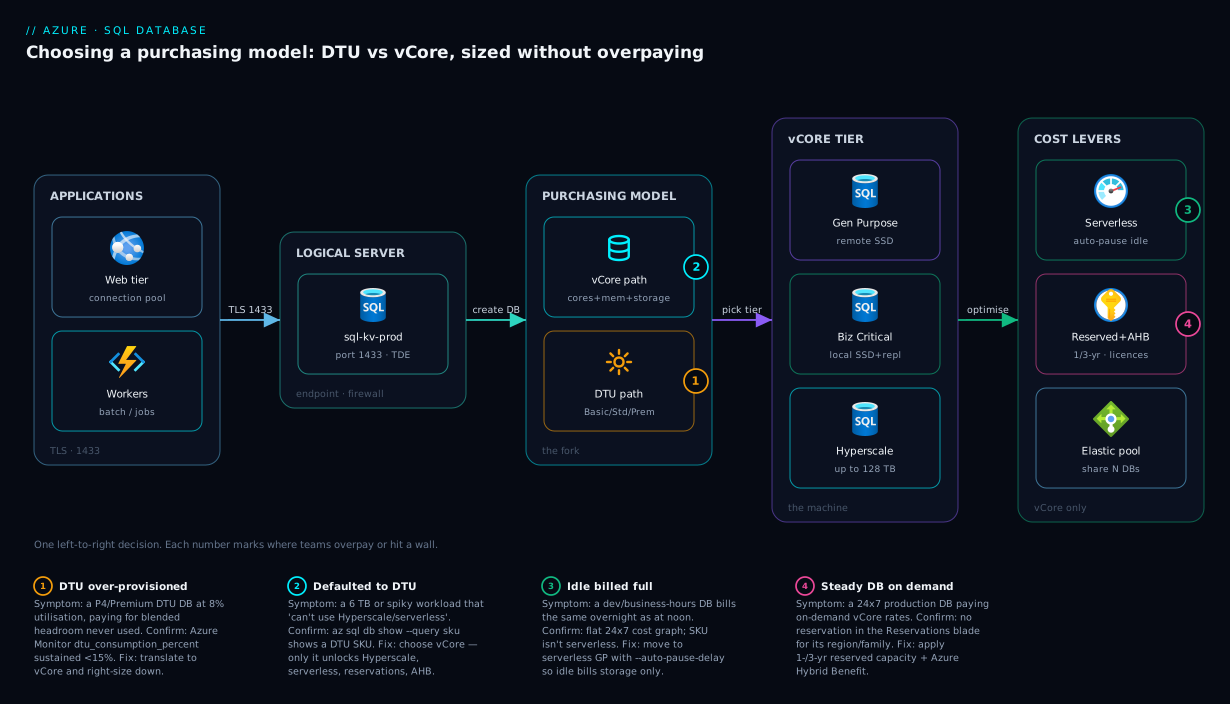
The diagram below is the whole decision as a left-to-right flow. On the left, your applications — a web tier and workers — connect over TLS to a logical SQL server (port 1433), the connection endpoint and security boundary; the real capacity lives in the databases behind it. The central fork is the purchasing model: the lower DTU path for a small, steady, fixed-price database (Basic/Standard/Premium, all three resources in one slider), or the upper vCore path for transparency, scale and cost levers. On the vCore path you pick a tier — General Purpose (remote storage, most apps), Business Critical (local SSD + hot replicas, low-latency HA), or Hyperscale (distributed page servers, very large databases) — with provisioned-versus-serverless on top.
The right-hand zone holds the vCore-only levers: reserved capacity and Azure Hybrid Benefit discounting compute, serverless auto-pause collapsing idle cost to storage-only, and an elastic pool sharing capacity across a fleet. The numbered badges mark the four most common mistakes — over-provisioning a Premium DTU SKU, defaulting to DTU and forfeiting Hyperscale/serverless, leaving auto-pause disabled, and paying on-demand on a steady workload that should be reserved.
Real-world scenario
ShopVeda, a mid-size Indian e-commerce company, ran its catalogue, orders and per-merchant analytics on Azure SQL. When the platform team inherited the bill, three databases told three different stories — and each became a textbook fix.
The orders database had been created on a DTU P4 (500 DTU) “to be safe before the Diwali sale.” Azure Monitor showed it cruising at 6–11% DTU utilisation outside flash sales, spiking to ~70% for a few hours at peak — Premium prices around the clock for headroom used a handful of days a year. They translated P4 to its rough vCore equivalent, landed on Business Critical BC_Gen5_8 (they needed low latency and HA at peak), enabled zone redundancy, and — since orders run steadily 24×7 — bought 3-year reserved capacity plus Azure Hybrid Benefit on existing licences. Same peak performance, much lower steady-state cost.
The catalogue-staging database was different: developers used it only in business hours, yet its S3 DTU SKU billed continuously. They moved it to serverless General Purpose (min 0.5, max 4) with --auto-pause-delay 60. Within a week the cost graph was a comb — compute during the workday, storage-only overnight — and the first morning query paid a couple of seconds of resume latency nobody noticed.
The per-merchant analytics workload was 40 small databases sized at S2 “just in case,” almost never running reports at the same time. The team consolidated all 40 into one vCore elastic pool sized for the aggregate peak, with a per-database cap so no merchant’s report starved the others. Forty dedicated SKUs collapsed into one shared pool a fraction of the size.
The lesson on their wiki was not “vCore is cheaper than DTU.” It was: the model is a dial, and you look at utilisation before you turn it. Orders needed more architecture but less money (reserved + AHB); staging needed serverless; analytics needed a pool. One blunt “make it cheaper” mandate would have broken at least one.
Advantages and disadvantages
Neither model is “better” in the abstract — each wins for a class of workload:
| DTU model | vCore model | |
|---|---|---|
| Advantages | Dead-simple (one slider); fixed predictable price; storage bundled so fewer decisions; great for tiny steady apps | Transparent CPU/memory sizing; storage sized independently; unlocks Hyperscale, serverless, reserved capacity, Azure Hybrid Benefit; easier to right-size and reason about cost |
| Disadvantages | Opaque blend you can’t tune; no Hyperscale/serverless/reservations/AHB; caps out at a few TB; “scale all three together” wastes the axis you didn’t need | More decisions to make (tier + compute + storage); easier to mis-size if you don’t look at utilisation; Business Critical is genuinely expensive |
DTU wins when simplicity is the requirement — a small internal app, a side project, a steady database where one fixed price and zero tuning beats every cost lever. The vCore decisions aren’t worth the overhead for a database that will never grow or need a discount.
vCore wins almost everywhere else, decisively when any of these hold: you want to see and reduce costs (reservations, AHB), the workload is spiky (serverless), the database is or will be large (Hyperscale), or it’s memory-/IO-skewed and the DTU blend wastes a resource. For any new production database of consequence, default to vCore and fall back to DTU only for deliberate simplicity.
Hands-on lab
This lab creates a logical server and three databases — one DTU, one vCore GP, one serverless — compares them, and tears everything down. It uses small SKUs to stay cheap; still, delete the resource group at the end. Run it in Cloud Shell.
1. Create a resource group and logical server. The server is the endpoint and security boundary; it has no cost itself.
RG=rg-sqlmodels-lab
LOC=centralindia
SRV=sql-kvlab-$RANDOM        # server names are globally unique
ADMIN=sqladminuser
PASS='Lab-$(openssl rand -base64 12)!'   # use a real strong password in practice

az group create -n $RG -l $LOC
az sql server create -n $SRV -g $RG -l $LOC \
  --admin-user $ADMIN --admin-password "$PASS"
2. Create a DTU Standard (S0) database — the simplest model, one tier of blended units.
az sql db create -g $RG -s $SRV -n db-dtu-s0 \
  --service-objective S0          # S0 = 10 DTU Standard
3. Create a vCore General Purpose database (2 vCores) — compute and storage named separately.
az sql db create -g $RG -s $SRV -n db-vcore-gp \
  --edition GeneralPurpose --family Gen5 --capacity 2 \
  --max-size 32GB
4. Create a serverless GP database that auto-pauses — the auto-pause flag is the idle-cost lever.
az sql db create -g $RG -s $SRV -n db-vcore-serverless \
  --edition GeneralPurpose --family Gen5 \
  --compute-model Serverless \
  --min-capacity 0.5 --capacity 2 \
  --auto-pause-delay 60
5. Compare the three side by side — the SKU name encodes the model.
az sql db list -g $RG -s $SRV \
  --query "[].{name:name, sku:sku.name, tier:sku.tier, capacity:sku.capacity, maxGB: properties.maxSizeBytes}" \
  -o table
Expected: db-dtu-s0 shows S0/Standard, db-vcore-gp shows GP_Gen5_2, db-vcore-serverless shows GP_S_Gen5_2. Reading these names fluently is half the battle on the pricing page.
6. Inspect serverless auto-pause and min capacity.
az sql db show -g $RG -s $SRV -n db-vcore-serverless \
  --query "{autoPauseDelay: properties.autoPauseDelay, minCapacity: properties.minCapacity, maxCapacity: sku.capacity}" -o json
7. (Optional) Scale the GP database from 2 to 4 vCores in place — an online resize with a brief reconfiguration.
az sql db update -g $RG -s $SRV -n db-vcore-gp --capacity 4 --family Gen5 --edition GeneralPurpose
8. Tear everything down — one command removes the server and all three databases.
az group delete -n $RG --yes --no-wait
You now have hands-on feel for how one “create a database” verb expresses three different cost models.
Common mistakes & troubleshooting
These show up as a surprise bill or a production incident. Symptom → root cause → confirm → fix.
| # | Symptom | Root cause | Confirm with | Fix |
|---|---|---|---|---|
| 1 | Costs a fortune at low load | Over-provisioned (e.g. P4) for unused headroom |
DTU/CPU % sustained <15% | Scale down; serverless if spiky |
| 2 | Timeouts, 40501/10928 under load |
Under-provisioned — out of DTUs/vCores | sys.dm_db_resource_stats; DTU pinned 100% |
Scale up; see throttling playbook |
| 3 | “Hyperscale unavailable” / stuck at a few TB | On DTU, or on GP/BC tier | az sql db show --query sku |
Migrate to Hyperscale (vCore only) |
| 4 | Dev DB bills the same overnight as noon | Provisioned/DTU with no auto-pause | Flat 24×7 cost graph; not serverless | Move to serverless GP + --auto-pause-delay |
| 5 | Reserved-capacity discount not applying | Scope/region/family mismatch, or DB is DTU | Reservation scope vs DB region/family | Match scope/region/family (vCore-only) |
| 6 | First morning query is slow on dev | Serverless auto-resume cold start | App Insights latency spike after idle | Expected; raise delay or accept resume |
| 7 | 50 small databases cost a fortune | Each sized for its own peak | Sum of SKUs ≫ aggregate peak | Consolidate into an elastic pool |
| 8 | Backup charges keep climbing | Long PITR + geo-redundant on a large DB | Cost analysis, backup storage meter | Shorten retention; zone/local redundancy |
| 9 | Business Critical too expensive | Paid for local SSD + replicas GP didn’t need | p95 latency vs requirement | Drop to General Purpose if latency allows |
| 10 | Can’t tell why the bill is high | Mixed models/tiers, no tagging | Cost analysis grouped by tag | Tag by env/owner; standardise on vCore |
Rows 1 and 2 are sizing problems you solve by looking at utilisation. Trust sys.dm_db_resource_stats and the portal’s DTU/CPU/IO percentage charts:
// Azure Monitor / Log Analytics: average resource utilisation, last 24h
AzureMetrics
| where ResourceProvider == "MICROSOFT.SQL"
| where MetricName in ("dtu_consumption_percent", "cpu_percent", "physical_data_read_percent", "log_write_percent")
| summarize avg(Average), max(Maximum) by MetricName, bin(TimeGenerated, 1h)
| order by TimeGenerated desc
If the max rarely nears 100% you can scale down; if it pins at 100% at peak you’re throttling and must scale up — the 40501/10928/49918 territory the SQL connectivity, timeouts and throttling playbook walks hop by hop.
Best practices
- Default new production databases to vCore General Purpose. Start cheap and balanced; move up to BC or out to Hyperscale later while keeping every cost lever.
- Look at utilisation before sizing or resizing.
sys.dm_db_resource_statsand the DTU/CPU/IO charts are the truth; “it feels slow” and “let’s be safe” both cost money. - Use serverless for anything intermittent — dev/test, internal tools, business-hours apps — with a sensible
auto-pause-delayso idle time doesn’t bill compute. - Reserve capacity and apply Azure Hybrid Benefit on steady production. A 24×7 database at a known size is the textbook 1-/3-year reservation candidate; AHB stacks on top, reusing on-prem SQL licences. Both are vCore-only.
- Use an elastic pool for many small, non-simultaneous databases — multi-tenant SaaS especially — capping per-database min/max so no tenant starves the rest.
- Right-size storage independently, and pick the tier for the architecture, not the brand. Don’t drag compute up just for space; Business Critical isn’t automatically “safe” — it’s local SSD + replicas you pay for whether you use them or not.
- Audit backup retention and redundancy. Long PITR and geo-redundant backups on a large database are a silent cost; downgrade when geo isn’t required.
- Tag every database by environment, owner and cost centre and review the SQL line monthly — you can’t optimise what you can’t attribute. Choose zone-redundancy on BC/Hyperscale where the SLA matters.
Security notes
Sizing and security are separate axes, but a few security choices interact with the model and the bill — set them deliberately from the start.
- Use Microsoft Entra ID authentication, not just SQL logins — centralised identity, MFA and conditional access beat a shared admin password and avoid embedded credentials. Store any unavoidable connection strings in Azure Key Vault.
- Lock down network access with the server firewall and, for production, a private endpoint so traffic never traverses the public internet; the trade-offs are in Private Endpoint vs Service Endpoint. Private connectivity is independent of DTU/vCore.
- Encryption is on by default. Transparent Data Encryption (TDE) protects data at rest on every tier, with optional bring-your-own-key via Key Vault; connections use TLS, so enforce a minimum TLS version.
- Business Critical’s readable secondary is a security and cost win — point read-only reporting users at it with a least-privilege role, keeping heavy analytics off the primary.
- Auditing and Microsoft Defender for SQL add threat detection and an audit trail for a small cost — cheap insurance for production, whichever model you chose.
Cost & sizing
What drives the bill, and the levers that move it:
| Cost driver | Applies to | How to control it |
|---|---|---|
| Compute (DTUs/vCores) | Both | Right-size from utilisation; serverless idle; reserve steady |
| Service tier | vCore | GP cheapest; pay for BC/Hyperscale only when needed |
| Provisioned vs serverless | vCore | Auto-pause kills idle compute cost |
| Storage (max data size) | Both | Size independently; don’t over-provision |
| Backup storage (PITR/LTR) | Both | Trim retention; downgrade redundancy |
| Reserved capacity + AHB | vCore | 1-/3-year prepay + on-prem licence reuse |
| Read replicas | BC free / HS paid | Use the free BC secondary; add HS replicas as needed |
A workflow that lands the right SKU without overpaying:
| Step | Action | Why |
|---|---|---|
| 1 | Estimate working set, peak concurrency, steady vs spiky | Picks model + provisioned/serverless |
| 2 | Start on GP, Gen5, small core count (serverless if spiky) | Cheapest sensible default |
| 3 | Run real load 1–2 weeks; watch sys.dm_db_resource_stats |
Replaces guessing with data |
| 4 | Scale the one pinned axis (cores, BC for latency, HS for size) | Avoid scaling all three blindly |
| 5 | At known steady-state, apply reserved capacity + AHB | Lock the discount on what you keep |
| 6 | Re-review monthly via Cost Analysis by tag | Catch drift and idle databases |
On rough figures: a DTU Basic database and a paused serverless GP database are both cheap enough for personal/dev use — often a few hundred rupees a month, since you mostly pay storage. A provisioned GP_Gen5_2 running 24×7 is a modest monthly cost; Business Critical at the same cores is several times that; Hyperscale scales with storage consumed. The two biggest production savings are (1) serverless + auto-pause on idle/spiky databases, then (2) reserved capacity + AHB on the steady ones. Confirm current numbers in the Azure Pricing Calculator for your region — the relationships are stable, the rupee figures are not.
Interview & exam questions
Q1. What is a DTU, and what does it bundle? A DTU (Database Transaction Unit) bundles a fixed ratio of CPU, memory and read/write I/O, derived from a benchmark workload. It’s simple — one number, one price — but opaque: you can’t see or tune the CPU/memory/IO split. Maps to AZ-900/DP-300 fundamentals.
Q2. How does vCore differ, and why is it the recommended default? vCore unbundles the blend: you choose CPU cores (each with attached memory) and storage independently. It’s the default because it’s transparent, lets you right-size each axis, and is the only model unlocking Hyperscale, serverless, reserved capacity and Azure Hybrid Benefit.
Q3. Name the three vCore service tiers and a defining trait of each. General Purpose (remote storage, budget-balanced, default); Business Critical (local SSD + Always On replicas, lowest latency, free readable secondary); Hyperscale (distributed page servers, ~100 TB+, near-instant backups).
Q4. When would you choose Business Critical over General Purpose? When you need the lowest storage latency, fastest failover, high transaction throughput, or a free readable secondary — and the workload justifies the higher cost of local SSD plus a replica fleet. Otherwise General Purpose is the cheaper default.
Q5. What problem does Hyperscale solve that GP/BC can’t? Very large or fast-growing databases: distributed page-server storage scales to ~100 TB+ (well beyond GP/BC’s few-TB ceiling), with near-instant snapshot backups and fast restores regardless of size — no multi-hour restores on multi-TB databases.
Q6. What is serverless and when is it right? A vCore compute tier that auto-scales CPU between a min and max and auto-pauses after an idle delay, billing only storage while paused. Ideal for intermittent or spiky workloads — dev/test, internal tools, business-hours apps; available on GP and Hyperscale, not BC. The trade-off is a short cold-start after a pause; tune it with the auto-pause delay (-1 disables).
Q7. When does an elastic pool save money, and when not? It saves money when many small databases peak at different times — you size the pool for the aggregate peak instead of the sum of individual peaks. It doesn’t help (and can cause contention) when all databases are busy simultaneously, or one dominant database starves the others.
Q8. Which cost levers exist only in the vCore model? Reserved capacity (1-/3-year prepaid compute discount), Azure Hybrid Benefit (reuse on-prem SQL licences), serverless auto-pause, and Hyperscale. None exist on DTU — a key reason to default to vCore for anything of consequence.
Q9. A database runs at 8% utilisation 24×7 on a P4 DTU SKU — what do you do?
Confirm with sys.dm_db_resource_stats/DTU% that it’s genuinely idle, translate to the vCore equivalent and drop to a smaller GP SKU, then — since it’s steady — apply reserved capacity + AHB. If load were spiky rather than steady-low, serverless would be the better move.
Q10. Why might a Business Critical database be the wrong, expensive choice? BC pays for local SSD and a four-node replica fleet whether or not the workload needs low latency or fast failover. A workload comfortably within General Purpose’s latency budget is overpaying several-fold on BC for resilience it isn’t using — so size the tier to the requirement, not the brand name.
Quick check
- In one sentence, what does a DTU bundle that a vCore makes explicit?
- Which two big-ticket capabilities exist only in the vCore model (name any two of: Hyperscale, serverless, reserved capacity, Azure Hybrid Benefit)?
- Which vCore tier scales storage to ~100 TB+ and gives near-instant backups?
- What does serverless auto-pause bill you for while the database is paused?
- You have 40 small databases that peak at different times — single databases or an elastic pool, and why?
Answers
- A DTU bundles CPU, memory and I/O into one fixed number; vCore breaks them out so you choose cores (with memory) and storage separately.
- Any two of: Hyperscale, serverless, reserved capacity, Azure Hybrid Benefit — none available on DTU.
- Hyperscale — distributed page-server storage to ~100 TB+ with near-instant snapshot backups.
- Only storage — compute billing stops while paused, the whole point of serverless for idle workloads.
- An elastic pool: sized for the aggregate peak with per-database caps, it serves the fleet for a fraction of 40 dedicated SKUs.
Glossary
- Azure SQL Database — Microsoft’s fully managed PaaS relational database; the platform runs and patches the engine, you rent capacity.
- Purchasing model — How you express and pay for capacity: DTU (blended) or vCore (unbundled).
- DTU (Database Transaction Unit) — A blended unit bundling a fixed ratio of CPU, memory and I/O. Tiers: Basic, Standard (S0–S12), Premium (P1–P15).
- eDTU — The pooled equivalent of a DTU, shared in a DTU elastic pool.
- vCore (Virtual Core) — One CPU core with attached memory on a hardware generation (e.g. Gen5); storage sized separately.
- Service tier — The storage/availability architecture: General Purpose, Business Critical, or Hyperscale.
- General Purpose — vCore tier on remote premium storage; cheapest, balanced, the default for most apps.
- Business Critical — vCore tier with local SSD and an Always On replica set; lowest latency, fastest failover, free readable secondary.
- Hyperscale — vCore tier with distributed page-server storage scaling to ~100 TB+, near-instant backups and fast restores.
- Provisioned compute — A fixed core count reserved and billed 24×7.
- Serverless — A vCore compute tier that auto-scales CPU and auto-pauses on idle, billing storage only while paused.
- Auto-pause delay — Minutes idle before a serverless database pauses (-1 disables).
- Elastic pool — A shared bucket of eDTUs/vCores many databases draw from, sized for aggregate not summed peaks.
- Reserved capacity — A 1-/3-year prepaid commitment discounting vCore compute (vCore only).
- Azure Hybrid Benefit (AHB) — Reusing on-prem SQL licences to cut the licence portion of vCore compute (vCore only).
- Transparent Data Encryption (TDE) — Encryption at rest, on by default for every tier; supports bring-your-own-key.
Next steps
- When a sized-too-small database throws errors under load, work the Troubleshooting Azure SQL Database: Connectivity, Timeouts, Throttling & Blocking playbook.
- To operationalise reservations, tagging and showback, read Azure FinOps and Cost Management.
- To watch utilisation and build right-sizing dashboards, see Azure Monitor and Application Insights.
- To choose GP vs Business Critical on availability grounds, ground it in BCDR foundations: RTO, RPO and the resilience spectrum.
- To secure the network path, compare Private Endpoint vs Service Endpoint and store connection strings in Azure Key Vault.