You run a SaaS product, and every customer that signs up gets their own database. It is the cleanest isolation model there is — tenant data never mingles, a restore affects one customer, a noisy tenant can’t read another’s rows — and it is also, if you size each database for its own peak, a quiet way to set money on fire. A hundred tenants, each on a Standard S2 (50 DTU) Azure SQL database “to be safe,” is a hundred SKUs you pay for around the clock, while the actual workload is a few tenants busy at 10am, a different few at 3pm, and the long tail asleep most of the day. You bought the sum of every peak; you used the aggregate, which is a fraction of it. Azure SQL elastic pools exist to close exactly that gap.
An elastic pool is a shared bucket of compute — eDTUs in the DTU model, vCores in the vCore model — that a set of databases draws from on demand. Each database takes what it needs up to a per-database cap; the pool is sized for the combined peak of the group, not the sum of the individual peaks. The same hundred databases that needed 5,000 DTU as dedicated SKUs might run in an 800-eDTU pool, because they never all peak at once. This is density planning: packing as many tenants as you safely can onto one pool, sizing it from real utilisation data, and putting guard-rails (per-database min/max caps, monitoring, autoscale) so one tenant’s bad afternoon doesn’t become everyone’s outage.
This article is a hands-on implementation guide. You’ll learn the mental model — eDTU vs vCore pools, per-database caps, database-per-tenant against the alternatives — then build it: a logical SQL server, an elastic pool, tenant databases moved in and out, per-database guard-rails, density monitoring, autoscale alerting, and the isolation controls a real multi-tenant system needs. We do it three ways (portal, az CLI, Bicep), validate at each step, and tear it down. By the end you can consolidate a sprawl of over-provisioned per-tenant databases into a pool that costs a fraction — without losing the isolation that made database-per-tenant attractive.
What problem this solves
The pain is concrete and shows up on the invoice. In a database-per-tenant SaaS, the naive instinct is to give each tenant a SKU big enough for its busiest moment. But tenants are not synchronised: a B2B app’s customers in different time zones peak at different hours; a retail app’s tenants spike on their own promotion days; the long tail of free-trial and small accounts barely registers any load. Sizing each database for its own peak provisions for a worst case that, across the fleet, never happens at once. You over-buy by the ratio of sum-of-peaks to aggregate-peak — routinely 5× to 20×.
What breaks without pooling is rarely an outage — it’s the budget, and the architecture decisions the budget forces. The platform owner sees the SQL line item climbing linearly with tenant count and starts rationing: “no new tenant gets its own database,” “merge small customers into a shared schema,” “downgrade everyone to Basic.” Each trades away isolation, blast-radius containment, or per-tenant restore — the very properties that made database-per-tenant the right call. Pooling keeps one-database-per-tenant economics and its isolation, by paying for capacity the fleet shares rather than capacity each tenant hoards.
Who hits this: anyone running database-per-tenant (or per-customer, or per-environment) beyond a handful — SaaS onboarding tenants faster than revenue justifies a dedicated SKU, agencies with a database per client, internal platforms spinning a database per team. The fix is not “one big shared database with a TenantId column” — that throws away isolation. It’s “keep separate databases, but put the ones that don’t peak together into a pool, sized from data, with caps so it’s shared fairly.”
To frame the whole decision before the deep dive, here is the spectrum of multi-tenant data models, what each costs you, and where elastic pools sit:
| Model | Isolation | Per-tenant restore | Cost at 500 tenants | Noisy-neighbour risk | Where it fits |
|---|---|---|---|---|---|
Single shared DB + TenantId |
Weakest (row filter) | No (whole DB) | Lowest | High (all share one DB) | Huge tenant counts, tiny per-tenant data |
| Schema-per-tenant | Medium (schema boundary) | Hard (per-schema) | Low | High (one DB engine) | Hundreds of small tenants, shared ops |
| DB-per-tenant, dedicated SKU | Strongest | Yes | Highest (sum of peaks) | None | Few large/regulated tenants |
| DB-per-tenant in an elastic pool | Strongest (separate DBs) | Yes (per DB) | Low (aggregate peak) | Bounded by per-DB caps | The SaaS sweet spot — many tenants, mixed load |
| Sharded (multiple pools) | Strongest | Yes | Scales horizontally | Bounded per shard | Beyond one pool’s limits; 1000s of tenants |
Learning objectives
By the end of this article you can:
- Explain what an elastic pool is, how eDTU and vCore pools share capacity, and how a database’s per-database min/max caps interact with the pool’s total.
- Decide between single databases, an elastic pool, and sharding for a multi-tenant workload, and justify the choice from utilisation data, not guesswork.
- Plan density — estimate how many tenant databases fit on a pool by sizing for the aggregate peak, leaving headroom, and respecting the per-pool database and storage limits.
- Build a pool end-to-end in the Azure portal, with
azCLI, and with Bicep: logical server, pool, tenant databases, per-database caps, and movement of databases into and out of the pool with zero data loss. - Monitor pool and per-database utilisation (
eDTU/vCore/storage/workers/sessions) with metrics and KQL, and wire alerts on the leading indicators before a pool runs hot. - Add autoscale to a pool, cap noisy neighbours with per-database settings, and apply the tenant-isolation and security controls (RBAC, firewall, Private Link, Always Encrypted) a real SaaS needs.
- Diagnose the common failures — pool DTU exhaustion, per-database cap starvation, hitting the max-databases-per-pool limit, storage full, and worker/session exhaustion — with the exact command to confirm each.
Prerequisites & where this fits
You should already understand Azure SQL Database basics: a logical SQL server (*.database.windows.net) is a connection endpoint and security boundary, and one or more databases live behind it on port 1433. You should know the two purchasing models at a high level — DTU (a blended unit of CPU + memory + IO sold as Basic/Standard/Premium) and vCore (CPU and memory sized explicitly, storage priced separately) — because pools come in both flavours and the choice carries forward. If that distinction is fuzzy, read Azure SQL Database Purchasing Models: DTU vs vCore first; this article assumes it. You’ll also want to be comfortable running az in Cloud Shell, reading JSON output, and the absolute basics of Bicep — if not, Deploy your first Bicep file from scratch covers the ground.
This sits in the Data platform track, one layer up from single-database provisioning. It assumes you can already create and connect to a single Azure SQL database — Azure SQL Database: Create, Connect & Firewall Quickstart is the upstream of this article. It pairs with monitoring — Azure Monitor & Application Insights for Observability powers the density-monitoring section — and with connectivity troubleshooting, because a pool that runs out of capacity surfaces as the exact timeouts and throttling covered in Troubleshooting Azure SQL: Connectivity, Timeouts, Throttling & Blocking.
A quick map of who owns what when a pool misbehaves, so you escalate to the right place:
| Layer | What lives here | Who usually owns it | What it can cause |
|---|---|---|---|
| Application / connection | Connection strings per tenant, pooling | App / dev team | Wrong DB targeted; connection storms |
| Logical SQL server | Firewall, Entra admin, endpoint | Platform / DBA | Login failures, firewall blocks |
| Elastic pool | eDTU/vCore total, per-DB caps, max DBs | Platform / DBA | Pool DTU exhaustion, density limits |
| Individual tenant DB | Schema, indexes, queries | App + DBA | One DB starving the pool (noisy neighbour) |
| Storage | Pool data + log + backup | Platform | Pool storage full → writes fail |
| Identity / network | RBAC, Private Link, Always Encrypted | Security team | Cross-tenant access, exposure |
Core concepts
Five ideas make every later decision obvious.
A pool is a shared capacity bucket, not a bigger database. A single Azure SQL database gets a fixed slice of compute that is its own — an S3 has 100 DTU whether it uses them or not. An elastic pool owns a total amount of compute (say 400 eDTU or 8 vCores) and lets every database in the pool draw from that total on demand. You size the pool once; individual databases flex within it. That’s the saving: ten databases that each occasionally need 50 DTU, but never together, share a 100-eDTU pool instead of ten 50-DTU SKUs.
Per-database min and max are the guard-rails. Each database has a per-database maximum (maxCapacity / db-max-capacity) — the most eDTU/vCores it may grab — and a per-database minimum (minCapacity / db-min-capacity) — a guaranteed floor reserved whether it’s busy or not. The max stops one tenant consuming the whole pool (the noisy-neighbour cap). The min guarantees a baseline at the cost of reducing shareable headroom — a 10-eDTU min on 40 databases pre-commits 400 eDTU, leaving nothing to share. Default min is 0 (pure sharing), which SaaS density usually wants.
Density is sum-of-peaks vs aggregate-peak. The whole economic case is this ratio. If 50 databases each peak at 50 DTU, the sum of peaks is 2,500 DTU — what dedicated SKUs cost. But if no more than ~8 are ever busy at once, the aggregate peak is around 400 DTU. Sizing to the aggregate (plus headroom) is the saving. Density planning measures that aggregate from real data, picks a pool size above it, and packs tenants up to the pool’s hard limits (max databases, max storage) without letting the aggregate near the ceiling.
Hard limits per pool bind before you expect. Each pool SKU caps the maximum number of databases (e.g. 100 for many DTU Standard pools, 500 at higher eDTU), the total pool storage, and the max concurrent workers and sessions. You can hit the database-count or storage limit long before the compute limit — a pool with capacity to spare but already holding its maximum databases won’t take another tenant. Real planning sizes against all these ceilings, not just eDTU.
Moving a database in or out is an online metadata operation. You don’t migrate data to pool a database. Assigning an existing database to a pool (az sql db update --elastic-pool ...) — or pulling it back to a dedicated SKU — re-homes its compute association online; the data stays put. That’s what makes pools operationally cheap: promote a tenant that outgrew the pool, or demote a quiet one back in, in seconds, connection string unchanged.
The vocabulary in one table
Pin down every moving part before the deep sections. The glossary repeats these for lookup; this is the mental model side by side:
| Concept | One-line definition | Where it lives | Why it matters for density |
|---|---|---|---|
| Elastic pool | Shared eDTU/vCore bucket for a set of DBs | On a logical server | The unit you size and pack tenants into |
| eDTU | Elastic DTU — the DTU-model pool’s shared compute | Pool property | DTU-model capacity you share |
| vCore (pool) | Explicit CPU/memory shared by the pool | Pool property | vCore-model capacity you share |
| Per-database max | Cap on what one DB can draw from the pool | Per-DB setting | The noisy-neighbour guard-rail |
| Per-database min | Guaranteed floor reserved for a DB | Per-DB setting | Reduces shareable headroom; usually 0 |
| Logical SQL server | The *.database.windows.net endpoint |
Subscription / RG | Hosts the pool; security boundary |
| Aggregate peak | Max combined load across all pool DBs | Measured metric | What you size the pool to |
| Sum of peaks | The naive per-DB-peak total | Hypothetical | What dedicated SKUs would cost |
| Max DBs per pool | Hard cap on database count per pool | Pool SKU limit | Density ceiling independent of compute |
| Pool storage | Shared data+log allowance | Pool SKU limit | Fills before compute on data-heavy tenants |
| Elastic Database Tools | Shard-map + split/merge for sharding | Client library | Scales past one pool to many |
Elastic pools: eDTU vs vCore, and how sharing actually works
A pool comes in the same two purchasing models as a single database, and the choice mirrors it. Get this right first — it determines every limit downstream.
The DTU (eDTU) pool model
A DTU-based elastic pool sells a blended bucket of compute as eDTUs (elastic DTUs) in three tiers — Basic, Standard, Premium — paralleling the single-database tiers. The pool buys a total eDTU amount, storage is bundled up to a tier maximum, and every database shares the eDTU pool. It’s the simplest model and maps cleanly onto a fleet of existing Standard databases.
Here is what the common DTU pool tiers give you. (Treat the upper bounds as published ceilings; Azure occasionally raises them, so confirm with az sql elastic-pool list-editions before committing a design.)
| eDTU pool tier | Max eDTU per pool | Max DBs per pool | Per-DB max eDTU range | Included storage (range) | Typical use |
|---|---|---|---|---|---|
| Basic | up to 1,600 | up to 500 | 5 (fixed-ish) | up to ~156 GB | Many tiny, near-idle tenants |
| Standard | up to 3,000 | 100 (≤200 eDTU) / 500 (higher) | 10–3,000 | up to ~4 TB | The SaaS default — mixed small/medium |
| Premium | up to 4,000 | 100 | 25–4,000 | up to ~4 TB | IO-heavy tenants, lower latency |
The two numbers people forget: the per-DB max eDTU (one database can’t draw more even if the pool has room), and the max-databases-per-pool that drops as you raise per-database limits — a Standard pool holds up to 500 databases at low per-DB caps but only 100 when each may draw up to the pool size. Density planning lives in that trade.
The vCore pool model
A vCore-based elastic pool sizes CPU and memory explicitly (e.g. 8 vCores, General Purpose, Gen5) and prices storage separately. It unlocks what DTU can’t: reserved capacity and Azure Hybrid Benefit discounts, Hyperscale for very large pools, zone redundancy, and clearer right-sizing (CPU and memory as distinct axes). For any pool you’ll keep long-term or want to discount, vCore is the better model.
| vCore pool tier (Gen5) | vCores per pool (range) | Max DBs per pool | Storage model | Notable feature |
|---|---|---|---|---|
| General Purpose | 2–80 | up to 500 | Remote, sized separately | The sensible default; cheapest |
| Business Critical | 4–80 | up to 100 | Local SSD + replicas | Low latency, built-in HA replicas |
| Hyperscale | 2–80 | depends on config | Distributed page servers | Very large pools, fast restore |
The vCore↔eDTU mapping is roughly 1 vCore ≈ 100 eDTU for General Purpose, but treat it as a starting point and re-measure — the models meter differently, and a workload that fit a 200-eDTU pool may want 2–3 vCores depending on its memory and IO profile.
How a database draws from the pool
A database in a pool consumes eDTU/vCores from the shared total up to its per-database max. While the total isn’t exhausted, every database gets what it asks for and fleet-wide utilisation sits well below 100%. When aggregate demand approaches the pool total, the pool throttles — databases queue, latency rises, and you see the symptoms a maxed-out single database shows. The art is sizing so the aggregate has headroom, and using per-database max so no single tenant can drive the aggregate to the ceiling alone.
| Situation | What the pool does | What the tenant feels | The lever |
|---|---|---|---|
| One DB busy, pool has room | DB draws up to its per-DB max | Full speed | Raise per-DB max if it needs more |
| Several DBs busy, pool has room | Each draws what it needs | Full speed | Nothing — this is the design working |
| Aggregate near pool total | Pool throttles fairly | All slow down | Scale the pool up, or move a DB out |
| One DB tries to hog the pool | Capped at its per-DB max | That DB slows, others fine | Per-DB max is doing its job |
| Pool storage full | Writes fail across the pool | Insert/update errors fleet-wide | Raise pool storage; archive data |
Density planning: sizing a pool from real data
This is the section that pays for the article. Density planning answers two questions: how big should the pool be? and how many tenants fit on it? You answer both from utilisation data, never from per-tenant peaks.
Step 1 — measure the aggregate, not the sum
Pull the eDTU/vCore utilisation of every candidate database over a representative window (a busy week, including any month-end or promo spikes). The number that sizes the pool is the aggregate peak: the highest combined utilisation across all of them at any single instant — almost always far below the sum of individual peaks, because they don’t peak together. Azure’s portal has an “elastic pool sizing” recommendation that estimates this for a set of databases; trust it as a starting point, then verify with your own metric query.
| Quantity | How to get it | What it tells you | Common mistake |
|---|---|---|---|
| Per-DB peak DTU | dtu_consumption_percent max per DB |
Sizing a dedicated SKU | Summing these to size a pool (over-buys) |
| Aggregate peak | Sum of per-DB DTU at each minute, then max | The pool’s minimum size | Using daily averages (hides spikes) |
| Aggregate p95 | 95th percentile of the per-minute aggregate | A cost/risk-balanced pool size | Sizing to p50 (throttles at peak) |
| Storage total | Sum of each DB’s used storage | Pool storage floor | Forgetting log + index overhead |
| Concurrent DBs busy | Count of DBs > X% at peak | Whether a pool helps at all | Pooling DBs that do peak together |
Step 2 — choose the pool size with headroom
Size above the aggregate peak, not exactly at it — a pool running at 95% aggregate has no room for a tenant’s bad day or an onboarding spike. Practical rule: size so the aggregate p95 sits around 60–70% of the pool total, leaving 30–40% headroom for bursts. Then set the per-database max high enough that a busy tenant gets responsive performance, but below the pool total so it can’t starve everyone. A common shape: a 400-eDTU pool with a per-DB max of 100 eDTU — any one tenant bursts to a quarter of the pool, but four would have to align to saturate it.
Step 3 — respect the hard limits
Now check the ceilings that aren’t compute. Count databases against the max-databases-per-pool for the tier and per-DB-max you chose; sum storage against the pool storage maximum; estimate peak concurrent workers and sessions against the pool’s caps. Whichever you hit first is your real density limit. It’s common to be compute-comfortable but database-count-bound — then you either lower the per-DB max (which raises the allowed count on Standard) or add a second pool.
| Limit to check | Where it comes from | What hitting it looks like | The fix |
|---|---|---|---|
| Max DBs per pool | Pool tier + per-DB max | New DB create fails: pool full | Lower per-DB max; or add a pool |
| Max pool storage | Pool tier | Writes fail across pool | Raise pool max size; archive cold data |
| Max concurrent workers | Pool tier (scales with eDTU/vCore) | Throttling / 40501 under concurrency |
Scale pool up; reduce long-running queries |
| Max sessions | Pool tier | New connections rejected | Connection pooling in app; scale pool |
| Aggregate compute | Your chosen pool size | Fleet-wide slow at peak | Scale pool up; move heavy DB out |
Step 4 — the density worked example
Make it concrete. Suppose 120 tenant databases, each historically on S2 (50 DTU), each storing ~2 GB. Measuring shows: per-minute aggregate peak ≈ 520 eDTU, aggregate p95 ≈ 310 eDTU, never more than ~9 databases above 40% at once, total storage ≈ 240 GB.
Size a Standard 600-eDTU pool (p95 of 310 at ~52%, peak of 520 at ~87% — tolerable with the per-DB cap), set per-DB max = 100 eDTU (one tenant bursts to a sixth of the pool), per-DB min = 0 (pure sharing). Limits check out: 120 databases is within the count cap at that per-DB max; 240 GB is well under the storage maximum. Result: one ~600-eDTU pool replaces 120 × 50-DTU SKUs — 6,000 DTU of dedicated capacity collapsed to 600 eDTU shared, a 10× reduction, isolation intact.
| Planning input | Measured / chosen value | Why |
|---|---|---|
| Tenant databases | 120 | The fleet to pool |
| Per-DB historical SKU | S2 (50 DTU) | The over-provisioned baseline |
| Sum of peaks (naive) | ~6,000 DTU | What dedicated SKUs cost |
| Aggregate peak (measured) | ~520 eDTU | They don’t peak together |
| Aggregate p95 | ~310 eDTU | Cost/risk balance point |
| Chosen pool | Standard, 600 eDTU | p95 ~52%, peak ~87% |
| Per-DB max / min | 100 / 0 eDTU | Burst cap / pure sharing |
| Total storage | ~240 GB | Under Standard storage cap |
Tenant isolation in a pooled, database-per-tenant model
Pooling shares compute, not data — that distinction is the whole isolation story. Because each tenant still has its own database, the strong isolation of database-per-tenant survives pooling, with a few sharp edges.
Data isolation is unchanged. Tenant A’s queries run against tenant A’s database — no shared schema, no TenantId filter to get wrong, no missing WHERE clause leaking rows across tenants. A restore, export, or drop affects exactly one tenant. This is the property a shared-database model throws away.
Compute isolation is bounded, not absolute. Tenants share the pool’s eDTU/vCores, so a runaway query in one database can consume resource another wanted — the noisy-neighbour problem. The per-database max bounds the blast radius but doesn’t give the hard per-tenant guarantee a dedicated SKU does. For a tenant that needs guaranteed performance (regulated or premium), pull it out onto its own SKU — the online move that costs nothing operationally.
Connection and access isolation is your job. Each tenant database has its own connection string (same server, different database name); ensure tenant A’s app context can only reach tenant A’s database. The cleanest pattern is a least-privilege contained database user per tenant, or per-tenant credentials in Key Vault — never one admin login that touches every database.
| Isolation dimension | In a pool (DB-per-tenant) | In a shared DB (TenantId) |
How to harden it in a pool |
|---|---|---|---|
| Data | Strong — separate databases | Weak — row filter | Nothing extra; it’s inherent |
| Restore / backup | Per tenant | Whole DB only | Per-DB PITR; export single tenant |
| Compute | Bounded by per-DB max | Fully shared | Tune per-DB max; promote VIPs out |
| Noisy neighbour | Capped, not eliminated | Unbounded | Per-DB max + monitoring/alerts |
| Access control | Per-DB users/credentials | App-enforced filter | Contained users; per-tenant secrets |
| Schema drift | Per-DB (independent) | Single schema (uniform) | Migration tooling across DBs |
The trade-off to internalise: a pool gives you data isolation for free but only bounded compute isolation. If a tenant’s contract demands guaranteed throughput, it doesn’t belong in the shared pool — and moving it out is a one-line operation, which is exactly why the model is flexible.
Scaling past one pool: sharding with Elastic Database Tools
One pool has ceilings — max databases, max eDTU, max storage. A large SaaS outgrows a single pool and shards across many pools. Azure’s pattern is Elastic Database Tools: a client library plus a shard map manager (a small database recording which tenant lives in which database/pool) and elastic query / split-merge tooling to query across shards and rebalance tenants. You don’t need this on day one — most SaaS products live happily on one or two pools for a long time — but route every tenant through a shard map lookup (tenant → database) rather than hard-coded strings, so adding a second pool is just a data move plus a shard-map update, transparent to the app.
| Concern | One pool | Sharded (many pools) | Tool |
|---|---|---|---|
| Tenant → DB routing | Direct (DB name = tenant) | Lookup via shard map | Shard map manager |
| Cross-tenant query | Query each DB | Elastic query across shards | Elastic Query |
| Rebalancing tenants | Move DB in/out of pool | Split/merge between shards | Split-Merge service |
| Capacity ceiling | One pool’s limits | Sum of all pools | Add pools as you grow |
| When you need it | Up to pool limits | 1000s of tenants / multi-region | At scale |
Architecture at a glance
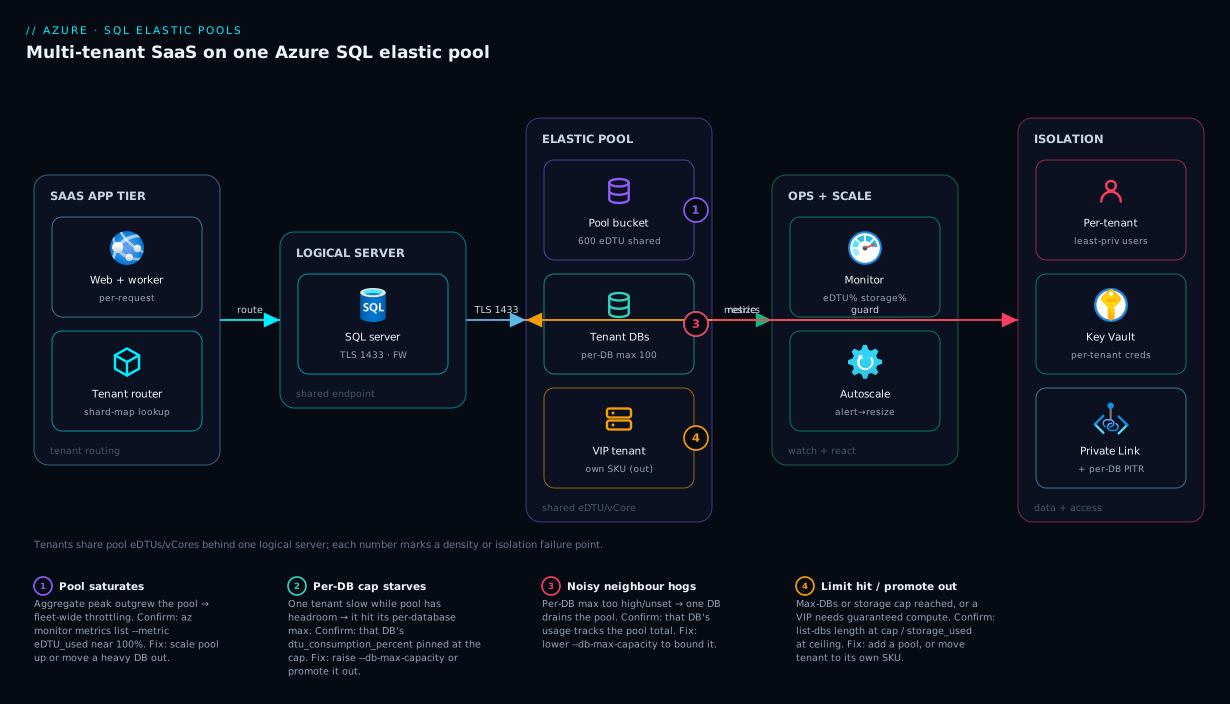
The diagram below is the multi-tenant pool as a left-to-right flow. On the left, your SaaS application tier — web and worker roles — does not hard-code one connection string; it routes each request through a tenant router that looks up which database belongs to the calling tenant (a shard-map pattern even with a single pool, so you stay shard-ready). Every connection lands on one logical SQL server over TLS on port 1433 — the shared endpoint, firewall and Entra-admin boundary for the fleet.
Behind that server sits the elastic pool: one shared bucket of eDTUs/vCores that a fleet of per-tenant databases draws from on demand, each capped by a per-database max so no single tenant can drain it. To the right are the controls that keep it healthy and safe: Azure Monitor watching pool eDTU%, storage% and worker/session counts to drive autoscale and alerts; and the isolation plane — per-tenant least-privilege users, Key Vault secrets, Private Link off the public internet, and per-database PITR. The numbered badges mark the four failures that bite a pooled SaaS — the pool saturating at aggregate peak, one tenant hitting its per-database cap (or starving others without one), the pool reaching its max-databases or storage limit, and a tenant that has outgrown shared compute and must be promoted to its own SKU.
Real-world scenario
LedgerLane, a B2B accounting SaaS in Pune, ran a database per customer — 280 of them — each on a Standard S3 (100 DTU) “so month-end close never lags.” The platform team inherited a SQL bill of roughly ₹14 lakh a month and a directive to halve it without breaking the per-tenant isolation auditors liked.
They started with data. A week of dtu_consumption_percent across all 280 databases was clear: the sum of per-database peaks was ~28,000 DTU, but the per-minute aggregate peak never exceeded ~3,400 eDTU and the p95 aggregate sat near 1,900 eDTU. Customers closed their books on different days; only a handful were ever hot at once. Total storage was ~1.6 TB. A textbook pooling candidate — high sum-of-peaks, low aggregate, well within storage limits.
They split by behaviour rather than dumping all 280 into one pool. Twelve large enterprise tenants with strict SLAs and heavy close cycles stayed on dedicated S3/P1 SKUs — guaranteed compute, no noisy-neighbour exposure. The remaining 268 went into two vCore General Purpose pools (split across two servers for blast-radius and to stay clear of the per-pool database ceiling), each at 24 vCores with per-database max 4 vCores, min 0 — vCore chosen specifically to apply 3-year reserved capacity and Azure Hybrid Benefit on the steady 24×7 base. The move itself was trivial: az sql db update --elastic-pool per database, online, connection strings unchanged because tenant routing already went through a lookup table. They wired alerts on pool vCore% > 75% and storage% > 80%, plus a runbook promoting any tenant that sustains its cap for a week.
The first month landed near ₹6.2 lakh — past the halving target. The surprise win came in week three: a tenant ran a runaway report that would once have slowed only that database; in the pool it briefly pushed vCore to 70%, the per-database cap held it to 4 vCores, the alert fired, and on-call promoted that tenant out within the hour — a potential fleet-wide slowdown reduced to a single bounded blip. The wiki lesson: pool the long tail, keep the whales dedicated, cap everyone, and measure the aggregate — never the sum.
Advantages and disadvantages
Pooling is the right default for multi-tenant database-per-tenant, but it is not free of trade-offs:
| Elastic pool (DB-per-tenant) | Dedicated SKU per tenant | |
|---|---|---|
| Advantages | Pay the aggregate peak, not the sum (often 5–20× cheaper); keep full data isolation and per-tenant restore; move DBs in/out online; one place to scale the whole fleet; per-DB caps bound noisy neighbours | Hard per-tenant performance guarantee; zero noisy-neighbour risk; simplest mental model; trivial to reason about one tenant’s capacity |
| Disadvantages | Only bounded compute isolation (shared pool); requires density planning and ongoing monitoring; per-pool limits (max DBs, storage) cap a single pool; a mis-set per-DB max can starve or hog | Most expensive at scale (you buy every peak); fleet-wide changes touch every DB; idle tenants still cost full SKU; no shared headroom for bursts |
When each matters: pool the long tail of tenants whose peaks don’t align — small/medium customers, free trials, internal environments. Keep dedicated the tenants with contractual performance guarantees, regulatory isolation requirements, or genuinely heavy 24×7 load that would dominate a pool. The two are not mutually exclusive; a mature SaaS runs both, and moves tenants between them as their usage and contracts change.
Hands-on lab
This is the centrepiece. You will build a working multi-tenant pool end to end — logical SQL server, elastic pool, tenant databases, per-database guard-rails, the online move of a database in and out, density monitoring, and an alert — three ways (portal, az CLI, Bicep), validating at each step, then tear it down. The lab uses small SKUs and runs for a few rupees if you delete it promptly.
Cost note: an elastic pool bills for the pool, not per database — even a small Standard 50-eDTU pool accrues an hourly charge while it exists. Do the lab in one sitting and run the teardown (Step 14). Budget under ₹200 if deleted within an hour or two.
Prerequisites for the lab
| Requirement | How to get it | Verify |
|---|---|---|
| Azure subscription | Free account works | az account show |
| Azure CLI ≥ 2.55 (or Cloud Shell) | Cloud Shell has it pre-installed | az version |
| Permission to create SQL resources | Contributor on the RG | az role assignment list --assignee <you> |
| A region close to you | e.g. centralindia |
— |
sqlcmd or any SQL client (optional) |
For connecting to a tenant DB | sqlcmd -? |
Set shared variables once (used by every az step below):
# Pick a globally-unique server name suffix and a strong admin password
RG=rg-saas-pool-lab
LOC=centralindia
SERVER=sql-saas-$RANDOM        # must be globally unique
ADMIN=sqladminuser
PASSWORD='Ch@ngeMe-$(openssl rand -hex 6)'   # set a real strong password
POOL=pool-tenants
echo "Server will be: $SERVER"
Step 1 — Create the resource group and logical SQL server
The pool and every tenant database live on one logical server. Create the resource group, then the server with a SQL admin login.
Portal: Create a resource → SQL Server (logical server) → resource group rg-saas-pool-lab, a globally-unique server name, your region, Use SQL authentication, set admin login and password → Review + create.
az CLI:
az group create --name $RG --location $LOC

az sql server create \
  --name $SERVER --resource-group $RG --location $LOC \
  --admin-user $ADMIN --admin-password "$PASSWORD"
Expected output: JSON describing the server with "state": "Ready" and a fullyQualifiedDomainName of $SERVER.database.windows.net. Validate:
az sql server show -n $SERVER -g $RG --query "{name:name, fqdn:fullyQualifiedDomainName, state:state}" -o table
Step 2 — Open the firewall so you can connect
A new server blocks all access. Add a rule allowing Azure services (for Cloud Shell) and, if connecting from your laptop, your public IP. (In production you’d use Private Link instead — see Security notes.)
Portal: Server → Networking → Public access → Selected networks → add a firewall rule for your client IP; tick Allow Azure services and resources to access this server for Cloud Shell.
az CLI:
# Allow Azure-internal services (Cloud Shell) — start/end 0.0.0.0 is the special "Azure services" rule
az sql server firewall-rule create -g $RG -s $SERVER \
  --name AllowAzureServices --start-ip-address 0.0.0.0 --end-ip-address 0.0.0.0

# Allow your current public IP (for a local SQL client)
MYIP=$(curl -s https://api.ipify.org)
az sql server firewall-rule create -g $RG -s $SERVER \
  --name MyClientIP --start-ip-address $MYIP --end-ip-address $MYIP
Validate:
az sql server firewall-rule list -g $RG -s $SERVER --query "[].{name:name, start:startIpAddress, end:endIpAddress}" -o table
Step 3 — Create the elastic pool
Create a Standard 100-eDTU pool with a per-database max of 50 eDTU and a min of 0 (pure sharing). These are deliberately small lab values; production sizing comes from the density section.
Portal: Server → Elastic pools → + New elastic pool → name pool-tenants → Configure pool → pricing tier Standard → set pool eDTU to 100 → on the Per database settings tab set Max eDTU = 50, Min eDTU = 0 → Apply → Review + create.
az CLI:
az sql elastic-pool create \
  --resource-group $RG --server $SERVER --name $POOL \
  --edition Standard --capacity 100 \
  --db-max-capacity 50 --db-min-capacity 0
Expected output: JSON with "sku": { "name": "StandardPool", "capacity": 100 } and perDatabaseSettings showing minCapacity: 0, maxCapacity: 50. Validate:
az sql elastic-pool show -g $RG -s $SERVER -n $POOL \
  --query "{name:name, edition:sku.tier, eDTU:sku.capacity, dbMin:perDatabaseSettings.minCapacity, dbMax:perDatabaseSettings.maxCapacity}" -o table
Step 4 — Create tenant databases directly in the pool
Create three tenant databases that belong to the pool from birth. A database created with --elastic-pool draws from the pool’s shared eDTU rather than getting its own SKU.
Portal: Server → SQL databases → + Create → database name tenant-001 → Compute + storage → Configure database → choose looking for elastic pools? → select pool-tenants → create. Repeat for tenant-002, tenant-003.
az CLI:
for T in tenant-001 tenant-002 tenant-003; do
  az sql db create -g $RG -s $SERVER -n $T --elastic-pool $POOL
done
Expected output: each database returns JSON with "elasticPoolId" pointing at your pool and "currentServiceObjectiveName": "ElasticPool". Validate that all three are in the pool:
az sql elastic-pool list-dbs -g $RG -s $SERVER -n $POOL --query "[].name" -o table
Step 5 — Create a standalone database, then move it INTO the pool
This proves the online-move operation. Create tenant-004 as a dedicated S1 database, confirm it’s standalone, then move it into the pool with no data migration.
az CLI:
# Create a dedicated (standalone) Standard S1 database
az sql db create -g $RG -s $SERVER -n tenant-004 --service-objective S1

# Confirm it is NOT in a pool yet
az sql db show -g $RG -s $SERVER -n tenant-004 \
  --query "{name:name, objective:currentServiceObjectiveName, pool:elasticPoolId}" -o table

# Move it INTO the pool — online metadata operation, no data movement
az sql db update -g $RG -s $SERVER -n tenant-004 --elastic-pool $POOL
Expected output: after the update, currentServiceObjectiveName becomes ElasticPool and elasticPoolId is populated. Validate the pool now holds four databases:
az sql elastic-pool list-dbs -g $RG -s $SERVER -n $POOL --query "length(@)"
# Expect: 4
Step 6 — Move a database OUT of the pool to a dedicated SKU
The reverse move — promoting a tenant that outgrew shared compute to its own guaranteed SKU. Pull tenant-004 back out to a dedicated S2.
az CLI:
# Promote tenant-004 out of the pool onto a dedicated S2 SKU
az sql db update -g $RG -s $SERVER -n tenant-004 --service-objective S2

# Confirm it left the pool
az sql db show -g $RG -s $SERVER -n tenant-004 \
  --query "{name:name, objective:currentServiceObjectiveName, pool:elasticPoolId}" -o table
Expected output: currentServiceObjectiveName is now S2 and elasticPoolId is null. The database is once again dedicated, with its connection string unchanged. Move it back into the pool for the rest of the lab:
az sql db update -g $RG -s $SERVER -n tenant-004 --elastic-pool $POOL
Step 7 — Adjust per-database caps on the live pool
Change the noisy-neighbour guard-rails without recreating anything. Raise the per-database max so a busy tenant can burst harder, then confirm.
Portal: Elastic pool → Configure → Per database settings → change Max eDTU → Save.
az CLI:
# Raise per-DB max to 75 eDTU (one tenant can now burst to 3/4 of the pool)
az sql elastic-pool update -g $RG -s $SERVER -n $POOL --db-max-capacity 75

az sql elastic-pool show -g $RG -s $SERVER -n $POOL \
  --query "{dbMin:perDatabaseSettings.minCapacity, dbMax:perDatabaseSettings.maxCapacity}" -o table
Expected output: maxCapacity: 75. The change is online and applies to every database in the pool immediately.
Step 8 — Scale the pool itself up and down
Resize the shared bucket. Scale the pool from 100 to 200 eDTU (more shared headroom), confirm, then scale back to keep the lab cheap.
az CLI:
# Scale the pool UP to 200 eDTU
az sql elastic-pool update -g $RG -s $SERVER -n $POOL --capacity 200

az sql elastic-pool show -g $RG -s $SERVER -n $POOL --query "sku.capacity"
# Expect: 200

# Scale back DOWN to 100 eDTU (cost control for the lab)
az sql elastic-pool update -g $RG -s $SERVER -n $POOL --capacity 100
Expected output: the sku.capacity reflects each change within seconds to a minute. Scaling a pool is online; databases keep serving throughout.
Step 9 — Generate a little load (optional) and watch utilisation
To see metrics move, connect to a tenant database and run a CPU-burning query. Skip if you have no client; the Step 10 metric queries still work against baseline.
# Connect with sqlcmd and run a deliberately heavy query a few times
sqlcmd -S $SERVER.database.windows.net -d tenant-001 -U $ADMIN -P "$PASSWORD" -Q \
  "SET NOCOUNT ON; DECLARE @i INT=0; WHILE @i<5000000 BEGIN SET @i+=1; END; SELECT 'done';"
Step 10 — Monitor pool and per-database density
This is the operational heart. Read the pool’s eDTU%, storage% and the per-database consumption that tells you whether one tenant is dominating.
Portal: Elastic pool → Overview shows pool eDTU and storage; the Database resource utilization chart shows each database’s share — your density view at a glance.
az CLI — pool-level metrics:
POOL_ID=$(az sql elastic-pool show -g $RG -s $SERVER -n $POOL --query id -o tsv)

# Pool eDTU% and storage% over the last hour
az monitor metrics list --resource "$POOL_ID" \
  --metric eDTU_used eDTU_limit storage_used storage_limit \
  --interval PT1M --aggregation Maximum -o table
KQL (if the server’s diagnostics flow to a Log Analytics workspace) — per-database consumption within the pool, the noisy-neighbour finder:
// Top databases by DTU consumption inside the pool, last hour
AzureMetrics
| where TimeGenerated > ago(1h)
| where ResourceProvider == "MICROSOFT.SQL" and MetricName == "dtu_consumption_percent"
| summarize avgDTU = avg(Average), maxDTU = max(Maximum) by Resource
| order by maxDTU desc
Validate: you can read a pool eDTU% number and identify which tenant database is consuming the most. That is the entire density-monitoring loop — size, watch the aggregate, watch the per-database share.
Step 11 — Add autoscale-style alerting on the pool
Pools don’t autoscale eDTU on a metric out of the box the way App Service plans do; you drive scaling with alerts + automation. Wire an alert on pool eDTU% so you know before it saturates. (For true automation, the alert triggers an Action Group → Function/Logic App that calls az sql elastic-pool update --capacity.)
az CLI:
# Alert when pool eDTU% exceeds 80% for 5 minutes
az monitor metrics alert create \
  --name "pool-eDTU-high" --resource-group $RG \
  --scopes "$POOL_ID" \
  --condition "max eDTU_used > 80" \
  --window-size 5m --evaluation-frequency 1m \
  --description "Elastic pool approaching eDTU ceiling"
Expected output: JSON describing the alert rule. In production you’d attach an Action Group (--action <ag-id>) to email the team and/or trigger a scale-up runbook. See Azure Monitor metric alerts with action groups for wiring the notification side end to end.
Step 12 — Per-tenant least-privilege access (isolation in practice)
Demonstrate access isolation: a contained database user scoped to one tenant database, so an app context for tenant-001 cannot touch tenant-002. Run against tenant-001:
-- In tenant-001 only: create a contained user with least privilege
CREATE USER app_tenant001 WITH PASSWORD = 'Str0ng-PerTenant-Pwd!';
ALTER ROLE db_datareader ADD MEMBER app_tenant001;
ALTER ROLE db_datawriter ADD MEMBER app_tenant001;
-- This user exists ONLY in tenant-001; it has no rights in tenant-002/003.
The application uses app_tenant001 (or a per-tenant secret from Key Vault) to connect only to tenant-001. There is no server-wide login that reaches every tenant — that’s the isolation guarantee in practice.
Step 13 — The whole pool as Bicep (declarative, repeatable)
Everything above as infrastructure-as-code. This template provisions the server, firewall, pool with per-database caps, and three pooled tenant databases in one deploy. Save as pool.bicep:
@description('Logical SQL server name (globally unique)')
param serverName string
@description('Azure region')
param location string = resourceGroup().location
@secure()
param adminPassword string
param adminLogin string = 'sqladminuser'
param tenantNames array = [ 'tenant-001', 'tenant-002', 'tenant-003' ]

resource sqlServer 'Microsoft.Sql/servers@2023-08-01-preview' = {
  name: serverName
  location: location
  properties: {
    administratorLogin: adminLogin
    administratorLoginPassword: adminPassword
    minimalTlsVersion: '1.2'
    publicNetworkAccess: 'Enabled'
  }
}

// Allow Azure services (the 0.0.0.0 special rule)
resource allowAzure 'Microsoft.Sql/servers/firewallRules@2023-08-01-preview' = {
  parent: sqlServer
  name: 'AllowAzureServices'
  properties: { startIpAddress: '0.0.0.0', endIpAddress: '0.0.0.0' }
}

resource pool 'Microsoft.Sql/servers/elasticPools@2023-08-01-preview' = {
  parent: sqlServer
  name: 'pool-tenants'
  location: location
  sku: { name: 'StandardPool', tier: 'Standard', capacity: 100 }   // 100 eDTU
  properties: {
    perDatabaseSettings: { minCapacity: 0, maxCapacity: 50 }       // per-DB floor/cap
  }
}

// One database per tenant, all placed in the pool
resource tenantDbs 'Microsoft.Sql/servers/databases@2023-08-01-preview' = [for t in tenantNames: {
  parent: sqlServer
  name: t
  location: location
  sku: { name: 'ElasticPool', tier: 'Standard' }
  properties: { elasticPoolId: pool.id }
}]
Deploy and validate:
az deployment group create -g $RG \
  --template-file pool.bicep \
  --parameters serverName=sql-saas-bicep-$RANDOM adminPassword="$PASSWORD"

# Confirm the pool and its databases exist
az sql elastic-pool list-dbs -g $RG -s <the-bicep-server-name> -n pool-tenants --query "[].name" -o table
Expected output: a successful deployment whose outputs list the server, and three databases inside pool-tenants. This is the artifact you keep in source control; see Deploy your first Bicep file from scratch if any of the syntax is new.
Step 14 — Teardown
Pools bill while they exist — delete everything. Removing the resource group drops the server, pool and all tenant databases in one shot.
# Deletes the server, pool, every tenant database, firewall rules and alert
az group delete --name $RG --yes --no-wait
Validate it’s gone (after a minute):
az group exists --name $RG
# Expect: false
If you created a second resource group for the Bicep deploy, delete that too. Confirm in Cost Management the next day that no SQL charges are still accruing.
| Lab step | Command core | Expected result |
|---|---|---|
| 1 Server | az sql server create |
state: Ready |
| 3 Pool | az sql elastic-pool create |
StandardPool, 100 eDTU |
| 4 Tenant DBs | az sql db create --elastic-pool |
3 DBs, ElasticPool objective |
| 5 Move in | az sql db update --elastic-pool |
elasticPoolId populated |
| 6 Move out | az sql db update --service-objective S2 |
elasticPoolId null |
| 7 Per-DB cap | az sql elastic-pool update --db-max-capacity |
maxCapacity: 75 |
| 8 Scale pool | az sql elastic-pool update --capacity |
sku.capacity changed |
| 10 Monitor | az monitor metrics list |
eDTU%/storage% readable |
| 11 Alert | az monitor metrics alert create |
rule created |
| 14 Teardown | az group delete |
az group exists → false |
Common mistakes & troubleshooting
These are the failures that actually happen on pooled multi-tenant SaaS — symptom, root cause, the exact way to confirm it, and the fix. Scan the table, then read the detail for the row that matches your incident.
| # | Symptom | Root cause | How to confirm | Fix |
|---|---|---|---|---|
| 1 | Whole fleet slow at peak, individual DBs throttled | Pool eDTU/vCore exhausted at aggregate peak | az monitor metrics list --metric eDTU_used near 100% |
Scale pool up; move a heavy DB out; raise pool size |
| 2 | One tenant slow, others fine | That DB hit its per-database max cap | Per-DB dtu_consumption_percent pinned at cap value |
Raise --db-max-capacity; or promote DB to own SKU |
| 3 | One tenant starves the others | Per-database max too high (or unset → = pool) | Per-DB consumption ≈ pool total during incident | Lower --db-max-capacity to bound the blast radius |
| 4 | New tenant DB create fails | Pool at its max-databases limit | az sql elastic-pool list-dbs --query "length(@)" at the cap |
Lower per-DB max (raises count cap) or add a pool |
| 5 | Inserts/updates fail across the pool | Pool storage full | storage_used/storage_limit metric at ceiling |
Raise pool --max-size; archive cold tenant data |
| 6 | New connections rejected under load | Pool max sessions/workers reached | workers_percent / sessions_percent near 100% |
App-side connection pooling; scale pool up |
| 7 | A premium tenant misses its SLA | Bounded (not guaranteed) compute in a shared pool | Per-DB consumption capped while pool busy | Promote that tenant out to a dedicated SKU |
| 8 | Pool costs more than expected | Per-database min set > 0 on many DBs | perDatabaseSettings.minCapacity > 0 × DB count |
Set min back to 0 unless a floor is truly needed |
| 9 | Can’t move a DB into the pool | DB SKU/edition incompatible with pool tier | az sql db update error: edition mismatch |
Match editions (e.g. Standard DB ↔ Standard pool) |
| 10 | Schema drift between tenants | No fleet migration tooling; per-DB schemas diverge | Compare schema versions across tenant DBs | Run migrations across all DBs (loop / DACPAC / EF) |
The detail on the ones that bite hardest:
Pool eDTU/vCore exhaustion (the aggregate outgrew the pool)
The fleet feels slow and several databases throttle at once — the pool, not any one database, is saturated. Confirm with the pool’s eDTU_used vs eDTU_limit (or vCore_used) near 100% at peak:
az monitor metrics list --resource "$POOL_ID" \
  --metric eDTU_used eDTU_limit --interval PT1M --aggregation Maximum -o table
Fix by cause: if the aggregate genuinely grew, scale the pool up (--capacity); if one database drives most of it, move that database out to its own SKU; if you’re consistently near the ceiling, density got too high — re-run the math and grow or split. This surfaces to tenants as the throttling symptoms in Troubleshooting Azure SQL: Connectivity, Timeouts, Throttling & Blocking.
Per-database cap starvation vs noisy-neighbour hogging
Two opposite failures, same setting. One tenant slow while the pool has headroom → it hit its per-database max; raise --db-max-capacity (or promote it out). One tenant dragging everyone down → the per-database max is too high or unset (unset defaults to the whole pool), so one database consumes nearly all the eDTU; lower --db-max-capacity. Confirm via per-database dtu_consumption_percent: pinned at the cap value = starved; tracking the pool total = the hog.
Hitting the max-databases-per-pool limit
A new tenant’s CREATE DATABASE ... (ELASTIC_POOL) fails because the pool already holds its maximum databases. Confirm the count against the tier limit:
az sql elastic-pool list-dbs -g $RG -s $SERVER -n $POOL --query "length(@)"
The trade: on Standard, a lower per-database max eDTU raises the allowed count. Either lower the per-DB max (if tenants don’t need to burst that high) or — cleaner at scale — add a second pool and route new tenants there via your shard map. This is exactly when Elastic Database Tools earn their keep.
Pool storage full
Writes fail fleet-wide with storage errors while compute is fine — the pool’s shared storage (data + log + index across all databases) is exhausted. Confirm with storage_used/storage_limit. Fix by raising the pool max size (az sql elastic-pool update --max-size) to the tier ceiling and archiving cold data. Storage often fills before compute on data-heavy SaaS — which is why planning sizes storage explicitly, not just eDTU.
Best practices
- Pool the long tail, keep whales dedicated. Pool tenants whose peaks don’t align; leave SLA-bound, regulated, or heavy 24×7 tenants on their own SKUs. Run both models and move tenants between them as usage changes.
- Size to the aggregate peak, never the sum. Measure per-minute combined utilisation; size so aggregate p95 sits around 60–70% of the pool, leaving headroom for bursts and onboarding.
- Always set a sensible per-database max. An unset max lets one tenant consume the whole pool. Cap it (a quarter to a sixth of the pool) so a noisy neighbour is a single-tenant blip, not a fleet-wide outage.
- Keep per-database min at 0 unless you must guarantee a floor — every non-zero min pre-commits capacity and shrinks the shareable headroom that makes pooling cheap.
- Route tenants through a lookup (shard map), not hard-coded strings, so promoting, demoting, or sharding a tenant is transparent to the app.
- Monitor the aggregate and the per-database share. Alert on pool eDTU/vCore%, storage%, and worker/session%, and watch which database dominates — catch a hog before it saturates the pool.
- Have a promotion runbook: any tenant sustaining its cap for a defined window moves to a dedicated SKU automatically — the online move makes this cheap and reversible.
- Plan against all the ceilings — max databases, max storage, and max workers/sessions bind independently of compute. Check each before declaring a density target.
- Prefer vCore for anything long-lived — it unlocks reserved capacity and Azure Hybrid Benefit and shows CPU and memory separately for cleaner right-sizing.
- Migrate schema fleet-wide with tooling (a loop, DACPAC, or EF migrations), never ad-hoc DDL, so tenant databases don’t drift apart.
- Split into multiple pools before one giant pool is your only one — two medium pools across two servers contain blast radius and dodge per-pool ceilings.
- Re-run the density math quarterly — tenant counts and behaviour drift; an 18-month-old sizing is probably wasting money or running hot.
Security notes
Pooling shares compute, so the security story is mostly the standard Azure SQL hardening plus the cross-tenant discipline that database-per-tenant gives you for free if you don’t undermine it.
- Per-tenant least privilege, never one god login. Use contained database users (or per-tenant credentials from Key Vault) scoped to a single tenant database. The application context for one tenant must not hold rights on another tenant’s database. Manage server admin and Entra admin separately and use them only for operations.
- Entra ID authentication over SQL logins. Prefer Microsoft Entra authentication and, for the application, a managed identity so no tenant connection string holds a password. See Managed identity: system- vs user-assigned patterns.
- Private Link, not public firewall, in production. The lab opened the public firewall for convenience; production should put the logical server behind a Private Endpoint so traffic never traverses the internet and the public endpoint is disabled. The model choice (Private Endpoint vs service endpoint) is covered in Azure Private Endpoint vs Service Endpoint.
- Encryption everywhere. TDE (Transparent Data Encryption) is on by default; enforce
minimalTlsVersion: '1.2'. For columns holding the most sensitive per-tenant data (PII, payment tokens), add Always Encrypted so even the DBA can’t read plaintext. - Auditing and threat detection at the server level. Enable SQL auditing to a Log Analytics workspace and Microsoft Defender for SQL on the server so every tenant database inherits threat detection and audit trails — one configuration protecting the whole fleet.
- Backups are per database — and so are restores. Point-in-time restore operates on a single tenant database, which is exactly the isolation you want: restoring tenant A never touches tenant B. Know your retention and test a single-tenant restore.
| Control | Mechanism | Protects against | Scope |
|---|---|---|---|
| Contained DB users / per-tenant creds | CREATE USER ... WITH PASSWORD / Key Vault |
Cross-tenant data access | Per database |
| Entra auth + managed identity | Microsoft.Sql AAD admin + MI |
Passwords in connection strings | Server + app |
| Private Endpoint | Private Link | Public internet exposure | Logical server |
| TDE + TLS 1.2 + Always Encrypted | Default TDE / minimalTlsVersion / AE columns |
Data at rest / in transit / from DBA | Server + columns |
| SQL auditing + Defender for SQL | Server-level audit + Defender plan | Undetected attacks, no audit trail | All DBs on server |
| Per-database PITR | Automated backups | Tenant data loss / corruption | Per database |
Cost & sizing
The whole point of pooling is the bill, so make the cost model explicit.
- You pay for the pool, not per database. Price is set by eDTU/vCore size and tier — fixed, independent of how many databases sit in it (up to the count limit). Adding a tenant to a pool with headroom is free at the margin; that’s the economic engine.
- The saving is the sum-of-peaks ÷ aggregate-peak ratio — a fleet whose tenants don’t peak together saves 5–20×. The denser and less-correlated the tenants, the bigger the win. The cost is density-planning effort, trivial against the line item it cuts.
- vCore pools take discounts DTU can’t. Reserved capacity (1- or 3-year) on the steady base plus Azure Hybrid Benefit on existing licences cut the compute portion substantially — often the biggest lever after pooling itself.
- Storage is priced and capped per pool (separate line in vCore, bundled to a tier max in DTU). Data-heavy tenants can make storage, not compute, the cost driver — size and watch it.
- Free-tier note: there’s no permanently-free elastic pool, but a free account’s credits cover a small lab. A single serverless database (auto-pausing) is the cheaper way to learn if you don’t need the pool itself.
A rough monthly picture (figures vary by region; confirm in the Azure pricing calculator):
| Configuration | What you get | Rough INR / month | Best for |
|---|---|---|---|
| 50 × Standard S2 dedicated | 50 DBs, each 50 DTU, always paid | very high (sum of 50 SKUs) | The thing you’re replacing |
| Standard 200-eDTU pool | Up to ~100 DBs sharing 200 eDTU | ~₹25,000–35,000 | Small SaaS, light long tail |
| Standard 600-eDTU pool | Larger fleet sharing 600 eDTU | ~₹70,000–95,000 | Mid SaaS (the worked example) |
| GP vCore pool, 8 vCores (PAYG) | Explicit CPU/mem, separate storage | ~₹55,000–75,000 | Long-lived, want right-sizing |
| GP vCore pool, 8 vCores (3-yr reserved + AHB) | Same, heavily discounted | a fraction of PAYG | Steady 24×7 base load |
| App-side: connection pooling | Fewer sessions per pool | free | Avoid session-limit throttling |
The sizing discipline in one line: measure the aggregate, size the pool to ~p95-at-65%, cap each database, then squeeze cost with vCore reservations on the steady base.
Interview & exam questions
1. What is an Azure SQL elastic pool, and what problem does it solve? A shared bucket of compute (eDTUs in DTU, vCores in vCore) that a set of databases draws from on demand, each up to a per-database cap. It solves over-provisioning in database-per-tenant SaaS: instead of sizing each database for its own peak (the sum of peaks), you size one pool for the aggregate peak, far smaller because tenants rarely peak simultaneously.
2. How do per-database min and max interact with the pool total? The max caps how much any single database may draw — the noisy-neighbour guard-rail. The min reserves a floor whether or not the database is busy, at the cost of shareable headroom. For SaaS density, set min to 0 (pure sharing) and max to a sensible slice (e.g. a quarter of the pool).
3. 200 tenant databases, each peaking at 50 DTU but never together — how do you size the pool? Not at 200 × 50 = 10,000 DTU (the sum). Measure the per-minute aggregate across all 200 and size so its p95 sits around 60–70% of the pool. If only ~10 are ever hot at once, a few hundred eDTU may suffice — re-checked against the max-databases and storage limits.
4. A single tenant is slow but the pool has headroom. What’s happening? That database hit its per-database max — it can’t draw more even though the pool isn’t full. Confirm via its dtu_consumption_percent pinned at the cap. Fix: raise --db-max-capacity, or promote it to a dedicated SKU if it consistently needs more.
5. One tenant is dragging the whole fleet down. Root cause and fix? The per-database max is too high or unset (unset defaults to the whole pool), so one runaway database consumes nearly all the compute. Confirm: its consumption tracks the pool total. Fix: lower --db-max-capacity — exactly what the cap exists to prevent.
6. Does an elastic pool give per-tenant performance guarantees? No — bounded compute isolation (via the per-database max), not a guarantee, because databases share the pool. Data isolation is absolute. A tenant needing a hard guarantee belongs on a dedicated SKU; move it out with an online az sql db update --service-objective.
7. How do you move a database into or out of a pool — downtime or data movement? az sql db update --elastic-pool <pool> moves it in; --service-objective <SKU> moves it out. Both are online metadata operations — no data migrated, connection string unchanged, no meaningful downtime. That’s what makes promoting/demoting tenants cheap.
8. Name three limits besides compute that bound tenants per pool. Max databases per pool (tier-dependent, and it drops as you raise the per-database max), max pool storage (data + log + index), and max concurrent workers/sessions. Any can bind before eDTU/vCore; planning checks all of them.
9. When choose a vCore pool over an eDTU pool? To right-size CPU and memory separately, run Hyperscale, or — most commonly — apply reserved capacity and Azure Hybrid Benefit discounts on steady load, none of which DTU supports. eDTU wins on simplicity for consolidating a fleet of existing Standard databases quickly.
10. How do you scale beyond a single pool’s limits? Shard across multiple pools with Elastic Database Tools — a shard map manager records tenant → database, elastic queries span shards, split-merge rebalances. Route through the shard map from day one so adding a pool is transparent.
11. The per-database min trap that inflates cost? A non-zero per-database min on many databases pre-commits capacity (40 × 10-eDTU = 400 eDTU reserved and unshareable), defeating the sharing that makes pooling cheap. Keep min at 0 unless a tenant genuinely needs a floor.
12. New-tenant onboarding fails with the pool not full on compute. Cause? The pool reached its maximum number of databases for that tier and per-database-max. Lower the per-database max (raises the count on Standard) or add a second pool.
These map to DP-300 (Azure Database Administrator Associate) — plan and implement data platform resources, configure elastic pools, monitor and optimise — and to AZ-305 (Solutions Architect) for the multi-tenant data-architecture decision (pool vs shard vs dedicated). The cost/reservation angle touches AZ-104 and FinOps practice.
| Question theme | Primary cert | Objective area |
|---|---|---|
| Elastic pool config, per-DB caps | DP-300 | Implement & configure data platform resources |
| Density / sizing / monitoring | DP-300 | Monitor and optimise operational resources |
| Multi-tenant model choice | AZ-305 | Design data storage solutions |
| Sharding / Elastic Database Tools | DP-300 / AZ-305 | Scale-out data architecture |
| vCore reservations / AHB cost | AZ-104 | Cost management and optimisation |
Quick check
- You have 100 tenant databases, each peaking at 50 DTU, but no more than 8 are ever busy at once. What number do you size the pool to, and what is the wrong number?
- A single tenant is slow while the pool’s eDTU sits at 40%. Which setting is responsible and what do you change?
- True or false: moving a database from a dedicated SKU into an elastic pool migrates its data and causes downtime.
- Why do you usually leave per-database min at 0 in a multi-tenant pool?
- You can’t onboard a new tenant even though pool eDTU has headroom. Name the most likely limit you’ve hit.
Answers
- Size it to the aggregate peak (the combined utilisation of the ~8 databases busy at once, plus headroom — a few hundred eDTU), not the sum of peaks (100 × 50 = 5,000 DTU), which is the over-provisioned number pooling exists to avoid.
- The database’s per-database max cap — it has hit its ceiling while the pool still has room. Raise
--db-max-capacity(or promote that tenant to its own SKU if it consistently needs more). - False. It’s an online metadata operation — no data movement, no meaningful downtime, and the connection string is unchanged. The same is true moving a database back out.
- Because every non-zero min pre-commits pool capacity to that database whether it’s busy or not, shrinking the shareable headroom that makes pooling cheap. Min 0 = pure sharing, which is what SaaS density wants.
- The max-databases-per-pool limit for your tier and per-database-max setting. Lower the per-database max (which raises the allowed count on Standard) or add a second pool and route new tenants there.
Glossary
- Elastic pool — a shared bucket of compute (eDTU/vCore) on a logical SQL server that a set of databases draws from on demand, each up to a per-database cap.
- eDTU (elastic DTU) — the DTU-model pool’s shared, blended unit of CPU + memory + IO that all databases in the pool consume.
- vCore (pool) — explicitly-sized CPU and memory shared by a vCore-model pool, with storage priced separately; unlocks reservations and Azure Hybrid Benefit.
- Per-database max — the most eDTU/vCore any single database may draw from the pool; the noisy-neighbour guard-rail. Unset defaults to the whole pool.
- Per-database min — a guaranteed floor of capacity reserved for a database; reduces shareable headroom, so usually set to 0 for SaaS.
- Aggregate peak — the highest combined utilisation across all pool databases at one instant; the number you size the pool to.
- Sum of peaks — the naive total of every database’s individual peak; what dedicated SKUs cost and what pooling avoids paying.
- Density planning — sizing a pool from the aggregate peak (not the sum) and packing tenants up to the pool’s hard limits without saturating it.
- Max databases per pool — a tier-dependent hard cap on how many databases a pool can hold; drops as you raise the per-database max on Standard.
- Logical SQL server — the
*.database.windows.netendpoint and security boundary that hosts pools and databases; not a VM. - Database-per-tenant — a multi-tenant model where each tenant gets its own database; strongest isolation, naturally pairs with pooling.
- Noisy neighbour — a tenant whose load consumes pool capacity others wanted; bounded (not eliminated) by the per-database max.
- Elastic Database Tools — Azure’s client library and services (shard map manager, elastic query, split-merge) for sharding tenants across many pools.
- Shard map manager — a small database recording which tenant lives in which database/pool, enabling transparent tenant routing and rebalancing.
- Online move — assigning a database to (or removing it from) a pool via
az sql db update, with no data migration and no meaningful downtime. - Contained database user — a user defined inside one database (not a server login), used to scope a tenant’s access to only its own database.
Next steps
You can now consolidate a sprawl of over-provisioned per-tenant databases into a pool sized from real data, with caps, monitoring and isolation intact. Build outward:
- Next: Azure SQL Database Purchasing Models: DTU vs vCore — the model choice that determines every pool limit; go deeper on tiers and serverless.
- Related: Azure SQL Database: Create, Connect & Firewall Quickstart — the single-database fundamentals this article pools.
- Related: Troubleshooting Azure SQL: Connectivity, Timeouts, Throttling & Blocking — what a saturated pool feels like to a tenant, and how to confirm it.
- Related: Azure Monitor & Application Insights for Observability — the metrics and KQL that drive density monitoring and autoscale alerts.
- Related: Azure Private Endpoint vs Service Endpoint — lock the logical server off the public internet for a production fleet.