You run the same web app in East US and West Europe, and you want one hostname — app.contoso.com — to send each visitor to the closest healthy region, fail over automatically when a region dies, and bleed 10% of traffic to a canary without a deployment. That is a global load-balancing problem, and on Azure the first tool most people reach for is Azure Traffic Manager. The thing that trips everyone up on day one is what it actually is: a DNS-based traffic director, not a proxy. It never sees your HTTP requests, never terminates TLS, never touches a packet of application traffic. It answers DNS queries — when a client resolves app.contoso.com, Traffic Manager returns the IP (or CNAME) of the endpoint its routing method chose, and the client connects to that endpoint directly. Understanding that one sentence dissolves three-quarters of the confusion about why failover takes a minute, why a “stuck” user keeps hitting a dead region, and why Traffic Manager and Front Door are not the same product.
This article builds the mental model from the ground up, then goes routing-method by routing-method. There are six routing methods — Performance, Priority, Weighted, Geographic, MultiValue and Subnet — each answering a different question: closest? most-preferred-that’s-up? this percentage split? which country? give me several to retry? which source subnet? You’ll learn what each decides, the exact knobs (endpoint monitoring, probing, TTL, endpoint status and weights), and — the part that separates a textbook answer from a production design — how to nest profiles so you get both “closest region” and “active/passive within each region” in one name. Every concept comes with the az CLI and a Bicep block, plus decision tables you can scan mid-design.
By the end you will look at a resiliency requirement — “active/active across two regions with regional failover and a weighted canary” — and lay out the exact profile topology, routing methods, monitor settings and TTL that deliver it. You will also know when Traffic Manager is the right tool and when you actually want Azure Front Door or Azure Load Balancer instead — choosing the wrong global layer is the most expensive mistake in this space.
What problem this solves
A single-region deployment has a single point of failure the size of an Azure region. When that region has a bad day — a zonal outage, a capacity event, a botched deployment — your users get errors and you have no automatic way to send them elsewhere. The instinct is “put a load balancer in front of both regions,” but a normal load balancer is regional: an Azure Standard Load Balancer or Application Gateway lives inside one region and balances across instances in that region. Nothing inside a region can balance across regions, because the thing that decides where a brand-new connection goes must act before the client connects to any region. The only layer before the connection is name resolution — DNS. That is the niche Traffic Manager fills: it makes the DNS answer itself the load-balancing decision.
What breaks without a global director: you cannot do regional failover (a dead region keeps receiving traffic until someone manually changes DNS — with a long TTL, an hour of errors), you cannot do latency-based routing (every user worldwide hits the one region you deployed in, paying 150–300 ms of avoidable round-trip), and you cannot do controlled traffic shifting (blue-green across regions, canary percentages, draining a region) without editing DNS by hand and waiting for caches to expire. Teams discover this during their first regional incident, when the runbook says “fail over to West Europe” and the only mechanism is a panicked az network dns record-set edit with a 3600-second TTL.
Who hits this: anyone running multi-region for availability or latency — public web apps and APIs, SaaS with a global user base, anything with an RTO a single region cannot meet. It also bites hybrid designs (Traffic Manager can route to an external/on-prem endpoint by FQDN) and per-country routing for data-residency (Geographic). Critically, it does not solve problems needing request inspection — WAF, path-based routing, TLS termination, caching. The most common architectural error here is reaching for Traffic Manager when the requirement actually calls for Front Door (an L7 reverse proxy) — so before the deep dive, here is the field in one frame:
| You need to… | Right layer | Why Traffic Manager is/ isn’t it |
|---|---|---|
| Send users to the closest region | Traffic Manager (Performance) or Front Door | Both do latency routing; TM is DNS-only, Front Door is a proxy |
| Fail over a whole region automatically | Traffic Manager (Priority) or Front Door | TM does it via DNS + endpoint health |
| Split traffic by percentage / canary | Traffic Manager (Weighted) or Front Door | TM splits the DNS answers |
| Route by user country | Traffic Manager (Geographic) or Front Door | TM Geographic uses source-IP → country |
| Terminate TLS, WAF, path routing, caching | Front Door / Application Gateway | TM never sees HTTP — it cannot do any of this |
| Balance across VMs inside one region | Load Balancer / Application Gateway | TM is global, not intra-region |
| Balance across non-HTTP (TCP/UDP) globally | Traffic Manager (any TCP/UDP app) | Front Door is HTTP(S)-only; TM is protocol-agnostic |
Learning objectives
By the end of this article you can:
- Explain precisely why Traffic Manager is DNS-based, what it returns to a resolver, and why that makes failover bounded by TTL + probe interval, not instant.
- Choose the correct routing method (Performance, Priority, Weighted, Geographic, MultiValue, Subnet) for a given requirement and state the question each one answers.
- Configure endpoint monitoring (protocol, port, path, interval, timeout, tolerated failures, expected status ranges) and reason about how those settings translate to a real failover time.
- Tune TTL to trade failover speed against DNS query volume and client-cache behaviour, and explain why a low TTL still does not guarantee fast failover.
- Add Azure, External and Nested endpoint types, and disable/enable or weight an endpoint to drain or canary without a redeploy.
- Design and build a nested profile topology that composes two routing methods (e.g. Performance across regions, Priority within each region) in one hostname.
- Decide when Traffic Manager is the right global layer versus Azure Front Door or Azure Load Balancer, and combine Traffic Manager with regional load balancers correctly.
- Stand up a working two-region Priority profile end to end with
az/Bicep, force a failover, observe it, and tear it down.
Prerequisites & where this fits
You should be comfortable with DNS fundamentals — A record, CNAME, TTL, what a resolver does, and authoritative vs recursive resolution. You should know that an Azure region is a failure domain and that real availability also uses Availability Zones within a region. You should know how to run az in Cloud Shell, read JSON, and ideally have two regional endpoints to point at (two Web Apps, two public-IP’d VMs, or two Application Gateways). No prior Traffic Manager experience is assumed; we build from the DNS layer up.
This sits in the Networking / global resiliency track. It is the global counterpart to the regional balancers in Azure Load Balancer vs Application Gateway: those distribute inside a region; Traffic Manager distributes across regions and even outside Azure. It is a building block of multi-region active/active design. Where you need request-aware features (WAF, caching, path routing) you graduate to a proxy edge such as Application Gateway with WAF and end-to-end TLS or Azure Front Door — a boundary we draw explicitly here. If you run your own DNS, this complements Azure DNS public zones, delegation and alias records, since you typically CNAME a vanity name onto the *.trafficmanager.net name.
A quick map of who owns what during a multi-region incident, so you escalate to the right layer fast:
| Layer | What lives here | Failure it causes / fixes | Who usually owns it |
|---|---|---|---|
| Client resolver / cache | TTL honouring, negative caching | “Stuck on dead region” until cache expires | Client OS / ISP (you can’t control) |
| Traffic Manager profile | Routing method, endpoints, monitor | Wrong endpoint chosen; failover timing | Platform / network team |
| Endpoint health probe | Protocol/port/path/interval | Slow or false failover | Platform + app team |
| Regional front end (LB/App GW) | Intra-region balancing, TLS, WAF | Regional 5xx the probe must detect | Network + app team |
| Application in each region | The actual service | The thing that goes unhealthy | App / dev team |
Core concepts
Six mental models make every routing method and every failover-timing question obvious.
Traffic Manager returns DNS, not traffic. This is the keystone. When a client resolves the Traffic Manager name (e.g. contoso.trafficmanager.net, usually fronted by a CNAME from your vanity name app.contoso.com), Traffic Manager’s authoritative DNS evaluates the profile’s routing method against the enabled, healthy endpoints and returns the answer for the chosen one — a CNAME to an Azure resource’s FQDN, or an A/AAAA for an external IP. The client caches that for the record’s TTL and connects to that endpoint directly. Traffic Manager is now out of the path until the cache expires. Every consequence follows: failover is bounded by TTL, “sticky to a dead region” is a caching artefact, and it can route any protocol because it only ever handed out a name.
An endpoint is a target with a status and a health. A Traffic Manager endpoint is one destination the profile can return: an Azure endpoint (a Public IP, Web App, etc. by resource ID), an External endpoint (any FQDN or IP — another cloud, on-prem, a non-Azure CDN), or a Nested endpoint (a child profile — the mechanism for composing routing methods). Each has two independent flags: a configuration status (enabled/disabled — your intent) and a monitor/health status (the probe’s verdict — reality). Traffic Manager returns only endpoints that are both enabled and healthy. Disabling is how you drain a region on purpose; the probe marking it Degraded is how a region drains itself when it fails.
The routing method is just “which healthy endpoint do I return?” Every method takes the same input — the enabled+healthy set — and applies a different rule. Performance returns the lowest-latency endpoint for the resolver’s region (Azure’s internet-latency map). Priority returns the highest-priority healthy endpoint (active/passive). Weighted returns endpoints proportionally to weights (split/canary). Geographic returns the endpoint mapped to the source IP’s geographic region (data residency). MultiValue returns several healthy A/AAAA records at once (client-side retry). Subnet maps source IP ranges to endpoints (a known corporate CIDR to a dedicated target). That’s the whole taxonomy — six rules over the same healthy set.
Failover time is a sum you can compute, not a mystery. When a region dies, a new resolver is sent elsewhere after roughly (probe interval × tolerated failures) + a small detection lag (the time to mark the endpoint Degraded); an already-resolved client moves only once its cached TTL expires. So with the default monitor (30 s interval, 3 failures) and a 60 s TTL, a fresh resolver moves in ~90 seconds and a mid-TTL client waits out up to its remaining 60 s. Fast probing (10 s) plus a low TTL compresses this; you cannot make it zero, because DNS caching isn’t yours to control.
Monitoring is per-endpoint and shapes everything. The endpoint monitor is an HTTP/HTTPS/TCP probe sent to each endpoint from multiple locations. You set protocol, port, path (point it at a real health endpoint, not /), interval (30 s standard, 10 s Fast), tolerated failures (0–9), timeout, and expected status ranges (default 200; you can accept 200–299, 301–302). The result drives health, which drives eligibility. A naive probe against / that depends on a downed database fails the whole endpoint exactly when you least want it to — the same shallow-vs-deep discipline you apply to any load balancer.
Profiles compose: nesting gives two behaviours at once. A single profile has one routing method; real designs often need two — “closest region, and within it active/passive.” You build a parent profile whose endpoints are child profiles (Nested endpoints): the parent’s method picks a child (Performance → closest region’s child), and the child’s method picks an endpoint within that group (Priority → the active instance). Nesting also exposes a minimum child endpoints threshold, so a child counts as “healthy” to its parent only if at least N of its own endpoints are up — stopping the parent feeding a child that is technically “online” but has lost most of its capacity.
How a Traffic Manager DNS lookup actually works
Walk a single request end to end — the timing of every later behaviour is encoded here. A user types app.contoso.com. Their recursive resolver looks it up; your DNS has a CNAME app.contoso.com → contoso.trafficmanager.net. The resolver then queries Traffic Manager’s authoritative servers for trafficmanager.net. Traffic Manager evaluates the profile: filters endpoints to those enabled and healthy, applies the routing method (using the resolver’s source IP for Performance, Geographic and Subnet), picks one, and returns its record — a CNAME to the chosen Azure FQDN (e.g. app-eus.azurewebsites.net) or an A/AAAA for an external endpoint. The resolver caches that for the TTL and hands it to the client, which connects directly to app-eus.azurewebsites.net over HTTPS. Traffic Manager saw none of that connection.
Two subtleties drive most “why did it do that?” tickets. First, Performance/Geographic/Subnet use the resolver’s IP, not the client’s: a user in Mumbai behind a Singapore corporate resolver looks like Singapore to Traffic Manager, so they may land in Southeast Asia rather than Central India. Public resolvers supporting EDNS Client Subnet (ECS) let Traffic Manager use a truncated client subnet for a better decision, but you can’t rely on every resolver sending it. Second, caching is layered: the recursive resolver caches for the TTL, and the client OS/browser may cache too — and some clients ignore low TTLs. That’s why “I set TTL to 30 and failover still took two minutes for that one user” is normal, not a bug.
The lifecycle of a query against the timing you can control:
| Stage | Who acts | What’s decided | What you control |
|---|---|---|---|
| Vanity CNAME | Your DNS zone | app.contoso.com → *.trafficmanager.net |
The CNAME + its TTL in your zone |
| Recursive query | Client’s resolver | Asks Traffic Manager authoritative DNS | Nothing (client-side) |
| Routing evaluation | Traffic Manager | Filters healthy+enabled, applies method | Method, endpoints, weights, status |
| Record returned | Traffic Manager | CNAME/A/AAAA for chosen endpoint | The profile TTL on this record |
| Resolver/client cache | Resolver + client | Caches answer for TTL | TTL value (clients may still ignore) |
| Direct connection | Client → endpoint | TCP/TLS straight to the endpoint | Nothing — TM is out of the path |
A first profile, created and pointed at two web apps, looks like this in the CLI:
# Create the profile (Priority routing, DNS name contoso, 60s TTL, HTTPS probe on /healthz)
az network traffic-manager profile create \
  --name tm-contoso --resource-group rg-global \
  --routing-method Priority \
  --unique-dns-name contoso \
  --ttl 60 \
  --protocol HTTPS --port 443 --path "/healthz" \
  --interval 30 --timeout 10 --max-failures 3
# The profile FQDN is now: contoso.trafficmanager.net
resource tm 'Microsoft.Network/trafficmanagerprofiles@2022-04-01' = {
  name: 'tm-contoso'
  location: 'global'                       // Traffic Manager is a global resource
  properties: {
    profileStatus: 'Enabled'
    trafficRoutingMethod: 'Priority'
    dnsConfig: {
      relativeName: 'contoso'              // -> contoso.trafficmanager.net
      ttl: 60                              // seconds clients cache the answer
    }
    monitorConfig: {
      protocol: 'HTTPS'
      port: 443
      path: '/healthz'                     // a real, shallow health endpoint
      intervalInSeconds: 30                // 30 = standard; 10 = Fast probing
      timeoutInSeconds: 10
      toleratedNumberOfFailures: 3         // 0-9
      expectedStatusCodeRanges: [ { min: 200, max: 299 } ]
    }
  }
}
The six routing methods, decided
This is the bulk. For each method: the question it answers, exactly how it selects, when to pick it, the trade-off, and the gotcha. First the whole set side by side, then the detail.
| Method | Question it answers | Selection rule | Classic use | Key gotcha |
|---|---|---|---|---|
| Performance | Which endpoint is closest? | Lowest latency from resolver’s region (latency map) | Latency-optimised active/active | Uses resolver IP, not client; not real-time RTT |
| Priority | Which preferred endpoint is up? | Highest-priority healthy endpoint | Active/passive failover | All-equal = no failover; set distinct priorities |
| Weighted | What split? | Random pick weighted by endpoint weights | Canary, blue-green, A/B, gradual shift | Caching makes per-user split coarse |
| Geographic | Which country is the user in? | Source-IP → geographic region mapping | Data residency, per-country routing | Needs a default region or some users get NODATA |
| MultiValue | Give me several to retry | Returns up to N healthy A/AAAA records | Client-side retry/HA, IPv4-only endpoints | External IP endpoints only (A/AAAA) |
| Subnet | Which source subnet? | CIDR-of-source-IP → mapped endpoint | Route a known CIDR (corp/partner) to a target | Needs a catch-all mapping or NXDOMAIN risk |
Performance — closest by latency
Performance routing returns the endpoint expected to give the lowest network latency. It does not ping in real time; it uses Azure’s internet-latency map keyed on the source IP’s region (the resolver’s) to pick the Azure region closest by latency — usually, not always, the same as closest by geography. Pick it for latency-optimised active/active: the same app in several regions, every user served by the nearest healthy one. The trade-off: the decision is only as good as the resolver’s location and the map’s granularity — a user behind a distant resolver may route sub-optimally, and there is no per-request RTT measurement.
az network traffic-manager profile update \
  --name tm-contoso --resource-group rg-global \
  --routing-method Performance
The gotcha set for Performance, and how to reason about each:
| Situation | What happens | Mitigation |
|---|---|---|
| Client uses a distant resolver | Routed to resolver’s nearest region, not client’s | Use ECS-aware resolvers; accept some skew |
| Endpoint region not recognisable | Azure endpoints expose region automatically; External endpoints need a region set | Set endpointLocation on external endpoints |
| All nearest endpoints unhealthy | Falls through to next-lowest-latency healthy one | Ensure ≥1 healthy endpoint elsewhere |
| Two regions near-equidistant | Map may flap between them across resolvers | Acceptable for active/active; pin with Geographic if needed |
Priority — active/passive failover
Priority routing (formerly “Failover”) returns the single healthy endpoint with the lowest priority number (1 = most preferred). Traffic flows to priority 1 while healthy; if it goes Degraded, all traffic shifts to priority 2, and so on. This is active/passive: a primary region serving everything and a warm standby that takes over only on failure. The trade-off: the standby sits idle (you pay for capacity you use only during failover), and you must assign distinct priorities — two endpoints sharing a priority gives undefined ordering, not “load balance.”
# Add two Azure endpoints with explicit priorities (1 = primary, 2 = standby)
az network traffic-manager endpoint create \
  --name eus-primary --profile-name tm-contoso --resource-group rg-global \
  --type azureEndpoints --priority 1 \
  --target-resource-id $(az network public-ip show -g rg-eus -n pip-eus --query id -o tsv)

az network traffic-manager endpoint create \
  --name weu-standby --profile-name tm-contoso --resource-group rg-global \
  --type azureEndpoints --priority 2 \
  --target-resource-id $(az network public-ip show -g rg-weu -n pip-weu --query id -o tsv)
// One Azure endpoint as IaC; the standby is identical with priority: 2
resource epPrimary 'Microsoft.Network/trafficmanagerprofiles/azureEndpoints@2022-04-01' = {
  parent: tm
  name: 'eus-primary'
  properties: {
    targetResourceId: pipEus.id
    endpointStatus: 'Enabled'
    priority: 1                         // most-preferred; all traffic while healthy (2 = standby)
  }
}
Weighted — split, canary, blue-green
Weighted routing assigns each endpoint a weight (1–1000) and returns endpoints randomly in proportion to them. Weights of 900/100 send ~90% of DNS answers to the first and ~10% to the second — the canonical canary / gradual blue-green shift, also used for A/B infrastructure tests and controlled migrations. The gotcha people miss is granularity: answers are cached per resolver for the TTL, so a single user isn’t re-rolled per request — they stick to whatever their resolver last cached. Weighted gives an accurate split in aggregate across many resolvers, not a clean per-request 90/10 for one user. Lower TTL = finer split, more queries.
az network traffic-manager profile update --name tm-contoso -g rg-global --routing-method Weighted
az network traffic-manager endpoint update --name eus-blue --profile-name tm-contoso \
  -g rg-global --type azureEndpoints --weight 900
az network traffic-manager endpoint update --name eus-green --profile-name tm-contoso \
  -g rg-global --type azureEndpoints --weight 100   # ~10% canary
How weight maps to behaviour, with the caching caveat made explicit:
| Weights (A:B) | Aggregate split | Per-user reality | Typical use |
|---|---|---|---|
| 1000 : 0 (or disable B) | 100% A | Everyone on A | Cut over fully / drain B |
| 900 : 100 | ~90% / ~10% | User sticks to one until TTL expires | Canary |
| 500 : 500 | ~50% / ~50% | Roughly even across resolvers | Blue-green / A-B |
| 100 : 900 | ~10% / ~90% | — | Late-stage shift toward B |
| 0 : 1000 | 100% B | — | Cut over to B complete |
Geographic — route by where the user is
Geographic routing maps the source IP’s geographic location to an endpoint via a hierarchy of World → Region (continent/grouping) → Country/State. You assign each endpoint one or more geographic regions (e.g. “Europe”, “India”, “United States – California”); a query from that location gets that endpoint. This is for data residency (“EU users must hit the EU deployment”), regulatory routing, and per-country content. The decisive gotcha: Geographic is not latency or failover — a country mapped to an unhealthy endpoint gets an empty answer (NODATA) with no fallback, because there is no “next closest.” You must map a catch-all (the top-level “World” region) to some endpoint, or unmapped/failed locations get nothing.
# Map the EU region to the West Europe endpoint, World (catch-all) to East US
az network traffic-manager endpoint create --name weu --profile-name tm-geo -g rg-global \
  --type azureEndpoints --geo-mapping GEO-EU \
  --target-resource-id $(az network public-ip show -g rg-weu -n pip-weu --query id -o tsv)
az network traffic-manager endpoint create --name eus --profile-name tm-geo -g rg-global \
  --type azureEndpoints --geo-mapping WORLD \
  --target-resource-id $(az network public-ip show -g rg-eus -n pip-eus --query id -o tsv)
Geographic design rules — the ones that prevent silent NODATA:
| Rule | Why | Failure if ignored |
|---|---|---|
| Always map World to one endpoint | Catch-all for unmapped locations | Unmapped users get NODATA |
| A region maps to exactly one endpoint in a profile | The hierarchy is a partition, not a set | Overlap is rejected at config time |
| Geographic ≠ failover | A mapped, unhealthy endpoint returns NODATA | “EU is down so EU users get nothing” |
| Combine with nesting for residency + HA | Child profile per region gives failover within the geography | Single endpoint per geo = no regional HA |
MultiValue — hand back several, let the client retry
MultiValue routing returns multiple healthy endpoints in one DNS answer (up to a configurable maximum record count), so the client can try the first and fall back without another lookup. It works only with External IPv4/IPv6 endpoints (it returns A/AAAA records) and suits client-side HA where the caller library retries a second address. The trade-off: you delegate failover to the client, which must actually attempt the next record — and many HTTP clients only use the first. Use it where you control the client or for protocols where multi-record retry is standard.
az network traffic-manager profile update --name tm-mv -g rg-global \
  --routing-method MultiValue --max-return 3
# Endpoints must be External IPv4/IPv6 (A/AAAA), e.g. two datacentre IPs
Subnet — map known source CIDRs to endpoints
Subnet routing maps source IP ranges (CIDRs) to specific endpoints — a query whose source falls in a mapped range gets that endpoint. The classic use is sending a known corporate or partner CIDR to a dedicated endpoint (internal users to a private/test build, everyone else to production), or pinning a range during a migration. The gotcha mirrors Geographic: you need a catch-all (an endpoint with no subnet, or covering 0.0.0.0/0) or sources outside every mapped range get NXDOMAIN/NODATA.
az network traffic-manager endpoint create --name corp --profile-name tm-subnet -g rg-global \
  --type externalEndpoints --target 10.0.0.10 \
  --subnet 203.0.113.0:24      # this corp CIDR -> the corp endpoint
az network traffic-manager endpoint create --name public --profile-name tm-subnet -g rg-global \
  --type externalEndpoints --target 20.1.2.3   # no subnet = catch-all
A consolidated decision table — start here when you’re choosing a method:
| If your requirement is… | It’s probably… | Method | Watch out for |
|---|---|---|---|
| “Send each user to the nearest region” | Latency optimisation | Performance | Resolver-location skew |
| “Primary region, fail over to secondary” | Active/passive HA | Priority | Distinct priorities; warm standby cost |
| “Bleed 10% to the new version” | Canary / blue-green | Weighted | Caching → coarse per-user split |
| “EU users must stay in the EU” | Data residency | Geographic | Map World; geo ≠ failover |
| “Client should retry a second IP” | Client-side HA | MultiValue | External IPs only; client must retry |
| “This office range goes to a test build” | Source-CIDR routing | Subnet | Catch-all mapping required |
Endpoint monitoring and failover timing
The probe is the engine of automatic failover, and its settings are your failover SLA. Traffic Manager probes each endpoint from multiple geographic locations; an endpoint is marked Degraded after it fails the probe for the tolerated number of failures in a row, and Online again once it passes (a profile-level monitor status aggregates them). The four numbers you set — interval, timeout, tolerated failures, and TTL — combine into the real-world failover time.
The monitor settings, their ranges, and what each one does:
| Setting | What it controls | Standard | “Fast” / range | Effect of changing |
|---|---|---|---|---|
| Protocol | Probe type | HTTP/HTTPS/TCP | — | HTTPS validates TLS path; TCP for non-HTTP |
| Port | Probe port | 80/443 typical | any valid port | Must match where the app listens |
| Path | HTTP(S) probe path | / |
any path | Point at a real /healthz, not / |
| Interval | Seconds between probes | 30 | 10 (Fast) | 10 s shrinks detection time ~3× |
| Timeout | Seconds to wait per probe | 10 (≤ interval−5 if interval 10) | 5–10 | Too low = false Degraded under load |
| Tolerated failures | Consecutive fails before Degraded | 3 | 0–9 | 0 = instant but flap-prone; higher = stabler/slower |
| Expected status | Codes counted as healthy | 200 | ranges e.g. 200–299, 301–302 | Accept redirects/auth pages deliberately |
The arithmetic that turns those into a failover time — memorise this shape:
| Component | Standard config | Fast config | Note |
|---|---|---|---|
| Detection (interval × tolerated fails) | 30 × 3 = 90 s | 10 × 3 = 30 s | Time to mark Degraded |
| Detection lag (probe scheduling) | a few seconds | a few seconds | Not precisely controllable |
| New resolver gets new endpoint | immediately after Degraded | immediately after Degraded | DNS now answers with the healthy one |
| Already-cached client moves | ≤ TTL | ≤ TTL | Bounded by what they cached |
| Practical worst case (cached user) | ~90 s + up to TTL | ~30 s + up to TTL | Why low TTL + Fast probing matter |
# Enable Fast probing (10s) with 1 tolerated failure and a 30s TTL for snappy failover
az network traffic-manager profile update --name tm-contoso -g rg-global \
  --interval 10 --timeout 9 --max-failures 1 --ttl 30 \
  --protocol HTTPS --port 443 --path "/healthz"
monitorConfig: {
  protocol: 'HTTPS'
  port: 443
  path: '/healthz'
  intervalInSeconds: 10                  // Fast probing
  timeoutInSeconds: 9                     // must be < interval for 10s probing
  toleratedNumberOfFailures: 1
  expectedStatusCodeRanges: [ { min: 200, max: 299 }, { min: 301, max: 302 } ]
}
Two monitoring truths that cause real incidents. First, the probe path must be shallow and honest, exactly like a load-balancer health check: if /healthz hard-depends on a database that blips, every region’s probe fails at once and all endpoints go Degraded — Traffic Manager then returns all of them anyway (the “all unhealthy” fallback, so you aren’t blackholed), but you’ve lost meaningful routing. Second, you probe the public front of each region — if that’s an Application Gateway or Load Balancer, the probe tests the gateway, not the app behind it; make the gateway’s own health reflect the app, or you fail over too late.
Endpoint types, status, and draining
The three endpoint types decide what you can target, and the two status flags decide whether a target is eligible right now.
| Endpoint type | What it targets | Health source | Typical use |
|---|---|---|---|
| Azure endpoint | An Azure resource by ID (Public IP, Web App, etc.) | Traffic Manager probe | Endpoints inside Azure |
| External endpoint | Any FQDN or IP | Traffic Manager probe (you set region for Performance) | On-prem, other clouds, non-Azure CDN |
| Nested endpoint | A child Traffic Manager profile | Aggregated child health + min child endpoints | Composing routing methods |
The two flags and what they mean operationally:
| Flag | Values | Set by | Meaning | Use it to… |
|---|---|---|---|---|
| Endpoint (config) status | Enabled / Disabled | You | Your intent to use it | Drain a region for maintenance |
| Monitor status | Online / Degraded / Disabled / CheckingEndpoint / Inactive | Probe / system | Probe reality | (Read-only) drives eligibility |
Draining without a redeploy is a quiet superpower. To pull a region for patching, disable its endpoint; new resolvers stop getting it within a probe cycle and existing clients drift off as TTLs expire. To bleed traffic down gradually first, drop its weight on a Weighted profile. Re-enable (or restore weight) to bring it back — far safer than editing DNS by hand.
# Drain East US for maintenance, then bring it back
az network traffic-manager endpoint update --name eus-primary --profile-name tm-contoso \
  -g rg-global --type azureEndpoints --endpoint-status Disabled
# ...patch...
az network traffic-manager endpoint update --name eus-primary --profile-name tm-contoso \
  -g rg-global --type azureEndpoints --endpoint-status Enabled
Nested profiles: composing two routing methods
A single profile has one routing method, but production resiliency usually needs two at once. The mechanism is nesting: a parent profile whose endpoints are child profiles (Nested endpoints). The parent’s method chooses a child; the child’s method chooses an endpoint within that group — building, for example, “closest region (Performance), and within each region active/passive (Priority).”
Walk the canonical pattern. Two regions, each with a primary and standby instance. You create two child profiles, each using Priority over that region’s primary (priority 1) and standby (priority 2), then a parent profile using Performance whose two endpoints are the child profiles. A user resolves the parent: Performance picks the closest region’s child; that child’s Priority picks the healthy (primary, else standby) instance. You now have latency routing across regions and active/passive failover inside each, under one hostname. The same shape gives Geographic-over-Priority (residency + regional HA) or Weighted-over-Performance (canary a whole new regional topology).
The minimum child endpoints setting on each Nested endpoint is the capacity-aware refinement: a child counts as “healthy” to its parent only if at least that many of its endpoints are Online. Set it to 1 (usable if any instance is up), or higher if a single surviving instance can’t carry the region’s load — so the parent routes all traffic elsewhere rather than overwhelm a crippled region.
Common nesting compositions and what each delivers:
| Parent method | Child method | Resulting behaviour | When to use |
|---|---|---|---|
| Performance | Priority | Closest region + active/passive within it | Latency + regional HA (most common) |
| Geographic | Priority | Country-correct + failover within the geo | Data residency with HA |
| Priority | Weighted | Region failover + canary inside primary | Safe rollout on the active region |
| Performance | Weighted | Closest region + A/B split inside it | Latency + experimentation |
| Weighted | Performance | Percentage shift between two latency-routed topologies | Migrating to a new multi-region layout |
Building the nested topology in the CLI:
# 1) Two child profiles, each Priority over a region's primary+standby
az network traffic-manager profile create --name tm-eus --resource-group rg-global \
  --routing-method Priority --unique-dns-name contoso-eus --ttl 30 \
  --protocol HTTPS --port 443 --path /healthz --interval 10 --timeout 9 --max-failures 1
az network traffic-manager profile create --name tm-weu --resource-group rg-global \
  --routing-method Priority --unique-dns-name contoso-weu --ttl 30 \
  --protocol HTTPS --port 443 --path /healthz --interval 10 --timeout 9 --max-failures 1
# (add eus-primary/eus-standby to tm-eus, weu-primary/weu-standby to tm-weu as above)

# 2) Parent profile: Performance across the two CHILD profiles (nested endpoints)
az network traffic-manager profile create --name tm-parent --resource-group rg-global \
  --routing-method Performance --unique-dns-name contoso --ttl 30 \
  --protocol HTTPS --port 443 --path /healthz --interval 10 --timeout 9 --max-failures 1

az network traffic-manager endpoint create --name child-eus --profile-name tm-parent \
  -g rg-global --type nestedEndpoints \
  --target-resource-id $(az network traffic-manager profile show -n tm-eus -g rg-global --query id -o tsv) \
  --min-child-endpoints 1

az network traffic-manager endpoint create --name child-weu --profile-name tm-parent \
  -g rg-global --type nestedEndpoints \
  --target-resource-id $(az network traffic-manager profile show -n tm-weu -g rg-global --query id -o tsv) \
  --min-child-endpoints 1
// The nested endpoint: parent 'parent' is a Performance profile (same shape as tm-contoso above);
// its endpoint targets a CHILD profile, gated by minChildEndpoints.
resource nestedEus 'Microsoft.Network/trafficmanagerprofiles/nestedEndpoints@2022-04-01' = {
  parent: parent
  name: 'child-eus'
  properties: {
    targetResourceId: tmEus.id            // the EAST US child profile's resource ID
    endpointStatus: 'Enabled'
    minChildEndpoints: 1                  // child is "healthy" if ≥1 of its endpoints is Online
  }
}
Architecture at a glance
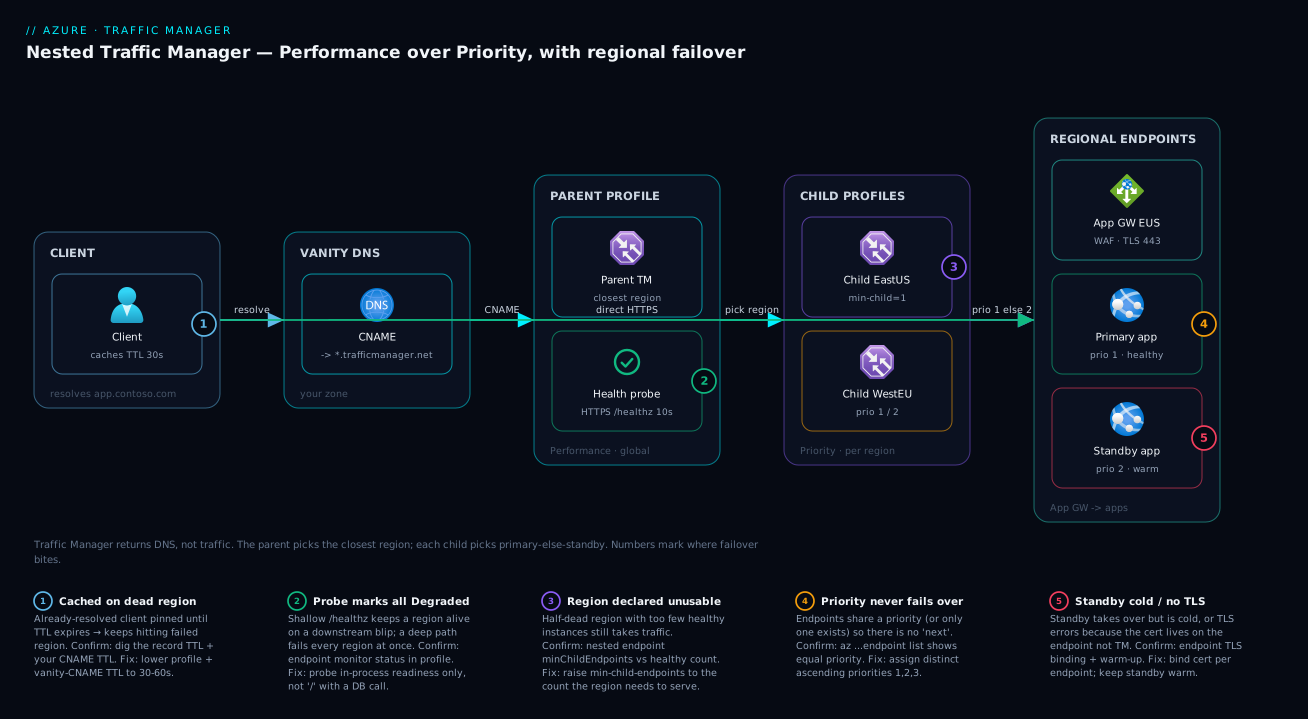
The diagram traces a request left to right through a nested Traffic Manager design — the most production-real topology. On the far left a client resolves app.contoso.com. Your DNS zone holds a CNAME onto the parent profile (contoso.trafficmanager.net), which uses Performance routing. The parent points at no servers — its two endpoints are child profiles, one per region, each using Priority. Performance picks the closest child for this resolver; that child’s Priority returns the region’s primary endpoint if healthy, else the standby. The returned record is a CNAME/A to the chosen region’s public front end — an Application Gateway or Load Balancer — behind which the app instances run. The client connects directly there; Traffic Manager is out of the path until the next resolution.
Follow the failure semantics in the numbered badges. Health probes run from multiple locations against each region’s /healthz; when East US goes Degraded, the East child’s Priority flips primary→standby, and if the whole region is down, Performance drops the East child and sends new resolvers to West Europe. The TTL badge marks where already-cached clients are pinned until expiry — the bounded part of failover you can’t skip. The min-child-endpoints badge is where a half-dead region is declared unusable to the parent. The legend narrates each number as symptom · confirm · fix, so the picture doubles as a diagnostic map: it teaches the routing topology and the exact hop where each failure bites.
Real-world scenario
Northwind Retail runs a storefront API as Azure Web Apps in East US 2 (North America) and West Europe (EU), each fronted by an Application Gateway with WAF. They started with a single Performance profile across both regions — shop.northwind.com CNAME’d onto northwind.trafficmanager.net — and it worked: US users hit East US 2, EU users hit West Europe, European latency dropped from ~180 ms to ~40 ms. The monitor probed / with the default 30 s / 3-failure settings and a 300-second TTL carried over from their old static DNS.
Then West Europe had a two-hour platform incident during a Friday sale. The probe correctly marked West Europe Degraded after ~90 seconds and new EU resolvers started getting East US 2 — but the support queue filled with EU customers seeing errors for the better part of fifteen minutes, because the 300-second TTL meant already-resolved clients kept their cached West Europe answer (some browsers and ISP resolvers held it even longer). Worse, their / health path called the regional catalogue database; when that database had its own brief blip in East US 2 an hour later, the East probe failed too, and for ~40 seconds both endpoints were Degraded and (per the all-unhealthy fallback) handed out anyway — sending some US users to a struggling region.
The redesign addressed three things. First, they dropped the TTL to 30 seconds and switched to Fast probing (10 s, 1 tolerated failure), cutting new-resolver failover from ~90 s to ~30 s and capping the cached-client tail at 30 s — the extra DNS queries cost a few hundred rupees a month. Second, they pointed the probe at a shallow /healthz checking only in-process readiness and a cached DB heartbeat, so a transient database blip no longer marks a region dead. Third — the structural fix — they moved to a nested topology: a Performance parent over two Priority child profiles, adding a standby slot (priority 2) per region so a single-instance failure fails over locally in seconds without touching cross-region DNS. They set min-child-endpoints = 1 so a region with any healthy instance still serves its users, but a fully-dead region cleanly evacuates.
The outcome: in the next regional event EU users shifted to East US 2 within ~30 seconds, the support spike was a handful of tickets instead of hundreds, and the team could drain a region for patching by disabling one endpoint — no DNS edits, no 2 a.m. record-set surgery. The global layer stayed under ₹500/month, dominated by per-query and health-check charges.
Advantages and disadvantages
A blunt two-column view before the prose:
| Advantages | Disadvantages |
|---|---|
| Protocol-agnostic — routes any TCP/UDP app, not just HTTP(S) | DNS-only: no TLS termination, WAF, caching, path routing |
| Truly global, region-independent (it’s DNS, not a regional box) | Failover bounded by TTL + probe; never instant |
| Can target External/on-prem endpoints by FQDN | Performance/Geo decisions use resolver IP, not client |
| Cheap — billed per million queries + per health check | Client caching can pin users to a dead region briefly |
| Six routing methods + nesting compose rich topologies | No request-level features (headers, cookies, sticky by app logic) |
| No data-path bottleneck — clients connect directly | You must design honest health paths or you mis-fail-over |
| Drain/canary by toggling endpoint status/weight — no redeploy | Weighted split is coarse per-user due to caching |
When each matters: the protocol-agnostic, direct-connection, low-cost nature makes Traffic Manager ideal as a pure global director for active/active latency routing and active/passive failover — especially for non-HTTP workloads (game servers, custom TCP, SMTP, anything Front Door can’t proxy) and for fronting endpoints with their own regional edge (App Gateway/WAF per region). The DNS-only limit is decisive the other way: if you need a single global TLS endpoint, WAF, caching, or path/host routing, Traffic Manager is wrong and Azure Front Door is right — an anycast L7 proxy that sees the request and gives near-instant in-path failover. Many serious designs use both: Front Door for the HTTP edge, Traffic Manager where a non-HTTP or hybrid path needs DNS-level direction.
Hands-on lab
A free-tier-friendly, end-to-end Priority failover you build, trigger and tear down in ~15 minutes: create a profile over two endpoints, observe routing, force a failover by disabling the primary, then clean up. (Use two Azure Web Apps on Free F1, or two public-IP’d resources you already have.)
1. Create a resource group and the profile (Priority, Fast probe, low TTL).
az group create --name rg-tm-lab --location eastus

az network traffic-manager profile create \
  --name tm-lab --resource-group rg-tm-lab \
  --routing-method Priority --unique-dns-name kvtmlab$RANDOM \
  --ttl 30 --protocol HTTPS --port 443 --path "/" \
  --interval 10 --timeout 9 --max-failures 1
# Note the printed fqdn, e.g. kvtmlab12345.trafficmanager.net
2. Create two Free web apps in different regions and capture their hostnames.
az appservice plan create -g rg-tm-lab -n plan-eus --sku F1 --location eastus
az appservice plan create -g rg-tm-lab -n plan-weu --sku F1 --location westeurope
az webapp create -g rg-tm-lab -p plan-eus -n kv-tm-eus$RANDOM   # note the name
az webapp create -g rg-tm-lab -p plan-weu -n kv-tm-weu$RANDOM   # note the name
3. Add them as Azure endpoints with priorities 1 (primary) and 2 (standby).
EUS_ID=$(az webapp show -g rg-tm-lab -n <kv-tm-eus-name> --query id -o tsv)
WEU_ID=$(az webapp show -g rg-tm-lab -n <kv-tm-weu-name> --query id -o tsv)

az network traffic-manager endpoint create --name primary --profile-name tm-lab \
  -g rg-tm-lab --type azureEndpoints --priority 1 --target-resource-id "$EUS_ID"
az network traffic-manager endpoint create --name standby --profile-name tm-lab \
  -g rg-tm-lab --type azureEndpoints --priority 2 --target-resource-id "$WEU_ID"
4. Watch the profile resolve to the primary. After a probe cycle both endpoints show Online:
az network traffic-manager endpoint list --profile-name tm-lab -g rg-tm-lab \
  --query "[].{name:name, status:endpointStatus, monitor:endpointMonitorStatus, prio:priority}" -o table
# Resolve the profile name — expect the PRIMARY's hostname
nslookup kvtmlab12345.trafficmanager.net
Expected: both endpoints Enabled / Online; the lookup returns a CNAME to the East US app (priority 1).
5. Force a failover by disabling the primary, then re-resolve.
az network traffic-manager endpoint update --name primary --profile-name tm-lab \
  -g rg-tm-lab --type azureEndpoints --endpoint-status Disabled
# wait ~30-60s, flush local DNS cache, then:
nslookup kvtmlab12345.trafficmanager.net      # now returns the West Europe (standby) hostname
Expected: within a probe cycle plus TTL the lookup flips to the standby. Re-enable the primary and it flips back — that is active/passive failover, observed.
6. Teardown.
az group delete --name rg-tm-lab --yes --no-wait
The F1 plans, profile and endpoints incur essentially no cost for a brief lab; deleting the resource group removes everything together.
Common mistakes & troubleshooting
The failure modes that actually generate tickets, each as symptom → root cause → confirm (exact command/path) → fix.
| # | Symptom | Root cause | Confirm | Fix |
|---|---|---|---|---|
| 1 | Failover “takes forever” for some users | Long TTL cached by resolver/client | dig/nslookup the record’s TTL; check your vanity-CNAME TTL too |
Lower profile TTL (e.g. 30–60 s); also lower the CNAME TTL in your zone |
| 2 | Whole app goes 503/empty during a DB blip | Probe path (/) hard-depends on a downstream → all endpoints Degraded |
Endpoint monitor status all Degraded in profile blade; check /healthz deps |
Point probe at a shallow /healthz; separate liveness from readiness |
| 3 | Priority profile never fails over | Endpoints share the same priority (or only one endpoint) | endpoint list shows equal priority values |
Assign distinct priorities (1, 2, 3…) |
| 4 | Performance routes EU users to US | Decision uses the resolver’s IP; corporate/public resolver is in the US | Compare resolver location vs user; test from the region | Accept skew, or use Geographic for hard residency; prefer ECS resolvers |
| 5 | Geographic users get NODATA / no answer | No World (catch-all) mapping, or mapped endpoint Degraded | endpoint show geo-mapping; profile monitor status |
Map World to an endpoint; combine with nesting for failover |
| 6 | Weighted split looks wrong (not 90/10) | Caching pins each resolver; small sample or high TTL | Observe aggregate over many resolvers, not one client | Lower TTL for finer split; measure in aggregate |
| 7 | Endpoint always Degraded though app is up |
Probe port/path/protocol mismatch or expected-status too strict | monitorConfig vs where app listens; curl the path for its code |
Align protocol/port/path; widen expectedStatusCodeRanges (e.g. accept 301/302/401) |
| 8 | External endpoint mis-routed by Performance | External endpoint has no region set, so latency map can’t place it | endpoint show for endpointLocation |
Set the endpoint’s location (Azure region it represents) |
| 9 | Nested parent sends traffic to a crippled region | min-child-endpoints too low (1) for the load | Nested endpoint minChildEndpoints; child healthy count |
Raise min-child-endpoints to the count a region needs to serve safely |
| 10 | Custom domain doesn’t validate / TLS errors | You CNAME’d to the profile but TLS/cert lives on the endpoint, not TM | Browser cert chain; endpoint’s own TLS binding | TM doesn’t do TLS — bind the cert on each endpoint (Web App/App GW) |
| 11 | All endpoints Degraded → users still get answers | The all-unhealthy fallback returns every endpoint so you’re not blackholed | Profile shows all Degraded yet DNS still answers |
Fix the real outage / the probe; understand this is by-design, not a bug |
| 12 | “It’s not load balancing” within a region | Traffic Manager is global, not intra-region | You expected per-VM balancing from TM | Put a regional Load Balancer/App Gateway behind each TM endpoint |
Two confirm-commands you’ll reach for constantly:
# See every endpoint's intent (status) and reality (monitor status) at a glance
az network traffic-manager endpoint list --profile-name tm-contoso -g rg-global \
  --query "[].{name:name, type:type, status:endpointStatus, monitor:endpointMonitorStatus, prio:priority, weight:weight}" -o table

# Profile-level monitor status + the resolved name
az network traffic-manager profile show --name tm-contoso -g rg-global \
  --query "{fqdn:dnsConfig.fqdn, status:profileStatus, monitor:monitorConfig}" -o json
Best practices
- Keep the probe path shallow and honest. A
/healthzchecking in-process readiness (at most a cached heartbeat of a hard dependency) prevents a transient downstream from marking a whole region dead. Never probe/if/does real work. - Set distinct priorities on Priority profiles and explicit weights on Weighted ones — never leave them implicit.
- Tune TTL deliberately. 30–60 s for fast failover; lower TTL = faster move and more DNS queries (and some clients still ignore it). Lower the vanity CNAME TTL too — the slowest link is whichever TTL is longest.
- Use Fast probing (10 s) with 1–2 tolerated failures for production failover; reserve the 30 s default where flap-resistance beats speed.
- Put a regional balancer behind each endpoint. TM picks the region; an Application Gateway or Load Balancer picks the instance and does TLS/WAF. TM is the global tier only.
- Nest to compose behaviours (Performance-over-Priority is the workhorse) and set min-child-endpoints to the capacity a region truly needs, so a half-dead region evacuates instead of being overwhelmed.
- Drain with endpoint status, not DNS edits. Disable an endpoint (or zero its weight) to pull a region; re-enable to return.
- Always map a catch-all — World for Geographic, a no-subnet/
0.0.0.0/0endpoint for Subnet — or some sources get NODATA/NXDOMAIN. - Set the location on External endpoints used with Performance, so the latency map can place them.
- Don’t expect TLS/WAF/caching from Traffic Manager — that’s Front Door, used instead of or alongside TM for the HTTP edge.
- Codify profiles in Bicep/Terraform and treat routing/weight/priority changes as reviewed changes — they’re production traffic controls.
- Test failover regularly (disable an endpoint in a game-day) so you know your real TTL+probe failover time, not the theoretical one.
Security notes
Traffic Manager handles no application data and terminates nothing, so its security surface is small but specific. There is no TLS at the Traffic Manager layer — it returns names; the certificate, HTTPS enforcement, mTLS and WAF all live on the endpoints (Web App, Application Gateway). Securing the path is the endpoints’ job: enforce HTTPS-only and bind valid certs per endpoint, and put WAF on the regional edge for request inspection (see Application Gateway with WAF and end-to-end TLS).
Least privilege: use the built-in Traffic Manager Contributor role scoped to the resource group, not broad Contributor — changing a routing method, weight or endpoint status is changing production traffic, so treat it like a deploy permission. Endpoint enumeration: profile and endpoint FQDNs are publicly resolvable, so encode no secrets in DNS names; disabling an endpoint hides it from routing but the underlying resource is still reachable by its own FQDN/IP — true backend isolation is the endpoint’s network controls (NSGs, Private Link, access restrictions), not Traffic Manager. Finally, the health probe originates from Traffic Manager’s IP ranges, not your clients; if you lock down a backend you must allow the probe source or every endpoint goes Degraded — keep the probe path to non-sensitive readiness data so an open /healthz leaks nothing.
Cost & sizing
Traffic Manager is one of the cheapest Azure services because it has no data path to meter. You pay for two things: DNS queries (per million queries, tiered down at higher volume) and health checks (per monitored endpoint per month, with a surcharge for Fast (10 s) probing and for external endpoints). There’s no charge for the bytes clients send your app (that’s client-to-endpoint), no per-profile fee, and no egress at the TM layer.
What drives the bill and how to right-size:
| Cost driver | Billed by | Pushes cost up when… | Right-size by |
|---|---|---|---|
| DNS queries | Per million queries (tiered) | Very low TTL × huge traffic = more re-resolutions | Don’t set TTL lower than failover needs require |
| Basic health checks | Per monitored endpoint / month | Many endpoints / nested children | Consolidate; only monitor what must fail over |
| Fast (10 s) probing | Surcharge per endpoint | Fast probing on many endpoints | Use Fast only where failover speed matters |
| External-endpoint monitoring | Surcharge per external endpoint | Many non-Azure endpoints monitored | Monitor only the ones that need automatic failover |
For sizing intuition: a typical two-to-four-region profile with a handful of endpoints and moderate query volume runs a few hundred rupees a month (well under ₹1,000); the per-query charge dominates only at very high traffic, and even a 10× TTL reduction usually adds a trivial amount. Nesting multiplies the endpoint-monitoring line (each child’s endpoints are monitored), so a deep nested topology with Fast probing everywhere is where the (still small) cost concentrates — monitor only the endpoints that genuinely need automatic failover. There’s no free tier, but the lab above costs effectively nothing for a brief run.
Interview & exam questions
1. Is Azure Traffic Manager a load balancer? Explain. It is a DNS-based traffic director, not a packet/connection load balancer. It load-balances by returning different DNS answers per its routing method; it never sees or proxies application traffic. Clients connect directly to the endpoint it named. (Maps to AZ-700, AZ-104.)
2. Why isn’t Traffic Manager failover instant? Because it works via DNS. A new resolver only gets re-routed after an endpoint is marked Degraded (probe interval × tolerated failures), and an already-resolved client stays pinned until its cached TTL expires. You compress this with Fast probing and a low TTL, but DNS caching means you can’t make it zero.
3. When do you choose Traffic Manager over Azure Front Door? When you need a protocol-agnostic global director (non-HTTP TCP/UDP), want clients to connect directly (no proxy hop/cost), or are fronting endpoints with their own regional edge. Choose Front Door for TLS termination, WAF, caching, path/host routing, or near-instant in-path failover — Front Door is an L7 proxy; TM is DNS only.
4. Contrast Performance and Geographic routing. Performance picks the lowest-latency endpoint for the resolver’s region (speed); Geographic picks the endpoint mapped to the source IP’s country/region (residency/compliance). Performance falls through to the next-closest healthy endpoint; Geographic returns NODATA for a mapped-but-unhealthy region unless you provide a catch-all.
5. How do you do a canary release with Traffic Manager? Weighted routing: give the stable endpoint a high weight (e.g. 900) and the canary a low one (e.g. 100) for a ~10% aggregate split, then shift weights over time. The split is coarse per-user because resolvers cache answers for the TTL.
6. What is a nested profile and what problem does it solve? A profile whose endpoints are other profiles (Nested endpoints). It composes two routing methods — a Performance parent over Priority children gives “closest region + active/passive within each region” under one hostname. A single profile has only one method; nesting layers them.
7. What does min-child-endpoints do?
On a Nested endpoint, it sets how many of the child’s endpoints must be Online for the child to count healthy to the parent. It makes failover capacity-aware: a region with too few surviving instances is declared unusable so the parent routes elsewhere.
8. Your Priority profile never fails over. Why? The endpoints share the same priority (or there’s only one), so there’s no defined “next.” Assign distinct, ascending priorities (1, 2, 3…).
9. Why does a database blip take your whole app offline behind Traffic Manager?
The probe path (often /) hard-depends on that database, so when it blips every region’s probe fails and all endpoints go Degraded at once. Fix with a shallow /healthz that doesn’t fail on a transient downstream; separate liveness from readiness.
10. Does Traffic Manager handle TLS for your custom domain? No — no TLS, certs or WAF at the TM layer. You CNAME your vanity name to the profile, but the certificate and HTTPS enforcement are bound on each endpoint (Web App, App Gateway). TLS errors mean an endpoint-side cert problem, not Traffic Manager.
11. How do you drain a region for maintenance without DNS surgery? Disable its endpoint (or drop its weight to 0 on a Weighted profile). New resolvers stop receiving it within a probe cycle and existing clients drift off as TTLs expire; re-enable to return.
12. Performance routing sends some European users to the US — why, and what would you change? The decision uses the resolver’s source IP, and that user’s corporate/public resolver is in the US, so they look American. For hard residency, switch to Geographic (source-country mapping), possibly nested over Priority for failover, and prefer resolvers that send EDNS Client Subnet.
Quick check
- What does Traffic Manager actually return to a client — traffic, or a DNS answer — and why does that bound failover time?
- Which routing method gives active/passive failover, and what must be true of the endpoints’ priority values?
- You want EU users to always hit the EU deployment for residency. Which method, and what mapping must you always include?
- In a nested profile, what does
min-child-endpointscontrol? - Name two things Traffic Manager cannot do that would push you to Azure Front Door instead.
Answers
- It returns a DNS answer (a CNAME/A for the chosen endpoint), not traffic. Because clients cache that answer for the TTL and connect directly, failover is bounded by (probe interval × tolerated failures) for new resolvers plus the cached TTL for existing clients — never instant.
- Priority routing. The endpoints must have distinct priority numbers (1 = primary, 2 = standby, …); equal priorities give undefined ordering, not failover.
- Geographic routing, mapping the EU region to the EU endpoint — and you must always map a World catch-all to some endpoint, or unmapped/failed locations get NODATA.
- How many of the child profile’s endpoints must be Online for that child to count as healthy to the parent profile — making cross-region failover capacity-aware.
- Any two of: TLS termination, WAF / request inspection, caching, path/host-based routing, near-instant in-path failover. Traffic Manager is DNS-only and sees no HTTP; Front Door is an L7 reverse proxy that does all of these.
Glossary
- Traffic Manager — Azure’s DNS-based global traffic director; returns the DNS answer for an endpoint chosen by a routing method.
- Profile — A named routing policy (one routing method) plus its endpoints; a global Azure resource resolvable at
*.trafficmanager.net. - Routing method — The rule for picking an endpoint: Performance, Priority, Weighted, Geographic, MultiValue, Subnet.
- Endpoint — One target a profile can return: Azure (resource ID), External (FQDN/IP), or Nested (a child profile).
- Config status vs monitor status — Your intent (Enabled/Disabled) vs the probe’s verdict (Online/Degraded); an endpoint must be both to be returned.
- TTL — Seconds a client/resolver caches the DNS answer (range 0–2,147,483,647); lower = faster failover and more queries.
- Endpoint monitoring — The HTTP/HTTPS/TCP health probe (protocol, port, path, interval, timeout, tolerated failures, expected status).
- Fast probing — A 10-second probe interval (vs the 30-second standard) for quicker detection, billed at a surcharge.
- Performance / Priority / Weighted — Lowest-latency endpoint / highest-priority healthy endpoint / proportional-to-weights split.
- Geographic routing — Returns the endpoint mapped to the source IP’s geographic region; needs a World catch-all.
- Nested profile — A profile whose endpoints are child profiles, composing two routing methods.
- Min child endpoints — How many of a child profile’s endpoints must be Online for it to count healthy to its parent.
- All-unhealthy fallback — If every endpoint is Degraded, Traffic Manager returns all of them so clients aren’t blackholed.
Next steps
- Pair the global tier with the regional one: Azure Load Balancer vs Application Gateway to choose the in-region balancer behind each endpoint.
- See the global director inside a full topology in multi-region active/active design.
- Add the request-aware edge (WAF, TLS, path routing) Traffic Manager can’t do with Application Gateway with WAF and end-to-end TLS.
- Ground the failure-domain thinking in Azure regions and Availability Zones explained.
- Wire the vanity hostname correctly with Azure DNS public zones, delegation and alias records.