You provisioned two VMs, put them behind a load balancer, called it “highly available,” and slept well — until a planned host maintenance event rebooted both at the same time, or a single rack lost power and took the whole tier with it. The uncomfortable truth is that two VMs is not a resilience strategy; where Azure places those two VMs relative to each other is the strategy, and that placement is governed by exactly two constructs you must choose between at create time: the Availability Set and the Availability Zone. Pick wrong and you either pay for redundancy that a single power feed can erase, or you over-engineer a dev box into a multi-datacentre footprint that doubles your bandwidth bill.
An Availability Set spreads your VMs across fault domains (separate racks with independent power and network) and update domains (groups patched at different times) — but all inside a single datacentre. It protects against a rack failure and against Azure’s planned maintenance hitting everything at once; it does not protect against that whole datacentre losing power, cooling or connectivity. An Availability Zone is a different promise entirely: it spreads VMs across physically separate datacentres within one region, each with its own power, cooling and network, far enough apart to survive a localised disaster but close enough for synchronous replication. The first construct buys you a documented 99.95% VM SLA; the second buys you 99.99% — and that single extra nine is the difference between roughly 4.4 hours and 52 minutes of permitted downtime a year.
This guide gives you the mental model first, then the decision. You will learn precisely what a fault domain, update domain and zone each protect against; why you cannot put an existing Availability-Set VM into a zone without rebuilding it; how the choice forces a chain of downstream decisions — Standard vs Basic Load Balancer, zonal vs zone-redundant public IPs, LRS vs ZRS managed disks, proximity placement groups; and how to read the SLA fine print so you don’t promise four nines you didn’t architect. By the end you will reach for the right construct on instinct, and know the cases where the answer is “use a Virtual Machine Scale Set instead.”
What problem this solves
Single VMs fail, and they fail in ways you don’t control. Azure runs your VM on a physical host in a datacentre, and that host gets patched (planned reboots for security and hypervisor updates), shares a rack (one top-of-rack switch, one power distribution unit — a single point of failure for everything on it), and lives in a datacentre that can itself lose a utility feed or a cooling loop. A lone VM rides all three risks. Microsoft is explicit about this: a single-instance VM using premium SSD or Ultra disks gets a 99.9% SLA, and a single instance on Standard SSD only 99.5% — there is no SLA at all for a single instance on Standard HDD. “It’s on Azure so it’s reliable” is a fallacy; Azure gives you the tools to be reliable and charges you nothing extra for the placement logic, but you must opt in.
What breaks without a deliberate choice: a team deploys “two web VMs” with no Availability Set and no zone assignment, Azure happens to schedule both on the same rack, the rack’s PDU fails at 3 a.m., and the “redundant” tier is fully down — the post-incident review discovers the two VMs were never actually separated. Or the reverse over-engineering failure: a team puts a low-traffic internal app across three zones, then gets a surprise five-figure annual bill from inter-zone data-transfer charges and zonal disk costs for a workload that a single Availability Set would have served at a fraction of the cost. Both failures come from not understanding what each construct actually isolates and what it costs.
Who hits this: anyone running IaaS virtual machines for production — web tiers, app tiers, self-hosted databases, domain controllers, legacy applications that can’t move to PaaS. PaaS services (App Service, SQL Database, Cosmos DB) handle this for you behind the scenes, but the moment you own the VM, you own the placement decision, and the SLA you can credibly offer your business depends entirely on getting it right.
Learning objectives
By the end of this article you can:
- Explain what a fault domain, update domain and Availability Zone each physically isolate, and which failure classes each does and does not protect against.
- State the exact Azure VM SLA for single-instance, Availability-Set and Availability-Zone deployments, and translate each into annual downtime minutes.
- Choose between an Availability Set and Availability Zones for a given workload using clear decision criteria — and recognise the cases where the right answer is “both” or “a scale set.”
- Trace how the resilience choice forces downstream decisions: Standard Load Balancer, zone-redundant vs zonal public IPs, LRS vs ZRS managed disks, and proximity placement groups.
- Deploy a zone-redundant two-tier topology with
azCLI and Bicep, and verify the actual fault-domain / zone placement of each VM. - Avoid the classic mistakes: mixing zonal and non-zonal resources behind one load balancer, assuming an Availability Set survives a datacentre outage, and ignoring inter-zone egress cost.
- Right-size the cost of resilience and explain what drives the bill — instance count, zone egress, ZRS disks and load-balancer tier.
Prerequisites & where this fits
You should be comfortable creating a basic Azure VM and know the first VM deployment flow — NICs, managed disks, NSGs and resource groups. You should understand that an Azure region is a geographic area containing one or more datacentres, and have at least skimmed how Azure regions and Availability Zones relate, because zones are a region-level capability. Familiarity with running az in Cloud Shell, reading JSON/-o table output, and the basics of a load balancer (frontend, backend pool, health probe) will let you follow the labs.
This sits in the Compute / High Availability track. It is upstream of disaster-recovery planning: resilience (Availability Sets and Zones) keeps a workload up within one region against rack and datacentre failures, while BCDR foundations — RTO and RPO and multi-region active-active design handle the region-wide disaster that even zones cannot survive. It pairs with Azure Storage redundancy — LRS, ZRS, GRS, RA-GRS, because the same zonal thinking governs your disks and storage accounts, and with Azure Load Balancer vs Application Gateway, because the load balancer in front of a zonal deployment must itself be zone-aware.
A quick map of the resilience layers, so you place this decision correctly in the stack:
| Resilience scope | Protects against | Azure construct | Typical SLA | Covered here? |
|---|---|---|---|---|
| Single host | Nothing beyond disk durability | One VM + premium disk | 99.9% (1 instance) | Baseline only |
| Rack + planned patching | One rack failing; maintenance hitting all at once | Availability Set | 99.95% | Yes (primary) |
| Datacentre | A whole datacentre losing power/cooling/network | Availability Zones | 99.99% | Yes (primary) |
| Region | A regional disaster (rare, but real) | Multi-region + Site Recovery / paired region | Design-dependent | Linked, not here |
| Data durability | Bit rot, accidental loss | LRS/ZRS/GRS disks & storage | n/a | Linked, not here |
Core concepts
Five mental models make every later decision obvious. Get these right and the rest is bookkeeping.
A region is many datacentres; a zone is a named bundle of them. An Azure region (e.g. eastus, westeurope) is a metro-area collection of datacentres. In a zone-enabled region, Azure groups those datacentres into (at least) three Availability Zones, labelled 1, 2, 3 for your subscription. Each zone is one or more datacentres with independent power, cooling and networking, physically separated from the others (different buildings, often kilometres apart) yet close enough that inter-zone latency stays low enough for synchronous replication. Critically, zone numbers are logical per subscription: your zone 1 and another subscription’s zone 1 may map to different physical datacentres — Azure shuffles the mapping to balance load, so never assume two subscriptions’ “zone 1” co-locate.
A fault domain is a rack; an update domain is a maintenance wave. Inside an Availability Set, a fault domain (FD) is a set of hardware sharing a single power source and network switch — effectively a rack. Spreading VMs across fault domains means a rack-level failure (PDU, TOR switch) takes down only the VMs in that FD, never all of them. An update domain (UD) is a logical group that Azure reboots together during planned maintenance — Azure walks the UDs one at a time, so only one UD’s VMs reboot at any moment, leaving the others serving. FDs protect against unplanned hardware failure; UDs protect against planned maintenance. An Availability Set gives you both, but only within one datacentre — every FD and UD in the set lives in the same building.
The two constructs isolate different blast radii. This is the crux. An Availability Set isolates racks and patch waves inside one datacentre. An Availability Zone isolates entire datacentres inside one region. If a single datacentre loses power, an Availability Set spanning that datacentre goes fully dark — every fault domain in it was in that same building. Zones survive that exact event because the other zones are different buildings. So the question “Availability Set or Zone?” is really “what is the largest failure I must survive — a rack, or a datacentre?”
You choose placement at create time, and largely cannot change it later. A VM’s Availability Set membership and its zone are set when the VM is created and are effectively immutable afterward. You cannot move a running VM from “no zone” into zone 2, nor add an existing VM to an Availability Set — you delete and recreate the VM (you can keep and reattach the OS/data disks). This is the single most common painful surprise: the resilience decision is an up-front architecture decision, not a setting you toggle in production.
The SLA is a contract with prerequisites, not a vibe. Microsoft publishes specific VM availability SLAs and they have conditions: you earn 99.99% only by deploying two or more instances across two or more Availability Zones in the same region; 99.95% by deploying two or more instances in the same Availability Set; 99.9% for a single instance using premium SSD or Ultra disks for OS and all data disks. Miss the condition — e.g. run a single VM, or put both VMs in the same FD — and you simply don’t get the SLA, regardless of intent. The number you can promise your business is the number whose prerequisite you actually met.
The vocabulary in one table
Before the deep sections, pin down every moving part. The glossary repeats these for lookup; this table is the mental model side by side:
| Term | One-line definition | Scope | Why it matters |
|---|---|---|---|
| Region | A metro-area set of datacentres | Geographic | The boundary zones live inside; DR crosses it |
| Availability Zone (AZ) | A physically separate datacentre group in a region | Within a region | Survives a datacentre outage; 99.99% SLA |
| Availability Set (AS) | A logical group spreading VMs over FDs + UDs | Within one datacentre | Survives a rack failure / planned patch; 99.95% |
| Fault domain (FD) | A rack: shared power + network switch | Within an AS | Isolates unplanned hardware failure |
| Update domain (UD) | A group Azure reboots together in maintenance | Within an AS | Isolates planned maintenance reboots |
| Zonal resource | Pinned to one specific zone (1/2/3) |
One zone | A VM, a zonal disk, a zonal public IP |
| Zone-redundant resource | Spread across all zones automatically | All zones | A Standard LB frontend, ZRS disk, zone-redundant IP |
| Proximity placement group (PPG) | Forces VMs physically close for low latency | Within a zone/DC | Trades resilience spread for latency |
| Virtual Machine Scale Set (VMSS) | Managed identical-VM fleet, zone-aware | Region/zones | The modern way to do HA at scale |
| SLA | The availability percentage Azure commits to | Per deployment shape | The downtime budget you can promise |
Fault domains and update domains: what an Availability Set actually does
An Availability Set is a logical container you create first; then you place VMs into it at their creation. When a VM joins a set, Azure assigns it to a fault domain and an update domain from the set’s configured counts, round-robining new VMs across them so the spread stays even. The set itself is free — you pay only for the VMs.
Fault domains — the unplanned-failure axis
A fault domain maps to physical hardware that shares a single point of failure: one power distribution unit and one top-of-rack network switch. If that PDU trips or that switch dies, every VM in that fault domain goes down together — but VMs in other fault domains are untouched because they hang off different power and network. By default an Availability Set offers up to 3 fault domains in most regions (some regions and configurations cap at 2). Two VMs across two FDs guarantee that no single rack failure can take both.
The number that bites people: if you create an Availability Set with 2 fault domains and deploy 3 VMs, two of those VMs share a fault domain — a single rack failure can now take two of your three. Always make the VM count a clean multiple of the FD count, or accept that some FDs host more than one VM.
Update domains — the planned-maintenance axis
An update domain is how Azure sequences planned maintenance (host OS patches, hypervisor upgrades) so it never reboots your whole tier at once. Azure reboots one UD at a time, waits for it to recover (default ~30 minutes between UDs), then moves to the next. With VMs spread across multiple UDs, only a fraction reboot simultaneously and the rest keep serving. An Availability Set supports up to 20 update domains (default 5). More UDs means smaller maintenance waves (fewer VMs down at once) but only helps if you have enough VMs to populate them.
The interplay of the two axes is the whole point. Here is what each domain type isolates, side by side:
| Property | Fault domain (FD) | Update domain (UD) |
|---|---|---|
| Protects against | Unplanned hardware failure (rack power/switch) | Planned maintenance reboots |
| Physical meaning | Separate rack: own power + network | Logical reboot grouping (may share hardware) |
| Default count | 2–3 (region-dependent) | 5 |
| Maximum count | 3 (some regions 2) | 20 |
| What “down at once” looks like | One rack’s VMs (unplanned outage) | One UD’s VMs (brief reboot during patch) |
| Tuning lever | Spread VMs evenly across all FDs | More UDs = smaller maintenance waves |
| Hard limitation | All FDs are in one datacentre | All UDs are in one datacentre |
A worked example: with a 3-FD, 5-UD set and 6 VMs, Azure round-robins so each FD holds 2 VMs (no rack failure takes more than 2 of 6) and the VMs distribute across the 5 UDs (a maintenance wave reboots at most 2 at a time):
| VM | Fault domain | Update domain | Survives a rack failure with… | Reboots in patch wave # |
|---|---|---|---|---|
| vm-0 | FD 0 | UD 0 | vm-1…5 (different FDs) | 1 |
| vm-1 | FD 1 | UD 1 | the rest | 2 |
| vm-2 | FD 2 | UD 2 | the rest | 3 |
| vm-3 | FD 0 | UD 3 | shares FD 0 with vm-0 | 4 |
| vm-4 | FD 1 | UD 4 | shares FD 1 with vm-1 | 5 |
| vm-5 | FD 2 | UD 0 | shares FD 2 with vm-2 | 1 (with vm-0) |
Create an Availability Set and deploy VMs into it:
# Create the Availability Set with explicit FD/UD counts (must exist before the VMs)
az vm availability-set create \
  --name avset-web-prod --resource-group rg-web-prod \
  --location eastus \
  --platform-fault-domain-count 3 \
  --platform-update-domain-count 5

# Create VMs INTO the set (--availability-set is set-at-create and immutable)
az vm create --name vm-web-0 --resource-group rg-web-prod \
  --availability-set avset-web-prod \
  --image Ubuntu2204 --size Standard_D2s_v5 \
  --vnet-name vnet-web --subnet snet-web --public-ip-address ""
az vm create --name vm-web-1 --resource-group rg-web-prod \
  --availability-set avset-web-prod \
  --image Ubuntu2204 --size Standard_D2s_v5 \
  --vnet-name vnet-web --subnet snet-web --public-ip-address ""
resource avset 'Microsoft.Compute/availabilitySets@2024-07-01' = {
  name: 'avset-web-prod'
  location: location
  // Aligned set so VMs use managed disks correctly
  sku: { name: 'Aligned' }
  properties: {
    platformFaultDomainCount: 3
    platformUpdateDomainCount: 5
  }
}

resource vm0 'Microsoft.Compute/virtualMachines@2024-07-01' = {
  name: 'vm-web-0'
  location: location
  properties: {
    availabilitySet: { id: avset.id }   // membership fixed at create time
    hardwareProfile: { vmSize: 'Standard_D2s_v5' }
    // ... storageProfile, osProfile, networkProfile ...
  }
}
Note the Aligned SKU. An Availability Set is either Aligned (managed-disk aware — Azure aligns disk fault domains with VM fault domains, the modern default) or Classic (legacy, for unmanaged disks in storage accounts). Always use Aligned with managed disks; Classic is effectively deprecated. Verify the actual FD/UD placement after deployment:
# Show which FD/UD each VM landed in
az vm availability-set show --name avset-web-prod --resource-group rg-web-prod \
  --query "virtualMachines[].id" -o tsv
# Or per VM, the instance view exposes platformFaultDomain / platformUpdateDomain
az vm get-instance-view --name vm-web-0 --resource-group rg-web-prod \
  --query "instanceView.platformFaultDomain, instanceView.platformUpdateDomain"
The Availability Set’s hard ceiling — and the reason it is not the end of the resilience story — is in the last row of the table above: every fault and update domain lives in a single datacentre. The set is brilliant against a rack failure and against Azure’s patching, and completely powerless against that datacentre losing its utility feed. That is exactly the gap Availability Zones fill.
Availability Zones: surviving a whole datacentre
An Availability Zone is a physically separate datacentre (or group of datacentres) within a region, with its own power, cooling and network, isolated far enough from the other zones that a single facility-level failure — fire, flood, power loss, cooling failure — cannot take more than one zone. A region with zones has at least three of them, numbered 1, 2, 3 for your subscription. Spreading VMs across two or more zones means a datacentre outage costs you at most one zone’s worth of capacity.
Zonal versus zone-redundant — the distinction that trips everyone
There are two ways a resource relates to zones, and conflating them causes real bugs:
- A zonal resource is pinned to one specific zone you name (
1,2, or3). A VM is always zonal — it runs in exactly one zone. A zonal managed disk, a zonal public IP, a zonal NAT gateway: each lives in one zone and shares that zone’s fate. - A zone-redundant resource is automatically spread across all zones with no single-zone dependency. A Standard Load Balancer frontend, a zone-redundant public IP, a ZRS managed disk: Azure replicates/distributes them so the loss of one zone does not take the resource down.
The rule that follows: a VM (zonal) survives a zone failure only because you placed other VMs in other zones; the thing that fronts them — the load balancer and its public IP — must be zone-redundant, or it becomes the single zonal point that defeats the whole design. Place a zonal public IP in zone 1 in front of VMs spread across zones 1, 2, 3 and you have just made zone 1’s datacentre a single point of failure for the entire tier.
Here is the zonal-vs-zone-redundant map for the resources you touch in a VM HA design:
| Resource | Can be zonal? | Can be zone-redundant? | Recommended for HA | Note |
|---|---|---|---|---|
| Virtual machine | Yes (always one zone) | No (a VM is one instance) | Spread instances across 2–3 zones | The VM is the unit you replicate |
| Managed disk (OS/data) | Yes (LRS, in the VM’s zone) | Yes (ZRS disks) | ZRS for zone-resilient disk | ZRS disk survives a zone loss |
| Public IP (Standard) | Yes (zonal, one zone) | Yes (zone-redundant) | Zone-redundant | Zonal IP = single zone dependency |
| Load Balancer (Standard) | Yes (zonal frontend) | Yes (zone-redundant frontend) | Zone-redundant frontend | Basic LB is not zone-aware |
| NAT Gateway | Yes (zonal only) | No | One per zone, or accept zonal | NAT GW is a zonal resource |
| Application Gateway v2 | No | Yes (spans zones) | Deploy across zones 1,2,3 | Specify zones at create |
| VNet / subnet | n/a (regional) | n/a (regional) | Spans all zones in region | A subnet reaches every zone |
The VNet detail is reassuring: a virtual network and its subnets are regional and reach every zone in the region. You do not create a subnet “per zone” — one subnet’s address space is available to VMs in any zone. So the network plumbing does not fragment by zone; only the instances and the single-zone resources do.
Deploying VMs across zones
Placing a VM in a zone is a single --zone flag at create time (and, again, immutable afterward). For real zone resilience you create one VM per zone:
# One VM in each of zones 1, 2, 3 — the VMs are zonal, the LB/IP must be zone-redundant
for z in 1 2 3; do
  az vm create --name vm-web-z$z --resource-group rg-web-prod \
    --image Ubuntu2204 --size Standard_D2s_v5 \
    --zone $z \
    --vnet-name vnet-web --subnet snet-web --public-ip-address ""
done

# Standard LB with a ZONE-REDUNDANT public IP frontend (note: no --zone on the IP = zone-redundant)
az network public-ip create --name pip-web --resource-group rg-web-prod \
  --sku Standard --allocation-method Static   # Standard SKU IP is zone-redundant by default
az network lb create --name lb-web --resource-group rg-web-prod \
  --sku Standard \
  --public-ip-address pip-web \
  --frontend-ip-name fe-web --backend-pool-name be-web
@allowed([ '1', '2', '3' ])
param zone string

resource vm 'Microsoft.Compute/virtualMachines@2024-07-01' = {
  name: 'vm-web-z${zone}'
  location: location
  zones: [ zone ]          // zonal: pinned to exactly this zone, immutable after create
  properties: {
    hardwareProfile: { vmSize: 'Standard_D2s_v5' }
    // ... rest of the VM ...
  }
}

resource pip 'Microsoft.Network/publicIPAddresses@2024-05-01' = {
  name: 'pip-web'
  location: location
  sku: { name: 'Standard' }   // Standard SKU
  // OMITTING the 'zones' array on a Standard public IP makes it ZONE-REDUNDANT.
  // Setting zones: ['1'] would make it ZONAL (single-zone dependency) — avoid for HA.
  properties: { publicIPAllocationMethod: 'Static' }
}
The single most important comment in that Bicep is on the public IP: omit the zones array → zone-redundant; specify one zone → zonal. This is the lever people get backwards. Verify which zone each VM actually landed in:
az vm list --resource-group rg-web-prod \
  --query "[].{name:name, zone:zones[0]}" -o table
Availability Set vs Availability Zone — head to head
With both constructs understood, here is the decision matrix in one place:
| Dimension | Availability Set | Availability Zones |
|---|---|---|
| Blast radius survived | Rack failure + planned maintenance | Whole-datacentre failure |
| Physical isolation | Racks within one datacentre | Separate datacentres in a region |
| VM SLA (2+ instances) | 99.95% | 99.99% |
| Annual downtime budget | ~4.4 hours | ~52 minutes |
| Survives datacentre power loss? | No | Yes |
| Inter-instance latency | Lowest (same DC) | Slightly higher (cross-DC, single-digit ms) |
| Inter-instance data transfer cost | Free (same DC) | Charged (inter-zone egress) |
| Region support | All regions | Zone-enabled regions only |
| Combine with the other? | Not in the same VM | Use zones for the higher tier |
| Set-at-create / immutable | Yes | Yes |
| Best for | Latency-sensitive, all-region reach, lower cost | Production needing the 99.99% SLA |
The two are mutually exclusive for a single VM — a VM is either in an Availability Set or in a zone, never both. (You can, however, build a VMSS that is zone-aware and internally manages fault-domain spread within each zone — more on that below.)
Run the question through this decision table and the answer falls out:
| If your situation is… | …then choose | Because |
|---|---|---|
| Must survive a datacentre outage, region has zones | Availability Zones | Only zones isolate whole datacentres; earns 99.99% |
| Region has no zones available | Availability Set | Zones aren’t offered there; a set still gives rack/patch HA |
| Latency-critical chatty tier, single-DC risk acceptable | Availability Set (± PPG) | Same-DC = lowest latency, free internal traffic |
| Heavy internal traffic between instances | Availability Set | Avoids per-GB inter-zone egress |
| HA at scale, many identical VMs | VMSS across zones | Manages zonal + FD spread for you |
| Stateful VM whose disk must survive a zone | Zones + ZRS disk | ZRS disk reattaches in another zone |
| Only need 99.95%, simplest/cheapest footprint | Availability Set | Free, all-region, lowest complexity |
The downstream chain: what the resilience choice forces
Choosing zones is not a single decision — it cascades into the load balancer, the public IP, the disks and sometimes a proximity placement group. Get one link wrong and the whole chain’s resilience collapses to its weakest zonal point.
Standard Load Balancer is mandatory for zones
The Basic Load Balancer is not zone-aware and is being retired; it cannot have a zone-redundant frontend and its backend pool cannot span zones cleanly. For any zonal or zone-redundant design you must use the Standard Load Balancer, which supports a zone-redundant frontend (survives a zone loss), zonal frontends (pinned, if you want explicit control), and backend pools that span zones. Basic LB also offers no SLA; Standard LB carries a 99.99% SLA when configured with two healthy backends. The same Basic-vs-Standard split applies to public IPs.
| Capability | Basic Load Balancer | Standard Load Balancer |
|---|---|---|
| Zone-redundant frontend | No | Yes |
| Zonal frontend | No | Yes |
| Backend across zones | Limited | Yes |
| SLA | None | 99.99% (with healthy backends) |
| Backend pool size | Up to 300 | Up to 1,000 |
| Secure by default (NSG) | Open unless NSG | Closed unless NSG allows |
| Status | Retiring | Current standard |
| Use for zonal HA | Do not | Required |
A trap inside the trap: Standard LB is “secure by default” — it blocks all inbound traffic unless an NSG explicitly allows it, whereas Basic LB was open. Teams migrating from Basic to Standard frequently see their app “go down” because they never had an NSG rule; the fix is an inbound NSG rule on the backend subnet/NIC for the app port. (For the deeper comparison of when a load balancer is even the right front end versus a layer-7 gateway, see Azure Load Balancer vs Application Gateway.)
Disks: LRS in-zone vs ZRS across zones
A VM’s managed disks default to LRS (Locally Redundant Storage) — three copies inside one datacentre, i.e. one zone. If that zone fails, an LRS disk is unavailable with the VM. ZRS (Zone-Redundant Storage) managed disks replicate synchronously across three zones, so the disk survives a zone outage and can be attached to a VM in another zone. For a zonal VM, an LRS disk is usually fine (the disk and VM share the zone’s fate, and you have a peer VM in another zone). ZRS disks shine when you want the disk itself to outlive a single zone — for example, to fail a stateful VM over to another zone and reattach the same disk.
| Disk redundancy | Copies & placement | Survives zone loss? | Cost vs LRS | Use when |
|---|---|---|---|---|
| LRS | 3 copies, one datacentre/zone | No | Baseline | Stateless VMs; peer in another zone covers HA |
| ZRS | 3 copies across 3 zones (sync) | Yes | Higher (premium) | Stateful disk must survive a zone; cross-zone reattach |
Set ZRS at disk-create time:
# A ZRS premium data disk (survives a single zone loss)
az disk create --name disk-data-zrs --resource-group rg-web-prod \
  --size-gb 256 --sku Premium_ZRS --location eastus
(For the full storage-redundancy picture — LRS through GRS and RA-GRS — and how it applies to storage accounts as well as disks, see Azure Storage redundancy decoded.)
Proximity placement groups: when latency beats spread
Zones improve resilience but add single-digit-millisecond inter-zone latency. For most workloads that is invisible; for chatty, latency-critical tiers (an app server hammering a database with thousands of tiny round-trips, HPC, certain SAP layers) it can matter. A Proximity Placement Group (PPG) forces a set of VMs to be allocated physically close together — same datacentre — minimising network latency. The cost is obvious: a PPG pulls VMs together, the opposite of spreading them for resilience. You can combine a PPG with an Availability Set (close and FD/UD-spread within one DC), but it inherently conflicts with cross-zone spread. The decision is an explicit trade: lowest latency (PPG) vs widest resilience (zones) — you rarely get both.
| Goal | Construct | Trade-off |
|---|---|---|
| Survive a datacentre outage | Availability Zones | +single-digit-ms latency, inter-zone egress cost |
| Survive a rack / patch wave | Availability Set | One-DC blast radius |
| Lowest possible inter-VM latency | Proximity Placement Group | VMs pulled together → less resilience spread |
| Latency-tight and rack-resilient | PPG + Availability Set | Still one-DC; no datacentre-outage protection |
| Resilience and scale, managed | VMSS across zones | Identical VMs only; app must be stateless-friendly |
Virtual Machine Scale Sets — the modern default for HA at scale
For anything beyond a couple of fixed VMs, the Virtual Machine Scale Set (VMSS) is the construct Microsoft steers you toward. A VMSS manages a fleet of identical VMs and is zone-aware: you specify the zones (1, 2, 3) and it distributes instances across them, handling fault-domain spread within each zone automatically. In Flexible orchestration mode (the current default) it even lets you mix sizes and gives per-VM control much like standalone VMs while still managing the zonal spread. For new HA designs at scale, a zone-spanning VMSS is usually the right answer; explicit Availability Sets are best reserved for a small fixed VM count or regions without zones.
Reading the SLA: turning nines into a promise
The SLA is the number you can credibly commit to your business, and each tier has a prerequisite you must actually satisfy. This table is the spine of the whole decision:
| Deployment shape | Required configuration | VM SLA | Annual downtime budget |
|---|---|---|---|
| Single instance, Standard HDD | One VM, Standard HDD disks | No SLA | n/a |
| Single instance, Standard SSD | One VM, all Standard SSD | 99.5% | ~43.8 hours |
| Single instance, Premium/Ultra | One VM, all Premium SSD or Ultra | 99.9% | ~8.76 hours |
| Availability Set | 2+ instances in the same Availability Set | 99.95% | ~4.38 hours |
| Availability Zones | 2+ instances across 2+ zones, same region | 99.99% | ~52.6 minutes |
Three reading notes that prevent over-promising:
| Pitfall | The trap | The correction |
|---|---|---|
| “Two VMs = 99.99%” | Two VMs in the same FD or same zone earns nothing extra | The SLA needs 2+ across 2+ zones (or in a set for 99.95%) |
| “The VM SLA is my app SLA” | The app’s real SLA is the product of every tier’s SLA | LB × VMs × DB × dependencies; the weakest link dominates |
| “Single big VM is fine” | One instance caps you at 99.9% no matter how premium | Only multiple instances (set/zones) cross into 99.95–99.99% |
The composite SLA point deserves emphasis: if your request path is Load Balancer (99.99%) → VMs in zones (99.99%) → SQL Database (varies) → Key Vault (99.99%), your end-to-end availability is the product of those numbers, always lower than the smallest. Architecting the VM tier to 99.99% is necessary but not sufficient; a single-instance dependency anywhere on the path drags the whole promise down.
Architecture at a glance
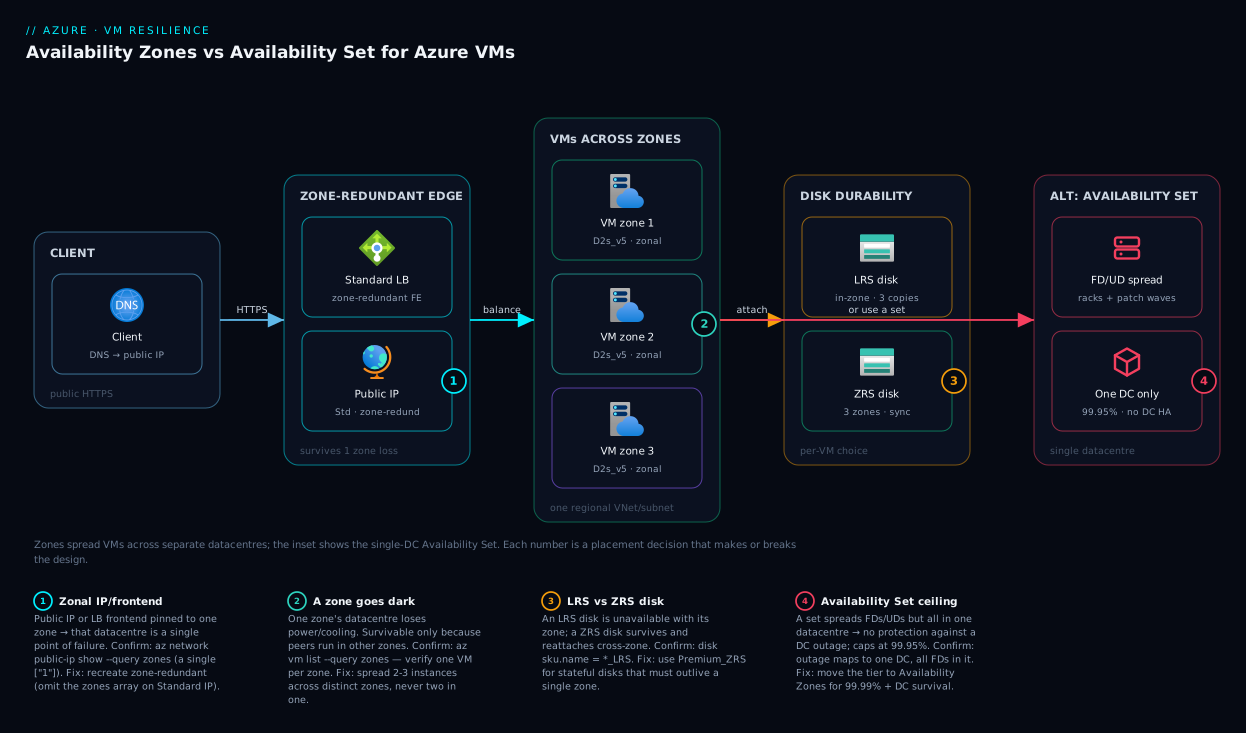
The reference topology is a two-zone (here, three-zone) web tier fronted by a zone-redundant Standard Load Balancer. Trace the request left to right: a client resolves the app’s public DNS to a zone-redundant public IP attached to a Standard Load Balancer frontend — because the IP and frontend are zone-redundant, the loss of any single zone’s datacentre does not remove the entry point. The load balancer health-probes the backend pool and distributes traffic across VM instances pinned one-per-zone (vm-z1 in zone 1, vm-z2 in zone 2, vm-z3 in zone 3); each VM is zonal and shares only its own zone’s fate. The VMs sit in one regional VNet/subnet that spans every zone, so the network plumbing never fragments. Each VM’s managed disks are either LRS (in-zone, fine because a peer covers HA) or ZRS (replicated across zones if the disk itself must survive a zone loss). For comparison the diagram also shows the Availability Set alternative — multiple VMs spread over fault and update domains but confined to a single datacentre — making vivid why a set survives a rack failure yet a datacentre outage takes it whole.
The numbered badges mark the four failure points that decide the design: the public IP / LB frontend if it is accidentally zonal instead of zone-redundant (one zone becomes a single point of failure); a backend VM’s zone going dark (survivable only because peers live in other zones); the Availability Set’s single-datacentre ceiling (no protection against a DC outage); and the disk-redundancy choice (an LRS disk is unavailable with its zone, a ZRS disk is not). The legend narrates each as symptom → how to confirm → fix.
Real-world scenario
Northwind Retail runs a customer-facing order API on Azure IaaS — a fixed pair of Linux VMs behind a load balancer in eastus, plus a self-hosted PostgreSQL VM. It was deployed two years ago by a contractor who created two web VMs and a Basic Load Balancer, with no Availability Set and no zone assignment. The business signed a customer contract promising 99.95% availability. Nobody had verified the architecture matched the promise.
The incident: during a routine Azure planned-maintenance window, both web VMs rebooted within the same five-minute window. The “redundant” pair went fully offline for eight minutes; the order API returned 503 to every customer. The post-incident review pulled the instance view and found the smoking gun — both VMs had been scheduled into the same update domain because they were never placed in an Availability Set, so Azure had no constraint keeping them in different maintenance waves. Worse, az vm get-instance-view showed both in the same fault domain too: a single rack failure would have done the same. The 99.95% promise had zero architectural backing — the deployment’s real SLA was that of a single instance at best, and arguably worse since two un-separated VMs can fail together.
The remediation, executed over two maintenance windows: the team rebuilt the web tier across three Availability Zones (one VM per zone), keeping the existing OS disks by detaching and reattaching them to the new zonal VMs. They replaced the Basic Load Balancer with a Standard Load Balancer carrying a zone-redundant public IP, and immediately hit the “secure by default” surprise — the app was unreachable until they added an inbound NSG rule for port 443 on the backend subnet. They moved the PostgreSQL VM’s data disk to Premium_ZRS so the database disk could survive a zone loss and be reattached to a standby VM in another zone, and documented a runbook for that failover. Finally they re-baselined the composite SLA: web tier 99.99%, Standard LB 99.99%, PostgreSQL VM 99.99% (now zonal-resilient via ZRS + standby), Key Vault 99.99% — a product comfortably above the contracted 99.95%, with the architecture to back it.
The lessons Northwind took away: “two VMs” is not redundancy unless Azure is constrained to separate them; the cheapest verification in the world is az vm get-instance-view reading platformFaultDomain and platformUpdateDomain; and the SLA you promise must be the one whose prerequisite you can prove you met. The inter-zone egress added roughly ₹4,000–6,000/month to the bill — a rounding error against the contractual penalty a single un-separated outage would have triggered.
Advantages and disadvantages
Each construct earns its place; neither is universally right.
| Advantages | Disadvantages | |
|---|---|---|
| Availability Set | Free; works in every region; lowest inter-VM latency; no inter-instance egress cost; protects against rack failure + planned patching | Single-datacentre blast radius (no DC-outage protection); caps at 99.95%; immutable membership; legacy-feeling vs VMSS/zones |
| Availability Zones | Survives a datacentre outage; 99.99% SLA; pairs with zone-redundant LB/IP/disks; the modern resilience model | Only in zone-enabled regions; inter-zone egress charges; slightly higher latency; immutable zone; more moving parts (must make IP/LB zone-redundant) |
When each matters: choose an Availability Set when your region has no zones, when inter-VM latency must be absolutely minimal (and you accept single-DC risk), when internal traffic volume between instances is large enough that inter-zone egress would hurt, or when 99.95% genuinely meets the business need. Choose Availability Zones when the workload is production-critical and the business needs the 99.99% SLA, when surviving a single-datacentre failure is a stated requirement, or when you are already building zone-redundant data and front-end layers and want the compute tier to match. When you need both scale and resilience with the least management, skip standalone VMs entirely and use a zone-spanning VMSS.
Hands-on lab
This lab builds a minimal zone-redundant web tier and proves the placement. It uses small B-series VMs to stay cheap; tear it down at the end to avoid charges. Run in Cloud Shell (bash).
1. Set variables and resource group.
RG=rg-az-lab; LOC=eastus
az group create --name $RG --location $LOC
2. Create a regional VNet and subnet (spans all zones).
az network vnet create --resource-group $RG --name vnet-lab \
  --address-prefix 10.20.0.0/16 \
  --subnet-name snet-web --subnet-prefix 10.20.1.0/24
3. Create a zone-redundant Standard public IP and Standard Load Balancer.
# No --zone on the IP → zone-redundant frontend
az network public-ip create --resource-group $RG --name pip-lab \
  --sku Standard --allocation-method Static
az network lb create --resource-group $RG --name lb-lab --sku Standard \
  --public-ip-address pip-lab --frontend-ip-name fe --backend-pool-name be
# Health probe + rule for HTTP/80
az network lb probe create --resource-group $RG --lb-name lb-lab \
  --name probe80 --protocol Tcp --port 80
az network lb rule create --resource-group $RG --lb-name lb-lab --name rule80 \
  --protocol Tcp --frontend-port 80 --backend-port 80 \
  --frontend-ip-name fe --backend-pool-name be --probe-name probe80
4. Create one VM per zone, into the backend pool. (Expected: each az vm create returns a JSON block with "zones": ["<n>"].)
for z in 1 2 3; do
  az vm create --resource-group $RG --name vm-z$z \
    --image Ubuntu2204 --size Standard_B1s --zone $z \
    --vnet-name vnet-lab --subnet snet-web \
    --public-ip-address "" --nsg "" \
    --admin-username azureuser --generate-ssh-keys \
    --custom-data <(echo '#cloud-config
package_update: true
runcmd:
  - apt-get install -y nginx
  - echo "served from $(hostname)" > /var/www/html/index.html')
done
5. Add an NSG rule for port 80 (Standard LB is closed by default — this is the classic gotcha).
az network nsg create --resource-group $RG --name nsg-web
az network nsg rule create --resource-group $RG --nsg-name nsg-web \
  --name allow-http --priority 100 --protocol Tcp \
  --destination-port-ranges 80 --access Allow --direction Inbound
az network vnet subnet update --resource-group $RG --vnet-name vnet-lab \
  --name snet-web --network-security-group nsg-web
6. Attach the VMs’ NICs to the LB backend pool, then verify zone placement. (Expected output: a table showing vm-z1 → 1, vm-z2 → 2, vm-z3 → 3.)
for z in 1 2 3; do
  NIC=$(az vm show -g $RG -n vm-z$z --query "networkProfile.networkInterfaces[0].id" -o tsv)
  IPCFG=$(az network nic show --ids $NIC --query "ipConfigurations[0].name" -o tsv)
  az network nic ip-config address-pool add --nic-name $(basename $NIC) -g $RG \
    --ip-config-name $IPCFG --lb-name lb-lab --address-pool be
done

# Prove each VM is in a distinct zone
az vm list -g $RG --query "[].{name:name, zone:zones[0]}" -o table
7. Test resilience by stopping one zone’s VM and confirming the LB still serves (the probe drops the stopped instance, traffic flows to the other two zones).
IP=$(az network public-ip show -g $RG -n pip-lab --query ipAddress -o tsv)
curl http://$IP    # served from one of the VMs
az vm stop -g $RG -n vm-z1    # simulate losing zone 1's instance
sleep 30
curl http://$IP    # still served, now from vm-z2 or vm-z3
8. Tear down.
az group delete --name $RG --yes --no-wait
What you proved: VMs land in distinct zones; a zone-redundant Standard LB keeps serving when one zone’s instance is gone; and the “secure by default” NSG requirement is real. Swap step 4 for --availability-set to see the Availability-Set path and read platformFaultDomain from the instance view instead.
Common mistakes & troubleshooting
The failure modes below are the ones that actually cause incidents, each with the exact way to confirm and fix it.
| # | Symptom | Root cause | How to confirm | Fix |
|---|---|---|---|---|
| 1 | “Redundant” VMs both go down in a patch window | No Availability Set/zone → same UD | az vm get-instance-view shows same platformUpdateDomain |
Rebuild VMs into an Availability Set or across zones |
| 2 | Both VMs die in a single rack failure | Both in the same fault domain | Instance view shows same platformFaultDomain |
Spread across FDs (set) or zones |
| 3 | Whole tier down in a datacentre outage despite an Availability Set | Set is single-datacentre | Outage maps to one DC; all FDs were in it | Move the tier to Availability Zones |
| 4 | App unreachable after moving to Standard LB | Standard LB is closed by default; no NSG rule | No inbound NSG rule for the app port | Add an inbound NSG allow rule on the backend subnet/NIC |
| 5 | One zone’s failure takes the whole site down | Public IP / LB frontend is zonal, not zone-redundant | IP zones array names one zone |
Recreate IP/frontend as zone-redundant (omit zones) |
| 6 | Cannot add an existing VM to an Availability Set | Membership is set-at-create, immutable | az vm update --set ...availabilitySet errors |
Delete + recreate the VM into the set; reattach disks |
| 7 | Cannot move a running VM into a zone | Zone is set-at-create, immutable | No --zone update path exists |
Recreate the VM with --zone; reattach OS/data disks |
| 8 | Three VMs in a 2-FD set, two share a rack | VM count not a multiple of FD count | Instance view: two VMs same platformFaultDomain |
Use 3 FDs, or accept/plan the uneven spread |
| 9 | Surprise high bill on a “small” app | Inter-zone egress + ZRS disk costs | Cost analysis shows inter-zone data transfer | Use an Availability Set if DC-outage HA isn’t required |
| 10 | Stateful VM can’t fail over to another zone | OS/data disk is LRS, stuck in its zone | Disk sku.name = Premium_LRS/Standard_LRS |
Use ZRS disks; or replicate data at the app layer |
| 11 | Region has no zone option in the portal | Region is not zone-enabled | az vm list-skus --zone returns empty for the region |
Use an Availability Set, or pick a zone-enabled region |
| 12 | VMSS instances all in one zone | zones not specified on the scale set |
Scale set zones is empty |
Recreate VMSS with zones: [1,2,3] |
A few of these deserve the exact confirm command. To read the real placement of a standalone VM:
az vm get-instance-view --name vm-web-0 --resource-group rg-web-prod \
  --query "{fd:instanceView.platformFaultDomain, ud:instanceView.platformUpdateDomain}"
To check whether a region even offers zones for your VM size:
# Empty 'zones' for the SKU in this region = no zone support there
az vm list-skus --location eastus --size Standard_D2s_v5 \
  --query "[].locationInfo[].zones" -o json
To confirm a public IP is zone-redundant (the array should be absent or all three zones, not a single zone):
az network public-ip show -g rg-web-prod -n pip-web --query "zones" -o json
# null / [] / ["1","2","3"] = zone-redundant ; ["1"] = zonal (single-zone risk)
And the decision table for “I’m seeing 5xx during maintenance, what now”:
| If you see… | It’s probably… | Do this |
|---|---|---|
| Both VMs reboot together in a patch window | Same update domain (no set/zones) | Rebuild into a set or across zones |
| Both VMs down on a localised hardware fault | Same fault domain | Spread across FDs or zones |
| Whole region-local tier down in a DC event | Availability Set (single-DC) limit | Move to zones |
| Outage despite zones, entry point gone | Zonal IP/LB frontend | Make the frontend zone-redundant |
| App dead right after a Standard-LB cutover | Missing NSG inbound rule | Add the allow rule |
Best practices
- Decide resilience at design time, not in production. Availability Set membership and zone are immutable; bake the choice into your IaC before the first VM exists.
- Prefer Availability Zones for production in zone-enabled regions — the extra nine (99.99% vs 99.95%) and datacentre-outage survival are usually worth the modest egress cost.
- Always run two or more instances. A single VM caps you at 99.9% no matter how premium the disk; only multiple instances unlock 99.95%/99.99%.
- Make the front end zone-redundant. A zonal public IP or LB frontend in one zone silently defeats a zone-spread backend — omit the
zonesarray on Standard public IPs for zone redundancy. - Use the Standard Load Balancer for any zonal design, and remember it is closed by default — add the NSG inbound rule for your app port.
- Match VM count to fault-domain count. Make instances a clean multiple of FDs so no rack failure takes a disproportionate share.
- Use ZRS disks for stateful VMs that must survive a zone loss or fail over cross-zone; LRS is fine for stateless tiers with a peer in another zone.
- Reach for a zone-spanning VMSS for HA at scale rather than hand-managing many standalone VMs in sets — it handles zonal and fault-domain spread for you.
- Verify, don’t assume. After every deploy, read
platformFaultDomain/platformUpdateDomain(sets) orzones(zonal) to confirm the spread is real. - Compute the composite SLA. Multiply every tier’s SLA on the request path; the weakest single-instance dependency caps the whole promise.
- Don’t confuse resilience with DR. Zones survive a datacentre; they do not survive a region. Add multi-region/Site Recovery for region-level disasters.
- Budget inter-zone egress for chatty tiers; if internal traffic is heavy and DC-outage HA isn’t required, an Availability Set may be cheaper and simpler.
Security notes
Resilience and security intersect at a few specific points. The Standard Load Balancer’s “secure by default” posture is a security win, not just a gotcha — it forces explicit NSG rules instead of an implicitly open frontend, so use the required rule to scope inbound access to exactly the ports and sources you intend (least-privilege at the edge). Spreading VMs across zones does not change your identity model: use a managed identity (system- or user-assigned) on each VM to reach Key Vault, Storage and other services without embedded credentials — the identity follows the VM regardless of its zone. Encryption is likewise orthogonal to the redundancy choice — managed disks (LRS or ZRS) are encrypted at rest by default with platform-managed keys, and you can layer customer-managed keys (CMK) via a Disk Encryption Set. Finally, keep the footprint private: VMs in a zonal HA tier belong on private subnets with the zone-redundant load balancer as the only public entry point, and outbound traffic routed deliberately (NAT Gateway or LB outbound rules) rather than a public IP on every VM — which widens the attack surface without adding resilience.
Cost & sizing
The cost of resilience comes from four levers, and only one of them is the VM count you’d expect.
| Cost driver | What it costs | Set vs Zones | How to control |
|---|---|---|---|
| VM instances | Per-VM hourly (size × count × hours) | Same for both | Right-size SKU; use B-series for bursty dev; reserve for prod |
| Availability Set | Free | Set only | No cost — the spread logic is free |
| Inter-zone data transfer | Per-GB egress between zones | Zones only | Minimise cross-zone chatter; co-locate chatty tiers |
| ZRS managed disks | Higher per-GB than LRS | Zones (optional) | Use ZRS only where the disk must survive a zone |
| Standard Load Balancer | Hourly + per-rule + processed-GB | Both (required) | One LB fronts many backends; consolidate |
| Standard public IP | Small hourly per IP | Both | One zone-redundant IP, not one per VM |
The non-obvious line is inter-zone data transfer. Traffic between zones in the same region is charged per GB in both directions, while traffic between VMs in the same Availability Set (same datacentre) is free. For a web tier that mostly talks outbound to clients, this is negligible. For a chatty internal mesh — app servers constantly calling a database across zones — it can become a real monthly figure, and it is the main reason a latency-sensitive, high-internal-traffic workload might deliberately choose an Availability Set (single DC, free internal traffic) over zones.
Rough sizing for a two-tier production web app: a pair of Standard_D2s_v5 VMs runs on the order of ₹13,000–17,000/month each before discounts (USD ~$160–200), so compute dominates regardless of resilience model. Zones add a Standard Load Balancer (roughly ₹1,800–2,500/month base plus processed-GB) and inter-zone egress (workload-dependent, often ₹3,000–8,000/month for a moderately chatty tier). Reserved Instances (1- or 3-year) cut the VM line by 40–60% — the single biggest lever, usually saving more than the entire zone-egress cost it enables. There is no free tier for production VM HA — the free account’s limited B1s hours are for learning — so plan the steady-state bill against the SLA the business actually needs, not the highest one available.
Interview & exam questions
1. What is the difference between a fault domain and an update domain? A fault domain is a set of hardware sharing a single power source and network switch (a rack) — spreading VMs across FDs protects against unplanned hardware failure. An update domain is a logical group Azure reboots together during planned maintenance — spreading across UDs ensures maintenance never reboots your whole tier at once. Both live within one datacentre.
2. What does an Availability Set protect against, and what is it powerless against? It protects against a single-rack hardware failure (via fault domains) and against planned-maintenance reboots hitting everything at once (via update domains). It is powerless against a whole-datacentre outage, because every fault and update domain in the set lives in the same datacentre.
3. What SLA do you get for two VMs in an Availability Set versus across Availability Zones? 99.95% for two or more instances in the same Availability Set; 99.99% for two or more instances spread across two or more Availability Zones in the same region. That is roughly 4.4 hours versus 52 minutes of permitted downtime per year. (Maps to AZ-104 / AZ-305.)
4. Can you add an existing VM to an Availability Set or move it into a zone? No. Both Availability Set membership and zone assignment are set at VM create time and are immutable. To change either you delete and recreate the VM, optionally detaching and reattaching the OS and data disks to preserve state.
5. Why must a zone-spread VM tier use a zone-redundant public IP and load balancer? Because a VM is zonal — it survives a zone loss only because peers exist in other zones. If the public IP or load-balancer frontend is zonal (pinned to one zone), that one zone’s datacentre becomes a single point of failure that defeats the entire backend spread. The frontend must be zone-redundant.
6. What is the difference between a zonal and a zone-redundant resource? A zonal resource is pinned to one specific zone and shares that zone’s fate (a VM, a zonal disk, a zonal IP). A zone-redundant resource is automatically spread across all zones with no single-zone dependency (a Standard LB frontend, a zone-redundant public IP, a ZRS disk).
7. When would you choose an Availability Set over Availability Zones? When the region has no zones; when inter-VM latency must be absolutely minimal and you accept single-datacentre risk; when heavy internal traffic between instances would make inter-zone egress costly; or when 99.95% genuinely meets the business requirement and you want a simpler, cheaper footprint.
8. What is the “secure by default” behaviour of the Standard Load Balancer? Unlike the Basic Load Balancer (which was open), the Standard Load Balancer blocks all inbound traffic unless an NSG explicitly allows it. After migrating to Standard, apps often appear down until an inbound NSG rule is added for the app’s port — this is the most common cutover surprise.
9. What is LRS versus ZRS for managed disks, and when does ZRS matter? LRS keeps three disk copies in one datacentre/zone; if that zone fails, the disk is unavailable. ZRS replicates synchronously across three zones, so the disk survives a zone outage and can be reattached to a VM in another zone. ZRS matters for stateful VMs whose disk must survive a single-zone failure or fail over cross-zone.
10. How do you reconcile a proximity placement group with zone resilience? A PPG forces VMs physically close together for the lowest inter-VM latency, which is the opposite of spreading them across zones for resilience. You generally pick one: lowest latency (PPG, single DC) or widest resilience (zones). A PPG can combine with an Availability Set (close and FD/UD-spread) but still within one datacentre.
11. Why isn’t “two VMs” automatically highly available? Without an Availability Set or zone assignment, Azure has no constraint forcing the two VMs apart — they can land in the same fault domain (one rack failure kills both) or the same update domain (one patch wave reboots both). HA requires Azure to be constrained to separate the instances.
12. How do you calculate an application’s real SLA across tiers? Multiply the SLA of every component on the request path (load balancer × VM tier × database × dependencies). The composite is always lower than the smallest single number, so a single-instance dependency anywhere caps the whole promise — architecting just the VM tier to 99.99% is necessary but not sufficient.
Quick check
- Which domain type protects against planned maintenance reboots, and which against unplanned rack failures?
- What exact SLA do you get for two VMs across two Availability Zones, and what for two VMs in one Availability Set?
- You spread VMs across zones 1, 2, 3 but the whole site goes down when zone 1 fails. What is the most likely cause?
- Can you move a running VM from “no zone” into zone 2 without recreating it?
- Why might a chatty internal tier deliberately choose an Availability Set over Availability Zones?
Answers
- Update domains protect against planned-maintenance reboots (Azure reboots one UD at a time); fault domains protect against unplanned hardware/rack failures (separate power and network per FD).
- 99.99% for two VMs across two or more Availability Zones; 99.95% for two VMs in the same Availability Set (~52 minutes vs ~4.4 hours of annual downtime).
- The public IP or load-balancer frontend is zonal (pinned to zone 1) instead of zone-redundant, so zone 1’s datacentre is a single point of failure for the entry point despite the zone-spread backend. Recreate the frontend as zone-redundant.
- No. Zone assignment is immutable at create time; you must delete and recreate the VM with
--zone, optionally reattaching the OS/data disks. - Because inter-zone data transfer is charged per GB while traffic between VMs in the same Availability Set (same datacentre) is free, and an Availability Set gives the lowest inter-VM latency — worth it when internal traffic is heavy and surviving a single-datacentre outage is not a requirement.
Glossary
- Region — A metro-area collection of Azure datacentres (e.g.
eastus). Zones live inside a region; disaster recovery crosses regions. - Availability Zone (AZ) — A physically separate datacentre group within a region with independent power, cooling and networking; numbered 1/2/3 per subscription.
- Availability Set (AS) — A logical grouping that spreads VMs across fault and update domains within a single datacentre.
- Fault domain (FD) — A rack-equivalent unit sharing one power source and network switch; isolates unplanned hardware failure.
- Update domain (UD) — A logical group Azure reboots together during planned maintenance; isolates planned reboots.
- Zonal resource — A resource pinned to one specific zone (a VM, a zonal disk, a zonal public IP), sharing that zone’s fate.
- Zone-redundant resource — A resource automatically spread across all zones with no single-zone dependency (Standard LB frontend, zone-redundant public IP, ZRS disk).
- LRS (Locally Redundant Storage) — Three disk/data copies in one datacentre/zone; does not survive a zone loss.
- ZRS (Zone-Redundant Storage) — Three copies synchronously replicated across three zones; survives a zone loss.
- Proximity Placement Group (PPG) — A constraint that allocates VMs physically close together for lowest latency, trading off resilience spread.
- Virtual Machine Scale Set (VMSS) — A managed fleet of identical VMs that is zone-aware and handles fault-domain spread automatically.
- Standard Load Balancer — The zone-aware, SLA-backed layer-4 load balancer; closed by default (requires NSG rules).
- SLA (Service Level Agreement) — The committed availability percentage for a given deployment shape, each tier with its own prerequisite.
- Composite SLA — The end-to-end availability of an app, computed as the product of every tier’s SLA on the request path.
- Aligned Availability Set — The managed-disk-aware Availability Set SKU that aligns disk fault domains with VM fault domains (vs legacy Classic).
Next steps
- Ground the regional and zonal vocabulary with Azure Regions and Availability Zones: Designing for Resilience.
- Extend resilience to the disk and storage layer with Azure Storage Redundancy Decoded: LRS vs ZRS vs GRS vs RA-GRS.
- Make the front end zone-aware by reading Azure Load Balancer vs Application Gateway: Picking the Right Traffic Manager.
- Plan for the disaster zones cannot survive with BCDR Foundations on Azure: RTO, RPO, and the Resilience Spectrum and Azure Multi-Region Active-Active Architecture.
- Choose the right VM size for each zonal instance with Decoding Azure VM Series: D, E, F, L, N and M Families.