For thirty years, enterprise security was built like a castle: a hard outer wall — the corporate firewall — and a soft, trusting interior. Once you were “inside the network”, you were assumed to be friendly. That model died the moment laptops left the building, applications moved to SaaS, and attackers learned that one phished password drops them behind the wall, where nothing is checked again. Zero Trust is the security model that replaces the castle. Its premise is brutal and simple: there is no trusted interior. Every request — from any user, on any device, to any resource — is treated as if it originated on an open, hostile network and must prove itself, every time.
This lesson teaches Zero Trust the way a cloud architect actually applies it: as a set of three principles enforced across seven defence layers, each backed by specific Azure services. You will learn what Zero Trust means (not just the buzzword), how it maps onto identity, devices, network, application, workload, data, and your security operations centre (SOC), and how the Microsoft Cloud Security Benchmark (MCSB) turns the philosophy into a checklist you can audit against. By the end you will be able to look at any Azure estate and name, layer by layer, what is protecting it — and what is missing. This is core ground for both SC-900 (security fundamentals) and AZ-500 (the Azure security engineer exam).
Learning objectives
By the end of this lesson you can:
- State the three Zero Trust principles — verify explicitly, use least-privilege access, assume breach — and explain what each one changes about how you build systems.
- Describe the seven security layers (identity, endpoint/device, network, application, workload, data, monitoring/SOC) and what each defends against.
- Map the right Azure security service to each layer: Entra ID / Conditional Access / PIM, Intune & Defender for Endpoint, NSG / Azure Firewall / Private Link, WAF, Defender for Cloud, Key Vault & encryption, and Microsoft Sentinel.
- Explain what the Microsoft Cloud Security Benchmark is and how it relates to Defender for Cloud’s Secure Score.
- Reason about defence in depth — why no single layer is sufficient, and how layers compensate for one another when one fails.
- Run a hands-on check that surfaces your environment’s Secure Score and top security recommendations from the CLI.
Prerequisites & where this fits
You should be comfortable with Azure’s basic building blocks — subscriptions and resource groups, Microsoft Entra ID and RBAC, and virtual networks — all covered earlier in this course. You do not need prior security experience; every term is defined the first time it appears. This is Lesson G5, in the Security module of the Azure Zero-to-Hero course. It is the conceptual keystone for everything security-related that follows: where earlier lessons taught individual services, this one gives you the framework that tells you why each service exists and where it sits. The very next lesson, on Key Vault and workload identity, is the data- and secrets-layer in action.
Core concepts: what Zero Trust actually is
Zero Trust is not a product you buy or a single box you tick. Microsoft, building on the original NIST framing (SP 800-207), defines it as a security strategy grounded in three principles. Internalise these, because every design decision below flows from them.
| Principle | What it means in practice | The mindset shift |
|---|---|---|
| Verify explicitly | Authenticate and authorise every request using all available signals — identity, device health, location, resource sensitivity, real-time risk — not just “are you on the corporate network?” | Trust is earned per request, never granted by location. |
| Use least-privilege access | Give each identity the minimum permissions, for the shortest time, scoped as narrowly as possible. Use just-in-time and just-enough access, and adaptive policies. | Standing, broad admin rights are a liability, not a convenience. |
| Assume breach | Design as if an attacker is already inside. Segment to limit blast radius, encrypt end to end, and instrument everything so you can detect and respond. | The question is not if but when — so contain and observe. |
Two further ideas make these workable:
- Defence in depth. No single control is perfect, so you stack independent layers. If MFA is bypassed, device compliance still gates access; if the network is breached, data is still encrypted; if a workload is compromised, the SOC still sees the anomaly. Each layer assumes the one in front of it might fail. This is why Zero Trust is inherently multi-layer — the title of this lesson.
- The blast radius. When (not if) something is compromised, how much can the attacker reach? Least privilege and segmentation exist to make that answer “very little”. A flat network with a global-admin service account has an enormous blast radius; a micro-segmented estate with scoped, just-in-time identities has a tiny one.
A note on terminology. People say “Zero Trust” to mean three different things: the strategy (the three principles), the architecture (the layered design below), and sometimes a specific product like Zero Trust Network Access (ZTNA). In this lesson, “Zero Trust” means the strategy and the architecture; products are named explicitly.
The seven layers of the Zero Trust model
Microsoft’s Zero Trust architecture organises defences into a set of interlocking domains. Throughout, identity is the new perimeter — it is the connective tissue that every other layer leans on, because every request begins with who (or what) is asking. Here are the seven layers, what each defends, and the primary failure each one is designed to stop.
| # | Layer | Defends | Primary threat it stops |
|---|---|---|---|
| 1 | Identity | Who/what is requesting access | Credential theft, phishing, password spray |
| 2 | Endpoint / device | The device making the request | Compromised, jailbroken or non-compliant devices |
| 3 | Network | Traffic between resources | Lateral movement, unwanted exposure |
| 4 | Application | The apps users and services consume | App-layer attacks (OWASP), shadow IT |
| 5 | Workload / infrastructure | VMs, containers, PaaS, IaC | Misconfiguration, vulnerable images, drift |
| 6 | Data | The information itself | Exfiltration, leakage, unauthorised reads |
| 7 | Monitoring / SOC | Visibility across all the above | Undetected breach, slow response |
A useful way to picture it: layers 1–6 are concentric rings of prevention and containment around your data; layer 7 wraps the whole thing in detection and response. Get a request through identity, and it still faces the device check; past the device, the network; and so on inward — while the SOC watches every step. Let us walk each layer and the Azure services that implement it.
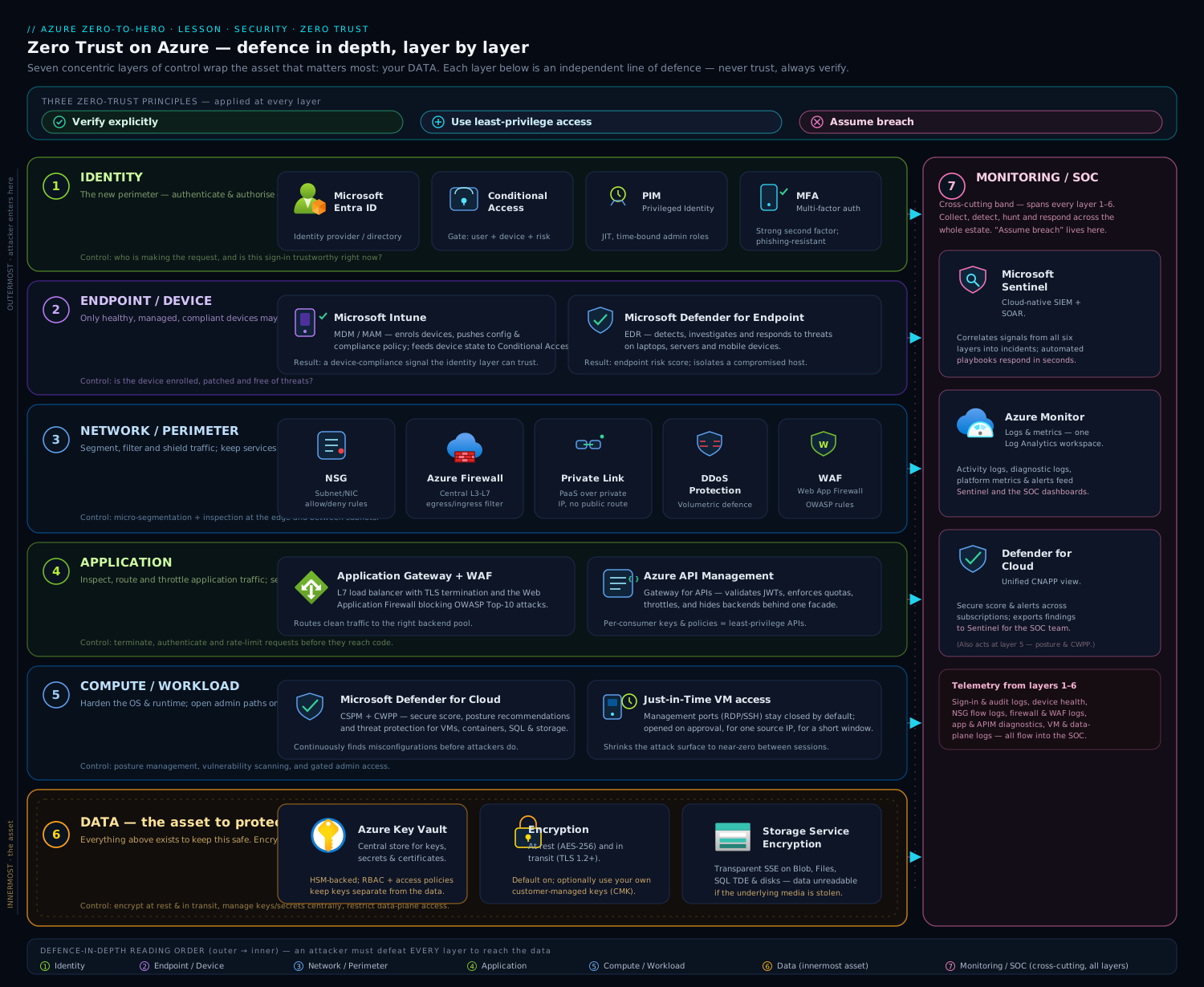
The diagram above shows the seven layers as nested rings around your data, with the Azure service that owns each layer labelled on its ring and the SOC (Microsoft Sentinel) drawing telemetry from all of them — read it from the outside in to follow a request’s journey, or from the centre out to see how data is protected in depth.
Layer 1 — Identity: the new perimeter
Because every request starts with an identity, this is the layer that matters most. If you secure only one layer well, secure this one.
Microsoft Entra ID is the identity provider: it authenticates users, groups, service principals, and managed identities, and issues the tokens that everything else trusts. (We covered Entra in depth in Microsoft Entra ID fundamentals and Entra RBAC & governance.) On top of Entra, three capabilities deliver the Zero Trust principles:
- Conditional Access (CA) is the policy engine that verifies explicitly. Every sign-in is evaluated against a set of signals — who the user is, the device’s compliance state, the location/IP, the application requested, and the real-time sign-in risk computed by Entra ID Protection — and CA returns a decision: allow, require multi-factor authentication (MFA), require a compliant or hybrid-joined device, force a password change, limit the session, or block outright. This is where “are you on the corporate network?” is replaced by “prove it, with every signal I have.” A baseline Zero Trust posture requires phishing-resistant MFA for all users and blocks legacy authentication protocols (which cannot do MFA and are a favourite of password-spray attacks).
- Privileged Identity Management (PIM) delivers least privilege for admins. Instead of standing Owner or Global Administrator rights, privileged roles are made eligible: an admin must activate the role just-in-time, often with justification, approval, and MFA, for a bounded window (say, four hours), after which it expires automatically. This shrinks the window an attacker can abuse a privileged account from “always” to “rarely”. See PIM just-in-time elevation in the governance lesson.
- Entra ID Protection supplies the risk signals — detecting leaked credentials, impossible-travel, anonymous-IP and malware-linked sign-ins — that Conditional Access consumes to make adaptive, real-time decisions. This is the “verify explicitly using real-time signals” principle made concrete.
The Zero Trust instinct here: assign roles to groups, scope them narrowly, make privilege temporary, and gate every sign-in with adaptive policy.
Layer 2 — Endpoint and device
A verified user on a compromised laptop is still a breach. The device is part of the request, so its health and compliance become an access signal.
- Microsoft Intune is the mobile device and application management (MDM/MAM) service. It enforces device compliance policies — disk encryption on, OS patched, no jailbreak, antivirus healthy — and reports each device as compliant or non-compliant to Entra. Conditional Access then consumes that state: require a compliant device becomes a grant control, so a non-compliant phone simply cannot reach corporate data. Intune also enables app protection policies that wrap corporate data inside apps (preventing copy-paste or “save as” to personal storage) even on unmanaged devices.
- Microsoft Defender for Endpoint (MDE) is endpoint detection and response (EDR): it watches process, file, and network behaviour on the device, blocks malware, and raises alerts on suspicious activity. Critically, MDE feeds a device risk score back into the loop, so a device showing active threats can be marked at-risk and have its access tightened automatically.
Together these close the assume breach gap on the endpoint: even a legitimate user is continuously re-evaluated based on the device’s live posture.
Layer 3 — Network: segment and never trust the wire
Zero Trust does not abolish the network layer — it inverts its assumption. The network is treated as hostile, traffic is micro-segmented, and resources are exposed as narrowly as possible. (Foundations are in the VNet deep dive and private endpoints at scale.)
| Service | Role in the network layer | Zero Trust contribution |
|---|---|---|
| Network Security Groups (NSGs) | Stateful allow/deny rules on subnets and NICs, by IP, port, protocol, and service tag | Micro-segmentation — default-deny between tiers limits lateral movement |
| Azure Firewall | Managed, stateful L3–L7 firewall with FQDN filtering, threat intel, and forced tunnelling | Central egress control and inspection in a hub-spoke topology |
| Azure Private Link / Private Endpoints | Brings PaaS services (Storage, SQL, Key Vault) onto your private VNet via a private IP | Removes public exposure entirely — the service is unreachable from the internet |
| Azure DDoS Protection | Absorbs volumetric attacks at the network edge | Availability under attack |
| Azure Bastion | Browser-based RDP/SSH with no public IP on the VM | Eliminates exposed management ports — a top breach vector |
The Zero Trust pattern is hub-spoke with forced tunnelling: spokes (workloads) route all egress through a hub that hosts Azure Firewall, while inbound PaaS access uses Private Link so nothing sensitive listens on a public IP. Default-deny NSGs between tiers mean that compromising the web tier does not hand the attacker the database. We cover the firewall and routing patterns in the networking module, and Azure Bastion for jump-free admin access.
Layer 4 — Application
Applications are where users and attackers actually meet, so this layer hardens the front door of your apps and brings shadow IT under control.
- Web Application Firewall (WAF) — available on Azure Application Gateway (regional) and Azure Front Door (global edge) — inspects HTTP/S traffic and blocks the OWASP Top 10 (SQL injection, cross-site scripting, and friends) via managed rule sets, plus custom and rate-limit rules. It is the application-layer complement to the network firewall: Azure Firewall guards the network, WAF guards the HTTP request. (See App Gateway WAF & end-to-end TLS.)
- Conditional Access (again) governs access to applications — both Microsoft and your own apps registered in Entra — so the same adaptive identity policy that protects sign-in protects each app.
- Microsoft Defender for Cloud Apps (a Cloud Access Security Broker, CASB) discovers shadow IT — the unsanctioned SaaS apps employees use — and lets you assess and govern them, applying session controls to risky usage.
The principle in play: verify explicitly at the app boundary, and assume the request payload itself may be malicious.
Layer 5 — Workload and infrastructure
This layer protects what runs your code: VMs, containers and AKS, App Service, databases, and the infrastructure-as-code (IaC) that provisions them. The dominant risk here is not a clever exploit but misconfiguration — a storage account left public, a VM with an open SSH port, an unpatched image.
The hub for this layer is Microsoft Defender for Cloud (MDC), which has two complementary halves:
- Cloud Security Posture Management (CSPM) — continuously assesses your resources against best-practice controls and produces a Secure Score plus prioritised, actionable recommendations (“encrypt this disk”, “restrict this NSG”, “enable MFA for these admins”). The free Foundational CSPM tier gives you the score and recommendations across the estate; the paid Defender CSPM adds attack-path analysis, agentless vulnerability scanning, and a cloud security graph.
- Cloud Workload Protection (CWP) — the paid Defender plans (Defender for Servers, for Containers, for Storage, for SQL, for App Service, for Key Vault, and more). These add runtime threat detection: a Defender-for-Servers agent raises alerts on suspicious process execution; Defender for Storage flags malware uploads and anomalous access; Defender for Containers scans images in the registry and watches the cluster at runtime.
Defender for Cloud is also where the Microsoft Cloud Security Benchmark lives as the default compliance standard — more on that next. Posture management prevents (fix it before it is exploited); workload protection detects (catch it if it is). Both embody assume breach at the infrastructure level. Shift-left further with Azure Policy as code so non-compliant resources are blocked at deploy time, and for hybrid/multi-cloud servers, Azure Arc projects the same controls onto machines outside Azure.
Layer 6 — Data: the thing you are actually protecting
Every other layer exists to protect this one. If an attacker reaches the data but it is encrypted, scoped, and labelled, the breach is contained.
- Encryption at rest is on by default for Azure Storage and managed disks using service-managed keys (SSE). For regulatory control you can supply customer-managed keys (CMK) held in Azure Key Vault (or Managed HSM), which lets you control rotation and revocation — revoke the key and the data is unreadable.
- Encryption in transit uses TLS everywhere; enforce a minimum TLS version and Secure transfer required on storage.
- Azure Key Vault is the secrets, keys, and certificates store — the heart of this layer. Apps fetch secrets at runtime using a managed identity instead of embedding credentials, and Key Vault audits every access. This is exactly the subject of the next lesson.
- Data classification and protection — Microsoft Purview Information Protection discovers and labels sensitive data (PII, financial, health) and can encrypt or restrict it based on label, so protection travels with the data wherever it goes.
The Zero Trust instinct: encrypt everything, control the keys, eliminate stored secrets, and know where your sensitive data is. The next lesson, Key Vault & workload identity, is this layer in practice.
Layer 7 — Monitoring and the SOC: assume breach, made operational
The first six layers try to prevent and contain. This one accepts that something will get through and ensures you see it and respond. It is the operational embodiment of assume breach.
- Microsoft Sentinel is Azure’s cloud-native SIEM (security information and event management) and SOAR (security orchestration, automation and response). It ingests logs and alerts from every layer above — Entra sign-ins, NSG/firewall flow logs, Defender for Cloud and Defender for Endpoint alerts, app and platform logs — into a Log Analytics workspace, correlates them with analytics rules and machine learning to surface real incidents above the noise, and drives automated response through playbooks (e.g. disable a user, isolate a device, block an IP).
- Azure Monitor and Log Analytics provide the underlying telemetry pipeline and the KQL query language Sentinel hunts with. (See the Azure Monitor deep dive.)
- Microsoft Defender XDR unifies the Defender signals (endpoint, identity, email, cloud apps) into cross-domain incidents that Sentinel can correlate further.
Without this layer, the others are flying blind: you might prevent 99% of attacks and never know about the 1% that lands. Sentinel is what turns “assume breach” from a slogan into a 2 a.m. alert and an automated containment.
The Microsoft Cloud Security Benchmark
Principles and layers are the why and the what. The Microsoft Cloud Security Benchmark (MCSB) is the how-do-I-measure-it — Microsoft’s prescriptive set of security best practices, mapped to industry standards, that you can audit your estate against.
A few things to understand for the exams and for real use:
- The MCSB is organised into control domains — Network Security (NS), Identity Management (IM), Privileged Access (PA), Data Protection (DP), Asset Management (AM), Logging & Threat Detection (LT), Incident Response (IR), Posture & Vulnerability Management (PV), Endpoint Security (ES), Backup & Recovery (BR), DevOps Security (DS), and Governance & Strategy (GS). Notice how cleanly these domains map onto the seven layers above — IM/PA to identity, NS to network, DP to data, LT/IR to the SOC, and so on. The benchmark is the layered model, expressed as auditable controls.
- Each control is cross-mapped to other frameworks — CIS Controls, NIST SP 800-53, and PCI-DSS — so satisfying the MCSB moves you toward those compliance regimes too.
- The MCSB is the default standard in Defender for Cloud. Your Secure Score is, in effect, your weighted percentage of MCSB (and related) controls satisfied across your subscriptions. Improving Secure Score is implementing the benchmark.
- Beyond MCSB, Defender for Cloud’s regulatory compliance dashboard lets you add standards (PCI-DSS, ISO 27001, SOC 2, CIS Azure Foundations) and track conformance against each.
The practical loop is: MCSB defines the controls → Defender for Cloud assesses them → Secure Score quantifies your posture → recommendations tell you the highest-impact fixes → you remediate and the score rises. That loop is how an architect drives measurable security improvement rather than guessing.
Putting it together: the layer-to-service map
Here is the single table to memorise — every layer, its Azure services, and which Zero Trust principle each most embodies. If you can reproduce this from memory, you understand the model.
| Layer | Primary Azure services | Strongest principle |
|---|---|---|
| Identity | Microsoft Entra ID, Conditional Access, PIM, Entra ID Protection, MFA | Verify explicitly + least privilege |
| Endpoint / device | Microsoft Intune, Defender for Endpoint | Verify explicitly (device signal) |
| Network | NSGs, Azure Firewall, Private Link, DDoS Protection, Bastion | Assume breach (segment, contain) |
| Application | WAF (App Gateway / Front Door), Conditional Access, Defender for Cloud Apps | Verify explicitly + assume breach |
| Workload / infra | Defender for Cloud (CSPM + workload plans), Azure Policy, Update Manager | Assume breach + least privilege |
| Data | Key Vault, encryption (SSE/CMK), TLS, Purview Information Protection | Assume breach (contain the prize) |
| Monitoring / SOC | Microsoft Sentinel (SIEM/SOAR), Azure Monitor / Log Analytics, Defender XDR | Assume breach (detect & respond) |
| Governance (cross-cutting) | Microsoft Cloud Security Benchmark, Defender for Cloud Secure Score, Azure Policy | All three (measure & enforce) |
Hands-on lab: read your Secure Score and top recommendations
This lab is read-only, free, and takes about ten minutes. You will surface your subscription’s Defender for Cloud Secure Score and its highest-impact recommendations from the CLI — the data-driven heartbeat of your Zero Trust posture. Use Azure Cloud Shell (bash) or a local shell with the Azure CLI; nothing here creates billable resources.
Step 1 — Sign in and select your subscription
az login --only-show-errors
az account show --query "{name:name, id:id}" --output table
Step 2 — Register the Security resource provider (one-off)
The Secure Score and recommendations live under Microsoft.Security. Registration is free and instant.
az provider register --namespace Microsoft.Security
az provider show --namespace Microsoft.Security --query "registrationState" -o tsv
Wait until it prints Registered (re-run the second line if it still says Registering).
Step 3 — Read your overall Secure Score
az security secure-scores list \
  --query "[].{name:displayName, current:score.current, max:score.max, percentage:score.percentage}" \
  --output table
Expected output (yours will differ):
Name     Current    Max    Percentage
-------  ---------  -----  ------------
ASC        28.00    58.0          0.48
A percentage of 0.48 means you have satisfied 48% of the weighted MCSB controls Defender for Cloud assesses. That single number is your Zero Trust posture, quantified.
Step 4 — List your top security recommendations
These are the concrete, prioritised fixes — each one is a control from the benchmark you have not yet met:
az security assessment list \
  --query "[?status.code=='Unhealthy'].{recommendation:displayName, resource:resourceDetails.Id}" \
  --output table 2>/dev/null | head -20
You will see items like “Management ports should be closed on your virtual machines”, “Storage account should use a private link connection”, or “MFA should be enabled on accounts with owner permissions” — each mapping directly to a layer above (network, data, identity).
Step 5 — See which regulatory standards you are tracked against
az security regulatory-compliance-standards list \
  --query "[].{standard:name, state:state}" --output table
The Microsoft Cloud Security Benchmark appears here as the default standard.
Validation
You have completed the lab when Step 3 returns a numeric Secure Score and Step 4 lists at least one recommendation. Pick the single highest-impact recommendation, read its description in the portal (Defender for Cloud → Recommendations), and note which of the seven layers it belongs to. That is the muscle this whole lesson builds: turning a finding into a layer.
Cleanup
Nothing to delete — every command was read-only and created no resources.
Cost note
Free. Reading the Secure Score, recommendations, and the Foundational CSPM data carries no charge. Cost only begins if you enable a paid Defender plan (e.g. Defender for Servers at roughly USD 15 per server per month, or Defender for Storage per-transaction). Do not enable a plan for this lab.
Common mistakes & troubleshooting
| Symptom | Likely cause | Fix |
|---|---|---|
az security secure-scores list returns empty |
Microsoft.Security provider not registered, or no resources assessed yet |
Run Step 2 and wait for Registered; ensure the subscription has at least one resource |
| MFA “enabled” but attackers still get in | Legacy authentication protocols (IMAP/POP/SMTP) bypass MFA | Block legacy auth in Conditional Access; require phishing-resistant MFA |
| Conditional Access policy locks you out | No break-glass account excluded from the policy | Always create two excluded break-glass emergency-access accounts, monitored heavily |
| Secure Score barely moves after fixes | Remediated low-weight controls, not the high-impact ones | Sort recommendations by potential score increase and tackle those first |
| PaaS service still reachable from the internet after adding a Private Endpoint | Public network access not disabled; DNS not pointed at the private IP | Set public network access to Disabled and use a Private DNS zone |
| Sentinel shows no data | No data connectors enabled, or wrong Log Analytics workspace | Enable connectors (Entra, Defender, Activity) and confirm the workspace |
| Disk/storage “encrypted” but auditors want key control | Using service-managed keys (SSE) only | Switch to customer-managed keys (CMK) in Key Vault for control over rotation/revocation |
| Defender recommendations appear but no threat alerts | Only free CSPM is on; runtime detection needs paid plans | Enable the relevant Defender workload plan (Servers, Storage, etc.) |
Best practices
- Start with identity. It is the highest-leverage layer: enforce MFA everywhere, block legacy auth, and put every privileged role behind PIM before anything else.
- Treat Secure Score as a KPI. Track it over time, set a target, and review the top recommendations weekly. It is your objective measure of Zero Trust progress.
- Default-deny, then allow. Whether NSGs, firewall rules, or Conditional Access — start from “block everything” and open only what is needed.
- Eliminate standing privilege. Just-in-time (PIM) elevation and managed identities remove the always-on credentials attackers hunt for.
- Remove public exposure. Use Private Link for PaaS and Bastion for VM management so nothing sensitive listens on a public IP.
- Centralise telemetry. Funnel every layer’s logs into one Sentinel/Log Analytics workspace — you cannot correlate what you cannot see.
- Shift security left. Enforce baselines with Azure Policy and scan IaC and container images before deployment, not after.
- Automate response. Wire Sentinel playbooks so common incidents (compromised user, malware on a host) are contained in seconds, not hours.
Security notes
Zero Trust is the security topic, so the notes here are about avoiding its classic pitfalls. The most dangerous failure mode is a false sense of completion: deploying MFA and declaring victory while legacy auth, over-privileged service principals, and public PaaS endpoints quietly remain. Defence in depth means all layers, weighted by leverage — an attacker only needs one open door. Equally, guard the break-glass accounts that are deliberately excluded from Conditional Access: they are the keys to the kingdom and must have long, vaulted passwords (or FIDO2 keys), be excluded from only the policies they must be, and trigger an alert on every use. Finally, remember that monitoring is not optional — prevention without detection is half a strategy; if Sentinel and the Defender plans are off, you are assuming breach but unable to act on it. Review your Secure Score and your high-severity recommendations on a cadence, and treat each unhealthy finding as a real, exploitable gap rather than a number to massage.
Interview & exam questions
-
What are the three principles of Zero Trust? Verify explicitly (authenticate and authorise every request using all available signals), use least-privilege access (minimum permissions, just-in-time, just-enough), and assume breach (segment, encrypt, and instrument as if an attacker is already inside).
-
What does “assume breach” change about how you architect a system? You stop relying on a trusted interior. You micro-segment the network to limit lateral movement, encrypt data end to end so a reached store is still unreadable, minimise blast radius with scoped least-privilege identities, and instrument everything so a compromise is detected and contained quickly.
-
Why is identity called “the new perimeter”? Because the network boundary no longer contains your users, devices, or apps — they are everywhere. Every request begins with an identity, so identity (Entra ID + Conditional Access) is where access is actually decided. Securing identity protects every other layer that trusts its tokens.
-
What is Conditional Access and what signals can it use? It is Entra ID’s policy engine that evaluates each sign-in against signals — user/group, device compliance, location/IP, the target application, and real-time sign-in risk — and returns a decision: allow, require MFA, require a compliant device, force a password reset, limit the session, or block. It is the “verify explicitly” principle implemented.
-
How does PIM implement least privilege? It makes privileged roles eligible rather than permanently assigned. Admins activate a role just-in-time — with justification, approval, MFA, and a time limit — after which it expires. This shrinks the window in which a privileged account can be abused from “always” to “rarely”.
-
What is the difference between Azure Firewall and a Web Application Firewall (WAF)? Azure Firewall protects the network (L3–L7, FQDN filtering, central egress control, hub-spoke). A WAF (on Application Gateway or Front Door) protects the application by inspecting HTTP/S requests and blocking the OWASP Top 10 (SQLi, XSS) at L7. They are complementary, not alternatives.
-
What are the two halves of Microsoft Defender for Cloud? CSPM (Cloud Security Posture Management) — continuous best-practice assessment producing the Secure Score and recommendations, free at the Foundational tier — and CWP (Cloud Workload Protection) — the paid Defender plans that add runtime threat detection for servers, storage, containers, SQL, and more. Posture prevents; workload protection detects.
-
What is the Microsoft Cloud Security Benchmark, and how does it relate to Secure Score? The MCSB is Microsoft’s prescriptive set of security controls (organised into domains like Network Security, Identity Management, Data Protection), cross-mapped to CIS and NIST. It is the default standard in Defender for Cloud, and your Secure Score is essentially your weighted percentage of MCSB controls satisfied — so raising Secure Score is implementing the benchmark.
-
What role does Microsoft Sentinel play in a Zero Trust architecture? Sentinel is the cloud-native SIEM/SOAR that operationalises “assume breach”: it ingests logs and alerts from every layer, correlates them into incidents, and drives automated response via playbooks. It is the detection-and-response wrapper around the preventive layers.
-
A user authenticates successfully with MFA from a compromised, non-compliant laptop. Which layer stops the breach, and how? The endpoint/device layer. Intune reports the device as non-compliant, and Conditional Access — configured to require a compliant device — blocks access despite the valid MFA. Defender for Endpoint would additionally flag the active threat and lower the device’s risk score.
-
Why is encryption at rest alone not sufficient data protection in a Zero Trust model? Because it only protects against physical media theft. A compromised application identity with read access decrypts data transparently. Zero Trust layers it: least-privilege access to the data, customer-managed keys you can revoke, classification/labelling via Purview, and monitoring for anomalous access — encryption is one control among several.
-
You enabled MFA but attackers still compromise mailboxes. What did you likely miss? Legacy authentication protocols (IMAP, POP, SMTP basic auth) that cannot perform MFA and silently bypass it. The fix is a Conditional Access policy that blocks legacy authentication outright, alongside requiring phishing-resistant MFA for interactive sign-ins.
Quick check
- Name the three Zero Trust principles.
- Which Azure service is the policy engine that decides whether a sign-in is allowed, challenged, or blocked?
- Which layer does Azure Private Link belong to, and what does it remove?
- What single number in Defender for Cloud quantifies your security posture, and what does it measure?
- Which service is Azure’s SIEM/SOAR, and which Zero Trust principle does it most embody?
Answers
- Verify explicitly, use least-privilege access, and assume breach.
- Conditional Access (in Microsoft Entra ID).
- The network layer; it removes a PaaS service’s public internet exposure by giving it a private IP on your VNet.
- The Secure Score — your weighted percentage of Microsoft Cloud Security Benchmark controls satisfied across the estate.
- Microsoft Sentinel; it most embodies assume breach (detection and response across all layers).
Exercise
Pick one real (or sandbox) Azure subscription and produce a one-page Zero Trust gap assessment. Make a seven-row table — one row per layer — and for each row write (a) the Azure service(s) currently protecting it, (b) the single biggest gap, and © the highest-impact fix. Then run the lab’s Step 3 and Step 4 to capture your Secure Score and top three recommendations, and map each recommendation to one of your seven rows. Finish with one sentence naming the one layer you would harden first and why. This is exactly the exercise an architect does in a security review — and it forces you to connect the principles, the layers, the services, and the measurable score into a single coherent picture.
Certification mapping
| Exam | Objective area this supports |
|---|---|
| SC-900 (Security, Compliance & Identity Fundamentals) | Describe the concepts of security and compliance — the Zero Trust model and its principles, defence in depth, and the shared-responsibility context. Describe Microsoft security solutions — Defender for Cloud, Sentinel, and the Defender suite at a conceptual level. |
| AZ-500 (Azure Security Engineer Associate) | Spans all five domains: Manage identity and access (Conditional Access, PIM), Secure networking (NSG, Firewall, Private Link, WAF), Secure compute, storage & databases (Key Vault, encryption, CMK), and Manage security operations (Defender for Cloud, Secure Score, MCSB, Sentinel). This lesson is the connective framework for the whole exam. |
| AZ-104 (Azure Administrator) | Implement and manage virtual networking and monitor and maintain Azure resources — the NSG/segmentation and monitoring layers covered here. |
Glossary
- Zero Trust — a security strategy that trusts no request by default and verifies each one explicitly, using least privilege and assuming breach.
- Verify explicitly — authenticate and authorise every request using all available signals, not network location.
- Least-privilege access — granting the minimum permissions, for the shortest time, at the narrowest scope.
- Assume breach — designing as if an attacker is already inside: segment, encrypt, and instrument everything.
- Defence in depth — stacking independent security layers so that the failure of one is caught by another.
- Blast radius — how much an attacker can reach once a given identity or resource is compromised.
- Conditional Access (CA) — Entra ID’s policy engine that evaluates sign-in signals and returns allow/MFA/block decisions.
- Privileged Identity Management (PIM) — just-in-time, time-bound, approved activation of privileged roles.
- Microsoft Intune — the MDM/MAM service that enforces device compliance and app protection policies.
- Defender for Endpoint (MDE) — endpoint detection and response (EDR) that protects and scores devices.
- Network Security Group (NSG) — stateful allow/deny rules applied to subnets and NICs for micro-segmentation.
- Azure Firewall — managed stateful L3–L7 firewall for central egress control and inspection.
- Private Link / Private Endpoint — brings a PaaS service onto your VNet via a private IP, removing public exposure.
- Web Application Firewall (WAF) — L7 protection against OWASP attacks on App Gateway or Front Door.
- Defender for Cloud (MDC) — Azure’s CSPM (posture/Secure Score) and CWP (runtime threat detection) platform.
- Secure Score — a weighted percentage of security controls satisfied, used as a posture KPI.
- Microsoft Cloud Security Benchmark (MCSB) — Microsoft’s prescriptive security controls, cross-mapped to CIS/NIST, and the default standard in Defender for Cloud.
- Key Vault — Azure’s managed store for secrets, keys, and certificates.
- Customer-managed key (CMK) — an encryption key you control in Key Vault, enabling rotation and revocation.
- Microsoft Sentinel — Azure’s cloud-native SIEM/SOAR for log correlation, detection, and automated response.
- SIEM / SOAR — security information & event management; security orchestration, automation & response.
- Break-glass account — an emergency-access admin account deliberately excluded from Conditional Access and heavily monitored.
Next steps
Continue the Security module with Eliminating Secrets: Key Vault & Workload Identity — the data-and-secrets layer in practice, where you remove long-lived credentials from your estate entirely. Then deepen specific layers:
- Entra RBAC & Governance Deep Dive — least privilege and PIM for the identity layer.
- Application Gateway WAF & End-to-End TLS — the application layer, hands-on.
- Private Endpoints & Private DNS at Scale — removing public exposure across the estate.
- Azure Policy as Code — enforcing the benchmark automatically at deploy time.