The engineer everyone pages when the pipeline is red is rarely the one who has memorised the most YAML keys. They are the one with a method. When the build that passed an hour ago suddenly fails, when a deploy halts at an approval that nobody can see, when a runner sits “idle” while jobs queue for twenty minutes, the strong engineer does not start blindly re-running the job and hoping — they run a short, fixed sequence that pins the failure to one stage (source, build, test, package/publish, or deploy) and one layer (the code/config, the pipeline definition, the runner/agent, the artifact registry, or the target environment), form a falsifiable hypothesis, prove it from logs, fix it with the smallest safe change, and verify with a clean run. Everyone else clicks Re-run jobs five times, then git commit --allow-empty -m "trigger CI", and burns an afternoon.
This lesson gives you that method and then turns it into playbooks: for each common failure you get a table of symptom → likely cause → the diagnostic that confirms it → the fix. We cover the failures you genuinely hit in production and that come up in interviews and on the AWS / Azure / GCP DevOps engineer exams — build failures (unpinned or unresolvable dependencies, a stale or missing cache, environment and toolchain drift, out-of-memory and disk-full, and flaky tests); pipeline and YAML errors (indentation and type-coercion traps, templating-expression mistakes, and the single biggest source of confusion — variable and secret scope); runner and agent problems (offline or unregistered, no capacity, missing permissions and labels, and the perennial Docker-in-Docker mess); artifact and registry issues (401/403 auth, pull-rate limits, and missing or immutable versions); and deployment failures (a stuck approval gate, OIDC/credential errors, ImagePullBackOff, and a rollout that never becomes healthy). We close with a dedicated flaky-pipeline playbook because intermittent failure is its own discipline. Examples are given for GitHub Actions, GitLab CI, Azure Pipelines and Jenkins, since the symptoms are universal even when the syntax differs.
Learning objectives
By the end of this lesson you can:
- Apply a repeatable troubleshooting loop — observe, isolate the stage and layer, reproduce, hypothesise, fix with the smallest safe change, verify, prevent — to any CI/CD failure.
- Diagnose and fix build failures: dependency resolution and lockfiles, cache hits/misses and cache poisoning, environment/toolchain drift (“works on my machine”), and resource exhaustion (OOM, disk-full).
- Read pipeline/YAML errors correctly — indentation and the Norway/octal coercion traps, templating-expression mistakes, and especially variable and secret scoping across triggers, jobs, environments and forks.
- Resolve runner/agent problems: offline/unregistered runners, capacity and concurrency limits, label/permission mismatches, and Docker-in-Docker vs the Docker socket.
- Fix artifact and registry failures:
401vs403, registry pull-rate limits, missing/yanked versions, and immutable-tag pushes. - Triage deployment failures: approval/gate stalls, OIDC/credential and trust-policy errors,
ImagePullBackOff/ErrImagePull, and a rollout stuck “progressing” — and run a flaky-test/flaky-pipeline quarantine-and-fix workflow.
Prerequisites & where this fits
You need a passing familiarity with a CI/CD system — a repository with a pipeline you can edit (GitHub Actions, GitLab CI, Azure Pipelines or Jenkins) and permission to view its logs and re-run jobs. The hands-on lab uses a free GitHub Actions workflow on a throwaway repository, so it costs nothing within the free tier. You should already have the core model from earlier in this course: what a pipeline is and how it is structured from the DevOps fundamentals — culture, CI/CD and the DevOps lifecycle, the YAML you need for pipelines — anchors, templates and the gotchas, how a pipeline is composed from stages, gates and artifacts, and the deployment strategies — rolling, blue/green, canary and rollback whose failures we triage here. We re-explain each failure from first principles, so it is fine if some of that is still fresh. This is the Troubleshooting lesson of the DevOps Zero-to-Hero track — the bridge between building pipelines and operating them under pressure. The next lesson steps up to the DevOps architecting ladder, from a single pipeline to an internal developer platform.
The method: a loop, not a re-run
Almost every pipeline failure yields to the same loop. The discipline is to follow it in order rather than hammering the re-run button — which, for a non-flaky failure, just wastes minutes and tells you nothing new.
- Observe — read the log to the failing line, not the summary. CI surfaces a red ✗ and an exit code, but the cause is usually a specific line a few screens up. Open the failing step, expand it, and scroll to the first error (a later error is often a consequence of the first). Note the exit code (
1= generic,137= OOM/SIGKILL,143= SIGTERM/cancelled,124= timeout,127= command-not-found). Resist re-running until you have read the actual failure. - Isolate the stage and the layer. Every failure lives in one stage — source (checkout, submodules, LFS), build (compile/deps), test, package/publish (artifact/registry), or deploy (the target environment) — and one layer: the code/config, the pipeline definition (YAML/expressions/scope), the runner/agent, the registry, or the target environment. Naming both eliminates most of the search space: a YAML parse error is the pipeline layer at parse time;
ImagePullBackOffis the deploy stage at the registry/environment boundary; “no runner available” is the runner layer before any of your steps run. - Reproduce — shrink the loop. A 12-minute pipeline is a terrible debugger. Reproduce the failing step locally where possible (run the exact build/test command in the same container image), or shrink CI feedback: run only the failing job, add a debug step (
env | sort,docker version,whoami,ls -la), or re-run with debug logging (ACTIONS_RUNNER_DEBUG/ACTIONS_STEP_DEBUGfor GitHub,CI_DEBUG_TRACE: "true"for GitLab,System.Debug=truefor Azure Pipelines). The goal is the shortest path from change to signal. - Form one hypothesis. State it as a falsifiable sentence: “the build fails because the cache restored a
node_modulesbuilt for a different lockfile, so a native module is missing.” A vague hunch (“CI is broken”) cannot be tested; a specific claim can — and points straight at the diagnostic (here: clear the cache and re-run). - Fix — the smallest, safest, reproducible change. Prefer pinning a version over loosening one, scoping a secret correctly over widening its scope, fixing a label over adding
runs-on: self-hostedeverywhere. Change one thing, and prefer a change that makes the pipeline more deterministic, not less. (Re-running until it passes is not a fix — it’s hiding a flake; see the flaky playbook.) - Verify, then prevent. A genuine fix is a green run from a clean state (fresh cache where relevant), not “the re-run happened to pass”. Then ask the prevention question: what guardrail — a committed lockfile, a cache key that includes the lockfile hash, a pinned action/image digest, a required status check, a timeout, a concurrency group — stops this recurring?
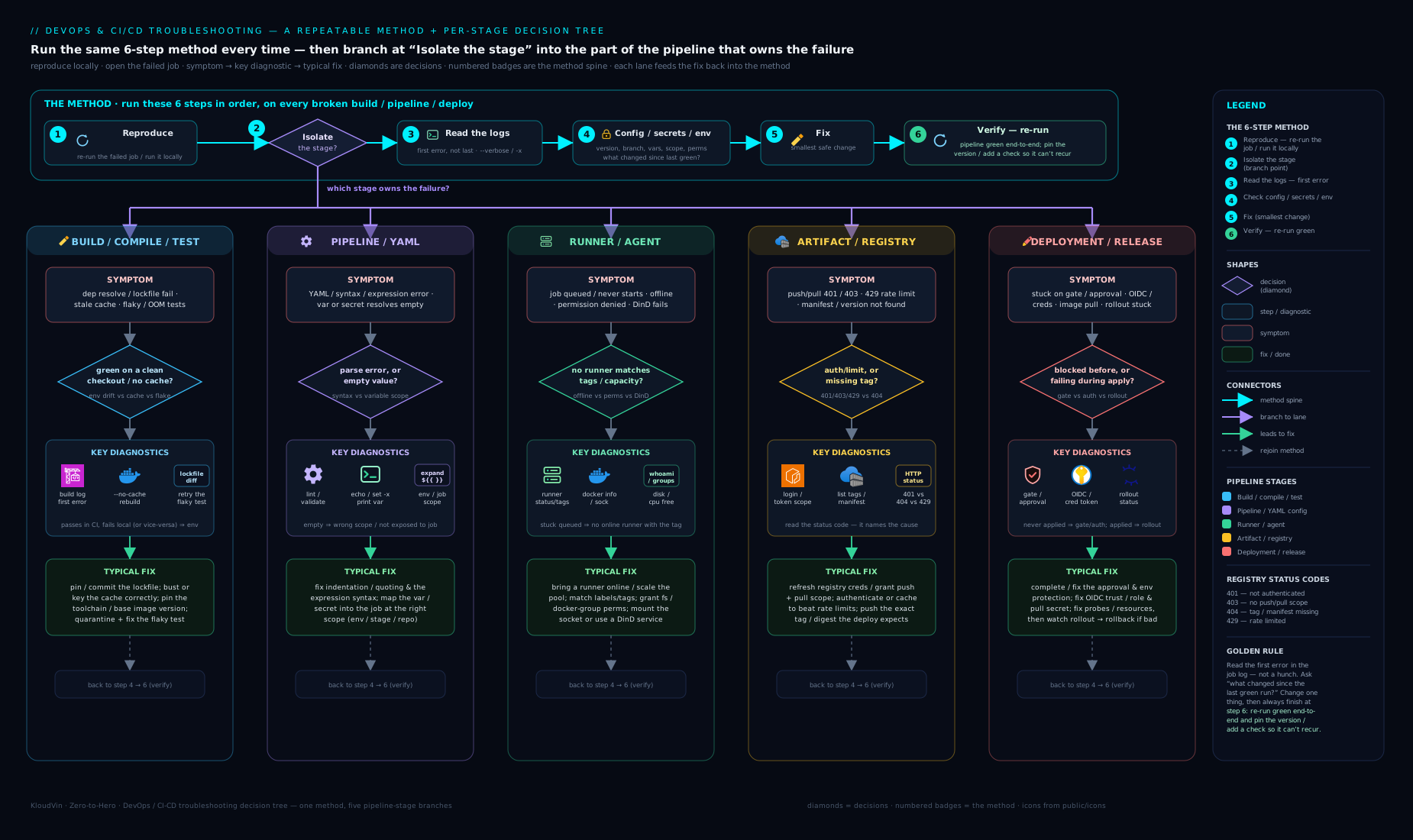
The decision tree above encodes step 2: start from the symptom at the top, branch on “which stage failed — build, pipeline parse, runner, artifact/registry, or deploy?”, and each leaf points you at the playbook below. Under pressure, walking the tree keeps you honest about which layer you are in before you change the pipeline.
The signals that answer everything
You can diagnose the large majority of failures from a handful of signals. Know precisely what each one tells you — this is what stops the flailing.
| Signal | Question it answers | Where to look |
|---|---|---|
| The first error line in the failing step | What actually broke (vs downstream noise)? | Expand the failing step, scroll to the top of the red output |
| The exit code | What kind of failure? (137 OOM, 143/130 cancelled, 124 timeout, 127 not-found, 126 not-executable) |
The step’s “exited with code N” line |
| Job vs step vs setup boundary | Did your code fail, or the runner/checkout/auth before it? | Failure in a setup/auth step → infra; in your script → code/config |
env dump (env | sort) |
Which variables/secrets are actually present in this context? | A temporary debug step at the top of the failing job |
Debug/verbose logs (ACTIONS_STEP_DEBUG, CI_DEBUG_TRACE, System.Debug) |
What is the runner doing internally (expressions, masking, network)? | Re-run with debug; read the expanded trace |
| Runner/agent status | Is there a runner online, idle, with the right labels? | Settings → Actions/CI runners; the agent pool view |
| Timing (“works in the morning, fails at 5pm”) | Resource contention, rate limits, or a time-of-day dependency? | Compare timestamps across runs; correlate with load |
A few high-leverage habits: always read the first error, not the last; check the exit code before the message (it often names the class of failure instantly); when a value is “missing”, dump the environment rather than guessing whether the secret reached the job; reach for debug logging the moment the surface log is insufficient; and remember that a failure in a setup/checkout/login step is an infrastructure problem, while a failure in your script is a code/config problem — the boundary tells you which playbook to open.
Build failures: dependencies, cache, environment & resources
The build stage fails for four recurring reasons: it can’t resolve dependencies, the cache lied to it, the environment differs from where the code was written, or it ran out of a resource. Name which one before you touch the YAML — the fixes are completely different.
| Symptom | Likely cause | Diagnostic | Fix |
|---|---|---|---|
npm ERR! could not resolve / Could not find a version that satisfies / 404 Not Found for a package |
An unpinned or yanked dependency, a private registry not configured, or a transient registry outage | Read the exact package + version; check whether it’s private; retry to rule out a blip | Commit the lockfile and install with npm ci / pip install -r … --require-hashes / mvn -o where possible; configure the private registry/auth; pin the version |
| Build passes locally, fails in CI with a missing native module / wrong binary | The cache restored artifacts built against a different lockfile, OS, or arch (cache key too loose) | Compare the cache key to the lockfile; check the runner OS/arch vs local | Make the cache key include a hash of the lockfile (hashFiles('**/package-lock.json')) and the OS/arch; bust the cache once to recover |
| First build of the day is slow / re-downloads everything; “cache not found” | Cache expired (e.g. GitHub evicts after ~7 days unused or at the repo cache size limit) or the key changed | Look for “Cache not found for input keys” in the log | Expected behaviour — add a restore-keys fallback prefix so a partial cache still helps; don’t treat a cold cache as a bug |
Error: ENOSPC: no space left on device / no space left during build |
Disk full — a large image, build artifacts, or accumulated layers on a self-hosted runner | df -h as a debug step; check artifact/log sizes |
On hosted runners, free space (docker system prune, remove unused toolchains) or use a larger runner; on self-hosted, add a cleanup step / bigger disk |
| Job killed with exit code 137 / “Killed” / OOMKilled | The build process exceeded the runner’s memory (a big compile, a memory-hungry test, a JVM with no heap cap) | Exit code 137 = SIGKILL (OOM); check memory use; look for the killed process | Reduce memory (cap JVM -Xmx, lower parallelism), or move to a larger runner; for containers raise the memory limit |
command not found / wrong language version / “works on my machine” |
Toolchain drift — the runner has a different Node/Python/JDK/Go version than your laptop | Print the version in CI (node -v, python --version); compare to local/.tool-versions |
Pin the toolchain explicitly (actions/setup-node@… with node-version, a version file, or a container image that fixes every tool); don’t rely on the runner default |
Intermittent network errors pulling deps (ETIMEDOUT, EAI_AGAIN, TLS errors) |
Transient registry/network blip, proxy/firewall on self-hosted, or DNS | Re-run once; check whether it’s a self-hosted egress/proxy issue | Add bounded retries to the install step; fix proxy/DNS on self-hosted runners; mirror critical registries |
permission denied running a script |
The script isn’t executable, or line endings (CRLF) broke the shebang | ls -la the script; file script.sh (CRLF shows as “with CRLF line terminators”) |
chmod +x (and commit the bit), enforce LF via .gitattributes (*.sh text eol=lf) |
Two reflexes to burn in. First, make the build reproducible before you make it fast: a committed lockfile plus an install-from-lockfile command (npm ci, not npm install) plus a pinned toolchain (ideally a container image) eliminates the entire “works on my machine” class — most CI-only build failures are an environment difference, not a code bug. Second, treat the cache as a suspect, not a given: a cache key that doesn’t include the lockfile hash will happily restore stale, mismatched artifacts and produce baffling failures, so when a build fails in a way that “makes no sense”, bust the cache and re-run as your first cheap experiment — and then fix the key so it can’t poison again.
Pipeline & YAML errors: syntax, expressions & scope
These are pipeline-layer failures — the system rejects or mis-runs the workflow because of the YAML, an expression, or (most commonly) where a variable or secret is visible. They fail differently from build errors: often the job never starts, or a value is mysteriously empty.
| Symptom | Likely cause | Diagnostic | Fix |
|---|---|---|---|
| “Invalid workflow file” / “mapping values are not allowed here” / YAML parse error | Indentation error, a tab character, or a missing/extra colon — the file isn’t valid YAML | Run yamllint; check for tabs (YAML forbids them); validate against the schema |
Fix the indentation (spaces only); use an editor/linter that flags tabs and schema errors before push |
A string value comes through as true/false/null/a number unexpectedly (e.g. a version 1.20 becomes 1.2) |
YAML type coercion — the Norway problem (no→false), octal/number coercion, unquoted versions |
Reproduce in yamllint/a YAML parser; echo the value |
Quote ambiguous scalars: "true", "no", "1.20", "08"; never leave version strings or country codes unquoted |
An expression renders literally (e.g. you see ${{ ... }} in output) or evaluates wrong |
Wrong expression context/syntax — using ${{ }} where it isn’t evaluated, or mixing runtime vs compile-time evaluation |
Print the raw vs evaluated value; check the platform’s expression docs for that position | Use the correct syntax for the position (GitHub ${{ }}; GitLab $VAR/rules; Azure $( ) runtime vs ${{ }} compile-time); don’t expect expressions in places that take plain strings |
A secret/variable is empty in the job (auth fails, value blank) |
The value isn’t in scope: wrong environment, not passed to a reusable workflow, or a secret on a different scope (org vs repo vs environment) | Add env | sort (secrets show masked but present); check which environment/scope the job uses |
Define/grant the secret at the right scope; pass secrets:/with: explicitly into reusable/called workflows; select the correct environment: |
| Secrets are empty in a fork / pull_request from a fork | By design, secrets are not exposed to workflows triggered by a fork’s PR (a security boundary) | The job is triggered by pull_request from a fork; secrets are blank |
Don’t rely on secrets in fork PRs; use pull_request_target carefully (it runs with secrets but checks out base — never run untrusted code with it), or split trusted post-merge steps |
A masked secret appears *** in logs but downstream parsing breaks |
Secret masking redacted a substring that also appears in normal output | Look for *** where a real value should be |
Don’t print secrets; if a benign value collides with the mask, change it; pass secrets via files/env, not command-line echo |
set -e/pipefail not active, so a failing command doesn’t fail the job |
The shell didn’t exit on error (no set -euo pipefail), or an error is hidden inside a pipe |
The step is green though a command clearly failed | Add set -euo pipefail at the top of multi-line run blocks; check exit codes explicitly for piped commands |
if: condition runs the step when it shouldn’t (or skips it) |
Expression evaluates a string as truthy, or wrong context (success()/always()/failure() misuse) |
Print the condition’s operands; read the truthiness rules (non-empty string is true) | Use explicit comparisons (if: github.ref == 'refs/heads/main'); use the status functions deliberately (if: always() to run cleanup) |
| Matrix job explodes into too many combinations or fails only on one leg | The matrix product is larger than intended, or one OS/version combination is genuinely broken | Read the matrix expansion; identify the failing leg | Trim with exclude:/include:; mark known-bad legs continue-on-error while you fix them; don’t let one leg block the rest unintentionally |
The single most valuable idea here is variable and secret scope. A pipeline value is not “global” — it lives at a level (organisation, repository, environment, job, step) and is visible only where that level reaches, and secrets are deliberately withheld from fork PRs as a security boundary. So when a value is “missing”, the question is never “did I set it?” but “is it in scope here?” — and the fastest answer is a one-line env | sort debug step (secrets print masked but present, which instantly distinguishes “not in scope” from “wrong value”). The second idea is YAML coerces types: an unquoted no, 1.20, or 08 is not the string you think — quote ambiguous scalars by default, and run yamllint before you push so parse errors never cost you a pipeline run.
Runner & agent problems: offline, capacity, permissions & Docker
Runner problems are insidious because they fail before your steps run — the job sits queued, or dies in setup — so engineers waste time debugging code that never executed. The four buckets: there is no runner (offline/unregistered), there is no capacity (all busy / concurrency capped), the runner lacks permission or the right labels, or the build needs Docker and the runner can’t provide it.
| Symptom | Likely cause | Diagnostic | Fix |
|---|---|---|---|
| Job stuck “Queued”/“Waiting for a runner” indefinitely | No runner with the requested labels is online; self-hosted runner offline/unregistered; hosted-minutes exhausted | Check the runners list (online? labels?); check billing/minutes; read runs-on/pool/tags |
Bring a runner online / re-register it; fix the label so it matches an available runner; top up minutes or switch to hosted |
| Jobs queue while runners show “idle” | Label/tag mismatch — runners are online but none matches the job’s required labels | Compare the job’s runs-on/tags/demands to the runners’ labels |
Align the labels (add the required label to a runner, or fix the job’s requested label); for GitLab check tags vs runner tags |
| Only N jobs run at once; the rest wait | Concurrency/parallelism limit — runner count, org concurrency, or concurrency/parallel caps |
Count online runners; check org/plan concurrency and any concurrency: group |
Add runners (or autoscale them), raise the plan’s concurrency, or accept/serialise with an explicit concurrency group |
| Self-hosted runner goes offline repeatedly | The runner service crashed, host rebooted, token expired, or the host ran out of disk/memory | Check the runner service status and logs on the host; df -h, free -m |
Run the runner as a resilient service (auto-restart), monitor host resources, rotate registration tokens; prefer ephemeral autoscaled runners |
Setup step fails: permission denied / can’t write / can’t reach a resource |
The runner’s OS user or identity lacks permission (filesystem, Docker, cloud, network) | whoami, id, ls -la the path; test the network/cloud call in a debug step |
Grant the runner user the needed permission (group membership, file mode, IAM role, firewall egress); least privilege, not root everywhere |
Cannot connect to the Docker daemon at unix:///var/run/docker.sock |
The build needs Docker but the runner has no Docker (or the user isn’t in the docker group) |
docker version in a debug step; check the daemon and group membership |
Install/enable Docker on the runner and add the user to the docker group, or mount the host Docker socket, or use Docker-in-Docker (see below) |
Docker-in-Docker build fails / can’t reach the daemon / TLS errors (GitLab docker:dind) |
DinD misconfigured — the dind service, DOCKER_HOST/TLS, or privileged mode is wrong |
Read the services:/DOCKER_* config; check the runner is privileged if DinD requires it |
Configure DinD correctly (docker:dind service + DOCKER_HOST/DOCKER_TLS_CERTDIR), or avoid it: use the host socket or a daemonless builder (Kaniko, BuildKit/buildx, Buildah) |
| State/files from a previous job appear in a new one (or are unexpectedly missing) | A non-ephemeral self-hosted runner reuses its workspace; or you expected persistence across ephemeral runners | Inspect the workspace; check whether the runner is reused or fresh | Use ephemeral runners for isolation; clean the workspace between jobs; pass state via artifacts/cache, never the runner’s local disk |
The job running on runner X has exceeded the maximum execution time (timeout) |
The job genuinely hung (waiting on input, a deadlock, a slow network) or the timeout is too low | Read where it stalled; check for an interactive prompt or an external wait | Fix the hang (non-interactive flags, timeouts on external calls); set a sensible timeout-minutes; never leave a job able to run forever |
Two reflexes here. First, “queued forever” and “idle runners” are almost always a label/capacity problem, not a code problem — before you read a single line of your build script, check that a runner is online and that its labels match what the job requested; a job that never started can’t have a code bug. Second, prefer ephemeral, daemonless container builds: long-lived self-hosted runners accumulate disk cruft, leak state between jobs, and turn Docker-in-Docker into a recurring support ticket — autoscaled ephemeral runners (e.g. GitHub’s Actions Runner Controller, or Azure DevOps scale-set agents) plus a daemonless builder (Kaniko/BuildKit/Buildah) removes most of this class of failure at the root.
Artifact & registry issues: auth, rate limits & versions
The package/publish boundary fails for three reasons: the runner can’t authenticate to the registry, it got rate-limited, or the version/tag it wants is absent, already present, or immutable. The 401 vs 403 distinction is the one to internalise.
| Symptom | Likely cause | Diagnostic | Fix |
|---|---|---|---|
401 Unauthorized pulling/pushing an image or package |
Not authenticated — no/expired token, not logged in, wrong registry URL | Check the login step ran; inspect the token/credential; confirm the registry host | Authenticate before the pull/push (docker login, registry token, cloud … get-login-password); refresh expired tokens; verify the registry URL |
403 Forbidden although the login succeeded |
Authenticated but the identity lacks permission (push to a protected repo, read a private package, wrong scope) | Confirm who the token is and what scope it has; check the registry’s RBAC | Grant the principal the needed permission/scope (push/pull on that repo); least privilege. (This is authorisation, not authentication) |
toomanyrequests / 429 / “pull rate limit exceeded” (often Docker Hub) |
Pull-rate limit for anonymous/free pulls, or an aggressive matrix hammering the registry | The error is explicit; correlate with many parallel jobs pulling the same image | Authenticate pulls (raises the limit), cache base images, mirror via a pull-through cache, or pin a digest and pull once; reduce redundant pulls in a matrix |
manifest unknown / not found / version X does not exist |
The tag/version was never published, was deleted/yanked, or you’re pulling from the wrong repo/registry | List the available tags/versions; check the publish job actually ran and succeeded | Publish the missing version (ensure the publish stage ran on the right trigger); fix the tag/coordinate; pull from the correct registry |
tag already exists / cannot overwrite / 409 Conflict on push |
The registry has immutable tags, or you’re republishing the same version | Check whether immutability is enabled; compare the version to what’s published | Bump the version (don’t reuse a released version); push a new tag/digest; if a retag is truly needed, use a mutable tag policy deliberately |
unauthorized: authentication required only in a fork PR |
Secrets/registry creds aren’t exposed to fork PRs (security boundary) — the pull/push has no credentials | The job is a fork pull_request; the login step has no secret |
Don’t push from fork PRs; gate publish on trusted post-merge events; for public base images use anonymous + caching |
denied: requested access to the resource is denied |
Wrong repository path/namespace, or the identity has no rights to that namespace | Compare the image reference to the registry namespace; check RBAC | Use the correct <registry>/<namespace>/<repo>:<tag>; grant the identity access to that namespace |
Checksum/signature verification fails on pull (cosign/Notation, or --require-hashes) |
The artifact was tampered with, re-published, or signed by a key you don’t trust | Verify the digest/signature against the expected key/policy | Re-pull by digest; verify the signature with the right key; if it genuinely changed, investigate the supply chain before trusting it |
The two reflexes. First, 401 means “I don’t know who you are”, 403 means “I know you, but you can’t do that” — 401 sends you to the login/credential step (did it run? is the token expired? right registry?), while 403 sends you to permissions/RBAC (does this identity have push/pull on this repo?); confusing them wastes the most time at this boundary. Second, stop pulling base images anonymously at scale — Docker Hub’s anonymous pull-rate limit will eventually 429 a busy pipeline, so authenticate pulls, cache base layers, and pin by digest so you pull a fixed image once; running your own Harbor or a cloud artifact registry with a pull-through cache removes the dependency on a shared public quota entirely.
Deployment failures: gates, OIDC, image pull & stuck rollouts
The deploy stage spans the boundary between your pipeline and the target environment, so it fails in the richest variety of ways: the pipeline waits on a gate that never clears, it can’t authenticate to the cloud (now usually OIDC), the cluster can’t pull the image, or the rollout never becomes healthy.
| Symptom | Likely cause | Diagnostic | Fix |
|---|---|---|---|
| Pipeline stuck “waiting” at a deploy stage; nothing happens | A manual approval / environment protection gate is pending and no eligible reviewer has approved | Check the environment’s protection rules / approvals; is a reviewer assigned and notified? | Approve as an eligible reviewer (or add one); for unattended deploys use an automated gate; ensure approvers are notified |
Deploy fails: Error assuming role with OIDC / Not authorized to perform sts:AssumeRoleWithWebIdentity / AADSTS70021 |
OIDC trust misconfigured — the role/credential’s trust policy doesn’t match the workflow’s subject (sub)/audience, or id-token: write is missing |
Read the federated identity’s trust conditions vs the token claims; check permissions: id-token: write |
Fix the trust policy’s sub/aud to match the repo/branch/environment; grant id-token: write; verify the audience. (See keyless OIDC deploys) |
401/403/could not find default credentials deploying to a cloud |
No credentials in the job, expired short-lived token, wrong region/subscription/project, or missing IAM permission | aws sts get-caller-identity / az account show / gcloud auth list as a debug step |
Wire OIDC or inject creds; select the right region/subscription/project; grant the deploy identity the minimum permission |
Kubernetes pod ImagePullBackOff / ErrImagePull after deploy |
The cluster can’t pull the image — wrong tag, private registry with no imagePullSecret, or the registry is unreachable | kubectl describe pod (the Events show the exact pull error); check the image reference |
Fix the image tag/path; add/repair the imagePullSecret (or workload-identity registry access); ensure the cluster can reach the registry |
Pod CrashLoopBackOff right after deploy |
The app starts and crashes — bad config/secret, missing env var, failed migration, wrong command | kubectl logs <pod> --previous; kubectl describe pod; check config/secrets |
Fix the app config/secret/migration; roll back to the last good revision while you fix forward |
| Rollout stuck “progressing”; never goes healthy; eventually times out | Readiness/health probe failing, insufficient resources to schedule, or a quota/PodDisruptionBudget blocking |
kubectl rollout status; kubectl get pods/describe; check probes, requests, quotas, events |
Fix the probe/threshold; provide resources/quota; for a bad release, roll back (kubectl rollout undo / redeploy previous) |
| Canary/blue-green analysis gate aborts the rollout | The progressive-delivery controller (Argo Rollouts/Flagger) saw metrics breach the threshold, or the metric query is wrong | Read the rollout/analysis status; check the metric query and thresholds | If the app is genuinely bad, the abort is correct — fix and re-release; if the query/threshold is wrong, fix the analysis template, not the gate |
| Deploy “succeeds” but traffic still hits the old version | Traffic not actually shifted — service/ingress/slot swap didn’t happen, or DNS/LB cached | Check the router/ingress/slot config and what it points at; verify endpoints | Complete the traffic switch (slot swap, service selector, weight shift); account for DNS TTL/LB warm-up before declaring success |
| Database migration fails mid-deploy and the app won’t start | A migration that isn’t backward-compatible ran against a schema the old/new pods can’t both use | Read the migration error; check the order (migrate vs deploy) and compatibility | Use expand/contract (backward-compatible) migrations; separate schema change from code change; never run a destructive migration in the same step as the cutover |
| Deploy works in staging, fails in prod with “resource not found”/permission | Environment-specific config/identity differs — different account, secret name, namespace, or role | Diff the per-environment variables/secrets/identity; check the target | Make environments parameterised and consistent; ensure the prod identity has the same (scoped) permissions; promote the same artifact, only config differs |
The single most valuable idea is that kubectl describe and --previous logs answer almost every Kubernetes deploy failure: ImagePullBackOff is a registry/auth problem the pod Events name exactly, while CrashLoopBackOff is an application problem the previous container’s logs explain — reading those two before changing anything tells you whether to fix the pipeline’s registry auth or the app’s config. The second idea is OIDC failures are trust-policy mismatches: the cloud rejected the federated token because its sub/aud claims don’t match what the role/credential trusts (wrong branch, environment, or repo, or a missing id-token: write permission) — so read the trust condition against the token’s claims rather than reaching for long-lived keys, which reintroduce the very secret-sprawl OIDC removes.
The flaky-pipeline playbook
A flaky pipeline passes and fails without any change to the code — the most corrosive failure mode, because it trains the team to ignore red and to re-run on faith, which lets real failures slip through. Treat flakiness as a first-class bug with its own workflow, not as background noise.
First, prove it’s flaky, not broken. Re-run the same commit with no changes. If it sometimes passes and sometimes fails, it’s flaky; if it always fails, it’s a real bug — go back to the playbooks above. Flakiness is, by definition, non-determinism.
Then find the source of non-determinism. Flaky failures nearly always trace to one of a small set of causes:
| Flake source | Tell-tale sign | Fix |
|---|---|---|
| Test ordering / shared state | Fails only in a certain order or in parallel; passes when run alone | Isolate tests (fresh fixtures per test); remove shared mutable state; randomise order in CI to surface it, then fix |
| Timing / race conditions | “Element not found”, “connection refused” that appears under load | Replace sleep with explicit waits/polling for the actual condition; add retries only around genuinely async waits |
| External dependency (network, third-party API, registry) | Fails on ETIMEDOUT/429/5xx intermittently |
Mock/stub external services in tests; add bounded retries for unavoidable network calls; mirror flaky registries |
| Resource contention (CPU/memory/disk on the runner) | Fails under parallelism or “at busy times”; exit 137 sometimes | Reduce parallelism or use larger/ephemeral runners; cap memory; isolate heavy jobs |
| Time/date/timezone & randomness | Fails near midnight, month-end, or 1-in-N | Inject a fixed clock/seed; never assert on real now()/random without control |
| Non-deterministic ordering (maps, sets, concurrency) | Assertions on order that isn’t guaranteed | Sort before asserting; assert on sets, not sequences, where order is irrelevant |
| Port/resource collisions | “address already in use” intermittently | Allocate ephemeral ports; ensure teardown; use unique names per job |
Then quarantine, fix, and re-admit — in that order. The workflow that actually clears flakiness:
- Detect & measure. Track per-test/per-job pass rate over many runs (many CI platforms and test frameworks flag flaky tests automatically). You cannot fix what you don’t measure, and “it feels flaky” isn’t a metric.
- Quarantine the worst offenders. Move proven-flaky tests to a non-blocking lane (a separate job,
continue-on-error, or a quarantine tag) so they stop blocking everyone — but keep running them so they’re still visible. Quarantine is a holding pen, not a delete. - Fix the root cause, not the symptom. Resist the cheap “wrap it in a retry” fix for anything that isn’t a genuine async wait — a blanket retry hides real regressions. Fix the determinism (isolate state, wait on conditions, mock externals, control the clock/seed).
- Re-admit with evidence. Only move a test back to the blocking lane once it has passed N consecutive runs. Then add the guardrail: a flaky-test detector in CI, a policy that new tests must be deterministic, and a budget that caps allowed flake rate.
The meta-rule: a retry is a painkiller, not a cure. Bounded retries are legitimate for genuinely unavoidable non-determinism (a network call, an eventually-consistent cloud API), but reaching for retries: 3 to silence a flaky unit test just buries a real bug and erodes trust in the pipeline. Every retry you add should come with a written reason for why the underlying operation is legitimately non-deterministic.
Hands-on lab: break it, diagnose it, fix it
You’ll plant several classic CI faults in a free GitHub Actions workflow on a throwaway repository, then walk each through the loop. (The symptoms are identical on GitLab/Azure/Jenkins; only the YAML differs.)
1. Create a throwaway repo and a first workflow.
mkdir ci-ts-lab && cd ci-ts-lab && git init -b main
mkdir -p .github/workflows
cat > .github/workflows/ci.yml <<'EOF'
name: ci
on: [push, workflow_dispatch]
jobs:
  build:
    runs-on: ubuntu-latest
    steps:
      - uses: actions/checkout@v4
      - name: show env
        run: env | sort | grep -E '^(GITHUB_REF|RUNNER_OS)='
      - name: build
        run: echo "build ok"
EOF
git add . && git commit -m "ci: first workflow"
# Create the repo and push (requires the gh CLI, authenticated):
gh repo create ci-ts-lab --private --source=. --push
Open the Actions tab and confirm the run is green. (No gh? Create an empty repo in the UI and git push to it.)
2. Fault A — a YAML parse error (the pipeline layer at parse time). Introduce a tab and a bad indent:
# Break indentation deliberately:
printf '      - name: oops\n         run: echo nope\n' >> .github/workflows/ci.yml
git commit -am "break: bad indentation" && git push
The run fails before any step with “Invalid workflow file”. Diagnose by validating locally — yamllint .github/workflows/ci.yml points at the exact line. Fix by correcting the indentation (spaces, consistent depth), commit, push, and confirm green. Lesson: a parse error never reaches your build — it’s the pipeline layer, caught by yamllint before you push.
3. Fault B — secret scope (the most common “missing value”). Add a step that needs a secret you haven’t set:
cat >> .github/workflows/ci.yml <<'EOF'
      - name: needs a secret
        run: |
          env | sort | grep -i token || true
          test -n "$API_TOKEN" && echo "have token" || { echo "MISSING token"; exit 1; }
        env:
          API_TOKEN: ${{ secrets.API_TOKEN }}
EOF
git commit -am "add step needing API_TOKEN" && git push
It fails with MISSING token. Diagnose: the env | sort step shows API_TOKEN is absent (not masked-but-present) — it isn’t in scope because you never defined it. Fix: gh secret set API_TOKEN --body "dummy-value", re-run, and watch the same step now show the secret masked-but-present and pass. Lesson: “missing” almost always means “not in scope” — and the env dump distinguishes “absent” from “wrong value” in seconds.
4. Fault C — a non-zero exit hidden by a pipe, then a timeout. Show why set -euo pipefail and timeouts matter:
cat >> .github/workflows/ci.yml <<'EOF'
      - name: hidden failure
        run: |
          set -euo pipefail        # remove this line to see the bug hide
          false | cat              # without pipefail, the job stays GREEN despite 'false'
          echo "this line should NOT run"
EOF
git commit -am "demonstrate pipefail" && git push
With set -euo pipefail the job correctly fails at false | cat; delete that line, push again, and watch the job go green despite a failed command — the classic silent failure. Fix: keep set -euo pipefail in every multi-line run. Lesson: an exit code you don’t enforce is an error you won’t see.
5. Fault D — flakiness, and why blind retries lie. Add a deliberately flaky step and observe re-runs:
cat >> .github/workflows/ci.yml <<'EOF'
      - name: flaky
        run: |
          if [ $(( RANDOM % 2 )) -eq 0 ]; then echo "pass"; else echo "fail"; exit 1; fi
EOF
git commit -am "add a flaky step" && git push
Re-run the same commit several times (Re-run all jobs): it passes and fails without any change — the definition of flaky. The tempting “fix” is a retry wrapper; the real fix is removing the non-determinism (here, the RANDOM). Lesson: re-run the same commit to prove flakiness, then fix the source of non-determinism — don’t paper over it with retries.
Validation. A clean walk-through shows: Fault A caught by yamllint before push; Fault B’s env dump distinguishing absent-vs-present and the secret fixing it; Fault C going green-when-it-shouldn’t once pipefail is removed; and Fault D flapping across identical re-runs until the RANDOM is removed.
Cleanup (so nothing is left behind):
gh repo delete ci-ts-lab --yes     # remove the throwaway repo
cd .. && rm -rf ci-ts-lab
Cost note: free. GitHub Actions on a private repo includes a monthly free-minutes allowance; this tiny workflow uses seconds per run. Delete the repo when done to leave no trace.
Common mistakes & troubleshooting
A meta-table — the mistakes engineers make while troubleshooting CI/CD, which keep them stuck or hide real problems:
| Mistake | Why it bites | Do this instead |
|---|---|---|
| Hitting Re-run before reading the log | Wastes minutes; for a non-flaky failure it changes nothing | Read the first error and the exit code, name the stage/layer, then act |
| Reading the last error instead of the first | The last error is often a consequence of the first | Scroll to the top of the red output; fix the earliest cause |
| Assuming a “missing” value means “I forgot to set it” | It’s usually a scope problem (env/fork/reusable-workflow) | env | sort debug step — masked-but-present vs absent tells you instantly |
| Treating the cache as always correct | A loose cache key restores stale/mismatched artifacts | Key the cache on the lockfile hash + OS/arch; bust it as a first cheap experiment |
npm install (or unpinned deps) in CI |
Non-reproducible builds; “works on my machine” | Commit the lockfile; install from it (npm ci); pin the toolchain/container |
| Debugging your build script when the job never started | The failure is a runner/label/capacity issue, not your code | Check a runner is online with matching labels before reading the script |
Confusing 401 with 403 at a registry |
Sends you to the wrong fix (creds vs permissions) | 401 → login/token; 403 → RBAC/scope |
| Pulling base images anonymously at scale | Docker Hub 429 rate limits flake the pipeline |
Authenticate pulls, cache/pin by digest, use a pull-through cache |
Wrapping a flaky unit test in retries |
Hides real regressions; erodes trust in green | Fix the non-determinism; reserve bounded retries for genuine async waits |
| Leaving jobs with no timeout | A hung job ties up a runner indefinitely | Set timeout-minutes; use non-interactive flags and external-call timeouts |
Running untrusted fork code with pull_request_target |
It runs with secrets — a real exfiltration risk | Never check out/run untrusted code with secrets in scope; gate on trusted events |
Best practices
- Make pipelines reproducible by default. Commit lockfiles and install from them; pin actions/images by tag and digest and the toolchain by version (or a fixed container); cache on a lockfile-hash key. Reproducibility is what makes failures debuggable — and most CI-only failures are an environment difference.
- Fail fast and loud. Put
set -euo pipefailat the top of multi-line scripts, set a sensibletimeout-minuteson every job, and make required checks actually required so a red build blocks merge rather than being ignored. - Scope secrets tightly and never expose them to forks. Define secrets at the narrowest scope that works (environment over repo over org), pass them explicitly into reusable workflows, and rely on the fork-PR secret boundary — debug “missing value” with an
envdump, not by widening scope. - Prefer ephemeral, daemonless runners. Autoscaled ephemeral runners isolate jobs and shed disk cruft; daemonless builders (Kaniko/BuildKit/Buildah) remove the Docker-in-Docker support burden.
- Keep deploys observable and reversible. Read
kubectl describe/--previousbefore changing anything; use backward-compatible (expand/contract) migrations; make every deploy strategy have a tested rollback; treat an aborted canary as a correct signal, not an obstacle. - Hunt flakiness as a first-class bug. Measure per-test/per-job flake rate, quarantine proven flakes to a non-blocking lane (still running), fix the determinism, and re-admit only with evidence — a retry is a painkiller, not a cure.
- Use OIDC, not long-lived keys. Federate the pipeline’s identity to the cloud so a leaked log or artifact isn’t a standing breach, and so deploy-auth failures are trust-policy fixes, not key rotations.
Security notes
Troubleshooting a pipeline repeatedly puts you near its most sensitive assets — credentials, the registry, and the production environment — so do it safely. Never widen a secret’s scope to make a job pass: a “missing” value is almost always a scoping problem, and the fix is to grant it at the right level, not to expose it more broadly; in particular, secrets are deliberately withheld from fork PRs, and pull_request_target runs with secrets — never use it to check out or run untrusted code, which is a real exfiltration path. Debug logs can leak secrets: ACTIONS_STEP_DEBUG/CI_DEBUG_TRACE/System.Debug print far more, and masking only catches known values — capture debug output to a controlled location, scrub before sharing, and disable it again after. When a registry or cloud call returns 403, resist granting broad permissions (push/admin everywhere, or a wildcard IAM policy) just to make it pass — confirm who the identity is and grant the minimum missing scope; over-broad CI identities are a classic escalation path. Prefer OIDC/short-lived credentials over long-lived keys so a leaked artifact isn’t a standing breach, and pin actions/images by digest so a compromised upstream tag can’t silently change what your pipeline runs. Finally, treat self-hosted runners as security boundaries: they often hold cloud credentials and run arbitrary PR code, so isolate them (ephemeral, least-privilege, no shared state), and never run untrusted forks on a runner with production access. These themes are developed in the DevSecOps pipeline lesson and the keyless OIDC deploys lesson.
Interview & exam questions
- A pipeline that passed an hour ago is now red with no code change. Walk me through your response. First, don’t re-run blindly — re-run the same commit once to test whether it’s flaky vs genuinely broken. Read the first error and the exit code; name the stage (build/test/publish/deploy) and layer (code/pipeline/runner/registry/environment). Common no-change culprits: a moved dependency or floating tag, an expired cache, an expired token, a registry rate limit, or a flaky test. Fix the specific cause and add the guardrail (pin the version/digest, fix the cache key) so it can’t recur.
- A secret is empty in a job even though you “set it”. How do you debug this? It’s a scope problem, not a missing value. Add an
env | sortdebug step: a secret in scope prints masked but present (***), while one out of scope is absent — that instantly distinguishes the two. Then grant it at the right scope (environment/repo/org), pass it explicitly into reusable/called workflows, and remember fork PRs don’t receive secrets by design. - What do exit codes
137,143,124, and127tell you?137= SIGKILL, almost always OOM (out of memory) — reduce memory or use a bigger runner.143= SIGTERM, usually a cancelled/terminated job.124= a timeout (e.g.timeoutwrapper).127= command not found (toolchain/PATH problem). Reading the code first often names the failure class before you read a line of the message. - A job sits “Queued” forever while the runners show “idle”. What’s happening? A label/tag mismatch: runners are online but none matches the job’s requested labels (
runs-on/tags/demands). The job hasn’t started, so it can’t be a code bug. Fix by aligning labels — add the required label to a runner or correct the job’s requested label — and check capacity/concurrency if runners are genuinely all busy. - Distinguish
401from403at a container registry, and how you’d fix each.401 Unauthorized= not authenticated — no/expired token, not logged in, or wrong registry; fix the login/credential step.403 Forbidden= authenticated but not permitted — the identity lacks push/pull on that repo; fix the RBAC/scope (least privilege). Confusing the two sends you to the wrong fix. - Your deploy fails with
Not authorized to perform sts:AssumeRoleWithWebIdentity(orAADSTS70021). Cause and fix? An OIDC trust mismatch: the cloud rejected the federated token because the role/credential’s trust conditions don’t match the token’ssub/audclaims (wrong branch/environment/repo), or the workflow lacksid-token: write. Fix the trust policy to match the actual subject/audience and grantid-token: write— don’t fall back to long-lived keys. - A Kubernetes pod is
ImagePullBackOffafter deploy; another isCrashLoopBackOff. How do you tell them apart and fix each?ImagePullBackOff/ErrImagePullis a registry/auth problem —kubectl describe podshows the exact pull error (wrong tag, missingimagePullSecret, unreachable registry); fix the image reference or pull credentials.CrashLoopBackOffis an application problem —kubectl logs --previousshows why it started and died (bad config/secret/migration); fix the app config and roll back while you fix forward. - What makes a pipeline “flaky”, and what’s the right workflow to deal with it? Flaky = passes/fails on the same commit with no change — non-determinism (test order/shared state, timing/races, external deps, resource contention, time/randomness). The workflow: measure flake rate, quarantine proven flakes to a non-blocking lane (still running, so still visible), fix the determinism (isolate state, wait on conditions, mock externals, control the clock/seed), and re-admit only after N green runs. A blanket retry on a unit test hides real regressions.
- A build passes locally but fails in CI with a missing native module. Most likely cause? A cache restored against a different lockfile/OS/arch, or a toolchain difference between laptop and runner. Diagnose by comparing the cache key to the lockfile and printing the tool versions in CI. Fix by keying the cache on the lockfile hash + OS/arch (bust it once to recover) and pinning the toolchain/container so the environment matches.
docker: Cannot connect to the Docker daemonon a self-hosted runner. What are your options? The runner has no Docker (or the user isn’t in thedockergroup). Options: install/enable Docker and add the user to thedockergroup; mount the host Docker socket; use Docker-in-Docker (privileged, withDOCKER_HOST/TLS configured); or — best — a daemonless builder (Kaniko/BuildKit/Buildah) that needs no daemon at all.- Why are secrets withheld from fork pull requests, and what’s the danger of
pull_request_target? Because a fork PR contains untrusted code; exposing secrets to it would let anyone exfiltrate them by editing the workflow/build.pull_request_targetruns in the base repo’s context with secrets but checks out the base — so running the fork’s code under it (e.g. building/testing the PR) would hand secrets to untrusted code. Never run untrusted code with secrets in scope. - A deploy “succeeds” but users still hit the old version. What likely went wrong? The traffic switch didn’t complete — the slot swap, service selector, or ingress/LB weight wasn’t actually changed, or DNS/LB caching is serving the old target. Verify the router/ingress/slot points at the new version and account for DNS TTL / LB warm-up before declaring success; “deployed” is not “receiving traffic”.
Quick check
- A job has been “Queued” for 15 minutes while the runners page shows two idle runners. Is this most likely a code bug, and what’s the first thing to check?
- A step’s
env | sortshows your secret as***(masked). Is the secret in scope or out of scope, and what does that rule out? - A
docker pullof a public base image starts failing intermittently with429 toomanyrequestsonly when many jobs run at once. What’s the cause and two fixes? - A test passes when run alone but fails when the suite runs in parallel. What category of flake is this, and what’s the fix (not a retry)?
- A deploy fails with
403 Forbiddenafter a successfuldocker login. Is this authentication or authorisation, and where do you look?
Answers
- Not a code bug — a queued job never started, so your script can’t be the cause. First check is a label/tag mismatch: the idle runners’ labels don’t match the job’s
runs-on/tags/demands. Align the labels (or check capacity/concurrency if they’re actually busy). - In scope — a masked
***means the secret reached the job (present but redacted). That rules out “not set / wrong scope / fork PR”; if auth still fails, the problem is the secret’s value/permission, not its visibility. - Docker Hub’s anonymous pull-rate limit, hit by many parallel pulls. Fixes: authenticate the pulls (higher limit) and cache/pin by digest (or use a pull-through-cache registry) so you pull the image once instead of per-job.
- Test ordering / shared mutable state (it depends on isolation that parallelism breaks). Fix the determinism: give each test fresh fixtures and remove shared state; randomise order in CI to surface such bugs — don’t wrap it in a retry, which hides the real defect.
- Authorisation — you authenticated (login succeeded), but the identity lacks permission (push/pull) on that repository. Look at the registry’s RBAC/scope for that principal and grant the minimum needed; a
401(not403) would have meant an authentication/credential problem instead.
Exercise
Build your own CI break-and-fix runbook (timed, free). On a fresh GitHub repo with a small Actions workflow, plant one fault per layer and prove you can diagnose each from observation alone — before you fix it.
-
Scaffold a workflow (checkout + a trivial build/test), confirm it’s green.
-
Plant five faults, one per layer:
- Pipeline (parse): introduce a YAML indentation/tab error and capture how it fails before any step.
- Pipeline (scope): reference a secret you haven’t set; capture the
env-dump showing it absent, then set it and show it masked-but-present. - Build (reproducibility): use an unpinned dependency or a cache key without the lockfile hash; force a mismatch and capture the failure.
- Runner (labels): request a
runs-on/label that no runner provides; capture the job stuck “queued”. - Deploy/flake: add a
RANDOM-based flaky step; re-run the same commit repeatedly and record the pass/fail flapping.
-
For each, write down the stage, the layer, the diagnostic signal (first error / exit code /
envdump / runner status), the root cause, and the fix — before fixing. Time yourself: under 6 minutes per fault. -
Fix each with the smallest, most deterministic change (correct indentation; grant the secret at the right scope; pin the dep + lockfile-hash cache key; fix the label; remove the non-determinism), and verify each yields a green run from a clean state.
-
Self-assess:
Criterion Target Identified the correct stage + layer before touching anything All 5 Found the root cause from the log/exit-code/ env/runner status (not guessing)All 5 Fixed with the smallest, most deterministic change All 5 Verified a clean green run afterwards (fresh cache where relevant) All 5 Whole drill completed Under 30 minutes -
Cleanup: delete the throwaway repo.
Cost note: free — a tiny Actions workflow on a private repo uses seconds of the monthly free-minutes allowance; delete the repo when done.
Certification mapping
- AWS DevOps Engineer (DOP-C02), Azure DevOps Engineer (AZ-400), Google Cloud DevOps Engineer — these exams test CI/CD operationally, which is exactly this lesson: diagnosing a failed pipeline, fixing OIDC/identity trust for keyless deploys, resolving artifact-registry auth (
401vs403) and rate limits, triaging a stuck/failed deployment (ImagePullBackOff, rollout health, rollback), and securing self-hosted runners/agents. The scenario questions (“a deploy fails with an OIDC error”, “a pod won’t pull its image”, “a build is flaky”) map directly to the playbooks here. - DevOps Institute — DevOps Foundation / DevSecOps — the method (isolate the stage/layer, fix the root cause, prevent recurrence) and the secret-handling/least-privilege themes align with the foundation and DevSecOps syllabi.
- CKA / CKAD — the deployment-failure playbook is core Kubernetes troubleshooting:
kubectl describe/logs --previous,ImagePullBackOffvsCrashLoopBackOff,rollout status/undo, probes and resource/quota issues are directly examinable. - GitHub Actions / GitLab certifications — variable/secret scope, expressions and contexts, reusable workflows, runners/agents, and caching are tested; the pipeline-layer and runner playbooks here cover those objectives.
Glossary
- Stage / job / step — the nesting of a pipeline: a stage groups jobs, a job runs on one runner and contains ordered steps. Naming where a failure sits is half the diagnosis.
- Runner / agent — the machine (hosted or self-hosted) that executes a job. “Queued forever” usually means no runner with matching labels is available.
- Exit code — the numeric result of a command;
0= success. Key non-zero codes:137(OOM/SIGKILL),143/130(terminated/cancelled),124(timeout),127(command not found),126(not executable). - Cache (CI) — stored dependencies/artifacts reused between runs to speed builds; a key that omits the lockfile hash can restore stale artifacts and cause baffling failures.
- Lockfile — the pinned dependency manifest (
package-lock.json,poetry.lock, etc.); installing from it (npm ci) makes builds reproducible. - Secret scope — the level at which a secret is defined and visible (org / repo / environment / job). Secrets are deliberately withheld from fork PRs.
- Type coercion (YAML) — YAML interpreting unquoted scalars as booleans/numbers/null (the Norway problem:
no→false;1.20→1.2); quote ambiguous values. - Docker-in-Docker (DinD) — running a Docker daemon inside a CI container to build images; needs privileged mode/TLS config. Daemonless builders (Kaniko/BuildKit/Buildah) avoid it.
- Docker socket —
/var/run/docker.sock; mounting the host’s socket lets a job use the host daemon instead of DinD (with security trade-offs). - OIDC (keyless) auth — federating a pipeline’s identity to a cloud via short-lived tokens instead of long-lived keys; failures are trust-policy (
sub/aud) mismatches, not bad passwords. 401vs403—401 Unauthorized= not authenticated (login/token problem);403 Forbidden= authenticated but not permitted (RBAC/scope problem).- Pull-rate limit — a registry cap on pulls (notably Docker Hub for anonymous/free); causes intermittent
429 toomanyrequestsunder parallel load. - Immutable tags — a registry policy forbidding overwriting a published tag; a re-push of the same version then fails with a conflict.
ImagePullBackOff/ErrImagePull— Kubernetes can’t pull the image (wrong tag, missingimagePullSecret, unreachable registry); the pod Events name the cause.CrashLoopBackOff— the container starts then repeatedly crashes (bad config/secret/migration/command);kubectl logs --previousexplains why.- Rollout (stuck “progressing”) — a deployment that never becomes healthy — failing readiness probes, insufficient resources, or a quota/PDB blocking; resolved by fixing the probe/resources or rolling back.
- Flaky test/pipeline — passes/fails on the same commit with no change, due to non-determinism; quarantine and fix the root cause rather than masking with retries.
- Quarantine (flaky) — moving a proven-flaky test to a non-blocking lane (still running, still visible) until its determinism is fixed and it’s re-admitted with evidence.
pull_request_target— a GitHub trigger that runs in the base repo’s context with secrets; dangerous if used to run untrusted fork code.
Next steps
You can now diagnose the everyday CI/CD failures across every stage and layer — red builds, pipeline/YAML and scope errors, runner/agent problems, artifact/registry auth, and deployment failures — and run a disciplined flaky-pipeline workflow. The next lesson steps up from “fix this failure” to “design a delivery platform that rarely produces these failures in the first place”:
- The DevOps Architecting Ladder: From a Single Pipeline to an Internal Developer Platform — the maturity rungs from one CI workflow to a governed, self-service platform.
- Deployment Strategies: Rolling, Blue/Green, Canary, Progressive Delivery & Rollback — the strategies (and rollbacks) whose failures this lesson triages.
- Building a DevSecOps Pipeline: SAST, DAST, SCA & Policy Gates — adding security gates without making the pipeline brittle.
- Keyless GitHub Actions Deployments with OIDC to AWS, Azure, and GCP — the deep dive on the OIDC trust that fixes most deploy-auth failures.
- Terraform Troubleshooting: State, Providers, Drift, Dependencies & Debugging — the IaC counterpart to this CI/CD playbook.