The difference between an engineer who is comfortable with Terraform and one who still dreads terraform apply is rarely knowledge of obscure resources. It is a method. When a plan wants to destroy a database, or apply halts with Error acquiring the state lock, or the provider throws a cryptic 403, the strong engineer does not guess and start deleting things — they run a short, fixed sequence that pins the failure to one layer (state, provider/auth, configuration, or the real cloud), form a falsifiable hypothesis, prove it, fix it with the smallest safe change, and verify. Everyone else runs apply again and hopes, or — worse — reaches for terraform state rm because a forum post said so, and turns a five-minute fix into an outage.
This lesson gives you that method and then turns it into playbooks: for each common failure you get a table of symptom → likely cause → the diagnostic command that confirms it → the fix. We cover the failures you genuinely hit in production and that come up in interviews and on the HashiCorp Terraform Associate exam — state problems (a stuck lock, drift, a corrupt or version-mismatched state file, and the careful state surgery of mv/rm/import/replace and the declarative moved/removed blocks); provider and authentication errors (version conflicts, lockfile mismatches, expired or wrong credentials, and API rate limits); plan/apply errors (cycle errors, for_each/count on unknown values, count vs for_each churn, and type mismatches); drift detection and reconciliation; and how to read what Terraform is actually doing with TF_LOG — plus a CI/CD failure playbook. Everything here runs against a free local provider, so you can reproduce every fault on your laptop without a cloud bill. (It applies equally to OpenTofu, the open-source fork — tofu mirrors these commands; differences are flagged.)
Learning objectives
By the end of this lesson you can:
- Apply a repeatable troubleshooting loop — observe, isolate the layer, compare desired vs actual, hypothesise, fix with the smallest safe change, verify, prevent — to any Terraform failure.
- Diagnose and clear state problems: a stuck lock (
force-unlock), drift, a corrupted or version-mismatched state file, and recover safely from backups. - Perform state surgery deliberately and reversibly —
state mv,state rm,import,-replace/taint — and prefer the declarativemovedandremovedblocks where they apply. - Fix provider and authentication failures: version constraints and the
.terraform.lock.hcllockfile,init -upgrade, credential/identity errors, and API rate limits. - Resolve plan/apply errors: dependency cycle errors, “Invalid for_each argument / value depends on resource attributes that cannot be determined until apply”,
count-vs-for_eachre-indexing churn, and type/for_each-key mismatches. - Detect and reconcile drift, and drive
TF_LOG(andTF_LOG_PATH) to debug provider/API calls and CI failures.
Prerequisites & where this fits
You need a working Terraform 1.x (or OpenTofu) CLI and a directory you can break. You do not need a cloud account — the lab uses the hashicorp/null, hashicorp/random, and hashicorp/local providers, which create fake/local resources for free. You should already have the core model from earlier in this course: HCL and the Terraform fundamentals — providers, state and the core workflow, how modules are structured, and ideally the IaC core concepts — state, drift and idempotency. We re-explain each failure from first principles, so it is fine if some of that is still fresh. This is the Troubleshooting lesson of the Terraform/Terragrunt Zero-to-Hero track — the bridge between writing Terraform and operating it under pressure. The next lesson steps up to the Terraform architecting ladder, from a single module to an enterprise platform. Everything here is free and local — no cloud account, no charges.
The method: a loop, not a guess
Almost every Terraform problem yields to the same loop. The discipline is to follow it in order rather than jumping to a destructive command you used once before.
- Observe — read the error to the end. Terraform’s errors are unusually good: they name the file, the line, the resource address, and very often the fix. Read the whole message (the last lines of a long apply matter most), then run
terraform planto see the intended changes before touching anything. Resist the urge to change state. - Isolate the layer. Terraform failures live in one of four layers — configuration (HCL/types/expressions and the dependency graph), provider/auth (plugin version, credentials, API), state (the mapping between config and real resources), or the real world (the cloud rejected or already changed something). Naming the layer eliminates most of the search space: a cycle error is configuration;
403is provider/auth; “state lock” is state; “already exists” is the real world drifting from state. - Compare desired vs actual. Terraform is declarative: it makes real infrastructure match configuration, tracked through state. Almost every surprising plan is a gap between two of those three — config changed, the cloud changed out-of-band (drift), or state is wrong (stale, imported badly, or pointing at a deleted resource). Put them side by side:
terraform plan,terraform state list,terraform state show <addr>. - Form one hypothesis. State it as a falsifiable sentence: “the plan wants to replace the bucket because
force_destroyiscount-indexed and I removed item 0, so everything re-indexed.” A vague hunch (“state is broken”) cannot be tested; a specific claim can. - Fix — the smallest, safest, reversible change. Prefer a config change (
movedblock, fixing a type) over state surgery; prefer-targetto scope an apply over editing state; and always back up state before surgery (cp terraform.tfstate terraform.tfstate.bak, or for remote,terraform state pull > backup.tfstate). If the fix proves the hypothesis, you have also confirmed the root cause. - Verify, then prevent. Run
terraform planand confirm it showsNo changes(or exactly the intended diff) — that is “fixed”, not “the apply stopped erroring”. Then ask the prevention question: what guardrail (a CI plan on every PR, state locking, version pinning, aprevent_destroylifecycle, a drift-detection schedule) stops this recurring?
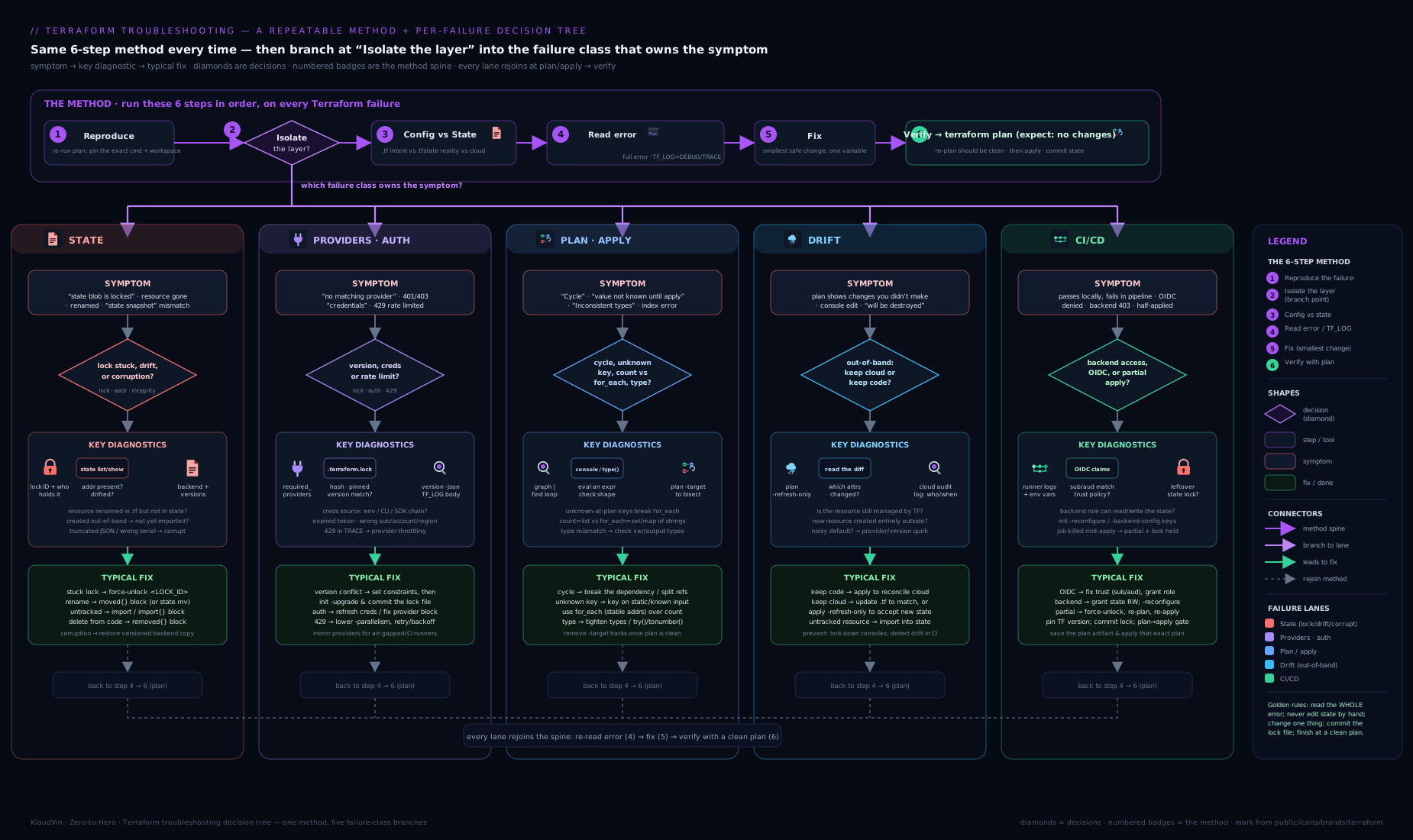
The decision tree above encodes step 2: start from the symptom at the top, branch on “is it a state error, a provider/auth error, a plan/config error, or unexpected drift?”, and each leaf points you at the playbook below. Under pressure, walking the tree keeps you honest about which layer you are in before you touch state.
The commands that answer everything
You can diagnose the large majority of problems with a handful of commands. Know precisely what each one tells you — this is what stops the flailing.
| Command | Question it answers | Where to look |
|---|---|---|
terraform plan |
What does Terraform want to do, and why? | The +/-/~/-/+ symbols, the # (because …) reasons, the “forces replacement” notes |
terraform state list |
What does state think exists? | The full list of resource addresses Terraform is tracking |
terraform state show <addr> |
What attributes does state hold for one resource? | The recorded attribute values — compare to the real cloud and to config |
terraform validate |
Is the configuration internally valid (syntax, types, references)? | Errors with file + line, before any provider/API call |
terraform providers |
Which providers/versions does this config require and use? | The provider tree + required versions |
terraform version |
Which CLI and provider versions are running? | CLI version + each provider’s resolved version |
TF_LOG=DEBUG terraform <cmd> |
What is Terraform/the provider actually doing (API calls, retries)? | The detailed log stream (set TF_LOG_PATH to capture it) |
A few high-leverage habits: run terraform plan before every apply and read the reasons, not just the counts; reach for terraform validate the instant an error mentions syntax, a type, or an unknown reference (it is fast and needs no credentials); use terraform state show to see what state believes rather than guessing; and remember that plan/apply perform an implicit refresh (they read the real world) — so a plan diff can come from config or from the cloud having drifted. When you need to see the wire, TF_LOG is the truth serum; just remember it can print secrets, so capture it to a file and delete it after.
State problems: locks, drift, corruption & surgery
State is where Terraform troubleshooting earns its reputation, because state is the one component you can damage permanently. The golden rule comes first: back up before you touch it. For local state, cp terraform.tfstate terraform.tfstate.bak; for remote, terraform state pull > backup.tfstate. With a backup, every operation below is reversible.
Think of state in three failure modes: it is locked (someone/something holds the lock), it is wrong (it disagrees with the real world — drift, or a bad import), or it is damaged/misaligned (corrupt JSON, a version mismatch, or resources at the wrong address after a refactor). The fix differs sharply by mode, so name the mode first.
| Symptom | Likely cause | Diagnostic | Fix |
|---|---|---|---|
Error acquiring the state lock (with a Lock Info block: ID, Who, Created) |
A previous run was interrupted (Ctrl-C, crashed CI job, killed agent) and never released the lock; or a genuine concurrent run | Read the Lock Info: the ID, Who, and Created time. Check whether another apply is actually running (CI, a colleague) |
If no run is active, terraform force-unlock <LOCK_ID> (use the ID from the error). Never force-unlock while a real apply is in progress — you risk concurrent writes and a corrupt state |
Lock won’t release even after force-unlock; backend-specific lock stuck |
Backend lock object orphaned — e.g. a stale DynamoDB lock item (S3 backend) or an Azure blob lease still held | Inspect the backend: the DynamoDB lock table item, or the blob’s lease state | Remove the orphaned lock at the backend (delete the DynamoDB lock item / break the blob lease) only after confirming nothing is running; then re-run |
Plan wants to create a resource that already exists in the cloud (Error: … already exists on apply) |
The resource exists in the real world but not in state — created manually, or state rm’d, or never imported |
terraform state list (it’s absent); confirm it exists in the cloud console/CLI |
Import it: terraform import <addr> <cloud-id> (or an import {} block + apply), then plan should show No changes |
| Plan wants to destroy/recreate a resource you didn’t change | Drift (someone changed it out-of-band) or state holds a stale/wrong value or a count/for_each re-index |
terraform plan and read the # (because …)/“forces replacement”; terraform state show <addr> vs the real resource |
If drift you want to keep: update config to match (or apply to reset to config). If state is stale: terraform apply -refresh-only. If re-index: see the for_each/count playbook below |
| Plan shows resources you already deleted manually (wants to “create” them back, or errors on refresh) | State still references a resource that no longer exists in the cloud | terraform plan (or terraform refresh/-refresh-only); terraform state show <addr> then check the cloud |
Let refresh reconcile: terraform apply -refresh-only marks it gone; or terraform state rm <addr> to drop the stale entry if refresh can’t (e.g. provider can’t read it) |
Error: state snapshot was created by Terraform vX, which is newer than current vY |
The state was written by a newer Terraform/OpenTofu version than the CLI you’re running | terraform version vs the version in CI / a colleague’s machine |
Upgrade your CLI to match (pin it in CI and via required_version). Do not hand-edit the version field — that risks corruption |
Error: Failed to load state: … invalid character / unexpected end of JSON (corrupt state) |
The state file was truncated/garbled — interrupted write, partial upload, manual edit, merge conflict committed | Try terraform state pull (does it parse?); inspect the file; check backend versioning |
Restore the last good version from your backup or backend versioning (S3 object versions, Terraform Cloud state history, blob snapshots). Re-run plan to confirm No changes |
| After a module/resource rename or move, plan wants to destroy the old and create the new | Terraform keys resources by address; renaming changes the address, so it reads as delete-then-create | terraform plan shows a - for the old address and + for the new, identical resource |
Tell Terraform it’s the same object: a moved {} block (declarative, reviewable, preferred) or terraform state mv <old> <new>; then plan shows No changes |
| Resource in the wrong module / needs to move between state files | Refactor split a config, or you moved a resource into/out of a module | terraform state list shows it at the old address |
Same as above — moved {} block within a config; across state files, terraform state mv -state-out=… (or pull/push) with backups |
| You want to stop managing a resource without destroying it | Hand-off to another team/config, or it should now be unmanaged | Decide: forget (keep the real resource) vs destroy | removed {} block with lifecycle { destroy = false } (Terraform 1.7+) to forget it declaratively, or terraform state rm <addr>. (Plain state rm only forgets — it never deletes the real resource) |
State surgery: the four scalpels (and the two declarative blocks)
“State surgery” sounds scary; done deliberately it is routine. There are four imperative scalpels and two newer declarative blocks. Know exactly what each does to state versus the real world — this is the distinction that prevents accidents.
| Operation | What it does | Touches real infra? | Use it when | The gotcha |
|---|---|---|---|---|
terraform import <addr> <id> (or import {} block) |
Records an existing cloud resource into state at <addr> |
No (read-only on the cloud) | A resource exists but Terraform doesn’t track it | Import only writes state — you must write matching config too, then plan until it’s No changes. import {} blocks (1.5+) are reviewable and can even generate config |
terraform state mv <src> <dst> |
Renames/moves a resource’s entry within (or across) state | No | A rename/refactor changed an address and you don’t want destroy+create | Prefer a moved {} block in config — it’s reviewed in the PR and survives for collaborators; state mv is a local, unreviewed mutation |
terraform state rm <addr> |
Forgets a resource — removes it from state only | No (resource keeps running) | Hand a resource to another config, or drop a stale/duplicate entry | It does not destroy the resource; the real thing keeps costing money and is now unmanaged. To delete, use terraform destroy/remove from config instead |
terraform apply -replace=<addr> (replaces terraform taint) |
Forces destroy-and-recreate of one resource on the next apply | Yes (destroys + recreates) | A resource is in a bad runtime state and must be rebuilt | It will delete and recreate — expect downtime/new IDs. taint/untaint are the older, two-step equivalents |
moved {} block (config) |
Declares old→new address equivalence so refactors don’t destroy/create | No | Renaming resources/modules, or moving into/out of modules | Keep it in config (you can prune it after everyone has applied); it’s the reviewable alternative to state mv |
removed {} block (config, 1.7+) |
Declares a resource removed from config, with destroy = false to forget (or true to destroy) |
Optional (you choose) | Stop managing a resource without deleting it, in a reviewable way | The declarative, PR-reviewed alternative to state rm; pair with deleting the resource block |
Two reflexes to burn in. First, state rm is “forget”, not “delete” — the real resource keeps running and now nobody manages it; reach for it only to hand off or drop a stale entry, never to “clean up” something you actually want gone (use destroy). Second, prefer the declarative blocks (moved, removed, import) over the imperative state subcommands wherever the version supports them: they go through code review, run in CI, and apply identically for every teammate — whereas terraform state mv/rm is a silent local mutation that the next person’s plan won’t understand.
Providers & authentication: versions, lockfiles & credentials
Provider problems split cleanly into versioning (which plugin, pinned how, recorded in the lockfile) and authentication (can the provider talk to the cloud, and as whom). The fix is completely different, so read the error to decide which.
| Symptom | Likely cause | Diagnostic | Fix |
|---|---|---|---|
Error: Failed to query available provider packages … no available releases match the given constraints |
A required_providers version constraint can’t be satisfied (typo, impossible range, yanked version) |
Read the constraint in terraform { required_providers { … } }; terraform providers |
Fix the constraint (e.g. ~> 5.0); run terraform init |
Error: provider … released a new version that is no longer compatible / unexpected major upgrade churn |
No version pin, so init pulled a new major with breaking changes |
terraform version; check required_providers for a missing/loose constraint |
Pin with a sensible constraint (~> 5.40 for patch/minor, >= 5.0, < 6.0 to cap the major); commit .terraform.lock.hcl |
Error: the cached package … does not match any of the checksums recorded in the dependency lock file |
The committed .terraform.lock.hcl lacks the checksum for your platform/arch, or the lock is stale |
Inspect .terraform.lock.hcl; note your OS/arch vs CI’s |
terraform providers lock -platform=linux_amd64 -platform=darwin_arm64 … to record all needed platforms; commit it. To intentionally bump, terraform init -upgrade |
Error: Inconsistent dependency lock file … provider … is not in the lock file (often in CI) |
CI ran init against a lockfile that doesn’t include a required provider/platform, or someone added a provider without re-locking |
CI log; compare local vs committed .terraform.lock.hcl |
Re-run terraform init -upgrade (or providers lock for all CI platforms) locally and commit the updated lockfile |
Error: Could not load plugin / Failed to install provider |
Network/proxy/mirror blocked the registry download, or a corrupt plugin cache | TF_LOG=DEBUG terraform init (shows the download URL/HTTP error) |
Fix proxy/registry access or configure a provider_installation/network mirror; clear .terraform/providers and re-init |
Error: building AzureRM Client / NoCredentialProviders / Unable to locate credentials / google: could not find default credentials |
The provider has no credentials — env vars unset, no CLI login, wrong profile, missing OIDC | The error names the provider; check az account show / aws sts get-caller-identity / gcloud auth list |
Provide credentials the provider expects (env vars, az login/aws sso login, a profile, or OIDC in CI); confirm with the cloud’s “who am I” command |
Error: … AccessDenied / 403 Forbidden / AuthorizationFailed despite being logged in |
Authenticated but the identity lacks IAM permission for that action/resource | aws sts get-caller-identity (who?) then check the IAM policy / Azure role assignment / GCP role for the action in the error |
Grant the missing permission to that principal (least privilege); re-run. (This is authorisation, not authentication) |
Error: … expired token / InvalidClientTokenId / 401 mid-apply |
Short-lived credentials (SSO/STS/OIDC) expired during a long apply | Token TTL; how long the apply ran | Refresh the session (aws sso login, re-auth) and re-run; for long applies, use credentials with adequate TTL or a CI identity that auto-refreshes |
Error: … Throttling / Rate exceeded / TooManyRequests / 429 |
The cloud API rate-limited you — large apply, high -parallelism, or a noisy account |
The error is explicit; correlate with a big plan or parallel runs | Lower terraform apply -parallelism=N (default 10); retry (many providers back off automatically); split the apply with -target; request a quota increase |
Error: Inconsistent provider configuration / missing required provider configuration in module |
A child module needs an explicit provider passed (e.g. aliased/multi-region) and didn’t get one | terraform validate; check the module’s required_providers and providers = { … } wiring |
Pass providers explicitly to the module (providers = { aws = aws.useast1 }); declare aliases at the root |
The two reflexes here. First, commit .terraform.lock.hcl and treat it like package-lock.json: it pins exact provider versions and checksums so every machine and CI runner resolves identically — most “works on my laptop, fails in CI” provider errors are a missing platform entry in the lockfile, fixed with terraform providers lock -platform=…. Second, separate authentication from authorisation: a credentials/NoCredentials/401 error means you aren’t logged in as anyone the provider can use; a 403/AccessDenied/AuthorizationFailed means you are logged in, but that identity lacks the IAM permission — confirm “who am I” with the cloud CLI before you change anything.
Plan & apply errors: cycles, for_each/count & types
These are configuration-layer failures — Terraform refuses or mis-plans because of the HCL, the type system, or the dependency graph. They are also the richest source of interview questions, because they test whether you understand how Terraform builds its graph and resolves values.
| Symptom | Likely cause | Diagnostic | Fix |
|---|---|---|---|
Error: Cycle: a → b → a (dependency cycle) |
Resources/modules reference each other in a loop (often via depends_on, or two security groups referencing each other) |
terraform graph (or TF_LOG=DEBUG) to see the edges; read the cycle the error prints |
Break the loop: remove the unnecessary depends_on; for mutual SG references use separate *_security_group_rule/*_sg_egress resources instead of inline rules; introduce an intermediate resource |
Error: Invalid for_each argument … the "for_each" value depends on resource attributes that cannot be determined until apply |
for_each/count is keyed on a value that is unknown at plan time (an attribute of a not-yet-created resource) |
Look at what feeds for_each/count; if it references another resource’s computed attribute, that’s it |
Key on values known at plan time (input vars, locals, names) — not computed IDs. If unavoidable, -target the dependency first, or restructure so keys are static |
Error: Invalid count argument … value depends on resource attributes that cannot be determined until apply |
Same root cause as above, but for count (e.g. count = length(aws_subnet.x) where x doesn’t exist yet) |
Inspect the count expression for a computed dependency |
Base count on known input (a variable/local), not on the length of another resource’s not-yet-known output; or apply the dependency first |
| Plan wants to destroy and recreate many resources after you added/removed one list item | The collection uses count (index-based), so removing item N re-indexes everything after it ([2] becomes [1]…) |
terraform plan shows a cascade of -/+ on …[n] addresses you didn’t intend to change |
Switch the collection to for_each keyed by a stable string (map/set), so each instance has a stable identity and only the changed key moves. Migrate existing instances with moved {}/state mv |
Error: The given "for_each" argument value is unsuitable: … must be a map, or set of strings |
for_each was given a list (lists aren’t allowed — duplicates/ordering) or a value of the wrong type |
Check the expression’s type (terraform console: type(var.x)) |
Convert to a set (toset(var.list)) or a map; for_each requires map or set-of-strings, and keys must be known at plan time |
Error: Duplicate object key / two different items produced the key "…" in for_each |
The expression building the for_each map produced duplicate keys |
Inspect the key expression; terraform console to evaluate it |
Make keys unique (include a discriminator); if using toset on non-unique values, derive a unique key map instead |
Error: Invalid index / … is not a valid index for … (accessing [count.index] or a key that doesn’t exist) |
Indexing into a count resource that’s empty, or a for_each key that isn’t present |
terraform console to inspect the collection; check whether count/for_each produced that index/key |
Guard with length()/try()/lookup(); reference for_each instances by key (aws_x.this["name"]), count ones by index (aws_x.this[0]) |
Error: Inconsistent conditional result types / Invalid value for … : … must be a … (type mismatch) |
An expression yields mismatched types (both branches of ? : must match), or a value doesn’t match the variable’s declared type |
terraform validate; terraform console to check type(...) of each side |
Align the types (cast with tostring/tonumber/tolist; make both ternary branches the same type); fix the variable’s type constraint |
Error: Unsupported attribute / This object does not have an attribute named "…" |
Referencing an attribute that doesn’t exist on that resource/output (typo, wrong provider version, wrong resource) | terraform providers schema -json or the registry docs for the real attribute names |
Use the correct attribute; if it disappeared, check the provider version’s changelog (a major upgrade may have renamed/removed it) |
Error: Reference to undeclared resource / input variable / Module not installed |
A name is referenced before it’s declared, or init wasn’t run after adding a module |
terraform validate; check the name exists; was terraform init run? |
Declare the variable/resource; run terraform init after adding modules/providers |
Error: Provider produced inconsistent final plan / Provider produced inconsistent result after apply |
A provider bug (planned value ≠ applied value) — usually a known issue in a specific provider version | terraform version; search the provider’s GitHub issues for the resource + message |
Upgrade/downgrade the provider to a fixed version; sometimes a second apply reconciles; report upstream if novel |
The single most valuable idea in this table is count vs for_each identity. count gives each instance a positional address ([0], [1], [2]); remove the middle one and everything after it shifts, so Terraform thinks you destroyed and recreated a pile of resources. for_each gives each instance a named address keyed by a string (["alice"], ["bob"]); add or remove a key and only that one moves, everyone else is untouched. Rule of thumb: use count only for “N identical copies” or a simple on/off toggle (count = var.enabled ? 1 : 0); use for_each whenever the instances are distinct things you’ll add to or remove from over time. The second idea is “known at plan time”: for_each/count keys, and anything that determines how many resources exist, must be computable during plan — so key them on inputs and locals, never on another resource’s computed attributes (IDs, ARNs) that only exist after apply.
Drift: detection & reconciliation
Drift is when the real infrastructure no longer matches what Terraform recorded in state — almost always because something changed it out-of-band: a console click, an autoscaler, another tool, or a cloud-side default. Terraform discovers drift during the refresh that plan/apply perform automatically (it reads each resource’s real state and compares). The skill is deciding, per drift, whether to accept reality into your config or re-impose your config onto reality — and never to blindly apply over a change you don’t understand.
| Symptom | Likely cause | Diagnostic | Fix |
|---|---|---|---|
plan shows changes you didn’t make (an attribute reverting, a tag missing) |
Out-of-band change — someone edited the resource in the console/another tool | terraform plan and read the ~ diff; terraform state show <addr> vs the live resource |
Decide intent. Keep the change → update config to match it. Reject the change → apply to reset it to config |
| You want to see drift without planning new config changes | You need to know “what changed in reality?” separate from “what does my new code want?” | terraform plan -refresh-only (shows only real-world vs state differences) |
Review; then terraform apply -refresh-only to update state to match reality (without changing any infrastructure) |
| State is stale — it holds old values though the cloud is correct | A change happened out-of-band that you want, and state hasn’t caught up | terraform apply -refresh-only (proposes syncing state) |
Apply the refresh-only run to record reality into state; then a normal plan is clean |
| A resource was deleted out-of-band; plan now wants to recreate it | The real resource is gone; state still references it | terraform plan/-refresh-only; check the cloud |
If you want it back, apply recreates it; if it should stay gone, remove it from config (or state rm) so plan is clean |
| Drift reappears after every apply (the same diff returns) | A controller/policy keeps re-changing the resource, or your config fights a cloud-managed default | Identify what writes the attribute (autoscaler, Azure Policy, a sidecar process) | Stop fighting: add lifecycle { ignore_changes = [that_attribute] } so Terraform stops managing it, or remove it from config and let the controller own it |
Constant noisy diff on an attribute Terraform shouldn’t own (e.g. autoscaled desired_count) |
Terraform and another system both manage the same field | terraform plan shows the same ~ every time |
lifecycle { ignore_changes = [desired_count] } — declare that field externally owned |
Two reflexes. First, -refresh-only is your safe lens on reality: terraform plan -refresh-only answers “what changed out-of-band?” with zero risk, and terraform apply -refresh-only syncs state to the real world without altering infrastructure — use it to absorb intentional manual changes before they collide with your next deploy. (Note: since Terraform 0.15.4 a plain plan no longer writes the refreshed state, and -refresh=false skips refresh entirely for speed when you’re certain nothing drifted.) Second, decide intent before you apply: every drift is a fork — accept reality (update config or ignore_changes) or re-impose config (apply) — and an apply you run without understanding the diff is how Terraform reverts a colleague’s emergency hotfix at 2 a.m. The deeper treatment, including a scheduled detection pipeline, is in detecting and reconciling Terraform drift.
TF_LOG: seeing what Terraform actually does
When the error message isn’t enough — a provider failing opaquely, a hang, a mysterious API rejection, a CI-only failure — TF_LOG turns on Terraform’s internal logging and shows you the real work: graph building, provider plugin handshakes, and every API request/response. It is the single best escalation when “read the error” runs out.
Set the level via the TF_LOG environment variable, and capture it with TF_LOG_PATH:
| Setting | What it gives you | When to use |
|---|---|---|
TF_LOG=TRACE |
Everything — the most verbose (graph walk, every plugin RPC). Firehose | Deep/last-resort debugging, bug reports to HashiCorp/provider maintainers |
TF_LOG=DEBUG |
Detailed flow incl. provider API requests/responses | The usual choice for “why is the provider doing this?” / auth / rate-limit issues |
TF_LOG=INFO / WARN / ERROR |
Progressively less — high-level info, warnings, or errors only | Lighter-touch insight without the firehose |
TF_LOG=JSON |
Machine-readable structured logs | Parsing logs in tooling/CI dashboards |
TF_LOG_CORE / TF_LOG_PROVIDER |
Split logging: core (Terraform itself) vs provider only | Isolate whether the issue is in core or in the plugin |
TF_LOG_PATH=./tf.log |
Writes the log to a file (works with any level above) | Always, when capturing — keeps the terminal usable and gives you a file to grep/attach |
A practical recipe: TF_LOG=DEBUG TF_LOG_PATH=./tf-debug.log terraform apply, then grep the file for the failing resource, the HTTP status (403, 429, 500), or the provider’s request body. For a provider that hangs, TF_LOG=TRACE shows whether it’s stuck waiting on an API call. To pin a problem to core-vs-plugin, use TF_LOG_CORE=ERROR TF_LOG_PROVIDER=DEBUG so the provider’s chatter isn’t drowned out by Terraform’s graph walk.
Security warning:
TF_LOG=DEBUG/TRACElogs can contain secrets — tokens, credentials, request bodies with sensitive values. Always write to a file you control (TF_LOG_PATH), never paste raw debug logs into a public issue or chat, and delete the log when done. In CI, do not enableTF_LOGon shared pipelines by default, and scrub artifacts.
CI/CD failure playbook
The same failures look different in a pipeline, where there’s no human at the keyboard, credentials come from OIDC/secrets, and the runner is ephemeral. Most CI-only Terraform failures are one of four things: the lockfile doesn’t include the runner’s platform, auth isn’t wired (OIDC/role), state locking collides between concurrent jobs, or the working directory/init is misconfigured.
| Symptom (in CI) | Likely cause | Diagnostic | Fix |
|---|---|---|---|
Error: Inconsistent dependency lock file / checksum mismatch — green locally, red in CI |
.terraform.lock.hcl lacks the CI runner’s platform (e.g. linux_amd64) |
Compare the lockfile’s recorded platforms to the runner OS/arch | terraform providers lock -platform=linux_amd64 -platform=darwin_arm64 … locally; commit the updated lockfile |
NoCredentials / 401 / could not find default credentials only in CI |
OIDC/role not assumed, secret not injected, wrong region/profile env | Pipeline logs for the auth step; aws sts get-caller-identity as a debug step |
Wire OIDC (GitHub id-token: write + role-to-assume) or inject credentials; confirm “who am I” before plan |
Error acquiring the state lock from a pipeline |
A previous CI job was cancelled and left the lock; or two jobs run concurrently on the same state | Check for a stuck/cancelled prior run; the Lock Info shows it |
Serialise jobs on that state (concurrency group); force-unlock <ID> the orphaned lock once you’ve confirmed nothing runs |
| Plan/apply hangs or times out in CI | Waiting on input (no -input=false), an API hang, or interactive approval |
Job log shows it stalled at a prompt; TF_LOG=DEBUG |
Always run terraform … -input=false; use -auto-approve only behind a real approval gate; set step timeouts |
Error: Backend initialization required / Module not installed |
terraform init not run (or run in the wrong dir), or backend config missing |
The init step / working-directory setting | Run terraform init in the correct directory with backend config; cache .terraform between steps carefully (not the lockfile-sensitive bits) |
| Apply succeeds locally, the plan/apply differ in CI (different result) | A different provider/Terraform version between laptop and runner | terraform version in both; check required_version and the lockfile |
Pin required_version, pin providers, commit the lockfile, and use the same CLI version in CI (e.g. a setup-terraform action with a fixed version) |
The meta-lesson: a CI pipeline should make failures reproducible. Pin the Terraform version and providers, commit the lockfile with every platform CI uses, run with -input=false, separate plan (on PRs, no creds-to-write) from apply (gated, with write creds), and serialise applies per state. The dedicated DevOps lesson on troubleshooting pipelines, builds and runners generalises this beyond Terraform.
Hands-on lab: break it, diagnose it, fix it
You’ll plant several classic faults using free, local providers (null, random, local) — no cloud account, no charges — then walk each through the loop.
1. Set up a throwaway config. Create a directory and a main.tf:
mkdir tf-ts-lab && cd tf-ts-lab
cat > main.tf <<'EOF'
terraform {
  required_version = ">= 1.5.0"
  required_providers {
    random = { source = "hashicorp/random", version = "~> 3.6" }
    local  = { source = "hashicorp/local",  version = "~> 2.5" }
  }
}

variable "names" {
  type    = list(string)
  default = ["alpha", "beta", "gamma"]
}

# Deliberately using count — we'll feel the re-index pain, then fix it.
resource "random_pet" "server" {
  count = length(var.names)
}
EOF
terraform init        # downloads providers, writes .terraform.lock.hcl
terraform apply -auto-approve
terraform state list  # random_pet.server[0..2]
2. Fault A — count re-index churn. Remove the first name and plan:
sed -i.bak 's/\["alpha", "beta", "gamma"\]/["beta", "gamma"]/' main.tf
terraform plan        # Note: it destroys [2] and CHANGES [0] and [1] — re-indexing!
You only deleted one item, yet count re-indexed everything. Fix by switching to for_each keyed by the name (stable identity), and migrate the existing instances with moved/state mv so nothing is destroyed:
cat > main.tf <<'EOF'
terraform {
  required_version = ">= 1.5.0"
  required_providers {
    random = { source = "hashicorp/random", version = "~> 3.6" }
    local  = { source = "hashicorp/local",  version = "~> 2.5" }
  }
}

variable "names" {
  type    = set(string)
  default = ["beta", "gamma"]
}

resource "random_pet" "server" {
  for_each = var.names
}
EOF
# Migrate the surviving instances from count-index to for_each-key in state:
terraform state mv 'random_pet.server[1]' 'random_pet.server["beta"]'
terraform state mv 'random_pet.server[2]' 'random_pet.server["gamma"]'
terraform plan        # Now: No changes (alpha was legitimately removed)
The lesson: for_each gives stable, named identity; the migration is pure state surgery with no infra impact. (A for_each type error is one console call away — terraform console then type(["a","b"]) shows it’s a list, which is why for_each rejects it until you toset(...) it.)
3. Fault B — drift, via refresh-only. Add a local_file, apply, then change it on disk out-of-band:
cat >> main.tf <<'EOF'

resource "local_file" "note" {
  filename = "${path.module}/note.txt"
  content  = "managed by terraform"
}
EOF
terraform apply -auto-approve
echo "edited out of band" > note.txt          # simulate an out-of-band change
terraform plan -refresh-only                   # shows the drift: state vs reality
terraform plan                                 # a normal plan wants to reset content to config
Decide intent: to keep the manual edit, update content in config to match; to reject it, terraform apply -auto-approve resets the file to the managed content. Run your choice and confirm a subsequent terraform plan shows No changes.
4. Fault C — TF_LOG to see the work. Capture a debug log of a plan and grep it:
TF_LOG=DEBUG TF_LOG_PATH=./tf-debug.log terraform plan
grep -i "provider" tf-debug.log | head        # provider plugin handshakes
rm -f tf-debug.log                              # delete — debug logs can hold secrets
For the stuck-lock drill there’s nothing to run with local state — the muscle memory is the point: when an apply prints Error acquiring the state lock with a Lock Info block, read the ID, confirm nothing is actually running, then terraform force-unlock <ID> — never force-unlock blindly.
Validation. A clean run shows: the count change re-indexing in the plan (then No changes after the for_each migration); -refresh-only surfacing the file drift and your chosen reconciliation yielding No changes; and a TF_LOG file you read and then deleted.
Cleanup (so nothing is left on disk):
terraform destroy -auto-approve
cd .. && rm -rf tf-ts-lab
Cost note: free / local. The
null,random, andlocalproviders create nothing in any cloud — the entire lab runs on your laptop with no account and no charges.
Common mistakes & troubleshooting
A meta-table — the mistakes engineers make while troubleshooting Terraform, which keep them stuck or cause outages:
| Mistake | Why it bites | Do this instead |
|---|---|---|
Running terraform state rm to “clean up” a resource you want gone |
It only forgets; the real resource keeps running, costing money, now unmanaged | Use terraform destroy / remove from config to actually delete; state rm is for hand-off only |
force-unlock while an apply might be running |
Concurrent writes can corrupt state | Confirm nothing is running (CI, colleagues) first; only then unlock by the printed ID |
Editing terraform.tfstate by hand |
One bad character corrupts it; you lose the resource mapping | Use state mv/rm/import or moved/removed/import blocks; never hand-edit |
Not committing .terraform.lock.hcl |
“Works locally, breaks in CI”; surprise provider upgrades | Commit it; record all CI platforms with providers lock -platform=… |
Using count for a list of distinct things |
Removing/adding an item re-indexes and destroys/recreates others | Use for_each keyed by a stable string; reserve count for N-copies / on-off |
Keying for_each/count on a computed attribute |
“value … cannot be determined until apply” | Key on inputs/locals known at plan time; -target the dependency if truly needed |
apply-ing over a diff you don’t understand |
You may revert someone’s intentional out-of-band change (e.g. a hotfix) | plan -refresh-only first; decide accept reality vs re-impose config |
Pasting TF_LOG=DEBUG output into a ticket/chat |
Debug logs can contain secrets | Capture to TF_LOG_PATH, scrub, and delete; share only the relevant scrubbed lines |
Re-running apply to “fix” an error without diagnosing |
Wastes time, can compound damage (half-applied state) | Read the error, name the layer, form one hypothesis, then act |
| Renaming a resource/module and accepting the destroy/create plan | You delete and recreate real infra for a pure rename | Add a moved {} block (or state mv) so it’s recognised as the same object |
Best practices
- Make state safe by default. Use a remote backend with locking (S3+DynamoDB, Azure Storage with blob lease, GCS, or Terraform Cloud/Enterprise) and versioning so every state write is recoverable; never share local state across a team. Back up before any state surgery (
state pull > backup.tfstate). - Pin everything, commit the lockfile. Set
required_version, pin providers with~>, commit.terraform.lock.hclwith all CI platforms recorded. Reproducibility is what makes failures debuggable. - Prefer declarative over imperative. Reach for
moved,removed, andimportblocks (reviewed in PRs, applied identically for everyone) over the unreviewedterraform state mv/rmandterraform importCLI mutations where your version supports them. - Plan on every PR; read the reasons. A
terraform planin CI on every change makes drift and unintended replacements visible before merge. Treat “forces replacement” on a stateful resource as a stop sign. - Protect the irreplaceable. Add
lifecycle { prevent_destroy = true }to databases and other resources whose loss is catastrophic, so an accidental destroy plan fails loudly. - Choose
for_eachfor distinct things. Default tofor_eachkeyed by a stable identifier; reservecountfor “N identical copies” and simple toggles — this single habit prevents most re-index churn. - Detect drift on a schedule. Run
plan(orplan -refresh-only) on a timer and alert on non-empty diffs rather than auto-applying — so out-of-band changes are caught early and reconciled deliberately.
Security notes
Troubleshooting Terraform repeatedly touches your most sensitive assets — credentials and state — so do it safely. State files contain secrets in plaintext (passwords, keys, generated values are stored as-is in JSON); never commit state to git, restrict access to the backend, enable encryption at rest, and treat any state pull/backup file as a secret you must delete. TF_LOG=DEBUG/TRACE can leak those same secrets into logs — always write to a controlled TF_LOG_PATH, scrub before sharing, and never enable verbose logging by default in shared CI. When an error is 403/AccessDenied, resist granting broad permissions (or *:*/Owner) just to make it pass — confirm the principal with the cloud’s “who am I” command and grant the minimum missing action; over-broad CI roles are a real escalation path. Be deliberate with force-unlock (a wrong call mid-apply corrupts shared state) and with -replace/destroy (they delete real infrastructure — gate them behind review and prevent_destroy on critical resources). Finally, use OIDC/short-lived credentials in CI rather than long-lived keys, so a leaked log or artifact isn’t a standing breach. These themes are developed in secrets in IaC — Vault and dynamic credentials.
Interview & exam questions
terraform applyfails withError acquiring the state lock. Walk me through your response. Read the Lock Info (ID, Who, Created). Determine whether an apply is actually running (CI, a colleague). If a real run is in progress, wait — never break a live lock. If it’s orphaned (a cancelled/crashed run),terraform force-unlock <LOCK_ID>with the ID from the error, then retry. Prevent it by serialising applies per state (CI concurrency groups).- What’s the difference between
terraform state rm,terraform destroy, andterraform import?state rmforgets a resource (removes it from state; the real resource keeps running — now unmanaged).destroydeletes the real resource.importadopts an existing real resource into state (and you must then write matching config). The classic trap: usingstate rmexpecting deletion — it doesn’t touch the cloud. - When do you use
countvsfor_each, and why does it matter for drift/churn?countis positional ([0],[1]) — removing a middle item re-indexes everyone after it, causing destroy/recreate of unchanged resources.for_eachis named by a stable key (["x"]) — add/remove a key and only that instance moves. Usecountfor N identical copies / on-off (var.enabled ? 1 : 0); usefor_eachfor distinct things you’ll add to or remove from. - Explain the error “for_each value depends on resource attributes that cannot be determined until apply.” How do you fix it?
for_each/countkeys must be known at plan time; you’ve keyed them on a computed attribute (an ID/ARN of a not-yet-created resource). Fix by keying on inputs/locals/names that are static at plan time; if genuinely unavoidable,-targetthe dependency to create it first, or restructure so the keys don’t depend on apply-time values. - You get a dependency
Cycleerror between two security groups. What’s happening and how do you break it? Two resources reference each other (often inline rules referencing the other group), so the graph has a loop. Break it by extracting the rules into separate rule resources (aws_security_group_rule/ the neweraws_vpc_security_group_ingress_rule) instead of inline blocks, removing the mutual reference; or drop an unnecessarydepends_on. - A plan wants to destroy and recreate a resource you only renamed in code. Why, and what’s the right fix? Terraform keys resources by address; a rename is a new address, read as delete-old + create-new. Tell Terraform it’s the same object with a
moved {}block (preferred — reviewed in the PR) orterraform state mv old new; then plan showsNo changes. - What does
terraform plan -refresh-onlydo, and when do you use it? It compares state to the real world only (it does not consider config changes), showing pure drift. You use it to answer “what changed out-of-band?” safely;terraform apply -refresh-onlythen updates state to match reality without changing any infrastructure — the safe way to absorb an intentional manual change before your next deploy. - Your config applies fine locally but fails in CI with an inconsistent-lock-file / checksum error. Cause and fix? The committed
.terraform.lock.hcldoesn’t include the CI runner’s platform (e.g.linux_amd64). Fix withterraform providers lock -platform=linux_amd64 -platform=darwin_arm64 …locally and commit the updated lockfile. (Always commit the lockfile and pin versions.) - A provider call returns
403 AccessDeniedeven though you’re authenticated. What’s the distinction and how do you debug? Authentication (who you are) succeeded; authorisation (what you may do) failed — the identity lacks the IAM permission for that action/resource. Confirm the principal (aws sts get-caller-identity/az account show), check its policy/role for the action named in the error, and grant the minimum missing permission. (TF_LOG=DEBUGshows the exact API call.) - How do you debug a provider that’s behaving opaquely or hanging? Set
TF_LOG=DEBUG(orTRACE) andTF_LOG_PATH=./tf.log, reproduce, then grep the log for the resource and the HTTP status/request body. UseTF_LOG_CORE/TF_LOG_PROVIDERto isolate core-vs-plugin. Remember debug logs can contain secrets — capture to a file, scrub, and delete. - State got corrupted (invalid JSON) after a failed write. How do you recover? Restore the last good version from your backup or backend versioning (S3 object versions / Terraform Cloud state history / blob snapshots / your
state pullbackup), then runterraform planto confirmNo changes. Never hand-edit state to “repair” it. Prevent it with a versioned, locking remote backend. - What’s the difference between
terraform taint/-replaceand changing config?-replace=<addr>(modern) /taint(legacy) forces a destroy-and-recreate of that one resource on the next apply, without any config change — used when a resource is in a bad runtime state. A config change re-plans normally.-replaceis destructive (downtime, new IDs), so reserve it for “rebuild this exact thing”.
Quick check
- You run
terraform state rm aws_s3_bucket.logsto get rid of a bucket. What actually happens to the bucket, and what should you have used to delete it? - A plan destroys and recreates five subnets after you removed one entry from a list. Which meta-argument is in use, what’s the underlying cause, and what’s the fix that preserves the survivors?
- You see
Error acquiring the state lockwith aLock Infoblock. What’s the one thing you must confirm before runningforce-unlock, and which value do you pass to it? - What does
terraform apply -refresh-onlychange — infrastructure, state, or both — and when would you run it? - A provider returns
403 AccessDeniedwhile you’re logged in. Is this an authentication or an authorisation problem, and which command tells you who you are?
Answers
- Nothing happens to the bucket —
state rmonly forgets it (removes it from state); the bucket keeps running and is now unmanaged. To actually delete it, remove the resource from config andterraform apply(orterraform destroy).state rmis for handing a resource off, not deleting it. countis in use; it’s positional, so removing a middle item re-indexes every later instance, making Terraform plan destroy/recreate of unchanged subnets. Switch the collection tofor_eachkeyed by a stable string, and migrate existing instances withmoved {}blocks orterraform state mvso only the genuinely removed one goes.- Confirm that no apply is actually running (no CI job, no colleague) — breaking a live lock can corrupt shared state. Then pass the lock ID from the error’s
Lock Infoblock:terraform force-unlock <ID>. - It updates state only (to match the real world); it does not change any infrastructure. Run it to absorb an intentional out-of-band change into state, or to inspect pure drift with
plan -refresh-onlyfirst. - Authorisation — you’re authenticated (logged in) but the identity lacks the IAM permission for that action.
aws sts get-caller-identity(oraz account show/gcloud auth list) tells you which principal you are, so you can grant the minimum missing permission.
Exercise
Build your own Terraform break-and-fix runbook (timed, free, local). On a fresh directory using only the null/random/local providers, plant one fault per layer and prove you can diagnose each from observation alone — before you fix it.
-
Scaffold a config (
terraform initwithrandom+local). -
Plant five faults, one per layer:
- Config (re-index): a
random_petcollection oncount; remove a middle item and capture the destructive plan. - Config (type): point a
for_eachat a list (not a set) and capture the error. - State (rename): rename a resource and capture the destroy/create plan.
- Drift: create a
local_file, edit it out-of-band, and captureplan -refresh-only. - Provider/version: loosen a provider constraint,
init -upgrade, and observe the resolved version change interraform version.
- Config (re-index): a
-
For each, write down the layer, the diagnostic command, the exact error/diff, the root cause, and the fix — before fixing. Time yourself: under 6 minutes per fault.
-
Fix each with the smallest safe change (a
moved {}/state mvfor the rename;for_each+ migration for the re-index;toset()for the type; your chosen reconciliation for drift; a version pin for the provider) and verify each yieldsterraform plan→No changes(except where a change is intended). -
Self-assess:
Criterion Target Identified the correct layer before touching anything All 5 Found the root cause from plan/state show/validate/console(not guessing)All 5 Fixed with the smallest, reversible change (declarative where possible) All 5 Verified planis clean (No changes) afterwardsAll 5 Whole drill completed Under 30 minutes -
Cleanup:
terraform destroy -auto-approvethen delete the directory.
Cost note: free / local — the whole exercise uses providers that create nothing in any cloud.
Certification mapping
- HashiCorp Terraform Associate (003) — this lesson is core to several objectives. State management (objectives 7): local vs remote state, locking and
force-unlock,state mv/rm/show/list,import, and themoved/removedblocks are directly testable. Reading and writing configuration (objective 8):countvsfor_each, dependency graph and cycles, type constraints, andterraform console. The core workflow (objective 5):plan/apply/refresh,-refresh-only,-replace/taint, and-target. Debugging (objective 6):TF_LOG/TF_LOG_PATHand the provider lockfile (.terraform.lock.hcl,providers lock) appear as exam items. The “countvsfor_each”, “state rmvsdestroy”, and “what doesforce-unlockdo” questions are exam staples. - AWS / Azure / GCP DevOps professional exams — these test Terraform operationally: drift detection and reconciliation, state backends with locking, CI/CD plan/apply gating with OIDC, and recovering a stuck pipeline. The CI/CD failure playbook here maps to those scenario questions.
- OpenTofu — the same concepts and commands apply (
tofumirrors the CLI); if you sit an OpenTofu-flavoured assessment, the state, provider, and debugging material transfers unchanged.
Glossary
- State — Terraform’s record (a JSON file) mapping your configuration to real resources; the source of truth it diffs against. Contains secrets in plaintext.
- State lock — a mutual-exclusion lock a backend takes during write operations so two runs can’t corrupt state;
force-unlock <ID>releases a stale one. force-unlock— manually releases a stuck state lock by its ID; safe only when no apply is actually running.- Drift — divergence between real infrastructure and what state records, caused by out-of-band changes; surfaced by Terraform’s refresh.
- Refresh /
-refresh-only— reading the real world to update state;plan -refresh-onlyshows pure drift,apply -refresh-onlysyncs state to reality without changing infrastructure. terraform import/import {}block — adopts an existing real resource into state (you must also write matching config); the block form is reviewable and can generate config.terraform state mv— renames/moves a resource’s entry within or across state; the imperative counterpart to amoved {}block.terraform state rm— forgets a resource (removes it from state only); does not delete the real resource.moved {}block — declarative way to tell Terraform a resource changed address (rename/refactor) so it isn’t destroyed/recreated.removed {}block — declarative way (1.7+) to stop managing a resource, choosing whether to forget (destroy = false) or destroy it.-replace/ taint — forces destroy-and-recreate of one resource on the next apply;taint/untaintare the older two-step form.countvsfor_each—countindexes instances positionally (re-indexes on removal);for_eachkeys them by a stable string (stable identity). Both must be resolvable at plan time.- Cycle error — a loop in the dependency graph (e.g. mutually-referencing resources); broken by extracting rules or removing an unneeded
depends_on. .terraform.lock.hcl— the dependency lock file pinning provider versions and checksums per platform; commit it.terraform providers lock -platform=…records additional platforms.required_providers/required_version— version constraints for providers and the Terraform CLI; pinning them makes runs reproducible.TF_LOG/TF_LOG_PATH— environment variables that enable internal/provider logging (TRACE/DEBUG/INFO/WARN/ERROR/JSON) and write it to a file; can contain secrets.- Authentication vs authorisation — who you are (credentials; failures look like
NoCredentials/401) vs what you may do (IAM permissions; failures look like403/AccessDenied). - Backend — where state lives and is locked (S3+DynamoDB, Azure Storage, GCS, Terraform Cloud); versioning here is your recovery path for corruption.
Next steps
You can now diagnose the everyday Terraform failures across every layer — state, providers/auth, configuration, and drift — and read what the engine is actually doing with TF_LOG. The next lesson steps up from “fix this error” to “design an IaC platform that rarely produces these errors in the first place”:
- The Terraform Architecting Ladder: From a Single Module to an Enterprise IaC Platform — the maturity rungs from local state to a governed, self-service platform.
- Detecting and Reconciling Terraform Drift Without Nuking Production — the deep dive on drift, refresh-only, and a scheduled detection pipeline.
- Authoring Terraform Modules: Structure, Inputs/Outputs, Versioning & Publishing — well-structured modules that avoid the cycle/
for_each/type traps by design. - DevOps Troubleshooting: Pipelines, Builds, Deployments, Runners & Artifacts — generalise the CI/CD failure playbook beyond Terraform.