Open the Google Cloud console for the first time and it asks you to “select a project.” You create one, spin up a VM, everything works. Six months later there are forty projects, three teams, a finance person asking who spent ₹4 lakh on BigQuery last month, and a security review wondering why a marketing developer can read the production database. Nobody designed this — it grew. Whether it grew into a mess or not comes down to the one thing almost nobody studies on day one: the GCP resource hierarchy.
Here is the whole idea in one sentence. Everything in Google Cloud lives in a tree, and three things flow down that tree automatically: who can do what (IAM), what is forbidden (Org Policy), and who pays (billing). Get the tree right and governance is something you set once at the top and forget. Get it wrong and you grant permissions project by project, chase org-wide policy through forty places, and reconcile bills by hand forever. The hierarchy isn’t paperwork for the auditors — it’s the single most load-bearing design decision in your whole Google Cloud estate, invisible until the day it saves you or sinks you.
This article builds the mental model from the ground up. We start with an analogy you already understand (a company’s org chart and the building it works in), define every node — Organization → Folders → Projects → Resources — and trace how a permission, a guardrail, and a rupee each travel from the root to a running VM. You’ll get the decision tables for folder-vs-project, the real limits, the gcloud and Terraform to build a clean hierarchy, and the handful of mistakes that lock teams out of their own org. By the end the “select a project” prompt looks completely different — because you’ll finally see the tree behind it.
What problem this solves
Without a hierarchy, every cloud resource is an island. Imagine a company where every laptop, door key, and expense card is configured individually — no departments, no shared policies, no roll-up reporting. Onboarding a hire means touching every system by hand; firing someone means hoping you found every grant; asking “what did engineering spend?” means summing receipts one by one. That is exactly what a flat pile of parentless GCP projects feels like at scale.
The resource hierarchy solves four pains at once. Access control at scale: grant a team once on the folder that contains thirty projects and inheritance does the rest. Guardrails that can’t be bypassed: instead of hoping nobody makes a public bucket or a VM with an external IP, an Org Policy at the top makes it structurally impossible, everywhere, forever. Billing roll-up: spend maps to teams and cost centers that match your real org chart. Blast-radius containment: because a project is a hard boundary, a compromised credential in dev cannot touch prod.
Who hits this? Everyone eventually, but it bites hardest at the jump from “one developer, one project” to “multiple teams, shared accountability.” Learn it early and you never become the team retrofitting governance onto forty ungoverned projects — you put the tree in place while it’s cheap.
| Pain without a hierarchy | What it looks like in production | What the hierarchy gives you |
|---|---|---|
| Access granted per project | 30 separate IAM grants to add one team; orphaned access after people leave | One grant on a folder, inherited by every project under it |
| No enforceable guardrails | “Please don’t make buckets public” in a wiki nobody reads | Org Policy at the root makes it impossible everywhere |
| Billing is a spreadsheet | Manually summing per-project invoices to answer “what did team X spend?” | Spend rolls up the tree to folders / cost centers |
| Everything can reach everything | A leaked dev key can hit prod data | Project boundary contains the blast radius |
| Onboarding is bespoke | New project = re-do all the security settings by hand | New project inherits IAM + policy from its folder automatically |
| No clear ownership | “Whose project is this?” with no answer | Folder structure mirrors the org chart; ownership is obvious |
Learning objectives
By the end of this article you can:
- Explain the four levels of the GCP resource hierarchy — Organization, Folders, Projects, and Resources — using a plain-language analogy and say precisely what each level is for.
- Describe how IAM allow policies inherit downward and compute the effective permissions on any resource by walking up its ancestry to the Organization.
- Explain how Org Policy constraints flow down the same tree to create guardrails, and why a
denyat a parent cannot be undone by anallowat a child. - Decide, with a table, when a new requirement needs a new project, a new folder, or just an IAM grant — and justify the choice.
- Recall the real limits and quotas that shape the design: hierarchy depth, projects per org, IAM bindings per policy, and Org Policy scope.
- Build a clean starter hierarchy with both
gcloudand Terraform, attach a billing account, and set your first Org Policy guardrail. - Recognize the classic failure modes — orphaned projects, the lockout that removes your own Organization Admin, billing detached at the wrong level — and how to avoid each.
- Connect the hierarchy to the wider GCP foundation: IAM, Shared VPC, billing, and landing-zone design.
Prerequisites & where this fits
You need almost nothing to follow the concepts — if you understand a company org chart, you are ready. To run the hands-on parts you should have a Google account, the ability to install or use the gcloud CLI (or Cloud Shell, which has it pre-installed), and ideally access to a Google Cloud Organization via Google Workspace or Cloud Identity. If you only have a personal Gmail account, you will have projects but no Organization node — that distinction matters, and we cover it explicitly below. If the CLI is new to you, start with Getting started with the gcloud CLI, Console and Cloud Shell and come back.
Where this fits: the resource hierarchy is the foundation layer — everything else in GCP sits on top of it. IAM decides who can act on the nodes; the hierarchy decides the shape those actions inherit through. Networking (Shared VPC), billing, and governance (Org Policy) all attach to nodes in this tree. This article is the conceptual base for GCP IAM fundamentals: roles, service accounts and policy, for Org Policy guardrails on the resource hierarchy, and for the full GCP foundation blueprint with Organization and Shared VPC. If you already know AWS, the closest analogue is AWS Organizations + accounts + OUs; if you know Azure, it is Management Groups + Subscriptions + Resource Groups — but the GCP version has its own rules, which we will be precise about.
| You already know… | The GCP equivalent | Key difference to remember |
|---|---|---|
| AWS Organization (root) | Organization node | One Organization per Workspace/Cloud Identity domain |
| AWS Organizational Unit (OU) | Folder | GCP folders nest up to a fixed depth; OUs nest deeper |
| AWS Account | Project | The project is GCP’s hard isolation + billing boundary |
| AWS resource (EC2, S3) | Resource (VM, bucket) | Lives inside exactly one project |
| Azure Management Group | Folder | Similar inheritance model |
| Azure Subscription | Project (billing-wise) | A project ties to one billing account at a time |
| Azure Resource Group | (no exact peer) | GCP has no sub-project grouping node; labels fill the gap |
| AWS SCP / Azure Policy | Org Policy constraint | Inherited down the tree as a guardrail |
Core concepts
Here is the mental model — install it carefully, because every later section is just a consequence of it.
Think of the hierarchy as a company that occupies a building. The Organization is the company itself — the root that owns everything and where top-level rules live. Folders are the departments and teams (Engineering, Finance, Marketing) — grouping things that share a manager, a budget, and a set of rules. Projects are the individual workspaces where work happens (an app’s dev environment, a data warehouse, a website’s prod stack) — each a private office with its own door, keys, and expense account. Resources — VMs, buckets, databases — are the desks and equipment inside an office. Everything sits in one office; every office belongs to a department; every department rolls up to the company.
What makes the tree powerful: rules set high up flow down automatically. A “no smoking” policy applies to every desk without being re-stated per room; a department head’s authority covers every office under them, including ones created next year. This downward flow is inheritance, and three different things inherit down the GCP tree: IAM allow policies (who can do what — grant a role on a folder and the grantee has it on every project beneath), Org Policy constraints (what’s forbidden — set “no external IPs” on a folder and no child can sneak past it), and billing/labels (spend rolls up into a structure you can report on).
Now define each node precisely — the analogy gets you 90% there; details are where people trip.
The Organization is the root, created automatically when you set up Google Workspace or Cloud Identity for a domain (say kloudvin.com). Exactly one per domain. Critically — a personal @gmail.com account gives you no Organization at all, so your projects float as orphans with no inherited IAM, no Org Policy, no centralized billing. It’s the biggest “where’s my Organization?” surprise for beginners, and the answer is always “you need a Workspace or Cloud Identity domain.”
Folders are optional grouping nodes under the Organization (or other folders) that organize projects and apply shared IAM and policy. A folder maps to a department, an environment (prod vs non-prod), or a team. They nest to a limited depth (see limits) and require an Organization.
Projects are the workhorse and most important node — a hard boundary that owns its resources, has a globally unique immutable Project ID (e.g. kloudvin-prod-web-7421) and Project Number, enables its own APIs, holds its own IAM, and attaches to one billing account at a time. Resources can’t span projects (except deliberate setups like Shared VPC). It’s where billing aggregates, most quotas apply, and the blast radius stops.
Resources are everything you deploy — a VM, a bucket, a Cloud SQL instance, a BigQuery dataset — each in exactly one project. They’re the leaves.
| Node | Plain-English meaning | Required? | Holds IAM? | Attaches billing? | Created by |
|---|---|---|---|---|---|
| Organization | The whole company (root) | Auto with Workspace/Cloud Identity | Yes (top of inheritance) | Indirectly (via projects) | Domain setup |
| Folder | A department / team / environment | Optional | Yes (inherited by children) | No | You (org has it) |
| Project | A specific workspace for an app/env | Yes — you always have ≥1 | Yes | Yes — one account at a time | You |
| Resource | A VM, bucket, DB, dataset | Yes — the actual workload | Some (e.g. bucket IAM) | No (rolls up to project) | You |
The limits that shape the design
The tree isn’t infinitely deep or wide, and the real numbers steer you toward shallow, sane structures. Treat these as guardrails on the shape of your hierarchy.
| Limit | Real value | What it constrains | Design implication |
|---|---|---|---|
| Folder nesting depth | Up to 10 levels below the Organization | How deep folders can stack | Keep it to 2–3; you’ll never need 10 |
| Folders under one parent | 300 (org or folder) | Fan-out at any single node | Group by team/env, not per-project |
| Projects per Organization | A default quota (e.g. low thousands), increasable | How many live projects you can hold | Clean up unused; request increases early |
| Project creation rate | A per-account/quota rate limit | Bursty automated project creation | Throttle factories; batch with backoff |
| IAM bindings per allow policy | 1,500 members per policy (≈250 with conditions) | Members directly on one node | Bind groups, never individuals — one binding = a whole team |
| Org Policy scope | Set at Org / Folder / Project only | Where constraints attach | Resources inherit; you can’t pin a policy to a single bucket via Org Policy |
| Project ID | 6–30 chars, lowercase/digits/hyphen, global-unique, immutable | Naming | Pick a convention once; you live with it forever |
| Deleted-project recovery | ~30-day soft-delete window | ID reuse + restore | Don’t script instant delete-then-recreate with same ID |
The 1,500-bindings limit is the technical reason “always grant to groups” is more than style — a few group bindings on a folder scale to thousands of people, while per-user bindings hit the ceiling. And the generous 10-level depth is a trap: you can nest ten deep, but policy reasoning doesn’t survive it. Shallow wins.
The three things that inherit — side by side
People conflate IAM inheritance and Org Policy inheritance because both “flow down.” They’re different mechanisms with different math, and keeping them distinct is the key insight of this topic.
| What flows down | Direction | Combine rule | Mental model | Set at |
|---|---|---|---|---|
| IAM allow policy (grants) | Org → Folder → Project → Resource | Additive (union) — you keep every role granted at any ancestor level | “Permissions accumulate as you go up the chain” | Any node |
| Org Policy (constraints) | Org → Folder → Project | Most-restrictive-wins by default — a parent deny cannot be loosened by a child unless the constraint allows merging |
“Guardrails tighten as they stack; children can’t escape a parent’s no” | Org / Folder / Project |
| Billing / cost | Resource → Project → Folder → Org | Aggregated (sum) | “Money rolls up for reporting” | Project attaches; reporting rolls up |
Read that table twice. IAM is additive going down (a child can only add, never subtract an inherited role). Org Policy is restrictive going down (a parent’s prohibition is the floor; children can be equal or tighter, never looser). Cost aggregates going up. Almost every confusing thing about GCP governance dissolves once these three rules sit separately in your head. So to answer “can this person do this on this resource?”, GCP walks up the resource’s ancestry — resource, project, every ancestor folder, the Organization — and unions every IAM binding. Effective permissions are the sum, which is exactly why a single roles/owner at the Organization is catastrophic (it lands on everything) and why you grant low and narrow.
Inside the Organization node
The Organization is the keystone, so let’s be exact about what hangs off it.
It’s created automatically and exactly once when a domain is provisioned for Workspace or Cloud Identity. Its name is your domain (kloudvin.com), it has a numeric ID, and it’s owned by the domain rather than any single user — which is why you designate human administrators via IAM rather than relying on a personal account.
Two roles matter enormously here. Organization Administrator (roles/resourcemanager.organizationAdmin) manages the Organization’s IAM and structure but is not automatically allowed to do everything inside projects. Organization Policy Administrator (roles/orgpolicy.policyAdmin) sets the guardrails. A new Organization’s first need is to grant these to a real person — better, a small admin group — because the bootstrap state is sparse by design.
| Organization-level concern | Role / mechanism | Why it lives at the Org |
|---|---|---|
| Manage hierarchy & IAM at top | roles/resourcemanager.organizationAdmin |
Single point to delegate downward |
| Set guardrails | roles/orgpolicy.policyAdmin |
Constraints inherit to everything |
| Create folders | roles/resourcemanager.folderCreator |
Folders only exist under an Org |
| Create projects | roles/resourcemanager.projectCreator |
Controls who can spawn projects |
| Link billing | roles/billing.admin (on billing account) |
Associate projects to accounts |
| Security command center | roles/securitycenter.admin |
Org-wide threat & posture view |
One subtle point: Organization Admin is structural, not all-powerful inside projects. Managing the tree doesn’t, by itself, let you read every database — you’d need data-plane roles too. GCP deliberately separates “manage the hierarchy” from “use the resources” so a platform admin isn’t implicitly a god over production data.
So set only broad, rarely-changing things at the Organization: company-wide guardrails (no public IPs, allowed regions, no SA-key creation), org-wide audit logging, and the small set of admin groups. Do not grant teams their working access here — that belongs low and narrow on folders or projects. A grant at the Org is the widest possible blast radius; touch the Org IAM policy rarely.
Inside Folders
Folders are where the hierarchy earns its keep. The beginner mistake is using none (a flat sprawl) or inventing a baroque ten-level structure nobody can navigate. The right answer is a shallow tree that mirrors how your organization actually splits responsibility and budget.
A folder groups projects (and sub-folders) that share three things: the people who should have access, the policies that should apply, and a budget/cost center. Share all three → same folder. Differ on any → a signal they belong in different folders.
Two dominant patterns, which most real orgs blend. Environment-first splits at the top on prod vs non-prod (a production folder and a non-production folder, team folders inside each) — trivial to apply strict guardrails to all of prod in one place. Team-first splits at the top on org structure (a folder per department: engineering, data, marketing, with environment sub-folders inside) — crisp per-team ownership and budgets.
| Pattern | Top-level split | Best when | Strength | Watch-out |
|---|---|---|---|---|
| Environment-first | prod / non-prod | Compliance & guardrails differ sharply by environment | One place to lock down all of prod | Team ownership is one level deeper |
| Team-first | per team / BU | Strong team autonomy and separate budgets | Ownership & cost map to org chart | Applying “all prod” rules spans many folders |
| Hybrid (common) | team → environment, or environment → team | Most mid/large orgs | Balances both | Pick one ordering and be consistent |
A worked folder example with real numbers
Take a fictional company, KloudVin Retail, with three engineering teams (Web, Mobile, Data) and a hard requirement that production is strictly governed. A clean hybrid hierarchy:
Organization: kloudvinretail.com
├── Folder: bootstrap            (seed/Terraform state, org-admin only)
├── Folder: common               (shared services: logging, networking host)
│   ├── Project: kvr-logging-prod
│   └── Project: kvr-net-host-prod      (Shared VPC host)
├── Folder: production           (Org Policy: no external IP, regions = asia-south1/2)
│   ├── Folder: web
│   │   └── Project: kvr-web-prod
│   ├── Folder: mobile
│   │   └── Project: kvr-mobile-prod
│   └── Folder: data
│       └── Project: kvr-data-prod
└── Folder: non-production       (looser policy, sandbox-friendly)
    ├── Folder: web
    │   ├── Project: kvr-web-dev
    │   └── Project: kvr-web-staging
    ├── Folder: mobile
    │   └── Project: kvr-mobile-dev
    └── Folder: data
        └── Project: kvr-data-dev
Now watch the leverage. To give the Data team access to all their data projects across environments, grant the group gcp-data-eng@kloudvinretail.com a role on the data folder under production and the one under non-production — two grants cover four projects, and any new data project dropped in either folder inherits the access automatically. To enforce “production never gets an external IP,” set one Org Policy on the production folder — it covers web, mobile, and data prod at once, including projects created next year. That’s the entire value proposition of folders in two sentences.
| Goal | Without folders | With this folder design |
|---|---|---|
| Data team access to all data projects | 4 separate project grants, updated on every new project | 2 folder grants, auto-inherited forever |
| Lock down all production | Re-apply policy in every prod project | 1 Org Policy on production folder |
| Shared logging for everyone | Configure per project | 1 logging project under common, sink set high |
| Onboard a new “payments” team | Create + secure each project by hand | Add payments folders; projects inherit |
Inside Projects
The project is the most consequential node. It’s simultaneously four things — an isolation boundary, an API surface, an IAM scope, and a billing unit. Internalize those four hats and projects stop being confusing.
Every project has three identifiers, and people mix them up constantly:
| Identifier | Example | Mutable? | Globally unique? | What it’s for |
|---|---|---|---|---|
| Project ID | kvr-web-prod |
No (set at creation) | Yes | The human-friendly key you use in gcloud, URLs, IAM |
| Project Number | 849213776054 |
No | Yes | The immutable numeric ID services use internally |
| Project Name | “KVR Web Prod” | Yes | No | A display label; change it freely |
The Project ID is the one that bites: globally unique across all of Google Cloud, 6–30 characters, lowercase letters/digits/hyphens, and immutable after creation. Pick a convention (<org>-<team>-<env>) and stick to it — you live with these IDs forever. An ID frees up for reuse only after a deleted project is fully purged.
Why the project boundary matters
Resources in different projects are isolated by default — a service account in kvr-web-dev can’t touch a bucket in kvr-web-prod without an explicit grant. That’s the blast-radius property: a mistake, a leaked key, or a runaway job stays contained to its project. You open specific holes (cross-project IAM, Shared VPC, VPC peering) deliberately when needed, but isolation is the default — which is what makes projects the unit of safety.
| Project “hat” | What it means | Consequence |
|---|---|---|
| Isolation boundary | Resources don’t cross projects by default | Contains blast radius; dev can’t hit prod |
| API surface | Each project enables its own APIs | Enable compute.googleapis.com per project before using it |
| IAM scope | Holds its own allow policy (plus inherited) | Grant working access here, narrowly |
| Billing unit | Ties to one billing account | Spend aggregates here; cost reports start here |
The project lifecycle and the 30-day grace period
Projects don’t vanish instantly when deleted. A deleted project enters a ~30-day recovery window (“soft-deleted”) where you can restore it, before permanent purge and ID release. That’s a safety net for fat-fingered deletes and a gotcha: you can’t immediately reuse the ID. Don’t script “delete then recreate with the same ID” expecting it to work in seconds.
| Project state | What it means | Can you restore? | Billing? |
|---|---|---|---|
| Active | Normal, running | n/a | Yes |
| Deleted (soft) | Scheduled for deletion, ~30-day window | Yes, via gcloud projects undelete |
Stops accruing for most resources |
| Purged | Permanently gone after the window | No | No |
Enabling APIs — the per-project gotcha
A fresh project can do almost nothing until you enable the relevant APIs on it. Creating a VM means enabling compute.googleapis.com in that project first. This trips up everyone once — a gcloud command fails with “API not enabled” and the fix is a one-liner. APIs are per-project, so enabling Compute in one project does nothing for another. In a clean foundation you bake the standard API set into project-factory Terraform so every new project starts ready.
# Enable the APIs a typical web project needs, in one shot
gcloud services enable \
  compute.googleapis.com \
  storage.googleapis.com \
  sqladmin.googleapis.com \
  logging.googleapis.com \
  monitoring.googleapis.com \
  --project=kvr-web-prod
How a permission, a guardrail, and a rupee travel the tree
This is the section that makes it click. We’ll trace three things from the root down to one running VM (web-vm-01 in kvr-web-prod).
Trace 1 — a permission (IAM, additive downward). Three grants exist: on the Org, gcp-sre@ has roles/compute.viewer; on the production folder, gcp-web-eng@ has roles/compute.instanceAdmin.v1; on the project, an on-call engineer has roles/compute.osLogin. GCP walks up the VM’s ancestry and unions them: SRE can view it (Org), web-eng can manage it (folder), on-call can SSH in (project). No level reduces another — IAM only adds. The effective policy is the sum.
Trace 2 — a guardrail (Org Policy, restrictive downward). The Org sets constraints/compute.vmExternalIpAccess to deny all, and the non-production folder tries to allow external IPs for sandbox convenience. For this kind of list/boolean constraint, the parent’s restriction holds unless the constraint is explicitly configured to merge with parents — and an org-wide hard deny is enforced exactly so children can’t loosen it. A guardrail set high is a floor: children can be equal or tighter, never looser, unless you design it to allow that. (Some constraints support merging and exceptions, but the safe default is “parent’s no wins.”)
Trace 3 — a rupee (billing, aggregating upward). web-vm-01 accrues cost, which lands on kvr-web-prod and its billing account. For reporting, spend rolls up: by project, and via folders/labels, by team and environment. Money flows the opposite direction from permissions and policy — up into the reports, not down into the resources.
| Thing | Starts at | Travels | Combines by | Who can override a parent? |
|---|---|---|---|---|
| IAM grant | Any node | Downward | Union (additive) | N/A — children only add |
| Org Policy | Org/Folder/Project | Downward | Most-restrictive (default) | Only if constraint allows merge/exception |
| Billing/cost | Resource | Upward | Sum | N/A — it’s reporting |
If you remember nothing else from this article, remember this table. The three behaviors — grants add downward, guardrails restrict downward, cost sums upward — are the entire physics of GCP governance.
Architecture at a glance
Picture the hierarchy as a left-to-right pipeline: “where the rules live” feeding “where the work runs” feeding “where money and logs roll up.” Far left is the Organization — the root, holding the broadest IAM grants and the org-wide Org Policy guardrails. Those flow rightward (down the tree) into Folders, which group projects by environment and team and add folder-scoped grants and policies. Folders feed Projects — the isolation boundaries where APIs are enabled and resources live. Inside each project sit the actual Resources: a VM, a bucket, a database. Trace a permission from Org → folder → project → resource and you’ve followed the additive IAM path; trace an Org Policy along the same arrows and you’ve followed the restrictive guardrail path.
Then notice the return arrow along the bottom: billing and centralized logging aggregate back up. Spend rolls into the project and up into folders and cost centers, and a logging sink set high captures audit logs from everything beneath into a central logging project. The diagram shows this two-way flow — rules flowing down-and-right, money and telemetry flowing back up — with numbered markers on the spots beginners most often trip.
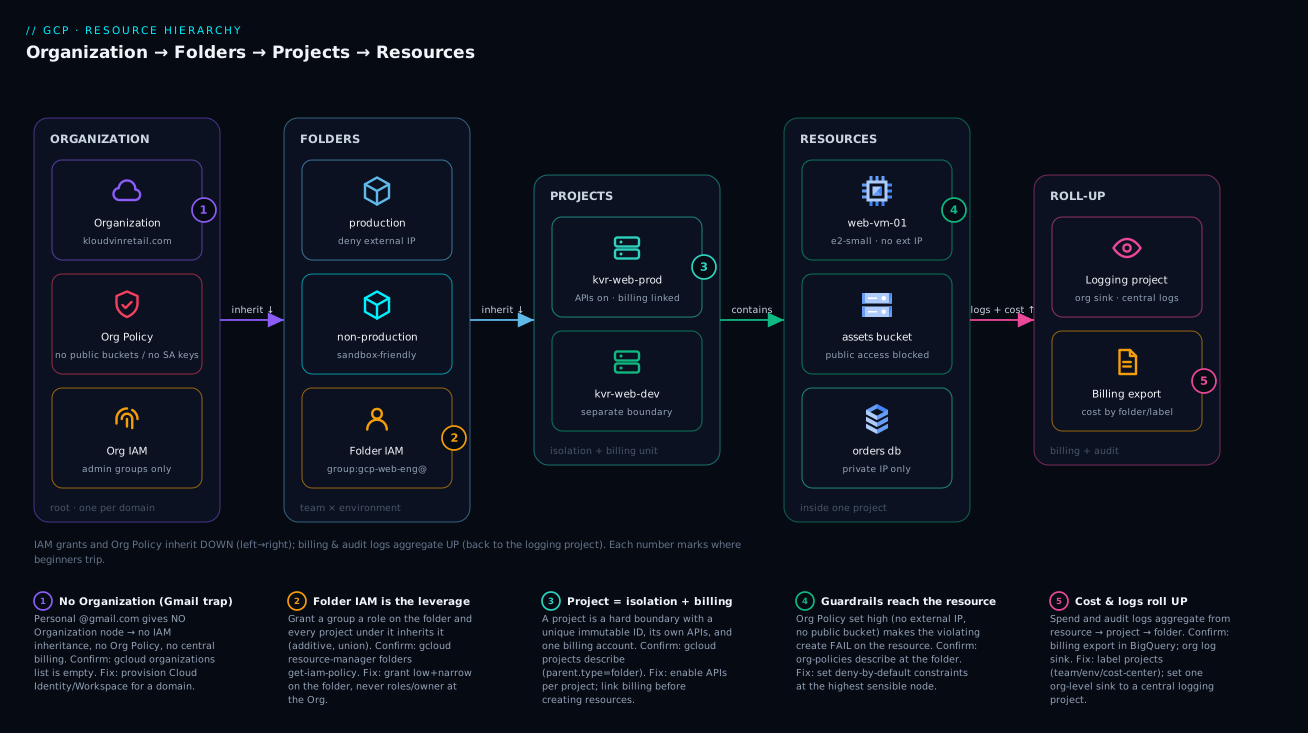
The shape to carry in your head: a tree you read top-down for rules and bottom-up for money. Design the tree once, and access, guardrails, and cost reporting all fall out of its shape for free.
Real-world scenario
Company: KloudVin Retail, a mid-size Indian e-commerce firm, ~120 engineers across Web, Mobile, and Data teams, running on Google Cloud with a hard PCI-adjacent requirement that production be tightly governed and auditable.
The starting mess. They began the way everyone does: a few engineers, ad-hoc projects, one shared billing account, and no Organization (bootstrapped on Gmail accounts). Eighteen months in: 47 parentless projects, IAM granted per project (one engineer had roles/owner on 31 of them because “it was easier”), no enforceable guardrails (three buckets were world-readable, found in a pen test), and finance closing each month by summing 47 billing CSVs in a spreadsheet. A security review flagged the public buckets and over-broad ownership as critical.
The redesign. The platform team stood up Cloud Identity for kloudvinretail.com, creating the Organization node and a root to govern from. They built the hybrid hierarchy shown earlier — bootstrap, common (central logging + Shared VPC host), production, and non-production folders, each with team sub-folders — and migrated the 47 orphans under the right folders with gcloud beta projects move, mapping each by environment and team.
The guardrails. On the production folder: deny external IPs (constraints/compute.vmExternalIpAccess), pin locations to asia-south1/asia-south2 (constraints/gcp.resourceLocations), and disable SA-key creation (constraints/iam.disableServiceAccountKeyCreation) to kill the leaked-key risk class. At the Organization: public-access-prevention so the world-readable-bucket incident could never recur anywhere.
The access cleanup. Blanket roles/owner grants gone, replaced by group-based folder-scoped roles: gcp-web-eng@ got instanceAdmin + storage.admin on the web folders, gcp-data-eng@ got BigQuery + storage on the data folders, on-call got narrow project access. The 31-project owner dropped to exactly what their job needed.
The outcome. Month-end billing went from a 47-CSV ritual to one console view broken down by folder and team. The next pen test found no public buckets — the Org Policy made them impossible. Onboarding a new “Payments” team became: create two folders, drop in projects, inherited IAM and policy apply automatically. The redesign took about three weeks; the governance is permanent. The hard-won lesson is this article’s thesis — the hierarchy isn’t overhead, it’s the cheapest governance you’ll ever buy, and cheapest of all before you have 47 orphan projects.
Advantages and disadvantages
The hierarchy is close to mandatory at any real scale, but it’s honest to name its costs — mostly upfront design effort and a learning curve — against its compounding benefits.
| Advantages | Disadvantages / costs |
|---|---|
| Set IAM once high, inherited everywhere — huge admin savings | Upfront design effort; a bad early structure is annoying to reshape |
| Org Policy guardrails that cannot be bypassed by children | Org Policy semantics (merge vs deny, exceptions) have a learning curve |
| Billing rolls up to teams/cost centers automatically | Requires Workspace/Cloud Identity to get an Organization at all |
| Project boundary contains blast radius by default | Cross-project work (Shared VPC, peering) needs deliberate setup |
| New projects inherit security posture instantly | Folder depth and projects-per-org have hard limits to design within |
| Clear ownership mirroring the org chart | Re-orging the company means re-orging folders (project moves) |
| Foundation for landing zones and automation | Easy to over-engineer into too many folder levels |
When the advantages dominate: any multi-team org, any compliance/audit requirement, anywhere finance needs per-team cost, anything you intend to scale. When the cost feels heavy: a solo developer experimenting — but even then the habit of clean Project IDs and one folder costs nothing and pays off the day a second person joins. The disadvantages are one-time or learnable; the advantages compound with every project you add.
Hands-on lab
This lab builds a minimal but real hierarchy: confirm your Organization, create two folders (production, non-production), a project in each, link billing, and set your first Org Policy guardrail. It uses only gcloud, creates no paid resources, and ends with teardown. You need an Organization (Workspace/Cloud Identity) and the roles folderCreator, projectCreator, billing.admin, and orgpolicy.policyAdmin. On a Gmail-only account the project steps work but folder/Org steps don’t — which itself demonstrates the “no Organization” reality.
Step 1 — confirm your Organization and capture its ID.
# List organizations you can see; copy the ID (a long number)
gcloud organizations list
# Save it for reuse
export ORG_ID=000000000000   # replace with your real org ID
Output: a table with DISPLAY_NAME (your domain) and ID. Empty means no Organization — you’re on a personal account, and the folder steps won’t apply.
Step 2 — create the top-level folders.
gcloud resource-manager folders create \
  --display-name="production" --organization="$ORG_ID"
gcloud resource-manager folders create \
  --display-name="non-production" --organization="$ORG_ID"

# List them and capture the production folder ID
gcloud resource-manager folders list --organization="$ORG_ID"
export PROD_FOLDER=000000000000   # replace with the production folder's ID
Output: each create returns a resource name (folders/NNN); the list shows both folders with their IDs.
Step 3 — create a project under each folder.
# Project IDs must be globally unique — add a random suffix
SUFFIX=$RANDOM
gcloud projects create "kvr-web-prod-$SUFFIX" \
  --folder="$PROD_FOLDER" --name="KVR Web Prod"

# A non-prod project (replace NONPROD_FOLDER with that folder's ID)
gcloud projects create "kvr-web-dev-$SUFFIX" \
  --folder=000000000000 --name="KVR Web Dev"
export PROJECT_ID="kvr-web-prod-$SUFFIX"
Output: “Create in progress…” then completion. The project now has the folder as its parent — verify next.
Step 4 — confirm the project’s place in the tree.
gcloud projects describe "$PROJECT_ID" \
  --format="value(projectId, parent.type, parent.id)"
Output: your project ID, folder, and the production folder’s ID — proving it lives under the folder, not at the root.
Step 5 — link a billing account.
# Find your billing account ID
gcloud billing accounts list
# Link it to the project (replace with your billing account ID)
gcloud billing projects link "$PROJECT_ID" \
  --billing-account=XXXXXX-XXXXXX-XXXXXX
Output: billingEnabled: true. The project can now create billable resources (we won’t, to stay free).
Step 6 — set your first Org Policy guardrail on the production folder.
# Deny external IP addresses for everything under the production folder
gcloud resource-manager org-policies deny \
  compute.vmExternalIpAccess all \
  --folder="$PROD_FOLDER"

# Verify the policy is in place
gcloud resource-manager org-policies describe \
  compute.vmExternalIpAccess --folder="$PROD_FOLDER"
Output: the policy described with the constraint set to deny. Any VM in any project under production now can’t get an external IP — try it in a sandbox to watch the create fail.
Step 7 — teardown. Remove what you made so nothing lingers.
# Delete the projects (enters ~30-day soft-delete; restorable)
gcloud projects delete "$PROJECT_ID" --quiet
gcloud projects delete "kvr-web-dev-$SUFFIX" --quiet

# Remove the Org Policy
gcloud resource-manager org-policies delete \
  compute.vmExternalIpAccess --folder="$PROD_FOLDER"

# Delete the folders (must be empty first)
gcloud resource-manager folders delete "$PROD_FOLDER"
# ...and the non-production folder by its ID
Output: a confirmation per deletion. The projects go to soft-delete, not instant removal — the 30-day window in action.
The same thing in Terraform
In production you build the hierarchy as code so it’s reviewable and repeatable. The equivalent in Terraform, the way a real foundation defines it:
variable "org_id"      { type = string }
variable "billing_acct" { type = string }

# Top-level folders
resource "google_folder" "production" {
  display_name = "production"
  parent       = "organizations/${var.org_id}"
}

resource "google_folder" "non_production" {
  display_name = "non-production"
  parent       = "organizations/${var.org_id}"
}

# A project under the production folder
resource "google_project" "web_prod" {
  name            = "KVR Web Prod"
  project_id      = "kvr-web-prod-7421"          # globally unique, immutable
  folder_id       = google_folder.production.id   # parented to the folder
  billing_account = var.billing_acct
}

# Enable the APIs the project needs
resource "google_project_service" "web_prod_apis" {
  for_each = toset([
    "compute.googleapis.com",
    "storage.googleapis.com",
    "logging.googleapis.com",
  ])
  project = google_project.web_prod.project_id
  service = each.value
}

# Folder-scoped IAM: grant the web team on the whole production/web area
resource "google_folder_iam_member" "web_team_admin" {
  folder = google_folder.production.id
  role   = "roles/compute.instanceAdmin.v1"
  member = "group:gcp-web-eng@kloudvinretail.com"
}

# Org Policy guardrail on the production folder: no external IPs
resource "google_folder_organization_policy" "no_external_ip" {
  folder     = google_folder.production.id
  constraint = "compute.vmExternalIpAccess"
  list_policy {
    deny { all = true }
  }
}
That’s the whole pattern in miniature: folders parented to the org, a project parented to a folder with billing attached, APIs enabled per-project, folder-level IAM (inherited by every project beneath), and a folder-level Org Policy (constraining every project beneath). Reusable project-factory modules generalize the google_project + google_project_service block so every new project is born governed — see the folder, project, and org-policy Terraform modules for production versions.
Common mistakes & troubleshooting
These are the failures that actually happen, roughly in the order beginners hit them: symptom → root cause → confirm → fix.
| # | Symptom | Root cause | How to confirm | Fix |
|---|---|---|---|---|
| 1 | “I have no Organization node” | Signed up with personal @gmail.com, not Workspace/Cloud Identity |
gcloud organizations list returns empty |
Set up Cloud Identity/Workspace for a domain; the Org appears automatically |
| 2 | New project can’t create a VM: “API not enabled” | Compute API not enabled in that project | gcloud services list --enabled --project=ID |
gcloud services enable compute.googleapis.com --project=ID |
| 3 | Project ID rejected at creation | ID taken globally, or invalid chars/length | Try a unique suffix; check 6–30 lowercase/digit/hyphen | Choose a unique, convention-following ID (it’s permanent) |
| 4 | A team has access to projects they shouldn’t | A broad grant (e.g. roles/owner) at Org or a high folder |
Check ancestry IAM: gcloud ... get-iam-policy at each level |
Remove the high grant; re-grant narrowly on the correct folder/project |
| 5 | Org Policy “isn’t working” — child still does the thing | Constraint set at wrong node, or merges with parent | gcloud resource-manager org-policies describe ... --folder/project |
Set at the right scope; verify effective policy on the child |
| 6 | Can’t delete a folder | Folder still contains projects/sub-folders | gcloud resource-manager folders list --folder=ID |
Move or delete contents first, then delete the folder |
| 7 | Locked out — removed our own Org Admin | The only Organization Admin grant was deleted | Console may still allow if you hold the role elsewhere | Use the super-admin / break-glass account to re-grant; always keep a break-glass admin |
| 8 | Deleted project, ID not reusable | Project is in the ~30-day soft-delete window | gcloud projects list --filter='lifecycleState:DELETE_REQUESTED' |
Wait out the window, or undelete and rename intent; don’t script instant reuse |
| 9 | Billing detached, resources stopped | Billing unlinked at project level (or account closed) | gcloud billing projects describe ID shows billingEnabled:false |
Re-link a valid billing account to the project |
| 10 | Orphan projects with no folder | Projects created at Org root, never parented | gcloud projects list then check each parent |
gcloud beta projects move ID --folder=FID into the right folder |
| 11 | Quota error creating many projects | Hit the per-org project-creation quota | Console → IAM & Admin → Quotas | Request a quota increase; reuse/clean up unused projects |
| 12 | Effective access confusing — “who can do this?” | Forgot inherited grants from ancestors | Use IAM Policy Analyzer / ancestry walk | Audit at Org, folder, and project; remember IAM is additive |
Two deserve emphasis. #7 (lockout) is the scariest and most avoidable — never let one user be the only Organization Admin, and keep a separate break-glass super-admin. #10 (orphans) is the most common at scale — restrict projectCreator and require new projects to land in a folder, ideally via a project factory so floating-at-root is impossible.
Best practices
- Get an Organization first. Stand up Cloud Identity or Workspace before anything serious; without it you have no inheritance, no Org Policy, no central billing.
- Keep the tree shallow. Two to three folder levels covers almost every org. Deep nesting makes policy reasoning harder for little gain.
- Mirror your org chart and budgets. Folders should map to how responsibility and money actually split. If a folder has no real owner and budget, question it.
- Grant low and narrow; reserve high and broad for admins. Working access goes on folders/projects with the least role that works; Org-level grants are rare and audited.
- Always use groups, never individuals, for IAM. Grant to
group:team@domain, not people — membership changes then never touch IAM. - Set guardrails at the highest sensible node. Company-wide constraints (no public buckets, no SA keys, allowed regions) belong at the Organization; environment-specific ones on the prod/non-prod folders.
- Bake API enablement and baseline IAM into a project factory. Every new project should be born with standard APIs on and folder-inherited posture applied — automate it in Terraform.
- Pick a Project ID convention and never deviate.
<org>-<team>-<env>-<suffix>is permanent and globally unique; consistency pays off in every script and dashboard. - Keep a break-glass admin. Retain a separate super-admin and a redundant Organization Admin so a bad IAM edit can never lock everyone out.
- Use labels for grouping the tree can’t express. GCP has no resource-group node; use labels (
team:web,env:prod,cost-center:1234) for cross-cutting cost and inventory. - Review effective access periodically. Audit at Org, folder, and project together (IAM Recommender / Policy Analyzer) to catch accumulated over-grants.
- Build it as code. Hand-built hierarchies drift; Terraform makes the tree reviewable, repeatable, and recoverable.
Security notes
The hierarchy is a security control — arguably GCP’s most foundational — so treat its design as a security decision, not org tidiness.
Least privilege rides on the tree’s shape. Because IAM is additive and inherited, every broad grant high up multiplies across everything below. Grant the least privileged role at the lowest necessary node. A roles/viewer at the Organization quietly grants read on every resource in the company — fine for an auditor group, catastrophic for an intern. Always ask “how far down does this reach?” The answer is “everything under the node you put it on.” Deepen this in GCP IAM fundamentals: roles, service accounts and policy and IAM deny policies, conditions and impersonation chains.
Guardrails belong at the top, deny-by-default. Set Org Policy at the Organization for what must never happen anywhere: public-access-prevention on storage, iam.disableServiceAccountKeyCreation (so leaked static keys become impossible — exactly the incident class that has bitten this blog), gcp.resourceLocations for data residency, and compute.vmExternalIpAccess to keep workloads off the public internet. Children inherit these as a floor — see Org Policy guardrails on the resource hierarchy.
The project boundary is your blast-radius wall. Keep prod and non-prod in separate projects and folders so a compromised dev credential can’t reach prod data. When you must connect them, do it deliberately via Shared VPC rather than collapsing the boundary; see Shared VPC multi-project network architecture. For exfiltration-grade isolation around sensitive data, layer VPC Service Controls on top, as in VPC Service Controls perimeters and exfiltration prevention.
Protect the admins and the audit trail. Keep Organization Admin and Org Policy Admin in small groups with a break-glass fallback, enable org-wide audit logging to a locked-down central logging project under common, and prefer Workload Identity Federation over long-lived SA keys for CI/CD — see Workload Identity Federation for keyless CI/CD.
| Security control | Where in the tree | Why there |
|---|---|---|
| Public-access-prevention, no SA keys, region pinning | Organization (Org Policy) | Must hold everywhere; deny-by-default floor |
| Auditor read access | Org or top folder (narrow role) | Broad read, but least-privileged role only |
| Team working access | Folder / project | Lowest node that covers the team’s scope |
| Prod/non-prod isolation | Separate folders + projects | Blast-radius containment |
| Central audit log sink | High node → common logging project |
Captures everything beneath |
| Keyless CI/CD identity | Project (Workload Identity Federation) | No static keys to leak |
Cost & sizing
The hierarchy nodes are free — Organizations, folders, and projects cost nothing to create or hold. You pay only for the resources inside projects (VMs, storage, BigQuery, egress). So the cost question isn’t “what does the tree cost” — it’s “how does the tree help you control what the resources cost.”
The mechanism is billing roll-up. Every project links to a billing account, spend aggregates at the project, and by organizing projects into folders and tagging them with labels (team, env, cost-center) you get spend sliced by exactly the dimensions finance cares about — automatically, in the console and the BigQuery billing export. A flat sprawl can’t do this cleanly; a well-shaped tree does it for free. Go deeper in GCP billing and cost management: budgets, export and discounts.
| Cost lever the hierarchy enables | How it works | Why it saves money |
|---|---|---|
| Per-folder / per-team cost view | Spend rolls up the tree | Finance attributes cost without spreadsheets |
| Budgets & alerts per project/folder | Set a budget on the node | Catch runaway spend before the invoice |
| Labels for cost slicing | team:, env:, cost-center: on projects |
Slice the billing export any way you need |
| Region pinning via Org Policy | gcp.resourceLocations constraint |
Avoid surprise cross-region egress charges |
| Quota guardrails | Org Policy + quotas | Prevent accidental over-provisioning |
| Decommission by project | Delete the whole project | Clean teardown stops all its costs at once |
Rough figures: the nodes are ₹0 / $0. A small always-on e2-small VM in asia-south1 runs in the low hundreds of rupees per month — trivial alone, but 47 ungoverned projects each with a forgotten e2-medium is how surprise five-figure bills happen, and the hierarchy plus per-folder budgets is exactly what surfaces that waste. The free tier covers small experimentation (e2-micro, a few GB of storage). The discipline that controls cost at scale is structural — budgets and labels on a clean tree — not penny-pinching individual resources.
Interview & exam questions
These map to the Cloud Digital Leader, Associate Cloud Engineer, and Professional Cloud Architect exams, where the resource hierarchy is foundational and recurs across IAM, security, and billing questions.
Q1. What are the four levels of the GCP resource hierarchy, top to bottom? Organization, Folders, Projects, and Resources. The Organization is the root (one per Workspace/Cloud Identity domain), folders group projects, projects are the isolation and billing boundary, and resources are the actual deployed things inside a project.
Q2. How do IAM allow policies behave through the hierarchy? They inherit downward and combine additively (union). A grant at a parent applies to all descendants, and a child can only add grants, never subtract an inherited one. Effective access on a resource is the union of bindings from the resource, its project, all ancestor folders, and the Organization.
Q3. How is Org Policy inheritance different from IAM inheritance? Both flow down the tree, but Org Policy constraints combine most-restrictively by default — a parent’s restriction is a floor a child cannot loosen (unless the constraint is explicitly configured to merge or allow exceptions). IAM is additive; Org Policy is restrictive. That difference is the crux.
Q4. Why might someone have no Organization node, and what’s the consequence? They signed up with a personal Gmail account rather than Google Workspace or Cloud Identity. The consequence: projects float as orphans with no parent, so there’s no IAM inheritance, no Org Policy, and no centralized billing roll-up. Fix by provisioning Cloud Identity/Workspace for a domain.
Q5. What makes a project the most important node? It’s a hard isolation boundary (resources don’t cross it by default), it has a globally unique immutable Project ID, it enables its own APIs, holds its own IAM scope, and links to exactly one billing account — so it’s simultaneously the unit of isolation, the API surface, the IAM scope, and the billing unit.
Q6. A team needs access to 12 projects that share an environment and owner. What’s the right move? Put those projects under a common folder and grant the team’s group the least-privileged role on that folder. Inheritance covers all 12 (and any future project added to the folder) with a single grant — far better than 12 per-project grants.
Q7. What’s the difference between Project ID, Project Number, and Project Name? Project ID is the human-friendly, globally unique, immutable key used in commands and IAM; Project Number is the immutable numeric ID services use internally; Project Name is a mutable display label. Only the Name can change after creation.
Q8. Where should you set “no public storage buckets,” and why? At the Organization, as an Org Policy constraint (public-access-prevention). It must hold everywhere as a deny-by-default floor; setting it at the root means every folder and project inherits it and no child can create a public bucket.
Q9. You deleted a project but can’t reuse its ID immediately. Why? Deleted projects enter a ~30-day soft-delete (recovery) window before permanent purge; during that window the ID isn’t released for reuse. Don’t script delete-then-recreate-with-same-ID expecting instant reuse.
Q10. How does the hierarchy help with cost management? Resource spend rolls up the tree: it aggregates at the project, and organizing projects into folders plus labeling them (team, env, cost-center) yields automatic per-team/per-environment cost breakdowns in the console and BigQuery export, plus budgets/alerts per node.
Q11. What’s the danger of granting roles/owner at the Organization?
Because IAM is additive and inherited, that grant lands on every resource in the entire company — the maximum blast radius. A single leaked or misused credential with org-level owner is catastrophic. Grant low and narrow; reserve high broad roles for tiny admin groups.
Q12. How would you connect two projects that need shared networking without collapsing isolation? Use Shared VPC: a host project shares its VPC subnets with service projects, so they share networking while remaining separate projects with their own IAM and billing. Don’t merge them into one project — that would destroy the blast-radius boundary.
Quick check
- In the company analogy, what real GCP node is “a department,” and what node is “a private office”?
- If a grant exists at the Organization and a different grant exists at a project, what does the user effectively have on a resource in that project?
- True or false: a child folder can loosen an Org Policy
denyset by its parent for a standard constraint. - You have a personal
@gmail.comaccount. Which hierarchy node do you not have, and what three capabilities does that cost you? - Name the three identifiers every project has, and say which one is mutable.
Answers
- A folder is a department; a project is a private office. (The Organization is the company; resources are the desks/equipment inside the office.)
- The union of both grants — IAM is additive and inherited, so the user has every role granted at the project and every role granted at the Organization (and any folder in between).
- False. For standard list/boolean constraints, a parent’s restriction is a floor; a child can be equal or more restrictive, not less, unless the constraint is explicitly configured to merge or allow exceptions.
- You have no Organization node. That costs you IAM inheritance, Org Policy guardrails, and centralized billing roll-up — your projects float as ungoverned orphans.
- Project ID, Project Number, and Project Name. Only the Project Name (display label) is mutable; the ID and Number are fixed at creation.
Glossary
- Resource hierarchy — The tree (Organization → Folders → Projects → Resources) through which IAM, Org Policy, and billing flow.
- Organization — The root node, created once per Google Workspace / Cloud Identity domain; the top of all inheritance.
- Folder — An optional grouping node under the Organization (or another folder) used to apply shared IAM and policy to a set of projects.
- Project — The hard isolation and billing boundary that owns resources, enables APIs, and holds its own IAM; identified by a globally unique, immutable Project ID.
- Resource — Any deployed thing (VM, bucket, dataset, DB) living inside exactly one project; the leaf of the tree.
- IAM allow policy — The set of role bindings on a node; inherits downward and combines additively (union).
- Inheritance — The downward flow of IAM grants and Org Policy constraints from a parent node to all descendants.
- Org Policy (constraint) — A guardrail set on Org/Folder/Project that restricts or requires configuration; inherits downward, most-restrictive by default.
- Effective policy — The actual access/constraint on a resource after combining all inherited and direct bindings/policies up its ancestry.
- Project ID — The human-friendly, globally unique, immutable identifier used in commands, URLs, and IAM.
- Project Number — The immutable numeric identifier services use internally.
- Billing account — The payment entity a project links to (one at a time); spend aggregates per project and rolls up the tree.
- Cloud Identity / Workspace — Google’s identity products whose domain provisioning creates the Organization node.
- Break-glass account — A retained, rarely-used super-admin/Org-Admin identity that prevents total lockout.
- Label — A key/value tag on projects/resources used for cost slicing and inventory where the tree itself can’t group (no resource-group node).
- Blast radius — The scope of damage a compromised credential or mistake can reach; bounded by the project (and folder) boundary.
Next steps
- Layer access onto the tree with GCP IAM fundamentals: roles, service accounts and policy, then go deep with IAM roles, policies, conditions and Recommender.
- Turn the hierarchy into enforced guardrails with Org Policy guardrails on the resource hierarchy.
- See the whole foundation assembled in the GCP foundation blueprint with Organization and Shared VPC and the landing-zone resource hierarchy.
- Connect projects without losing isolation via Shared VPC multi-project network architecture.
- Make the bill match the tree with GCP billing and cost management: budgets, export and discounts.