Every data platform review I run starts with the same confession: “we have a data lake and a data warehouse, and they disagree.” The lake — files in Cloud Storage — holds everything cheaply but nobody trusts it. The warehouse — BigQuery — is trusted but holds a copy that is hours or days behind, loaded by a pipeline someone wrote in 2022 and nobody dares touch. Finance numbers come from the warehouse, data-science features come from the lake, and the two drift apart quietly until a board deck and an ML model disagree about last quarter’s revenue. The lakehouse pattern exists to kill that split: one copy of the data, in open formats on cheap object storage where it must be open, in managed warehouse storage where speed and mutation matter — with one security model, one catalog, and one set of tables that every engine (SQL, Spark, BI, ML) reads.
Google Cloud is unusually well shaped for this pattern because BigQuery was born storage-compute separated: its native storage already behaves like a managed lake tier, and BigLake extends BigQuery’s security and table semantics outward over Parquet and Apache Iceberg files sitting in your GCS buckets. Add Pub/Sub as the event backbone, Dataflow as the batch-and-streaming processor, the BigQuery Storage Write API as the high-throughput ingestion door, Dataplex as the governance overlay, and Dataform for in-warehouse ELT, and you have every layer of a lakehouse as a serverless, per-use service — no clusters to keep warm, no HDFS to babysit.
This article is the full architecture at production depth: GCS zone layout and file strategy, the batch path versus the streaming path (and what “exactly-once” actually means at each hop), the BigQuery internals that decide your bill — slots, partitioning, clustering, editions — BigLake and Iceberg so Spark and BigQuery read the same tables, Dataplex governance, Looker and Analytics Hub consumption, and Composer-versus-Workflows orchestration. Every decision comes as a table you can argue from; every build step comes with real gcloud/bq/SQL and Terraform. It is the reference I wish existed the first time I was told to “just make the lake and the warehouse agree.”
What problem this solves
The two-stack pattern — a Hadoop-descended lake plus a separate warehouse — fails in slow motion. Each failure looks local, but they compound into the platform nobody trusts:
| Symptom in production | Root cause in the two-stack design | What it costs you |
|---|---|---|
| Finance dashboard and ML feature store disagree on revenue | Two copies of the same facts, loaded by different pipelines on different schedules | Weeks of reconciliation; execs stop trusting data |
| “Can you add this column?” takes three weeks | Change must land in lake schema, ETL job, warehouse DDL and BI model separately | Analytics velocity collapses; teams build shadow extracts |
| Security review fails on the lake | Object-storage ACLs are bucket-grained; row/column policies exist only in the warehouse | Lake gets locked down; data scientists copy data out to work — worse exposure |
| Storage bill doubles yearly | Every consumer keeps a private copy (lake → warehouse → team marts → CSV exports) | 4–6× storage multiplication is typical; so is the ETL compute to maintain it |
| Streaming events reach dashboards next day | Streaming lands in the lake; the warehouse loads nightly batches | “Real-time” product decisions made on yesterday’s data |
| One bad file silently corrupts a month of reports | No contract between landing files and consumption tables; no data-quality gate | Backfills, apology emails, and a “data trust” project every year |
The lakehouse answer is architectural, not tooling cosmetics: store once in open formats, govern once through one catalog and one ACL model, and let every engine come to the data. On GCP: GCS holds the raw and open-format zones, BigQuery holds hot serving tables, BigLake makes lake files first-class BigQuery tables with row- and column-level security, and Dataplex applies quality gates and lineage across all of it. “The lake and warehouse disagree” becomes a category error — the warehouse is a governed view over the lake.
Who hits this: any team past ~1 TB and two consumers, and hardest when streaming (clickstream, IoT, CDC) enters, because bolting streaming onto a batch two-stack multiplies pipelines again. The streaming path is where most designs go wrong, which is why it gets the deepest section here.
Learning objectives
By the end of this article you can:
- Draw the full GCP lakehouse — sources → Pub/Sub/Dataflow → GCS zones → BigLake → BigQuery → Dataplex → Looker/Analytics Hub — and defend every arrow in a design review.
- Design GCS raw/staging/curated zones with the right bucket topology, storage classes, lifecycle rules, Parquet file sizing and Hive-partitioned layout.
- Choose the correct batch ingestion route (free load jobs,
LOAD DATA, Data Transfer Service, Dataflow, Datastream CDC) with its limits, and the correct streaming route (Storage Write API modes, Pub/Sub BigQuery subscriptions, Dataflow exactly-once vs at-least-once) with its cost. - Explain BigQuery internals well enough to size them: slots, on-demand vs editions with autoscaling, partitioning (time-unit, integer-range, ingestion-time), clustering, and the cost controls that cap a runaway query.
- Unify lake and warehouse with BigLake tables (delegated access, metadata caching, fine-grained security on files) and Apache Iceberg — including when to use BigQuery managed Iceberg tables versus external ones written by Spark.
- Govern the platform with Dataplex: zones and assets, data profiling, AutoDQ data-quality scans that gate promotion, lineage, policy tags and dynamic data masking.
- Build the ELT layer with Dataform (SQLX,
ref(), assertions, incremental tables) and scheduled queries; serve it with Looker/Looker Studio/BI Engine; share it zero-copy with Analytics Hub. - Engineer cost with worked numbers — on-demand vs editions crossover, logical vs physical storage billing, streaming ingestion per-GiB math — and pick Composer vs Workflows for orchestration.
Prerequisites & where this fits
You should be comfortable with: SQL at the window-function level, one IaC tool (examples here are Terraform), IAM fundamentals (principals, roles, bindings — see GCP IAM and Service Accounts: Roles, Bindings and Least Privilege), and BigQuery basics. If BigQuery’s serverless model or the $/TiB scan economics are new, read BigQuery for Beginners: How Serverless Analytics Works first, then BigQuery for Data Analytics: Warehousing, Querying and Visualization — this article builds directly on both and does not re-teach the query lifecycle. Familiarity with Pub/Sub and event-driven architecture and Cloud Storage classes and lifecycle helps; both are recapped only as far as the lakehouse needs.
Where it fits: this is the anchor architecture for the GCP data track — the piece that connects ingestion, storage, processing, governance and consumption into one system. It maps heavily to the Professional Data Engineer certification (storage design, pipeline design, exactly-once semantics, cost optimization are all blueprint items) and partially to Professional Cloud Architect.
Ownership in a real org splits like this — worth agreeing on before you build, because every later argument is really this table:
| Layer | GCP services | Typical owner | The decision that lives here |
|---|---|---|---|
| Sources & CDC | Datastream, application producers, SaaS exports | Source app teams | Contract: schema, keys, delivery guarantees |
| Event backbone | Pub/Sub (topics, schemas, DLQs) | Platform/data engineering | Retention, ordering, schema enforcement |
| Processing | Dataflow (Beam), occasionally Dataproc/Spark | Data engineering | Exactly-once vs at-least-once; enrichment |
| Lake storage | Cloud Storage buckets (zones) | Data platform | Zone layout, formats, lifecycle, region |
| Lake/warehouse bridge | BigLake, BigLake metastore, connections | Data platform | Which tables are open-format vs native |
| Warehouse | BigQuery datasets, reservations | Data platform + analytics eng | Partitioning, editions, workload isolation |
| ELT & modeling | Dataform, scheduled queries | Analytics engineering | Dependency DAG, tests, incremental logic |
| Governance | Dataplex (catalog, DQ, lineage, policy tags) | Data governance | Quality gates, PII policy, discoverability |
| Consumption | Looker, Looker Studio, Connected Sheets, notebooks, Vertex AI | BI + DS teams | Semantic layer, acceleration, access |
| Sharing | Analytics Hub | Data platform | What leaves the team/org, zero-copy |
Core concepts
Five ideas carry the whole architecture. Get these right and every section below is a detail.
1. The lakehouse is one copy plus two access paths — not two stores. A data lake is open files (Parquet, Avro, ORC, Iceberg) on object storage: cheap, engine-agnostic, schema-on-read, weak governance. A data warehouse is managed tables: ACID, fast SQL, fine-grained security, schema-on-write, but historically closed. The lakehouse keeps one physical copy and gives it both personalities: open files that behave like governed tables. On GCP the trick is that BigLake projects BigQuery’s table semantics (IAM at table level, row/column security, masking, metadata caching) onto GCS files, while BigQuery native storage remains available for the hot, heavily-mutated serving tables where a managed format wins. You choose per table where it lives; consumers never notice.
2. Storage and compute never share a bill. GCS and BigQuery storage charge per GiB-month; BigQuery compute charges per TiB scanned (on-demand) or per slot-hour (editions); Dataflow per worker-second; Pub/Sub per TiB moved. Nothing idles except what you explicitly reserve — which is why lakehouse-on-GCP has no “cluster sizing” step. The design questions are layout questions (partitioning, file sizes, formats), because layout turns into scan bytes and scan bytes are the bill.
3. The streaming path and the batch path converge on the same tables. Batch lands files in GCS and loads (or federates) into BigQuery. Streaming flows Pub/Sub → Dataflow → Storage Write API straight into the same partitioned tables. One table, two doors. The design constraint is that both doors must be idempotent and both must respect the table’s partitioning, or your “one copy” quietly becomes “one table, duplicated rows.”
4. Governance is an overlay, not a gate you build later. Dataplex organizes buckets and datasets into logical lakes and zones, auto-discovers files into catalog entries, runs data-quality scans that gate promotion from raw to curated, and records lineage across BigQuery and pipeline jobs. Column policy is policy tags + dynamic masking — defined once, enforced identically on native and BigLake tables. Bolt governance on later and you will redo the zone layout; design it in.
5. Everything downstream consumes tables, never files. Looker, Looker Studio, Connected Sheets, notebooks, Analytics Hub subscribers — all read tables through BigQuery’s API surface. Files are the platform team’s implementation detail; the moment a consumer touches gs:// directly, you’ve forked governance.
The vocabulary, pinned:
| Term | One-line definition | Layer |
|---|---|---|
| Zone (lake) | A lifecycle stage of data: raw → staging → curated | GCS / Dataplex |
| BigLake table | GCS files exposed as a governed BigQuery table via a connection | Bridge |
| Connection | BigQuery resource wrapping a service account that reads GCS for BigLake/external tables | Bridge |
| External table | Plain federation over GCS files — caller needs bucket access, no fine-grained security | Bridge (legacy) |
| Iceberg | Open table format adding ACID, snapshots, schema evolution to Parquet files | Lake format |
| Slot | BigQuery’s unit of query compute (virtual CPU + RAM); queries run on many | Warehouse |
| Edition | Slot pricing tier: Standard / Enterprise / Enterprise Plus with autoscaling | Warehouse |
| Storage Write API | gRPC ingestion API: streams rows into BigQuery with exactly-once option | Ingestion |
| Default stream | The always-existing Storage Write API stream: at-least-once, highest simplicity | Ingestion |
| Watermark | Dataflow’s estimate of event-time completeness; drives window firing | Processing |
| AutoDQ scan | Dataplex data-quality scan: declarative rules, scheduled, results to BigQuery | Governance |
| Policy tag | Taxonomy node attached to columns; IAM on the tag = column-level security | Governance |
| Linked dataset | Analytics Hub subscriber’s zero-copy, read-only view of a shared dataset | Sharing |
| Slot-hour | Billing unit for editions: one slot for one hour (billed per second, 1 min minimum) | Cost |
And the three storage architectures side by side — the decision you’ll make per table for the rest of your tenure:
| Dimension | Data lake (GCS files only) | Warehouse (BigQuery native) | Lakehouse (BigLake / Iceberg over GCS + native hot tables) |
|---|---|---|---|
| Storage cost (us-central1, indicative) | $0.020/GB Standard, to $0.0012 Archive | $0.02/GiB active logical (or $0.04/GiB physical, compressed) | Lake price for open zones; BQ price for hot tables |
| Open engine access (Spark, Trino) | Full, native | Via Storage Read API only | Full on open zones; Read API on native |
| Row/column security, masking | None (bucket ACLs) | Full | Full — BigLake enforces it on files |
| ACID / mutation | None (object overwrite) | Full DML, multi-statement transactions | Iceberg: snapshots + merge; native: full DML |
| Streaming ingest | Files every N minutes | Storage Write API, seconds | Both doors |
| Time travel | Object versioning (manual) | 2–7 days built in + 7-day fail-safe | Iceberg snapshots / BQ time travel |
| Schema enforcement | Convention only | Enforced on write | Enforced via table definitions + DQ scans |
| Typical role in this architecture | Raw + archive zones | Serving marts, high-mutation tables | The curated core everyone reads |
The lake: Cloud Storage zone design
The lake is three (sometimes four) zones, each a contract about trust and mutability — not a folder aesthetic. Everything else in the platform keys off this:
| Zone | Contents | Format | Mutability contract | Who reads it | Storage class strategy |
|---|---|---|---|---|---|
| raw (bronze) | Exactly what the source sent — CDC records, JSON events, CSV drops, API dumps | Source-native (JSON/Avro/CSV) | Append-only, immutable, never edited | Pipelines + incident forensics only | Standard 30d → Nearline 90d → Coldline/Archive |
| staging (silver) | Parsed, typed, deduplicated, conformed keys; still per-source | Parquet | Rebuildable from raw at any time | Data engineering | Standard; lifecycle-delete after N days if rebuildable |
| curated (gold) | Business entities and facts; partitioned; DQ-gated | Parquet or Iceberg | Merge via pipeline only; consumers read-only | Everyone (via BigLake/BigQuery) | Standard (hot) |
| export (optional) | Outbound extracts for partners | Per contract | Regenerated per run | External transfer jobs | Standard, lifecycle-delete 30d |
Three rules I hold in every review: raw is legally sacred (it’s your replay and audit source — losing it means losing the ability to rebuild anything downstream), staging is disposable by design (if it can’t be rebuilt from raw, it’s not staging), and only curated is a consumption surface — and even then only through BigLake/BigQuery tables, never gs:// paths.
Bucket topology, region and settings
One bucket per zone per environment is the sweet spot — coarse enough to manage, fine enough that IAM, lifecycle and retention differ where they must:
| Setting | Value for the lake | Why / trade-off | Gotcha |
|---|---|---|---|
| Bucket granularity | <org>-<env>-lake-{raw,staging,curated} |
IAM + lifecycle boundaries align with trust boundaries | One mega-bucket makes zone-level lifecycle/IAM impossible |
| Location | Same region as BigQuery dataset (e.g. asia-south1) |
Loads and BigLake require co-location; egress-free | US multi-region BQ can load from any US bucket; EU stricter — plan region first |
| Uniform bucket-level access | On, always | Kills object ACL sprawl; IAM-only | Legacy ACL-dependent tools break — good, find them now |
| Public access prevention | Enforced | A lake leak is a résumé event | Org policy storage.publicAccessPrevention makes it non-negotiable |
| Versioning | On for raw; off elsewhere | Protects the sacred zone from overwrite bugs | Pair with lifecycle numNewerVersions or versions accumulate cost |
| Soft delete | Default 7-day window | Recovers from bucket-level fat-fingers | Retained bytes are billed; tune the window deliberately |
| Retention policy / lock | Consider on raw for compliance | WORM guarantee for auditors | Locked retention is irreversible — model cost before locking |
| CMEK | Per data classification | Compliance; key revocation = kill switch | Key and bucket must be co-located; grant the GCS service agent |
| Autoclass | Good default on raw | Auto-transitions objects by access; no retrieval fees or min durations | Management fee per 1,000 objects; explicit lifecycle is cheaper at known access patterns |
Class economics in one line (us-central1, indicative): Standard $0.020/GB-month with no retrieval fee, Nearline $0.010 (+$0.01/GB retrieval, 30-day minimum), Coldline $0.004 (+$0.02/GB, 90-day), Archive $0.0012 (+$0.05/GB, 365-day). Retrieval fees are why you never point a Spark backfill at Archive casually — re-reading 50 TB of Archive costs $2,500 in retrieval before a single vCPU spins. Full class mechanics live in Cloud Storage Classes and Lifecycle.
Layout, file sizing and the small-files disease
Inside curated, layout is performance. Use Hive-style partition paths so BigLake/BigQuery can prune by directory:
gs://acme-prod-lake-curated/events/
  event_date=2026-07-06/hr=22/part-00000-....parquet   (~256 MB–1 GB each)
  event_date=2026-07-07/hr=00/...
| Concern | Target | Why | How to enforce |
|---|---|---|---|
| File size (Parquet) | 256 MB–1 GB | Fewer files = fewer opens/lists; row-group parallelism inside | Dataflow FileIO.withNumShards sized to window volume; periodic compaction job |
| Files per table | Thousands, not millions | BQ load caps at 10M files/job; listing dominates query startup | Hourly compaction of streaming spill; Iceberg rewrite_data_files |
| Partition path key | Low-cardinality time (event_date=) |
Directory pruning; matches BQ partitioning downstream | hive_partition_uri_prefix on the BigLake table |
| Key naming | Avoid monotonic prefixes for high write QPS | GCS ranges shard by key; sequential names hotspot one shard | Time goes in the directory, randomness in the filename |
| Request rate | Bucket auto-scales from ~1,000 writes/s, 5,000 reads/s; doubles as load ramps ~every 20 min | Sudden 10× bursts before ramp see 429s | Gradual ramp-up; exponential backoff (client libraries do this) |
| Object size cap | 5 TiB hard limit per object | — | Irrelevant if you’re sizing files correctly |
| Compression | Snappy (Parquet default) or ZSTD | Splittable via row groups; gzip’d CSV is not splittable | Set in the writer; never gzip CSV for anything you’ll query |
Everything above as code — CLI first, then Terraform:
# Region variable — decide ONCE, everything co-locates with it
export REGION=asia-south1 PROJECT=acme-data-prod

gcloud storage buckets create gs://acme-prod-lake-raw \
  --project=$PROJECT --location=$REGION \
  --uniform-bucket-level-access --public-access-prevention \
  --soft-delete-duration=7d

# Lifecycle: raw cools as it ages
cat > /tmp/lc-raw.json <<'EOF'
{"rule":[
  {"action":{"type":"SetStorageClass","storageClass":"NEARLINE"},"condition":{"age":30}},
  {"action":{"type":"SetStorageClass","storageClass":"COLDLINE"},"condition":{"age":90}},
  {"action":{"type":"SetStorageClass","storageClass":"ARCHIVE"},"condition":{"age":365}},
  {"action":{"type":"Delete"},"condition":{"age":30,"numNewerVersions":3}}
]}
EOF
gcloud storage buckets update gs://acme-prod-lake-raw --lifecycle-file=/tmp/lc-raw.json
resource "google_storage_bucket" "curated" {
  name                        = "acme-prod-lake-curated"
  project                     = "acme-data-prod"
  location                    = "asia-south1"
  uniform_bucket_level_access = true
  public_access_prevention    = "enforced"

  soft_delete_policy { retention_duration_seconds = 604800 } # 7 days

  lifecycle_rule {
    action { type = "Delete" }
    condition { age = 30, matches_prefix = ["tmp/", "export/"] }
  }
}
The batch path: files into BigQuery
Batch is the boring path and it should stay boring. The routes, exhaustively:
| Route | Mechanism | Compute cost | Transform capability | Best for | Hard limits to know |
|---|---|---|---|---|---|
Load job (bq load, API) |
Shared free slot pool copies files → native storage | Free (no SLA on the shared pool) | None (schema mapping only) | The default; 90% of batch | 1,500 loads/table/day; 100k/project/day; 15 TB total bytes/job; 10k URIs; 10M files |
LOAD DATA SQL |
Same engine, SQL statement | Free, or your reservation via PIPELINE assignment | Column list, partition target | SQL-first teams; Dataform pre-ops | Same as load jobs |
| BigQuery Data Transfer Service | Managed scheduler (GCS, SaaS: Ads, GA4, S3, Teradata…) | Free for GCS source (loads underneath) | None | Recurring drops, SaaS ingestion | Min 15-min schedule granularity for GCS |
| Dataflow batch | Beam job reads GCS, transforms, writes BQ | Worker-seconds (vCPU ~$0.056/hr batch) | Full code | Heavy transform/enrich/PII-scrub before land | Your pipeline’s own correctness |
| Datastream CDC | Serverless CDC MySQL/Postgres/Oracle/SQL Server → BQ or GCS | Per-GB CDC processed | Soft-delete columns, staleness knob | Operational DB replicas without pipeline code | Backfill throughput; source log retention |
| Storage Write API (pending mode) | Programmatic batch: append to stream, commit atomically | $0.025/GiB after free 2 TiB/mo | Your code | Exactly-once programmatic batch from apps | Stream TTL; commit is the atomic unit |
| CTAS over BigLake | CREATE TABLE AS SELECT from lake table |
Query cost (scan or slots) | Full SQL | Materializing curated → native marts | Scans the source — partition-prune it |
Two non-obvious facts drive most batch designs. Load jobs are free but SLA-less — they run on a shared pool and can queue at busy hours; if a load feeds a 06:00 SLA dashboard, assign a reservation with job_type=PIPELINE so it draws your paid slots. And loads are atomic per job — full commit or full failure — which makes retries trivially safe.
Format rules in brief: Parquet is the default (splittable via row groups, additive schema evolution on load); Avro suits CDC/interop because the schema travels with the data; CSV and newline JSON belong in raw only — compressed CSV/JSON files cap at 4 GB each, aren’t splittable when gzipped, and CSV’s positional schema is a standing invitation to silent column drift.
And the idempotent load pattern — partition-scoped truncate-load, the single most reliable batch trick on BigQuery:
# Reload one day atomically: retry-safe, no dedupe needed
bq load --source_format=PARQUET --replace \
  'acme_analytics.events$20260707' \
  'gs://acme-prod-lake-curated/events/event_date=2026-07-07/*.parquet'
-- Same thing in SQL (runs free, or on PIPELINE reservation slots)
LOAD DATA OVERWRITE acme_analytics.events
PARTITIONS (event_date = '2026-07-07')
FROM FILES (
  format = 'PARQUET',
  uris = ['gs://acme-prod-lake-curated/events/event_date=2026-07-07/*.parquet']
);
That table$YYYYMMDD partition decorator targets exactly one partition; --replace/OVERWRITE scopes the truncation to it. Rerun it five times, get one copy.
The streaming path: Pub/Sub → Dataflow → Storage Write API
This is the section that separates working lakehouses from expensive ones. The streaming path has three hops, and each hop has its own delivery semantics; “exactly-once” is only true end-to-end if every hop holds its part of the contract.
Hop 1 — Pub/Sub, the buffer that saves you
Pub/Sub is a global, serverless message bus: publishers write to a topic, each subscription gets every message, subscribers ack within a deadline or the message redelivers. Its lakehouse role is shock absorber and replay log — when Dataflow is draining, deploying or broken, Pub/Sub holds the backlog. The settings that matter:
| Setting | Values | Default | Lakehouse recommendation | Trade-off / gotcha |
|---|---|---|---|---|
| Topic message retention | up to 31 days | none (subscription-level applies) | 7 days on critical topics | Topic-level retention lets new subscriptions seek backwards; billed $0.27/GiB-mo |
| Subscription retention | 10 min – 7 days | 7 days | 7 days | Includes acked messages only if retain_acked_messages |
| Ack deadline | 10–600 s | 10 s | 60 s+ for Dataflow (it manages extensions itself) | Too low → redelivery storms → duplicate pressure |
| Delivery type | pull, push, BigQuery, Cloud Storage | pull | pull for Dataflow; BigQuery type for no-transform tables | Push caps throughput; export types have no code hook (SMT aside) |
| Exactly-once delivery | on/off (pull, regional) | off | Off when Dataflow dedupes anyway | Adds latency; only intra-region; Dataflow doesn’t need it |
| Ordering keys | per-key FIFO | off | Only if consumers require order | 1 MB/s throughput cap per key; a hot key throttles |
| Schema (Avro/Protobuf) | attach to topic | none | Attach Avro schema + revisions on curated topics | Rejects bad producers at publish time — your first DQ gate |
| Dead-letter topic | after 5–100 attempts | off | On, 5 attempts, alert on DLQ depth | Without it a poison message redelivers forever, stalling backlog |
| Filter | attribute expression | none | Filter per subscription to cut egress | Filtered-out messages still count as delivered for billing? No — filtered messages are acked free of your code, but you pay throughput |
| Message size | ≤10 MB | — | Keep ≤1 MB; batch small events at producer | 10 MB is a hard limit; oversized publishes fail |
gcloud pubsub topics create events-clickstream \
  --message-retention-duration=7d \
  --schema=clickstream-v1 --message-encoding=binary

gcloud pubsub topics create events-clickstream-dlq

gcloud pubsub subscriptions create events-clickstream-dataflow \
  --topic=events-clickstream --ack-deadline=60 \
  --dead-letter-topic=events-clickstream-dlq --max-delivery-attempts=5
The operational metric that matters is oldest_unacked_message_age — that’s your streaming SLO leading indicator, not Dataflow CPU.
Hop 2 — Dataflow, where correctness is manufactured
Dataflow runs Apache Beam pipelines serverlessly: autoscaled workers, checkpointed state, and — critically — effectively-once processing inside the pipeline: Pub/Sub redeliveries are deduplicated on message ID, and each bundle’s outputs commit atomically with its state. The pipeline does parse → validate → enrich → window → write, quarantining poison messages to a DLQ instead of dying on them:
import apache_beam as beam
from apache_beam.options.pipeline_options import PipelineOptions
from apache_beam.io.gcp.bigquery import WriteToBigQuery, BigQueryDisposition

class ParseEvent(beam.DoFn):
    def process(self, msg):
        try:
            row = parse_and_validate(msg)          # types, required keys, PII scrub
            yield beam.pvalue.TaggedOutput("ok", row)
        except Exception:
            yield beam.pvalue.TaggedOutput("dead", msg)  # → DLQ, never crash the bundle

with beam.Pipeline(options=PipelineOptions(
    streaming=True, project="acme-data-prod", region="asia-south1",
    enable_streaming_engine=True, max_num_workers=10)) as p:

    parsed = (p
        | beam.io.ReadFromPubSub(subscription="projects/acme-data-prod/subscriptions/events-clickstream-dataflow")
        | beam.ParDo(ParseEvent()).with_outputs("ok", "dead"))

    (parsed.ok | WriteToBigQuery(
        "acme-data-prod:acme_analytics.events",
        method=WriteToBigQuery.Method.STORAGE_WRITE_API,   # exactly-once sink
        write_disposition=BigQueryDisposition.WRITE_APPEND,
        with_auto_sharding=True))

    (parsed.dead | beam.io.WriteToPubSub("projects/acme-data-prod/topics/events-clickstream-dlq"))
The pipeline options that decide cost and correctness:
| Option | Values | Default | Set it to | Why |
|---|---|---|---|---|
| Streaming Engine | on/off | on for newer SDKs | on | Moves shuffle/state off workers → smaller, cheaper, faster-scaling workers |
max_num_workers |
1–1000+ | 100 | Explicit cap (e.g. 10) | Autoscaling without a cap is a blank cheque against a backlog surge |
| Machine type | any | n1-standard-4-ish | n2d/e2 small for parse-heavy |
Right-size; streaming billed per worker-second (vCPU ~$0.069/hr streaming) |
| At-least-once mode | vs exactly-once | exactly-once | At-least-once if sink dedupes or duplicates are tolerable | Skips dedup/state overhead → lower latency & cost |
with_auto_sharding (BQ sink) |
on/off | off | on | Lets the service pick write parallelism to avoid throttling |
| Update / drain | — | — | Drain before replacing; update for compatible changes | Cancel drops in-flight windows → gaps or (with replay) duplicates |
| Autoscaling algorithm | THROUGHPUT_BASED / NONE | THROUGHPUT_BASED | default | NONE only for fixed-cost experiments |
| Dataflow Prime | on/off | off | Usually off | Per-DCU billing model; evaluate against plain Streaming Engine |
No-code alternative: Google’s provided template does Pub/Sub → BigQuery with a UDF hook and DLQ table, one command:
gcloud dataflow flex-template run ps-to-bq-events \
  --template-file-gcs-location=gs://dataflow-templates-asia-south1/latest/flex/PubSub_Subscription_to_BigQuery_Flex \
  --region=asia-south1 \
  --parameters inputSubscription=projects/acme-data-prod/subscriptions/events-clickstream-dataflow,outputTableSpec=acme-data-prod:acme_analytics.events,outputDeadletterTable=acme-data-prod:acme_analytics.events_dlq
Hop 3 — the Storage Write API, BigQuery’s ingestion door
The BigQuery Storage Write API is a gRPC, protobuf-based append protocol — the modern replacement for legacy insertAll streaming. It’s cheaper ($0.025/GiB vs $0.05/GB, first 2 TiB/month free), faster, and it’s the only door with real exactly-once semantics, via streams:
| Stream type | Visibility | Semantics | Use when |
|---|---|---|---|
| Default stream | Immediate per append | At-least-once (retries can duplicate) | Simple producers; Beam at-least-once mode; Pub/Sub BQ subscriptions use this door |
| Committed | Immediate per append | Exactly-once when you supply offsets (out-of-order/duplicate offsets rejected with ALREADY_EXISTS/OUT_OF_RANGE) |
Streaming with strict no-duplicates (Dataflow’s exactly-once sink does this for you) |
| Pending | Invisible until stream commit | Atomic batch (all-or-nothing) | Programmatic batch replacing load jobs |
| Buffered | Per-row flush control | Row-level checkpointing | Rare; connector internals |
Quotas you’ll actually hit (defaults; raisable): concurrent connections 1,000 per project per region (10,000 in US/EU multi-regions); throughput ~3 GiB/s per project in multi-regions; CreateWriteStream is rate-limited — reuse streams (or use the default stream) rather than creating one per batch. Fresh rows sit in write-optimized storage until background compaction moves them into columnar Capacitor blocks, queryable within seconds either way. The legacy insertAll streaming buffer restriction (DML failing with would affect rows in the streaming buffer) is one more reason to leave insertAll behind.
Choosing your streaming route
All four viable routes compared — this is the table to argue from in design review:
| Pub/Sub BigQuery subscription | Dataflow at-least-once + default stream | Dataflow exactly-once + committed streams | Legacy insertAll |
|
|---|---|---|---|---|
| Transforms | Schema mapping only (+ lightweight single-message transforms) | Full Beam | Full Beam | n/a (client-side) |
| Delivery to table | At-least-once | At-least-once | Exactly-once | At-least-once (best-effort insertId dedupe) |
| Latency to queryable | Seconds | Seconds | Seconds (slightly higher) | Seconds |
| Cost model (indicative) | ~$50/TiB subscription (Write API included) | Workers + $0.025/GiB | Workers (+~10–20% CPU for dedupe/state) + $0.025/GiB | $0.05/GB — 2× Write API |
| Failure handling | DLQ topic on schema mismatch | Your DLQ pattern | Your DLQ pattern | Client retries |
| Ops burden | None | Pipeline to run | Pipeline to run | Client library only |
| Pick when | Events already table-shaped | Duplicates tolerable / dedupe downstream via MERGE |
Money, inventory, anything counted | Never for new builds |
The honest architectural note: at-least-once + idempotent MERGE downstream is often the best engineering trade. Exactly-once inside Dataflow costs state and CPU; if your curated layer already merges on a business key (as CDC forces you to anyway), the cheaper mode plus a dedupe step gives the same downstream truth:
-- Hourly dedupe/merge from streamed appends into the curated fact
MERGE acme_analytics.orders_curated T
USING (
  SELECT * EXCEPT(rn) FROM (
    SELECT *, ROW_NUMBER() OVER (PARTITION BY order_id ORDER BY ingest_ts DESC) rn
    FROM acme_analytics.orders_stream
    WHERE event_date = CURRENT_DATE('Asia/Kolkata')
  ) WHERE rn = 1
) S ON T.order_id = S.order_id
WHEN MATCHED THEN UPDATE SET status = S.status, amount = S.amount, updated_at = S.ingest_ts
WHEN NOT MATCHED THEN INSERT ROW;
And the zero-code route in Terraform — Pub/Sub writing straight to BigQuery:
resource "google_pubsub_subscription" "events_to_bq" {
  name  = "events-clickstream-bq"
  topic = google_pubsub_topic.events.id

  bigquery_config {
    table               = "acme-data-prod.acme_analytics.events_raw"
    use_topic_schema    = true
    write_metadata      = true    # publish_time, message_id columns
    drop_unknown_fields = true
  }
  dead_letter_policy {
    dead_letter_topic     = google_pubsub_topic.events_dlq.id
    max_delivery_attempts = 5
  }
}
Gotcha that catches everyone once: the Pub/Sub service agent (service-<project-number>@gcp-sa-pubsub.iam.gserviceaccount.com) needs roles/bigquery.dataEditor on the target dataset or the subscription sits in an error state writing nothing.
Streaming limits & failure table
| Limit / behavior | Value (default) | What hitting it looks like | Response |
|---|---|---|---|
| Pub/Sub message size | 10 MB hard | Publish INVALID_ARGUMENT |
Batch at producer; claim-check big payloads to GCS |
| Ordering key throughput | 1 MB/s per key | Publish throttling on hot keys | Shard keys; question whether order is truly required |
| Write API throughput | ~3 GiB/s/project (multi-region) | RESOURCE_EXHAUSTED on AppendRows |
Quota increase; multiplex connections; check row batching |
| Write API connections | 1,000/region (10k US/EU) | Connection refusals under fan-out | Connection pooling / multiplexing; fewer, fatter writers |
| Committed offset replay | — | ALREADY_EXISTS on append |
Not an error — that’s exactly-once working; skip and continue |
| Offset gap | — | OUT_OF_RANGE |
Client bug: rewind to last committed offset and resend |
| Dataflow watermark stuck | — | Data freshness climbing, no errors | Hot key or stuck DoFn: check side-input stalls, key skew; Reshuffle |
| Pub/Sub backlog age | — | oldest_unacked_message_age growing |
Scale max_num_workers; check DLQ for poison loop |
| BQ subscription error state | — | Subscription stops, state != ACTIVE |
Table deleted / schema mismatch / IAM: fix and it resumes |
BigQuery internals recap: slots, layout, editions
Full treatment lives in BigQuery for Data Analytics; here is the layer the lakehouse depends on, with the current pricing model.
Slots and the two ways to buy compute
A slot is BigQuery’s unit of compute. Queries decompose into stages; stages fan out across however many slots the scheduler grants; shuffle moves intermediate data between stages. You buy compute one of two ways:
- On-demand: $6.25/TiB scanned (first 1 TiB/month free), with a soft ceiling of ~2,000 concurrent slots per project. You pay for bytes the query touches, so table layout is literally the bill.
- Editions (capacity): you pay $/slot-hour for a reservation with a baseline (always-on floor, can be 0) and an autoscale max; the autoscaler adds slots in increments of 50, billed per second with a one-minute minimum. Slot-hour prices (us-central1, pay-as-you-go, indicative): Standard $0.04, Enterprise $0.06, Enterprise Plus $0.10; 1-yr/3-yr commitments discount Enterprise tiers roughly 20–40%.
| Standard | Enterprise | Enterprise Plus | |
|---|---|---|---|
| $/slot-hour (PAYG, us-central1) | $0.04 | $0.06 | $0.10 |
| Commitments (1y/3y) | No | Yes | Yes |
| Max reservation size | 1,600 slots | Higher (quota) | Higher (quota) |
| Fine-grained security (row/column/masking) | No | Yes | Yes |
| BigQuery ML, BI Engine | No | Yes | Yes |
| CMEK | No | Yes | Yes |
| Managed DR / Assured Workloads | No | No | Yes |
| Intended for | Dev, ad-hoc | Production default | Regulated/compliance |
The crossover rule of thumb: one slot running 24×7 on Enterprise PAYG is 730 × $0.06 ≈ $43.8/month — the price of 7 TiB of on-demand scanning. Move to editions when steady scan volume outruns an equivalent autoscaled reservation; keep spiky, low-volume projects on-demand. Mixed estates are normal: reservations assign per project/folder with job_type granularity (QUERY, PIPELINE, ML_EXTERNAL), so BI gets a baseline while ad-hoc stays on-demand.
# Admin project holds reservations; assign to workload projects
bq mk --location=asia-south1 --reservation --edition=ENTERPRISE \
  --slots=100 --autoscale_max_slots=400 prod-bi
bq mk --reservation_assignment --reservation_id=acme-admin:asia-south1.prod-bi \
  --assignee_type=PROJECT --assignee_id=acme-data-prod --job_type=QUERY
Partitioning and clustering — the layout that is the bill
| Partitioning type | Key | Granularity | Max partitions | Use |
|---|---|---|---|---|
| Time-unit column | DATE/TIMESTAMP/DATETIME column | hourly / daily / monthly / yearly | 10,000 | The default for facts (daily) |
| Ingestion-time | _PARTITIONTIME pseudo-column |
same | 10,000 | Only when no event-time column exists |
| Integer-range | INT64 column | fixed buckets | 10,000 | Tenant/shard IDs |
| (none + clustering) | — | — | — | Small/dimension tables |
Clustering sorts data within (or without) partitions by up to 4 columns, in order; queries filtering on prefix columns read only matching blocks, and BigQuery re-clusters in the background for free. The decision matrix:
| If the column is… | Partition or cluster? | Why |
|---|---|---|
| Event date, ~daily query windows | Partition (DAY) | Hard pruning + partition-scoped ops ($20260707 decorators, per-partition expiry) |
| Hourly windows on huge tables | Partition (HOUR) — watch the 10k cap (416 days) | Cap forces archive strategy |
| High-cardinality filter (customer_id, sku) | Cluster | Partitioning would explode partition counts |
| Both date + IDs | Partition by date, cluster by IDs | The canonical lakehouse fact layout |
| Low-cardinality enum (status) | Cluster (late position) | Not worth a partition dimension |
| Multi-tenant isolation | Integer-range partition on tenant bucket | Enables per-tenant deletes/expiry |
CREATE TABLE acme_analytics.events
(
  event_id STRING NOT NULL,
  event_date DATE NOT NULL,
  event_ts TIMESTAMP NOT NULL,
  customer_id STRING,
  event_name STRING,
  payload JSON
)
PARTITION BY event_date
CLUSTER BY customer_id, event_name
OPTIONS (
  require_partition_filter = TRUE,   -- refuse full scans outright
  partition_expiration_days = 730
);
require_partition_filter = TRUE is the single highest-ROI line in this article: any query without a WHERE event_date … predicate fails instead of scanning everything. Note the sharp edge: the filter must hit the column bare — WHERE DATE(event_ts) = '2026-07-07' on a table partitioned by event_date prunes nothing.
Cost-control settings, enumerated
| Control | Scope | What it does | Set it |
|---|---|---|---|
maximum_bytes_billed |
Per query/job | Hard-fails a query that would scan more | Default it in BI tooling: e.g. 100 GB |
| Dry run | Per query | Returns scan estimate, costs nothing | bq query --dry_run; CI check on Dataform PRs |
| Cached results | Project | Free identical-query hits for 24 h | On by default; deterministic SQL keeps it warm |
require_partition_filter |
Table | Rejects unpruned queries | Every large fact table |
| Materialized views | Dataset | Auto-refreshed pre-aggregation; queries rewrite to them transparently | Top 5 dashboard aggregates |
| BI Engine | Project/location | In-memory acceleration (per-GiB-hour reservation) | Looker Studio-heavy estates |
| Custom quotas | Project/user | Daily bytes-scanned caps per user/project | 1–5 TiB/user/day stops runaways |
| Time travel window | Dataset | 2–7 days of point-in-time reads | ALTER SCHEMA … SET OPTIONS (max_time_travel_hours=48) on churny staging |
| Storage billing model | Dataset | Logical ($0.02 active/GiB) vs physical ($0.04 active/GiB on compressed bytes, incl. time-travel/fail-safe) | Physical wins when compression >2×: check INFORMATION_SCHEMA.TABLE_STORAGE |
| Long-term storage | Automatic | Untouched 90 days → ~half-price storage | Free win; don’t “touch” cold partitions needlessly |
-- Is physical (compressed) billing cheaper for this dataset?
SELECT table_name,
  ROUND(SUM(active_logical_bytes)/POW(1024,3),1)  AS logical_gib,
  ROUND(SUM(active_physical_bytes)/POW(1024,3),1) AS physical_gib,
  ROUND(SAFE_DIVIDE(SUM(active_logical_bytes), SUM(active_physical_bytes)),1) AS compression_x
FROM `acme-data-prod.asia-south1`.INFORMATION_SCHEMA.TABLE_STORAGE
WHERE table_schema = 'acme_analytics'
GROUP BY table_name ORDER BY logical_gib DESC;
BigLake, external tables and Iceberg: unifying lake and warehouse
This is the hinge of the whole lakehouse. Four table flavours can sit over (or in) your data, and choosing per-table is the architecture:
| External table | BigLake table | BigQuery managed Iceberg table | Native table | |
|---|---|---|---|---|
| Data lives in | Your GCS bucket | Your GCS bucket | Your GCS bucket (Parquet + Iceberg metadata) | BigQuery storage (Capacitor) |
| Who reads GCS | The querying user (needs bucket IAM) | The connection’s service account — users need only table grants | The connection | n/a |
| Row/column security, masking | ✗ | ✓ | ✓ | ✓ |
| Metadata caching / perf | ✗ (lists objects per query) | ✓ (30 min–7 day staleness window) | ✓ (managed) | ✓ (native) |
| Writable from BigQuery | ✗ | ✗ (read-only) | ✓ DML + Storage Write API + background compaction | ✓ everything |
| Writable from Spark | ✓ (it’s just files) | ✓ via BigLake metastore (Iceberg) | Read via metadata snapshots; writes via BigQuery | Storage Read API only |
| Schema evolution | Manual redefine | Manual / detected | Iceberg-native | Native |
| Use for | Quick federation, one-offs | Curated lake zones | Curated zones needing BQ writes + open reads | Hot marts, high-mutation serving |
The mechanics: a connection is a BigQuery resource wrapping a Google-managed service account. You grant that account roles/storage.objectViewer on lake buckets; users get bigquery.dataViewer on tables. Nobody but the platform holds bucket access — delegated access — which is what makes fine-grained security on files possible at all.
bq mk --connection --location=asia-south1 --connection_type=CLOUD_RESOURCE lake-conn
bq show --connection asia-south1.lake-conn   # → serviceAccountId

gcloud storage buckets add-iam-policy-binding gs://acme-prod-lake-curated \
  --member="serviceAccount:bqcx-…@gcp-sa-bigquery-condel.iam.gserviceaccount.com" \
  --role=roles/storage.objectViewer
CREATE EXTERNAL TABLE acme_lake.events_curated
WITH PARTITION COLUMNS (event_date DATE)
WITH CONNECTION `asia-south1.lake-conn`
OPTIONS (
  format = 'PARQUET',
  uris = ['gs://acme-prod-lake-curated/events/*'],
  hive_partition_uri_prefix = 'gs://acme-prod-lake-curated/events',
  require_hive_partition_filter = TRUE,
  max_staleness = INTERVAL 4 HOUR,          -- ← this makes it BigLake-cached
  metadata_cache_mode = 'AUTOMATIC'
);
The metadata cache settings deserve their own row-by-row, because they’re the most misunderstood knob in BigLake:
| Setting | Values | Effect | Gotcha |
|---|---|---|---|
metadata_cache_mode |
AUTOMATIC / MANUAL |
Caches object listing + file stats so queries skip GCS listing | MANUAL means you must refresh or results go stale-but-valid |
max_staleness |
INTERVAL 30 min – 7 days | Queries may serve from cache this old | New files can be invisible up to this long — size it to your landing cadence |
| Manual refresh | CALL BQ.REFRESH_EXTERNAL_METADATA_CACHE('acme_lake.events_curated') |
Immediate visibility | Call it as the last step of batch landing jobs |
| Cache off (plain external) | omit both | Every query lists GCS | Fine under ~1k files; painful at 100k |
Iceberg is where the lake stops being “files” and becomes a database-grade table: manifest-tracked snapshots give ACID commits, time travel, schema evolution and compaction. You’ll meet it two ways on GCP. BigLake Iceberg external tables: Spark owns writes via the BigLake metastore (the serverless Iceberg catalog); BigQuery reads, always consistent to a snapshot. BigQuery managed Iceberg tables: BigQuery owns the table — full DML, Storage Write API streaming, automatic background compaction — while storing Parquet + Iceberg metadata in your bucket and exporting metadata snapshots so Spark/Trino read without touching BigQuery. Managed Iceberg is the strongest “one copy” story on the platform: warehouse ergonomics, open files.
CREATE TABLE acme_lake.orders_iceberg
(order_id STRING, order_date DATE, amount NUMERIC, status STRING)
CLUSTER BY order_date
WITH CONNECTION `asia-south1.lake-conn`
OPTIONS (
  file_format = 'PARQUET',
  table_format = 'ICEBERG',
  storage_uri = 'gs://acme-prod-lake-curated/iceberg/orders'
);
Rounding out the family: object tables expose unstructured GCS objects (images, PDFs, audio) as a queryable metadata table over the same connection — the on-ramp for ML over the lake (ML.GENERATE_EMBEDDING, remote Vertex AI models) without moving a byte. And BigQuery Omni runs the same BigLake model over S3/ADLS when acquisitions leave data on other clouds.
Governance: Dataplex over everything
Ungoverned lakehouses re-create the swamp with better formats. Dataplex is the governance overlay: it doesn’t move data; it organizes, describes, tests and traces it.
Logical organization. A Dataplex lake contains zones (typed raw or curated); zones contain assets — attached GCS buckets and BigQuery datasets. Discovery jobs crawl attached buckets and register files as tables (into BigQuery datasets / the metastore) so “what’s in the lake?” has a queryable answer:
| Dataplex object | Maps to | Enforces |
|---|---|---|
| Lake | A data domain (e.g. commerce) |
Ownership boundary; per-domain admins |
| Raw zone | …-lake-raw bucket |
Heterogeneous formats allowed |
| Curated zone | …-lake-curated bucket + BQ datasets |
Format/schema conformance required (Parquet/ORC/Avro, consistent schema) |
| Asset | One bucket or dataset | Discovery settings, per-asset IAM |
| Entry (catalog) | A discovered/registered table | Searchable metadata + aspects |
This maps one-to-one onto a domain-oriented org — each domain gets a lake, and the data mesh operating model falls out naturally.
Data quality as a gate, not a dashboard. Dataplex data profiling scans learn column distributions; AutoDQ scans run declarative rules on schedule (or on-demand from a pipeline) and write results to BigQuery. The rule types, enumerated:
| Rule type | Checks | Example |
|---|---|---|
nonNullExpectation |
Column has no NULLs | order_id |
uniquenessExpectation |
No duplicate values | order_id per day |
rangeExpectation |
Numeric/date bounds | amount BETWEEN 0 AND 500000 |
setExpectation |
Value ∈ allowed set | status IN ('placed','shipped',…) |
regexExpectation |
Pattern match | GSTIN/phone formats |
rowConditionExpectation |
Arbitrary SQL predicate per row | refund_amount <= amount |
tableConditionExpectation |
Aggregate SQL predicate | COUNT(*) > 0.9 * yesterday (freshness/volume) |
sqlAssertion |
Custom SQL returning violating rows | Cross-table referential checks |
gcloud dataplex datascans create data-quality orders-dq \
  --location=asia-south1 \
  --data-source-resource="//bigquery.googleapis.com/projects/acme-data-prod/datasets/acme_analytics/tables/orders_curated" \
  --data-quality-spec-file=orders-dq.yaml \
  --schedule="TZ=Asia/Kolkata 30 5 * * *"
The production pattern: the orchestrator runs the scan between staging and curated promotion and fails the DAG on rule failure — quality is a gate in the DAG, and bad data never reaches the zone consumers trust.
Lineage and column policy. The Data Lineage API records table-level lineage automatically for BigQuery jobs (plus Composer and Dataflow integrations) — “what feeds this dashboard?” becomes a graph query. Column protection is policy tags: a taxonomy (PII > phone, PII > pan_number) attached to columns; only principals holding Fine-Grained Reader on the tag read them, and data policies attach dynamic masking (SHA-256, nullify, default value) for everyone else. Enforced identically on native and BigLake tables — the payoff of routing all access through BigQuery:
| Control | Granularity | Mechanism | Works on BigLake? |
|---|---|---|---|
| Dataset/table IAM | Table | Standard IAM | ✓ |
| Authorized views/datasets | Row/column via SQL | View with grant, no base access | ✓ |
| Row-level access policy | Row | CREATE ROW ACCESS POLICY … GRANT TO (…) FILTER USING (region = "IN") |
✓ |
| Policy tags (column-level) | Column | Taxonomy + Fine-Grained Reader | ✓ |
| Dynamic data masking | Column | Data policy on the tag | ✓ |
| VPC Service Controls | API perimeter | Blocks exfil to outside projects | ✓ (see below) |
The ELT layer: Dataform and scheduled queries
Raw and staged data becomes curated marts inside BigQuery — ELT, not ETL, because the warehouse is the best transform engine you own. Dataform is GCP’s native answer (free; you pay only the BigQuery jobs it runs): git-backed repositories of SQLX files, where ref() builds the dependency DAG, assertions are tests, and incremental tables handle the streaming tail:
-- definitions/orders_daily.sqlx
config {
  type: "incremental",
  schema: "acme_marts",
  bigquery: { partitionBy: "order_date", clusterBy: ["customer_id"] },
  assertions: { uniqueKey: ["order_date", "customer_id"], nonNull: ["revenue"] }
}
SELECT order_date, customer_id,
       SUM(amount) AS revenue, COUNT(*) AS orders
FROM ${ref("orders_curated")}
${when(incremental(), `WHERE order_date >= DATE_SUB(CURRENT_DATE('Asia/Kolkata'), INTERVAL 3 DAY)`)}
GROUP BY 1, 2
Compilation happens through release configurations (pin an environment to a git branch/tag) and execution through workflow configurations (cron inside Dataform) or an external orchestrator. Where each ELT tool fits:
| Scheduled queries | Dataform | dbt (core/Cloud) | Dataflow SQL/Beam | |
|---|---|---|---|---|
| Dependency DAG | ✗ (independent statements) | ✓ ref() graph |
✓ | Code-level |
| Tests / assertions | ✗ | ✓ built-in | ✓ | Custom |
| Git + code review | ✗ (UI-owned SQL) | ✓ native | ✓ | ✓ |
| Incremental models | Manual MERGE |
✓ declarative | ✓ | Streaming-native |
| Cost | Free (query cost only) | Free (query cost only) | Infra/SaaS + query cost | Workers |
| Fit | 1–5 simple refreshes | GCP-native ELT default | Multi-warehouse teams, dbt talent | Transform before landing |
Scheduled queries (BigQuery Data Transfer Service under the hood) still earn their keep for single-statement refreshes:
bq query --use_legacy_sql=false \
  --display_name="mv_repair_orders_daily" \
  --schedule="every day 01:30" \
  --replace --destination_table=acme_marts.orders_snapshot \
  'SELECT * FROM acme_analytics.orders_curated WHERE order_date = CURRENT_DATE("Asia/Kolkata")'
But the moment statement B depends on statement A, scheduled queries become a race condition with a UI — move to Dataform.
Consumption: Looker, Looker Studio, BI Engine and the ML door
The consumption layer reads governed tables, never files. The realistic GCP options:
| Looker (core) | Looker Studio | Looker Studio Pro | Connected Sheets | Notebooks / BigQuery DataFrames | |
|---|---|---|---|---|---|
| Semantic layer | LookML — governed metrics, one definition of “revenue” | None (per-report logic) | None | None | Code |
| Governance | Central model, per-user attributes → row filters | Per-report sharing | Team workspaces, IAM, audit | Sheet sharing | Project IAM |
| Cost (indicative) | Quote-based: platform + per-user | Free | ~$9/user/project/month | Workspace license | Compute only |
| Query pattern | Generated SQL + aggregate awareness + PDTs | Direct queries per widget | Same + scheduled delivery | BigQuery data menu, extracts |
Storage Read API (Arrow) |
| Failure mode to design against | PDT rebuild storms at 09:00 | Unpruned SELECT * per viewer refresh | Same as Studio | Analysts extracting full tables | Full-table reads into pandas |
| Fit | The governed BI standard | Ad-hoc, external sharing | Teams standardizing on Studio | Finance power users | DS/ML |
Two defensive moves pay for themselves immediately. Point BI at views/materialized views with partition filters baked in, never raw facts — a widget refreshed by 200 viewers must not be able to full-scan. And reserve BI Engine GiB with preferred_tables: Looker Studio latencies drop to sub-second on hot aggregates without changing a query.
The ML door: BigQuery ML trains where the data lives, remote models call Vertex AI endpoints (including Gemini for ML.GENERATE_TEXT over text columns), and BigQuery DataFrames (bigframes.pandas) gives notebooks a pandas API that compiles to SQL — killing the 200 GB to_dataframe() download anti-pattern.
Sharing: Analytics Hub
Cross-team and cross-org sharing is where lakehouses historically leak — extracts, SFTP, “temporary” buckets. Analytics Hub replaces all of it with zero-copy sharing: a publisher lists a dataset in an exchange; a subscriber gets a linked dataset — a read-only pointer, not a copy. Publisher pays storage once; each subscriber’s queries bill to the subscriber’s own compute; revoke the listing and every linked dataset dies with it.
| Object / role | What it is | Governance note |
|---|---|---|
| Data exchange | Container of listings (private by default) | Per-exchange IAM; VPC-SC compatible |
| Listing | One shared dataset (or Pub/Sub topic) + metadata | Can restrict egress (block copy-out of results) |
| Linked dataset | Subscriber’s zero-copy read view | Always same region as source — cross-region needs dataset replication first |
| Analytics Hub Admin / Publisher / Subscriber / Viewer | The four IAM personas | Map to platform / producing team / consuming team / browsers |
| Usage metrics | Per-listing subscriber/query stats | Your “is anyone using this?” answer before deprecation |
resource "google_bigquery_analytics_hub_data_exchange" "commerce" {
  project = "acme-data-prod"
  location = "asia-south1"
  data_exchange_id = "commerce_gold"
  display_name = "Commerce curated marts"
}

resource "google_bigquery_analytics_hub_listing" "orders" {
  project = "acme-data-prod"
  location = "asia-south1"
  data_exchange_id = google_bigquery_analytics_hub_data_exchange.commerce.data_exchange_id
  listing_id = "orders_daily"
  display_name = "Orders daily mart"
  bigquery_dataset { dataset = "projects/acme-data-prod/datasets/acme_marts" }
}
Inside one company, Analytics Hub is how domain teams consume each other’s gold layer in a mesh; outside, it’s the productization path (the same mechanism powers Google’s public datasets program).
Orchestration: Composer vs Workflows
Something must sequence load → transform → DQ scan → publish and own retries, backfills and alerting. Two credible options, honestly compared:
| Dimension | Cloud Composer (managed Airflow) | Workflows (+ Cloud Scheduler) |
|---|---|---|
| Model | Python DAGs, operators, sensors | Serverless YAML steps calling HTTP/connectors |
| Cost floor | Environment always-on: roughly $350–450+/month small env | ~zero: $0.01/1k internal steps (5k/month free) + Scheduler jobs |
| Backfills / catchup | Native (catchup, airflow dags backfill) |
Build it yourself |
| Complex dependencies | Rich (branching, pools, task groups, cross-DAG) | Parallel steps + conditions; painful past ~30 steps |
| GCP task coverage | Operators for BQ, Dataflow, Dataplex, GCS… | Connectors for the same APIs |
| Long waits | Sensors/deferrable operators | Callbacks; executions can run up to a year |
| Failure UX | Airflow UI: per-task logs, retries, SLA misses | Execution log per run; thinner |
| Team skill bet | Python + Airflow ecosystem | YAML + API shapes |
| Pick when | >10 interdependent pipelines, backfills matter, dedicated DE team | Event-driven glue, small estates, cost-sensitive |
The honest sizing note: Composer’s floor means it must replace at least a person-day of monthly toil to justify itself. Small lakehouses run beautifully on Scheduler + Workflows + Dataform’s own scheduler; graduate to Composer when backfills and cross-pipeline dependencies become weekly pain. A Workflows chain for the nightly promotion:
main:
  steps:
    - runDQScan:
        call: http.post
        args:
          url: https://dataplex.googleapis.com/v1/projects/acme-data-prod/locations/asia-south1/dataScans/orders-dq:run
          auth: { type: OAuth2 }
        result: scan
    - runDataform:
        call: http.post
        args:
          url: https://dataform.googleapis.com/v1beta1/projects/acme-data-prod/locations/asia-south1/repositories/acme-elt/workflowInvocations
          auth: { type: OAuth2 }
          body:
            compilationResult: ${scan.body.name}   # gate: only after DQ passes
Architecture at a glance
Read the diagram left to right — it is the whole article in one picture. Sources (operational databases via Datastream CDC, and apps/devices emitting events) feed the ingest tier: Pub/Sub buffers and schema-validates the stream, Dataflow parses, deduplicates and enriches. From Dataflow the data forks — the batch/lake path lands hourly Parquet into the GCS zone buckets (raw → curated) where BigLake exposes the curated zone as governed, Iceberg-backed tables; the streaming path writes straight into partitioned BigQuery tables through the Storage Write API with exactly-once commits. Dataplex overlays the warehouse and lake with data-quality gates, lineage and policy tags. Consumption never touches files: Looker reads governed SQL, Analytics Hub shares curated datasets zero-copy, and Vertex AI/BigQuery ML train on the same tables. The numbered badges mark the six design decisions the legend narrates — where exactly-once is manufactured, where partition pruning saves the bill, and where governance actually bites.
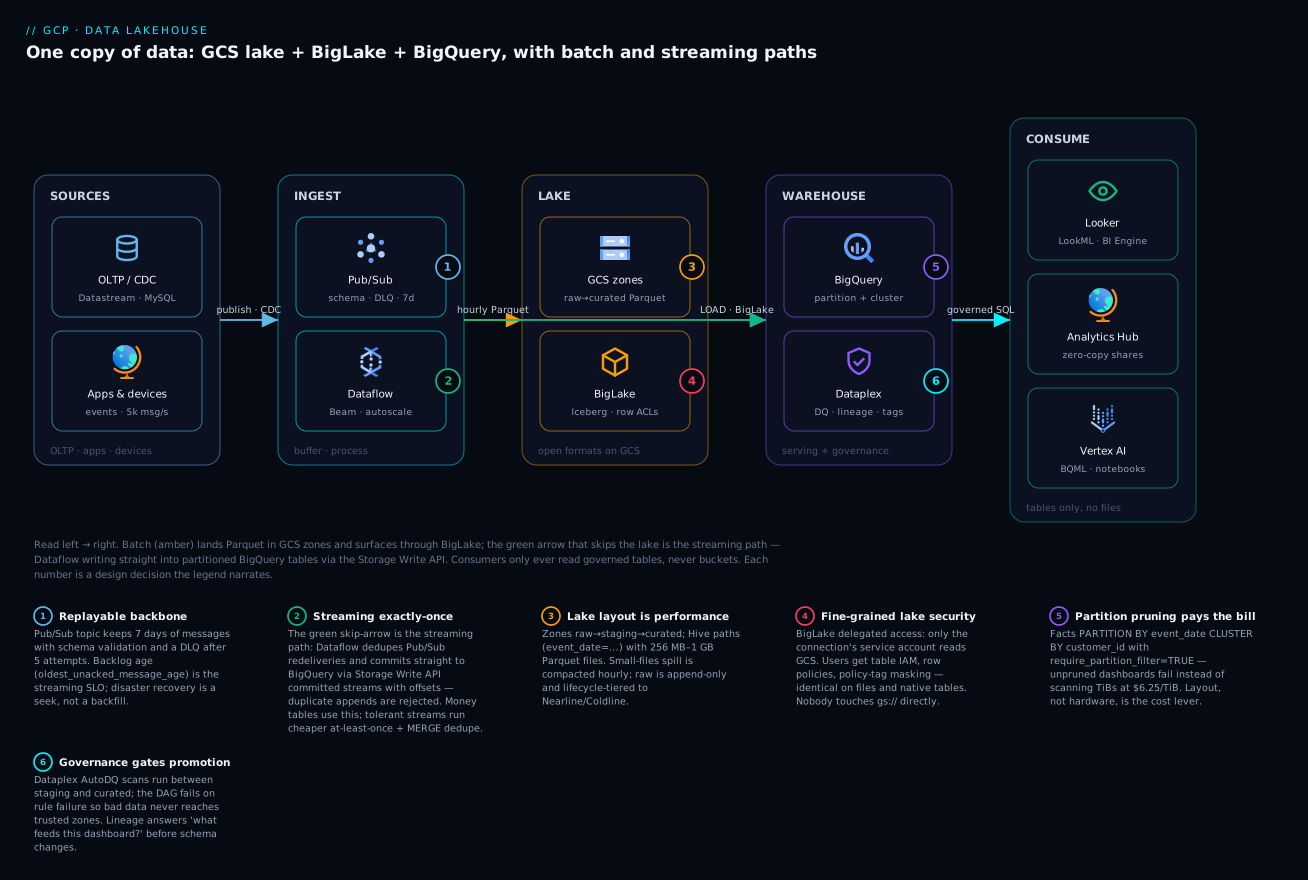
Six structural properties to internalize: (1) every consumer reads through BigQuery’s API surface — one IAM/masking model covers everything; (2) wherever BigLake/Iceberg is used, lake and warehouse are the same tables — nothing to reconcile; (3) both ingestion doors converge on identically partitioned tables; (4) Pub/Sub retention makes the stream replayable — streaming DR is a seek, not a heroic backfill; (5) governance attaches to tables, so it survives storage migrations; (6) each tier scales and bills independently — no cluster couples ingestion to query performance.
Real-world scenario: Trellico’s duplicate-revenue incident
Trellico, a fictional but realistic Bengaluru quick-commerce company, ran this exact architecture at moderate scale: ~5,000 events/s clickstream plus order CDC via Datastream, ~12 TiB/month of new data, BigQuery in asia-south1, on-demand pricing, Looker Studio dashboards for city managers.
The incident: finance flagged Monday’s GMV dashboard reading ₹4.1 crore against ₹3.6 crore in the payment gateway’s settlement report — 14% high. Lineage led the platform team to the cause in ninety minutes: the orders pipeline ran in Dataflow at-least-once mode writing via the default stream, chosen months earlier “temporarily” for latency. A worker preemption Sunday night caused bundle retries and ~610k order events landed twice. Dashboards summed raw appends — the hourly dedupe MERGE existed, but a Dataform release misconfiguration had silently stopped scheduling it eleven days earlier. Two defects, one visible failure.
The fix came in three layers, and the order matters. Immediately (day 0): re-ran the dedupe MERGE for the affected partitions — corrected dashboards by noon; used time travel (FOR SYSTEM_TIME AS OF) to snapshot the corrupted state for the postmortem. Structurally (week 1): moved the orders pipeline (money) to Dataflow exactly-once with the Storage Write API committed-stream sink, accepting ~15% higher worker cost on that one pipeline; left the clickstream pipeline (tolerant) on at-least-once. Institutionally (week 2): added a Dataplex tableConditionExpectation scan comparing SUM(amount) in curated against a Datastream-replicated settlements table with 0.5% tolerance, wired as a hard gate in the promotion Workflow — the class of bug now pages before finance sees it; and added an assertion-freshness alert on Dataform so a non-running model is itself an incident.
Post-stabilization numbers, worth quoting because they generalize: the exactly-once orders pipeline ran 3× n2d-standard-2 workers (~$510/month with Streaming Engine); Pub/Sub ~25 TiB/month (~$1,000); Storage Write API ~$270/month. The retro’s headline was not technical: at-least-once had been fine for months because duplicates were rare — the architecture was betting correctness on preemption luck plus an unmonitored cleanup job. Delivery semantics are a per-table financial decision, not a pipeline default: clickstream tolerates duplicates, revenue does not, and a table feeding finance either gets exactly-once writes or gets its dedupe monitored like production code — because it is.
Advantages and disadvantages
| Advantages | Disadvantages |
|---|---|
| One copy of data; lake/warehouse reconciliation eliminated by construction | BigLake/Iceberg feature set moves fast — designs need an owner who tracks releases |
| Fully serverless tiers: no clusters to size, patch or keep warm | Serverless ≠ cheap by default: unpruned scans and unbounded autoscaling bill instantly |
| Open formats (Parquet/Iceberg) keep Spark/Trino access and an exit path | Native-table features (full DML breadth, some perf) still exceed open-format tables |
| Fine-grained security (rows, columns, masking) reaches files, not just warehouse tables | All fine-grained enforcement assumes access via BigQuery — direct GCS readers bypass it |
| Streaming and batch converge on the same tables with seconds-level freshness | Exactly-once streaming costs real CPU/state; semantics need per-table decisions |
| Governance (DQ, lineage, catalog) is declarative and enforceable as pipeline gates | Dataplex adds its own IAM/object model to learn; scans are a billable line item |
| Cost scales with use and is attributable per query/job/team | On-demand pricing is a footgun without require_partition_filter + quotas + monitoring |
| Zero-copy sharing (Analytics Hub) replaces extract sprawl | Same-region constraint pushes you into replication planning for global sharing |
When do the disadvantages dominate? Sub-terabyte estates with one consumer (a single Postgres replica + Metabase beats all of this), teams with zero streaming needs (skip Pub/Sub/Dataflow entirely — GCS + load jobs + Dataform is a fine “small lakehouse”), and orgs that cannot route consumption through BigQuery (heavy direct-Spark shops should weigh Dataproc + Iceberg + BigQuery-as-one-engine instead).
Hands-on lab: a miniature lakehouse in one sitting
Free-tier-friendly: stays inside 1 TiB/month query + 10 GiB storage + Pub/Sub 10 GiB free allowances; the only pennies are GCS storage and the BigQuery subscription’s per-TiB fee on a few MB. Total < ₹10. Requires a project with billing linked and bq, gcloud ≥ 460.
1. Set the stage.
export PROJECT=$(gcloud config get-value project) REGION=asia-south1
gcloud services enable bigquery.googleapis.com pubsub.googleapis.com \
  bigqueryconnection.googleapis.com dataplex.googleapis.com
bq mk --location=$REGION --dataset lakehouse_lab
gcloud storage buckets create gs://$PROJECT-lab-curated --location=$REGION \
  --uniform-bucket-level-access --public-access-prevention
2. Land batch files (the lake).
cat > /tmp/orders.csv <<'EOF'
order_id,order_date,customer_id,amount,status
O-1001,2026-07-06,C-9,2499.00,delivered
O-1002,2026-07-06,C-4,899.50,delivered
O-1003,2026-07-07,C-9,4999.00,placed
EOF
gcloud storage cp /tmp/orders.csv "gs://$PROJECT-lab-curated/orders/order_date=2026-07-06/part-0.csv"
3. Bridge it with a BigLake connection + external table.
bq mk --connection --location=$REGION --connection_type=CLOUD_RESOURCE lab-conn
SA=$(bq show --connection --format=json $REGION.lab-conn | python3 -c 'import json,sys;print(json.load(sys.stdin)["cloudResource"]["serviceAccountId"])')
gcloud storage buckets add-iam-policy-binding gs://$PROJECT-lab-curated \
  --member="serviceAccount:$SA" --role=roles/storage.objectViewer
CREATE EXTERNAL TABLE lakehouse_lab.orders_lake
WITH CONNECTION `asia-south1.lab-conn`
OPTIONS (format='CSV', uris=['gs://YOUR_PROJECT-lab-curated/orders/*'],
         skip_leading_rows=1, max_staleness=INTERVAL 30 MINUTE,
         metadata_cache_mode='AUTOMATIC');
SELECT * FROM lakehouse_lab.orders_lake;   -- 3 rows, straight off GCS
4. Create the warehouse fact — partitioned + clustered.
CREATE TABLE lakehouse_lab.events
(event_id STRING, event_date DATE, event_ts TIMESTAMP, customer_id STRING, event_name STRING)
PARTITION BY event_date CLUSTER BY customer_id
OPTIONS (require_partition_filter = TRUE);
5. Stream into it — zero code, Pub/Sub BigQuery subscription.
gcloud pubsub topics create lab-events
# Pub/Sub's service agent must be able to write:
PN=$(gcloud projects describe $PROJECT --format='value(projectNumber)')
bq add-iam-policy-binding --member="serviceAccount:service-$PN@gcp-sa-pubsub.iam.gserviceaccount.com" \
  --role=roles/bigquery.dataEditor lakehouse_lab
gcloud pubsub subscriptions create lab-events-bq --topic=lab-events \
  --bigquery-table=$PROJECT:lakehouse_lab.events

gcloud pubsub topics publish lab-events --message='{"event_id":"E-1","event_date":"2026-07-07","event_ts":"2026-07-07T10:15:00Z","customer_id":"C-9","event_name":"add_to_cart"}'
SELECT * FROM lakehouse_lab.events WHERE event_date = '2026-07-07';
-- your event, queryable within seconds of publish
6. Prove the two guardrails. Run SELECT COUNT(*) FROM lakehouse_lab.events; — it fails with Cannot query over table … without a filter over column(s) event_date (that’s require_partition_filter earning its keep). Then dry-run the pruned version and note totalBytesProcessed:
bq query --use_legacy_sql=false --dry_run \
  'SELECT COUNT(*) FROM lakehouse_lab.events WHERE event_date="2026-07-07"'
7. Optional governance taste: in the console, create a Dataplex data-profile scan on lakehouse_lab.orders_lake and view the published profile on the table’s Dataplex tab.
8. Teardown.
gcloud pubsub subscriptions delete lab-events-bq && gcloud pubsub topics delete lab-events
bq rm -r -f -d $PROJECT:lakehouse_lab
bq rm --connection $REGION.lab-conn
gcloud storage rm -r gs://$PROJECT-lab-curated
Common mistakes & troubleshooting
The playbook — symptom to fix, in the order the platform usually teaches them:
| # | Symptom | Root cause | Confirm (exact path) | Fix |
|---|---|---|---|---|
| 1 | External/BigLake query: Access Denied … does not have storage.objects.get |
Connection SA (or user, for plain external) lacks bucket read | bq show --connection, check bucket IAM for that SA |
Grant roles/storage.objectViewer on the bucket to the connection’s SA |
| 2 | Quota exceeded: … load jobs per table |
Micro-batching >1,500 loads/table/day | INFORMATION_SCHEMA.JOBS_BY_PROJECT WHERE job_type='LOAD' count by table/day |
Consolidate to hourly loads, or move the feed to Storage Write API |
| 3 | Duplicate rows in a streamed fact | At-least-once path (default stream / Pub/Sub BQ sub / retries) with no dedupe | SELECT event_id, COUNT(*) … HAVING COUNT(*)>1 on a recent partition |
Exactly-once sink for money tables; else scheduled MERGE dedupe — monitored |
| 4 | Pub/Sub backlog grows; Dataflow “healthy” | Poison message loop, or autoscaling capped | Metrics: oldest_unacked_message_age + Dataflow data freshness; DLQ empty? |
Wire DLQ (--max-delivery-attempts=5); raise max_num_workers; fix the parser |
| 5 | BQ subscription writes nothing, no errors in your code | Subscription in error state: missing bigquery.dataEditor for Pub/Sub SA, or schema mismatch |
gcloud pubsub subscriptions describe lab-events-bq --format='value(state)' |
Grant the service agent on the dataset; align topic schema / drop_unknown_fields |
| 6 | Query scans TBs despite partitioning | Predicate wraps the partition column (DATE(ts)=…), or filters a different column |
Execution details → bytes processed; dry run both forms | Filter the partition column bare; add require_partition_filter=TRUE |
| 7 | Cannot read and write in different locations on load/CTAS |
Bucket and dataset regions differ | gcloud storage buckets describe vs bq show --dataset |
Co-locate (recreate bucket or dataset); US multi-region is permissive, others aren’t |
| 8 | BigLake table missing files landed minutes ago | Metadata cache within max_staleness window |
Compare SELECT COUNT(*) vs `gcloud storage ls |
wc -l` |
| 9 | Lake queries crawl; job stats show huge file counts | Small-files disease from unsharded streaming spill | Job execution details: files read vs bytes | Compact to 256 MB–1 GB Parquet (Dataflow/Spark job or Iceberg rewrite) |
| 10 | RESOURCE_EXHAUSTED: AppendRows throughput |
Storage Write API regional throughput/connection quota | Quotas page → BigQuery Storage Write API; error rate by region | Request increase; enable multiplexing/auto-sharding; batch rows per append |
| 11 | Bill spikes overnight (editions or on-demand) | Autoscale max too high + runaway transform; or viewer-refreshed dashboards full-scanning facts | INFORMATION_SCHEMA.JOBS ORDER BY total_slot_ms/total_bytes_billed DESC, grouped by principal |
Cap autoscale_max_slots; point BI at MVs/filtered views; per-user byte quotas |
| 12 | UPDATE or DELETE … would affect rows in the streaming buffer |
Legacy insertAll buffer rows are DML-immutable |
Table details → streaming buffer stats | Wait for buffer flush, or (better) migrate the writer to Storage Write API |
| 13 | Dataform run green but tables stale | Release config points at a stale branch/tag; schedule disabled | Dataform → release configuration → compiled commit SHA | Fix the release ref; alert on workflowInvocations age (this bit Trellico) |
Error-string quick reference for the searchers:
| Error (as seen) | Layer | Meaning | First move |
|---|---|---|---|
rateLimitExceeded |
BQ jobs | Too many concurrent/recent operations of that type | Backoff; check for a retry storm |
quotaExceeded |
BQ | A daily/table quota (loads, DML rate, bytes) | Identify which quota in the message; redesign the hot path |
resourcesExceeded |
BQ query | Query needs more shuffle/memory than available | Reduce skew, pre-aggregate, avoid giant ORDER BY without LIMIT |
responseTooLarge |
BQ query | Result >10 GB to a client | Write results to a destination table |
ALREADY_EXISTS on AppendRows |
Storage Write API | Offset already committed — duplicate send | Treat as success; advance offset |
OUT_OF_RANGE on AppendRows |
Storage Write API | Offset skips ahead of stream end | Client bug: resync from committed offset |
SCHEMA_MISMATCH_EXTRA_FIELDS |
BQ subscription | Message has fields the table lacks | drop_unknown_fields=true or evolve the table schema |
PERMISSION_DENIED: bigquery.tables.getData |
IAM | Caller can see metadata but not read | Grant dataViewer at dataset/table; check policy-tag Fine-Grained Reader for masked columns |
Access Denied … VPC Service Controls |
Perimeter | Request crosses a service perimeter | Ingress/egress rule or access level — see VPC Service Controls |
Table … does not have a schema |
External table | Autodetect failed on messy files | Declare schema explicitly; quarantine the bad file |
Best practices
- Decide the region once, first, in writing. Buckets, datasets, connections, Dataflow, reservations all co-locate; a late region change is a full migration.
require_partition_filter = TRUEon every fact table over ~10 GB. Convert cost incidents into failed queries at zero runtime cost.- Choose delivery semantics per table, by financial blast radius. Exactly-once (or gated dedupe) for money; at-least-once for behavioral streams. Write the choice into the table’s docs.
- Raw zone is append-only and lifecycle-managed; never grant humans write on it. It’s your replay source and your audit answer.
- Consumers get tables, never buckets. The day a BI tool reads
gs://directly, fine-grained governance is fiction. - Gate promotion on DQ scans in the DAG — quality checks that only feed dashboards are decoration.
- Compact relentlessly. Streaming spill produces small files; schedule compaction (or use managed Iceberg’s background optimization) before listings dominate query time.
- Dedupe jobs are production code: monitor their freshness, not just their exit codes. A silently-unscheduled MERGE is how Trellico happened.
- Give BI a reservation (or byte quotas) and everything else its own. Workload isolation via reservations/assignments turns “the analyst broke prod ETL” into an impossibility.
- Check physical vs logical storage billing quarterly with
TABLE_STORAGE; >2× compression means the physical model halves that line. - Schema-validate at the topic (Pub/Sub schemas) so garbage is rejected at publish, not discovered at query.
- Everything in Terraform, including reservations, connections, policy-tag taxonomies and scan definitions. Console-created governance evaporates in the next reorg.
Security notes
Least-privilege for this architecture is mostly service-account hygiene plus policy tags, and it’s enumerable:
| Principal | Grant | Scope | Never grant |
|---|---|---|---|
| Dataflow worker SA | roles/dataflow.worker, pubsub.subscriber (sub), bigquery.dataEditor (target dataset), storage.objectAdmin (staging/temp bucket) |
Per-pipeline SA, per-resource | Project-wide editor — the classic anti-pattern |
| BigLake connection SA | roles/storage.objectViewer |
Lake buckets only | Bucket write; it’s a read bridge |
| Pub/Sub service agent | roles/bigquery.dataEditor |
Target dataset for BQ subscriptions | — |
| Dataform SA | bigquery.jobUser (project), dataEditor (marts + staging datasets) |
Datasets it builds | Access to raw PII datasets it doesn’t transform |
| Analysts | bigquery.dataViewer on curated/marts + Fine-Grained Reader only per approved tag |
Dataset-level | dataViewer on raw/staging; bucket roles of any kind |
| BI service account | dataViewer on marts, jobUser, its own reservation |
Marts only | Access to base facts if views can serve it |
Beyond IAM: encryption is on by default; add CMEK across bucket + dataset + topic + Dataflow when a classification demands key custody (revocation is your kill switch). Network isolation: Dataflow workers on private IPs in a Shared VPC subnet, and the whole estate — BigQuery, GCS, Pub/Sub, Dataflow APIs — inside a VPC Service Controls perimeter so stolen credentials can’t exfiltrate to an attacker’s project (perimeter design here). Column protection is policy tags + masking; row protection is row-access policies; deletion is partition expiry plus DPDP/GDPR-driven DELETE with the time-travel window tuned down on sensitive datasets. And audit: BigQuery + GCS Data Access logs into a locked sink — “who read the PII column last quarter” must be a query, not a shrug.
Cost & sizing
The unit prices that matter (us-central1 list, indicative — regional prices vary, INR at ≈₹85/$):
| Meter | Price | Free tier | Note |
|---|---|---|---|
| BQ on-demand query | $6.25/TiB scanned | 1 TiB/month | Scan bytes = layout quality |
| BQ Enterprise slot-hour (PAYG) | $0.06 | — | 100 slots 24×7 ≈ $4,380/mo (≈₹3.7L) |
| BQ storage (logical) | $0.02/GiB active, $0.01 long-term | 10 GiB | Long-term = 90 days untouched |
| BQ storage (physical) | $0.04/GiB active, $0.02 long-term | — | On compressed bytes; incl. time travel/fail-safe |
| Storage Write API | $0.025/GiB | 2 TiB/month | Half of legacy insertAll ($0.05/GB) |
| Pub/Sub throughput | $40/TiB | 10 GiB/month | Publish and delivery each metered |
| Pub/Sub BQ subscription | ~$50/TiB | — | Includes the BigQuery write |
| Dataflow streaming | ~$0.069/vCPU-hr + memory + Streaming Engine | — | Batch vCPU cheaper (~$0.056) |
| GCS Standard | $0.020/GB-mo | 5 GB (us regions) | Nearline/Coldline/Archive: see lake section |
| BI Engine | per GiB-hour reservation | — | Small reservations go far with preferred tables |
| Dataplex DQ/profiling | per DCU-hour of scan processing | — | Scoped scans (incremental on partitions) keep it small |
| Composer environment | ~$350–450+/mo floor | — | vs Workflows at ~$0 floor |
Worked monthly estimate for the Trellico-scale platform (5,000 events/s ≈ 12.4 TiB/month streaming, 25 TiB lake, 40 TiB/month scanned by BI + ELT):
| Line item | Math | USD/mo | ≈INR/mo |
|---|---|---|---|
| Pub/Sub (publish + subscribe) | 24.8 TiB × $40 | $992 | ₹84,000 |
| Dataflow streaming (2 pipelines, ~6 vCPU avg + SE) | workers + Streaming Engine | ~$510 | ₹43,000 |
| Storage Write API | (12.4 − 2 free) TiB ≈ 10,650 GiB × $0.025 | $266 | ₹23,000 |
| BQ storage (grows; month-6 ≈ 70 TiB logical, physical model @3.5× compression) | ~20 TiB physical × $0.04/GiB | $820 | ₹70,000 |
| GCS lake (25 TiB blended classes) | mostly Standard + Nearline | ~$420 | ₹36,000 |
| Query compute — option A: on-demand | (40 − 1) TiB × $6.25 | $244 | ₹21,000 |
| Query compute — option B: Enterprise autoscale (0 baseline, ~50-slot average 12 h/day) | 50 × $0.06 × 365 h | $1,095 | ₹93,000 |
| Orchestration (Workflows + Scheduler) | steps ≈ free tier | ~$5 | ₹450 |
| Total (with option A) | ≈$3,260 | ≈₹2.8L |
That option A/B gap is the sizing lesson in one row: at 40 TiB/month scanned, on-demand wins by 4×; the crossover arrives near 175 TiB/month, or earlier if you need editions-gated features or concurrency guarantees. Decide from data, not vibes — summing total_bytes_billed over 30 days in INFORMATION_SCHEMA.JOBS_BY_PROJECT gives your real TiB/month, and total_slot_ms percentiles size the candidate reservation.
Right-sizing levers in priority order: partition filters (routinely a 10–100× scan cut), materialized views for top dashboards, physical storage billing where compression >2×, lifecycle raw to colder classes, at-least-once for tolerant streams — and only then reservation tuning.
Interview & exam questions
Mapped to the Professional Data Engineer (PDE) and Professional Cloud Architect (PCA) blueprints.
- Q: What makes a “lakehouse” different from a lake plus a warehouse? A: One physical copy of data serving both open-engine and SQL access under one governance model. On GCP: GCS holds open formats, BigLake projects BigQuery’s table security/semantics onto those files, and native BigQuery tables cover hot serving — so there is no synchronization pipeline between “lake” and “warehouse” to drift. (PDE: storage design.)
- Q: When do you pick a BigLake table over an external table? A: Almost always. External tables make the querying user need GCS access and re-list objects per query; BigLake delegates GCS access to a connection service account, enabling row/column security, masking and metadata caching. Plain external tables are for quick one-off federation. (PDE.)
- Q: Walk through exactly-once from producer to BigQuery. A: Producer publishes with retries (dupes possible) → Pub/Sub delivers at-least-once → Dataflow deduplicates redeliveries by message ID and processes effectively-once within checkpointed bundles → the Storage Write API committed-stream sink writes with offsets, so retried appends are rejected (
ALREADY_EXISTS) rather than duplicated. End-to-end it’s effectively exactly-once into the table; producers must still be idempotent at the business-key level for cross-restart safety. (PDE: pipeline semantics — a favorite.) - Q: Default stream vs committed vs pending streams — when for each? A: Default: at-least-once streaming with zero stream management. Committed + offsets: exactly-once streaming. Pending: batch semantics — appends invisible until an atomic commit, replacing load jobs for programmatic producers. (PDE.)
- Q: Partitioning vs clustering — how do you decide? A: Partition on the coarse pruning dimension (almost always event date; 10,000-partition cap in mind), cluster on up to 4 high-cardinality filter/join columns in query order. Partitioning gives hard pruning plus partition-scoped operations (decorators, expiry); clustering gives block-level pruning within scans and free background maintenance. Canonical fact:
PARTITION BY event_date CLUSTER BY customer_id. (PDE/PCA.) - Q: A query on a date-partitioned table scans the full table despite a date filter. Why? A: The predicate doesn’t hit the partition column bare — e.g. filtering
DATE(event_ts)when the table partitions onevent_date, or applying a function/cast to the partition column. Rewrite the predicate; enforce withrequire_partition_filter. (PDE troubleshooting.) - Q: On-demand vs editions — what’s the actual decision function? A: Compare measured TiB scanned × $6.25 against the slot-hours an equivalent autoscaled reservation would bill (1 always-on Enterprise slot ≈ $43.8/mo ≈ 7 TiB scanned). Editions also buy concurrency guarantees, workload isolation via assignments, and gated features (fine-grained security, BI Engine, ML). Mixed estates — BI on a reservation, ad-hoc on-demand — are standard. (PCA cost design.)
- Q: Where does Dataplex actually enforce anything? A: Data-quality scans enforce only if pipelines gate on their results; policy tags + data policies enforce column access/masking at query time; zone types enforce format/schema conformance on discovery. Lineage and catalog are observability. Design DAGs so promotion depends on scan success. (PDE governance.)
- Q: How do you share curated data with another business unit without copying it? A: Analytics Hub: publish the dataset as a listing in an exchange; the subscriber’s linked dataset is a zero-copy read-only reference billed to their compute. Same-region requirement — replicate the dataset first for cross-region sharing. (PCA.)
- Q: Composer or Workflows for orchestration? A: Composer for many interdependent DAGs, backfills/catchup, sensor-heavy waits, and a team fluent in Airflow — at a $350+/mo floor. Workflows + Scheduler for event-driven glue and small estates at near-zero cost. The gate: when backfill orchestration becomes weekly pain, Composer pays for itself. (PCA.)
Quick check
- Name the two “doors” into a BigQuery fact table in this architecture and the delivery guarantee of each.
- What single table option turns unpruned dashboard queries into errors instead of bills?
- Why does a BigLake table sometimes not show files that landed two hours ago, and what are the two fixes?
- You need Spark and BigQuery to read and BigQuery to write one curated table in your bucket. Which table flavour?
- At 30 TiB scanned/month with spiky concurrency, on-demand or Enterprise autoscale — and what’s the one-line math?
Answers
- Batch loads (free shared pool or PIPELINE reservation; atomic per job) and the Storage Write API (at-least-once via default stream; exactly-once via committed streams with offsets).
require_partition_filter = TRUE(paired with predicates on the bare partition column).- Metadata caching: queries may serve listings up to
max_stalenessold. Fix by callingBQ.REFRESH_EXTERNAL_METADATA_CACHEafter landing, or shrinking/removingmax_staleness. - A BigQuery managed Iceberg table — BigQuery-writable (DML + Storage Write API), stored as Parquet + Iceberg metadata in your GCS bucket, snapshot-readable by Spark.
- On-demand: 30 × $6.25 ≈ $188/mo, versus ≈$1,000+ for a meaningful autoscaled Enterprise reservation — on-demand wins until scan volume approaches ~175 TiB/month or you need editions-gated features/isolation.
Glossary
- Lakehouse — architecture keeping one copy of data in open formats with warehouse-grade governance, ACID and SQL performance layered on top.
- Zone (raw/staging/curated) — lifecycle stages of lake data with escalating trust and stricter contracts.
- BigLake — BigQuery’s mechanism for governed tables over GCS files: delegated access via a connection, fine-grained security, metadata caching.
- Connection — BigQuery resource wrapping a Google-managed service account that reads lake buckets on behalf of table queries.
- Apache Iceberg — open table format adding snapshots, ACID commits and schema evolution over Parquet; readable/writable by many engines.
- BigLake metastore — serverless Iceberg-compatible catalog letting Spark and BigQuery share table definitions.
- Storage Write API — gRPC append protocol into BigQuery; default (at-least-once), committed (exactly-once with offsets), pending and buffered stream types; $0.025/GiB.
- Slot — BigQuery compute unit; bought implicitly (on-demand $/TiB) or explicitly (editions $/slot-hour with autoscaling).
- Editions — Standard/Enterprise/Enterprise Plus capacity tiers; feature- and price-differentiated.
- Watermark — Beam/Dataflow’s moving estimate of event-time completeness, controlling window firing and late-data handling.
- AutoDQ scan — Dataplex declarative data-quality scan; results land in BigQuery and can gate pipelines.
- Policy tag — taxonomy node bound to columns; IAM on the tag yields column-level security, optionally with dynamic masking.
- Analytics Hub linked dataset — subscriber-side zero-copy reference to a published dataset; compute billed to the subscriber.
- Time travel — BigQuery’s 2–7 day point-in-time table state (
FOR SYSTEM_TIME AS OF), followed by a 7-day fail-safe.
Next steps
- Go deeper on the warehouse core — slots, the query lifecycle, materialized views — in BigQuery for Data Analytics: Warehousing, Querying and Visualization.
- If the scan-cost model still feels abstract, the worked dollar math in BigQuery for Beginners: How Serverless Analytics Works and the $5/TB Cost Model makes it concrete.
- Harden the event backbone with GCP Pub/Sub and Event-Driven Architecture: Decouple and Scale.
- Wrap the estate in an exfiltration perimeter with GCP VPC Service Controls: Build Data Exfiltration Perimeters.
- Scale the operating model across domains with Data Mesh: Decentralized Data Ownership, which this lakehouse’s Dataplex lakes and Analytics Hub exchanges implement almost verbatim.