Quick take: VPC Service Controls draws a logical fence around a set of Google Cloud projects and the Google-managed APIs they use. Inside the fence, data moves freely. Crossing the fence — reading a BigQuery dataset from outside, writing a Cloud Storage object to a project that is not a member, copying a Spanner table to your laptop — is denied by Google’s own API front end unless an explicit access level, ingress rule or egress rule allows it. IAM answers can this identity touch this resource? VPC Service Controls answers a different, sharper question: can this data leave the trust boundary at all? It is the strongest native control Google Cloud offers against data exfiltration, and the one most likely to break a pipeline at 02:00 if you enforce it without mapping your flows first.
A healthcare analytics company stored eighteen months of de-identified patient records in BigQuery, mirrored nightly to a Cloud Storage bucket. Every access path was IAM-correct: analysts had roles/bigquery.dataViewer, the pipeline service account had roles/storage.objectAdmin, audit logging was on. Then a contractor with legitimate dataViewer ran a single bq extract to a bucket in their personal GCP project to “experiment locally over the weekend.” Nothing in IAM stopped it — the contractor was authorized to read, and bq extract is just a read followed by a write. Forty gigabytes of regulated data left the company’s trust boundary in nine minutes, to a project with no CMEK, no logging, and no DLP. The control that would have turned that bq extract into a hard PERMISSION_DENIED — because the destination bucket lived in a project outside the service perimeter — is VPC Service Controls (VPC-SC). This article is how you design, deploy, debug and live with it.
VPC Service Controls is deceptively easy to switch on and genuinely hard to operate. The mechanics are simple — you define a service perimeter, list the projects inside it, list the Google APIs it protects, and the perimeter denies cross-boundary API calls. The difficulty is that legitimate work crosses the boundary constantly: your CI/CD runner deploys from outside, your monitoring scrapes metrics, a partner’s project reads a shared dataset, BigQuery reads a federated source in another perimeter. Each of those is an ingress or egress path you must enumerate, justify and encode — or the perimeter breaks it. Get the design right and you have an exfiltration control that holds even against a compromised admin with roles/owner. Get it wrong and you have an outage with a cryptic RESOURCES_NOT_IN_SAME_SERVICE_PERIMETER error and a 12-character vpcServiceControlsUniqueId that nobody on the bridge knows how to decode. By the end you will know both halves: build the fence, and read the logs when it bites.
What problem this solves
IAM is an authorization control: it decides whether a principal may perform an action on a resource. It is necessary and it is not sufficient, because authorization says nothing about where the data goes after an authorized read. A user with roles/bigquery.dataViewer is, by design, allowed to read the data — and reading is the first half of every exfiltration. The second half (writing it somewhere untrusted, or pulling it to an untrusted network) is, from IAM’s point of view, a separate action on a separate resource that the same powerful identity is also allowed to perform. IAM has no concept of a trust boundary that spans those two actions. That is the gap VPC-SC fills.
Concretely, here is what cannot be prevented without a service perimeter, even on a perfectly least-privilege IAM estate:
- Credential exfiltration. A leaked or phished service-account key is normally game over: the attacker can
gsutil cpyour buckets to their own project from anywhere on the internet, because the API accepts the valid credential. With the bucket inside a perimeter, the API rejects the call unless it originates from inside the perimeter (or an allow-listed access level / ingress rule). The stolen key is far less useful. - Insider copy-out. The contractor above. A privileged insider can stage data to a personal project, a public bucket, or BigQuery in another org. The perimeter denies the cross-boundary write.
- Misconfigured public exposure. Someone makes a bucket public or grants
allUsers. Inside an enforced perimeter, anonymous internet reads are still denied, because the request does not originate inside the perimeter — VPC-SC is a second, independent gate behind IAM. - Lateral movement between projects. Without a perimeter, any project an identity can reach is a potential staging ground. A perimeter containing only your sensitive projects means data cannot be moved to the other 400 projects in the org by API.
Who hits this hardest: regulated industries (healthcare/HIPAA, finance/PCI, public sector), anyone with data-residency obligations, anyone storing PII/PHI in BigQuery/Cloud Storage/Spanner, and any org told by an auditor “demonstrate that data cannot leave these projects.” VPC-SC is the demonstrable control. The cost is operational: it is a deny-by-default network-style boundary over APIs, and like any firewall, it is only as good as your inventory of the legitimate flows you must permit.
A note on what it is not: VPC-SC is not a substitute for IAM least privilege, not a substitute for GCP IAM and Service Accounts: Roles, Bindings and Least Privilege, not a DLP scanner, and not a firewall (those govern the IP network; VPC-SC governs the API control plane). It is a complementary layer that assumes you already have IAM and network controls and adds the boundary they structurally cannot express.
Learning objectives
By the end of this article you can:
- Explain the VPC-SC threat model precisely — what a service perimeter protects against (data exfiltration across a trust boundary), what it does not protect against, and why it is orthogonal to IAM.
- Design a service perimeter: choose its member projects, its
restrictedServiceslist, itsvpcAccessibleServices(VPC-accessible) configuration, and decide between a single perimeter, multiple perimeters, and perimeter bridges. - Author access levels in Access Context Manager (basic and custom/CEL) and attach them so that only requests from trusted IPs, regions, identities or device-policy states may enter the perimeter.
- Write ingress and egress rules (the modern replacement for bridges in most cases) to permit specific identities, sources and operations to cross the boundary, scoped to exact services and methods.
- Roll out safely with dry-run mode, read the dry-run violation logs, and promote a spec to enforced only once the logs are clean.
- Understand the Private Google Access and restricted.googleapis.com interplay — why on-prem and VM egress must use the restricted VIP and the
199.36.153.4/30range for a perimeter to be effective. - Diagnose a denied request end to end: find the
vpcServiceControlsUniqueId, read theRESOURCES_NOT_IN_SAME_SERVICE_PERIMETER/NO_MATCHING_ACCESS_LEVEL/EGRESS_VIOLATIONreason in the audit log, and apply the right fix. - Build, dry-run, enforce and tear down a perimeter end to end with
gcloudand Terraform.
Prerequisites & where this fits
You should be comfortable with the GCP Resource Hierarchy: Organization, Folders, Projects — VPC-SC lives at the organization level and operates on projects as members, so the hierarchy is the substrate. You should understand IAM well (Google Cloud IAM Explained Simply: Members, Roles, and Bindings), because every ingress/egress rule is written in terms of identities and the perimeter sits behind IAM, not instead of it. Networking fundamentals help: GCP’s Global VPC Explained and GCP VPC and Shared VPC: Networking Across Projects cover the Private Google Access and Shared-VPC pieces that VPC-SC depends on. If you have built a landing zone, the GCP Landing Zone: Foundation Blueprint with Shared VPC and Org Policies is where the perimeter naturally slots in as a platform-level guardrail.
Where this fits in the bigger security picture: VPC-SC is one of three independent boundaries you layer.
| Boundary | Governs | Mechanism | Answers the question | Example control |
|---|---|---|---|---|
| IAM | Who may do what to a resource | Roles + bindings on resources | “Is this principal authorized?” | roles/bigquery.dataViewer on a dataset |
| Firewall / network | Which packets reach which VMs | VPC firewall rules, routes | “Can this IP reach that port?” | Deny 0.0.0.0/0 to :22 |
| VPC Service Controls | Whether data can cross a trust boundary via Google APIs | Service perimeter over the API front end | “Can this data leave the perimeter?” | Deny bq extract to an outside bucket |
The three are independent and complementary. A request must pass all three gates: IAM must authorize it, the network must permit the packet (for VM-originated traffic), and VPC-SC must permit the cross-boundary API call. VPC-SC is the only one of the three that understands “this data belongs to this set of projects and may not be read from outside them.”
You will need: organization-level access (roles/accesscontextmanager.policyAdmin to manage access policies and levels, plus roles/resourcemanager.organizationAdmin context), the Access Context Manager and the relevant data APIs enabled, and — critically — a non-production org or a dry-run plan, because VPC-SC mistakes cause outages.
Core concepts
Six mental models make every later section obvious. Internalize these and the rest of VPC-SC is detail.
1. The perimeter wraps the API front end, not the network. When any client — a VM, Cloud Shell, your laptop, another Google service — calls a Google API like bigquery.googleapis.com or storage.googleapis.com, the call lands on Google’s global API front end before it reaches the service. VPC-SC inserts a check at that front end: is this request crossing a service-perimeter boundary in a way that isn’t allowed? If yes, the front end returns PERMISSION_DENIED with a VPC-SC reason — the request never reaches BigQuery or GCS at all. This is why VPC-SC protects against a leaked key from the public internet: the check happens at the front door regardless of how good the credential is.
2. A service perimeter is a set of projects + a set of protected services. You declare which projects are inside the perimeter (members, by project number) and which Google APIs the perimeter protects (restrictedServices, e.g. storage.googleapis.com, bigquery.googleapis.com). For a protected service, an API call that would move data across the boundary — a read from outside, a write to outside, a copy between a member and a non-member — is denied by default. Services you do not list are unaffected by the perimeter.
3. The default is deny across the boundary, not deny everything. Inside the perimeter, member projects talk to each other and to protected services freely. The perimeter only bites when a request has one foot inside and one foot outside: an external caller reaching in (controlled by ingress and access levels) or an inside resource reaching out (controlled by egress). This “free inside, gated at the boundary” model is exactly like a network DMZ, applied to APIs.
4. Access levels are conditions for ingress, defined in Access Context Manager. An access level is a named, reusable condition — “requests from these corporate IP CIDRs,” “from these regions,” “from these specific service accounts,” “from corporate-managed compliant devices.” You attach one or more access levels to a perimeter; a request that originates outside the perimeter but satisfies an attached access level is allowed in. Access levels are the OR-set: satisfying any one of them grants entry. They are how you let your office network, your CI/CD identity, or your admin laptops reach into the perimeter without dropping the wall for everyone.
5. Ingress and egress rules are the precise, modern boundary controls. Access levels are coarse (IP/region/identity → in). Ingress rules and egress rules (the ingress/egress policies model) are surgical: each rule names a source (an access level, or a specific project/identity), an identity (which principals), and an operation (which services and methods), for traffic entering (ingress) or leaving (egress) the perimeter. They are how you express “service account pipeline@analytics may read from BigQuery in this perimeter, and may write to exactly this one bucket in that other perimeter” — far tighter than a blanket access level or an old-style bridge.
6. Dry-run mode tells you what would break before it does. A perimeter has two configurations: the enforced config (status) that actually denies, and the dry-run config (spec) that only logs what it would deny. You roll out by putting your intended policy in dry-run, running production for days, reading the violation logs to find every legitimate flow you forgot, fixing the policy, and only then promoting it to enforced. Skipping dry-run is the single most common way teams cause a VPC-SC outage.
The vocabulary in one table
Pin down every moving part before the deep sections. The glossary repeats these for lookup; this table is the model side by side.
| Term | One-line definition | Where it lives | Why it matters |
|---|---|---|---|
| Access policy | The org-level container for all perimeters and access levels | Organization (one per org, by default) | Everything attaches to it; accessPolicies/<id> |
| Service perimeter | A boundary around member projects + protected services | Inside the access policy | The fence itself |
| Member project | A project that is inside a perimeter | Listed by projects/<number> |
Free communication inside; gated at boundary |
restrictedServices |
The Google APIs this perimeter protects | Perimeter config | Only listed services are guarded |
vpcAccessibleServices |
Which services VPC networks inside the perimeter may reach | Perimeter config | Locks VMs to an allow-list of APIs |
| Access level | A named condition (IP/region/identity/device) for ingress | Access Context Manager | The OR-set that lets trusted callers in |
| Ingress rule | A precise allow for traffic entering the perimeter | Perimeter ingress policy | Surgical inbound control |
| Egress rule | A precise allow for traffic leaving the perimeter | Perimeter egress policy | Surgical outbound control; controlled exfil paths |
| Perimeter bridge | A legacy two-way join between perimeters for specific projects | Bridge perimeter type | Older sharing model; ingress/egress now preferred |
Dry-run (spec) |
A config that logs would-be denials without enforcing | Perimeter spec + useExplicitDryRunSpec |
Safe rollout and change testing |
Enforced (status) |
The config that actually denies | Perimeter status |
The live wall |
restricted.googleapis.com |
The VIP (199.36.153.4/30) that honors perimeters |
DNS + routing | On-prem/VM egress must use it |
vpcServiceControlsUniqueId |
A short ID stamped on every denied request | Error + audit log | The key to debugging a denial |
Anatomy of a service perimeter
A perimeter is a JSON/Terraform object with a small but consequential set of fields. Understanding each field — its default, when you change it, and what it costs you — is most of operating VPC-SC. Here is every field that matters, in one reference.
| Field | What it controls | Typical value | Default if omitted | Gotcha |
|---|---|---|---|---|
title / name |
The perimeter’s resource id | accessPolicies/123/servicePerimeters/prod |
(required) | Name is immutable after create |
perimeterType |
Regular vs Bridge | PERIMETER_TYPE_REGULAR |
REGULAR |
Bridges are a different, two-way join |
status.resources |
Member projects (enforced) | ["projects/884932100"] |
empty (nothing protected) | Project number, not ID |
status.restrictedServices |
Protected APIs (enforced) | ["storage.googleapis.com", "bigquery.googleapis.com"] |
none | Forgetting a service leaves a hole |
status.accessLevels |
Access levels granting ingress | ["accessPolicies/123/accessLevels/corp"] |
none (no external ingress) | Coarse; prefer ingress rules for precision |
status.vpcAccessibleServices.enableRestriction |
Restrict which APIs VMs can call | true |
false (all APIs reachable) |
When true you MUST list every API VMs need |
status.vpcAccessibleServices.allowedServices |
The API allow-list for VPCs | ["storage.googleapis.com", "RESTRICTED-SERVICES"] |
n/a | Omitting one breaks VM calls to it |
status.ingressPolicies |
Precise inbound allow rules | rule objects | none | The surgical inbound control |
status.egressPolicies |
Precise outbound allow rules | rule objects | none | The surgical outbound control |
spec.* |
The same fields, in dry-run | mirror of status |
none | Where you stage changes safely |
useExplicitDryRunSpec |
Whether spec is evaluated for dry-run |
true |
false |
Must be true for spec to log violations |
Member projects: the unit of containment
Membership is by project number (the immutable numeric id), not project ID. Every resource in a member project that belongs to a protected service is inside the boundary; a resource in a non-member project is outside, full stop. There is no resource-level granularity — you cannot put one BigQuery dataset inside and leave another out within the same project. The project is the atom.
# Add a project to an EXISTING perimeter (enforced config). Project NUMBER required.
gcloud access-context-manager perimeters update prod_perimeter \
  --policy=123456789012 \
  --add-resources="projects/884932100123"
This has a sharp design consequence: put data of the same sensitivity class in the same perimeter, and isolate sensitivity classes into separate perimeters or separate projects. If a low-sensitivity logging project and a high-sensitivity PHI project share a perimeter, anyone allowed into the perimeter for logs can also reach PHI. Project layout is your perimeter granularity.
restrictedServices: choosing what to protect
You list the Google APIs the perimeter guards. The big data-bearing services are the ones that matter most; here is the canonical set and why each belongs.
| Service (API) | What it protects | Why it’s high-priority | Notable behavior under VPC-SC |
|---|---|---|---|
storage.googleapis.com |
Cloud Storage buckets/objects | The #1 exfil target; gsutil cp out is the classic leak |
Public-bucket reads still denied if from outside |
bigquery.googleapis.com |
BigQuery datasets, jobs, exports | bq extract, query copy-out, federated reads |
Cross-perimeter queries need egress rules |
spanner.googleapis.com |
Cloud Spanner databases | Regulated transactional data | Reads/writes gated at boundary |
bigtable.googleapis.com |
Cloud Bigtable | Large-scale NoSQL | Same gating model |
sqladmin.googleapis.com |
Cloud SQL admin (export/import) | gcloud sql export to a bucket is an exfil path |
Protects the export plane |
dataflow.googleapis.com |
Dataflow jobs | Jobs that read protected data and could write out | Workers must run inside the perimeter |
pubsub.googleapis.com |
Pub/Sub topics/subscriptions | Streaming data egress | Cross-perimeter subscriptions need rules |
cloudkms.googleapis.com |
KMS keys (CMEK) | Key access is the keystone for encrypted data | Protect to stop key use from outside |
secretmanager.googleapis.com |
Secrets | Credential exfiltration | Stops secret reads from outside |
logging.googleapis.com |
Cloud Logging | Log data can contain sensitive records | Log routing across perimeters needs care |
aiplatform.googleapis.com |
Vertex AI | Training data and model artifacts | Increasingly the new exfil surface |
artifactregistry.googleapis.com |
Artifact Registry | Source/image supply chain | CI pulls/pushes need rules |
There is a special token: RESTRICTED-SERVICES in the VPC-accessible-services list means “all the services currently in restrictedServices,” so you do not have to maintain the list twice. Use it.
A reasonable starting restrictedServices for a data perimeter:
gcloud access-context-manager perimeters update prod_perimeter \
  --policy=123456789012 \
  --add-restricted-services="bigquery.googleapis.com,storage.googleapis.com,spanner.googleapis.com,cloudkms.googleapis.com,secretmanager.googleapis.com"
The decision rule: protect every service that holds or can move your sensitive data, plus KMS (because protecting data while leaving its keys reachable from outside is a hole). Be deliberate — protecting a service you actively use across the boundary means you now owe an ingress/egress rule for every legitimate cross-boundary call to it.
vpcAccessibleServices: locking VMs to an API allow-list
By default, a VM inside the perimeter can call any Google API (subject to the boundary checks). vpcAccessibleServices with enableRestriction=true flips that to a strict allow-list: VMs in the perimeter may only call the APIs you name. This closes a subtle hole — a compromised VM inside the perimeter trying to exfiltrate via an unprotected service (e.g. uploading to a Google service you forgot to restrict). With VPC-accessible-services on, that VM can’t reach the unlisted API at all.
gcloud access-context-manager perimeters update prod_perimeter \
  --policy=123456789012 \
  --enable-vpc-accessible-services \
  --add-vpc-allowed-services="RESTRICTED-SERVICES,storage.googleapis.com,bigquery.googleapis.com,logging.googleapis.com,monitoring.googleapis.com"
The trade-off is operational sharpness: forget to list an API your VMs legitimately use (say monitoring.googleapis.com for the Ops Agent) and that traffic silently fails. Always include the platform basics — logging, monitoring, the metadata-server-backed ones — and dry-run this change like any other.
Regular perimeters vs bridge perimeters
| Aspect | Regular perimeter | Bridge perimeter |
|---|---|---|
| Purpose | Isolate a set of projects + services | Join projects across two regular perimeters |
perimeterType |
PERIMETER_TYPE_REGULAR |
PERIMETER_TYPE_BRIDGE |
Has restrictedServices? |
Yes | No (it has no services of its own) |
| Has access levels / ingress / egress? | Yes | No |
| Directionality | N/A | Two-way for the listed member projects |
| Modern alternative | — | Ingress/egress rules (more precise, one-way capable) |
| When to use | Almost always | Legacy sharing where a full mutual join is acceptable |
In modern designs you reach for ingress/egress rules before bridges, because rules are one-directional and method-scoped while a bridge opens a broad, symmetric path. Bridges remain valid and are covered later, but treat them as the blunter instrument.
Access levels: the ingress conditions
An access level is a named, reusable condition evaluated against the attributes of an incoming request — its source IP, the region it came from, the identity making it, and the device it came from. Access levels live in Access Context Manager and are attached to perimeters (and can be reused across many perimeters and even IAP). There are two authoring models.
| Model | How you express it | Best for | Example |
|---|---|---|---|
| Basic | A list of conditions; each condition is ANDed internally, conditions are ORed together | Most cases: IP ranges, regions, device policy, member lists | “From corp CIDRs AND a compliant device” |
| Custom | A single CEL (Common Expression Language) expression over origin, request, device, levels |
Complex logic basic can’t express | origin.ip in [...] && device.is_corp_owned_device |
Basic access levels — the common conditions
A basic access level’s conditions array is an OR of conditions; within one condition the attributes (ipSubnetworks, members, regions, devicePolicy, requiredAccessLevels) are ANDed. The condition attributes you will actually use:
| Condition attribute | Meaning | Example value | Notes |
|---|---|---|---|
ipSubnetworks |
Source IP CIDRs (the caller’s public IP) | ["203.0.113.0/24"] |
Must be the request’s origin IP; NAT/proxy aware |
members |
Specific identities (users, service accounts) | ["serviceAccount:ci@proj.iam..."] |
Identity-bound ingress without IP pinning |
regions |
Geographic regions of the request | ["US", "GB"] |
ISO country codes from request geo-IP |
devicePolicy.requireCorpOwned |
Only corp-owned devices | true |
Requires Endpoint Verification / BeyondCorp |
devicePolicy.requireScreenlock |
Screen lock enforced | true |
Device-trust signal |
devicePolicy.osConstraints |
Minimum OS/version | [{osType: DESKTOP_MAC, minimumVersion: "13.0"}] |
Posture gating |
requiredAccessLevels |
Must also satisfy another level | ["accessPolicies/123/accessLevels/corp"] |
Compose levels |
negate |
Invert the condition | true |
Use sparingly; deny-style logic |
Define a basic access level from a YAML spec:
# corp_access.yaml — corporate network OR specific CI identity from a region
- ipSubnetworks:
  - 203.0.113.0/24
  - 198.51.100.0/24
- members:
  - serviceAccount:ci-deployer@platform-ci.iam.gserviceaccount.com
  regions:
  - US
gcloud access-context-manager levels create corp_access \
  --policy=123456789012 \
  --title="Corp network or CI from US" \
  --basic-level-spec=corp_access.yaml
This level is satisfied by either (a) a request from one of the two corporate CIDRs, or (b) a request from the CI service account that also originates in the US. Attach it to a perimeter and those callers may reach in.
Custom access levels — CEL when basic isn’t enough
When you need logic basic conditions can’t express — say “corporate IP and corp-owned device and not from a specific risky subnet” — use a custom level with a CEL expression.
gcloud access-context-manager levels create strict_access \
  --policy=123456789012 \
  --title="Corp IP and corp-owned device" \
  --custom-level-spec=custom.yaml
# custom.yaml
expression: >
  origin.ip in ['203.0.113.0/24'] &&
  device.is_corp_owned_device == true &&
  device.encryption_status == DeviceEncryptionStatus.ENCRYPTED
The CEL variables available — origin (ip, region), request (auth, time), device (corp-owned, encryption, OS), and levels (other levels’ results) — let you build posture-aware ingress. The trade-off: CEL is powerful but harder to read and audit than basic conditions, so reserve it for genuine complexity.
Attaching access levels to a perimeter
# Grant ingress to anyone satisfying corp_access
gcloud access-context-manager perimeters update prod_perimeter \
  --policy=123456789012 \
  --add-access-levels="corp_access"
How the OR-set behaves at the boundary:
| Caller origin | corp_access satisfied? | Result (no ingress rules) |
|---|---|---|
| Inside the perimeter (member project) | n/a | Allowed (intra-perimeter) |
Corporate office IP 203.0.113.10 |
Yes (IP condition) | Allowed in |
| CI service account from US | Yes (member+region) | Allowed in |
| Home IP, valid credential | No | Denied (NO_MATCHING_ACCESS_LEVEL) |
| Attacker with stolen key, random IP | No | Denied |
Note the crucial property: a valid credential is not enough. The contractor with stolen keys, calling from a random IP that satisfies no access level, is denied at the boundary even though IAM would authorize them. That is the whole point.
Ingress and egress rules: surgical boundary control
Access levels are coarse: satisfy a condition, get in (to everything the perimeter protects, for any operation your IAM allows). Ingress and egress policies are the precise model. Each rule is a from/to pair: a from block (the source and identity) and a to block (the resources, services and methods). A request is allowed across the boundary only if it matches a rule’s from and its to. This lets you say exactly “this identity, from this source, may call these methods on these resources” — the least-privilege version of crossing the wall.
Ingress rules — letting specific callers reach in
An ingress rule controls traffic entering the perimeter. Structure:
| Block | Field | Meaning |
|---|---|---|
ingressFrom |
sources |
An access level OR a specific project/resource the traffic comes from |
ingressFrom |
identities / identityType |
Which principals (specific list, or ANY_IDENTITY / ANY_SERVICE_ACCOUNT / ANY_USER_ACCOUNT) |
ingressTo |
resources |
Which member projects can be reached (or *) |
ingressTo |
operations |
Which serviceName + methodSelectors are allowed |
Example: allow the CI deployer service account, coming from the corp access level, to perform all Storage and BigQuery operations on the perimeter:
# ingress.yaml
- ingressFrom:
    sources:
    - accessLevel: accessPolicies/123456789012/accessLevels/corp_access
    identities:
    - serviceAccount:ci-deployer@platform-ci.iam.gserviceaccount.com
  ingressTo:
    operations:
    - serviceName: storage.googleapis.com
      methodSelectors:
      - method: "*"
    - serviceName: bigquery.googleapis.com
      methodSelectors:
      - method: "*"
    resources:
    - "*"
gcloud access-context-manager perimeters update prod_perimeter \
  --policy=123456789012 \
  --set-ingress-policies=ingress.yaml
Egress rules — letting inside resources reach out
An egress rule controls traffic leaving the perimeter — the controlled exfiltration path. Structure mirrors ingress:
| Block | Field | Meaning |
|---|---|---|
egressFrom |
identities / identityType |
Which inside principals may egress |
egressTo |
resources |
Which external projects/resources may be reached |
egressTo |
externalResources |
Specific external resources (e.g. a partner bucket) |
egressTo |
operations |
Which serviceName + methods are allowed outbound |
Example: allow the analytics pipeline service account to write (only storage.objects.create) to exactly one partner project — a controlled, audited, method-scoped egress:
# egress.yaml
- egressFrom:
    identities:
    - serviceAccount:pipeline@analytics-prod.iam.gserviceaccount.com
  egressTo:
    resources:
    - projects/998877665544   # the partner's project number
    operations:
    - serviceName: storage.googleapis.com
      methodSelectors:
      - method: "google.storage.objects.create"
gcloud access-context-manager perimeters update prod_perimeter \
  --policy=123456789012 \
  --set-egress-policies=egress.yaml
This is the difference VPC-SC makes operationally real: data can leave the perimeter, but only this one identity, only to this one project, only via object-create — every other egress is denied and logged.
Ingress/egress vs access levels vs bridges — when to use which
| Need | Access level | Ingress/egress rule | Bridge |
|---|---|---|---|
| Let the corporate office reach all protected services | Best fit | Overkill | No |
| Let one identity write to one external bucket | No (can’t scope egress) | Best fit | No |
| Two-way sharing of a few projects between perimeters | Possible but broad | Best fit (one-way, scoped) | Legacy fit |
| Pin a specific method on a specific service | No | Best fit | No |
| Allow a partner project to read one dataset | No | Best fit | No |
| Simple “trusted network gets in” | Best fit | Works | No |
The rule of thumb: access levels for coarse, network/identity-based ingress; ingress/egress policies for everything precise; bridges only when you specifically want a symmetric project join and accept its breadth.
identityType shortcuts
When you don’t want to enumerate identities, the identityType field on ingressFrom/egressFrom provides wildcards:
identityType |
Matches | Use when |
|---|---|---|
ANY_IDENTITY |
Any principal (user or SA) | Source-restricted by access level; identity irrelevant |
ANY_USER_ACCOUNT |
Any end-user account | Human access from a trusted source |
ANY_SERVICE_ACCOUNT |
Any service account | Service-to-service from a trusted project |
(omit, list identities) |
Exactly the listed principals | Tightest control |
Pairing sources: [accessLevel] with identityType: ANY_IDENTITY is a common, clean pattern: “anyone coming from this trusted network may enter,” with the network — not the identity list — doing the gating.
Perimeter bridges and multi-perimeter design
Most real estates have more than one perimeter. The classic split: a production perimeter holding sensitive data, an analytics perimeter for the data-science team, and perhaps a shared-services perimeter. The question is how data moves between them. Three patterns.
Pattern 1 — separate perimeters joined by ingress/egress rules (preferred)
Each perimeter stands alone; cross-perimeter access is granted by precise rules. To let the analytics perimeter read a specific prod dataset: add an ingress rule on prod allowing the analytics service account (sourced from the analytics projects) to call BigQuery read methods, and (if analytics writes results back) an egress rule on analytics allowing that write. One-directional, method-scoped, fully audited. This is the modern default.
Pattern 2 — a perimeter bridge (legacy, symmetric)
A bridge perimeter lists member projects from two or more regular perimeters and lets those specific projects communicate across the perimeters, two-way, for the perimeters’ protected services. A project can belong to multiple bridges. Bridges have no services or access levels of their own — they only join.
# Create a bridge joining a prod project and an analytics project
gcloud access-context-manager perimeters create analytics_bridge \
  --policy=123456789012 \
  --title="Prod-Analytics bridge" \
  --perimeter-type=bridge \
  --resources="projects/884932100123,projects/773311220099"
Bridge semantics and limits:
| Property | Bridge behavior |
|---|---|
| Directionality | Symmetric (two-way) for member projects |
| Services | None of its own; inherits the protected services of the joined regular perimeters |
| Access levels | Not supported on a bridge |
| Granularity | Project-level join; cannot scope to a method |
| Project membership | A project can be in multiple bridges |
| Modern alternative | Ingress/egress rules (one-way, method-scoped) |
The reason to prefer Pattern 1: a bridge opens a broad, symmetric path between two projects for all protected services, which is usually more access than you need. Ingress/egress rules give you “analytics may read this one prod dataset” instead of “these two projects can freely exchange everything.”
Pattern 3 — one big perimeter (only for uniform sensitivity)
If every project genuinely shares the same trust level and the same set of authorized humans, a single perimeter is simplest. This is rare in regulated environments, where PHI and non-PHI must be separable, but valid for, say, a single-tenant analytics platform where everything is equally sensitive.
A decision table for the layout:
| Situation | Recommended layout |
|---|---|
| One sensitivity class, one team | Single regular perimeter |
| Prod data + separate analytics team needing read access | Two perimeters + ingress rule (Pattern 1) |
| Multiple teams, multiple data classes | Multiple perimeters + ingress/egress rules |
| Legacy two-way project sharing already in place | Bridge (Pattern 2), migrate to rules over time |
| Data must demonstrably never mix (multi-tenant) | Perimeter (or project) per tenant |
Dry-run mode: rolling out without an outage
This is the section that prevents the 02:00 incident. A perimeter carries two configurations:
| Config | Field | Behavior | Logs to |
|---|---|---|---|
| Enforced | status |
Actually denies cross-boundary violations | Audit log (denied + enforced) |
| Dry-run | spec (+ useExplicitDryRunSpec: true) |
Does not deny; logs what it would deny | Audit log (dryRun: true) |
The rollout workflow is: dry-run the full intended policy → run production for days → read every dry-run violation → fix the policy (add the missing ingress/egress/access-level) → repeat until the dry-run log is clean → promote to enforced.
# Put your intended config in DRY-RUN (spec), enforcing NOTHING yet.
# (Terraform/JSON is cleaner for full specs; gcloud shown for the toggle.)
gcloud access-context-manager perimeters dry-run create prod_perimeter \
  --policy=123456789012 \
  --perimeter-title="Prod (dry-run)" \
  --perimeter-type=regular \
  --perimeter-resources="projects/884932100123" \
  --perimeter-restricted-services="bigquery.googleapis.com,storage.googleapis.com" \
  --perimeter-access-levels="corp_access"
Now read what the dry-run would have blocked. Dry-run violations appear in Cloud Logging with dryRun: true:
# Surface dry-run VPC-SC violations in the last 24h
gcloud logging read '
  protoPayload.metadata."@type"="type.googleapis.com/google.cloud.audit.VpcServiceControlAuditMetadata"
  AND protoPayload.metadata.dryRun=true' \
  --freshness=1d --limit=50 \
  --format='table(
    timestamp,
    protoPayload.authenticationInfo.principalEmail,
    protoPayload.methodName,
    protoPayload.metadata.violationReason,
    protoPayload.metadata.vpcServiceControlsUniqueId)'
Every row is a legitimate flow you must decide about: allow it (add an ingress/egress rule or access level) or accept it will break (it shouldn’t have been crossing the boundary). When the dry-run log shows only the denials you want, promote:
# Promote the dry-run spec to the enforced status
gcloud access-context-manager perimeters dry-run enforce prod_perimeter \
  --policy=123456789012
The same discipline applies to every change after go-live: never edit status directly on a live perimeter. Stage the change in spec, dry-run it, confirm the log, then enforce. Treating spec as your “pull request” and status as “merged to main” is the operational model that keeps VPC-SC from causing outages.
Dry-run’s coverage and limits:
| Dry-run catches | Dry-run does NOT catch |
|---|---|
| Cross-boundary reads/writes that would be denied | Errors from enforced config already live (those just deny) |
| Missing ingress paths (callers you forgot) | Latency or quota effects |
| Missing egress paths (outbound you forgot) | IAM denials (different layer entirely) |
| The exact identity/method/service of each would-be denial | Network-layer failures (firewalls/routes) |
Private Google Access and the restricted VIP
A perimeter is only airtight if all traffic to protected services flows through an endpoint that honors the perimeter. This is the part teams miss and then wonder why on-prem hosts or VMs can still reach data “around” the wall — or why, after enabling Private Google Access naively, the perimeter doesn’t bite. The key is the restricted VIP.
Google publishes special domains and IP ranges for API access:
| Endpoint | DNS | IP range | VPC-SC aware? | Use for |
|---|---|---|---|---|
| restricted.googleapis.com | restricted.googleapis.com |
199.36.153.4/30 |
Yes | All access to APIs that you want the perimeter to govern |
| private.googleapis.com | private.googleapis.com |
199.36.153.8/30 |
No (bypasses VPC-SC) | Private access to non-restricted APIs only |
| Default public endpoints | *.googleapis.com |
Google’s public ranges | Yes, but routes over the internet | General access when not using private access |
The rule: for a perimeter to be effective, route protected-service traffic to the restricted.googleapis.com VIP (199.36.153.4/30). Concretely:
- Enable Private Google Access on the subnets whose VMs need protected APIs (so VMs without external IPs can reach Google APIs over internal routes).
- Create a route sending
199.36.153.4/30to the default internet gateway (it stays on Google’s backbone, never the public internet). - Configure DNS so
*.googleapis.comresolves torestricted.googleapis.com(a Cloud DNS private zone forgoogleapis.comwith a CNAME torestricted.googleapis.comand an A record for the VIP). This forces every API call from the VPC onto the VPC-SC-aware VIP.
# 1) Private Google Access on the subnet
gcloud compute networks subnets update prod-subnet \
  --region=us-central1 --enable-private-ip-google-access

# 2) Route the restricted VIP to the default internet gateway (stays on Google backbone)
gcloud compute routes create route-restricted-vip \
  --network=prod-vpc \
  --destination-range=199.36.153.4/30 \
  --next-hop-gateway=default-internet-gateway

# 3) Private DNS zone forcing *.googleapis.com -> restricted VIP
gcloud dns managed-zones create googleapis-restricted \
  --visibility=private --networks=prod-vpc \
  --dns-name=googleapis.com. --description="Force restricted VIP"
gcloud dns record-sets create restricted.googleapis.com. \
  --zone=googleapis-restricted --type=A --ttl=300 \
  --rrdatas="199.36.153.4,199.36.153.5,199.36.153.6,199.36.153.7"
gcloud dns record-sets create "*.googleapis.com." \
  --zone=googleapis-restricted --type=CNAME --ttl=300 \
  --rrdatas="restricted.googleapis.com."
For on-premises hosts reaching protected APIs over Cloud VPN / Interconnect, the same principle applies: route 199.36.153.4/30 over the hybrid link and resolve *.googleapis.com to the restricted VIP via on-prem DNS forwarding. If on-prem keeps using the public endpoints, those requests originate from your on-prem public IP — outside the perimeter — and are denied unless an access level admits that IP. The restricted VIP plus an access level for the corporate egress IP is the supported pattern.
The interplay, summarized:
| Scenario | Without restricted VIP | With restricted VIP + perimeter |
|---|---|---|
| VM (no external IP) calls GCS | Needs Private Google Access at all; may use private VIP (bypasses VPC-SC) | Reaches GCS via VPC-SC-aware VIP; boundary enforced |
| On-prem host calls BigQuery | Hits public endpoint from on-prem public IP | Hits restricted VIP; allowed only if access level admits the corp IP |
| Compromised VM tries to exfil to outside bucket | May succeed if it can route to public endpoint | Egress denied by perimeter at the VIP |
Without the restricted-VIP plumbing, you can have a perfect perimeter that traffic simply routes around. With it, every API call is funneled through the gate.
Supported services and known limitations
Not every Google service supports VPC-SC, and the ones that do sometimes have edges. Two practical truths: (1) check the current supported-products list before relying on protection for a given service, and (2) some services are VPC-SC supported (the perimeter governs them) while a few have partial or beta support with caveats.
A working view of common services and their relationship to VPC-SC:
| Service | VPC-SC supported | Notes / caveat |
|---|---|---|
| Cloud Storage | Yes | Fully supported; the flagship protected service |
| BigQuery | Yes | Supported; cross-perimeter queries/exports need rules |
| Cloud Spanner / Bigtable | Yes | Supported |
| Cloud SQL (Admin) | Yes | Protects the export/import plane (sqladmin) |
| Cloud KMS / Secret Manager | Yes | Protect to seal encrypted-data access |
| Pub/Sub | Yes | Cross-perimeter subscriptions need egress/ingress rules |
| Dataflow / Dataproc | Yes | Workers must run inside the perimeter |
| Vertex AI | Yes | Training/serving; check method-level support |
| Cloud Logging / Monitoring | Yes | Sink/scope routing across perimeters needs care |
| Artifact Registry / Container Registry | Yes | CI pull/push across the boundary needs rules |
| Compute Engine API | Yes | Governs the control plane (instance ops), not in-VM traffic |
| Cloud DNS, Cloud Functions, Cloud Run | Yes | Supported; functions/run that call protected APIs run inside |
| Some newer/partner services | Varies | Always verify on the current supported-products list |
Limitations and edges you must design around:
| Limitation | Why it exists | Implication |
|---|---|---|
| Project-level granularity only | The perimeter atom is the project | Can’t put half a project’s resources in and half out |
| Member by project number | Numbers are immutable | Use numbers in IaC; don’t confuse with IDs |
| Some Google-managed service agents need allow-listing | Internal service accounts act on your behalf | A few flows require ingress rules for service agents |
| Browser/console access can be blocked | The console calls APIs from your browser IP | You may need an access level for admin browsers |
| Cross-org access is harder | Perimeters are org-scoped | Sharing across orgs needs explicit external-resource rules |
| Not all methods are individually selectable | Method selectors depend on the service | Some services support * only, not per-method |
| Quotas on perimeters/levels/rules | Platform limits | Large estates must plan rule counts |
Approximate platform limits worth knowing (verify current values for your org):
| Object | Typical limit (per access policy / perimeter) | Why it matters |
|---|---|---|
| Service perimeters per policy | Hundreds | Large multi-team orgs can hit this; plan layout |
| Access levels per policy | Hundreds | Reuse levels; don’t create one per app |
| Projects per perimeter | Thousands | Big perimeters are fine numerically; risky by design |
| Ingress/egress rules per perimeter | Tens to low hundreds | Consolidate rules; wildcard identities where safe |
| Resources in an access policy | Bounded | Monitor as the estate grows |
Architecture at a glance
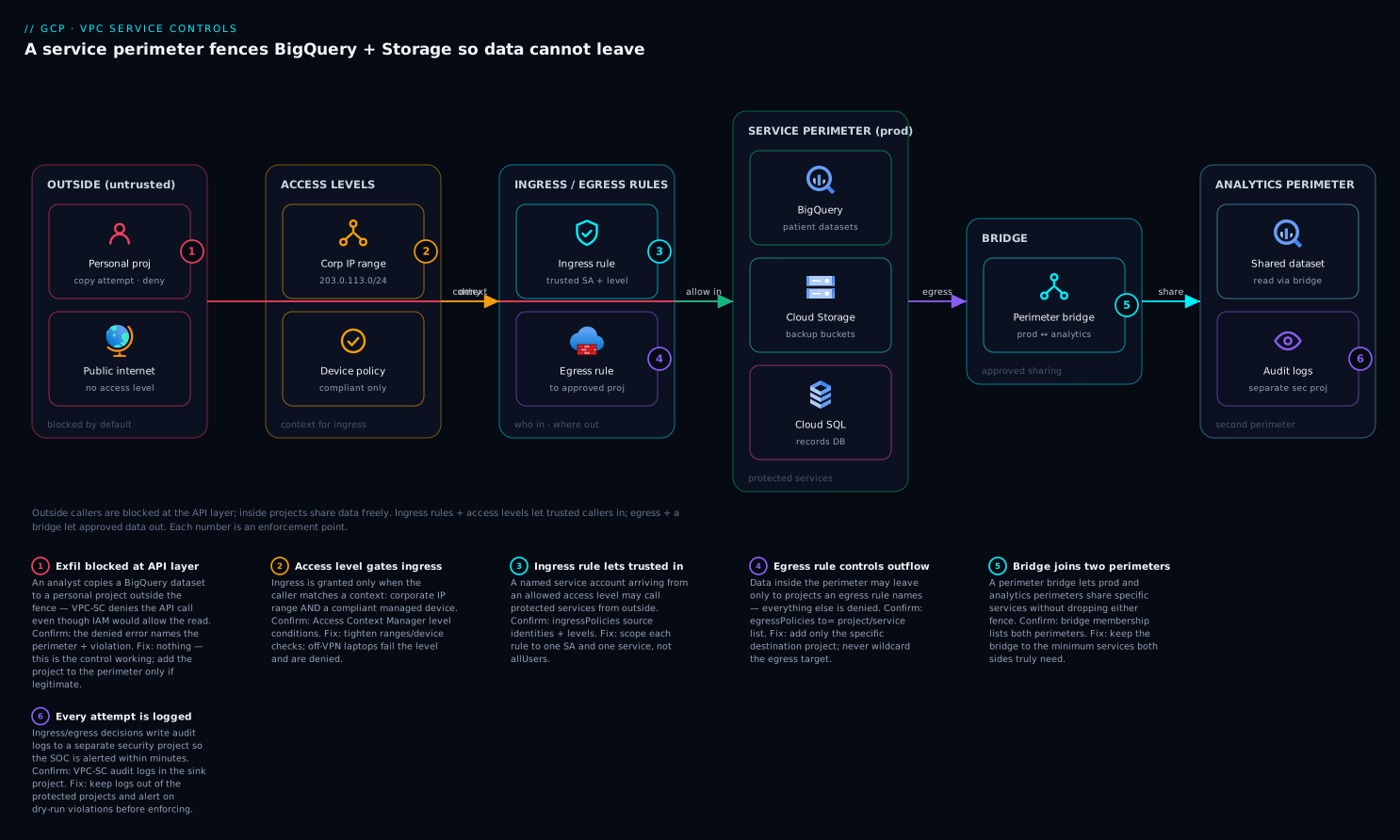
The first diagram shows the perimeter as a containment boundary. Read it from the center out: a service perimeter encloses a set of member projects (by project number) and the protected services those projects use — BigQuery, Cloud Storage, Spanner, KMS. Inside the boundary, those projects and services communicate freely; the wall is invisible to intra-perimeter traffic. At the edge sit the two controlled crossings: ingress (governed by access levels and ingress rules) admits trusted callers — the corporate network, a CI identity, an admin laptop on a compliant device — while egress (governed by egress rules) permits narrowly scoped outbound — for example, one pipeline service account writing to one partner bucket. Everything else that tries to cross — a stolen key from a random IP, an insider’s bq extract to a personal project, an anonymous read of a misconfigured public bucket — meets a deny at the API front end and never reaches the data.
The second diagram traces a single request’s decision path through the boundary, which is the mental model you replay during an incident. A caller issues an API request to a protected service. The front end first asks: does this request cross a perimeter boundary? If both endpoints are inside the same perimeter, it is allowed straight through. If it crosses, the front end evaluates the perimeter’s controls in order — does the source satisfy an access level? does an ingress rule match the identity, source, service and method (for inbound)? does an egress rule match (for outbound)? If any applicable control allows it, the request proceeds; if none does, the front end returns PERMISSION_DENIED with a VPC-SC violationReason and a vpcServiceControlsUniqueId, and writes a violation entry to the audit log. That unique id and reason are exactly what you grep for when “it worked yesterday” turns into a denied pipeline.
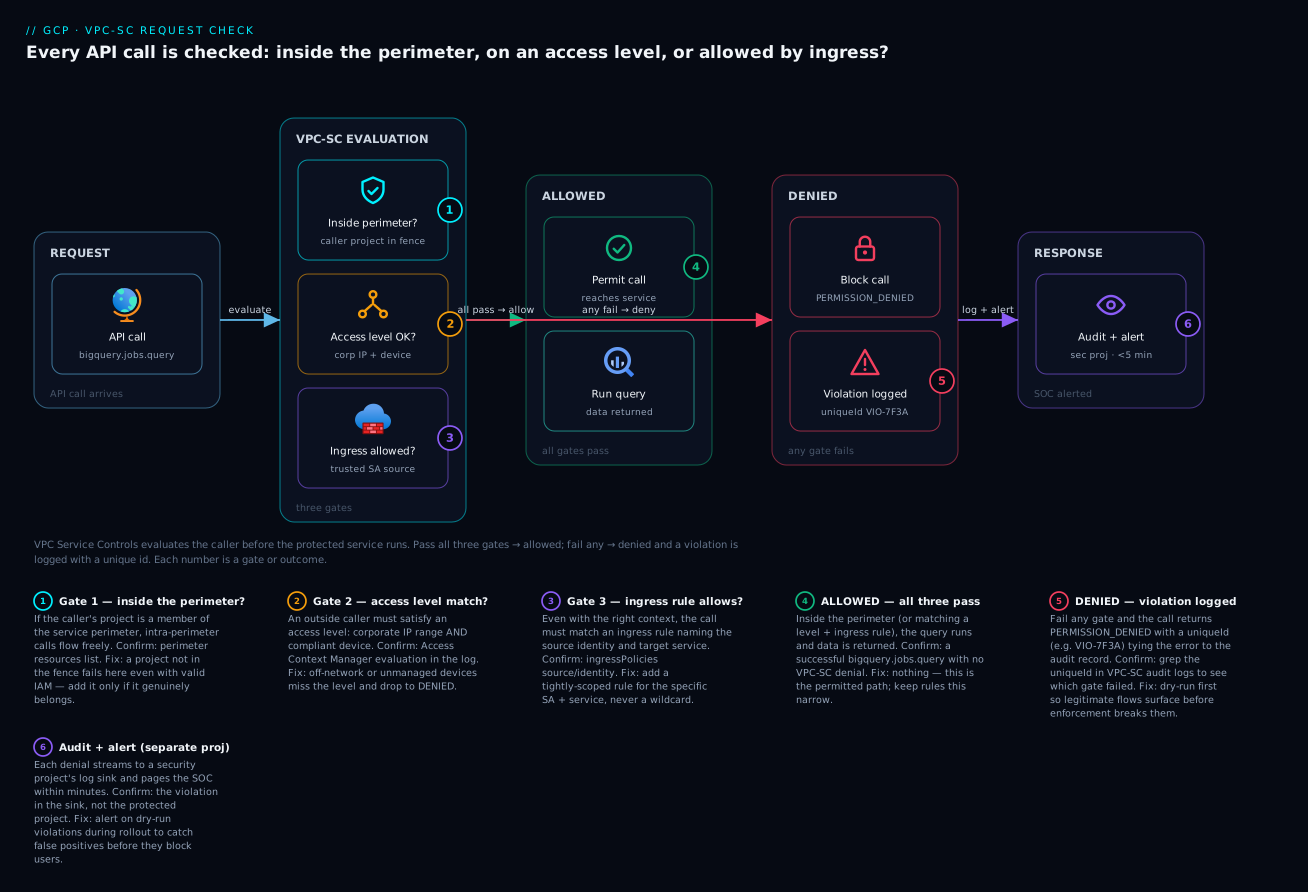
VPC-SC operates at the service/API layer, not the IP layer, which is why both diagrams center on the API front end rather than on subnets and firewalls. It complements — never replaces — your firewall rules and your Private Google Access routing; the restricted VIP is simply how you make sure the IP-layer plumbing delivers every API call to this service-layer gate.
Real-world scenario
Meridian Health Analytics (fictional, but a composite of real deployments) runs a population-health platform on Google Cloud: de-identified claims and EHR extracts for 4.2 million patients in BigQuery (~38 TB), source files and model artifacts in Cloud Storage (~12 TB), and a transactional consent store in Cloud Spanner. They are HIPAA-regulated and contractually bound to demonstrate that patient data cannot leave a defined set of projects. Their org has 60 projects across data, ML, app and sandbox folders. The platform team is six engineers; the monthly cloud spend is about ₹62,00,000 (~$74k).
The trigger for adopting VPC-SC was an internal audit finding, not a breach: the auditor noted that any of 14 engineers with roles/bigquery.dataEditor could bq extract regulated tables to any bucket in any of the 60 projects — or, with a personal credential, to a personal project — and IAM could not prevent it. The finding was “data has no enforced trust boundary.” The team scoped four projects (the BigQuery data project, the GCS data project, the Spanner project, and a KMS project holding the CMEK keys) as the prod data perimeter, and a separate two-project analytics perimeter for the data-science team’s notebooks and scratch datasets.
They did it in dry-run first. The intended prod perimeter protected bigquery, storage, spanner, cloudkms, and secretmanager, with one access level (corp_egress: the company’s NAT egress CIDRs) and vpcAccessibleServices restricting VMs to the protected set plus logging/monitoring. They put the whole thing in spec (dry-run) and ran production for eleven days. The dry-run violation log was a goldmine of forgotten flows: the nightly Dataflow job’s workers ran in a fifth project not in the perimeter; the BI tool connected from a SaaS IP range not in corp_egress; the ML team’s notebooks read three specific prod datasets directly; and the CI deployer pushed schema migrations from a build project. Each surfaced as a dryRun: true entry with the exact identity, service and method.
They translated each finding into policy: moved the Dataflow workers into the perimeter; added an ingress rule for the BI tool’s service account scoped to the SaaS CIDRs and only BigQuery read methods; added an ingress rule on prod letting the analytics service account read the three named datasets; added an ingress rule for the CI deployer scoped to bigquery.tables.* from the build project. After two more dry-run days with a clean log, they ran perimeters dry-run enforce. Nothing broke on go-live — because everything that would have broken had already shown up in dry-run and been allow-listed.
Two months later the control paid for itself. A developer’s laptop was compromised and their gcloud credentials (with roles/bigquery.dataViewer) were used to attempt a bq extract of a claims table to an attacker-controlled bucket in an external project, from an IP in another country. IAM authorized the read — the credential was valid — but the perimeter denied the cross-boundary write: the destination project was outside the perimeter, no egress rule allowed it, and the source IP satisfied no access level. The attempt produced a RESOURCES_NOT_IN_SAME_SERVICE_PERIMETER denial and a vpcServiceControlsUniqueId in the audit log; the log-based alert on violationReason fired in under three minutes. Zero patient records left the perimeter. The audit finding was closed with the dry-run logs and the enforced policy as evidence.
The rollout, as a timeline — because the order is the lesson:
| Phase | Action | Outcome | Lesson |
|---|---|---|---|
| Day 0 | Scope perimeters; define intended policy | 2 perimeters, 5 protected services | Project layout = perimeter granularity |
| Day 0 | Apply entire policy in dry-run (spec) |
Nothing enforced; logging begins | Never enforce first |
| Days 1–11 | Run production; read dry-run violations | 4 forgotten flows found | Dry-run finds what design misses |
| Day 12 | Add ingress rules / move Dataflow project | Log shrinks to expected denials | Translate each finding to a rule |
| Days 12–13 | Re-run dry-run; confirm clean log | Only intended denials remain | Confirm before enforcing |
| Day 14 | dry-run enforce → live |
Zero breakage on go-live | A clean dry-run = a safe cutover |
| +2 months | Compromised-credential exfil attempt | Denied; SOC alert in <3 min | The control works against valid creds |
Advantages and disadvantages
VPC-SC is a strong control with real operational cost. Weigh it honestly before committing an org to it.
| Advantages (why it’s worth it) | Disadvantages (why it bites) |
|---|---|
| Stops exfiltration even by authorized, privileged identities — closes the gap IAM structurally cannot | Requires a complete inventory of legitimate cross-boundary flows; missing one breaks a workflow |
| Defeats stolen/leaked credentials from outside the perimeter — the valid key is no longer enough | Deny errors are cryptic (RESOURCES_NOT_IN_SAME_SERVICE_PERIMETER, a 12-char unique id) and need log-reading skill |
| A second, independent gate behind IAM — public-bucket misconfig still can’t be read from outside | Adds friction to CI/CD, partner integrations, and any cross-perimeter tooling — each needs a rule |
| Auditable, demonstrable boundary — exactly what regulators ask for | Project-level granularity only; forces deliberate project layout |
| Dry-run mode lets you validate the entire policy before enforcing | The restricted-VIP/DNS/route plumbing is fiddly and easy to get subtly wrong |
| Ingress/egress rules give least-privilege, method-scoped crossings | Some services have partial support; you must check the supported-products list |
| Reuses Access Context Manager levels across perimeters and IAP | Console/browser access can be blocked, surprising admins |
| Native, no extra agents or cost beyond the platform | Operationally heavier than IAM alone; needs ongoing change discipline (spec → status) |
When it clearly earns its keep: regulated data (HIPAA/PCI/public sector), data-residency mandates, “prove data can’t leave these projects” requirements, and any high-value data store where a stolen credential would be catastrophic. When it may be overkill: a single small project with no sensitive data, a sandbox, or an estate where IAM least privilege and good network controls already meet the risk and the operational overhead isn’t justified. The disadvantages are all manageable — but only with dry-run discipline and someone on the team who can read a violation log, which is the entire back half of this article.
Hands-on lab
Build a perimeter around a single project, protect Cloud Storage, observe a dry-run would-be denial, add an access level, enforce, watch a real denial, then tear it all down. This uses two projects you own (one inside, one outside) and stays within free-tier-friendly footprints (a few small objects). Run in Cloud Shell.
Safety note: VPC-SC mistakes can lock you out of your own resources. Do this in a sandbox org/project, keep your Cloud Shell IP handy for the access level, and use dry-run for every change exactly as shown.
Step 1 — Variables and prerequisites.
ORG_ID=123456789012                      # your organization id
POLICY=$(gcloud access-context-manager policies list \
  --organization=$ORG_ID --format="value(name)" | head -n1)
IN_PROJECT=vpcsc-lab-inside              # project that will be INSIDE
OUT_PROJECT=vpcsc-lab-outside            # project that will be OUTSIDE
IN_NUM=$(gcloud projects describe $IN_PROJECT --format="value(projectNumber)")
echo "Policy=$POLICY  InsideNum=$IN_NUM"
gcloud services enable accesscontextmanager.googleapis.com storage.googleapis.com \
  --project=$IN_PROJECT
If POLICY is empty, create an access policy first:
gcloud access-context-manager policies create \
  --organization=$ORG_ID --title="lab-policy"
Step 2 — Make a bucket inside and a bucket outside.
gcloud storage buckets create gs://vpcsc-in-$IN_NUM --project=$IN_PROJECT --location=us
gcloud storage buckets create gs://vpcsc-out-demo --project=$OUT_PROJECT --location=us
echo "secret patient row" | gcloud storage cp - gs://vpcsc-in-$IN_NUM/data.txt
Step 3 — Create the perimeter in DRY-RUN, protecting Cloud Storage, with NO access level yet.
gcloud access-context-manager perimeters dry-run create lab_perimeter \
  --policy=$POLICY \
  --perimeter-title="Lab perimeter (dry-run)" \
  --perimeter-type=regular \
  --perimeter-resources="projects/$IN_NUM" \
  --perimeter-restricted-services="storage.googleapis.com"
Expected: the perimeter is created with a spec (dry-run) only; it enforces nothing.
Step 4 — Trigger a would-be denial and read it in the dry-run log. Copy the inside object to the outside bucket — this crosses the boundary and would be denied if enforced:
gcloud storage cp gs://vpcsc-in-$IN_NUM/data.txt gs://vpcsc-out-demo/leak.txt
# Succeeds NOW (dry-run doesn't enforce) — but it logs a would-be violation.
sleep 30
gcloud logging read '
  protoPayload.metadata."@type"="type.googleapis.com/google.cloud.audit.VpcServiceControlAuditMetadata"
  AND protoPayload.metadata.dryRun=true' \
  --project=$IN_PROJECT --freshness=10m --limit=5 \
  --format='table(protoPayload.methodName, protoPayload.metadata.violationReason, protoPayload.metadata.vpcServiceControlsUniqueId)'
Expected: a row with a violationReason like RESOURCES_NOT_IN_SAME_SERVICE_PERIMETER and a vpcServiceControlsUniqueId. This is the dry-run telling you what enforcement would block.
Step 5 — Add an access level for your Cloud Shell IP so legitimate ingress works after enforcement.
MYIP=$(curl -s https://ifconfig.me)
cat > lab_level.yaml <<EOF
- ipSubnetworks:
  - ${MYIP}/32
EOF
gcloud access-context-manager levels create lab_corp \
  --policy=$POLICY --title="Lab Cloud Shell IP" --basic-level-spec=lab_level.yaml
gcloud access-context-manager perimeters dry-run update lab_perimeter \
  --policy=$POLICY --add-access-levels="lab_corp"
Step 6 — Enforce the perimeter.
gcloud access-context-manager perimeters dry-run enforce lab_perimeter --policy=$POLICY
Step 7 — Watch the real denial. Now the cross-boundary copy is blocked:
gcloud storage cp gs://vpcsc-in-$IN_NUM/data.txt gs://vpcsc-out-demo/leak2.txt
# Expected: a 403 with "Request is prohibited by organization's policy"
# and a vpcServiceControlsUniqueId in the error.
Reading from inside still works (you satisfy lab_corp or are intra-perimeter):
gcloud storage cat gs://vpcsc-in-$IN_NUM/data.txt # still works
Validation checklist. You created a perimeter, saw a dry-run would-be violation with its unique id, added an access level, enforced, and watched the same cross-boundary copy turn into a hard denial — while intra-perimeter reads kept working. The steps mapped to what each proves:
| Step | What you did | What it proves |
|---|---|---|
| 3 | Perimeter in dry-run | You can stage policy without enforcing |
| 4 | Cross-boundary copy + log read | Dry-run logs the exact would-be denial + unique id |
| 5 | Access level for your IP | Legitimate ingress is allow-listed before enforcement |
| 6 | Enforce | The wall goes live |
| 7 | Blocked copy out | Cross-boundary exfil is now denied for real |
Teardown (do this to avoid a lingering wall).
gcloud access-context-manager perimeters delete lab_perimeter --policy=$POLICY --quiet
gcloud access-context-manager levels delete lab_corp --policy=$POLICY --quiet
gcloud storage rm -r gs://vpcsc-in-$IN_NUM gs://vpcsc-out-demo
Cost note. The bucket and a few tiny objects cost effectively nothing; VPC Service Controls itself has no per-perimeter charge. The only “cost” of this lab is remembering to delete the perimeter so you don’t lock future work out of those projects.
Infrastructure as code: the perimeter in Terraform
In production you manage perimeters as code, reviewed in PRs, with the dry-run spec as the staging ground. Terraform’s google_access_context_manager_service_perimeter expresses both status (enforced) and spec (dry-run).
# A regular perimeter with enforced status AND a dry-run spec.
resource "google_access_context_manager_service_perimeter" "prod" {
  parent = "accessPolicies/123456789012"
  name   = "accessPolicies/123456789012/servicePerimeters/prod"
  title  = "prod"

  # Enforced configuration
  status {
    resources           = ["projects/884932100123", "projects/884932100456"]
    restricted_services = [
      "bigquery.googleapis.com",
      "storage.googleapis.com",
      "spanner.googleapis.com",
      "cloudkms.googleapis.com",
      "secretmanager.googleapis.com",
    ]
    access_levels = [google_access_context_manager_access_level.corp.name]

    vpc_accessible_services {
      enable_restriction = true
      allowed_services   = ["RESTRICTED-SERVICES", "logging.googleapis.com", "monitoring.googleapis.com"]
    }

    # Ingress: CI deployer from corp may run BigQuery + Storage ops
    ingress_policies {
      ingress_from {
        sources { access_level = google_access_context_manager_access_level.corp.name }
        identities = ["serviceAccount:ci-deployer@platform-ci.iam.gserviceaccount.com"]
      }
      ingress_to {
        resources = ["*"]
        operations {
          service_name = "bigquery.googleapis.com"
          method_selectors { method = "*" }
        }
        operations {
          service_name = "storage.googleapis.com"
          method_selectors { method = "*" }
        }
      }
    }

    # Egress: pipeline SA may write objects to one partner project
    egress_policies {
      egress_from {
        identities = ["serviceAccount:pipeline@analytics-prod.iam.gserviceaccount.com"]
      }
      egress_to {
        resources = ["projects/998877665544"]
        operations {
          service_name = "storage.googleapis.com"
          method_selectors { method = "google.storage.objects.create" }
        }
      }
    }
  }

  # Dry-run spec: a mirror of status where you stage the NEXT change first,
  # let it log violations, then promote it into status.
  use_explicit_dry_run_spec = true
  spec {
    resources           = ["projects/884932100123", "projects/884932100456"]
    restricted_services  = ["bigquery.googleapis.com", "storage.googleapis.com",
                            "spanner.googleapis.com", "cloudkms.googleapis.com",
                            "secretmanager.googleapis.com"]
    access_levels       = [google_access_context_manager_access_level.corp.name]
  }
}

resource "google_access_context_manager_access_level" "corp" {
  parent = "accessPolicies/123456789012"
  name   = "accessPolicies/123456789012/accessLevels/corp"
  title  = "Corp network"
  basic {
    conditions {
      ip_subnetworks = ["203.0.113.0/24", "198.51.100.0/24"]
    }
  }
}
The IaC discipline that keeps VPC-SC safe:
| Practice | Why |
|---|---|
Manage spec and status together in code |
The diff is your change review |
Stage changes in spec first, enforce in a later PR |
Mirrors dry-run → enforce |
| Use a dedicated resource for access levels and reference by name | Reuse, avoid drift |
| Pin project numbers (immutable) in code, not IDs | Membership is by number |
| Gate enforced-config changes behind extra review | A bad status edit is an outage |
| Keep one source of truth (no console edits on managed perimeters) | Console edits cause Terraform drift and surprise breakage |
Common mistakes & troubleshooting
This is the section you bookmark, because the day VPC-SC bites you, the error is opaque and the bridge is loud. First the scannable playbook, then the detail for the entries that hurt most.
| # | Symptom | Root cause | Confirm (exact command / path) | Fix |
|---|---|---|---|---|
| 1 | Request is prohibited by organization's policy / 403 on an API call that IAM allows |
Request crosses a perimeter boundary with no allowing rule/level | Find the vpcServiceControlsUniqueId in the error; read the violation log (below) |
Add an ingress rule, egress rule, or access level for that exact flow |
| 2 | RESOURCES_NOT_IN_SAME_SERVICE_PERIMETER |
Source and target are in different perimeters (or one is outside) | Audit log violationReason; check both projects’ membership |
Bridge or (preferred) ingress/egress rule joining the two |
| 3 | NO_MATCHING_ACCESS_LEVEL |
Caller’s origin (IP/region/identity) satisfies no attached access level | Log shows the principal + origin; compare to your levels | Add the caller’s IP/identity to an access level or an ingress rule |
| 4 | VPC_SERVICE_CONTROLS egress violation when writing out |
An egress to an external project isn’t allow-listed | violationReason = egress; identify target project |
Add an egress rule scoped to that identity/project/method |
| 5 | VMs suddenly can’t reach a Google API after enabling vpcAccessibleServices |
The API isn’t in allowedServices |
gcloud ... perimeters describe → vpcAccessibleServices |
Add the missing service (e.g. monitoring.googleapis.com) |
| 6 | On-prem hosts denied even from corporate IP | They hit public endpoints, not the restricted VIP | Check on-prem DNS resolution of *.googleapis.com |
Force restricted.googleapis.com + route 199.36.153.4/30; add an access level for the corp egress IP |
| 7 | Cloud Console operations fail with a VPC-SC error | The console calls APIs from your browser’s IP | Error in console mentions VPC-SC + unique id | Add an access level for admin browser IPs, or an ingress rule for the user |
| 8 | A Google-managed feature breaks (e.g. cross-project service agent) | A Google service agent acting on your behalf is blocked | Log shows a ...gserviceaccount.com service agent identity |
Add an ingress rule for that service agent / required project |
| 9 | Enforcing broke things you never saw in design | You skipped or under-ran dry-run | No dry-run violation history exists | Roll back to dry-run, run for days, read the log, then re-enforce |
| 10 | BigQuery query referencing another project fails | Cross-perimeter read with no ingress on the data perimeter | violationReason on the data project |
Ingress rule on the data perimeter for the querying identity + bigquery read methods |
| 11 | Dataflow/Dataproc job fails to read protected data | Workers run outside the perimeter | Job’s worker project not a member | Run workers in a perimeter member project (or add ingress) |
| 12 | Terraform plan wants to revert perimeter changes every run | Someone edited the perimeter in the console (drift) | terraform plan shows unexpected diffs |
Stop console edits; import/realign; manage only in code |
| 13 | Pub/Sub subscription in another perimeter gets no messages | Cross-perimeter publish/subscribe not allowed | violationReason on the topic or sub project |
Ingress/egress rules for the pubsub methods between perimeters |
| 14 | Access level “works” but for the wrong callers | Condition logic (AND vs OR) misunderstood | Re-read the level: conditions OR, attributes within AND | Split into separate conditions or tighten the attribute set |
The expanded detail for the ones that bite hardest:
1 & 2 — The generic “prohibited by organization’s policy” 403 and RESOURCES_NOT_IN_SAME_SERVICE_PERIMETER.
Root cause: The request moves data across a perimeter boundary and nothing allows it. The error deliberately reveals little to the caller, so the real diagnosis is in the audit log.
Confirm: Every VPC-SC denial stamps a vpcServiceControlsUniqueId on the error response and the matching log entry. Grab it from the error (the gcloud/SDK error text or the response body), then query the log:
# Find the exact denial by its unique id
UNIQUE_ID="abc123XYZ456"   # from the error message
gcloud logging read "
  protoPayload.metadata.\"@type\"=\"type.googleapis.com/google.cloud.audit.VpcServiceControlAuditMetadata\"
  AND protoPayload.metadata.vpcServiceControlsUniqueId=\"${UNIQUE_ID}\"" \
  --freshness=2d --limit=5 \
  --format='yaml(timestamp, protoPayload.authenticationInfo.principalEmail,
    protoPayload.methodName, protoPayload.resourceName,
    protoPayload.metadata.violationReason, protoPayload.metadata.egressViolations,
    protoPayload.metadata.ingressViolations)'
The log gives you the principal, the method, the resource, the violationReason, and (for ingress/egress) the specific violation block naming the source/target. That tells you precisely which rule to add.
Fix: If it’s a missing inbound path → ingress rule or access level. If outbound → egress rule. If two perimeters that should share → ingress/egress (preferred) or a bridge.
3 — NO_MATCHING_ACCESS_LEVEL.
Root cause: The caller is outside the perimeter and their request attributes (IP, region, identity) match none of the attached access levels.
Confirm: The log entry shows the principalEmail and the request origin; compare against your levels with gcloud access-context-manager levels describe.
Fix: Add the caller’s source IP (or identity) to the appropriate access level, or — better, if it’s a specific identity doing a specific job — write an ingress rule so you grant exactly that identity/source/method rather than widening the network gate for everyone.
6 — On-prem denied even from the corporate IP.
Root cause: On-prem hosts are resolving *.googleapis.com to the public endpoints and egressing over the internet from your corporate public IP, which (a) may not match an access level and (b) doesn’t traverse the VPC-SC-aware VIP path you intended.
Confirm: On an on-prem host, nslookup storage.googleapis.com — if it returns public Google ranges, not 199.36.153.4/30, your DNS isn’t forcing the restricted VIP.
Fix: Configure on-prem DNS to resolve *.googleapis.com to restricted.googleapis.com (the 199.36.153.4/30 VIP), route that range over your VPN/Interconnect, and add an access level admitting the corporate egress IP.
7 — Cloud Console operations fail.
Root cause: The console runs in your browser and calls Google APIs from your browser’s IP. If that IP satisfies no access level, console actions against protected services are denied — even though your gcloud from a trusted host works.
Confirm: The console surfaces a VPC-SC error with a unique id; your CLI from a corp host on the same task succeeds.
Fix: Add an access level (or ingress rule) covering admin browser source IPs — many orgs scope a tightly-controlled “admin access level” for exactly this.
9 — “Enforcing broke things we never designed for.” Root cause: Dry-run was skipped or run too briefly to capture infrequent flows (the weekly report, the monthly batch, the quarterly partner export). Confirm: There is little or no dry-run violation history to point to. Fix: Revert to dry-run and run it long enough to cover your slowest cadence — at least a week, ideally a month if you have monthly jobs. The fix for a VPC-SC outage is almost always “go back to dry-run and do the homework.”
Best practices
- Dry-run everything, always. Stage the entire intended policy in
spec, run production across your slowest job cadence, and promote tostatusonly when the dry-run log shows only the denials you want. This single discipline prevents the great majority of VPC-SC outages. - Let project layout define perimeter granularity. Group same-sensitivity projects together; isolate sensitivity classes into separate perimeters or projects. You cannot split a project, so design the project map with the perimeter in mind.
- Protect KMS and Secret Manager alongside the data. A perimeter around BigQuery/GCS that leaves
cloudkmsandsecretmanagerreachable from outside is a hole — the keys and credentials are the data’s locks. - Prefer ingress/egress rules over access levels and bridges for anything precise. Reserve access levels for coarse “trusted network/identity gets in”; use rules to grant exact identity → method → resource crossings; use bridges only when you truly want a symmetric project join.
- Force the restricted VIP. Plumb Private Google Access, the
199.36.153.4/30route, and DNS so all protected-service traffic from VMs and on-prem traversesrestricted.googleapis.com. A perimeter that traffic can route around is theater. - Turn on
vpcAccessibleServices(VPC-accessible-services) with an allow-list. It stops a compromised inside VM from exfiltrating via an unprotected API. Always include logging/monitoring and the platform basics, and dry-run the change. - Manage perimeters as code, never in the console on managed resources. The Terraform diff is your change review; console edits cause drift and surprise breakage. Pin project numbers.
- Alert on
violationReasonin the audit log. A denied cross-boundary attempt is a security signal — wire a log-based alert so the SOC sees exfil attempts (and broken pipelines) within minutes. - Keep access levels reusable and few. Define a small set of well-named levels (corp network, admin browsers, CI source) and reference them across perimeters and IAP, rather than minting one per app.
- Document every ingress/egress rule’s justification. Each crossing is an exception to “deny by default”; record why it exists so the next reviewer can revoke it when the need ends.
- Test admin and console access before enforcing. Make sure your own break-glass paths (admin browser IPs, the deploy identity) are allow-listed, or you can lock yourself out of the very perimeter you just built.
- Cover the supported-services reality. Verify each service you protect actually supports VPC-SC and understand its method-selector granularity before you depend on the boundary for it.
Security notes
- VPC-SC is defense in depth, not a replacement for IAM. Keep IAM least privilege regardless: the perimeter stops cross-boundary movement, but an over-privileged identity inside the perimeter can still do damage inside. Both layers matter — see GCP IAM and Service Accounts: Least Privilege.
- It blunts credential theft from outside, not insider abuse inside. A stolen key from the internet is denied; a malicious insider operating from within the perimeter is constrained only by IAM and by egress rules. Scope egress tightly and watch the audit log.
- Protect the keys with the data. Bring
cloudkmsandsecretmanagerinto the perimeter so CMEK keys and secrets can’t be used from outside; otherwise an attacker who reaches the keys can undo your encryption story. - Lock VMs to an API allow-list.
vpcAccessibleServiceswithenableRestrictionprevents a compromised in-perimeter VM from using an unprotected Google API as an exfil channel. - Secure the ingress/egress exceptions. Every rule is a hole you opened deliberately; make each as narrow as possible (specific identity, specific method, specific resource) and review them periodically — a stale egress rule to a decommissioned partner is a forgotten door.
- Guard the access policy itself.
roles/accesscontextmanager.policyAdmincan rewrite or delete perimeters. Treat it as a tier-0 permission: few holders, just-in-time elevation, and audit logging on policy changes. - Alert on enforcement changes. A perimeter being moved to dry-run, deleted, or having a service removed is a high-signal event — someone widening the boundary should trip an alert, because that is exactly what an attacker (or a careless admin) would do to exfiltrate.
- Don’t leak topology in error handling. The VPC-SC denial to a caller is intentionally vague; keep it that way in your own wrappers — the detail belongs in the audit log and the SOC, not in a response to an untrusted client.
Cost & sizing
The headline: VPC Service Controls has no direct service charge. There is no per-perimeter, per-access-level, or per-rule fee. What it costs is operational and adjacent, and that is what you budget for.
| Cost dimension | What you pay for | Rough magnitude | Notes |
|---|---|---|---|
| VPC-SC itself | Nothing | ₹0 | No per-perimeter/level/rule charge |
| Engineering to design + dry-run | Team time | Days to weeks initially | The real cost; front-loaded |
| Ongoing change management | Time per cross-boundary need | Hours per new rule | spec → dry-run → status per change |
| Audit log storage | Cloud Logging ingestion/retention | Per-GB (small) | Violation logs are low-volume but keep them |
| Restricted-VIP networking | Routes/DNS (negligible) + any Interconnect | Mostly free; hybrid link if on-prem | The VIP path has no special charge |
| Possible re-architecture | Moving projects/jobs into the perimeter | One-time | E.g. relocating Dataflow workers |
Sizing is not about throughput (there’s no capacity to provision) but about structural complexity:
| Estate shape | Perimeters | Access levels | Ingress/egress rules | Effort |
|---|---|---|---|---|
| One sensitive project, one team | 1 | 1–2 | 0–3 | Low |
| Prod data + analytics team | 2 | 2–4 | 3–10 | Moderate |
| Multi-team, multi-class regulated org | 5–15 | 5–15 | tens | High; needs a platform owner |
| Multi-tenant (perimeter per tenant) | 1 per tenant | shared small set | per-tenant | High; automate with IaC |
The cost lesson from the field: the bill is time, paid mostly up front in design and dry-run, and recovered many times over the first time the perimeter denies a real exfiltration attempt or closes an audit finding. Budget the engineering, not a line item — and budget ongoing change capacity, because every new cross-boundary integration will need a rule.
Interview & exam questions
1. What does VPC Service Controls protect against that IAM cannot? Data exfiltration across a trust boundary by an authorized identity. IAM decides whether a principal may perform an action; it cannot prevent an authorized user from copying data they’re allowed to read to an untrusted location, because that copy is a separate authorized action. VPC-SC adds a perimeter so cross-boundary API calls are denied at the Google front end regardless of IAM authorization.
2. Where in the request path does VPC-SC enforce, and why does that defeat a stolen key? At Google’s API front end, before the request reaches the service. Because the check happens at the front door based on whether the request crosses a perimeter boundary, a valid-but-stolen credential calling from outside the perimeter is denied — the credential’s validity is irrelevant if the origin isn’t allowed in.
3. Define an access level and explain how multiple conditions combine. An access level (in Access Context Manager) is a named, reusable condition on request attributes — IP, region, identity, device policy. A basic level’s conditions are ORed (satisfy any one to pass); the attributes within a single condition are ANDed. You attach levels to a perimeter to admit trusted callers from outside.
4. When would you use an ingress/egress rule instead of an access level? When you need precision: an ingress/egress rule scopes a crossing to a specific identity, source, service and method (and for egress, a specific external resource). Access levels are coarse (“this network gets in to everything”); rules express least-privilege crossings like “this SA may only storage.objects.create to this one external project.”
5. What is a perimeter bridge and why might you avoid it now? A bridge is a perimeter type that joins specific projects across two regular perimeters, two-way, for their protected services, with no method scoping. You avoid it in modern designs because ingress/egress rules are one-directional and method-scoped — a bridge usually grants more access (broad, symmetric) than you actually need.
6. Explain dry-run mode and the safe rollout sequence. A perimeter has an enforced config (status) and a dry-run config (spec, with useExplicitDryRunSpec: true) that logs would-be denials without enforcing. Roll out by putting the full intended policy in dry-run, running production long enough to capture all flows, reading the violation logs, allow-listing each legitimate flow, then promoting to enforced. Skipping dry-run is the top cause of VPC-SC outages.
7. Why is the restricted VIP (restricted.googleapis.com, 199.36.153.4/30) essential? Because a perimeter only governs traffic that reaches the VPC-SC-aware endpoint. You route protected-service traffic from VMs and on-prem to the restricted VIP (via Private Google Access, a route for 199.36.153.4/30, and DNS forcing *.googleapis.com to it) so every API call funnels through the gate. The private.googleapis.com VIP, by contrast, bypasses VPC-SC and must not be used for protected services.
8. An engineer with roles/bigquery.dataViewer runs bq extract to their personal project and it fails with a VPC-SC error. Explain. IAM authorized the read (they have viewer). The write to the personal project crosses the perimeter boundary to a non-member project with no egress rule allowing it, so VPC-SC denies the cross-boundary operation — typically RESOURCES_NOT_IN_SAME_SERVICE_PERIMETER. The control stopped exactly the insider copy-out IAM couldn’t.
9. How do you debug a denied request? Capture the vpcServiceControlsUniqueId from the error, then query Cloud Logging for the VpcServiceControlAuditMetadata entry with that id to read the principalEmail, methodName, resourceName, and violationReason (and the ingress/egress violation block). That pinpoints the exact identity, method, resource and reason, which tells you which ingress/egress rule or access level to add.
10. What does vpcAccessibleServices do and what’s the risk of enabling it carelessly? It restricts which Google APIs VMs inside the perimeter may call, to an allow-list — closing the hole where a compromised in-perimeter VM exfiltrates via an unprotected API. The risk: if you forget to allow-list an API your VMs legitimately use (e.g. monitoring), that traffic silently fails, so you dry-run the change and always include platform basics.
11. Your on-prem hosts are denied even though their corporate IP is in an access level. What’s wrong? They are almost certainly resolving *.googleapis.com to public endpoints and egressing over the internet rather than via the restricted VIP, so the request doesn’t traverse the intended path. Force on-prem DNS to restricted.googleapis.com, route 199.36.153.4/30 over the VPN/Interconnect, and confirm the origin IP matches the access level.
12. How do perimeters interact with the resource hierarchy and IAM — which evaluates first? Perimeters are organization-scoped and operate on projects as members. A request must pass both IAM (authorization) and VPC-SC (boundary) — they are independent gates. VPC-SC enforces at the API front end; failing it returns a VPC-SC denial even when IAM would allow, and vice versa. Neither replaces the other.
These map to Google Professional Cloud Security Engineer (data exfiltration prevention, Access Context Manager, VPC-SC design) and Professional Cloud Architect (designing secure, compliant landing zones). A compact cert mapping:
| Question theme | Primary cert | Domain |
|---|---|---|
| VPC-SC vs IAM, threat model | Pro Cloud Security Engineer | Data protection / boundary controls |
| Access levels, ingress/egress, bridges | Pro Cloud Security Engineer | Configuring access (Access Context Manager) |
| Dry-run rollout, debugging denials | Pro Cloud Security Engineer | Operations / incident response |
| Restricted VIP, Private Google Access | Pro Cloud Network Engineer | Hybrid connectivity / private access |
| Perimeter design in a landing zone | Pro Cloud Architect | Designing for security & compliance |
Quick check
- A user with
roles/bigquery.dataViewerrunsbq extractto a bucket in their personal project and gets a VPC-SC error. IAM authorized the read — so what denied the operation, and whatviolationReasondo you expect? - You want to let only the CI service account, only from the corporate network, only run
storage.objects.createon the perimeter. Do you use an access level, an ingress rule, or a bridge — and why? - True or false: enabling
vpcAccessibleServiceswith an allow-list and forgetting to includemonitoring.googleapis.comwill silently break the Ops Agent on your VMs. - Your on-prem hosts are denied even though their corporate egress IP is in an attached access level. What is the most likely cause?
- What two configurations does a perimeter carry, what is the difference between them, and which one do you change first when rolling out?
Answers
- VPC Service Controls denied it: the write crossed the perimeter boundary into a non-member (personal) project with no egress rule allowing it. Expected
violationReason:RESOURCES_NOT_IN_SAME_SERVICE_PERIMETER(an egress-class violation). IAM allowed the read; the boundary stopped the cross-perimeter write. - An ingress rule. It is the only one of the three that can scope a crossing to a specific identity (the CI SA), a specific source (an access level for the corp network), a specific service+method (
storage.googleapis.com/google.storage.objects.create). An access level alone is too coarse (it admits the network to everything), and a bridge is a broad two-way project join. - True.
vpcAccessibleServicesrestricts VMs to the allow-listed APIs only; omittingmonitoring.googleapis.comblocks the Ops Agent’s metric/log writes with no IAM error — which is why you dry-run the change and always include platform basics. - They are resolving
*.googleapis.comto the public endpoints and egressing over the internet instead of the restricted VIP (restricted.googleapis.com,199.36.153.4/30), so the request doesn’t traverse the intended VPC-SC-aware path. Force on-prem DNS to the restricted VIP and route199.36.153.4/30over the hybrid link. - A perimeter carries an enforced config (
status) that actually denies and a dry-run config (spec, withuseExplicitDryRunSpec: true) that only logs would-be denials. You changespecfirst — stage the policy in dry-run, read the violation logs, fix gaps, then promote tostatus.
Glossary
- VPC Service Controls (VPC-SC) — a Google Cloud control that draws a logical perimeter around projects and the APIs they use, denying cross-boundary data movement at the API front end to prevent exfiltration.
- Access policy — the organization-level container (
accessPolicies/<id>) that holds all service perimeters and access levels for the org. - Service perimeter — the boundary itself: a set of member projects plus the Google APIs (
restrictedServices) it protects. - Member project — a project that is inside a perimeter, listed by its immutable project number; resources in it that belong to protected services are inside the boundary.
restrictedServices— the list of Google APIs a perimeter guards; only listed services are subject to boundary checks.vpcAccessibleServices(VPC-accessible services) — config restricting which Google APIs VMs inside the perimeter may call; withenableRestriction, VMs can reach only the allow-listed services.- Access Context Manager — the service where access levels (and the access policy) are defined; reusable across perimeters and IAP.
- Access level — a named condition on request attributes (IP, region, identity, device policy) that, when satisfied, admits an outside caller into the perimeter; basic levels OR their conditions and AND attributes within a condition.
- Ingress rule / egress rule — precise, method-scoped allow rules for traffic entering (ingress) or leaving (egress) the perimeter, expressed as a from (source/identity) and to (resources/services/methods) pair.
- Perimeter bridge — a legacy perimeter type (
PERIMETER_TYPE_BRIDGE) that joins specific projects across two regular perimeters, two-way, for their protected services, with no method scoping. - Dry-run config (
spec) — a perimeter configuration that logs would-be denials without enforcing, used (withuseExplicitDryRunSpec: true) to validate policy before going live. - Enforced config (
status) — the live perimeter configuration that actually denies cross-boundary violations. restricted.googleapis.com/ restricted VIP — the VPC-SC-aware API endpoint and its IP range199.36.153.4/30; protected-service traffic must traverse it for the perimeter to be effective.private.googleapis.com— a private-access VIP (199.36.153.8/30) that bypasses VPC-SC; for non-protected APIs only.- Private Google Access — a subnet feature letting VMs without external IPs reach Google APIs over internal routes; a prerequisite for the restricted-VIP plumbing.
violationReason— the field in the VPC-SC audit log naming why a request was denied (e.g.RESOURCES_NOT_IN_SAME_SERVICE_PERIMETER,NO_MATCHING_ACCESS_LEVEL, egress/ingress violations).vpcServiceControlsUniqueId— a short identifier stamped on every denied request (in the error and the audit log) used to correlate a denial to its log entry for debugging.identityType— a shortcut on ingress/egressfromblocks (ANY_IDENTITY,ANY_USER_ACCOUNT,ANY_SERVICE_ACCOUNT) to match classes of principals without listing them.
Next steps
You can now design a service perimeter, roll it out safely with dry-run, plumb the restricted VIP, and debug a denial from its unique id. Build outward:
- Next: GCP IAM and Service Accounts: Roles, Bindings and Least Privilege — the authorization layer VPC-SC sits behind; get least privilege right first.
- Related: GCP ‘Permission Denied’? The IAM Troubleshooting Decision Tree — distinguish an IAM denial from a VPC-SC denial fast during an incident.
- Related: GCP VPC and Shared VPC: Networking Across Projects — the Shared-VPC and Private Google Access foundations the restricted VIP depends on.
- Related: GCP Landing Zone: The Foundation Blueprint with Shared VPC and Org Policies — where the perimeter slots in as a platform-level guardrail.
- Related: The GCP Resource Hierarchy Explained — the org/folder/project substrate that perimeters and access policies attach to.
- Related: GCP Cloud Monitoring and Operations: Observability Built In — wire the log-based alert on
violationReasonso exfil attempts and broken pipelines page you in minutes.