The day your GCP estate stops being one project and becomes ten, a quiet decision gets made for you whether you make it or not: who owns the network, who pays the bill, and which guardrails are non-negotiable. A GCP landing zone — Google’s reference for it is the Foundation Blueprint (delivered as the terraform-google-modules / terraform-example-foundation repos and the Cloud Foundation Toolkit) — is the explicit, version-controlled answer to those questions. It is a resource hierarchy of an organization node, folders and projects; a Shared VPC so one platform team owns subnets, routes and firewalls while product teams deploy into them; a set of organization policy constraints that disable the dangerous defaults; centralized logging and billing; and a project factory — Terraform that mints every new project pre-wired to all of the above. Skip it and you get sprawl: projects on personal billing accounts, a network per project, no central log sink, and a security team that can enforce nothing.
This is the architect’s build guide, not a tour of the console. We treat the landing zone as a contract between platform, security, network and product teams, and we enumerate every clause: the four-level hierarchy and where each control attaches, the folder taxonomy and why you organize by blast radius rather than org chart, the project factory module and the exact gcloud/Terraform that drives it, Shared VPC host-and-service attachment with subnet-level IAM, the org policy constraints that actually matter (list and boolean, with the inheritance and mergePolicy semantics that trip people up), hierarchical firewall policies, the log sink and billing export wiring, IAM groups with separation of duties, and the Assured Workloads overlay for regulated estates. Every control comes with both the imperative gcloud and the declarative Terraform, because in a landing zone the Terraform is the source of truth and the CLI is only for confirming what it did.
By the end you will be able to design a hierarchy that won’t need re-cutting in eighteen months, stand up a project factory that makes a compliant project a pull request rather than a ticket, reason precisely about how an org policy at the org node interacts with one at a folder, and sequence the whole rollout in phases — bootstrap, org, environments, then workloads — so that you are never blocked on a control you forgot to lay down first. Because this is a reference you will return to mid-design, the hierarchy, the constraints, the IAM model and the rollout are all laid out as scannable tables: read the prose once, then keep the tables open while you write the HCL.
What problem this solves
Without a landing zone, GCP adoption follows a predictable decline. The first project is created by an engineer with an Owner role and a personal credit card. The second copies the first. By the tenth, you have ten default VPC networks (each with the wide-open default firewall rules Google ships), ten different IAM models (mostly roles/owner handed to whoever asked), audit logs scattered across projects with no central sink, and a finance team that cannot answer “what did the data platform cost last month” because spend is spread across unlabeled projects on three billing accounts. Nothing is wrong yet — it just cannot be governed, secured, or paid for predictably, and every one of those problems compounds.
What breaks specifically: the security team has no enforcement point — an org policy can disable public IPs on VMs across the whole company in one place, but only if there is an organization node and the policy is set there; without it they are filing per-project tickets forever. The network team cannot enforce a routing or egress posture because each project owns its own VPC. The platform team cannot offer self-service because there is no template — every new project is bespoke, so it is a ticket, a meeting, and a week. And finance cannot allocate cost because projects lack a consistent labeling and folder structure to roll spend up by.
Who hits this: any organization past a handful of GCP projects, and especially anyone in a regulated industry (finance, healthcare, public sector) where “show me your access controls and your audit trail” is an auditor’s opening question, not a nice-to-have. The landing zone is the difference between answering that question with a terraform plan and a single log project, versus a week of screenshots. The fix is never “tighten the projects we have” reactively — it is to lay down the hierarchy, the factory and the guardrails once, early, and route everything through them.
To frame the whole build before the deep dive, here is every layer of the landing zone, the problem it solves, and the single most important thing to get right:
| Landing-zone layer | What it solves | Primary GCP construct | The one thing to get right |
|---|---|---|---|
| Resource hierarchy | A single root + inheritance for policy and IAM | Organization → Folders → Projects | An org node exists and folders map to blast radius, not the org chart |
| Project factory | Self-service, compliant project creation | Terraform project-factory module + CI/CD |
Projects are PRs, never click-created; baseline applied every time |
| Shared VPC | One central network, many workload projects | Host project + service project attachment | Platform owns subnets/firewalls; service projects get subnet-level IAM only |
| Org policies | Disable dangerous defaults company-wide | gcloud org-policies / constraints |
Set the high-value constraints at the org node; test in a sandbox folder first |
| Hierarchical firewall | Central, inheritable network guardrails | Firewall policies on org/folder | Deny the obvious (0.0.0.0/0:22) high in the hierarchy; allow specifics low |
| Centralized logging | One audit trail across the estate | Aggregated log sink → log project | An org-level aggregated sink to a locked-down, access-restricted project |
| Centralized billing | Cost visibility and allocation | One billing account + BigQuery export | All projects on one billing account; export to BigQuery from day one |
| IAM & SoD | Least privilege, separation of duties | Groups + roles at folder scope | Bind groups (never users) at the highest sensible node; split the privileged roles |
| Assured Workloads (optional) | Regulatory/data-residency controls | Assured Workloads folders | Only where a compliance regime demands it; it constrains, it doesn’t just label |
Learning objectives
By the end of this article you can:
- Design a four-level GCP resource hierarchy (organization, folders, sub-folders, projects) around blast radius and billing boundaries, and explain exactly where IAM and org policy inheritance attach at each level.
- Stand up a project factory with the
terraform-google-modules/project-factorymodule so every new project arrives pre-wired with Shared VPC attachment, a log sink, labels, budget alerts and a least-privilege IAM baseline — driven from CI/CD, never the console. - Configure Shared VPC: enable a host project, attach service projects, and grant
roles/compute.networkUserat the subnet level so a workload project can use a specific subnet without seeing the rest of the network. - Apply the high-value organization policy constraints (list and boolean), reason correctly about inheritance,
inheritFromParent,mergePolicy,allow/denyvalue semantics and dry-run mode, and test changes in a sandbox folder before they hit production. - Build hierarchical firewall policies that deny the obvious high in the hierarchy and delegate specifics low, and explain how they interact with network-level firewall rules and priorities.
- Wire centralized logging (an org-level aggregated log sink to a dedicated, access-restricted project or BigQuery/GCS) and centralized billing (one billing account, BigQuery billing export) so audit and cost are answerable estate-wide.
- Implement an IAM and separation-of-duties model using Google Groups bound at folder scope, splitting org-admin, network-admin, security-admin, billing-admin and project-creator into distinct roles.
- Decide when an Assured Workloads overlay is warranted, and sequence the entire build as a phased rollout (bootstrap → org → environments → workloads) that never blocks on a missing prerequisite.
Prerequisites & where this fits
You should already understand the GCP basics this builds on: a project is the fundamental unit of billing, IAM and API enablement — every resource lives in exactly one; the GCP Resource Hierarchy of organization, folders and projects and how policy and IAM flow down it; how Google Cloud IAM binds a member to a role at a resource (the policy binding); and the shape of GCP networking, in particular that a VPC in GCP is global (one network spans regions, subnets are regional). You should be comfortable running gcloud, reading JSON/YAML output, and writing Terraform (the landing zone is Terraform end to end). Familiarity with GCP Service Accounts and least privilege helps, because the project factory runs as a service account and every guardrail is ultimately an IAM or policy decision.
This sits at the very foundation of a GCP estate — it is upstream of every workload article. It assumes the hierarchy and IAM fundamentals above and is the platform on which everything else (GKE, BigQuery, Cloud Run, data platforms) is deployed. It pairs tightly with GCP VPC and Shared VPC networking (the networking half of the blueprint) and GCP VPC Service Controls (the data-exfiltration perimeter you add on top once the hierarchy exists). When something goes wrong with access in the resulting estate, the GCP “Permission Denied” decision tree is the companion runbook.
A quick map of who owns which clause of the contract, so you know whose review a change needs:
| Layer | What lives here | Who usually owns it | What they enforce |
|---|---|---|---|
| Organization node | Root IAM, org policies, billing link | Cloud platform / CCoE | The non-negotiable guardrails for the whole company |
| Folders (environment/team) | Inherited IAM and policy, project grouping | Platform + security | Blast-radius boundaries; environment-specific policy |
| Project factory (Terraform + CI/CD) | Project creation, baseline wiring | Platform engineering | Every project is compliant by construction |
| Shared VPC host project | Subnets, routes, firewalls, Cloud NAT, DNS | Network team | The single network posture; subnet-level access |
| Service projects | Workloads (GKE, Cloud Run, VMs, data) | Product / app teams | Their own resources; they consume the network |
| Logging project | Aggregated audit log sink | Security / SecOps | The tamper-resistant, central audit trail |
| Billing account + export | Spend, budgets, BigQuery export | FinOps / finance | Cost visibility and allocation |
Core concepts
Six mental models make every later decision obvious.
The hierarchy is an inheritance tree, and where you attach a control decides its blast radius. GCP resources form a strict tree: the organization node is the root (created automatically when you verify a domain via Cloud Identity / Google Workspace), folders nest under it (up to several levels deep), and projects are the leaves; resources live in projects. Two things flow down this tree and accumulate: IAM policy bindings (a role granted at a folder applies to every project beneath it) and organization policy constraints (a constraint set at the org node applies everywhere unless overridden lower). This is the entire reason the hierarchy exists — it is not for tidiness, it is the surface you attach governance to. Grant roles/viewer to your auditors at the org node and they can read everything; set constraints/compute.skipDefaultNetworkCreation at the org node and no project anywhere gets a default network. Attach low and the blast radius is small; attach high and it is the whole company.
The project factory makes “a compliant project” a deterministic artifact, not a human act. A landing zone’s promise is self-service without sprawl, and the mechanism is the project factory: a Terraform module (terraform-google-modules/project-factory) that, given a few inputs (name, folder, billing account, the APIs to enable, the Shared VPC to attach, the labels), produces a project that is identical in shape to every other project — same baseline IAM, same log sink, same budget alert, same network attachment. Crucially it runs in CI/CD as a service account, so creating a project is opening a pull request, not clicking in the console. The factory is where compliance stops being a checklist someone might skip and becomes a property of the system.
Shared VPC decouples “who owns the network” from “who runs the workload.” In a Shared VPC, one project is designated the host project and owns the network resources — VPC, subnets, routes, firewall rules, Cloud NAT, Cloud Router. Other projects, service projects, are attached to the host and their resources (VMs, GKE nodes, Cloud Run with direct VPC egress) are placed onto the host’s subnets. The network team manages one network centrally; product teams deploy without touching CIDRs, routes or firewalls. The access control is deliberately fine-grained: a service project’s principals get roles/compute.networkUser on specific subnets, not the whole network, so a workload sees only the subnet it was given. This is the single most important architectural move in the blueprint.
Organization policies disable the dangerous defaults; they are not IAM. An organization policy is a constraint on what configurations are allowed, applied to a node in the hierarchy and inherited down. It is orthogonal to IAM: IAM says who can act; org policy says what the resulting resource may look like. There are two kinds. Boolean constraints are on/off (constraints/compute.disableSerialPortAccess — enforced or not). List constraints allow or deny a set of values (constraints/gcp.resourceLocations — allow only in:eu-locations; constraints/compute.vmExternalIpAccess — deny all, or allow specific VMs). The defaults Google ships are permissive for ease of onboarding (default network, public IPs allowed, any region); the landing zone’s job is to turn the dangerous ones off centrally, with full understanding of how a child policy can override or merge with a parent’s.
Centralization of logs and billing turns “scattered” into “answerable.” By default each project’s audit logs stay in that project and each project can be on its own billing account — which is exactly why nobody can answer estate-wide questions. The blueprint fixes both with central plumbing. An aggregated log sink at the organization (or folder) level captures logs from every project beneath it and routes them to one destination — a dedicated logging project (BigQuery for query, Cloud Storage for cheap retention, or Pub/Sub for streaming to a SIEM). One billing account is linked to the org and every project draws on it, with a BigQuery billing export so cost is queryable and a budget with alerts on each project. Now “who accessed what” and “what did we spend” are single queries.
Separation of duties means no one principal holds every key. A landing zone’s IAM model deliberately splits the powerful roles so that, for example, the person who can create projects cannot also rewrite org policies, and the person who manages the network cannot also grant themselves data access. The privileged roles — Organization Administrator, Organization Policy Administrator, Folder Admin, Project Creator, Network Admin, Security Admin, Billing Account Administrator, Logging Admin — are bound to distinct Google Groups at the appropriate scope, and humans are members of groups, never named directly in a binding. This is separation of duties (SoD): an auditor’s first checklist item and a real defense against both mistakes and insider risk.
The vocabulary in one table
Before the deep sections, pin down every moving part. The glossary at the end repeats these for lookup; this table is the mental model side by side:
| Concept | One-line definition | Where it lives | Why it matters to the landing zone |
|---|---|---|---|
| Organization | Root node of the hierarchy, tied to a domain | Cloud Identity / Workspace | The single point to attach company-wide IAM + policy |
| Folder | A grouping node under the org or another folder | The hierarchy | Blast-radius and inheritance boundary |
| Project | The unit of billing, IAM and API enablement | A leaf in the hierarchy | Every resource lives in exactly one |
| Org policy constraint | A rule on allowed configurations | Org / folder / project | Disables dangerous defaults; inherited down |
| Project factory | Terraform that mints baseline projects | A module run in CI/CD | Makes compliance a property, not a checklist |
| Shared VPC host | Project that owns the central network | A designated project | One network for many service projects |
| Service project | Project attached to a host’s network | Workload projects | Runs workloads on the shared subnets |
| Aggregated log sink | A sink capturing logs from a subtree | Org / folder level | The central, tamper-resistant audit trail |
| Billing account | The payment + cost-rollup container | Linked to the org | One bill; export to BigQuery for FinOps |
| Hierarchical firewall policy | Inheritable firewall rules on org/folder | Org / folder | Central network guardrails above per-VPC rules |
| Google Group | A managed set of identities | Cloud Identity / Workspace | The thing you bind roles to (never users) |
| Assured Workloads | A folder with compliance/residency controls | A special folder type | Enforces a regulatory regime, not just labels |
| Cloud Foundation Toolkit (CFT) | Google’s reference Terraform/blueprints | A module/blueprint repo | The opinionated starting point for all of this |
The resource hierarchy: design before you build
The hierarchy is the one decision that is genuinely expensive to change later — moving projects between folders can re-evaluate inherited IAM and org policy in ways that break running workloads — so it is worth getting right on paper first. GCP gives you an organization at the root, then folders (nestable, with a documented depth and breadth limit), then projects as leaves.
The four levels and what attaches where
Each level of the tree is a place you can attach IAM bindings and org policy. The art is attaching each control at the highest level where it is universally true, so it is inherited everywhere and you write it once:
| Level | What it is | What you attach here | Inheritance behavior |
|---|---|---|---|
| Organization | The root, one per domain | Company-wide org policies, break-glass IAM, billing link, org-level log sink + firewall policy | Everything below inherits; the broadest blast radius |
| Top-level folders | e.g. Common, Production, NonProduction, Development, Bootstrap |
Environment-wide policy and IAM differences | Inherited by all sub-folders and projects beneath |
| Sub-folders | e.g. team or business-unit folders within an environment | Team-scoped IAM (the team’s groups), exceptions | Inherited by the team’s projects |
| Projects | The workload leaves | Resource-specific IAM, project-only policy overrides | The narrowest scope; no further inheritance |
The reference foundation lays down a small, opinionated set of top-level folders. The two most important and least obvious are Common (also called fldr-common) — which holds the platform projects every environment depends on: the org-level logging project, the org Secrets/KMS project, the interconnect/networking host projects, the org Terraform/seed project — and Bootstrap (fldr-bootstrap), which holds the seed project and the CI/CD plumbing that builds the rest of the foundation and therefore must exist before anything else.
Why folders map to blast radius, not the org chart
The instinct is to model your company: a folder per department, mirroring who reports to whom. Resist it. Org charts re-organize every year or two; your folder structure should not. Worse, an org-chart structure puts the wrong things together — your “Marketing” folder would contain Marketing’s dev, staging and prod, so a too-broad IAM grant or a relaxed policy meant for dev leaks into Marketing’s prod. The blueprint instead cuts the top level by environment (Production, NonProduction, Development) so that the most important boundary — the one between prod and not-prod — is the highest boundary, where the strictest policies and tightest IAM attach and are inherited. Within an environment you can then subdivide by team or business unit. The principle: the dimension that most needs different guardrails should be the highest dimension in the tree. For almost every organization that dimension is environment (prod vs non-prod), not department.
Two folder-design models, weighed honestly:
| Model | Top-level cut | Pro | Con | Use when |
|---|---|---|---|---|
| Environment-first (blueprint default) | Production / NonProduction / Development / Common |
Strictest boundary (prod) is highest; policy/IAM inherit cleanly per environment | Cross-team prod policy is uniform — less per-team nuance at the top | Almost always — this is the recommended default |
| Business-unit-first | A folder per BU, environments nested inside | Strong cost/ownership isolation per BU; each BU self-governs | Prod vs non-prod boundary is lower, so a BU-wide grant can span prod; re-orgs churn the tree | Large, autonomous BUs each running a full SDLC with separate billing |
A common refinement is a hybrid: environment at the top, then business unit beneath each environment (Production/RetailBU, Production/DataBU). You get the strict prod boundary high and per-BU subdivision — at the cost of more folders to manage.
Hierarchy limits you must design within
The tree is not infinitely deep or wide; design within Google’s documented limits so you never have to re-cut to fit:
| Limit | Value (default; many are raisable via quota) | Why it matters to design |
|---|---|---|
| Folder nesting depth | 10 levels below the org node | Keep it shallow (3–4 used); depth costs clarity, not just quota |
| Folders directly under a parent | 300 | Don’t model 300 teams as flat folders; group them |
| Total projects under an org | Bounded by project-creation quota (request increases) | Plan for the factory creating many; raise quota early |
| Projects per folder | No hard per-folder cap, but org-wide quota applies | Distribute; don’t pile everything in one folder |
| Org policies evaluated per resource | Inherited set is merged at evaluation | Deep stacks of overriding list policies get hard to reason about |
| IAM bindings (policy size) per resource | Members-per-policy and policy-size limits apply | Bind groups, not users — groups keep policies small |
The single most useful habit: keep the tree shallow and wide-at-the-right-level. Three or four levels (org → environment → team → project) is enough for almost everyone, reasons cleanly, and leaves headroom.
The project factory: compliant projects as pull requests
If the hierarchy is the skeleton, the project factory is the organ that keeps it alive — it is how new projects enter the estate without anyone hand-assembling guardrails. The reference implementation is the terraform-google-modules/project-factory module, run from a CI/CD pipeline (Cloud Build, GitHub Actions, GitLab) by a dedicated project-creator service account.
What the factory does on every project
A bare gcloud projects create gives you an empty, default-network, no-budget, no-log-sink project on whatever billing account the caller defaults to. The factory instead applies the entire baseline atomically:
| Factory step | What it sets up | Why it’s part of the baseline |
|---|---|---|
| Create the project | In a specific folder, with a deterministic ID | Lands in the right blast-radius boundary from birth |
| Link the billing account | The org’s single billing account | No project escapes cost visibility |
| Enable required APIs | Only the services this project needs | Least functionality; smaller attack surface |
| Disable the default network | Via the org policy + not creating one | No wide-open default VPC ever exists |
| Attach to Shared VPC | As a service project; grant subnet networkUser |
Workloads land on the central network, not a new one |
| Apply baseline IAM | The owning team’s group as editor; viewers; no user Owners | Least privilege and SoD from day one |
| Create a log sink (or rely on the aggregated one) | Routes to the central logging project | Audit trail is wired automatically |
| Set a budget + alerts | A budget tied to the project’s expected spend | Cost anomalies page someone, not surprise finance |
| Apply labels | env, team, cost-center, data-class |
Cost rollup and policy targeting work |
The factory in Terraform
The module call is small because the module is opinionated. A representative service project, attached to a Shared VPC and landed in the production folder:
module "prj_data_prod" {
  source  = "terraform-google-modules/project-factory/google"
  version = "~> 15.0"

  name              = "data-prod"
  random_project_id = true                     # avoids global name collisions
  org_id            = var.org_id
  folder_id         = var.folder_production_id  # land in Production
  billing_account   = var.billing_account_id    # the single org billing account

  # Attach to the Shared VPC host as a service project, on a specific subnet
  shared_vpc                 = var.host_project_id
  shared_vpc_subnets         = [var.subnet_data_prod_self_link]  # subnet-level networkUser

  activate_apis = [
    "compute.googleapis.com",
    "container.googleapis.com",     # only what this project needs
    "bigquery.googleapis.com",
    "logging.googleapis.com",
    "monitoring.googleapis.com",
  ]

  labels = {
    env         = "prod"
    team        = "data-platform"
    cost_center = "cc-4471"
    data_class  = "confidential"
  }

  # No user Owners; the owning team's *group* gets editor at the project
  # (broader roles are bound higher, on the folder, to the same group)
}
The equivalent confirming gcloud (you read with the CLI; you create with Terraform):
# Confirm the project landed in the right folder and on the right billing account
gcloud projects describe data-prod-7f3a \
  --format="value(projectId, parent.id, parent.type)"
gcloud billing projects describe data-prod-7f3a \
  --format="value(billingAccountName, billingEnabled)"

# Confirm it is a Shared VPC service project attached to the host
gcloud compute shared-vpc get-host-project data-prod-7f3a
Why CI/CD, not the console
The factory’s power is that it runs as a service account in a pipeline, which gives you four things the console cannot:
| Property | Console-created project | Factory (CI/CD) project |
|---|---|---|
| Reviewability | A click no one sees | A pull request with diff + approval |
| Repeatability | Each one is bespoke | Every one is identical by construction |
| Auditability | “Who created this?” is a log dig | The PR + commit is the record |
| Drift control | Drifts immediately, silently | terraform plan shows drift; pipeline corrects it |
| Least privilege | Creator usually has Owner | The SA has exactly project-creation + billing-link |
The project-creator service account is granted a deliberately narrow set of roles at the folder (or org) level — roles/resourcemanager.projectCreator, roles/billing.user (to link the billing account), and roles/resourcemanager.projectIamAdmin scoped to set baseline IAM — and not Owner anywhere. Humans never hold these; the pipeline does.
Shared VPC: one network, many service projects
Shared VPC is the networking spine of the blueprint and the place where “centralized control without central bottleneck” actually happens. One host project owns every network resource; service projects attach to it and run workloads on its subnets.
Host and service project roles
The split of responsibilities is exact and worth memorizing, because it is also the IAM boundary:
| Concern | Owned by host project | Owned by service project |
|---|---|---|
| VPC network, subnets, secondary ranges | Yes | No |
| Routes, Cloud Router, Cloud NAT | Yes | No |
| Firewall rules (network) + firewall policies | Yes | No |
| Cloud DNS private zones, peering | Yes (typically) | No |
| VMs / GKE nodes / Cloud Run (VPC egress) | No | Yes (placed on host subnets) |
| Workload IAM, data, app config | No | Yes |
compute.networkUser grants (who may use a subnet) |
Granted by host admins | Held by service-project principals |
Enabling the host and attaching a service project
The host project is enabled for Shared VPC, then each service project is associated with it. With gcloud:
# 1) Designate the host project (network team owns this project)
gcloud compute shared-vpc enable host-net-prod

# 2) Associate a service project with the host
gcloud compute shared-vpc associated-projects add data-prod-7f3a \
  --host-project host-net-prod

# 3) List what's attached, to confirm
gcloud compute shared-vpc list-associated-resources host-net-prod
The Terraform equivalent, which is how you actually manage it:
# Enable the host project for Shared VPC
resource "google_compute_shared_vpc_host_project" "host" {
  project = var.host_project_id
}

# Attach a service project
resource "google_compute_shared_vpc_service_project" "data_prod" {
  host_project    = google_compute_shared_vpc_host_project.host.project
  service_project = module.prj_data_prod.project_id
}
Subnet-level IAM: the part everyone gets wrong
The reason Shared VPC is safe and not just shared is that you grant roles/compute.networkUser at the subnet level, not the project/network level. Grant it on the network and the service project can use every subnet (and see the whole topology); grant it on a single subnet and it can use only that one. Always grant at the subnet:
# Let the data-prod project's principals USE only the data-prod subnet
resource "google_compute_subnetwork_iam_member" "data_prod_subnet_user" {
  project    = var.host_project_id
  region     = var.region
  subnetwork = var.subnet_data_prod_name
  role       = "roles/compute.networkUser"
  member     = "group:gcp-data-platform-prod@example.com"  # a group, not a user
}
Two service accounts beyond your team’s group usually need networkUser on the subnet too — the GKE service agent and the Google APIs service agent — for GKE clusters and certain managed services to provision into the shared subnet. Forgetting these is the number-one Shared VPC failure.
The networkUser grant scopes, compared:
| Grant scope | What it allows | Topology visibility | When to use |
|---|---|---|---|
Network-level (roles/compute.networkUser on the host project) |
Use any subnet in the network | The whole topology | Almost never — too broad |
| Subnet-level (on one subnetwork) | Use only that subnet | Just that subnet | Always — the safe default |
| Plus GKE/Google-APIs service agents on the subnet | Managed services can provision into it | The granted subnet | Whenever the project runs GKE or certain PaaS |
Shared VPC vs VPC Peering vs standalone VPC
Shared VPC is not the only way to connect projects; choosing it deliberately matters:
| Model | Network ownership | Central control | Best for | Limitation |
|---|---|---|---|---|
| Shared VPC | One host owns it; service projects attach | High — one team owns subnets/firewalls | A landing zone with a central platform team | All service projects share one admin domain per host |
| VPC Peering | Each project owns its own VPC; peered | Low — each side self-governs | Connecting otherwise-independent VPCs | Non-transitive; no central firewall; route/CIDR coordination |
| Standalone VPC per project | Each project owns everything | None central | True isolation / tiny estates | Sprawl; no central posture; the problem the LZ solves |
For a landing zone the answer is Shared VPC for the estate, with Peering or Network Connectivity Center only where you must bridge separate hosts (e.g. prod and non-prod hosts kept deliberately apart).
Organization policies: disabling the dangerous defaults
Org policies are how the security team enforces “what configurations are allowed” across the whole estate from one place. This is the most leverage in the entire blueprint and also the most subtle, because of inheritance.
Constraint types and how they evaluate
There are two constraint shapes, and a handful of evaluation knobs that decide how a child policy interacts with a parent’s:
| Constraint type | Shape | Example | Values |
|---|---|---|---|
| Boolean | Enforced or not | constraints/compute.disableSerialPortAccess |
enforced: true/false |
| List | Allow or deny a set | constraints/gcp.resourceLocations |
allowedValues / deniedValues, or allowAll/denyAll |
The evaluation knobs that trip people up:
| Knob | What it does | The gotcha |
|---|---|---|
inheritFromParent |
Whether a child policy merges with the parent’s | Set false and the child replaces the parent entirely (a common accidental hole) |
allowAll / denyAll |
A blanket allow or deny on a list constraint | denyAll at the org, then a child allow of specifics is the safe pattern |
mergePolicy semantics |
How allowed/denied sets combine up the tree | Denies are powerful; an inherited deny can’t be un-denied by a child allow for some constraints |
| Dry-run mode | Evaluate and log violations without enforcing | Always dry-run a new constraint first; read the violations; then enforce |
| Conditions (CEL) | Apply a constraint only to tagged resources | Lets you exempt a labeled exception without disabling the whole policy |
The high-value constraints every landing zone sets
You will not set every available constraint; you will set the dozen or so that close the dangerous defaults. These are the ones that earn their place at the org node (or a top-level folder), with the failure they prevent:
| Constraint | Type | Recommended setting | What it prevents |
|---|---|---|---|
constraints/compute.skipDefaultNetworkCreation |
Boolean | enforced: true |
New projects shipping a wide-open default VPC |
constraints/compute.vmExternalIpAccess |
List | denyAll (allow specific VMs by exception) |
VMs getting public IPs by default |
constraints/sql.restrictPublicIp |
Boolean | enforced: true |
Cloud SQL instances with public IPs |
constraints/storage.publicAccessPrevention |
Boolean | enforced: true |
Buckets becoming public (the classic data leak) |
constraints/iam.disableServiceAccountKeyCreation |
Boolean | enforced: true |
Long-lived exportable SA keys (use WIF/impersonation instead) |
constraints/iam.allowedPolicyMemberDomains (domain restriction) |
List | allow only your Cloud Identity customer ID(s) | Granting access to external/personal Google accounts |
constraints/gcp.resourceLocations |
List | allow only your approved regions (e.g. in:eu-locations) |
Resources created outside your data-residency boundary |
constraints/compute.requireOsLogin |
Boolean | enforced: true |
SSH via metadata keys instead of IAM-controlled OS Login |
constraints/compute.disableSerialPortAccess |
Boolean | enforced: true |
Interactive serial console access to VMs |
constraints/iam.automaticIamGrantsForDefaultServiceAccounts |
Boolean | enforced: true |
Default SAs auto-getting the broad Editor role |
constraints/compute.restrictVpcPeering |
List | restrict to approved orgs/networks | Unsanctioned cross-org VPC peering |
constraints/essentialcontacts.allowedContactDomains |
List | your domains only | Security/billing notices going to outside addresses |
Setting and testing a constraint
Set a boolean constraint at the org with gcloud, but dry-run it first:
# Dry-run: log what WOULD be denied, enforce nothing yet
gcloud org-policies set-policy --organization=$ORG_ID dryrun-policy.yaml
# ... read violations in Cloud Logging, fix exceptions, THEN enforce ...
gcloud org-policies set-policy --organization=$ORG_ID enforce-policy.yaml

# Inspect the effective policy on a project (what it actually sees after inheritance)
gcloud org-policies describe constraints/compute.vmExternalIpAccess \
  --project=data-prod-7f3a --effective
In Terraform, the org-policy module (v2 API) is the durable way:
# Deny external IPs on VMs across the whole org (allow specific VMs by exception lower)
resource "google_org_policy_policy" "deny_vm_external_ip" {
  name   = "organizations/${var.org_id}/policies/compute.vmExternalIpAccess"
  parent = "organizations/${var.org_id}"

  spec {
    rules {
      deny_all = "TRUE"
    }
  }
}

# A list constraint: restrict resource locations to approved regions
resource "google_org_policy_policy" "resource_locations" {
  name   = "organizations/${var.org_id}/policies/gcp.resourceLocations"
  parent = "organizations/${var.org_id}"

  spec {
    rules {
      values {
        allowed_values = ["in:asia-south1-locations", "in:europe-west1-locations"]
      }
    }
  }
}
Inheritance and override patterns
The whole reason inheritance is subtle is that you often want a global rule with a narrow exception. The pattern that keeps you safe is deny broadly high, allow narrowly low, and prefer denyAll + explicit allows over allowAll + denies:
| Goal | Set at org | Override at folder/project | Why this is safe |
|---|---|---|---|
| No public IPs anywhere, except one bastion | vmExternalIpAccess: denyAll |
On the bastion’s project: allowedValues: [<bastion VM>] |
The default is closed; the hole is explicit and reviewable |
| EU-only, except one global-marketing project | resourceLocations: allow EU |
On that project: add the extra region | The exception is scoped to one project, not the company |
| No SA keys, except a legacy system | disableServiceAccountKeyCreation: enforced |
On that project: enforced: false |
The legacy hole is visible and time-boxed |
| Block external members, except a partner folder | allowedPolicyMemberDomains: [yours] |
On partner folder: add the partner’s customer ID | External access is contained to one folder |
The decision table for which way to write a list policy:
| If you see… | It’s probably… | Do this |
|---|---|---|
| A constraint where the safe state is “nothing allowed” | A security boundary (public IPs, external domains) | denyAll at org, explicit allow exceptions low |
| A constraint where the safe state is “a known set” | A residency/region or approved-image rule | allowedValues: [the known set] at org |
| A child that mysteriously has more than its parent | inheritFromParent: false somewhere |
Set inheritFromParent: true unless you truly mean to replace |
| A policy “not taking effect” on a project | An override lower in the tree | gcloud org-policies describe ... --effective to see the merged result |
Hierarchical firewall policies: central network guardrails
Network firewall rules live in a single VPC and only protect that VPC. Hierarchical firewall policies sit on the organization or folder and are inherited by every VPC in every project beneath — so you can mandate a baseline (deny inbound 0.0.0.0/0:22, allow health-check ranges, allow your IAP range) once, high up, and let teams add specifics low.
How the layers and priorities stack
A packet is evaluated against the concatenation of the policies it inherits, in hierarchy order, then the network’s own rules. Understanding the order is everything:
| Layer | Where it’s defined | Evaluated | Typical use |
|---|---|---|---|
| Org-level firewall policy | Organization node | First | Company-wide hard denies (e.g. block RDP/SSH from the internet) and must-allows (health checks, IAP) |
| Folder-level firewall policy | A folder | After org, before network | Environment-specific baseline (prod stricter than dev) |
| Network firewall rules | A single VPC (host project) | After hierarchical policies | Workload-specific allows the team manages |
| Implied rules | Every VPC | Last | Implied allow-egress, deny-ingress |
Within a hierarchical policy, each rule has a priority and an action of allow, deny, or goto_next (delegate the decision to the next layer down). goto_next is the mechanism that lets a high policy enforce some things and explicitly hand the rest to teams.
A baseline org firewall policy in Terraform
# An org-level firewall policy: deny inbound SSH/RDP from the internet,
# allow GCP health-check + IAP ranges, then delegate the rest downward.
resource "google_compute_firewall_policy" "org_baseline" {
  parent      = "organizations/${var.org_id}"
  short_name  = "org-baseline"
  description = "Company-wide network guardrails"
}

resource "google_compute_firewall_policy_rule" "deny_ssh_rdp_internet" {
  firewall_policy = google_compute_firewall_policy.org_baseline.id
  priority        = 1000
  direction       = "INGRESS"
  action          = "deny"
  match {
    layer4_configs { ip_protocol = "tcp"  ports = ["22", "3389"] }
    src_ip_ranges = ["0.0.0.0/0"]
  }
  enable_logging = true
}

resource "google_compute_firewall_policy_rule" "allow_iap" {
  firewall_policy = google_compute_firewall_policy.org_baseline.id
  priority        = 900     # lower number = higher priority than the deny above
  direction       = "INGRESS"
  action          = "allow"
  match {
    layer4_configs { ip_protocol = "tcp" ports = ["22", "3389"] }
    src_ip_ranges = ["35.235.240.0/20"]   # IAP TCP-forwarding range
  }
}

resource "google_compute_firewall_policy_rule" "delegate_rest" {
  firewall_policy = google_compute_firewall_policy.org_baseline.id
  priority        = 2147483000
  direction       = "INGRESS"
  action          = "goto_next"    # hand everything else to folder/network rules
  match {
    layer4_configs { ip_protocol = "all" }
    src_ip_ranges = ["0.0.0.0/0"]
  }
}

# Associate the policy with the org so it's inherited
resource "google_compute_firewall_policy_association" "org_assoc" {
  firewall_policy = google_compute_firewall_policy.org_baseline.id
  attachment_target = "organizations/${var.org_id}"
  name = "org-baseline-assoc"
}
The hierarchical-vs-network firewall decision, summarized:
| Put a rule in… | When the rule is… | Example |
|---|---|---|
| Org firewall policy | A non-negotiable, company-wide guardrail | Deny 0.0.0.0/0:22; allow IAP range |
| Folder firewall policy | Environment-wide and uniform | Prod denies all egress except approved CIDRs |
| Network firewall rule (host VPC) | Workload-specific, team-owned | Allow app tier → DB tier on 5432 |
| A tag/SA-targeted rule | Scoped to specific instances | Allow only web SA instances on 443 |
Centralized logging and billing
Two pieces of central plumbing turn a scattered estate into an answerable one: an aggregated log sink and a single billing account with export.
The aggregated log sink
An aggregated sink at the org (or folder) level captures matching log entries from every project beneath it and routes them to one destination. You set it once, and every current and future project is covered — including projects the factory hasn’t created yet. Destinations:
| Sink destination | Best for | Cost profile | Query story |
|---|---|---|---|
| BigQuery dataset | Interactive query, dashboards, alerting on logs | Storage + query | SQL over logs; great for investigation |
| Cloud Storage bucket | Long-term, cheap retention / compliance | Cheapest at rest | Not directly queryable; archival |
| Pub/Sub topic | Streaming to a SIEM (Chronicle, Splunk) | Per-message | Real-time fan-out to external tooling |
| Log bucket (Cloud Logging) | Keep in Logging with controlled retention | Logging storage | Logs Explorer + Log Analytics |
The reference design routes audit logs to a dedicated logging project in the Common folder, locked down so even platform admins can’t quietly delete the trail. Create an org aggregated sink to BigQuery in Terraform:
# Org-level aggregated sink: every project's audit logs → central BigQuery dataset
resource "google_logging_organization_sink" "audit_to_bq" {
  name             = "org-audit-logs"
  org_id           = var.org_id
  include_children = true      # the whole subtree, recursively
  destination      = "bigquery.googleapis.com/projects/${var.logging_project_id}/datasets/${var.audit_dataset_id}"

  # Capture admin-activity + data-access audit logs across the org
  filter = "logName:\"logs/cloudaudit.googleapis.com\""
}

# Grant the sink's writer identity permission to write to the dataset
resource "google_bigquery_dataset_iam_member" "sink_writer" {
  project    = var.logging_project_id
  dataset_id = var.audit_dataset_id
  role       = "roles/bigquery.dataEditor"
  member     = google_logging_organization_sink.audit_to_bq.writer_identity
}
The audit-log categories you must understand, because two of them are off by default and cost money:
| Audit log type | What it records | Default state | Cost note |
|---|---|---|---|
| Admin Activity | Config/metadata changes (create/delete/setIamPolicy) | Always on, free, can’t be disabled | The baseline trail |
| Data Access | Reads of data/config (e.g. who read a bucket object) | Off by default (except BigQuery) | Can be high-volume; enable selectively + budget for it |
| System Event | Google-initiated actions on your resources | Always on, free | Useful for “GCP did X to my VM” |
| Policy Denied | A request denied by org policy / VPC-SC | On when applicable | Gold for debugging denied actions |
Centralized billing and cost allocation
The billing failure is subtle: nothing breaks if projects are on different billing accounts — you just lose the ability to see total spend and allocate it. The fix is one billing account linked to the org, every project drawing on it, a BigQuery billing export so cost is queryable, and budgets with alerts per project.
| Billing control | What it gives you | How to set it |
|---|---|---|
| Single billing account on the org | One bill; estate-wide total | Link at org; factory links every project to it |
| BigQuery billing export | SQL over daily cost by project/label/SKU | Enable export in billing settings → a dataset |
| Budgets + threshold alerts | Pager when a project overspends | google_billing_budget per project, alert at 50/90/100% |
Labels (cost-center, team, env) |
Cost rollup by any dimension | Factory applies them; export carries them |
| Billing IAM split | Only FinOps manages the account | roles/billing.admin to a FinOps group only |
A budget with alerts, in Terraform:
resource "google_billing_budget" "data_prod" {
  billing_account = var.billing_account_id
  display_name    = "budget-data-prod"

  budget_filter {
    projects = ["projects/${module.prj_data_prod.number}"]
  }
  amount {
    specified_amount { currency_code = "INR"  units = "300000" }   # ₹3,00,000/mo
  }
  threshold_rules { threshold_percent = 0.5 }
  threshold_rules { threshold_percent = 0.9 }
  threshold_rules { threshold_percent = 1.0 }

  all_updates_rule {
    monitoring_notification_channels = [var.finops_pagerduty_channel]
    disable_default_iam_recipients   = false
  }
}
IAM and separation of duties
The landing zone’s IAM model is built on two rules: bind groups, never users, and split the powerful roles so no one principal holds the whole kingdom. Groups (managed in Cloud Identity / Workspace) keep policy bindings small and stable — you change membership in the directory, not the IAM policy — and SoD is the control auditors look for first.
The privileged roles and who holds them
These are the high-blast-radius roles. Each goes to a distinct group, at the highest scope that role legitimately needs:
| Role | What it can do | Scope it’s bound at | Group (example) |
|---|---|---|---|
roles/resourcemanager.organizationAdmin |
Manage org-level IAM and the hierarchy | Organization | gcp-org-admins |
roles/orgpolicy.policyAdmin |
Set/modify org policy constraints | Organization | gcp-org-policy-admins |
roles/resourcemanager.folderAdmin |
Manage folders + their IAM | Org or a top folder | gcp-folder-admins |
roles/resourcemanager.projectCreator |
Create projects | A folder (often the factory SA) | gcp-project-creators |
roles/compute.networkAdmin |
Manage networks, subnets, firewalls | Host project / network folder | gcp-network-admins |
roles/compute.securityAdmin |
Manage firewall + SSL policies | Host project | gcp-security-admins |
roles/billing.admin |
Manage the billing account | Billing account | gcp-billing-admins |
roles/logging.admin |
Manage sinks, log buckets | Logging project / org | gcp-logging-admins |
roles/iam.securityReviewer |
Read all IAM (audit, no change) | Organization | gcp-security-auditors |
Why separation of duties matters, made concrete
The point of splitting is that the intersection of two roles is where danger lives. Some combinations one principal must not hold:
| Don’t let one principal hold… | …together with… | Because they could… |
|---|---|---|
projectCreator |
orgPolicyAdmin |
Create a project and relax the policy that would have constrained it |
billingAdmin |
projectCreator |
Spin up unbounded spend on a billing account they also control |
networkAdmin |
securityReviewer over data |
Open a network path and see they have access to the data behind it |
organizationAdmin |
everything | This is root — guard it with break-glass, MFA, and few members |
logging.admin |
the workloads being logged | Delete the trail of their own actions |
The organizationAdmin group is break-glass: a tiny membership, hardware-MFA enforced, normally empty of standing access (members elevate via an approval workflow / PAM), and every use alerts. You should be able to count its day-to-day members on one hand and have them all be process, not people-by-default.
Binding a group at folder scope (Terraform)
# The data-platform team gets editor on the Production *folder* (inherited by their projects)
resource "google_folder_iam_member" "data_team_editor" {
  folder = var.folder_production_id
  role   = "roles/editor"
  member = "group:gcp-data-platform-prod@example.com"
}

# Auditors get read-only across the whole org
resource "google_organization_iam_member" "auditors" {
  org_id = var.org_id
  role   = "roles/iam.securityReviewer"
  member = "group:gcp-security-auditors@example.com"
}
A note on custom roles: prefer predefined roles; create a custom role only when no predefined role fits and you need to narrow permissions (e.g. a “deployer” that can deploy but not read secrets). Custom roles are powerful for least privilege but are a maintenance burden (Google adds permissions to services; your custom role won’t track them), so use them surgically.
| Role choice | Use when | Trade-off |
|---|---|---|
| Predefined role | A Google role matches the job | Easy, tracks new permissions; may be slightly broad |
| Custom role (org/project) | You must narrow to specific permissions | Precise least privilege; you maintain it as services evolve |
Basic role (owner/editor/viewer) |
Almost never in prod | Far too broad; editor especially is a common over-grant |
Assured Workloads: the compliance overlay
For most estates the controls above are the whole story. For regulated ones — public sector, financial services with residency mandates, healthcare — Assured Workloads adds a folder type that enforces a compliance regime (data residency, personnel access controls, specific product restrictions) rather than merely labeling it. You create an Assured Workloads folder for a regime (e.g. a regional sovereignty package, FedRAMP, CJIS, HIPAA-aligned controls), and projects created inside it inherit hard constraints — which regions are usable, which products are permitted, and operational-access guarantees — that you cannot accidentally weaken with an ordinary org-policy override.
| Aspect | Ordinary folder + org policies | Assured Workloads folder |
|---|---|---|
| Data residency | You enforce via gcp.resourceLocations (can be overridden) |
Enforced by the program; harder to subvert |
| Product allow-list | You curate manually | The compliance package defines permitted products |
| Personnel/support access | Standard Google support model | Controls on who (and from where) can access |
| Monitoring of violations | Your own log analysis | Built-in compliance monitoring + violation surfacing |
| When to use | The default for non-regulated workloads | Only when a named regime requires it |
Assured Workloads is a constraint, not a feature you bolt on for comfort — it can limit which services and regions you may use, so adopt it where a regulation demands it and not as a blanket “extra security.” Where it applies, it slots into the hierarchy as one or more dedicated folders, and the project factory targets those folders for the regulated workloads.
Architecture at a glance
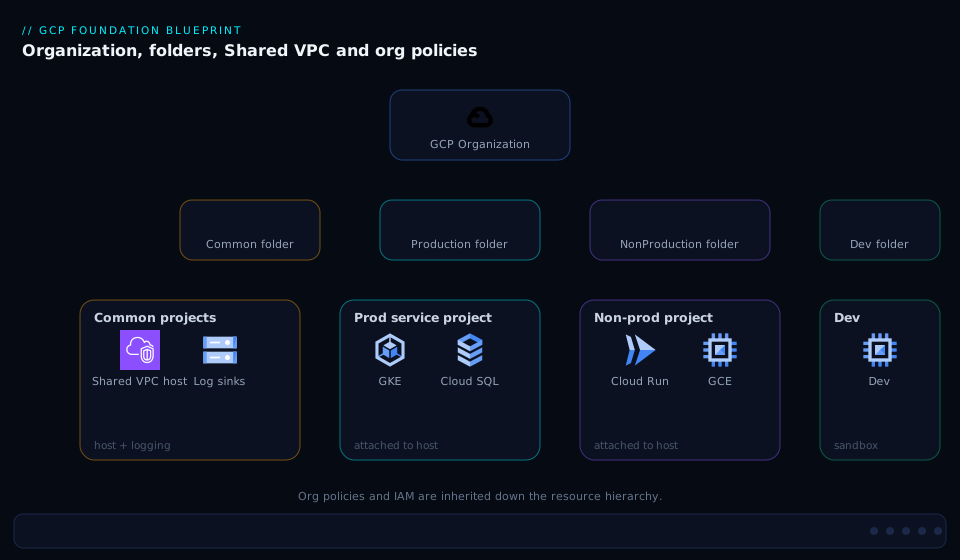
The blueprint’s structure is best read as a tree with control attached at every level. At the root sits the organization node, where the company-wide org policies (no default networks, no public IPs, EU-only locations, domain-restricted members), the break-glass org-admin IAM, the aggregated log sink, and the org-level hierarchical firewall policy all attach and inherit downward. Beneath it the top-level folders cut the estate by environment — Common, Production, NonProduction, Development, and Bootstrap — each a blast-radius boundary where environment-specific policy and the owning teams’ groups are bound. The Common folder holds the platform projects every environment leans on: the central logging project (locked-down destination of the sink), the Shared VPC host projects, the org KMS/secrets project, and the seed/Terraform project. Follow any environment folder down to its service projects — the workload leaves the project factory mints — each attached to a Shared VPC host and granted compute.networkUser on just its subnet.
Trace a single new workload through it: a pull request invokes the factory, which creates a project in the Production folder, links it to the one billing account, enables only the APIs it needs, attaches it as a service project to the host, grants its group subnet-level network access, wires its logs into the aggregated sink, and sets a budget — and the org-node policies it inherits mean it cannot have a default network or a public IP even if someone tried. The diagram shows exactly this: the hierarchy on the left with controls attached at each level, the Shared VPC host-and-service relationship in the middle, and the org policies enforcing downward across the whole tree.
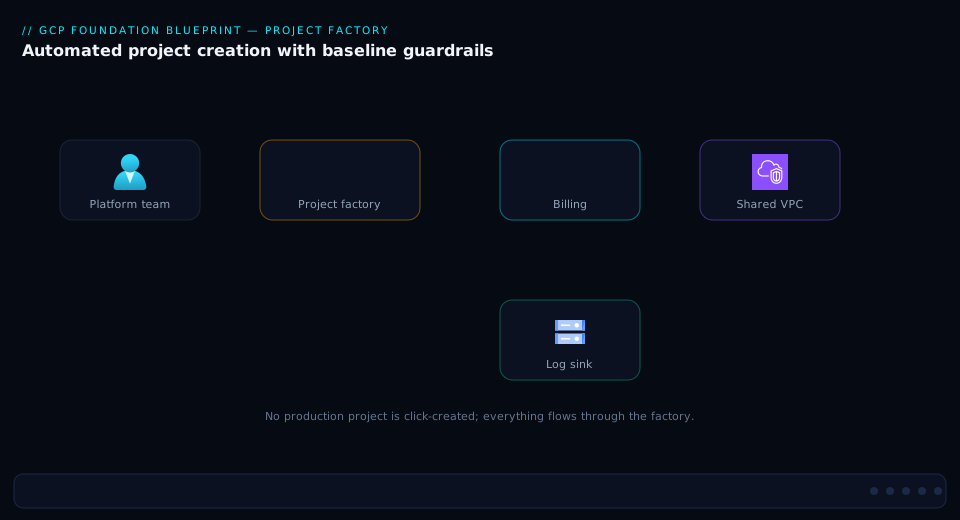
The project factory’s runtime sequence — what actually happens, in order, when a new project is requested — is the operational heart of the blueprint. A merged pull request triggers the CI/CD pipeline running as the project-creator service account; the factory creates the project in the target folder, links billing, enables APIs, attaches the project to the Shared VPC host as a service project, grants the owning group compute.networkUser on its designated subnet, applies the baseline IAM and labels, ensures the project’s logs flow to the aggregated sink, and sets the budget — all as one terraform apply, so the project is either fully compliant or not created at all.
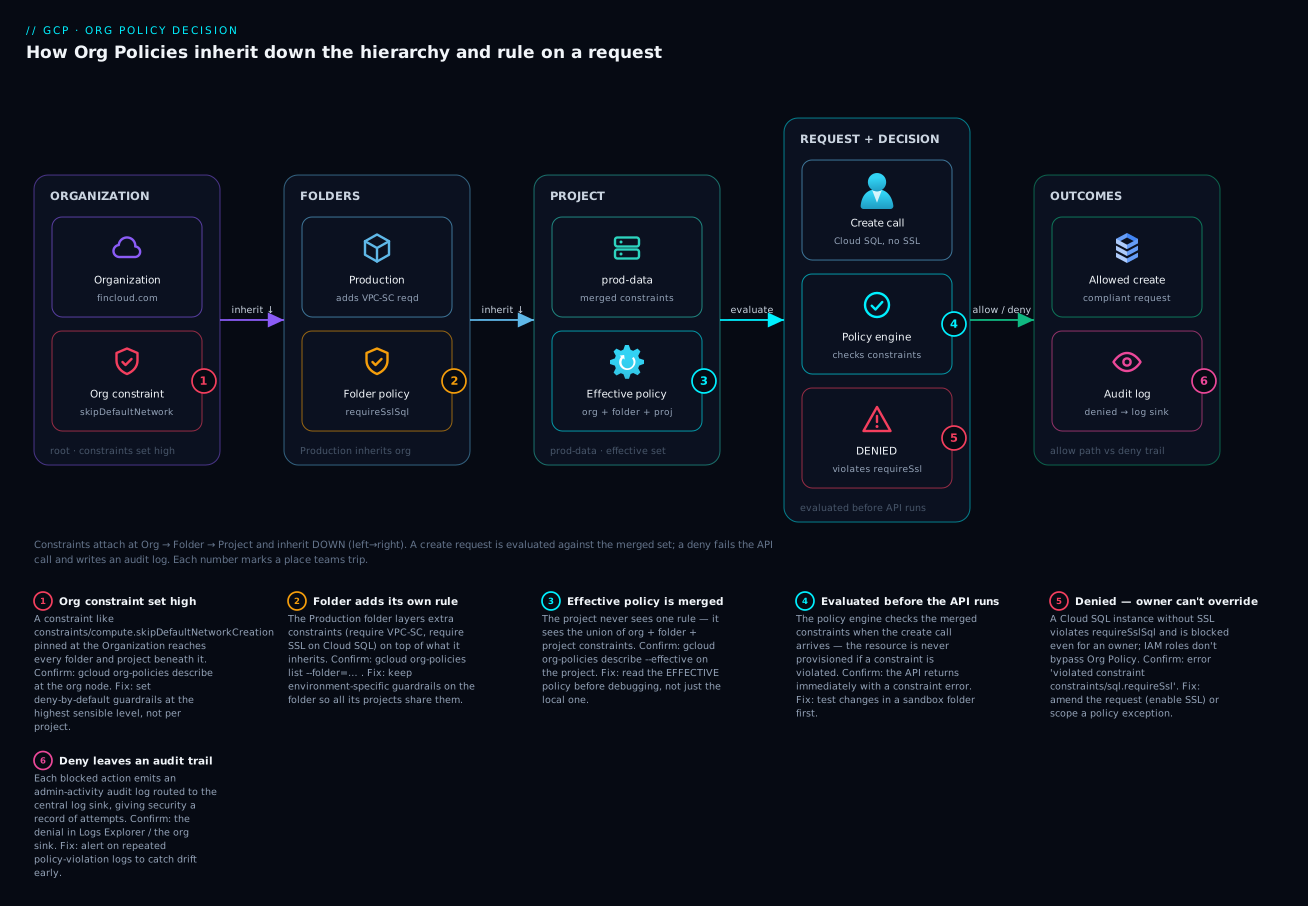
Finally, the org-policy decision flow shows how a configuration request is evaluated against the inherited stack of constraints. When a principal tries to create a resource — say a VM with an external IP — GCP evaluates the effective policy for that resource: it walks from the org node down to the project, merging constraints according to inheritFromParent and the allow/deny semantics, and either permits the action or denies it with a Policy Denied audit-log entry naming the constraint. The same path explains why a policy “isn’t taking effect”: an override lower in the tree changed the effective result, which --effective reveals.
Real-world scenario
FinCloud Analytics is a fintech building a regulated data platform on GCP: ~18 engineers across a data-platform team, an app team, and a two-person platform/security function. They process payments telemetry and are subject to data-residency and audit requirements. When the platform lead joined, GCP was a sprawl: 23 projects created ad hoc, 9 of them on three different billing accounts (two on a founder’s personal account), every project with its own default VPC and the wide-open default firewall rules, no central log sink, and roles/owner granted to eleven individuals across various projects. An auditor’s data-residency and access-control questions had no clean answer. Monthly GCP spend was about ₹14,00,000 and finance could not break it down by team.
The remediation was a Foundation Blueprint rollout in phases, deliberately not a big-bang. Phase 0 (bootstrap): they verified the domain in Cloud Identity to get an organization node (previously they had none — projects were under “No organization”), created a Bootstrap folder with a seed project holding the Terraform state bucket and the project-creator service account, and bound the privileged roles to fresh groups (gcp-org-admins with two members and hardware MFA, gcp-org-policy-admins, gcp-network-admins, gcp-billing-admins, gcp-security-auditors). Phase 1 (org): they set the high-value org policies in dry-run first — skipDefaultNetworkCreation, vmExternalIpAccess: denyAll, storage.publicAccessPrevention, disableServiceAccountKeyCreation, allowedPolicyMemberDomains to their customer ID, and resourceLocations to their two approved regions. The dry-run violation logs were illuminating: 9 buckets were public and 31 SA keys existed. They remediated those before flipping to enforce.
Phase 2 (environments + central plumbing): top-level folders (Common, Production, NonProduction, Development), a Common Shared VPC host per environment, a locked-down logging project with an org aggregated sink to BigQuery (and a GCS bucket for cheap long retention), the single billing account linked to the org with BigQuery billing export enabled, and an org hierarchical firewall policy denying inbound 0.0.0.0/0:22/3389 and allowing the IAP range. Phase 3 (workloads): they stood up the project factory and, project by project, re-created each workload as a factory-minted service project (rather than trying to retrofit the old ones), migrated data, and decommissioned the originals — so every project in the new estate was compliant by construction.
What went wrong mid-rollout, and the lesson: when they enforced vmExternalIpAccess: denyAll org-wide, a Cloud Build worker pool that legitimately needed egress broke, and a GKE cluster failed to create because they had forgotten to grant the GKE service agent compute.networkUser on the shared subnet. Both were caught because they had dry-run first and rolled out per folder — the breakage was contained to one non-prod folder, fixed with a scoped exception (a labeled bastion allow, and the missing service-agent grant), and never touched production. The end state: one billing account, spend now broken down by team/cost-center label in a BigQuery dashboard (which surfaced ₹2,10,000/month of idle dev resources they then killed), an org-wide audit trail answerable in SQL, and zero public buckets or default networks. Net monthly spend fell to ₹11,20,000 and the next audit’s access-control section was a terraform plan and one query. The lesson on the wall: “Dry-run every policy, roll out per folder, and re-create rather than retrofit.”
The rollout as a timeline, because the order is the lesson:
| Phase | What they did | Why this order | What it prevented |
|---|---|---|---|
| 0 — Bootstrap | Org node, seed project, groups + break-glass | Nothing else can attach without an org node and a place to run Terraform | Building on sand; root held by individuals |
| 1 — Org policies (dry-run) | High-value constraints in dry-run, then enforce | See the violations before enforcing breaks things | Enforcing denyAll and taking down Cloud Build |
| 2 — Environments + plumbing | Folders, Shared VPC, sink, billing, firewall | Workloads need a place to land and central plumbing to wire into | Re-doing project wiring later |
| 3 — Workloads (factory) | Factory; re-create each project compliant | Retrofitting old projects is slower and leaves drift | Carrying forward 23 bespoke configurations |
Advantages and disadvantages
The blueprint’s centralization is its strength and, if misapplied, its risk. Weigh it honestly:
| Advantages (why this model helps you) | Disadvantages (why it bites) |
|---|---|
| One place (the org node) to enforce policy across the whole company — security writes a guardrail once | The org node and host projects become critical: an outage or misconfig there has the widest blast radius |
| The project factory makes every project compliant by construction — sprawl becomes structurally impossible | Up-front design and engineering cost is real; it does not pay off for a single-project startup |
| Shared VPC gives one network posture with subnet-level least privilege — central control without central bottleneck | Cross-project IAM (service agents, subnet networkUser) is fiddly; a forgotten grant breaks GKE/PaaS in confusing ways |
| Centralized logging + billing make “who did what” and “what did we spend” single queries | The logging and billing projects need careful access control or they become a single point of information failure |
| Org policies disable the dangerous defaults (public buckets, default VPCs, SA keys) estate-wide | Inheritance/override semantics are subtle; a wrong inheritFromParent silently opens a hole |
| The hierarchy lets cost and audit roll up cleanly by environment/team | The hierarchy is expensive to re-cut; moving projects between folders re-evaluates inherited policy and can break workloads |
| Phased rollout + dry-run + Terraform make the whole thing reviewable and reversible | Done as a big-bang without dry-run, an org-wide enforce can take down legitimate workloads instantly |
The model is right whenever you have multiple teams, regulated or sensitive workloads, or a need for central network/billing/audit governance — which is to say, essentially every organization past its first few projects. It is over-engineering for a genuine single-project, single-team experiment; the overhead of Shared VPC, org policies, a factory and central plumbing only earns out past a handful of workloads. The disadvantages are all manageable — dry-run policies, roll out per folder, guard the critical projects with tight IAM and break-glass, and treat the hierarchy as a deliberate design — but only if you know they exist, which is the point of building it consciously rather than letting it accrete.
Hands-on lab
You will stand up a miniature foundation in a sandbox: a folder, an org policy set in dry-run then enforced, a Shared VPC host with a service project on a subnet, and an aggregated log sink — all with gcloud and Terraform, all tear-downable. This requires an organization and the privileged roles on it (Org Admin, Org Policy Admin, Project Creator, Billing User); if you only have a single project you can do the project-factory and Shared VPC parts but not the org-policy/folder parts. Run in Cloud Shell.
Step 1 — Set context variables.
export ORG_ID=$(gcloud organizations list --format="value(ID)" | head -n1)
export BILLING=$(gcloud billing accounts list --format="value(ACCOUNT_ID)" | head -n1)
export REGION=asia-south1
echo "Org: $ORG_ID  Billing: $BILLING"
Expected: a numeric org ID and a billing account ID print. If ORG_ID is empty you have no organization — the folder/policy steps won’t apply.
Step 2 — Create a sandbox folder (the safe place to test policy).
gcloud resource-manager folders create \
  --display-name="lz-sandbox" --organization=$ORG_ID
export FOLDER=$(gcloud resource-manager folders list \
  --organization=$ORG_ID --filter="displayName=lz-sandbox" --format="value(ID)")
echo "Folder: $FOLDER"
Expected: a folder is created and its numeric ID prints.
Step 3 — Create two projects (a host and a service project) via gcloud. (In production the factory does this; here we do it directly to keep the lab self-contained.)
export HOST=lz-host-$RANDOM
export SVC=lz-svc-$RANDOM
gcloud projects create $HOST --folder=$FOLDER
gcloud projects create $SVC  --folder=$FOLDER
gcloud billing projects link $HOST --billing-account=$BILLING
gcloud billing projects link $SVC  --billing-account=$BILLING
gcloud services enable compute.googleapis.com --project=$HOST
gcloud services enable compute.googleapis.com --project=$SVC
Expected: two projects created in the sandbox folder, both linked to billing, Compute API enabled.
Step 4 — Set an org policy in DRY-RUN on the sandbox folder, then read violations. We disable default network creation, but in dry-run so it only logs:
cat > dryrun.yaml <<EOF
name: ${FOLDER}/policies/compute.skipDefaultNetworkCreation
spec:
  rules:
  - enforce: true
EOF
# Apply as a DRY-RUN policy (logs would-be violations, enforces nothing)
gcloud org-policies set-policy dryrun.yaml --update-mask=dryRunSpec
# Inspect the effective policy on the service project
gcloud org-policies describe constraints/compute.skipDefaultNetworkCreation \
  --project=$SVC --effective
Expected: the dry-run policy is accepted; --effective shows the constraint as it would apply. This is the habit to internalize — never enforce a new constraint blind.
Step 5 — Enforce the policy on the folder.
cat > enforce.yaml <<EOF
name: ${FOLDER}/policies/compute.skipDefaultNetworkCreation
spec:
  rules:
  - enforce: true
EOF
gcloud org-policies set-policy enforce.yaml
Expected: the constraint now enforces — new projects under this folder won’t get a default network.
Step 6 — Build a Shared VPC: host network, subnet, attach the service project.
# Create a VPC + subnet in the host project (custom mode — no auto subnets)
gcloud compute networks create lz-vpc --subnet-mode=custom --project=$HOST
gcloud compute networks subnets create lz-subnet-$REGION \
  --network=lz-vpc --range=10.10.0.0/24 --region=$REGION --project=$HOST

# Enable Shared VPC on the host and attach the service project
gcloud compute shared-vpc enable $HOST
gcloud compute shared-vpc associated-projects add $SVC --host-project=$HOST

# Confirm the attachment
gcloud compute shared-vpc list-associated-resources $HOST
Expected: a custom VPC + subnet exist in the host; the host is Shared-VPC-enabled; the service project appears in the associated-resources list.
Step 7 — Grant subnet-level networkUser to a principal (least privilege). Replace the member with your own user or a group:
gcloud compute networks subnets add-iam-policy-binding lz-subnet-$REGION \
  --region=$REGION --project=$HOST \
  --member="user:$(gcloud config get-value account)" \
  --role="roles/compute.networkUser"
Expected: the binding is added on the subnet (not the whole network) — this is the safe Shared VPC grant.
Step 8 — (Optional) Create an aggregated log sink on the folder to a GCS bucket.
gcloud storage buckets create gs://lz-audit-$RANDOM --location=$REGION --project=$HOST
export LOGBUCKET=$(gcloud storage buckets list --project=$HOST --format="value(name)" | grep lz-audit | head -n1)
gcloud logging sinks create lz-folder-sink \
  storage.googleapis.com/$LOGBUCKET \
  --folder=$FOLDER --include-children \
  --log-filter='logName:"logs/cloudaudit.googleapis.com"'
Expected: a sink is created capturing audit logs from the whole folder subtree into the bucket. (You’d then grant the sink’s writer identity roles/storage.objectCreator on the bucket for it to actually write.)
Validation checklist. You created a hierarchy node (folder), set a constraint in dry-run first then enforced it, built a Shared VPC with subnet-level least-privilege access, and wired an aggregated sink — the four pillars of the blueprint in miniature. The lab steps mapped to what each proves:
| Step | What you did | What it proves | Real-world analogue |
|---|---|---|---|
| 2 | Create a sandbox folder | The hierarchy is the surface controls attach to | Every environment folder |
| 4 | Org policy in dry-run | You can see violations before enforcing | How you safely ship any constraint |
| 5 | Enforce the policy | A constraint inherits down to projects | The org-wide guardrails |
| 6–7 | Shared VPC + subnet networkUser | Central network with least-privilege access | The networking spine of the LZ |
| 8 | Aggregated sink | One trail captures a whole subtree | The central audit log |
Cleanup (avoid lingering charges and an orphaned folder).
# Delete the sink, projects (this releases their resources), then the folder
gcloud logging sinks delete lz-folder-sink --folder=$FOLDER --quiet
gcloud projects delete $SVC  --quiet
gcloud projects delete $HOST --quiet
gcloud resource-manager folders delete $FOLDER
Cost note. Empty projects, a custom VPC, one subnet and a near-empty GCS bucket cost essentially nothing for an hour (well under ₹50); deleting the projects and folder stops everything. A Shared VPC and org policies themselves are free — you pay for the resources inside the projects, of which this lab creates almost none.
Common mistakes & troubleshooting
The failures here are mostly IAM and inheritance subtleties — they confuse because the symptom is far from the cause. First as a scannable table, then the entries that bite hardest in full.
| # | Symptom | Root cause | Confirm (exact cmd / path) | Fix |
|---|---|---|---|---|
| 1 | GKE cluster create fails on a Shared VPC with a permissions error | GKE/Google-APIs service agent lacks compute.networkUser on the subnet |
gcloud projects get-iam-policy $HOST; check the subnet IAM |
Grant the GKE + Google-APIs service agents networkUser on the subnet |
| 2 | A new project still got a default network | skipDefaultNetworkCreation not enforced at or above this project |
gcloud org-policies describe constraints/compute.skipDefaultNetworkCreation --project=$P --effective |
Enforce the constraint at the org/folder; delete the default VPC |
| 3 | An org policy “isn’t taking effect” on one project | An override lower in the tree (project/folder policy) changed the effective result | gcloud org-policies describe <constraint> --project=$P --effective |
Remove/adjust the lower override; check inheritFromParent |
| 4 | VM with an external IP was created despite vmExternalIpAccess: denyAll |
The project has an allow override, or the policy is set below this resource’s path | --effective on the project shows the merged allow |
Remove the override, or scope the allow to specific VMs only |
| 5 | Service project can use subnets it shouldn’t | networkUser granted at the network/project level, not the subnet |
gcloud compute networks get-iam-policy lz-vpc shows a project-level binding |
Revoke the broad grant; re-grant at the subnet only |
| 6 | Terraform terraform apply fails: cannot create project |
The project-creator SA lacks projectCreator on the target folder, or billing-link permission |
gcloud resource-manager folders get-iam-policy $FOLDER |
Grant the SA roles/resourcemanager.projectCreator + roles/billing.user |
| 7 | Logs aren’t arriving in the central BigQuery dataset | The sink’s writer identity lacks write permission on the destination | gcloud logging sinks describe <sink> → check writerIdentity + dataset IAM |
Grant the writer identity bigquery.dataEditor on the dataset |
| 8 | An external (gmail) account was granted a role | allowedPolicyMemberDomains not set, or set below where the grant happened |
gcloud org-policies describe constraints/iam.allowedPolicyMemberDomains --effective |
Set domain restriction at the org; remove the external binding |
| 9 | Moving a project to another folder broke its access | Inherited IAM/policy changed with the new parent | Compare effective policy before/after; check folder IAM diff | Re-grant needed bindings; avoid casual project moves |
| 10 | Data Access audit logs are empty for a service | Data Access logs are off by default | Check the org/project IAM audit config | Enable Data Access logs for that service (and budget for volume) |
| 11 | Billing export dataset has no recent rows | Export was enabled late or to the wrong dataset; or perms | Billing → export settings; check the dataset | Re-point/enable the export; it’s not retroactive |
| 12 | Hierarchical firewall rule seems ignored | A higher-priority rule (lower number) or goto_next handled the packet first |
gcloud compute firewall-policies describe <policy> and rule priorities |
Reorder priorities; check the org→folder→network evaluation chain |
| 13 | Org policy change had no audit trail of who changed it | Looking in the wrong project’s logs | Query the org-level audit logs for SetOrgPolicy |
Use the aggregated sink / org logs, not a project’s |
| 14 | terraform plan shows huge drift on IAM bindings |
Used google_*_iam_policy (authoritative) instead of _iam_member |
Inspect the resource type in state | Switch to _iam_member/_iam_binding; authoritative resources clobber out-of-band grants |
The expanded form for the ones that cost the most time:
1. GKE (or a managed service) fails to create on a Shared VPC. Root cause: the GKE service agent (service-<hostnum>@container-engine-robot.iam.gserviceaccount.com) and/or the Google APIs service agent (<svcprojnum>@cloudservices.gserviceaccount.com) lack roles/compute.networkUser on the shared subnet — your team’s group having it is not enough; the platform’s agents provision the nodes. Confirm: inspect the subnet’s IAM (gcloud compute networks subnets get-iam-policy <subnet> --region=<r> --project=$HOST) and look for the agents. Fix: grant both service agents networkUser on the subnet; for GKE also grant the GKE agent roles/container.hostServiceAgentUser on the host project. This single omission is the most common Shared VPC failure in the wild.
2. A new project still got a default network. Root cause: constraints/compute.skipDefaultNetworkCreation was not enforced at or above the project when it was created — a dry-run, or a policy set only on a sibling folder, doesn’t help. Confirm: gcloud org-policies describe constraints/compute.skipDefaultNetworkCreation --project=$P --effective shows it not enforced. Fix: enforce it at the org (or the environment folder), and delete the stray default VPC and its permissive default firewall rules.
3. An org policy “isn’t taking effect.” Root cause: something lower in the hierarchy overrode it — a project- or folder-level policy with a different rule, or inheritFromParent: false that replaced the parent’s policy rather than merging. Confirm: always reach for --effective, which shows the merged result GCP actually evaluates, not just what you set at one node. Fix: remove or correct the lower override; set inheritFromParent: true unless you genuinely intend to replace the inherited policy.
5. A service project can use subnets it shouldn’t. Root cause: networkUser was granted at the network or host-project level (which grants every subnet) instead of on a single subnet. Confirm: gcloud compute networks get-iam-policy <network> --project=$HOST shows the over-broad binding. Fix: revoke it and re-grant roles/compute.networkUser on the specific subnetwork resource only — the whole safety property of Shared VPC depends on this.
14. Terraform IAM drift / clobbering. Root cause: using the authoritative google_*_iam_policy (or _iam_binding for a role) resource, which owns the entire policy (or the whole role’s member set) and overwrites any binding made outside Terraform — including ones other teams or Google added. Confirm: the resource type in your state is _iam_policy/_iam_binding. Fix: prefer the non-authoritative google_*_iam_member resources, which add/remove a single member without disturbing others. In a multi-team landing zone, authoritative IAM resources are a foot-gun.
Best practices
- An organization node first, always. Verify your domain in Cloud Identity / Workspace so you have an org node before anything else — it is the only place company-wide policy and IAM can attach. Projects under “No organization” are ungovernable.
- Cut folders by blast radius (environment), not the org chart. Put the prod/non-prod boundary highest, where the strictest policy and tightest IAM inherit. Org charts churn; your hierarchy shouldn’t.
- Make every project a pull request via the factory. Never click-create a production project. The
project-factorymodule run in CI/CD as a narrow service account makes compliance a property, not a checklist. - Dry-run every org policy, then roll out per folder. See the violations, remediate them, then enforce — and contain blast radius by enforcing on one folder before the org. This is how you avoid taking down legitimate workloads.
- Grant
compute.networkUserat the subnet, never the network. And remember the GKE and Google-APIs service agents need it too. This is the safety property of Shared VPC. - Bind groups, never users; split the privileged roles. Humans are members of Google Groups; bindings reference groups. Separate org-admin, policy-admin, network-admin, billing-admin and project-creator so no one principal is root. Make
organizationAdminbreak-glass. - Centralize logs to a locked-down project from day one. An org aggregated sink to a dedicated logging project (BigQuery for query + GCS for cheap retention) — set before workloads exist so coverage is automatic.
- One billing account, with BigQuery export and per-project budgets. Cost visibility and allocation are impossible to retrofit cleanly; enable the export early and label every project (
env,team,cost-center). - Prefer non-authoritative IAM resources in Terraform (
_iam_memberover_iam_policy) so teams don’t clobber each other’s grants — and treat all IAM and policy as reviewed code. - Disable the dangerous defaults explicitly: no default networks, no public IPs, no public buckets, no SA keys, domain-restricted members, region-restricted resources. These dozen constraints close most of the common-leak surface.
- Re-create, don’t retrofit, when adopting the blueprint over a messy estate. Factory-mint new compliant projects and migrate into them rather than trying to bend old bespoke projects into shape.
- Use the Cloud Foundation Toolkit /
terraform-example-foundationas the starting point, not a blank slate — it encodes these decisions; adapt it rather than reinvent it. - Guard the critical projects. The host projects and the logging/billing projects have outsized blast radius — tightest IAM, break-glass, and change review on them above all.
Security notes
- Domain restriction is the perimeter against the wrong identities.
constraints/iam.allowedPolicyMemberDomainsset to your Cloud Identity customer ID(s) at the org node stops anyone granting a role to a personal@gmail.comor an external org — a common, quiet exfiltration vector. Pair it with Essential Contacts restricted to your domains. - Kill long-lived service-account keys. Enforce
constraints/iam.disableServiceAccountKeyCreationand use Workload Identity Federation or short-lived service-account impersonation instead. Exportable JSON keys are the single most-leaked GCP credential; the landing zone should make them impossible to create. - Lock down the logging and billing projects. The aggregated sink’s destination is your audit trail — restrict who can read and especially delete it (separate
logging.adminfrom workload admins), consider bucket-lock/retention on the GCS copy, and treat tampering as a P1 alert. Whoever can delete logs can hide their tracks. - Least privilege via subnet-level network access and split roles. Shared VPC’s subnet-scoped
networkUser, predefined-then-custom roles, and SoD between the privileged roles together mean a single compromised principal can’t pivot across the estate. - Make org-admin break-glass. The
organizationAdmingroup should have near-zero standing membership, hardware-MFA, just-in-time elevation through an approval workflow, and an alert on every use. It is root; treat it like root. - Add VPC Service Controls for data exfiltration. Once the hierarchy exists, draw a VPC Service Controls perimeter around the projects holding sensitive data so even a valid credential can’t move data to a project outside the perimeter.
- Enable Data Access audit logs where data sensitivity demands it. They’re off by default; for regulated data you want “who read this” — budget for the volume and route it to the central sink.
The security constraints that do the most, mapped to the threat they close:
| Control | Constraint / mechanism | Closes | Also enables |
|---|---|---|---|
| Domain restriction | iam.allowedPolicyMemberDomains |
Access granted to external/personal accounts | Clean “only our people” audit answer |
| No SA keys | iam.disableServiceAccountKeyCreation + WIF |
Leaked long-lived credentials | Forces modern short-lived auth |
| No public buckets | storage.publicAccessPrevention |
The classic open-bucket data leak | Compliance posture by default |
| No public IPs | compute.vmExternalIpAccess: denyAll |
Internet-exposed VMs | Forces IAP/bastion access patterns |
| Locked audit trail | Aggregated sink + restricted logging project | Tampering / hiding tracks | Tamper-evident, SQL-queryable audit |
| Subnet-level network access | compute.networkUser on subnet |
Lateral network reach | Least-privilege networking |
| Data perimeter | VPC Service Controls | Exfiltration with a valid credential | Service-level data boundary |
Cost & sizing
The landing-zone constructs are almost all free — you pay for the resources inside the projects, plus a little for the central plumbing:
- Hierarchy, org policies, Shared VPC, IAM, hierarchical firewall: free. Folders, the org node, constraints, the host/service relationship and firewall policies cost nothing. The value here is governance, not a line item.
- Logging is the one real central cost. The aggregated sink itself is free, but the destination costs: BigQuery storage + query on ingested logs, or GCS storage (cheap) for retention. The big variable is Data Access logs — off by default for a reason; turning them on for chatty services can be a large volume. Mitigate with filters (route only what you need), GCS for cold retention, and log-bucket retention tuning.
- Billing export to BigQuery is a small storage + query cost and pays for itself the first time it surfaces idle spend (FinCloud found ₹2,10,000/month of waste). Always on.
- Cloud NAT and egress in the host project are real costs once workloads run — NAT has an hourly + per-GB charge, and cross-region/internet egress is metered. These belong to the workloads, but the host project is where NAT is billed.
- Assured Workloads may carry program-specific costs and constrains which (sometimes pricier-tier) services/regions you can use — a compliance cost, not a comfort purchase.
A rough monthly picture for the foundation itself (excluding workload compute/storage), for a mid-size estate:
| Cost driver | What you pay for | Rough INR / month | Notes |
|---|---|---|---|
| Hierarchy + org policies + Shared VPC | Nothing | ₹0 | Governance constructs are free |
| Aggregated log sink → GCS (retention) | Cheap object storage | ~₹2,000–8,000 | Scales with log volume; coldline for old logs |
| Aggregated log sink → BigQuery (query) | Storage + query on logs | ~₹8,000–40,000 | Data Access logs dominate; filter aggressively |
| Billing BigQuery export | Storage + light query | ~₹500–2,000 | Pays for itself via waste it surfaces |
| Cloud NAT (host project) | Hourly + per-GB | ~₹3,000–15,000 | Belongs to workloads; billed in host |
| Central security tooling (SCC, optional) | Tier-dependent | varies | Security Command Center premium is separate |
The sizing rule: the foundation’s own cost is small and dominated by log volume; spend your optimization effort on filtering logs (don’t ingest everything to BigQuery — route noise to GCS or drop it) rather than on the free governance constructs. The real savings the blueprint unlocks are on the workload side — the cost visibility it gives you is what lets you find and kill waste.
Interview & exam questions
1. Why must a GCP landing zone start with an organization node, and how do you get one? Because the organization node is the only place company-wide IAM and org policies can attach and inherit down — without it, projects are under “No organization” and ungovernable centrally. You obtain it by verifying a domain through Cloud Identity or Google Workspace, which automatically creates the org node tied to that domain.
2. Explain how IAM and org policy inheritance flow through the hierarchy, and why folder design matters. Both flow downward and accumulate: a role granted at a folder applies to every project beneath it, and a constraint set at the org applies everywhere unless overridden lower. So folder design decides blast radius — attach a control at the highest level where it’s universally true. Cutting top-level folders by environment puts the strictest (prod) boundary highest, where the tightest policy/IAM inherit cleanly.
3. What is the project factory and why run it in CI/CD rather than the console? The project factory is a Terraform module (terraform-google-modules/project-factory) that mints projects with a complete baseline — folder placement, billing link, only-needed APIs, Shared VPC attachment, baseline IAM, log sink, budget and labels. Running it in CI/CD as a narrow service account makes project creation a reviewable pull request, identical by construction, audited, and drift-controlled — none of which the console gives you.
4. In Shared VPC, at what level do you grant compute.networkUser, and what’s the consequence of getting it wrong? At the subnet level — so a service project can use only its designated subnet and can’t see the rest of the topology. Granting it at the network or host-project level lets the project use every subnet, breaking least privilege. The most common failure is forgetting that the GKE and Google-APIs service agents also need it on the subnet, which makes cluster/PaaS creation fail.
5. What’s the difference between a boolean and a list org-policy constraint, with an example of each? A boolean constraint is on/off — e.g. constraints/compute.disableSerialPortAccess (enforced or not). A list constraint allows or denies a set of values — e.g. constraints/gcp.resourceLocations (allow only approved regions) or constraints/compute.vmExternalIpAccess (denyAll, or allow specific VMs). List constraints support allowedValues/deniedValues and allowAll/denyAll.
6. How do you safely introduce a new org policy across a live estate? Dry-run first: apply it in dry-run mode so violations are logged but not enforced, read those violations, remediate the legitimate exceptions, and only then flip to enforce — rolling out per folder before org-wide. This is exactly how you avoid an org-wide denyAll instantly breaking a legitimate workload (e.g. a Cloud Build pool that needs egress).
7. A policy you set at the org node “isn’t taking effect” on one project. What’s happening and how do you diagnose it? Something lower in the hierarchy overrode it — a project/folder policy with a different rule, or inheritFromParent: false that replaced rather than merged the parent’s policy. Diagnose with gcloud org-policies describe <constraint> --project=<p> --effective, which shows the merged effective result GCP actually evaluates. Fix by removing/correcting the lower override.
8. What does an aggregated log sink do, and where should its destination live? An aggregated sink at the org or folder level captures matching logs from every project beneath it (with include_children) and routes them to one destination — covering current and future projects automatically. The destination should be a dedicated, locked-down logging project (BigQuery for query, GCS for cheap retention, Pub/Sub for SIEM streaming), with delete access tightly restricted so the trail can’t be tampered with.
9. Describe a separation-of-duties model for the privileged landing-zone roles. Bind each high-blast-radius role to a distinct Google Group at the appropriate scope: organizationAdmin, orgPolicyAdmin, folderAdmin, projectCreator, networkAdmin, securityAdmin, billingAdmin, loggingAdmin, plus read-only securityReviewer for auditors. No one principal should hold combinations like project-creator + org-policy-admin (create a project and relax its constraints) or billing-admin + project-creator (unbounded spend). Org-admin is break-glass.
10. When would you use Assured Workloads, and how is it different from just setting org policies? Use it when a named regulatory regime (sovereignty/residency, FedRAMP, HIPAA-aligned, CJIS) requires enforced controls. Unlike ordinary org policies — which you set and could accidentally override — an Assured Workloads folder enforces data residency, a permitted-product allow-list, and personnel-access controls as a program, harder to subvert, with built-in compliance monitoring. It’s a constraint regime, not a label, so adopt it only where regulation demands it.
11. Why prefer google_*_iam_member over google_*_iam_policy in a landing zone’s Terraform? Because _iam_policy (and _iam_binding) are authoritative — they own the whole policy (or a role’s entire member set) and overwrite any binding made outside that Terraform, including ones other teams or Google’s own automation added. In a multi-team estate that’s a foot-gun. _iam_member is non-authoritative: it adds/removes a single member without disturbing others.
12. What are hierarchical firewall policies and how do they relate to network firewall rules? They’re firewall policies attached to the org or folder and inherited by every VPC beneath, evaluated before a network’s own rules. They let you mandate a baseline (deny 0.0.0.0/0:22, allow IAP/health-check ranges) high in the hierarchy and use goto_next to delegate the rest to folder policies and per-VPC rules. Evaluation order is org policy → folder policy → network rules → implied rules.
These map to the Google Cloud Professional Cloud Architect and Professional Cloud Security Engineer certifications (resource hierarchy, org policies, Shared VPC, IAM/SoD, logging) and the Professional Cloud Network Engineer for Shared VPC and hierarchical firewall specifics. A compact cert-mapping:
| Question theme | Primary cert | Objective area |
|---|---|---|
| Hierarchy, folders, inheritance | Cloud Architect | Designing resource management |
| Org policies, constraints, dry-run | Cloud Security Engineer | Configuring access + org policy |
| Shared VPC, subnet networkUser | Cloud Network Engineer | Designing/implementing VPC networks |
| IAM, SoD, groups, custom roles | Cloud Security Engineer | Managing identity + access |
| Centralized logging, audit logs | Cloud Security Engineer / DevOps Engineer | Logging, monitoring, audit |
| Project factory, Terraform/CFT | Cloud DevOps Engineer / Architect | Automating infrastructure |
| Assured Workloads, residency | Cloud Security Engineer | Compliance + data protection |
Quick check
- You set
constraints/compute.skipDefaultNetworkCreationto enforce at a single dev folder, but a new project in the production folder still got a default network. Why? - A GKE cluster fails to create on a Shared VPC even though your team’s group has
compute.networkUseron the subnet. What’s the most likely missing grant? - True or false: granting
roles/compute.networkUseron the host network is the recommended way to let a service project use a subnet. - You set an org policy at the organization node but it “isn’t taking effect” on one project. What single command shows you why, and what’s the usual cause?
- Why do you bind Google Groups rather than individual users in landing-zone IAM, and name one role combination no single principal should hold.
Answers
- Org policy inherits downward; a constraint set only on the dev folder applies to that folder’s subtree, not to the production folder. To cover the whole estate, enforce it at the organization node (or on every environment folder). Then delete the stray default VPC the prod project received.
- The GKE service agent (and often the Google APIs service agent) needs
roles/compute.networkUseron the subnet too — your team’s group having it is not enough, because the platform’s agents provision the nodes. For GKE also grant the GKE agentroles/container.hostServiceAgentUseron the host project. - False. Granting
networkUseron the network lets the service project use every subnet and see the whole topology. The least-privilege, recommended way is to grant it on the specific subnetwork only. gcloud org-policies describe <constraint> --project=<p> --effectiveshows the merged effective policy GCP actually evaluates. The usual cause is an override lower in the hierarchy (a folder/project policy, orinheritFromParent: falsereplacing the parent’s policy).- Groups keep IAM policy bindings small and stable — you change membership in the directory, not the policy — and they’re the basis of clean separation of duties. One combination to avoid:
projectCreator+orgPolicyAdmin(a principal could create a project and relax the policy meant to constrain it). Others:billingAdmin+projectCreator, orloggingAdminover the workloads it logs.
Glossary
- Landing zone / Foundation Blueprint — Google’s reference design (and
terraform-example-foundation/ CFT implementation) for a governed, scalable GCP estate: hierarchy, Shared VPC, org policies, central logging/billing, and a project factory. - Organization (org node) — the root of the resource hierarchy, tied to a Cloud Identity / Workspace domain; the single point to attach company-wide IAM and org policy.
- Folder — a grouping node under the org or another folder; a blast-radius and inheritance boundary (nestable to 10 levels).
- Project — the unit of billing, IAM and API enablement; a leaf in the hierarchy where resources live.
- Org policy constraint — a rule on allowed configurations, applied to a hierarchy node and inherited down; boolean (on/off) or list (allow/deny a set).
inheritFromParent/mergePolicy— controls for how a child org policy combines with (or replaces) its parent’s; a wrong value silently opens holes.- Dry-run (org policy) — evaluate a constraint and log would-be violations without enforcing; the mandatory first step before enforcing any new policy.
- Project factory — the
terraform-google-modules/project-factorymodule, run in CI/CD as a service account, that mints projects with a full compliant baseline. - Shared VPC — a model where one host project owns the network and service projects attach to run workloads on its subnets.
- Host / service project — the project that owns the Shared VPC network / a project attached to it to run workloads.
compute.networkUser— the role granted (at the subnet level) that lets a service project’s principals use that subnet.- Service agent — a Google-managed service account (e.g. GKE service agent, Google APIs service agent) that provisions resources on your behalf and may itself need
networkUseron a shared subnet. - Hierarchical firewall policy — firewall rules attached to the org or a folder and inherited by every VPC beneath, evaluated before per-network rules; supports
allow/deny/goto_next. - Aggregated log sink — a sink at the org/folder level (with
include_children) that routes logs from a whole subtree to one destination (BigQuery/GCS/Pub/Sub/log bucket). - Admin Activity / Data Access / System Event / Policy Denied logs — the audit-log categories; Data Access is off by default and high-volume; Policy Denied records org-policy/VPC-SC denials.
- Billing account + BigQuery billing export — the single payment container linked to the org, with a daily cost export to BigQuery for FinOps query and allocation.
- Separation of duties (SoD) — splitting privileged roles across distinct groups so no one principal holds the whole kingdom (e.g. project-creator separate from org-policy-admin).
- Break-glass (org admin) — the
organizationAdmingroup held with near-zero standing access, hardware-MFA and just-in-time elevation; it is effectively root. - Workload Identity Federation (WIF) — short-lived, keyless credential exchange that replaces long-lived SA keys; the modern alternative once
disableServiceAccountKeyCreationis enforced. - Assured Workloads — a folder type that enforces a regulatory regime (residency, permitted products, personnel access) rather than labeling it; for regulated estates only.
- Cloud Foundation Toolkit (CFT) — Google’s collection of reference Terraform modules and blueprints (including the project factory and example foundation) that encode these decisions.
Next steps
You can now design and sequence a governed GCP foundation. Build outward:
- Next: GCP VPC and Shared VPC: Networking Across Projects — go deep on the networking half: subnets, routes, Cloud NAT, peering and the host/service mechanics this article assumes.
- Related: The GCP Resource Hierarchy Explained — the inheritance model the whole blueprint rests on, in depth.
- Related: GCP VPC Service Controls: Build Data Exfiltration Perimeters — the data-perimeter you add on top once the hierarchy exists.
- Related: GCP IAM and Service Accounts: Roles, Bindings and Least Privilege — the identity foundation the factory and every guardrail run on.
- Related: GCP “Permission Denied”? The IAM Troubleshooting Decision Tree — the runbook for when access breaks in the estate you just built.
- Related: GCP Cloud Monitoring and Operations: Observability Built In — turn the centralized logs into dashboards, alerts and SLOs.