You spin up a virtual machine in asia-south1 (Mumbai) and another in us-central1 (Iowa), both in the same Google Cloud project, both on the default network. With zero extra configuration — no peering, no gateway, no VPN — you SSH from one to the other over a private 10.x address and it just works. If you came from AWS or Azure this is the moment your brain refuses to cooperate, because everything you learned says a network lives in one region and crossing regions means peering connections, transit gateways, and route tables you maintain by hand. In Google Cloud (GCP) that assumption is simply wrong. A VPC (Virtual Private Cloud) in GCP is a global resource. One network. Every region. By default. That single design decision ripples through subnets, routing, firewalls, load balancing and cost in ways that surprise nearly everyone, and getting it wrong — or right — shapes your entire cloud foundation.
This article is the mental model. We are going to take the strangest, most counter-intuitive thing about GCP networking and make it feel obvious. We will start with an analogy you already understand, then build up the real machinery piece by piece: what “global” actually means and what it does not mean, why subnets stay regional even though the VPC is global, how a single internal IP route table spans continents, why your firewall rules are global tags rather than per-subnet ACLs, and what Google’s private backbone has to do with any of this. Along the way we will compare GCP head-to-head with AWS and Azure so the contrast does the teaching, work a concrete multi-region example with real CIDRs and real numbers, and lay everything out in scannable tables you can keep open while you build.
By the end you will not just know that a GCP VPC is global — you will understand why Google built it that way, exactly what spans the planet and what stays pinned to a region, when this default saves you weeks of work and when it quietly creates a blast radius you did not intend. You will be able to design a clean multi-region network on GCP, explain the model to a skeptical AWS architect in two sentences, and answer the certification questions that trip up people who only memorized that “VPCs are global” without grasping what that sentence really claims.
What problem this solves
Multi-region networking on the older clouds is a tax you pay over and over. On AWS, a VPC is bound to one region; to connect a VPC in us-east-1 to one in eu-west-1 you stand up a VPC peering connection or a Transit Gateway, attach both VPCs, write route-table entries on each side, and repeat that for every new region and every new VPC — an O(n²) mesh of peering connections that becomes a full-time job at scale. On Azure the VNet is regional too, and you wire regions together with global VNet peering plus user-defined routes. None of this is hard once; it is hard forever, because every new region, every new environment, every new team that needs connectivity adds another edge to a graph you maintain by hand, and a single missing route or wrong CIDR turns into a 3 a.m. “why can’t service A reach service B across regions” incident.
GCP’s global VPC deletes that entire category of work for traffic inside one VPC. A VM in any region can reach a VM in any other region of the same VPC over private IPs with no peering, no inter-region gateway, and no route-table edits — the routing is built in and the traffic rides Google’s private global backbone, never the public internet. Add a third region next year and there is nothing to wire; the subnet you create there is instantly reachable from everywhere else in the VPC. That is the problem solved: the multi-region connectivity mesh disappears, and the operational tax that grows with your footprint on other clouds is simply absent here.
Who hits this — and who gets surprised by the flip side. Teams building genuinely global products (low-latency apps with users on three continents, active-active databases, follow-the-sun services) hit it as pure upside: the network gets out of their way. But the same default surprises security and platform teams who expected a regional blast radius and instead got a planet-wide one — a permissive firewall rule applies in every region at once, a single VPC can become a sprawling shared fabric, and “just use the default network” creates a flat global network that is exactly what a zero-trust review will flag. Understanding the model is how you keep the upside without inheriting the surprise. To frame the whole topic before the deep dive, here is what is actually global, what is regional, and what is zonal in GCP networking — the table that resolves 80% of the confusion:
| Resource | Scope | Spans regions? | Mental model |
|---|---|---|---|
| VPC network | Global | Yes | The whole private network — one object, everywhere |
| Subnet | Regional | No (lives in one region) | An IP range within the global VPC, pinned to a region |
| Route (subnet/dynamic/static) | Global | Yes | Built-in reachability between all subnets of the VPC |
| Firewall rule | Global | Yes | Applies across the whole VPC, targeted by tag/SA, not subnet |
| Internal IP address | Regional | No | Allocated from a regional subnet’s range |
| External (public) IP | Regional or global | Depends | Global for global load balancers; regional otherwise |
| VM instance | Zonal | No | Lives in one zone of one region |
| Cloud Router | Regional | No | Per-region BGP control plane for dynamic routes |
| Cloud NAT | Regional | No | Per-region egress for a region’s subnets |
| Global external Application Load Balancer | Global | Yes | One anycast IP, backends in any region |
Read that table twice. The single most important row is the second one: the VPC is global, but subnets are regional. Almost every “wait, what?” about GCP networking dissolves once that sentence is load-bearing in your head.
Learning objectives
By the end of this article you can:
- Explain in plain language what “a GCP VPC is global” actually means — and, just as importantly, what it does not mean (it is not “one giant subnet” and it is not “no firewalls”).
- Draw the boundary between global, regional and zonal resources in GCP networking and place any networking object on the correct line.
- Describe how subnets, the internal IP route table, and dynamic/static routes combine so that any VM reaches any other VM in the VPC across regions with no peering.
- Compare a GCP VPC against an AWS VPC and an Azure VNet feature-by-feature, and explain why GCP eliminates the inter-region peering mesh those clouds require.
- Reason about firewall rules as VPC-global, tag/service-account-targeted constructs rather than per-subnet ACLs, and explain the implied-deny / implied-allow defaults.
- Choose between auto mode and custom mode VPCs and explain why production uses custom mode every time.
- Design a clean two- or three-region network with non-overlapping CIDRs, regional Cloud Routers and Cloud NAT, and explain where the global default helps and where you must still act per-region.
- Identify the security and cost consequences of a planet-spanning default network and apply the guardrails (Shared VPC, hierarchical firewall, custom mode) that keep the blast radius intentional.
Prerequisites & where this fits
You should be comfortable with basic networking vocabulary — IP address, CIDR block (e.g. 10.0.0.0/24), subnet, route, gateway, NAT — and have a rough mental picture of what a VPC is on some cloud. You should know that GCP organizes resources into projects, and that a region (like europe-west1) is a geographic area containing multiple zones (europe-west1-b). You do not need deep BGP knowledge; we will introduce Cloud Router and dynamic routing gently. Having gcloud installed (or open in Cloud Shell) lets you run the hands-on lab, but the concepts stand on their own.
Where this sits: this is a foundational networking concept, upstream of almost everything else you will build on GCP. It assumes the region/zone fundamentals from GCP Regions and Zones: Building for Resiliency and the project/org structure from GCP Resource Hierarchy Explained. It is the prerequisite for the deeper networking topics: the option-by-option GCP VPC Deep Dive: Subnets, Routes, Firewall, NAT, the multi-project pattern in GCP VPC and Shared VPC: Networking Across Projects, and the egress controls in GCP Hierarchical Firewall and Cloud NAT Egress Control. If you are coming from another cloud, the contrast tables here will be the fastest way to remap your instincts.
Here is the layered picture of where the global VPC fits relative to the things above and below it, so you know which concept owns which decision:
| Layer | What it decides | Scope | Article that goes deep |
|---|---|---|---|
| Organization / folders | Policy, guardrails, billing boundary | Global | GCP Resource Hierarchy Explained |
| Project | The unit a VPC lives in | Global | GCP Resource Hierarchy Explained |
| VPC network | The private network fabric | Global | this article |
| Subnet | Regional IP ranges in the VPC | Regional | GCP VPC Deep Dive |
| Firewall / routes | Who can talk to whom, how packets flow | Global | GCP VPC Deep Dive |
| Cloud Router / NAT / VPN | Dynamic routing, egress, hybrid | Regional | GCP HA VPN and Cloud Router |
| Load balancing | How clients reach your services | Global or regional | GCP Cloud Load Balancing Deep Dive |
Core concepts
Five mental models make everything that follows obvious. Read these slowly; the rest of the article is just these five ideas applied.
The VPC is the building; subnets are the floors. Picture a single office building that — somehow — has floors in different cities. The building is one entity with one address book and one internal phone system. That is the VPC: a single global object. Each floor occupies one city and has its own room numbers (its own IP range). That is a subnet: regional, with a CIDR block in exactly one region. Because everyone is in the same building, any person on any floor can phone any other directly — no need to “connect” the Mumbai floor to the Iowa floor, because they were never separate buildings. The reason a VM in asia-south1 reaches a VM in us-central1 with no peering is exactly this: they are not two networks being joined, they are two floors of one building that was always whole.
“Global” means one control plane and built-in reachability — not one flat IP range. The most common misread of “the VPC is global” is to imagine one enormous subnet stretching across the world. It is not. Each region still has its own subnet with its own CIDR, and an internal IP is allocated from exactly one regional range. What is global is (a) the network object you manage — you create and configure one VPC, not one-per-region — and (b) the reachability between all its subnets, provided by a built-in subnet route for every subnet that every other subnet can already see. So “global” is about management surface and connectivity, not about flattening all your addresses into one giant pool. Subnets stay regional; the glue between them is free and automatic.
Routes are mostly invisible because Google pre-writes them. On AWS you author route tables; on GCP, the moment you create a subnet, GCP inserts a subnet route for its CIDR that is visible to the entire VPC. There is no per-subnet route table you attach and maintain for east-west traffic — the VPC has one routing table, scoped globally, and your subnets’ ranges are auto-populated into it. You add routes only for the things Google can’t infer: a default route to the internet (auto-created, 0.0.0.0/0 → default-internet-gateway), static routes for appliances, and dynamic routes learned over BGP via Cloud Router for hybrid links. The everyday “how does region A reach region B” question has no answer to author, because the answer already exists.
Firewall rules are VPC-wide, and they target identity, not location. Coming from AWS security groups + NACLs (both regional, both subnet/instance-scoped) or Azure NSGs (subnet- or NIC-attached), the GCP model feels inside-out: a VPC firewall rule is a global object on the VPC, and you scope what it applies to with network tags or service accounts, not by subnet. A rule that allows TCP 22 to instances tagged ssh-allowed applies to those instances in every region of the VPC at once. There is no NACL layer at the subnet boundary; the firewall is a single distributed, stateful layer enforced at each VM’s virtual NIC. This is why a sloppy rule has a planet-sized blast radius — and why correct tagging is the whole game.
Private cross-region traffic rides Google’s backbone, not the internet. When your Mumbai VM talks to your Iowa VM over internal IPs, those packets travel on Google’s own global private network — the same fiber that carries Search and YouTube — not the public internet. You pay inter-region network rates (lower than internet egress), and you get Google’s latency and reliability rather than the open internet’s. This backbone is the physical reason the global VPC is even possible: Google could make one network span the planet because it already owned a planet-spanning network — the global VPC is, in a sense, Google exposing its own internal topology to you.
The vocabulary in one table
Before the deep sections, pin every moving part side by side. The glossary repeats these for lookup; this is the mental model in one view:
| Term | One-line definition | Scope | Why it matters here |
|---|---|---|---|
| VPC network | The global private network fabric | Global | The “building”; one object spans all regions |
| Subnet (subnetwork) | An IP range pinned to one region | Regional | The “floor”; where internal IPs come from |
| Auto mode VPC | VPC that auto-creates a subnet per region | Global | Convenient, fixed 10.128.0.0/9 ranges; not for prod |
| Custom mode VPC | VPC where you create every subnet | Global | Full control over CIDRs; the production default |
| Subnet route | Auto route for a subnet’s CIDR | Global | The free glue making east-west work with no peering |
| Default route | Auto 0.0.0.0/0 to internet gateway |
Global | Egress path; remove/replace to force private-only |
| Dynamic route | BGP route learned via Cloud Router | Regional/Global | Hybrid connectivity (VPN/Interconnect) |
| Firewall rule | Allow/deny on the VPC, by tag/SA | Global | Security; planet-wide blast radius if sloppy |
| Network tag | A label on a VM that rules target | Per-VM | How you scope firewall rules to instances |
| Cloud Router | Per-region BGP speaker | Regional | Advertises subnets, learns on-prem routes |
| Cloud NAT | Managed egress for private VMs | Regional | One per region; lets private VMs reach internet |
| Shared VPC | One host project’s VPC used by others | Global | Centralize the network, decentralize workloads |
| VPC Peering | Connect two separate VPCs | N/A (cross-VPC) | Only needed between VPCs, never within one |
What “global” really means (and what it doesn’t)
Let us nail this down before going further, because the entire rest of the article depends on it. The claim “a GCP VPC is global” is true, but people pack two different meanings into it — one correct, one a trap.
The correct meaning has two parts. First, the network is a single object you manage once. You run gcloud compute networks create prod-vpc exactly once, and that VPC can hold subnets in Iowa, Mumbai, Frankfurt and São Paulo simultaneously. You do not create prod-vpc-us, prod-vpc-asia, prod-vpc-eu; there is one prod-vpc. Second, all subnets of that VPC are mutually reachable over private IPs for free, with no peering, gateways, or route authoring, and that reachability holds the instant you add a new region’s subnet.
The trap meaning is “global = one flat IP space with no boundaries.” That is false on both counts. Subnets are still regional and still have distinct CIDRs; an internal IP belongs to exactly one region. And there are absolutely boundaries — firewall rules, just enforced VPC-wide rather than per-subnet. So “global” buys you management simplicity and built-in connectivity; it does not remove addressing structure or security controls. Here is the precise breakdown of what the word does and does not promise:
| “Global VPC” claim | True? | Precise statement |
|---|---|---|
| One VPC object spans all regions | Yes | You create and manage a single network resource |
| Subnets in different regions talk over private IP without peering | Yes | Built-in subnet routes; traffic on Google backbone |
| New region is reachable the moment its subnet exists | Yes | No mesh to extend, no routes to add |
| It is one giant flat subnet | No | Subnets are regional with distinct CIDRs |
| There are no firewalls / no isolation | No | Firewall rules exist; they are VPC-global, tag-scoped |
| Internal IPs are global | No | Internal IPs are allocated from a regional subnet |
| Cloud NAT / Cloud Router are global too | No | Both are regional; you deploy one per region |
| The default network is safe for production | No | Default network is auto-mode + permissive; rebuild it |
A useful way to internalize this is to separate the data plane (where packets can flow) from the management plane (what you configure) from the policy plane (what is allowed). GCP makes the data plane and management plane global, while the policy plane is global in scope but identity-targeted in effect:
| Plane | What it covers | GCP scope | Consequence |
|---|---|---|---|
| Management | The objects you create/configure | Global (one VPC) | No per-region network duplication |
| Data | Where packets physically travel | Global (Google backbone) | Cross-region private traffic, low latency |
| Addressing | Where IPs come from | Regional (subnets) | Plan CIDRs per region; no overlap |
| Policy (firewall) | What traffic is permitted | Global object, tag-scoped | One rule, every region — mind the blast radius |
| Egress/hybrid | Internet/on-prem reachability | Regional (NAT, Router, VPN) | Deploy per region you need it in |
Subnets are regional: the part everyone gets wrong
If the VPC is global, why isn’t the subnet? Because IP addresses have to live somewhere, and Google chose to make the region the unit of address allocation and failure isolation. A subnet in GCP is a CIDR range bound to exactly one region (not one zone — this is itself a nice surprise, more below). Every VM, every internal load balancer, every Cloud SQL private IP draws its address from a regional subnet. So the VPC is the global container, and subnets are the regional compartments inside it that actually hand out addresses.
This produces a few consequences that catch people off guard, all of them good once you expect them:
A GCP subnet spans all zones in its region. On AWS a subnet is tied to a single Availability Zone, so a 3-AZ deployment needs at least three subnets and you carve your CIDR into AZ-sized chunks. On GCP a single subnet covers every zone in its region. You can place VMs in us-central1-a, -b, and -f all in the same subnet, same CIDR. This means you plan far fewer ranges and never run out of “the AZ-c subnet” while “AZ-a” has space free. One subnet per region per tier is a perfectly normal, even recommended, layout.
You can expand a subnet’s primary range without downtime. Because GCP subnets are not pre-sliced per zone, you can grow a subnet’s primary CIDR (e.g. /24 → /20) in place with gcloud compute networks subnets expand-ip-range, with no need to recreate it. You cannot shrink it, and the new range must not overlap anything, but the ability to expand live is a real operational gift when a region grows faster than you planned.
Secondary ranges power GKE without extra subnets. A subnet can carry a primary range plus secondary ranges — additional CIDRs used for alias IPs, which is how GKE assigns Pod and Service IPs without burning a separate subnet per cluster. You define pods and services secondary ranges on the subnet and the cluster draws from them. This keeps cluster networking inside the same regional subnet object.
Here is the regional-subnet model laid against the two clouds people usually arrive from:
| Aspect | GCP subnet | AWS subnet | Azure subnet |
|---|---|---|---|
| Scope | One region (all zones) | One Availability Zone | One region (within a VNet) |
| Parent network scope | Global VPC | Regional VPC | Regional VNet |
| Subnets needed for 3-AZ HA | 1 (covers all zones) | 3 (one per AZ) | 1 (zones via the subnet) |
| Resize primary range live | Yes (expand only) | No (recreate) | Limited (address-space edits) |
| Secondary ranges (alias IPs) | Yes (Pods/Services) | No (separate constructs) | Delegation/no direct equiv |
| Cross-region same-VPC reach | Built-in, no peering | Peering/TGW required | Global peering required |
And the planning consequence, in one decision table:
| If you need… | On GCP do this | Why |
|---|---|---|
| HA across zones in one region | One subnet, place VMs in multiple zones | Subnet already spans zones |
| Presence in a second region | Add one subnet in that region to the same VPC | Reachable instantly, no peering |
| GKE Pod/Service IPs | Add secondary ranges to the subnet | Alias IPs, no extra subnet |
| Room to grow later | Pick a generous primary CIDR, or expand live | Expansion is online; shrink is not |
| Strict per-environment isolation | Separate VPCs (or Shared VPC + firewalls) | One VPC is one fabric |
Routing: how packets cross the planet with no route tables
This is the section that makes the magic concrete. On GCP there is exactly one routing table per VPC, and it is global. When you create a subnet, GCP automatically inserts a subnet route for that subnet’s CIDR; that route is visible across the whole VPC, so every other subnet already knows how to reach it. There is no route table to attach to a subnet, no “main route table vs custom route table,” no inter-region propagation toggle. East-west reachability is a property of the VPC, not something you assemble.
So what kinds of routes exist, and which do you ever touch? There are four:
| Route type | Created by | Scope | Typical purpose | Do you author it? |
|---|---|---|---|---|
| Subnet route | Auto (on subnet create) | Global | Reach every subnet’s CIDR in the VPC | No — it just appears |
Default route (0.0.0.0/0) |
Auto (on VPC create) | Global | Egress to the internet gateway | Rarely (remove for private-only) |
| Static (custom) route | You | Global | Send a CIDR to a next-hop appliance/ILB/VPN | Sometimes |
| Dynamic route | Cloud Router (BGP) | Regional or global | Learn on-prem/peer CIDRs over VPN/Interconnect | No (you configure the Router) |
Two design choices on the VPC change how dynamic routes behave, and they matter for multi-region:
Regional vs global dynamic routing mode. A VPC’s dynamic routing mode is either regional (default) or global. In regional mode, a Cloud Router in us-central1 advertises and learns routes only for subnets in us-central1; your on-prem peer over a VPN in Iowa learns about Iowa subnets but not Mumbai subnets. In global mode, every Cloud Router advertises all the VPC’s subnets and learned on-prem routes are usable VPC-wide — so a single VPN tunnel in one region can carry traffic to/from subnets in every region. Global mode is what you usually want for a truly global network with hybrid connectivity; regional mode keeps failure domains tighter.
| Dynamic routing mode | A region’s Cloud Router advertises… | On-prem routes are usable… | Use when |
|---|---|---|---|
| Regional (default) | Only that region’s subnets | In that region only | Tight regional failure domains; per-region hybrid |
| Global | All subnets in the VPC | VPC-wide | One VPN/Interconnect serving all regions |
Note carefully what is and isn’t automatic. East-west traffic between subnets of the same VPC is always automatic regardless of dynamic routing mode — subnet routes handle that and they are global by construction. Dynamic routing mode only affects how BGP-learned (hybrid) routes propagate. People conflate the two and assume they need “global” mode just to make two regions of one VPC talk; they do not. Here is the clean separation:
| Traffic | Mechanism | Needs config? | Affected by dynamic routing mode? |
|---|---|---|---|
| VM ↔ VM, same subnet | Subnet route | No | No |
| VM ↔ VM, different regions, same VPC | Subnet routes (global) | No | No |
| VM ↔ internet (egress) | Default route + NAT/external IP | NAT is per-region | No |
| VM ↔ on-prem (VPN/Interconnect) | Dynamic routes via Cloud Router | Yes | Yes |
| VM ↔ another VPC | VPC Peering / PSC | Yes | Peering is non-transitive |
Firewall rules: global, stateful, and targeted by tags
Now the security model, which is where the global nature has the sharpest teeth. A VPC firewall rule in GCP is a rule on the network, not on a subnet or NIC. It has a direction (INGRESS or EGRESS), an action (allow or deny), a priority (0–65535, lower wins), a set of targets (which instances it applies to — by network tag, by service account, or all instances), and source/destination ranges or tags. Crucially, because the rule lives on the global VPC, it applies to its targeted instances in every region at once. A rule targeting tag web opens that port on every web-tagged VM whether it is in Iowa or Mumbai.
There is no separate NACL layer at the subnet edge (unlike AWS, which has both security groups and network ACLs). GCP firewall rules are stateful — allow the inbound and the response is automatically permitted — and they are enforced in a distributed fashion right at each VM’s virtual interface. Two implied rules always exist at the lowest priority and cannot be deleted:
| Implied rule | Direction | Action | Priority | Effect |
|---|---|---|---|---|
| Implied allow egress | EGRESS | allow | 65535 | All outbound permitted unless you deny it |
| Implied deny ingress | INGRESS | deny | 65535 | All inbound blocked unless you allow it |
So out of the box: nothing can reach your VM from outside until you write an allow-ingress rule, and your VM can reach anything outbound until you write a deny-egress rule. That asymmetry (deny-in, allow-out) is the same default posture AWS and Azure use, but the scope differs sharply. Compare the three models so the contrast teaches:
| Firewall aspect | GCP VPC firewall | AWS security group | AWS network ACL | Azure NSG |
|---|---|---|---|---|
| Attaches to | The global VPC | An ENI/instance | A subnet | A subnet or NIC |
| Scope of one rule | All regions of the VPC | One region | One region | One region |
| Stateful? | Yes | Yes | No (stateless) | Yes |
| Targeting | Tags / service accounts | Membership in the SG | Subnet association | Subnet/NIC association |
| Allow + deny? | Both (priority-ordered) | Allow-only | Allow + deny (numbered) | Both (priority-ordered) |
| Default ingress | Implied deny | Deny (no rule) | Allow (default NACL) | Deny |
| Default egress | Implied allow | Allow | Allow (default NACL) | Allow |
The practical guidance falls out of the scope difference. On GCP you do not model isolation by drawing rules per subnet; you model it by tagging instances and writing tightly-targeted rules. “Allow 5432 from tag app to instances with service account db-sa” is the GCP idiom, and it works identically in every region. The decision table:
| Goal | GCP firewall idiom | Anti-pattern to avoid |
|---|---|---|
| Let the web tier reach the app tier on 8080 | Allow ingress 8080, source tag web, target tag app |
Allowing 0.0.0.0/0 to 8080 |
| Restrict DB to app tier only | Allow 5432 from tag app, target SA db-sa@… |
Relying on subnet placement alone |
| Block all egress except to a proxy | Deny egress 0.0.0.0/0, allow egress to proxy IP |
Leaving implied-allow egress wide open |
| Region-specific exception | Tag only that region’s VMs; rule targets the tag | Assuming rules can be “scoped to a region” |
| Org-wide baseline (every VPC) | Hierarchical firewall policy at folder/org | Re-writing the same rule in every VPC |
A note for scale: because per-VPC rules are global and you often want a baseline across many VPCs, GCP also offers hierarchical firewall policies attached at the organization or folder level, which apply above the per-VPC rules. That is how platform teams enforce “deny RDP from the internet everywhere” once. It is covered in GCP Hierarchical Firewall and Cloud NAT Egress Control; for this article, the point is that even the org-wide controls inherit the global-scope philosophy.
Auto mode vs custom mode: pick custom, always
When you create a VPC you choose its subnet creation mode: auto or custom. This choice is small to make and large in consequence, so understand it before you ever click “create.”
An auto mode VPC automatically creates one subnet in every GCP region, drawn from a fixed, predetermined block — the 10.128.0.0/9 range, carved into a /20 per region. It is convenient for a quick demo: you get connectivity everywhere instantly. But it has three problems for real use. First, the CIDRs are fixed and predictable, which makes overlap with on-prem or other VPCs very likely (everyone’s auto-mode VPC uses the same ranges). Second, it creates subnets in regions you will never use, sprawling your address footprint. Third — and this is the kicker — it auto-creates subnets in new regions Google launches in the future, so your network silently grows without your say-so. The default network every new project gets is an auto-mode VPC, which is exactly why “just use the default” is a production anti-pattern.
A custom mode VPC creates no subnets automatically. You create each subnet deliberately, choosing its region and CIDR. This is more typing up front and it is the right answer for every production network, because you control the address plan, you create subnets only where you operate, and nothing changes underneath you when Google opens a new region.
| Dimension | Auto mode VPC | Custom mode VPC |
|---|---|---|
| Subnets at creation | One per every region | None — you create them |
| CIDR ranges | Fixed 10.128.0.0/9 (per-region /20) |
You choose every CIDR |
| New Google region appears | Auto-adds a subnet | Nothing changes |
| Overlap risk with on-prem/peers | High (predictable ranges) | Low (you plan ranges) |
| Address sprawl | Yes (regions you don’t use) | No |
| Control / auditability | Low | High |
| Recommended for production | No | Yes |
| The default network is… | This one | — |
You can convert an auto-mode VPC to custom mode (one-way, via gcloud compute networks update --switch-to-custom-subnet-mode), but you cannot go back. The clean move on a new project is to delete the default network entirely and create a custom-mode VPC with exactly the subnets you intend.
| Migration / setup action | Command intent | Reversible? |
|---|---|---|
| Convert auto → custom | networks update --switch-to-custom-subnet-mode |
No |
| Convert custom → auto | Not supported | — |
| Delete the default network | networks delete default (after removing deps) |
Recreate possible |
| Create production VPC | networks create … --subnet-mode=custom |
— |
Architecture at a glance
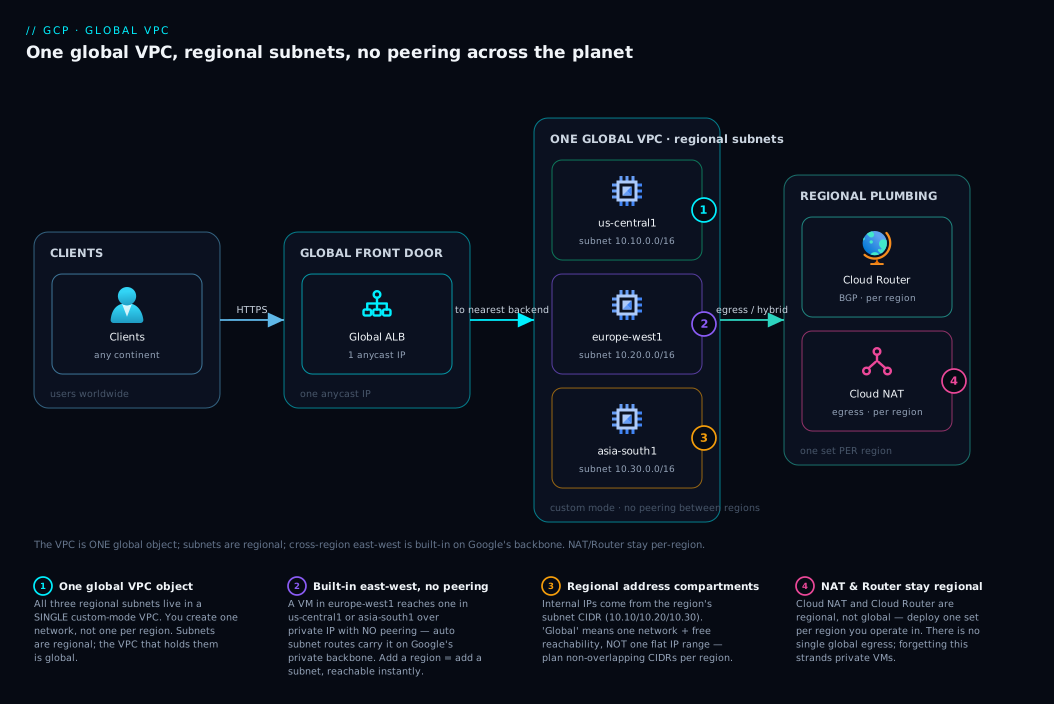
Walk the diagram left to right and the whole model snaps together. On the far left sit your clients — users anywhere on Earth — who reach a single global external Application Load Balancer that owns one anycast IP. That one IP is itself a demonstration of “global”: there is no per-region front-end address to juggle; one address routes each client to the nearest healthy backend over Google’s edge. From the load balancer, traffic enters the star of the show: a single custom-mode VPC holding regional subnets in three parts of the world — us-central1 (10.10.0.0/16), europe-west1 (10.20.0.0/16), and asia-south1 (10.30.0.0/16), each fronting compute behind the LB. The critical visual: there is no peering line, no gateway box, no transit hub between the three regions. They sit inside one VPC boundary because they are one network; the thin internal arrows between them are subnet routes that exist for free, carrying east-west traffic on Google’s private backbone.
Below the compute, each region has its own regional plumbing — a Cloud Router (BGP) and a Cloud NAT for private egress — because those resources are regional, not global, so you deploy one set per region you operate in. The numbered badges mark the four things most worth understanding: the single global VPC object spanning all three regions, the regional subnets that hand out internal IPs, the free cross-region private path with no peering, and the per-region NAT/Router that you do replicate. Read the badges in order and you have re-derived the article: one global network, regional address compartments, automatic planet-wide reachability, and a handful of things that stubbornly stay regional.
Real-world scenario
Vellore Stream is a fictional live-video startup that streams regional-language sports to fans across India, Europe and North America. Their first cloud engineer, fresh from five years on AWS, designed their GCP network the only way his instincts knew: three VPCs — vpc-us, vpc-eu, vpc-asia — one per region, “for isolation and blast-radius control,” wired together with VPC Peering so the metadata service in Mumbai could reach the billing service in Frankfurt. It worked, but every new feature that needed cross-region calls meant another peering connection and another round of “which CIDR did we use in eu again?” The peering mesh had five connections after eight months and a recurring class of incidents where a service in one region simply could not resolve or reach a service in another because a peering route was missing or a CIDR had quietly overlapped. Worse, peering is non-transitive: us↔eu and eu↔asia did not give them us↔asia, so they kept adding edges. The on-call rotation had a dreaded runbook titled “cross-region can’t connect.”
When they brought in a GCP-native architect for a reliability review, her first recommendation landed like a record scratch: collapse the three VPCs into one custom-mode global VPC. The team pushed back hard — surely one network across three continents was less safe, not more? She walked them through the model in this article: the VPC being global does not mean flat; isolation comes from firewall rules targeted by network tags and service accounts, which apply identically in every region, and from Shared VPC boundaries between teams — not from chopping the fabric into per-region VPCs joined by fragile peering. They planned a clean address scheme — 10.10.0.0/16 for us-central1, 10.20.0.0/16 for europe-west1, 10.30.0.0/16 for asia-south1, all non-overlapping — set the VPC to global dynamic routing so their single Interconnect in Europe could serve all regions, and replaced the peering routes with the VPC’s built-in subnet routes that needed no authoring at all.
The results were the kind that make a migration pay for itself. The “cross-region can’t connect” runbook was deleted — there were no peering routes to miss because there was no peering; any region reached any other region the instant its subnet existed. Adding a fourth region for a new market (southamerica-east1, 10.40.0.0/16) went from a multi-day peering-and-route exercise to a single subnet creation, reachable everywhere immediately. The cross-region traffic that used to be a tangle now rode Google’s backbone at inter-region rates, and their security posture improved because the firewall rules were now centrally defined, tag-based, and identical across regions instead of triplicated and drifting. The lesson the team wrote into their wiki: on GCP you do not buy isolation by fragmenting the network — you buy it with identity-scoped firewalls on top of one coherent global fabric, and you let the global VPC delete the connectivity busywork entirely.
Advantages and disadvantages
The global VPC is a genuine architectural advantage, but only if you respect its flip side. The honest trade-off table first, then when each side matters:
| Advantages | Disadvantages |
|---|---|
| No inter-region peering mesh — east-west is built-in | Planet-wide blast radius for firewall mistakes |
| Add a region = add a subnet (reachable instantly) | One VPC can sprawl into a giant flat fabric if undisciplined |
| One network object to manage, not one per region | “Just use default network” tempts you into auto-mode + permissive |
| Cross-region traffic on Google’s private backbone | Internal IPs still regional — you must plan non-overlapping CIDRs |
| Fewer subnets (one per region, spans all zones) | NAT/Router/VPN are regional — no single global egress |
| Firewall rules consistent across regions by design | Same consistency means a bad rule is consistently bad everywhere |
| Global LB + global VPC = clean global-app pattern | Quotas (subnets, routes, rules per VPC) still bound very large designs |
When the advantages dominate: you are building a multi-region or global application, you value operational simplicity, and you have the discipline to use custom mode and tag-scoped firewalls. The global model removes an entire layer of toil and an entire class of incidents. When the disadvantages bite: you have weak network governance, many teams sharing one project, or a compliance regime demanding hard network segmentation between environments — in which case you lean on Shared VPC boundaries, separate VPCs per environment (joined only where truly needed), and hierarchical firewall baselines to re-introduce intentional boundaries on top of the global fabric. The model does not force you into one flat network; it just makes one flat network the easy thing, so your guardrails have to be deliberate.
| If your context is… | The global VPC is… | What to add |
|---|---|---|
| Genuinely global product, strong platform team | A big win | Custom mode + tag-based firewalls |
| Many teams, one project, weak governance | A risk | Shared VPC, per-team subnets, hierarchical FW |
| Strict env isolation (prod/dev must not touch) | Insufficient alone | Separate VPCs per env; connect only as needed |
| Single-region app today, maybe multi-region later | Future-proofing for free | Custom mode now; add regions when needed |
| Hybrid with on-prem in one location | A clean fit | Global dynamic routing + one Interconnect |
Hands-on lab
This lab builds a real two-region global VPC, proves cross-region private connectivity with zero peering, and tears it down. It uses small e2-micro VMs and is cheap; still, delete everything at the end. Replace PROJECT_ID with your project.
Step 1 — Create a custom-mode global VPC. No subnets appear yet; that is the point.
gcloud compute networks create demo-global-vpc \
  --project=PROJECT_ID \
  --subnet-mode=custom \
  --bgp-routing-mode=global
Expected: the network is created with Subnet mode: CUSTOM and BGP routing mode: GLOBAL. List it:
gcloud compute networks list --filter="name=demo-global-vpc"
# NAME              SUBNET_MODE  BGP_ROUTING_MODE  IPV4_RANGE  GATEWAY_IPV4
# demo-global-vpc   CUSTOM       GLOBAL
Step 2 — Create two regional subnets with non-overlapping CIDRs, in two different regions of the same VPC.
gcloud compute networks subnets create sn-us \
  --network=demo-global-vpc --region=us-central1 --range=10.10.0.0/24

gcloud compute networks subnets create sn-asia \
  --network=demo-global-vpc --region=asia-south1 --range=10.30.0.0/24
Step 3 — Allow internal traffic and SSH with a single VPC-global firewall rule each. Note these rules apply across both regions automatically.
# Internal east-west between both subnet ranges
gcloud compute firewall-rules create allow-internal \
  --network=demo-global-vpc --direction=INGRESS --action=ALLOW \
  --rules=tcp,udp,icmp --source-ranges=10.10.0.0/24,10.30.0.0/24

# SSH from IAP / your IP to tagged instances
gcloud compute firewall-rules create allow-ssh \
  --network=demo-global-vpc --direction=INGRESS --action=ALLOW \
  --rules=tcp:22 --source-ranges=35.235.240.0/20 --target-tags=ssh
Step 4 — Launch one VM in each region, both on the same VPC, both with the ssh tag.
gcloud compute instances create vm-us \
  --zone=us-central1-a --machine-type=e2-micro \
  --network=demo-global-vpc --subnet=sn-us --tags=ssh --no-address

gcloud compute instances create vm-asia \
  --zone=asia-south1-a --machine-type=e2-micro \
  --network=demo-global-vpc --subnet=sn-asia --tags=ssh --no-address
Step 5 — Prove cross-region private connectivity. SSH into the US VM (via IAP, since there’s no external IP) and ping the Asia VM’s internal IP. There is no peering, no VPN, no route you wrote.
ASIA_IP=$(gcloud compute instances describe vm-asia --zone=asia-south1-a \
  --format='get(networkInterfaces[0].networkIP)')

gcloud compute ssh vm-us --zone=us-central1-a --tunnel-through-iap \
  --command="ping -c 4 $ASIA_IP"
# Expected: 4 successful replies from 10.30.0.x across continents,
# routed entirely on Google's private backbone — no peering involved.
Step 6 — Inspect the auto-created routes to see the subnet routes you never wrote.
gcloud compute routes list --filter="network=demo-global-vpc" \
  --format="table(name,destRange,nextHopGateway,nextHopNetwork)"
# You'll see subnet routes for 10.10.0.0/24 and 10.30.0.0/24,
# plus a default 0.0.0.0/0 route to the internet gateway — all auto.
Step 7 — Teardown (do not skip).
gcloud compute instances delete vm-us   --zone=us-central1-a -q
gcloud compute instances delete vm-asia --zone=asia-south1-a -q
gcloud compute firewall-rules delete allow-internal allow-ssh -q
gcloud compute networks subnets delete sn-us   --region=us-central1 -q
gcloud compute networks subnets delete sn-asia --region=asia-south1 -q
gcloud compute networks delete demo-global-vpc -q
The same network as Terraform, for the IaC-minded:
resource "google_compute_network" "demo" {
  name                    = "demo-global-vpc"
  auto_create_subnetworks = false          # custom mode
  routing_mode            = "GLOBAL"        # global dynamic routing
}

resource "google_compute_subnetwork" "us" {
  name          = "sn-us"
  network       = google_compute_network.demo.id
  region        = "us-central1"
  ip_cidr_range = "10.10.0.0/24"
}

resource "google_compute_subnetwork" "asia" {
  name          = "sn-asia"
  network       = google_compute_network.demo.id
  region        = "asia-south1"
  ip_cidr_range = "10.30.0.0/24"
}

resource "google_compute_firewall" "internal" {
  name          = "allow-internal"
  network       = google_compute_network.demo.id
  direction     = "INGRESS"
  source_ranges = ["10.10.0.0/24", "10.30.0.0/24"]
  allow { protocol = "tcp" }
  allow { protocol = "udp" }
  allow { protocol = "icmp" }
}
Common mistakes & troubleshooting
These are the failure modes that actually bite, drawn from real GCP networking incidents. Symptom → root cause → how to confirm → fix.
| # | Symptom | Root cause | How to confirm | Fix |
|---|---|---|---|---|
| 1 | Two VMs in different regions can’t reach each other on private IP | A firewall rule blocks the traffic — connectivity is built-in, but ingress is implied-deny | gcloud compute firewall-rules list; check for an allow-internal rule covering both ranges |
Add an ingress allow rule whose source-ranges include the other region’s subnet CIDR |
| 2 | “I need to peer my two regions” — wasted effort | Misapplied AWS instinct; same-VPC regions never need peering | They’re already on one VPC: gcloud compute networks subnets list --network=X shows both |
Delete the peering plan; rely on subnet routes |
| 3 | Subnet create fails: range overlaps | New subnet’s CIDR collides with an existing subnet or a peered/learned route | gcloud compute networks subnets list; check existing ranges and BGP-learned routes |
Choose a non-overlapping CIDR; maintain an address plan |
| 4 | On-prem (VPN) can reach one region but not others | VPC is in regional dynamic routing mode | gcloud compute networks describe X --format='get(routingConfig.routingMode)' → REGIONAL |
Switch to global: gcloud compute networks update X --bgp-routing-mode=global |
| 5 | Default network appeared with subnets everywhere | Project’s default auto-mode VPC auto-created a subnet per region | gcloud compute networks describe default → autoCreateSubnetworks: true |
Delete the default network; build a custom-mode VPC |
| 6 | A permissive rule unexpectedly opened a port in another region | Firewall rules are VPC-global; a tag matched VMs in regions you didn’t intend | gcloud compute firewall-rules describe RULE → check targetTags / no region scoping |
Narrow targets via specific tags/SAs; remember rules aren’t region-scoped |
| 7 | Private VMs can’t reach the internet to pull packages | No Cloud NAT in that region (and no external IP) | gcloud compute routers nats list --router=R --region=REGION (empty) |
Deploy Cloud NAT in that region (NAT is regional) |
| 8 | Cross-region works but latency is high and “feels like internet” | Traffic is leaving via external IPs, not internal | Check whether VMs use external IPs / a public hostname for the call | Call peers by internal IP/DNS so traffic stays on the backbone |
| 9 | VPC Peering to a partner VPC works, but their other peer is unreachable | Peering is non-transitive | Map the peering graph; A↔B and B↔C does not give A↔C | Add direct peering, or use a hub with Network Connectivity Center |
| 10 | Ran out of internal IPs in a region under growth | Subnet primary range too small | gcloud compute networks subnets describe SN → small ipCidrRange |
Expand live: gcloud compute networks subnets expand-ip-range SN --prefix-length=20 |
| 11 | GKE cluster create fails: not enough IP space | Subnet lacks secondary ranges for Pods/Services | Inspect subnet secondaryIpRanges (missing/too small) |
Add secondary ranges sized for Pods and Services |
| 12 | Firewall rule created but has no effect | Priority ordering — a higher-priority deny wins, or targets don’t match | gcloud compute firewall-rules list --sort-by=priority; verify tags on the VM |
Adjust priority; confirm the VM actually carries the target tag/SA |
Three confirmation habits that save the most time: (1) when “they can’t connect,” check firewall rules before routes — routes are almost always fine, ingress is almost always the blocker; (2) when reasoning about hybrid reachability, always check dynamic routing mode first; (3) when something is “open in a region you didn’t expect,” remember the firewall rule is global and re-read its targets.
Best practices
- Always use custom-mode VPCs in production. Delete the default network on new projects and create a custom VPC with exactly the subnets you intend. Never ship auto-mode.
- Maintain a single source-of-truth address plan. Allocate non-overlapping CIDRs per region (and reserve room for future regions and on-prem). One overlap is a multi-day cleanup.
- One subnet per region per tier, sized generously. Subnets span all zones, so you need far fewer than on AWS; pick a roomy primary CIDR and expand live if needed rather than carving tiny ranges.
- Scope firewall rules with network tags or service accounts, never
0.0.0.0/0for east-west. Model isolation by identity, and remember every rule applies VPC-wide across all regions. - Prefer service-account-targeted rules over tags for sensitive tiers. Tags can be set by anyone who can edit an instance; service-account targeting is harder to spoof.
- Set the VPC to global dynamic routing when you have hybrid links serving multiple regions, and keep it regional when you deliberately want tight per-region failure domains.
- Deploy Cloud NAT and Cloud Router per region you operate in — they are regional; there is no single global egress, and forgetting this strands private VMs without internet.
- Keep cross-region traffic on internal IPs/DNS so it rides the private backbone at inter-region rates rather than leaving via external IPs at internet rates.
- Use Shared VPC to centralize the network while decentralizing workloads when multiple teams/projects share one fabric — see GCP VPC and Shared VPC.
- Layer hierarchical firewall policies at the org/folder level for org-wide baselines (e.g. deny RDP/SSH from the internet everywhere), above per-VPC rules.
- Reserve static internal IPs for stable endpoints (databases, internal LBs) so DNS/config doesn’t drift when instances are recreated.
- Watch the per-VPC quotas (subnets, routes, firewall rules, peerings) for very large designs; request increases early rather than hitting a hard wall mid-migration.
Security notes
The global VPC’s security model is “one network, many identity-scoped controls,” so security discipline shifts from segmenting subnets to scoping by identity and bounding the fabric. The core points:
- Blast radius is global by default — a firewall mistake is a global mistake. Treat firewall changes as production changes: review them, test targets, and prefer narrow service-account targeting over broad tags or CIDRs.
- Least privilege via service accounts: target sensitive ingress rules (DB, admin) at the service account of the allowed callers, not just tags, since tags are mutable by instance editors. Pair with IAM least-privilege from GCP IAM and Service Accounts: Least Privilege.
- Don’t expose VMs publicly to administer them. Use IAP TCP forwarding (source range
35.235.240.0/20) for SSH/RDP instead of opening 22/3389 to the internet — the lab above does exactly this. - Force private-only where required by removing the default
0.0.0.0/0route and routing egress through controlled paths (Cloud NAT to specific destinations, or a proxy), so workloads can’t freely reach the internet. - Use Private Google Access and Private Service Connect so VMs reach Google APIs and managed services over internal paths rather than the public internet — see GCP Private Service Connect.
- Segment hard boundaries with separate VPCs or VPC Service Controls, not by hoping subnet placement isolates things. For data-exfiltration boundaries, layer VPC Service Controls perimeters.
- Enforce org-wide network guardrails with hierarchical firewall policies and org policies (e.g. restrict which projects can create external IPs), so a single team can’t widen the global fabric’s exposure.
- Log and monitor: enable VPC Flow Logs on sensitive subnets and Firewall Rules Logging on key rules so you can see what the global fabric is actually permitting.
Cost & sizing
The VPC object itself is free — you do not pay to have a global network, subnets, routes, or firewall rules. What you pay for is traffic and the regional plumbing, and the global model changes the shape of those costs in ways worth understanding before you design.
The biggest line item people miss is inter-region egress. Cross-region traffic inside your VPC is private and rides the backbone, but it is not free — Google charges per-GB for traffic between regions, with rates varying by the region pair (intra-continent is cheaper than inter-continent). Traffic within a single region (between zones, between subnets in the same region) is generally free or near-free. So a chatty service that calls across continents on every request can run up a real bill purely on network — the fix is data-locality (keep hot paths in-region) and only crossing regions for what genuinely must.
| Cost driver | Roughly how it’s charged | Notes / how to control |
|---|---|---|
| VPC, subnets, routes, firewall rules | Free | No charge for the network constructs themselves |
| Same-region traffic (zone↔zone) | Free / negligible | Keep hot paths in one region |
| Inter-region egress (within VPC) | Per-GB, region-pair dependent | Intra-continent cheaper; minimize cross-continent chatter |
| Internet egress | Per-GB, tiered by volume/destination | Use Cloud CDN; keep traffic internal where possible |
| Cloud NAT | Hourly per gateway + per-GB processed | One per region; consolidate where sensible |
| External IP addresses | Small hourly charge (esp. unused/static) | Release unused static IPs |
| Cloud VPN / Interconnect | Hourly + egress | Global routing lets one link serve all regions |
| Global external ALB | Hourly + per-rule + data processed | One global LB vs many regional ones |
Rough INR/USD intuition (verify current rates for your regions before budgeting): inter-region egress lands in the order of a few US cents per GB intra-continent and higher across continents — at, say, $0.02–$0.08/GB, ten terabytes of monthly cross-region traffic is roughly $200–$800 (≈ ₹17,000–₹67,000), enough that designing for locality matters. A Cloud NAT gateway is a small hourly charge plus per-GB processed; running one per region across three regions is a handful of dollars a month in fixed cost before traffic. The network object being global and free is the gift; the traffic across that global object is where sizing discipline pays off.
| Sizing question | Guidance |
|---|---|
| How many subnets? | One per region per tier; subnets span zones, so far fewer than AWS |
| How big a CIDR per subnet? | Generous (e.g. /20–/16); expansion is online, shrinking isn’t |
| How many Cloud NATs? | One per region you run private VMs in |
| Regional vs global routing? | Global if one hybrid link serves all regions; regional for tight domains |
| One global LB or several regional? | Global ALB for a global app (one anycast IP); regional for in-region only |
Interview & exam questions
Q1. What does it mean that a GCP VPC is “global”? It means the VPC is a single network object spanning all regions, and all of its subnets are mutually reachable over private IP with no peering or inter-region gateway. It does not mean one flat subnet — subnets remain regional with distinct CIDRs — nor that there are no firewalls. (Maps to Cloud Digital Leader, ACE, PCA networking fundamentals.)
Q2. If the VPC is global, why are subnets regional? Because IP addresses must be allocated from somewhere, and Google chose the region as the unit of address allocation and isolation. A subnet is a CIDR pinned to one region (spanning all its zones); internal IPs come from that regional range, while the VPC provides the global container and built-in reachability.
Q3. How does a VM in one region reach a VM in another region of the same VPC, with no peering? GCP auto-creates a subnet route for every subnet’s CIDR, visible across the entire global VPC, so every subnet already knows how to reach every other subnet. The traffic flows on Google’s private backbone. You author nothing for east-west connectivity.
Q4. Contrast GCP’s cross-region connectivity with AWS. On AWS a VPC is regional, so connecting two regions requires VPC Peering or Transit Gateway plus route-table edits, and the mesh grows O(n²). On GCP one global VPC makes all regions reachable by default; adding a region is just adding a subnet, with nothing to wire.
Q5. What is the difference between auto mode and custom mode VPCs, and which should production use?
Auto mode auto-creates a subnet in every region from fixed 10.128.0.0/9 ranges (and in future new regions); custom mode creates no subnets — you define each one’s region and CIDR. Production uses custom mode for control, no overlap, and no silent growth. The default network is auto-mode, which is why you replace it.
Q6. How are GCP firewall rules scoped, and what’s the blast radius? A VPC firewall rule is a global object on the network, targeted by network tag or service account (not by subnet). It applies to its targeted instances in every region of the VPC at once — so the blast radius of a permissive rule is the whole planet, which is why narrow, identity-scoped targeting matters.
Q7. What are the implied firewall rules in a GCP VPC? Two un-deletable lowest-priority rules: implied allow egress (all outbound permitted unless denied) and implied deny ingress (all inbound blocked unless allowed). So a new VM accepts nothing inbound until you write an allow rule, and can reach out freely until you write a deny.
Q8. When do you need VPC dynamic routing mode set to “global”? When you have hybrid connectivity (VPN/Interconnect) in one or some regions and want on-prem routes usable across all regions of the VPC — e.g. a single Interconnect serving every region. In regional mode, a region’s Cloud Router only advertises/learns that region’s subnets. Note this affects BGP-learned routes only; east-west between subnets is always automatic.
Q9. Does the global VPC mean you never need VPC Peering? You never need peering within one VPC across regions. You still need VPC Peering (or Private Service Connect / Network Connectivity Center) to connect separate VPCs — and remember peering is non-transitive, so A↔B and B↔C does not yield A↔C.
Q10. Are Cloud NAT and Cloud Router global like the VPC? No. Both are regional. You deploy a Cloud Router and a Cloud NAT per region where you need dynamic routing or private-VM egress. There is no single global NAT — assuming there is strands private VMs in regions you forgot to cover.
Q11. How does a GCP subnet differ from an AWS subnet in terms of zones? A GCP subnet spans all zones in its region, so one subnet gives you multi-zone HA. An AWS subnet is tied to a single Availability Zone, so you need one subnet per AZ. This is why GCP designs use far fewer subnets.
Q12. How would you isolate prod from dev on GCP given a global VPC? Not by subnet placement within one VPC. Use separate VPCs per environment (connected only where genuinely needed), or Shared VPC boundaries plus tightly-scoped, service-account-targeted firewall rules and VPC Service Controls perimeters for data boundaries. Isolation comes from identity-scoped policy and VPC boundaries, not from fragmenting one VPC.
Quick check
- True or false: a GCP subnet must be recreated to span more than one zone.
- You add a subnet in
australia-southeast1to an existing VPC that has subnets in the US and Europe. How much peering/route work is required to make the new region reachable from the others? - A firewall rule allows TCP 443 to instances tagged
web. You havewebVMs in three regions. In how many regions does the rule take effect? - Your on-prem site connects via VPN in
europe-west1, but can only reach European subnets, not US ones. What single VPC setting most likely needs to change? - Why is the default network a poor choice for production, in two specifics?
Answers
- False. A GCP subnet spans all zones in its region automatically; you place VMs in multiple zones within the same subnet. (AWS requires one subnet per AZ; GCP does not.)
- None. Same-VPC regions are reachable by built-in subnet routes with no peering and no route authoring — the new region is reachable the instant the subnet exists (subject only to a firewall allow rule for the traffic).
- All three. VPC firewall rules are global; a rule targeting tag
webapplies to those VMs in every region of the VPC at once. - The VPC’s dynamic routing mode is
regional; switch it toglobalso the Cloud Router advertises all subnets and the VPN can reach every region. - It is an auto-mode VPC (auto-creates subnets in every region from fixed, overlap-prone
10.128.0.0/9ranges, including future new regions), and it ships with permissive default firewall rules — neither of which you want in production.
Glossary
- VPC (Virtual Private Cloud) network — In GCP, a single global private network object that can contain subnets in any/every region; the “building.”
- Subnet (subnetwork) — A CIDR range bound to one region (spanning all its zones) from which internal IPs are allocated; the “floor.”
- Auto mode VPC — A VPC that automatically creates one subnet per region from fixed
10.128.0.0/9ranges, and in any future regions Google adds. The default network is auto-mode. - Custom mode VPC — A VPC that creates no subnets automatically; you define each subnet’s region and CIDR. The production standard.
- Subnet route — An automatically created route for a subnet’s CIDR, visible across the whole VPC, providing free east-west reachability between all subnets.
- Default route — The auto-created
0.0.0.0/0route to the default internet gateway; remove or replace it to force private-only egress. - Dynamic route — A route learned over BGP via Cloud Router from on-prem/peer networks (VPN/Interconnect).
- Dynamic routing mode — A VPC setting,
regionalorglobal, controlling whether Cloud Routers advertise/learn routes for one region or all regions. - Firewall rule — A global allow/deny rule on the VPC, with direction, priority, and targets scoped by network tag or service account (not by subnet).
- Network tag — A label attached to a VM that firewall rules target; mutable by anyone who can edit the instance.
- Implied rules — The un-deletable lowest-priority allow-egress and deny-ingress rules every VPC has.
- Cloud Router — A regional managed BGP speaker that advertises VPC subnets and learns on-prem routes.
- Cloud NAT — A regional managed service letting private (no-external-IP) VMs reach the internet for egress.
- Shared VPC — A model where a host project owns the VPC and service projects attach workloads to it — centralized network, decentralized workloads.
- VPC Peering — A connection between two separate VPCs; non-transitive, and never needed within a single VPC across regions.
- Alias IP / secondary range — Additional subnet CIDRs used to assign extra IPs (e.g. GKE Pod/Service ranges) without separate subnets.
Next steps
- Go option-by-option on subnets, routes, firewalls and NAT in GCP VPC Deep Dive: Subnets, Routes, Firewall, NAT.
- Centralize the network across many projects with GCP VPC and Shared VPC: Networking Across Projects.
- Control egress and apply org-wide baselines in GCP Hierarchical Firewall and Cloud NAT Egress Control.
- Front your global VPC with a single anycast IP using the GCP Cloud Load Balancing Deep Dive.
- Reach Google APIs and managed services privately with GCP Private Service Connect.
- Wire hybrid connectivity over BGP with GCP HA VPN and Cloud Router.