Quick take: A GCP region is a geographic area (like
asia-south1, Mumbai). A zone is one physically isolated datacenter inside that region (asia-south1-a). Some resources live in a single zone, some span all zones in a region, and some span the whole planet. Resiliency on Google Cloud is almost entirely about choosing the right scope for each piece of your stack — and the cheapest mistake to avoid is running everything in one zone.
An e-commerce company deployed its entire stack into a single GCP zone to keep latency low and the architecture simple. One Compute Engine VM ran the web app, one more ran a self-managed database, and both sat in asia-south1-a. It worked beautifully — until a cooling failure took that one datacenter offline for forty minutes. The site went completely dark. Nothing was replicated, the VMs were not in a managed instance group so nothing recreated them elsewhere, and the database had no standby. The team spent the outage frantically restoring a backup into a different zone by hand. The fix, it turned out, was not “buy more reliability” — it was understanding that Google Cloud already offered the redundancy for free, and they had simply opted out of it by deploying everything into one fault domain.
This article is the beginner’s mental model that prevents that incident. You will learn exactly what regions and zones are, the difference between zonal, regional, multi-regional and global resources, how to read GCP’s Service Level Agreements so you know what Google actually promises, how to pick a region, and — the part that matters most — how to lay out a stack that keeps serving when a zone (or even a whole region) goes down. Everything is grounded in real gcloud commands you can run, real services (regional managed instance groups, regional Cloud SQL HA, multi-region Cloud Storage and the global external load balancer), and a worked resilient layout you can copy. No prior GCP experience is assumed beyond having a project and the gcloud CLI installed.
The single sentence to carry through the whole article: regions and zones are GCP’s “fault-domain menu,” and your job is to order the right level of redundancy for each layer of your stack — not too little (a single-zone outage takes you down) and not too much (a needless multi-region database triples your bill).
What problem this solves
Datacenters fail. Power supplies die, cooling units trip, network switches misbehave, a fibre cut isolates a building, or a botched maintenance window takes a rack offline. These are not rare exotic events — at cloud scale they happen somewhere every week. The question is never “will hardware fail?” but “when it does, does my application notice?”
Building physical redundancy yourself — two datacenters in different parts of a city, independent power feeds, redundant fibre, automatic failover — costs millions and takes years. GCP has already built it. Google operates the datacenters, the power, the cooling and the inter-datacenter network, and exposes that physical redundancy to you as a simple choice of scope: do you want this resource pinned to one building (zonal), spread across the buildings in one metro (regional), or replicated across metros (multi-regional / global)? You get enterprise-grade fault isolation by ticking the right box, not by pouring concrete.
What breaks without this knowledge is exactly the opening story. Teams new to the cloud reflexively build the way they built on-premises — one server, one database, in one place — because that is what “deploy the app” used to mean. On a single physical server that was the only option. On GCP it is a choice, and usually the wrong one for anything that matters. The people who hit this hardest are small teams shipping their first production workload, developers who lifted a working dev setup straight into prod, and anyone who optimised for “lowest latency / simplest setup” without realising they had also optimised for “single point of failure.” The good news is that the fix is almost always cheap and built in: a regional managed instance group instead of a lone VM, a regional Cloud SQL instance with high availability enabled instead of a single one, a global load balancer instead of a single VM’s public IP.
To frame the entire field before we go deep, here is the menu — every common GCP building block, the smallest blast radius it survives, and what taking it down requires:
| Layer | Typical zonal (fragile) choice | Resilient choice | Survives a zone failure? | Survives a region failure? |
|---|---|---|---|---|
| Compute (web/app tier) | Single Compute Engine VM | Regional managed instance group across 2–3 zones | Yes (regional MIG) | No (needs a second region) |
| Relational database | Single Cloud SQL instance | Regional Cloud SQL with HA (standby in another zone) | Yes (auto-failover) | No (needs cross-region replica) |
| Object storage | (already replicated) | Regional or multi-region bucket | Yes (always) | Yes (multi-region only) |
| Front door / entry point | One VM’s public IP | Global external Application Load Balancer | Yes | Yes (routes to a healthy region) |
| Containers | Zonal GKE cluster | Regional GKE cluster (control plane + nodes multi-zone) | Yes | No (needs multi-region/fleet) |
| Block disk | Zonal Persistent Disk | Regional Persistent Disk (synchronously replicated to 2 zones) | Yes | No |
Read that table top to bottom and you have already absorbed 70% of this article. The rest is detail, real commands, and the reasoning for when each level is worth it.
Learning objectives
By the end of this article you can:
- Define region, zone, zonal/regional/multi-regional/global resource, and fault domain precisely, and explain how they relate.
- Look at any GCP resource and say whether it lives in one zone, one region, or globally — and therefore what failure it survives.
- Read a GCP Service Level Agreement and explain why a single zonal VM has no uptime SLA while a multi-zone deployment does.
- Choose a region for a workload by weighing latency, data residency / compliance, service availability, and cost.
- Design a web tier that survives a zone failure with a regional managed instance group, and a database tier that survives one with regional Cloud SQL HA.
- Put a global external load balancer in front of multiple regions so a whole-region outage fails over automatically.
- Run the real
gcloudcommands to create zones-spanning resources and to inspect what scope an existing resource has. - Recognise the common single-zone, single-region and cost mistakes — and the symptom that reveals each.
Prerequisites & where this fits
You need a Google Cloud project with billing enabled and the gcloud CLI installed and authenticated (gcloud init). You should be comfortable running a command in your terminal and reading its output. No networking, Kubernetes or database expertise is assumed — every term is defined as it appears.
This is a foundational article in the GCP track. It sits directly on top of the raw definitions in GCP Regions and Zones Explained: What They Really Mean for Availability and Latency, which you can read first if “region vs zone” is brand new — this article assumes that distinction and goes straight to designing for failure with it. It pairs naturally with GCP’s Global VPC Explained (because a GCP network spans regions, which is what makes global load balancing possible), the gcloud CLI Quickstart (for the command muscle memory used throughout), and the compute decision in GCP Compute: Compute Engine, Cloud Run, GKE and Cloud Functions. Where this fits in the bigger picture: resource scope is the first design decision of any GCP architecture, made before you choose SKUs, before you write Terraform, before you think about cost. Get it wrong and every later decision inherits a single point of failure.
A quick map of who decides what when you choose scope, so you know which trade-off you are actually making:
| Decision | What you trade off | Who usually cares | Failure it controls |
|---|---|---|---|
| Which region | Latency vs residency vs price vs feature availability | Product + Legal + Finance | Where data lives; how far from users |
| Zonal vs regional resource | A little cost/complexity vs surviving a datacenter loss | Architect / SRE | Single-zone (datacenter) failure |
| Single vs multi-region | Significant cost/complexity vs surviving a metro loss | Architect + Finance | Whole-region (regional) failure |
| Global front door (yes/no) | One global IP + edge routing vs per-region IPs | Network / SRE | Region failover; user proximity |
Core concepts
Five ideas make every later decision obvious. Read these once and the commands later will feel like common sense.
A region is a place; a zone is a building inside that place. A region is a specific geographic area where Google has datacenter capacity — asia-south1 is Mumbai, europe-west1 is Belgium, us-central1 is Iowa. Inside each region are several zones, each a separate physical datacenter (or tightly grouped set of datacenters) with its own independent power, cooling and networking. Zones are named region-plus-letter: asia-south1-a, asia-south1-b, asia-south1-c. The crucial property: zones in a region are isolated enough that one can fail without taking the others down, yet close enough (typically within the same metro, sub-millisecond to low-single-digit-millisecond apart) that you can replicate between them in real time with negligible latency cost. That combination — isolated but close — is the whole reason regional resources work.
A “fault domain” is the blast radius of one failure. A fault domain is simply “the set of things that go down together when one thing breaks.” A single zone is a fault domain: a cooling failure there kills everything in it but nothing in the neighbouring zone. A region is a larger fault domain: a region-wide event (rare, but real — a coordinated power or network event, or a natural disaster) can affect all zones at once. The entire skill of resiliency design is spreading your stack across fault domains so that no single failure can take down your whole application. Spread across zones → survive a zone failure. Spread across regions → survive a region failure.
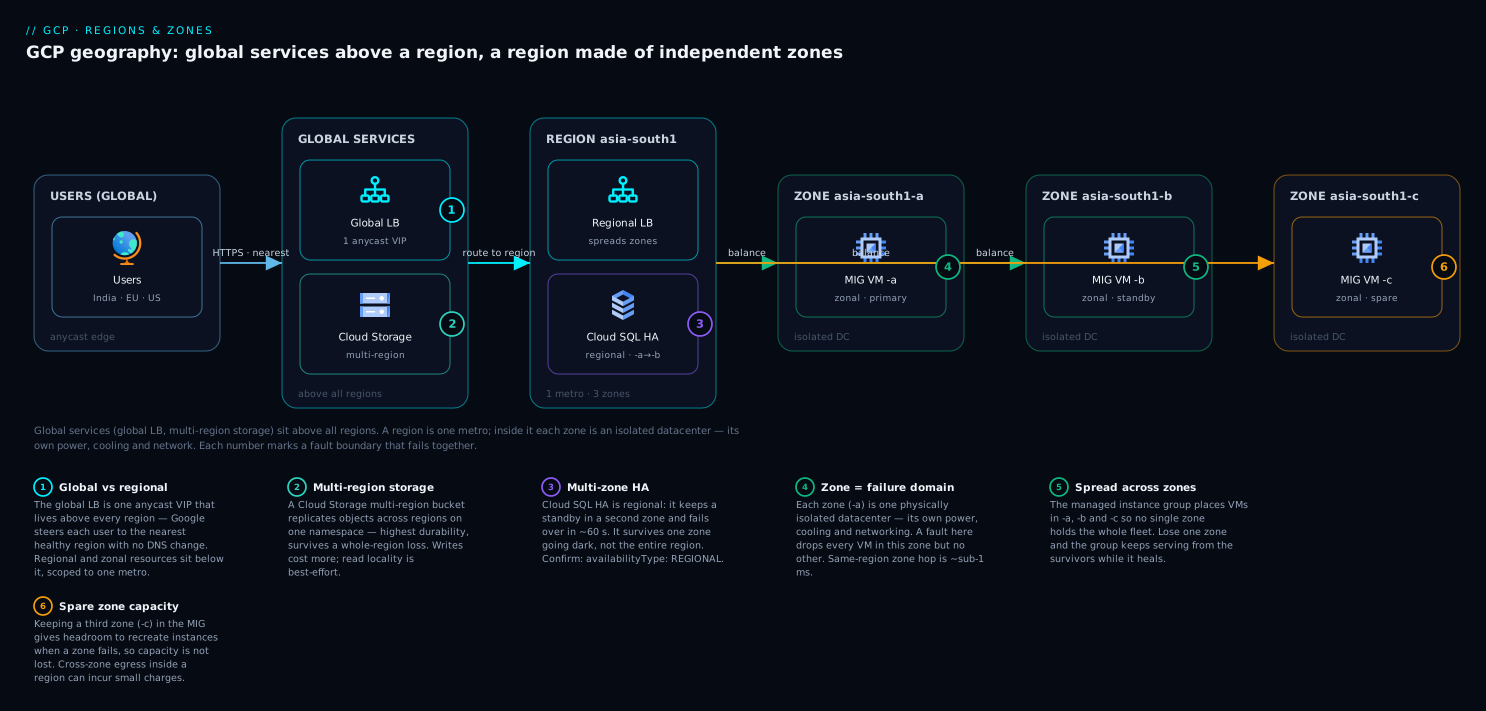
Every GCP resource has a scope, and scope decides what it survives. This is the heart of it. A resource is zonal, regional, multi-regional, or global, and that scope is fixed when you create it. A zonal resource (a single VM, a zonal Persistent Disk) lives in exactly one zone and dies with that zone. A regional resource (a regional managed instance group, regional Cloud SQL, a regional Persistent Disk) is automatically spread or replicated across zones in one region and survives a single zone failing. A multi-regional resource (a multi-region Cloud Storage bucket) is replicated across regions and survives a whole region failing. A global resource (the global load balancer, a global VPC network, a global anycast IP) exists across the planet and is not tied to any one location.
You compose resiliency by stacking scopes. A resilient application is not one magic “highly available” switch — it is each layer placed at the right scope. The front door is global. The compute tier is regional (spread across zones). The database is regional with HA. Static assets are in a multi-region or regional bucket. When a zone in your region fails, the global front door keeps routing, the regional compute group recreates capacity in surviving zones, and the regional database fails over to its standby — each layer handling the failure at its own level. Nothing about that requires heroics; it requires choosing the right scope per layer up front.
More scope costs more — match it to what you actually need. Wider scope means more redundancy and more money: more running instances, cross-zone or cross-region data replication, and (for cross-region) inter-region network egress charges. The art is matching the scope to the requirement. A throwaway dev box can be a single zonal VM. A revenue-generating web tier should be regional. A database whose loss means losing customer orders should be regional-HA, and only goes multi-region if a region outage is genuinely unacceptable to the business. Over-scoping is a real and common waste; do not put everything in multi-region “to be safe.”
The scope vocabulary in one table
Before the deep sections, pin every scope down side by side. This is the table to keep open:
| Scope | Spans | Example resources | Survives a zone outage? | Survives a region outage? | Relative cost |
|---|---|---|---|---|---|
| Zonal | One zone (one datacenter) | Single Compute Engine VM, zonal Persistent Disk, zonal GKE node pool | No | No | Lowest |
| Regional | All zones in one region | Regional MIG, regional Cloud SQL (HA), regional Persistent Disk, regional GKE | Yes | No | Moderate |
| Multi-regional | Several regions in a continent | Multi-region Cloud Storage bucket, multi-region BigQuery dataset | Yes | Yes | Higher |
| Global | The whole planet | Global external load balancer, VPC network, global anycast IP, Cloud DNS | Yes | Yes (routes around) | Varies (often modest) |
Regions, zones and the geography of GCP
A region is identified by a name with a directional + number suffix and maps to a real city or area. You pick regions; Google assigns the physical zones underneath them. A few real examples to make this concrete (region names are stable; the human location is what you actually reason about):
| Region (id) | Location | Typical zones | Good for |
|---|---|---|---|
asia-south1 |
Mumbai, India | -a, -b, -c |
Indian users; India data residency |
asia-south2 |
Delhi, India | -a, -b, -c |
Second India region (DR pair for Mumbai) |
us-central1 |
Iowa, USA | -a, -b, -c, -f |
US workloads; often cheapest, widest service set |
europe-west1 |
Belgium | -b, -c, -d |
EU users; EU data residency |
europe-west2 |
London, UK | -a, -b, -c |
UK residency |
australia-southeast1 |
Sydney | -a, -b, -c |
Australian users/residency |
Two beginner facts that trip people up. First, zone letters are not portable across projects — asia-south1-a in your project may not map to the same physical datacenter as asia-south1-a in someone else’s. Google shuffles the letter-to-datacenter mapping per project to spread load. So never assume two projects’ “zone a” are co-located. Second, not every region has the same services or machine types. Newer machine families, some GPUs/TPUs, and certain managed services roll out region by region. Always confirm a region supports what you need before committing.
You can list everything gcloud knows about regions and zones directly:
# List all regions available to your project
gcloud compute regions list

# List all zones, with their parent region and status (UP/DOWN)
gcloud compute zones list --format="table(name, region, status)"

# Filter to just the zones in one region
gcloud compute zones list --filter="region:( asia-south1 )"
Set sensible defaults so you do not repeat --zone/--region on every command:
# Make asia-south1 / asia-south1-a the default for this gcloud config
gcloud config set compute/region asia-south1
gcloud config set compute/zone   asia-south1-a
Zonal, regional, multi-regional and global resources
The single most useful skill is looking at a resource and knowing its scope. Here is the field guide for the resources a beginner meets first — note especially that some services are always one scope (you do not get a choice) and others let you choose at creation:
| Resource | Scope you choose | Default / common | What ties it to that scope |
|---|---|---|---|
| Compute Engine VM instance | Zonal only | A single zone | A VM is one machine in one datacenter |
| Managed instance group (MIG) | Zonal or regional | Regional recommended for prod | Regional MIG spreads VMs across zones |
| Persistent Disk | Zonal or regional | Zonal | Regional PD synchronously replicates to 2 zones |
| Cloud SQL instance | Zonal or regional (HA) | Zonal (single) | “High availability” adds a standby in another zone |
| Cloud Storage bucket | Regional, dual-region, or multi-region | (you pick at creation, immutable) | Location type set at bucket creation |
| GKE cluster | Zonal or regional | Regional recommended | Regional = multi-zone control plane + nodes |
| External Application Load Balancer | Global (or regional variant) | Global | Anycast IP fronting backends in many regions |
| VPC network | Global | Global | One VPC spans all regions; subnets are regional |
| Subnet | Regional | One region | A subnet’s IP range belongs to one region |
| Cloud DNS | Global | Global | Anycast name servers worldwide |
| BigQuery dataset | Regional or multi-region | (you pick at creation) | Dataset location set at creation |
To inspect what scope an existing resource has, the location field in its description tells you. A few quick checks:
# A VM shows a single zone -> it is zonal
gcloud compute instances describe web-1 --zone asia-south1-a \
  --format="value(zone)"

# A MIG: 'instanceGroupManagers' (zonal) vs 'regionInstanceGroupManagers' (regional)
gcloud compute instance-groups managed list \
  --format="table(name, region, zone, targetSize)"

# A Cloud SQL instance: availabilityType REGIONAL = HA, ZONAL = single
gcloud sql instances describe shop-db \
  --format="value(settings.availabilityType, region, gceZone)"

# A Cloud Storage bucket: location + locationType (region / dual-region / multi-region)
gcloud storage buckets describe gs://shop-assets \
  --format="value(location, locationType)"
If availabilityType comes back ZONAL, your database is a single point of failure. If a MIG shows a zone instead of a region, it is zonal and will not recreate instances elsewhere when that zone dies. These one-line checks are how you audit an environment for hidden single points of failure.
Latency and data residency: the other two reasons region choice matters
Resiliency is one reason to care about regions, but two more drive the which region decision: latency and data residency.
Latency is the round-trip time between your users and your resources, and it is governed mostly by physical distance plus the speed of light. A user in Mumbai hitting a server in Iowa pays ~200+ ms each way; the same user hitting asia-south1 pays single-digit milliseconds. For interactive apps this is the difference between “snappy” and “sluggish.” The rule is simple: put compute and data close to the users who consume them. If your users are global, that is exactly what a global load balancer plus multiple regions solves — each user is served from the nearest healthy region.
Data residency is the legal/compliance requirement that certain data physically stay within a country or jurisdiction. Indian regulations may require customer data to remain in India; the EU’s rules shape where personal data of EU residents may live. Choosing asia-south1/asia-south2 keeps data in India; choosing europe-west* keeps it in the EU. This is not a performance question — it is a “can we legally operate” question, and it can override the latency-optimal or cost-optimal choice. Multi-region buckets respect continental boundaries (e.g. the EU multi-region keeps data within EU regions), which matters when a residency rule meets a need for region-failure survival.
Here is how the four region-selection forces typically pull, so you can weigh them deliberately rather than picking the default someone else used:
| Force | What it pushes you toward | Beginner heuristic |
|---|---|---|
| Latency | The region geographically nearest your users | Pick the closest region to the majority of traffic |
| Data residency / compliance | A region inside the required jurisdiction | If a law applies, it wins — even over latency/cost |
| Service availability | Regions that have the machines/services you need | Verify GPUs/new SKUs/managed services exist there first |
| Cost | Cheaper regions (often us-central1) |
Only let cost decide when latency & law are satisfied |
A worked latency intuition (orders of magnitude, not guarantees) so the trade-off feels real:
| User location | Region | Approx. round-trip | Feels |
|---|---|---|---|
| Mumbai user | asia-south1 (Mumbai) |
~2–10 ms | Instant |
| Mumbai user | asia-southeast1 (Singapore) |
~30–60 ms | Fine |
| Mumbai user | europe-west1 (Belgium) |
~120–160 ms | Noticeably laggy |
| Mumbai user | us-central1 (Iowa) |
~200–250 ms | Sluggish for interactive apps |
Designing for a zone failure
This is the most important section: how to make a stack survive one zone going down, which is the failure you will actually hit. The principle is “spread every stateful and stateless layer across at least two zones in your region.” Three building blocks do almost all the work.
Regional managed instance groups (the resilient compute tier)
A lone VM is zonal — it dies with its zone and nothing brings it back. A managed instance group (MIG) is a set of identical VMs created from an instance template, managed as one unit, that GCP keeps at a target size: if an instance disappears (crash, zone loss), the MIG recreates it to restore the count. A regional MIG spreads those instances across multiple zones in the region. So when a zone fails, the MIG still has instances in the surviving zones and recreates the lost ones there — capacity self-heals, automatically.
Create a template, then a regional MIG that spreads across three zones:
# 1) An instance template = the blueprint for every VM in the group
gcloud compute instance-templates create web-tmpl \
  --machine-type e2-medium \
  --image-family debian-12 --image-project debian-cloud \
  --tags http-server

# 2) A REGIONAL MIG spread across three zones, target 3 instances
gcloud compute instance-groups managed create web-mig \
  --template web-tmpl \
  --size 3 \
  --region asia-south1 \
  --zones asia-south1-a,asia-south1-b,asia-south1-c

# 3) Autoscale 3 -> 10 on 60% CPU, and add health-based autohealing
gcloud compute instance-groups managed set-autoscaling web-mig \
  --region asia-south1 --min-num-replicas 3 --max-num-replicas 10 \
  --target-cpu-utilization 0.60
The behaviours that make this resilient, and the knobs that control them:
| MIG feature | What it does | Why it matters for a zone failure |
|---|---|---|
| Regional (multi-zone) distribution | Spreads instances evenly across the chosen zones | A zone loss removes only ~1/N of capacity, not all of it |
| Target size maintenance | Recreates instances to keep the count | Lost instances are rebuilt automatically in surviving zones |
| Autohealing (health check) | Recreates instances that fail an app health check | Unhealthy/hung VMs are replaced without you paging |
| Autoscaling | Adds/removes instances on CPU/load/schedule | Surviving zones absorb load while the lost zone is rebuilt |
| Target distribution shape | EVEN keeps zones balanced |
Prevents one zone holding too much of your fleet |
A regional MIG with at least 3 target instances across 3 zones means losing one zone costs you one-third of capacity for a few minutes while it rebuilds — not an outage. Autoscaling then refills. This is the single highest-leverage resiliency change a beginner can make: replace lone VMs with a regional MIG behind a load balancer.
Regional Persistent Disk (resilient block storage)
A VM’s boot/data disk is normally a zonal Persistent Disk — it lives in the VM’s zone and is lost with it. A regional Persistent Disk synchronously replicates every write to a second zone in the same region, so if the primary zone fails you can attach the disk to a VM in the secondary zone and keep going with no data loss. It is the building block for stateful workloads that need fast failover without a database’s help.
# A regional PD replicated across two zones in the region
gcloud compute disks create data-rpd \
  --size 100 --type pd-ssd \
  --region asia-south1 \
  --replica-zones asia-south1-a,asia-south1-b
The trade-off table for disk choices:
| Disk type | Scope | Survives zone loss? | Write latency impact | Use when |
|---|---|---|---|---|
| Zonal Persistent Disk | One zone | No | Lowest | Stateless VMs, scratch data, dev |
| Regional Persistent Disk | Two zones (one region) | Yes | Slightly higher (synchronous replica) | Stateful VM that must survive a zone loss |
| Local SSD | One zone (physical host) | No (also lost on stop) | Lowest of all | Ephemeral high-IOPS scratch only |
Regional Cloud SQL with high availability (the resilient database)
The database is where single-zone deployments hurt most, because losing it means losing or freezing your data. Cloud SQL (managed MySQL/PostgreSQL/SQL Server) can run as a single zonal instance (no protection) or as a regional instance with high availability: GCP runs a standby in a different zone, synchronously replicated, and fails over automatically to the standby if the primary’s zone has a problem — your connection string (the instance’s IP/connection name) stays the same, so the app reconnects and continues.
# Create a regional (HA) Cloud SQL instance: a standby lives in another zone
gcloud sql instances create shop-db \
  --database-version POSTGRES_15 \
  --tier db-custom-2-7680 \
  --region asia-south1 \
  --availability-type REGIONAL

# Promote an EXISTING single instance to HA (adds the standby)
gcloud sql instances patch shop-db --availability-type REGIONAL
What HA does and does not protect against — important so you set expectations correctly:
| Failure | Single (ZONAL) Cloud SQL | Regional (HA) Cloud SQL |
|---|---|---|
| Primary zone outage | Down until you restore a backup | Auto-failover to standby in another zone (seconds–~1–2 min) |
| Whole-region outage | Down | Still down — HA is within one region |
Accidental DROP TABLE |
Restore from backup / PITR | Restore from backup / PITR (HA does not undo writes) |
| Need a read replica far away | N/A | Add a cross-region read replica (separate feature) |
Two beginner clarifications. HA is not a backup — it protects against a zone failing, not against you deleting data, so you still need automated backups and point-in-time recovery enabled. And HA is within one region — to survive a whole region you add a cross-region read replica that you can promote, which is a deliberate, more advanced DR step, not the automatic failover HA gives you.
Designing for a region failure
Region-wide outages are far rarer than zone failures, but for some businesses (payments, healthcare, anything with a hard “we cannot be down” mandate) surviving one is required. The pattern is: run the stack in two regions and put a global load balancer in front so traffic shifts to the healthy region automatically. This is more expensive and more complex than zone-level resiliency, so apply it deliberately, not by default.
The global external load balancer (the region-failover front door)
The global external Application Load Balancer gives you a single anycast IP advertised from Google’s edge worldwide. You attach backends in multiple regions (typically the regional MIGs from earlier), define health checks, and the load balancer routes each user to the nearest healthy backend. If a whole region’s backends go unhealthy, it stops sending traffic there and serves everyone from the surviving region — no DNS change, no manual cutover. Because it is global, the same IP also gives every user low-latency entry at the nearest Google edge.
The pieces of a global LB and what each does:
| Component | Role | Scope |
|---|---|---|
| Global static IP (anycast) | One public IP advertised worldwide | Global |
| Forwarding rule + target proxy | Accepts traffic on the IP/port, terminates TLS | Global |
| URL map | Routes paths/hosts to backend services | Global |
| Backend service | Groups backends (MIGs/NEGs) across regions + health check | Global |
| Health check | Probes backends; unhealthy ones get no traffic | Global |
| Backends (regional MIGs) | The actual compute in each region | Regional |
A condensed creation flow (each step is one gcloud command; this is the shape, not an exhaustive script):
# A global anycast IP for the front door
gcloud compute addresses create shop-ip --global

# A health check the LB uses to decide which backends are alive
gcloud compute health-checks create http web-hc --port 80 --request-path /healthz

# A GLOBAL backend service, then attach a regional MIG from EACH region
gcloud compute backend-services create web-bes \
  --global --protocol HTTP --health-checks web-hc

gcloud compute backend-services add-backend web-bes --global \
  --instance-group web-mig --instance-group-region asia-south1
gcloud compute backend-services add-backend web-bes --global \
  --instance-group web-mig-2 --instance-group-region asia-south2
Multi-region storage and data
Stateless compute is easy to run in two regions; the hard part of multi-region is data, because data has to be in both places and stay consistent. Two beginner-friendly tools:
Multi-region Cloud Storage for static assets and blobs. A bucket created with a multi-region location (e.g. asia, eu, us) is automatically replicated across regions in that continent and stays served even if one region is down. You give up nothing operationally — same API, same bucket name — and gain region-failure survival for objects. Set the location at creation; it is immutable afterwards.
# Regional bucket (survives a zone loss; tied to one region)
gcloud storage buckets create gs://shop-assets-regional --location asia-south1

# Multi-region bucket (survives a region loss; replicated across the continent)
gcloud storage buckets create gs://shop-assets-multi --location asia
The storage location types side by side:
| Location type | Example | Replicated across | Survives region loss? | Cost / notes |
|---|---|---|---|---|
| Regional | asia-south1 |
Zones in one region | No | Cheapest; lowest latency to that region’s compute |
| Dual-region | asia1 (predefined pair) |
Two specific regions | Yes | You know exactly which two regions hold the data |
| Multi-region | asia, eu, us |
Multiple regions in a continent | Yes | Highest availability; data stays on the continent |
For the relational database, “multi-region” is not automatic the way storage is. Cloud SQL HA is single-region; to survive a region loss you add a cross-region read replica and promote it during a regional disaster — a deliberate DR runbook, often with some data-loss window, not a transparent failover. For globally distributed strong consistency you would reach for Cloud Spanner (multi-region configurations), which is a more advanced and more expensive choice. The honest beginner guidance: get zone-level resilience right everywhere first; add region-level resilience only where the business truly requires it.
Service Level Agreements: what Google actually promises
An SLA (Service Level Agreement) is Google’s contractual uptime commitment for a service, and — critically — the SLA you get depends on how you deploy. This catches beginners constantly: a single zonal VM has no Compute Engine uptime SLA at all. Google only commits to an uptime percentage when you deploy in a way that itself tolerates a zone failure (e.g. instances across two or more zones, or a regional MIG). The SLA is Google’s way of saying “if you build for redundancy, we guarantee the redundancy works.” Deploy a single point of failure and you have contractually opted out of the guarantee.
How deployment shape maps to the uptime commitment (illustrative tiers — always check the current official SLA for exact figures and credits):
| Deployment shape | Has an uptime SLA? | Roughly translates to |
|---|---|---|
| Single Compute Engine VM (one zone) | No SLA | Google makes no uptime promise for a lone VM |
| VMs across 2+ zones in a region (e.g. regional MIG) | Yes (high, e.g. ≥ 99.99%) | Minutes of allowed downtime per month |
| Regional Cloud SQL (HA) | Yes (higher than single) | HA tier SLA; single-instance SLA is lower or none |
| Multi-region Cloud Storage | Yes (highest tier) | Very high availability target for object reads |
| Global external Load Balancer | Yes | Global control-plane/data-plane availability target |
Two facts every beginner should internalise. First, an SLA is a refund promise, not a physics guarantee — exceeding the downtime budget earns you service credits, it does not magically keep you up. Resiliency is your design; the SLA just commits Google to the parts they own. Second, “the nines” compound across your stack: if your front door, compute, and database each promise 99.99%, the end-to-end availability is the product, which is lower than any single component. The way to raise end-to-end availability is to remove single points of failure at every layer — exactly what regional/global scope does.
A quick “nines” reference so the targets feel concrete:
| Availability | Downtime per month | Downtime per year |
|---|---|---|
| 99.0% (“two nines”) | ~7.3 hours | ~3.65 days |
| 99.9% (“three nines”) | ~43.8 minutes | ~8.77 hours |
| 99.95% | ~21.9 minutes | ~4.38 hours |
| 99.99% (“four nines”) | ~4.38 minutes | ~52.6 minutes |
| 99.999% (“five nines”) | ~26 seconds | ~5.26 minutes |
Architecture at a glance
Walk the resilient layout left to right and the scopes click into place. Users worldwide hit a single global anycast IP at the front (global scope); Google’s edge terminates TLS and the global external load balancer routes each user to the nearest healthy region. Inside the primary region (asia-south1), traffic lands on a regional managed instance group whose VMs are spread across zones -a, -b, and -c (regional scope) — lose any one zone and the other two keep serving while the MIG rebuilds the lost instances. Those VMs read and write a regional Cloud SQL instance running HA, with a primary in one zone and a synchronously-replicated standby in another (regional scope) that takes over automatically if the primary’s zone fails. Static assets come from a multi-region Cloud Storage bucket (multi-region scope). A second region stands behind the same load balancer so that if all of asia-south1 goes dark, the front door shifts every user to the standby region. The diagram shows each component sitting in its correct fault domain — the single insight the whole article is built on.
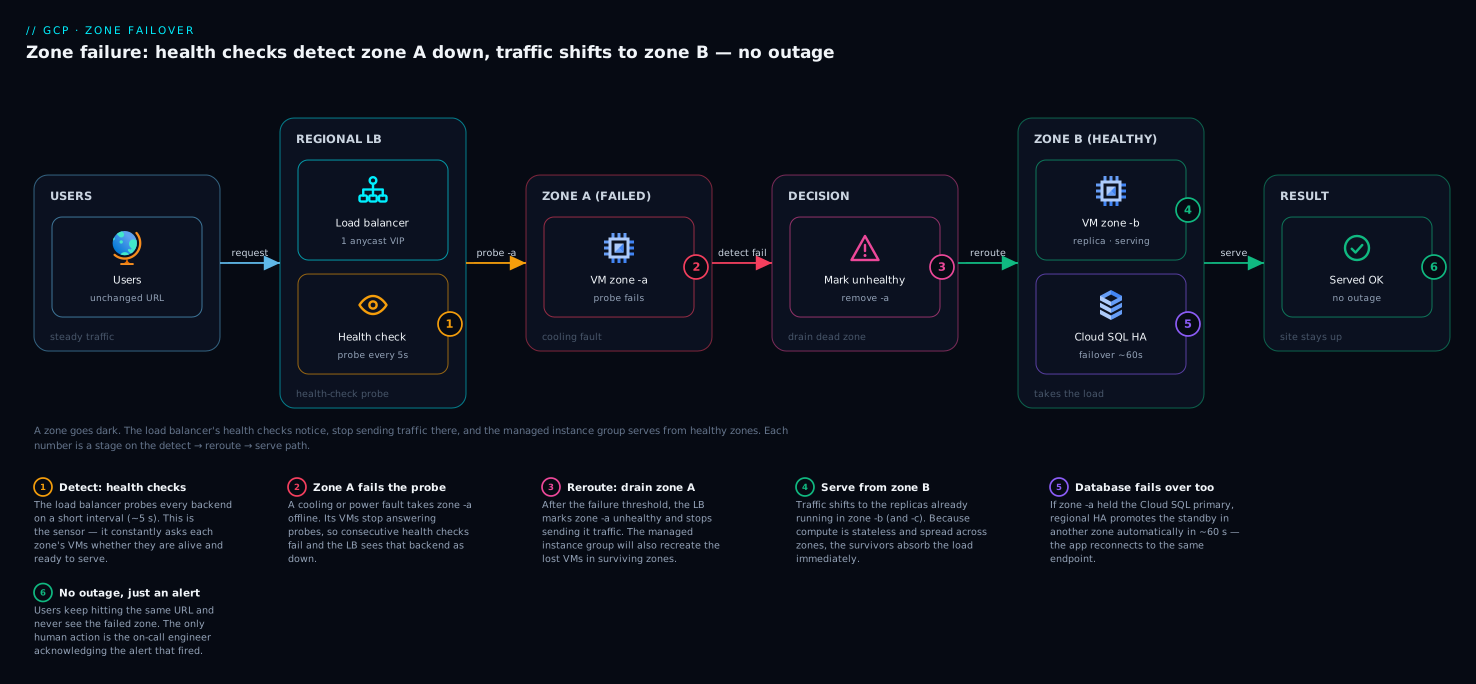
Now zoom into the moment a single zone fails. A global load balancer sits in front of a regional MIG with instances in three zones. Zone -a suffers a cooling failure and its instances stop answering health checks. The load balancer’s health check marks those backends unhealthy and stops routing traffic to them, sending all requests to the healthy instances in zones -b and -c. Simultaneously the regional MIG notices its target size is short and recreates the lost instances in the surviving zones; autoscaling adds more if load demands it. If the failed zone happened to hold the Cloud SQL primary, HA fails over to the standby in another zone and the app reconnects on the same connection name. From the user’s perspective: a brief blip at most, then normal service — with zero manual intervention. The on-call engineer’s only job is to acknowledge the alert.
Real-world scenario
Kirana Cart, a fictional but realistic Indian grocery-delivery startup, ran its first production stack the way its founding engineer had always run a server: one Compute Engine e2-standard-4 VM in asia-south1-a for the Node.js API, a self-managed PostgreSQL on a second e2-standard-4 VM in the same zone, and a single zonal Persistent Disk for the database. Static product images were served straight off the API VM’s local disk. Latency to their Mumbai-heavy user base was excellent and the monthly bill was a tidy ₹38,000. It ran flawlessly for five months — which is exactly how single-zone setups lull you.
Then asia-south1-a had a partial outage during a maintenance event. Both VMs were in that zone, so the API and the database went down together. Because the VMs were standalone (no MIG), nothing recreated them. Because the database disk was zonal, the team could not simply attach it elsewhere. Because images lived on the API VM’s disk, the storefront could not even render product photos from a cached page. The site was fully down for fifty-one minutes while an engineer manually spun up replacement VMs in asia-south1-b and restored the previous night’s database backup — losing four hours of orders placed since that backup. The post-incident number that stung: roughly ₹6 lakh in lost orders and a spike in support tickets, from a single datacenter event GCP had isolated to one zone.
The rebuild changed scope, not spend, by much. The API VM became a regional MIG of 3 e2-standard-4 instances across asia-south1-a/-b/-c behind a global external load balancer with a /healthz health check. PostgreSQL moved to regional Cloud SQL with --availability-type REGIONAL (a standby in a second zone, automatic failover) and nightly backups plus point-in-time recovery. Product images moved to a regional Cloud Storage bucket served through the same load balancer. The new bill came to about ₹61,000/month — higher, but a fraction of one outage’s cost.
The very next quarter, asia-south1-b had a brief incident — the zone that now held one-third of the MIG and, as it happened, the Cloud SQL standby. The result: the load balancer dropped the unhealthy zone-b instances and served everyone from -a and -c; the MIG rebuilt the lost instance within minutes; Cloud SQL was unaffected because the primary was elsewhere (and would have auto-failed-over if it had not been). Customer-visible downtime: none. The on-call engineer acknowledged a single alert and watched the MIG self-heal. The lesson Kirana Cart took away — and the one this article exists to teach — is that the redundancy was always there for the asking; they had simply been deploying into one fault domain by habit.
Advantages and disadvantages
| Advantages of scope-aware, multi-zone/region design | Disadvantages / costs to weigh |
|---|---|
| Survives single-zone (datacenter) failures automatically, with no manual intervention | More running instances and replicated data → higher bill than a single VM |
| Unlocks Google’s uptime SLAs (a single zonal VM has none) | More moving parts (MIG, LB, HA DB) → more to understand and operate |
| Self-healing: MIGs recreate lost instances; HA databases fail over | Cross-zone and especially cross-region data transfer can incur egress charges |
| Global front door puts every user at the nearest healthy region (latency + failover) | Not every service/SKU is available in every region — constrains placement |
| Multi-region storage survives whole-region loss with no app changes | Multi-region databases are genuinely complex (replicas, DR runbooks, possible data-loss windows) |
| Lets you place data for residency/compliance while still being resilient | Over-scoping (“multi-region everything to be safe”) wastes real money |
When each matters: zone-level resilience (regional MIG + regional Cloud SQL HA) is the right default for essentially any production workload — the cost is modest and the protection covers the failure you will actually experience. Region-level resilience (two regions + global LB + multi-region data) is worth its added cost and complexity only when a whole-region outage is genuinely unacceptable to the business — high-value transactional systems, regulated workloads with hard availability mandates. For dev/test, throwaway, or truly non-critical workloads, a single zonal VM is perfectly fine and the cheapest choice; do not pay for resilience you do not need.
Hands-on lab
This lab builds a zone-resilient web tier from scratch with a regional MIG behind a global load balancer, proves it survives losing instances in a zone, then tears everything down. It uses small e2-micro/e2-small machines to stay cheap. Replace the project/region if you like; commands assume asia-south1.
Step 0 — Set project and defaults.
gcloud config set project YOUR_PROJECT_ID
gcloud config set compute/region asia-south1
Step 1 — Create a firewall rule so health checks and HTTP can reach the VMs. Google’s health-check probes come from known ranges; allow them and port 80.
gcloud compute firewall-rules create allow-hc-http \
  --network default --direction INGRESS --action ALLOW \
  --rules tcp:80 \
  --source-ranges 130.211.0.0/22,35.191.0.0/16
Expected: Creating firewall...done. and the rule listed.
Step 2 — Create an instance template that serves a tiny page including the zone name. The startup script installs a one-line web server so each VM identifies its own zone — handy for seeing multi-zone spread.
gcloud compute instance-templates create web-tmpl \
  --machine-type e2-small \
  --image-family debian-12 --image-project debian-cloud \
  --tags http-server \
  --metadata startup-script='#! /bin/bash
    apt-get update && apt-get install -y python3
    ZONE=$(curl -s -H "Metadata-Flavor: Google" http://metadata/computeMetadata/v1/instance/zone | cut -d/ -f4)
    mkdir -p /var/www && echo "Hello from zone: $ZONE" > /var/www/index.html
    echo "OK" > /var/www/healthz
    cd /var/www && nohup python3 -m http.server 80 &'
Expected: Created ... web-tmpl.
Step 3 — Create a REGIONAL managed instance group spread across three zones.
gcloud compute instance-groups managed create web-mig \
  --template web-tmpl --size 3 \
  --region asia-south1 \
  --zones asia-south1-a,asia-south1-b,asia-south1-c
Expected: the group is created; after a minute the instances appear across all three zones.
Step 4 — Verify the instances really landed in different zones. This is the resiliency proof — three instances, three zones.
gcloud compute instance-groups managed list-instances web-mig \
  --region asia-south1 \
  --format="table(instance.basename(), instanceStatus, zone.basename())"
Expected: three rows, RUNNING, with zones asia-south1-a, -b, -c — one each.
Step 5 — Add a health check and named port so a load balancer can use the group.
gcloud compute health-checks create http web-hc --port 80 --request-path /healthz
gcloud compute instance-groups managed set-named-ports web-mig \
  --region asia-south1 --named-ports http:80
Step 6 — Build the global load balancer front door.
gcloud compute addresses create web-ip --global
gcloud compute backend-services create web-bes \
  --global --protocol HTTP --port-name http --health-checks web-hc
gcloud compute backend-services add-backend web-bes --global \
  --instance-group web-mig --instance-group-region asia-south1
gcloud compute url-maps create web-map --default-service web-bes
gcloud compute target-http-proxies create web-proxy --url-map web-map
gcloud compute forwarding-rules create web-fr --global \
  --target-http-proxy web-proxy --ports 80 --address web-ip
Step 7 — Get the IP and test it. Allow a few minutes for the LB to provision and backends to pass health checks.
IP=$(gcloud compute addresses describe web-ip --global --format="value(address)")
echo "Front door: http://$IP"
# Repeat a few times; responses may come from different zones
curl -s "http://$IP"
Expected: Hello from zone: asia-south1-a (or -b/-c) — proof traffic is balancing across zones.
Step 8 — Simulate a zone failure by deleting an instance and watch self-healing. Delete one VM (standing in for a lost zone’s instance) and confirm the MIG recreates it.
# Grab one instance name and delete it
VICTIM=$(gcloud compute instance-groups managed list-instances web-mig \
  --region asia-south1 --format="value(instance.basename())" | head -n1)
gcloud compute instances delete "$VICTIM" --zone asia-south1-a --quiet

# Watch the group restore its target size (re-run a few times)
gcloud compute instance-groups managed list-instances web-mig \
  --region asia-south1 \
  --format="table(instance.basename(), instanceStatus, zone.basename())"
Expected: the group briefly shows 2 instances, then a new one appears (status RECREATING → RUNNING) to restore 3 — the site never stopped answering on the LB IP.
Step 9 — Validation checklist. You have proven zone resilience if: (a) Step 4 showed instances in three distinct zones; (b) Step 7’s curl returned different zone names; © Step 8 showed the MIG recreate the deleted instance automatically while the front-door IP kept responding.
Step 10 — Teardown (delete in reverse dependency order to avoid “resource in use” errors).
gcloud compute forwarding-rules delete web-fr --global --quiet
gcloud compute target-http-proxies delete web-proxy --quiet
gcloud compute url-maps delete web-map --quiet
gcloud compute backend-services delete web-bes --global --quiet
gcloud compute addresses delete web-ip --global --quiet
gcloud compute instance-groups managed delete web-mig --region asia-south1 --quiet
gcloud compute health-checks delete web-hc --quiet
gcloud compute instance-templates delete web-tmpl --quiet
gcloud compute firewall-rules delete allow-hc-http --quiet
Expected: each delete returns ...done.; a final gcloud compute instances list shows nothing left from the lab. Tearing down promptly keeps this lab within a few rupees.
Common mistakes & troubleshooting
The failures below are the ones beginners actually hit. Scan the table, then read the detail for the row that matches.
| # | Symptom | Root cause | How to confirm | Fix |
|---|---|---|---|---|
| 1 | Site fully down when one datacenter has an issue | Everything in one zone (single point of failure) | gcloud compute instances list — all VMs share one zone |
Move compute to a regional MIG across ≥2 zones |
| 2 | DB unreachable after a zone blip; data frozen | Cloud SQL availabilityType = ZONAL |
gcloud sql instances describe ... --format="value(settings.availabilityType)" |
gcloud sql instances patch --availability-type REGIONAL |
| 3 | “MIG won’t recreate my VM in another zone” | The MIG is zonal, not regional | gcloud compute instance-groups managed list shows a zone, not a region |
Recreate as a regional MIG with --region + --zones |
| 4 | Lost the DB disk’s data when the zone failed | Zonal Persistent Disk, no replica | gcloud compute disks describe ... shows one zone |
Use a regional PD (--replica-zones) or managed DB HA |
| 5 | Can’t create a VM/SKU in the chosen region | That machine type/service isn’t in the region | gcloud compute machine-types list --zones <zone> returns nothing |
Pick a region that has it, or a different machine family |
| 6 | Tried to “move” a bucket to multi-region — no option | Bucket location is immutable after creation | gcloud storage buckets describe ... --format="value(location)" |
Create a new bucket with the desired location and copy objects |
| 7 | Surprise data-transfer charges appear | Cross-region (or cross-zone) egress between components | Billing → check egress SKUs; components span regions | Keep chatty components in one region; only span regions deliberately |
| 8 | LB serves errors right after creation | Backends not yet healthy / wrong health-check path | gcloud compute backend-services get-health web-bes --global |
Wait for health checks; fix /healthz path & firewall |
| 9 | Health checks all fail; no traffic served | Firewall blocks Google probe ranges | No allow rule for 130.211.0.0/22,35.191.0.0/16 |
Add the firewall rule from the lab Step 1 |
| 10 | “Region failover didn’t happen” during a region outage | HA is single-region; no second region/replica configured | Only one region has backends; Cloud SQL has no cross-region replica | Add a second region behind the LB; add a cross-region read replica |
| 11 | Two projects’ “zone a” assumed co-located | Zone-letter→datacenter mapping is per project | (Design assumption, not a command) | Never assume cross-project zone co-location; spread explicitly |
| 12 | Paying for multi-region but don’t need it | Over-scoped for the actual requirement | Review which data truly needs region survival | Downgrade non-critical data to regional; reserve multi-region for must-survive data |
1. Everything in one zone. The classic. A single zone is a single fault domain; when it has an issue your whole stack shares its fate. Confirm with gcloud compute instances list — if every VM’s zone column is identical, you have a single point of failure. Fix by replacing standalone VMs with a regional MIG so instances span at least two zones and self-heal.
2. Cloud SQL left as ZONAL. A single Cloud SQL instance has no standby — a zone problem takes the database down and only a backup restore brings it back. Confirm with --format="value(settings.availabilityType)"; ZONAL is the red flag. Fix by patching to REGIONAL, which adds the standby and automatic failover (and remember: HA is not a backup — keep PITR on too).
3. A zonal MIG that “won’t move.” People create a MIG but use the zonal form and then wonder why it never rebuilds instances in another zone after a zone loss. Confirm with gcloud compute instance-groups managed list — a zone value means zonal. Fix by recreating it regionally (--region plus --zones).
7. Surprise egress charges. Spreading components across regions (or sometimes zones) means data crossing the network, and cross-region traffic is billed. Confirm in Billing under the network-egress SKUs. Fix by keeping latency-sensitive, high-traffic component pairs (app ↔ database) in the same region, and only spanning regions where you deliberately intend to (DR replica, multi-region storage).
9. Health-check firewall. Google’s load-balancer and health-check probes originate from 130.211.0.0/22 and 35.191.0.0/16. If your firewall does not allow those ranges to your VMs, every backend is marked unhealthy and the LB serves nothing. Confirm with gcloud compute backend-services get-health (all UNHEALTHY). Fix with the allow rule from lab Step 1.
Best practices
- Default to regional, not zonal, for anything in production. Make “regional MIG + regional Cloud SQL HA” your reflex for production compute and databases; reserve single zonal resources for dev/test and truly disposable workloads.
- Run a MIG with at least 3 instances across 3 zones where the region has three, so losing one zone costs ≤ 1/3 of capacity and autoscaling refills it.
- Always front production compute with a load balancer + health check, even within one region — it removes unhealthy instances and is the seam you later extend to a second region.
- Enable Cloud SQL HA (
--availability-type REGIONAL) and keep automated backups + PITR. HA covers a zone failure; backups cover human error and corruption — you need both. - Pick your region for users, residency, and feature availability first; let cost break ties. Verify the region has the machine types and services you need before committing.
- Choose Cloud Storage location by survival need: regional for region-local low-latency assets, multi-region only when objects must survive a whole-region loss.
- Audit for hidden single points of failure with the one-line
describechecks (VM zone, MIG region vs zone, Cloud SQLavailabilityType, disk zone) before you call a stack “production-ready.” - Keep chatty component pairs in the same region to avoid cross-region latency and egress; span regions deliberately, for resilience, not by accident.
- Add region-level resilience only where the business mandates it. Two regions + global LB + multi-region data is powerful and pricey — apply it to must-survive systems, not to everything.
- Make compute stateless so a failed instance can be replaced freely; push state into managed, replicated services (Cloud SQL, Cloud Storage) rather than onto a VM’s local disk.
- Test a zone failure (delete an instance, as in the lab) so you have seen the self-healing before a real incident, not just trusted it.
Security notes
Resiliency and security overlap more than beginners expect — both are about removing single points of failure, just of different kinds.
- Health-check and LB firewall ranges are an allow-list, not a blanket open. Allow only
130.211.0.0/22and35.191.0.0/16for probes; do not open port 80/443 to0.0.0.0/0on the instances if a load balancer fronts them — let the LB be the public surface and keep backends private. - Prefer private backends behind the load balancer. Instances can sit on internal IPs with no public address, reachable only via the LB, shrinking the attack surface while staying highly available.
- Replication respects residency — verify it. A multi-region bucket replicates within its continent (
eustays in EU regions); confirm the multi-region/dual-region you choose keeps regulated data inside the required jurisdiction. - Encrypt everywhere by default. Persistent Disks, Cloud SQL, and Cloud Storage are encrypted at rest by Google-managed keys automatically; for stricter control use customer-managed keys (CMEK) — note CMEK keys are themselves regional, so plan key location alongside data location.
- Least privilege on the operators of resilient infrastructure. Creating/deleting MIGs, load balancers and databases is powerful; grant those roles narrowly. See Google Cloud IAM Explained Simply for the member/role/binding model.
- A standby is not a backup, and a backup is a security control. HA protects against hardware failure; immutable, access-controlled backups protect against ransomware, malicious deletion, and human error. Keep both, and lock down who can delete backups.
Cost & sizing
What actually drives the bill when you add resilience, and how to right-size it:
- Instance count dominates compute cost. A regional MIG of 3 instances costs ~3× a single VM of the same type — that is the price of surviving a zone loss with capacity to spare. Right-size by running the smallest machine type and lowest instance count that meets measured load, and let autoscaling add instances only at peak rather than running peak capacity 24/7.
- Cloud SQL HA roughly doubles database cost because you pay for the standby as well as the primary. It is almost always worth it for a production database; a single instance is appropriate only for dev/test.
- Cross-region data transfer (egress) is metered. Traffic between regions — replication, a cross-region read replica, app-in-region-A talking to data-in-region-B — incurs per-GB egress. Keep tightly-coupled components co-located; budget egress explicitly for any deliberate multi-region design.
- Storage location changes the rate. Multi-region and dual-region storage cost more per GB than regional, and you pay for the redundancy. Use regional buckets for assets that only need zone-level survival; reserve multi-region for objects that must survive a region loss.
- The global load balancer has a modest hourly + per-request/data component — small relative to compute, and it buys you both global low-latency entry and region failover.
A rough monthly picture for a small zone-resilient production web app in asia-south1 (illustrative INR — verify with the pricing calculator):
| Component | Sizing | Rough INR / month | What it buys |
|---|---|---|---|
Regional MIG (3 × e2-standard-2) |
3 instances across 3 zones, autoscale to 6 | ~₹30,000–40,000 | Zone-failure survival + capacity headroom |
Regional Cloud SQL HA (db-custom-2-7680) |
Primary + standby in another zone | ~₹18,000–24,000 | Auto-failover database |
| Global external Load Balancer | One global IP + modest traffic | ~₹1,500–3,000 | Global entry + health-based routing |
| Regional Cloud Storage | Static assets, regional bucket | ~₹500–1,500 | Zone-resilient object storage |
| Single zonal baseline (for contrast) | 1 VM + 1 self-managed DB VM | ~₹15,000–20,000 | No resilience — the trap |
The honest takeaway: zone-level resilience for a small app costs roughly 1.5–2× a fragile single-zone setup — and a single avoided outage (recall Kirana Cart’s ₹6 lakh) pays for years of it. Region-level resilience (a second region) roughly doubles the resilient figure again; spend it only where a region outage is genuinely unacceptable.
Interview & exam questions
1. What is the difference between a region and a zone in GCP? A region is a geographic area (e.g. asia-south1, Mumbai); a zone is one physically isolated datacenter within a region (e.g. asia-south1-a) with its own independent power, cooling and networking. A region contains multiple zones that are isolated from each other but close enough for low-latency replication. You spread across zones to survive a datacenter failure and across regions to survive a metro-wide one.
2. Name the four resource scopes and what failure each survives. Zonal (one zone — survives nothing beyond the zone), regional (all zones in a region — survives a single zone failing), multi-regional (several regions in a continent — survives a region failing), and global (planet-wide, e.g. the load balancer — not tied to one location). You build resilient systems by placing each layer at the right scope.
3. Why does a single Compute Engine VM have no uptime SLA? Because Google only guarantees uptime for deployments that themselves tolerate a zone failure — instances across two or more zones (e.g. a regional MIG). A lone VM is a single point of failure by definition, so there is nothing for Google to guarantee. Deploy across zones and the SLA applies.
4. How do you make a compute tier survive a zone failure? Use a regional managed instance group that spreads instances across multiple zones, front it with a load balancer and health check, and enable autohealing/autoscaling. When a zone fails, the LB stops routing to unhealthy instances and the MIG recreates the lost ones in surviving zones automatically.
5. What does --availability-type REGIONAL do for Cloud SQL? It turns a single-zone instance into a high-availability one: Google runs a synchronously-replicated standby in a different zone and fails over automatically if the primary’s zone has a problem, keeping the same connection name. It protects against a zone failure — but it is single-region and is not a substitute for backups.
6. Does Cloud SQL HA protect against a whole-region outage? No. HA is within one region (primary + standby in two zones of that region). To survive a region outage you add a cross-region read replica that you promote during a regional disaster — a deliberate DR step, not the automatic failover HA provides.
7. How does a global external load balancer enable region failover? It advertises a single anycast IP worldwide and routes each user to the nearest healthy backend across multiple regions. If a whole region’s backends fail their health checks, it stops sending traffic there and serves everyone from the surviving region — no DNS change or manual cutover.
8. What are the three location types for a Cloud Storage bucket and which survive a region loss? Regional (one region — survives a zone loss only), dual-region (two specific regions — survives a region loss), and multi-region (multiple regions in a continent — survives a region loss). The location is chosen at creation and is immutable.
9. Your app’s users are all in India and a law requires data to stay in India. Which regions, and what overrides what? Use asia-south1 (Mumbai) and/or asia-south2 (Delhi). Data residency overrides latency and cost — even if another region were faster or cheaper, the legal requirement forces an India region. For region-failure survival within India, a Delhi+Mumbai dual-region/replica keeps data on-shore.
10. What is a “fault domain” and why does it matter? A fault domain is the set of resources that fail together when one thing breaks — a zone is one fault domain, a region a larger one. Resiliency design is the practice of spreading your stack across fault domains so no single failure takes down the whole application. Spread across zones to survive a zone, across regions to survive a region.
11. When should you NOT use multi-region? When the workload doesn’t need to survive a whole-region outage — dev/test, internal tools, or any system where a rare region event is tolerable. Multi-region adds real cost (replication, egress, higher storage rates) and complexity; over-scoping “to be safe” is a common waste. Get zone-level resilience right first.
12. How can you tell whether an existing MIG is zonal or regional? Run gcloud compute instance-groups managed list: a regional MIG shows a region, a zonal one shows a zone. Only a regional MIG spreads instances across zones and recreates them elsewhere after a zone loss.
These map to the Google Cloud Digital Leader (cloud concepts, regions/zones, reliability) and the Associate Cloud Engineer (ACE) exams (deploying compute, configuring MIGs, Cloud SQL HA, load balancing). The resilient-architecture reasoning also underpins the Professional Cloud Architect exam’s availability-and-DR design objectives. A compact cert mapping:
| Question theme | Primary cert | Objective area |
|---|---|---|
| Region/zone/scope definitions | Cloud Digital Leader | Core infrastructure & reliability concepts |
| Regional MIG, autohealing | Associate Cloud Engineer | Deploying & managing Compute Engine |
| Cloud SQL HA, backups | Associate Cloud Engineer | Configuring data solutions |
| Global LB, region failover | Professional Cloud Architect | Designing for high availability & DR |
| Choosing a region (residency/latency/cost) | Cloud Digital Leader / PCA | Solution & compliance design |
Quick check
asia-south1is Mumbai. Isasia-south1-ba region or a zone, and what does it have that’s independent fromasia-south1-a?- You have one Compute Engine VM running production. A cooling failure hits its zone. What happens, and what one change would have prevented the outage?
- Your Cloud SQL
describeshowsavailabilityType: ZONAL. What does that mean for a zone failure, and what command fixes it? - True or false: a multi-region Cloud Storage bucket survives a whole-region outage, but a regional bucket does not.
- Why does a single, standalone VM have no Compute Engine uptime SLA?
Answers
- A zone — one physically isolated datacenter inside the Mumbai region, with its own independent power, cooling and networking separate from
asia-south1-a, so one can fail without the other. - The VM (and your app) goes down with the zone and nothing recreates it — a standalone VM is zonal. The fix: run a regional managed instance group across ≥2 zones behind a load balancer, so capacity self-heals in surviving zones.
ZONALmeans there is no standby — a zone failure takes the database down until you restore a backup. Fix withgcloud sql instances patch <name> --availability-type REGIONAL, which adds an auto-failover standby in another zone (and keep backups/PITR — HA is not a backup).- True. Multi-region (and dual-region) buckets replicate across regions and survive a region loss; a regional bucket is tied to one region and survives only a zone loss within it.
- Because Google only guarantees uptime for deployments that tolerate a zone failure (instances across ≥2 zones). A lone VM is a single point of failure, so there is nothing to guarantee; spread across zones and the SLA applies.
Glossary
- Region — a geographic area where Google has datacenter capacity (e.g.
asia-south1= Mumbai); contains multiple zones. - Zone — one physically isolated datacenter within a region (e.g.
asia-south1-a) with independent power, cooling and networking. - Fault domain — the set of resources that fail together when one thing breaks; a zone is one, a region a larger one.
- Zonal resource — a resource living in exactly one zone (e.g. a Compute Engine VM, a zonal Persistent Disk); dies with that zone.
- Regional resource — a resource spread/replicated across zones in one region (e.g. regional MIG, regional Cloud SQL, regional PD); survives a single zone failing.
- Multi-regional resource — a resource replicated across regions in a continent (e.g. a multi-region Cloud Storage bucket); survives a region failing.
- Global resource — a resource that exists planet-wide and isn’t tied to one location (e.g. the global load balancer, a VPC network, Cloud DNS).
- Managed instance group (MIG) — a set of identical VMs from a template, kept at a target size, that recreates failed instances; regional MIGs spread across zones.
- Instance template — the immutable blueprint (machine type, image, tags, startup script) a MIG uses to create every VM.
- Autohealing — a MIG feature that recreates instances failing an application health check.
- Cloud SQL high availability (HA) —
availabilityType: REGIONAL; a synchronously-replicated standby in another zone with automatic failover. - Cross-region read replica — a Cloud SQL replica in a different region you promote during a regional disaster (manual DR, not automatic failover).
- Regional Persistent Disk — a block disk synchronously replicated to two zones in a region; survives a zone loss.
- Global external load balancer — a single anycast IP advertised worldwide that routes users to the nearest healthy backend across regions.
- Anycast IP — one IP address advertised from many locations; users reach the nearest one automatically.
- Data residency — the requirement that data physically remain within a specific country/jurisdiction; drives region choice over latency/cost.
- SLA (Service Level Agreement) — Google’s contractual uptime commitment for a service (with credits if missed); depends on deploying for redundancy.
- Latency — round-trip time between users and resources, governed mostly by physical distance; minimised by placing resources near users.
Next steps
You can now place each layer of a stack at the right scope and make it survive the failures that actually happen. Build outward:
- Start here if “region vs zone” is still fuzzy: GCP Regions and Zones Explained: What They Really Mean for Availability and Latency — the pure-concepts companion to this design-focused article.
- Related: GCP’s Global VPC Explained: Why Your Network Spans the Planet by Default — the global network model that makes global load balancing and multi-region designs possible.
- Related: Cloud Storage Classes Decoded: Standard, Nearline, Coldline, Archive — and Lifecycle Rules — pair location (regional/multi-region) with the right storage class.
- Related: GCP Compute: Compute Engine, Cloud Run, GKE and Cloud Functions — pick the compute model, then apply this scope thinking to it.
- Related: gcloud CLI Quickstart: The Essential Commands That Cover 90% of Your Day — fluency with the commands used throughout this lab.
- Related: Google Cloud IAM Explained Simply: Members, Roles, and Bindings — least-privilege control over who can change your resilient infrastructure.