Quick take: Compute Engine is your VM when you need control. Cloud Run is your fastest path from a container to an HTTPS URL. GKE is Kubernetes when you genuinely need Kubernetes. Cloud Functions is for event-driven snippets. App Engine is the original opinionated PaaS. Pick the abstraction that matches how much infrastructure you actually want to own — not the one your team happens to know.
A retail company ran every workload on Compute Engine because that is what the team knew. They baked custom OS images, hand-rolled startup scripts for trivial APIs, wrote their own autoscaling glue, and spent one engineer-week a month patching kernels and rotating images. The bill was high and, worse, the toil was high — most of the team’s time went into keeping VMs alive rather than shipping features. When they finally moved their stateless APIs to Cloud Run, deployment time dropped from hours to under two minutes, the VMs-to-patch count fell to zero for those services, and the monthly compute spend for that tier dropped by roughly 60% because the services now scaled to zero overnight. The machine-learning training jobs, though, stayed on Compute Engine — they needed specific GPUs, custom NVIDIA drivers, and 200 GB of local SSD scratch space that no serverless product offers. That single migration is the whole lesson of this article in miniature: GCP gives you compute at five very different abstraction levels, and the art is matching each workload to the right rung of the ladder.
This article is the map of that ladder. We treat Compute Engine, Cloud Run, GKE, Cloud Functions and App Engine not as five competing products but as five points on one axis — control on one end, abstraction on the other — where moving toward abstraction trades knobs for the elimination of toil. You will learn what each service actually is, how each one scales (and whether it scales to zero), what drives the bill, the machine families and types behind Compute Engine and GKE, how Spot and preemptible VMs cut cost by up to 91%, how managed instance groups (MIGs) and autoscaling turn raw VMs into a self-healing fleet, and — the payoff — a decision matrix you can run a workload through in thirty seconds. Every operation gets real gcloud and, where it applies, Terraform. The comparisons, machine specs and pricing drivers are all laid out as scannable tables — read the prose once, then keep the tables open when you size your next service.
By the end you will stop defaulting. When a new workload lands on your desk you will know whether it wants a VM you fully own, a container that scales to zero behind an HTTPS URL, a Kubernetes cluster because you have Kubernetes-shaped problems, a function that fires on an event, or a PaaS that just runs your app. Knowing which — and being able to defend it with cost numbers and operational trade-offs — is what separates an architect from someone who runs everything on the one service they already know.
What problem this solves
Every cloud platform offers compute at multiple abstraction levels, but the cost of choosing wrong is rarely visible until months later. Choose too much control (everything on Compute Engine) and you pay in toil: OS patching, image management, autoscaling glue, hardening, and the salaries of the people doing all of it. Choose too much abstraction for a workload that doesn’t fit (a long-running stateful process forced onto Cloud Functions) and you pay in workarounds, timeouts and architecture contortions. Choose Kubernetes when you have three services and no platform team and you pay in operational complexity that buys you nothing. The pain is real and it compounds.
What breaks without a clear mental model: teams standardise on the wrong default. A startup adopts GKE because a senior engineer used it elsewhere, then spends six months learning Kubernetes operations instead of building product. An enterprise mandates Compute Engine for “consistency” and ends up with hundreds of barely-utilised VMs running stateless web apps that should cost a tenth as much on Cloud Run. A developer reaches for Cloud Functions for a 20-minute batch job and fights the timeout ceiling forever. None of these are wrong tools — they are right tools pointed at the wrong workloads.
Who hits this: essentially every team on GCP. It bites hardest on teams migrating from on-premises (who reach for VMs out of habit), teams over-rotated on one technology (Kubernetes shops who orchestrate everything including a static website), and cost-sensitive teams who never realised that an idle Cloud Run service costs literally nothing. The fix is not a single “best” service — it is a framework for matching the workload’s real requirements (statefulness, runtime length, scaling profile, control needs, team capability) to the rung of the ladder that fits.
To frame the whole field before the deep dive, here is the entire GCP compute spectrum at a glance — the five services, what each one fundamentally is, and the one-line reason you’d reach for it:
| Service | What it fundamentally is | Abstraction level | Scales to zero? | Reach for it when… |
|---|---|---|---|---|
| Compute Engine | Raw virtual machines on Google’s infrastructure | Lowest (you own the OS) | No (VMs are always-on unless you stop them) | You need OS control, GPUs, specific licenses, or long-lived stateful processes |
| Google Kubernetes Engine (GKE) | Managed Kubernetes — container orchestration | Low-to-medium (you own the cluster, Google owns the control plane) | Pods can; nodes can scale to zero (Autopilot/node-auto-provisioning) | You have Kubernetes-shaped problems: many services, complex scheduling, the K8s ecosystem |
| App Engine | Opinionated platform-as-a-service for web apps | Medium-high | Standard: yes; Flexible: no (min 1 VM) | You want a managed runtime for a web app and accept the platform’s opinions |
| Cloud Run | Serverless containers behind an HTTPS endpoint | High | Yes (default) | Stateless HTTP services or jobs in a container, fast deploys, pay-per-use |
| Cloud Functions | Functions-as-a-service — event-driven snippets | Highest | Yes (default) | Short event handlers: a Pub/Sub message, a Storage upload, an HTTP webhook |
Learning objectives
By the end of this article you can:
- Place any of the five GCP compute services on the control-vs-abstraction axis and explain precisely what each rung trades away and gains.
- Choose between Compute Engine, Cloud Run, GKE, Cloud Functions and App Engine for a concrete workload, defending the choice with statefulness, runtime-length, scaling-profile and team-capability criteria.
- Read the Compute Engine machine families (E2, N2/N2D, C3/C4, T2D/T2A, M-series, A-series/G2) and pick a machine type by vCPU, memory and workload shape.
- Cut VM cost with Spot VMs (and legacy preemptible), understanding the eviction model, the up-to-91% discount, and which workloads tolerate it.
- Turn raw VMs into a self-healing, autoscaling fleet with managed instance groups (MIGs), instance templates, health checks, and CPU/load-balancer/metric-based autoscaling.
- Explain the scaling model of each serverless option — Cloud Run concurrency and instance autoscaling, scale-to-zero, cold starts, min-instances — and how that drives both latency and cost.
- Reason about the pricing model behind each service (per-second VM billing, committed-use and sustained-use discounts, Cloud Run’s request/CPU/memory model, GKE cluster-management fees, Cloud Functions invocation pricing) and right-size accordingly.
- Run a real workload through a decision matrix and land on the correct service the first time.
Prerequisites & where this fits
You should be comfortable with cloud fundamentals: what a virtual machine is, what a container is (and ideally have built a Docker image), and the difference between a stateless and a stateful workload. Familiarity with running gcloud in Cloud Shell or a configured local SDK helps, as does a basic grasp of HTTP, autoscaling concepts, and what “serverless” means (no servers to manage yourself — Google still runs servers). You do not need Kubernetes expertise; this article explains where GKE fits without requiring you to already know it.
This article sits at the foundation of the GCP compute track and is upstream of nearly everything you’ll build. Once you’ve chosen a compute service here, the deeper single-service articles take over. For the serverless-container path, Cloud Run Explained: Serverless Containers That Scale to Zero (and Back) Without Kubernetes goes far deeper on concurrency, cold starts and revisions. For Kubernetes, GKE Autopilot vs Standard vs Enterprise: Choose Your Kubernetes Mode and GKE Autopilot vs Standard: Which Google Kubernetes Engine Mode Should You Actually Use? drill into cluster modes. The decision itself is also covered, from a slightly different angle, in GCP Cloud Run vs GKE vs Compute Engine: Choose the Right Compute. Underpinning all compute choices are regions and zones — GCP Regions and Zones Explained: What They Really Mean for Availability and Latency — and identity, where every workload runs as something via GCP IAM and Service Accounts: Roles, Bindings and Least Privilege. If you’re coming from another cloud, the translation maps make this faster: GCP for AWS Engineers and GCP for Azure Engineers.
A quick map of who typically owns each compute service in a real org, so you know whose problem each service becomes:
| Service | Who operates it day-to-day | What they own | What Google owns |
|---|---|---|---|
| Compute Engine | Platform / infra / SRE team | OS, patching, images, scaling glue, security hardening | Hypervisor, hardware, network, live migration |
| GKE Standard | Platform team + app teams | Node pools, K8s objects, upgrades (with help), add-ons | Control plane, node auto-repair, managed upgrades |
| GKE Autopilot | App teams (mostly) | Workloads (pods, services), resource requests | Nodes, scaling, node security, control plane |
| App Engine | App teams | Code, app.yaml, scaling config |
Runtime, OS, scaling, patching, the entire platform |
| Cloud Run | App teams | Container image, service config, concurrency | Everything below the container |
| Cloud Functions | App teams / developers | Function code + dependencies | Build, runtime, scaling, everything else |
Core concepts
Five mental models make every later decision in this article obvious.
The control-vs-abstraction axis is the master variable. Picture a horizontal line. On the far left sits Compute Engine, where you own everything from the OS up — maximum control, maximum responsibility. On the far right sits Cloud Functions, where you hand Google a snippet and it handles everything else — maximum abstraction, almost no control. Every GCP compute service is a point on that line, and moving rightward systematically trades knobs for the elimination of toil. There is no “best” position, only the one that matches a given workload: an ML training job with custom drivers belongs on the left, a webhook handler on the far right, most stateless web services in the Cloud Run zone right of centre. The biggest mistake teams make is anchoring at one position (usually the far left, out of habit) and dragging every workload to it.
Statefulness and runtime length route the decision more than anything else. Two questions answer most placements. Does the workload hold state on the instance (in-memory session, local disk, a long-lived connection)? If yes, lean toward VMs, GKE StatefulSets or App Engine Flexible — the serverless options assume disposable, interchangeable instances. How long does one unit of work run? A 50-millisecond request fits anywhere; a 9-minute job fits Cloud Run jobs or Cloud Functions (2nd gen); a 6-hour batch job needs Compute Engine, a GKE Job, or a long-running Cloud Run job — never Cloud Functions. Answer these two and the candidate set usually narrows to two services.
Scale-to-zero is the cost game-changer, and only some services play it. A service that scales to zero costs nothing when idle — compute drops to zero (you may still pay for storage or a reserved minimum). Cloud Run, Cloud Functions, App Engine Standard and GKE pods (with the right setup) can scale to zero. Compute Engine VMs and App Engine Flexible cannot — a running VM bills whether it serves one request or a million until you stop it. For spiky, low-average or dev/test workloads, scale-to-zero is the difference between a ₹200/month bill and a ₹6,000/month one. The catch is the cold start: the first request to a scaled-to-zero service pays the start-up latency while an instance spins up.
Serverless does not mean “no servers” — it means “not your servers, and you pay only for use.” Google still runs the servers under Cloud Run and Cloud Functions; you just never see, patch or scale them. The defining properties: you deploy units of work (a container, a function) not machines; the platform scales them automatically including to zero; and you are billed for consumption (requests, CPU-seconds, GB-seconds, invocations) not allocated capacity. This is why serverless is cheap for spiky workloads and can be more expensive than a VM at steady high utilisation — at constant high load, a committed VM beats per-request pricing.
Managed instance groups turn raw VMs into a platform feature. A single VM is a pet — it has a name, it can die, and nothing brings it back. A managed instance group (MIG) built from an instance template is a herd: it maintains a target number of identical VMs, recreates any that fail a health check (autohealing), scales the count on metrics (autoscaling), and rolls out new templates gradually. With a MIG plus a load balancer, Compute Engine gains much of what makes serverless attractive — self-healing and autoscaling — while keeping full OS control. It’s why “Compute Engine” in practice usually means “a MIG,” not a lone VM.
The spectrum, side by side
Before the deep sections, pin down every service against the dimensions that decide placement. This is the mental model in one table; the rest of the article is the detail behind each cell:
| Dimension | Compute Engine | GKE | App Engine | Cloud Run | Cloud Functions |
|---|---|---|---|---|---|
| Unit you deploy | A VM (or a MIG of VMs) | Containers (pods) on a cluster | App code + app.yaml |
A container image | A function (code + deps) |
| You manage the OS? | Yes | Standard: yes (nodes); Autopilot: no | No | No | No |
| Scales to zero? | No | Pods yes; nodes can | Standard yes / Flexible no | Yes | Yes |
| Max request/job duration | Unlimited (it’s a VM) | Unlimited | Standard ~10 min req; Flexible ~60 min | 60 min (request) / longer for jobs | 9 min (1st gen) / 60 min (2nd gen) |
| GPUs / custom hardware | Yes (full menu) | Yes (GPU node pools) | No | Yes (limited GPU support) | No |
| State on instance | Yes (persistent disk) | Yes (StatefulSets, PVs) | Flexible only | No (stateless) | No (stateless) |
| Cold starts | None (always on) | None (pods running) | Standard: yes / Flexible: no | Yes (mitigate with min-instances) | Yes |
| Primary billing unit | vCPU+RAM per second | Nodes (VMs) + cluster fee | Instance-hours / instance-class | Requests + CPU/mem time | Invocations + CPU/mem time |
| Operational burden | Highest | High (Standard) / Medium (Autopilot) | Low | Very low | Lowest |
| Best fit | Full control, GPU, legacy, stateful | K8s ecosystem, many services | Managed web apps | Stateless HTTP / containerised jobs | Event-driven glue |
The control-versus-abstraction spectrum in depth
The single most useful thing you can internalise is where each service sits and what the move between them costs you. Think of it as a dial you turn from “I own everything” to “I own almost nothing.” Turning it toward abstraction is mostly a one-way win — you shed toil — until you hit a workload requirement the higher abstraction can’t satisfy (a GPU, a 6-hour run, OS-level access, a kernel module), at which point you must turn the dial back. The skill is turning it as far toward abstraction as the workload allows, and no further.
Here is the dial, position by position, with the concrete thing you gain and the concrete thing you give up at each step:
| Position (most → least control) | You gain by moving here (toward abstraction) | You give up | The wall you hit that forces you back |
|---|---|---|---|
| Compute Engine (bare VM) | — (this is the control anchor) | — | (nothing more controllable in this list) |
| Compute Engine + MIG | Autohealing, autoscaling, rolling updates | Per-instance pets; still patch the OS | — |
| GKE Standard | Container orchestration, scheduling, the K8s ecosystem | Cluster + node operations; a steep learning curve | Need raw OS/kernel access or non-container workloads |
| GKE Autopilot | Node management gone; pay per pod resource | Node-level customisation (DaemonSets limited, no privileged tweaks) | Need specific node shapes/customisation Standard allows |
| App Engine Flexible | Managed VMs running your container/runtime | Kubernetes flexibility; min 1 instance (no scale-to-zero) | Need orchestration of many interdependent services |
| App Engine Standard | Fully managed runtime, scale-to-zero, fast scaling | Runtime/library constraints; sandbox limits | Need a custom binary, a long job, or an unsupported runtime |
| Cloud Run | Any container, scale-to-zero, HTTPS in minutes, per-use billing | Long-lived state; background work outside a request (mitigated by jobs) | Need persistent local state or a process that must always run |
| Cloud Functions | Deploy a snippet, zero infra, event triggers built in | Everything but the function; tight time/size limits | Need anything longer/larger than a small handler |
A few practical truths about navigating this dial:
- Default to the right, justify moving left. Start by asking “could this be a Cloud Run service?” If yes, you’ve likely found the cheapest, lowest-toil home. Move left only when a specific requirement forces it.
- The biggest single jump in operational burden is the GKE boundary. Adopting Kubernetes brings a whole operational discipline — don’t cross it for fewer than a handful of services or without a team to own it.
- App Engine is the “forgotten middle.” It predates Cloud Run and overlaps with it heavily. For new container workloads Cloud Run is almost always the better choice; App Engine remains relevant for existing apps and teams who want its opinions (versions, traffic splitting,
app.yaml). - Cloud Run has quietly absorbed most of App Engine’s and many of Cloud Functions’ use cases — with services, jobs and functions all running on Cloud Run infrastructure, it is the centre of gravity of GCP serverless compute today.
Compute Engine deep dive: machine families, types, and the VM model
Compute Engine is raw infrastructure-as-a-service: you rent virtual machines on Google’s hardware, choose the OS, and own everything from there up. Its superpower is flexibility — any OS, any software, GPUs, TPUs, local SSDs, custom machine shapes — and its cost is toil: you patch, image, scale and secure. This section is for the workloads where the other services genuinely can’t help.
Machine families and types
A Compute Engine VM’s shape is its machine type, and machine types are grouped into families optimised for different workload profiles. Picking the right family is the first sizing decision and the one most people get wrong by defaulting to a general-purpose type for a memory-bound or compute-bound job. The families, what they’re for, and when to reach for each:
| Family | Series (examples) | Optimised for | vCPU:memory profile | Reach for it when… |
|---|---|---|---|---|
| General purpose | E2, N2, N2D, N4, C4 | Balanced price/performance for most workloads | ~4 GB per vCPU (varies) | Web/app servers, microservices, small-medium databases |
| Cost-optimised | E2 | Lowest cost, day-to-day workloads | Flexible, capped performance | Dev/test, low-traffic services, batch where cost matters |
| Compute optimised | C3, C4, H3 | Highest per-core performance | Lower memory per vCPU | Gaming servers, HPC, CPU-bound batch, ad serving |
| Memory optimised | M1, M2, M3, M4 | Very high memory per core | Up to ~30 GB+ per vCPU | Large in-memory databases, SAP HANA, big analytics |
| Accelerator (GPU/TPU) | A2, A3, A4 (GPU), G2 | Attached GPUs/accelerators | High memory + GPU | ML training/inference, rendering, scientific compute |
| Scale-out (Arm) | T2A, C4A | Price/performance on Arm | Balanced | Scale-out, cloud-native, Arm-compatible workloads |
Within a family you choose a machine type that fixes the vCPU and memory, named <series>-<type>-<vcpus> (for example e2-standard-4 = E2 family, standard type, 4 vCPUs). The type sub-categories control the memory-to-vCPU ratio:
| Type keyword | Memory per vCPU (typical) | Example | Use for |
|---|---|---|---|
micro / small / medium |
Shared-core, fractional | e2-micro, e2-small |
Tiny services, free-tier-eligible workloads |
standard |
~4 GB | n2-standard-8 (8 vCPU, 32 GB) |
Balanced general workloads |
highmem |
~8 GB | n2-highmem-8 (8 vCPU, 64 GB) |
Memory-bound: caches, in-memory DBs |
highcpu |
~1 GB | n2-highcpu-16 (16 vCPU, 16 GB) |
CPU-bound: batch, encoding, compute |
custom |
You choose | custom-6-20480 (6 vCPU, 20 GB) |
Right-size to exact need, avoid waste |
The custom machine type is an underused cost lever: if your workload needs 6 vCPUs and 20 GB, you don’t have to round up to a predefined n2-standard-8 (8 vCPU, 32 GB) and pay for unused capacity — you specify exactly --custom-cpu=6 --custom-memory=20GB. For oddly-shaped workloads this routinely saves 15–30%.
Creating and managing a VM
A minimal VM with gcloud:
# Create a general-purpose E2 VM with a Debian image
gcloud compute instances create web-vm-01 \
  --project=my-project \
  --zone=asia-south1-a \
  --machine-type=e2-standard-4 \
  --image-family=debian-12 \
  --image-project=debian-cloud \
  --boot-disk-size=30GB \
  --boot-disk-type=pd-balanced \
  --tags=http-server
The equivalent in Terraform, which is how you should manage anything beyond a throwaway:
resource "google_compute_instance" "web_vm" {
  name         = "web-vm-01"
  project      = "my-project"
  zone         = "asia-south1-a"
  machine_type = "e2-standard-4"
  tags         = ["http-server"]

  boot_disk {
    initialize_params {
      image = "debian-cloud/debian-12"
      size  = 30
      type  = "pd-balanced"
    }
  }

  network_interface {
    network = "default"
    access_config {} # ephemeral external IP
  }
}
The boot-disk type is itself a sizing decision — it sets the IOPS and throughput ceiling and a chunk of the cost:
| Disk type | Performance profile | Cost | Use for |
|---|---|---|---|
pd-standard |
HDD-backed, low IOPS | Cheapest | Cold/archival, sequential throughput, dev |
pd-balanced |
SSD, balanced IOPS/cost | Moderate | Most workloads (good default) |
pd-ssd |
SSD, high IOPS | Higher | Databases, latency-sensitive I/O |
pd-extreme / hyperdisk |
Highest, configurable IOPS | Highest | Demanding databases, provisioned IOPS |
| Local SSD | Physically attached NVMe, ephemeral | Per-disk | Scratch space, caches (data lost on stop) |
Spot VMs and preemptible VMs: cutting compute cost by up to 91%
A regular Compute Engine VM runs until you stop it, at the standard price. A Spot VM runs on Google’s spare capacity at a steep discount — historically 60–91% off the on-demand price — with one catch: Google can preempt (reclaim) it at any time, with about 30 seconds’ notice, when it needs the capacity back. For the right workloads this is the single biggest cost lever in Compute Engine.
Spot VMs are the current model; preemptible VMs are the older, legacy version with a hard 24-hour maximum lifetime. New workloads should use Spot. The eviction model and what tolerates it:
| Property | Spot VM | Preemptible VM (legacy) | Regular (on-demand) |
|---|---|---|---|
| Discount vs on-demand | ~60–91% | ~60–91% | 0% (baseline) |
| Maximum lifetime | No fixed limit (until preempted) | 24 hours hard cap | Unlimited |
| Preemption notice | ~30 seconds | ~30 seconds | Never preempted |
| Can be preempted? | Yes, anytime | Yes, anytime + forced at 24h | No |
| Best for | Fault-tolerant, restartable, batch | Same (legacy) | Stateful, always-on, latency-critical |
The decision of whether a workload can run on Spot comes down to one question: can it survive being killed with 30 seconds’ notice and restarted? If yes, take the discount. If no, don’t.
| Workload | Spot-safe? | Why |
|---|---|---|
| Batch data processing (checkpointed) | Yes | Restart from last checkpoint; minutes lost, not hours |
| CI/CD build runners | Yes | A killed build just re-runs |
| Stateless web tier behind a load balancer (with on-demand baseline) | Partly | Mix Spot + on-demand; LB drains evicted nodes |
| ML training with checkpointing | Yes | Resume from checkpoint; huge savings on long runs |
| Rendering / encoding farms | Yes | Per-frame/per-segment work re-queues |
| Production database | No | State loss / availability hit unacceptable |
| Latency-critical user-facing single instance | No | A 30-second eviction is a user-visible outage |
Creating a Spot VM is one flag:
# Spot VM — same as a normal VM plus the provisioning model and termination action
gcloud compute instances create batch-worker-01 \
  --zone=asia-south1-a \
  --machine-type=n2-standard-8 \
  --provisioning-model=SPOT \
  --instance-termination-action=DELETE \
  --image-family=debian-12 --image-project=debian-cloud
To handle the 30-second notice gracefully, your VM should listen for the preemption signal (delivered via the metadata server) and checkpoint or drain. The most powerful pattern is Spot VMs inside a MIG: the group keeps requesting capacity, so preempted instances are automatically recreated when capacity returns, giving you a fleet that’s mostly Spot-priced and self-replenishing.
Managed instance groups and autoscaling: production VMs without the pets
A lone VM is a liability — it can fail and nothing recovers it. A managed instance group (MIG) turns Compute Engine into a production-grade, self-healing, autoscaling platform. You define an instance template (machine type, image, disks, startup script, tags) and the MIG maintains a target number of identical VMs from it, recreating any that die and scaling the count to demand.
The features a MIG layers on raw VMs are exactly what makes serverless attractive — minus the OS abstraction:
| MIG feature | What it does | Why it matters |
|---|---|---|
| Instance template | Immutable blueprint for every VM in the group | Identical, reproducible instances; version your fleet |
| Autohealing | Recreates VMs that fail an application health check | Self-healing — a hung app gets replaced automatically |
| Autoscaling | Adds/removes VMs based on CPU, LB utilisation, or custom metrics | Match capacity to load; pay for what you use |
| Regional (multi-zone) MIG | Spreads instances across zones in a region | Survives a zonal outage |
| Rolling updates | Gradually replaces VMs with a new template | Zero/low-downtime deploys, canary, surge control |
| Load balancer integration | MIG is a backend; LB routes to healthy members | Front a fleet with one IP, drain on update |
Autoscaling policies
The MIG autoscaler decides the instance count. You pick the signal it scales on:
| Autoscaling signal | Scales on | Best for | Note |
|---|---|---|---|
| CPU utilisation | Average CPU across the group vs a target | CPU-bound workloads; simple default | Lagging signal; set sensible cooldowns |
| Load balancer utilisation | Serving capacity of the backend | HTTP services behind an LB | Ties scaling to real request load |
| Custom / Cloud Monitoring metric | Any metric you publish (queue depth, RPS) | Queue workers, custom signals | Most precise; needs the metric plumbed |
| Schedule-based | Time of day / known events | Predictable peaks (business hours) | Combine with metric-based for spikes |
| Min/max replicas | Hard floor and ceiling on count | Cost control + capacity guarantee | Always set max to bound the bill |
A regional MIG with CPU autoscaling, end to end:
# 1. Create an instance template (the blueprint)
gcloud compute instance-templates create web-template-v1 \
  --machine-type=e2-standard-4 \
  --image-family=debian-12 --image-project=debian-cloud \
  --tags=http-server \
  --metadata=startup-script='#! /bin/bash
    apt-get update && apt-get install -y nginx
    systemctl enable --now nginx'

# 2. Create a regional MIG from the template, base size 3
gcloud compute instance-groups managed create web-mig \
  --template=web-template-v1 \
  --size=3 \
  --region=asia-south1

# 3. Add CPU-based autoscaling: 3–10 instances, target 60% CPU
gcloud compute instance-groups managed set-autoscaling web-mig \
  --region=asia-south1 \
  --min-num-replicas=3 \
  --max-num-replicas=10 \
  --target-cpu-utilization=0.60 \
  --cool-down-period=90

# 4. Add autohealing with a health check (recreate unhealthy VMs)
gcloud compute health-checks create http web-hc \
  --port=80 --request-path=/healthz \
  --check-interval=10s --timeout=5s \
  --healthy-threshold=2 --unhealthy-threshold=3

gcloud compute instance-groups managed update web-mig \
  --region=asia-south1 \
  --health-check=web-hc \
  --initial-delay=120
The equivalent Terraform for the template and MIG (the core of a production fleet):
resource "google_compute_instance_template" "web" {
  name_prefix  = "web-template-"
  machine_type = "e2-standard-4"
  tags         = ["http-server"]

  disk {
    source_image = "debian-cloud/debian-12"
    auto_delete  = true
    boot         = true
  }
  network_interface {
    network = "default"
    access_config {}
  }
  lifecycle { create_before_destroy = true }
}

resource "google_compute_region_instance_group_manager" "web" {
  name               = "web-mig"
  region             = "asia-south1"
  base_instance_name = "web"
  version { instance_template = google_compute_instance_template.web.id }

  named_port {
    name = "http"
    port = 80
  }
}

resource "google_compute_region_autoscaler" "web" {
  name   = "web-autoscaler"
  region = "asia-south1"
  target = google_compute_region_instance_group_manager.web.id
  autoscaling_policy {
    min_replicas    = 3
    max_replicas    = 10
    cooldown_period = 90
    cpu_utilization { target = 0.6 }
  }
}
Cloud Run deep dive: serverless containers and the scaling model
Cloud Run is the fastest path from a container image to a production HTTPS endpoint, and for most stateless web services it is the right default on GCP today. You hand it a container that listens on a port; it runs that container, gives it a TLS URL, scales it from zero to many on traffic, and bills you for the CPU and memory time used plus the requests served. No VMs, no clusters, no OS.
Cloud Run comes in two shapes:
| Cloud Run resource | What it is | Triggered by | Scales to zero? |
|---|---|---|---|
| Cloud Run service | A container serving requests behind an HTTPS URL | HTTP requests, events (via Eventarc) | Yes (default) |
| Cloud Run job | A container that runs to completion then exits | Manual, scheduled (Cloud Scheduler), or pipeline | N/A (runs, then stops) |
The scaling model: concurrency, instances, and cold starts
Cloud Run’s scaling is governed by two numbers most people misconfigure. Concurrency is how many simultaneous requests a single container instance handles (default 80, max 1000). Instances is how many containers exist. Cloud Run adds instances when existing ones hit their concurrency limit and removes them (down to the minimum) when traffic drops.
| Setting | What it controls | Default | Range | Tune it when… |
|---|---|---|---|---|
| Concurrency | Simultaneous requests per instance | 80 | 1–1000 | CPU-heavy per request → lower; lightweight I/O → raise |
| Min instances | Warm instances kept alive (no scale-to-zero) | 0 | 0–1000 | Latency-critical: pay to kill cold starts |
| Max instances | Ceiling on instances | 100 | 1–1000+ | Bound cost; protect a fragile downstream |
| CPU allocation | CPU only during requests, or always | During requests | request-time / always-on | Background work / streaming → always-on |
| Memory | RAM per instance | 512 MiB | 128 MiB–32 GiB | Sized to your container’s footprint |
| CPU | vCPU per instance | 1 | up to 8 | Compute-bound requests |
| Request timeout | Max single-request duration | 5 min | up to 60 min | Long-running requests / streaming |
The cold start is Cloud Run’s one real tax: when the service is at zero instances (or needs a new one) and a request arrives, Cloud Run must pull the image, start the container, and let it initialise before serving — typically a few hundred milliseconds to a few seconds depending on image size and start-up code. The mitigations:
| Cold-start lever | Effect | Cost impact |
|---|---|---|
| Min instances ≥ 1 | Keeps N instances always warm — no cold start for steady traffic | You pay for the warm instances even when idle |
| Smaller image | Faster pull and start | Free (build discipline) |
| Lighter start-up code | Defer heavy init out of the start path | Free |
| CPU boost on start | Extra CPU during the first start to speed init | Slightly higher (feature-dependent) |
| Second-generation execution env | Faster networking/CPU; trade-off vs gen1 start | Same price tier |
A real deploy from a container image, with the knobs set:
# Deploy a container to Cloud Run with tuned concurrency, scaling and resources
gcloud run deploy orders-api \
  --image=asia-south1-docker.pkg.dev/my-project/apps/orders-api:1.4.2 \
  --region=asia-south1 \
  --platform=managed \
  --concurrency=80 \
  --min-instances=1 \
  --max-instances=20 \
  --cpu=1 --memory=512Mi \
  --timeout=120 \
  --allow-unauthenticated \
  --service-account=orders-api@my-project.iam.gserviceaccount.com
In Terraform, the modern Cloud Run v2 resource:
resource "google_cloud_run_v2_service" "orders_api" {
  name     = "orders-api"
  location = "asia-south1"

  template {
    service_account = "orders-api@my-project.iam.gserviceaccount.com"
    scaling {
      min_instance_count = 1
      max_instance_count = 20
    }
    max_instance_request_concurrency = 80
    timeout                          = "120s"

    containers {
      image = "asia-south1-docker.pkg.dev/my-project/apps/orders-api:1.4.2"
      resources {
        limits = {
          cpu    = "1"
          memory = "512Mi"
        }
      }
    }
  }
}
Cloud Run’s deeper mechanics — revisions, traffic splitting, gradual rollouts, and concurrency tuning — are covered in Cloud Run Explained: Serverless Containers That Scale to Zero (and Back) Without Kubernetes.
GKE deep dive: when you actually need Kubernetes
Google Kubernetes Engine runs the open-source Kubernetes orchestrator as a managed service: Google operates the control plane (API server, scheduler, etcd) and you run workloads as pods on nodes (Compute Engine VMs underneath). GKE is powerful and the right answer for a specific shape of problem — but it carries the highest day-to-day operational burden here, and the most common GKE mistake is adopting it for workloads Cloud Run would have served with a fraction of the effort.
Reach for GKE when you have Kubernetes-shaped problems, not because Kubernetes is prestigious:
| You genuinely need GKE when… | Why Cloud Run / others fall short |
|---|---|
| You run many interdependent services with complex networking | Cloud Run is per-service; service mesh and pod-to-pod policy live in K8s |
| You need advanced scheduling (affinity, taints, bin-packing, GPUs shared across pods) | Serverless gives you little scheduling control |
| You depend on the Kubernetes ecosystem (operators, Helm, CRDs, Istio, Argo) | That ecosystem assumes a K8s API to talk to |
| You need stateful workloads with ordered, stable identity (StatefulSets, PVs) | Serverless is stateless by design |
| You want portability across clouds/on-prem on one orchestration API | Cloud Run is GCP-specific |
| You run a platform for other teams and need fine-grained multi-tenancy | A cluster gives you namespaces, quotas, RBAC |
GKE itself offers modes that re-run the control-vs-abstraction trade-off within Kubernetes:
| GKE mode | You manage | Google manages | Billing | Best for |
|---|---|---|---|---|
| Standard | Node pools, node config, scaling tuning, upgrades | Control plane, node auto-repair/upgrade options | Nodes (VMs) + control-plane fee | Teams who need node-level control |
| Autopilot | Workloads only (pods, requests/limits) | Nodes, scaling, node security, provisioning | Per-pod vCPU/memory/storage requested | Teams who want K8s without node ops |
A minimal Autopilot cluster (the lower-toil default for most new GKE users):
# Autopilot cluster — Google manages nodes; you just deploy workloads
gcloud container clusters create-auto my-cluster \
  --region=asia-south1 \
  --project=my-project

# Get credentials, then deploy a workload
gcloud container clusters get-credentials my-cluster --region=asia-south1
kubectl create deployment web --image=asia-south1-docker.pkg.dev/my-project/apps/web:1.0
kubectl scale deployment web --replicas=3
kubectl expose deployment web --type=LoadBalancer --port=80
The choice between Autopilot, Standard and Enterprise — and whether you should be on GKE at all — is the entire subject of GKE Autopilot vs Standard vs Enterprise: Choose Your Kubernetes Mode and GKE Autopilot vs Standard: Which Google Kubernetes Engine Mode Should You Actually Use?.
Cloud Functions and App Engine: the event-handlers and the original PaaS
Cloud Functions is the highest-abstraction compute on GCP: you write a single function, declare its trigger, and Google handles everything else — build, runtime, scaling to zero and back. It exists for glue: respond to a Pub/Sub message, react to a Storage upload, handle an HTTP webhook, run a lightweight scheduled task. It is the wrong tool for anything long-running or heavy.
Cloud Functions has two generations, and the difference matters:
| Aspect | 1st gen | 2nd gen (on Cloud Run + Eventarc) |
|---|---|---|
| Max execution time | 9 minutes | 60 minutes |
| Concurrency per instance | 1 | up to 1000 (configurable) |
| Max memory | 8 GB | 32 GB |
| Underlying platform | Functions infra | Cloud Run + Eventarc |
| Triggers | HTTP, limited events | HTTP + broad Eventarc events |
| Recommendation | Legacy/simple | Preferred for new functions |
The trigger model is the point of Cloud Functions — the function fires because something happened:
| Trigger type | Fires when… | Typical use |
|---|---|---|
| HTTP | An HTTP request hits the function URL | Webhooks, lightweight APIs |
| Pub/Sub | A message is published to a topic | Async processing, fan-out |
| Cloud Storage | An object is created/deleted/updated | Image thumbnailing, file processing |
| Firestore / Firebase | A document changes | Reactive backend logic |
| Eventarc (2nd gen) | Any of 90+ GCP event sources fires | Broad event-driven integrations |
| Cloud Scheduler | A cron schedule triggers (via HTTP/Pub-Sub) | Periodic jobs |
A Pub/Sub-triggered function deployed with gcloud:
# 2nd-gen function triggered by messages on a Pub/Sub topic
gcloud functions deploy process-order \
  --gen2 \
  --region=asia-south1 \
  --runtime=python312 \
  --source=. \
  --entry-point=process_order \
  --trigger-topic=orders \
  --memory=512Mi \
  --timeout=120s
App Engine is GCP’s original platform-as-a-service, predating Cloud Run by years. You deploy app code with an app.yaml, and the platform runs it — handling scaling, patching and the runtime. It comes in two environments with very different characters:
| App Engine environment | What runs | Scale-to-zero? | Customisation | Best for |
|---|---|---|---|---|
| Standard | Your code in a Google-managed sandbox (supported runtimes) | Yes | Limited (sandbox constraints) | Web apps in supported languages, spiky traffic, cost-sensitive |
| Flexible | Your container on managed Compute Engine VMs | No (min 1 instance) | More (custom runtime, libraries) | Apps needing custom runtimes / longer requests |
App Engine’s distinctive features are versions (deploy multiple versions of a service and keep them addressable) and traffic splitting (route a percentage of traffic to a version for canaries and A/B tests), configured via app.yaml:
# app.yaml — App Engine Standard, Python, with automatic scaling
runtime: python312
instance_class: F2
automatic_scaling:
  min_instances: 0
  max_instances: 10
  target_cpu_utilization: 0.6
# Deploy and split traffic 90/10 between versions for a canary
gcloud app deploy --version=v2 --no-promote
gcloud app services set-traffic default --splits=v1=0.9,v2=0.1
The honest guidance in 2026: for new workloads, prefer Cloud Run over App Engine Flexible (same job, with scale-to-zero and per-use billing) and Cloud Run or Cloud Functions over App Engine Standard. App Engine remains a solid home for existing apps and teams who specifically want its versioning/traffic-splitting model and app.yaml simplicity.
Architecture at a glance
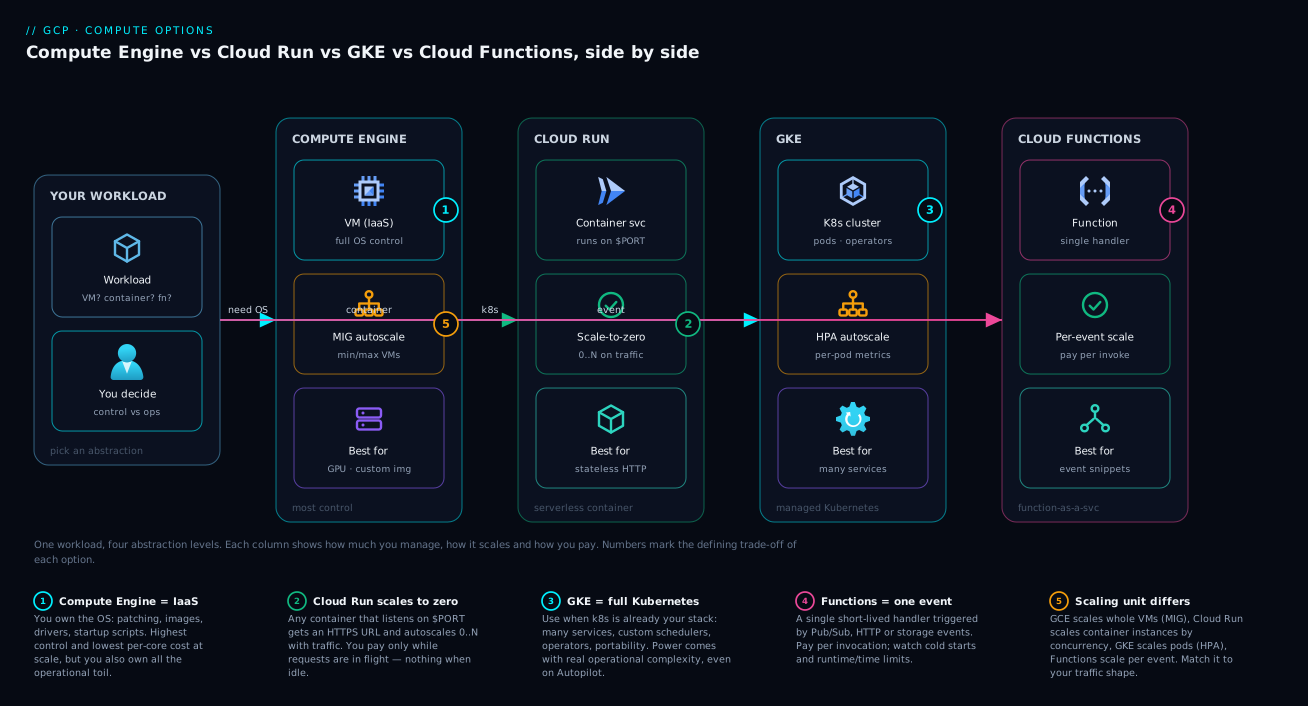
The first diagram lays the five services out side by side along the control-versus-abstraction axis so you can see the spectrum rather than memorise it. On the far left, Compute Engine is a stack of VM nodes with machine-type labels (E2, N2, C3), a boot disk, the OS you own, and a MIG wrapper showing autohealing and autoscaling — the control anchor. Moving right, GKE is a cluster: a Google-managed control plane up top and your node pools (Compute Engine VMs) running pods below, with Autopilot and Standard called out. Further right, App Engine shows the Standard sandbox and Flexible VM environments behind an app.yaml. Then Cloud Run — a container behind an HTTPS URL with the scale-to-zero arrow and the concurrency/instances knobs. On the far right, Cloud Functions is a single function box wired to its triggers (HTTP, Pub/Sub, Storage). Across the bottom runs the axis arrow — more control / more toil left, more abstraction / less toil right — with scale-to-zero flagged on every service that has it.
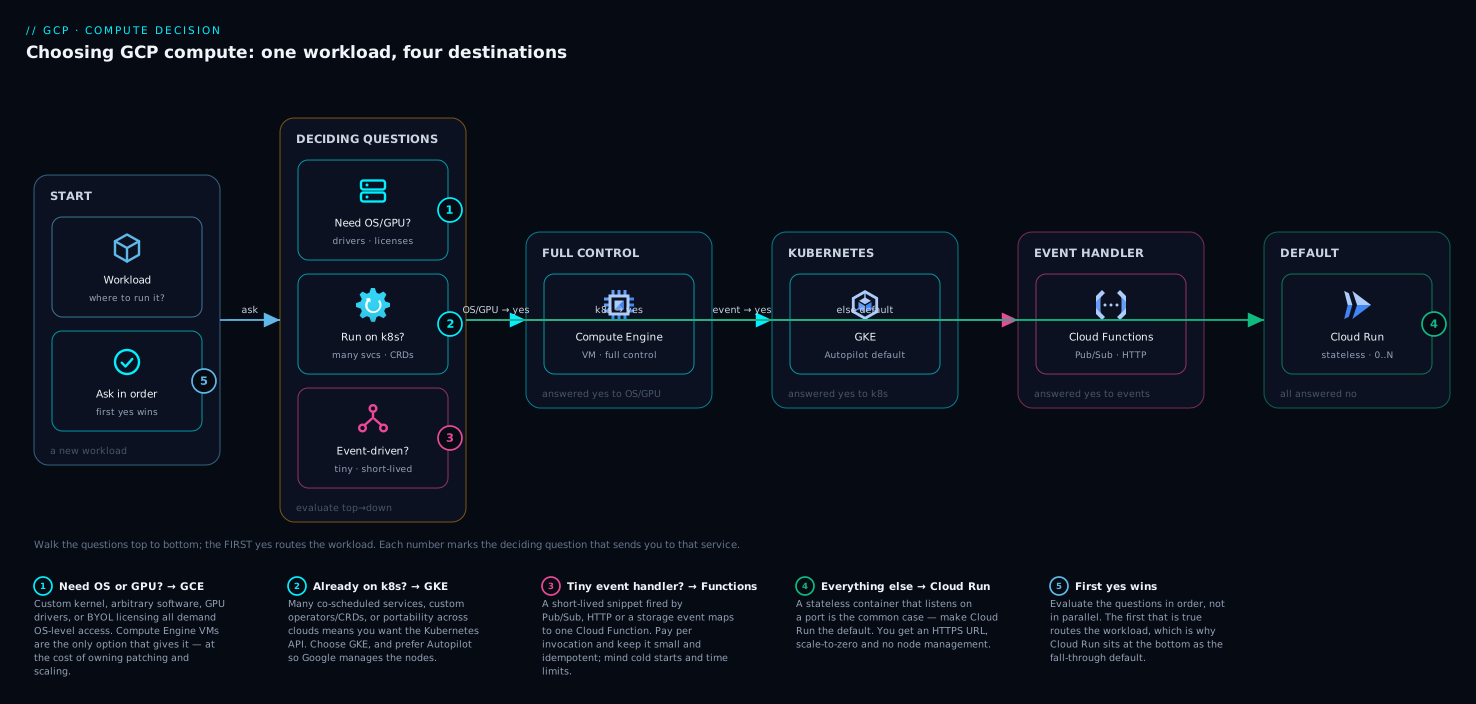
The second diagram turns that spectrum into a decision flow — the questions, in order, that route a workload to its service. Starting from the workload: Is it event-driven and short? → Cloud Functions. Does it need OS control, GPUs, specific licenses or long-lived state? → Compute Engine (branching to a MIG for a fleet). Do you have Kubernetes-shaped problems — many services, complex scheduling, the K8s ecosystem? → GKE (Autopilot vs Standard). Is it a stateless container or job that should scale to zero and deploy fast? → Cloud Run. Do you want a managed runtime and accept the platform’s opinions? → App Engine. Each terminal node carries the one-line reason it won, so the diagram doubles as a justification you can show a teammate.
Real-world scenario: the retail platform’s compute map
Return to the retail company from the opening. NovaCart (a fictional but realistic mid-size online retailer) ran on a single answer — Compute Engine — for everything: a 40-VM fleet hand-managed across two zones, costing roughly ₹6.2 lakh/month in compute, with one full-time engineer dedicated to patching, imaging and babysitting autoscaling scripts they’d written themselves. Black Friday exposed the cracks: their hand-rolled autoscaler reacted too slowly, the checkout API fell over under a 5× spike, and the post-mortem made it clear the team was spending 70% of its infrastructure time on keeping VMs alive rather than shipping.
The architect ran every workload through the decision flow and re-homed them:
| Workload | Old home | New home | Why it moved | Result |
|---|---|---|---|---|
| Public product & checkout APIs (stateless HTTP, spiky) | Compute Engine fleet | Cloud Run (min-instances=2, max=50, concurrency=80) | Stateless, scale-to-zero overnight, instant scale-out on spikes | Deploy time hours → 2 min; 60% cheaper at this tier; survived a 7× spike without paging |
| Recommendation service (many micro-services, custom autoscalers, A/B routing) | Compute Engine | GKE Autopilot | Genuinely K8s-shaped: a mesh of services, complex scheduling, ecosystem tools | Node ops gone; pay per pod; team kept their K8s tooling |
| Image processing on upload (thumbnails, format conversion) | Compute Engine cron VMs | Cloud Functions (2nd gen), Storage-triggered | Event-driven, short-lived, embarrassingly parallel | VMs decommissioned; pay per invocation; scales with upload rate automatically |
| Nightly inventory reconciliation (45-min batch, restartable) | Compute Engine | Cloud Run job on a schedule | Containerised batch, runs then exits, no always-on VM needed | No idle VM overnight; runs only when scheduled |
| ML ranking-model training (GPUs, custom CUDA drivers, 200 GB scratch) | Compute Engine | Compute Engine (A2 GPU VMs, Spot, in a MIG) | Needs specific GPUs + drivers + local SSD; nothing serverless offers this | Stayed put, but moved to Spot → ~70% cheaper for the training runs |
| Internal admin portal (low traffic, Python web app) | Compute Engine | App Engine Standard | Managed runtime, scales to zero, the team already knew app.yaml |
One always-on VM eliminated; near-zero cost when idle |
The outcome after three months: compute spend dropped from ₹6.2 lakh to about ₹2.7 lakh/month (a 56% cut), the dedicated VM-babysitting role moved to feature work, and the next Black Friday autoscaled cleanly because Cloud Run and Autopilot handle scale-out far faster than the old scripts. The thesis of this article, learned the hard way: there is no single right compute service — there is a right service per workload, and the cost of defaulting to one is paid in money and toil. Note the answer was not “abandon Compute Engine” — the GPU training stayed there because it genuinely needs the control. The dial was simply turned as far toward abstraction as each workload allowed.
Advantages and disadvantages
Each service is a sharp tool. The trade-offs, side by side:
| Service | Advantages | Disadvantages |
|---|---|---|
| Compute Engine | Maximum flexibility (any OS/software, GPUs, custom hardware, licenses); lowest unit compute cost at steady high utilisation (with CUDs); full state/persistent disk; no cold starts; Spot for up-to-91% savings | Highest operational burden (patching, imaging, scaling glue, hardening); no scale-to-zero (idle VMs cost money); you own availability and autoscaling design |
| GKE | Full container orchestration and scheduling; rich ecosystem (Helm, operators, mesh); portability across clouds; stateful workloads; multi-tenancy for platforms | Steepest learning curve; highest day-to-day complexity (Standard); control-plane fee; easy to over-adopt for workloads Cloud Run would serve |
| App Engine | Fully managed runtime; fast scaling and (Standard) scale-to-zero; built-in versions + traffic splitting; very low ops | Platform opinions and sandbox constraints (Standard); Flexible has no scale-to-zero; largely superseded by Cloud Run for new work |
| Cloud Run | Any container, scale-to-zero, HTTPS in minutes, per-use billing, near-zero ops, jobs + services; fast deploys and traffic splitting | Stateless only (no local persistent state); cold starts (mitigable); not for processes that must always run a background loop without a request |
| Cloud Functions | Lowest possible ops; event triggers built in; scale-to-zero; ideal glue | Tight time/memory limits (esp. 1st gen); stateless; per-invocation pricing can add up at very high volume; easy to outgrow |
The meta-point: advantages on the left of the spectrum (control, flexibility) are exactly the disadvantages on the right (you’d have to give them up), and vice versa. The “best” service is the one whose advantages you need and whose disadvantages your workload can tolerate.
Hands-on lab: deploy the same app three ways and compare
This lab deploys a trivial containerised web service three ways — Compute Engine (in a MIG), Cloud Run, and Cloud Functions — so you feel the difference in effort, deploy time, and scaling directly. It is free-tier-friendly if you tear everything down promptly. Set your project and region first.
Step 0 — Set up.
gcloud config set project my-project
gcloud config set compute/region asia-south1
export REGION=asia-south1
export ZONE=asia-south1-a
# Enable the APIs you'll touch
gcloud services enable compute.googleapis.com run.googleapis.com \
  cloudfunctions.googleapis.com cloudbuild.googleapis.com
Step 1 — Compute Engine path (a MIG behind autoscaling). Create a template, a MIG, and autoscaling.
gcloud compute instance-templates create lab-tpl \
  --machine-type=e2-small --image-family=debian-12 --image-project=debian-cloud \
  --tags=http-server \
  --metadata=startup-script='#! /bin/bash
    apt-get update && apt-get install -y nginx
    echo "hello from $(hostname)" > /var/www/html/index.html'

gcloud compute instance-groups managed create lab-mig \
  --template=lab-tpl --size=2 --zone=$ZONE

gcloud compute instance-groups managed set-autoscaling lab-mig \
  --zone=$ZONE --min-num-replicas=2 --max-num-replicas=5 --target-cpu-utilization=0.6
Expected: gcloud compute instance-groups managed list-instances lab-mig --zone=$ZONE shows two RUNNING instances after a minute or two. Note the effort: a template, a group, an autoscaler, a firewall rule for port 80, and you still own the OS.
Step 2 — Cloud Run path (the same idea, far less effort). Deploy a public container image (using a sample hello image to skip the build).
gcloud run deploy lab-run \
  --image=us-docker.pkg.dev/cloudrun/container/hello \
  --region=$REGION --allow-unauthenticated \
  --min-instances=0 --max-instances=5 --concurrency=80
Expected: the command prints a Service URL in under a minute. curl it and you get a response. No VM, no OS, scales to zero automatically.
RUN_URL=$(gcloud run services describe lab-run --region=$REGION --format='value(status.url)')
curl -s "$RUN_URL" | head -n 3
Step 3 — Cloud Functions path (an HTTP snippet). Create a tiny function locally and deploy it.
mkdir -p lab-fn && cd lab-fn
cat > main.py <<'PY'
import functions_framework

@functions_framework.http
def hello(request):
    return "hello from a cloud function\n"
PY
cat > requirements.txt <<'TXT'
functions-framework==3.*
TXT

gcloud functions deploy lab-hello --gen2 --region=$REGION \
  --runtime=python312 --source=. --entry-point=hello \
  --trigger-http --allow-unauthenticated
cd ..
Expected: after the build completes, a trigger URL is printed; curl it to get the greeting. You wrote five lines of code and zero infrastructure.
Step 4 — Validate and compare. Note three things you just observed: (a) deploy effort and time grew dramatically from Functions → Cloud Run → Compute Engine; (b) only Compute Engine left you owning an OS; © the MIG keeps two VMs running (and billing) even with no traffic, whereas Cloud Run and Functions sit at zero. That is the spectrum, felt directly.
Step 5 — Teardown (do this to avoid charges).
# Cloud Functions
gcloud functions delete lab-hello --gen2 --region=$REGION --quiet
# Cloud Run
gcloud run services delete lab-run --region=$REGION --quiet
# Compute Engine MIG + template
gcloud compute instance-groups managed delete lab-mig --zone=$ZONE --quiet
gcloud compute instance-templates delete lab-tpl --quiet
Confirm nothing lingers: gcloud compute instances list, gcloud run services list, and gcloud functions list should show no lab resources.
Common mistakes & troubleshooting
The failure modes here are mostly decision failures and a handful of operational gotchas. Symptom → root cause → how to confirm → fix:
| # | Symptom | Root cause | How to confirm | Fix |
|---|---|---|---|---|
| 1 | Compute bill is far higher than expected for simple web apps | Stateless services running on always-on VMs instead of scale-to-zero serverless | gcloud compute instances list shows many low-utilisation VMs; check CPU metrics |
Move stateless HTTP services to Cloud Run; let them scale to zero |
| 2 | Team spends most of its time patching/imaging VMs | Over-rotation on Compute Engine; everything defaulted to VMs | Headcount audit: who does infra toil vs features | Re-home VM-shaped-only workloads; push the rest right on the spectrum |
| 3 | Adopted GKE, now drowning in cluster ops for 3 services | Kubernetes adopted without K8s-shaped problems or a platform team | Count services and the ops hours the cluster consumes | For few stateless services, Cloud Run is far less toil; reserve GKE for real K8s needs |
| 4 | Cloud Run service has slow first requests after idle | Cold start at zero instances | Latency spikes after gaps; logs show new instance starts | Set --min-instances=1+; shrink image; defer heavy start-up init |
| 5 | Cloud Functions job keeps timing out | Workload exceeds the function time limit (9 min gen1 / 60 min gen2) | Logs show timeout at the ceiling | Use Cloud Run jobs or Compute Engine for long batch; or move to gen2 |
| 6 | Spot VMs keep disappearing and work is lost | Preemption with no checkpointing / no MIG to recreate | Operations logs show PREEMPTED; instances vanish |
Checkpoint work; run Spot in a MIG so capacity self-replenishes; keep an on-demand baseline |
| 7 | MIG isn’t scaling under load | No/incorrect autoscaler, or wrong signal (CPU vs LB) | gcloud compute instance-groups managed describe shows autoscaler config |
Attach autoscaler with the right signal; set sensible min/max and cooldown |
| 8 | VMs in a MIG flap (recreated repeatedly) | Autohealing health check too aggressive or app slow to start | Check --initial-delay vs real start time; health-check thresholds |
Raise --initial-delay; loosen thresholds; fix slow start-up |
| 9 | Cloud Run instance count explodes, bill spikes | Concurrency set too low (1 instance per request) | Service config shows low concurrency; instance count high | Raise concurrency for I/O-bound services; cap with --max-instances |
| 10 | App Engine Flexible costs money even at zero traffic | Flexible has a minimum of 1 instance (no scale-to-zero) | gcloud app instances list shows ≥1 always |
Move to App Engine Standard or Cloud Run for scale-to-zero |
| 11 | Custom container won’t serve on Cloud Run | Container doesn’t listen on $PORT / binds 127.0.0.1 |
Logs show no requests served; container started | Listen on the injected $PORT env var; bind 0.0.0.0 |
| 12 | Picked the wrong machine family; performance poor or wasteful | General-purpose type for a memory- or compute-bound job | Compare workload profile to family; check CPU/mem utilisation | Move to highmem/highcpu/compute-optimised; consider a custom machine type |
Best practices
- Default to the right of the spectrum, justify moving left. Start every new workload by asking “could this be Cloud Run?” Only descend to GKE or Compute Engine when a concrete requirement (OS access, GPUs, K8s ecosystem, long state) forces it.
- Never run a lone production VM — always a MIG. A single VM is a pet that can die unrecovered. Build from an instance template, attach autohealing and autoscaling, and span zones with a regional MIG.
- Use Spot/Preemptible for anything fault-tolerant. Batch, CI runners, checkpointed ML training, render farms — take the up-to-91% discount, and run Spot inside a MIG so capacity self-replenishes.
- Right-size with custom machine types. Don’t round a 6-vCPU/20-GB need up to a predefined 8-vCPU/32-GB type — specify exactly what you need and stop paying for waste.
- Set
min-instanceson latency-critical Cloud Run services, leave it at zero for everything else. Pay to kill cold starts only where users feel them; let dev/test and spiky services drop to zero. - Tune Cloud Run concurrency to the workload. I/O-bound services should run high concurrency (one instance serves many requests); CPU-heavy services should run lower concurrency and more instances.
- Always cap with
max-instances. Bound the bill and protect fragile downstreams from a thundering serverless herd. - Adopt GKE deliberately, not by default. It is the highest-toil option; cross the Kubernetes boundary only with K8s-shaped problems and a team to own them. Prefer Autopilot to shed node ops.
- Match the machine family to the workload shape. General-purpose for balanced, compute-optimised for CPU-bound, memory-optimised for in-memory, accelerator for ML — the default is rarely the right one for specialised work.
- Use committed-use discounts for steady, predictable VM/GKE workloads and sustained-use discounts (automatic) for VMs that run most of the month — they materially change the steady-state cost comparison against serverless.
- Keep functions and Cloud Run services stateless and idempotent. The platform treats instances as disposable; design accordingly and externalise state.
- Instrument everything with Cloud Monitoring and Cloud Logging so your scaling signals, cold-start latencies and preemption events are visible — see GCP Cloud Monitoring and Operations: Observability Built In.
Security notes
Compute security is mostly about identity, least privilege, network isolation, and patching — and the right rung of the spectrum changes who owns each.
- Run every workload as a least-privilege service account, never the default. Compute Engine VMs, Cloud Run services, Cloud Functions and GKE workloads all execute as an identity. The default Compute Engine service account is over-privileged; create a dedicated service account per workload with only the roles it needs. The whole model is covered in GCP IAM and Service Accounts: Roles, Bindings and Least Privilege.
- Prefer Workload Identity for GKE (and the built-in service-account binding for Cloud Run/Functions) over downloaded service-account keys — keys are long-lived secrets that leak; Workload Identity hands out short-lived tokens.
- Patching responsibility shifts with abstraction. On Compute Engine you patch the OS (use OS patch management / managed images and rebuild MIGs from updated templates). On Cloud Run, Functions, App Engine and GKE Autopilot, Google patches the layers below your code/container — a security advantage of moving right.
- Network-isolate by default. Put VMs and GKE nodes in a private VPC with no public IPs where possible; reach the internet via Cloud NAT and reach Google APIs via Private Google Access. Use firewall rules / network tags to restrict ingress. Cloud Run and Functions can be made internal-only and reached via a VPC connector / direct VPC egress.
- Shielded VMs and Confidential Computing harden Compute Engine: Shielded VM guards against boot-level rootkits; Confidential VMs encrypt memory in use for sensitive data.
- Scope ingress tightly. Don’t
--allow-unauthenticatedon Cloud Run/Functions unless the endpoint is genuinely public; require IAM invoker permissions or put the service behind an authenticating load balancer / IAP for internal apps. - Use Artifact Registry with vulnerability scanning for container images feeding Cloud Run/GKE, and only deploy images you’ve scanned — Binary Authorization can enforce this.
Cost & sizing
What drives the bill is fundamentally different per service, and understanding the billing unit is how you right-size:
| Service | Primary cost drivers | Discount levers | Scales to zero (no idle cost)? |
|---|---|---|---|
| Compute Engine | vCPU + memory per second (1-min min), disk, network egress, GPUs | Sustained-use (automatic), committed-use (1/3-yr), Spot (up to ~91%), custom machine types | No — running VMs bill continuously |
| GKE Standard | Node VMs (as Compute Engine) + per-cluster management fee | Node CUDs/Spot, right-sized node pools, autoscaling, free zonal cluster tiers | Nodes can scale down; control-plane fee persists |
| GKE Autopilot | Per-pod vCPU/memory/storage requested, + cluster fee | Right-size pod requests; no paying for unused node headroom | Pods can scale to zero; cluster fee persists |
| App Engine | Standard: instance-hours by class; Flexible: underlying VM-hours | Standard scale-to-zero; right instance class | Standard: yes; Flexible: no (min 1) |
| Cloud Run | Requests + CPU-time + memory-time while serving (per 100 ms), egress | Scale-to-zero; tune concurrency; CPU only during requests | Yes (at min-instances=0) |
| Cloud Functions | Invocations + CPU/memory time + egress | Scale-to-zero; right-size memory (memory also sets CPU) | Yes |
Three sizing rules that decide most cost outcomes:
- For spiky / low-average / bursty traffic, serverless wins decisively because you pay near zero when idle. A dev API that gets 200 requests/day costs pennies on Cloud Run and a small fixed sum on a VM. The break-even moves with utilisation.
- For steady, high-utilisation workloads, a committed VM (or GKE node) often beats per-request pricing. A service pinned at high CPU 24/7 may be cheaper on a committed-use Compute Engine VM than on Cloud Run, because per-request pricing assumes you benefit from scale-to-zero you’re not using. Model both at your real utilisation.
- Spot is the single biggest VM lever — for fault-tolerant batch/training, it cuts the compute line by 60–91%. Don’t leave it on the table for restartable work.
Rough order-of-magnitude figures (vary by region; relative, not a quote): a small always-on e2-small VM runs on the order of ₹1,000–1,500/month; the same low-traffic workload on Cloud Run with scale-to-zero can be under ₹100/month; a GKE Autopilot cluster carries a control-plane fee of a few thousand rupees/month before any workloads — which is why a single small service rarely justifies a cluster. Model your real request volume and utilisation in the GCP Pricing Calculator before committing.
Interview & exam questions
These map to the Google Cloud Associate Cloud Engineer and Professional Cloud Architect exams and to real architecture interviews.
-
Q: Place GCP’s compute services on the control-vs-abstraction axis and explain the trade-off. A: From most control to most abstraction: Compute Engine → GKE → App Engine → Cloud Run → Cloud Functions. Moving toward abstraction trades configurability and control (OS access, scheduling, custom hardware) for the elimination of operational toil (patching, scaling, imaging). You choose the right-most service the workload’s requirements allow.
-
Q: A stateless HTTP API with spiky traffic and a containerised build — which service and why? A: Cloud Run. It runs any container, scales to zero (cheap when idle), scales out fast on spikes, gives an HTTPS URL in minutes, and bills per use — a perfect match for stateless spiky HTTP.
-
Q: When is GKE the right choice over Cloud Run? A: When you have Kubernetes-shaped problems: many interdependent services, advanced scheduling (affinity/taints/GPU sharing), dependence on the K8s ecosystem (Helm, operators, mesh), stateful workloads (StatefulSets), multi-cloud portability, or running a platform for other teams. Not merely because Kubernetes is familiar.
-
Q: What are Spot VMs and which workloads suit them? A: VMs on spare capacity at up to ~91% discount that Google can preempt with ~30 seconds’ notice. They suit fault-tolerant, restartable work — batch, CI runners, checkpointed ML training, render farms — ideally inside a MIG so preempted capacity is recreated. Not for stateful or latency-critical single instances.
-
Q: What does a managed instance group give you over a single VM? A: Autohealing (recreate VMs failing a health check), autoscaling (CPU/LB/metric-driven count), regional spread across zones for resilience, rolling updates from a versioned instance template, and load-balancer integration — turning raw VMs into a self-healing, autoscaling fleet.
-
Q: Explain Cloud Run concurrency and its cost/latency effect. A: Concurrency is the number of simultaneous requests one instance handles (default 80). Higher concurrency means fewer instances for I/O-bound traffic (cheaper) but risks CPU contention for compute-heavy requests; lower concurrency isolates heavy requests but spawns more instances (costlier). Tune to the workload’s CPU profile.
-
Q: What is a cold start and how do you mitigate it on Cloud Run? A: The latency the first request pays when an instance must be started (image pull, container start, init) from zero. Mitigate with
min-instances ≥ 1(warm instances), smaller images, lighter start-up code, and startup CPU boost. Min-instances trades idle cost for predictable latency. -
Q: Cloud Functions 1st gen vs 2nd gen — key differences? A: 2nd gen runs on Cloud Run + Eventarc, supporting up to 60-minute execution (vs 9), high configurable concurrency (vs 1), up to 32 GB memory, and far broader event triggers. 2nd gen is preferred for new functions.
-
Q: Why might a steady, high-CPU 24/7 service be cheaper on Compute Engine than Cloud Run? A: Serverless per-request pricing assumes you benefit from scale-to-zero. A workload pinned at high utilisation never scales to zero, so a committed-use (or even on-demand) VM can be cheaper than paying per-request/CPU-time for capacity you use constantly. Model both at real utilisation.
-
Q: Choose a machine family for (a) an in-memory cache, (b) CPU-bound video encoding, © a balanced web tier. A: (a) Memory-optimised (M-series) or
highmem— high memory per vCPU; (b) Compute-optimised (C3/C4) orhighcpu— high per-core performance; © General-purpose (E2/N2)standard— balanced price/performance. -
Q: App Engine Standard vs Flexible — when each? A: Standard runs your code in a managed sandbox, scales to zero, and scales fast — best for supported-runtime web apps with spiky traffic and cost sensitivity. Flexible runs your container on managed VMs with more customisation but a 1-instance minimum (no scale-to-zero) — for custom runtimes/longer requests. For new container work, Cloud Run usually beats Flexible.
-
Q: A 45-minute nightly batch job, containerised and restartable — where does it run? A: A Cloud Run job on a schedule (runs to completion then exits, no idle VM), a GKE Job, or a Spot Compute Engine VM in a MIG. Not an always-on VM (wasteful overnight), and a Cloud Run job is cleaner than pushing a 45-minute job near the Cloud Functions ceiling.
Quick check
- Which two GCP compute services sit at the extreme abstraction end of the spectrum, and which sits at the extreme control end?
- Name three workload characteristics that push a decision toward Compute Engine rather than Cloud Run.
- What is the maximum discount range for Spot VMs, and what is the catch?
- What does a MIG add to a raw set of VMs (name three things)?
- On Cloud Run, what setting eliminates cold starts for steady traffic, and what does it cost you?
Answers
- Cloud Functions and Cloud Run sit at the abstraction end; Compute Engine sits at the control end (with GKE and App Engine in between).
- Any three of: needs OS-level / kernel access; needs specific GPUs/TPUs or custom drivers; needs a specific OS license; holds long-lived state on local disk; runs an always-on process or a very long batch job; needs a custom CPU platform or local SSD.
- Roughly 60–91% off on-demand; the catch is that Google can preempt the VM at any time with about 30 seconds’ notice (and legacy preemptible VMs also have a 24-hour hard cap), so the workload must be fault-tolerant and restartable.
- Any three of: autohealing (recreate failed VMs), autoscaling (CPU/LB/metric-based count), regional multi-zone spread for resilience, rolling updates from a versioned instance template, and load-balancer backend integration.
- Min instances ≥ 1 keeps warm instances so steady traffic never hits a cold start; the cost is that you pay for those warm instances even when idle (you lose scale-to-zero for that floor).
Glossary
- Compute Engine — GCP’s infrastructure-as-a-service: virtual machines you fully control, from the OS up.
- Machine family — A group of Compute Engine machine types optimised for a workload profile (general-purpose, compute-, memory-optimised, accelerator, scale-out/Arm).
- Machine type — A specific VM shape fixing vCPU and memory, named like
e2-standard-4;custom-*types let you set exact vCPU/RAM. - Spot VM — A VM on Google’s spare capacity at up to ~91% discount that can be preempted with ~30 seconds’ notice; the current model (preemptible VMs are the legacy version with a 24-hour cap).
- Preemption — Google reclaiming a Spot/preemptible VM when it needs the capacity, after a short termination notice.
- Managed instance group (MIG) — A set of identical VMs built from an instance template that the platform keeps healthy (autohealing), scales (autoscaling), and updates (rolling updates).
- Instance template — The immutable blueprint (machine type, image, disks, startup script) a MIG creates VMs from.
- Autohealing — A MIG recreating any VM that fails its application health check.
- Autoscaling — Automatically changing the instance/pod count based on a signal (CPU, load-balancer utilisation, custom metric, schedule).
- GKE (Google Kubernetes Engine) — Managed Kubernetes; Google runs the control plane, you run pods on nodes (which are Compute Engine VMs).
- Autopilot (GKE) — A GKE mode where Google manages the nodes and you pay per pod resource request; lower toil than Standard.
- Cloud Run — Serverless containers behind an HTTPS endpoint, scaling to zero and billed per use; offered as services and jobs.
- Concurrency (Cloud Run) — The number of simultaneous requests a single container instance handles (default 80).
- Scale-to-zero — A service dropping to zero running instances (and zero compute cost) when idle; offered by Cloud Run, Cloud Functions, App Engine Standard and GKE pods.
- Cold start — The latency the first request pays while an instance is started from zero (image pull, container start, init).
- Cloud Functions — Functions-as-a-service for short, event-driven snippets; 2nd gen runs on Cloud Run + Eventarc with longer limits.
- App Engine — GCP’s original PaaS; Standard (managed sandbox, scale-to-zero) and Flexible (managed VMs, min 1 instance).
- Sustained-use discount — Automatic Compute Engine discount for VMs that run a large fraction of the month.
- Committed-use discount (CUD) — A 1- or 3-year commitment for a steep, predictable Compute Engine/GKE discount.
- Control-vs-abstraction axis — The mental model placing each compute service by how much you manage (control) versus how much Google manages (abstraction).
Next steps
- Go deep on the serverless-container default with Cloud Run Explained: Serverless Containers That Scale to Zero (and Back) Without Kubernetes.
- Decide your Kubernetes mode (and whether you need Kubernetes at all) with GKE Autopilot vs Standard vs Enterprise: Choose Your Kubernetes Mode and GKE Autopilot vs Standard: Which Google Kubernetes Engine Mode Should You Actually Use?.
- See the decision from another angle in GCP Cloud Run vs GKE vs Compute Engine: Choose the Right Compute.
- Ground every compute choice in GCP Regions and Zones Explained: What They Really Mean for Availability and Latency and secure every workload with GCP IAM and Service Accounts: Roles, Bindings and Least Privilege.
- Make scaling and cold starts visible with GCP Cloud Monitoring and Operations: Observability Built In, and connect event-driven compute with GCP Pub/Sub and Event-Driven Architecture: Decouple and Scale.