Quick take: GKE Autopilot is Kubernetes with the nodes hidden and the bill metered per pod. GKE Standard hands you the node pools and bills per provisioned VM. GKE Enterprise is not a fourth cluster type — it is a tier you switch on over either mode to manage a fleet of clusters with config-as-policy, a managed service mesh, multi-cluster ingress and security posture. Most teams should default new clusters to Autopilot, drop to Standard only for the workloads that genuinely need node-level control, and adopt Enterprise once “how many clusters do we have and are they all compliant?” becomes a question nobody can answer.
A data-platform team chose GKE Standard because they wanted “real Kubernetes experience.” Within a year three engineers were spending a third of their time on node pools, cluster-autoscaler tuning, COS image upgrades and surge-upgrade windows that had nothing to do with the product. When they moved their stateless checkout and catalog microservices to GKE Autopilot, those services ran with no node management at all — Google sized, scaled, patched and secured the nodes — and the team kept Standard only for the Spark and GPU training jobs that actually needed custom machine shapes and local SSDs. Six months later, with eleven clusters across dev, staging, prod and two data regions, they turned on GKE Enterprise because the real problem had shifted from “operate one cluster” to “prove all eleven are configured the same and locked down.” That arc — Autopilot by default, Standard by exception, Enterprise when fleet governance bites — is the whole decision, and this article is about getting each fork right with real numbers instead of vibes.
This is the deep version. We treat the three as a spectrum of who operates the node and who governs the fleet, not as three logos. You will learn exactly what Autopilot manages on your behalf (and the constraints that buys), what Standard exposes (and the operational tax it carries), and what Enterprise layers on top (and what it costs per vCPU). Every claim is grounded in real gcloud, real manifests, and real limits — node-pool surge settings, Dataplane V2 (Cilium) network policy, Node Auto-Provisioning (NAP), the cluster autoscaler, Spot and GPU support, Workload Identity, Binary Authorization, and the Enterprise fleet stack (Config Sync, Policy Controller, Cloud Service Mesh, multi-cluster Ingress/Gateway, GKE security posture). Because this is a reference you return to mid-design-review, the comparisons, limits and decision rules are laid out as scannable tables — read the prose once, then keep the tables open when someone asks “why Autopilot here and Standard there?”
By the end you will stop choosing a mode by reflex. You will know whether a workload needs a privileged DaemonSet (Standard), whether per-pod billing actually saves money for your bin-packing (often Autopilot), whether you can run that GPU job on Autopilot now (frequently yes), and whether you have enough clusters that Enterprise’s fee pays for itself in audit time saved.
What problem this solves
Kubernetes is the most capable application platform most teams will ever run, and also the most operationally demanding. A raw cluster asks you to own the control plane (GKE already manages that for you), the nodes (the VMs that run pods), the node pools (groups of identical nodes), the autoscaler, the CNI, the OS image and its CVEs, the upgrade cadence, the security posture, and — once you have more than one cluster — the consistency across clusters. Each of those is a place to get paged. GKE’s three modes exist so you can pay down exactly as much of that operational debt as your workload justifies, and not a rupee more.
What breaks without the right choice: a team picks Standard for a fleet of stateless web apps and now babysits node pools, cluster-autoscaler thresholds, surge-upgrade windows and idle-node waste for no product benefit — three engineers doing toil a managed mode would erase. Or a team picks Autopilot for a workload that needs a privileged host-networking agent, a custom kernel module, or a specific local-SSD machine shape, and hits a constraint wall because Autopilot deliberately forbids those. Or an org grows to a dozen clusters on Standard/Autopilot with no fleet layer, and discovers at audit time that three clusters have public endpoints, two never enabled network policy, and nobody can prove which version of a baseline policy each cluster runs — the exact gap Enterprise closes.
Who hits this: anyone standing up Kubernetes on Google Cloud. It bites hardest on (1) cost-sensitive teams who over-provision Standard nodes and pay for idle headroom; (2) platform teams who under-estimate the node-operations tax of Standard at scale; (3) workloads with hard node requirements (GPUs done wrong, privileged agents, host networking) jammed onto the wrong mode; and (4) growing orgs whose pain silently migrates from operate a cluster to govern a fleet without anyone noticing until an auditor does. The fix is almost never “use the mode we already know” — it is “match the mode to who must own the node and the fleet.”
To frame the whole field before the deep dive, here is the spectrum — what you stop owning at each step, what it costs you, and the one signal that tells you you’ve outgrown the mode below it:
| Mode | You stop owning… | You start paying… | The signal you’ve outgrown the simpler choice |
|---|---|---|---|
| Autopilot | Nodes, node pools, OS patching, autoscaler config, bin-packing, many security defaults | Per-pod resource requests (CPU/mem/storage) + flat cluster fee | A workload needs node-level control Autopilot forbids (privileged, host net, custom machine shape, certain DaemonSets) |
| Standard | The control plane only (Google still runs it) | Per-provisioned-node VM cost + flat cluster fee | You run many clusters and can’t prove they’re consistent or compliant |
| Enterprise (tier over either) | Cross-cluster config drift, manual policy, per-cluster mesh wiring, posture blind spots | A per-vCPU Enterprise subscription on top of the underlying mode | (Top of the spectrum — adopt when fleet governance is the bottleneck) |
Learning objectives
By the end of this article you can:
- Explain precisely what GKE Autopilot manages on your behalf versus Standard, and name the node-level capabilities Autopilot does not allow — and decide a workload’s mode from those constraints, not from habit.
- Reason about per-pod (Autopilot) vs per-node (Standard) billing with real numbers, including bin-packing efficiency, idle headroom, minimum pod sizes, and when each is cheaper.
- Configure and compare the scaling stack — Cluster Autoscaler (CA), Node Auto-Provisioning (NAP), Horizontal/Vertical Pod Autoscaling (HPA/VPA) — and say which mode automates which layer.
- Use Dataplane V2 (Cilium / eBPF) for network policy and observability, and explain how it differs from the legacy iptables-based dataplane and Calico.
- Run GPUs and Spot on the right mode, with the correct node selectors, taints/tolerations and
cloud.google.com/gke-spotsemantics — and know Autopilot’s Spot/GPU model versus Standard’s. - Harden any GKE cluster with Workload Identity, Shielded GKE Nodes, private clusters, Binary Authorization and the GKE security posture dashboard — and state which are on by default in Autopilot.
- Decide when to adopt GKE Enterprise and wire its fleet stack — Config Sync, Policy Controller, Cloud Service Mesh, multi-cluster Ingress/Gateway, fleet identity — and estimate the per-vCPU cost.
- Apply a defensible decision matrix to put each workload on Autopilot, Standard or Enterprise, and justify it to an architecture review.
Prerequisites & where this fits
You should already be comfortable with core Kubernetes: pods, deployments, services, namespaces, requests/limits, taints/tolerations, node selectors, and kubectl. You should know that GKE is Google’s managed Kubernetes — Google always runs the control plane (API server, etcd, scheduler, controller-manager) regardless of mode; the modes differ in who runs the data plane (the nodes). You should be able to run gcloud and kubectl in Cloud Shell, read YAML and JSON, and understand that a node pool is a group of identical VM nodes that scale together.
This sits in the Compute / Platform track. The upstream decision — should this even be Kubernetes? — is covered in GCP Cloud Run vs GKE vs Compute Engine: Choose the Right Compute; if the answer is “GKE,” this article is the next fork. It pairs with GCP IAM and Service Accounts: Roles, Bindings and Least Privilege (Workload Identity is the bridge from Kubernetes service accounts to Google IAM), GCP VPC and Shared VPC: Networking Across Projects (where your cluster’s IP ranges and Shared VPC come from), and GCP Cloud Monitoring and Operations: Observability Built In (where cluster metrics and logs land). For fleet governance, GCP Landing Zone: The Foundation Blueprint with Shared VPC and Org Policies and GCP VPC Service Controls: Build Data Exfiltration Perimeters are the org-level companions to GKE Enterprise. A lighter, more introductory take on the Autopilot-vs-Standard split lives in GKE Autopilot vs Standard: Which Google Kubernetes Engine Mode Should You Actually Use? — read that first if you want the gentle version; this is the architect’s depth.
A quick map of who owns what across the modes, so a design review knows which team a decision lands on:
| Layer | Autopilot owner | Standard owner | Enterprise adds |
|---|---|---|---|
| Control plane (API/etcd/scheduler) | Fleet-wide management view | ||
| Node provisioning & sizing | You (node pools / NAP) | — | |
| OS image & CVE patching | You (auto-upgrade helps) | Posture scanning of both | |
| Autoscaling config | Google (built-in) | You (CA + NAP + HPA/VPA) | — |
| Networking dataplane (CNI) | Google (DPv2 default) | You (DPv2 or legacy) | Multi-cluster service mesh |
| Security posture | Google (hardened defaults) | You | Fleet posture dashboard + Policy Controller |
| Cross-cluster config/policy | n/a (per cluster) | n/a (per cluster) | Config Sync + Policy Controller |
Core concepts
Five mental models make every later comparison obvious.
A “mode” is a contract about who operates the node, not a different Kubernetes. All three modes run the same upstream Kubernetes with Google’s managed control plane. Autopilot signs you up for a contract where Google owns the nodes end to end — provisioning, sizing, scaling, patching, hardening — and you only declare pods. Standard signs you up for the classic contract: Google runs the control plane, you own node pools, autoscaling configuration, OS upgrades and security choices. Enterprise is orthogonal — it is a subscription tier you enable on a fleet that adds governance and multi-cluster features over whichever mode each cluster uses. You can have an Enterprise fleet containing both Autopilot and Standard clusters.
Billing follows the operating boundary. Because Autopilot operates the node for you, it bills you for what your pods request — vCPU, memory and ephemeral storage on the pod’s resource requests, per second, with a small set of compute classes. Because Standard hands you the node, it bills you for the node VMs you provision (the Compute Engine price of every node that exists, idle or not), plus disks. Both modes add the same flat cluster management fee (roughly $0.10/hour per cluster, ≈ $73/month), with one free zonal cluster per billing account. The deep consequence: Autopilot makes you pay for used capacity and eliminates idle-node waste, but charges a per-pod overhead and enforces minimums; Standard makes you pay for provisioned capacity, so your bin-packing efficiency is your problem and your savings.
Standard’s freedom is also Standard’s tax. On Standard you choose machine families (E2, N2, N2D, C3, C4, T2D, A100/H100 GPU shapes), local SSDs, sole-tenant nodes, custom boot disks, privileged DaemonSets, host networking, custom kernel sysctls, and the CNI. That is real power for workloads that need it. It is also real toil: every one of those is a thing to size, secure, upgrade and pay for whether or not a pod is using it right now. Autopilot removes the toil by removing most of the knobs.
Autopilot’s safety is also Autopilot’s wall. To operate nodes safely for you, Autopilot enforces guardrails: no privileged pods or arbitrary host access, a restricted set of host paths, no node SSH, no arbitrary DaemonSets that need node-level privilege, a managed (you-don’t-touch) node OS, and minimum and incremented pod resource requests (so it can pack and bill cleanly). Most stateless web/API workloads never notice these. Some workloads — node agents, eBPF tooling that needs CAP_SYS_ADMIN, certain security/observability vendors, GPU edge cases, anything that wants to ssh to a node — hit the wall, and that is the signal to use Standard.
A fleet is the unit of governance once you have many clusters. A single cluster is a thing you operate; a fleet (formerly “environ”) is a group of clusters you govern as one. GKE Enterprise turns a fleet into a managed object with fleet-wide identity, Config Sync (GitOps config from a repo to every cluster), Policy Controller (OPA Gatekeeper constraints enforced fleet-wide), Cloud Service Mesh (managed Istio across clusters), multi-cluster Ingress/Gateway (one VIP load-balancing across clusters/regions), and the security posture + compliance dashboard. The trigger to adopt it is not cluster count per se but the moment “are all our clusters consistent and compliant?” becomes a question you can’t answer from memory.
The vocabulary in one table
Before the deep sections, pin every moving part. The glossary repeats these for lookup; this is the mental model side by side:
| Concept | One-line definition | Lives where | Why it matters to the mode choice |
|---|---|---|---|
| Control plane | API server, etcd, scheduler, controllers | Google-managed (all modes) | Same in every mode; never your toil |
| Node | A Compute Engine VM that runs pods | Data plane | Autopilot hides it; Standard exposes it |
| Node pool | A group of identical nodes scaling together | Standard (Autopilot manages implicitly) | The unit you size/upgrade on Standard |
| Autopilot | Mode where Google operates all nodes | Cluster-level setting | Per-pod billing; node knobs removed |
| Standard | Mode where you operate node pools | Cluster-level setting | Per-node billing; full node control |
| Enterprise | Subscription tier for fleet governance | Fleet-level | Multi-cluster config/policy/mesh/posture |
| Cluster Autoscaler (CA) | Adds/removes nodes in a pool to fit pods | Standard (Autopilot built-in) | Standard scaling layer you configure |
| Node Auto-Provisioning (NAP) | Creates whole new node pools on demand | Standard option (Autopilot built-in) | Autoscaling node shapes, not just count |
| HPA / VPA | Scale pod replicas / pod size by metrics | Workload-level (both modes) | App-layer scaling; orthogonal to node scaling |
| Dataplane V2 | eBPF/Cilium-based CNI + network policy | Cluster networking | Default on Autopilot; opt-in on Standard |
| Workload Identity | Bind a K8s SA to a Google IAM SA | Cluster + IAM | The secure way pods call Google APIs |
| Spot | Preemptible discounted nodes/pods | Node/pod level | Big savings for fault-tolerant work |
| Fleet | A group of clusters governed as one | Project/org-level | The unit Enterprise governs |
| Config Sync | GitOps: repo → cluster config | Enterprise feature | Eliminates per-cluster config drift |
| Policy Controller | OPA Gatekeeper constraints, fleet-wide | Enterprise feature | Enforces guardrails everywhere at once |
| Cloud Service Mesh | Managed Istio (mTLS, traffic, telemetry) | Enterprise feature | Cross-cluster mTLS and routing |
The mode comparison, end to end
This is the table you screenshot for the design review. Every axis that actually changes your decision, Autopilot versus Standard, with Enterprise noted where it overlays. Read it once top to bottom; the deep sections below expand each row.
| Axis | Autopilot | Standard | Enterprise overlay |
|---|---|---|---|
| Who runs nodes | Google (fully) | You (node pools) | Either, governed as a fleet |
| Billing unit | Per pod request (vCPU/mem/storage), per second | Per provisioned node VM + disks | + per-vCPU subscription on top |
| Cluster fee | ~$0.10/hr (1 free zonal) | ~$0.10/hr (1 free zonal) | Replaced by Enterprise subscription |
| Idle-node waste | None (you don’t pay for idle nodes) | Yours to avoid (idle nodes still bill) | Same as underlying mode |
| Node sizing / machine family | Google picks from compute classes | You pick (E2/N2/N2D/C3/C4/T2D/A-series…) | — |
| Min pod size | ~0.25 vCPU / 0.5 GiB, incremented | None (any size fits a node) | — |
| Privileged pods / host access | Forbidden | Allowed | — |
| Node SSH | Not available | Available | — |
| DaemonSets | Limited (no node-privilege ones) | Full | — |
| GPUs | Supported (declare in pod spec) | Full (node pools + drivers) | — |
| Spot | Supported (cloud.google.com/gke-spot) |
Full (Spot node pools) | — |
| Local SSD | Not exposed | Supported | — |
| OS image | Managed (Container-Optimized OS, you don’t pick) | You pick (COS / COS-containerd / Ubuntu) | Posture scans both |
| Autoscaling | Built-in (nodes auto) | You configure CA + NAP | — |
| Dataplane | Dataplane V2 (default, mandatory) | DPv2 or legacy (your choice) | Multi-cluster mesh |
| Security defaults | Hardened by default (Shielded, WI, no privileged) | You opt in | Fleet posture + Policy Controller |
| SLA | Control plane + pods covered | Control plane (+ nodes if regional/HA) | Same underlying SLA |
| Best for | Stateless apps, most microservices, “just run my pods” | Custom compute, GPUs/ML, privileged agents, node-level control | Many clusters needing consistent governance |
Three reading notes that save the most argument:
| Distinction | The trap | How to tell them apart |
|---|---|---|
| Autopilot “can’t do X” vs “you wouldn’t” | People reject Autopilot for limits they’d never hit | List your workload’s actual node needs; most apps need none of Autopilot’s forbidden capabilities |
| Per-pod cheaper vs per-node cheaper | “Autopilot is more expensive per vCPU” — true per unit, false at the bill | Standard charges for provisioned capacity; if your bin-packing leaves 35% idle, Autopilot’s per-pod premium is often still cheaper overall |
| Enterprise = a cluster type | Teams look for an “Enterprise cluster” to create | It’s a fleet subscription tier; you enable it on the fleet, not as a --mode on a cluster |
Node management: who owns the VM
The single deepest difference between the modes is who owns the node lifecycle. On Standard you own node pools; on Autopilot Google does. This section enumerates that boundary.
Standard node pools — every knob you own
On Standard a node pool is a group of identical nodes (same machine type, image, disk, labels, taints) that scale and upgrade together. You create one or many. Here are the knobs you own and what each costs you to own:
| Node-pool setting | What it controls | Default / typical | When you tune it | The toll for owning it |
|---|---|---|---|---|
| Machine type | vCPU/RAM shape (e.g. e2-standard-4) |
e2-medium |
Match workload CPU:mem ratio; cost | You must right-size and re-size as load changes |
| Image type | Node OS (cos_containerd, ubuntu_containerd) |
cos_containerd |
Need Ubuntu/specific kernel modules | You track its CVEs and upgrade cadence |
| Disk type / size | Boot disk (pd-balanced/pd-ssd), GB |
pd-balanced 100 GB |
IOPS-heavy nodes; image size | Pay for the disk on every node, idle or not |
| Local SSD count | Attached NVMe scratch | 0 | Shuffle-heavy ML/analytics | Data is ephemeral; you handle that |
| Autoscaling min/max | CA bounds for the pool | off / fixed count | Bursty load | You pick bounds; wrong bounds → 503 or waste |
| Surge upgrade | Extra nodes during upgrade (maxSurge/maxUnavailable) |
surge 1, unavail 0 | Faster vs cheaper upgrades | You design the upgrade blast radius |
| Taints / labels | Scheduling constraints | none | Dedicate pools (GPU, Spot, system) | You maintain the taint/toleration matrix |
| Spot | Preemptible discounted nodes | off | Fault-tolerant batch | You handle preemption gracefully |
| Node locations (zones) | Which zones the pool spans | cluster default | Spread for HA | You balance HA against cross-zone egress |
| Workload metadata / shielded | Metadata server mode, secure boot | shielded on (newer) | Security baseline | You verify it’s on |
The defining commands. Create a Standard cluster, then a custom node pool with autoscaling and a taint:
# Standard regional cluster with Dataplane V2 and Workload Identity on
gcloud container clusters create cl-std-prod \
  --region asia-south1 \
  --enable-dataplane-v2 \
  --workload-pool="$(gcloud config get-value project).svc.id.goog" \
  --enable-shielded-nodes \
  --release-channel regular \
  --num-nodes 1            # nodes PER ZONE (×3 in a 3-zone region)

# A dedicated, autoscaling node pool for general workloads
gcloud container node-pools create np-general \
  --cluster cl-std-prod --region asia-south1 \
  --machine-type e2-standard-4 \
  --enable-autoscaling --min-nodes 0 --max-nodes 12 \
  --node-labels pool=general \
  --max-surge-upgrade 2 --max-unavailable-upgrade 0
# Terraform — the same Standard cluster + node pool, the IaC you keep in git
resource "google_container_cluster" "std" {
  name               = "cl-std-prod"
  location           = "asia-south1"
  remove_default_node_pool = true
  initial_node_count = 1
  datapath_provider  = "ADVANCED_DATAPATH"      # Dataplane V2
  workload_identity_config { workload_pool = "${var.project}.svc.id.goog" }
  release_channel { channel = "REGULAR" }
}

resource "google_container_node_pool" "general" {
  name     = "np-general"
  cluster  = google_container_cluster.std.id
  location = "asia-south1"
  autoscaling { min_node_count = 0  max_node_count = 12 }
  node_config {
    machine_type    = "e2-standard-4"
    image_type      = "COS_CONTAINERD"
    shielded_instance_config { enable_secure_boot = true }
    labels          = { pool = "general" }
  }
  upgrade_settings { max_surge = 2  max_unavailable = 0 }
}
Autopilot — you declare pods, Google does the rest
On Autopilot there is no node-pools create. You create the cluster and apply workloads; Google provisions, sizes, scales, bin-packs, patches and decommissions nodes to fit your pods. The cluster creation is a one-liner:
gcloud container clusters create-auto cl-auto-prod \
  --region asia-south1 \
  --release-channel regular
# That's it. No node pools, no machine type, no autoscaler config.
What Autopilot manages for you, and the constraint each managed thing implies:
| Autopilot manages… | So you never… | The constraint it implies |
|---|---|---|
| Node provisioning & count | Set min/max nodes, watch idle nodes | You can’t pin work to a specific node |
| Node machine shape | Pick machine types | You request via compute classes, not exact SKUs |
| OS image & CVE patching | Run upgrades, track COS CVEs | You can’t install node kernel modules |
| Bin-packing | Tune scheduler for density | Pod requests must meet min/increment rules |
| Node security hardening | Configure Shielded/secure-boot | No privileged pods, no node SSH |
| Surge upgrades | Design upgrade blast radius | Upgrades happen on Google’s managed cadence (you pick the channel/window) |
| System DaemonSets | Run logging/monitoring agents | Your own node-privilege DaemonSets are restricted |
Autopilot compute classes are how you ask for non-default hardware without managing node pools. Instead of “give me an n2-standard-8 node pool,” you annotate the pod:
# Autopilot: request the "Scale-Out" compute class (e.g. Tau T2D) + an architecture
apiVersion: apps/v1
kind: Deployment
metadata: { name: web }
spec:
  replicas: 4
  selector: { matchLabels: { app: web } }
  template:
    metadata:
      labels: { app: web }
    spec:
      nodeSelector:
        cloud.google.com/compute-class: "Scale-Out"     # compute class, not a machine type
        kubernetes.io/arch: "amd64"
      containers:
        - name: web
          image: asia-south1-docker.pkg.dev/PROJECT/repo/web:1.0.0
          resources:
            requests:                                    # Autopilot bills on THIS
              cpu: "500m"
              memory: "512Mi"
              ephemeral-storage: "1Gi"
The compute classes you can request on Autopilot, and what each is for:
| Compute class | Backed by (typical) | Use it for | Note |
|---|---|---|---|
| (default / general-purpose) | E2/N2-class balanced | Most web/API workloads | No selector needed |
| Balanced | Higher CPU+mem ceilings than default | Larger pods needing more headroom | Higher max pod size |
| Scale-Out | Tau T2D / Arm T2A | CPU-bound, scale-horizontally, or Arm | Pick arch: arm64 for T2A |
| Performance | C3/C3D-class | Latency/throughput-sensitive | Larger, dedicated-style pods |
| Accelerator | GPU shapes (L4, A100, H100…) | ML inference/training on Autopilot | Declare GPU in resources |
The pod resource rules Autopilot enforces (so it can pack and bill cleanly) — these are the constraints people trip on first:
| Rule | What it means | Why it exists | What happens if you ignore it |
|---|---|---|---|
| Minimum request | ~0.25 vCPU / 0.5 GiB per pod (varies by class) | Packing + billing floor | Request is bumped up to the minimum (you pay the floor) |
| CPU:memory ratio bounds | Memory per vCPU must sit in a band | Maps to real machine shapes | Request is adjusted to the nearest valid ratio |
| Increment | CPU rounds to 0.25 steps (class-dependent) | Clean bin-packing | Rounded up to the next increment |
| Ephemeral storage default/cap | Per-pod storage request, bounded | Node disk is shared & managed | Bounded to the class limit |
| DaemonSet overhead | System DaemonSets reserve some capacity | Logging/monitoring run on every node | Slightly less allocatable than the raw node |
Billing: per-pod vs per-node, with real numbers
The cost model is where the modes diverge most and where intuition misleads most. The rule: Standard bills for capacity you provision; Autopilot bills for capacity your pods request. Neither is universally cheaper — it depends entirely on how full your nodes are.
The mechanics side by side:
| Dimension | Autopilot | Standard |
|---|---|---|
| What you pay for | Sum of pod requests (vCPU, memory, ephemeral storage), per second | Every node VM that exists (Compute Engine price), per second, + disks |
| Idle capacity | Not billed (no idle nodes exist to you) | Billed (an idle node still costs its full VM price) |
| Bin-packing efficiency | Google’s problem; you pay only requests | Your problem; wasted headroom is wasted money |
| Discounts | Spot pods; CUDs apply to Autopilot compute | Spot nodes; CUDs/SUDs; reservations |
| System overhead | DaemonSet/system overhead partly absorbed | You pay for system pods’ share of each node |
| Minimum spend | Per-pod minimums + cluster fee | One node minimum + cluster fee |
| Cluster fee | ~$0.10/hr (1 free zonal cluster) | ~$0.10/hr (1 free zonal cluster) |
A worked comparison. Suppose a service needs 8 vCPU and 16 GiB of actually-requested pod capacity, running 24×7.
| Scenario | Standard cost driver | Autopilot cost driver | Who wins |
|---|---|---|---|
| Nodes packed ~95% full | 2× e2-standard-4 (8 vCPU) ≈ tightly matched |
8 vCPU / 16 GiB of requests | Roughly even; Standard edges it if you pack near-perfectly and use CUDs |
| Nodes ~65% full (realistic) | You provision ~3× e2-standard-4 (12 vCPU) to hold 8 vCPU of pods |
Still only 8 vCPU of requests billed | Autopilot — you stop paying for the 4 idle vCPU |
| Spiky / scale-to-low-at-night | Min node count keeps ≥1 node warm 24×7 | Pods scale down → requests (and bill) shrink | Autopilot for bursty/low-baseline |
| Steady, huge, perfectly tuned | Reserved e2/n2 + 3-yr CUD + tight packing |
Per-pod premium applies | Standard — at scale with discipline + CUDs |
| GPU training, 6 hrs/day | Spot GPU node pool, you manage on/off | Autopilot GPU pods, on only when scheduled | Often Autopilot (no idle GPU node) unless you script Standard tightly |
The honest summary: Autopilot’s per-vCPU rate is higher than a raw node’s, but Standard charges for provisioned vCPU and Autopilot for requested vCPU. Most real clusters run 50–70% packed, so Autopilot’s premium is frequently cheaper at the invoice than Standard’s idle headroom — and it removes the labor of chasing utilization. Standard wins when you have large, steady, well-tuned fleets where committed-use discounts and near-perfect bin-packing beat the per-pod premium, or when you need machine shapes / local SSDs Autopilot doesn’t expose.
The levers that move each bill:
| Lever | Effect on Autopilot bill | Effect on Standard bill |
|---|---|---|
| Right-sizing pod requests (VPA) | Directly lowers it (you pay requests) | Indirect (lets you pack more per node) |
| Bin-packing tuning | Irrelevant to you (Google packs) | Directly lowers it (fewer nodes) |
| Spot | Discounts the pods you mark Spot | Discounts whole Spot node pools |
| Committed-use discounts (CUD) | Apply to Autopilot compute | Apply to node vCPU/RAM |
| Scale-to-zero overnight | Bill follows requests down | Only if min-nodes=0 and CA drains pools |
| Over-provisioning headroom | You don’t pay for unused headroom | You pay for every idle node |
Networking: Dataplane V2 (Cilium / eBPF)
GKE’s modern data plane is Dataplane V2, built on Cilium and eBPF instead of the legacy kube-proxy/iptables model. It is the default and only dataplane on Autopilot, and an opt-in (--enable-dataplane-v2) on Standard. It gives you scalable network policy, built-in flow logging, and better performance at high service counts than iptables, which degrades as rules multiply.
What the dataplanes give you, compared:
| Capability | Dataplane V2 (Cilium/eBPF) | Legacy (iptables/kube-proxy) | Calico add-on (legacy) |
|---|---|---|---|
| Network policy enforcement | Built-in (no add-on) | Needs Calico add-on | Yes (the add-on) |
| Scaling with service count | eBPF maps, scales well | iptables chains grow, slows at scale | iptables-based |
| Network policy logging | Built-in (flow logs) | Not native | Limited |
| FQDN / DNS-aware policy | Supported (Cilium) | No | No |
| Observability (Hubble-style flows) | Yes | No | Limited |
| Default on Autopilot | Yes (mandatory) | n/a | n/a |
| Opt-in on Standard | --enable-dataplane-v2 at create |
default if DPv2 off | --enable-network-policy |
A NetworkPolicy is the same Kubernetes object on either dataplane — DPv2 just enforces it natively. Default-deny ingress for a namespace, then allow only from a labeled client:
# Default-deny all ingress in the namespace
apiVersion: networking.k8s.io/v1
kind: NetworkPolicy
metadata: { name: default-deny-ingress, namespace: payments }
spec:
  podSelector: {}
  policyTypes: ["Ingress"]
---
# Allow ingress to the api pods only from pods labeled app=web
apiVersion: networking.k8s.io/v1
kind: NetworkPolicy
metadata: { name: allow-web-to-api, namespace: payments }
spec:
  podSelector: { matchLabels: { app: api } }
  policyTypes: ["Ingress"]
  ingress:
    - from:
        - podSelector: { matchLabels: { app: web } }
      ports:
        - { protocol: TCP, port: 8080 }
The cluster-level networking decisions that matter for both modes (set at create time, hard to change later):
| Networking choice | What it controls | Autopilot | Standard | Gotcha |
|---|---|---|---|---|
| VPC-native (alias IPs) | Pods/Services get real VPC IP ranges | Always on | Strongly recommended | Required for many features; pick ranges with headroom |
| Pod CIDR sizing | Max pods per cluster/node | Google-sized | You size (--cluster-ipv4-cidr) |
Too small → can’t scale; can’t grow easily later |
| Private cluster | Nodes have no public IPs | Supported | Supported | Plan Cloud NAT for egress; auth-net for control plane |
| Control-plane access | Public/private API endpoint + authorized networks | Configurable | Configurable | Lock down authorized networks in prod |
| Shared VPC | Cluster in a service project, network in host | Supported | Supported | IAM on the host-project subnet must be granted |
| Dataplane V2 observability | Flow logs for network policy | On | Opt-in with DPv2 | Adds logging cost; invaluable for policy debugging |
| Gateway API | Next-gen ingress (vs Ingress object) | Supported | Supported | Prefer for new multi-cluster routing |
Scaling: CA, NAP, HPA and VPA
Kubernetes scales at two layers: pods (replicas and pod size) and nodes (count and shape). GKE provides four autoscalers; the mode determines which you configure versus which Google runs for you.
| Autoscaler | Scales | Lives at | Autopilot | Standard | Trigger |
|---|---|---|---|---|---|
| Horizontal Pod Autoscaler (HPA) | Pod replica count | Workload | You configure | You configure | CPU/mem/custom metrics |
| Vertical Pod Autoscaler (VPA) | Pod request size | Workload | You configure (recommended) | You configure | Observed usage |
| Cluster Autoscaler (CA) | Node count in a pool | Node pool | Google (built-in) | You enable per pool | Pending pods / idle nodes |
| Node Auto-Provisioning (NAP) | Creates new node pools/shapes | Cluster | Google (built-in) | You enable | Pods that no existing pool fits |
On Autopilot, node scaling (CA + NAP) is intrinsic — Google adds capacity in whatever shape your pending pods need and removes it when idle. You only manage HPA and VPA at the app layer. On Standard, you enable CA per node pool and optionally NAP at the cluster level, and you own the bounds.
HPA on either mode (scale web between 3 and 30 replicas at 65% CPU):
kubectl autoscale deployment web --min=3 --max=30 --cpu-percent=65
# HPA v2 with a custom/target-utilization object (portable across both modes)
apiVersion: autoscaling/v2
kind: HorizontalPodAutoscaler
metadata: { name: web, namespace: shop }
spec:
  scaleTargetRef: { apiVersion: apps/v1, kind: Deployment, name: web }
  minReplicas: 3
  maxReplicas: 30
  metrics:
    - type: Resource
      resource:
        name: cpu
        target: { type: Utilization, averageUtilization: 65 }
Enabling NAP on a Standard cluster (so it can invent node pools to fit GPU or large pods automatically):
gcloud container clusters update cl-std-prod --region asia-south1 \
  --enable-autoprovisioning \
  --min-cpu 0 --max-cpu 200 --min-memory 0 --max-memory 800
How the scaling layers interact (the order matters during a traffic spike):
| Step | What fires | On Autopilot | On Standard |
|---|---|---|---|
| 1. Load rises | HPA adds pod replicas | You configured HPA | You configured HPA |
| 2. Pods go Pending (no room) | Need more nodes | Google adds nodes automatically | CA adds nodes (within your max) |
| 3. No pool fits the pod shape | Need a new node shape | Google (NAP built-in) provisions it | NAP (if enabled) provisions it; else Pending |
| 4. Load falls | HPA removes replicas | Google removes idle nodes | CA removes idle nodes (drain) |
| 5. Pods chronically wrong-sized | Right-size requests | VPA recommends/sets | VPA recommends/sets |
A common trap on Standard: HPA scales pods but CA’s --max-nodes is too low, so new replicas sit Pending and you 503 under load even though “autoscaling is on.” Autopilot sidesteps this by removing the node ceiling from your hands.
GPUs and Spot: discounted and accelerated compute
Both modes run GPUs and Spot (preemptible) capacity; they differ in how you ask. On Standard you create GPU/Spot node pools; on Autopilot you declare GPU/Spot in the pod spec and Google provisions matching nodes.
The GPU and Spot models compared:
| Concern | Autopilot | Standard |
|---|---|---|
| Request a GPU | nvidia.com/gpu in pod resources + (often) a GPU node selector |
Create a GPU node pool, schedule via taint/toleration |
| GPU driver install | Managed by Google | Managed via the driver DaemonSet (auto on recent GKE) |
| GPU types | L4, A100, H100, T4 (region-dependent) via Accelerator class | Same range, you pick the accelerator on the pool |
| Spot capacity | cloud.google.com/gke-spot: "true" selector/toleration |
Spot node pool (--spot) |
| Preemption handling | Pods get a termination signal; you must tolerate restarts | Same; you design for it |
| Idle GPU cost | None when no GPU pod is scheduled | A running GPU node bills even idle (script on/off) |
| Best for | Bursty inference, scheduled training, “don’t babysit GPU nodes” | Sustained training fleets, fine node control, local SSD shuffle |
A GPU + Spot pod on Autopilot (Google provisions an L4 Spot node to fit it):
apiVersion: apps/v1
kind: Deployment
metadata: { name: infer }
spec:
  replicas: 2
  selector: { matchLabels: { app: infer } }
  template:
    metadata: { labels: { app: infer } }
    spec:
      nodeSelector:
        cloud.google.com/gke-accelerator: "nvidia-l4"
        cloud.google.com/gke-spot: "true"
      tolerations:
        - key: "cloud.google.com/gke-spot"
          operator: "Equal"
          value: "true"
          effect: "NoSchedule"
      containers:
        - name: infer
          image: asia-south1-docker.pkg.dev/PROJECT/repo/infer:1.0.0
          resources:
            limits: { nvidia.com/gpu: 1 }
            requests: { cpu: "2", memory: "8Gi" }
The equivalent on Standard is a node pool, then a pod that tolerates its taint:
# Standard: a Spot GPU node pool with the L4 accelerator
gcloud container node-pools create np-gpu-spot \
  --cluster cl-std-prod --region asia-south1 \
  --machine-type g2-standard-8 \
  --accelerator type=nvidia-l4,count=1 \
  --spot \
  --enable-autoscaling --min-nodes 0 --max-nodes 8 \
  --node-taints nvidia.com/gpu=present:NoSchedule
Spot economics and risk in one table (true for both modes):
| Property | Spot value | On-demand value | Implication |
|---|---|---|---|
| Discount | ~60–91% off | baseline | Huge for fault-tolerant work |
| Preemption | Can be reclaimed any time (≤30 s notice) | Never preempted | Only for restart-tolerant pods |
| SLA | None on the capacity | Standard | Don’t run stateful/critical-singletons on Spot |
| Best workloads | Batch, CI, dev, scale-out inference, training checkpoints | Databases, stateful, critical front doors | Mix: on-demand baseline + Spot burst |
| Min-disruption design | PodDisruptionBudgets, checkpointing, multiple replicas | n/a | Engineer for eviction, not against it |
Security posture across the modes
Security is where Autopilot’s “guardrails by default” pays off most, and where Standard asks you to opt in deliberately. The controls every GKE cluster should have, and their default state per mode:
| Control | What it does | Autopilot default | Standard default | How to set |
|---|---|---|---|---|
| Workload Identity | Pods assume Google IAM via K8s SA (no key files) | On | Opt-in | --workload-pool=PROJECT.svc.id.goog |
| Shielded GKE Nodes | Secure boot, vTPM, integrity monitoring | On | On (recent) / opt-in | --enable-shielded-nodes |
| No privileged pods | Blocks privileged, host namespaces |
Enforced | Allowed (you restrict) | PodSecurity admission / Policy Controller |
| Private cluster | Nodes have no public IPs | Supported | Supported | --enable-private-nodes |
| Authorized networks | Restrict who reaches the API server | Configurable | Configurable | --enable-master-authorized-networks |
| Binary Authorization | Only signed/attested images deploy | Supported | Supported | --binauthz-evaluation-mode |
| Node auto-upgrade | Patches node CVEs automatically | Managed (you don’t run it) | Recommended on | --enable-autoupgrade |
| Secrets encryption (CMEK / app-layer) | Encrypt etcd secrets with your KMS key | Supported | Supported | --database-encryption-key |
| Security posture dashboard | Scans config + vulnerabilities | Available | Available | --security-posture=standard |
Workload Identity is the single most important security setting in either mode — it replaces downloaded service-account JSON keys (a perennial leak source) with a federated binding from a Kubernetes service account to a Google IAM service account. Wire it up:
# 1) Cluster has the workload pool (set at create with --workload-pool)
# 2) Create the Google SA and grant it least-privilege roles
gcloud iam service-accounts create sa-orders
gcloud projects add-iam-policy-binding "$PROJECT" \
  --member="serviceAccount:sa-orders@$PROJECT.iam.gserviceaccount.com" \
  --role="roles/pubsub.publisher"

# 3) Allow the K8s SA (ns/orders, ksa orders) to impersonate the Google SA
gcloud iam service-accounts add-iam-policy-binding \
  sa-orders@$PROJECT.iam.gserviceaccount.com \
  --role roles/iam.workloadIdentityUser \
  --member "serviceAccount:$PROJECT.svc.id.goog[orders/orders]"

# 4) Annotate the K8s SA to bind them
kubectl annotate serviceaccount orders -n orders \
  iam.gke.io/gcp-service-account=sa-orders@$PROJECT.iam.gserviceaccount.com
Binary Authorization stops unsigned or unattested images from ever running — deploy-time supply-chain control:
gcloud container clusters update cl-std-prod --region asia-south1 \
  --binauthz-evaluation-mode=PROJECT_SINGLETON_POLICY_ENFORCE
The least-privilege checklist that applies to both modes, mapped to the threat it blocks:
| Hardening step | Threat it blocks | Mode note |
|---|---|---|
| Workload Identity (no SA keys) | Leaked long-lived credentials | On by default in Autopilot |
| Private nodes + Cloud NAT egress | Direct inbound to nodes; uncontrolled egress | Both; plan NAT |
| Authorized networks on API | Internet-wide control-plane probing | Both; lock to your CIDRs |
| Network policy default-deny | Lateral movement between pods | DPv2 native (default on Autopilot) |
| Binary Authorization | Unsigned/untrusted images | Both |
| PodSecurity “restricted” / Policy Controller | Privileged escapes | Enforced by Autopilot; opt-in on Standard |
| CMEK on secrets + disks | Plaintext etcd/disk exposure | Both |
| Security posture + GKE threat detection | Mis-config and runtime threats drift | Posture both; advanced detection is Enterprise-grade |
GKE Enterprise: governing the fleet
Once you operate more than a handful of clusters, the bottleneck stops being any single cluster and becomes consistency across all of them. GKE Enterprise is the subscription tier that turns a fleet (a named group of clusters) into a governed unit. It is not a cluster mode — you keep your Autopilot and Standard clusters and register them to a fleet, then enable Enterprise features over the fleet.
The Enterprise feature set, what each solves, and what it would cost you to build by hand:
| Enterprise feature | What it does | The pain it removes | DIY equivalent you avoid |
|---|---|---|---|
| Fleet & fleet identity | Names a group of clusters; shared workload-identity pool | “Which clusters exist and who are they?” | Spreadsheet of clusters + per-cluster identity wiring |
| Config Sync | GitOps: a Git repo’s config is continuously applied to every cluster | Config drift between clusters | Custom CI that kubectl applys to N clusters |
| Policy Controller | OPA Gatekeeper constraints enforced fleet-wide (with a bundle library) | “Is every cluster locked down the same?” | Hand-rolled admission webhooks per cluster |
| Cloud Service Mesh | Managed Istio: mTLS, traffic splitting, telemetry, multi-cluster | Per-cluster mesh install/upgrade, cross-cluster mTLS | Self-managed Istio control planes |
| Multi-cluster Ingress / Gateway | One VIP load-balancing across clusters/regions | Global routing, regional failover | Custom global LB + health logic |
| Multi-cluster Services (MCS) | Service discovery across clusters in the fleet | Cross-cluster service calls | Manual service export/import |
| Security posture & compliance | Fleet-wide config/vuln scanning, CIS/benchmark reports | Per-cluster audits | Manual posture review |
| Connect gateway | One auth plane to reach any registered cluster (even on-prem/other clouds) | VPN/jump hosts per cluster | Bastion sprawl |
| Anthos on-prem/other clouds | Same fleet governance for non-GCP clusters | Hybrid/multicloud inconsistency | Separate tooling per environment |
Register a cluster to a fleet and turn on the GitOps + policy stack:
# Register an existing cluster (Autopilot or Standard) into the project's fleet
gcloud container fleet memberships register cl-std-prod \
  --gke-cluster=asia-south1/cl-std-prod \
  --enable-workload-identity

# Enable Config Sync (GitOps) and Policy Controller fleet-wide
gcloud container fleet config-management enable
gcloud container fleet policycontroller enable

# Point Config Sync at a Git repo (config rendered to every member cluster)
cat > acm.yaml <<'EOF'
applySpecVersion: 1
spec:
  configSync:
    enabled: true
    sourceFormat: unstructured
    git:
      syncRepo: https://github.com/acme/fleet-config
      syncBranch: main
      dir: clusters
      secretType: none
EOF
gcloud container fleet config-management apply --membership cl-std-prod --config acm.yaml
A Policy Controller constraint that forbids any container without resource limits, enforced on every fleet cluster at once:
# Requires the K8sRequiredResources constraint template (from the policy library)
apiVersion: constraints.gatekeeper.sh/v1beta1
kind: K8sRequiredResources
metadata: { name: require-limits }
spec:
  match:
    kinds:
      - { apiGroups: [""], kinds: ["Pod"] }
  parameters:
    limits: ["cpu", "memory"]
When Enterprise is worth its per-vCPU fee — the triggers:
| Trigger | Why Enterprise pays off |
|---|---|
| More than ~3–5 clusters | Drift and audit cost grow super-linearly; Config Sync + posture flatten it |
| Regulated workload (PCI/HIPAA/FedRAMP-style) | Fleet posture + Policy Controller produce the consistent, provable baseline auditors want |
| Multi-region active/active | Multi-cluster Ingress/Gateway + MCS give one global front door and failover |
| Service-to-service mTLS mandate | Cloud Service Mesh delivers mesh-wide mTLS without per-cluster Istio toil |
| Hybrid / multicloud | Connect gateway + Anthos govern non-GCP clusters in the same fleet |
| “Nobody can prove our clusters are consistent” | That sentence is the buy signal |
When Enterprise is overkill:
| Situation | Use instead |
|---|---|
| One or two clusters | Plain Autopilot/Standard + good IaC |
| Single region, single team | Standard/Autopilot with Terraform-enforced config |
| No mTLS/multi-cluster/compliance need | Skip the subscription; the per-vCPU fee buys nothing yet |
Architecture at a glance
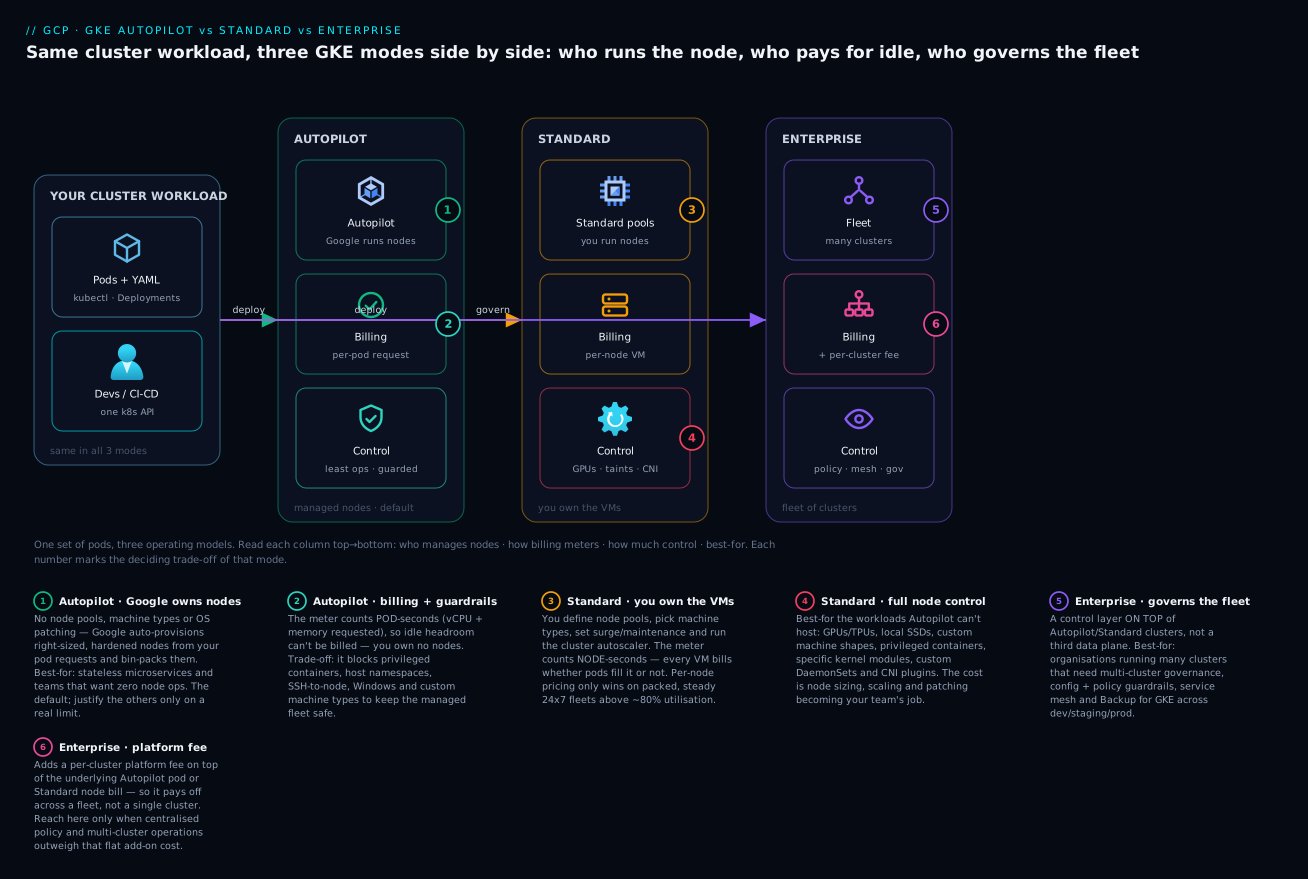
The first diagram shows the spectrum as a single picture: the same managed control plane sits at the top for every mode (Google runs the API server, etcd, scheduler and controllers no matter what you choose). Below it, the data plane is where the modes split. On the Autopilot side, Google owns the entire node layer — provisioning, sizing, the Container-Optimized OS image, CVE patching, bin-packing and node scaling — and you interact only with pods whose resource requests drive a per-pod bill. On the Standard side, you own node pools (machine types, disks, local SSD, taints, surge-upgrade settings), the Cluster Autoscaler and Node Auto-Provisioning, and you pay the per-node VM price for everything provisioned, idle or not. Both data planes run Dataplane V2 (Cilium/eBPF) for network policy — mandatory on Autopilot, opt-in on Standard. Read it as a dial: the further left (Autopilot), the more Google operates and the less you tune; the further right (Standard), the more control and the more toil.
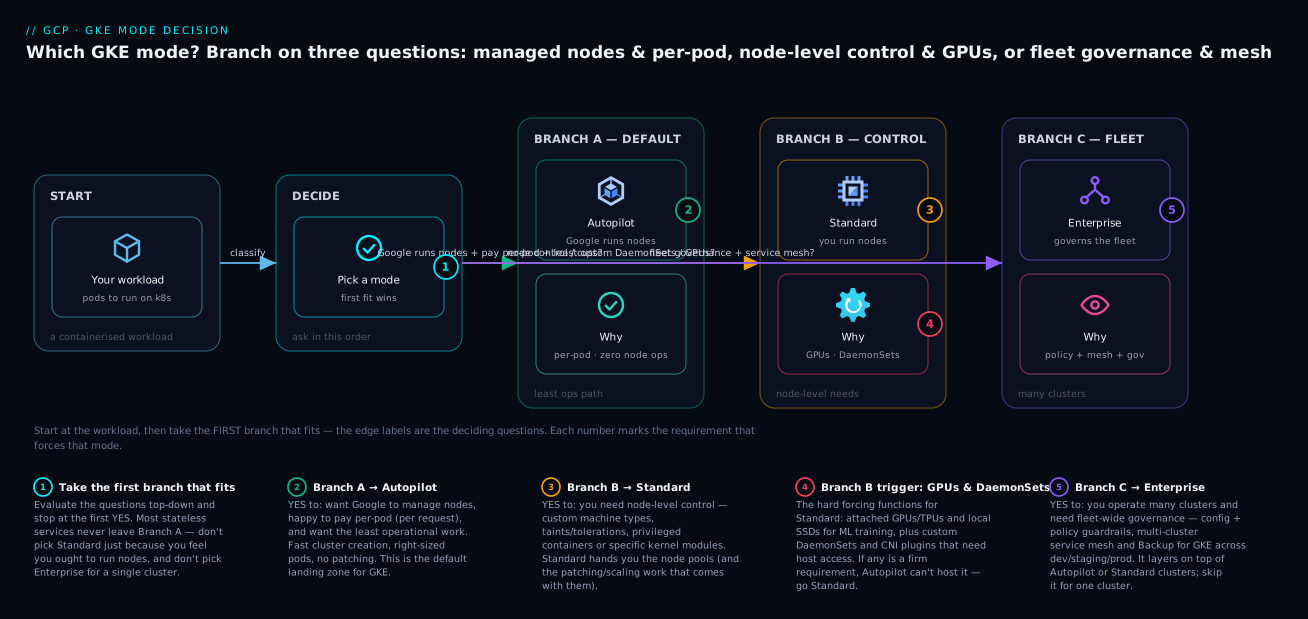
The second diagram is the decision flow you walk in a design review. It starts from the workload and asks the questions that actually decide the mode, in priority order. Does the workload need node-level control — privileged containers, host networking, custom kernel modules, local SSD, a specific machine shape, or node SSH? If yes, you need Standard, because Autopilot forbids those by design. If no, the default is Autopilot — Google operates the nodes and bills per pod, which suits the large majority of stateless services. Then a second, orthogonal question: do you operate many clusters that must be governed consistently — config-as-policy, fleet-wide mTLS, multi-cluster routing, provable compliance? If yes, layer GKE Enterprise over whichever mode the clusters use. The two questions are independent: Enterprise sits on top of Autopilot or Standard, it doesn’t replace the node-level decision.
Real-world scenario
Nimbus Mart, a mid-size Indian e-commerce company, runs everything on GKE. Their platform team is five engineers; their Google Cloud bill is about ₹14,00,000/month, of which GKE compute is roughly ₹4,80,000. They started, two years ago, with a single Standard cluster in asia-south1 because the founding engineers wanted “real Kubernetes.” It worked — until it didn’t scale as an operating model.
The first crack was cost. Their Standard cluster ran a mix of bursty front-end services (catalog, search, checkout) plus a couple of always-on workers. To absorb evening traffic spikes they kept node-pool minimums high “to be safe,” and their nodes averaged 58% utilization — they were paying for ~42% idle vCPU around the clock. A finance review flagged it. The platform lead’s first instinct was to tune bin-packing and lower node minimums, which helped marginally but reintroduced cold-start 503s during spikes when the Cluster Autoscaler lagged demand.
The second crack was toil. With one cluster they already spent ~30% of one engineer’s week on node operations: surge-upgrade windows, COS CVE upgrades, autoscaler tuning, and a recurring “why are pods Pending?” investigation that always turned out to be --max-nodes set too low. When they spun up separate dev, staging and a second-region (asia-southeast1) cluster, that toil multiplied by four and the clusters drifted — staging had network policy, dev didn’t; the second-region cluster had a public control-plane endpoint nobody intended.
The redesign was a clean application of the spectrum. They moved the stateless front-end services (catalog, search, checkout, ~80% of their pods) to a new Autopilot cluster per environment. Per-pod billing erased the idle-node waste overnight — the same workload that ran at 58% utilization on Standard now billed only for requested pods, cutting front-end compute ~22% — and the node-operations toil for those services dropped to zero. They kept Standard for exactly two things: the nightly recommendation-model training (needs A100 GPUs, local SSD for shuffle, and runs on Spot node pools they script on/off), and a third-party security agent that requires a privileged host-networking DaemonSet Autopilot won’t allow. Those genuinely needed node control, so Standard was correct — not habitual.
Six months and eleven clusters later (dev/staging/prod × two regions, plus the GPU Standard cluster and a sandbox), the bottleneck had migrated again — from operating clusters to governing them. An internal PCI readiness review asked, “prove every prod cluster denies public control-plane access, enforces network-policy default-deny, and runs the same admission constraints.” Nobody could, quickly. They enabled GKE Enterprise over the fleet: Config Sync rendered a single Git repo of baseline config (network policies, namespaces, RBAC) to every cluster; Policy Controller enforced “no privileged pods, resource limits required, no public LoadBalancers in prod” fleet-wide; the security posture dashboard produced the CIS-style report the auditor wanted; and Cloud Service Mesh gave them mesh-wide mTLS without hand-installing Istio on eleven clusters. The Enterprise per-vCPU fee added about ₹62,000/month — comfortably less than the ~1.5 engineers of audit-and-drift work it replaced.
The arc as a timeline, because the order is the lesson:
| Phase | Setup | Pain that forced the change | The fix |
|---|---|---|---|
| Year 0 | One Standard cluster | “We want real Kubernetes” | (fine for one cluster) |
| +6 mo | Standard at 58% utilization | Paying for ~42% idle vCPU 24×7 | Move stateless apps to Autopilot (−22% front-end compute) |
| +6 mo | Front-ends on Autopilot | Node toil gone for those; GPU/agent still need control | Keep Standard for GPU training + privileged agent only |
| +12 mo | 11 clusters, drifting | “Prove they’re all consistent and compliant” | Enable GKE Enterprise (Config Sync + Policy Controller + mesh + posture) |
| Steady state | Autopilot default · Standard by exception · Enterprise fleet | — | Toil down, cost down, audit provable; +₹62k/mo < 1.5 engineers saved |
Advantages and disadvantages
Each mode is a deliberate trade. Weigh them honestly before you commit a workload.
| Mode | Advantages | Disadvantages |
|---|---|---|
| Autopilot | No node management at all; pay only for pod requests (no idle-node waste); hardened security defaults (Workload Identity, Shielded, no privileged, DPv2); fast cluster creation; node scaling/patching automatic; pod-level SLA | Higher per-vCPU rate; minimum/incremented pod sizes; no privileged pods, host networking, node SSH, local SSD or arbitrary node DaemonSets; you can’t pin to a specific node or machine SKU |
| Standard | Full node control (machine families, local SSD, sole-tenant, custom OS); privileged pods/host networking/DaemonSets allowed; per-node billing + CUDs/SUDs can beat per-pod at scale with tight packing; SSH and node-level debugging | You own node sizing, scaling config, OS upgrades, surge windows and security opt-ins; idle nodes still bill; bin-packing efficiency is your cost problem; more ways to mis-configure (public endpoints, no network policy) |
| Enterprise | Fleet-wide config (Config Sync) and policy (Policy Controller) end drift; managed multi-cluster mesh (mTLS, traffic, telemetry); multi-cluster Ingress/Gateway + MCS for global routing; security posture/compliance reporting; hybrid/multicloud governance | Per-vCPU subscription on top of compute; operational and conceptual overhead (GitOps, constraints, mesh); overkill for one or two clusters; you still choose Autopilot/Standard underneath |
When each advantage actually matters: Autopilot wins for the broad middle of stateless web/API workloads where you want to ship, not operate — which is most of them. Standard earns its toll only when a workload has a real node-level requirement (GPU fleets with local SSD, privileged agents, custom kernels, sole-tenancy) or when a large, steady, well-tuned fleet plus CUDs genuinely beats Autopilot’s premium. Enterprise is justified the moment fleet consistency and compliance — not any single cluster — is your constraint; below ~3–5 clusters, disciplined Terraform usually suffices and the subscription buys little.
Hands-on lab
Stand up an Autopilot cluster and a Standard cluster side by side, deploy the same workload to each, observe the billing-model difference (per-pod vs per-node), apply a network policy under Dataplane V2, and tear everything down. Run in Cloud Shell. (Both clusters incur the ~$0.10/hr cluster fee beyond the one free zonal cluster, plus small compute; the whole lab run is a few hundred rupees if you delete promptly — and zonal clusters here keep node costs minimal.)
Step 1 — Project and variables.
export PROJECT=$(gcloud config get-value project)
export REGION=asia-south1
gcloud services enable container.googleapis.com
Step 2 — Create an Autopilot cluster (one line, zonal-equivalent via region).
gcloud container clusters create-auto cl-auto-lab \
  --region $REGION --release-channel regular
Expected: after a few minutes, STATUS: RUNNING. Note there are no node pools to configure.
Step 3 — Create a Standard cluster with one small autoscaling pool, Dataplane V2 and Workload Identity.
gcloud container clusters create cl-std-lab \
  --zone ${REGION}-a \
  --enable-dataplane-v2 \
  --workload-pool="${PROJECT}.svc.id.goog" \
  --machine-type e2-standard-2 \
  --num-nodes 1 --enable-autoscaling --min-nodes 1 --max-nodes 4
Expected: STATUS: RUNNING, and one e2-standard-2 node visible.
Step 4 — Deploy the same workload to each cluster.
# Autopilot
gcloud container clusters get-credentials cl-auto-lab --region $REGION
kubectl create deployment web --image=ghcr.io/nginx/nginx-unprivileged:stable --replicas=3
kubectl set resources deployment web --requests=cpu=250m,memory=256Mi
kubectl get nodes -o wide        # Google has provisioned nodes to fit your pods

# Standard
gcloud container clusters get-credentials cl-std-lab --zone ${REGION}-a
kubectl create deployment web --image=ghcr.io/nginx/nginx-unprivileged:stable --replicas=3
kubectl set resources deployment web --requests=cpu=250m,memory=256Mi
kubectl get nodes -o wide        # YOUR node(s) — fixed shape, scale within bounds
Expected difference: on Autopilot, kubectl get nodes shows nodes Google sized to your pods (and you never picked a machine type); on Standard, you see the e2-standard-2 node(s) you provisioned — billing for the whole VM whether the pods fill it or not.
Step 5 — See the billing-model difference in kubectl describe.
# On Autopilot: the cluster reports per-pod scheduling; requests ARE the bill
kubectl describe node | grep -A4 "Allocated resources"
# On Standard: the node's full capacity exists regardless of how packed it is
The mental takeaway: Autopilot’s allocatable tracks your requests; Standard’s node capacity is fixed and you pay for all of it.
Step 6 — Apply a default-deny network policy (works on both; DPv2 enforces natively).
kubectl apply -f - <<'EOF'
apiVersion: networking.k8s.io/v1
kind: NetworkPolicy
metadata: { name: default-deny-ingress, namespace: default }
spec:
  podSelector: {}
  policyTypes: ["Ingress"]
EOF
kubectl get networkpolicy
Expected: the policy is created; on Dataplane V2 it is enforced without any add-on.
Step 7 — Confirm hardened defaults differ.
# Autopilot rejects a privileged pod by policy; Standard would allow it
kubectl apply -f - <<'EOF'
apiVersion: v1
kind: Pod
metadata: { name: priv-test }
spec:
  containers:
    - name: c
      image: busybox
      command: ["sleep","3600"]
      securityContext: { privileged: true }
EOF
Expected on Autopilot: the request is denied by the Autopilot policy (privileged not allowed). On Standard: it would schedule (don’t leave it running). This is the guardrail wall in one command.
Validation checklist. You created both modes, deployed identical workloads, saw that Autopilot provisions nodes to fit pods (per-pod billing) while Standard bills the node you provisioned, applied a network policy under Dataplane V2, and watched Autopilot reject a privileged pod that Standard accepts. That is the entire decision in a single session.
The lab steps mapped to what each proves:
| Step | What you did | What it proves |
|---|---|---|
| 2 | create-auto (no node config) |
Autopilot removes node management entirely |
| 3 | Standard with a sized node pool | You own the node shape and bounds on Standard |
| 4–5 | Same workload both modes | Per-pod (Autopilot) vs per-node (Standard) billing |
| 6 | NetworkPolicy default-deny | DPv2 enforces policy natively, no add-on |
| 7 | Privileged pod | Autopilot’s guardrail wall vs Standard’s freedom |
Cleanup (stop all charges).
gcloud container clusters delete cl-auto-lab --region $REGION --quiet
gcloud container clusters delete cl-std-lab --zone ${REGION}-a --quiet
Common mistakes & troubleshooting
The real failure modes when teams pick or run these modes — symptom, root cause, how to confirm, and the fix.
| # | Symptom | Root cause | Confirm (exact command / path) | Fix |
|---|---|---|---|---|
| 1 | Picked Standard “to learn Kubernetes,” now drowning in node toil | Chose control you don’t need | Count hours/week on node ops; list workloads’ actual node needs | Move stateless apps to Autopilot; keep Standard by exception |
| 2 | Autopilot bill higher than expected per vCPU | Comparing per-vCPU rate, not invoice; tiny pods hitting minimums | kubectl describe nodes; sum pod requests vs Standard idle |
Right-size requests (VPA); accept premium where it beats idle waste |
| 3 | Pods Pending forever on Standard under load | --max-nodes too low or no NAP for the pod shape |
kubectl describe pod → “Insufficient cpu/memory”; gcloud container node-pools describe |
Raise --max-nodes; enable --enable-autoprovisioning |
| 4 | “Autopilot can’t run my workload” | Workload needs privileged / host net / local SSD / node SSH | kubectl apply returns an admission denial naming the field |
Use Standard for that workload (correct, not a workaround) |
| 5 | Network policy “not working” | Legacy dataplane without Calico; or policy never applied | gcloud container clusters describe --format='value(networkConfig.datapathProvider)' |
Recreate with --enable-dataplane-v2 (or enable network policy) |
| 6 | Pods can’t call Google APIs (403 / default credentials) | Workload Identity not wired; relying on node SA | kubectl get sa -o yaml (no iam.gke.io annotation) |
Wire Workload Identity (SA + binding + annotation) |
| 7 | GPU pods stay Pending on Standard | No GPU node pool / driver, or missing toleration | kubectl describe pod → “0/ nodes available, taint”; pool list |
Create GPU node pool + accelerator; tolerate the taint; ensure driver DaemonSet |
| 8 | Spot pods evicted constantly, app flaps | Spot used for non-tolerant workload | kubectl get events → preemption; pod not restart-safe |
Move critical pods to on-demand; keep Spot for batch/burst with PDBs |
| 9 | Idle nodes billing on Standard overnight | Node-pool min too high; CA can’t scale to 0 | Plan node count vs load graph; --min-nodes value |
Set --min-nodes 0 where safe; consolidate; or use Autopilot |
| 10 | Eleven clusters, can’t prove they’re consistent | No fleet governance layer | Try to diff config across clusters manually | Enable GKE Enterprise: Config Sync + Policy Controller + posture |
| 11 | “Enterprise cluster” can’t be found in the create UI | Treating Enterprise as a cluster mode | There is no --mode=enterprise |
Register clusters to a fleet; enable Enterprise on the fleet |
| 12 | Control-plane reachable from the internet in prod | Public endpoint + no authorized networks | gcloud container clusters describe --format='value(privateClusterConfig.enablePrivateEndpoint, masterAuthorizedNetworksConfig)' |
--enable-private-nodes, --enable-master-authorized-networks |
| 13 | Mesh mTLS inconsistent across clusters | Hand-installed Istio per cluster, drift | Compare Istio versions per cluster | Use Cloud Service Mesh (managed) via Enterprise |
| 14 | Autopilot pod got more CPU/mem than requested | Request below minimum/increment; bumped up | kubectl get pod -o jsonpath requests vs what you set |
Set requests at/above the class minimum to avoid surprise billing |
The entries that bite hardest, expanded:
1. Standard chosen for the experience, not the need. The most expensive mistake is cultural: picking Standard because “real engineers run nodes.” Confirm by listing each workload’s actual node requirements — most stateless services need none of Standard’s exclusive capabilities. Fix: default to Autopilot, and keep Standard only for workloads with a concrete node-level need.
3. Pending pods under load on Standard. HPA scales replicas, but if the Cluster Autoscaler’s --max-nodes is too low (or no Node Auto-Provisioning exists for an unusual pod shape), the new replicas have nowhere to land and sit Pending — a 503 under load that looks like an app bug. Confirm: kubectl describe pod <name> shows “0/N nodes are available: Insufficient cpu.” Fix: raise --max-nodes, and enable --enable-autoprovisioning so GKE can invent a fitting node pool. Autopilot doesn’t have this failure because it owns the ceiling.
5. Network policy silently not enforced. On a legacy-dataplane Standard cluster without the Calico network-policy add-on, NetworkPolicy objects are accepted by the API but not enforced — a dangerous false sense of isolation. Confirm: gcloud container clusters describe <cl> --format='value(networkConfig.datapathProvider)' should read ADVANCED_DATAPATH (Dataplane V2). Fix: recreate with --enable-dataplane-v2 (it’s the default and mandatory on Autopilot, which is why Autopilot doesn’t hit this).
11. Looking for an “Enterprise cluster.” Teams waste time hunting for a third cluster type. There isn’t one. Fix: create Autopilot or Standard clusters, register them to a fleet (gcloud container fleet memberships register), and enable Enterprise features on the fleet.
Best practices
- Default new clusters to Autopilot. Make Standard the exception you justify with a concrete node-level requirement, not the default. Most stateless services belong on Autopilot.
- Set pod requests deliberately on Autopilot — they are your bill. Use VPA recommendations to right-size, and keep requests at or above the class minimum to avoid being silently bumped (and billed) up.
- Right-size and consolidate on Standard — idle nodes bill in full. Use
--min-nodes 0where safe, NAP for unusual shapes, and committed-use discounts for steady baseline capacity. - Always enable Dataplane V2 (it’s mandatory on Autopilot; use
--enable-dataplane-v2on Standard) and start namespaces default-deny, opening only the flows you need. - Turn on Workload Identity everywhere and never download service-account keys. It’s on by default in Autopilot; opt in explicitly on Standard.
- Make clusters private (
--enable-private-nodes) with authorized networks on the control plane, and plan Cloud NAT for egress. Public control-plane endpoints in prod are a finding waiting to happen. - Use release channels (
regular/stable) for predictable, automatic control-plane and node upgrades rather than pinning versions and falling behind on CVEs. - Run on-demand baseline + Spot burst for fault-tolerant workloads, with PodDisruptionBudgets and checkpointing; never put critical singletons or stateful primaries on Spot.
- Adopt GKE Enterprise when fleet consistency is the bottleneck (~3–5+ clusters, compliance, multi-cluster mesh) — and drive config via Config Sync (GitOps) and guardrails via Policy Controller, not per-cluster
kubectl. - Keep cluster config in Terraform regardless of mode, so a cluster is reproducible and reviewable — and so drift is a diff, not a surprise.
- Separate liveness from readiness and keep health checks shallow, so a downstream blip doesn’t evict your whole deployment.
- Tag and label by environment and team for cost attribution; per-pod (Autopilot) and per-node (Standard) costs both need owners.
Security notes
GKE security splits into control-plane exposure, node hardening, identity, network isolation and supply-chain control — and the mode changes how many of these you must set by hand.
- Identity (Workload Identity). The non-negotiable. Bind Kubernetes service accounts to Google IAM service accounts so pods get short-lived, automatically-rotated credentials instead of long-lived JSON keys (a recurring leak source — the least-privilege discipline in GCP IAM and Service Accounts: Roles, Bindings and Least Privilege applies directly). On by default in Autopilot;
--workload-pool=PROJECT.svc.id.googon Standard. - Node hardening. Shielded GKE Nodes (secure boot, vTPM, integrity monitoring) and Container-Optimized OS with automatic CVE patching. Autopilot enforces these and you can’t weaken them; on Standard, enable
--enable-shielded-nodesand--enable-autoupgrade. - No privileged escape. Autopilot forbids privileged pods, host namespaces and most host paths by policy. On Standard, enforce the equivalent with PodSecurity admission (“restricted”) or Policy Controller constraints — don’t leave privileged escalation open.
- Network isolation. Private nodes (no public IPs), authorized networks on the API server, and default-deny NetworkPolicy under Dataplane V2 to stop lateral movement. For data-exfiltration perimeters around your cluster’s Google API access, layer GCP VPC Service Controls: Build Data Exfiltration Perimeters.
- Supply chain. Binary Authorization so only signed/attested images deploy, plus Artifact Registry vulnerability scanning. Both modes support it; wire it into CI/CD.
- Encryption. CMEK for boot disks and application-layer secrets encryption for etcd secrets with your own KMS key. Both modes support it.
- Posture and runtime threats. The GKE security posture dashboard scans configuration and workload vulnerabilities; GKE Enterprise adds fleet-wide compliance reporting and advanced threat detection. Turn on at least
--security-posture=standard.
The security defaults by mode, restated as a checklist auditors actually ask for:
| Control | Autopilot | Standard (you must set) | Enterprise adds |
|---|---|---|---|
| Workload Identity | Default on | --workload-pool |
Fleet workload-identity pool |
| Shielded nodes / secure boot | Enforced | --enable-shielded-nodes |
Posture verifies it |
| No privileged pods | Enforced | PodSecurity / Policy Controller | Policy Controller fleet-wide |
| Private nodes + authorized networks | Configure | Configure | Connect gateway for access |
| Binary Authorization | Configure | Configure | Fleet-consistent policy |
| Network policy default-deny | DPv2 native | DPv2 + your policies | Multi-cluster mesh mTLS |
| Compliance reporting | Posture dashboard | Posture dashboard | Fleet CIS/benchmark reports |
Cost & sizing
What drives the GKE bill, by mode, and how to right-size each.
| Cost driver | Autopilot | Standard | Lever to reduce it |
|---|---|---|---|
| Compute | Sum of pod requests (vCPU/mem/eph-storage), per second | Every node VM provisioned, per second | Autopilot: right-size requests; Standard: pack tighter, fewer nodes |
| Idle capacity | None | Idle nodes bill in full | Standard: --min-nodes 0, consolidate; or switch to Autopilot |
| Cluster management fee | ~$0.10/hr (≈$73/mo); 1 free zonal cluster | Same | Use the free zonal cluster for dev/sandbox |
| Disks | Per-pod ephemeral storage requested | Boot + local SSD on every node | Standard: smaller boot disks, fewer local SSDs |
| GPUs | Billed only while GPU pods scheduled | GPU node bills even idle | Autopilot for bursty GPU; script Standard GPU pools on/off |
| Spot savings | ~60–91% on Spot pods | ~60–91% on Spot node pools | Use for fault-tolerant work |
| Committed-use discounts | Apply to Autopilot compute | Apply to node vCPU/RAM | Buy CUDs for steady baseline |
| Egress | Standard GCP egress (cross-zone/region/internet) | Same | Keep traffic in-zone/region; private endpoints |
| Enterprise subscription | Per-vCPU on top | Per-vCPU on top | Only enable when fleet governance pays for it |
Rough sizing intuition (numbers are illustrative; always price with the calculator):
| Workload shape | Recommended mode | Why | Rough monthly (illustrative) |
|---|---|---|---|
| 10 stateless services, bursty, ~60% packed | Autopilot | No idle-node waste; no node toil | Pay ~requested vCPU + ~$73 cluster fee |
| Steady 24×7 fleet, 200 vCPU, tuned, CUDs | Standard | CUDs + tight packing beat per-pod premium | Discounted node VMs + ~$73 fee |
| Nightly GPU training, 4 hrs | Autopilot (or scripted Standard) | No idle GPU node billing | GPU-hours only |
| Dev/sandbox | Autopilot, free zonal | Zero node management; free cluster fee | Minimal pod requests |
| 6+ clusters, compliance, mTLS | Any + Enterprise | Fleet governance is the constraint | Underlying compute + per-vCPU Enterprise fee |
The one-line rule: on Autopilot, your bill is your pod requests — so right-size them; on Standard, your bill is your provisioned nodes — so pack them. Both get the same cluster fee and the same one free zonal cluster; Enterprise adds a per-vCPU subscription you only switch on when fleet consistency saves more engineer-time than it costs.
Interview & exam questions
1. What is the fundamental difference between GKE Autopilot and Standard? Autopilot is a mode where Google operates the entire node layer (provisioning, sizing, scaling, patching, hardening) and bills per pod resource request; Standard hands you node pools and bills per provisioned node VM. Both run the same Google-managed control plane. Maps to the Professional Cloud Architect and Professional Cloud DevOps Engineer exams.
2. Is GKE Enterprise a third type of cluster?
No. Enterprise is a subscription tier you enable over a fleet of clusters (Autopilot and/or Standard), adding Config Sync, Policy Controller, Cloud Service Mesh, multi-cluster Ingress/Gateway and security posture. You register clusters to the fleet; there is no --mode=enterprise.
3. Why might Autopilot be cheaper than Standard even though its per-vCPU rate is higher? Standard bills for provisioned capacity, so idle node headroom (often 30–45%) is wasted money; Autopilot bills only for requested pod capacity. For typical clusters running 50–70% packed, Autopilot’s per-pod premium is frequently lower at the invoice — plus it removes the utilization-chasing labor.
4. When must you use Standard rather than Autopilot? When a workload needs node-level control Autopilot forbids: privileged containers, host networking, custom kernel modules/sysctls, local SSDs, specific machine SKUs/sole-tenant nodes, node SSH, or certain node-privileged DaemonSets (e.g. some security/observability agents).
5. What is Dataplane V2 and why does it matter?
A Cilium/eBPF-based CNI that enforces NetworkPolicy natively (no Calico add-on), scales better than iptables at high service counts, and provides flow logging and DNS-aware policy. It is the mandatory default on Autopilot and opt-in (--enable-dataplane-v2) on Standard. A NetworkPolicy on a legacy dataplane without Calico is accepted but not enforced — a common security gap.
6. Explain Cluster Autoscaler vs Node Auto-Provisioning vs HPA vs VPA. HPA scales pod replicas on metrics; VPA right-sizes pod requests; CA adds/removes nodes within existing pools; NAP creates new node pools/shapes when no existing pool fits a pending pod. On Autopilot, CA and NAP are built-in (Google runs them); on Standard you configure them. App-layer (HPA/VPA) is yours in both modes.
7. How do you run GPUs on Autopilot vs Standard?
On Autopilot you declare nvidia.com/gpu in the pod spec (plus a gke-accelerator selector) and Google provisions a matching node; drivers are managed. On Standard you create a GPU node pool with --accelerator, schedule via taint/toleration, and rely on the driver DaemonSet. Autopilot avoids idle-GPU-node billing; Standard suits sustained fleets with local SSD.
8. What does Workload Identity solve and is it on by default?
It federates a Kubernetes service account to a Google IAM service account so pods get short-lived, auto-rotated credentials instead of long-lived JSON keys. It is on by default in Autopilot and must be enabled (--workload-pool) on Standard. It is the recommended way for pods to call Google APIs.
9. What’s the right design for Spot capacity in GKE? On-demand baseline plus Spot burst for fault-tolerant workloads, with PodDisruptionBudgets, multiple replicas and checkpointing. Spot (60–91% off) can be reclaimed with ≤30 s notice and has no SLA, so never run stateful primaries or critical singletons on it. Autopilot uses a Spot pod selector/toleration; Standard uses Spot node pools.
10. When should an organization adopt GKE Enterprise? When the bottleneck shifts from operating any single cluster to governing many consistently — typically ~3–5+ clusters, regulated/compliance workloads needing a provable baseline, multi-region active/active routing, or a service-mesh-wide mTLS mandate. Below that, disciplined Terraform usually suffices and the per-vCPU fee buys little.
11. How does billing differ for an idle cluster between modes?
On Autopilot an idle cluster with no pods costs essentially just the cluster management fee (no nodes exist to bill). On Standard, any node your pools keep running (e.g. --min-nodes 1) bills its full VM price even with zero pods. This is why Autopilot suits bursty and low-baseline workloads.
12. What security defaults does Autopilot enforce that you must configure manually on Standard? Workload Identity, Shielded nodes/secure boot, no privileged pods/host namespaces, automatic node CVE patching, and Dataplane V2 network policy — all on/enforced by default in Autopilot, all opt-in (or your responsibility to enforce) on Standard.
Quick check
- You have a stateless REST API at ~60% node packing on Standard, paying for idle headroom 24×7. Which mode likely lowers the bill and the toil, and why?
- A workload needs a privileged host-networking DaemonSet for a security agent. Which mode, and why can’t you use the other?
- Your
NetworkPolicyobjects exist but traffic isn’t blocked on a Standard cluster. What’s the single most likely cause and the confirming command? - You run nine clusters and an auditor asks you to prove they all enforce the same admission rules and deny public control-plane access. What do you turn on?
- On Autopilot, your bill is higher than a colleague’s Standard estimate at the same vCPU. Name two reasons and the first lever you’d pull.
Answers
- Autopilot. Standard bills for provisioned nodes, so ~40% idle headroom is wasted; Autopilot bills only for pod requests and removes node operations entirely. Right-size requests (VPA) to push savings further.
- Standard. Autopilot forbids privileged containers and host networking by policy to operate nodes safely; a node-privileged DaemonSet is exactly what it blocks, so Standard (where you own the nodes) is required.
- The cluster is on the legacy dataplane without the Calico network-policy add-on, so policies are accepted but not enforced. Confirm with
gcloud container clusters describe <cl> --format='value(networkConfig.datapathProvider)'— it should readADVANCED_DATAPATH. Fix by enabling Dataplane V2 (or network policy). - GKE Enterprise over a fleet: Config Sync for consistent config, Policy Controller for fleet-wide admission constraints, and the security posture dashboard for the compliance report; also enforce private nodes + authorized networks.
- (a) Autopilot’s per-vCPU rate is higher than a raw node’s; (b) tiny pods are bumped up to the minimum/increment, inflating requests. First lever: right-size pod requests (VPA) so you stop paying for padding or sub-minimum bumps — then compare invoice to invoice, including Standard’s idle nodes.
Glossary
| Term | Definition |
|---|---|
| GKE | Google Kubernetes Engine — managed Kubernetes; Google always runs the control plane. |
| Autopilot | Mode where Google operates all nodes; you declare pods and pay per pod resource request. |
| Standard | Mode where you operate node pools and pay per provisioned node VM. |
| GKE Enterprise | A subscription tier over a fleet adding fleet-wide config, policy, mesh, multi-cluster routing and posture. |
| Control plane | The Google-managed API server, etcd, scheduler and controllers — identical across all modes. |
| Node | A Compute Engine VM that runs pods; hidden by Autopilot, owned by you on Standard. |
| Node pool | A group of identical nodes that scale and upgrade together (Standard concept). |
| Cluster Autoscaler (CA) | Adds/removes nodes within a pool to fit pending pods; built-in on Autopilot. |
| Node Auto-Provisioning (NAP) | Creates new node pools/shapes when no existing pool fits a pod; built-in on Autopilot. |
| HPA / VPA | Horizontal Pod Autoscaler (replica count) / Vertical Pod Autoscaler (pod request size). |
| Dataplane V2 | Cilium/eBPF-based CNI that natively enforces NetworkPolicy; default and mandatory on Autopilot. |
| Workload Identity | Federation binding a Kubernetes service account to a Google IAM service account (no key files). |
| Shielded GKE Nodes | Nodes with secure boot, vTPM and integrity monitoring. |
| Binary Authorization | Deploy-time control allowing only signed/attested container images. |
| Spot | Deeply discounted, preemptible capacity (nodes on Standard, pods on Autopilot). |
| Compute class | An Autopilot abstraction (Balanced, Scale-Out, Performance, Accelerator) for requesting hardware without node pools. |
| Fleet | A named group of clusters governed as one unit; the object GKE Enterprise manages. |
| Config Sync | GitOps feature applying a Git repo’s config continuously to every fleet cluster. |
| Policy Controller | OPA Gatekeeper constraints enforced fleet-wide via a policy library. |
| Cloud Service Mesh | Managed Istio providing mTLS, traffic management and telemetry across clusters. |
| Multi-cluster Ingress / Gateway | One load-balancing VIP across multiple clusters/regions. |
| CUD / SUD | Committed-Use / Sustained-Use Discounts on Compute Engine capacity. |
Next steps
- Decide whether GKE is even the right home for the workload first: GCP Cloud Run vs GKE vs Compute Engine: Choose the Right Compute.
- If you want the gentler Autopilot-vs-Standard primer before this depth: GKE Autopilot vs Standard: Which Google Kubernetes Engine Mode Should You Actually Use?.
- Wire pods to Google APIs the secure way with GCP IAM and Service Accounts: Roles, Bindings and Least Privilege.
- Get the cluster’s networking right — IP ranges, Shared VPC, private access — with GCP VPC and Shared VPC: Networking Across Projects.
- Stand up the org-level guardrails your fleet plugs into with GCP Landing Zone: The Foundation Blueprint with Shared VPC and Org Policies and add a data-exfiltration perimeter via GCP VPC Service Controls: Build Data Exfiltration Perimeters.
- Make the clusters observable with GCP Cloud Monitoring and Operations: Observability Built In.