You open the Google Cloud console to create your first Google Kubernetes Engine (GKE) cluster, and before you have typed a single thing the form asks a question you cannot un-see: Autopilot or Standard? It is the very first fork, it is permanent for the life of that cluster, and the console offers one sentence of help. So most teams pick whichever the last blog post recommended, run with it for a year, and only discover the trade-off when a bill spikes or a DaemonSet refuses to schedule. This article is the explanation you wish that form had linked to.
Here is the one-sentence version, and then we will earn it slowly: Autopilot is GKE where Google runs the nodes and you pay for the pods you actually run; Standard is GKE where you run the nodes and you pay for the VMs whether or not pods use them. Same Kubernetes API, same kubectl, same control plane Google manages for you in both — the difference is where the boundary of “your responsibility” sits, and that one boundary cascades into cost, security, flexibility and how much of your weekend the cluster will consume. Get the mental model right and the choice becomes obvious in about thirty seconds per workload.
By the end you will be able to look at any workload — a bursty web API, a GPU training job, a chatty service mesh, a privileged security agent — and say, with reasons, “this one is Autopilot, that one is Standard,” and defend it in an architecture review. You will know the exact gcloud flags and Terraform to create each, the limits that quietly disqualify one or the other, the pricing math with real rupee and dollar numbers, and the migration story for when you outgrow your first guess. We are not going to restate the docs — we are going to build the intuition that makes them make sense.
What problem this solves
Plain Kubernetes is a remarkable engine and a brutal landlord. The cluster will happily run your containers, but you must supply and maintain the machines they run on: pick machine types, size the pool, patch the OS, upgrade the kubelet, rotate nodes, watch for the CPU and memory you provisioned but never used, and keep the security posture tight on every node. On a self-managed cluster that is a full-time platform team. GKE already removes the worst of it by managing the control plane — the API server, scheduler, etcd, and controller-manager — so you never babysit a master node. But on GKE Standard, the worker nodes are still yours: your VMs, your node pools, your patching cadence, your wasted headroom, your 3 a.m. “why won’t this pod schedule” page.
The pain shows up in two predictable ways. First, money you cannot see: you provision a node pool of e2-standard-4 machines for a service that needs two cores, the pool sits 60% empty all night, and you pay for every idle core because billing on Standard is per-VM-second, not per-pod. Multiply across a dozen teams who each “rounded up to be safe” and the waste is the single biggest line item on many GKE bills. Second, operational toil you did not sign up for: node upgrades that go sideways, surge settings nobody tuned, a security finding that says “your nodes are running an outdated kernel,” a Pending pod because the pool has no room and the cluster autoscaler is mid-cooldown. None of this is your application’s problem, yet it eats your team.
GKE Autopilot is Google’s answer: a mode where Google operates the nodes as part of the managed service. You stop thinking in machines and start thinking in pods. You declare what each pod needs — so many millicores of CPU, so much memory — and Google provisions, sizes, bin-packs, patches and upgrades the compute invisibly, then bills you for the sum of your pods’ resource requests, not for VMs. The idle-headroom waste structurally disappears because there is no headroom you own; the node toil disappears because you have no nodes to toil over. What you give up — the honest core of the whole decision — is direct control of those nodes: no SSH, no privileged DaemonSets, no arbitrary machine types, and a fixed set of guardrails Google enforces to keep the fleet safe and dense. Whether that trade is a gift or a cage depends entirely on the workload, which is exactly what the rest of this article teaches you to judge.
Learning objectives
By the end of this article you can:
- Explain the Autopilot vs Standard difference in one sentence and back it with the correct mental model of who owns the node boundary and who pays for idle capacity.
- Decide, per workload, which mode fits — using a concrete decision table and the disqualifying limits (privileged pods,
DaemonSets, GPUs, Windows, custom machine types) that force one choice. - Reason about pod-level (Autopilot) vs node-level (Standard) billing and run the worked math in INR/USD to predict which is cheaper for a given utilisation.
- Write the exact
gcloud container clusters createcommands and Terraform (google_container_cluster) for both modes, with the flags that matter. - Map GKE’s shared-responsibility line in each mode: what Google patches and secures versus what stays yours.
- Avoid the classic traps — unschedulable pods from missing resource requests, surprise costs from
DaemonSets, the “Autopilot won’t let me SSH” panic, and bursting/scaling gotchas. - Plan a migration path (you cannot flip a cluster’s mode in place) and run a mixed fleet of Autopilot and Standard clusters under one platform.
Prerequisites & where this fits
You should be comfortable with the Kubernetes basics: a pod is the smallest deployable unit (one or more containers that share a network and lifecycle), a node is a worker machine that runs pods, a Deployment keeps a desired number of pod replicas alive, and kubectl is how you talk to the cluster. You should know what a resource request is — the CPU and memory a container tells the scheduler it needs — because that single concept is the hinge of the entire Autopilot model. If “requests vs limits” is fuzzy, skim a Kubernetes fundamentals primer first; on this site, Understanding managed Kubernetes: AKS, EKS, and GKE compared sets the broader stage and Kubernetes VPA: right-sizing requests and limits drills into requests specifically.
Where this sits: this is the compute-platform decision that comes after you have decided to use containers and orchestration at all. Upstream of it is the question “should this even be Kubernetes, or would Cloud Run or a plain VM be simpler?” — covered in Cloud Run vs GKE vs Compute Engine: the decision and the broader GCP compute options compared. Once you have chosen GKE, this article picks the mode. Downstream of it are the deep operational topics — node pools and networking internals in GKE deep dive: Autopilot, Standard, node pools, networking, production hardening in GKE Autopilot production hardening guide, and the enterprise tier in GKE Autopilot, Standard, and Enterprise editions explained. This piece is deliberately the intuition layer beneath all of those.
A quick map of where the mode choice sits relative to everything else you will configure:
| Layer | The question | Where it’s decided | Covered here? |
|---|---|---|---|
| Should this be containers at all? | Container vs VM vs serverless | Cloud Run / GKE / Compute Engine decision | No (upstream) |
| Should the orchestrator be GKE? | GKE vs Cloud Run vs raw VMs | Compute options compared | No (upstream) |
| Which GKE mode? | Autopilot vs Standard | This article | Yes — the core |
| Which edition / tier? | Standard edition vs Enterprise | GKE editions explained | Briefly |
| How are nodes/pools shaped? | Machine types, pools, networking | GKE deep dive | No (downstream) |
| How do pods get IAM? | Workload Identity | Workload Identity deep dive | Briefly |
Core concepts
Six mental models make every later decision fall out for free. Read these once slowly; the rest of the article is just consequences.
The control plane is Google’s in both modes — only the nodes differ. GKE manages two layers separately. The control plane (API server, scheduler, etcd, controller-manager) is fully Google-operated in both modes — you never see or patch a master. What changes is the data plane: the worker nodes. On Standard you own them; on Autopilot Google owns them too. So the real headline is narrower than “managed vs unmanaged” — it is “managed control plane + your nodes” (Standard) versus “managed control plane + managed nodes” (Autopilot). Same API, same kubectl, same YAML; different node ownership.
Think hotel, not house. Standard is renting an apartment: the building (control plane) is maintained for you, but inside your unit you own the furniture (nodes) — you buy it, arrange it, fix it, and you pay rent on the whole apartment even for the rooms you never enter. Autopilot is a hotel room: you ask for a room with two beds and a desk (pod requests), and the hotel gives you exactly that, cleans it, maintains the plumbing, and charges you per night for the room you occupy — but you cannot knock down a wall, you cannot bring your own boiler, and you cannot access the basement. The whole Autopilot trade is the hotel trade: less control, less work, you only pay for what you occupy, and the management is somebody else’s job.
You pay for pods (Autopilot) or for VMs (Standard). This is the single most consequential difference and the one that surprises finance. On Standard, billing is per node — you pay the Compute Engine price of every VM in your node pools, per second, whether pods fill them or not. A half-empty node still costs full price. On Autopilot, billing is per pod — you pay for the CPU, memory and ephemeral storage your pods request (rounded to Autopilot’s allowed increments), summed across all running pods, per second. There are no nodes on the bill. The practical effect: on Standard you pay for capacity; on Autopilot you pay for consumption. If your nodes run packed and busy, capacity-pricing wins. If they run half-empty (which most do), consumption-pricing wins.
Requests are a suggestion on Standard and a contract on Autopilot. On Standard, a pod with no resource requests still schedules — the scheduler just guesses and may overcommit a node. On Autopilot, every pod must declare CPU and memory requests (Autopilot injects sane defaults if you omit them, and enforces minimums and ratios), because those requests are literally what Google sizes the invisible nodes against and what you are billed for. So a habit that is merely “good practice” on Standard becomes mandatory and load-bearing on Autopilot. This is why teams new to Autopilot sometimes see odd sizing or cost — they never set honest requests, so Autopilot defaulted them.
Autopilot enforces guardrails; Standard lets you do anything. Because Google operates the Autopilot fleet and packs many tenants densely, it must forbid things that would compromise the host or the neighbours: no privileged containers, no host namespace access (hostNetwork, hostPID, arbitrary hostPath), no SSH to nodes, a curated set of machine types. Standard imposes none of this — it is your VM, do as you wish, including the dangerous and the exotic. So Autopilot is safer and more restrictive by default; Standard is more powerful and more your problem. Most stateless workloads never touch a guardrail; security agents, certain CSI drivers, and low-level networking tools hit them immediately.
Bin-packing is the hidden hero. “Bin-packing” is the act of fitting many pods efficiently onto as few nodes as possible — like packing a suitcase so nothing is wasted. On Standard, you are the packer: you choose node sizes and hope the scheduler fills them; gaps are money you burn. On Autopilot, Google is the packer and is incentivised to pack tightly (you are billed by pod, so Google absorbs the node overhead) — it provisions right-sized nodes for your exact pods and reclaims them as pods leave. This is why Autopilot’s per-pod price carries a premium over raw VM cost yet often produces a lower bill: you stop paying for the gaps.
The vocabulary in one table
Pin down every moving part before the deep dive. The glossary repeats these for lookup; this is the side-by-side mental model.
| Concept | One-line definition | Autopilot | Standard |
|---|---|---|---|
| Control plane | API server, scheduler, etcd, controllers | Google-managed | Google-managed |
| Node / worker | VM that runs your pods | Google-managed, invisible | You own and operate |
| Node pool | A group of identical nodes you define | None — auto-provisioned | You create and size them |
| Billing unit | What the meter counts | Pod requests (vCPU·s, GiB·s) | Node-seconds (the VM price) |
| Resource request | CPU/mem a pod declares it needs | Mandatory; sets size + bill | Optional; scheduling hint |
| Bin-packing | Fitting pods onto fewest nodes | Google does it | You do it |
| Cluster autoscaler (CA) | Adds/removes nodes for pending pods | Implicit / automatic | You configure per pool |
| Node auto-provisioning (NAP) | Auto-creates node pools on demand | Always on (the model) | Optional feature |
| Privileged pod | Container with host-level powers | Blocked | Allowed |
| DaemonSet | One pod per node, fleet-wide | Limited / billed per node | Fully supported |
| SSH to node | Shell on the worker VM | Not available | Available |
| Surge upgrade | Extra nodes during a node upgrade | Google-managed | You tune it |
How the two modes actually differ — the master comparison
If you remember one table from this article, make it this one. Every row is a real, load-bearing difference; the deep sections that follow just expand each row.
| Dimension | GKE Autopilot | GKE Standard |
|---|---|---|
| Who operates nodes | You | |
| Billing model | Per pod request (vCPU·s, mem·s, storage·s) | Per node (Compute Engine VM price) |
| You pay for idle headroom? | No — only requested pod resources | Yes — every VM, used or not |
| Node pools | None to manage | You create, size, scale, upgrade |
| Machine type choice | Curated compute classes (general, scale-out, Arm, GPU) | Any Compute Engine type |
| Node SSH / host access | Not available | Full |
| Privileged containers | Blocked | Allowed |
Arbitrary hostPath / host namespaces |
Restricted | Allowed |
| DaemonSets | Supported with constraints; billed as pods | First-class, runs on every node |
| Node OS patching | Google triggers, you set windows/strategy | |
| Node upgrades | Fully managed | You choose channel, surge, maintenance windows |
| Spot / Preemptible | Spot Pods supported | Spot/Preemptible VMs supported |
| GPUs / TPUs | Supported (request via spec) | Supported (you build the pool) |
| Windows containers | Not supported | Supported |
| Per-pod sizing limits | Min/max requests + CPU:mem ratios enforced | Bounded only by node size |
| Security default posture | Hardened, restricted by default | You harden it |
| Operational toil | Minimal | Real: patch, scale, capacity |
| Best for | Stateless apps, bursty load, lean teams | Special hardware, host-level needs, packed fleets |
| SLA | Pods + control plane | Control plane (+ nodes per Compute Engine) |
A second lens that helps the choice click — frame it as “what do you stop doing on Autopilot?” versus “what do you keep the power to do on Standard?”
| You STOP doing (Autopilot) | You KEEP the power to do (Standard) |
|---|---|
| Picking machine types and sizing pools | Choose any machine type, including custom/exotic |
| Patching and upgrading nodes | Pin node OS/version, control surge and windows |
| Paying for empty node capacity | Pack nodes tightly yourself for steady fleets |
| Running and tuning the cluster autoscaler | Run privileged/host-level workloads and agents |
| Worrying about node security baselines | SSH in to debug a node directly |
| Capacity planning headroom | Run Windows containers and unusual CSI drivers |
When Autopilot wins, when Standard wins — the decision
Now make it actionable. The honest decision is not “which is better” (neither is) but “which fits this workload and this team.” Here is the decision table I actually use in reviews. Find the row that describes your situation; the recommendation and the reason are in the last two columns.
| If your situation is… | Lean toward | Because |
|---|---|---|
| Stateless web app / API, variable traffic | Autopilot | You pay per pod, idle vanishes, zero node ops |
| Small team, no dedicated platform engineers | Autopilot | Node patching/scaling/upgrades are gone |
| Bursty or spiky load (campaigns, batch waves) | Autopilot | Scales to pods on demand; no pre-provisioned waste |
| You want the lowest-toil “just run my containers” | Autopilot | Closest GKE gets to serverless containers |
| You need privileged pods or host-namespace access | Standard | Autopilot blocks these outright |
| You run security/observability agents as DaemonSets on every node | Standard | Per-node agents are first-class and cheaper there |
| You need a specific or custom machine type | Standard | Autopilot offers curated classes only |
| You need Windows containers | Standard | Autopilot is Linux-only |
| Steady, predictable, packed 24×7 fleet at high utilisation | Standard | Capacity-pricing on packed VMs can beat per-pod |
| You need to SSH into nodes for low-level debugging | Standard | No node access on Autopilot |
| You need niche CSI drivers / kernel modules | Standard | Host-level installs are restricted on Autopilot |
| You want fewest ways to misconfigure security | Autopilot | Hardened guardrails are on by default |
| Mixed estate, want one default and exceptions | Both | Autopilot as default, Standard for the exceptions |
And here is the disqualifier table — the hard limits that don’t say “lean toward” but “you cannot use Autopilot for this, full stop.” If any of these is a firm requirement, Standard is the answer regardless of everything else.
| Hard requirement | Autopilot? | Verdict |
|---|---|---|
Privileged containers (securityContext.privileged: true) |
Blocked | Standard only |
hostNetwork / hostPID / hostIPC |
Blocked | Standard only |
Arbitrary hostPath volumes |
Restricted | Standard (for most uses) |
| SSH / direct node shell | Not available | Standard only |
| Windows Server containers | Not supported | Standard only |
| Custom machine type (exact vCPU:mem you specify) | Not supported | Standard only |
| Node-level kernel modules / custom OS images | Not supported | Standard only |
| Certain third-party agents needing host access | Often blocked | Standard (or vendor’s Autopilot-aware mode) |
The reassuring news: a typical stateless application — a Deployment of a containerised web service, a queue worker, a cron job, an internal API — trips none of these. For that majority, Autopilot is the lower-cost, lower-effort default, and the burden of proof is on choosing Standard, not the other way round.
The whole decision compresses to a thirty-second flowchart-in-a-table:
| Ask, in order… | If yes → | If no → |
|---|---|---|
| 1. Do I need privileged/host access, Windows, custom machine types, or node SSH? | Standard (a disqualifier fired) | go to 2 |
| 2. Is this a steady, uniform, 24×7 fleet I can keep packed above ~80%? | Standard (capacity-pricing may win) | go to 3 |
| 3. Anything left? | — | Autopilot (the default) |
The cost model, explained with real numbers
This is where most articles wave their hands. The two billing models are genuinely different shapes, and you can predict the winner with a back-of-envelope calculation.
Standard pricing = the VM price. You pay the Compute Engine rate for every node, per second, for as long as the node exists, plus the flat GKE cluster-management fee (one charge per cluster per hour, the first cluster typically covered by a free tier). If your node is an e2-standard-4 (4 vCPU, 16 GiB) and your pods request 1.5 vCPU total, you still pay for 4 vCPU. The “tax” is your idle headroom, invisible on the line item — it just looks like “nodes cost X.”
Autopilot pricing = the sum of pod requests. You pay a per-vCPU-hour and per-GiB-hour rate (plus ephemeral storage) for what your pods request, summed, per second, with a small per-pod minimum and enforced CPU:memory ratios; Spot Pods get a steep discount. There are no node charges and Google absorbs the system overhead. The “tax” here is the per-unit premium over raw VM pricing — Autopilot’s vCPU-hour costs more because it bundles node management and bin-packing risk.
So the whole question reduces to: does my idle-headroom tax (Standard) exceed the per-unit premium (Autopilot)? Equivalently — how full do my Standard nodes actually run?
Here is the shape of the trade as a reference (illustrative ratios, not a price sheet — always confirm current rates in the GCP pricing calculator):
| Node utilisation (how packed your Standard VMs are) | Who tends to win | Why |
|---|---|---|
| Low (≤ 40% — typical for bursty/dev) | Autopilot | You’re paying for >60% empty VMs on Standard |
| Medium (40–60% — common default) | Often Autopilot | Idle tax usually still beats the per-pod premium |
| High (60–80% — well-tuned fleet) | Toss-up | Premium and idle tax roughly cancel |
| Very high (> 80%, steady 24×7, packed) | Standard | Little idle to tax; raw VM rate wins |
| Spot-heavy, fault-tolerant batch | Either (Spot) | Both support Spot; compare Spot Pod vs Spot VM |
A worked example with rupees and dollars
Make it concrete. Suppose a service that, at steady state, runs pods requesting a total of 8 vCPU and 32 GiB of memory. Two ways to host it.
Standard. To run 8 vCPU of pods with normal headroom you might provision 3× e2-standard-4 nodes (12 vCPU, 48 GiB total) — you need slack for the kube-system pods, the DaemonSets, and scheduling gaps, so you can’t pack to exactly 8. Your effective utilisation is about 8/12 ≈ 67%, and you pay for all 12 vCPU around the clock.
Autopilot. You pay for the 8 vCPU and 32 GiB your pods request — and nothing for the 4 vCPU of headroom you no longer provision, because there are no nodes you own.
The arithmetic that matters compares “12 vCPU at the VM rate” against “8 vCPU at the Autopilot rate.” With illustrative rates where the Autopilot vCPU-hour runs roughly 1.2–1.4× a comparable VM vCPU-hour, paying for 8 units at 1.3× ≈ 10.4 VM-equivalent units beats paying for 12 VM units — Autopilot is cheaper here despite the premium, purely because you stopped buying the 4 idle vCPU. Flip it: if you could genuinely pack those nodes to 90%+ (a steady, uniform, 24×7 workload), Standard’s ~8.9 effective units beat Autopilot’s 10.4 and Standard wins.
The reusable rule of thumb, in one table:
| Quantity | Standard | Autopilot |
|---|---|---|
| What you buy | Node capacity (e.g. 12 vCPU) | Pod requests (e.g. 8 vCPU) |
| What you pay for idle | All of it | None |
| Per-unit rate | VM rate (lower) | VM rate × ~1.2–1.4 (premium) |
| Break-even utilisation | — | Roughly 70–80%: below it Autopilot wins, above it Standard can |
| Hidden cost | Engineer time on node ops | Per-pod minimums; ratio rounding |
| Discount lever | CUDs, Spot VMs, packing | Spot Pods, honest (small) requests |
Two cost levers people forget. Honest requests are money on Autopilot: an over-requested pod (asking 2 vCPU, using 0.3) is pure waste, so right-sizing with the Vertical Pod Autoscaler directly lowers the bill — see Kubernetes VPA: right-sizing requests and limits. And Committed Use Discounts and Spot apply on both sides — Standard has CUDs and Spot VMs, Autopilot has Spot Pods and committed-use options — so factor discounts in, not just on-demand rates.
Architecture at a glance
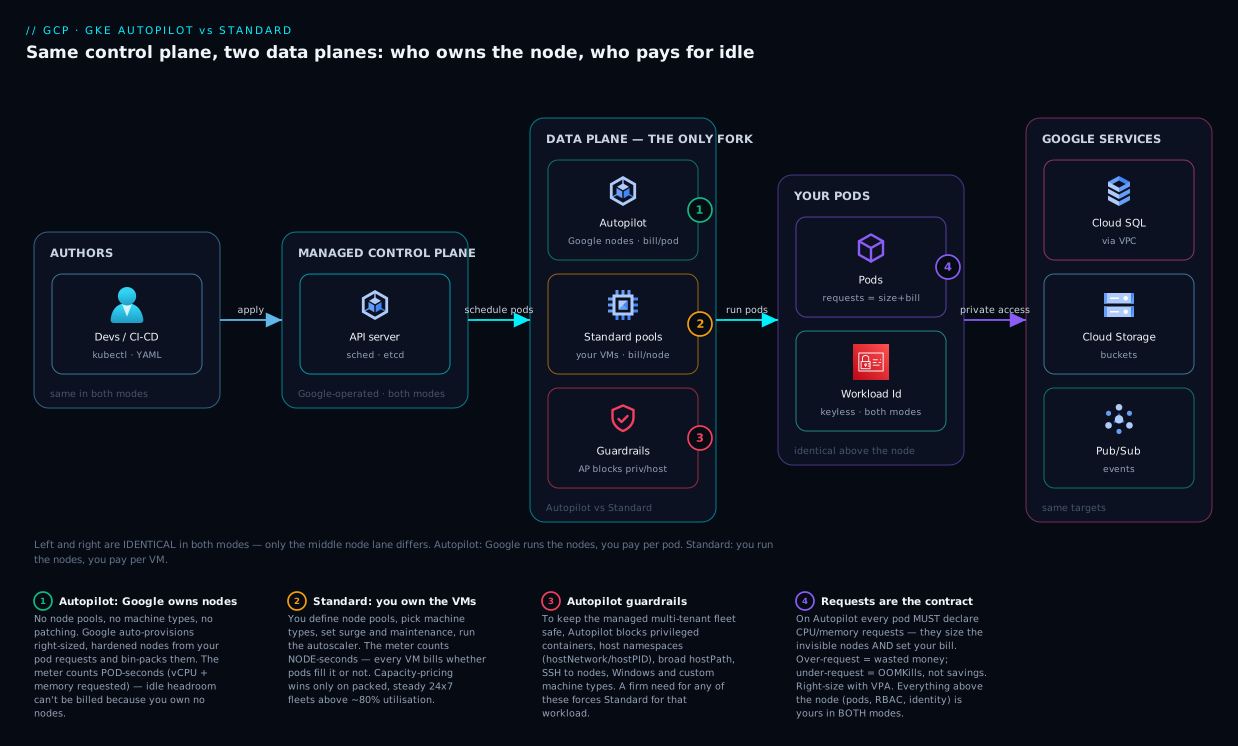
Walk the diagram left to right and the whole model lands in one picture. On the far left sits the part that is identical in both modes: your developers push container images and apply Kubernetes YAML through kubectl or CI/CD, and the Google-managed control plane — API server, scheduler, etcd — accepts it. Nothing about how you author Deployments, Services, or HPAs changes between Autopilot and Standard; the API surface is the same. The fork happens at the data plane, the middle of the diagram, where the two modes diverge into two lanes.
In the Autopilot lane there are no node boxes you own — Google’s node auto-provisioning reads your pod requests, conjures right-sized hardened nodes underneath, bin-packs your pods, patches and upgrades them invisibly, and the meter counts pod-seconds (vCPU and memory requested). In the Standard lane you define node pools of specific machine types; the cluster autoscaler grows and shrinks them within your bounds; you own patching and surge; and the meter counts node-seconds — every VM, full or empty. Both lanes land in the same place on the right: your pods reach the same Google Cloud services — Cloud SQL, Cloud Storage, Pub/Sub over the VPC, with pod identity via Workload Identity — because once a pod runs, where the node came from is irrelevant to the application. The numbered badges mark the four decisions that actually differ: who provisions the node (1), who patches it (2), what the meter counts (3), and which guardrails apply to the pod (4).
The reading to burn in: left is shared, right is shared, only the middle changes — and that change is entirely about node ownership, which flows into the four badges of provisioning, patching, cost and guardrails.
The shared-responsibility line, mode by mode
“Managed” is not binary — it is a line, and the line moves between modes. Knowing exactly where it sits stops both over-trusting (“Google secures everything”) and over-working (“I must patch the nodes” on Autopilot, where you must not). Here is the division of labour for each layer.
| Layer | Standard: who owns it | Autopilot: who owns it |
|---|---|---|
| Control plane (API server, etcd, scheduler) | ||
| Control-plane security patches | ||
| Node OS image & kernel | You select; Google supplies images | |
| Node OS patching / CVE response | Google triggers; you set windows & approve | Google (automatic) |
| Node upgrades (kubelet version) | You pick channel, surge, windows | |
| Node sizing & capacity | You (machine types, pool size) | Google (per pod requests) |
| Node security hardening / baseline | You (Shielded nodes, etc.) | Google (hardened by default) |
| Cluster autoscaling config | You | |
| Pod security context & policy | You | You (within Autopilot guardrails) |
| Network policy | You | You |
| IAM / Workload Identity | You | You |
| Your container images & their CVEs | You | You |
| Application config, secrets, data | You | You |
| RBAC | You | You |
The pattern to memorise: Autopilot moves the entire node row to Google; everything above the node (your pods, RBAC, network policy, images, secrets, identity) stays yours in both modes. Autopilot is not “Google runs my app securely” — it is “Google runs my nodes securely; the app is still your job.” That distinction prevents the most dangerous misconception about Autopilot.
Creating each mode — gcloud and Terraform
Theory is cheap; here is exactly how you stand up each one. Both commands assume you have set a project and region. The differences in the commands are the differences in the model.
Autopilot — the short command
Autopilot clusters are deliberately minimal to create — there is no node configuration to pass, because there are no nodes you own.
# Create a GKE Autopilot cluster — note: NO machine type, NO node count, NO pool flags
gcloud container clusters create-auto autopilot-prod \
  --region asia-south1 \
  --release-channel regular \
  --project my-project

# Get credentials and confirm
gcloud container clusters get-credentials autopilot-prod --region asia-south1
kubectl get nodes   # nodes appear/disappear automatically as pods come and go
# Terraform — Autopilot is a single boolean; you do NOT define node pools
resource "google_container_cluster" "autopilot" {
  name             = "autopilot-prod"
  location         = "asia-south1"      # regional cluster (Autopilot is always regional)
  enable_autopilot = true               # <-- this one flag is the whole mode switch

  release_channel {
    channel = "REGULAR"
  }
  # No node_config, no node_pool blocks — Autopilot provisions nodes for you.
}
That is the entire cluster. You never specify a machine type or a node count because you are not buying nodes — you will declare per-pod requests in your workload YAML, and Google sizes the fleet to match.
Standard — you define the nodes
Standard requires you to describe the workers, because they are yours.
# Create a GKE Standard cluster with an explicit node pool you own and operate
gcloud container clusters create standard-prod \
  --region asia-south1 \
  --release-channel regular \
  --machine-type e2-standard-4 \
  --num-nodes 1 \
  --enable-autoscaling --min-nodes 1 --max-nodes 5 \
  --project my-project

# Add a second, specialised node pool (e.g. for memory-heavy workloads)
gcloud container node-pools create mem-pool \
  --cluster standard-prod --region asia-south1 \
  --machine-type e2-highmem-4 \
  --enable-autoscaling --min-nodes 0 --max-nodes 4
# Terraform — Standard: you manage the cluster AND its node pools explicitly
resource "google_container_cluster" "standard" {
  name                     = "standard-prod"
  location                 = "asia-south1"
  remove_default_node_pool = true   # best practice: delete the default, manage pools yourself
  initial_node_count       = 1
  release_channel { channel = "REGULAR" }
}

resource "google_container_node_pool" "primary" {
  name       = "primary-pool"
  cluster    = google_container_cluster.standard.id
  location   = "asia-south1"
  node_count = 1

  autoscaling {
    min_node_count = 1
    max_node_count = 5
  }
  node_config {
    machine_type = "e2-standard-4"   # YOU choose the VM shape — the core of Standard
    disk_size_gb = 100
    disk_type    = "pd-balanced"
    oauth_scopes = ["https://www.googleapis.com/auth/cloud-platform"]
  }
  management {
    auto_repair  = true
    auto_upgrade = true
  }
}
The contrast is the lesson: Autopilot’s create is enable_autopilot = true and you’re done; Standard’s create is a cluster plus one-or-more node pools you size, scale and maintain. The flags that exist only on the Standard side — machine_type, num_nodes, min/max-nodes, disk_type, auto_repair, auto_upgrade — are each a knob Autopilot removed from your to-do list. Here is how the same intent maps across the two:
| Intent | Autopilot | Standard |
|---|---|---|
| Create the cluster | clusters create-auto / enable_autopilot = true |
clusters create + node pool(s) |
| Choose VM shape | Not specified (curated classes via pod spec) | --machine-type / node_config.machine_type |
| Set node count | Not specified | --num-nodes, --min/max-nodes |
| Autoscale nodes | Automatic | --enable-autoscaling + bounds |
| Node auto-repair/upgrade | Always on (Google) | management { auto_repair / auto_upgrade } |
| Add specialised capacity | New compute class via pod spec | New node_pool resource |
| Pick a disk type | Managed | node_config.disk_type |
Asking for special hardware on Autopilot
A common myth is “Autopilot can’t do GPUs or Arm.” It can — you just request the capability in the pod spec rather than building a pool. Autopilot reads a nodeSelector / resource request and provisions the matching node class under the hood.
# Autopilot GPU: request a GPU in the pod; Autopilot provisions a GPU node for you
apiVersion: apps/v1
kind: Deployment
metadata: { name: inference }
spec:
  replicas: 1
  selector: { matchLabels: { app: inference } }
  template:
    metadata: { labels: { app: inference } }
    spec:
      nodeSelector:
        cloud.google.com/gke-accelerator: nvidia-l4   # Autopilot picks a GPU node class
      containers:
      - name: model
        image: asia-south1-docker.pkg.dev/my-project/repo/model:1.0
        resources:
          requests: { cpu: "2", memory: "8Gi" }
          limits:   { nvidia.com/gpu: "1" }            # request 1 L4 GPU
On Standard, the same outcome requires you to create and manage a GPU node pool (--accelerator type=nvidia-l4,count=1) and install drivers via the supplied DaemonSet. Autopilot trades that setup for one pod-spec request — less control, far less work.
Workloads, mode by mode — what schedules and what fights you
The fastest way to internalise the difference is to picture common workloads and ask “does this just work, or does it hit a wall?” Here is that map for the patterns you will actually deploy.
| Workload pattern | On Autopilot | On Standard | Note |
|---|---|---|---|
| Stateless web app / REST API (Deployment) | Just works | Just works | Autopilot sweet spot |
| Background queue worker | Just works | Just works | Per-pod billing on Autopilot |
| CronJob / batch | Just works (scales to zero between runs) | Works (idle nodes cost unless scaled to 0) | Autopilot avoids idle-between-runs cost |
| StatefulSet with Persistent Disks | Works (PD-backed PVCs) | Works | Both support PD CSI |
| Service mesh (Istio sidecars) | Works (sidecars billed as pod resources) | Works | Mind the per-pod request overhead on Autopilot |
| Logging/metrics agent as DaemonSet | Works but billed per node-pod; some need host access | First-class, cheaper at scale | Per-node agents favour Standard |
| Security agent needing host namespaces | Often blocked | Works | Classic Standard-only case |
| GPU inference/training | Works (request GPU in spec) | Works (build GPU pool) | Both; Autopilot is less setup |
| TPU workloads | Supported | Supported | Confirm region/availability |
| Windows containers | Not supported | Works | Standard only |
| Privileged init / sysctl tuning at host level | Blocked | Works | Standard only |
| Niche CSI driver / kernel module | Restricted | Works | Standard only |
The actionable read: scan your manifests for privileged: true, hostNetwork, hostPID, broad hostPath, Windows nodeSelectors, and host-accessing DaemonSets. If none appear, Autopilot runs the lot. If they do, that specific workload — not necessarily your whole estate — wants Standard.
Real-world scenario
Company: KiranaCloud, a fast-growing Indian grocery-delivery startup running its platform on GKE. Engineering team of nine, no dedicated SRE, single asia-south1 region.
The starting point. Eighteen months ago a contractor stood up a GKE Standard cluster — three e2-standard-8 nodes — because “that’s what the tutorial used.” It ran the storefront API, a cart service, a couple of queue workers, and a nightly reconciliation CronJob. It worked. Then two things hurt. First, the bill: the three nodes ran 24×7 at an average of 31% CPU and 28% memory — they had massively over-provisioned “to be safe,” and the cluster autoscaler never shrank below three because the minimum was set to three. They were paying for roughly three nodes’ worth of capacity to run barely one node’s worth of pods. Second, the toil: a node auto-upgrade once went mid-deploy without a tuned surge setting and briefly dropped capacity during an evening rush; nobody owned node maintenance, so security findings about node OS versions sat unactioned for weeks.
The diagnosis. A platform review made the picture obvious in one chart: utilisation in the low thirties means two-thirds of the node spend was idle headroom tax, exactly the regime where Autopilot’s per-pod pricing wins. And with no SRE, the node operations were a liability the team kept failing to do well. Crucially, an audit of the manifests found no privileged pods, no host-namespace usage, no Windows, no exotic CSI — the only DaemonSet was the logging agent, which had an Autopilot-compatible mode. Nothing disqualified Autopilot.
The move. They created a new GKE Autopilot cluster (you cannot convert in place), set honest CPU/memory requests on every Deployment for the first time — running the Vertical Pod Autoscaler in recommendation mode to right-size them — and migrated service by service behind a load balancer, draining the old Standard cluster over a weekend. The reconciliation CronJob, which used to keep a node warm all night, now scales to zero pods between runs and costs nothing in the gap.
The outcome. Measured over the next month: the GKE bill dropped roughly 38%, driven almost entirely by no longer paying for the ~68% idle capacity. The node-operations toil went to zero — no more node upgrades, surge tuning, or OS-CVE findings, because there are no nodes the team owns. The one wrinkle: the Istio sidecars they later added carried a per-pod request overhead that Autopilot bills, so they tuned sidecar requests down to honest values to keep the savings. The lesson KiranaCloud took away — and the one to take from this article — is that their original Standard choice was never wrong in principle; it was wrong for a small team running a half-empty cluster. The mode has to match the workload and the team, and theirs had quietly drifted into Autopilot’s exact sweet spot.
Advantages and disadvantages
Neither mode is “better.” Each is a bundle of trade-offs. Here is the honest two-column ledger.
| Autopilot | Standard | |
|---|---|---|
| Advantage | No node ops — Google patches, upgrades, scales nodes | Total control of nodes, machine types, OS |
| Advantage | Pay only for pod requests — idle headroom can’t be billed | Capacity-pricing wins on packed, steady fleets |
| Advantage | Hardened, restricted-by-default security posture | Run anything: privileged, host-level, Windows, exotic |
| Advantage | Closest GKE gets to “just run my containers” | DaemonSets and per-node agents are first-class |
| Advantage | Bin-packing and right-sizing handled by Google | SSH and node-level debugging available |
| Disadvantage | No SSH / host access; guardrails block some workloads | You own patching, upgrades, capacity — real toil |
| Disadvantage | Per-pod premium rate over raw VM cost | Idle headroom is billed and often invisible |
| Disadvantage | Curated machine classes only; no Windows | Easy to over-provision and overpay |
| Disadvantage | Per-pod minimums and CPU:mem ratios to respect | More ways to misconfigure security |
| Disadvantage | Less visibility into the nodes themselves | Node upgrades can bite if surge/windows untuned |
When each advantage actually matters. Autopilot’s “no node ops” is decisive for small or platform-light teams, and its per-pod pricing is decisive for bursty or under-utilised workloads (most of them, early on). Standard’s control is decisive the moment a hard requirement appears — a host-level security agent, a precisely-shaped GPU pool, a Windows service, a niche driver — and its capacity-pricing only truly wins on a steady, well-packed 24×7 fleet kept above ~80% utilisation. If you cannot honestly say your nodes run that full, Autopilot’s premium rate is usually cheaper than Standard’s bill for emptiness.
Hands-on lab
Stand up both modes side by side, deploy the same app to each, and see the differences with your own eyes. Free-tier-friendly: one zonal-equivalent Autopilot region and a tiny Standard cluster, torn down at the end so you pay cents.
Step 1 — Set your project and region.
gcloud config set project my-project
gcloud config set compute/region asia-south1
gcloud services enable container.googleapis.com   # enable the GKE API once
Step 2 — Create an Autopilot cluster (no node flags).
gcloud container clusters create-auto lab-autopilot \
  --region asia-south1 --release-channel regular
gcloud container clusters get-credentials lab-autopilot --region asia-south1
kubectl get nodes   # likely empty/few — nodes appear only when pods need them
Step 3 — Deploy a sample app WITH resource requests (mandatory on Autopilot).
kubectl create deployment hello --image=us-docker.pkg.dev/google-samples/containers/gke/hello-app:1.0
# Set honest requests — Autopilot sizes nodes and bills from these
kubectl set resources deployment hello --requests=cpu=250m,memory=256Mi
kubectl expose deployment hello --type=LoadBalancer --port=80 --target-port=8080
kubectl get nodes   # watch: Autopilot has now provisioned a right-sized node for your pod
Expected: within a minute or two a node appears sized to your pod, and kubectl get svc hello eventually shows an external IP. You never chose a machine type.
Step 4 — Create a Standard cluster (you pick the nodes).
gcloud container clusters create lab-standard \
  --region asia-south1 --release-channel regular \
  --machine-type e2-small --num-nodes 1 \
  --enable-autoscaling --min-nodes 1 --max-nodes 3
gcloud container clusters get-credentials lab-standard --region asia-south1
kubectl get nodes   # the node(s) you provisioned are already there, idle, billing
Expected: nodes exist immediately and are billing whether or not pods use them — the opposite of Autopilot’s on-demand nodes.
Step 5 — Prove the guardrail difference. Try a privileged pod on each.
cat <<'EOF' | kubectl apply -f -
apiVersion: v1
kind: Pod
metadata: { name: priv-test }
spec:
  containers:
  - name: c
    image: busybox
    command: ["sleep","3600"]
    securityContext: { privileged: true }
EOF
Expected: on Standard the pod schedules. On Autopilot it is rejected/blocked by the Autopilot admission policy — a direct, visible demonstration of the security guardrail.
Step 6 — Compare what the meter sees.
# Standard: you can list and SSH-adjacent inspect the nodes you own
kubectl get nodes -o wide
gcloud compute instances list   # the Standard nodes show up as VMs you own

# Autopilot: nodes are managed; you reason in pods, not VMs
kubectl get pods -o wide
Step 7 — Tear it all down (do this — clusters bill until deleted).
kubectl delete deployment hello --ignore-not-found
gcloud container clusters delete lab-autopilot --region asia-south1 --quiet
gcloud container clusters delete lab-standard  --region asia-south1 --quiet
What you just felt directly: Autopilot conjured a right-sized node from a pod request and blocked a privileged pod; Standard handed you VMs that bill from the moment they exist and let the privileged pod run. That is the entire article in seven commands.
Common mistakes & troubleshooting
The differentiator. These are the real failure modes teams hit, with the exact way to confirm and fix each.
| # | Symptom | Root cause | How to confirm | Fix |
|---|---|---|---|---|
| 1 | Pods stuck Pending on Autopilot |
No/under-specified resource requests, or request violates Autopilot min/ratio | kubectl describe pod → events mention requests/limits or admission |
Set valid CPU/mem requests within Autopilot’s ranges and CPU:mem ratio |
| 2 | Privileged pod won’t start on Autopilot | Autopilot blocks privileged, host namespaces, broad hostPath |
kubectl describe pod → admission webhook denial |
Remove host-level requirement, or run that workload on Standard |
| 3 | Surprise cost spike on Autopilot | Over-requested pods or sidecars billed per pod | Compare requests vs actual usage in Cloud Monitoring; run VPA in recommend mode | Right-size requests; trim sidecar requests |
| 4 | “I can’t SSH to the node” on Autopilot | Node access is not offered by design | gcloud compute ssh finds no node you own |
Debug via pods/kubectl debug; if host shell is essential, use Standard |
| 5 | DaemonSet costs more than expected on Autopilot | DaemonSet runs a pod per node and is billed as pods | kubectl get pods -o wide shows one per node, all billed |
Reconsider whether the agent needs per-node; for fleets of agents, Standard may be cheaper |
| 6 | Standard cluster bill high despite low traffic | Idle node headroom; autoscaler min too high | Cloud Monitoring node CPU/mem < 40%; check pool --min-nodes |
Lower min, right-size machine type, or move to Autopilot |
| 7 | Brief outage during a Standard node upgrade | Surge/maintenance window untuned; single small pool | Activity log shows node upgrade at the outage time | Set maintenance windows, increase surge, run ≥2 nodes / PodDisruptionBudgets |
| 8 | “Autopilot can’t do GPUs/Arm” assumption | Capability is requested in pod spec, not via a pool | You looked for a node-pool flag and found none | Add the gke-accelerator/Arm nodeSelector + resource request to the pod |
| 9 | Tried to “switch this cluster to Autopilot” | Mode is fixed at create; not convertible in place | Console/gcloud offers no flip flag |
Create a new cluster in the target mode and migrate workloads |
| 10 | Third-party security agent fails on Autopilot | Agent needs host access Autopilot forbids | Vendor docs / pod events show host-namespace requirement | Use the vendor’s Autopilot-aware deployment, or run it on Standard |
| 11 | Pods OOMKilled on Autopilot after “saving money” | Requests/limits set too low to look cheap | kubectl describe pod → OOMKilled; Monitoring shows memory at limit |
Set requests to honest usage — under-requesting causes evictions, not savings |
| 12 | DaemonSet expected on every node “missing” on Autopilot | Autopilot manages node lifecycle differently; some host DaemonSets are constrained | kubectl get ds shows desired ≠ ready, events cite policy |
Use Autopilot-supported equivalents (managed add-ons) or Standard |
Two debugging reflexes worth building. On Autopilot, kubectl describe pod is your best friend — almost every Autopilot-specific failure (requests, ratios, privileged, host access) surfaces as a clear admission-webhook or scheduling event there, not in the app logs. On Standard, Cloud Monitoring node utilisation is your cost truth — if node CPU and memory sit below 40% for days, you are paying the idle tax, and right-sizing or Autopilot is the fix.
Best practices
- Default to Autopilot; justify Standard. Make Autopilot the standing choice for new clusters and require a specific disqualifier (host access, Windows, custom machine type, packed-fleet economics) to pick Standard. This kills the most common waste at the source.
- Always set honest resource requests. On Autopilot they are mandatory and they are your bill; on Standard they are how the scheduler packs nodes. Run the Vertical Pod Autoscaler in recommendation mode to set them from real usage, per Kubernetes VPA: right-sizing requests and limits.
- Right-size before you re-platform. If a Standard cluster looks expensive, check utilisation first — sometimes the fix is lowering
--min-nodesand shrinking machine types, not switching modes. - Use PodDisruptionBudgets and ≥2 replicas so node upgrades (Standard) or node consolidation (Autopilot) never take your service to zero.
- Run one mode per cluster, mixed fleet per platform. You cannot mix modes within a cluster or convert one in place. Run Autopilot and Standard clusters side by side and route each workload to the right one.
- Audit manifests for disqualifiers before choosing. Grep for
privileged,hostNetwork,hostPID,hostPath, Windows nodeSelectors. Their presence — not vibes — should drive a Standard decision. - Keep the release channel consistent and current. Use a release channel (
regularis a sane default) so the control plane and (on Standard) nodes stay patched on a predictable cadence. - Tag clusters with their mode and owner. Label every cluster
mode=autopilot|standardso cost reports and reviews can see the split instantly. - Use Spot for fault-tolerant work in both modes. Spot Pods (Autopilot) and Spot VMs (Standard) cut cost dramatically for batch and stateless workloads that tolerate eviction.
- Don’t fight the guardrails — redesign or relocate. If Autopilot blocks something, first ask whether the workload truly needs host access; often it does not. If it genuinely does, that workload belongs on Standard — not the whole estate.
- Plan capacity with requests, not nodes. Even on Standard, reason in pod requests and let the autoscaler shape pools; thinking in nodes first is what causes over-provisioning.
Security notes
The headline: Autopilot is more secure by default; Standard can be made equally secure but the work is yours. Autopilot ships a hardened posture — privileged containers and host namespaces blocked, a restricted node baseline, automatic node patching — that removes whole classes of misconfiguration. On Standard you can reach the same place (Shielded GKE nodes, restricted Pod Security Admission, network policy, prompt patching) but every one of those is a control you must consciously enable and maintain.
Two things are identical in both modes and remain entirely your responsibility, regardless of mode: pod identity and the workloads above the node. Use Workload Identity so pods authenticate to Google APIs without keys — detailed in GKE Workload Identity: IAM from pod to Google API — and keep your service accounts least-privileged per GCP IAM service accounts and least privilege. Network isolation (private clusters, authorised networks, network policy) and the security of your container images (scanning, provenance) are yours in both modes too — Autopilot manages the node, not your code or your RBAC.
| Security control | Autopilot | Standard |
|---|---|---|
| Privileged containers blocked | Yes, by default | You enforce (PSA/policy) |
| Host namespace access blocked | Yes, by default | You enforce |
| Node OS auto-patched | Yes (Google) | Google triggers; you set windows |
| Hardened node baseline | Default | You configure (Shielded nodes) |
| Workload Identity (keyless pod auth) | You enable & use | You enable & use |
| Network policy / private cluster | You configure | You configure |
| RBAC least-privilege | You design | You design |
| Image scanning / supply chain | You own | You own |
The one-line security takeaway: Autopilot removes the node attack surface from your plate and hardens it by default; everything from the pod upward is still your job in both modes.
Cost & sizing
What actually drives the GKE bill, and how to right-size it.
| Cost driver | Autopilot | Standard | Lever to pull |
|---|---|---|---|
| Compute | Sum of pod CPU/mem requests (per second) | Node-seconds (VM price), used or idle | Right-size requests (AP); pack/shrink nodes (Std) |
| Idle headroom | Not billable (no nodes you own) | Fully billed | Lower --min-nodes, smaller machines (Std) |
| Cluster management fee | Per cluster/hour (free-tier covers first) | Per cluster/hour (free-tier covers first) | Consolidate clusters where sensible |
| Ephemeral storage | Per GiB requested | Part of node disk | Request only what pods need (AP) |
| Spot discount | Spot Pods | Spot/Preemptible VMs | Use Spot for fault-tolerant work |
| Committed use | CUD options | CUDs on VMs | Commit steady baseline |
| GPU/TPU | Per accelerator requested | Per accelerator in pool | Scale to zero between jobs |
| Network egress | Standard GCP egress | Standard GCP egress | Keep traffic in-region/private |
Rough figures (illustrative; confirm in the GCP pricing calculator). For a small steady service requesting ~2 vCPU and 8 GiB total, an Autopilot footprint commonly lands in the low thousands of rupees per month (roughly USD 30–60) depending on region and Spot usage. The equivalent Standard setup with a single small node pool looks similar if well-packed, but balloons if you over-provision — the three-e2-standard-8-at-30% pattern from the scenario costs several times an Autopilot equivalent purely in idle tax. Free-tier note: GKE gives a recurring credit that effectively covers the cluster-management fee for one zonal/Autopilot cluster, but you still pay for compute (Standard nodes or Autopilot pod requests). The single biggest sizing lever on either mode is the same: set requests to honest, measured values — over-requesting wastes money on Autopilot, over-provisioning wastes it on Standard; both are solved by right-sizing to real usage.
Interview & exam questions
Mapped to the Google Professional Cloud Architect (PCA), Associate Cloud Engineer (ACE), and the container mindset behind the CKA.
1. In one sentence, what is the difference between GKE Autopilot and Standard? Autopilot is GKE where Google operates the nodes and you pay per pod resource request; Standard is GKE where you operate the nodes and pay per VM whether or not pods use them. Same control plane and API in both.
2. On which mode are resource requests mandatory, and why? Autopilot. Requests are what Google uses to size the invisible nodes and what you are billed for, so every pod must declare them (Autopilot injects defaults and enforces minimums and CPU:memory ratios if you omit or violate them).
3. A workload needs a privileged container with host-network access. Which mode, and why? Standard. Autopilot blocks privileged containers and host namespaces by design to keep its multi-tenant fleet safe, so a host-level requirement disqualifies Autopilot.
4. Your Standard cluster runs at 30% utilisation 24×7 with a small team. What do you recommend? Move to Autopilot (or at minimum right-size). At low utilisation you are paying a large idle-headroom tax that per-pod Autopilot pricing avoids, and a small team benefits from offloading node operations entirely.
5. Can you convert an existing Standard cluster to Autopilot in place? No. The mode is fixed at cluster creation. You create a new cluster in the target mode and migrate workloads to it.
6. Who patches the worker nodes in each mode? Google patches them automatically on Autopilot. On Standard, Google supplies images and can auto-upgrade, but you choose the release channel, surge settings, and maintenance windows and own the cadence.
7. Why might Autopilot cost more per vCPU yet produce a lower bill? Its per-vCPU rate carries a premium for managing and bin-packing nodes, but you pay only for pod requests with no idle node capacity. Below roughly 70–80% node utilisation, eliminating the idle tax outweighs the premium.
8. How do you run a GPU workload on Autopilot?
Request the GPU in the pod spec — a cloud.google.com/gke-accelerator nodeSelector plus an nvidia.com/gpu resource limit — and Autopilot provisions a matching GPU node. You do not create or manage a GPU node pool.
9. What does “managed” cover in each mode — be precise. In both, Google manages the control plane (API server, etcd, scheduler). Autopilot additionally manages the nodes (provisioning, sizing, patching, upgrades, security baseline). Your pods, RBAC, network policy, images, secrets and identity are yours in both.
10. A DaemonSet-based security agent is critical. How does the choice change? On Standard the agent runs first-class per node and is straightforward; on Autopilot, per-node DaemonSet pods are billed and host-accessing ones may be blocked, so you either use the vendor’s Autopilot-aware mode or run that cluster on Standard.
11. What is the cheapest way to run a nightly batch job that is idle 23 hours a day? On Autopilot a CronJob scales to zero pods between runs and costs nothing in the gap. On Standard you must scale the pool to zero or the idle nodes bill all night.
12. Name two things that are identical regardless of mode.
The Kubernetes API/kubectl experience and your responsibility for pod-level security (Workload Identity, RBAC, network policy, image security). The control plane being Google-managed is also identical.
Quick check
- Which mode bills you per pod request rather than per VM?
- True or false: you can switch a running cluster from Standard to Autopilot with a flag.
- A pod is
Pendingon Autopilot with an admission message about requests — what’s the likely fix? - Which mode blocks privileged containers by default?
- Your Standard nodes sit at 25% utilisation 24×7 — what does that tell you about cost?
Answers
- Autopilot — billing is the sum of running pods’ CPU/memory/storage requests, per second; there are no node charges.
- False — the mode is fixed at creation. You must create a new cluster in the desired mode and migrate workloads.
- Set valid resource requests within Autopilot’s allowed minimums and CPU:memory ratio (and ephemeral-storage rules); the admission policy is rejecting the pod because its requests are missing or out of range.
- Autopilot — privileged containers and host-namespace access are blocked by default to protect the managed multi-tenant fleet; on Standard you allow or restrict them yourself.
- You are paying a large idle-headroom tax — about three-quarters of the node capacity is unused but billed, the exact regime where Autopilot’s per-pod pricing (or aggressive right-sizing) saves money.
Glossary
- GKE (Google Kubernetes Engine): Google’s managed Kubernetes — Google always runs the control plane; the modes differ on who runs the nodes.
- Control plane: The Kubernetes brain (API server, scheduler, etcd, controller-manager). Google-managed in both Autopilot and Standard.
- Data plane / nodes: The worker VMs that run your pods. You own them on Standard; Google owns them on Autopilot.
- Autopilot: GKE mode where Google operates the nodes and bills per pod resource request, with hardened guardrails and no node access.
- Standard: GKE mode where you operate node pools and are billed per VM, with full control and full responsibility.
- Node pool: A group of identical worker nodes you define on Standard (machine type, size, autoscaling). Absent on Autopilot.
- Resource request: The CPU and memory a container declares it needs. Mandatory and billable on Autopilot; a scheduling hint on Standard.
- Bin-packing: Fitting pods efficiently onto the fewest nodes. Google does it on Autopilot; you do it on Standard.
- Cluster autoscaler: Adds/removes nodes to satisfy pending pods. Automatic on Autopilot; you configure bounds on Standard.
- Node auto-provisioning (NAP): Auto-creates right-sized node pools on demand — the always-on basis of Autopilot, optional on Standard.
- Idle headroom tax: The cost of provisioned-but-unused node capacity, billed on Standard, structurally absent on Autopilot.
- Spot Pods / Spot VMs: Discounted, preemptible compute for fault-tolerant workloads — Spot Pods on Autopilot, Spot VMs on Standard.
- Workload Identity: Keyless mechanism letting pods authenticate to Google APIs as a service account. Your responsibility in both modes.
- PodDisruptionBudget (PDB): A policy capping how many pods of a workload can be down at once, protecting availability during node operations in both modes.
Next steps
- Go deeper on node pools, networking and the Autopilot/Standard internals in GKE deep dive: Autopilot, Standard, node pools, networking.
- Harden an Autopilot cluster for production with GKE Autopilot production hardening guide.
- Decide whether GKE is even the right home versus serverless or VMs in Cloud Run vs GKE vs Compute Engine: the decision.
- Give pods least-privilege access to Google services with GKE Workload Identity: IAM from pod to Google API.
- Right-size requests (which directly lowers your Autopilot bill) using Kubernetes VPA: right-sizing requests and limits.
- See where GKE fits next to AKS and EKS in Understanding managed Kubernetes: AKS, EKS, and GKE compared.