Quick take: Cloud Run is the fastest way to run a container, and for the large majority of stateless HTTP and event-driven workloads it is the right default. GKE is Kubernetes when you genuinely need Kubernetes — operators, DaemonSets, complex scheduling, a service mesh you actually use. Compute Engine is for everything a container can’t hold: a kernel module, a GPU training run that lives for days, a vendor appliance, a licensing model tied to the host. Cloud Functions is Cloud Run with the container hidden. Most teams should start at the top of that list and earn their way down only when a specific, named limitation forces it.
A Series-B startup standardised its entire platform on GKE because Kubernetes had been the default at everyone’s previous job. The decision was never debated; it was inherited. They spent the first quarter not building product but tuning node pools, choosing an ingress controller, debugging the cluster autoscaler, and arguing about Helm chart structure — all before a single customer-facing feature shipped. The control plane bill was the smallest line on the invoice; the real cost was the two platform engineers whose entire job became keeping the cluster alive. When they finally moved the customer APIs to Cloud Run, a deploy became gcloud run deploy, scaling became a number in a YAML file, and the platform team shrank its operational surface to almost nothing. The lesson was not “Kubernetes is bad.” It was that they had paid for a control surface they were not using, and the resume of the engineer choosing the platform is not a workload requirement.
This article is the decision framework that startup wished it had. We treat Google Cloud’s four core compute services — Cloud Run, GKE (in its Autopilot and Standard modes), Compute Engine, and Cloud Functions — not as four products to memorise but as points on a single axis: how much of the machine do you want to manage? The further left you sit, the more Google runs for you and the less you can customise; the further right, the more control and the more 02:00 pages you own. You will learn where each service actually wins, the mechanics that make the difference real (scale-to-zero, request concurrency, cold starts, the networking model, statefulness, the billing unit), and a rigorous matrix that turns “which one?” from a debate into a lookup. Every claim is anchored to real gcloud, real manifests, real Terraform, and real numbers — because at this level the difference between a good decision and an expensive one is in the details nobody reads until they hurt.
What problem this solves
GCP gives you at least five distinct ways to run the same containerised web service, and the wrong choice does not announce itself on day one. It shows up in month three as operational toil you cannot delegate, a bill that scales with idle time instead of traffic, or a ceiling you hit during your first real load spike. The pain is asymmetric: over-provisioning abstraction (running a VM fleet for a stateless API) wastes money and on-call sleep, while under-provisioning it (forcing a stateful, kernel-dependent workload onto a serverless platform) wastes weeks fighting a platform that was never going to bend that far.
What breaks without a deliberate framework: teams default to whatever they know. Ex-Kubernetes shops put everything on GKE and drown in cluster ops before they have product-market fit. Teams burned by Kubernetes over-correct to Compute Engine and hand-roll their own orchestration — scripts, cron, a half-built deployer — reinventing exactly the scheduling GKE would have given them. Serverless enthusiasts try to force a stateful, long-running batch job through Cloud Run’s request model and hit the timeout wall. Each of these is a category error: matching the workload to a familiar tool instead of to the tool’s actual shape.
Who hits this: every team standing up a new service on GCP, every team migrating off another cloud or off-prem, every architect writing a platform standard that a hundred future services will inherit. The cost of the decision compounds — a default chosen once gets copied a hundred times. Getting the framework right is leverage; getting it wrong is a tax you pay on every deploy for years.
To frame the whole field before the deep dive, here is the spectrum at a glance — the same workload, viewed through what each service makes you own:
| Service | Abstraction level | You manage | Google manages | Scales to zero? | Billing granularity |
|---|---|---|---|---|---|
| Cloud Functions (2nd gen) | Function / source | A single function’s code | Build, container, runtime, scaling, OS | Yes | Per-request + per-100ms compute |
| Cloud Run (service) | Container image | The container + a few flags | Scaling, OS, patching, networking, TLS | Yes (min-instances 0) | Per-100ms while serving + per-request |
| GKE Autopilot | Pod (manifest) | Pods, manifests, K8s API objects | Nodes, control plane, autoscaling, OS patching | Per-workload (HPA to 0 w/ add-on) | Per-Pod vCPU/memory/sec requested |
| GKE Standard | Node + Pod | Node pools, Pods, the cluster | Control plane only | No (nodes stay) | Per-node (VM) + per-cluster-hour |
| Compute Engine | Virtual machine | The whole VM and OS | Hypervisor, hardware, host | No | Per-second VM (vCPU + RAM + disk) |
Learning objectives
By the end of this article you can:
- Place any GCP workload on the abstraction spectrum and name the least-managed service that still meets every hard requirement — and justify the choice with specifics, not preference.
- Explain the mechanics that actually differentiate these services: scale-to-zero, request concurrency, cold-start anatomy, the per-100ms vs per-second vs per-Pod billing units, and what each one does to your bill and your latency tail.
- Choose correctly between Cloud Run services and Cloud Run jobs, and between GKE Autopilot and GKE Standard, knowing exactly what each mode fixes and what it costs you.
- Map the networking model of each service — ingress, egress, VPC connectivity, Private Service Connect, internal load balancing — and pick the one that fits your isolation and latency requirements.
- Reason about statefulness: why Cloud Run is stateless by contract, when a StatefulSet on GKE is the right answer, and when only a VM (or a managed service entirely off these four) will do.
- Quantify and compare the operational burden of each option in concrete terms — patching, scaling, upgrades, incident surface — so “ops cost” becomes a number you can defend in a design review.
- Plan a realistic migration path in both directions (Cloud Run → GKE when you outgrow it; GKE/GCE → Cloud Run when you over-bought) without a rewrite.
- Apply a decision matrix and answer PCA / PCDE-style exam and interview questions on GCP compute selection.
Prerequisites & where this fits
You should already understand containers (an image, a registry, a port, an entrypoint) and the basics of HTTP services. You should be able to run gcloud in Cloud Shell or locally with an authenticated SDK, read YAML, and recognise Terraform HCL. Conceptual familiarity with Kubernetes — what a Pod, Deployment, Service and HPA are — helps for the GKE sections but is not assumed; we define the moving parts. You should know that GCP organises resources into projects under an org hierarchy, and that IAM binds principals (including service accounts) to roles.
This article sits at the top of the Compute track and is upstream of almost everything else you build. It assumes the regional model from GCP Regions and Zones Explained: What They Really Mean (every choice here is a regional or zonal one) and the identity model from GCP IAM and Service Accounts: Roles, Bindings and Least Privilege (every workload runs as a service account). It pairs with the networking foundation in GCP’s Global VPC Explained: Why Your Network Spans the Planet by Default. For the two services that need their own deep dives once you’ve chosen them, continue to Cloud Run Explained: Serverless Containers That Scale to Zero (and Back) Without Kubernetes and GKE Autopilot vs Standard vs Enterprise: Choose Your Kubernetes Mode.
A quick map of who owns which layer once you’ve chosen — because the choice is a choice about which team carries which pager:
| Layer | Cloud Run / Functions | GKE Autopilot | GKE Standard | Compute Engine |
|---|---|---|---|---|
| Hardware / host | ||||
| OS / kernel / patching | Google (node auto-upgrade) | You | ||
| Node sizing / pools | n/a (no nodes) | You | You (the VM) | |
| Control plane (K8s) | n/a | n/a | ||
| Scaling logic | Google (you set bounds) | You (HPA) + Google (nodes) | You (HPA + node pools) | You (MIG + autoscaler) |
| Container runtime | You (install Docker/containerd) | |||
| Your app + config | You | You | You | You |
| Incident surface | Smallest | Small | Medium | Largest |
Core concepts
Five mental models make every later decision obvious. Internalise these and the matrix at the end is just confirmation.
Abstraction is a single axis, and you always want the leftmost point that fits. Cloud Functions → Cloud Run → GKE Autopilot → GKE Standard → Compute Engine is a ladder from “Google runs the machine” to “you run the machine.” Every rung you climb to the right buys you control and costs you operational responsibility. The senior move is not to pick the most powerful tool; it is to pick the least powerful tool that still satisfies every hard requirement, because unused power is pure cost — money, complexity, and on-call load you pay for and don’t use. The startup in the opening climbed three rungs higher than their workload needed and paid for it in engineer-quarters.
Scale-to-zero is the dividing line between “serverless” and “always-on.” Cloud Run and Cloud Functions can drop to zero running instances when no traffic arrives — you pay nothing for idle. The next request pays a cold start to bring an instance up. GKE Standard nodes and Compute Engine VMs do not scale to zero: the moment they exist you pay for them whether or not a single request lands. GKE Autopilot bills per Pod and can scale Pods down (and, with the right configuration, a Deployment to zero), but a baseline of system Pods keeps the cluster non-free. This single property — does idle cost money? — sorts the spectrum cleanly for cost-sensitive and bursty workloads.
Concurrency changes the unit economics of serverless. A traditional VM serves many requests per process; a naive “function” serves one request per instance. Cloud Run sits in between and lets you choose: each container instance can handle up to 1000 concurrent requests (default 80). This matters enormously. At concurrency 80, one instance absorbs 80 simultaneous callers before a second instance (and its cold start) is needed — so your bill and your tail latency depend directly on this number. Set it too low and you over-provision instances and pay cold starts constantly; set it too high for a CPU-bound app and each request starves. Concurrency is the lever that makes Cloud Run cheaper than functions-style “one request per instance” for most web traffic.
Statefulness is a contract, not a preference. Cloud Run instances are ephemeral and stateless by design: no durable local disk you can rely on (the filesystem is an in-memory tmpfs that counts against your memory limit and vanishes when the instance stops), no guaranteed identity, no stable address. State must live elsewhere — Cloud SQL, Firestore, Memorystore, Cloud Storage. Kubernetes offers StatefulSets with stable network identity and persistent volumes, which is what you reach for when a workload genuinely needs sticky identity and durable attached storage (a database you self-host, a stateful stream processor). Compute Engine gives you a real disk and a real, persistent host. Pretending a stateless platform is stateful (writing important data to Cloud Run’s tmpfs) is the most common and most painful category error in this whole space.
The billing unit tells you what you’re really renting. Cloud Functions and Cloud Run bill per-100ms of compute while a request is being served (plus a per-request fee and, optionally, per-100ms for idle “instance-based” billing if you want CPU always allocated). GKE Autopilot bills for the vCPU and memory your Pods request, per second. GKE Standard bills for the VMs (nodes) you run, per second, plus a per-cluster management fee. Compute Engine bills for the VM, per second, idle or not, plus disk. The unit is the whole game: a spiky, mostly-idle API is cheapest where you pay per-request (Cloud Run); a steady, fully-utilised fleet is often cheapest where you pay per-VM at a committed-use discount (GKE Standard or Compute Engine). There is no universally cheapest option — only the cheapest for this traffic shape.
The vocabulary in one table
Before the deep sections, pin down every moving part. The glossary at the end repeats these for lookup; this table is the mental model side by side:
| Concept | One-line definition | Where it applies | Why it matters to the decision |
|---|---|---|---|
| Scale-to-zero | Drop to 0 instances when idle, pay nothing | Cloud Run, Cloud Functions | Makes idle free; introduces cold starts |
| Cold start | Latency to spin up a fresh instance | Cloud Run, Functions, autoscaled nodes | The price of scale-to-zero; tunable, not free |
| Concurrency | Requests one instance serves at once | Cloud Run (1–1000, default 80) | Sets instance count, cost and tail latency |
| min-instances | Warm instances always kept | Cloud Run | Kills cold starts; you pay for the floor |
| max-instances | Hard cap on horizontal scale | Cloud Run | Protects downstreams and your bill |
| Pod | Smallest deployable unit in K8s | GKE | The thing you manage on GKE, not the VM |
| Node pool | A group of identical VMs (nodes) | GKE Standard | You size and manage these; Autopilot hides them |
| StatefulSet | Pods with stable identity + storage | GKE | The reason to pick K8s for stateful workloads |
| MIG | Managed Instance Group (VM fleet + autoscaler) | Compute Engine | DIY orchestration when you choose VMs |
| Sole-tenant node | A physical host dedicated to you | Compute Engine | Licensing / compliance that needs isolation |
| CUD | Committed Use Discount (1/3-yr commit) | GKE Standard, Compute Engine | Up to ~55–70% off steady fleets |
| Service account | The identity a workload runs as | All four | Least-privilege identity for every workload |
The abstraction spectrum, rung by rung
The whole decision is a walk down this ladder. For each rung: what it is, what it abstracts away, what it forces you to own, and the single sentence that tells you when to stop here. We go from most-managed to least.
Cloud Functions (2nd gen) — a function, not a server
You write a single function — an HTTP handler or an event handler — and Google builds it into a container, runs it, scales it, and tears it down. 2nd-gen Cloud Functions is built on Cloud Run and Eventarc underneath, which is why its scaling, concurrency and networking behave like Cloud Run’s. You never see the container; you see a function signature.
Stop here when the unit of work genuinely is a function: a Pub/Sub message handler, a Cloud Storage “on upload” trigger, a lightweight webhook, a small scheduled task. The moment you want a full web framework, multiple routes, or a custom base image, you’ve outgrown the function abstraction and Cloud Run is the same engine with the lid off.
# Deploy a 2nd-gen HTTP function (Python) — Google builds and runs the container for you
gcloud functions deploy resize-thumbnail \
  --gen2 --runtime=python312 --region=asia-south1 \
  --source=. --entry-point=resize --trigger-http --allow-unauthenticated \
  --memory=512Mi --max-instances=20
Cloud Run (services) — your container, Google’s machine
You hand Google a container image and a handful of knobs (CPU, memory, concurrency, min/max instances, the service account, VPC connectivity). Google runs it on a fully managed, auto-scaling, auto-patched fleet behind an HTTPS endpoint with a free managed certificate. You own the container and the config; you own nothing about the host, the OS, the scaling machinery, or the load balancer.
Stop here for the large majority of stateless HTTP services, APIs, and event consumers. This is the correct default on GCP, and you should need a reason to climb past it, not a reason to use it.
# Deploy a container as a Cloud Run service — note the levers that define its economics
gcloud run deploy checkout-api \
  --image=asia-south1-docker.pkg.dev/PROJECT/repo/checkout:1.4.2 \
  --region=asia-south1 \
  --concurrency=80 --cpu=1 --memory=512Mi \
  --min-instances=1 --max-instances=50 \
  --service-account=checkout-sa@PROJECT.iam.gserviceaccount.com \
  --no-allow-unauthenticated
The same service as Terraform — because at scale you define these as code, reviewed in PRs, not typed by hand:
resource "google_cloud_run_v2_service" "checkout" {
  name     = "checkout-api"
  location = "asia-south1"
  ingress  = "INGRESS_TRAFFIC_INTERNAL_LOAD_BALANCER"   # private ingress
  template {
    service_account = google_service_account.checkout.email
    scaling {
      min_instance_count = 1                              # warm floor: no cold starts
      max_instance_count = 50                             # bill + downstream guard
    }
    max_instance_request_concurrency = 80                 # the cost/latency lever
    containers {
      image = "asia-south1-docker.pkg.dev/${var.project}/repo/checkout:1.4.2"
      resources {
        cpu_idle = true                                   # CPU only while serving (request-based billing)
        limits   = { cpu = "1", memory = "512Mi" }
      }
    }
  }
}
Cloud Run (jobs) — run-to-completion, not request-driven
A Cloud Run job runs a container to completion and exits — no HTTP endpoint, no concurrency, no request model. You trigger it (manually, on a schedule via Cloud Scheduler, or from a pipeline) and it runs N tasks in parallel, each a container execution with a retry policy. This is the right shape for batch work: a nightly ETL, a database migration, a report generation, a fan-out over a list of files.
Stop here when the work is finite and not request-driven. People force batch jobs through Cloud Run services and hit the request-timeout wall; jobs are the purpose-built answer, with a much longer task timeout and a clean task-array model.
# A Cloud Run job: 100 tasks, each handling one shard, up to 1-hour runtime, 3 retries
gcloud run jobs create nightly-etl \
  --image=asia-south1-docker.pkg.dev/PROJECT/repo/etl:2.0 \
  --region=asia-south1 \
  --tasks=100 --parallelism=20 --task-timeout=3600 --max-retries=3 \
  --cpu=2 --memory=4Gi \
  --service-account=etl-sa@PROJECT.iam.gserviceaccount.com
gcloud run jobs execute nightly-etl --region=asia-south1
The services-vs-jobs distinction inside Cloud Run trips up even experienced teams, so make it explicit:
| Dimension | Cloud Run service | Cloud Run job |
|---|---|---|
| Trigger | Incoming HTTP / events | Manual, schedule, or pipeline |
| Endpoint | HTTPS URL | None |
| Concurrency | 1–1000 requests/instance | n/a (task-based) |
| Lifetime | Runs while traffic arrives | Runs to completion, then exits |
| Timeout | Up to 3600 s per request | Up to 86,400 s (24 h) per task — see note |
| Parallelism | Horizontal instances | --tasks × --parallelism |
| Scale to zero | Yes | n/a (only runs when executed) |
| Best for | APIs, web, event consumers | ETL, migrations, batch fan-out |
Note: Cloud Run service request timeout maxes at 3600 s (60 min); jobs task timeout extends to 24 h. Always confirm current maxima in the Cloud Run quotas page before designing close to a limit — Google raises these over time and the exact ceiling is the kind of number you must verify, never assume.
GKE Autopilot — pods without nodes
GKE Autopilot gives you the full Kubernetes API — Deployments, Services, ConfigMaps, HPA, operators, CRDs — but Google manages the nodes for you. You never create a node pool, never pick a machine type, never run a node upgrade. You submit Pods with resource requests; Google provisions exactly the compute to run them and bills you per-Pod vCPU and memory per second. It is “Kubernetes as a service” in the truest sense: the API surface of K8s with the node-ops surface removed.
Stop here when you need Kubernetes-specific capabilities — operators (a database operator, a cert-manager), DaemonSet-style per-node agents (within Autopilot’s allowances), a real service mesh, complex pod-affinity scheduling, or simply portability of K8s manifests — but you do not want to run nodes.
# Autopilot Deployment: you declare Pod resource requests; Google provisions nodes invisibly
apiVersion: apps/v1
kind: Deployment
metadata:
  name: orders
spec:
  replicas: 3
  selector: { matchLabels: { app: orders } }
  template:
    metadata: { labels: { app: orders } }
    spec:
      serviceAccountName: orders-ksa            # bound to a GSA via Workload Identity
      containers:
        - name: orders
          image: asia-south1-docker.pkg.dev/PROJECT/repo/orders:3.1
          resources:
            requests: { cpu: "500m", memory: "512Mi" }   # Autopilot bills on these
            limits:   { cpu: "1",    memory: "1Gi" }
          ports: [{ containerPort: 8080 }]
GKE Standard — full control of the cluster
GKE Standard hands you the node pools: you choose machine types, set autoscaling bounds per pool, decide on spot vs on-demand nodes, control the OS image, manage upgrades (with auto-upgrade if you opt in), and tune the cluster autoscaler. Google still runs the control plane (the API server, etcd, scheduler) for a per-cluster hourly fee. You get every Kubernetes knob and you own every node.
Stop here when you need control Autopilot doesn’t expose: specific machine families (GPUs/TPUs in particular configurations, high-memory or compute-optimised SKUs), DaemonSets that must run on every node with privileged access, custom kernel parameters, Windows nodes, or a very large, steady fleet where committed-use discounts on the nodes beat Autopilot’s per-Pod pricing.
# A Standard cluster with a default pool and an autoscaling spot pool for batch
gcloud container clusters create prod \
  --region=asia-south1 --release-channel=regular \
  --num-nodes=2 --machine-type=e2-standard-4 \
  --enable-ip-alias --workload-pool=PROJECT.svc.id.goog

gcloud container node-pools create batch-spot \
  --cluster=prod --region=asia-south1 \
  --machine-type=c2-standard-8 --spot \
  --enable-autoscaling --min-nodes=0 --max-nodes=20
Compute Engine — the whole machine
A Compute Engine VM is exactly that: an operating system on a virtual machine, with a real disk, a real kernel you control, and full root. You install whatever you like, attach GPUs or local SSDs, run non-containerised software, satisfy licensing that’s tied to a host, and orchestrate scaling yourself with a Managed Instance Group (MIG) and its autoscaler. Google manages the hypervisor and hardware; everything above the virtual hardware is yours.
Stop here — and only here — when a container genuinely cannot hold the workload: a kernel module or custom driver, a multi-day GPU training run, a vendor appliance shipped as a VM image, software licensed per-physical-core needing sole-tenant nodes, or a legacy app you can’t or won’t containerise yet.
# A VM with a GPU for a training run — the kind of workload that justifies Compute Engine
gcloud compute instances create train-01 \
  --zone=asia-south1-a --machine-type=g2-standard-8 \
  --accelerator=type=nvidia-l4,count=1 \
  --image-family=common-cu123 --image-project=deeplearning-platform-release \
  --boot-disk-size=200GB --maintenance-policy=TERMINATE
Here is the spectrum as a single reference — the rung, what you stop owning vs start owning, and the one-line trigger to stop there:
| Rung | Unit | You stop managing | You still own | Stop here when… |
|---|---|---|---|---|
| Cloud Functions | A function | Build, container, server, scaling | Function code + a few flags | The work is literally one function/trigger |
| Cloud Run service | A container | OS, host, scaling, LB, TLS | Container, concurrency, min/max | Stateless HTTP/API/event consumer (the default) |
| Cloud Run job | A container | OS, host, the request model | Container, task array, timeout | Finite batch work, not request-driven |
| GKE Autopilot | A Pod | Nodes, node ops, control plane | Manifests, K8s objects, requests | You need K8s API but not node ops |
| GKE Standard | A node + Pod | Control plane only | Node pools, the cluster, upgrades | You need node-level control or CUD-priced steady fleet |
| Compute Engine | A VM | Hypervisor, hardware | The entire OS and everything on it | A container can’t hold it (kernel/GPU/license/legacy) |
Scaling, concurrency and cold starts — the mechanics that decide cost and latency
This is where the abstract spectrum becomes concrete money and concrete milliseconds. The three levers — how each service scales, how concurrency works, and what a cold start actually costs — determine both your bill and your latency tail.
How each service scales
The scaling model is different enough per service that “it autoscales” hides more than it reveals. What scales, on what signal, and how fast:
| Service | What scales | On what signal | Scale-to-zero | Typical scale-up latency |
|---|---|---|---|---|
| Cloud Functions | Instances | Request rate / event backlog | Yes (default) | Cold start: ~100ms–few s |
| Cloud Run service | Instances | Concurrent requests vs concurrency target | Yes (min=0) | Cold start: ~100ms–few s (image-dependent) |
| GKE Autopilot | Pods (HPA) + nodes (Google) | CPU/memory/custom metrics | Per-workload | Pod sched seconds + node provision tens of s |
| GKE Standard | Pods (HPA) + nodes (cluster autoscaler) | CPU/memory/custom; node pressure | No (nodes persist) | Pod seconds; new node ~1–4 min |
| Compute Engine (MIG) | VMs | CPU / LB utilisation / custom | No | New VM ~1–3 min (boot + init) |
Two consequences fall straight out of this table. First, only Cloud Run and Functions give you request-grained, scale-to-zero elasticity with sub-second-to-few-second responsiveness — ideal for spiky and bursty traffic. Second, GKE Standard and Compute Engine pay a minutes-long penalty to add capacity because a whole VM must boot, which is why you keep headroom (and why pre-warmed buffer nodes or over-provisioned replicas exist). Autopilot splits the difference: Pods schedule in seconds onto existing capacity, but a genuinely new node still takes tens of seconds.
Concurrency — the Cloud Run superpower (and footgun)
On Cloud Run, concurrency is how many requests a single container instance handles simultaneously. The default is 80; the range is 1 to 1000. This one number reshapes your economics:
| Concurrency setting | Behaviour | Cost effect | Latency effect | When to use |
|---|---|---|---|---|
| 1 | One request per instance (functions-style) | Most instances, most cold starts, highest cost | Best isolation, no in-instance contention | Heavy CPU/GPU per request; non-thread-safe code |
| Default 80 | Up to 80 concurrent per instance | Balanced | Fine for I/O-bound web apps | Most HTTP APIs and web services |
| High (200–1000) | Many concurrent per instance | Fewest instances, lowest cost, fewest cold starts | Risk of CPU/memory contention per request | Lightweight, I/O-bound, well-tuned apps |
| Tuned to your p95 | Set so an instance saturates near its CPU limit | Optimal | Optimal | After load-testing the real workload |
The intuition: a request that mostly waits (calls a database, an external API) leaves the CPU idle, so one instance can interleave many such requests cheaply — push concurrency up. A request that mostly computes (image processing, crypto, ML inference) saturates the CPU alone, so high concurrency just makes every request slower — push concurrency down toward 1. Setting concurrency without knowing whether your workload is I/O-bound or CPU-bound is guessing; load-test, watch CPU at the instance, and set concurrency so an instance is near its CPU ceiling at the target rate.
# Lower concurrency for a CPU-heavy inference service; raise it for an I/O-bound API
gcloud run services update inference   --region=asia-south1 --concurrency=4
gcloud run services update lookup-api  --region=asia-south1 --concurrency=250
Cold starts — anatomy, magnitude, and mitigation
A cold start is the latency to take a request from zero: pull the image (first time on a host), start the container, boot the runtime, run your initialisation (DI graph, config load, first DB connection), and only then serve. It is the price of scale-to-zero. It is not a bug and it is not unbounded — it is a cost you can measure and largely remove.
| Cold-start contributor | Typical magnitude | Reduce it by | Trade-off |
|---|---|---|---|
| Image pull (first on a host) | ~0.5–30 s by image size | Smaller image, multi-stage build, fewer layers | Build discipline |
| Container start | ~50–500 ms | Minimal base image; no heavy entrypoint | Less in the image |
| Runtime boot (JVM/.NET/Node) | ~0.2–10 s | AOT/ReadyToRun, lighter runtime, lazy init | Build complexity / language choice |
| App init (DI, config, first DB) | ~0.1–5 s | Lazy-init non-critical paths; cache config | First real request still primes pools |
| min-instances warm floor | Eliminates the above for the floor | Set min-instances ≥ 1 |
You pay for the warm instances 24×7 |
| CPU boost (startup) | Faster boot for the first request | --cpu-boost on Cloud Run |
Negligible cost, near-free win |
| Startup CPU always-allocated | No throttling between requests | --no-cpu-throttling |
Higher cost (CPU billed always) |
The decisive lever is min-instances: keep one or more warm and the cold start simply never happens for steady traffic — you trade a small always-on cost for a flat latency profile. For latency-sensitive production services, min-instances=1 (or more) plus --cpu-boost is the standard hardening. For truly bursty, cost-sensitive, latency-tolerant workloads (a webhook that fires a few times an hour), min-instances=0 and accept the occasional cold start is exactly right — that’s the whole point of scale-to-zero.
# Production hardening: a warm floor, CPU boost on startup, generous ceiling
gcloud run services update checkout-api --region=asia-south1 \
  --min-instances=2 --max-instances=100 --cpu-boost
GKE and Compute Engine have a different cold-start story: there is no per-request cold start on warm Pods/VMs, but adding capacity (a new node, a new VM) takes minutes. So the serverless cold start is a per-request, sub-second-to-few-second tail event you remove with min-instances; the GKE/GCE equivalent is a capacity-provisioning delay you remove with headroom and buffer nodes. Different problem, different mitigation, same underlying truth: warmth costs money, and you decide how much to keep warm.
The limits that shape the design
A handful of hard ceilings drive real architecture decisions — design close to any of these and you must confirm the current number in the service’s quotas page, because Google raises them over time and a stale figure is a design bug:
| Limit | Cloud Run service | Cloud Run job | GKE | Compute Engine | Why it matters |
|---|---|---|---|---|---|
| Max request / task timeout | up to 3600 s | up to 86,400 s (task) | n/a (your app) | n/a | Forces batch onto jobs, not services |
| Concurrency per instance | 1–1000 (default 80) | n/a | your app design | your app design | The cost/latency lever |
| Max instances / scale ceiling | configurable cap | --tasks × --parallelism |
node-pool / autoscaler bounds | MIG max-size | Protects downstreams and the bill |
| Durable local disk | none (in-mem tmpfs) | none (in-mem tmpfs) | PersistentVolume | Persistent Disk / local SSD | Decides where state can live |
| Per-instance memory/CPU max | bounded per config | bounded per config | node machine type | machine type (very high) | Caps a single instance’s size |
| GPU / accelerator support | limited / specific | limited / specific | yes (Standard pools) | yes (broad families) | Pushes GPU work right on the spectrum |
Networking — ingress, egress and reaching your VPC
The networking model differs sharply across the spectrum and is often the constraint that decides the choice when latency, isolation, or private connectivity matter.
Ingress — how traffic reaches the workload
| Service | Default ingress | Internal-only option | Custom domain / TLS | Notes |
|---|---|---|---|---|
| Cloud Functions (2nd gen) | HTTPS URL (managed cert) | Internal + Cloud Load Balancing | Via LB / domain mapping | Inherits Cloud Run ingress controls |
| Cloud Run service | HTTPS URL (managed cert) | --ingress=internal / internal-and-cloud-load-balancing |
Domain mapping or external LB | Free managed TLS; IAM-gated invoker |
| GKE Autopilot/Standard | Service (ClusterIP/LB) + Ingress/Gateway |
Internal LB (networking.gke.io/load-balancer-type: Internal) |
Managed certs via Gateway/Ingress | You own the ingress object |
| Compute Engine | The VM’s NIC + a load balancer you create | Internal TCP/UDP/HTTP LB | You configure the LB + certs | Most assembly required |
Egress and VPC connectivity — reaching private resources
The recurring question: “my Cloud Run service needs to reach a Cloud SQL instance / Memorystore / an on-prem host over a private IP — how?” The answer is Direct VPC egress or a Serverless VPC Access connector, and the choice has real consequences:
| Mechanism | Used by | What it does | When to choose | Limit / gotcha |
|---|---|---|---|---|
| Direct VPC egress | Cloud Run, Functions (2nd gen) | Attaches the service directly to a VPC subnet (no connector VM) | New deployments; lower latency, no connector cost | Consumes subnet IPs; verify regional availability |
| Serverless VPC Access connector | Cloud Run, Functions, App Engine | A small managed instance fleet that bridges serverless → VPC | Existing setups; when Direct egress isn’t suitable | You pay for connector instances; throughput-bound |
| Private Service Connect (PSC) | All (incl. GKE, GCE) | Private endpoint to a service (Google API or your own) | Reaching Google APIs / published services privately | Per-endpoint config |
| Native VPC (VPC-native cluster) | GKE | Pods get real VPC IPs (alias IP ranges) | Always for GKE prod | Plan CIDR ranges up front |
| VM NIC | Compute Engine | The VM is in the VPC natively | Inherent | You manage firewall rules |
The failure domain each service occupies also differs, and it changes how you design for resilience — a zonal service needs you to spread across zones; a regional one already is:
| Service | Resource scope | Built-in multi-zone? | How you get HA |
|---|---|---|---|
| Cloud Run / Cloud Functions | Regional | Yes (Google spreads instances across zones in the region) | Inherent in-region; multi-region needs a global LB + multiple deploys |
| GKE Autopilot | Regional (control plane + nodes multi-zone) | Yes | Inherent; pick regional cluster |
| GKE Standard | Zonal or Regional (your choice) | Only if you choose a regional cluster | Choose regional cluster + multi-zone node pools |
| Compute Engine | Zonal (a VM lives in one zone) | No | You spread a MIG across zones (regional MIG) + LB |
The takeaway: serverless and regional GKE hand you in-region, cross-zone resilience for free, while Compute Engine (and zonal GKE) make zone-spreading your job — another way the spectrum trades managed convenience for control.
# Cloud Run with Direct VPC egress to reach a private Cloud SQL / Memorystore over its VPC
gcloud run deploy checkout-api --region=asia-south1 \
  --image=asia-south1-docker.pkg.dev/PROJECT/repo/checkout:1.4.2 \
  --network=prod-vpc --subnet=run-egress-subnet \
  --vpc-egress=private-ranges-only
The decisive networking facts: GKE Pods and Compute Engine VMs live natively inside your VPC with their own IPs, full firewall control, and direct private reachability — which is exactly why a workload with strict network-isolation or low-latency-to-VPC-resources requirements often lands on GKE or GCE. Cloud Run and Functions are outside the VPC by default and reach in via Direct VPC egress or a connector; that bridge is excellent and production-grade, but it is a bridge, and for the most isolation-sensitive workloads “natively in the VPC” is the requirement that pushes you right on the spectrum.
Statefulness and storage — the contract that can’t be bent
Match the storage model to the workload’s actual needs, and never write durable state somewhere ephemeral.
| Storage need | Cloud Run / Functions | GKE | Compute Engine | The right home for the data |
|---|---|---|---|---|
| Ephemeral scratch | In-memory tmpfs (counts vs memory) | emptyDir / ephemeral volume |
Local disk | Fine for temp; never durable |
| Durable file mount | Cloud Storage FUSE / NFS (Filestore) mount | PersistentVolume (PD/Filestore) | Persistent Disk / Filestore | A managed volume, not the instance |
| Sticky identity + volume | Not supported | StatefulSet + PV | The VM itself | StatefulSet or a VM |
| Relational state | External (Cloud SQL, AlloyDB) | External or self-hosted on PV | External or on the VM | A managed DB, ideally |
| Cache / session | External (Memorystore) | External or in-cluster | External or on the VM | Memorystore / Redis |
| Object storage | Cloud Storage (always) | Cloud Storage | Cloud Storage | Cloud Storage |
The hard rules that follow:
- Cloud Run is stateless by contract. Its filesystem is in-memory, counts against your memory limit, and disappears when the instance stops or scales in. You can mount Cloud Storage (via FUSE) or an NFS share for durable files, but there is no sticky instance identity — never assume “the same instance” handles a user’s next request. State lives in Cloud SQL, Firestore, Memorystore, or Cloud Storage.
- Kubernetes StatefulSets are the answer for sticky identity + durable storage. A StatefulSet gives each Pod a stable name (
pod-0,pod-1), a stable network identity, and its own PersistentVolume that survives reschedule. This is what you reach for to self-host a database, a Kafka broker, or any workload that needs “the same identity with the same disk” — and it is a real, defensible reason to choose GKE over Cloud Run. - Compute Engine is for state the platform layers can’t model: a database appliance, software that demands a specific filesystem layout or a kernel feature, or a workload where you simply want a long-lived host with a big local SSD.
# A StatefulSet: stable identity + per-Pod durable volume — the GKE reason to leave Cloud Run
apiVersion: apps/v1
kind: StatefulSet
metadata: { name: ledger-db }
spec:
  serviceName: ledger-db
  replicas: 3
  selector: { matchLabels: { app: ledger-db } }
  template:
    metadata: { labels: { app: ledger-db } }
    spec:
      containers:
        - name: db
          image: asia-south1-docker.pkg.dev/PROJECT/repo/ledger-db:5
          volumeMounts: [{ name: data, mountPath: /var/lib/db }]
  volumeClaimTemplates:
    - metadata: { name: data }
      spec:
        accessModes: [ "ReadWriteOnce" ]
        storageClassName: premium-rwo
        resources: { requests: { storage: 100Gi } }
Cost models compared — the unit is the whole game
There is no universally cheapest service; there is only the cheapest service for a given traffic shape. The differentiator is the billing unit and whether idle costs money.
| Service | Billing unit | Pay for idle? | Discount levers | Cheapest when… |
|---|---|---|---|---|
| Cloud Functions (2nd gen) | Per-request + per-100ms compute while running | No (scales to 0) | Free tier; tune memory | Low/spiky volume; truly event-driven |
| Cloud Run (request-based) | Per-100ms CPU/mem while serving + per-request | No (min=0) | Concurrency↑, committed use (Cloud Run CUD) | Spiky, mostly-idle, bursty web traffic |
| Cloud Run (instance-based / min-instances) | Per-100ms for the warm floor + serving | Partially (the floor) | min-instances right-sized; CUD | Steady traffic needing zero cold starts |
| GKE Autopilot | Per-Pod vCPU + memory requested, per second | Per running Pod | CUD on Autopilot; scale-to-zero workloads | Variable K8s workloads; right-sized requests |
| GKE Standard | Per-node VM/sec + per-cluster mgmt fee | Yes (nodes persist) | Spot nodes, CUD, bin-packing density | Large steady fleet, high utilisation, CUD |
| Compute Engine | Per-VM/sec (vCPU+RAM) + disk | Yes | Spot/preemptible, CUD, sustained-use | Steady, fully-utilised, or spot-tolerant batch |
The mental model in one line per service: Cloud Run/Functions bill you for work done (great for spiky/idle); GKE Standard/Compute Engine bill you for capacity rented (great for steady, fully-used fleets with a committed-use discount); GKE Autopilot bills you for Pods requested (a middle ground that punishes sloppy resource requests and rewards right-sized ones). The crossover point is utilisation: below some threshold of steady load, paying per-request wins; above it, paying per-VM-at-CUD wins. Find your threshold by modelling both against your real traffic — never by assuming serverless is “always cheaper” (it isn’t, for steady high load) or that VMs are “always cheaper” (they aren’t, for spiky low load).
A worked illustration of the crossover, for a single service at three traffic shapes (figures are illustrative orders-of-magnitude to show the shape of the curve, not a quote — always price your own region and config):
| Traffic shape | Cloud Run (request-based) | GKE Standard (2× e2 nodes, on-demand) | Who wins |
|---|---|---|---|
| Spiky: 100k req/day, mostly idle nights | Pennies–low ₹ hundreds/month (idle is free) | Full node cost 24×7 regardless | Cloud Run by a wide margin |
| Steady-moderate: ~constant low-double-digit RPS | Moderate (you pay for sustained serving) | Node cost, well-utilised, CUD-eligible | Roughly even — model both |
| Steady-heavy: high RPS, ~full utilisation 24×7 | High (per-request adds up at volume) | Nodes at high density + 1–3yr CUD | GKE Standard with CUD |
# Buy down a steady fleet: a 1-year committed-use discount on Compute Engine vCPU/RAM
gcloud compute commitments create cud-prod \
  --region=asia-south1 --plan=12-month \
  --resources=vcpu=16,memory=64GB
Operational burden — making “ops cost” a number
“Cloud Run is less ops” is true but vague. Make it concrete: enumerate the operational tasks and mark who does each. The fewer rows you own, the lower your real total cost of ownership — and engineer-hours are more expensive than instances, which is why this table often decides a design review.
| Operational task | Cloud Run / Functions | GKE Autopilot | GKE Standard | Compute Engine |
|---|---|---|---|---|
| OS patching | Google (node auto-upgrade) | You | ||
| Node provisioning/sizing | n/a | You | You | |
| Control-plane upgrades | n/a | n/a | ||
| Worker/node upgrades | n/a | You (can automate) | You | |
| Autoscaler tuning | Set bounds only | HPA tuning | HPA + cluster autoscaler | You (MIG policy) |
| Capacity headroom planning | None | Minimal | You | You |
| Ingress / LB / TLS | Google (managed) | You own the object | You own the object | You assemble |
| Security hardening surface | Smallest (container) | Pods + cluster policy | Pods + nodes + cluster | Whole OS |
| Cost optimisation work | Concurrency + min-instances | Right-size requests + CUD | Bin-pack + spot + CUD | Right-size + spot + CUD |
| Relative ops load | ★ (lowest) | ★★ | ★★★★ | ★★★★★ (highest) |
Read this as a hiring and on-call statement, not just a chore list. Cloud Run lets a small product team ship without a platform team. GKE Standard effectively requires dedicated platform/SRE capacity to run well — node pools, upgrades, autoscaler behaviour, and the cluster’s security posture are real, ongoing jobs. Compute Engine puts you back to running servers, with everything that implies (patch cadence, image management, configuration drift). The opening startup’s mistake was buying GKE-Standard-level ops load for a workload that Cloud Run’s ★ row would have served — they paid two engineers to do work Google would have done for free.
Migration paths — moving along the spectrum without a rewrite
Because Cloud Run, GKE, and Cloud Functions all run the same OCI container image, movement between them is a deployment-target change, not a rewrite. This is the quiet superpower of standardising on containers: your code doesn’t care which rung it runs on. Plan the path, in both directions.
| From → To | Effort | What changes | What stays | When you’d do it |
|---|---|---|---|---|
| Cloud Functions → Cloud Run | Low | Wrap the function in a tiny HTTP server; same image model | Business logic | You need multiple routes / custom base image |
| Cloud Run → GKE | Medium | Write a Deployment+Service; manage ingress, HPA, identity | The container image | You need K8s features / steady-fleet CUD pricing |
| GKE → Cloud Run | Medium | Drop the cluster machinery; map env/secrets/SA; ingress→URL | The container image | You over-bought K8s; ops load isn’t worth it |
| Compute Engine → Cloud Run/GKE | Medium–High | Containerise the app first; externalise state | The application code (if container-friendly) | Modernising a legacy VM workload |
| Cloud Run → Compute Engine | High (rare) | Re-host as a VM; hand-build orchestration | Almost nothing benefits | A new hard requirement (kernel/GPU/license) |
Two practical truths from doing these migrations:
- Up the spectrum (Cloud Run → GKE) is the common, low-risk move as a workload grows into genuine Kubernetes needs. The same image deploys; you add the Deployment/Service/HPA/ingress around it and wire Workload Identity so the Pod runs as the same service account. Nothing about the app changes.
- Down the spectrum (GKE → Cloud Run) is the under-appreciated cost win. Teams that adopted Kubernetes reflexively often discover that two-thirds of their services are plain stateless HTTP that never used a single K8s feature. Moving those to Cloud Run sheds the entire node-ops burden and frequently cuts the bill — the opening startup’s exact path. The blocker is rarely technical; it’s the sunk-cost attachment to the cluster.
# The same image, three targets — this is why migration is a deploy change, not a rewrite
IMG=asia-south1-docker.pkg.dev/PROJECT/repo/orders:3.1

# As a Cloud Run service:
gcloud run deploy orders --image=$IMG --region=asia-south1

# As a GKE Deployment (image referenced in the manifest):
kubectl set image deployment/orders orders=$IMG

# As a Compute Engine container-VM (Container-Optimized OS):
gcloud compute instances create-with-container orders-vm \
  --zone=asia-south1-a --container-image=$IMG
When each one wins — the decisive criteria
Cut through preference with hard “if this is true, choose that” rules. These are the load-bearing rows of the whole article.
Choose Cloud Run when…
| The workload is… | Why Cloud Run wins |
|---|---|
| A stateless HTTP API or web service | Its exact design point; least ops, scale-to-zero, managed TLS |
| Spiky / bursty / mostly-idle | You pay only for traffic; idle is free |
| An event consumer (Pub/Sub, Eventarc) | Push-triggered, auto-scaling, no infra |
| A finite batch job (as a Cloud Run job) | Run-to-completion, task fan-out, long timeout |
| Built by a team without a platform/SRE function | One command to deploy; nothing to operate |
| Anything where “default” is the honest answer | It is the correct GCP compute default |
Choose GKE (Autopilot first) when…
| The workload needs… | Why GKE wins | Autopilot or Standard? |
|---|---|---|
| Kubernetes operators / CRDs | Only K8s offers the API | Either; Autopilot if no node ops |
| A real service mesh (Istio/ASM) | Mesh assumes K8s | Either |
| StatefulSets (sticky identity + PV) | Cloud Run can’t; K8s can | Either |
| DaemonSets / per-node privileged agents | Node-level placement | Standard (broad DaemonSet/privilege needs) |
| Specific GPU/TPU machine families, Windows nodes | Node control | Standard |
| A very large steady fleet wanting node CUD | Per-node CUD beats per-Pod at scale | Standard |
| K8s portability across clouds | Manifests travel | Either |
| K8s API but zero desire to run nodes | All of the above, none of the ops | Autopilot |
Choose Compute Engine when…
| The workload requires… | Why only a VM works |
|---|---|
| A kernel module / custom driver / kernel tuning | Containers share the host kernel; you need control of it |
| A multi-day GPU/HPC training run | Long-lived host with attached accelerators and local SSD |
| Software licensed per physical core / host affinity | Sole-tenant nodes give dedicated physical hosts |
| A vendor appliance shipped as a VM image | Not a container; runs as a VM |
| A legacy app you can’t/won’t containerise yet | Lift-and-shift first, modernise later |
| Full OS control / specific filesystem layout | Only a real VM exposes the whole OS |
Choose Cloud Functions when…
| The workload is… | Why Functions wins over Cloud Run |
|---|---|
| Literally one function / one trigger | Less to build than even a container |
| A glue handler (webhook, storage trigger, Pub/Sub) | Source-deploy, no Dockerfile |
| Tiny and event-driven with no framework needs | The simplest possible unit |
Architecture at a glance
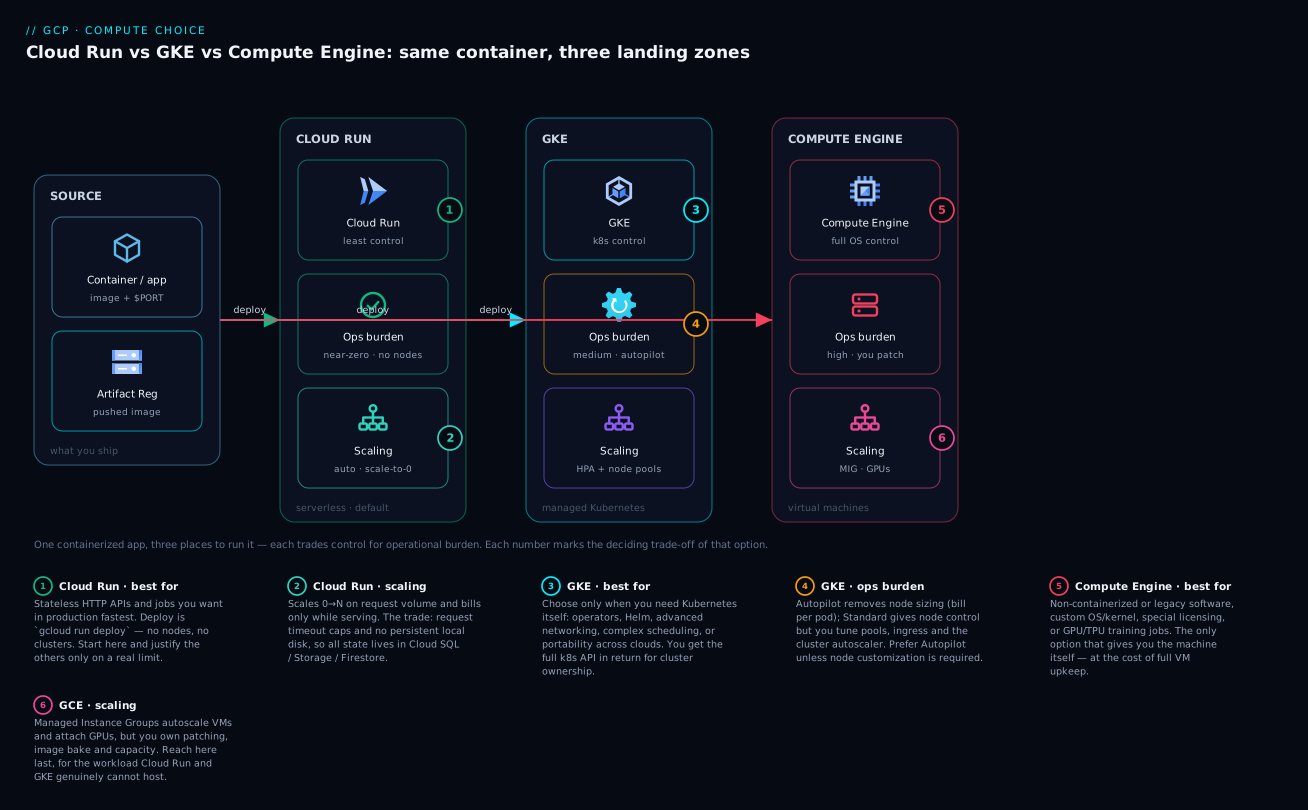
The first diagram lays the three primary services side by side as a single decision surface. On the left, Cloud Run is drawn as a managed, auto-scaling band of identical container instances behind a Google-managed HTTPS front door with a free TLS certificate — instances appear and disappear with traffic, the band thinning to zero when idle and fanning out under load, each instance carrying its concurrency number. In the centre, GKE is drawn as a cluster: a Google-managed control plane (API server, etcd, scheduler) sitting above node pools of VMs, with Pods scheduled onto nodes, an HPA driving Pod count and the cluster autoscaler driving node count, and a Service/Ingress object as the entry point — the Autopilot vs Standard split shown as “Google manages the nodes” vs “you manage the nodes.” On the right, Compute Engine is drawn as raw VMs inside the VPC — a Managed Instance Group with its own autoscaler, attachable GPUs and Persistent Disks, full OS control. Across the top runs the abstraction axis (most-managed → least-managed); along the bottom, the ops-burden axis thickens left-to-right. Reading it left-to-right is the decision: start at the most-managed end and move right only when a labelled requirement (a Kubernetes operator, a GPU, a kernel module) forces it.
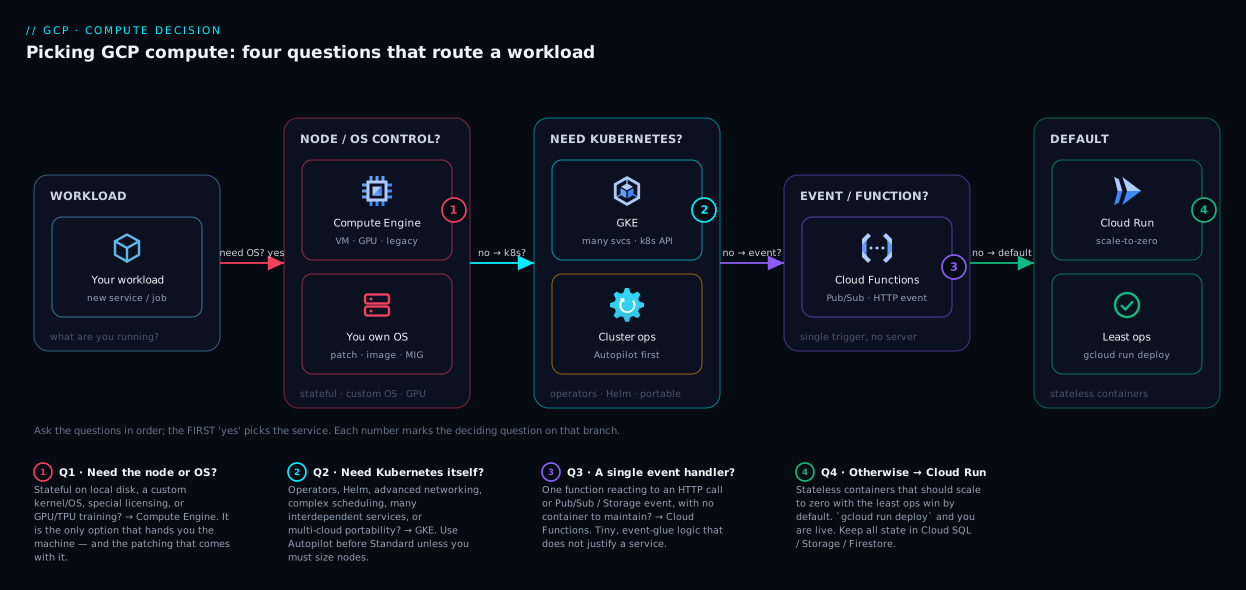
The second diagram is the decision flow itself — the questions in the order you should ask them. It begins at “Is the workload a containerised, stateless HTTP service or event consumer?” If yes and you have no special needs, the flow lands on Cloud Run (the default exit, reached fastest). A branch asks “Do you need Kubernetes-specific features — operators, StatefulSets, mesh, DaemonSets?”; yes routes to GKE, with a sub-branch “Do you need node-level control (specific machines, DaemonSets, node CUD)?” splitting Standard from Autopilot. Another branch asks “Can a container even hold this — or do you need a kernel module, a GPU host, host licensing, or a legacy VM app?”; yes routes to Compute Engine. A small early branch peels off “Is it literally one function/trigger?” to Cloud Functions. Every arrow is labelled with the criterion that takes it, so the reader can trace their own workload from the top question to exactly one service.
Real-world scenario
Lumio Retail (a fictional but representative D2C company) ran its entire platform — storefront API, checkout service, three background workers, a recommendations model, and a nightly data pipeline — on a single GKE Standard cluster, because the founding engineer had run Kubernetes at a previous company and “knew it would scale.” Eighteen months in, the platform team was two people whose calendars were full of node-pool upgrades, cluster-autoscaler debugging, and ingress-controller incidents. The cloud bill was ₹3.1 lakh/month, and the engineering lead could not honestly say which services needed Kubernetes and which were just there because everything was.
The architect ran the framework in this article against each workload. The findings were stark:
- Storefront API and checkout service were plain stateless HTTP. They had never used a CRD, an operator, a StatefulSet, or a DaemonSet. Traffic was spiky — heavy at lunch and evening, near-idle overnight — yet the cluster ran the same node count 24×7. These were textbook Cloud Run workloads paying GKE-Standard prices and ops load.
- The three background workers were finite, schedule-driven tasks (an order-export, an invoice-generator, a stock-reconciler). They had been shoehorned into long-running Deployments with a sidecar cron. They were Cloud Run jobs wearing a Kubernetes costume.
- The nightly data pipeline orchestrated a fan-out over thousands of files and genuinely benefited from a workflow tool; it stayed adjacent to GKE but moved its heavy steps to a Cloud Run job triggered by Cloud Scheduler, with BigQuery doing the actual analytics (see BigQuery for Data Analytics: Warehousing, Querying and Visualization).
- The recommendations model ran GPU inference with a custom CUDA build and a large model loaded into a long-lived process. This one did need the host: it moved to Compute Engine with an L4 GPU and a MIG for the occasional retraining burst. The container-on-a-VM model gave them the kernel and driver control they needed.
The migration took three weeks and not a single application rewrite — every service already shipped as a container, so each move was a new deployment target plus wiring Workload Identity → service accounts so each Cloud Run service ran as its own least-privilege identity (the discipline from GCP IAM and Service Accounts: Roles, Bindings and Least Privilege). The outcomes after one billing cycle:
- The GKE cluster shrank to a single small workload (the pipeline orchestration), and the team decommissioned two of three node pools.
- The storefront and checkout APIs, on Cloud Run with
min-instances=2for warmth and concurrency tuned to 120 for their I/O-bound profile, served the same traffic at roughly 40% of the prior compute cost because they now paid almost nothing overnight. - The platform team went from two full-time cluster operators to one engineer at part-time, freeing the other to build product.
- Total bill landed near ₹1.7 lakh/month, and — the part the CFO cared about — the cost now tracked traffic instead of sitting flat regardless of load.
The lesson Lumio took away was not “Kubernetes is wrong.” It was that they had been running four different workload shapes on one tool chosen for one engineer’s familiarity, and that matching each workload to the least-managed service that fit it recovered both money and engineer-time. The recommendations model proved the inverse point: when a workload genuinely needs the host, climbing the spectrum to Compute Engine is not a failure — it’s the correct call, for that one workload, for a concrete reason.
Advantages and disadvantages
The honest two-column trade-off for each service:
| Service | Advantages | Disadvantages |
|---|---|---|
| Cloud Run | Fastest to production; scale-to-zero (free idle); managed TLS/scaling/patching; per-request billing; tunable concurrency; same image as GKE | Stateless by contract; request timeout ceiling; cold starts without a warm floor; less node-level control; outside VPC by default |
| Cloud Functions | Simplest unit (source-deploy, no Dockerfile); ideal glue/trigger handler; scale-to-zero | Single-function shape; outgrown the moment you need routes/framework; same cold-start considerations |
| GKE Autopilot | Full K8s API with no node ops; per-Pod billing; rewards right-sized requests; portability | Costs more than Cloud Run for simple HTTP; some node-level features restricted; you still own manifests/HPA |
| GKE Standard | Total cluster control; any machine family/GPU/TPU; DaemonSets; node CUD for steady fleets; mesh/operators | Heaviest ops (node pools, upgrades, autoscaler); pays for idle nodes; effectively needs an SRE function |
| Compute Engine | Full OS/kernel control; GPUs, sole-tenant nodes, host licensing; runs anything; spot for cheap batch | Most ops (patching, images, drift); you build orchestration; pays for idle; no scale-to-zero |
When each advantage actually matters: Cloud Run’s scale-to-zero is decisive for spiky and idle-heavy traffic and irrelevant for a fully-utilised 24×7 fleet. GKE’s API richness is decisive when you use operators/StatefulSets/mesh and pure overhead when you don’t. Compute Engine’s OS control is decisive for a kernel-dependent or GPU workload and a liability for a plain web service. The trade-off table only tells you which column to weigh; your workload’s hard requirements tell you which row those weights land on.
Hands-on lab
Deploy the same container as a Cloud Run service, observe scale-to-zero and concurrency, then deploy it to a GKE Autopilot cluster to feel the difference — all free-tier-friendly (we keep instances tiny and delete everything at the end). Run in Cloud Shell (Bash).
Step 1 — Variables and a tiny container image. We’ll use a public sample that serves HTTP and echoes its environment.
PROJECT=$(gcloud config get-value project)
REGION=asia-south1
REPO=lab-repo
IMG="$REGION-docker.pkg.dev/$PROJECT/$REPO/hello:1"
gcloud config set run/region $REGION
Step 2 — Create an Artifact Registry repo and push a sample image.
gcloud artifacts repositories create $REPO --repository-format=docker --location=$REGION
# Use Google's hello sample, retagged into your registry
gcloud builds submit --tag $IMG \
  https://github.com/GoogleCloudPlatform/cloud-run-hello.git
Expected: a successful Cloud Build that pushes hello:1 to your repo. (If cloud-run-hello isn’t reachable, any small HTTP container you own works identically.)
Step 3 — Deploy as a Cloud Run service with scale-to-zero.
gcloud run deploy hello-run \
  --image=$IMG --allow-unauthenticated \
  --concurrency=80 --cpu=1 --memory=256Mi \
  --min-instances=0 --max-instances=10
URL=$(gcloud run services describe hello-run --format='value(status.url)')
echo "$URL"
curl -s "$URL" | head -n 3
Expected: a https://hello-run-….run.app URL that returns the sample page. With min-instances=0, after a few idle minutes the next request pays a brief cold start — the price of paying nothing while idle.
Step 4 — Observe concurrency and a warm floor. Lower concurrency to 1 (functions-style) and set a warm floor, then watch the difference in instance behaviour under a tiny load test.
gcloud run services update hello-run --concurrency=1 --min-instances=1
# Fire 50 quick requests; concurrency=1 forces more instances than concurrency=80 would
for i in $(seq 1 50); do curl -s -o /dev/null "$URL" & done; wait
# Inspect active revision config
gcloud run services describe hello-run \
  --format='value(spec.template.spec.containerConcurrency, spec.template.metadata.annotations)'
Expected: containerConcurrency: 1 and a non-zero min-instances annotation. Conceptually you’ve just proven the lever — concurrency 1 spreads the same load over many instances; restoring 80 collapses it back onto few. (Use Cloud Monitoring’s “Container instance count” metric to see this in a real test.)
Step 5 — Deploy the identical image to GKE Autopilot. Same image, different rung.
gcloud container clusters create-auto lab-ap --region=$REGION
gcloud container clusters get-credentials lab-ap --region=$REGION
kubectl create deployment hello-gke --image=$IMG
kubectl set resources deployment hello-gke \
  --requests=cpu=250m,memory=256Mi --limits=cpu=500m,memory=512Mi
kubectl expose deployment hello-gke --type=LoadBalancer --port=80 --target-port=8080
kubectl get svc hello-gke -w   # wait for EXTERNAL-IP, then Ctrl-C
Expected: after a couple of minutes, an external IP you can curl. Note what just happened: on Cloud Run you ran one command and got a URL with TLS; on Autopilot you wrote a Deployment, set resource requests, created a Service, and waited for a load balancer — more control, more objects, more steps, for the same container. That contrast is the entire article in your hands.
Validation checklist. You deployed one image to two rungs of the spectrum; saw Cloud Run’s scale-to-zero and concurrency lever; saw Autopilot’s Pod/Service/LB model with explicit resource requests; and felt the ops-surface difference directly. The steps mapped to the concepts:
| Step | What you did | What it proves |
|---|---|---|
| 3 | Cloud Run deploy, min=0 | Scale-to-zero + one-command managed HTTPS |
| 4 | Concurrency 1 vs 80, warm floor | Concurrency is the cost/latency lever |
| 5 | Same image to Autopilot | More control = more objects, for identical code |
Cleanup (avoid lingering charges — the Autopilot cluster and the LB cost money while they exist).
kubectl delete svc hello-gke --ignore-not-found
gcloud container clusters delete lab-ap --region=$REGION --quiet
gcloud run services delete hello-run --region=$REGION --quiet
gcloud artifacts repositories delete $REPO --location=$REGION --quiet
Cost note. Cloud Run at min-instances=0 costs effectively nothing at rest. The Autopilot cluster and its load balancer bill while they exist — deleting them promptly keeps this lab to a few rupees. Never leave a lab cluster or a public load balancer running overnight.
Common mistakes & troubleshooting
The failure modes are mostly decision failures that surface as runtime pain. Symptom → root cause → how to confirm → fix:
| # | Symptom | Root cause | Confirm (exact path / command) | Fix |
|---|---|---|---|---|
| 1 | Cloud Run requests time out at ~60 min on a long job | Forcing batch work through a Cloud Run service | Request duration near the service timeout ceiling | Use a Cloud Run job (gcloud run jobs create, long task-timeout) |
| 2 | Bill is flat regardless of traffic; idle costs money | Steady-priced GKE/GCE for a spiky workload | Plan/VM running 24×7 while traffic is bursty; node count flat | Move stateless HTTP to Cloud Run (scale-to-zero) |
| 3 | Latency spikes on the first request after idle | Cold start with min-instances=0 |
gcloud run services describe --format='value(spec.template.metadata.annotations)' shows min=0 |
Set --min-instances=1+ and --cpu-boost |
| 4 | Cloud Run instance count explodes; cost surges | Concurrency too low (e.g. 1) for an I/O-bound app | --format='value(spec.template.spec.containerConcurrency)' = 1 |
Raise concurrency to a tuned value (e.g. 80–250) |
| 5 | Each Cloud Run request is slow under load | Concurrency too high for a CPU-bound app | CPU at instance pinned at 100% while serving many | Lower concurrency toward 1–4 for CPU-heavy work |
| 6 | Data written to disk vanishes between requests | Treating Cloud Run’s tmpfs as durable | Files gone after instance recycle/scale-in | Externalise state (Cloud SQL/Firestore/GCS) |
| 7 | Cloud Run can’t reach a private Cloud SQL / Memorystore | No VPC connectivity configured | Connection refused/timeout to a private IP | Add Direct VPC egress or a Serverless VPC connector |
| 8 | GKE cluster eats engineer-time; nobody uses K8s features | Chose GKE Standard by default, not by need | Audit: no CRDs/operators/StatefulSets/DaemonSets in use | Migrate stateless services to Cloud Run |
| 9 | GKE Autopilot bill higher than expected | Over-large or unset Pod resource requests | kubectl get pods -o ... shows fat requests |
Right-size requests; Autopilot bills on them |
| 10 | New node takes minutes; traffic drops during a spike | Cluster autoscaler / MIG provisioning latency | Scale event in Cloud Logging; node added 1–4 min late | Keep headroom / buffer nodes; over-provision replicas |
| 11 | Pod can’t access a GCP API; “permission denied” | Workload not bound to a service account (Workload Identity) | gcloud logging read shows the default SA / 403 |
Configure Workload Identity; bind KSA→GSA with least privilege |
| 12 | Tried to run a kernel module / custom driver in Cloud Run | Container can’t control the host kernel | The module/driver fails to load in the sandbox | Use Compute Engine (real kernel) for that workload |
| 13 | GPU workload won’t schedule on Cloud Run | Wrong rung for sustained custom-GPU work | No GPU available / unsupported config | Compute Engine VM with the accelerator, or GKE Standard GPU pool |
| 14 | Scale-out is “instant” expectation broken on GCE/GKE | Confusing serverless cold start with VM provisioning | New VM/node boot is minutes, not sub-second | Right model: warm floor (Cloud Run) vs headroom (GKE/GCE) |
The four that bite hardest, expanded:
1. Long-running work on a Cloud Run service. A nightly ETL or a big migration pushed through a request handler hits the service request timeout and dies mid-run. The fix is structural, not a timeout bump: it’s a Cloud Run job, which has a far longer task timeout and a task-array model built for exactly this. Confirm by checking whether the work is request-driven (service) or run-to-completion (job) — if it’s the latter, you’re on the wrong Cloud Run primitive.
2. Flat bill on a spiky workload. A stateless API on a 24×7 GKE node fleet or a always-on VM pays for every idle overnight hour. Confirm by overlaying traffic against running capacity: if capacity is flat while traffic is bursty, you’re renting idle. The fix is Cloud Run’s scale-to-zero — the single biggest cost win available on this spectrum for spiky traffic.
6. Durable data on ephemeral disk. Writing user uploads or session state to Cloud Run’s filesystem “works” in testing (one warm instance) and silently loses data in production (instance recycles, another instance has none of it). Confirm by recycling the revision and checking the file is gone. The fix is the contract: Cloud Run is stateless; state lives in Cloud SQL, Firestore, Memorystore, or Cloud Storage.
8. GKE by reflex. The most expensive mistake in the whole space and the opening story’s root cause. Confirm by auditing actual Kubernetes-feature usage: kubectl get crd, look for operators, StatefulSets, DaemonSets, a mesh. If the honest answer is “we use none of these, it’s plain stateless HTTP,” you bought a cluster you don’t need. The fix is the GKE → Cloud Run migration — same image, far less ops, usually less money.
Best practices
- Default to Cloud Run; justify climbing the spectrum. New stateless HTTP/event workloads start on Cloud Run. Require a named requirement (an operator, a StatefulSet, a GPU host, a kernel module) before moving to GKE or Compute Engine. “We might need Kubernetes later” is not a requirement.
- Pick the least-managed service that meets every hard need. Unused control is pure cost — money, complexity, and on-call load. The senior move is restraint, not power.
- Tune Cloud Run concurrency to the workload’s CPU/IO profile. I/O-bound → high concurrency (80–250+); CPU-bound → low (1–4). Load-test and watch instance CPU; never leave it at the default for a CPU-heavy service.
- Set a warm floor for latency-sensitive services.
min-instances ≥ 1plus--cpu-boostremoves cold starts for steady traffic at small, predictable cost. Reservemin-instances=0for genuinely bursty, latency-tolerant work. - Use Cloud Run jobs for batch, not services. Run-to-completion work belongs in jobs (long timeout, task fan-out), not in a request handler fighting the service timeout.
- Right-size GKE Autopilot Pod requests. Autopilot bills on
requests; fat requests waste money silently. Measure real usage and set requests tight, limits sane. - Prefer Autopilot over Standard unless you need node control. Standard’s node ops are a real, ongoing cost; only take it on for specific machines, DaemonSets, Windows nodes, or node-level CUD on a large steady fleet.
- Buy committed-use discounts for steady fleets. Predictable GKE-Standard/Compute-Engine baseline load should run on 1- or 3-year CUDs (and spot for fault-tolerant batch) — major savings the serverless path can’t match at high steady utilisation.
- Run every workload as a dedicated, least-privilege service account. Cloud Run/Functions via
--service-account; GKE via Workload Identity (KSA→GSA). Never run on the default service account in production. - Keep state out of compute. Externalise to Cloud SQL/AlloyDB, Firestore, Memorystore, or Cloud Storage. Treat every compute instance — serverless or VM — as replaceable.
- Standardise on containers to keep migration cheap. Because the same OCI image runs on Cloud Run, GKE and (as a container-VM) Compute Engine, your code stays portable across the spectrum; movement is a deploy-target change, not a rewrite.
- Re-run the decision at scale milestones. A workload that fit Cloud Run at launch may justify GKE at 100× traffic; a reflexive GKE cluster may shed two-thirds of its services to Cloud Run. Revisit the matrix periodically, not just at greenfield.
Security notes
- Identity per workload, least privilege always. Every Cloud Run service, Cloud Function, GKE Pod and VM should run as its own service account with only the roles it needs. On GKE, use Workload Identity so Pods get GCP credentials without a downloaded key; on Cloud Run/Functions, set
--service-accountexplicitly. The default service account is over-privileged — never ship on it. - Gate ingress with IAM, not just network. Cloud Run invocation is IAM-controlled:
--no-allow-unauthenticatedplusroles/run.invokergranted only to the callers that should reach it (a specific service account, a load balancer, an authenticated user). This is a real authorization boundary, distinct from network reachability. - Use private ingress and VPC egress where isolation matters.
--ingress=internal(or internal-and-cloud-load-balancing) keeps a Cloud Run service off the public internet; Direct VPC egress / PSC reach private resources without traversing the public path. GKE/GCE workloads sit natively in the VPC with full firewall control — the right home for the most isolation-sensitive services. - Shrink the surface as you climb the spectrum. Cloud Run’s attack surface is a single container; GKE adds cluster and node surface (RBAC, network policy, node OS); Compute Engine adds the entire OS you must patch and harden. More control means more to secure — budget for it.
- Harden the supply chain. Pull images from Artifact Registry, enable vulnerability scanning, pin digests (not floating tags), and consider Binary Authorization to block unverified images on GKE/Cloud Run. The container is your unit of deployment across all three services; securing it secures the whole spectrum.
- Protect state at the data layer. Since state lives in Cloud SQL/Firestore/Memorystore/GCS, apply encryption (CMEK where required), private connectivity (Private Service Connect / private IP), and least-privilege data access — the compute tier’s security is only as good as the data tier behind it.
The security posture each service hands you, side by side:
| Control | Cloud Run / Functions | GKE | Compute Engine |
|---|---|---|---|
| Workload identity | --service-account |
Workload Identity (KSA→GSA) | VM service account |
| Ingress authz | IAM invoker + ingress mode | Service/Ingress + IAP/mesh authz | LB + firewall + IAP |
| Network isolation | Direct VPC egress / internal ingress | VPC-native, network policy | Native VPC, full firewall |
| OS patch responsibility | Google (nodes) | You | |
| Supply-chain gating | Binary Authorization | Binary Authorization + admission | Your pipeline |
| Attack surface | Smallest (container) | Cluster + nodes + Pods | Whole OS |
Cost & sizing
What drives the bill on each service, and how to right-size it:
- Cloud Run bills per-100ms of CPU/memory while serving plus a tiny per-request fee; idle is free at
min-instances=0. The levers are concurrency (higher = fewer instances = lower cost for I/O-bound apps), min-instances (your always-on floor — keep it as low as latency allows), and CPU/memory size (right-size to the workload). A spiky API can run for low ₹ hundreds/month; a busy one with a warm floor scales with real traffic, not idle time. - GKE Autopilot bills per-Pod requested vCPU/memory per second — so your bill is your sum of
requests, and over-requesting is the silent cost killer. Right-size requests against measured usage; you pay for what you ask for, not what you use. - GKE Standard bills per-node VM/second plus a per-cluster management fee (the first zonal cluster has a management-fee allowance; confirm current free-tier terms). Costs are driven by node count/size and utilisation — bin-pack densely, use spot nodes for fault-tolerant work, and buy CUDs for the steady baseline. Idle nodes cost full price, so don’t over-provision pools.
- Compute Engine bills per-VM/second (vCPU + RAM) plus disk; sustained-use discounts apply automatically and CUDs / spot cut steady and batch costs hard. Right-size the machine type, use spot for interruptible batch, and stop VMs you don’t need (they bill while running, idle or not).
Free-tier touchpoints worth knowing (always re-verify current limits — Google adjusts these): Cloud Run and Cloud Functions have monthly free request and compute allowances; Compute Engine has a small e2-micro free instance in specific US regions; GKE has a per-billing-account management-fee credit for one zonal/Autopilot cluster. None of these make a production fleet free, but they make experimentation and small workloads genuinely cheap.
A rough monthly picture for a small production stack (illustrative INR, model your own region/config):
| Workload | Best-fit service | Sizing | Rough INR / month |
|---|---|---|---|
| Spiky storefront API | Cloud Run | min=1, conc=120, 1 vCPU/512Mi | ~₹3,000–8,000 (tracks traffic) |
| Background batch (nightly) | Cloud Run job | 100 tasks, 2 vCPU/4Gi, runs ~1h/day | ~₹1,000–3,000 |
| K8s platform (operators/mesh) | GKE Autopilot | right-sized Pods, ~8 vCPU equiv | ~₹15,000–30,000 |
| Steady high-RPS fleet | GKE Standard + CUD | 3× e2-standard-8, 1-yr CUD, spot batch | ~₹40,000–70,000 (with CUD) |
| GPU inference / training | Compute Engine | g2-standard-8 + L4, spot for retrain | ~₹25,000–60,000 (usage-driven) |
The cost takeaway is the same as the design takeaway: match the billing unit to the traffic shape. Spiky and idle-heavy → pay per-request (Cloud Run/Functions). Steady and fully-utilised → pay per-VM at a committed-use discount (GKE Standard/Compute Engine). Variable K8s workloads with disciplined requests → per-Pod (Autopilot). Choosing the wrong unit is how teams pay double — flat VM bills for bursty traffic, or per-request premiums for a saturated 24×7 fleet.
Interview & exam questions
1. A team defaults every new service to GKE because that’s what they know. What’s the architectural critique? They’re matching the workload to a familiar tool, not to its requirements — a category error. Most stateless HTTP services use no Kubernetes-specific feature (operators, StatefulSets, DaemonSets, mesh) and would run on Cloud Run with far less ops burden, scale-to-zero economics, and the same container image. The correct principle is to choose the least-managed service that meets every hard requirement, climbing the spectrum only for a named need.
2. Explain scale-to-zero and which GCP compute services have it. Scale-to-zero means dropping to zero running instances when no traffic arrives, so idle costs nothing; the next request pays a cold start. Cloud Run (min-instances=0) and Cloud Functions have it. GKE Standard nodes and Compute Engine VMs do not — they bill while they exist. GKE Autopilot bills per running Pod and can scale workloads down, but a baseline of system Pods keeps the cluster non-free.
3. What is Cloud Run concurrency and how does it affect cost and latency? Concurrency is how many requests a single container instance serves simultaneously (default 80, range 1–1000). Higher concurrency means fewer instances and lower cost for I/O-bound apps but risks per-request contention for CPU-bound ones; lower concurrency isolates each request but spawns more instances and cold starts. You tune it by load-testing and setting it so an instance saturates near its CPU limit at the target rate.
4. When would you choose GKE over Cloud Run, specifically? When the workload needs a Kubernetes-specific capability Cloud Run can’t provide: operators/CRDs, StatefulSets (sticky identity + persistent volumes), a real service mesh, DaemonSet-style per-node agents, specific GPU/TPU machine families, Windows nodes, or a very large steady fleet where per-node committed-use discounts beat per-request pricing. Absent such a need, Cloud Run is the better default.
5. Autopilot vs Standard — what’s the trade-off? Autopilot gives the full Kubernetes API with no node management (Google sizes and runs nodes; you pay per-Pod requested). Standard gives total node control — machine types, node pools, DaemonSets, GPUs, node CUDs — at the cost of running and upgrading those nodes yourself. Choose Autopilot unless you need node-level control or CUD-priced node economics on a large steady fleet.
6. A workload needs a custom kernel module and a GPU for multi-day training. Which service, and why not the others? Compute Engine. Containers share the host kernel, so a kernel module/custom driver needs a real VM you control; a multi-day GPU run wants a long-lived host with an attached accelerator and local SSD. Cloud Run/Functions are stateless and sandboxed (no kernel control, no sustained custom-GPU host); GKE could do GPU work but the kernel-module + host-control requirement points cleanly at a VM.
7. How does a stateless contract change your architecture on Cloud Run? Cloud Run instances are ephemeral with an in-memory filesystem and no sticky identity, so state must be externalised — Cloud SQL/AlloyDB for relational, Firestore for documents, Memorystore for cache/session, Cloud Storage for objects. You design every instance as replaceable and never assume the same instance serves a user’s next request. For sticky identity + durable attached storage you’d need a StatefulSet on GKE or a VM.
8. Compare the billing units of Cloud Run, GKE Autopilot, GKE Standard and Compute Engine. Cloud Run: per-100ms of compute while serving + per-request (idle free). Autopilot: per-Pod requested vCPU/memory per second. Standard: per-node VM/second + per-cluster fee (idle nodes billed). Compute Engine: per-VM/second + disk (idle billed). Spiky/idle-heavy traffic is cheapest on per-request billing; steady fully-utilised fleets are cheapest on per-VM billing with committed-use discounts.
9. What is a cold start, and how do you eliminate it on Cloud Run without giving up scale-to-zero entirely? A cold start is the latency to bring up a fresh instance (image pull, container/runtime boot, app init) on the first request from zero. You remove it for steady traffic with min-instances ≥ 1 (a warm floor) plus --cpu-boost, while still letting the service scale up and down above that floor. Truly bursty, latency-tolerant workloads keep min-instances=0 and accept occasional cold starts.
10. A service runs on a 24×7 GKE Standard cluster but is plain stateless HTTP with spiky traffic. What do you recommend and what’s the expected outcome? Migrate it to Cloud Run — same container image, no rewrite. Expected outcomes: scale-to-zero means you stop paying for idle overnight hours (often a large bill cut for spiky traffic), and you shed all node-ops burden. You’d wire the service to its own service account (Workload Identity → --service-account) and configure VPC egress if it needs private resources.
11. How do you migrate from Cloud Run to GKE when you outgrow it, and what stays the same? You write a Kubernetes Deployment + Service, add an Ingress/Gateway for traffic, configure an HPA, and bind the Pod to a service account via Workload Identity. What stays the same is the container image itself — because all three services run the same OCI image, it’s a deployment-target change, not an application rewrite. The same is true in reverse (GKE → Cloud Run), which is the common cost-recovery move.
12. What’s the difference between a Cloud Run service and a Cloud Run job, and when do you use each? A service is request-driven (HTTPS endpoint, concurrency, scales to zero) for APIs/web/event consumers, with a request-timeout ceiling. A job is run-to-completion (no endpoint, a task array with parallelism, a much longer task timeout) for finite batch work — ETL, migrations, fan-out. Forcing batch through a service hits the request timeout; jobs are the purpose-built primitive.
These map to Professional Cloud Architect (PCA) — designing and planning a cloud solution, selecting appropriate compute — and Professional Cloud DevOps Engineer (PCDE) — optimising service performance and cost, choosing deployment targets. The cost/billing-unit reasoning also appears in Cloud Digital Leader at a conceptual level. A compact cert-mapping for revision:
| Question theme | Primary cert | Objective area |
|---|---|---|
| Service selection / abstraction spectrum | PCA | Design a solution; choose compute |
| Scale-to-zero, concurrency, cold starts | PCDE | Optimise performance and cost |
| Cost models / billing units / CUD | PCA / PCDE | Cost optimisation |
| Statefulness, StatefulSets, storage | PCA | Design for state and data |
| Workload Identity / least-privilege SA | PCA / PCSE | Secure compute workloads |
| Migration across the spectrum | PCDE | Deployment and modernisation |
Quick check
- A stateless HTTP API has heavy daytime traffic and near-zero overnight traffic. Which service minimises cost, and what property makes it cheap?
- Your Cloud Run service’s instance count and bill explode under modest load, and the app is I/O-bound (mostly waiting on a database). What single setting is most likely wrong, and which way do you move it?
- True or false: GKE Standard nodes scale to zero when idle, so you pay nothing overnight.
- A workload needs a stable per-instance identity and a durable attached volume per instance. Which compute service can model this, and what Kubernetes object do you use?
- You must run a custom kernel module and attach a GPU for a multi-day training job. Which service, and why can’t Cloud Run do it?
Answers
- Cloud Run (or Cloud Functions). The property is scale-to-zero: with
min-instances=0it drops to zero instances overnight and bills nothing for idle, then scales up for daytime traffic — you pay for work done, not capacity rented. - Concurrency is most likely too low (e.g. 1), so each request spawns its own instance. For an I/O-bound app, raise concurrency (e.g. 80–250) so one instance interleaves many waiting requests, collapsing instance count and cost.
- False. GKE Standard nodes are VMs that persist and bill while they exist; they do not scale to zero. Only Cloud Run/Functions (and, per-workload, Autopilot Pods) give scale-to-zero. To stop paying for idle you’d move the workload to a serverless service or shut the nodes down.
- GKE, using a StatefulSet — it gives each Pod a stable identity (
pod-0,pod-1) and its own PersistentVolume that survives reschedule. Cloud Run can’t (it’s stateless with no sticky identity); a single VM is the other option for one such instance. - Compute Engine. Containers share the host kernel, so a custom kernel module needs a real VM you control, and a multi-day GPU run wants a long-lived host with an attached accelerator. Cloud Run is sandboxed and stateless — no kernel control and not built for sustained custom-GPU hosts.
Glossary
- Abstraction spectrum — the ladder from most-managed to least-managed compute (Cloud Functions → Cloud Run → GKE Autopilot → GKE Standard → Compute Engine); you want the leftmost rung that meets every requirement.
- Scale-to-zero — dropping to zero running instances when idle so idle costs nothing; available on Cloud Run and Cloud Functions.
- Cold start — the latency to bring up a fresh instance (image pull, container/runtime boot, app init) on the first request from zero; removed for steady traffic with a warm floor.
- Concurrency — the number of requests one Cloud Run instance serves at once (default 80, range 1–1000); the primary lever on cost and tail latency.
- min-instances / max-instances — the always-warm floor and the hard ceiling on Cloud Run horizontal scale; min removes cold starts, max protects downstreams and the bill.
- Cloud Run service — a request-driven container behind an HTTPS endpoint with concurrency and scale-to-zero; the default for stateless HTTP/event workloads.
- Cloud Run job — a run-to-completion container with a task array and long task timeout; the right primitive for finite batch work.
- GKE Autopilot — managed Kubernetes where Google runs the nodes; you submit Pods and pay per-Pod requested vCPU/memory.
- GKE Standard — Kubernetes where you manage node pools and the cluster (Google runs only the control plane); full node-level control and node CUD pricing.
- Pod — the smallest deployable unit in Kubernetes; what you manage on GKE rather than the underlying VM.
- Node pool — a group of identical VMs (nodes) in a GKE Standard cluster that you size, autoscale and upgrade.
- StatefulSet — a Kubernetes workload giving Pods stable identity and per-Pod persistent volumes; the reason to choose GKE for stateful workloads.
- Managed Instance Group (MIG) — a Compute Engine fleet of identical VMs with its own autoscaler; the DIY orchestration layer when you choose VMs.
- Sole-tenant node — a physical Compute Engine host dedicated to you, for licensing or compliance that requires host isolation.
- Committed Use Discount (CUD) — a 1- or 3-year spend commitment that discounts steady GKE-Standard/Compute-Engine capacity substantially.
- Direct VPC egress / Serverless VPC Access connector — the two ways a Cloud Run/Functions workload reaches resources on a private VPC.
- Workload Identity — the GKE mechanism binding a Kubernetes service account to a Google service account so Pods get GCP credentials without a downloaded key.
- Billing unit — the thing each service charges for (per-100ms-while-serving, per-Pod-requested, per-node, per-VM); matching it to your traffic shape is the core of cost design.
Next steps
You can now place any GCP workload on the abstraction spectrum and choose the least-managed service that fits it. Go deeper on the two services you’ll reach for most:
- Next: Cloud Run Explained: Serverless Containers That Scale to Zero (and Back) Without Kubernetes — the full mechanics of the service you’ll default to.
- Related: GKE Autopilot vs Standard vs Enterprise: Choose Your Kubernetes Mode — the deep dive once you’ve decided you genuinely need Kubernetes.
- Related: GCP IAM and Service Accounts: Roles, Bindings and Least Privilege — give every workload its own least-privilege identity, on any rung.
- Related: GCP’s Global VPC Explained: Why Your Network Spans the Planet by Default — the networking model your compute connects into.
- Related: GCP Pub/Sub and Event-Driven Architecture: Decouple and Scale — the event source that pairs perfectly with Cloud Run and Cloud Functions.
- Related: BigQuery for Data Analytics: Warehousing, Querying and Visualization — where the analytics belongs when your compute layer just orchestrates it.