The first real decision you make on Google Cloud is the one most people make by accident: where does this thing run? A dropdown says us-central1 or asia-south1, you pick whatever’s default or nearest, and move on. Months later a single datacenter loses power for forty minutes, your “cloud” app is down the whole time, and you discover — too late — that “the cloud” was actually one building in one city, because every resource lived in one zone. Nothing was redundant. Nobody told you it wasn’t.
This article fixes that gap. A region is a geographic area — a metro like Mumbai or Iowa — and a zone is one physically isolated datacenter inside that region. That sentence is true but useless until you understand what it implies: which failures take you down, how far away your users are in milliseconds, what “high availability” actually costs, and why some Google services (Cloud Storage, the global load balancer) ignore zones entirely while others (a VM, a disk) are nailed to exactly one. Get the mental model right and every later decision — where to put the database, whether one region is enough, why your API is slow for users on another continent — stops being guesswork.
By the end you’ll look at any GCP resource and instantly answer three questions: what’s its blast radius (what has to fail before this dies), what’s its latency (who’s near it and who pays a round-trip tax), and what does redundancy cost. We build the model with concrete analogies and real round-trip numbers, scannable tables, an architecture walkthrough, and a free-tier lab — no jargon dumps, every section designed to make you go “oh, now I get it.”
What problem this solves
The problem is invisible until it bites. When you deploy a VM, disk, or database, it physically lives somewhere specific. If you don’t consciously decide how widely to spread it, the default is the narrowest, cheapest, most fragile option: a single zone. Everything works in demos — a single zone has excellent uptime on a normal day. Then a real-world event hits one datacenter (power, cooling, a fibre cut) and every single-zone resource goes dark together, because they were never separate.
Here’s what breaks. An engineer puts the web tier, database, and cache all in asia-south1-a — fast, cheap, sub-millisecond between them. But “the database is in another zone for safety” never happened, so when -a has an incident, the site, the data, and the cache vanish at once with nothing to fail over to. The opposite mistake is just as expensive: a team terrified of downtime spreads a chatty app across two distant regions, then can’t understand why every page is slow and the egress bill tripled — every DB call now crosses an ocean, and Google bills inter-region traffic. Both share one root cause: not knowing what a zone and a region physically are, and therefore mispricing the trade between availability, latency, and cost. It bites first-timers (single-zone-everything), cost-sensitive teams (over-spreading for no resilience gain), and latency-sensitive products alike. The fix is never “buy more cloud” — it’s understanding the geography you’re already standing on.
Here’s the entire mental model in one table — the three scopes, what each physically is, what has to fail before it goes down, and the everyday analogy we’ll keep returning to:
| Scope | What it physically is | Blast radius (what fails together) | Survives a… | Everyday analogy |
|---|---|---|---|---|
| Zone | One isolated datacenter (its own power, cooling, network) | Everything pinned to that one zone | (nothing below it) | A single building |
| Region | A metro cluster of 3+ nearby zones | One whole metro | …zone failure (if you span zones) | A city with several buildings |
| Multi-region / Global | A service spread across many regions/continents | A whole geography | …region failure | A country with several cities |
Read it top to bottom: each row survives the failure of the row above it, and costs a bit more (in money, latency, or complexity) to get there. That single idea — availability is a ladder you climb by widening blast radius, and every rung has a price — is the whole article.
Learning objectives
By the end of this article you can:
- Explain in one plain sentence each what a zone, region, and multi-region/global service physically are — and draw the failure ladder connecting them.
- Look at any GCP resource (VM, disk, Cloud SQL, GKE, Storage, load balancer) and name its scope — zonal, regional, or global — and therefore its blast radius.
- Reason about latency with real numbers: why same-zone is sub-millisecond, cross-zone ~1 ms, cross-region tens to hundreds of ms, and which calls must stay local.
- Decode a resource name like
asia-south1-aorus-central1on sight, and read the-a/-b/-cconvention for what it does and doesn’t guarantee. - Choose between one zone, multiple zones, one region, and multiple regions with a decision table tied to a concrete availability/RTO/RPO target.
- Build a basic highly available deployment: regional MIG + regional Cloud SQL + global load balancer, with the right
gcloud/Terraform flags. - Estimate the cost and latency tax of each rung, including inter-region egress and cross-region replication, in rough INR/USD terms.
- Avoid the four classic traps: single-zone-everything, a silent zonal disk under a “regional” app, over-spreading a chatty workload, and assuming a global service needs no thought.
Prerequisites & where this fits
You need very little. A Google Cloud account (the free tier plus trial credits cover the lab), the gcloud CLI or browser Cloud Shell, and a rough idea that GCP has services like Compute Engine (VMs), Cloud SQL (databases), and Cloud Storage (objects). No networking depth, Kubernetes, or prior architecture experience needed — every concept is built from zero, and new terms are defined on first use and in the glossary.
Where this sits: it’s the foundation layer of GCP architecture, and almost every other decision depends on it. The resource hierarchy decides who owns and pays for a resource — see GCP Resource Hierarchy Explained. Regions and zones decide where it runs and what can kill it — this article. Natural next steps: choosing compute per tier (GCP Compute Options Compared and the Cloud Run vs GKE vs Compute Engine decision), and the deeper resiliency patterns in the companion GCP Regions and Zones: Resiliency, Latency and Global Services.
Core concepts
Five mental models make every later decision obvious. Read once; everything after is application.
A zone is a building. A region is a city. Multi-region is a country. This is the analogy to burn into memory. A zone is a single datacenter — one building with its own power, cooling, and network. A region is a metro containing several of these buildings (zones), close enough that traffic between them is fast but independent enough that a problem in one usually doesn’t touch the others. A multi-region or global service spreads across cities and continents. The point: failures are usually contained to one level — a building can flood without taking down the city, a city without the country. You choose how much containment you want, and pay accordingly.
Your blast radius is the smallest box your resource lives in. When something fails, what goes down with it? A resource pinned to one zone has a blast radius of that zone — anything else there might die at the same time, and nothing outside can save you. This is the most important idea in the article: the scope of a resource is the scope of its failure. A zonal VM dies with its zone; a regional database survives a zone but dies with its region; a global load balancer survives a region. “Is this safe?” really means “what’s the smallest box it’s in, and can I afford to lose it?”
Every GCP resource has a fixed scope you can’t change after the fact. Each service is born zonal, regional, or global. A standard Compute Engine VM and persistent disk are zonal — one zone, full stop. A regional MIG or regional Cloud SQL is regional — Google spreads it across zones. Cloud Storage, the global load balancer, and BigQuery are regional or multi-region/global depending on how you create them. You don’t make a zonal VM “regional” by wishing — you put several zonal VMs in different zones and front them with something regional. The art is composing zonal pieces into a regional or global whole.
Latency is the tax for distance, and it’s brutally non-linear. Same zone: well under a millisecond. Different zones, same region: a tiny bit more — around or under 1 ms round-trip. Cross region: tens of milliseconds within a continent, 100–250+ ms across oceans. A page that makes one database call doesn’t care. A page that makes 50 sequential calls, each crossing a region, multiplies that round-trip 50 times — the difference between a snappy app and an unusable one. Keep tightly-coupled, chatty components in the same zone or region; only span regions for things that talk rarely or asynchronously.
Some services hide all of this — on purpose, at a price. Google built global services so you don’t think about zones: the global external load balancer gives one anycast IP and routes each user to the nearest healthy region; a multi-region Cloud Storage bucket stores objects redundantly across regions under one namespace. These are gifts, not magic, and not free — they trade away some control (you can’t pin where a write lands) and often cost more (multi-region and inter-region carry premiums). Knowing which services abstract geography and which don’t is half of designing on GCP. (Every term above is collected in the glossary at the end.)
What a region and a zone physically are
When Google says region asia-south1, they mean a metro — Mumbai. Inside it, Google runs at least three zones, named with a trailing letter: asia-south1-a, -b, -c. Each zone is a physically separate datacenter (or independently-powered section), engineered so a failure of power, cooling, or networking in one is very unlikely to cascade into another — close enough that the network between them is fast, decoupled where it counts.
A region almost always has three or more zones, and that “three” isn’t an accident: it’s the minimum that lets you lose one zone while keeping a majority (two of three) alive — which matters for systems that vote on consistency (databases, quorum services).
The name-decoding cheat sheet — read any GCP location string at a glance:
| You see | It means | Scope | Example resources |
|---|---|---|---|
us-central1 |
A region (Iowa) — metro, no zone letter | Regional | Regional MIG/disk/Cloud SQL, region bucket |
us-central1-a |
A zone (datacenter a) in that region |
Zonal | A VM, a standard disk, a zonal GKE cluster |
asia-south1 |
A region (Mumbai) | Regional | Same regional resources, different metro |
asia-south1-c |
A zone (c) in Mumbai |
Zonal | A specific VM instance |
eu / us / asia |
A multi-region (continent-scale) | Multi-region | Multi-region bucket, BigQuery dataset |
global |
A global resource (no location) | Global | External load balancer, global IP, VPC network |
Two subtleties that save you from real mistakes:
Zone letters are per-project, not universal. Your asia-south1-a and mine aren’t guaranteed to be the same datacenter — Google randomizes the letter-to-datacenter mapping per project to spread load. So don’t assume two projects are “in the same zone” because the letters match, and don’t hardcode -a everywhere — let resources spread.
Zones are independent for failure but share a metro. They protect you from common, localized failures — a power unit, a cooling loop, a switch — but not from a true regional disaster. That’s why the ladder has a rung above the region: most outages you’ll ever see are zone-scoped; the rare, scary ones are region-scoped, and only a second region defends against those.
What a zone protects you from, and what it doesn’t:
| Failure event | Scope | Single zone survives? | Multi-zone region survives? | Need 2nd region? |
|---|---|---|---|---|
| Server / rack hardware failure | Sub-zone | Often | Yes | No |
| Power distribution / cooling fault | One zone | No | Yes | No |
| Zone network switch failure | One zone | No | Yes | No |
| Bad config push to one zone | One zone | No | Usually | No |
| Region control-plane / capacity event | One region | No | No | Yes |
| Metro-scale natural disaster | One region | No | No | Yes |
| Cloud-global software bug (very rare) | Global | No | No | Multi-cloud |
How GCP service scopes work (zonal vs regional vs global)
This is where the model becomes daily decisions. Every GCP resource falls into one of three scopes, and its scope is its blast radius and latency profile in one word. Memorize where the common services land and most of your architecture instincts become automatic.
Zonal resources live in one zone — a standard Compute Engine VM and persistent disk are the headliners. Cheapest and lowest-latency within that zone (why people over-use them) but they die with it: a fine building block, a dangerous whole-system foundation. Regional resources are spread by Google across a region’s zones automatically — a regional MIG recreates VMs in surviving zones, a regional persistent disk syncs across two zones, regional Cloud SQL keeps a hot standby with ~60 s failover, regional GKE spreads the control plane — surviving a zone for a small premium. Global / multi-region resources transcend regions: the global external load balancer (one anycast IP, nearest-healthy-region routing), multi-region Cloud Storage and BigQuery (data redundant across regions), and the VPC network (global, regional subnets) hide geography by design.
The master reference — scope of the services you’ll touch most, what each survives, and the one-line “so what”:
| Service | Common scope | Survives zone? | Survives region? | The “so what” |
|---|---|---|---|---|
| Compute Engine VM (standard) | Zonal | No | No | Single-building risk; use a MIG to spread |
| Persistent disk (standard) | Zonal | No | No | Data in one building unless regional PD |
| Regional persistent disk | Regional | Yes (2 zones) | No | Survives a zone; ~2× storage cost |
| Managed instance group (regional) | Regional | Yes | No | Recreates VMs in surviving zones |
| Cloud SQL (HA / regional) | Regional | Yes (~60 s) | No (add replica) | One-click HA across two zones |
| GKE cluster (regional) | Regional | Yes | No | Regional control plane, no single-zone master |
| Cloud Run | Regional | Yes | No | Serverless; Google spreads zones for you |
| Cloud Storage (regional bucket) | Regional | Yes | No | Strong consistency, low in-region latency |
| Cloud Storage (multi-region) | Multi-region | Yes | Yes | Highest durability; pricier writes |
| Global external Load Balancer | Global | Yes | Yes | One IP worldwide; nearest-region routing |
| Cloud DNS | Global | Yes | Yes | Anycast name resolution everywhere |
| VPC network | Global | Yes | Yes | Global network; regional subnets |
| BigQuery dataset | Regional / multi-region | Yes | If multi-region | Location set at creation; hard to move |
The pattern: compute and raw disks start zonal; managed/regional variants and Google’s platform services climb the ladder for you. The architect’s job is to wrap zonal building blocks (VMs, disks) inside regional constructs (MIGs, regional disks, load balancers) so the whole survives a zone even though each piece doesn’t. As a default: stateless tier → regional MIG or Cloud Run behind a global LB; database → regional (HA) Cloud SQL or Spanner; cache → regional if load-bearing, zonal if disposable; static assets → multi-region or regional bucket; entry point → the global load balancer.
Latency: the real cost of distance
Availability gets the headlines, but latency is what your users feel every second. These are order-of-magnitude round-trip times (RTT) — actuals vary, but the ratios are stable, and ratios drive design.
| Path | Typical RTT | Feels like | Rule of thumb |
|---|---|---|---|
| Same zone (VM ↔ VM / disk) | < 0.5 ms (~0.2 ms) | Instant | Free — co-locate freely |
| Same region, different zone | ~0.5–1 ms | Imperceptible | Cheap — spread for HA guilt-free |
| Same continent, different region | ~10–50 ms | Noticeable when chatty | Span only for DR / coarse traffic |
| Cross-continent (India ↔ US) | ~150–250+ ms | Sluggish per round-trip | Never put a chatty dependency here |
| User → nearest edge (global LB) | low tens of ms | Snappy | Terminate close to the user |
Latency matters more than the raw numbers suggest because of multiplication — a single 100 ms round-trip is fine, but software rarely makes one call.
Worked example — the chatty-page tax. Your product page makes 30 sequential calls to its database (common with naive ORMs — the classic “N+1” pattern). Compare four placements:
| App ↔ DB placement | Per-call RTT | 30 calls (total DB time) | Page feels |
|---|---|---|---|
| Same zone | ~0.3 ms | ~9 ms | Instant |
| Same region, different zone | ~0.8 ms | ~24 ms | Still instant |
| Different regions, same continent | ~30 ms | ~900 ms | Visibly slow |
| Different continents | ~180 ms | ~5,400 ms (5.4 s) | Broken |
Same code, same database. The only change is the geographic gap between the tiers — and the page went from instant to a 5.4-second disaster. That’s why “keep tightly-coupled components in the same region” isn’t a preference; it’s physics times your call count. The fix is never “use a faster network” (you can’t beat light) — move the tiers together, batch the 30 calls into 1, or serve that continent its own regional copy.
The flip side: components that talk rarely or asynchronously are fine across regions. So the rule has a precise shape:
| Communication pattern | Cross-zone? | Cross-region? | Why |
|---|---|---|---|
| Synchronous, chatty (app ↔ DB) | Yes | No | RTT multiplies by call count |
| Synchronous, occasional | Yes | Tolerable | Few round-trips, small tax |
| Asynchronous (queue, pub/sub) | Yes | Yes | Latency hidden by buffering |
| Bulk / batch (replication, ETL) | Yes | Yes | Throughput matters, not RTT |
| User-facing first byte | global LB | global LB | Terminate at the nearest edge |
How many zones and regions do you actually need?
The honest answer is “exactly enough to meet your availability target, and not one more — each rung up the ladder costs money, latency, or complexity.” Availability is measured in “nines” (the percentage of time the service is up); each extra nine cuts allowed downtime 10× and usually means climbing a rung:
| Availability | “Nines” | Max downtime / year | Roughly what it takes |
|---|---|---|---|
| 99% | two nines | ~3.65 days | Single zone, no redundancy (dev/test) |
| 99.9% | three nines | ~8.76 hours | Single region, spread across zones |
| 99.95% | — | ~4.38 hours | Multi-zone + HA managed services |
| 99.99% | four nines | ~52.6 minutes | Robust, well-run regional design |
| 99.999% | five nines | ~5.26 minutes | Multi-region active/active, auto failover |
Two more numbers complete the picture — the ones executives actually ask about:
- RTO (Recovery Time Objective): the max time you can be down before it’s unacceptable. “Back within 5 minutes” is an RTO.
- RPO (Recovery Point Objective): the max data you can lose, measured in time. “At most the last 30 seconds of writes” is an RPO.
These decide your rung more than anything else. Tight RTO + near-zero RPO push you toward multi-zone-now, multi-region-soon; a relaxed back-office app (an hour of downtime and lost data is fine) lives happily in one region.
The decision table that ties it together — pick the row that matches your real requirement:
| Your requirement | Architecture | Survives | Doesn’t survive | Cost |
|---|---|---|---|---|
| Dev / test / personal | Single zone (VM + zonal disk) | Hardware blips | Zone failure | × 1 |
| Internal app, some downtime OK | Multi-zone, 1 region (regional MIG + Cloud SQL HA) | Any one zone | Region failure | ~× 1.3–2 |
| Customer-facing, can’t be down | Multi-zone + global LB (regional backends, 1 IP) | Zone + instance failure | Full region failure | ~× 1.5–2.5 |
| Mission-critical, tight RTO/RPO | Multi-region active/passive (DR) | A whole region (failover) | Two regions at once | ~× 2–3 |
| Global product, lowest latency | Multi-region active/active | A region, no failover delay | Cloud-global event | ~× 3–4+ |
The 90% answer for most production apps is row three: stateless tier across a region’s zones (regional MIG or Cloud Run), a regional HA database, and a global load balancer in front. It survives the failures you’ll actually experience (zone-scoped), gives nearest-region routing, and costs a modest premium — not the 3–4× of full active/active multi-region, which you add only when a real RTO/RPO or global-latency need forces it. And multi-region is a serious commitment, not a checkbox: it roughly doubles your operational surface and adds replication-lag (RPO) questions. Climb one rung at a time, only as far as the requirement demands.
Architecture at a glance
Let’s walk the row-three “90% answer” end to end — made concrete in one region (Mumbai, asia-south1) with a DR toehold in a second (Delhi, asia-south2). Trace it left to right, the way a request flows.
A user anywhere hits one anycast IP on the global external load balancer. They don’t know which region serves them — Google routes them to the nearest healthy backend and steers them away from a region having a bad day, no DNS change, no per-region IP to manage. The request lands in asia-south1, where a regional managed instance group runs your stateless VMs across zones -a/-b/-c; if -a loses power, -b/-c keep serving and the LB drains the dead zone. Those instances talk to a regional (HA) Cloud SQL whose primary sits in one zone with a synchronous standby in another — a zone failure triggers automatic ~60 s failover, and because the standby is in-region, every app-to-DB call stays a sub-millisecond hop. Static assets live in a multi-region Cloud Storage bucket, redundant across regions by design.
The second region, asia-south2, is the DR rung: a warm standby MIG and a cross-region Cloud SQL read replica fed by asynchronous replication. It isn’t serving live traffic (active/passive), so its replication lag means a small, non-zero RPO — the deliberate trade for surviving a whole-region event. The badges mark where each blast radius lives and its latency cost; the legend narrates each as what it protects · how to confirm · the latency reality.
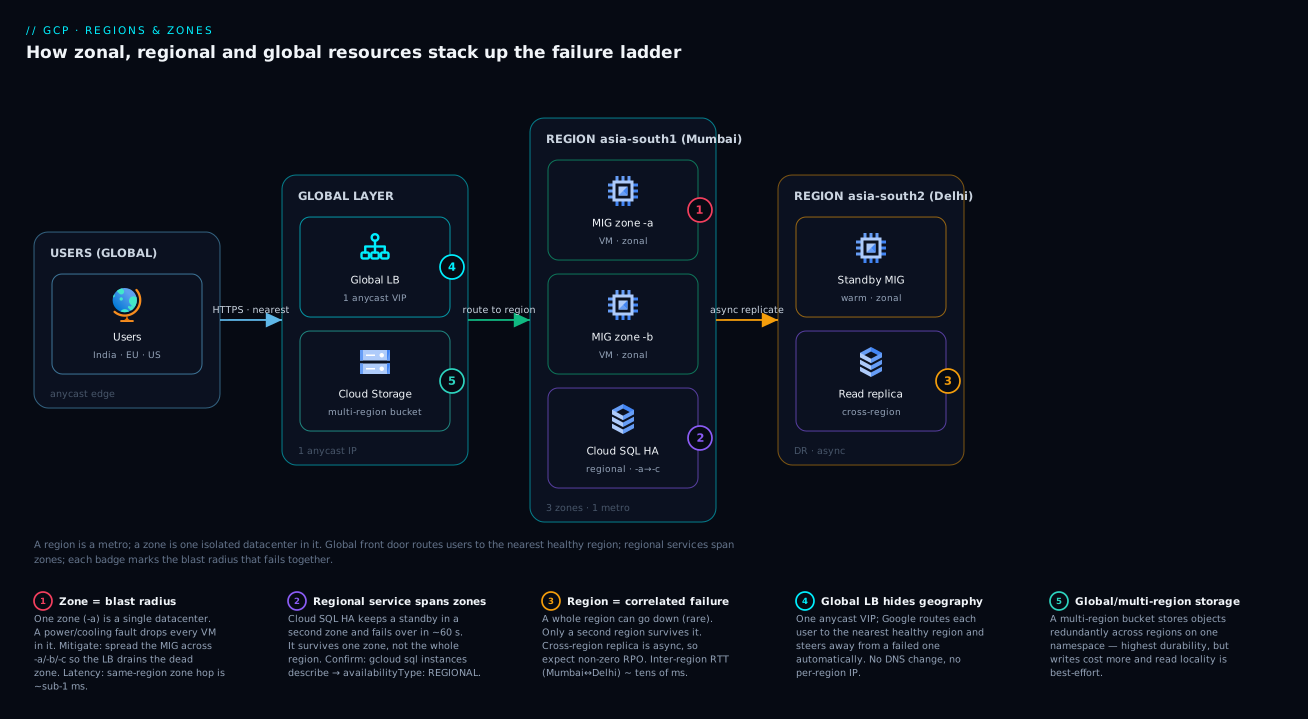
The shape to remember: global at the edge, regional for the workload, zonal pieces spread inside the region, a second region only for DR. Each layer sits on exactly the rung it needs — no higher, no lower.
Real-world scenario
ShopKart, a fast-growing Indian D2C retailer, ran its entire platform in asia-south1-a: the web tier on standalone Compute Engine VMs, a single Cloud SQL instance with HA off, and a Redis cache — all in one zone. Fast (sub-millisecond hops), cheap (no redundancy to pay for), and flawless for eighteen months. The team believed they were “on the cloud, so it’s resilient.”
At 7:40 PM on the busiest evening of a festival sale, zone asia-south1-a had a power-distribution incident. Every VM, the database, and the cache went dark at once, because they were never apart — nothing to fail over to, no standby, no second copy of anything. The site was hard-down for 47 minutes at peak. Lost revenue ran to several lakhs, and the founder’s retro question is the one this article exists to answer: “We’re on Google Cloud — how were we in a single building?”
The fix was neither exotic nor expensive — just climbing one rung of the ladder. The team:
- Converted the web tier to a regional MIG across
-a/-b/-c. Same VM count, now spread; a zone failure drops a third of capacity instead of all of it, and the MIG auto-recreates instances in surviving zones. - Turned on Cloud SQL HA (
availabilityType: REGIONAL) — a synchronous standby in a second zone, automatic ~60 s failover, app-to-DB latency still sub-millisecond. - Put a global load balancer in front, replacing the single VM’s IP with one anycast IP, health-checked across zones.
- Moved images and static assets to a multi-region Cloud Storage bucket, off the VMs entirely.
- Left the cache zonal — a deliberate call: a cold cache after a zone failure just repopulates, so they didn’t pay for redundancy they didn’t need.
Total cost increase: roughly 35% (regional standby/disk premium plus the load balancer) for a system that now shrugs off the exact failure that cost a peak-sale evening. Six months later a different zone had a brief network incident; the LB drained it, the MIG and Cloud SQL rode through, and not a single customer noticed. That’s the whole value of understanding zones and regions — the second outage was a non-event because they’d matched their blast radius to what they could afford to lose. (They explicitly skipped multi-region: their RTO/RPO didn’t justify the 2–3× cost and operational doubling. One rung was the right answer, not the maximum.)
Advantages and disadvantages
The region/zone model is a genuine engineering achievement, but it’s a set of trade-offs, not a free lunch:
| Advantages | Disadvantages |
|---|---|
| Failures are contained — a zone problem needn’t be an outage | The default (single zone) is the fragile one; safety is opt-in |
| You pay only for the resilience you choose (rung by rung) | Easy to under-provision (single-zone trap) or over-provision (needless multi-region) |
| Regional services give zone-redundancy almost for free | Each rung adds cost, and multi-region roughly doubles ops surface |
| Global services hide geography (one IP, nearest routing) | Hiding geography reduces control (you can’t pin exactly where a write lands) |
| Same-region cross-zone latency is negligible (~1 ms) | Cross-region latency is large and non-negotiable (physics) |
| Clear mental model maps directly to availability targets | Requires conscious design — nothing protects you automatically |
| Inter-zone traffic in a region is typically free or cheap | Inter-region and internet egress is billed and can surprise you |
The advantages dominate when you design deliberately — choose your rung against a real RTO/RPO, wrap zonal pieces in regional constructs, let global services do the geography. The disadvantages bite when you don’t decide: you inherit the fragile single-zone default by accident (ShopKart), or panic-buy multi-region for an app that never needed it. The model rewards intention and punishes drift — which is why the mental model here is worth more than any single config flag.
Hands-on lab
This lab makes the abstract physical: in ~10 minutes, free-tier-friendly, you’ll see zones and regions, measure the latency tax, and create a zonal vs a regional disk. Use Cloud Shell or a local gcloud. Replace YOUR_PROJECT with your project ID.
Step 1 — Set your project and list the geography you’re standing on.
gcloud config set project YOUR_PROJECT

# Every region GCP offers — note the names have NO zone letter
gcloud compute regions list --format="table(name, status)"

# Every zone, with the region it belongs to — note the -a/-b/-c letters
gcloud compute zones list \
  --format="table(name, region.basename(), status)" \
  --filter="region:asia-south1"
Expected: asia-south1 is a region; asia-south1-a, -b, -c are its zones. You’re literally listing the buildings inside the city.
Step 2 — Create a small VM in one specific zone (a zonal resource).
gcloud compute instances create lab-vm-a \
  --zone=asia-south1-a \
  --machine-type=e2-micro \
  --image-family=debian-12 --image-project=debian-cloud
e2-micro is free-tier-eligible. Notice you had to name a zone — a VM can’t exist without one. That’s “zonal” made real.
Step 3 — See scope in the resource itself.
# A VM reports a zone-scoped self-link — it lives in exactly one building
gcloud compute instances describe lab-vm-a --zone=asia-south1-a \
  --format="value(zone)"
The output ends in .../zones/asia-south1-a — the resource is its zone.
Step 4 — Measure the latency tax for real. Create a second VM in a different zone, same region, then ping across.
gcloud compute instances create lab-vm-b \
  --zone=asia-south1-b \
  --machine-type=e2-micro \
  --image-family=debian-12 --image-project=debian-cloud

# SSH into VM-a and ping VM-b's INTERNAL IP across zones (same region)
B_IP=$(gcloud compute instances describe lab-vm-b --zone=asia-south1-b \
  --format="value(networkInterfaces[0].networkIP)")
gcloud compute ssh lab-vm-a --zone=asia-south1-a \
  --command="ping -c 5 $B_IP"
Expected: cross-zone, same-region RTT around 0.5–1 ms — proof that spreading across zones for safety costs almost nothing in latency. (Ping a VM in another region and watch it jump to tens of ms — the cross-region tax, live.)
Step 5 — Create a zonal vs a regional disk and feel the difference.
# A standard zonal disk — lives in ONE zone
gcloud compute disks create lab-disk-zonal \
  --zone=asia-south1-a --size=10GB --type=pd-balanced

# A REGIONAL disk — synchronously replicated across TWO zones
gcloud compute disks create lab-disk-regional \
  --region=asia-south1 \
  --replica-zones=asia-south1-a,asia-south1-b \
  --size=10GB --type=pd-balanced
The zonal disk took --zone; the regional disk took --region plus two --replica-zones — same construct, one rung apart, and the regional one survives a zone for roughly double the storage price.
Step 6 — The same idea in Terraform (scope as code, how you’d actually ship it):
# Zonal VM — must specify a zone
resource "google_compute_instance" "lab_vm_a" {
  name         = "lab-vm-a"
  zone         = "asia-south1-a"        # <- zonal: one building
  machine_type = "e2-micro"
  boot_disk { initialize_params { image = "debian-cloud/debian-12" } }
  network_interface { network = "default" }
}

# Regional persistent disk — replicated across two zones
resource "google_compute_region_disk" "lab_disk_regional" {
  name          = "lab-disk-regional"
  region        = "asia-south1"          # <- regional: spans zones
  replica_zones = ["asia-south1-a", "asia-south1-b"]
  size          = 10
  type          = "pd-balanced"
}
Step 7 — Tear everything down (so the free tier stays free):
gcloud compute instances delete lab-vm-a --zone=asia-south1-a --quiet
gcloud compute instances delete lab-vm-b --zone=asia-south1-b --quiet
gcloud compute disks delete lab-disk-zonal --zone=asia-south1-a --quiet
gcloud compute disks delete lab-disk-regional --region=asia-south1 --quiet
You’ve now seen it: zones are buildings you must name, cross-zone latency is nearly free, and “regional” is a real, different flag that buys real resilience.
Common mistakes & troubleshooting
The failure modes that turn the abstract into a 2 AM page — symptom, root cause, how to confirm, fix:
| # | Symptom | Root cause | How to confirm | Fix |
|---|---|---|---|---|
| 1 | Whole app dies when one datacenter has an incident | Everything in one zone (single-zone trap) | gcloud compute instances list --format="table(name,zone)" — all the same zone |
Regional MIG; spread across -a/-b/-c |
| 2 | App is “regional” but data was lost in a zone failure | The disk under it was a zonal PD | gcloud compute disks list --format="table(name,zone,region)" — disk has a zone |
Regional PD or a regional/HA managed DB |
| 3 | Every page is slow after a “DR improvement” | App and DB now in different regions | Compare app region vs DB region; ping the DB host | Co-locate tiers in one region; batch calls |
| 4 | Cloud SQL didn’t fail over during a zone outage | HA never enabled (single-zone instance) | gcloud sql instances describe NAME --format="value(settings.availabilityType)" = ZONAL |
--availability-type=REGIONAL |
| 5 | GKE control plane unreachable in a zone incident | Cluster is zonal (single-zone master) | gcloud container clusters describe NAME --format="value(location)" is a zone |
Recreate as a regional cluster |
| 6 | Egress bill spiked unexpectedly | Cross-region / internet traffic you didn’t model | Billing → “inter-region egress” / “internet egress” SKUs | Keep chatty traffic in-region; cache at the edge |
| 7 | “Out of resources in zone -a” when launching VMs |
Hardcoding one capacity-constrained zone | The error names the zone explicitly | Regional MIG picks zones, or specify several |
| 8 | Failover region is stale / missing recent writes | Cross-region replication is asynchronous (RPO > 0) | Check replica lag in the DB metrics | Accept the RPO, or synchronous in-region for zero RPO |
| 9 | One zone serves all traffic; others sit idle | Session affinity or a single-zone backend pins it | LB backend distribution / affinity settings | Spread backends across zones; relax affinity |
| 10 | Terraform plan recreates a resource to “move” regions | Scope is immutable — no in-place relocation | Plan shows destroy/create, not update | Build new in the target region, migrate, cut over |
The meta-lesson: most of these are scope mismatches — a resource on a different rung than you assumed. When something surprises you, the first question is “what’s the actual scope of this resource?” and the first command is the describe that prints its zone or region.
Best practices
- Default to regional, opt into zonal deliberately. Reach for the regional variant (MIG, disk, HA Cloud SQL, GKE) for anything that matters; use a single zone only when you’ve decided the blast radius is acceptable (dev, test, disposable cache).
- Spread, don’t pin. Let regional MIGs and managed services place instances across
-a/-b/-c. Hardcoding one zone recreates the single-zone trap and exposes you to that zone’s capacity limits. - Co-locate tightly-coupled tiers. Keep app and database in the same region (cross-zone fine, cross-region not) so per-request latency stays sub-millisecond. Physics multiplies.
- Put a global load balancer at the front door. For the price of an LB you get one anycast IP, cross-zone health checks, nearest-region routing, and automatic steering away from a failed region.
- Match your rung to a written RTO/RPO. Don’t guess — write down the downtime and data loss the business accepts, then pick the architecture row that meets it, no higher.
- Add multi-region only when the requirement forces it. It roughly doubles ops surface and adds replication-lag (RPO) questions. Sometimes mandatory, never a reflex.
- Choose data location at creation; treat it as permanent. Buckets and BigQuery datasets bind location at creation and are painful to move. Decide region vs multi-region up front.
- Mind egress. In-region cross-zone traffic is typically free; inter-region and internet egress is billed. Keep chatty traffic local to avoid a surprise line item.
- Keep stateless tiers stateless. No sticky sessions, no local disk state — that’s what makes spreading across zones (and later regions) trivial: any instance can serve any request.
- Test the failure you designed for. Periodically drain or kill a zone’s instances and confirm the system rides through. An untested resilience design is a hypothesis, not a guarantee.
- Name and tag by scope. Make a resource’s zone/region obvious in names and labels so the single-zone trap is visible in a list, not discovered in an incident.
- Pick regions for latency and compliance. Nearest region for speed — but check data-residency rules first; sometimes the law, not the map, dictates the region.
Security notes
Region and zone choices intersect security three concrete ways.
Data residency and sovereignty. Where data physically lives is often a legal requirement, not a preference. A regional bucket or dataset keeps data within one geography; a multi-region one spreads it across a continent. If regulations require data to stay in-country, choose an in-country region (e.g. asia-south1/asia-south2 for India) and avoid multi-region groupings that span borders. See the perimeter patterns in VPC and Shared VPC Networking on GCP.
Blast radius is a security property too. The isolation that contains a failure to one zone or region also contains the spread of a problem — a compromise scoped to one zone is, by construction, limited to it.
Network paths follow scope. In-region traffic travels Google’s private backbone; cross-region or PaaS-endpoint traffic may take paths you should lock down. Prefer private connectivity, apply least-privilege IAM so a foothold in one zone can’t reach another, and remember the VPC network is global while its subnets are regional. See IAM, Service Accounts and Least Privilege on GCP.
Cost & sizing
Climbing the ladder costs money in predictable places. What drives the bill at each rung, in rough terms (prices vary by region and change — reason about the ratios):
| Rung | What you pay extra for | Multiplier vs single zone | Notes |
|---|---|---|---|
| Single zone | Baseline compute + storage | × 1 | Cheapest, most fragile — dev/test only |
| Multi-zone (regional services) | Regional disk (~2× storage) + HA standby DB | ~× 1.3–2 | Standby + replicated storage are the main adds |
| Multi-zone + global LB | The load balancer (rules + data processed) | ~× 1.5–2.5 | Modest cost; buys edge routing + HA |
| Multi-region (active/passive DR) | A 2nd region + cross-region replication egress | ~× 2–3 | “Two of everything,” partly idle |
| Multi-region (active/active) | Full live duplicate + cross-region traffic | ~× 3–4+ | Highest cost/ops; true global/critical only |
The specific drivers to watch: a regional persistent disk (~2× a zonal one — use it only for data that must survive a zone); the HA standby database (size it like the primary); inter-region egress from cross-region replication and multi-region buckets (keep chatty traffic in-region); internet egress serving users (cache at the edge with the global LB + CDN); the load balancer (one fronts many backends, so it amortizes); and idle DR capacity (right-size the standby, scale up only at failover).
Free-tier note: the lab stays free — e2-micro is free-tier-eligible, and small disks/short-lived VMs cost pennies if torn down promptly. The expensive rungs (multi-region active/active) are production commitments — understand them here, adopt them only when a real requirement and budget call.
Sizing rule of thumb: start at the rung your written RTO/RPO demands (for most apps, multi-zone + global LB), size each tier for normal load plus headroom to lose one zone (a third of capacity can vanish and you still serve), and treat the jump to multi-region as a separate, budgeted project — not a flag you flip.
Interview & exam questions
These map to the Cloud Digital Leader, Associate Cloud Engineer (ACE), and Professional Cloud Architect (PCA) exams, where region/zone reasoning is foundational.
1. Difference between a region and a zone? A region is a metro containing multiple zones; a zone is a single, physically isolated datacenter (own power, cooling, networking). A region almost always has three or more zones so a workload can lose one and keep a majority alive.
2. Is a standard Compute Engine VM zonal, regional, or global? Zonal — it lives in one zone and doesn’t survive that zone’s failure alone. For zone redundancy you spread VMs across zones via a regional managed instance group.
3. App and database are in different regions and the app is slow — why? Every DB call now pays cross-region RTT (tens to hundreds of ms), multiplied by the number of chatty, synchronous calls. Co-locate tightly-coupled tiers in one region; cross-region is for async/DR traffic only.
4. How do you make Cloud SQL survive a zone failure?
Set availabilityType: REGIONAL (HA): a synchronous standby in a second zone with automatic ~60 s failover. It doesn’t survive a full region — add a cross-region read replica for that.
5. What does the global external load balancer give you that a regional one doesn’t? One anycast IP worldwide, automatic routing to the nearest healthy region, and automatic failover away from an unhealthy one — no DNS changes, no per-region IPs.
6. Regional vs multi-region Cloud Storage bucket? Regional stores redundantly across a region’s zones (low in-region latency, survives a zone); multi-region stores across regions (survives a whole region, highest durability) at higher write cost and best-effort read locality. Location is set at creation and hard to change.
7. Define RTO and RPO and how they drive region/zone design. RTO = max acceptable downtime; RPO = max acceptable data loss (in time). Tight RTO + near-zero RPO push toward multi-zone now, multi-region (low-lag replication) soon; relaxed targets are met by one region across zones.
8. Why is a regional architecture often “enough” for production? Most real outages are zone-scoped (power, cooling, a switch, a bad config push), and a multi-zone regional design survives all of them. Full-region failures are rare and only justify multi-region under a strict RTO/RPO or global-latency need — which roughly doubles cost and ops.
9. Are zone letters (-a, -b, -c) the same datacenter for everyone?
No — Google randomizes the letter-to-datacenter mapping per project to balance load, so asia-south1-a in two projects may differ. Never assume letter equivalence across projects.
10. Same-zone vs cross-region latency, roughly? Same-zone sub-millisecond (~0.2 ms); same-region cross-zone ~under 1 ms; cross-region within a continent tens of ms; cross-continent 150–250+ ms. The ratios drive design: chatty calls stay in-region.
11. “Out of resources in zone us-central1-a” when launching VMs — fix? That zone is temporarily capacity-constrained for your machine type. Don’t hardcode one zone — use a regional MIG (auto-selects zones) or specify multiple candidate zones.
12. Is a VPC network zonal, regional, or global on GCP? Global — its subnets are regional. Distinctive to GCP: one VPC spans every region, with regional subnets and global routing inside it.
Quick check
- In one sentence each: what is a zone, a region, and a multi-region?
- A standard persistent disk fails when its datacenter loses power. What scope is it, and what’s the regional alternative?
- Your app makes 40 sequential DB calls per page. App and DB are in different continents (~180 ms RTT). Roughly how long is the page spending just on DB round-trips?
- Which single GCP service gives you one IP worldwide and routes users to the nearest healthy region?
- Your RTO/RPO say “an hour of downtime and an hour of lost data is fine.” Do you need multi-region? Why or why not?
Answers
- A zone is one isolated datacenter (a building); a region is a metro containing several zones (a city); a multi-region is a service spread across regions (a country). Each survives the failure of the one below it.
- It’s zonal (lives in one zone, dies with it). The regional alternative is a regional persistent disk, which synchronously replicates across two zones and survives a zone failure (for roughly double the storage cost).
- ~40 × 180 ms = ~7,200 ms (about 7.2 seconds) — an unusable page. The fix is to co-locate the tiers, batch the calls, or serve that continent from its own regional stack.
- The global external Application Load Balancer (one anycast IP, nearest-healthy-region routing, automatic failover).
- No. A single region across zones meets that relaxed RTO/RPO comfortably; multi-region would 2–3× cost and double ops for resilience the requirement doesn’t ask for. Climb only to the rung you need.
Glossary
- Zone — A single physically isolated datacenter (own power, cooling, network) in a region; the smallest blast radius. Named like
asia-south1-a. - Region — A metro containing three or more zones; named like
asia-south1(no zone letter). The unit of geographic distance. - Multi-region — A service or bucket spread across regions (
asia,eu,us); survives a whole-region failure with highest durability. - Global resource — A resource with no location, serving all regions (external load balancer, VPC network, Cloud DNS).
- Zonal resource — Pinned to one zone (standard VM, standard disk); doesn’t survive that zone’s failure alone.
- Regional resource — Spread across a region’s zones automatically (regional MIG, disk, Cloud SQL); survives a zone failure.
- Blast radius — What fails together when one failure occurs; equals the resource’s scope. The central concept here.
- RTT (round-trip time) — Time for a request + reply; the latency tax that multiplies with chatty calls.
- RTO / RPO — Max acceptable downtime / max acceptable data loss (in time); together they decide multi-zone vs multi-region.
- Managed instance group (MIG) — Identical VMs managed as a unit; a regional MIG spreads them across zones and auto-heals into surviving ones.
- Cloud SQL HA —
availabilityType: REGIONAL: a synchronous standby in a second zone with ~60 s failover; survives a zone, not a region. - Anycast IP — One IP advertised from many locations so users reach the nearest; how the global load balancer offers one worldwide IP.
Next steps
- Solidify who owns and pays for the resources you place, in GCP Resource Hierarchy Explained.
- Go deeper on the HA and global-service patterns introduced here, in the companion GCP Regions and Zones: Resiliency, Latency and Global Services.
- Pick the right compute per tier with GCP Compute Options Compared and the Cloud Run vs GKE vs Compute Engine decision.
- See how the global VPC and regional subnets fit together, in VPC and Shared VPC Networking on GCP.
- Watch your deployment in production with Cloud Monitoring and the Operations Suite.