Quick take: A GCP VPC is a single global network that spans every region at once — no peering needed to route between regions, unlike AWS where a VPC is regional. Shared VPC takes that one step further: a host project owns the network and subnets, and service projects attach their VMs, GKE clusters and Cloud SQL into subnets the central team delegates to them. The networking team controls IP space, routes and firewalls in one place; the application teams control their own workloads. The whole model rests on three things being right: subnet IAM delegation, firewall targeting by tag or service account, and not over-allocating CIDR.
A platform team ran ten teams on ten separate VPCs stitched together with a mesh of VPC peering connections. Peering is non-transitive, so every new pair that needed to talk required a new peering link, and every shared service (a central DNS forwarder, a Cloud Interconnect to the data centre) had to be re-peered or re-advertised into each VPC by hand. Adding the eleventh team meant editing routes in ten projects. They moved to Shared VPC: one host project owns a /16, each team gets one or more regional subnets delegated by IAM, the on-prem Interconnect attaches once to the host project, and new service projects get network access by a single role grant. The peering mesh collapsed to a hub. New projects went from a half-day of routing changes to a one-line gcloud command.
This article takes you from VPC fundamentals to a production multi-project network. You will learn what a global VPC really is (and where the global boundary stops), how subnets, routes and firewall rules compose, exactly how Shared VPC delegates a subnet to a service project without handing over network-admin rights, when to reach for VPC Network Peering instead, and how Private Google Access and Cloud NAT let private VMs reach Google APIs and the internet without public IPs. Every concept comes with the real gcloud command and the Terraform that codifies it, and the article ends with a connectivity troubleshooting playbook — the one you open when a VM in a service project cannot reach a database it should.
What problem this solves
In a single small project you barely think about the network: you launch a VM, it gets an IP from the default VPC, and it can reach the internet. That model breaks the moment you have more than a handful of teams, an on-premises connection, or any compliance requirement that says “the network is owned by a central function, not by whoever launches a VM.”
Without a shared network, every project grows its own VPC. To make project A talk to project B you peer them. Peering is non-transitive (A↔B and B↔C does not give you A↔C), so a fully connected mesh of n projects needs n·(n−1)/2 peerings — 10 projects is 45 links, 20 projects is 190. Worse, shared infrastructure multiplies: a Cloud Interconnect or a Cloud VPN to the data centre lives in one VPC, and peering does not propagate a peer’s custom routes by default and never propagates a peer’s Interconnect/VPN-learned routes to a third VPC — so on-prem reachability has to be re-plumbed per VPC. IP planning fragments across teams and overlaps creep in, which silently blocks future peering (peered VPCs may not have overlapping subnet ranges).
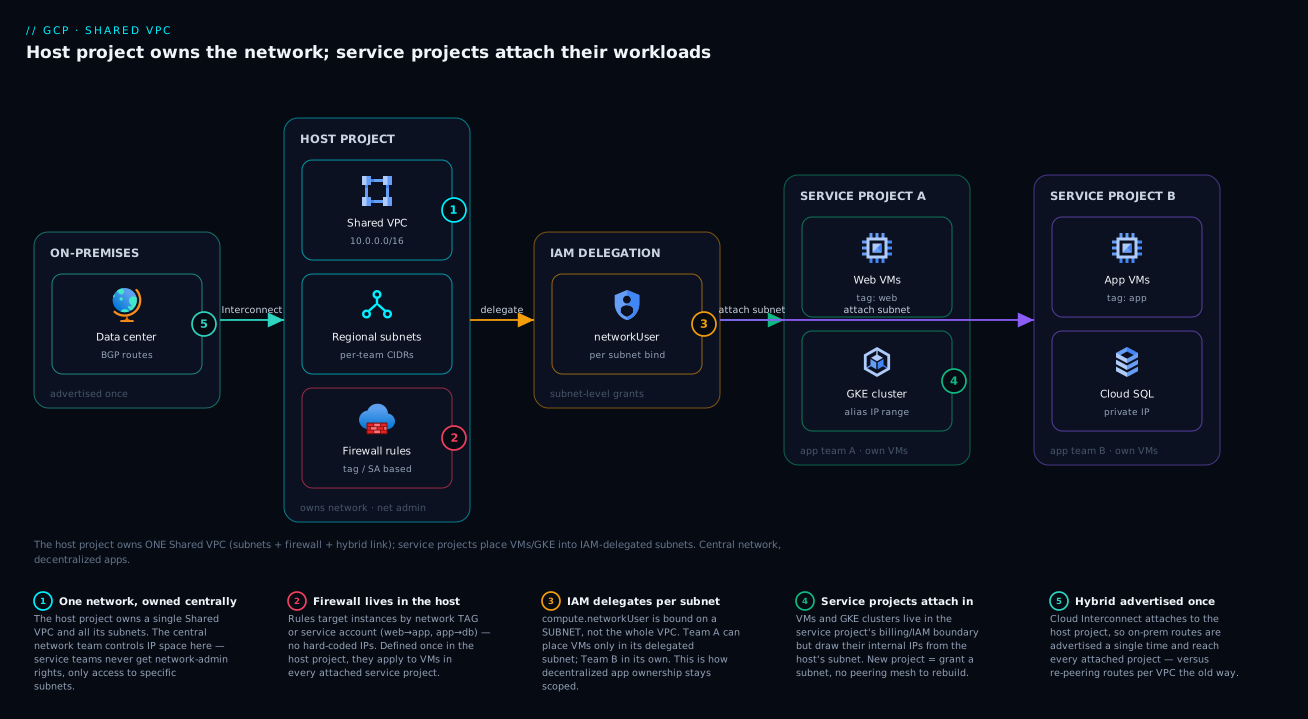
Shared VPC fixes the structural problem: there is one network, owned by a host project, and other projects (service projects) place workloads into it. The central networking team controls CIDR, routes, firewall rules, DNS and hybrid connectivity in one place; application teams keep full control of their own compute and data. You get centralised governance and decentralised delivery — the thing the peering mesh could never give you. Who hits the pain without it: any organisation past ~5 projects, anyone with hybrid connectivity, anyone under a policy that separates “owns the network” from “runs the app”, and every GKE-heavy shop (GKE on Shared VPC is the standard enterprise pattern).
| Pain in a multi-VPC world | What actually breaks | How Shared VPC removes it |
|---|---|---|
| Peering mesh grows quadratically | 10 projects → 45 peerings; constant route edits | One network; service projects attach, no peering |
| Hybrid connectivity per VPC | Interconnect/VPN re-plumbed into every VPC | Attach once to the host project; everyone reaches on-prem |
| IP space fragments per team | Overlaps block future peering; no central plan | Central team owns the /16 and hands out subnets |
| Firewall/route governance scattered | Each team writes its own rules; drift and gaps | Host project owns all firewall rules and routes |
| GKE networking duplicated | Each cluster in its own VPC, no shared services | Clusters share subnets + secondary ranges centrally |
| No separation of network vs app duty | Whoever launches a VM controls the subnet | Network Admin (host) ≠ workload owner (service) |
Learning objectives
By the end of this article you can:
- Explain what a global VPC is, where the global boundary actually stops (subnets are regional; firewall rules are global; routes can be regional or global), and how routes and firewall rules compose to allow or deny a flow.
- Stand up a Shared VPC host project, share the network (all subnets or specific subnets), and attach a service project — with both
gcloudand Terraform. - Delegate a single subnet to a service team using the
compute.networkUserrole at subnet scope, without granting them Network Admin, and explain why that is the whole point. - Choose correctly between Shared VPC and VPC Network Peering for a given topology, and explain the non-transitivity and route-exchange rules that drive the choice.
- Write firewall rules that target workloads by network tag and by service account, reason about priority and the implied default rules, and layer hierarchical firewall policies at the org/folder level above them.
- Enable Private Google Access so internal-only VMs reach Google APIs, and deploy Cloud NAT so they reach the internet — without any external IPs.
- Design a realistic multi-project network (host + several service projects, shared and isolated subnets, on-prem Interconnect) and reason about its CIDR plan.
- Troubleshoot “VM can’t reach X” methodically using Connectivity Tests, firewall logs, VPC Flow Logs and route inspection.
Prerequisites & where this fits
You should be comfortable with the GCP Resource Hierarchy: Organization, Folders and Projects (Shared VPC lives inside an organization and crosses project boundaries) and with Google Cloud IAM Explained Simply: Members, Roles, and Bindings, because subnet delegation is an IAM binding. Knowing GCP Regions and Zones helps, since subnets are regional. Basic IP/CIDR fluency (what a /24 is, RFC 1918 ranges) is assumed. If you come from AWS, the one-line mapping is in GCP for AWS Engineers: The Complete Service-by-Service Translation Map — the headline is “VPC is global, not regional; subnets are regional; security groups don’t exist — firewall rules attach to the VPC and target by tag/SA.”
This sits in the Networking track. It is the foundation under almost everything else: GKE clusters, Cloud SQL with private IP, internal load balancers, and any private-by-default architecture all assume you have the VPC and firewall model below. It pairs with GCP’s Global VPC Explained for the deeper “why global” story, with GCP VPC Service Controls: Build Data Exfiltration Perimeters for the data-plane perimeter that sits beside (not instead of) firewall rules, and with the GCP Landing Zone: The Foundation Blueprint with Shared VPC and Org Policies for how this slots into a full landing zone.
Where each control lives, and who owns it, so you call the right team during an incident:
| Layer | What lives here | Scope | Who usually owns it |
|---|---|---|---|
| Organization / folder | Hierarchical firewall policies, org policies | Org-wide / folder | Security / platform |
| Host project | The VPC, subnets, routes, firewall rules, Cloud NAT, Interconnect | One network, all regions | Network team |
| Service project | VMs, GKE, Cloud SQL placed into host subnets | The workload only | Application team |
| Subnet (regional) | IP range + secondary ranges; the unit of delegation | One region | Network team grants; app team uses |
| Firewall rule (global) | Allow/deny by tag/SA/CIDR + priority | Whole VPC | Network team |
| VM / instance | Network tags, service account, internal IP | One zone | Application team |
Core concepts
Six mental models make every later section obvious.
A VPC is a global, project-scoped network. Create a VPC in a project and it exists in every GCP region simultaneously — there is no per-region VPC. You then carve subnets, and each subnet belongs to exactly one region (it has a primary IPv4 CIDR, e.g. 10.10.0.0/24). A VM in asia-south1 and a VM in europe-west1, in the same VPC, can route to each other over Google’s backbone with no peering and no gateway — they are on the same network, just different subnets. The VPC is the global thing; the subnet is the regional thing. That single fact is the biggest difference from AWS.
Routes move packets; firewall rules permit them. Every VPC has system-generated routes: a default route to the internet (0.0.0.0/0 → default-internet-gateway) and a subnet route for each subnet’s range (so all subnets reach each other). You add custom static routes (e.g. send 0.0.0.0/0 to a NAT instance or next-hop appliance) and dynamic routes learned from Cloud Router over Interconnect/VPN. A packet first needs a route to its destination; then it needs a firewall rule to allow it. No route → it never leaves; route but no allow rule → it’s dropped. Both must say yes.
Firewall rules are global, stateful, and target by tag or service account — there is no “security group.” A firewall rule lives on the VPC (not on a subnet, not on an instance) and applies across all regions. It is stateful (return traffic for an allowed connection is automatically permitted). You target which instances it applies to by network tag, by service account, or to all instances; and you match the other end by IP range, tag, or service account. So “web tier may talk to app tier on 8080” is one rule — target: app-tier SA, source: web-tier SA, allow tcp:8080 — with no IP addresses hard-coded.
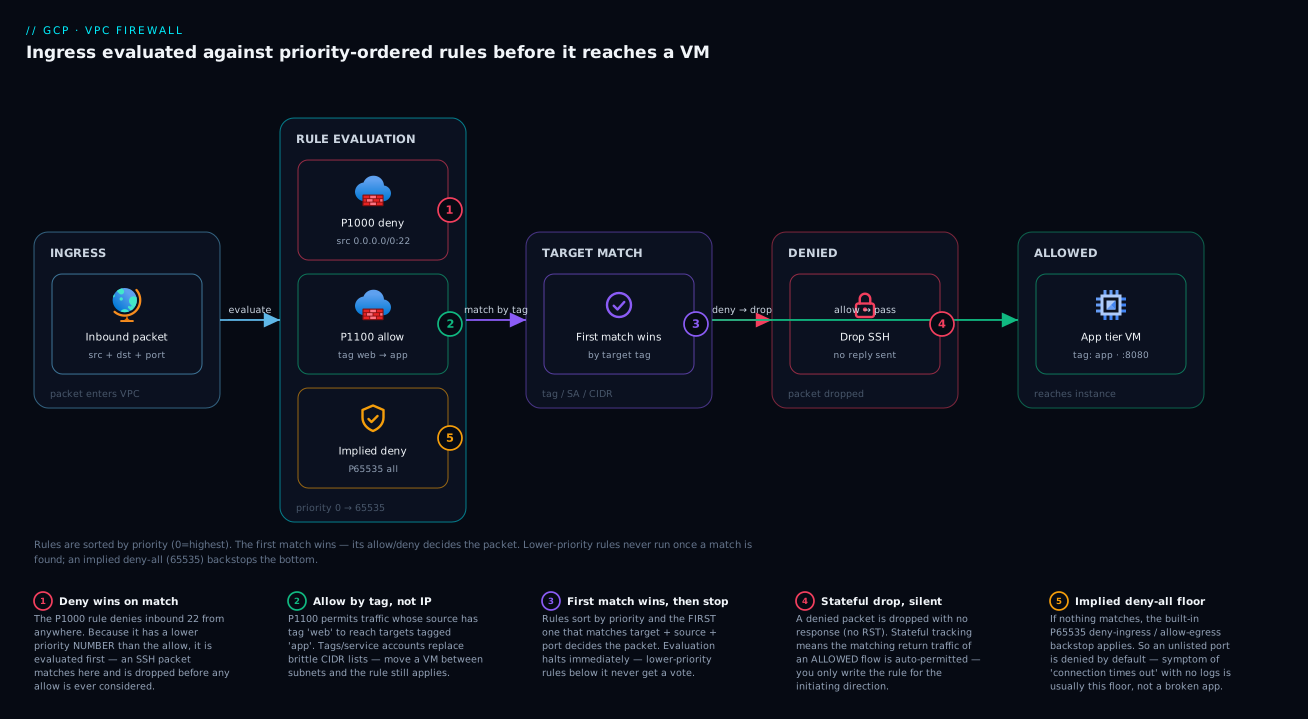
Every VPC has two implied rules and two priority extremes. Implicitly, there is a lowest-priority deny all ingress and a lowest-priority allow all egress — so by default nothing gets in and everything can get out (subject to your rules). Rule priority runs 0 (highest) to 65535 (lowest); the first matching rule wins. A deny at priority 1000 beats an allow at 2000. The default VPC ships extra convenience rules (default-allow-internal, default-allow-ssh, etc.) that a hand-built VPC does not.
Shared VPC separates “owns the network” from “runs the workload.” You designate one project the host project (it holds the VPC and subnets) and attach one or more service projects. A user with the Network User role on a subnet in the host project can launch a VM in their own service project that lands in that host subnet. They never get to edit the subnet, the routes, or the firewall — they just use the IP space. The network team stays in control of CIDR, routing and security; the app team owns everything above the NIC.
Private Google Access and Cloud NAT give private VMs reachability without public IPs. A VM with no external IP cannot reach Google APIs (storage.googleapis.com, etc.) or the internet by default. Private Google Access (a per-subnet toggle) lets it reach Google APIs and services over internal routing. Cloud NAT (a regional, managed service on a Cloud Router) lets it make outbound connections to the internet without an external IP and without accepting any inbound. Together they are how “no public IPs” architectures actually function.
The vocabulary side by side — pin these before the deep sections:
| Concept | One-line definition | Scope | Why it matters here |
|---|---|---|---|
| VPC network | A global, project-scoped virtual network | Global (all regions) | The one network everyone shares |
| Subnet | A primary IPv4 CIDR in one region | Regional | The unit of IP allocation and of delegation |
| Secondary range | An extra CIDR on a subnet (alias IPs) | Regional | GKE pods/services ranges live here |
| Route | Where to send a packet for a destination | Regional or global | No route → packet never leaves |
| Firewall rule | Allow/deny by tag/SA/CIDR + priority | Global (per VPC) | Permits the flow a route enabled |
| Network tag | A label on a VM used by firewall rules | Per instance | Targets rules without IP addresses |
| Service account (as target) | The VM’s identity used by firewall rules | Per instance | Stronger targeting than tags |
| Host project | The project that owns the Shared VPC | One per Shared VPC | Network team’s domain |
| Service project | A project attached to the host | Many | App team’s domain |
networkUser |
IAM role to use a subnet/network | Project or subnet | The delegation primitive |
| VPC Peering | Private routing between two VPCs | Pair of VPCs | The alternative to Shared VPC |
| Private Google Access | Reach Google APIs from a no-external-IP VM | Per subnet | Private VMs reach GCS/BigQuery/etc. |
| Cloud NAT | Managed outbound NAT for private VMs | Regional | Private VMs reach the internet outbound |
| Cloud Router | Speaks BGP; programs dynamic routes | Regional | Drives Interconnect/VPN + Cloud NAT |
VPC fundamentals: global network, regional subnets, routes
Auto mode vs custom mode
When you create a VPC you choose subnet creation mode. Auto mode automatically creates one subnet per region from a fixed 10.128.0.0/9 block (and adds subnets in new regions Google launches). It is convenient for demos and overlaps predictably — which is exactly why it is wrong for anything that will peer or connect to on-prem. Custom mode creates no subnets; you define every subnet and CIDR yourself. Always use custom mode for production: you own the IP plan, nothing is created behind your back, and you avoid the 10.128.0.0/9 overlaps that break peering. The default network every new project gets is an auto-mode VPC — delete or ignore it for real work.
# Custom-mode VPC (no subnets created automatically) — the production default
gcloud compute networks create vpc-prod \
  --subnet-mode=custom \
  --bgp-routing-mode=global \
  --project=host-prod-net

# Add a regional subnet with a primary range
gcloud compute networks subnets create snet-app-asia-south1 \
  --network=vpc-prod --region=asia-south1 \
  --range=10.10.0.0/24 \
  --enable-private-ip-google-access \
  --enable-flow-logs \
  --project=host-prod-net
resource "google_compute_network" "vpc_prod" {
  project                 = "host-prod-net"
  name                    = "vpc-prod"
  auto_create_subnetworks = false        # custom mode
  routing_mode            = "GLOBAL"      # dynamic routes propagate across regions
}

resource "google_compute_subnetwork" "app_asia_south1" {
  project                  = "host-prod-net"
  name                     = "snet-app-asia-south1"
  network                  = google_compute_network.vpc_prod.id
  region                   = "asia-south1"
  ip_cidr_range            = "10.10.0.0/24"
  private_ip_google_access = true
  log_config { aggregation_interval = "INTERVAL_5_SEC"; flow_sampling = 0.5; metadata = "INCLUDE_ALL_METADATA" }
}
Auto vs custom, and the routing-mode choice that sits beside it:
| Setting | Values | Default | When to change | Trade-off / gotcha |
|---|---|---|---|---|
| Subnet creation mode | auto / custom |
auto for default; you pick on create |
Always custom for prod |
Auto uses 10.128.0.0/9 — overlaps break peering |
| BGP routing mode | regional / global |
regional |
global when on-prem/dynamic routes must reach all regions |
Regional confines learned routes to the subnet’s region |
| Subnet primary range | any RFC 1918 (or RFC 6598/public) CIDR | none (custom) | Per subnet, by region and team | Cannot shrink later; plan headroom up front |
| Private Google Access | on / off (per subnet) | off | On for any no-external-IP subnet | Off → private VMs can’t reach Google APIs |
| Flow logs | on / off (per subnet) | off | On for prod subnets you must audit | Adds log volume + cost; sample to control it |
| MTU | 1460 / 1500 / up to 8896 | 1460 | Jumbo frames for throughput-heavy intra-VPC | Both ends + path must agree; mismatches drop |
Subnets are regional; the VPC is global
A subnet’s range is reachable from the entire VPC — a VM in another region routes to it over the backbone, no peering. You can expand a subnet’s primary range later (e.g. /24 → /23) but you cannot shrink it, and you cannot overlap it with another subnet in the same VPC or with any peered VPC. Plan CIDR with real headroom (see Cost & sizing). Secondary ranges turn a subnet into a host for alias IP ranges — GKE uses them for pods and services so containers get real VPC IPs.
# Expand a subnet's primary range (grow only — you cannot shrink)
gcloud compute networks subnets expand-ip-range snet-app-asia-south1 \
  --region=asia-south1 --prefix-length=23 --project=host-prod-net

# Add secondary ranges for GKE pods + services (alias IPs)
gcloud compute networks subnets update snet-gke-asia-south1 \
  --region=asia-south1 \
  --add-secondary-ranges=pods=10.20.0.0/16,services=10.21.0.0/20 \
  --project=host-prod-net
Routes: system, static, dynamic
Routes decide where a packet goes; priority breaks ties (lower number wins). Know the three kinds and their order:
| Route type | Created by | Example | Priority | Notes |
|---|---|---|---|---|
| Subnet route | System (per subnet) | 10.10.0.0/24 → local |
0 (highest, can’t override) | Always present; makes all subnets reach each other |
| Default internet route | System | 0.0.0.0/0 → default-internet-gateway |
1000 | Remove/override to force egress via NAT/appliance |
| Custom static route | You | 0.0.0.0/0 → next-hop VM/ILB |
you set (0–65535) | Steer traffic to firewalls, NVAs, NAT instances |
| Dynamic route | Cloud Router (BGP) | on-prem 192.168.0.0/16 learned |
from BGP | Interconnect/VPN; global mode spreads to all regions |
| Peering route | Peering (subnet routes exchanged) | peer’s 10.30.0.0/24 |
inherited | Only subnet (and optionally custom) routes; non-transitive |
# A static default route via an internal load balancer (next-hop NVA firewall)
gcloud compute routes create rt-egress-via-fw \
  --network=vpc-prod --destination-range=0.0.0.0/0 \
  --next-hop-ilb=ilb-fw-frontend --priority=900 \
  --project=host-prod-net
Firewall rules: priority, tags, service accounts, and policies
GCP firewall rules are stateful, global, and instance-targeted — there is no security group attached to a NIC. You write rules on the VPC; each rule specifies a direction (ingress/egress), an action (allow/deny), a priority (0–65535), the targets (which instances it governs — all, by tag, or by service account), and the match (the other end — IP ranges, source tags, or source service accounts) plus protocols/ports. The first matching rule by priority wins; ties at equal priority resolve deny over allow.
The implied rules and the default-VPC rules
Every VPC has two invisible rules at priority 65535: deny all ingress and allow all egress. So inbound is closed until you open it, and outbound is open until you close it. The default network adds named rules you should not assume exist on a custom VPC:
| Rule (default network only) | Direction | Allows | Why you must not rely on it |
|---|---|---|---|
default-allow-internal |
ingress | all protocols from 10.128.0.0/9 |
Custom VPCs have no such rule — add your own internal-allow |
default-allow-ssh |
ingress | tcp:22 from 0.0.0.0/0 |
Open SSH to the world — never replicate in prod |
default-allow-rdp |
ingress | tcp:3389 from 0.0.0.0/0 |
Open RDP to the world — never replicate in prod |
default-allow-icmp |
ingress | ICMP from 0.0.0.0/0 |
Convenient for ping; scope it down in prod |
| (implied) deny ingress | ingress | nothing (priority 65535) | The real baseline — everything else is additive |
| (implied) allow egress | egress | everything (priority 65535) | Add deny-egress rules to lock outbound down |
Targeting by tag vs by service account
You can target rules two ways. Network tags are free-text labels on a VM; anyone with compute.instances.setTags can add or remove them, so a tag is an assertion the VM owner makes. Service accounts are the VM’s identity, controlled by IAM; targeting by SA means the rule applies to exactly the instances running as that SA and a workload owner can’t escape it by editing a string. Prefer service accounts for security-sensitive rules; tags are fine for coarse, low-trust grouping. You cannot mix tags and SAs in the same rule’s target.
| Aspect | Network tag | Service account |
|---|---|---|
| What it is | Free-text label on the VM | The VM’s IAM identity |
| Who can change it | Anyone with setTags on the instance |
Controlled by IAM (set at create / via admin) |
| Spoofable by VM owner | Yes — just add the tag | No — needs the SA + actAs permission |
| Granularity | Coarse grouping | Exact, identity-bound |
| Best for | Broad zones (e.g. web, bastion) |
Security-critical tiers (db, payments) |
| Limit | 64 tags per instance | One SA per instance |
| Cross-rule mixing | Can’t mix tag + SA targets in one rule | Same |
# Allow the app tier (by service account) to reach the DB tier (by service account) on 5432
gcloud compute firewall-rules create fw-app-to-db \
  --network=vpc-prod --direction=INGRESS --action=ALLOW \
  --priority=1000 --rules=tcp:5432 \
  --target-service-accounts=db-tier@svc-data.iam.gserviceaccount.com \
  --source-service-accounts=app-tier@svc-app.iam.gserviceaccount.com \
  --project=host-prod-net

# Allow health checks + IAP ranges to reach the web tier (by tag) on 443
gcloud compute firewall-rules create fw-allow-hc-iap-web \
  --network=vpc-prod --direction=INGRESS --action=ALLOW \
  --priority=900 --rules=tcp:443 \
  --target-tags=web \
  --source-ranges=130.211.0.0/22,35.191.0.0/16,35.235.240.0/20 \
  --project=host-prod-net
resource "google_compute_firewall" "app_to_db" {
  project                 = "host-prod-net"
  name                    = "fw-app-to-db"
  network                 = google_compute_network.vpc_prod.id
  direction               = "INGRESS"
  priority                = 1000
  target_service_accounts = ["db-tier@svc-data.iam.gserviceaccount.com"]
  source_service_accounts = ["app-tier@svc-app.iam.gserviceaccount.com"]
  allow { protocol = "tcp"; ports = ["5432"] }
  log_config { metadata = "INCLUDE_ALL_METADATA" }
}
Those two source CIDRs (130.211.0.0/22, 35.191.0.0/16) are Google’s load-balancer health-check ranges; 35.235.240.0/20 is Identity-Aware Proxy (IAP). Forgetting them is the single most common “my health check is failing / I can’t SSH via IAP” cause. The well-known ranges worth memorising:
| Source range | Who it is | When you must allow it |
|---|---|---|
130.211.0.0/22, 35.191.0.0/16 |
Google LB health checkers | Any backend behind a Google load balancer |
35.235.240.0/20 |
Identity-Aware Proxy (IAP) | SSH/RDP/TCP via IAP (no public IP) |
199.36.153.8/30 |
restricted.googleapis.com VIP |
Private Google Access with VPC-SC |
199.36.153.4/30 |
private.googleapis.com VIP |
Private Google Access (no VPC-SC) |
169.254.169.254 |
Metadata server | Always reachable; don’t block egress to it |
The firewall rule parameter reference
Every knob on a firewall rule, with its default and the gotcha:
| Field | Values | Default | When to change | Gotcha |
|---|---|---|---|---|
direction |
INGRESS / EGRESS | INGRESS | Egress rules to lock outbound | Egress targets destinations, not sources |
action |
ALLOW / DENY | — | DENY to carve exceptions above allows | Equal priority: DENY wins |
priority |
0–65535 | 1000 | Lower to win over broader rules | First match wins; plan bands (e.g. 900/1000/2000) |
target |
all / tags / service accounts | all instances | Scope to a tier | Can’t mix tags + SAs in one rule |
source (ingress) |
ranges / tags / SAs | — | Match the other end | SA/tag sources only for internal VPC traffic |
rules (proto:port) |
tcp/udp/icmp/esp/… : ports | — | Least-port | all is a smell; enumerate ports |
| Logging | on / off | off | On for sensitive/audited rules | Adds log volume; sample at scale |
| Disabled | true / false | false | Stage a rule without deleting | Easy to forget a disabled deny is off |
Hierarchical firewall policies (org/folder level)
Firewall rules are per-VPC. Hierarchical firewall policies sit above them at the organization or folder level and apply to every VPC in that scope — before the VPC rules evaluate. Use them for guardrails the central security team must enforce everywhere: “deny all RDP from the internet org-wide,” “always allow the IAP range,” “allow health-check ranges.” Policy rules add a goto_next action (defer to lower levels) alongside allow/deny, so you set a baseline and let teams add specifics underneath. Evaluation order is org policy → folder policy → VPC firewall rules, highest level first.
# Create a hierarchical policy and attach it to a folder; deny inbound RDP everywhere
gcloud compute firewall-policies create --organization=123456789012 \
  --short-name=baseline-guardrails

gcloud compute firewall-policies rules create 1000 \
  --firewall-policy=baseline-guardrails --organization=123456789012 \
  --direction=INGRESS --action=deny --layer4-configs=tcp:3389 \
  --src-ip-ranges=0.0.0.0/0

gcloud compute firewall-policies associations create \
  --firewall-policy=baseline-guardrails --organization=123456789012 \
  --folder=987654321098
Where each firewall control evaluates, top to bottom:
| Level | Mechanism | Scope | Typical use | Action verbs |
|---|---|---|---|---|
| Organization | Hierarchical firewall policy | All VPCs in org | Org-wide deny-RDP-from-internet, allow IAP | allow / deny / goto_next |
| Folder | Hierarchical firewall policy | All VPCs in folder | Per-environment guardrails (prod stricter) | allow / deny / goto_next |
| VPC (global) | VPC firewall rules | One network | App-tier-to-DB, health checks | allow / deny |
| Implied | Built-in | One network | deny-ingress / allow-egress baseline | deny / allow |
Shared VPC: host and service projects, subnet IAM delegation
Shared VPC is the headline feature. You enable a project as a host, share its network (either all subnets or a selected set), attach service projects, and then delegate specific subnets to specific principals so they can launch resources into them. Crucially, sharing the network is not the same as letting people use a subnet — those are two distinct grants, and getting the second one (networkUser at subnet scope) right is what makes least-privilege work.
The roles that make it work
| Role | Granted on | Lets the holder… | Who gets it |
|---|---|---|---|
roles/compute.xpnAdmin (Shared VPC Admin) |
Org or folder | Enable host projects, attach service projects, manage sharing | Central network team |
roles/compute.networkAdmin |
Host project | Create/modify subnets, routes, firewall rules | Network team |
roles/compute.securityAdmin |
Host project | Manage firewall rules + SSL certs | Network/security team |
roles/compute.networkUser |
Subnet (or whole host project) | Use a subnet (launch resources into it) — not edit it | Service-project users / service accounts |
roles/compute.instanceAdmin.v1 |
Service project | Create VMs (that land in delegated host subnets) | Application team |
The delegation primitive is networkUser at subnet scope. Grant it on a single subnet and the principal can place resources in that subnet only; grant it at the host project level and they can use every subnet — broader, and usually wrong for least privilege. They still cannot touch the subnet’s CIDR, the routes, or the firewall rules; those need networkAdmin, which stays with the central team.
Step by step with gcloud
# 1) Enable the host project (run as Shared VPC Admin / xpnAdmin)
gcloud compute shared-vpc enable host-prod-net

# 2) Attach a service project to the host
gcloud compute shared-vpc associated-projects add svc-app-prod \
  --host-project=host-prod-net

# 3) Delegate ONE subnet to the service project's users + its GKE/compute service accounts
#    (subnet-scoped networkUser = least privilege)
gcloud compute networks subnets add-iam-policy-binding snet-app-asia-south1 \
  --region=asia-south1 --project=host-prod-net \
  --member="serviceAccount:service-PROJNUM@cloudservices.gserviceaccount.com" \
  --role="roles/compute.networkUser"

gcloud compute networks subnets add-iam-policy-binding snet-app-asia-south1 \
  --region=asia-south1 --project=host-prod-net \
  --member="group:team-app@example.com" \
  --role="roles/compute.networkUser"

# 4) Now a user in svc-app-prod can launch a VM into the host subnet
gcloud compute instances create vm-app-01 \
  --project=svc-app-prod --zone=asia-south1-a \
  --subnet=projects/host-prod-net/regions/asia-south1/subnetworks/snet-app-asia-south1 \
  --no-address
That service-PROJNUM@cloudservices.gserviceaccount.com member is the Google APIs service agent of the service project — GKE and managed services use it to provision into the host subnet, so it needs networkUser too (a frequent omission that makes GKE-on-Shared-VPC fail with a confusing permission error).
The same in Terraform
# Enable host project
resource "google_compute_shared_vpc_host_project" "host" {
  project = "host-prod-net"
}

# Attach a service project
resource "google_compute_shared_vpc_service_project" "svc_app" {
  host_project    = google_compute_shared_vpc_host_project.host.project
  service_project = "svc-app-prod"
}

# Delegate a single subnet (subnet-scoped networkUser)
resource "google_compute_subnetwork_iam_member" "app_subnet_user" {
  project    = "host-prod-net"
  region     = "asia-south1"
  subnetwork = "snet-app-asia-south1"
  role       = "roles/compute.networkUser"
  member     = "group:team-app@example.com"
}
What lives where in a Shared VPC
The dividing line is the whole point — keep it straight:
| Resource | Host project | Service project | Notes |
|---|---|---|---|
| The VPC network | ✅ owns it | ❌ | One network, shared |
| Subnets + secondary ranges | ✅ owns | ❌ uses (via networkUser) | Delegated per subnet |
| Routes | ✅ | ❌ | Central control |
| Firewall rules / policies | ✅ | ❌ | Central control |
| Cloud NAT / Cloud Router | ✅ | ❌ | Egress owned centrally |
| External IPs / Cloud Interconnect | ✅ | ❌ | Hybrid attaches once |
| VM instances | ❌ | ✅ owns | Land in host subnets |
| GKE clusters | ❌ | ✅ owns | Use host subnet + secondary ranges |
| Cloud SQL (private IP), ILBs | depends* | ✅ workload | *Internal IP allocation in host |
| Persistent disks, app data | ❌ | ✅ | Pure workload |
A practical rule: the network team should be able to re-IP, re-route, or re-firewall the whole estate without touching a service project, and an app team should be able to deploy, scale and redeploy without filing a network ticket. If either of those isn’t true, your role split is wrong.
VPC Peering vs Shared VPC: when to use which
Both connect things privately, but they solve different problems. Shared VPC puts multiple projects on one network with central ownership. VPC Network Peering connects two separate VPCs (which may be in different projects, even different orgs) so their VMs route to each other privately — but each VPC keeps its own ownership, routes and firewall rules. Peering is non-transitive and exchanges subnet routes automatically (custom routes only if both sides opt in; Interconnect/VPN-learned routes are never re-exported to a third VPC). That non-transitivity is the crux: a hub-and-spoke of peerings does not let spokes talk to each other through the hub.
| Dimension | Shared VPC | VPC Network Peering |
|---|---|---|
| What it connects | Many projects → one network | Two VPCs → private routing |
| Network ownership | Central (host project) | Each VPC owns its own |
| Transitive? | N/A (one network) | No — A↔B, B↔C ≠ A↔C |
| Route exchange | Single network, all routes | Subnet routes auto; custom routes opt-in; on-prem routes never re-exported |
| IP overlap allowed | No (one network) | No (peered ranges must not overlap) |
| Firewall control | One central rule set | Each side independent |
| Best for | Enterprise multi-team, GKE, hybrid hub | Connecting two independent orgs/products; SaaS producer↔consumer |
| Cross-org | Within one org | Yes (across orgs) |
| Quota concern | Subnet/route/rule limits in one VPC | Peering count + aggregate routes across peerings |
| If your situation is… | Choose | Because |
|---|---|---|
| Many teams, central network team, hybrid to data centre | Shared VPC | One owner, one route table, Interconnect attaches once |
| GKE platform across many service projects | Shared VPC | Standard pattern; secondary ranges shared centrally |
| Two separate companies / orgs need to interconnect | Peering | Crosses org boundaries; each keeps control |
| A SaaS you publish that customers must reach privately | Peering (or PSC) | Producer↔consumer, independent ownership |
| You need full transitive any-to-any across 10 VPCs | Shared VPC (or NCC hub) | Peering can’t do transitive; don’t build a mesh |
| Short-lived connection between two existing VPCs | Peering | Fast, no re-architecture |
# Peering is configured on BOTH sides (each VPC peers to the other)
gcloud compute networks peerings create peer-a-to-b \
  --network=vpc-a --peer-project=proj-b --peer-network=vpc-b \
  --export-custom-routes --import-custom-routes --project=proj-a
gcloud compute networks peerings create peer-b-to-a \
  --network=vpc-b --peer-project=proj-a --peer-network=vpc-a \
  --export-custom-routes --import-custom-routes --project=proj-b
For genuine transitive any-to-any across many VPCs without a mesh, Network Connectivity Center (NCC) provides a hub — but for a single org’s multi-team estate, Shared VPC is almost always the cleaner answer.
Private Google Access and Cloud NAT: reachability without public IPs
A hardened design gives VMs no external IP. Two features make that workable.
Private Google Access
Private Google Access is a per-subnet toggle. With it on, a VM that has only an internal IP can reach Google APIs and services (storage.googleapis.com, bigquery.googleapis.com, etc.) over Google’s internal network — no external IP, no Cloud NAT needed for Google APIs. It does not give access to the general internet, and it does not affect VMs that already have external IPs. You typically pair it with a DNS setup that resolves *.googleapis.com to the private (private.googleapis.com, 199.36.153.4/30) or restricted (restricted.googleapis.com, 199.36.153.8/30) VIPs, the latter when you also use VPC Service Controls.
# Turn on Private Google Access for an existing subnet
gcloud compute networks subnets update snet-app-asia-south1 \
  --region=asia-south1 --enable-private-ip-google-access \
  --project=host-prod-net
| Variant | VIP range | Use when | Pair with |
|---|---|---|---|
| Private Google Access (standard) | private.googleapis.com → 199.36.153.4/30 |
No-external-IP VMs need Google APIs | Route + DNS for the VIP |
| Restricted (VPC-SC) | restricted.googleapis.com → 199.36.153.8/30 |
Same, but inside a VPC-SC perimeter | VPC Service Controls |
| Private Service Connect endpoint | your chosen internal IP | Consume a specific Google/3rd-party API privately | PSC endpoint + DNS |
Cloud NAT
Cloud NAT is a regional, fully managed service (configured on a Cloud Router) that lets instances without external IPs make outbound connections to the internet — apt-get, calling a third-party API, pulling a public container image — while accepting no inbound connections. It is not a box you run; there is no NAT VM to scale or patch. In a Shared VPC, Cloud NAT lives in the host project (it’s part of the network), so all service-project VMs in that subnet share it. Key sizing knob: ports per VM (default 64) times the number of VMs must fit the NAT IPs you allocate — under-provision and you get NAT port exhaustion under load (the GCP cousin of SNAT exhaustion).
# A Cloud Router + Cloud NAT for a region (host project owns it in Shared VPC)
gcloud compute routers create rtr-asia-south1 \
  --network=vpc-prod --region=asia-south1 --project=host-prod-net

gcloud compute routers nats create nat-asia-south1 \
  --router=rtr-asia-south1 --region=asia-south1 \
  --nat-all-subnet-ip-ranges \
  --auto-allocate-nat-external-ips \
  --enable-logging \
  --project=host-prod-net
resource "google_compute_router" "asia_south1" {
  project = "host-prod-net"
  name    = "rtr-asia-south1"
  region  = "asia-south1"
  network = google_compute_network.vpc_prod.id
}

resource "google_compute_router_nat" "asia_south1" {
  project                            = "host-prod-net"
  name                               = "nat-asia-south1"
  router                             = google_compute_router.asia_south1.name
  region                             = "asia-south1"
  nat_ip_allocate_option             = "AUTO_ONLY"
  source_subnetwork_ip_ranges_to_nat = "ALL_SUBNETWORKS_ALL_IP_RANGES"
  min_ports_per_vm                   = 64
  log_config { enable = true; filter = "ERRORS_ONLY" }
}
The three “how does a private VM reach X” answers, side by side — this table prevents most “no external IP, now what?” confusion:
| The VM needs to reach… | Use | External IP? | Notes |
|---|---|---|---|
| Google APIs (GCS, BigQuery, Pub/Sub…) | Private Google Access | No | Per-subnet toggle; no NAT needed for Google APIs |
| The general internet (outbound) | Cloud NAT | No | Managed, regional; outbound only |
| Inbound from the internet | External LB / external IP | The LB has it | VM stays private behind the LB |
| Another Google/PSC-published service privately | Private Service Connect | No | Internal endpoint IP in your VPC |
| On-prem | Cloud Interconnect / VPN | No | Via Cloud Router on the host project |
Architecture at a glance
The first diagram shows the Shared VPC ownership model. Read it left to right. On the left, the host project owns the VPC (10.0.0.0/16, global) and every regional subnet carved from it — say snet-web 10.0.1.0/24, snet-app 10.0.2.0/24, snet-db 10.0.3.0/24 — plus all firewall rules, routes, Cloud NAT and the Cloud Interconnect to the on-prem data centre. In the middle, three service projects (web, app, data) each hold only their workloads — VMs, a GKE cluster, a Cloud SQL instance — which attach into the host’s subnets via a subnet-scoped networkUser grant. The arrows show that the service projects do not own any network object; they borrow IP space. On the right, the on-prem network reaches every service project through the single Interconnect attached to the host, because they are all on one VPC — no per-project re-plumbing.
The second diagram traces a packet through the firewall model so you can see why a flow is or isn’t allowed. A request enters the VPC and is matched against firewall rules in priority order (0 highest → 65535 lowest). The rule’s target (a network tag like web, or a service account like app-tier@…) decides which instances the rule governs; the source (an IP range, tag, or service account) decides who is allowed. The flow follows the tiers: traffic to the web tier is allowed from the LB health-check + IAP ranges on 443; web→app is allowed on 8080 by tag/SA; app→db is allowed on 5432 by service account. Anything not matched by an allow rule hits the implied deny-ingress at the bottom and is dropped. The diagram makes the two-gate rule visible: a packet needs both a route to get there and an allow rule to be let in.
Real-world scenario
Meridian Logistics runs a shipment-tracking platform on GCP: a public web tier, an internal API tier, a PostgreSQL database (Cloud SQL, private IP), and a GKE cluster running async workers, spread across asia-south1 (Mumbai) and asia-southeast1 (Singapore). Twelve engineers across three squads (web, platform, data) plus a two-person cloud team. They started with the obvious “one VPC per squad” layout and three VPC peerings, and a Cloud VPN from each VPC to the corporate data centre for an inventory system.
The structure cracked within a quarter. The data squad needed the platform API to reach Cloud SQL, and the platform API needed the web tier in front — but peering is non-transitive, so web↔db (which they didn’t want directly) and web↔platform↔db routing had to be reasoned about per pair, and a new “analytics” squad meant three more peerings and another VPN. The corporate route 192.168.40.0/24 had to be advertised into each VPC separately; when it changed, two of the three VPNs were missed and the inventory sync silently failed for a day. IP planning had drifted: two squads had both grabbed 10.0.0.0/16, so they couldn’t peer the analytics VPC without re-IP’ing. The cloud team was spending more time on routing tickets than on the platform.
They migrated to a Shared VPC. A new host project meridian-host-net owns a custom-mode VPC with a clean plan: 10.10.0.0/16 for Mumbai, 10.20.0.0/16 for Singapore, carved into web, app, db and gke subnets per region, with GKE secondary ranges (pods, services) on the gke subnets. Each squad’s project became a service project; the cloud team delegated only the subnets each squad needed via subnet-scoped networkUser. Firewall rules went central and identity-based: web (by tag) accepts 443 from the LB/IAP ranges; app (by SA) accepts 8080 from web’s SA; Cloud SQL (by SA) accepts 5432 from app’s SA. The corporate VPN was replaced by a single Cloud Interconnect on the host project — advertised once, reaching every squad. Private subnets got Private Google Access (so workers pull from GCS without public IPs) and a regional Cloud NAT in the host project for outbound package/image pulls.
The results were concrete. Onboarding the analytics squad went from “three peerings + a VPN + a re-IP” to one associated-projects add plus two add-iam-policy-binding commands — under ten minutes, zero routing changes elsewhere. The data-centre route now lives in exactly one place; the silent-sync class of bug disappeared. The cloud team re-IP’d a mis-sized subnet (grew db from /26 to /24) without touching a single service project. Firewall posture improved because rules target service accounts, so a squad can’t widen access by editing a tag string. The before/after, squad-onboarding edition:
| Step to onboard a new squad | Peering-mesh world | Shared VPC world |
|---|---|---|
| Give them network reachability | Create N peerings (one per VPC they must reach) | associated-projects add (1 command) |
| Grant subnet usage | New subnet + routes in their VPC | subnets add-iam-policy-binding networkUser (subnet-scoped) |
| Reach the data centre | New VPN tunnel + advertise routes | Nothing — Interconnect already reaches all |
| Avoid IP overlap | Manual cross-team check, often missed | Central plan; one source of truth |
| Firewall for their tier | They write rules in their VPC (drift) | Central rule targets their SA |
| Typical elapsed time | Half a day + review | Under 10 minutes |
Advantages and disadvantages
| Advantages (Shared VPC) | Disadvantages / trade-offs |
|---|---|
| One network, central CIDR/route/firewall ownership — no peering mesh | Host project is a hard dependency for every service project |
| Service projects get reachability by a single role grant | Requires org-level xpnAdmin and disciplined IAM to delegate safely |
| Hybrid (Interconnect/VPN) attaches once, reaches everyone | All cross-project blast radius shares one network — design isolation in |
| Global VPC: cross-region routing with no gateway/peering | Subnet ranges can grow but never shrink — bad CIDR plan haunts you |
| Identity-based firewalls (by SA) resist tag-spoofing | Firewall-rule sprawl without governance; needs naming + review |
| GKE-on-Shared-VPC is the supported enterprise pattern | GKE needs the service project’s API service agent as networkUser — easy to miss |
| Clean duty split: network team vs app teams | Org-chart friction if “who owns the network” isn’t settled |
| Cloud NAT + Private Google Access centralised in the host | Regional services (NAT, Router) still need per-region setup |
Shared VPC is right when you have multiple teams, a central network function, hybrid connectivity, or a GKE platform — i.e. most growing enterprises. It is over-engineering for a single team’s isolated experiment or a two-product company that just needs two VPCs to talk (peering is simpler there). The dependency on the host project is real: treat it as tier-0 infrastructure (change management, IaC, careful access), because an outage or misconfiguration there affects every attached project at once.
Hands-on lab
Build a minimal Shared VPC: a host project with a custom VPC and one subnet, a service project attached, a subnet delegated, a firewall rule, Private Google Access and Cloud NAT, then launch a no-external-IP VM in the service project and prove it can reach the internet and Google APIs. Run in Cloud Shell. You need two projects you can administer and xpnAdmin at the org/folder (or use two projects where you have owner + the Shared VPC Admin role).
Step 1 — Variables.
HOST=host-lab-$RANDOM        # must be globally-unique if creating new
SVC=svc-lab-$RANDOM
REGION=asia-south1
ZONE=asia-south1-a
# (Assume both projects already exist and billing is linked.)
Step 2 — Custom-mode VPC + one subnet with Private Google Access, in the host.
gcloud compute networks create vpc-lab \
  --subnet-mode=custom --bgp-routing-mode=regional --project=$HOST

gcloud compute networks subnets create snet-lab \
  --network=vpc-lab --region=$REGION --range=10.50.0.0/24 \
  --enable-private-ip-google-access --project=$HOST
Expected: the network is created with no subnets, then one subnet snet-lab with privateIpGoogleAccess: true.
Step 3 — Enable the host and attach the service project.
gcloud compute shared-vpc enable $HOST
gcloud compute shared-vpc associated-projects add $SVC --host-project=$HOST
# Verify
gcloud compute shared-vpc get-host-project $SVC   # -> name: <HOST>
Expected: get-host-project returns the host’s name — the link is live.
Step 4 — Delegate the subnet to the service project (subnet-scoped networkUser). Grant both your user and the service project’s API service agent.
SVC_NUM=$(gcloud projects describe $SVC --format='value(projectNumber)')
gcloud compute networks subnets add-iam-policy-binding snet-lab \
  --region=$REGION --project=$HOST \
  --member="serviceAccount:service-$SVC_NUM@cloudservices.gserviceaccount.com" \
  --role="roles/compute.networkUser"
gcloud compute networks subnets add-iam-policy-binding snet-lab \
  --region=$REGION --project=$HOST \
  --member="user:$(gcloud config get-value account)" \
  --role="roles/compute.networkUser"
Step 5 — A firewall rule allowing IAP SSH to a tagged VM (so you can connect with no public IP).
gcloud compute firewall-rules create fw-allow-iap-ssh \
  --network=vpc-lab --direction=INGRESS --action=ALLOW \
  --priority=1000 --rules=tcp:22 \
  --target-tags=lab --source-ranges=35.235.240.0/20 --project=$HOST
Step 6 — Cloud Router + Cloud NAT in the host so the private VM can egress.
gcloud compute routers create rtr-lab --network=vpc-lab --region=$REGION --project=$HOST
gcloud compute routers nats create nat-lab --router=rtr-lab --region=$REGION \
  --nat-all-subnet-ip-ranges --auto-allocate-nat-external-ips --project=$HOST
Step 7 — Launch a no-external-IP VM in the SERVICE project, into the host subnet.
gcloud compute instances create vm-lab --project=$SVC --zone=$ZONE \
  --subnet=projects/$HOST/regions/$REGION/subnetworks/snet-lab \
  --no-address --tags=lab --machine-type=e2-micro
Expected: the VM is created in $SVC but its NIC IP (10.50.0.x) comes from the host subnet.
Step 8 — Connect via IAP and prove reachability.
gcloud compute ssh vm-lab --project=$SVC --zone=$ZONE --tunnel-through-iap

# Inside the VM:
curl -s -o /dev/null -w "%{http_code}\n" https://www.google.com   # internet via Cloud NAT -> 200
curl -s -H "Metadata-Flavor: Google" \
  "http://metadata.google.internal/computeMetadata/v1/instance/zone"  # metadata works
gcloud storage ls 2>/dev/null || echo "needs a bucket+perm, but the API VIP is reachable via PGA"
Validation: SSH works with no external IP (IAP), curl https://www.google.com returns 200 (Cloud NAT egress), and the metadata server responds. You proved the full private-VM pattern: delegated subnet, IAP for admin, NAT for egress, PGA for Google APIs.
What each step proved:
| Step | What you did | What it proves |
|---|---|---|
| 2 | Custom VPC + subnet with PGA | Custom mode + Private Google Access basics |
| 3 | Enable host + attach service | The Shared VPC link itself |
| 4 | Subnet-scoped networkUser |
Least-privilege delegation (incl. API service agent) |
| 5 | IAP SSH firewall rule | Admin access with no public IP |
| 6 | Cloud Router + NAT | Managed outbound egress for private VMs |
| 7 | VM in service project, host subnet | The core “borrow the network” pattern |
| 8 | IAP SSH + curl | End-to-end private reachability |
Teardown (do this — Cloud NAT, the VM and the routers bill).
gcloud compute instances delete vm-lab --project=$SVC --zone=$ZONE --quiet
gcloud compute routers nats delete nat-lab --router=rtr-lab --region=$REGION --project=$HOST --quiet
gcloud compute routers delete rtr-lab --region=$REGION --project=$HOST --quiet
gcloud compute firewall-rules delete fw-allow-iap-ssh --project=$HOST --quiet
gcloud compute shared-vpc associated-projects remove $SVC --host-project=$HOST
gcloud compute networks subnets delete snet-lab --region=$REGION --project=$HOST --quiet
gcloud compute networks delete vpc-lab --project=$HOST --quiet
gcloud compute shared-vpc disable $HOST
Common mistakes & troubleshooting
The “a VM can’t reach something it should” playbook. Read the prose once; keep the table open during an incident. The golden first move on GCP is Connectivity Tests (Network Intelligence Center) — it simulates the path and tells you the exact rule/route that drops the packet, usually faster than reading logs.
# Simulate the path and get the exact allow/deny verdict + which rule/route decided it
gcloud network-management connectivity-tests create test-app-to-db \
  --source-instance=projects/svc-app-prod/zones/asia-south1-a/instances/vm-app-01 \
  --destination-ip-address=10.10.3.5 --destination-port=5432 --protocol=TCP \
  --project=host-prod-net
gcloud network-management connectivity-tests describe test-app-to-db --project=host-prod-net
| # | Symptom | Root cause | Confirm (exact step) | Fix |
|---|---|---|---|---|
| 1 | VM in service project can’t be created in a host subnet (“required permission compute.subnetworks.use”) | Service-project principal lacks networkUser on that subnet |
gcloud compute networks subnets get-iam-policy <subnet> --region=R |
Grant roles/compute.networkUser at subnet scope to the user/SA |
| 2 | GKE cluster create fails on Shared VPC with a permissions error | The service project’s API service agent lacks networkUser (and host-service-agent role) |
Check bindings for service-PROJNUM@cloudservices… and the GKE host service agent |
Grant networkUser to the cloudservices SA; grant the GKE host service agent role |
| 3 | Health check shows backend UNHEALTHY; LB returns 502 | Firewall doesn’t allow Google HC ranges to the backend port | Connectivity Test from 130.211.0.0/22 → backend; check firewall logs |
Add ingress allow from 130.211.0.0/22,35.191.0.0/16 to the target tag/SA on the port |
| 4 | Can’t SSH; no external IP | No firewall allow for IAP range on tcp:22 | Connectivity Test from 35.235.240.0/20; firewall logs show deny |
Allow 35.235.240.0/20 → tcp:22 on the VM’s tag/SA; grant IAP-secured Tunnel User |
| 5 | Private VM can’t reach storage.googleapis.com |
Private Google Access off, or DNS/route for the API VIP missing | gcloud compute networks subnets describe --format='value(privateIpGoogleAccess)' |
Enable PGA on the subnet; ensure route+DNS to private/restricted.googleapis.com |
| 6 | Private VM can’t reach the internet (apt-get hangs) | No Cloud NAT for that subnet/region | Check for a Cloud NAT on a router in that region covering the subnet | Create Cloud Router + Cloud NAT; include the subnet’s ranges |
| 7 | App↔DB works in one region, not another | Cloud Router is regional; learned routes don’t cross regions |
gcloud compute networks describe --format='value(routingConfig.routingMode)' |
Set VPC --bgp-routing-mode=global |
| 8 | Two VPCs won’t peer / peering inactive | Overlapping subnet CIDRs, or one side not configured | gcloud compute networks peerings list; compare ranges |
Re-IP the overlap; create the peering on both sides |
| 9 | Spokes can’t talk through a peered hub | Peering is non-transitive | Map the topology — A↔B, B↔C ≠ A↔C | Use Shared VPC or NCC hub; don’t expect transitivity |
| 10 | On-prem route not reachable from a service project | Interconnect/VPN learned route not propagated (peering won’t re-export it) | gcloud compute routes list — is the on-prem prefix present? |
Put hybrid on the host VPC (Shared VPC); don’t rely on peering to carry it |
| 11 | A deny rule isn’t blocking traffic |
A higher-priority (lower-number) allow wins |
List rules sorted by priority; first match wins | Lower the deny’s priority number below the allow, or scope the allow |
| 12 | Firewall rule “does nothing” | Targets a tag/SA the VM doesn’t actually have | gcloud compute instances describe --format='value(tags.items, serviceAccounts)' |
Fix the tag/SA on the rule or the VM; verify with a Connectivity Test |
| 13 | Outbound fails under load only (intermittent) | Cloud NAT port exhaustion (too few ports/IPs per VM) | NAT logs / Dropped reason; check min-ports-per-vm × VMs vs NAT IPs |
Raise --min-ports-per-vm or add NAT IPs; enable dynamic port allocation |
| 14 | Can reach by IP but not by name | Cloud DNS / private zone or *.googleapis.com resolution missing |
dig the name on the VM; check private DNS zones |
Configure Cloud DNS private zone / API VIP records |
The two confirming commands you reach for most:
# Did a packet actually get denied, and by which rule? (requires firewall logging enabled)
gcloud logging read \
  'resource.type="gce_subnetwork" AND jsonPayload.disposition="DENIED"' \
  --project=host-prod-net --limit=20 --format=json

# What routes does this VPC actually have? (find a missing/overriding route)
gcloud compute routes list --filter="network:vpc-prod" --project=host-prod-net
Best practices
- Always use custom-mode VPCs. Auto mode’s
10.128.0.0/9subnets overlap predictably and will block future peering. Own every CIDR yourself. - Plan IP space top-down before you carve a single subnet. Allocate per-region blocks (e.g. a
/16per region), then per-tier subnets, with explicit GKE secondary ranges. You can grow a subnet but never shrink it. - Delegate subnets at subnet scope, not project scope. Grant
networkUseron the specific subnet a team needs — not the whole host project — so least privilege actually holds. - Target security-critical firewall rules by service account, not tag. Tags are owner-editable strings; service accounts are IAM-controlled identity. Reserve tags for coarse grouping.
- Always allow the well-known ranges you actually need: LB health checks (
130.211.0.0/22,35.191.0.0/16) and IAP (35.235.240.0/20). Most “health check failing / can’t SSH” tickets are these. - Layer hierarchical firewall policies for org-wide guardrails (deny RDP/SSH from the internet, always-allow IAP), and let teams add specifics in VPC rules underneath.
- Put hybrid connectivity (Interconnect/VPN) on the host project. It attaches once and reaches every service project — the core payoff of Shared VPC. Use global BGP routing mode so learned routes reach all regions.
- Go no-external-IP by default: Private Google Access for Google APIs, Cloud NAT for outbound internet, IAP for admin access. Public IPs are the exception, not the default.
- Enable VPC Flow Logs and firewall-rule logging on production subnets/rules (sampled to control cost) so Connectivity Tests and incident forensics have data.
- Codify everything in Terraform — VPC, subnets, peerings, firewall rules, NAT, the Shared VPC attachments and the subnet IAM bindings — and review network changes like tier-0 code.
- Treat the host project as tier-0. Tight access (
xpnAdmin/networkAdminto the cloud team only), change management, and IaC, because a mistake there hits every attached project. - Name rules and subnets by intent (
fw-app-to-db,snet-web-asia-south1) so a reviewer reads the topology from the names alone — the antidote to firewall sprawl.
Security notes
- Default-deny ingress, explicit allow. The implied deny-ingress is your friend; never add a broad
allow 0.0.0.0/0“to make it work.” Open exactly the ports and sources each tier needs, by SA where it matters. - Lock down outbound too. The implied allow-egress means VMs can call anywhere by default. Add deny-egress rules (or route all egress through a NAT/firewall) for sensitive workloads, and pair with VPC Service Controls to stop data exfiltration to non-perimeter Google projects.
- No public IPs by default. A VM with only an internal IP plus IAP/NAT/PGA has a dramatically smaller attack surface than one with an external IP — there is nothing to scan or brute-force.
- Use IAP for SSH/RDP, not bastions with public IPs. IAP authenticates with IAM and TLS and needs only the
35.235.240.0/20allow; grantroles/iap.tunnelResourceAccessornarrowly. - Keep
xpnAdminandnetworkAdminto the central team. SubnetnetworkUseris the only network role service teams should hold, and only on the subnets they use. - Enable firewall + flow logging on sensitive paths so a denied (or unexpectedly allowed) flow is provable after the fact; ship logs to a central, access-controlled sink.
- Pin GKE and service identities. When delegating to service projects, grant
networkUserto specific service accounts/agents, not broadly, so only the intended workloads can place resources in a subnet. - Hierarchical policies enforce non-negotiables. Use them so a service team cannot open RDP to the internet even with full control of their own VPC rules — the guardrail wins because it evaluates first.
Cost & sizing
GCP does not charge for the VPC, subnets, routes, firewall rules, or peering itself — peering traffic is billed as normal egress, not a peering fee. What actually drives the network bill:
- Egress and cross-region/-zone traffic. Internet egress and inter-region traffic cost per GB; same-zone internal traffic is free, cross-zone within a region is cheap, cross-region is more. A global VPC makes cross-region easy, which makes it easy to spend — keep chatty services co-located.
- Cloud NAT bills an hourly rate per gateway plus per-GB processed. Size
min-ports-per-vmand NAT IPs to your concurrency: default 64 ports/VM, and64,512 ÷ ports-per-VMVMs per NAT IP. Under-provision → port-exhaustion drops under load; over-provision → wasted reserved IPs. - Cloud Interconnect/VPN have their own hourly + egress pricing — but you pay for one hybrid link on the host, not one per project, which is part of the savings story.
- VPC Flow Logs and firewall logging bill on log volume. Sample (
flow_sampling = 0.5or lower) on high-traffic subnets; full sampling on a busy subnet can dominate the network bill. - Cloud Router is free; the BGP it runs isn’t a line item. Private Google Access is free (you still pay normal API/egress for what you call).
The cost drivers and how to right-size them:
| Driver | What you pay for | Rough INR | How to right-size | Watch-out |
|---|---|---|---|---|
| Internet egress | Per-GB out to internet | tiered, ~₹7–10/GB | Cache/CDN; keep traffic internal | Cross-region adds up silently |
| Cross-region traffic | Per-GB region↔region | per-GB | Co-locate chatty services | Global VPC makes it too easy |
| Cloud NAT | Hourly/gateway + per-GB | ~₹3–4/hr + data | Right-size ports + IPs | Port exhaustion under load |
| VPC Flow Logs | Log volume ingested | per-GB logs | Sample (0.1–0.5); scope subnets | Full sampling can dominate |
| Firewall logging | Log volume | per-GB logs | Log only sensitive rules | Logging every rule is wasteful |
| Interconnect/VPN | Hourly + egress | varies | One link on the host | Don’t replicate per project |
| VPC / subnets / routes / peering | Nothing | ₹0 | — | Traffic still billed as egress |
CIDR sizing rule of thumb: give each region a /16 in the plan, each tier a /24 (256 IPs, ~250 usable) unless you know it’s bigger, and size GKE secondary ranges generously — pods especially exhaust fast (a /16 pods range supports far more pods than a /20). The cost of a too-small range is a painful re-IP later (you can grow primary ranges but not shrink, and secondary-range changes are disruptive); the cost of a too-large range is only that you “use up” plan space — so err large within your overall plan.
Interview & exam questions
1. What does it mean that a GCP VPC is “global,” and what is not global? The VPC network spans every region at once — VMs in different regions on the same VPC route to each other over Google’s backbone with no peering or gateway. Subnets are regional (each has one region and one primary CIDR), firewall rules are global (per VPC), and routes can be regional or global. The global thing is the network; the regional thing is the subnet.
2. Explain Shared VPC in terms of host and service projects. A host project owns the VPC, subnets, routes and firewall rules. Service projects are attached to it and run workloads (VMs, GKE, Cloud SQL) that land in the host’s subnets. The host (central network team) controls IP space and security; service projects (app teams) control only their workloads. Delegation is via the compute.networkUser role on a subnet.
3. How do you give a service-project team access to exactly one subnet, and no more? Grant roles/compute.networkUser on that subnet (subnet-scoped IAM binding) to the team’s group and the relevant service accounts. That lets them launch resources into the subnet but not edit its CIDR, routes, or firewall rules (which need networkAdmin). Granting at the host project level instead would expose every subnet — too broad.
4. Shared VPC vs VPC Peering — when each? Shared VPC puts many projects on one centrally-owned network; ideal for a single org’s multi-team estate, GKE platforms and hybrid (Interconnect attaches once). Peering connects two separate VPCs that keep their own ownership; ideal across orgs or for SaaS producer↔consumer. Peering is non-transitive and won’t re-export on-prem/learned routes to a third VPC, so don’t build meshes with it.
5. Why is VPC Peering non-transitivity a problem, and what are the workarounds? Because A↔B and B↔C does not yield A↔C, a hub-and-spoke of peerings doesn’t let spokes communicate through the hub, and on-prem connectivity attached to one VPC isn’t carried to a third. Workarounds: use Shared VPC (one network), Network Connectivity Center (a transitive hub), or accept and design around the limitation.
6. How do firewall rule priority and the implied rules work? Priority is 0 (highest) to 65535 (lowest); the first matching rule wins, and at equal priority deny beats allow. Every VPC has an implied deny-all-ingress and allow-all-egress at 65535. So inbound is closed until you allow it, outbound open until you deny it. The default network adds extra convenience allow rules that custom VPCs don’t have.
7. Targeting firewall rules by network tag vs service account — trade-off? A tag is a free-text label any instance editor can add, so it’s owner-assertable and spoofable; good for coarse grouping. A service account is the VM’s IAM identity, controlled centrally and not spoofable by the workload owner; use it for security-critical rules (e.g. “only the app SA may reach the DB on 5432”). You can’t mix tag and SA targets in one rule.
8. What are hierarchical firewall policies and how do they relate to VPC firewall rules? They’re firewall policies attached at the organization or folder level that apply to all VPCs beneath and evaluate before VPC-level rules (org → folder → VPC). They add a goto_next action to defer to lower levels. Use them for org-wide guardrails (deny internet RDP, always-allow IAP) that a team can’t override locally.
9. How does a VM with no external IP reach Google APIs and the internet? Private Google Access (a per-subnet toggle) lets it reach Google APIs over internal routing — no external IP, no NAT needed for Google APIs. Cloud NAT (regional, managed, on a Cloud Router) lets it make outbound internet connections without an external IP and without accepting inbound. Admin access uses IAP tunneling.
10. Your GKE cluster on a Shared VPC fails to create with a permissions error. First thing to check? Whether the service project’s API service agent (service-PROJNUM@cloudservices.gserviceaccount.com) and the GKE host service agent have roles/compute.networkUser on the relevant subnet (and the host-service-agent role at the host project). GKE provisions into the host subnet as those agents, so missing that binding is the classic cause.
11. You enabled Private Google Access but the VM still can’t reach storage.googleapis.com. What else is needed? PGA on the subnet is necessary but you also need routing and DNS for the API VIP — a route to 199.36.153.4/30 (private.googleapis.com) or 199.36.153.8/30 (restricted.googleapis.com with VPC-SC) and DNS resolving *.googleapis.com to it. Verify the subnet flag is true and that name resolution points at the VIP.
12. A health check shows your backend unhealthy and the LB returns 502. Likely network cause? The firewall isn’t allowing Google’s health-check ranges (130.211.0.0/22, 35.191.0.0/16) to reach the backend on the serving port. Add an ingress allow from those ranges to the backend’s tag/SA on the port, and confirm with a Connectivity Test from one of those ranges.
These map to the Professional Cloud Network Engineer exam (VPC design, Shared VPC, firewall rules and policies, hybrid connectivity, Private Google Access, Cloud NAT) and touch the Professional Cloud Architect exam (multi-project network design, security boundaries). The IAM-delegation angle overlaps Professional Cloud Security Engineer.
| Question theme | Primary cert | Objective area |
|---|---|---|
| Global VPC, subnets, routes | Cloud Network Engineer | Design and implement a GCP network |
| Shared VPC, host/service, delegation | Cloud Network Engineer / Security | Configure network services; access control |
| Peering vs Shared VPC, transitivity | Cloud Network Engineer | Hybrid/interconnectivity design |
| Firewall rules, tags/SAs, priority | Cloud Network Engineer | Implement VPC firewall rules |
| Hierarchical policies | Cloud Network Engineer / Security | Organization-level network controls |
| Private Google Access, Cloud NAT | Cloud Network Engineer | Private connectivity & egress |
Quick check
- True or false: to route traffic between a VM in
asia-south1and a VM ineurope-west1on the same VPC, you must create VPC peering. - A teammate can’t launch a VM into a host subnet (“compute.subnetworks.use” denied). What single IAM grant fixes it, and at what scope?
- You have a
denyfirewall rule at priority 1000 and anallowat priority 900 matching the same traffic. Which wins, and why? - A private VM (no external IP) needs to
apt-get updatefrom the internet and read from a GCS bucket. Which two features do you enable? - Why can’t you build a working 10-VPC any-to-any mesh purely with VPC peering, and what do you use instead?
Answers
- False. A GCP VPC is global — subnets in different regions on the same VPC route to each other over Google’s backbone with no peering and no gateway. Peering is only for connecting separate VPCs.
- Grant
roles/compute.networkUserat subnet scope (on that specific subnet, in the host project) to the teammate’s user/group and the relevant service accounts. Subnet scope keeps it least-privilege; project scope would expose all subnets. - The
allowat priority 900 wins, because lower priority number = higher precedence and the first matching rule wins. To make the deny win, give it a lower number than the allow (e.g. 800), or narrow the allow. - Cloud NAT (for outbound internet access without an external IP) and Private Google Access on the subnet (for Google APIs like GCS). Admin access would additionally use IAP.
- Because VPC peering is non-transitive (A↔B and B↔C do not give A↔C) — a mesh needs n·(n−1)/2 peerings and still can’t carry on-prem/learned routes between peers. Use Shared VPC (one network) or Network Connectivity Center (a transitive hub) instead.
Glossary
- VPC network — a global, project-scoped virtual network that spans every GCP region at once.
- Subnet — a regional IP range (primary CIDR) carved from a VPC; the unit of IP allocation and of Shared VPC delegation.
- Secondary range — an additional CIDR on a subnet used for alias IPs; GKE pod and service ranges live here.
- Auto / custom mode — whether a VPC auto-creates per-region subnets from
10.128.0.0/9(auto) or you define every subnet (custom; use this for prod). - Route — a rule for where to send a packet for a destination; system-generated (subnet, default-internet), custom static, dynamic (BGP), or peering-exchanged.
- Firewall rule — a stateful, global (per-VPC) allow/deny rule with a priority (0–65535), targeted by tag/SA/all and matched by IP/tag/SA.
- Implied rules — every VPC’s built-in lowest-priority deny-all-ingress and allow-all-egress.
- Network tag — a free-text label on a VM used to target firewall rules; owner-editable, hence spoofable.
- Hierarchical firewall policy — a firewall policy at the org/folder level that applies to all VPCs beneath and evaluates before VPC rules.
- Host project — the project that owns a Shared VPC (the network, subnets, routes, firewall rules).
- Service project — a project attached to a host project; runs workloads that land in the host’s subnets.
- Shared VPC Admin (
xpnAdmin) — the org/folder role that enables hosts and attaches service projects. networkUserrole — the role granting permission to use (not edit) a subnet or network; the delegation primitive, best granted at subnet scope.- VPC Network Peering — private routing between two separate VPCs; non-transitive, exchanges subnet routes (custom routes opt-in).
- Private Google Access — a per-subnet feature letting no-external-IP VMs reach Google APIs over internal routing.
- Cloud NAT — a regional, managed service (on a Cloud Router) giving private VMs outbound internet access without external IPs.
- Cloud Router — a managed service that speaks BGP and programs dynamic routes; underpins Interconnect/VPN and Cloud NAT.
- Identity-Aware Proxy (IAP) — IAM-authenticated TLS tunneling for SSH/RDP/TCP to private VMs (allow
35.235.240.0/20). - Connectivity Tests — a Network Intelligence Center tool that simulates a packet’s path and names the rule/route that allows or denies it.
Next steps
You can now design and reason about a multi-project GCP network. Build outward:
- Next: GCP’s Global VPC Explained: Why Your Network Spans the Planet by Default — the deeper “why global” story behind everything here.
- Related: GCP VPC Service Controls: Build Data Exfiltration Perimeters — the data-plane perimeter that sits beside firewall rules to stop exfiltration.
- Related: GCP Landing Zone: The Foundation Blueprint with Shared VPC and Org Policies — how Shared VPC slots into a full enterprise landing zone.
- Related: GCP IAM and Service Accounts: Roles, Bindings and Least Privilege — get the identities right that your firewall rules and subnet delegations depend on.
- Related: GCP ‘Permission Denied’? The IAM Troubleshooting Decision Tree That Always Finds It — when the blocker is IAM, not the network.
- Related: GKE Autopilot vs Standard vs Enterprise: Choose Your Kubernetes Mode — the GKE platform that most often runs on a Shared VPC.