You have years of AWS muscle memory. You think in EC2 instances, security groups, IAM roles, and S3 buckets. Then a project lands on Google Cloud Platform (GCP), you open the console, and nothing is where your hands expect it. Where are the AZs? Why is there no “account” to switch into? Why does a single IAM role apply to your entire organization at once? The services are mostly the same shapes — a VM service, an object store, a managed Postgres — but the names differ and, more disorienting, the org model underneath is different. That second part is what slows people down. Translating “EC2 is Compute Engine” takes a minute; un-learning “every boundary is an account” takes a week.
This article is the phrasebook and the cultural briefing in one. Think of it like landing somewhere you already speak a related language: the grammar rhymes and most words are cognates, but a few false friends will trip you and a few structural rules are genuinely different. We’ll do the cognates fast — a service-by-service map you can scan — then slow down on the four places where GCP doesn’t think the way AWS thinks, because that’s where AWS engineers lose hours. The goal isn’t to make you a GCP expert in one read; it’s to make GCP feel familiar instead of foreign, so your instincts transfer and you only learn the genuine deltas. We lead with the mental model, give you the translation tables, then walk one real three-tier architecture across both clouds so the map becomes a picture.
What problem this solves
The pain is concrete: a senior engineer becomes a confused junior the moment the cloud changes. You know exactly how to build an HA web app on AWS — VPC with public/private subnets across three AZs, an ALB, an Auto Scaling group, RDS Multi-AZ, an S3 bucket behind CloudFront — before lunch. On GCP you stall on the first step, because the console asks questions AWS never did (“which project?”, “global or regional load balancer?”) and doesn’t ask ones you expected (“which AZ for the subnet?” — GCP subnets are regional).
What breaks without a translation map is time and confidence. You either reach for the AWS pattern and force it where it doesn’t fit (one project per environment and per AZ, because that’s how accounts felt), or you over-research a concept you already understand and just needed the new name for. The fix is a direct map: “the thing you call X is called Y, it behaves the same except for Z.”
Who hits this: every AWS-fluent engineer joining a GCP shop, every architect comparing the two, every multi-cloud team needing shared vocabulary, and anyone studying for the Associate Cloud Engineer or Professional Cloud Architect exam after an AWS background. Getting the org-model mappings wrong (project vs account, IAM scope, network reach) causes real misconfigurations, so this doubles as a “don’t shoot yourself in the foot” guide.
Here’s the whole field on one screen — the five mental shifts that matter most, before any service names:
| AWS instinct | GCP reality | Why it trips you up |
|---|---|---|
| A boundary = an account | A boundary = a project (inside an Org) | Projects are lighter, free, and you make many of them |
| Subnets live in an AZ | Subnets are regional (span all zones) | You stop choosing an AZ for the subnet entirely |
| A VPC is regional | A VPC is global by default | One VPC spans every region; subnets carve out regions |
| IAM is mostly per-account | IAM inherits down Org → Folder → Project | Grant once high up and it cascades — powerful and dangerous |
| Load balancer = regional appliance | Many LBs are global (one anycast IP worldwide) | A single IP fronts back-ends in many regions |
Learning objectives
By the end of this article you can:
- Translate any core AWS service to its closest GCP equivalent — compute, storage, database, networking, IAM, serverless, containers, messaging, and observability — and state how clean each mapping is.
- Explain the four structural differences that matter most: project vs account, global vs regional VPC, regional subnets, and IAM inheritance down the resource hierarchy.
- Map AWS IAM concepts (users, roles, policies, instance profiles) onto GCP’s members, roles, bindings, and service accounts without carrying over the wrong assumptions.
- Pick the right GCP compute for a workload you’d have put on EC2, Lambda, ECS/Fargate, or EKS — and know when Cloud Run replaces three AWS services at once.
- Write the first
gcloudcommand and Terraform block for a VM, a bucket, a managed database, a VPC, and an IAM binding. - Sketch a full three-tier GCP architecture from its AWS blueprint and explain every translated component.
- Avoid the five most common “I did it the AWS way and it broke” mistakes on GCP.
Prerequisites & where this fits
You should be comfortable on AWS at roughly an Associate level: you know what EC2, VPCs, subnets, security groups, S3, RDS, IAM roles, and an ALB are, and you’ve built something with them. You don’t need any prior GCP exposure — that’s the point. Basic familiarity with the command line and the idea of infrastructure-as-code (Terraform) helps, since every mapping here comes with both a gcloud snippet and a Terraform block.
This sits at the very front of a GCP learning path for experienced cloud engineers — it’s the bridge that lets you skip the “what is cloud” material and go straight to “what’s different here.” From here, each row in the tables below has a deep-dive you can follow: the org model in GCP Resource Hierarchy Explained: Organization, Folders and Projects, the network in GCP VPC and Shared VPC: Networking Across Projects, identity in GCP IAM and Service Accounts: Roles, Bindings and Least Privilege, and compute choices in GCP Cloud Run vs GKE vs Compute Engine: Choose the Right Compute. If you want the AWS side fresh in mind first, AWS Regions and Availability Zones: Resiliency from the Ground Up and AWS Organizations and IAM Foundations: Accounts, OUs and Roles are the counterparts to two of the biggest shifts below.
Core concepts
Before the translation tables, internalize the five ideas that make every later mapping click. Get these and you’ll predict most GCP behaviour from your AWS knowledge; miss them and the names won’t save you.
The mental model: GCP is AWS with a different org chart and a more global network. Almost every service has a near-twin; almost every difference that bites comes from two places — how GCP organizes resources (the hierarchy) and how GCP draws its network (global, not regional). One sentence to keep: on AWS the unit of isolation is the account; on GCP it’s the project, and projects are cheap, numerous, and nested under an organization that pushes IAM and policy downward.
Project ≈ account, but lighter. On AWS an account is a hard wall — separate bill, separate IAM, separate everything — and you cross it by assuming a role. On GCP a project is the equivalent unit (it owns resources, has its own IAM, bounds billing and quota) but it’s free to create, you spin up dozens without ceremony, and they live under an Organization with Folders for grouping (the AWS Organizations OU analog). “I need a new account” becomes “I need a new project,” with the friction near zero. Common pattern: one project per app per environment (shop-prod, shop-staging, shop-dev).
The VPC is global; subnets are regional. The most disorienting network difference. On AWS a VPC lives in one region and subnets pin to Availability Zones. On GCP a VPC is a global object — one VPC can hold subnets in us-central1, europe-west1, and asia-south1 at once — and a subnet is regional, spanning all zones in its region (you never pick a zone). Resources in different regions of the same VPC talk over Google’s backbone via internal IP with no peering — AWS would need a Transit Gateway or VPC peering for that. GCP also renames “security groups” to firewall rules, attached via network tags or service accounts rather than an ENI.
IAM flows downhill. On AWS, IAM mostly lives in one account (with SCPs as Org guardrails). On GCP, an IAM policy can be set at the Organization, Folder, Project, or resource level, and it inherits downward — a role granted at the Org cascades to every folder, project, and resource beneath. The pieces are renamed: AWS principals become members (user, group, or service account), managed/inline policies become roles (permission sets), and attaching a role to a member at a scope is a binding. You don’t create per-project “IAM users” — human identity comes from Google/Cloud Identity accounts and groups.
Service accounts are first-class and replace instance profiles + execution roles. On AWS an EC2 instance gets permissions via an instance profile wrapping a role; a Lambda gets an execution role. On GCP the workload identity is a service account (a resource with an email like app@project.iam.gserviceaccount.com) attached to the VM, Cloud Run service, or GKE pod. Service accounts are members and identities — you grant them roles, and other members can be granted the right to impersonate them. Keyless workload auth is Workload Identity Federation.
The vocabulary in one table
Pin the renamed pieces side by side before we go service-by-service:
| Concept (what it does) | AWS name | GCP name | One-line note for the AWS brain |
|---|---|---|---|
| Top-level container of everything | Organization (AWS Organizations) | Organization | Both exist; GCP’s pushes IAM/policy down harder |
| Grouping container | Organizational Unit (OU) | Folder | Same idea; folders can nest |
| Isolation / billing / IAM unit | Account | Project | Free, numerous, lighter than an account |
| Human identity | IAM user | Cloud Identity / Google account | You don’t create per-project users |
| App / workload identity | IAM role + instance profile | Service account | A resource with an email; attach to compute |
| Set of permissions | Managed/inline policy | Role (predefined/custom) | Granted to a member at a scope |
| Attaching permission to a principal | Policy attachment | Binding | member + role + resource scope |
| Org-level guardrail | Service Control Policy (SCP) | Organization Policy | Constrains what’s allowed below |
| Network boundary | VPC (regional) | VPC (global) | One VPC spans regions |
| Subnet | Subnet (zonal/AZ) | Subnet (regional) | Spans all zones in its region |
| Stateless packet filter | Security Group / NACL | Firewall rule | Attached via tags/SA, not ENI |
| Resource labelling for cost/automation | Tags | Labels (and network tags) | Two distinct concepts; don’t conflate |
The service-by-service translation map
This is the core reference — the cognate dictionary. Scan to the row you need. The “Mapping fit” column is the honest part: Clean means it behaves how you’d expect coming from AWS; Close means same job, different model in a way you’ll notice; Loose means the closest thing but don’t assume parity.
Compute
| AWS | GCP | Mapping fit | The one thing that’s different |
|---|---|---|---|
| EC2 | Compute Engine | Clean | Per-second billing, sustained-use discounts auto-apply, live migration (VMs don’t reboot for host maintenance) |
| EC2 Auto Scaling Group | Managed Instance Group (MIG) | Clean | Built-in autohealing via health checks; regional MIGs spread across zones automatically |
| Launch Template / AMI | Instance Template / Image | Clean | Images are global resources, usable in any region |
| Lambda | Cloud Functions (2nd gen) | Close | 2nd-gen runs on Cloud Run under the hood; longer max timeouts, concurrency per instance |
| Fargate / ECS | Cloud Run | Close | Scales to zero, request-driven, no cluster to manage — often replaces ECS and an ALB |
| EKS | Google Kubernetes Engine (GKE) | Clean | GKE Autopilot manages nodes for you; control plane is Google-run either way |
| Elastic Beanstalk | App Engine | Close | App Engine is older/opinionated; many now choose Cloud Run instead |
| Batch | Cloud Run jobs / Batch | Close | Run-to-completion workloads; Batch for HPC-style array jobs |
| Spot Instances | Spot VMs | Clean | Same idea (preemptible/Spot), deep discount, can be reclaimed |
The headline: Cloud Run is the service with no clean AWS twin, and the one to learn first — “give me a container, I’ll give you a URL that scales 0→N and bills per request,” roughly Fargate + ALB + scale-to-zero minus the cluster and always-on cost. Decide compute with GCP Compute: Compute Engine, Cloud Run, GKE and Cloud Functions and its AWS Compute: EC2, Lambda, ECS and EKS counterpart.
Storage
| AWS | GCP | Mapping fit | The one thing that’s different |
|---|---|---|---|
| S3 | Cloud Storage (GCS) | Clean | One global namespace for buckets; classes set per-object, can auto-tier |
| S3 Standard / IA / Glacier | Standard / Nearline / Coldline / Archive | Clean | Nearline≈IA (30-day min), Coldline≈90-day, Archive≈365-day min |
| EBS | Persistent Disk / Hyperdisk | Clean | Disks are zonal; regional PD replicates across two zones synchronously |
| EBS snapshot | PD snapshot | Clean | Snapshots are global; restore into any zone |
| EFS | Filestore | Close | Managed NFS; tiers (Basic/Zonal/Enterprise) instead of EFS modes |
| FSx | NetApp Volumes / Filestore | Loose | Closest managed-file options; not a 1:1 product line |
| Storage Gateway | Storage Transfer Service / gcsfuse | Loose | Different tools for hybrid/transfer; no single twin |
S3 → GCS is the cleanest mapping here: aws s3 cp muscle memory becomes gcloud storage cp, bucket names share one global namespace, and only the class names differ — the lifecycle idea is identical. See Google Cloud Storage Classes and Lifecycle and Amazon S3 Storage Classes and Lifecycle.
Databases
| AWS | GCP | Mapping fit | The one thing that’s different |
|---|---|---|---|
| RDS (MySQL/Postgres/SQL Server) | Cloud SQL | Clean | Same managed-engine idea; connect via Cloud SQL Auth Proxy or private IP |
| Aurora | AlloyDB (Postgres) / Cloud SQL | Close | AlloyDB is the Aurora-class Postgres; no MySQL flavour |
| DynamoDB | Firestore / Bigtable | Close | Firestore = document+serverless; Bigtable = wide-column at massive scale |
| DynamoDB (huge scale, low-latency KV) | Bigtable | Close | HBase-compatible, petabyte-scale; not serverless-billed like DynamoDB |
| ElastiCache (Redis/Memcached) | Memorystore | Clean | Managed Redis/Memcached; same engines |
| Redshift | BigQuery | Close | BigQuery is serverless (no clusters to size); pay per query or via slots |
| Neptune (graph) | Spanner Graph / partner | Loose | No drop-in managed graph DB historically; Spanner adds graph queries |
| Spanner (no AWS twin) | Cloud Spanner | — | Globally-distributed, strongly-consistent relational; AWS has no equivalent |
Two flags. DynamoDB has no single twin — used as a serverless document store it maps to Firestore; used as a massive low-latency KV engine it maps to Bigtable, so pick by how you used it. And Redshift → BigQuery is a model change: no cluster to provision or pause, you load and query, and the bill follows bytes scanned (or reserved slots) — simpler ops, different cost mental model. See BigQuery for Data Analytics and AWS Databases: RDS, DynamoDB and Aurora.
Networking
| AWS | GCP | Mapping fit | The one thing that’s different |
|---|---|---|---|
| VPC (regional) | VPC (global) | Close | One VPC spans all regions; no cross-region peering needed inside it |
| Subnet (AZ-scoped) | Subnet (regional) | Close | Spans all zones in the region; you don’t choose an AZ |
| Security Group | Firewall rule (VPC) | Close | Stateful; targets by network tag or service account, not ENI |
| NACL | Firewall rule + Hierarchical FW | Loose | No separate stateless NACL; firewall rules + org-level hierarchical policies |
| Internet Gateway | (implicit via routes + external IP) | Close | No IGW object; external IP + default route to internet |
| NAT Gateway | Cloud NAT | Clean | Managed egress NAT; configured per-region, no NAT instances |
| Route 53 | Cloud DNS | Clean | Managed DNS, public + private zones |
| ALB (L7) | Global/Regional External Application LB | Close | Many LBs are global with one anycast IP fronting multi-region back-ends |
| NLB (L4) | External/Internal Network LB | Close | L4 pass-through; internal and external variants |
| CloudFront | Cloud CDN (+ Media CDN) | Clean | CDN bolted onto the global LB; cache at Google’s edge |
| Transit Gateway | Network Connectivity Center | Close | Hub-and-spoke transit; different object model |
| VPC Peering | VPC Peering | Clean | Same concept; non-transitive |
| PrivateLink | Private Service Connect (PSC) | Close | Private access to services/producers across VPCs/projects |
| Direct Connect | Cloud Interconnect | Clean | Dedicated/Partner Interconnect for private hybrid links |
| Site-to-Site VPN | Cloud VPN (HA VPN) | Clean | HA VPN gives a 99.99% SLA with redundant tunnels |
| Shared VPC (no exact AWS twin) | Shared VPC | — | One host project owns the network; many service projects attach |
Networking is where AWS instincts most need adjusting: the global-VPC / regional-subnet shift means you provision less — no per-AZ subnet sprawl, no Transit Gateway to connect two regions of “your own” network. Shared VPC has no clean AWS twin: a central host project owns one VPC and lends subnets to many service projects, so a platform team owns the network while app teams deploy into it. See GCP VPC and Shared VPC and the AWS VPC, Subnets and Security Groups baseline.
Identity, security & governance
| AWS | GCP | Mapping fit | The one thing that’s different |
|---|---|---|---|
| IAM (per account) | Cloud IAM (inherits down hierarchy) | Close | Grant at Org/Folder/Project; cascades downward |
| IAM Role (assumed) | Custom/Predefined Role + binding | Close | Roles are permission sets; you bind them to members at a scope |
| IAM user | Cloud Identity user | Close | Human identity is centralized, not per-project |
| Instance profile | Service account on the resource | Close | Attach a service account to the VM/Cloud Run/pod |
| STS AssumeRole | Service Account impersonation | Close | --impersonate-service-account; short-lived tokens |
| IAM Identity Center (SSO) | Cloud Identity / Workspace + IAM | Close | Federated SSO; groups map to IAM bindings |
| KMS | Cloud KMS | Clean | Managed keys, CMEK/envelope encryption |
| Secrets Manager | Secret Manager | Clean | Versioned secrets, IAM-gated, rotation supported |
| Service Control Policy (SCP) | Organization Policy | Close | Org-wide constraints; declarative allow/deny on configs |
| GuardDuty | Security Command Center | Close | Threat detection + posture; tiered (Standard/Premium/Enterprise) |
| Config / Security Hub | Security Command Center + Asset Inventory | Close | Posture, findings, and a queryable asset graph |
| CloudTrail | Cloud Audit Logs | Clean | Admin/Data-access logs; on by default for admin activity |
| IAM keys for CI/CD | Workload Identity Federation | Close | Keyless federation from GitHub/other IdPs |
Identity is where carrying over AWS assumptions causes real damage. Two rules: roles inherit downward, so roles/owner at the Org is owner everywhere — far broader than an account-scoped admin; and you bind roles to members at a resource scope, you don’t “attach a policy to a user.” Go deep in GCP IAM and Service Accounts and, for keyless CI/CD, Workload Identity Federation for GitHub Actions.
Serverless, messaging & data pipelines
| AWS | GCP | Mapping fit | The one thing that’s different |
|---|---|---|---|
| SQS | Pub/Sub | Close | Pub/Sub is pub-sub and queue-like; pull or push subscriptions |
| SNS | Pub/Sub (topics) | Close | One service covers SNS+SQS roles; fan-out via subscriptions |
| EventBridge | Eventarc | Close | Routes events from sources to Cloud Run/Functions |
| Step Functions | Workflows | Close | Serverless orchestration; YAML/JSON definition |
| Kinesis Data Streams | Pub/Sub (+ Dataflow) | Close | Streaming ingest via Pub/Sub; processing via Dataflow |
| Kinesis Firehose | Dataflow / Pub/Sub→BigQuery | Close | Managed delivery to sinks; Dataflow templates |
| Glue (ETL) | Dataflow / Dataproc | Close | Dataflow = managed Apache Beam; Dataproc = managed Spark/Hadoop |
| EMR | Dataproc | Clean | Managed Spark/Hadoop clusters |
| Athena | BigQuery | Close | Query data in place; serverless SQL |
| API Gateway | API Gateway / Apigee | Close | API Gateway for simple; Apigee for full lifecycle management |
| AppSync (GraphQL) | (partner / build on Cloud Run) | Loose | No managed GraphQL twin; commonly built on Cloud Run |
The collapse to notice: Pub/Sub does the job of both SQS and SNS (and much of Kinesis). One topic, many subscriptions, pull-or-push — you stop choosing between a queue and a topic and model subscriptions instead. See GCP Pub/Sub and Event-Driven Architecture and, for Beam streaming, Google Cloud Dataflow: Apache Beam, Streaming & Batch.
Observability, DevOps & AI/ML
| AWS | GCP | Mapping fit | The one thing that’s different |
|---|---|---|---|
| CloudWatch Metrics/Logs | Cloud Monitoring + Cloud Logging | Close | “Cloud Operations” suite (formerly Stackdriver) |
| CloudWatch Alarms | Alerting policies (Monitoring) | Clean | Same idea; notification channels |
| X-Ray | Cloud Trace | Clean | Distributed tracing; OpenTelemetry-friendly |
| CodeBuild / CodePipeline | Cloud Build / Cloud Deploy | Close | Build + progressive delivery; triggers on repos |
| CodeCommit | Cloud Source Repositories | Loose | Exists but most teams use GitHub/GitLab |
| ECR | Artifact Registry | Clean | Container + package registry (supersedes Container Registry) |
| CloudFormation | Deployment Manager / Terraform | Close | Terraform is the de-facto IaC on GCP; Config Connector for K8s-native |
| SageMaker | Vertex AI | Close | End-to-end ML platform; training, pipelines, endpoints |
| Bedrock | Vertex AI (Model Garden, Gemini) | Close | Foundation models + GenAI; Gemini is Google’s frontier model |
| Rekognition / Comprehend / etc. | Cloud Vision / Natural Language / etc. | Clean | Pre-trained AI APIs, near 1:1 by capability |
Observability maps cleanly in spirit — the naming note is that the suite was Stackdriver, is now Cloud Operations, and people say both. See Google Cloud Monitoring & Operations. On the AI side, Vertex AI is the SageMaker and Bedrock equivalent — one platform spanning classic ML and GenAI/Gemini.
How the four big mental shifts actually play out
Tables give you the names; these four shifts are why the names aren’t enough. Spend your learning budget here.
Shift 1 — Projects, not accounts
On AWS a new account is a weighty act (billing setup, OU placement, an SCP, baseline guardrails). On GCP the equivalent project is a single command. Resources must live in a project, and a project bounds IAM, billing, and quotas — but the friction is gone, so a per-app-per-environment layout is normal and you end up with more projects than you’d have had accounts.
# Create a project under a folder, link billing, set it as default
gcloud projects create shop-prod-4821 \
  --name="Shop Prod" --folder=123456789012
gcloud billing projects link shop-prod-4821 \
  --billing-account=0X0X0X-0X0X0X-0X0X0X
gcloud config set project shop-prod-4821
resource "google_project" "shop_prod" {
  name            = "Shop Prod"
  project_id      = "shop-prod-4821"
  folder_id       = "folders/123456789012"
  billing_account = "0X0X0X-0X0X0X-0X0X0X"
}
The hierarchy — Organization → Folders → Projects → resources — is the analog of AWS’s Org → OUs → Accounts:
| Layer | AWS | GCP | Practical difference |
|---|---|---|---|
| Root | Management/Org | Organization | Tied to your domain (Cloud Identity) |
| Grouping | OU | Folder | Folders nest; IAM/policy can attach at each level |
| Isolation unit | Account | Project | Free to create; you make many |
| Guardrail | SCP | Organization Policy | Declarative constraints on configs |
| Where resources live | Inside an account | Inside a project | Everything belongs to exactly one project |
Read GCP Resource Hierarchy Explained for the complete model.
Shift 2 — The VPC is global, subnets are regional
Picture an AWS multi-region app: a VPC in us-east-1, another in eu-west-1, and VPC peering or a Transit Gateway to connect “your own” network across them. On GCP one VPC is global — a single VPC with a subnet in us-central1 and another in europe-west1, whose resources reach each other over Google’s backbone via internal IP with no peering. The subnet is regional and covers every zone automatically, so zone-level HA is the default and you never assign a subnet to a zone.
# One global VPC (custom mode), then a regional subnet per region as needed
gcloud compute networks create vpc-shop --subnet-mode=custom
gcloud compute networks subnets create snet-shop-use \
  --network=vpc-shop --region=us-central1 --range=10.10.0.0/20
gcloud compute networks subnets create snet-shop-eu \
  --network=vpc-shop --region=europe-west1 --range=10.20.0.0/20
resource "google_compute_network" "vpc_shop" {
  name                    = "vpc-shop"
  auto_create_subnetworks = false   # custom mode — you control subnets
}

resource "google_compute_subnetwork" "use" {
  name          = "snet-shop-use"
  network       = google_compute_network.vpc_shop.id
  region        = "us-central1"
  ip_cidr_range = "10.10.0.0/20"
}
A side-by-side of the network primitives so the differences are explicit:
| Network concept | AWS behaviour | GCP behaviour |
|---|---|---|
| VPC scope | One region | Global (spans all regions) |
| Subnet scope | One AZ | Regional (all zones in the region) |
| Cross-region (same network) | Needs peering / Transit Gateway | Native over the backbone |
| Default subnet count | You design them | “auto mode” makes one per region (or custom) |
| Firewall attach point | Security Group on ENI | Rule targets network tag / service account |
| Private egress | NAT Gateway per AZ | Cloud NAT per region |
Shift 3 — IAM inherits down the hierarchy
The most dangerous-if-misunderstood shift. You set an IAM policy at the Organization, Folder, Project, or resource, and grants inherit downward — effective permissions are the union of every binding from the Org down to the resource. Grant a group roles/viewer at the Org and they can view everything in every project. There’s no account boundary fencing IAM by default; the boundary is the scope you chose to bind at.
# Bind a role to a member AT A SCOPE. Lower scope = tighter blast radius.
# Project scope (preferred for app teams):
gcloud projects add-iam-policy-binding shop-prod-4821 \
  --member="group:shop-devs@example.com" \
  --role="roles/run.developer"

# Org scope (cascades to EVERYTHING below — use sparingly):
gcloud organizations add-iam-policy-binding 567890123456 \
  --member="group:platform-admins@example.com" \
  --role="roles/resourcemanager.folderViewer"
resource "google_project_iam_member" "devs_run" {
  project = "shop-prod-4821"
  role    = "roles/run.developer"
  member  = "group:shop-devs@example.com"
}
The IAM term map so you stop translating in your head mid-incident:
| AWS IAM idea | GCP IAM equivalent | Watch out |
|---|---|---|
| Principal (user/role/service) | Member (user:, group:, serviceAccount:) |
Prefix matters in bindings |
| Managed/inline policy | Role (predefined or custom) | Role = permission set, not a target |
| Attach policy to principal | Binding (member+role at a scope) | You bind on a resource, not on the user |
| Account boundary fences IAM | Scope you bind at fences it | Org-level grants cascade everywhere |
| AssumeRole | Impersonation | --impersonate-service-account |
| Permission boundary | Closest: custom roles + org policy | No identical construct |
Shift 4 — Service accounts run your workloads
On AWS a workload’s permissions come from an execution/instance role; on GCP from a service account attached to the resource. It’s both a member (you grant it roles) and an identity (the VM/Cloud Run/pod acts as it). The keyless cross-cloud answer is Workload Identity Federation; inside GKE it’s Workload Identity (pods assume a Google SA without keys).
# Create a service account, give it least-privilege, attach to a VM at boot
gcloud iam service-accounts create app-shop \
  --display-name="Shop app runtime"
gcloud projects add-iam-policy-binding shop-prod-4821 \
  --member="serviceAccount:app-shop@shop-prod-4821.iam.gserviceaccount.com" \
  --role="roles/cloudsql.client"
gcloud compute instances create vm-shop-1 \
  --service-account=app-shop@shop-prod-4821.iam.gserviceaccount.com \
  --scopes=cloud-platform --zone=us-central1-a
| AWS workload-auth | GCP equivalent | Note |
|---|---|---|
| Instance profile (EC2) | Service account on the VM | Attach at create; rotate via SA |
| Lambda execution role | Service account on the function/Cloud Run | Same pattern, different compute |
| IRSA (EKS pod role) | GKE Workload Identity | Pod ↔ Google SA, keyless |
| OIDC for CI (GitHub→AWS) | Workload Identity Federation | Keyless from external IdP |
| Long-lived access keys | SA keys (avoid) → prefer federation | Keys are the anti-pattern on both |
Architecture at a glance
To turn the map into a picture, walk a standard three-tier web app from its AWS blueprint into GCP, left to right. On AWS the internet hits an ALB in public subnets across AZs, forwarding to an Auto Scaling group of EC2 in private subnets, talking to RDS Multi-AZ, with S3 assets behind CloudFront. The GCP translation keeps the same shape but swaps each box for its twin and simplifies the network: the Global External Application Load Balancer has one anycast IP worldwide, the Managed Instance Group spans zones automatically (no per-AZ subnet design), Cloud SQL is the managed DB with a regional HA replica, Cloud Storage holds assets, and Cloud CDN is enabled on the load balancer itself rather than as a separate distribution.
Follow the numbered path: a request enters at the global anycast IP; the Application LB terminates TLS and either serves a cached asset from Cloud CDN or routes to a healthy MIG instance; that instance authenticates to Cloud SQL via its attached service account over private IP; static reads come from Cloud Storage; and Cloud IAM (inheriting from the project) plus firewall rules (targeting the service account, not an ENI) gate everything. The badges mark the four spots where an AWS instinct needs adjusting — global LB, regional subnet, service-account DB auth, and project-scoped IAM.
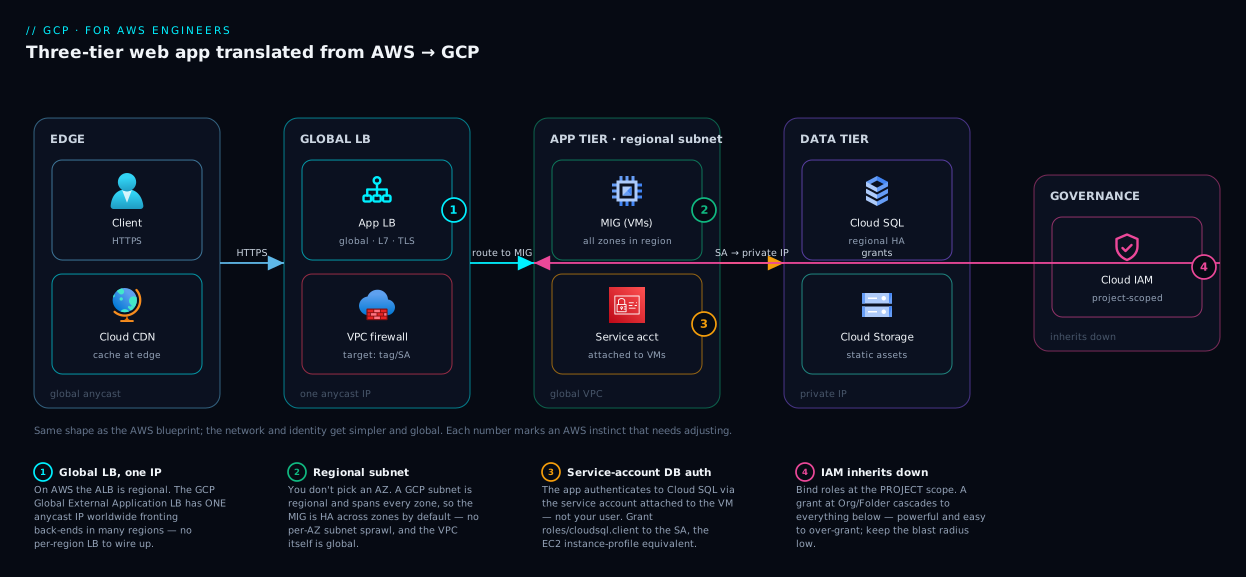
The lesson the picture teaches: the architecture diagram barely changes from AWS to GCP — same tiers, same flow — but the network and identity plumbing gets simpler and more global, which is exactly where the four mental shifts pay off.
Real-world scenario
Northwind Retail ran a mature AWS estate — a payments API on ECS Fargate behind an ALB, RDS PostgreSQL Multi-AZ, DynamoDB for the cart, SQS between services, and a Redshift warehouse for analytics — and acquired a startup whose stack was already on GCP. Rather than migrate one into the other, leadership chose to standardize the analytics and new services on GCP while keeping the AWS payments core, and the platform team (all AWS veterans) had six weeks to become productive on GCP. Their first instinct was the trap: they started creating a GCP project per environment per region — shop-prod-us, shop-prod-eu, shop-staging-us — mirroring how they’d have used AWS accounts plus regional VPCs. Within days the project list was unwieldy and IAM was a mess.
The correction came from internalizing the four shifts. They collapsed to one project per app per environment (shop-prod, shop-staging), because a single global VPC could hold subnets in both us-central1 and europe-west1 without separate projects or peering — eliminating the regional split entirely. They translated the stack with the map: ECS Fargate → Cloud Run (which removed the ALB and the cluster — the API became a container with a URL that scaled to zero off-hours, cutting the always-on Fargate bill), RDS → Cloud SQL with a regional HA configuration, DynamoDB → Firestore for the cart’s document shape, SQS → Pub/Sub with pull subscriptions, and Redshift → BigQuery, which deleted an entire class of cluster-sizing work since BigQuery is serverless.
The mistakes they hit were textbook AWS-brain. They first wrote firewall rules expecting to attach them to instances like security groups to an ENI; the rules did nothing until they learned to target by network tag and service account. They granted the dev team roles/editor at the folder level “to keep it simple,” then realized in a review that this cascaded to every project under the folder — far more than intended — and re-scoped to project-level bindings with specific predefined roles. And they spent half a day debugging a Cloud SQL “permission denied” before grasping that the service account attached to Cloud Run, not the human user, needed roles/cloudsql.client.
The outcome: the GCP-native footprint went live in five weeks. The Cloud Run migration alone cut the API’s monthly compute by roughly 40% versus always-on Fargate (scale-to-zero overnight and on weekends), and BigQuery removed the Redshift cluster’s idle cost. The durable lesson the team wrote into their onboarding doc: “Don’t port the AWS org chart. Learn the four shifts first — projects, global VPC, IAM inheritance, service accounts — and the service names take care of themselves.”
Advantages and disadvantages
Treating GCP as “AWS translated” is a fast on-ramp, but it has limits. The honest trade-off:
| Advantages of the translation-map approach | Disadvantages / where it breaks down |
|---|---|
| Instant productivity — your AWS instincts transfer to 80% of services | The 20% that’s genuinely different (org model, global network) is exactly what bites |
| You skip the “what is cloud” material and learn only deltas | Risk of forcing AWS patterns where GCP has a better native one (Shared VPC, Cloud Run) |
| Cross-team vocabulary for multi-cloud shops | “Close” mappings tempt you to assume parity that isn’t there (DynamoDB→Firestore) |
| Faster architecture design — sketch in AWS, translate to GCP | Some GCP services have no AWS twin (Spanner, BigQuery’s model) and need fresh learning |
| Lower migration risk — same shapes reduce surprises | Cost models differ (per-second billing, sustained-use, BigQuery bytes-scanned) |
When the map serves you best: standing up familiar architectures fast, comparing the clouds for a decision, and onboarding AWS engineers. When to set the map down and learn GCP on its own terms: anything touching the resource hierarchy, IAM scope, global networking, or a no-twin service (Spanner, BigQuery, Cloud Run’s scale-to-zero economics). Those reward native thinking, not translation.
Hands-on lab
Stand up the GCP halves of three core mappings — a VM (EC2→Compute Engine), a bucket (S3→Cloud Storage), and an IAM binding — all free-tier-friendly. You need the gcloud CLI authenticated and a project with billing linked. Compute Engine and Cloud Storage both have an Always Free tier (e.g. one e2-micro VM in a US region and 5 GB of Standard storage), so this costs nothing if you stay inside it and tear down.
1. Set your project and region (the “which account/region” step, GCP-style).
gcloud config set project YOUR_PROJECT_ID
gcloud config set compute/region us-central1
gcloud config set compute/zone us-central1-a
2. Create the network — a global VPC and one regional subnet (Shift 2 in action).
gcloud compute networks create vpc-lab --subnet-mode=custom
gcloud compute networks subnets create snet-lab \
  --network=vpc-lab --region=us-central1 --range=10.0.0.0/24
# Allow SSH (firewall rule targets a tag, not an ENI — Shift 2)
gcloud compute firewall-rules create allow-ssh-lab \
  --network=vpc-lab --allow=tcp:22 --target-tags=lab \
  --source-ranges=35.235.240.0/20   # IAP range; tighten as needed
3. Launch the Always-Free VM (EC2 → Compute Engine).
gcloud compute instances create vm-lab \
  --machine-type=e2-micro \
  --zone=us-central1-a \
  --subnet=snet-lab \
  --tags=lab \
  --image-family=debian-12 --image-project=debian-cloud
# Expected: an instance with an internal 10.0.0.x and (optionally) an external IP.
gcloud compute instances list
4. Create a bucket and upload an object (S3 → Cloud Storage).
# Bucket names share ONE global namespace, like S3 — pick a unique name
gcloud storage buckets create gs://kv-lab-$RANDOM-assets \
  --location=US --default-storage-class=STANDARD
echo "hello gcp" > index.txt
gcloud storage cp index.txt gs://kv-lab-XXXX-assets/   # use your bucket name
gcloud storage ls gs://kv-lab-XXXX-assets/
5. Make a service account and bind a role (IAM, GCP-style — Shifts 3 & 4).
gcloud iam service-accounts create app-lab --display-name="Lab app"
# Grant the SA read on the bucket — a binding ON the resource, to the member
gcloud storage buckets add-iam-policy-binding gs://kv-lab-XXXX-assets \
  --member="serviceAccount:app-lab@YOUR_PROJECT_ID.iam.gserviceaccount.com" \
  --role="roles/storage.objectViewer"
6. Verify, then tear everything down (don’t skip — avoids stray charges).
gcloud compute instances delete vm-lab --zone=us-central1-a --quiet
gcloud storage rm -r gs://kv-lab-XXXX-assets
gcloud compute firewall-rules delete allow-ssh-lab --quiet
gcloud compute networks subnets delete snet-lab --region=us-central1 --quiet
gcloud compute networks delete vpc-lab --quiet
gcloud iam service-accounts delete \
  app-lab@YOUR_PROJECT_ID.iam.gserviceaccount.com --quiet
You just did, in GCP idiom, what you’d do with EC2 + a VPC + S3 + an IAM role on AWS — and felt the three differences (regional subnet, global bucket namespace, bind-role-to-service-account) first-hand. For a guided console-and-CLI tour, Google Cloud Hands-On First Steps: Console, gcloud CLI, Cloud Shell & SDKs goes further.
Common mistakes & troubleshooting
The failure modes below are specifically the ones AWS engineers create by reflex. Symptom → why it happens → how to confirm → fix.
| # | Symptom | AWS instinct that caused it | Confirm | Fix |
|---|---|---|---|---|
| 1 | Firewall rule has no effect | Expected SG-on-ENI behaviour | gcloud compute firewall-rules describe NAME shows no matching target |
Target by --target-tags or --target-service-accounts; add the tag to the instance |
| 2 | IAM grant far too broad | Bound role at Org/Folder “to keep it simple” | gcloud projects get-iam-policy shows inherited binding |
Re-bind at project scope with a predefined role; remove the high-level grant |
| 3 | Cloud SQL “permission denied” from app | Forgot the workload identity needs the grant | Check which SA the compute uses | Grant roles/cloudsql.client to the service account, not your user |
| 4 | Project sprawl, unmanageable list | Made a project per env per region | gcloud projects list is enormous |
Collapse to per-app-per-env; one global VPC spans regions |
| 5 | “Where do I pick the AZ for my subnet?” | Subnet feels zonal like AWS | The create command has no zone flag for subnets | Subnets are regional; pick a region, HA across zones is automatic |
| 6 | Long-lived SA key leaked / committed | Reached for access keys like AWS | Search repos for .json keys |
Use Workload Identity Federation (CI) / Workload Identity (GKE); delete the key |
| 7 | Two regions “of my VPC” can’t talk | Assumed you need peering/TGW | Both subnets are in the same VPC already | They already can — same global VPC; no peering needed |
| 8 | Default service account is over-privileged | Ignored the default like AWS’s default role | gcloud compute instances describe shows the default SA + broad scopes |
Create a least-privilege SA; attach it; restrict scopes |
| 9 | DynamoDB→Firestore data model fights you | Assumed Firestore == DynamoDB | Access patterns don’t map | Re-model for Firestore’s document/query shape, or use Bigtable for wide-column scale |
| 10 | Redshift habits (resize/pause) missing | Looked for a cluster to size | BigQuery has no cluster | Stop sizing; control cost via bytes scanned / slot reservations |
| 11 | “503 / no capacity” on Cloud Run cold start | Treated it like always-on Fargate | Cold start on scale-from-zero | Set min instances ≥1 for latency-sensitive paths |
| 12 | Labels vs tags confusion | Used “tags” for cost allocation | GCP network tags ≠ labels | Use labels for billing/automation; network tags for firewall targeting |
The meta-pattern: nearly every mistake is an AWS reflex applied one layer too high (IAM scope), one model off (firewall targeting, DynamoDB), or one assumption stale (regional VPC, always-on compute). Catch yourself reaching for the AWS muscle memory and ask “which of the four shifts does this touch?”
Best practices
- Don’t port the AWS org chart. Map accounts→projects and OUs→folders, but right-size project count to apps/environments, not to AWS account habits or regions.
- Bind IAM at the lowest useful scope. Prefer project-level bindings with predefined roles; reserve Org/Folder grants for genuinely org-wide needs, and remember they cascade.
- One global VPC, regional subnets. Lean on the global VPC instead of recreating per-region networks; carve subnets per region as you expand. See GCP VPC and Shared VPC.
- Use Shared VPC for platform/app team separation — the GCP-native pattern AWS lacks; a host project owns the network, service projects deploy into it.
- Give every workload a least-privilege service account. Never run on the default SA with broad scopes; attach a purpose-built SA and grant only what it needs.
- Go keyless. Use Workload Identity Federation for CI/CD and Workload Identity in GKE; treat SA JSON keys as a last resort, like AWS long-lived access keys.
- Reach for Cloud Run first for stateless HTTP workloads — it collapses Fargate + ALB + scaling into one service and scales to zero. Decide with GCP Cloud Run vs GKE vs Compute Engine.
- Target firewall rules by service account or network tag, not by trying to attach them to instances like security groups.
- Use labels for billing/automation, network tags for firewall targeting — they are different mechanisms; don’t conflate them.
- Pick the right DynamoDB twin by usage: Firestore for serverless document access, Bigtable for wide-column scale — don’t assume one fits both.
- Adopt Terraform as the IaC baseline on GCP (it’s the de-facto standard); reserve CloudFormation-style native tooling only where required.
- Turn on Cloud Audit Logs and Security Command Center early — the CloudTrail + GuardDuty equivalents — so posture and audit are there from day one.
Security notes
Identity is where AWS habits create the most security risk, so treat these as non-negotiable. IAM inheritance is double-edged — a broad grant high in the hierarchy is invisible at the resource and cascades everywhere, so bind at the lowest scope that works and audit Org/Folder bindings with gcloud organizations get-iam-policy and gcloud resource-manager folders get-iam-policy. Service accounts are powerful identities: don’t reuse one SA across unrelated workloads, don’t grant roles/iam.serviceAccountUser/...TokenCreator casually (it lets a member act as the SA), and prefer impersonation over keys. Eliminate long-lived keys — the GCP equivalent of a leaked AWS access key is a committed SA JSON file; use Workload Identity Federation so CI holds no secret.
Mirror your AWS isolation discipline with the GCP twins: encrypt with Cloud KMS (CMEK where you must own the key), keep secrets in Secret Manager (IAM-gated, not env vars), put databases on private IP behind the Cloud SQL Auth Proxy, and constrain egress with Cloud NAT plus hierarchical firewall policies. Enforce org-wide guardrails with Organization Policy (the SCP analog) — disable SA key creation, restrict resource locations, require OS Login. And wire Cloud Audit Logs (your CloudTrail) and Security Command Center (your GuardDuty + Security Hub) into alerting from day one.
Cost & sizing
Bill drivers differ enough that lift-and-shift cost assumptions mislead. Three GCP economics to internalize: per-second billing with automatic sustained-use discounts (a VM run most of the month gets a discount with zero commitment — no Reserved Instance purchase), Committed Use Discounts (CUDs) for deeper savings when you commit (the RI/Savings-Plan analog), and serverless bytes/requests pricing for BigQuery (per TB scanned) and Cloud Run (per request + CPU/memory time, scaling to zero). That last is the biggest change — a Redshift cluster or always-on Fargate service has a fixed floor; BigQuery and Cloud Run cost near-zero at idle.
| Service | What drives the bill | Free tier (Always Free) | Cost lever for AWS brains | Rough INR / USD anchor |
|---|---|---|---|---|
| Compute Engine | vCPU + RAM × time (per-second) | 1× e2-micro (US regions) |
Sustained-use auto-discount; CUDs; Spot VMs | e2-medium ≈ $25/mo (~₹2,100) on-demand |
| Cloud Run | Requests + CPU/mem time | 2M requests, 360k GB-s/mo | Scale-to-zero; set min-instances only when needed | Often <$5/mo (~₹420) for low-traffic APIs |
| Cloud Storage | GB stored + ops + egress | 5 GB Standard (US) | Lifecycle to Nearline/Coldline/Archive | Standard ≈ $0.020/GB-mo (~₹1.7) |
| Cloud SQL | Instance hours + storage + HA | None (paid) | Right-size tier; HA doubles compute | db-g1-small ≈ $25–35/mo (~₹2,500) |
| BigQuery | Bytes scanned (on-demand) or slots | 1 TB query + 10 GB storage/mo | Partition/cluster tables; reserve slots | $6.25/TB scanned (~₹520) on-demand |
| Cloud NAT | Hourly + data processed | None | One per region; consolidate egress | ~$0.044/hr + per-GB (~₹3.7/hr) |
| Network egress | GB out (internet/cross-region) | 1 GB/mo (varies) | Keep traffic in-region; use Cloud CDN | Tiered; internet egress ~$0.085–0.12/GB |
Right-sizing rule that transfers from AWS: start small (an e2 type or Cloud Run with low min-instances), measure with Cloud Monitoring, then commit (CUDs) only for steady baseline load — the same RI/Savings-Plan discipline, with sustained-use discounts free in the meantime. See Google Cloud Billing & Cost Management. (USD↔INR at ~₹84/$; figures are list-price anchors, not quotes — check the current pricing calculator.)
Interview & exam questions
Q1. What’s the GCP equivalent of an AWS account, and how does it differ? A project. It’s the unit of isolation, billing, IAM, and quota — but unlike an account it’s free and quick to create, you typically run many, and they nest under an Organization with Folders. Maps to the ACE exam’s resource-hierarchy domain.
Q2. AWS VPCs are regional; what’s different about GCP VPCs? A GCP VPC is global — a single VPC can hold subnets in many regions, and resources across those regions communicate over Google’s backbone without peering or a Transit Gateway. Subnets are regional (span all zones), so you never pick an AZ for a subnet.
Q3. How does GCP IAM differ from AWS IAM in scope? GCP IAM inherits down the hierarchy: a binding at the Org/Folder/Project cascades to everything beneath. Effective permissions are the union of all bindings from the Org down to the resource. AWS IAM is largely account-scoped with SCPs as guardrails; GCP’s “guardrail” is Organization Policy.
Q4. An EC2 instance uses an instance profile for permissions. What’s the GCP equivalent? A service account attached to the resource (VM, Cloud Run service, GKE pod). The SA is both a member (you grant it roles) and an identity (the workload acts as it). For keyless cross-cloud/CI auth, use Workload Identity Federation.
Q5. You used DynamoDB. What’s the right GCP service? It depends on usage: Firestore for a serverless document store with flexible queries, Bigtable for wide-column, low-latency, petabyte-scale key-value. There’s no single drop-in; choose by access pattern.
Q6. What replaces Redshift, and why is it a different cost model? BigQuery — but it’s serverless: no cluster to provision, size, or pause. You load and query; cost is driven by bytes scanned (on-demand) or reserved slots. That removes cluster-sizing ops but changes how you control spend (partitioning, clustering).
Q7. Which GCP service often replaces ECS Fargate and an ALB? Cloud Run — it takes a container, gives it an autoscaling HTTPS endpoint, scales to zero, and needs no cluster or separate load balancer for the common case. It’s the service with no clean AWS twin and the highest-leverage one to learn.
Q8. How do GCP firewall rules differ from AWS security groups? GCP firewall rules are stateful like SGs but target by network tag or service account, not by attaching to an ENI/instance directly. There’s no separate stateless NACL; org-wide controls come from hierarchical firewall policies.
Q9. What is Shared VPC and what AWS concept is it closest to? Shared VPC lets a central host project own one VPC and share its subnets with multiple service projects, so a platform team controls networking while app teams deploy into it. AWS has no exact twin (closest is centralized networking via Transit Gateway/RAM, but the model differs).
Q10. What’s the GCP equivalent of CloudTrail and GuardDuty? Cloud Audit Logs (Admin Activity on by default; enable Data Access for sensitive resources) is CloudTrail; Security Command Center is the GuardDuty + Security Hub analog for threat detection and posture management.
Q11. How do you avoid long-lived credentials for CI/CD on GCP? Workload Identity Federation — federate your external IdP (e.g. GitHub OIDC) to GCP so pipelines obtain short-lived tokens without a stored service-account key. Inside GKE, Workload Identity does the keyless pod-to-SA mapping.
Q12. AWS sustained workloads use Reserved Instances. What’s the GCP equivalent and the free bonus? Committed Use Discounts (CUDs) are the RI/Savings-Plan analog for committed spend. The free bonus is sustained-use discounts, applied automatically to Compute Engine the longer a VM runs in a month — no purchase required.
Quick check
- AWS subnets are AZ-scoped. What is the scope of a GCP subnet, and what scope is the VPC?
- You grant
roles/viewerat the Organization level. Who can now view what, and why is that risky? - Your EC2 used an instance profile. What GCP construct gives a VM its permissions, and how do you attach it?
- You used DynamoDB as a low-latency key-value store at huge scale. Which GCP service fits better than Firestore?
- Name the single GCP service that often replaces both ECS Fargate and an ALB.
Answers
- A subnet is regional (spans all zones in its region); the VPC is global (spans all regions). You pick a region for the subnet, never an AZ.
- Everyone in that group can view every resource in every project under the Org, because IAM inherits downward — the grant cascades. It’s risky because the broad scope is invisible at the resource and far exceeds an account-scoped grant.
- A service account attached to the VM (via
--service-accountat create time, or updated later); the SA is granted roles, and the workload runs as it. - Bigtable — wide-column, low-latency, petabyte-scale. Firestore suits serverless document access; Bigtable suits the massive KV pattern.
- Cloud Run — container in, autoscaling HTTPS URL out, scales to zero, no cluster or separate load balancer needed for the common case.
Glossary
- Project — GCP’s unit of resource isolation, billing, IAM, and quota; the rough equivalent of an AWS account, but free and numerous.
- Folder — A grouping container in the resource hierarchy; the analog of an AWS Organizations OU. Folders can nest.
- Organization — The root of the GCP hierarchy, tied to a Cloud Identity/Workspace domain; analog of the AWS management/organization root.
- Service account (SA) — A non-human identity (with an email) attached to workloads to grant them permissions; replaces AWS instance profiles/execution roles.
- Member — Any identity in an IAM binding: a user, group, or service account (
user:,group:,serviceAccount:). The GCP term for an AWS principal. - Role — A named collection of permissions (predefined or custom) granted to a member at a scope; the GCP analog of an AWS managed/inline policy.
- Binding — The association of a member + role on a resource at a scope; how you “grant” access. The GCP analog of attaching a policy.
- Organization Policy — Declarative org-wide constraints on resource configuration; the GCP analog of an AWS Service Control Policy (SCP).
- Global VPC — A GCP VPC that spans all regions; subnets within it are regional. No cross-region peering needed inside one VPC.
- Regional subnet — A subnet that automatically spans every zone in its region; you never assign it to a single zone.
- Network tag — A label on a VM used to target firewall rules (distinct from billing labels).
- Shared VPC — A pattern where a host project owns a VPC and shares subnets with service projects; a GCP-native model with no exact AWS twin.
- Cloud Run — A serverless container platform that gives a container an autoscaling HTTPS endpoint and scales to zero; often replaces Fargate + ALB.
- Workload Identity Federation — Keyless federation that lets external identities (e.g. GitHub OIDC) obtain short-lived GCP tokens without stored keys.
- Sustained-use discount — An automatic Compute Engine discount that increases the longer a VM runs in a billing month, with no commitment.
- Committed Use Discount (CUD) — A discount for committing to a baseline of usage over 1–3 years; the GCP analog of AWS Reserved Instances/Savings Plans.
Next steps
- Lock in the org model with GCP Resource Hierarchy Explained: Organization, Folders and Projects — the foundation under every other mapping.
- Go deep on the network shift in GCP VPC and Shared VPC: Networking Across Projects.
- Master identity, the highest-risk delta, in GCP IAM and Service Accounts: Roles, Bindings and Least Privilege.
- Pick compute confidently with GCP Cloud Run vs GKE vs Compute Engine: Choose the Right Compute.
- Translate your data layer with BigQuery for Data Analytics: Warehousing, Querying and Visualization and GCP Pub/Sub and Event-Driven Architecture: Decouple and Scale.