A logging platform kept every log file in Standard storage “for compliance.” Eighteen months in, the Cloud Storage line item had quietly become the third-largest item on the GCP invoice, and a sampling of access logs showed that 95% of objects older than 90 days were never read again. Nobody had done anything wrong, exactly — they had just never told the platform that the data was cold. One lifecycle configuration later — Standard objects transition to Nearline at 30 days, Coldline at 90, non-current versions expire at 365, and a junk staging-logs/ prefix is deleted at 7 days — the bill for that bucket fell 55% with zero application changes and zero data loss. The bytes did not move servers, did not get slower to read, and did not get less durable. They just stopped being charged the hot-data price for cold-data behaviour.
This is the most overlooked lever in a GCP bill, and it is overlooked because storage never pages you. A crashed service wakes the on-call; an over-provisioned bucket simply bleeds money in the background where nobody is looking. The mechanics are not hard, but they are unforgiving in the details: the “cheap” classes charge you to read your own data, they impose a minimum storage duration that bills you for days you did not use if you delete early, and the automation that moves objects between classes has its own pricing model and a set of conditions that interact with object versioning and soft delete in ways that surprise people the first time a “delete” rule wipes the wrong thing.
This article is the working guide a senior engineer would hand you. We define the four classes by their three trade-offs (storage rent, retrieval cost, minimum duration), break the pricing model into its four components so you can predict a bill before you commit, then go deep on the two ways objects move down the tiers — lifecycle rules (you write the policy) and Autoclass (Google watches access and moves them for you) — and exactly when each is right. We cover location types (regional / dual-region / multi-region) because they change every number on the page, the interaction of versioning and soft delete with lifecycle deletion (the part that causes data-loss incidents), real gcloud and lifecycle JSON and Terraform for every operation, and three worked cost-optimization examples with actual arithmetic. By the end you will classify any dataset in seconds, write a lifecycle policy that does not accidentally delete production, and explain to a finance partner exactly why the bill is what it is.
What problem this solves
Most teams store data as if it were uniform — one bucket, one price, “files in the cloud.” Real data has a temperature: hot (read constantly — a web app’s images), warm (read occasionally — last quarter’s reports), cold (read a few times a year — older backups), and frozen (kept for years for legal reasons, prayed never needed). Paying the hot price for frozen data is pure waste, and it is the default outcome because Standard is the default class and nothing moves an object off it unless you say so.
What breaks is the budget, silently. A 100 TB bucket of mostly-cold backups sitting in Standard costs roughly $2,000/month in a US region. The same bytes, correctly tiered into Archive, cost roughly $120/month — a ~$22,000/year difference for identical data, in the identical project, retrieved at identical millisecond latency. The trap is that nobody audits storage; it is rarely the line item anyone looks at until a finance review forces the question, and by then you have paid the premium for a year or more.
There is a second, subtler failure mode that this article spends real time on: getting the optimization wrong in the other direction. Move data that is still warm into Coldline or Archive and the retrieval fees plus early-deletion charges can cost more than leaving it in Standard would have. A 50 TB dataset that someone “archived” to save money, then had to scan monthly for an ML pipeline, can quietly cost several times the Standard bill once you add up retrieval at $0.05/GB and minimum-duration penalties on every re-write. Cost optimization here is not “make everything cold” — it is “match the class to the measured access pattern,” and the difference between those two sentences is the difference between saving money and a surprise invoice.
Who hits this: every team that keeps backups, logs, compliance archives, media masters, ML training sets, or anything tagged “for audit” or “just in case.” The fix is almost never “delete data” (scary, frequently disallowed) — it is “stop paying the hot price for cold data, and stop paying the cold-retrieval price for warm data.” Cloud Storage gives you both a manual switch (set the class) and two automation paths (lifecycle rules and Autoclass), and the entire skill is knowing which to reach for.
| Data “temperature” | Read frequency | Real example | Right class | Why | Approx. storage rent (US) |
|---|---|---|---|---|---|
| Hot | Many times a day | Web app images, live datasets | Standard | No retrieval fee, no min duration | ~$0.020/GB/mo |
| Warm | ~Monthly | Last quarter’s reports, recent logs | Nearline | 30-day commitment, small read fee | ~$0.010/GB/mo |
| Cold | A few times a year | Older backups, finished projects | Coldline | 90-day commitment, higher read fee | ~$0.004/GB/mo |
| Frozen | Less than once a year | 7-year compliance archive, DR copy | Archive | 365-day commitment, highest read fee | ~$0.0012/GB/mo |
| Unknown / changing | You genuinely can’t predict | Mixed buckets, new workloads | Autoclass | Google moves it; no read/min-duration fees | Per-object mgmt fee + class rent |
Pricing throughout this article uses approximate US-region list prices to make the arithmetic concrete. Exact rates vary by region and location type and change over time — always confirm against the live Cloud Storage pricing page and the GCP Pricing Calculator before you commit a number to a budget. The ratios (Standard : Nearline : Coldline : Archive ≈ 17 : 8 : 3 : 1 on storage rent) are far more stable than the absolute figures.
Learning objectives
By the end of this article you can:
- Distinguish Standard, Nearline, Coldline and Archive by their three trade-offs — storage rent, retrieval fee, and minimum storage duration — and explain why all four are equally durable (eleven nines) and equally fast to first byte.
- Break a Cloud Storage bill into its four cost components — at-rest storage, data retrieval, operations (Class A / Class B), and minimum-duration/early-deletion charges — and predict the cost of a workload before committing to it.
- Decide between lifecycle rules and Autoclass for a given bucket, and explain exactly what each costs and where each fails.
- Write a correct lifecycle configuration in JSON using every condition (
age,createdBefore,daysSinceCustomTime,daysSinceNoncurrentTime,isLive,matchesStorageClass,matchesPrefix/Suffix,numNewerVersions,noncurrentTimeBefore) and every action (SetStorageClass,Delete,AbortIncompleteMultipartUpload). - Combine object versioning and soft delete with lifecycle deletion safely — and avoid the data-loss and runaway-cost traps where a
Deleterule and versioning interact badly. - Choose a location type (regional, dual-region, multi-region) for a bucket and explain how it changes durability, availability, latency, egress and price.
- Drive all of the above with real
gcloud storage/gsutilcommands, lifecycle JSON, and Terraform — and validate the result. - Run a cost-optimization exercise on a real dataset with a worked decision matrix, and recognise the common mistake of over-tiering warm data into the wrong class.
Prerequisites & where this fits
You should already know what a Cloud Storage bucket is (a globally-named container for objects, i.e. files plus metadata), how to authenticate gcloud, and the basics of GCP projects and IAM. Helpful but not required: familiarity with how billing rolls up per project, and the idea that data has a lifecycle. If you want the gentler, mental-model-first treatment of the four classes, read the companion piece Cloud Storage Classes Decoded: Standard, Nearline, Coldline, Archive — and Lifecycle Rules first; this article assumes that vocabulary and goes deeper into pricing math, the lifecycle JSON schema, Autoclass internals, and the versioning/soft-delete interactions.
This sits in the Storage & Cost-Optimization track. It pairs naturally with GCP Cloud Monitoring and Operations: Observability Built In (you will want metrics and budget alerts on storage spend), with GCP IAM and Service Accounts: Roles, Bindings and Least Privilege (lifecycle and bucket management are IAM-gated operations), and with GCP VPC Service Controls: Build Data Exfiltration Perimeters when the buckets hold regulated data. For analytics workloads that read from buckets, BigQuery for Data Analytics: Warehousing, Querying and Visualization explains the downstream consumer that often drives your retrieval-fee bill.
Here is the layered map of who owns what, so you involve the right people when a storage decision has blast radius beyond your team:
| Layer | What lives here | Who usually owns it | What a wrong decision causes |
|---|---|---|---|
| Bucket location & class default | Region/multi-region, default class | Platform / architecture | Wrong location → high egress, latency, can’t move later |
| Object class per object | The class each object currently holds | App + lifecycle policy | Hot price for cold data, or retrieval fees on warm data |
| Lifecycle / Autoclass policy | Transition + deletion automation | Platform + data owner | Over-tiering, or a Delete rule that wipes prod |
| Versioning & soft delete | Recovery windows for deletes/overwrites | Data owner + security | Runaway version cost, or unrecoverable deletes |
| Retention / Object Lock | Compliance immutability | Security / compliance | Can’t delete (or can, when you shouldn’t) |
| IAM & access | Who can read/write/admin the bucket | Security | Exfiltration, or broken pipelines |
Core concepts
Six mental models make every later decision obvious.
A storage class is a price-and-performance deal, not a different bucket. Every object carries exactly one storage class. All four classes live in ordinary buckets, return bytes through the same API at the same millisecond first-byte latency, and share the same 99.999999999% (eleven nines) annual durability. What differs is the deal: the cheaper the monthly rent, the more it costs to read the data (retrieval fee), the more each operation costs, and the longer Google asks you to commit (minimum storage duration). There is no “slow tier” — unlike tape or AWS Glacier’s deep tiers, GCS Archive is online and millisecond-fast to read; you pay for the read, you do not wait hours for it.
The bill has four moving parts, not one. People reason about “storage cost” as a single number and get surprised. The real bill is at-rest storage (GB-months) + data retrieval (per-GB reads from colder classes) + operations (per-1,000 API calls, split into expensive Class A writes/lists and cheap Class B reads) + minimum-duration / early-deletion charges (a penalty for deleting, overwriting, or transitioning an object before its class’s commitment elapses). Optimizing only the first part while ignoring the other three is how a “cheaper” class ends up more expensive.
Minimum storage duration is a commitment, and it bites on every early removal. Nearline commits you to 30 days, Coldline to 90, Archive to 365. If you delete, overwrite, or transition to another class an object before its minimum elapses, you are charged for the remaining days at that class’s rate as if it had stayed. This is why churny data (objects rewritten daily) is a terrible fit for Coldline/Archive — every rewrite is an early deletion of the old version and you pay the penalty repeatedly.
There are two ways objects move down the tiers, and they are mutually exclusive on a bucket. You either write a lifecycle policy (declarative rules: “at age 30 days, SetStorageClass Nearline”) and own the access-pattern assumptions, or you enable Autoclass and let Google move objects based on actual access — promoting them back to Standard on read, with no retrieval fees and no early-deletion fees but a per-object management fee instead. You cannot have Autoclass and a lifecycle SetStorageClass action (or a matchesStorageClass condition) on the same bucket; the two transition engines would fight.
Versioning, soft delete, and lifecycle deletion are three different “undo” mechanisms that overlap. Object versioning keeps prior generations when you overwrite or delete (you opt in; old versions are noncurrent and still cost money). Soft delete is on by default for new buckets and retains deleted objects (current and noncurrent) for a 7-day window (configurable 7–90 days, or 0 to disable) so an accidental delete is reversible — also billed while retained. A lifecycle Delete action interacts with both: on a versioned bucket, Delete on a live object makes it noncurrent (doesn’t free space), and you need version-aware conditions (numNewerVersions, daysSinceNoncurrentTime) to actually expire old versions. Getting this wrong either fails to save space or deletes data you needed.
Location type changes every number on the page. A bucket is regional (one region), dual-region (a specific pair, replicated, low-latency to both), or multi-region (a broad geography like US or EU). Multi/dual-region buys higher availability SLA and geo-redundancy but costs more per GB and changes egress economics; regional is cheapest and lowest-latency to in-region compute. You choose this at bucket creation and largely cannot change it later without copying data to a new bucket — so it is the highest-stakes early decision.
The vocabulary in one table
Pin down every moving part before the deep sections. The glossary at the end repeats these for lookup; this is the side-by-side mental model.
| Term | One-line definition | Where it lives | Why it matters to cost |
|---|---|---|---|
| Storage class | Price/performance deal on an object | Per object | The core lever; sets rent + read fee + min duration |
| Standard / Nearline / Coldline / Archive | Hot → frozen tiers | Per object | 17:8:3:1 rent ratio; read fee inverts |
| At-rest storage | GB-month rent | Billed monthly | Usually the biggest line — until you tier |
| Data retrieval fee | Per-GB charge to read cold data | On read from N/C/A | Turns “cheap” cold into expensive if read often |
| Class A / Class B operations | Write/list vs read/get API calls | Per 1,000 calls | Many small objects → operations dominate |
| Minimum storage duration | Commitment: 30/90/365 days | Per object’s class | Early delete/overwrite/transition → penalty |
| Lifecycle rule | Declarative transition/deletion policy | Per bucket | Automates tiering; can also delete |
| Autoclass | Google moves classes by access | Per bucket (toggle) | No read/min fees; per-object mgmt fee |
| Object versioning | Keeps prior generations | Per bucket (opt-in) | Noncurrent versions cost money silently |
| Soft delete | Default 7-day undelete window | Per bucket (default on) | Deleted objects billed during retention |
| Location type | Regional / dual / multi | Per bucket (at creation) | Changes rent, availability, egress |
| Custom-Time / noncurrent time | Metadata timestamps for rules | Per object | Drives daysSinceCustomTime / version expiry |
The four storage classes, end to end
Standard is the default and the only class with no retrieval fee and no minimum duration — it is for data you touch and for short-lived data. The three colder classes trade a lower monthly rent for a retrieval fee, pricier operations, and a minimum-duration commitment. Here is the full reference you scan first; every number is approximate US-region list pricing.
| Class | Storage rent (US) | Retrieval fee | Min duration | Availability SLA (region / multi-dual) | Durability | First-byte latency | Read it when… |
|---|---|---|---|---|---|---|---|
| Standard | ~$0.020/GB/mo | None | None | 99.9% / 99.95% | 11 nines | ms | Many times/day; or stored briefly |
| Nearline | ~$0.010/GB/mo | ~$0.01/GB | 30 days | 99.0% / 99.9% | 11 nines | ms | ≤ ~1×/month |
| Coldline | ~$0.004/GB/mo | ~$0.02/GB | 90 days | 99.0% / 99.9% | 11 nines | ms | ≤ ~1×/quarter |
| Archive | ~$0.0012/GB/mo | ~$0.05/GB | 365 days | 99.0% / 99.9% | 11 nines | ms | < ~1×/year |
The single most important reading of that table is the break-even logic: a colder class only saves money if your monthly read volume is low enough that the retrieval fees don’t eat the storage savings. The rule of thumb each class encodes is right there in the “read it when” column — those frequencies are not marketing, they are the access rates at which the math works out.
Standard — the default, and where short-lived data belongs
Standard is for hot data and for anything stored briefly. Two non-obvious uses: (1) data you will delete within days — because a colder class’s minimum duration would charge you for 30/90/365 days even if you delete on day 2, Standard’s no-minimum makes it cheaper for transient data despite higher rent; (2) the staging area for objects that a lifecycle rule will later transition down. New objects always start here unless you explicitly create them in another class or Autoclass manages the bucket.
Nearline — warm, monthly-ish access
Nearline halves the rent versus Standard in exchange for a ~$0.01/GB read fee and a 30-day commitment. It fits data read about once a month: recent backups you might restore, last-quarter reports, logs you occasionally grep. The break-even is generous — you can read a meaningful fraction of Nearline data monthly and still come out ahead of Standard.
Coldline — cold, quarterly access
Coldline drops rent to ~$0.004/GB with a higher ~$0.02/GB read fee and a 90-day commitment. It fits data you touch a few times a year: older backups, completed-project artifacts, DR copies you test quarterly. The 90-day minimum means Coldline is wrong for anything overwritten more often than that.
Archive — frozen, yearly-or-less access
Archive is the cheapest rent (~$0.0012/GB) with the highest read fee (~$0.05/GB) and a 365-day commitment. It is the tape replacement: seven-year compliance holds, regulatory archives, the DR copy you hope never to read. Crucially it is online — millisecond first-byte, no thaw delay — so “Archive” here means price, not availability. The 365-day minimum is the gotcha: delete or rewrite an Archive object after a month and you still pay eleven more months of rent for it.
Legacy class names you’ll still see
Older buckets and tools surface legacy names. They map cleanly to the modern classes; you don’t create new ones but you’ll see them in storageClass fields and old IaC.
| Legacy name | Maps to | Notes |
|---|---|---|
| Multi_Regional | Standard (in a multi-region) | Old name for hot data in a multi-region location |
| Regional | Standard (in a region) | Old name for hot data in a single region |
| Durable Reduced Availability (DRA) | ~Standard with 99% availability SLA | Deprecated; lower availability, no real cost edge today |
A newer Rapid Storage zonal class also exists for latency-sensitive, I/O-intensive workloads (single-zone, sub-millisecond, no minimum duration). It is outside the hot→frozen tiering story this article is about — mentioned for completeness so you recognise it in the class list, not as a tiering target.
The pricing model: storage + retrieval + operations + minimum duration
This is the section that prevents surprise invoices. A Cloud Storage bill is the sum of four independent meters. Optimize one in isolation and you can make the total worse.
| Component | What it meters | Unit | Driven by | Where it surprises people |
|---|---|---|---|---|
| At-rest storage | Bytes stored over time | per GB-month | Volume × class rent | Forgetting noncurrent versions + soft-deleted objects count |
| Data retrieval | Bytes read from colder classes | per GB | Reads from N/C/A | “Cheap” Archive read monthly costs more than Standard |
| Operations | API calls | per 1,000 ops | Object count + access pattern | Millions of tiny objects → ops dominate the bill |
| Minimum-duration / early-deletion | Removing data before commitment | per GB (remaining days) | Deletes/overwrites/transitions of cold objects | Churny data in Coldline/Archive pays this constantly |
| Network egress | Bytes leaving GCP / crossing regions | per GB | Reads to internet / other regions | Cross-region and internet egress dwarfs storage sometimes |
Operations: Class A vs Class B
Operations are billed per 1,000 calls and split into two buckets. Class A are the “expensive” mutating/listing operations; Class B are the “cheap” reads. Colder classes charge more per operation, which compounds the many-small-objects problem.
| Operation class | Example API calls | Relative cost | Gets worse as the class gets colder? |
|---|---|---|---|
| Class A | objects.insert (upload), objects.list, objects.rewrite, objects.copy, bucket list |
Higher | Yes |
| Class B | objects.get (download), objects.getMetadata |
Lower | Yes |
| Free | objects.delete, bucket/object metadata for billing |
$0 | — |
The practical implication: a bucket holding 50 million 20 KB objects can have an operations bill that rivals its storage bill, and tiering those tiny objects to Coldline makes the per-op cost worse, not better. For many-small-objects workloads, the right move is often to aggregate (tar/parquet them into larger objects) before tiering, or leave them in Standard and fix the access pattern.
Minimum storage duration: the early-deletion math
If you remove an object before its class’s minimum, you pay for the unused remainder. Concretely:
| Action before minimum elapses | What you’re charged | Example (1 GB Coldline, deleted on day 10) |
|---|---|---|
| Delete | Storage for the remaining days at that class | 80 of 90 days × $0.004/GB/mo prorated ≈ still billed ~80 days |
| Overwrite (same key) | Old generation treated as early-deleted | Same penalty on the replaced bytes |
| Transition to another class (lifecycle SetStorageClass) | Early-deletion on the source class if min not met | Don’t transition Archive→anything before 365 days |
| Rewrite to change class manually | Same as transition | Pay the source class’s remaining-duration charge |
The lesson encoded here: set lifecycle transition ages to respect downstream minimums. A rule that moves objects Standard → Nearline at 30 days, then Nearline → Coldline at 45 days, triggers an early-deletion charge on Nearline (only 15 of its 30 days used). Space your transitions so each class meets its minimum before the next hop — e.g. Nearline at 30, Coldline at 90 (60 days in Nearline), Archive at 365.
A worked four-meter example
Take 10 TB of backup data, read pattern “restore ~200 GB once a month,” stored for a year, ignoring egress and operations for clarity:
| Scenario | Storage/mo | Retrieval/mo | Min-duration risk | Effective $/mo |
|---|---|---|---|---|
| All Standard | 10,240 GB × $0.020 = $204.80 | $0 | None | ~$205 |
| All Nearline | 10,240 × $0.010 = $102.40 | 200 × $0.01 = $2.00 | Low (monthly restore > 30d) | ~$104 |
| All Coldline | 10,240 × $0.004 = $40.96 | 200 × $0.02 = $4.00 | OK if not rewritten < 90d | ~$45 |
| All Archive | 10,240 × $0.0012 = $12.29 | 200 × $0.05 = $10.00 | Risky: monthly restore churns < 365d | ~$22 |
Archive is cheapest here only because the read volume is modest. Push the monthly restore to 2 TB and Archive’s retrieval becomes 2,048 × $0.05 = $102/mo on top of $12 rent — now Coldline ($41 + $41 = $82) or even Nearline beats it. This is the whole game: the right class is a function of both your storage volume and your read volume, and you must put real numbers in.
Autoclass: let Google move objects by actual access
Lifecycle rules force you to predict access patterns. Autoclass removes the prediction: enable it on a bucket and Google moves each object between classes based on whether it is actually read, promoting it back to Standard the instant it’s read again — and critically, charges no retrieval fees and no early-deletion fees on Autoclass-managed objects. In exchange you pay a small per-object management fee (a monthly charge per object under Autoclass management).
How Autoclass transitions work
Every new object lands in Standard. If an object (≥ 128 KiB) goes unread, Autoclass cools it on a fixed schedule; reading its data (not just metadata) promotes it straight back to Standard. Objects < 128 KiB stay in Standard permanently (too small to be worth cooling). You pick a terminal class: Nearline (default) or Archive (opt-in, unlocks the deeper Coldline/Archive hops).
| Days since last access | Terminal = Nearline (default) | Terminal = Archive (opt-in) |
|---|---|---|
| 0 (new or just read) | Standard | Standard |
| 30 | → Nearline | → Nearline |
| 90 | stays Nearline | → Coldline |
| 365 | stays Nearline | → Archive |
| On any data read | → Standard | → Standard |
Autoclass vs lifecycle SetStorageClass — the decision
They are mutually exclusive on a bucket (you cannot use a lifecycle SetStorageClass action or a matchesStorageClass condition while Autoclass is on). Choose deliberately:
| Dimension | Autoclass | Lifecycle SetStorageClass |
|---|---|---|
| Who decides transitions | Google, by actual access | You, by predicted age/conditions |
| Retrieval fees | None on managed objects | Charged normally on cold reads |
| Early-deletion fees | None on managed objects | Charged if you remove before min duration |
| Extra cost | Per-object management fee | None (just the class rents + read fees) |
| Promotes cold→hot on read? | Yes, automatically | No (objects stay cold once moved) |
| Best for | Unknown/changing/bursty access; mixed buckets | Known, predictable aging (logs, backups by date) |
| Worst for | Buckets of millions of tiny (<128 KiB) objects (per-object fee, never cools) | Data whose access pattern you genuinely can’t predict |
| Objects < 128 KiB | Stay in Standard (still pay per-object fee) | Can be tiered, but ops cost rises |
The clean heuristic: if you can confidently describe how the data ages, write a lifecycle policy; if you can’t (or access is bursty and re-reads happen), turn on Autoclass. Autoclass shines for data lakes, ML feature stores, and shared buckets where some objects suddenly get hot again — there, the no-retrieval-fee promotion-on-read is worth the per-object fee. It is a poor fit for buckets of tens of millions of sub-128 KiB objects, where the per-object management fee adds up and nothing ever cools.
Enabling Autoclass
# Enable Autoclass at bucket creation (recommended), Nearline terminal (default)
gcloud storage buckets create gs://kv-data-lake \
  --location=US \
  --enable-autoclass \
  --uniform-bucket-level-access

# Enable Archive as the terminal class on an existing bucket
gcloud storage buckets update gs://kv-data-lake \
  --enable-autoclass \
  --autoclass-terminal-storage-class=ARCHIVE
# Terraform — Autoclass with Archive terminal class
resource "google_storage_bucket" "data_lake" {
  name                        = "kv-data-lake"
  location                    = "US"
  uniform_bucket_level_access = true

  autoclass {
    enabled                = true
    terminal_storage_class = "ARCHIVE"   # or "NEARLINE" (default)
  }
}
Toggling Autoclass on an existing bucket is allowed; switching the terminal class from Archive back to Nearline transitions any already-cold objects up to Nearline. You cannot mix Autoclass with SetStorageClass lifecycle rules — but you can still use lifecycle Delete rules alongside Autoclass (deletion is orthogonal to class transitions), which is the common pattern: Autoclass handles tiering, a Delete rule handles expiry.
Lifecycle rules: conditions, actions, and the JSON
When you do know how data ages, lifecycle rules are precise, free of management fees, and version-aware. A lifecycle configuration is a list of rules, each pairing an action with one or more conditions (ANDed together within a rule). Rules run automatically — Cloud Storage inspects objects regularly — but changes can take up to 24 hours to take effect, and an object that matches multiple rules has them applied in a defined precedence (deletion wins over transition; among transitions, the one yielding the coldest class wins).
The three actions
| Action | What it does | Notes |
|---|---|---|
SetStorageClass |
Transition object to a colder (or different) class | Cannot coexist with Autoclass; respects min-duration economics |
Delete |
Delete the object (or, on a versioned bucket, make a live object noncurrent / permanently remove a noncurrent one) | The dangerous one — pair with version-aware conditions |
AbortIncompleteMultipartUpload |
Garbage-collect parts of uploads that never completed | Pure savings; safe to always include (e.g. age 7) |
Every condition
Conditions are the precision instruments. A rule fires only when all its conditions match. Knowing each one — and especially the version-aware ones — is the difference between a policy that saves money and one that deletes production.
| JSON key | Meaning | Typical use |
|---|---|---|
age |
Object is ≥ N days old (from creation) | “Transition at 30 days” |
createdBefore |
Created before midnight UTC of a date | One-off cleanup before a cutoff date |
customTimeBefore |
Object’s Custom-Time metadata is before a date | Retention keyed to a business event, not upload date |
daysSinceCustomTime |
N days have passed since the object’s Custom-Time | “Delete 7 years after the record’s event date” |
daysSinceNoncurrentTime |
N days since this version became noncurrent | Expire old versions N days after they were superseded |
isLive |
true = live (current) version; false = noncurrent |
Scope a rule to current vs old versions |
matchesStorageClass |
Object is currently in one of the listed classes | “Only transition objects still in Standard” (not with Autoclass) |
matchesPrefix |
Object name begins with a string (case-sensitive) | Target a folder, e.g. staging-logs/ |
matchesSuffix |
Object name ends with a string (case-sensitive) | Target a type, e.g. .tmp |
numNewerVersions |
At least N newer versions exist than this one | “Keep 3 versions; delete older” |
noncurrentTimeBefore |
Became noncurrent before a date | One-off old-version cleanup |
Limit to know: across all rules on a bucket you can specify up to 1,000
matchesPrefix+matchesSuffixvalues in total. That is generous, but a per-tenant policy that adds a prefix per customer can approach it — design prefixes hierarchically rather than per-object.
A production-grade lifecycle JSON
Here is the logging-platform policy from the intro, written correctly. It transitions live objects down the tiers respecting minimum durations, expires noncurrent versions, deletes a junk prefix early, and garbage-collects failed uploads:
{
  "rule": [
    {
      "action": { "type": "SetStorageClass", "storageClass": "NEARLINE" },
      "condition": { "age": 30, "matchesStorageClass": ["STANDARD"], "isLive": true }
    },
    {
      "action": { "type": "SetStorageClass", "storageClass": "COLDLINE" },
      "condition": { "age": 90, "matchesStorageClass": ["NEARLINE"], "isLive": true }
    },
    {
      "action": { "type": "SetStorageClass", "storageClass": "ARCHIVE" },
      "condition": { "age": 365, "matchesStorageClass": ["COLDLINE"], "isLive": true }
    },
    {
      "action": { "type": "Delete" },
      "condition": { "daysSinceNoncurrentTime": 365 }
    },
    {
      "action": { "type": "Delete" },
      "condition": { "numNewerVersions": 3 }
    },
    {
      "action": { "type": "Delete" },
      "condition": { "age": 7, "matchesPrefix": ["staging-logs/"] }
    },
    {
      "action": { "type": "AbortIncompleteMultipartUpload" },
      "condition": { "age": 7 }
    }
  ]
}
Read the safety design: every transition is scoped with isLive: true and matchesStorageClass so it only ever moves a live object that is still in the expected source class (no double-charging, no churn). Deletion of old data targets noncurrent versions via daysSinceNoncurrentTime and caps live history at three with numNewerVersions — it never blindly deletes live objects by age (the classic data-loss bug). The only age-based Delete is fenced to the staging-logs/ prefix, which is explicitly disposable.
Applying and reading the policy
# Apply a lifecycle config from a JSON file
gcloud storage buckets update gs://kv-logs \
  --lifecycle-file=lifecycle.json

# Read the current lifecycle config back
gcloud storage buckets describe gs://kv-logs \
  --format="json(lifecycle_config)"

# Remove all lifecycle rules (apply an empty rule list)
echo '{"rule": []}' > empty.json
gcloud storage buckets update gs://kv-logs --lifecycle-file=empty.json
# Terraform — the same policy as code (excerpt)
resource "google_storage_bucket" "logs" {
  name          = "kv-logs"
  location      = "US"
  storage_class = "STANDARD"

  versioning { enabled = true }

  lifecycle_rule {
    action    { type = "SetStorageClass" storage_class = "NEARLINE" }
    condition { age = 30 matches_storage_class = ["STANDARD"] with_state = "LIVE" }
  }
  lifecycle_rule {
    action    { type = "SetStorageClass" storage_class = "COLDLINE" }
    condition { age = 90 matches_storage_class = ["NEARLINE"] with_state = "LIVE" }
  }
  lifecycle_rule {
    action    { type = "Delete" }
    condition { days_since_noncurrent_time = 365 }
  }
  lifecycle_rule {
    action    { type = "Delete" }
    condition { num_newer_versions = 3 }
  }
  lifecycle_rule {
    action    { type = "Delete" }
    condition { age = 7 matches_prefix = ["staging-logs/"] }
  }
}
Lifecycle gotchas that cause incidents
| Gotcha | What goes wrong | The fix |
|---|---|---|
| Up-to-24h delay | You apply a rule, test immediately, “it didn’t work” | Wait up to 24h; rules are not synchronous |
| Age vs transition stacking | Stacked transitions trigger early-deletion charges | Space ages to meet each min duration (30 → 90 → 365) |
Delete on a versioned bucket |
Deletes only make live objects noncurrent; space not freed | Add daysSinceNoncurrentTime / numNewerVersions to expire versions |
Age-based Delete with no scope |
A broad { "age": N, Delete } can wipe live prod |
Always fence with prefix/class/version conditions; test on a copy |
matchesStorageClass + Autoclass |
Config rejected or conflicting | Don’t mix; pick one transition engine |
| Custom-Time not set | daysSinceCustomTime rules never fire |
Set the object’s Custom-Time metadata on upload |
Versioning and soft delete: undelete without the runaway bill
Two recovery mechanisms protect you from accidental deletes and overwrites — and both cost money silently if you don’t bound them.
Object versioning
Enable versioning and every overwrite/delete keeps the prior generation as a noncurrent version. Noncurrent versions are full objects — they occupy storage at their class rate. Without a lifecycle rule to expire them, a frequently-overwritten bucket accumulates versions forever and the bill climbs with no visible cause.
# Enable versioning
gcloud storage buckets update gs://kv-logs --versioning

# List all versions (including noncurrent generations)
gcloud storage ls --all-versions gs://kv-logs/path/

# Disable versioning (existing noncurrent versions remain until expired/deleted)
gcloud storage buckets update gs://kv-logs --no-versioning
The mandatory companion to versioning is a lifecycle rule that bounds version history — both of the version-aware deletes from the policy above (numNewerVersions: 3 and daysSinceNoncurrentTime: 365). Versioning without expiry is the second most common storage-cost surprise after never tiering at all.
Soft delete (on by default)
New buckets get a soft delete policy with a 7-day default retention. Deleted objects (live or noncurrent) are retained and restorable for the window — billed at their class rate while retained — then permanently removed. It is a safety net distinct from versioning: it catches deletes even on non-versioned buckets, and it catches deletes of noncurrent versions too.
| Aspect | Object versioning | Soft delete |
|---|---|---|
| Default | Off (opt-in) | On, 7-day retention |
| Triggers on | Overwrite and delete | Delete (of live or noncurrent) |
| Retention | Until lifecycle/you expire it | 7 days default; configurable 7–90, or 0 to disable |
| Cost while retained | Class rate (noncurrent) | Class rate (soft-deleted) |
| Restore | Copy the noncurrent generation | Restore API (single or bulk LRO) |
| Listed by default? | No (need --all-versions) |
No (need soft-deleted flag) |
# Set soft-delete retention to 14 days
gcloud storage buckets update gs://kv-logs \
  --soft-delete-duration=14d

# Disable soft delete (retention 0) — only if you have another recovery story
gcloud storage buckets update gs://kv-logs --soft-delete-duration=0

# List soft-deleted objects, then restore one
gcloud storage ls --soft-deleted gs://kv-logs/path/
gcloud storage restore gs://kv-logs/path/object.txt
The cost interaction to internalise: versioning + soft delete + a Delete lifecycle rule can briefly multiply your stored bytes. Delete a live object on a versioned bucket and you now potentially have a noncurrent version and a soft-deleted copy, both billed, until each window expires. For high-churn buckets, tune soft-delete retention down (or to 0 with a deliberate alternative) and make sure version-expiry rules are in place, or the “undo” safety nets quietly become a meaningful line item.
Location types: regional, dual-region, multi-region
Location is the one choice you can’t easily undo — it’s fixed at bucket creation, and changing it means copying every object to a new bucket. It sets your durability geography, availability SLA, latency to compute, and egress economics.
| Location type | Example | Geo-redundancy | Availability SLA | Latency to in-region compute | Relative storage price | Change later? |
|---|---|---|---|---|---|---|
| Regional | us-east1 |
Within one region (still 11 nines) | 99.9% (Standard) | Lowest | Cheapest | No (copy to new bucket) |
| Dual-region | nam4 (Iowa+SC), or custom pair |
Across two specific regions | 99.95% (Standard) | Low to both regions | Higher | No |
| Multi-region | US, EU, ASIA |
Across a broad geography | 99.95% (Standard) | Varies by request origin | Higher | No |
How to choose, as a decision table:
| If your need is… | Choose | Why |
|---|---|---|
| Lowest cost + co-located with regional compute (GCE/GKE/Dataproc in one region) | Regional | Cheapest, lowest latency, no cross-region egress to that region |
| High availability + a specific two-region DR posture | Dual-region | Geo-redundant with predictable low latency to both, turbo replication available |
| Content served globally / multi-region analytics / max availability | Multi-region | Broadest redundancy and availability; serves reads from near the requester |
| Regulated data that must stay in a jurisdiction | Regional or in-jurisdiction multi-region (EU) |
Data-residency control |
Two cost notes people miss: egress between regions and to the internet is billed separately and can exceed storage — a regional bucket read heavily from another region racks up cross-region egress; and multi/dual-region rent is higher per GB, so don’t reach for US multi-region “to be safe” on data that a single region would serve fine. Match location to where the data is read, not to a vague durability instinct — durability is eleven nines everywhere.
Architecture at a glance
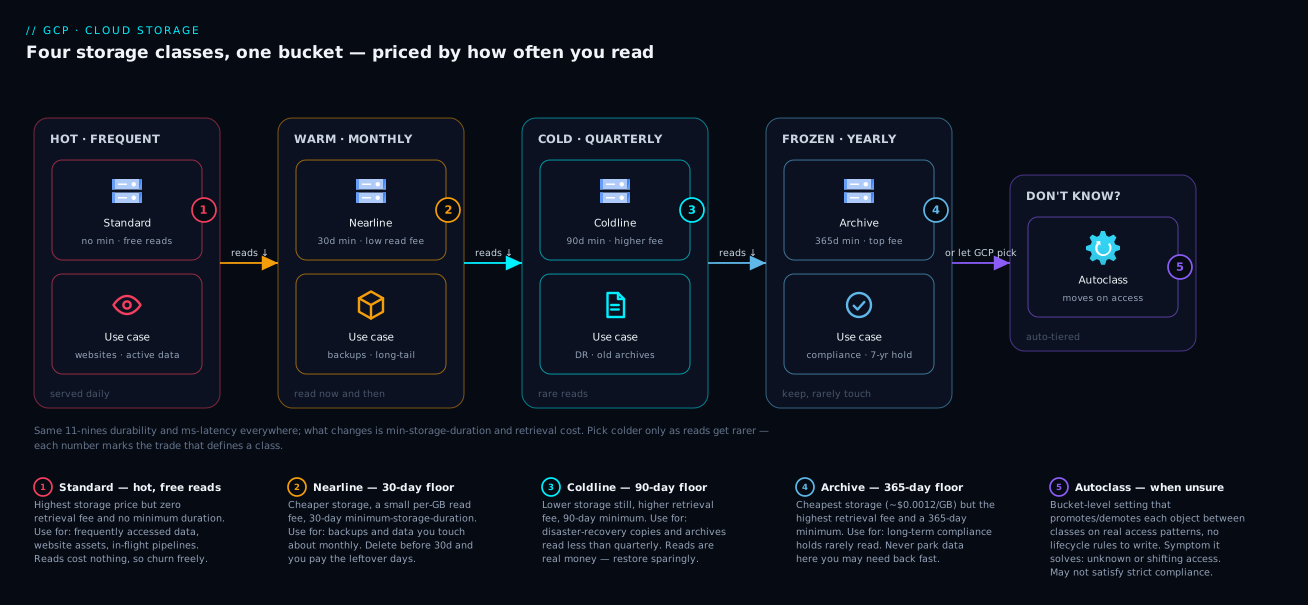
The first diagram is the classes map: it lays the four storage classes side by side as a temperature gradient — Standard (hot, no retrieval fee, no minimum) on the left, through Nearline (warm, 30-day minimum) and Coldline (cold, 90-day minimum), to Archive (frozen, 365-day minimum, highest retrieval fee) on the right. Read it as a trade curve: as you move right the monthly rent falls and the retrieval fee and commitment rise, while durability (eleven nines) and first-byte latency (milliseconds) stay flat across all four. That flat line is the key insight the picture teaches — the colder classes are not slower or less safe, they are a different deal, and the gradient shows exactly what you trade for the cheaper rent.
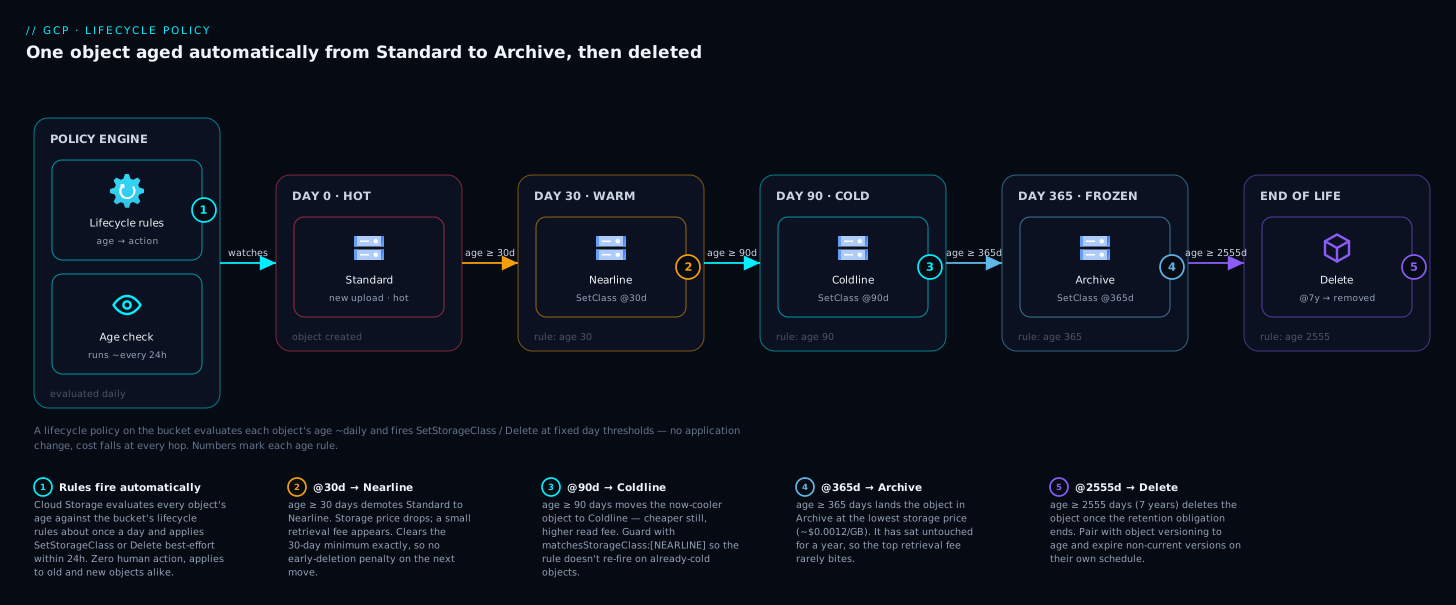
The second diagram traces the lifecycle flow: an object enters in Standard, and as conditions are met (age 30, age 90, age 365) a lifecycle rule’s SetStorageClass action walks it down the tiers — Standard → Nearline → Coldline → Archive — until a Delete action (scoped by version-aware conditions or a disposable prefix) finally expires it. Follow the arrows left to right and you are watching a single object’s economic life: each hop drops its rent and starts a new minimum-duration clock, and the terminal delete is where versioning and soft delete decide whether “deleted” means gone or recoverable for a window. The diagram is the mental model for everything in the lifecycle-rules section — conditions on the left of each arrow, actions on the arrow, classes in the boxes.
The whole method is in those two pictures: the first tells you which deal to put an object on, the second tells you how it moves between deals automatically over time.
Real-world scenario
Northwind Genomics runs a sequencing pipeline on GCP. Raw sequencer output, intermediate alignment files, and final variant-call archives all landed in a single multi-region bucket (US) in Standard, because that is the default and nobody had revisited it. Eighteen months in, the bucket held 620 TB and its Cloud Storage line item was ~$12,400/month — the second-largest item on the GCP invoice after Compute. The data team of three had assumed storage was “just what it costs.”
A cost review forced the question, and the access logs told a clear story. Raw reads (about 180 TB) were processed once within days of upload and then never touched again except for the rare regulatory re-analysis. Intermediate alignments (about 240 TB) were regenerated each pipeline run and effectively disposable after the run completed. Final variant archives (about 200 TB) were read a handful of times a year by researchers and had a seven-year legal retention. Everything had been paying the Standard multi-region rent (~$0.026/GB/mo in US, higher than regional Standard) regardless of how cold it actually was.
The first instinct on the bridge was the dangerous one: “archive everything.” It would have been wrong twice over. The intermediate alignments were rewritten every run — Archive’s 365-day minimum means each regeneration pays an early-deletion penalty, costing more than Standard. And the raw reads, though cold, were occasionally bulk-scanned for re-analysis; Archive’s $0.05/GB retrieval on a 180 TB scan is $9,000 in a single read — one re-analysis erases a year of savings.
The correct policy matched each dataset to its measured pattern. Intermediate alignments were a deletion problem, not a tiering one: a Delete rule on the intermediate/ prefix at age 14 days removed 240 TB of standing storage entirely (the pipeline regenerates them on demand). Raw reads went to Coldline at 30 days — cold, but its $0.02/GB retrieval beats Archive’s $0.05 for the bulk re-scan case. Final archives went to Archive at 90 days with a daysSinceCustomTime hold keyed to each record’s collection date, plus versioning bounded by daysSinceNoncurrentTime: 30. New writes moved to a regional bucket co-located with the pipeline’s compute, cutting both rent and cross-region egress.
The result: standing storage fell from 620 TB to about 380 TB (after deleting intermediates), and the surviving data sat mostly in Coldline and Archive. The monthly bill dropped from ~$12,400 to ~$2,100 — an 83% reduction — with the re-analysis path explicitly costed and accepted (a full raw re-scan would add ~$3,600 in Coldline retrieval, budgeted as an occasional event, not a monthly cost). The lesson written on the wall: “Tier to the access pattern you measured, not the cheapest rent on the page — and the cheapest data is the data you proved you can delete.”
The decisions as a table, because the reasoning per dataset is the transferable part:
| Dataset | Size | Access pattern | Wrong move | Right move | Why |
|---|---|---|---|---|---|
| Intermediate alignments | 240 TB | Disposable after each run | Archive (rewritten → early-deletion penalty) | Delete at 14 days (regenerate on demand) | Cheapest data is deleted data |
| Raw reads | 180 TB | Processed once, rare bulk re-scan | Archive (huge retrieval on re-scan) | Coldline at 30 days, live | $0.02/GB retrieval beats $0.05 for bulk reads |
| Final variant archives | 200 TB | A few reads/year, 7-yr hold | Standard (overpaying rent) | Archive at 90 days + Custom-Time hold | Frozen + legal retention is Archive’s exact use case |
| Bucket location | — | Read by in-region compute | US multi-region |
Regional, co-located | No multi-region need; cuts rent + egress |
Advantages and disadvantages
Tiered storage with lifecycle automation is one of the highest-ROI moves in a GCP estate, but it has sharp edges. Weigh them honestly:
| Advantages | Disadvantages |
|---|---|
| Large, permanent cost reduction for aging data — often 50–85% with zero app changes | Retrieval fees on Nearline/Coldline/Archive can exceed savings if you read cold data often |
| All classes share eleven-nines durability and millisecond latency — colder ≠ slower or less safe | Minimum-duration commitments (30/90/365) penalize early delete/overwrite/transition — bad for churny data |
| Lifecycle rules and Autoclass automate movement — set once, runs forever | A mis-scoped Delete rule can delete live production; the up-to-24h delay obscures testing |
| Autoclass needs no prediction and never charges retrieval/early-deletion on managed objects | Autoclass’s per-object fee hurts buckets of millions of tiny objects; <128 KiB never cools |
| Versioning + soft delete give strong accidental-delete recovery | Those same nets silently multiply stored bytes if not bounded by expiry rules |
| Per-prefix/suffix/Custom-Time targeting makes policies precise | Location type is effectively permanent — a wrong choice means re-copying terabytes |
| Cost reports break spend down by class so optimization is measurable | Operations (Class A/B) and egress can dominate for many-small-objects or cross-region reads |
The model is right for almost any data that ages predictably — backups, logs, media masters, compliance archives. It bites hardest on (1) churny data rewritten faster than a cold class’s minimum, (2) buckets of tens of millions of sub-128 KiB objects where operations and Autoclass per-object fees dominate, and (3) teams that “archive to save money” without costing the retrieval path. Every disadvantage is manageable once you know it exists — which is the entire point of measuring access before you tier.
Hands-on lab
Create a bucket, exercise classes, apply a lifecycle policy with both transition and version-aware deletion, turn on versioning and inspect soft delete, then tear it all down. Everything here is small and cheap (kilobytes); the only meaningful cost is a few operations. Run in Cloud Shell.
Step 1 — Variables and a regional bucket (cheapest, lowest-latency).
export PROJECT_ID=$(gcloud config get-value project)
export BUCKET="kv-lifecycle-lab-$RANDOM"
gcloud storage buckets create gs://$BUCKET \
  --location=us-east1 \
  --default-storage-class=STANDARD \
  --uniform-bucket-level-access
Expected: Creating gs://kv-lifecycle-lab-XXXX/... and no error. Confirm the location/class:
gcloud storage buckets describe gs://$BUCKET \
  --format="json(location, locationType, storageClass)"
Expected: "location": "US-EAST1", "locationType": "region", "storageClass": "STANDARD".
Step 2 — Upload an object in each class and verify.
echo "hot"    > hot.txt
echo "frozen" > frozen.txt
gcloud storage cp hot.txt    gs://$BUCKET/hot.txt
gcloud storage cp frozen.txt gs://$BUCKET/cold/frozen.txt --storage-class=ARCHIVE
gcloud storage ls --long gs://$BUCKET/**
Expected: two objects listed; frozen.txt shows storage class ARCHIVE. Reading it back is millisecond-fast — Archive is online:
gcloud storage cat gs://$BUCKET/cold/frozen.txt # prints "frozen" instantly
Step 3 — Enable versioning, then prove a version is kept on overwrite.
gcloud storage buckets update gs://$BUCKET --versioning
echo "hot v2" > hot.txt
gcloud storage cp hot.txt gs://$BUCKET/hot.txt        # overwrite the live object
gcloud storage ls --all-versions --long gs://$BUCKET/hot.txt
Expected: two generations of hot.txt — one live (hot v2), one noncurrent (hot). The noncurrent version is now billable storage until a rule expires it.
Step 4 — Apply a lifecycle policy (transition + version expiry + prefix delete).
cat > lifecycle.json <<'JSON'
{
  "rule": [
    { "action": { "type": "SetStorageClass", "storageClass": "NEARLINE" },
      "condition": { "age": 30, "matchesStorageClass": ["STANDARD"], "isLive": true } },
    { "action": { "type": "Delete" },
      "condition": { "daysSinceNoncurrentTime": 7 } },
    { "action": { "type": "Delete" },
      "condition": { "numNewerVersions": 2 } },
    { "action": { "type": "Delete" },
      "condition": { "age": 1, "matchesPrefix": ["staging/"] } },
    { "action": { "type": "AbortIncompleteMultipartUpload" },
      "condition": { "age": 7 } }
  ]
}
JSON
gcloud storage buckets update gs://$BUCKET --lifecycle-file=lifecycle.json
Step 5 — Read the policy back and validate it stuck.
gcloud storage buckets describe gs://$BUCKET --format="json(lifecycle_config)"
Expected: the JSON you applied, echoed back with all five rules. (The rules will not fire immediately — Cloud Storage applies lifecycle changes within up to 24 hours; this step only proves the policy is installed, which is the validation that matters in a lab.)
Step 6 — Inspect the soft-delete policy (on by default).
gcloud storage buckets describe gs://$BUCKET --format="json(soft_delete_policy)"
Expected: a policy with a retention duration around 604800 seconds (7 days) — the default safety net you got without asking. Optionally tighten it:
gcloud storage buckets update gs://$BUCKET --soft-delete-duration=0 # disable for the lab
Validation checklist.
| Step | What you did | What it proves |
|---|---|---|
| 1–2 | Regional bucket; object per class | Class is per-object; Archive reads instantly (online) |
| 3 | Versioning + overwrite | Overwrites keep a billable noncurrent version |
| 4–5 | Apply + read lifecycle JSON | Transition, version-expiry and prefix-delete rules install correctly |
| 6 | Inspect soft delete | New buckets default to a 7-day undelete window (billable while retained) |
Teardown (delete everything, including all versions).
gcloud storage rm --recursive gs://$BUCKET
# If versions linger, force-remove the bucket and all generations:
gcloud storage buckets delete gs://$BUCKET
Expected: the bucket and all objects/versions are gone. Total lab cost: a few operations — well under a rupee.
Common mistakes & troubleshooting
The failure modes here are mostly economic (a surprise bill) or data-loss, not crashes. Scan the table, then read the detail for the ones that bite hardest.
| # | Symptom | Root cause | Confirm (command / path) | Fix |
|---|---|---|---|---|
| 1 | Bill didn’t drop after “archiving” cold data | Retrieval fees on frequent reads exceed storage savings | Billing → Cloud Storage SKUs: high “Data Retrieval” line | Move read-often data to a warmer class; cost the read path first |
| 2 | Surprise charge after deleting cold objects | Early-deletion (minimum-duration) penalty | Billing shows “early delete” SKU for N/C/A | Don’t delete/overwrite cold objects before 30/90/365 days |
| 3 | Storage keeps growing despite a Delete rule | Versioning on; Delete only made live objects noncurrent | gcloud storage ls --all-versions shows many generations |
Add daysSinceNoncurrentTime / numNewerVersions rules |
| 4 | Lifecycle rule “doesn’t work” right after applying | Up-to-24h propagation delay | buckets describe --format=...(lifecycle_config) shows it installed |
Wait up to 24h; the policy is correct |
| 5 | A Delete rule wiped live production data | Age-based Delete with no scope |
Review the rule’s condition; check soft delete / versions |
Restore from soft delete/versions; re-scope rule with prefix/version conditions |
| 6 | Can’t enable Autoclass; config rejected | Bucket has SetStorageClass lifecycle rules / matchesStorageClass |
buckets describe shows both |
Remove SetStorageClass rules or don’t enable Autoclass |
| 7 | Operations bill rivals storage bill | Millions of tiny objects → Class A/B ops dominate | Billing → “Class A/B Operations” SKUs | Aggregate small objects; reconsider tiering tiny files |
| 8 | Autoclass bucket bill higher than expected | Per-object management fee on huge object counts; <128 KiB never cools | Billing → Autoclass management SKU | Use lifecycle rules instead for many-tiny-object buckets |
| 9 | daysSinceCustomTime rule never fires |
Custom-Time metadata not set on objects | gcloud storage objects describe → no customTime |
Set Custom-Time on upload (--custom-time) |
| 10 | High cross-region/egress charges | Reads from a different region than the bucket, or multi-region overkill | Billing → “Network egress” / inter-region SKUs | Co-locate bucket with compute; use regional where possible |
| 11 | Objects won’t transition to colder class | Transition age shorter than source min duration → blocked/penalized | Review rule ages vs class minimums | Space ages: 30 → 90 → 365 so each min is met |
| 12 | Soft-deleted/old data still billed | Soft delete + versioning retention windows overlap | buckets describe soft_delete_policy; ls --all-versions |
Tune soft-delete duration; bound versions with rules |
The expanded reasoning for the costliest ones:
1. The bill didn’t drop after “archiving.” Cause: you moved data that is still read regularly into a class with a steep retrieval fee. A dataset scanned monthly in bulk pays Archive’s $0.05/GB every scan; on tens of TB that erases the rent savings. Confirm: in the billing console, filter to Cloud Storage and look at the Data Retrieval SKU — if it’s large, your “cold” data is warm. Fix: match the class to the measured read volume (Coldline or Nearline for occasionally-bulk-read data), and always cost the retrieval path before tiering.
2. Surprise charge after deleting cold objects. Cause: the minimum-duration penalty — deleting an Archive object after a month still bills ~11 months of its rent. Confirm: billing shows an early-delete SKU on the cold class. Fix: let cold objects live out their minimum; if you must churn data, it doesn’t belong in a cold class.
3. Storage grows despite a Delete rule. Cause: on a versioned bucket, a Delete action on a live object just creates a noncurrent version — it doesn’t free space; old versions pile up. Confirm: gcloud storage ls --all-versions shows many generations per key. Fix: add version-aware expiry (daysSinceNoncurrentTime, numNewerVersions). Versioning without expiry is a slow leak.
5. A Delete rule wiped live data. Cause: an unscoped { "age": N, "action": "Delete" } matched live production objects. Confirm: read the rule; if it has no prefix/class/isLive fence, it deletes everything that age. Fix: recover from soft delete (default 7-day window) or noncurrent versions immediately, then re-scope every Delete rule with prefix/version conditions and test on a copy bucket first. This is why the safe-policy template fences every Delete.
Best practices
- Tier to measured access, not to the cheapest rent. Pull access logs (or use Autoclass) before choosing a class. The right class is a function of both storage volume and read volume.
- Cost the retrieval path before archiving. Estimate monthly GB read × the class’s per-GB retrieval fee; if it rivals the storage savings, pick a warmer class. The cheap rent is a trap for read-often data.
- Use Autoclass when access is unknown, bursty, or re-reads happen. Its no-retrieval-fee promotion-on-read pays for the per-object fee in data-lake/ML/shared-bucket workloads. Use explicit lifecycle rules when aging is predictable (logs, dated backups).
- Space lifecycle transitions to respect minimum durations. 30 → 90 → 365 days so each class meets its commitment before the next hop — never stack transitions that trigger early-deletion charges.
- Never write an unscoped age-based
Deleterule. Always fence deletion with a prefix, a storage-class match, or version-aware conditions; test on a throwaway bucket; remember the up-to-24h delay. - Pair versioning with mandatory version-expiry rules.
numNewerVersionsto cap history anddaysSinceNoncurrentTimeto age out old versions — versioning without expiry is a silent cost leak. - Right-size soft-delete retention for churn. The 7-day default is a good safety net; tune up to 90 days for sensitive data, or down (with a deliberate alternative recovery story) for high-churn buckets where soft-deleted copies add up.
- Choose location for where data is read. Regional + co-located compute is cheapest and lowest-latency; reserve multi/dual-region for genuine global-serving or DR needs. Remember it’s effectively permanent.
- Aggregate many tiny objects before tiering. Sub-128 KiB objects never cool under Autoclass and inflate operations costs; tar/parquet them into larger objects first.
- Set Custom-Time for event-based retention. Drive seven-year holds off
daysSinceCustomTimekeyed to a business date, not upload date. - Put lifecycle, versioning and soft-delete config in Terraform. Reviewed in PRs, a Delete rule’s scope is far safer when a second engineer signs off on it.
- Alert on storage SKUs, not just total spend. A budget alert on the Cloud Storage Data-Retrieval and Class-A-Operations SKUs catches a bad tiering decision before the monthly invoice does.
Security notes
- Least-privilege on bucket administration. Lifecycle, versioning and soft-delete settings are changed via
storage.buckets.update; grant Storage Admin narrowly and prefer per-bucket IAM. A user who can edit lifecycle rules can write a Delete rule — treat that permission as destructive. See GCP IAM and Service Accounts: Roles, Bindings and Least Privilege. - Use uniform bucket-level access. Disable per-object ACLs (
--uniform-bucket-level-access) so access is governed solely by IAM — simpler to reason about and audit than legacy ACLs. - Soft delete and versioning are ransomware/oops insurance. Keep soft delete on (default 7 days; raise for sensitive buckets) and enable versioning on critical data so a malicious or accidental delete is recoverable. They protect against the very Delete rules you write.
- Object Retention / Bucket Lock for true immutability. For WORM/compliance data that must not be deletable, use a retention policy (optionally locked) so even an admin can’t delete before the retention elapses — stronger than a lifecycle rule, which only adds deletion.
- Encryption is on by default; manage keys deliberately. All objects are encrypted at rest with Google-managed keys; use CMEK (Cloud KMS) where you need control over the key, rotation, and the ability to revoke access by disabling the key.
- Perimeters for exfiltration risk. For regulated data, place buckets inside a VPC Service Controls perimeter so even valid credentials can’t read data out to an untrusted network — see GCP VPC Service Controls: Build Data Exfiltration Perimeters.
- Don’t leak via public access. Avoid
allUsers/allAuthenticatedUsersgrants unless the bucket is intentionally a public website; enable public access prevention at the org or bucket level.
Cost & sizing
The bill drivers, ranked, and how each interacts with the optimization:
- At-rest storage usually dominates until you tier — then it shrinks dramatically. The class-rent ratio is roughly Standard : Nearline : Coldline : Archive = 17 : 8 : 3 : 1, so moving the cold majority of a bucket from Standard to Coldline/Archive is typically a 60–85% cut on the standing-storage line.
- Data retrieval is the silent killer of bad tiering. Reads from Nearline (~$0.01/GB), Coldline (~$0.02/GB) and Archive (~$0.05/GB) add up fast on bulk scans. Always multiply expected monthly read-GB by these before archiving.
- Operations matter at high object counts. Class A (writes/lists) cost far more than Class B (reads), and colder classes raise both. Millions of tiny objects can make operations a top-three line item — aggregate them.
- Minimum-duration penalties punish churn in cold classes; budget cold classes only for data that will live out 30/90/365 days.
- Network egress (cross-region, internet) is billed separately and can exceed storage for read-heavy or mis-located buckets — co-locate.
- Autoclass adds a per-object management fee but removes retrieval/early-deletion fees — net-positive for unpredictable access, net-negative for huge tiny-object counts.
A rough monthly picture for 100 TB of mixed data, US region, to anchor the magnitude:
| Strategy | Standing storage / mo | When it wins |
|---|---|---|
| All Standard (no tiering) | 102,400 GB × $0.020 = ~$2,048 | Truly hot data only |
| 20% Standard / 50% Nearline / 30% Coldline | $410 + $512 + $123 = ~$1,045 | Mixed warm/cold, modest reads |
| 10% Standard / 30% Coldline / 60% Archive | $205 + $123 + $74 = ~$402 | Mostly frozen + occasional reads |
| Autoclass (typical settling) | class rents by access + per-object fee | Unknown/bursty access patterns |
Add retrieval, operations and egress on top per your actual access — the table is standing storage only, deliberately, because that is the line tiering attacks. There is no free tier discount that changes the strategy, but GCP’s always-free tier includes a small monthly allotment of Standard storage in specific US regions for experimentation. The honest floor for production cost optimization is “measure access, then tier” — the arithmetic above is why an 80%+ reduction is routine when most of a bucket is genuinely cold.
Interview & exam questions
1. What are the three trade-offs that distinguish the four Cloud Storage classes? Storage rent (falls Standard → Archive), retrieval fee (rises Standard → Archive; Standard has none), and minimum storage duration (none / 30 / 90 / 365 days). All four share eleven-nines durability and millisecond first-byte latency — the colder classes are a different price deal, not slower or less safe.
2. Why can moving data to Archive cost more than leaving it in Standard? Because Archive charges a ~$0.05/GB retrieval fee and a 365-day minimum duration. Data that’s read frequently or rewritten often pays those fees repeatedly — a monthly bulk scan of tens of TB, or churny rewrites, can exceed the storage savings. Match the class to measured read volume, not to the cheapest rent.
3. What are the four components of a Cloud Storage bill? At-rest storage (GB-months), data retrieval (per-GB reads from colder classes), operations (Class A writes/lists vs Class B reads, per 1,000 calls), and minimum-duration/early-deletion charges. (Network egress is a fifth, separate, charge.) Optimizing storage alone while ignoring retrieval and operations can make the total worse.
4. How does Autoclass differ from lifecycle SetStorageClass, and when do you pick each? Autoclass moves objects by actual access (promoting back to Standard on read) with no retrieval or early-deletion fees but a per-object management fee; lifecycle rules move objects by predicted conditions (age, etc.) and charge retrieval/early-deletion normally. They’re mutually exclusive on a bucket. Use Autoclass for unknown/bursty access; use lifecycle rules for predictable aging like dated logs and backups.
5. On a versioned bucket, why might a Delete lifecycle rule fail to reduce storage, and how do you fix it? A Delete on a live object just makes it noncurrent — the prior bytes remain billable as a noncurrent version. To actually reclaim space you add version-aware conditions: daysSinceNoncurrentTime (age out old versions) and/or numNewerVersions (cap how many generations you keep).
6. What is the minimum storage duration and when does the penalty apply? It’s a commitment per class — 30 (Nearline), 90 (Coldline), 365 (Archive) days. If you delete, overwrite, or transition an object to another class before its minimum elapses, you’re charged for the remaining days at that class’s rate. It’s why churny data is wrong for cold classes and why lifecycle transition ages must be spaced to meet each minimum.
7. Explain the difference between object versioning and soft delete. Versioning is opt-in and keeps prior generations on overwrite and delete (noncurrent versions, billable until expired). Soft delete is on by default with a 7-day window (configurable 7–90 days or 0) and makes deleted objects — live or noncurrent — restorable for that window. Versioning protects overwrites and deletes; soft delete is a delete-only safety net that works even without versioning.
8. How do location types affect cost and availability, and can you change one later? Regional is cheapest and lowest-latency to in-region compute (99.9% SLA); dual-region and multi-region cost more per GB but offer geo-redundancy and higher availability (99.95%). Durability is eleven nines regardless. Location is set at creation and effectively can’t be changed — moving it means copying every object to a new bucket.
9. Why can a bucket of millions of tiny objects have a surprising bill, and what do you do? Operations (Class A/B, per 1,000 calls) scale with object count and cost more in colder classes; Autoclass’s per-object fee also scales with count and objects < 128 KiB never cool. The fix is to aggregate small objects (tar/parquet) into larger objects before tiering, or keep them in Standard and fix the access pattern.
10. You set a daysSinceCustomTime rule but it never fires. Why? The objects have no Custom-Time metadata set, so the condition has nothing to measure from. Set Custom-Time on upload (e.g. --custom-time) keyed to the relevant business date; then the rule counts days from that timestamp rather than from creation.
11. What does AbortIncompleteMultipartUpload do and why include it? It garbage-collects the parts of multipart/resumable uploads that never completed, which otherwise sit as billable storage invisibly. It’s pure savings with no downside, so a rule like { "age": 7, "AbortIncompleteMultipartUpload" } is safe to include on essentially every bucket.
12. A lifecycle change “doesn’t work” when you test it five minutes later. What’s happening? Lifecycle configuration changes can take up to 24 hours to take effect, and rule evaluation is asynchronous. Confirm the policy is installed via buckets describe (that’s the real validation in a test); don’t expect immediate transitions/deletions.
These map to the Google Associate Cloud Engineer (manage Cloud Storage, lifecycle, classes) and Professional Cloud Architect (designing cost-optimized, durable storage; data lifecycle and compliance) exams; the cost-modeling angle also appears in Professional Data Engineer. A compact mapping:
| Question theme | Primary cert | Objective area |
|---|---|---|
| Classes, trade-offs, min duration | ACE / PCA | Plan and configure storage |
| Lifecycle rules, versioning, soft delete | ACE | Manage Cloud Storage |
| Autoclass vs lifecycle, cost modeling | PCA / PDE | Design cost-optimized data solutions |
| Location types, durability, availability | PCA | Design for reliability and residency |
| Retention/Bucket Lock, CMEK, perimeters | PCA / Security | Compliance and data protection |
Quick check
- You have 50 TB of backups read in bulk about once a month. Which class is the likely best fit, and why is Archive probably wrong here?
- Name the four components of a Cloud Storage bill.
- On a versioned bucket, why does a plain age-based
Deleterule often not shrink your storage, and what two conditions fix it? - True or false: Archive objects take hours to retrieve because they’re on cold media.
- Your bucket has
SetStorageClasslifecycle rules and you try to enable Autoclass — it’s rejected. Why?
Answers
- Nearline (or Coldline) — monthly bulk reads are too frequent for Archive’s $0.05/GB retrieval, which on 50 TB is $2,500 per scan and would dwarf the storage savings. Nearline’s $0.01/GB ($500/scan) or Coldline’s $0.02/GB ($1,000/scan, but cheaper rent) fits “read about monthly.” Archive is for data read less than once a year.
- At-rest storage (GB-months), data retrieval (per-GB reads from colder classes), operations (Class A writes/lists and Class B reads, per 1,000 calls), and minimum-duration / early-deletion charges. (Network egress is a separate fifth charge.)
- On a versioned bucket,
Deleteon a live object only makes it noncurrent — the bytes stay billable as an old version. Fix withdaysSinceNoncurrentTime(age out noncurrent versions) andnumNewerVersions(cap how many generations you keep). - False. All Cloud Storage classes, including Archive, are online with millisecond first-byte latency — “Archive” describes the price (cheapest rent, highest retrieval fee, 365-day minimum), not slow retrieval. There is no thaw delay.
- Autoclass and a lifecycle
SetStorageClassaction (or amatchesStorageClasscondition) are mutually exclusive on a bucket — both are class-transition engines and would conflict. Remove the SetStorageClass rules, or don’t enable Autoclass. (A lifecycleDeleterule can coexist with Autoclass.)
Glossary
- Storage class — the price-and-performance deal attached to an object (Standard, Nearline, Coldline, Archive); sets storage rent, retrieval fee, and minimum duration.
- Standard — hot tier: highest rent, no retrieval fee, no minimum duration; the default class and the home for short-lived data.
- Nearline / Coldline / Archive — progressively colder tiers: lower rent, higher per-GB retrieval fee, longer minimum duration (30 / 90 / 365 days).
- At-rest storage — the GB-month rent for bytes stored, billed per class rate.
- Data retrieval fee — a per-GB charge for reading data from Nearline/Coldline/Archive; Standard has none.
- Operations (Class A / Class B) — billed per 1,000 API calls; Class A = writes/lists (
insert,list,rewrite), Class B = reads (get,getMetadata); colder classes cost more per op. - Minimum storage duration — the commitment per class (30/90/365 days); early delete, overwrite, or transition incurs a charge for the remaining days.
- Lifecycle rule — a declarative policy pairing an action (
SetStorageClass,Delete,AbortIncompleteMultipartUpload) with conditions (age,numNewerVersions, etc.); runs automatically, up to 24h to take effect. - Autoclass — bucket feature that moves objects between classes by actual access (promoting to Standard on read) with no retrieval/early-deletion fees but a per-object management fee; mutually exclusive with
SetStorageClassrules. - Object versioning — opt-in feature that keeps prior generations on overwrite/delete as billable noncurrent versions; needs expiry rules to bound cost.
- Soft delete — default 7-day (configurable 7–90, or 0) window during which deleted objects are restorable, billed at their class rate while retained.
- Noncurrent version — a prior generation of an object kept by versioning; addressed via
--all-versions, expired viadaysSinceNoncurrentTime/numNewerVersions. - Custom-Time — an object metadata timestamp you set; drives
customTimeBefore/daysSinceCustomTimefor event-based retention. - Location type — regional (one region, cheapest), dual-region (a specific pair), or multi-region (broad geography); set at creation, effectively permanent.
- Class A / Class B operations — see Operations.
- Retention policy / Bucket Lock — immutability controls that prevent deletion before a retention period (optionally locked, WORM); stronger than lifecycle deletion.
- CMEK — customer-managed encryption keys via Cloud KMS, for control over the key protecting your objects.
Next steps
You can now classify any dataset, predict its bill, write a safe lifecycle policy, and choose between Autoclass and explicit rules. Build outward:
- Next: Cloud Storage Classes Decoded: Standard, Nearline, Coldline, Archive — and Lifecycle Rules — the mental-model-first companion if you want the analogy and beginner framing reinforced.
- Related: GCP Cloud Monitoring and Operations: Observability Built In — wire budget alerts on the Cloud Storage retrieval and operations SKUs so a bad tiering decision pages you before the invoice does.
- Related: GCP IAM and Service Accounts: Roles, Bindings and Least Privilege — lock down who can edit lifecycle rules (a Delete-rule permission is destructive).
- Related: GCP VPC Service Controls: Build Data Exfiltration Perimeters — wrap regulated buckets in a perimeter so valid credentials can’t read data out to the internet.
- Related: BigQuery for Data Analytics: Warehousing, Querying and Visualization — the analytics consumer that often drives your retrieval-fee bill when it scans buckets.