Here is a bill that confuses almost everyone the first time they see it: a team stored 40 TB of finished video renders, log archives and database backups in Google Cloud Storage, paid for it month after month, and never once looked at 95% of those files again. They were paying the premium price to keep data they were only keeping “just in case.” When someone finally moved that cold data into the right storage class, the monthly bill for those objects dropped by roughly 85% — and not one byte was deleted. That is the entire promise of storage classes, and it is the single most overlooked lever in a GCP bill.
A storage class is just a price-and-performance tier you attach to your data. Every object gets one. They all sit in the same kind of bucket, return bytes through the same API, and are equally durable. What changes between Standard, Nearline, Coldline and Archive is the deal: the cheaper the monthly rent, the more it costs to read the data and the longer Google asks you to commit to keeping it. Pick wrong and you either overpay every month (data idling in Standard) or get a surprise bill when you read “cold” data more often than you promised.
This article gives you the mental model first — one analogy that makes the whole thing click — then the comparison grids, a worked example with real numbers, the decision table you’ll actually use, and lifecycle rules: the automation that watches an object’s age and moves it down the tiers for you. By the end you’ll classify any dataset in five seconds, and know exactly why the “cheap” classes are sometimes the most expensive mistake you can make.
What problem this solves
Not all data is accessed the same way, but most teams store it as if it were — treating Cloud Storage like one bucket of “files in the cloud” at one price. In reality your data has a temperature: hot (read constantly — a website’s images), warm (read occasionally — last quarter’s reports), cold (read rarely — a backup from March), and frozen (legally kept for seven years, prayed never needed). Paying the hot price for frozen data is pure waste.
What breaks is your budget, quietly. Storage doesn’t crash or page you at 2 a.m.; it bleeds money in the background. A 100 TB bucket of mostly-cold backups in Standard costs about $2,000/month in the US. The same data, tiered into Archive, costs about $120/month — a ~$22,000/year difference for the exact same bytes, in the exact same project, retrieved at the exact same speed. Nobody notices, because storage is rarely the line item anyone audits.
Who hits this: every team that keeps backups, logs, compliance archives, media masters, or ML datasets — anything tagged “for audit” or “just in case.” The fix is almost never “delete data” (scary, often disallowed) — it’s “stop paying the hot price for cold data,” and Cloud Storage gives you both a manual switch (set the class) and an automatic one (lifecycle rules).
| Data “temperature” | How often you read it | Real example | Right storage class | What you’d overpay in Standard |
|---|---|---|---|---|
| Hot | Many times a day | Website images, live app data | Standard | Nothing — this is correct |
| Warm | About once a month | Last quarter’s reports, recent logs | Nearline | ~2.5x the storage rent |
| Cold | A few times a year | Older backups, finished projects | Coldline | ~5x the storage rent |
| Frozen | Almost never (legal hold, DR) | 7-year compliance archive, tape replacement | Archive | ~17x the storage rent |
Learning objectives
By the end of this article you can:
- Explain what a storage class is using a plain-English mental model, and why all four classes are equally durable and equally fast to read.
- Tell Standard, Nearline, Coldline and Archive apart by their three trade-offs: storage price, retrieval cost, and minimum storage duration.
- Read the hidden costs that trip everyone up — retrieval fees, Class A/B operation charges, and early-deletion (minimum-duration) fees — and predict when a “cheap” class becomes expensive.
- Run the break-even math: calculate at what access frequency Nearline beats Standard, and Archive beats Coldline, for a real dataset.
- Write a lifecycle rule that ages objects from Standard → Nearline → Coldline → Archive (and optionally deletes them) automatically, with both
gcloudand Terraform. - Pick the right class in five seconds using a decision table, and avoid the four classic anti-patterns (cold class for hot data, tiny files in Archive, retrieving “frozen” data monthly, deleting before the minimum duration).
- Understand how class interacts with bucket location, Autoclass, soft delete, versioning and encryption so your cost optimization doesn’t break durability or recovery.
Prerequisites & where this fits
You should know what an object store is: Cloud Storage holds objects (files — an image, a .zip, a Parquet file) inside buckets (named containers), addressed like gs://my-bucket/backups/2026/march.tar.gz. Unlike a disk you don’t mount it; you read and write whole objects over HTTPS or the gcloud storage CLI. You need a billing-enabled GCP project and the gcloud CLI (or Cloud Shell). No prior knowledge of the classes is assumed — that’s what we’re building.
Where this fits: storage classes are the cost dimension of Cloud Storage. The location dimension (regional vs multi-region — GCP Regions and Zones, Explained) decides where your bytes live; the class decides how much you pay to keep and read them there. The two are independent — Standard regional or Archive multi-region are both valid. It pairs with the more advanced Google Cloud Storage Classes and Lifecycle: Cost-Optimized Data for the operator’s reference. Storage also feeds downstream: it’s the landing zone for BigQuery analytics and an event source for Pub/Sub pipelines, and access is governed by GCP IAM.
Core concepts
Everything about storage classes follows from one analogy. Get this and the pricing stops being mysterious.
The mental model: a storage company with four plans
Imagine a self-storage company that offers four plans:
- Standard is a unit on the ground floor, by the entrance. Highest monthly rent, but you can drive up and grab your things any time, free, as often as you like. For stuff you use weekly.
- Nearline is a unit on the third floor. Cheaper rent — but they charge a small fee each time you go up to get something, and they ask you to keep the unit for at least 30 days. For boxes you open maybe once a month.
- Coldline is a unit in the basement across town. Much cheaper rent, a bigger fee to retrieve, and a 90-day minimum commitment. For things you’ll open a couple of times a year.
- Archive is a deep vault in a salt mine three states away. Almost free to rent, but the largest retrieval fee and a 365-day minimum. For the box you legally must keep but pray you never open.
Now the insight that surprises everyone: in Cloud Storage all four “units” are in the same building, and when you DO retrieve, the box comes back in milliseconds — even from Archive. Unlike physical cold storage (or AWS Glacier’s older tiers, where you wait hours), GCP’s cold classes are not slow to read. The penalty for “cold” is purely financial, not temporal: you pay more to read, but read just as fast. Clearing this misconception changes how you design.
So a storage class is a bet on how often you’ll read the data. Read it rarely → take the cheap rent and accept the retrieval fee you’ll seldom pay. Read it constantly → pay the high rent and read for free. The classes differ on just three numbers.
The three numbers that define every class
Every class is just a point on three sliders. There are no other moving parts.
| The number | What it means | Direction as you go colder | Why it exists |
|---|---|---|---|
| Storage price (per GB-month) | The monthly “rent” to keep a byte | Goes down (cheaper) | Colder data uses cheaper, lower-priority infrastructure |
| Retrieval fee (per GB read) | A charge to read the data back out | Goes up (more expensive) | Google subsidizes the rent by charging for the rare reads |
| Minimum storage duration | You’re billed as if you kept it this long, even if you delete sooner | Goes up (longer commit) | Colder classes assume long-term keeping; deleting early = an “early-deletion fee” |
Read those three together and the pricing model is just a see-saw: storage price goes down, retrieval fee and minimum duration go up. That’s it. A class fits your data only if you read it rarely enough that the rent savings outweigh the retrieval fees you’ll actually incur, and you’ll keep it past the minimum duration anyway.
What is the same across all classes
Just as important is what does not change. A colder class never costs you durability, data availability when you read, or read speed. What’s identical:
| Property | Standard / Nearline / Coldline / Archive |
|---|---|
| Durability (design) | 99.999999999% (“eleven nines”) annual — your data is equally safe in every class |
| First-byte latency on read | Milliseconds — Archive is not slow to read, just expensive to read |
| API and tools | Identical: same gcloud storage, same client libraries, same gs:// paths |
| Encryption at rest | Always on (Google-managed by default; you can supply your own keys) |
| Set per-object | Class lives on each object, not just the bucket — you can mix classes in one bucket |
| Max object size | 5 TB per object in every class |
Two subtleties hide in that “set per-object” row. First, the bucket has a default storage class that new objects inherit unless told otherwise — but any object can override it. Second, the availability SLA does differ slightly by class and location (Standard multi-region is offered at a higher availability SLA than the cold classes), but durability — whether your bytes survive — is the same eleven-nines design everywhere. Don’t conflate the two: for cost decisions, durability is constant.
The four classes, side by side
Now the reference grid — US list prices and structural numbers as of 2026. Exact per-GB figures vary by region and change over time, so confirm the current rate on the pricing page before modeling a big bill; the ratios and structure below are stable and are what you reason with.
| Standard | Nearline | Coldline | Archive | |
|---|---|---|---|---|
| Mental model | Hot / live data | Read ~monthly | Read ~quarterly | Read ~yearly or never |
| Storage (per GB-month, US) | ~$0.020 | ~$0.010 | ~$0.004 | ~$0.0012 |
| Retrieval fee (per GB read) | $0 (none) | ~$0.01 | ~$0.02 | ~$0.05 |
| Minimum storage duration | None | 30 days | 90 days | 365 days |
| Read speed | ms | ms | ms | ms |
| Best for | Websites, app data, active datasets | Backups read monthly, recent logs | Backups/DR read a few times a year | Compliance, legal hold, tape replacement |
| The trap | Overpaying for cold data | Retrieving more than monthly | Frequent reads, tiny objects | Reading it at all regularly; deleting early |
A few things to internalize from this grid:
- Storage rent roughly halves at each step (0.020 → 0.010 → 0.004 → 0.0012). Archive is about 16–17x cheaper to store than Standard.
- Retrieval is free only in Standard. Every other class charges per GB you read. This is the line item that ruins a “smart” cost optimization when someone reads the cold data often.
- The minimum duration is a commitment, not a lock. You can delete an Archive object after one day — but you’ll be charged as if it lived 365 days. That charge is the early-deletion fee (also called a minimum-storage-duration charge).
Why the cheap classes charge you to read your own data
This feels unfair until you see the logic. Google offers Archive at ~$0.0012/GB only because it assumes you almost never read it — letting it place the data on cheaper, denser infrastructure. The retrieval fee both makes that assumption true and recoups cost on the rare reads. It isn’t a bolted-on gotcha; it’s the mechanism that makes cheap rent possible. The deal is explicit: you trade “free reads” for “cheap rent,” and it only pays off if you read rarely.
The hidden costs everyone forgets
Storage rent is the obvious number everyone compares. The bill surprises come from three other charges a naive comparison misses — they separate someone who saves money from someone who moves data to a “cheaper” class and somehow pays more.
1. Retrieval (data-read) fees
Reading an object in Nearline/Coldline/Archive costs a per-GB fee on top of any network egress. Read a 1 TB Coldline backup and you pay roughly $20 to get it back — every time. Restore it monthly to test and that’s $240/year in retrieval alone, which can wipe out the rent savings versus Nearline. The rule: the rarer your reads, the colder you can safely go.
2. Operations (Class A and Class B) charges
Every API call costs a tiny amount, grouped into two buckets. Class A = the “writing/listing” calls (uploads, compose, listing); Class B = the “reading” calls (downloads, metadata). Fractions of a cent each — but more expensive in colder classes, and they explode with millions of tiny objects. 50 million 10 KB objects cost far more in operations to read than a few large objects holding the same bytes.
| Operation class | Example operations | Charged per | Cost behavior across classes |
|---|---|---|---|
| Class A (mutating/listing) | objects.insert (upload), objects.list, rewrite, compose |
Per 1,000 operations | Cheap in Standard; higher in cold classes |
| Class B (reading) | objects.get (download), objects.getIamPolicy |
Per 10,000 operations | Cheap in Standard; higher in cold classes |
| Free | delete, listing buckets, getting bucket metadata |
— | No charge |
The practical lesson: Archive loves large objects and hates tiny ones. Putting ten million tiny log lines as individual objects into Archive is an anti-pattern — the per-operation and per-object overhead dominates. Tar/zip them into big bundles first.
3. Early-deletion (minimum-duration) fees
If you delete, overwrite, or move to another class an object before it has lived out its class’s minimum duration, you’re billed for the remaining days as if it had stayed. Delete a Coldline object after 10 days and you pay for the other 80 days of “rent” you skipped.
| Class | Minimum duration | Delete/replace after 1 day → you’re charged for… | The implication |
|---|---|---|---|
| Standard | None | Nothing | Churn freely |
| Nearline | 30 days | 30 days of storage | Don’t put short-lived data here |
| Coldline | 90 days | 90 days of storage | Only for data you’ll keep a quarter+ |
| Archive | 365 days | 365 days of storage | Only for truly long-term data |
This is why lifecycle transitions to a colder class should fire on age, sequenced to clear each minimum. Move an object to Coldline at day 30 and delete it at day 60, and you pay an early-deletion fee for 60 of the required 90 days. Stagger your tiers so each lives out (or near) its minimum.
Picking a class in five seconds: the decision table
You don’t need to memorize prices. You need one question: how often will I read this data? That single answer maps almost perfectly to a class.
| If you’ll read the data… | And you’ll keep it for… | Pick | Because |
|---|---|---|---|
| Multiple times a day / it’s serving users | Any duration | Standard | Retrieval is free; you read too often for any other class to win |
| About once a month | At least a month | Nearline | Rent is half of Standard; one read/month barely dents it |
| A few times a year | At least a quarter | Coldline | Rent is ~5x cheaper; rare reads make the retrieval fee negligible |
| Almost never (legal/DR only) | A year or more | Archive | Rent is ~17x cheaper; you’ll likely never pay a retrieval fee |
| You genuinely don’t know the pattern | Unknown | Autoclass (let GCP decide) | GCP moves each object between classes based on its actual access |
That last row is the escape hatch. Autoclass is a bucket setting where Google automatically promotes objects to Standard when read and demotes idle ones toward colder classes — with no retrieval or early-deletion fees for the transitions it manages, for a small per-object management fee. Use it when access is unpredictable or you don’t want to design rules. Use explicit classes + lifecycle rules when you know the pattern (e.g., “logs hot for 30 days, then archived 7 years”) and want deterministic behavior. One caveat: you can’t run Autoclass and lifecycle class-change rules on the same bucket — pick one model.
A worked example with real numbers
Models stick when you run the numbers once. Take a concrete dataset and find the cheapest correct home.
The dataset: “DataFlow Analytics” keeps 10 TB of nightly database exports — each a ~30 GB file, retained 90 days for point-in-time recovery, then deleted. They restore one to verify about once a month, and do a real disaster restore twice a year. So: 10 TB stored, ~14 reads/year, each ~30 GB.
Let’s compare keeping all 10 TB in each class. Storage rent first (10,000 GB × per-GB rate × 12 months, rounded):
| Class | Storage rent (10 TB × 12 mo) | + Retrieval (14 reads × 30 GB) | + Early-deletion risk at 90-day delete | Effective annual cost |
|---|---|---|---|---|
| Standard | 10,000 × $0.020 × 12 = $2,400 | $0 (free) | None | ~$2,400 |
| Nearline | 10,000 × $0.010 × 12 = $1,200 | 420 GB × $0.01 ≈ $4 | OK — kept ≥30 days | ~$1,204 |
| Coldline | 10,000 × $0.004 × 12 = $480 | 420 GB × $0.02 ≈ $8 | OK — kept exactly 90 days | ~$488 |
| Archive | 10,000 × $0.0012 × 12 = $144 | 420 GB × $0.05 ≈ $21 | Bad — deleting at 90 days triggers ~275 days of early-deletion fee | ~$144 storage + a large penalty |
The lesson jumps out. Coldline wins at ~$488/year — a quarter of Standard — because reads are rare (retrieval fee is trivial) and the data is kept exactly 90 days (just meeting Coldline’s minimum). Archive is cheapest on rent ($144) but wrong here: its 365-day minimum means deleting at day 90 incurs an early-deletion fee for the missing ~275 days. Retrieval is a rounding error in every cold class because reads are rare — proving the rule that read frequency, not retrieval price, picks the class.
Now flip one variable: restore an export every single day (testing automation) — 365 reads × 30 GB ≈ 10,950 GB/year. Coldline’s retrieval fee balloons to 10,950 × $0.02 ≈ $219, and Archive’s to 10,950 × $0.05 ≈ $548, now larger than Archive’s entire storage rent. The see-saw tips: rent savings no longer cover retrieval, and Nearline or Standard would win. Same data, different access pattern, different answer — that’s the whole game.
Lifecycle rules: the automation that does this for you
Manually re-classing objects as they age is a chore nobody keeps up with. Object Lifecycle Management is the built-in automation: attach rules to a bucket, GCP evaluates them about once a day, and when an object matches a rule’s conditions it performs the action — SetStorageClass (demote to a colder class) or Delete. No code, no cron, no Cloud Function. This is how “logs are hot for 30 days, then Coldline for a year, then deleted” becomes a policy instead of a calendar reminder.
The shape of a rule
A lifecycle rule is an action plus a set of conditions (ALL conditions must be true for the action to fire). The conditions are how you express “old enough” or “outdated.”
| Condition | Meaning | Typical use |
|---|---|---|
age |
Days since the object was created | “After 30 days, move to Nearline” |
createdBefore |
Created before a fixed date | One-time cleanup of legacy data |
daysSinceCustomTime |
Days since a custom timestamp you set | Age from “last business event,” not upload |
isLive |
Whether it’s the current (live) version | Target only old non-current versions |
numNewerVersions |
Keep N versions, act on the rest | “Delete all but the 3 newest versions” |
matchesStorageClass |
Only objects currently in these classes | Prevent re-acting on already-cold objects |
matchesPrefix / matchesSuffix |
Path or extension match | Only logs/ or only .tmp files |
daysSinceNoncurrentTime |
Days since a version became non-current | Clean up superseded versions after N days |
And the actions:
| Action | What it does | Notes |
|---|---|---|
SetStorageClass |
Moves the object to a colder class | Only “downward” useful transitions; counts as a Class A op |
Delete |
Removes the object (or version) | On a versioned bucket, deleting the live object makes it non-current, not gone |
A complete tiering policy in gcloud
Here’s a real policy applying the sequencing rule from earlier: Standard → Nearline at 30 days → Coldline at 90 → Archive at 365 → delete at 7 years (2,555 days), each step landing as the prior class’s minimum is satisfied. First, write the rules to a JSON file:
{
  "rule": [
    {
      "action": { "type": "SetStorageClass", "storageClass": "NEARLINE" },
      "condition": { "age": 30, "matchesStorageClass": ["STANDARD"] }
    },
    {
      "action": { "type": "SetStorageClass", "storageClass": "COLDLINE" },
      "condition": { "age": 90, "matchesStorageClass": ["NEARLINE"] }
    },
    {
      "action": { "type": "SetStorageClass", "storageClass": "ARCHIVE" },
      "condition": { "age": 365, "matchesStorageClass": ["COLDLINE"] }
    },
    {
      "action": { "type": "Delete" },
      "condition": { "age": 2555 }
    }
  ]
}
Then apply it to the bucket and read it back to confirm:
# Apply the lifecycle policy from the JSON file
gcloud storage buckets update gs://kv-backups-prod \
  --lifecycle-file=lifecycle.json

# Verify what's now attached
gcloud storage buckets describe gs://kv-backups-prod \
  --format="json(lifecycle_config)"
The matchesStorageClass condition on each transition matters: it stops a rule from re-firing on objects that have already moved on, which keeps GCP from doing pointless rewrites (each of which is a billable Class A operation).
The same policy in Terraform
If you manage infrastructure as code, the lifecycle rules live right on the bucket resource. This is the recommended way to keep the policy reviewable and version-controlled:
resource "google_storage_bucket" "backups" {
  name          = "kv-backups-prod"
  location      = "US"          # multi-region; or a single region like "us-central1"
  storage_class = "STANDARD"    # the bucket's DEFAULT class for new objects

  # Recover from accidental deletes/overwrites for 7 days
  soft_delete_policy {
    retention_duration_seconds = 604800
  }

  lifecycle_rule {
    condition { age = 30, matches_storage_class = ["STANDARD"] }
    action {
      type          = "SetStorageClass"
      storage_class = "NEARLINE"
    }
  }
  lifecycle_rule {
    condition { age = 90, matches_storage_class = ["NEARLINE"] }
    action {
      type          = "SetStorageClass"
      storage_class = "COLDLINE"
    }
  }
  lifecycle_rule {
    condition { age = 365, matches_storage_class = ["COLDLINE"] }
    action {
      type          = "SetStorageClass"
      storage_class = "ARCHIVE"
    }
  }
  lifecycle_rule {
    condition { age = 2555 }   # ~7 years
    action { type = "Delete" }
  }
}
Two notes. Lifecycle actions are best-effort within ~24 hours, not instant — an object that turns 30 today may transition tomorrow, and you are not billed for the gap. And lifecycle transitions only go colder; there is no automatic “warm it back up” rule (that’s exactly what Autoclass is for, if you need bidirectional movement).
Architecture at a glance
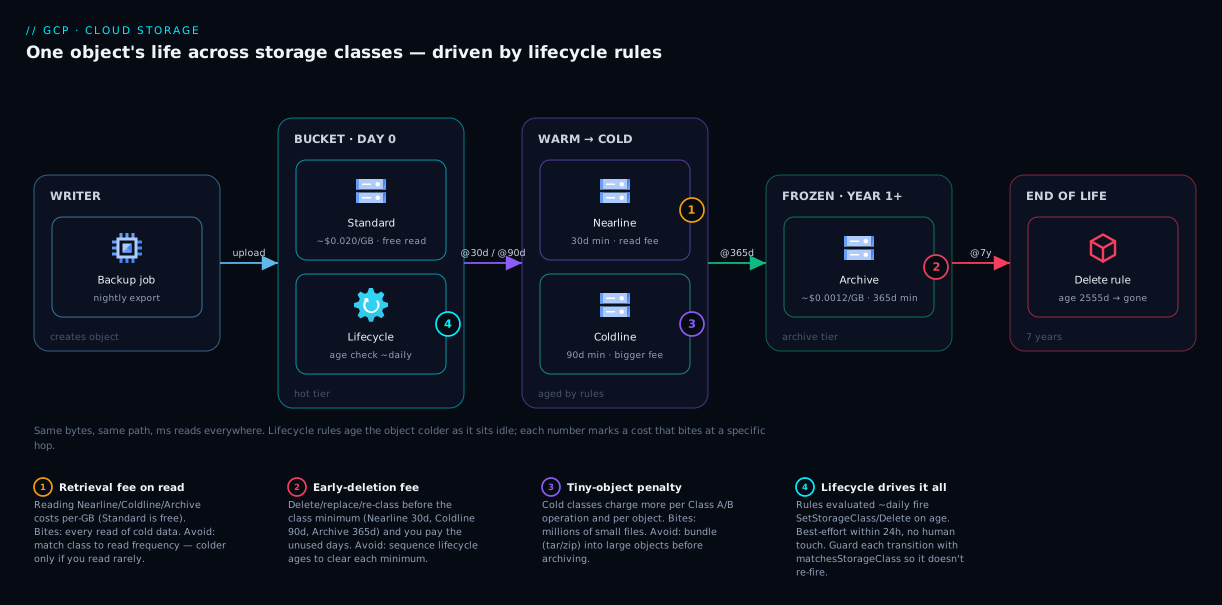
Picture one object — last night’s database export — across its whole life, left to right. A backup job creates it and it lands as a Standard object: hot and free to read, because for the first month anyone might restore it. A lifecycle rule evaluated daily watches its age. At 30 days the rule fires SetStorageClass and it becomes Nearline — same bytes, same path, just cheaper rent and a small read fee now. At 90 days it demotes to Coldline; at 365 days, to Archive, where it costs almost nothing. Throughout, any read returns bytes in milliseconds regardless of class — you just pay that class’s retrieval fee. At the 7-year mark a Delete rule removes it. The object aged from hot to frozen to gone, untouched by a human.
The diagram below draws this as a pipeline: the writer on the left, the bucket holding objects that drift rightward through the four classes as lifecycle conditions trip, and numbered badges marking the three cost mechanics that bite at specific hops — retrieval fee on any read, early-deletion fee if you delete before a class’s minimum, and the operations/object-size cost that punishes tiny files. Read the legend as “what it is · when it bites · how to avoid it.”
Real-world scenario
PixelForge Studios is a 40-person animation house. Their Cloud Storage bill had crept to $3,100/month — the second-largest line on their GCP invoice, surprising for a studio that thought of cloud as “the render farm.” A junior architect was asked to find out why.
The bucket layout told the story. Everything — active project files, delivered film masters, daily render-cache dumps, and a seven-year archive of past client work — sat in one Standard multi-region bucket totaling 150 TB. It had grown organically: every tool wrote to the same place, and nobody set a class because the default “just worked.” They were paying ~$0.026/GB-month for 150 TB, most of it untouched in over a year.
A quick gcloud storage audit by prefix and age was stark: only ~12 TB (projects/active/) was genuinely hot; ~30 TB of delivered masters (projects/delivered/) were read a handful of times a year on client re-export requests; ~8 TB of render cache (cache/) was pure scratch — regenerable, read for days then never again; and ~100 TB (archive/) was opened essentially never except for the occasional legal request.
Instead of a risky bulk move, they wrote lifecycle rules scoped by prefix, sequenced to respect minimum durations:
{
  "rule": [
    { "action": {"type":"SetStorageClass","storageClass":"COLDLINE"},
      "condition": {"age": 60, "matchesPrefix": ["projects/delivered/"], "matchesStorageClass":["STANDARD"]} },
    { "action": {"type":"SetStorageClass","storageClass":"ARCHIVE"},
      "condition": {"age": 365, "matchesPrefix": ["projects/delivered/","archive/"], "matchesStorageClass":["COLDLINE","STANDARD"]} },
    { "action": {"type":"Delete"},
      "condition": {"age": 14, "matchesPrefix": ["cache/"]} }
  ]
}
Delivered masters drop to Coldline at 60 days (read a few times a year — a perfect fit) and Archive at a year. The 100 TB historical archive moves to Archive directly (already older than a year, so the 365-day minimum is moot). Render cache is deleted at 14 days — it’s regenerable, so retention was pure waste. Active projects stayed Standard.
The next month, storage cost on those objects fell from ~$3,100 to about $640/month — an 80% reduction — with zero impact on artists, because hot data stayed hot and cold data still reads in milliseconds when a client calls. The architect’s one-line summary to the CFO: “We were paying first-class airfare to store luggage we never picked up.”
Advantages and disadvantages
Storage classes are almost pure upside if you respect the access pattern — and a foot-gun if you don’t. The honest trade-off:
| Advantages | Disadvantages |
|---|---|
| Up to ~17x cheaper storage for cold data, same durability | Cold classes charge per-GB retrieval fees that punish frequent reads |
| Read speed is identical across classes (ms, even Archive) | Minimum durations mean early delete/overwrite incurs a fee |
| Lifecycle rules automate tiering — set once, runs forever | Mis-sequenced lifecycle rules can cause early-deletion fees |
| Class is per-object — mix hot and cold in one bucket | Operations/object-count costs make cold classes hostile to tiny files |
| Autoclass removes guesswork for unpredictable access | Autoclass adds a small per-object management fee |
| No re-architecture — same API, paths, and tools | Requires knowing (or measuring) the access pattern to choose well |
When each side matters: the advantages dominate for archival, backup, compliance, and media — large objects, rare reads, long retention, exactly where cold classes are designed to live. The disadvantages dominate when someone puts a cold class on frequently-accessed data, a swarm of tiny objects, or data deleted faster than the class minimum. The deciding factor is always: do the real reads and retention match the class’s assumptions? If yes, you save a fortune; if no, you can pay more than Standard. No class is “best” in the abstract — only best for a pattern.
Hands-on lab
This walk-through creates a bucket, puts objects in different classes, attaches a lifecycle rule, and tears it all down. It costs effectively nothing (a few cents at most, often within free-tier). You need the gcloud CLI authenticated to a billing-enabled project, or just open Cloud Shell.
1. Set your project and a unique bucket name. Bucket names are globally unique, so add something random.
gcloud config set project YOUR_PROJECT_ID
export BKT="kv-class-lab-$(date +%s)"   # e.g. kv-class-lab-1782000000
2. Create a Standard regional bucket (regional is cheapest and fine for a lab):
gcloud storage buckets create gs://$BKT \
  --location=us-central1 \
  --default-storage-class=STANDARD \
  --uniform-bucket-level-access
3. Upload a file as Standard, then a second copy directly as Coldline. The --storage-class flag overrides the bucket default per object:
echo "hot data - read often" > hot.txt
echo "cold backup - read rarely" > cold.txt

gcloud storage cp hot.txt  gs://$BKT/hot.txt
gcloud storage cp cold.txt gs://$BKT/cold.txt --storage-class=COLDLINE
4. Confirm each object’s class. Notice the two objects in the same bucket carry different classes:
gcloud storage objects describe gs://$BKT/hot.txt  --format="value(storage_class)"   # STANDARD
gcloud storage objects describe gs://$BKT/cold.txt --format="value(storage_class)"   # COLDLINE
5. Change an object’s class in place (this is what lifecycle does automatically). Move hot.txt to Nearline:
gcloud storage objects update gs://$BKT/hot.txt --storage-class=NEARLINE
gcloud storage objects describe gs://$BKT/hot.txt --format="value(storage_class)"   # NEARLINE
6. Attach a lifecycle rule that deletes anything older than 1 day (so this lab self-cleans). Create the file and apply it:
cat > lc.json <<'EOF'
{ "rule": [ { "action": {"type":"Delete"}, "condition": {"age": 1} } ] }
EOF

gcloud storage buckets update gs://$BKT --lifecycle-file=lc.json
gcloud storage buckets describe gs://$BKT --format="json(lifecycle_config)"
Expected output from the describe: a JSON block showing your single Delete-at-age-1 rule, confirming the policy is attached. (The actual deletion is best-effort within ~24 hours — you won’t see objects vanish instantly.)
7. Tear down so nothing lingers or bills you. Deleting the bucket removes its objects too:
gcloud storage rm --recursive gs://$BKT
You just exercised the entire model: per-object classes in one bucket, manual re-classing, and a lifecycle rule — the same primitives that, at scale, cut a six-figure storage bill.
Common mistakes & troubleshooting
The failure modes that turn a cost optimization into a cost increase, plus the operational gotchas — symptom, root cause, how to confirm, fix:
| # | Symptom | Root cause | How to confirm | Fix |
|---|---|---|---|---|
| 1 | Bill went up after moving to a cold class | Data is read often; retrieval fees exceed rent savings | Billing report: look for high “Retrieval” / “Data read” SKUs on the bucket | Move that data back to Nearline/Standard, or enable Autoclass |
| 2 | Unexpected “early deletion” charges | Objects deleted/overwritten/re-classed before the class minimum | Billing SKU “Early Delete” or audit logs showing deletes on young cold objects | Sequence lifecycle ages to ≥ each class’s minimum; don’t churn cold data |
| 3 | Cold class costs far more than the rent math predicts | Millions of tiny objects → operations + per-object overhead dominate | Object count vs. total bytes (huge count, small avg size) | Bundle tiny files (tar/zip) before archiving; fewer, larger objects |
| 4 | Lifecycle rule “isn’t working” | Conditions are ANDed; one condition not met, or rule applied <24h ago | buckets describe ... lifecycle_config; check object age vs age |
Wait ~24h; verify ALL conditions match; check matchesStorageClass |
| 5 | SetStorageClass rule re-fires endlessly / extra Class A ops |
No matchesStorageClass guard — rule re-evaluates already-moved objects |
Rising Class A op count with no new uploads | Add matchesStorageClass to scope each transition to the prior class |
| 6 | Setting a class on the bucket didn’t change existing objects | Bucket default class only affects new objects | Existing objects still show old class in objects describe |
Re-class existing objects explicitly, or add a lifecycle SetStorageClass rule |
| 7 | Can’t set lifecycle class-change rules — they’re ignored | Autoclass is enabled on the bucket; it manages classes itself | buckets describe shows autoclass.enabled: true |
Pick one model: Autoclass or explicit lifecycle class transitions, not both |
| 8 | Deleted objects “came back” / weren’t really gone | Soft delete or object versioning is retaining copies | buckets describe shows soft-delete/versioning enabled; list versions |
Expected — tune retention; use numNewerVersions/daysSinceNoncurrentTime to prune |
| 9 | Multi-region cold data still seems pricey | Multi-region storage rates are higher than single-region for every class | Bucket location is US/EU/ASIA (multi-region) |
Use a regional location if you don’t need multi-region resilience |
| 10 | “Object not found” right after a lifecycle delete you didn’t expect | A broad age/matchesPrefix rule matched more than intended |
Review every rule in lifecycle_config; check prefixes |
Tighten conditions (prefix/suffix/storage-class); test on a scratch bucket first |
The meta-lesson across all ten: most “storage class” incidents are economic, not technical — the bytes are safe and fast; the surprise is on the invoice. Read the billing breakdown by SKU (not just the total) and the cause is usually obvious in minutes.
Best practices
- Choose by read frequency, full stop. Hot → Standard, ~monthly → Nearline, ~quarterly → Coldline, ~yearly/never → Archive. Don’t overthink the per-GB price; the access pattern decides.
- Always set the bucket’s
--default-storage-classdeliberately. Don’t let “whatever the default was” silently put cold data in Standard for years. - Use lifecycle rules for known patterns; use Autoclass for unknown ones. Both are correct tools — pick by whether you can predict access.
- Sequence lifecycle transitions to respect minimum durations (Nearline@30 → Coldline@90 → Archive@365) so you never trip early-deletion fees.
- Guard every
SetStorageClassrule withmatchesStorageClassso rules don’t re-fire and rack up Class A operations. - Bundle small files before archiving. Cold classes punish object count and tiny sizes; one big object beats a million small ones.
- Delete regenerable data, don’t archive it. Render caches, temp exports, intermediate pipeline files — a
Deleterule beats any storage class. - Test lifecycle rules on a scratch bucket first. A too-broad
ageor prefix can delete more than you meant; verify with a non-critical bucket. - Audit the billing report by SKU monthly, not just the total — retrieval, operations and early-deletion charges hide in line items you can name and fix.
- Pair class with the right location: regional for cost when you don’t need multi-region resilience; reserve multi-region for data that genuinely needs it (see GCP Regions and Zones, Explained).
- Keep recovery features (soft delete, versioning) on for important buckets, and let lifecycle prune old versions — cost optimization should never cost you recoverability.
Security notes
Storage class is a cost attribute, but tiering data still touches security — don’t let optimization quietly weaken your posture.
- Encryption is always on, in every class. Data at rest uses Google-managed keys by default; supply customer-managed keys (CMEK) via Cloud KMS where you need key control. Changing class never decrypts or exposes data. (Who can manage keys and buckets is an IAM question — see GCP IAM, Explained and IAM Service Accounts and Least Privilege.)
- Permissions to change class and lifecycle are powerful — scope them tightly.
storage.buckets.updatelets a principal rewrite lifecycle rules (includingDelete). Grant it via least-privilege roles to a few admins or a CI service account, not broadly. - Lifecycle
Deleteactions bypass human review. A bad rule deletes production data automatically. Pair it with soft delete and/or object versioning so an over-broad rule is recoverable, not catastrophic. - Use Bucket Lock / retention policies for true compliance holds. If data legally cannot be deleted for N years (WORM), a lifecycle rule isn’t enough — a retention policy (optionally locked) enforces immutability even an admin can’t override until it expires. Archive handles cost; the retention policy handles the legal mandate — they’re complementary.
- Enable uniform bucket-level access so IAM governs permissions consistently rather than per-object ACLs, which are easy to get wrong as objects multiply.
- Audit access to cold data. Archive reads should be rare and noteworthy; route data-access audit logs to your sink (see Cloud Monitoring and the Operations Suite) so an unexpected bulk-read of “frozen” data is visible — a cost and security signal.
Cost & sizing
What actually drives a Cloud Storage bill, in order of how often it surprises people:
| Cost driver | What it is | How to control it |
|---|---|---|
| Storage (at-rest) | GB-months × per-GB rate (varies by class + location) | Tier cold data down via class/lifecycle; this is the big lever |
| Retrieval / data-read | Per-GB fee to read Nearline/Coldline/Archive | Match class to read frequency; don’t read cold data often |
| Network egress | Bytes leaving GCP to the internet/other regions | Keep reads in-region; egress is separate from retrieval and adds up |
| Operations (Class A/B) | Per-call charges for uploads/lists/reads | Fewer, larger objects; avoid listing huge buckets constantly |
| Early deletion | Charged-for unused days when you delete before the minimum | Respect class minimums; sequence lifecycle ages |
| Autoclass management | Small per-object fee when Autoclass is on | Use Autoclass only where the guesswork-removal is worth it |
Rough figures to anchor on (US, per month): storing 1 TB costs ~$20 / $10 / $4 / $1.2 (Standard / Nearline / Coldline / Archive); 100 TB scales that to ~$2,000 / $1,000 / $400 / $120; reading 1 TB back adds a retrieval fee of $0 / ~$10 / ~$20 / ~$50. Storage rent roughly halves at each step while the retrieval fee climbs — the see-saw, in dollars.
Free tier: Cloud Storage includes a small monthly free allowance — on the order of 5 GB-months of Standard storage in US regions, plus modest free Class A/B operations and limited free egress. Enough to run the lab above, not production. Always confirm current rates and limits on the official pricing page before modeling a real bill — the ratios here are durable, but the cents move. The operator’s-side companion Google Cloud Storage Classes and Lifecycle: Cost-Optimized Data goes deeper.
Interview & exam questions
Useful for the Google Cloud Digital Leader and Associate Cloud Engineer exams, and for any GCP architecture interview.
Q1. What is a storage class, in one sentence? A storage class is a price-and-performance tier attached to each object that trades lower monthly storage cost for higher retrieval cost and a longer minimum storage duration. All classes share the same durability and read speed.
Q2. Name the four standard storage classes from hottest to coldest, with their minimum durations. Standard (no minimum), Nearline (30 days), Coldline (90 days), Archive (365 days). Storage rent decreases and retrieval fees increase as you go colder.
Q3. Is Archive slow to read, like tape or older AWS Glacier? No. All GCP storage classes, including Archive, return the first byte in milliseconds. The penalty for cold classes is purely financial (retrieval fees and minimum durations), not a retrieval delay.
Q4. You moved 50 TB of backups from Standard to Archive and your bill went up. Why? Almost certainly you read or re-class those objects frequently (triggering retrieval fees) or you delete them on a cycle shorter than Archive’s 365-day minimum (triggering early-deletion fees). Cold classes only save money when reads are rare and retention is long.
Q5. What is the minimum storage duration and what happens if you delete sooner? It’s the period you’re billed for even if you delete earlier. Delete a Coldline object after 10 days and you still pay for the remaining 80 days as an early-deletion (minimum-duration) charge.
Q6. How do lifecycle rules work, and how often are they evaluated?
You attach rules (an action plus ANDed conditions like age or numNewerVersions) to a bucket. GCP evaluates them about once a day and performs SetStorageClass or Delete on matching objects — no code required. Actions are best-effort within ~24 hours.
Q7. When would you use Autoclass instead of lifecycle rules? When access patterns are unpredictable. Autoclass automatically promotes objects to Standard on access and demotes idle ones toward colder classes, with no retrieval or early-deletion fees for its managed transitions, for a small per-object management fee. Use explicit lifecycle rules when you know the pattern.
Q8. Does changing an object’s storage class change its bucket’s location or its durability? No. Location and class are independent; durability is the same eleven-nines design across all classes. Class only changes cost (and the availability SLA tier), not where the bytes live or how safe they are.
Q9. Why does putting millions of tiny objects in Archive often cost more than expected? Cold classes have higher per-operation (Class A/B) charges and per-object overhead. Many tiny objects multiply those charges, sometimes exceeding the storage savings. Bundle small files into large objects before archiving.
Q10. How do you stop a SetStorageClass lifecycle rule from re-firing and racking up operations?
Add a matchesStorageClass condition scoping the transition to the previous class only (e.g., Nearline → Coldline only matches objects currently in Nearline), so already-transitioned objects no longer match.
Q11. A regulation requires data be immutable for 7 years. Is setting Archive class enough? No. Class controls cost, not immutability. Use a bucket retention policy (optionally locked) to enforce WORM/immutability, and combine it with Archive class for cheap long-term storage. They solve different problems.
Q12. Bucket default class vs object class — what’s the relationship? The bucket’s default storage class is what new objects inherit. Existing objects keep their class until you change them, and any object can override the default. So changing the bucket default does not re-tier existing data.
Quick check
- You read a dataset roughly once a month and keep it for years. Which class?
- True or false: reading data from Archive takes hours, like tape.
- You delete a Coldline object after 30 days. What extra charge do you risk, and why?
- Which lifecycle condition prevents a
SetStorageClassrule from re-firing on already-moved objects? - Your unpredictable-access bucket keeps surprising you with retrieval fees. What one bucket feature removes the guesswork?
Answers
- Nearline — ~monthly reads and long retention fit its 30-day minimum and modest retrieval fee perfectly.
- False — every class, including Archive, returns the first byte in milliseconds; the cold penalty is financial, not temporal.
- The early-deletion (minimum-storage-duration) fee — Coldline’s minimum is 90 days, so you’re billed for the remaining ~60 days you didn’t keep it.
matchesStorageClass— scoping the transition to the prior class stops the rule matching objects that already moved.- Autoclass — it moves objects between classes based on real access, with no retrieval or early-deletion fees on its managed transitions.
Glossary
- Object — a single file (plus metadata) stored in Cloud Storage, addressed like
gs://bucket/path/file. - Bucket — a globally-named container that holds objects; it has a location and a default storage class.
- Storage class — the per-object price/performance tier (Standard, Nearline, Coldline, Archive) that sets storage rent, retrieval fee, and minimum duration.
- Standard — the hot class: highest storage rent, no retrieval fee, no minimum duration; for frequently-read data.
- Nearline — the warm class: ~half the storage rent, a small retrieval fee, 30-day minimum; for ~monthly access.
- Coldline — the cold class: ~5x cheaper storage, larger retrieval fee, 90-day minimum; for ~quarterly access.
- Archive — the frozen class: ~17x cheaper storage, largest retrieval fee, 365-day minimum; for rarely/never-read long-term data.
- Retrieval fee — a per-GB charge to read data from Nearline/Coldline/Archive (Standard has none).
- Minimum storage duration — the period you’re billed for even if you delete earlier; deleting sooner triggers an early-deletion fee.
- Early-deletion fee — the charge for the unused remainder of a class’s minimum duration when you delete/replace/re-class too soon.
- Operations (Class A / Class B) — per-API-call charges; Class A = mutating/listing (uploads, lists), Class B = reading (downloads); higher in cold classes.
- Object Lifecycle Management — bucket rules that automatically
SetStorageClassorDeleteobjects when conditions (likeage) are met, evaluated ~daily. - Autoclass — a bucket setting that automatically moves objects between classes based on actual access, with no retrieval/early-deletion fees on its managed transitions.
- Default storage class — the class new objects in a bucket inherit unless overridden; does not change existing objects.
- Durability — the design probability your data survives (eleven nines, 99.999999999%), identical across all classes.
- Soft delete / versioning — recovery features that retain deleted or overwritten objects for a window, so lifecycle deletes are recoverable.
- Retention policy (Bucket Lock) — enforces immutability (WORM) for a set duration; the right tool for legal/compliance holds, distinct from storage class.
Next steps
- Go deeper on the operator’s side with Google Cloud Storage Classes and Lifecycle: Cost-Optimized Data.
- Understand the location dimension that pairs with class in GCP Regions and Zones, Explained: What They Really Mean.
- Lock down who can change buckets and lifecycle rules with GCP IAM, Explained: Members, Roles and Bindings — Simply.
- See where storage feeds analytics in BigQuery: Your Serverless Analytics Warehouse, Explained.
- Make object uploads trigger pipelines with Pub/Sub and Event-Driven Architecture on GCP.