The first time you open the IAM page in the Google Cloud console, it looks like a spreadsheet that grew teeth. There’s a list of email addresses, each with a cryptic role like roles/storage.objectViewer next to it, a “Grant access” button, and a quiet warning that you’re one wrong click away from either locking yourself out or handing a stranger your production database. People reach for tutorials, copy a gcloud command they don’t understand, and hope. That’s the wrong way to learn this, because Google Cloud IAM — Identity and Access Management, the system that decides who can do what to which resource — is actually built on a single, almost embarrassingly simple idea. Once you see that idea, the whole console stops being scary and starts being obvious.
Here is the entire system in one sentence: an IAM policy answers the question “WHO can do WHAT on WHICH thing?” by attaching a list of (member, role) pairs to a resource. That’s it. “Who” is a member (you, a teammate, an app). “What” is a role (a named bundle of permissions like “can read files in a bucket”). “Which thing” is the resource the policy is attached to (a project, a bucket, a single virtual machine). The pairing of a member to a role on a resource is called a binding, and a bag of bindings is a policy. Members, roles, bindings, policy — four words, and you already know what three of them mean. The rest of this article is just making each word concrete enough that you never have to guess again.
By the end you’ll have a mental model you can reason with at 2 a.m.: why granting roles/owner at the organization level is a career-limiting move, why a permission you “didn’t grant” still works (inheritance), why the answer is almost never a basic role and almost always a predefined role, and how to read any access decision by tracing it through the hierarchy. We’ll lead with the analogy, build the model piece by piece, lay it out in scannable tables, walk a real architecture, and finish with a copy-pasteable lab — the clearest explanation of GCP IAM you’ll find anywhere.
What problem this solves
Every cloud account starts the same way: one person, the founder-administrator, who can do everything. That works for exactly one person for exactly one week. Then a second engineer joins and needs to deploy to Cloud Run but absolutely should not be able to delete the billing account. Then a CI/CD pipeline needs to push container images but nothing else. Then the analytics team needs to read BigQuery but never write to it. Then a contractor needs three days of access to one bucket and nothing more. The moment you have more than one actor and more than one thing worth protecting, you have an authorization problem, and “everyone is an admin” becomes the single most dangerous configuration in your account.
What breaks without IAM done right is not subtle. The classic failure is the over-privileged service account: an app that needed to read one bucket was granted roles/editor on the whole project “to make it work,” and three years later a leaked key lets an attacker spin up crypto-mining VMs, read every database, and delete your backups. The opposite is just as common and far more annoying day-to-day: the under-privileged deploy, where a pipeline fails Friday at 4 p.m. with PERMISSION_DENIED: caller does not have permission and nobody can tell which of the thousands of GCP permissions is missing. Both come from the same root cause — not understanding the model — and both vanish once you do.
Who hits this? Everyone, but hardest for three groups: new users overwhelmed by the sheer number of roles who default to the blunt instrument; teams migrating from AWS who bring the wrong intuitions (GCP roles are not AWS JSON policy documents); and anyone running workloads as service accounts, where the rules for non-human identities are where most real incidents live. This article is the foundation under all of that.
Learning objectives
By the end you can:
- Say in one sentence what an IAM policy is, and explain a binding as a (member, role) pair attached to a resource.
- Tell the four member types apart — Google account, service account, group, and domain — and pick the right one for humans versus workloads.
- Choose correctly between basic, predefined, and custom roles, and explain why predefined is the default and basic is almost always wrong.
- Trace how a permission inherits down the resource hierarchy (organization → folder → project → resource) so you understand why access you “didn’t grant” still works.
- Read the practical difference between allow policies and deny policies, and know that an explicit deny always wins.
- Distinguish a role (a bundle) from a single permission (
service.resource.verb), and read any permission string on sight. - Grant, view, and revoke access with both
gcloudand Terraform, using the authoritative-versus-additive distinction that prevents the most common “I wiped everyone’s access” accident. - Apply the least-privilege workflow: start from zero, grant the narrowest predefined role at the lowest resource, and tighten with conditions.
Prerequisites & where this fits
You don’t need much. You should have a Google Cloud account (the free tier is plenty), know how to open Cloud Shell (the in-browser terminal with gcloud pre-installed), and be comfortable that a “resource” in GCP means any manageable thing — a project, a storage bucket, a VM, a Pub/Sub topic. Helpful but not required: you’ve seen a JSON object, and you know that a cloud “project” is the billing-and-isolation container your resources live in.
IAM is the security spine of GCP, so it sits underneath almost everything else. It assumes the GCP resource hierarchy explained — the organization/folder/project tree that IAM permissions flow down — because where you attach a policy is half of what a policy does. It pairs immediately with GCP IAM and Service Accounts: Roles, Bindings and Least Privilege, which goes deeper on the non-human-identity side once you’ve got this mental model. From here you build toward an enterprise-grade setup in the GCP foundation blueprint: organization and Shared VPC, and you’ll see IAM enforce network boundaries in GCP VPC Service Controls and the service perimeter. This article is the on-ramp: master members, roles and bindings here, and every one of those reads as a logical next step rather than a wall.
Here’s the one-screen map of where IAM lives relative to the things it protects, so you can see why “where you grant” matters as much as “what you grant”:
| Layer | What it is | Can hold an IAM policy? | Who typically manages it |
|---|---|---|---|
| Organization | The root node for your whole company’s GCP | Yes — grants here inherit everywhere | Org admins / platform team |
| Folder | A grouping of projects (by team, env, or BU) | Yes — inherits to all projects under it | Platform / domain leads |
| Project | The billing + isolation container for resources | Yes — the most common place to grant | Project owners / app teams |
| Resource | A bucket, VM, dataset, topic, etc. | Many (not all) support resource-level policy | App / resource owners |
| Member (identity) | The “who” — a person or a workload | No (it’s the subject, not the object) | The actor itself + IAM admins |
Core concepts
Let’s build the model one brick at a time. Read this section slowly once; everything later is application.
The mental model: a guest list on a door, not a keyring on a person
Most people’s intuition for access control is wrong for GCP, and fixing it makes everything click. You probably imagine a keyring: each person carries keys, and a key opens a door — permission lives on the person. GCP works the other way around. Permission lives on the door — on the resource. Each resource holds a guest list (its IAM policy) that says, in effect: “These members, in these roles, may enter.” When you ask “can Asha read this bucket?”, GCP doesn’t look at Asha’s keyring. It walks to the bucket, reads the bucket’s guest list, then the guest lists of everything above it in the hierarchy, and checks whether any name Asha (directly or via a group) in a role that includes the read permission.
This inversion explains three things newcomers trip on. First, there’s no “list of everything Asha can do” button — there’s no central keyring to print; her access is the sum of every guest list that mentions her, scattered across the hierarchy (the Policy Analyzer tool exists to reconstruct that picture). Second, inheritance works because a guest list on the project door applies to every room inside it — the policy is attached high and the check walks upward. Third, deleting a resource removes its access cleanly — the list was on the door; remove the door, the list goes too. Hold this picture: policies are guest lists bolted to resources, and access is “is this member on any guest list from here up?”
The four words, defined concretely
Now the vocabulary, each tied to the analogy:
| Term | Plain definition | In the analogy | A concrete example |
|---|---|---|---|
| Member (a.k.a. principal) | The identity being granted access — a who | A named guest | user:asha@kloudvin.com |
| Role | A named bundle of permissions — a what | The “level of access” on the list (e.g. “may read”) | roles/storage.objectViewer |
| Permission | A single allowed action, service.resource.verb |
One specific thing the level lets you do | storage.objects.get |
| Binding | One (member → role) pairing on a resource | One line on the guest list | “asha@ : objectViewer” |
| Policy | The full set of bindings on a resource | The entire guest list on that door | the bucket’s complete IAM policy |
| Resource | The thing the policy is attached to | The door the list is bolted to | gs://kloudvin-invoices |
Read those top to bottom and the sentence writes itself: a policy is a list of bindings; each binding maps a member to a role; a role is a bag of permissions; the whole thing is bolted to a resource. Four nouns and you’ve got the architecture.
What an IAM policy actually looks like
Abstractions get real fast when you see the JSON. A policy is genuinely just this — a list of bindings, each with a role and the members who hold it:
{
  "bindings": [
    {
      "role": "roles/storage.objectViewer",
      "members": [
        "user:asha@kloudvin.com",
        "group:analysts@kloudvin.com"
      ]
    },
    {
      "role": "roles/storage.objectAdmin",
      "members": [
        "serviceAccount:invoicer@my-proj.iam.gserviceaccount.com"
      ]
    }
  ],
  "etag": "BwYABCDEF=",
  "version": 1
}
Read it like a guest list. Two lines: “anyone in this members list may do everything in objectViewer,” and “this one service account may do everything in objectAdmin.” The etag is a concurrency token that quietly prevents two admins from clobbering each other’s edits (more in the gotchas). That’s the entire data structure — everything else (the console, the gcloud flags, the Terraform resources) is sugar over reading and writing this object.
Members: the four kinds of “who”
A member is always written as type:identifier, and the type prefix tells GCP what kind of identity it is. There are four you’ll use constantly, plus a couple of special ones. The single most important distinction is human vs workload: people are Google accounts; apps are service accounts. Confusing the two is the root of a huge fraction of IAM mistakes.
| Member type | Prefix syntax | What it is | Use it for | Don’t use it for |
|---|---|---|---|---|
| Google account | user:asha@kloudvin.com |
A single human’s Google identity | Real people logging into the console / gcloud |
App or CI identities (use a service account) |
| Service account | serviceAccount:bot@proj.iam.gserviceaccount.com |
A non-human identity for a workload | Apps, VMs, functions, pipelines, jobs | A human (they can’t “log in” as one normally) |
| Google group | group:analysts@kloudvin.com |
A managed group of members | Granting a role to a team in one binding | A workload identity |
| Domain | domain:kloudvin.com |
Everyone in a Workspace/Cloud Identity domain | Broad “all employees” grants (use sparingly) | Anything needing precision |
| All authenticated | allAuthenticatedUsers |
Any Google-authenticated identity, anywhere | Almost nothing — very broad | Private data (treat as semi-public) |
| All users | allUsers |
Literally anyone on the internet, no auth | Public static assets only | Anything you’d mind a stranger touching |
The rule that saves the most pain: grant roles to groups, not individuals. Put analysts@kloudvin.com on the binding once, then manage who’s an analyst in your directory. Joiners and leavers become a group-membership change — you never touch the IAM policy. That keeps bindings few, makes access auditable (“who’s an analyst?” is a directory question), and turns offboarding into a single group removal. The two scary members — allUsers and allAuthenticatedUsers — are exactly as broad as they sound; reserve them for genuinely public content and treat any binding using them as a flashing red light in review.
Roles: the three families, and why predefined wins
A role is a named bundle of permissions. There are three families, and choosing the right family is one of the two or three highest-leverage IAM decisions you make.
| Role family | Examples | Granularity | When to use | The catch |
|---|---|---|---|---|
| Basic (a.k.a. primitive) | roles/owner, roles/editor, roles/viewer |
Whole-project, enormously broad | Tiny sandbox / solo experiment only | editor ≈ “change almost anything”; owner can also manage IAM. Far too broad for prod |
| Predefined | roles/storage.objectViewer, roles/run.invoker, roles/bigquery.dataViewer |
Per-service, curated by Google | Almost always — your default | You must find the right one among thousands |
| Custom | roles/myorg.invoiceReader |
Exactly the permissions you list | When no predefined role fits cleanly | You own maintenance forever as APIs evolve |
The intuition for each: Basic roles are the three big buckets that predate fine-grained IAM — viewer (read almost everything), editor (read + modify almost everything), owner (editor + manage access + delete the project). They’re memorable, which is the trap: they’re project-wide and coarse, so an app with editor that only needed to read a bucket can also rewrite firewall rules. Use them only in a throwaway personal sandbox.
Predefined roles are the answer 95% of the time. Google maintains thousands, scoped to individual services and tasks, and keeps them updated as new permissions appear — that maintenance is the whole point. The naming is mercifully consistent: roles/<service>.<persona>, where the persona suffix follows a pattern you learn once and read forever.
| Suffix pattern | What it means | Typical permissions included |
|---|---|---|
*.viewer / *.dataViewer |
Read-only | get, list |
*.editor / *.dataEditor |
Read + write, no admin | get, list, create, update, delete of data |
*.admin |
Full control of the service | All of the above + manage the service’s own IAM |
*.user |
Use the service’s resources without managing them | e.g. cloudsql.client to connect to a DB |
*.invoker |
Trigger/invoke only | e.g. run.invoker to call a Cloud Run service |
So roles/storage.objectViewer is “read objects in buckets,” roles/storage.admin is “fully manage buckets and their access,” and roles/run.invoker is “may call this Cloud Run service but not change it.” Once the pattern clicks you can predict role names before you look them up.
Custom roles fill the gap predefined can’t — when you need, say, “read invoices and write audit logs, but nothing else,” and no single predefined role draws that line. You list the exact permissions; GCP bundles them under a name you choose. The power is surgical least privilege; the cost is that you own that role’s lifecycle — when Google ships a new permission, predefined roles pick it up automatically and yours does not. Reach for custom roles deliberately, not reflexively. GCP IAM and Service Accounts: Roles, Bindings and Least Privilege walks the custom-role lifecycle in depth.
Permissions: reading the service.resource.verb string
Underneath every role is a list of permissions, and a permission is just a structured string: service.resource.verb. Learn to read it and “permission denied” stops being a mystery.
| Permission | Service | Resource | Verb | In plain English |
|---|---|---|---|---|
storage.objects.get |
Cloud Storage | objects | get | download/read an object |
storage.objects.list |
Cloud Storage | objects | list | list objects in a bucket |
compute.instances.start |
Compute Engine | instances | start | start a stopped VM |
bigquery.tables.getData |
BigQuery | tables | getData | read rows from a table |
pubsub.topics.publish |
Pub/Sub | topics | publish | publish a message to a topic |
resourcemanager.projects.setIamPolicy |
Resource Manager | projects | setIamPolicy | change who has access (the powerful one) |
Two things to internalize. First, you almost never grant a permission directly — you grant a role, a curated bag of these. Second, the most dangerous permission in GCP is *.setIamPolicy (e.g. resourcemanager.projects.setIamPolicy): anyone who can set the IAM policy can grant themselves any other permission. That’s why roles/owner is so heavy — it includes setIamPolicy. Watch for any role carrying it the way you’d watch for sudo.
The resource hierarchy: why permissions flow downhill
This is the concept that turns “I never granted that, why does it work?” into “of course it works.” GCP resources form a tree, and IAM policies inherit downward: a binding set on a parent applies to every child beneath it. The effective access on any resource is the union of its own policy plus every ancestor’s policy, all the way up to the organization.
| Level | Example | A grant here applies to… | Mental note |
|---|---|---|---|
| Organization | kloudvin.com (org node) |
Every folder, project, and resource you own | The blast radius is your entire company — grant almost nothing here |
| Folder | folders/prod, folders/teams/data |
Every project and resource under that folder | Great for “all of prod” or “the whole data team” |
| Project | projects/shop-prod |
Every resource inside that project | The everyday place to grant access |
| Resource | gs://kloudvin-invoices (a bucket) |
Just that one resource | Tightest scope; use for sharing one thing |
Picture Asha granted roles/viewer at the folder folders/prod. She can now view every project and resource under prod — even ones created tomorrow, even ones nobody explicitly added her to — because the check walks upward from each resource and finds her on the folder’s guest list. That’s the power and the danger of inheritance in one sentence. The discipline that follows is grant at the lowest level that satisfies the need: read one bucket → grant on the bucket, not the project; own one project → grant on the project, not the folder. A high grant is a wide grant, and width is risk. (One caveat: inheritance is allow-only by default — children can’t narrow a parent grant without a deny policy.)
Allow vs deny: the two policy types, and who wins
IAM is allow-first: a binding grants, and absence of a grant means no access — the allow policy is what you touch 99% of the time. But GCP also has deny policies, which explicitly block a member from a permission even if an allow policy grants it. The evaluation rule is the one to memorize:
| Question | Answer |
|---|---|
| What does an allow binding do? | Grants the role’s permissions to the member |
| What does a deny rule do? | Blocks specific permissions for a member, regardless of allows |
| If a permission is both allowed and denied, what happens? | Denied. An explicit deny always wins over any allow |
| What if a permission is neither allowed nor denied? | Denied (default-deny — no access unless granted) |
| Where do deny policies attach? | Org, folder, or project nodes (they also inherit down) |
So the full decision for “can this member do this here?” is: walk the hierarchy; if any deny rule in scope blocks it → denied; else if any allow binding grants it → allowed; else → denied. Deny-wins, then allow, then default-deny. Start with allow policies only; reach for deny later as a guardrail (e.g. “no one outside platform may ever delete projects, even owners”), and keep the deny set tiny — a stray deny is far harder to debug than a missing allow.
Granting access: gcloud and Terraform, the safe way
Knowing the model, the operations are short. There are two ways to write a policy, and the difference between them causes more accidental lockouts than any other single thing in IAM, so we’ll be explicit.
The two grant styles: additive vs authoritative
| Style | What it does | gcloud form |
Terraform resource | Risk |
|---|---|---|---|---|
| Additive | Adds/removes one (member, role) binding, leaving the rest untouched | add-iam-policy-binding / remove-iam-policy-binding |
google_*_iam_member |
Safe — surgical, can’t wipe others |
| Authoritative (per-role) | Sets the entire member list for one role, replacing it | (set via policy file) | google_*_iam_binding |
Medium — replaces everyone on that role |
| Authoritative (whole policy) | Replaces the entire policy on the resource | set-iam-policy <file> |
google_*_iam_policy |
High — replaces all access; can lock you out |
The rule: default to additive. add-iam-policy-binding and Terraform’s _iam_member touch exactly one binding and leave every other grant alone. The authoritative forms (set-iam-policy, _iam_binding, _iam_policy) overwrite — and the spectacular failure mode is running one with an incomplete member list and silently deleting access for everyone you forgot, sometimes including yourself. Use authoritative only when you truly want “these and only these members,” and never mix _iam_member and _iam_binding for the same role in Terraform (they fight on every apply).
gcloud: grant, view, revoke
The everyday loop. One additive command, just changing the --member prefix for a user, a group (recommended), or a service account (a workload):
# ADDITIVE grant — adds one binding, leaves all others intact
gcloud projects add-iam-policy-binding shop-prod \
  --member="user:asha@kloudvin.com" --role="roles/storage.objectViewer"

gcloud projects add-iam-policy-binding shop-prod \
  --member="group:analysts@kloudvin.com" --role="roles/bigquery.dataViewer"

gcloud projects add-iam-policy-binding shop-prod \
  --member="serviceAccount:invoicer@shop-prod.iam.gserviceaccount.com" \
  --role="roles/storage.objectAdmin"
View the policy (“print the guest list”), then revoke — the mirror of grant, same flags, opposite verb:
# "Who has which roles?" flattened to a readable list
gcloud projects get-iam-policy shop-prod \
  --flatten="bindings[].members" \
  --format="table(bindings.role, bindings.members)"

# Revoke one binding (leaves all others intact)
gcloud projects remove-iam-policy-binding shop-prod \
  --member="user:asha@kloudvin.com" --role="roles/storage.objectViewer"
To grant on a single resource instead of a project, the same pattern moves to the resource-specific command — note the lower scope: this touches one bucket, nothing else.
# Grant read on ONE bucket only (tightest sensible scope)
gcloud storage buckets add-iam-policy-binding gs://kloudvin-invoices \
  --member="group:analysts@kloudvin.com" \
  --role="roles/storage.objectViewer"
Terraform: the additive pattern as code
In Terraform, google_*_iam_member is the additive, safe-by-default building block. This grants three bindings — a group, a service account, and a single user — each independent of the others:
# Additive: each block manages exactly ONE (member, role) binding.
resource "google_project_iam_member" "analysts_bq_read" {
  project = "shop-prod"
  role    = "roles/bigquery.dataViewer"
  member  = "group:analysts@kloudvin.com"
}

resource "google_project_iam_member" "invoicer_storage" {
  project = "shop-prod"
  role    = "roles/storage.objectAdmin"
  member  = "serviceAccount:invoicer@shop-prod.iam.gserviceaccount.com"
}

resource "google_storage_bucket_iam_member" "analysts_bucket_read" {
  bucket = "kloudvin-invoices"
  role   = "roles/storage.objectViewer"
  member = "group:analysts@kloudvin.com"
}
Here’s the side-by-side that prevents the wipe-everyone accident, mapped across both tools:
| Goal | gcloud | Terraform | Effect on other members |
|---|---|---|---|
| Add one person to a role | add-iam-policy-binding |
google_project_iam_member |
Untouched (safe) |
| Remove one person from a role | remove-iam-policy-binding |
delete the _iam_member block |
Untouched (safe) |
| Set the exact member list for one role | policy file + set-iam-policy |
google_project_iam_binding |
Replaced — anyone omitted loses that role |
| Replace the entire policy | set-iam-policy <full.json> |
google_project_iam_policy |
Replaced — total overwrite, lock-out risk |
IAM Conditions: access that’s true only sometimes
One more lever worth knowing early — it’s how you go from “good” to “tight.” An IAM Condition is an optional expression on a binding that must evaluate true for the grant to apply, so a role can be active only for certain resources or only until a date. The classic uses: time-box a contractor, or scope a broad role to one resource-name prefix.
# Grant objectViewer, but ONLY on buckets whose name starts with "kloudvin-",
# and ONLY until end of 2026-07-31 — after that the binding stops applying.
gcloud projects add-iam-policy-binding shop-prod \
  --member="user:contractor@partner.com" \
  --role="roles/storage.objectViewer" \
  --condition='expression=resource.name.startsWith("projects/_/buckets/kloudvin-")
    && request.time < timestamp("2026-08-01T00:00:00Z"),title=temp-bucket-read'
| Condition use case | Expression sketch | Why it beats a plain grant |
|---|---|---|
| Time-boxed access | request.time < timestamp("...") |
Access self-expires; no “forgot to revoke” |
| Scope to one resource prefix | resource.name.startsWith("...") |
A broad role narrowed to a slice |
| Limit to a resource type | resource.type == "storage.googleapis.com/Bucket" |
Role applies only where it should |
| Restrict by request attributes | request.time.getHours(...) etc. |
Context-aware grants for sensitive roles |
Conditions aren’t supported by every role or resource, and they add evaluation complexity, so use them where they earn their keep — temporary access and prefix-scoping are the two highest-value patterns.
Architecture at a glance
Let’s trace a single real request end to end, because seeing IAM in motion is what makes the static model stick. Picture KloudVin’s invoicing flow. A user’s browser calls a Cloud Run service that authenticates as its own service account, invoicer@shop-prod.iam.gserviceaccount.com, and tries two things: read invoice files from a Cloud Storage bucket, and write a row to a BigQuery dataset. Neither happens unless IAM says yes — and where the yes comes from differs for each.
Follow the diagram left to right. On the left is the identity zone: the human group analysts@ (read-only) and the workload identity invoicer@. In the middle is the policy engine — not a server you deploy, but the IAM check that runs on every API call: it reads the target resource’s allow policy, walks up the hierarchy gathering inherited bindings (org → folder → project → resource), applies any deny rules first, and returns allow or deny. On the right are the resources the policy protects: the Cloud Run service (with its own invoker binding), the bucket, and the dataset. Numbered badges mark the four moments access is decided — invoke, inherited-grant lookup, bucket read, dataset write — and a fifth marks the deny rule that can veto any of them. The one thing the picture teaches: the same identity gets different answers at different doors, because each door reads its own guest list plus everything inherited from above.
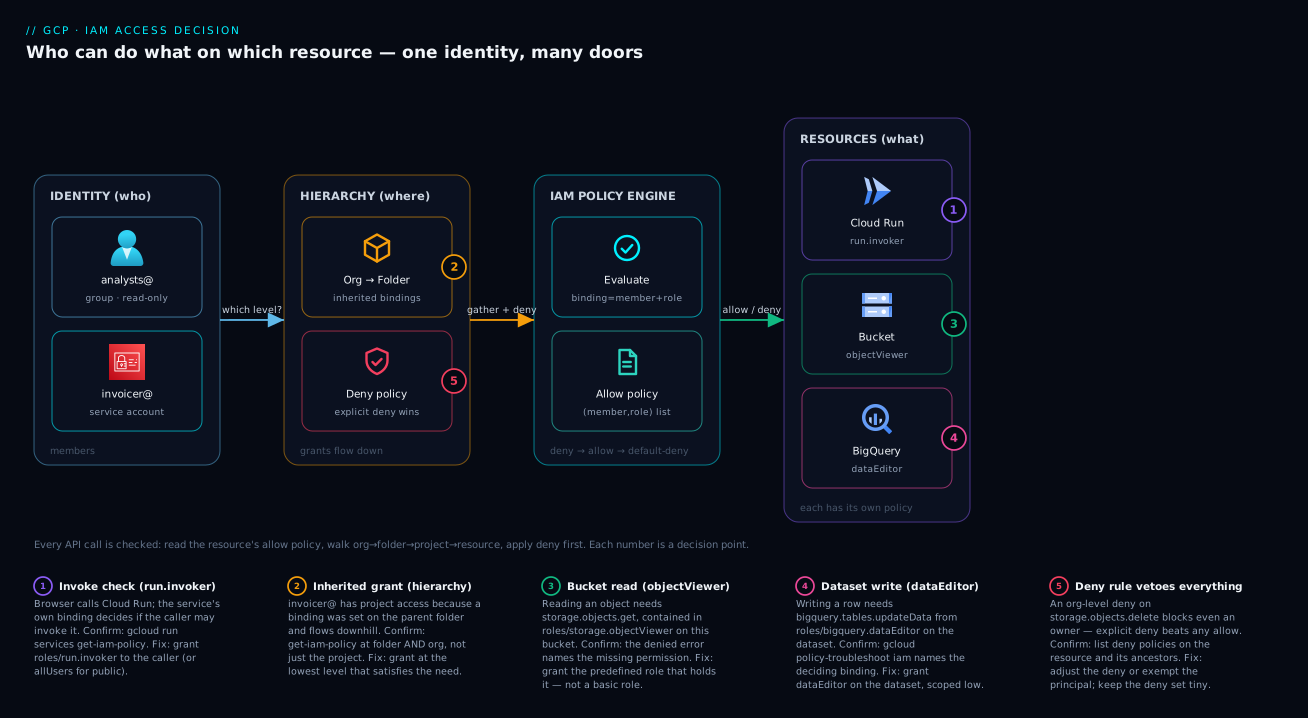
The flow in words: the browser hits Cloud Run (badge 1 — the run.invoker binding decides if the caller is allowed in); Cloud Run runs as invoicer@, whose project-level grants were inherited from a folder binding (badge 2); invoicer@ reads the bucket, checked against the bucket’s own objectViewer/objectAdmin policy (badge 3); invoicer@ writes to BigQuery, checked against the dataset’s dataEditor policy (badge 4); and over all of it, an org-level deny rule (badge 5) could block, say, storage.objects.delete for everyone — and that deny would win even against an owner. One identity, four doors, five decision points, all reading from the same allow-then-deny-then-default-deny logic.
Real-world scenario
KloudVin Retail is a 40-person company running a storefront on GCP. When they started, the founding engineer, Ravi, did what everyone does: he made the three other engineers roles/owner on the single kloudvin-prod project “so nothing blocks us.” It worked for a year. Then three things happened in one quarter that forced a reckoning.
First, an intern accidentally deleted the production Cloud SQL instance while “cleaning up test resources” — they had owner, so nothing stopped them. Second, a contractor’s laptop was stolen with an active gcloud session holding editor on prod. Third, an enterprise prospect’s security questionnaire asked, “Can you produce a list of who can delete production data?” and the honest answer was “all of us, and I can’t easily prove otherwise.” The everyone-is-admin model had quietly become an existential risk to a deal.
The fix was a textbook application of this model, done over two weeks. They built a tiny resource hierarchy — an org node, a prod and a nonprod folder, with the project under prod (following GCP resource hierarchy explained) — then replaced every individual owner grant with group-based predefined roles. Three Google groups: platform-admins@ got roles/editor at the prod folder (broad, but only three trusted people, and notably not owner, so they couldn’t silently rewrite IAM); developers@ got curated predefined roles at the project (roles/run.developer, roles/storage.objectAdmin, roles/cloudsql.client) — enough to ship, nothing to delete the database; analysts@ got read-only roles/bigquery.dataViewer plus roles/storage.objectViewer.
Three changes made the difference. They moved every workload off human credentials onto dedicated service accounts with narrow roles, so a stolen laptop session could no longer act as an app. They added a single deny policy at the org node blocking cloudsql.instances.delete and resourcemanager.projects.delete for everyone except platform-admins@ — an explicit guardrail that even an accidental over-grant couldn’t bypass. And they answered the customer’s question with one command: gcloud projects get-iam-policy plus Policy Analyzer, producing an exact list of who could touch production. The intern incident became impossible (developers had no delete on SQL), the stolen-session blast radius shrank to read-and-deploy, and the deal closed on the strength of a clean, provable access model. Total new spend: zero — IAM, groups, and deny policies are free. The only cost was understanding the model, which is exactly what they’d skipped at the start.
Advantages and disadvantages
IAM done this way is overwhelmingly worth it, but it’s honest to name where it bites.
| Advantages | Disadvantages |
|---|---|
| Free — no charge for IAM, roles, groups, or policies | Steep at first; thousands of predefined roles to navigate |
| Fine-grained least privilege — grant exactly what’s needed | Easy to under-grant and get cryptic PERMISSION_DENIED |
| Inheritance means you grant once high and it flows down | Inheritance also means a high grant is a wide grant (blast radius) |
| Group-based grants make joiners/leavers a directory change | No single “everything Asha can do” view (access is scattered) |
| Predefined roles are maintained by Google as APIs evolve | Custom roles you own don’t auto-update — maintenance debt |
| Conditions + deny policies enable surgical, time-boxed access | Conditions/deny add evaluation complexity and harder debugging |
| Audited — every grant change is logged for compliance | Authoritative set-iam-policy can wipe access if misused |
When does each matter? The inheritance double-edge matters most as your org grows — a convenient org-level grant in month one becomes a sprawling over-exposure by month twelve, so bias every grant downward. The under-grant friction matters most for app teams shipping fast; the cure is the diagnostic workflow in the troubleshooting section (read the denied permission from the error, find the predefined role that contains it). And the authoritative-wipe risk matters most in CI/CD; the cure is simply preferring additive (_iam_member / add-iam-policy-binding) everywhere except the rare, deliberate “exactly these and only these” case.
Hands-on lab
A 15-minute, free-tier-friendly walk-through. You’ll create a service account, grant it the wrong (too-narrow) role, watch it fail, then grant the right predefined role and watch it succeed — the exact loop you’ll run for real. Everything here is within the free tier; teardown is at the end.
1. Set your project and confirm who you are.
gcloud config set project YOUR_PROJECT_ID
gcloud auth list   # confirms the active account
2. Create a test bucket and a service account (the workload identity).
# A uniquely-named bucket (bucket names are globally unique)
gcloud storage buckets create gs://kloudvin-iam-lab-$RANDOM --location=US

# A service account to act as our "app"
gcloud iam service-accounts create iam-lab-bot \
  --display-name="IAM lab demo bot"
3. Grant a deliberately insufficient role and watch it fail. We grant roles/storage.legacyBucketReader (which can see the bucket but not read objects), then try to read an object — this is the under-grant failure, on purpose:
SA="iam-lab-bot@YOUR_PROJECT_ID.iam.gserviceaccount.com"
BUCKET="gs://kloudvin-iam-lab-XXXX"   # use the name you created

echo "hello iam" > /tmp/test.txt
gcloud storage cp /tmp/test.txt $BUCKET/test.txt   # you (owner) can upload

gcloud projects add-iam-policy-binding YOUR_PROJECT_ID \
  --member="serviceAccount:$SA" \
  --role="roles/storage.legacyBucketReader"

# Impersonate the SA and try to READ the object — expect PERMISSION_DENIED
gcloud storage cat $BUCKET/test.txt \
  --impersonate-service-account=$SA
Expected: a PERMISSION_DENIED mentioning storage.objects.get. Read that string — it names the exact permission you’re missing. That’s your clue.
4. Grant the right predefined role and watch it succeed. roles/storage.objectViewer is the role that contains storage.objects.get:
gcloud projects add-iam-policy-binding YOUR_PROJECT_ID \
  --member="serviceAccount:$SA" \
  --role="roles/storage.objectViewer"

# Try again — now it works
gcloud storage cat $BUCKET/test.txt \
  --impersonate-service-account=$SA
Expected output: hello iam. You just lived the entire IAM loop — denied → read the missing permission → grant the predefined role that holds it → allowed.
5. Inspect the policy you built (print the guest list).
gcloud projects get-iam-policy YOUR_PROJECT_ID \
  --flatten="bindings[].members" \
  --filter="bindings.members:$SA" \
  --format="table(bindings.role)"
You’ll see both roles you granted. Notice you added the second without removing the first — that’s additive grants in action.
6. Teardown (so nothing lingers):
gcloud projects remove-iam-policy-binding YOUR_PROJECT_ID \
  --member="serviceAccount:$SA" --role="roles/storage.objectViewer"
gcloud projects remove-iam-policy-binding YOUR_PROJECT_ID \
  --member="serviceAccount:$SA" --role="roles/storage.legacyBucketReader"
gcloud iam service-accounts delete $SA --quiet
gcloud storage rm --recursive $BUCKET
| Lab step | What it teaches | The transferable lesson |
|---|---|---|
| Create SA | Workloads get their own identity | Never run apps as a human account |
| Wrong role → fail | The under-grant failure mode | The error names the missing permission |
| Right predefined role → pass | Choosing the correct role family | Predefined beats basic; match role to the permission |
| Inspect policy | Reading a live policy | get-iam-policy is your “who has what” tool |
| Teardown | Revoke = mirror of grant | Additive grants revoke cleanly, one at a time |
Common mistakes & troubleshooting
The failures below are the ones that actually generate incidents and support tickets. Each is symptom → root cause → how to confirm → fix.
| # | Symptom | Root cause | How to confirm | Fix |
|---|---|---|---|---|
| 1 | PERMISSION_DENIED: caller does not have permission on a deploy/app |
The identity is missing one specific permission | Read the error — it names the permission (e.g. run.services.create) |
Grant the predefined role that contains that permission |
| 2 | “I removed someone but their access still works” | Access is inherited from a parent (folder/org), not the resource | get-iam-policy at folder and org, not just the project |
Remove the binding at the level where it’s actually set |
| 3 | A Terraform apply wiped everyone’s access | Used authoritative _iam_policy/_iam_binding with an incomplete list |
Diff the plan; look for _iam_binding/_iam_policy |
Switch to additive _iam_member; never mix the two per role |
| 4 | App works locally but fails in GCP with permission errors | Locally it used your credentials; in GCP it’s the service account’s (narrower) | Check which identity the workload runs as | Grant the workload’s service account the role, not yourself |
| 5 | Granted a role but access still denied seconds later | IAM changes are eventually consistent — propagation lag | Retry after ~60s; check the binding is actually present | Wait for propagation; verify with get-iam-policy |
| 6 | An owner is being blocked from an action | An explicit deny policy is in scope — deny beats allow | List deny policies on the resource and its ancestors | Adjust/remove the deny rule, or exempt the principal |
| 7 | “Concurrent policy changes” / etag mismatch error |
Two writers edited the policy at once; the etag went stale |
The error message says the etag is outdated | Re-read the policy (fresh etag) and re-apply your change |
| 8 | A public bucket leaked data | allUsers/allAuthenticatedUsers on a storage binding |
get-iam-policy shows allUsers in members |
Remove the public member; audit for others org-wide |
| 9 | Custom role suddenly can’t do a new action | The role is stale — a new permission appeared, custom roles don’t auto-update | Compare the custom role’s permissions to the equivalent predefined | Add the new permission, or switch to a predefined role |
| 10 | Group grant doesn’t take effect for a member | The person isn’t actually in the Google group, or group sync lag | Check group membership in the Admin console | Add them to the group; wait for membership to propagate |
| 11 | Can’t grant a role you don’t hold | You can’t grant permissions you yourself lack (no privilege escalation) | The error says you lack the permission to set policy | Have someone with setIamPolicy make the grant |
| 12 | Service account key leaked / over-used | Long-lived SA keys are a top breach vector | Audit for downloaded keys; check usage logs | Prefer keyless auth (Workload Identity / attached SA); rotate/disable keys |
The single most useful confirm-tool across all of these is the Policy Troubleshooter — give it a principal, a resource, and a permission, and it tells you whether access is granted and which binding decides it. Its companion, Policy Analyzer, answers the reverse (“what can this principal reach?”) by reconstructing the scattered guest lists into one view — the “everything Asha can do” answer the model otherwise lacks.
# "Why can (or can't) this principal do this here?" — names the deciding binding
gcloud policy-troubleshoot iam //cloudresourcemanager.googleapis.com/projects/shop-prod \
  --principal-email="asha@kloudvin.com" \
  --permission="storage.objects.get"
Best practices
- Default to predefined roles. Basic roles (
owner/editor/viewer) are for throwaway sandboxes only; in any shared or production project, find the predefined role that matches the task. - Grant to groups, not individuals. One binding per group, and manage membership in your directory. Joiners and leavers become a group change, never an IAM edit.
- Grant at the lowest level that works. Resource over project, project over folder, folder over org. Inheritance makes a high grant a wide grant — push every grant downward.
- Give every workload its own service account. Never let an app run as a human’s account, and never share one service account across unrelated workloads — you lose the ability to scope or revoke independently.
- Prefer additive operations.
add-iam-policy-bindingand Terraform_iam_memberare surgical and safe. Reserve authoritativeset-iam-policyfor deliberate “exactly these” cases, and never mix additive and authoritative for the same role. - Treat
setIamPolicylikesudo. Any role that can change IAM (includingowner) is a privilege-escalation vector — grant it to very few, very trusted principals. - Reserve
allUsers/allAuthenticatedUsersfor genuinely public content. Any binding with these is a review red flag; audit for them regularly. - Use conditions to time-box and scope. Contractors get expiring access; broad roles get narrowed to a resource prefix. Self-expiring grants beat “remember to revoke.”
- Use deny policies as guardrails, sparingly. A small, intentional deny set (“no one but platform may delete projects”) catches accidental over-grants — but keep it tiny, because a stray deny is hard to debug.
- Avoid long-lived service account keys. Prefer keyless auth (attached service accounts, Workload Identity Federation). Downloaded JSON keys are a top breach vector.
- Audit continuously. IAM changes are logged; review
setIamPolicyevents, run Policy Analyzer periodically, and reconcile against what you intended.
Security notes
IAM is the security control plane, so the security notes are the heart of the matter. Least privilege is the whole game: every principal should hold the narrowest role, at the lowest scope, for the shortest time that lets it do its job — and “shortest time” is what conditions are for. The most dangerous single grant in GCP is anything carrying setIamPolicy (preeminently roles/owner), because it’s self-escalating: a holder can grant themselves anything. Keep owners to a tiny, named set and prefer editor-with-guardrails or curated predefined roles for everyone else.
For identity isolation, human credentials never run workloads — apps, functions, and VMs authenticate as service accounts, and the gold standard is keyless (an attached service account or Workload Identity Federation, so there’s no downloadable key to leak). If you must use keys, treat them like passwords: short-lived, rotated, never in source control. For blast-radius control, lean on the hierarchy and deny policies: scope grants to the lowest node and add explicit denies on destructive permissions (*.delete on production data, projects.delete). Finally, audit is non-negotiable: every policy change is logged, and a periodic review of SetIamPolicy events plus a Policy Analyzer sweep is the difference between “we think access is fine” and “we can prove it.” GCP IAM and Service Accounts: Roles, Bindings and Least Privilege is the direct continuation, and GCP VPC Service Controls and the service perimeter is how you stop a legitimately authorized identity from exfiltrating data across a network boundary — a layer above IAM.
Cost & sizing
The happiest section in any cloud article: IAM is free. There is no charge for policies, bindings, roles (predefined or custom), groups, conditions, or deny policies. You don’t “size” IAM the way you size a VM. What IAM costs you is operational, and that cost is real if you ignore the model.
| “Cost” | What drives it | How to keep it low |
|---|---|---|
| IAM service charge | Nothing — it’s free | N/A |
| Operational toil | Per-individual bindings sprawling across projects | Group-based grants → one binding per team |
| Incident risk | Over-privileged accounts (owner/editor everywhere) |
Predefined least-privilege roles |
| Debugging time | Cryptic PERMISSION_DENIED, scattered access |
Policy Troubleshooter + Policy Analyzer |
| Audit/compliance effort | No clear access map | Groups + hierarchy + logged changes = a provable map |
| Custom role maintenance | Roles you own going stale | Prefer predefined; review custom roles on API changes |
Everything in this article — every grant, group, condition, deny policy, and the troubleshooter and analyzer tools — costs nothing. The only things in the broader IAM orbit that can incur cost are the resources you protect (a bucket, a VM) and downstream features like high-volume data-access audit logs. The access control itself is gratis — so there is zero financial excuse for the “everyone is owner” anti-pattern.
Interview & exam questions
Q1. In one sentence, what is an IAM policy? A list of bindings attached to a resource, where each binding maps one or more members to a single role. It answers “who can do what on which resource.” (Relevant to Associate Cloud Engineer.)
Q2. What is the difference between a role and a permission?
A permission is a single allowed action in the form service.resource.verb (e.g. storage.objects.get). A role is a named bundle of permissions. You grant roles, not individual permissions.
Q3. Why are predefined roles preferred over basic roles?
Basic roles (owner/editor/viewer) are project-wide and enormously broad, violating least privilege. Predefined roles are scoped to a service and task and are maintained by Google as APIs evolve. Use basic roles only in throwaway sandboxes.
Q4. A user was removed from a project’s IAM policy but still has access. Why? The access is inherited from a parent in the resource hierarchy — a folder or the organization node. IAM grants flow downhill, so you must remove the binding at the level where it’s actually set, which may be above the project.
Q5. What happens if a permission is both allowed and denied? It’s denied. An explicit deny policy always wins over any allow policy. The evaluation order is deny → allow → default-deny.
Q6. When should you use a service account versus a user account? Service accounts are for non-human identities — apps, VMs, functions, pipelines. User accounts are for humans. Never run a workload as a human account; never expect a human to authenticate as a service account in normal flows.
Q7. What is the risk of the authoritative set-iam-policy (or Terraform _iam_policy)?
It replaces the entire policy. If your supplied member list is incomplete, you silently delete everyone you omitted — potentially locking yourself out. Prefer additive operations (add-iam-policy-binding / _iam_member).
Q8. How do you grant access that automatically expires?
Attach an IAM Condition with a request.time < timestamp("...") expression to the binding. After that time the binding stops applying — ideal for contractors and temporary access.
Q9. Why is any role containing setIamPolicy especially dangerous?
Because a principal who can set the IAM policy can grant themselves any other permission — it’s a privilege-escalation vector. roles/owner includes it, which is why owners must be a tiny, trusted set.
Q10. What’s the recommended way to grant a role to a team of ten people?
Grant the role to a Google group once (group:team@domain), then manage membership in your directory. This keeps bindings minimal, makes access auditable, and turns offboarding into a single group removal.
Q11. Which tool tells you why a principal can or cannot perform an action?
The Policy Troubleshooter (gcloud policy-troubleshoot iam). Give it a principal, resource, and permission, and it reports whether access is granted and which binding decides it.
Q12. A custom role stopped working after Google released a new API feature. Why? Custom roles don’t auto-update. When Google adds a permission, predefined roles pick it up automatically but your custom role does not — you must add the new permission yourself, or switch to a predefined role. (Relevant to Professional Cloud Security Engineer.)
Quick check
- Fill in the blanks: an IAM policy is a list of ______ attached to a ______, and each one maps a ______ to a ______.
- You need a CI pipeline to push container images and do nothing else. What member type should it use, and what role family should you grant?
- True or false: granting
roles/viewerat a folder lets the member view every project under that folder, including ones created later. - Your app can read a bucket when you test it locally but gets
PERMISSION_DENIEDonce deployed to Cloud Run. What’s the most likely cause? - A permission appears in both an allow binding and a deny rule for the same member. Is it allowed or denied?
Answers
- An IAM policy is a list of bindings attached to a resource, and each one maps a member to a role.
- A service account (workloads get their own non-human identity), granted a predefined role — specifically the narrow
roles/artifactregistry.writer, not a basic role. - True. IAM grants inherit downhill, including to resources created after the grant — which is exactly why you grant at the lowest level that satisfies the need.
- The deployed app runs as its service account, which is a different (narrower) identity than your personal account used locally. Grant the role to the service account, not yourself.
- Denied. An explicit deny always wins over any allow (deny → allow → default-deny).
Glossary
- IAM (Identity and Access Management) — GCP’s system for controlling who can do what on which resource.
- Member / Principal — the identity being granted access: a Google account, service account, group, or domain.
- Role — a named bundle of permissions (e.g.
roles/storage.objectViewer). - Permission — a single allowed action in
service.resource.verbform (e.g.storage.objects.get); you grant roles, which contain permissions. - Binding — one (member → role) pairing on a resource; one line of the guest list.
- Policy (allow policy) — the full set of bindings attached to a resource; the guest list on the door.
- Deny policy — a separate policy that explicitly blocks permissions for a member; an explicit deny always wins over an allow.
- Basic role — the three coarse legacy roles (
owner,editor,viewer); project-wide and far too broad for production. - Predefined role — a curated, service-scoped role maintained by Google; the default choice.
- Custom role — a role you define from an exact list of permissions; you own its maintenance.
- Service account — a non-human identity for workloads (apps, VMs, functions, pipelines).
- Resource hierarchy — the organization → folder → project → resource tree that IAM grants inherit down.
- Inheritance — the rule that a binding on a parent applies to all children beneath it.
- IAM Condition — an optional expression on a binding that must be true for the grant to apply (e.g. time-boxing).
- Policy Troubleshooter / Policy Analyzer — tools that explain why access is (or isn’t) granted, and what a principal can reach.
- etag — a concurrency token on a policy that prevents two simultaneous edits from clobbering each other.
Next steps
- Go deeper on the workload side with GCP IAM and Service Accounts: Roles, Bindings and Least Privilege — keys, impersonation, and the custom-role lifecycle.
- Build the tree IAM flows down with GCP resource hierarchy explained.
- Stand up an enterprise-grade landing zone in the GCP foundation blueprint: organization and Shared VPC.
- Add a network-level data boundary above IAM with GCP VPC Service Controls and the service perimeter.
- See IAM govern data access in practice with BigQuery as an analytics warehouse.