Every team that moves microservices to Google Cloud asks the same question: “we know Kubernetes — what does production-grade look like on GKE (Google Kubernetes Engine) specifically?” Kubernetes is the easy 40%. The other 60% is a chain of GCP-specific decisions: cluster mode, ingress path, image registry, keyless API auth, private database access, async messaging, secrets delivery, rollout staging, observability. Get them right and GKE is boring in the best way. Leave them to defaults-plus-tutorials and the cluster that worked in the demo fails at the first traffic spike, the first poison message, or the first leaked service-account key.
This article is the reference architecture I deploy by default in 2026: a regional GKE Autopilot cluster fronted by the Gateway API on Google’s global external Application Load Balancer, images in Artifact Registry, keyless access via Workload Identity Federation for GKE, one Cloud SQL instance and (where justified) one Memorystore cache per service, Pub/Sub for everything asynchronous, Secret Manager through the CSI add-on, Cloud Deploy canary rollouts, and Managed Service for Prometheus plus Cloud Trace for observability. Every component gets the why, the rejected alternatives, the limits, the gotchas, and working gcloud, YAML and Terraform.
By the end you can draw this architecture from memory, defend each choice in a design review (including “why not Cloud Run?” and “why no service mesh yet?”), stand up a working slice of it in an afternoon, and troubleshoot the eight failure modes that account for most GKE microservices incidents.
What problem this solves
Microservices on Kubernetes rarely fail because “Kubernetes was the wrong choice.” They fail because the platform decisions around the cluster were never made explicitly — each team improvised, and the improvisations disagree. One service authenticates with a mounted JSON key (which leaks), another shares a database with its neighbour (which couples deploys), a third sits in a five-hop synchronous chain (so one slow pod becomes a sitewide outage). Nobody owns ingress, so four LoadBalancer Services each carry a public IP and no WAF. No dead-letter queue exists anywhere, so the first malformed message spins a consumer at 100% CPU for a weekend.
The fix is a reference architecture: one documented, defensible default per decision, deviated from only with a written reason. GCP’s managed pieces — Autopilot, the Gateway controller, Workload Identity, the Cloud SQL connectors, managed Prometheus — remove entire categories of toil, but only when wired together the intended way.
Here is what ships when each decision is left unmade, and what it costs you:
| Decision left unmade | What teams ship instead | How it fails in production |
|---|---|---|
| Cluster mode | Standard cluster, hand-tuned node pools | Weekends on node upgrades; bin-packing waste; one under-sized pool throttles everything |
| Ingress | Four type: LoadBalancer Services |
Four public IPs, no WAF, no path routing, no canary |
| Image registry | Docker Hub / gcr.io leftovers |
Rate-limited pulls mid-incident; no scanning; no locality |
| GCP API auth | SA JSON keys in K8s Secrets | Keys leak into git and CI logs; rotation never happens |
| Data ownership | One shared Postgres | A schema change in one service breaks three; pool exhaustion is collective punishment |
| Sync vs async | Every call is synchronous HTTP | Retry storms; one slow dependency cascades into an outage |
| Secrets | Base64 in manifests | Secrets in git; no rotation, audit or versioning |
| Rollout strategy | kubectl apply from a laptop |
No canary, rollback or approval; “who deployed this?” has no answer |
| Observability | Default logs only | No RED metrics or traces; MTTR in hours — nobody sees the failing hop |
| Mesh | Istio “because microservices” | 300 billed sidecars, an upgrade treadmill, zero policies written |
If you recognise three or more rows, this reference architecture pays for itself the first quarter.
Learning objectives
By the end of this article you can:
- Justify GKE Autopilot as the default cluster mode — and name the signals that push you to Standard instead.
- Publish services through the Gateway API (
gke-l7-global-external-managed) with TLS, Cloud Armor, health checks and weighted canary routing. - Wire the image path: Artifact Registry repo design, cleanup policies, scanning, and how Autopilot nodes pull.
- Configure Workload Identity Federation for GKE both ways so no pod ever mounts a JSON key.
- Give each service its own Cloud SQL (Auth Proxy sidecar or language connectors) and Memorystore cache, all on private IP.
- Decouple services with Pub/Sub — ack deadlines, retry policy, dead-letter topics, ordering, exactly-once, and the IAM gotchas.
- Deliver secrets via Secret Manager + the CSI add-on, and ship releases with Cloud Deploy canaries driven by Gateway traffic splits.
- Autoscale with HPA on CPU and Pub/Sub backlog, observe with Managed Service for Prometheus and Cloud Trace, enforce NetworkPolicy, and articulate when Cloud Service Mesh earns its cost — and when Cloud Run beats GKE outright.
Prerequisites & where this fits
You should know core Kubernetes objects (Deployment, Service, namespace, HPA), have basic gcloud fluency and a billed project, and know GCP networking at the level of “a VPC is global, subnets are regional.” If GKE modes are new, read GKE Autopilot vs Standard: Which Google Kubernetes Engine Mode Should You Actually Use? first; if you are still choosing a container platform at all, start with GCP Cloud Run vs GKE vs Compute Engine: Choose the Right Compute. This article sits at the composition layer — it assumes each ingredient and shows how they assemble into one defensible system; deeper dives live in GCP IAM and Service Accounts: Roles, Bindings and Least Privilege and GCP Pub/Sub and Event-Driven Architecture: Decouple and Scale.
A map of the layers this architecture covers, and the division of labour on each:
| Layer | Component chosen here | You configure | Google manages |
|---|---|---|---|
| Compute | GKE Autopilot (regional) | Pod requests, PDBs, spread | Nodes, patching, bin-packing, scaling |
| Ingress | Gateway API → global external ALB | Gateway, HTTPRoutes, policies | LB provisioning, anycast, TLS termination |
| Images | Artifact Registry (regional, Docker) | Repos, cleanup, IAM | Storage, scanning engine, availability |
| Identity | Workload Identity Federation | KSA↔IAM bindings, roles | Token exchange, metadata server |
| State | Cloud SQL + Memorystore per service | Instance size, HA, schema | Replication, failover, backups, patching |
| Async | Pub/Sub topics + subscriptions | Ack/retry/DLQ policy, schemas | Brokers, storage, global routing |
| Secrets | Secret Manager + CSI add-on | Secrets, versions, access | Encryption, replication, audit log |
| Delivery | Cloud Deploy + skaffold | Pipeline, targets, canary % | Render/apply execution, promotion state |
| Observability | Managed Prometheus + Cloud Trace + Cloud Logging | PodMonitoring, OTel export, SLOs | Collectors’ scale-out, storage, query |
| East-west security | NetworkPolicy (Dataplane V2), mesh only if earned | Policies per namespace | eBPF enforcement |
Core concepts
Five mental models carry the whole design.
1. The cluster is a regional substrate, not the architecture. An Autopilot cluster is always regional: control plane and pods spread across three zones (control plane SLA 99.95%, Autopilot pods 99.9%). Treat it as a utility — no SSH, no node pools, no node upgrade windows. Everything architectural lives above it (routes, identities, data contracts) or beside it (databases, topics).
2. A “service” is a bundle, not a Deployment. Each microservice is a repeatable kit: one namespace, one Deployment (+ HPA + PodDisruptionBudget), one Kubernetes ServiceAccount (KSA) bound to one IAM identity, one HTTPRoute on the shared Gateway, its own Cloud SQL database, optionally its own Memorystore, and the Pub/Sub topics it owns — stamped out by Terraform plus a manifest template, so service #14 is provisioned exactly like service #4.
3. Identity is the security perimeter. Pods do not authenticate to GCP with keys; they are identities. Workload Identity maps namespace/ksa-name to an IAM principal, and IAM grants that principal exactly the roles its service needs (roles/cloudsql.client, roles/pubsub.publisher on one topic). Blast radius of a compromised pod = that service’s grants, nothing more.
4. On Autopilot, requests are the bill. Autopilot charges for the resources your pods request (vCPU, memory, ephemeral storage), not for nodes — and pins limits equal to requests (no burst headroom), with defaults of 0.5 vCPU / 2 GiB if you omit requests (often 4× what a small service needs). Right-sizing requests is simultaneously your performance tuning and your cost control; it is the #1 Autopilot surprise.
5. Two planes of communication. Synchronous traffic enters once, through one global load balancer, and fans out via HTTP routes; service-to-service synchronous calls are rationed (shallow call graphs). Everything that tolerates seconds of delay — order events, notifications, projections, webhooks — rides Pub/Sub. That one discipline eliminates most cascade failures before any mesh or circuit breaker enters the conversation.
The vocabulary you need, in one pass:
| Term | One-line definition | Why it matters here |
|---|---|---|
| GKE Autopilot | GKE mode where Google runs the nodes; you pay per pod request | Removes node ops; changes the cost model |
| Dataplane V2 | GKE’s eBPF networking layer, always on in Autopilot | Built-in NetworkPolicy + flow logs |
| Gateway API | Ingress successor: Gateway + HTTPRoute CRDs, role-separated |
One shared LB, per-team routes, canary weights |
| NEG | LB backend pointing at pod IPs, not nodes | Container-native load balancing, no second hop |
| Artifact Registry | Regional artifact store (REGION-docker.pkg.dev/...) |
Image locality, scanning, cleanup, per-repo IAM |
| Workload Identity Federation | Maps KSAs to IAM principals via token exchange | Keyless GCP API access from pods |
| Cloud SQL Auth Proxy / connectors | Sidecar or library dialling Cloud SQL over TLS with IAM | Private, certificate-free DB connectivity |
| Memorystore | Managed Redis/Valkey on private IP | Per-service cache/session store |
| Pub/Sub | Global managed messaging (topics, subscriptions) | The async backbone; DLQs stop poison pills |
| Secret Manager CSI add-on | Mounts Secret Manager secrets as pod files | Secrets out of etcd/git; versioned + audited |
| HPA | Scales replicas on metrics | On Autopilot, the only autoscaler you tune |
Cluster foundation: why Autopilot is the default
Start with the mode decision, because it shapes everything downstream. Autopilot is the default here; Standard is the exception you argue into, not out of.
Microservices are exactly what Autopilot was built for — many small, stateless, replicated pods with no node-level requirements. In Standard mode you own node pool sizing, machine types, upgrades, bin-packing and the cluster autoscaler’s moods; in a 12-service estate that is a part-time job producing zero product value. Autopilot deletes the job: nodes are invisible, patched by Google, provisioned to fit pending pods, billed per pod request. It also hardens by default — Shielded nodes, no SSH, Workload Identity and Dataplane V2 always on, Container-Optimized OS only — and enrols in a release channel (rapid/regular/stable/extended; pick regular for production) so control-plane and node versions move together inside your maintenance windows.
| Dimension | Autopilot (default here) | Standard | Winner for microservices |
|---|---|---|---|
| Node management | None — Google provisions/patches/repairs | You: pools, sizes, upgrades, taints | Autopilot |
| Billing unit | Pod resource requests (vCPU/GiB/hr) | Node VMs, whether used or idle | Autopilot until utilisation is very high |
| Bin-packing risk | Google’s problem | Yours — idle headroom is pure waste | Autopilot |
| Security posture | Shielded, no SSH, WI + DPv2 forced on | All optional, you assemble it | Autopilot |
| Pod SLA | 99.9% (pods, multi-zone) | None on pods (VM SLA only) | Autopilot |
| Node customisation (agents, images, kernels) | Limited — no privileged pods/hostNetwork, COS only | Full control | Standard |
| Exotic hardware / shapes | Broad (GPU, Spot, compute classes) but curated | Anything Compute Engine sells | Standard for edge cases |
| Cost at sustained high utilisation + CUDs | Slight per-resource premium | Cheaper with genuinely excellent bin-packing | Standard, only with proof |
| Ops toil | Near zero | Weekly, forever | Autopilot |
Signals that justify Standard: a privileged node-level agent, kernel/sysctl tuning, local-SSD topology needs, or a measured >70–80% sustained utilisation profile where machine-type CUDs beat Autopilot pricing. Absent those, take Autopilot (full catalogue: GKE Autopilot vs Standard vs Enterprise: Choose Your Kubernetes Mode).
Autopilot’s guardrails, though, are contractual — design your manifests around them:
| Autopilot rule | Value / behaviour | Consequence if ignored | Work with it |
|---|---|---|---|
| Default container requests | 0.5 vCPU / 2 GiB if you omit requests | Small services billed ~4× necessity | Always set explicit requests |
| Minimum per pod (general-purpose) | 50m CPU / 52 MiB | Requests below are mutated up | Don’t micro-slice below 50m |
| CPU:memory ratio | 1:1 to 1:6.5 (vCPU:GiB) | Autopilot silently raises one side | Size within the window |
| Limits | Pinned equal to requests | Undersized requests = throttling under load | Set requests to load-tested p95 |
| Privileged / hostNetwork / hostPath | Blocked (NET_ADMIN needs --workload-policies=allow-net-admin) |
Manifest rejected at admission | Sidecars/DPv2 features, or Standard |
| DaemonSets | Allowed; each replica bills like a pod | Fleet-wide agents get expensive | Prefer built-in platform agents |
| Spot pods | cloud.google.com/gke-spot: "true", 60–91% off, evictable |
Evictions mid-request if unhandled | Batch/queue consumers only |
| Scale-up latency | Tens of seconds to minutes | Spikes outrun provisioning | Sensible minReplicas; balloon pods for headroom |
Create the cluster (region asia-south1 used throughout; substitute yours):
gcloud container clusters create-auto prod-apps \
  --region=asia-south1 \
  --release-channel=regular \
  --network=prod-vpc --subnetwork=gke-snet \
  --enable-private-nodes \
  --gateway-api=standard
The same in Terraform:
resource "google_container_cluster" "prod" {
  name             = "prod-apps"
  location         = "asia-south1"
  enable_autopilot = true
  network          = google_compute_network.prod.id
  subnetwork       = google_compute_subnetwork.gke.id

  release_channel { channel = "REGULAR" }
  gateway_api_config { channel = "CHANNEL_STANDARD" }

  private_cluster_config { enable_private_nodes = true }
  ip_allocation_policy {}   # VPC-native; required, and default on Autopilot
}
Private nodes mean pods have no public IPs; egress to the internet goes via Cloud NAT on the VPC (budget it — NAT gateway plus per-GiB processing). Put the cluster in a Shared VPC service project in larger orgs (see GCP VPC and Shared VPC: Networking Across Projects).
Traffic in: Gateway API on the global load balancer
One entry point for all synchronous traffic. Not a LoadBalancer Service per team (IP sprawl, no L7), not legacy Ingress (single-owner object, annotation soup). The Gateway API is the current answer — and on GKE the GKE Gateway controller is a Google-managed control plane that programs real Cloud Load Balancing infrastructure from your CRDs, not an ingress controller you install. The resource model is deliberately role-split:
| Resource | What it declares | Who owns it | Example here |
|---|---|---|---|
GatewayClass |
Which LB flavour a Gateway instantiates | Google (pre-installed) | gke-l7-global-external-managed |
Gateway |
An actual LB: listeners, TLS, allowed namespaces | Platform team (gateway-infra ns) |
external-gw, HTTPS :443 |
HTTPRoute |
Host/path → Service mapping, weights, filters | Each service team, in their ns | /orders → orders:80 |
HealthCheckPolicy |
LB health probe per backend Service | Service team | GET /healthz :8080 |
GCPBackendPolicy |
Cloud Armor, timeouts, CDN, session affinity | Platform/service | securityPolicy: edge-armor |
GCPGatewayPolicy |
Gateway-level knobs (SSL policy…) | Platform team | Min TLS 1.2 |
Pick the GatewayClass deliberately:
| GatewayClass | Provisions | Scope | Use when |
|---|---|---|---|
gke-l7-global-external-managed |
Global external Application LB (anycast, single IP worldwide) | Internet-facing, multi-region-ready | Default here — public APIs/web |
gke-l7-regional-external-managed |
Regional external Application LB | Internet-facing, one region | Data-residency or regional-only products |
gke-l7-rilb |
Regional internal Application LB | Private/east-west or internal apps | Internal APIs, corp tools |
gke-l7-gxlb |
Classic global external LB | Legacy | Only if a required feature hasn’t reached -managed |
Why this beats the alternatives you might reach for first:
| Capability | Service type: LoadBalancer |
Ingress (GKE) | Gateway API (chosen) |
|---|---|---|---|
| Layer | L4 passthrough | L7 | L7 |
| One IP for many services | No — IP per Service | Yes | Yes |
| Team-scoped route ownership | No | No (one object) | Yes — HTTPRoute per namespace |
| Weighted traffic split (canary) | No | No | Yes — backendRefs weights |
| Cloud Armor / CDN attach | No | Annotations | Typed policy CRDs |
| Health check control | Port-level only | Annotation/BackendConfig | HealthCheckPolicy CRD |
| Cross-namespace routing | No | No | Yes — allowedRoutes + ReferenceGrant |
| Google’s future investment | Maintenance | Frozen | Active |
The platform team’s Gateway, and one team’s route:
apiVersion: gateway.networking.k8s.io/v1
kind: Gateway
metadata:
  name: external-gw
  namespace: gateway-infra
spec:
  gatewayClassName: gke-l7-global-external-managed
  listeners:
  - name: https
    protocol: HTTPS
    port: 443
    tls:
      mode: Terminate
      certificateRefs:
      - name: api-tls          # K8s TLS Secret; or Certificate Manager via
                               # annotation networking.gke.io/certmap: prod-map
    allowedRoutes:
      namespaces:
        from: Selector
        selector:
          matchLabels: { shared-gateway-access: "true" }
---
apiVersion: gateway.networking.k8s.io/v1
kind: HTTPRoute
metadata:
  name: orders-route
  namespace: orders
spec:
  parentRefs:
  - name: external-gw
    namespace: gateway-infra
  hostnames: ["api.example.com"]
  rules:
  - matches:
    - path: { type: PathPrefix, value: /orders }
    backendRefs:
    - name: orders
      port: 80
Two essentials tutorials skip. First, the LB’s default health check probes / — define health explicitly:
apiVersion: networking.gke.io/v1
kind: HealthCheckPolicy
metadata:
  name: orders-hc
  namespace: orders
spec:
  targetRef: { group: "", kind: Service, name: orders }
  default:
    config:
      type: HTTP
      httpHealthCheck: { requestPath: /healthz, port: 8080 }
Second, attach Cloud Armor (WAF, rate limits, geo rules) and a sane backend timeout:
apiVersion: networking.gke.io/v1
kind: GCPBackendPolicy
metadata:
  name: orders-backend
  namespace: orders
spec:
  targetRef: { group: "", kind: Service, name: orders }
  default:
    timeoutSec: 30
    securityPolicy: edge-armor-policy
Under the hood the controller creates NEGs holding pod IPs, so the LB routes to pods directly (container-native load balancing) — no kube-proxy second hop, and health checks see pod health. Verify with kubectl get gateway external-gw -n gateway-infra (PROGRAMMED: True plus the address) and gcloud compute backend-services list. A global ALB runs on forwarding-rule hours plus per-GiB processing — roughly $20–35/month (₹1,700–3,000) before traffic.
The image path: Artifact Registry to node
Images live in Artifact Registry (AR) — regional, IAM-scoped, scannable — at REGION-docker.pkg.dev/PROJECT/REPO/IMAGE:TAG. Keep the registry in the same region as the cluster for fast, egress-free pulls. Container Registry (gcr.io) is deprecated; Docker Hub adds rate limits and an external dependency exactly when you least want one (node scale-up mid-incident).
| Setting | Values | Default | Recommendation & why | Gotcha |
|---|---|---|---|---|
| Format | docker, maven, npm, python, apt, go… |
— | One docker repo per environment or team |
One format per repo |
| Mode | Standard, Remote (pull-through), Virtual (facade) | Standard | Standard for your images + one Remote proxying Docker Hub | Remote caches upstream — kills rate-limit risk |
| Location | Region / multi-region | — | Same region as cluster (asia-south1) |
Multi-region costs more egress than it saves |
| Immutable tags | on/off | Off | On for prod — a tag can never be repointed | Breaks :latest workflows (good) |
| Cleanup policies | Keep-N / delete-older-than | None | Keep last 10; delete untagged >30 days | Without it storage grows forever at $0.10/GiB/mo |
| Vulnerability scanning | Artifact Analysis on-push | Off | On for prod (≈$0.26/image) | Results feed Binary Authorization |
| CMEK | Customer-managed keys | Google-managed | Only if compliance demands | Key revocation bricks pulls |
gcloud artifacts repositories create apps \
  --repository-format=docker --location=asia-south1 \
  --immutable-tags

gcloud auth configure-docker asia-south1-docker.pkg.dev
docker build -t asia-south1-docker.pkg.dev/$PROJECT_ID/apps/orders:v1.4.2 .
docker push  asia-south1-docker.pkg.dev/$PROJECT_ID/apps/orders:v1.4.2
resource "google_artifact_registry_repository" "apps" {
  repository_id = "apps"
  format        = "DOCKER"
  location      = "asia-south1"
  docker_config { immutable_tags = true }

  cleanup_policies {
    id     = "keep-recent"
    action = "KEEP"
    most_recent_versions { keep_count = 10 }
  }
}
Pull mechanics on Autopilot: nodes authenticate as the cluster’s node identity, which reads same-project AR by default; cross-project registries need roles/artifactregistry.reader on that identity — the classic cause of ImagePullBackOff ... 403 Forbidden. Two upgrades as you mature: Image streaming (mounts image data on demand, so large images start in seconds) and Binary Authorization (admission policy allowing only signed/attested images from your repos — closing the “deployed from a personal registry” hole).
Workload Identity: keyless access to Google APIs
The single most important security decision in this architecture: no service-account JSON keys, anywhere. Workload Identity Federation for GKE (always on in Autopilot, pool PROJECT_ID.svc.id.goog) lets a pod’s KSA obtain short-lived Google tokens via the GKE metadata server. Client libraries pick them up through Application Default Credentials with zero code changes.
Two wiring styles:
| Aspect | Direct principal binding (newer) | GSA impersonation (classic) |
|---|---|---|
| IAM member | principal://iam.googleapis.com/projects/NUM/locations/global/workloadIdentityPools/PROJECT_ID.svc.id.goog/subject/ns/NS/sa/KSA |
serviceAccount:GSA@PROJECT.iam.gserviceaccount.com |
| Extra IAM SA object | None | One GSA per service |
| Extra binding | None | roles/iam.workloadIdentityUser for svc.id.goog[NS/KSA] on the GSA |
| Pod annotation | None | iam.gke.io/gcp-service-account: GSA@… on the KSA |
| Works with | Most services accepting principal identifiers | Everything (some products still expect a GSA) |
| Choose when | Greenfield, simplicity | You need a GSA (cross-project setups, tooling parity) |
Classic style, end to end for the orders service:
gcloud iam service-accounts create orders-sa
gcloud projects add-iam-policy-binding $PROJECT_ID \
  --member="serviceAccount:orders-sa@$PROJECT_ID.iam.gserviceaccount.com" \
  --role="roles/cloudsql.client"
gcloud iam service-accounts add-iam-policy-binding \
  orders-sa@$PROJECT_ID.iam.gserviceaccount.com \
  --member="serviceAccount:$PROJECT_ID.svc.id.goog[orders/orders-ksa]" \
  --role="roles/iam.workloadIdentityUser"

kubectl create serviceaccount orders-ksa -n orders
kubectl annotate serviceaccount orders-ksa -n orders \
  iam.gke.io/gcp-service-account=orders-sa@$PROJECT_ID.iam.gserviceaccount.com
Terraform for the identity kit (this block is stamped per service):
resource "google_service_account" "orders" { account_id = "orders-sa" }

resource "google_service_account_iam_member" "orders_wi" {
  service_account_id = google_service_account.orders.name
  role               = "roles/iam.workloadIdentityUser"
  member             = "serviceAccount:${var.project_id}.svc.id.goog[orders/orders-ksa]"
}

resource "google_project_iam_member" "orders_sql" {
  project = var.project_id
  role    = "roles/cloudsql.client"
  member  = "serviceAccount:${google_service_account.orders.email}"
}
Maintain a per-service role map (e.g. orders-sa → roles/cloudsql.client + publisher on orders.events only; payments-sa → subscriber on payments-orders-sub only; frontend-sa → nothing) and review it quarterly — every service, every grant, nothing wildcarded. Grant topic- and secret-level bindings (gcloud pubsub topics add-iam-policy-binding, gcloud secrets add-iam-policy-binding) rather than project-wide roles wherever the resource supports it. Verify from inside a pod with gcloud auth list in a debug container — if you see the node identity instead of your service’s, the KSA annotation or serviceAccountName is missing.
Data per service: Cloud SQL and Memorystore
One database per service is the rule that keeps microservices micro. Sharing a database couples schemas, deploy windows and failure domains; the moment two services join each other’s tables you have a distributed monolith. The default relational store is Cloud SQL for PostgreSQL — regional (HA) instances for anything customer-facing, private IP only (Private Service Connect or private services access; never --assign-ip). How pods connect is where teams stumble:
| Option | How it works | Pros | Cons / when not |
|---|---|---|---|
| Auth Proxy sidecar (default here) | Sidecar dials the instance on 3307 over mTLS with the pod’s IAM identity; app talks 127.0.0.1:5432 |
No certs, IAM-enforced, language-agnostic | +100m/128Mi per pod on the Autopilot bill |
| Language connectors (Go/Java/Python) | Library does the same TLS+IAM dance in-process | No sidecar cost, fewer moving parts | Per-language work; not every stack has one |
| Direct private IP | Plain TCP 5432 to the RFC-1918 address | Zero overhead | You own TLS/authz posture; fine with strict NetworkPolicy |
| Public IP + authorized networks | TCP over internet | None in this design | Don’t — even “temporarily” |
| IAM database authentication | DB users are IAM principals; short-lived tokens as passwords | Kills long-lived DB passwords | Postgres/MySQL only; combine with proxy/connector |
The sidecar pattern inside the orders Deployment:
apiVersion: apps/v1
kind: Deployment
metadata:
  name: orders
  namespace: orders
spec:
  replicas: 3
  selector: { matchLabels: { app: orders } }
  template:
    metadata:
      labels: { app: orders }
    spec:
      serviceAccountName: orders-ksa
      topologySpreadConstraints:
      - maxSkew: 1
        topologyKey: topology.kubernetes.io/zone
        whenUnsatisfiable: ScheduleAnyway
        labelSelector: { matchLabels: { app: orders } }
      containers:
      - name: orders
        image: asia-south1-docker.pkg.dev/myproj/apps/orders:v1.4.2
        ports: [{ containerPort: 8080 }]
        resources:
          requests: { cpu: 500m, memory: 1Gi }
        readinessProbe:
          httpGet: { path: /healthz, port: 8080 }
          periodSeconds: 5
        env:
        - name: DB_HOST
          value: "127.0.0.1"       # via the proxy sidecar
      - name: cloud-sql-proxy
        image: gcr.io/cloud-sql-connectors/cloud-sql-proxy:2.14.0
        args: ["--port=5432", "myproj:asia-south1:orders-pg"]
        securityContext: { runAsNonRoot: true }
        resources:
          requests: { cpu: 100m, memory: 128Mi }
Provision the instance (Enterprise edition, regional HA; Enterprise Plus buys 99.99% SLA and near-zero-downtime maintenance when a service justifies it):
gcloud sql instances create orders-pg \
  --database-version=POSTGRES_16 --edition=enterprise \
  --tier=db-custom-2-8192 --region=asia-south1 \
  --availability-type=REGIONAL --no-assign-ip \
  --network=projects/$PROJECT_ID/global/networks/prod-vpc
Watch connection limits: each tier caps max_connections (a db-custom-2-8192 Postgres lands in the low hundreds by default), and 30 pods × a 10-connection pool = 300 connections = incident. Keep per-pod pools at 5–10 and add PgBouncer when replica counts climb.
For caching and sessions, Memorystore provides Redis-protocol stores on private IP (port 6379):
| Offering | HA / SLA | Size range | Use here |
|---|---|---|---|
| Redis, Basic tier | Single node, no SLA, flush on failover | 1–300 GiB | Dev/staging caches only |
| Redis, Standard tier | Primary + replica, auto-failover, 99.9% | 1–300 GiB (+ up to 5 read replicas) | Default prod cache/session store |
| Redis Cluster / Valkey | Sharded, scales horizontally, PSC-based | Multi-node | >~100k ops/s or >300 GiB needs |
gcloud redis instances create orders-cache \
  --region=asia-south1 --tier=standard --size=1 \
  --redis-version=redis_7_0
Treat the cache as disposable: services must start and serve (degraded) with it empty or absent. If losing Redis loses data, it stopped being a cache.
Async between services: Pub/Sub
Synchronous chains are how microservices architectures die: an orders → payments → inventory → notify HTTP chain needs four services up and fast simultaneously — availability multiplies, latency adds. The rule: commands may be synchronous; facts are asynchronous. When orders commits an order it publishes order.created to a Pub/Sub topic; payments, inventory and notify each consume through their own subscription at their own pace. Pub/Sub is serverless, global and capacity-planning-free — see GCP Pub/Sub and Event-Driven Architecture: Decouple and Scale for the full pattern language.
The subscription is where reliability is won or lost. Every knob, with production values:
| Setting | Range / values | Default | Production guidance |
|---|---|---|---|
| Delivery mode | Pull, StreamingPull, Push (HTTPS), BigQuery, Cloud Storage | Pull | StreamingPull (client libs) in-cluster; Push only for endpoints that can’t run a client |
| Ack deadline | 10–600 s | 10 s | ≥ p99 processing time (60 s typical); libs extend it, crashes redeliver sooner |
| Message retention | 10 min–7 days (sub); topic up to 31 days | 7 days | Keep 7 days; topic retention for replay |
| Retry policy | Immediate or exponential backoff (10–600 s) | Immediate | Exponential always — immediate retry hammers a struggling consumer |
| Dead-letter topic | Any topic + max-delivery-attempts 5–100 |
Off | On for every subscription — 5 attempts, alert on depth |
| Ordering keys | Per-key FIFO | Off | Only per-aggregate needs; serialises throughput per key |
| Exactly-once delivery | Regional feature flag | Off | For non-idempotent consumers; costs latency — prefer idempotent handlers |
| Filter | Attribute expression | None | Filter at the subscription, not in code |
| Expiration | Never, or after inactivity | 31 days | --expiration-period=never in prod — expiry silently deletes subs |
gcloud pubsub topics create orders.events
gcloud pubsub topics create orders.events.dlq

gcloud pubsub subscriptions create payments-orders-sub \
  --topic=orders.events \
  --ack-deadline=60 \
  --min-retry-delay=10s --max-retry-delay=600s \
  --dead-letter-topic=orders.events.dlq \
  --max-delivery-attempts=5 \
  --expiration-period=never
resource "google_pubsub_subscription" "payments_orders" {
  name  = "payments-orders-sub"
  topic = google_pubsub_topic.orders_events.id

  ack_deadline_seconds = 60
  expiration_policy { ttl = "" }              # never expire
  retry_policy {
    minimum_backoff = "10s"
    maximum_backoff = "600s"
  }
  dead_letter_policy {
    dead_letter_topic     = google_pubsub_topic.orders_events_dlq.id
    max_delivery_attempts = 5
  }
}
The IAM gotcha that breaks dead-lettering silently: the Pub/Sub service agent (service-PROJECT_NUMBER@gcp-sa-pubsub.iam.gserviceaccount.com) needs roles/pubsub.publisher on the DLQ topic and roles/pubsub.subscriber on the source subscription — without them, messages never dead-letter and retry forever. Two more rules from scar tissue: make every consumer idempotent (Pub/Sub is at-least-once; dedupe on a business key) and alert on num_undelivered_messages — backlog growth is your earliest warning a consumer is sick.
Config, secrets, and Secret Manager CSI
Non-secret config (flags, endpoints, tuning) belongs in ConfigMaps rendered per environment by the delivery pipeline. Secrets do not belong in Kubernetes Secret objects committed to git — base64 is not encryption, and etcd is not an audit system. The system of record is Secret Manager: versioned, IAM-gated, CMEK-capable, audit-logged, at $0.06 per secret-version per location per month plus $0.03 per 10,000 accesses (rounding error at this scale).
| Option | Secret at rest | Rotation story | Audit | Verdict |
|---|---|---|---|---|
| Env vars in manifests | In git, plaintext | None | None | Never |
K8s Secret |
etcd (encrypted at rest) but usually also in git | Manual, unversioned | None per-secret | Only as CSI sync target |
| Secret Manager + CSI add-on (default) | Secret Manager; mounted as files | New version → rolling restart picks it up | Cloud Audit Logs per access | Default for app secrets |
| Secret Manager SDK in code | Secret Manager; fetched at startup/runtime | App-controlled, can hot-reload | Full | Best for dynamic/rotating creds |
| External Secrets Operator | Secret Manager → synced K8s Secrets | Operator-managed | Partial | Fine if you’re multi-cloud already |
GKE ships a managed Secret Manager add-on (built on the Secrets Store CSI driver) — no Helm charts to babysit:
gcloud container clusters update prod-apps \
  --region=asia-south1 --enable-secret-manager
apiVersion: secrets-store.csi.x-k8s.io/v1
kind: SecretProviderClass
metadata:
  name: orders-secrets
  namespace: orders
spec:
  provider: gke
  parameters:
    secrets: |
      - resourceName: "projects/PROJECT_NUMBER/secrets/orders-db-password/versions/latest"
        path: "db-password"
---
# pod spec: mount via a csi volume with
# driver secrets-store-gke.csi.k8s.io and
# volumeAttributes.secretProviderClass: orders-secrets
The pod’s KSA needs roles/secretmanager.secretAccessor on each named secret (not project-wide) — granted in the same Terraform stamp as the identity kit. Pin production mounts to a numbered version (versions/3) rather than latest so deploys, not secret pushes, control change; rotate by adding a version then rolling the Deployment.
Shipping changes: Cloud Deploy and rollout strategies
kubectl apply from laptops does not survive the second team. Cloud Deploy provides a managed delivery pipeline: CI (Cloud Build or GitHub Actions) pushes the image to AR and creates a release; Cloud Deploy renders manifests with skaffold, applies to staging, and promotes to prod behind an approval — optionally as an automated canary that shifts Gateway API traffic weights for you.
| Strategy | Mechanics | Blast radius | Rollback | Use when |
|---|---|---|---|---|
| RollingUpdate (bare) | Deployment replaces pods (maxSurge/maxUnavailable) |
All traffic as pods ready | kubectl rollout undo |
Dev/staging; trivial services |
| Recreate | Kill all, start new | 100% + downtime | Redeploy old | Never in prod |
| Blue-green | Two Deployments; flip HTTPRoute backend |
0 until flip, then 100% | Flip back (seconds) | Big-bang releases needing instant revert |
| Canary via Cloud Deploy + Gateway | Pipeline shifts route weights 10% → 50% → 100% with verify | 10% worst case | Automated abort re-weights to 0% | Production default |
| Progressive + mesh | Fine-grained splits, mirroring | Tunable | Policy-driven | Only after adopting a mesh |
The pipeline definition (clouddeploy.yaml):
apiVersion: deploy.cloud.google.com/v1
kind: DeliveryPipeline
metadata:
  name: orders-pipeline
serialPipeline:
  stages:
  - targetId: staging
    profiles: [staging]
  - targetId: prod
    profiles: [prod]
    strategy:
      canary:
        runtimeConfig:
          kubernetes:
            gatewayServiceMesh:          # drives HTTPRoute weights — no mesh required
              httpRoute: orders-route
              service: orders
              deployment: orders
        canaryDeployment:
          percentages: [10, 50]
          verify: true
gcloud deploy apply --file=clouddeploy.yaml --region=asia-south1
gcloud deploy releases create rel-$(git rev-parse --short HEAD) \
  --delivery-pipeline=orders-pipeline --region=asia-south1 \
  --images=orders=asia-south1-docker.pkg.dev/$PROJECT_ID/apps/orders:v1.4.2
The verify: true step runs a container you define (smoke tests against the canary); failure aborts and re-weights traffic back automatically. Promotion sits behind a required approval, so “who released this and when” has a first-class answer. Keep migrations decoupled from rollouts — expand-migrate-contract, never “the deploy runs the migration and 10% of pods expect the new column.”
Scaling: HPA on Autopilot
Autopilot removes node autoscaling from your job description — when the HPA asks for more replicas, capacity appears. Your entire scaling surface is therefore two things: honest per-pod requests (section above) and well-chosen HPA signals.
| HPA metric type | Source | Example | Use for |
|---|---|---|---|
Resource (CPU) |
Built-in metrics-server | CPU 65% utilisation | Default for request-serving pods |
Resource (memory) |
metrics-server | Memory 75% | Genuinely memory-bound services only |
Custom (Pods) via GMP |
Managed Prometheus + Stackdriver adapter | http_requests_in_flight |
Latency-sensitive APIs where CPU lags load |
| External | Cloud Monitoring metric | pubsub…num_undelivered_messages |
Queue consumers — scale on backlog |
Object |
A single object’s metric | RPS on one Service | Rare; prefer external/custom |
Web tier on CPU, worker tier on backlog — the canonical pair:
apiVersion: autoscaling/v2
kind: HorizontalPodAutoscaler
metadata:
  name: orders
  namespace: orders
spec:
  scaleTargetRef: { apiVersion: apps/v1, kind: Deployment, name: orders }
  minReplicas: 3          # one per zone — never 1 in prod
  maxReplicas: 30
  metrics:
  - type: Resource
    resource:
      name: cpu
      target: { type: Utilization, averageUtilization: 65 }
  behavior:
    scaleDown:
      stabilizationWindowSeconds: 300   # don't flap on troughs
---
# payments worker: scale on Pub/Sub backlog (needs the
# Custom Metrics Stackdriver Adapter installed once per cluster)
  metrics:
  - type: External
    external:
      metric:
        name: pubsub.googleapis.com|subscription|num_undelivered_messages
        selector:
          matchLabels:
            resource.labels.subscription_id: payments-orders-sub
      target: { type: AverageValue, averageValue: "100" }
Three Autopilot-specific rules. First, because limits = requests, an undersized CPU request throttles the container at exactly p95 load — mystery latency; set requests from load tests. Second, scale-up needing fresh nodes takes tens of seconds to minutes: keep minReplicas covering baseline and, for instant headroom, run low-priority balloon pods (a PriorityClass below default — evicted the moment real pods need room, pre-warming capacity). Third, always ship a PodDisruptionBudget (minAvailable: 2); Autopilot honours it during continuous node upgrades, which otherwise will eventually drain both your replicas at 03:00.
The mesh question, network policy, and east-west security
Do you need a service mesh? For most estates under ~15 services: no — and on Autopilot the cost is unusually visible, because sidecar requests are billed. A default proxy footprint of 100m CPU / 128 MiB across 300 pods is ~30 vCPU and ~38 GiB of billed requests — roughly $1,100+/month (₹90k+) before any benefit, plus an upgrade and debugging surface. Adopt Cloud Service Mesh (Google’s managed Istio-based mesh — fleet-attached, managed control and data plane) when specific requirements arrive, not as a rite of passage:
| Signal | Skip the mesh (do this instead) | Adopt Cloud Service Mesh |
|---|---|---|
| Encrypt east-west | GKE inter-node encryption; NetworkPolicy scopes reach | Compliance mandates mTLS with workload identity per hop |
| Service-to-service authz | NetworkPolicy (L3/4) per namespace | L7 authz needed (“orders may POST /charge on payments”) |
| Retries/timeouts | Client-library defaults | Uniform traffic policy across 30+ polyglot services |
| Canary | Gateway API weights via Cloud Deploy | Per-header/user sticky canaries, traffic mirroring |
| Telemetry | GMP + Cloud Trace with OTel SDKs | Can’t touch code; need uniform L7 telemetry |
| Team capacity | — | A platform team owns mesh upgrades as a product |
Whether or not a mesh ever arrives, NetworkPolicy goes in on day one. Autopilot runs Dataplane V2 (eBPF), so enforcement is built in — no Calico install. Default-deny each namespace, then allow the specific edges of your call graph:
apiVersion: networking.k8s.io/v1
kind: NetworkPolicy
metadata:
  name: payments-ingress
  namespace: payments
spec:
  podSelector: {}
  policyTypes: [Ingress]
  ingress:
  - from:
    - namespaceSelector:
        matchLabels: { kubernetes.io/metadata.name: orders }
    ports:
    - { protocol: TCP, port: 8080 }
Remember the LB: Gateway health checks and traffic arrive from Google’s proxy ranges via NEGs, so your default-deny must still admit the LB’s health-check source ranges (130.211.0.0/22, 35.191.0.0/16) to serving ports — the classic “everything worked until we added NetworkPolicy, now the Gateway says backends unhealthy” incident.
Observability: Managed Prometheus, Cloud Trace, Cloud Logging
You need all three signals wired before the first incident, not after. The GCP-native stack means zero self-hosted observability infrastructure:
| Signal | Instrument | Where it lands | Query with | Cost driver |
|---|---|---|---|---|
| Metrics (RED/USE) | /metrics + PodMonitoring CRD |
Managed Service for Prometheus (Monarch) | PromQL (Grafana or Cloud Monitoring) | ~$0.06/M samples first tier — control scrape interval + cardinality |
| Traces | OTel SDK → Cloud Trace exporter (or collector) | Cloud Trace | Trace explorer, latency heatmaps | $0.20/M spans after 2.5M free/mo — sample 5–10% |
| Logs | stdout as structured JSON | Cloud Logging (automatic on GKE) | Logs Explorer | $0.50/GiB after 50 GiB free/mo — exclusion filters on chatty namespaces |
| LB access logs | Enable on the Gateway’s backends | Cloud Logging | resource.type="http_load_balancer" |
Same as logs; sample if huge |
| SLOs / alerts | Cloud Monitoring SLO API + alerting | Cloud Monitoring | Burn-rate policies | Free-ish; alerting channels |
Managed collection is enabled by default on current Autopilot clusters — you declare scrape targets with a CRD and Google runs the collectors:
apiVersion: monitoring.googleapis.com/v1
kind: PodMonitoring
metadata:
  name: orders-metrics
  namespace: orders
spec:
  selector:
    matchLabels: { app: orders }
  endpoints:
  - port: metrics
    interval: 30s
Traces do not appear by magic: instrument with OpenTelemetry and export to Cloud Trace (direct exporter or an OTel collector Deployment). Propagate context on both planes — traceparent headers for sync calls, Pub/Sub message attributes for async hops — or every trace dies at the first topic. With that in place, Cloud Trace answers “which of the six hops added 900 ms” in one click. Wire the golden alerts on day one: per-route p99 and 5xx burn rates at the Gateway, num_undelivered_messages per subscription, DLQ depth > 0, Cloud SQL connections >80% of max, HPA maxReplicas saturation. The broader tooling story is in GCP Cloud Monitoring and Operations: Observability Built In.
When GKE is wrong: the Cloud Run decision
Honest architects run this table before every new system. Cloud Run deploys the same containers with far less platform to own — if your workload fits its model, GKE is over-engineering (see Cloud Run Explained: Serverless Containers That Scale to Zero).
| Factor | Cloud Run favours | GKE (this architecture) favours |
|---|---|---|
| Platform capacity | No platform team — fully request-driven | A platform team exists (even 1–2 engineers) |
| Traffic shape | Spiky, idle-heavy — scale-to-zero pays | Sustained baseline — reserved pods beat per-request |
| Runtime model | Request/event-driven services | Long-lived consumers, WebSockets, background loops, StatefulSets |
| Kubernetes API need | None | Operators, CRDs, sidecar patterns, PDBs, fine scheduling |
| Networking | Simple ingress + direct VPC egress | NetworkPolicy graphs, internal L7 topologies, mesh option |
| Service count | A handful, independent | 10+ sharing platform conventions |
| Compliance/control | Defaults acceptable | Admission policies (Binary Auth), custom controls |
| Cost at low scale | Wins (zero idle) | Cluster fee + min replicas always on |
| Cost at sustained scale | Per-request premium accumulates | Requested-resource pricing + CUDs win |
The honest middle path many orgs land on: Cloud Run for spiky/simple edge services, one GKE estate for the interconnected core — both behind the same global load balancer, the same Artifact Registry, the same keyless IAM discipline. This reference architecture is for the day the core outgrows Cloud Run’s model.
Architecture at a glance
Read the diagram left to right, the direction a request travels. Clients resolve one anycast IP and hit the global external Application Load Balancer, declared as a Gateway (gke-l7-global-external-managed) with Cloud Armor attached; TLS terminates there (1). Each team’s HTTPRoute maps its path to its Service, and NEGs deliver straight to pod IPs inside the regional GKE Autopilot cluster, where every service runs with its own KSA — Workload Identity makes each GCP call keyless (2) — sized by honest requests and scaled by HPA (3). Each service owns its Cloud SQL database, reached privately through the Auth Proxy sidecar (4), and its Memorystore cache. Facts flow asynchronously through Pub/Sub with dead-letter queues guarding every subscription (5), while Managed Prometheus, Cloud Trace and Cloud Logging watch all of it — and the mesh remains a deliberate, deferred decision (6).
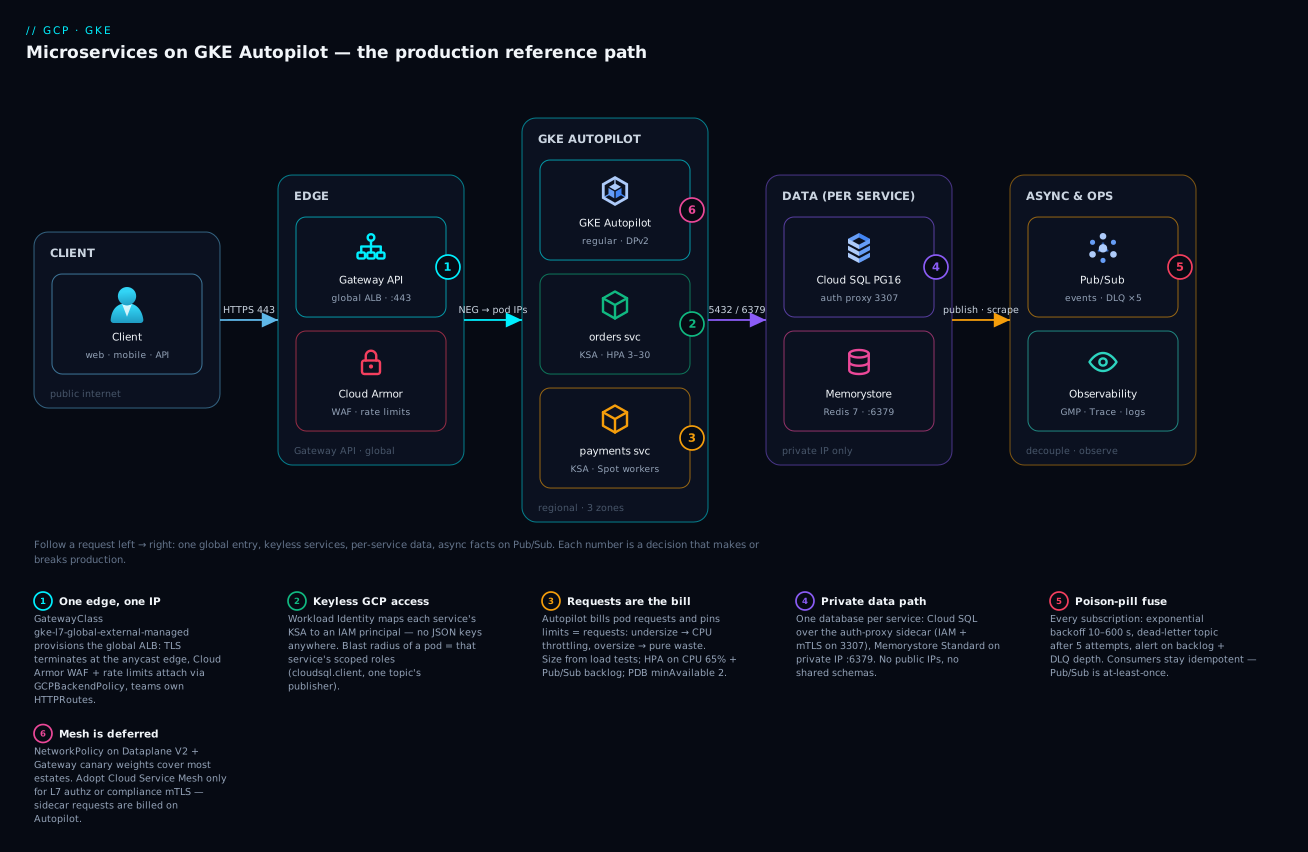
What the diagram deliberately does not show is also the point: no self-managed ingress controllers, no node pools, no Prometheus servers, no key files. Every box you don’t see is toil this architecture deleted.
Real-world scenario: Navikart’s flash-sale quarter
Navikart, a Bengaluru marketplace (fictional, assembled from three real engagements), ran a Django monolith on Compute Engine MIGs. Ahead of festive season they split the core into 12 services on this architecture: one Autopilot cluster in asia-south1, Gateway API on the global ALB, per-service Cloud SQL Postgres 16, Memorystore Standard for sessions, Pub/Sub for order events, Cloud Deploy canaries. Baseline: ~250 RPS; flash-sale target: 4,000 RPS for 90 minutes.
The first load test failed impressively: checkout p99 went from 180 ms to 4.2 s at barely 900 RPS — with CPU utilisation graphs looking healthy (~60%). The team had copied 250m CPU requests from a blog post; Autopilot pins limits to requests, and per-pod CPU throttling (visible in container_cpu_cfs_throttled_periods_total; averages hid it) was strangling bursts. Fix: load-test each service, re-request checkout at 1 vCPU / 1.5Gi, drop three over-provisioned internal services to 100m/256Mi. Net bill change: +4%. p99 back to 210 ms at 4,000 RPS.
The second failure was self-inflicted a week before the sale: a marketing service published a malformed order.created event (string total, not paise integer). The invoices consumer threw — and with the default immediate retry policy and no DLQ, Pub/Sub redelivered the message thousands of times an hour; HPA dutifully scaled the consumer to maxReplicas, burning ₹6,000 of compute overnight fighting one poisoned message. The fix is what this article makes mandatory: exponential backoff (10 s → 600 s), dead-letter topics with 5 attempts on all 14 subscriptions, a DLQ-depth alert, and schema validation that acks-and-parks unparseable messages.
Sale day was quiet. HPA took checkout from 6 to 44 pods over four minutes (balloon pods absorbed the first 30 seconds); Autopilot provisioned capacity with no human involvement; Cloud Armor rate rules blunted a scripted bot spike before it touched a pod. One canary that week — a payments release with a connection leak — was caught at the 10% stage by the verify step watching p99 and rolled back in 40 seconds; nobody paged.
The quarter’s platform bill: ~₹1.9L/month at peak season (cluster compute ~₹78k, Cloud SQL fleet ~₹66k, Memorystore ~₹12k, LB + NAT + Pub/Sub + observability the rest) — about 22% less than the over-provisioned MIG estate it replaced, with node ops eliminated. Their retro’s one-liner is the article’s thesis: “Kubernetes was fine; the defaults were the project.”
Advantages and disadvantages
| Advantages | Disadvantages |
|---|---|
| Node ops eliminated: Autopilot patches, packs and scales nodes; 99.9% pod SLA | Autopilot guardrails: no privileged pods/hostNetwork; some agents need Standard |
| Pay-per-request pods — costs track features, not fleets | Requests discipline is mandatory; lazy defaults (0.5 vCPU/2 GiB) cost real money |
| One global anycast entry: self-serve routes, canaries, central Cloud Armor | GCP-specific CRDs and behaviours to learn (NEGs, policies, health-check sources) |
| Keyless IAM end to end — no keys to leak, per-service blast radius | More Terraform to stamp and review (the good kind of overhead) |
| Per-service Cloud SQL/Memorystore kill shared-database coupling | More instances to size and pay for; HA doubles each |
| Pub/Sub + DLQ discipline absorbs spikes and poison messages by design | At-least-once forces idempotent consumers — a real engineering tax |
| Managed observability (GMP, Trace, Logging) — no self-hosted stack | Sample/cardinality costs need active curation at scale |
| Mesh optional and deferred; NetworkPolicy + Gateway cover most estates | If mesh arrives, it is a second platform to operate |
The pattern in the right-hand column: this architecture trades operational burden for design discipline. Everything hard about it is a decision or a convention, not a 03:00 page — which is exactly the trade a platform should make.
Hands-on lab: a two-service slice in ~45 minutes
Free-tier-friendly: the $74.40/month GKE credit covers one cluster’s management fee, pod requests are tiny, images are Google’s samples, and teardown is complete. An hour of this costs a few rupees.
1. Project + APIs.
export PROJECT_ID=$(gcloud config get-value project)
gcloud services enable container.googleapis.com \
  artifactregistry.googleapis.com monitoring.googleapis.com
2. Create the Autopilot cluster (Gateway API on). Takes ~5–7 minutes.
gcloud container clusters create-auto lab-apps \
  --region=asia-south1 --release-channel=regular --gateway-api=standard
gcloud container clusters get-credentials lab-apps --region=asia-south1
kubectl get gatewayclass   # expect gke-l7-global-external-managed listed
3. Deploy two “services”.
kubectl create namespace store
kubectl -n store create deployment web --replicas=2 \
  --image=us-docker.pkg.dev/google-samples/containers/gke/hello-app:1.0
kubectl -n store create deployment api --replicas=2 \
  --image=us-docker.pkg.dev/google-samples/containers/gke/hello-app:2.0
kubectl -n store expose deployment web --port=80 --target-port=8080
kubectl -n store expose deployment api --port=80 --target-port=8080
Watch Autopilot provision: kubectl get pods -n store -w shows Pending while nodes are created (~60–90 s), then Running.
4. One Gateway, two routes. Save and kubectl apply -f gateway.yaml:
apiVersion: gateway.networking.k8s.io/v1
kind: Gateway
metadata: { name: lab-gw, namespace: store }
spec:
  gatewayClassName: gke-l7-global-external-managed
  listeners:
  - { name: http, protocol: HTTP, port: 80 }
---
apiVersion: gateway.networking.k8s.io/v1
kind: HTTPRoute
metadata: { name: web-route, namespace: store }
spec:
  parentRefs: [{ name: lab-gw }]
  rules:
  - matches: [{ path: { type: PathPrefix, value: / } }]
    backendRefs: [{ name: web, port: 80 }]
  - matches: [{ path: { type: PathPrefix, value: /api } }]
    backendRefs: [{ name: api, port: 80 }]
5. Test through the global LB. Programming takes 3–5 minutes the first time.
kubectl -n store get gateway lab-gw \
  -o jsonpath='{.status.addresses[0].value}'   # note the IP (e.g. 34.x.x.x)
curl http://34.x.x.x/        # → "Hello, world! Version: 1.0.0 ..."
curl http://34.x.x.x/api     # → "Hello, world! Version: 2.0.0 ..."
Early no healthy upstream or resets mean the LB/NEGs are still programming — wait; kubectl describe gateway lab-gw -n store shows conditions.
6. Add an HPA and watch Autopilot follow.
kubectl -n store autoscale deployment web --cpu-percent=60 --min=2 --max=10
# generate load from a throwaway pod:
kubectl -n store run hey --rm -it --image=busybox -- \
  /bin/sh -c 'while true; do wget -qO- http://web >/dev/null; done'
kubectl -n store get hpa,pods -w   # replicas climb; new nodes appear invisibly
7. A canary in one line. Edit web-route to split traffic — this is the primitive Cloud Deploy automates:
    backendRefs:
    - { name: web, port: 80, weight: 90 }
    - { name: api, port: 80, weight: 10 }
for i in $(seq 1 20); do curl -s http://34.x.x.x/ | head -1; done — roughly two of twenty responses now say Version 2.0.0.
8. Teardown (do not skip — the LB bills hourly).
kubectl delete namespace store            # deletes Gateway → deprovisions the LB
gcloud container clusters delete lab-apps --region=asia-south1 --quiet
Common mistakes & troubleshooting
The playbook for the failure modes this architecture actually produces:
| # | Symptom | Root cause | Confirm | Fix |
|---|---|---|---|---|
| 1 | p99 spikes under load; CPU graphs look fine | Limits=requests → CFS throttling | container_cpu_cfs_throttled_periods_total rising in GMP |
Raise CPU requests to load-tested p95 |
| 2 | Pods Pending, then a bill jump |
Requests omitted → defaults 0.5 vCPU / 2 GiB each | kubectl describe pod shows mutated requests |
Explicit requests on every container |
| 3 | ImagePullBackOff + 403 Forbidden |
Cluster identity lacks AR access (cross-project repo) | Pod events; gcloud artifacts repositories get-iam-policy |
Grant roles/artifactregistry.reader to the node identity |
| 4 | Permission denied on GCP calls |
KSA annotation / serviceAccountName / WI binding missing |
gcloud auth list from a debug pod shows node identity |
Complete the WI triple: annotation + workloadIdentityUser + serviceAccountName |
| 5 | Gateway has no address; routes 404 | Gateway API disabled, or namespace not allowed by allowedRoutes |
kubectl describe gateway; HTTPRoute Accepted=False |
--gateway-api=standard; label the namespace to match the selector |
| 6 | LB 502; failed_to_pick_backend in LB logs |
All NEG endpoints unhealthy — probe hits wrong path/port | LB log statusDetails; gcloud compute backend-services get-health |
HealthCheckPolicy pointing at the real /healthz port |
| 7 | Backends unhealthy right after “hardening” | Default-deny NetworkPolicy blocked LB health-check ranges | DPv2 flow logs: drops from 130.211.0.0/22, 35.191.0.0/16 |
Allow those ranges to serving ports |
| 8 | Intermittent connection refused to Cloud SQL at scale-out |
max_connections exhausted (pods × pool size) |
num_backends metric vs the flag |
Shrink pools; PgBouncer; right-size tier |
| 9 | Consumer pegged at 100% CPU, backlog flat, bill climbing | Poison message + immediate retry + no DLQ | num_undelivered_messages static while pull count huge |
Exponential backoff + DLQ; validate then ack bad messages |
| 10 | Messages never reach the configured DLQ | Service agent lacks publisher on DLQ / subscriber on source | Subscription warning banner; topic IAM | Grant gcp-sa-pubsub agent both roles |
| 11 | Both replicas restarted together overnight | No PDB; Autopilot node upgrade drained them | kubectl get events shows synchronized evictions |
PDB minAvailable: 2; ≥3 replicas zone-spread |
| 12 | Prometheus metrics missing for one service | No PodMonitoring, or wrong port name |
kubectl get podmonitoring -A; GMP target status |
PodMonitoring matching labels + named metrics port |
| 13 | Secret change never reached pods | Mount pinned to latest but app read the file once at boot |
SM version timestamps vs pod start time | Roll the Deployment on rotation, or watch the file |
| 14 | Canary aborts every time at verify | Verify hits the route while weights point 90% at stable | Cloud Deploy rollout logs; verify output | Point verify at the canary Service Cloud Deploy renders |
Rows 1–4 account for most first-quarter pain; rows 9–10 for the most expensive nights. Print the table.
Best practices
- Stamp services from a template (Terraform module + manifest chart): namespace, KSA, IAM kit, HTTPRoute, HPA, PDB, PodMonitoring, DLQ’d subscriptions. Consistency is the architecture.
- Set requests from load tests, not folklore — on Autopilot they are your limits, bill and latency at once. Re-measure quarterly.
- Three replicas minimum, zone-spread, with a PDB on the request path; Autopilot upgrades nodes continuously and will eventually drain any two pods that let it.
- One Gateway, many HTTPRoutes: platform team owns Gateway/TLS/Cloud Armor; service teams own routes via
allowedRoutes. - Keyless or it doesn’t ship: CI rejects manifests mounting SA keys; Workload Identity is the only path to Google APIs.
- Every subscription gets exponential backoff + DLQ + a depth alert — the first poison message is a when.
- Per-service data, private IP only; IAM DB auth where supported, small per-pod pools, PgBouncer before you need it.
- Deploy through the pipeline, promote with approvals, canary with verify — laptops lose prod
kubectl applyon day one. - Immutable tags + cleanup policies + scanning in Artifact Registry; Binary Authorization once CI signs images.
- Instrument before incident: PodMonitoring per service, OTel context through Pub/Sub attributes, golden alerts as code.
- Write the mesh ADR now, adopt later — record trigger conditions (L7 authz, compliance mTLS, 30+ services) so nobody installs Istio out of boredom.
Security notes
Least privilege is structural: one KSA per service mapped to one IAM identity with resource-scoped grants (topic-level publisher, secret-level accessor) — audit the role map quarterly and alert on any roles/*.admin binding to a workload identity. Nodes are private (egress via Cloud NAT, optionally through a Secure Web Proxy allowlist); data services expose private IPs only; the sole public surface is the Gateway, where Cloud Armor enforces WAF, rate and geo policy in front of TLS 1.2+ (pinned via an SSL policy on GCPGatewayPolicy). East-west, default-deny NetworkPolicy encodes the call graph — a compromised pod reaches exactly its declared dependencies, and Dataplane V2 flow logs record the attempts. Supply chain: images only from your AR repos, scanned on push, tags immutable, Binary Authorization refusing anything unsigned. Secrets live in Secret Manager with per-secret IAM and Cloud Audit Logs, so “who read the DB password and when” is a query, not a shrug. Everything at rest is encrypted by default; add CMEK only where a regulator demands key custody — revoking a key is an outage with a compliance certificate.
Cost & sizing
What actually drives the bill, in the order it usually surprises people:
| Cost driver | Meter | Indicative list rate (us-central1; varies) | Control lever |
|---|---|---|---|
| Autopilot pod compute | Requested vCPU / GiB / ephemeral per second | ~$0.0445/vCPU-hr, ~$0.0049/GiB-hr | Right-size requests; Spot pods (60–91% off); CUDs |
| Cluster management fee | $0.10/cluster/hr (~$73/mo) | One cluster offset by the $74.40/mo free credit | Few clusters, many namespaces |
| Cloud SQL | vCPU + RAM + storage; HA doubles | 2 vCPU / 8 GiB regional Postgres ≈ $200–260/mo | Small per-service instances; Enterprise Plus only where SLA demands |
| Memorystore | GiB-hours by tier | Basic 1 GiB ≈ $35–40/mo; Standard ≈ 2× | Basic in non-prod; cache-aside |
| Global external ALB | Forwarding rules + per-GiB | ~$20–35/mo before traffic | One shared Gateway, not per-team LBs |
| Cloud NAT | Gateway hours + per-GiB | Small until egress-heavy | Keep east-west private; AR in-region |
| Pub/Sub | Throughput per TiB | ~$40/TiB (first 10 GiB/mo free) | Batch publishes; subscription filters |
| Observability | Samples, spans, log GiB | $0.06/M samples · $0.20/M spans · $0.50/GiB logs | 30–60 s scrape, 5–10% sampling, log exclusions |
| Artifact Registry | GiB-month + scans | $0.10/GiB/mo · $0.26/scan | Cleanup policies; scan prod only |
A worked “12 services, modest production” example — 36 always-on pods averaging 250m/512Mi (~10 vCPU / 20 GiB including HPA peaks, ≈$390), four Postgres instances of which two HA (≈$640), one Standard Memorystore GiB (≈$75), shared LB + NAT (≈$70), half a TiB of Pub/Sub (≈$20), curated observability (≈$60) and Artifact Registry (≈$12) — lands around $1,270/month ≈ ₹1.08L at ₹85/$, with the cluster management fee absorbed by the free credit.
Numbers are list-price, region-dependent and conservative — the point is the shape: databases usually out-cost the cluster, unset requests are the fastest way to double the compute line, and observability is cheap until cardinality isn’t. Review the requests-vs-usage gap (GMP has the data) monthly — the highest-yield FinOps ritual on Autopilot.
Interview & exam questions
Relevant to the Professional Cloud Architect and Professional Cloud DevOps Engineer exams, and to real design reviews:
-
Why choose GKE Autopilot over Standard for a microservices platform? Autopilot removes node management (provisioning, patching, bin-packing, upgrades), bills per pod request rather than per node, forces security best practice (Shielded nodes, Workload Identity, Dataplane V2) and carries a pod-level SLA. Standard remains for node-level agents, privileged workloads, kernel tuning, or proven high-utilisation fleets where machine-type CUDs win.
-
How does traffic reach a pod from the internet in this architecture? Client → anycast IP of the global external Application Load Balancer, provisioned by the GKE Gateway controller from a
Gatewayof classgke-l7-global-external-managed. TLS and Cloud Armor apply at the edge; anHTTPRoutematches host/path; NEGs route directly to pod IPs (container-native), skipping any node-port hop. -
Explain Workload Identity Federation for GKE in two sentences. The cluster’s workload pool (
PROJECT_ID.svc.id.goog) lets a pod exchange its Kubernetes ServiceAccount token for Google credentials — either as a directly-bound IAM principal or by impersonating a Google service account. No JSON keys exist, tokens are short-lived, and IAM scopes each service to its own resources. -
A pod calls Pub/Sub and gets 403 despite the KSA annotation. What do you check? That the Deployment sets
serviceAccountName(default KSA is the classic miss); that the GSA hasroles/iam.workloadIdentityUserfor thesvc.id.goog[ns/ksa]member; and that the GSA holds the Pub/Sub role on the right resource. Confirm from inside the pod (gcloud auth list) which identity it actually got. -
When do messages fail to dead-letter even though a DLQ is configured? When the Pub/Sub service agent lacks
roles/pubsub.publisheron the dead-letter topic androles/pubsub.subscriberon the source subscription — delivery attempts never convert into DLQ writes and the message retries indefinitely. Checkable via the subscription’s warning banner or IAM inspection. -
How would you run a canary release without a service mesh? Gateway API
HTTPRoutesupports weightedbackendRefs; Cloud Deploy’s canary strategy shifts weights (10% → 50% → 100%) between stable and canary Deployments, running a verify job at each step and re-weighting to zero on failure. A mesh only becomes necessary for per-user/header stickiness or traffic mirroring. -
What does “limits equal requests” on Autopilot imply for performance tuning? No burstable headroom: a container hitting its CPU request is CFS-throttled even on an idle node. Requests must be set to measured p95 needs, and throttling metrics — not utilisation averages — are the signal for undersizing.
-
How do you autoscale a Pub/Sub consumer deployment? HPA with an External metric on
pubsub.googleapis.com|subscription|num_undelivered_messagesfiltered to the subscription (via the Custom Metrics Stackdriver Adapter), targeting an average backlog per pod. Autopilot supplies node capacity automatically; pair with Spot pods for cost. -
Cloud Run or GKE for a new 5-service product with spiky traffic and no platform team? Cloud Run: scale-to-zero matches spiky traffic, there is no cluster fee or pod sizing, and nothing needs Kubernetes-only primitives. GKE earns its keep with 10+ interconnected services, long-lived or stateful workloads, CRDs/operators, NetworkPolicy graphs and a team to own the platform.
-
What are the first six alerts you’d configure for this platform? Gateway 5xx-ratio and p99 burn rates per route;
num_undelivered_messagesgrowth; DLQ depth > 0; Cloud SQL connections vsmax_connections(>80%); HPA atmaxReplicassustained; pod CPU-throttling rate. Together they catch edge failures, async rot, connection exhaustion and undersizing before users do.
Quick check
- Which GatewayClass provisions the internet-facing global load balancer used here?
- On Autopilot, what happens if a container specifies no resource requests?
- Name the two IAM grants the Pub/Sub service agent needs for dead-lettering to work.
- Why must Cloud SQL per-pod connection pools stay small?
- What CRD tells Managed Service for Prometheus to scrape your pods?
Answers
gke-l7-global-external-managed.- Autopilot applies defaults (0.5 vCPU / 2 GiB) and bills them; limits are pinned to requests either way.
roles/pubsub.publisheron the dead-letter topic androles/pubsub.subscriberon the source subscription.- Total connections = pods × pool size, and each Cloud SQL tier caps
max_connections; HPA scale-outs otherwise exhaust the cap and new pods getconnection refused. PodMonitoring(namespace-scoped;ClusterPodMonitoringfor cluster-wide).
Glossary
- Autopilot: GKE mode where Google operates nodes; you request pod resources and pay for them.
- Gateway API: Ingress successor (
Gateway,HTTPRoute, policy CRDs) with role separation and traffic weights. - NEG (network endpoint group): LB backend of pod IP:port pairs — container-native load balancing.
- Cloud Armor: Edge WAF/DDoS/rate-limit policy attached to LB backends.
- Artifact Registry: Regional artifact store at
REGION-docker.pkg.dev; scanning, cleanup, per-repo IAM. - Workload Identity Federation for GKE: KSA-to-IAM token exchange giving pods keyless Google credentials.
- KSA / GSA: Kubernetes ServiceAccount / Google (IAM) service account — WI links the two.
- Cloud SQL Auth Proxy: Sidecar tunnelling DB connections over mTLS with IAM checks (server port 3307).
- Memorystore: Managed Redis/Valkey (Basic, Standard-HA, Cluster) on private IP.
- Dead-letter topic (DLQ): Pub/Sub topic receiving messages after N failed deliveries — the poison-pill fuse.
- Secret Manager CSI add-on: GKE-managed driver mounting Secret Manager versions as pod files.
- Cloud Deploy: Managed delivery pipelines rendering with skaffold, promoting releases, canary-capable.
- Managed Service for Prometheus (GMP): Google-run Prometheus collection/storage queried with PromQL.
- Dataplane V2: GKE’s eBPF dataplane; native NetworkPolicy enforcement and flow logs.
- Cloud Service Mesh: Google’s managed Istio-based mesh — mTLS, L7 authz, traffic policy, telemetry.
Next steps
- Settle the cluster-mode decision in depth: GKE Autopilot vs Standard: Which Google Kubernetes Engine Mode Should You Actually Use? and the enterprise view in GKE Autopilot vs Standard vs Enterprise: Choose Your Kubernetes Mode.
- Pressure-test whether you need this platform at all: GCP Cloud Run vs GKE vs Compute Engine: Choose the Right Compute.
- Go deeper on the async backbone: GCP Pub/Sub and Event-Driven Architecture: Decouple and Scale.
- Harden the identity layer with GCP IAM and Service Accounts: Roles, Bindings and Least Privilege.
- Build out the day-2 view with GCP Cloud Monitoring and Operations: Observability Built In.