Here is the problem Cloud Run exists to solve. You have a container — a web app, an API, a worker that resizes images — and you want it on the internet. The old way: spin up a virtual machine, install Docker, run the container, wire up a load balancer, set up TLS, patch the OS forever, and pay for that VM 24 hours a day even at 3am when nobody is using it. Cloud Run is Google Cloud’s answer: you hand it a container image and it runs that container on demand — starting copies when requests arrive, removing them when traffic dies down, all the way to zero copies when nobody is calling — billing you, to the 100 milliseconds, only for the time your container actually did work. No VM to manage, no Kubernetes cluster to operate, no load balancer to wire up, and no bill while it sits idle.
That last part is the headline, so let’s name it plainly: scale to zero means that when your service has no traffic, Cloud Run runs no instances of your container at all, and the cost for that period is ₹0. When the next request shows up, Cloud Run starts a fresh copy, hands it the request, and you’re live again — the gap between “zero running” and “first request served” is the cold start (a few hundred milliseconds to a few seconds), and knowing when it happens and how to make it disappear is half of using Cloud Run well. The other half is the one rule the platform turns on: your container must be stateless and listen for HTTP on the port we tell it. Obey that rule and an enormous amount of infrastructure becomes Google’s problem instead of yours.
This is the clearest explanation of Cloud Run you’ll find, for someone smart but new to serverless containers. We build the mental model with an analogy, then make it concrete: how requests flow, what “an instance” and “concurrency” really mean, how the bill is calculated with real numbers, and when to pick Cloud Run over Cloud Functions, GKE or a plain VM. By the end you’ll deploy a real service from one gcloud command and know what every knob does. For the exhaustive operational treatment afterward, Google Cloud Run, In Depth is the next stop — but start here, because this is where it clicks.
What problem this solves
The pain Cloud Run removes is operational tax on small-to-medium workloads. Running a container in production traditionally means owning the machine — choosing a VM size, patching the OS, restarting the process when it dies, putting a load balancer in front, terminating TLS, and (the expensive part) paying for capacity sized for your peak even though most of the day you’re nowhere near it. A VM provisioned for your busiest minute is mostly idle, and you pay for the idle. For a startup’s API at 50 rpm, an internal tool used 9-to-5, or a webhook firing a few times an hour, a 24/7 VM is rent on an empty room. Teams either over-provision (wasting money) or under-provision (falling over on spikes), and burn engineering hours on plumbing nobody’s customers care about.
Who hits this: anyone deploying a stateless HTTP service or event-driven worker who doesn’t want to operate Kubernetes — web backends, REST and gRPC APIs, webhook receivers, server-rendered sites, lightweight ML inference, and “glue” services reacting to a Pub/Sub message or a file landing in a bucket. If your workload is request-driven and stateless, Cloud Run is very likely the cheapest, simplest place to run it. Where it’s not the answer — long-lived stateful processes, hours-long GPU jobs, deep Kubernetes-native tooling — we cover in the decision section. Who reaches for Cloud Run, and what they’re escaping:
| Situation today | The pain | What Cloud Run changes |
|---|---|---|
| API on a 24/7 VM, mostly idle | Paying for peak capacity all day | Scale to zero; pay per request-second |
| Container behind a hand-built LB + TLS | Plumbing you maintain forever | HTTPS URL + TLS provisioned automatically |
| Spiky traffic (campaigns, launches) | Manual scaling, falls over or overspends | Autoscales 0 → N in seconds, no config |
| “Just run my container somewhere” | Kubernetes is too much machinery | One command, no cluster to operate |
| Webhook / event handler firing rarely | A whole VM for a few calls an hour | Costs ~nothing between events |
| Internal tool used 9-to-5 | Idle nights and weekends billed | Idle = ₹0; warms on first morning hit |
Learning objectives
By the end of this article you can:
- Explain in one sentence what Cloud Run is and the one rule (stateless container listening on
$PORT) that the whole platform depends on. - Describe the request lifecycle: how a request reaches an instance, what an instance is, and what concurrency means (many requests per instance, not one).
- Explain scale to zero and cold starts — when each happens, why the first request after idle is slow, and the exact knob (minimum instances) that removes cold starts.
- Read and reason about the four sizing levers — CPU, memory, concurrency, and min/max instances — and pick sensible starting values.
- Calculate a Cloud Run bill from real numbers (vCPU-seconds, GiB-seconds, requests) and explain what the free tier covers.
- Choose correctly between Cloud Run, Cloud Functions, GKE and a VM for a given workload, with a decision table.
- Deploy a real service with one
gcloud run deploy, split traffic between revisions for a safe canary, and tear it all down.
Prerequisites & where this fits
You don’t need much. Know roughly what a container is — a packaged-up app with its dependencies, what a Dockerfile builds and docker run starts — even if you’ve never built one (Cloud Run can build it for you from source). Be comfortable running a terminal command, and ideally have done the first-steps with gcloud, Console and Cloud Shell to authenticate to a project. HTTP at the level of “client sends a request, server sends a response” is plenty. No Kubernetes knowledge required — the whole pitch is that you don’t need it.
Cloud Run is one of GCP’s compute options — the serverless-container one — sitting next to Compute Engine (raw VMs you manage and patch), GKE (managed Kubernetes, you own cluster config and scaling policy), and Cloud Functions (one function on an event, which in its 2nd generation runs on Cloud Run under the hood). With Cloud Run you manage only the container image; Google manages servers, scaling, TLS, load balancing and patching. From Azure it’s the closest thing to Container Apps / App Service for containers; from AWS, think “Fargate + ALB, but serverless and scale-to-zero” — full mapping in GCP for Azure Engineers. This is the concept on-ramp; production depth (every flag, VPC egress, traffic tuning) lives in the Cloud Run deep dive and Cloud Run in Production.
Core concepts
Five mental models make everything about Cloud Run obvious. Read these once and the rest is detail hanging off them.
The mental model: a food-truck dispatcher, not a restaurant. A traditional VM is like leasing a restaurant — yours 24/7, rent due whether or not a customer walks in. Cloud Run is a food-truck dispatcher: you hand over a blueprint (your container image); orders roll out a truck (a container instance); one truck handles several orders at once (concurrency); a surge brings out more (autoscaling); the rush ends and every truck goes home — zero on the road (scale to zero), so you pay nothing; the first order after a quiet spell waits for a truck to roll out (cold start). You never own a building; you pay for trucks only while they serve. That image is Cloud Run.
A service is your app; a revision is a frozen version; an instance is a running copy. A service is the long-lived thing with a stable URL (https://my-api-xxxx.run.app). Every deploy creates an immutable revision (a snapshot of this exact image + settings), so you can split traffic across revisions or roll back instantly. An instance is one running copy a revision spins up to serve requests. The service is the restaurant brand, a revision is this week’s recipe, an instance is one truck cooking. You deploy services, ship revisions, the platform runs instances.
Concurrency means one instance serves many requests at once — the cost superpower. The most misunderstood thing about Cloud Run. By default one instance handles up to 80 concurrent requests (settable 1–1000); it does not spin up one instance per request — if 80 arrive at once, one instance serves all of them and the 81st triggers a second. That’s why it’s cheap for web traffic: a server spends most of each request waiting on a database, so one instance interleaves dozens of waiting requests on the same CPU. Set concurrency to 1 and you force one instance per request — fine for a CPU-bound ML model, ruinous for a normal API. (Cloud Functions 1st-gen forced concurrency 1; this is the big thing Cloud Run gives you over it.)
Scale to zero: idle costs nothing, the price is a cold start. When traffic stops, instances are removed and compute cost is ₹0. A request to a zero-instance service must cold-start — pull/start the container, run your init, then serve — typically a few hundred ms to a few seconds. Where the first slow request matters, set minimum instances ≥ 1 to keep that many always warm (billed at a reduced idle rate) and cold starts vanish. Scale-to-zero and always-warm are two ends of one dial — min=0 cheapest, min=1+ fastest — chosen per service.
The container contract: be stateless, listen on $PORT, start fast. Cloud Run runs any container in any language that obeys three rules. (1) Listen for HTTP on the PORT env var (default 8080) bound to 0.0.0.0 — not a hardcoded port or 127.0.0.1. (2) Be stateless — the filesystem is ephemeral in-memory tmpfs that vanishes with the instance, so durable state goes to Cloud SQL, Cloud Storage or Firestore. (3) Start quickly so cold starts stay short. That’s the whole contract. The vocabulary, side by side:
| Term | One-line meaning | Real-world analogy | Why it matters |
|---|---|---|---|
| Service | The app + its stable *.run.app URL |
The restaurant brand | What you deploy and point clients at |
| Revision | An immutable snapshot of image + config | This week’s exact recipe | Enables traffic split + instant rollback |
| Instance | One running copy of your container | One truck on the road | The unit that does work and gets billed |
| Concurrency | Requests one instance handles at once | Orders one truck cooks in parallel | The cost superpower (default 80) |
| Cold start | Time to start a fresh instance | Rolling a truck out + warming up | First request after idle is slow |
| Min instances | Warm copies always kept | Trucks idling on standby | Set ≥1 to kill cold starts |
| Max instances | Ceiling on copies | Most trucks you’ll ever dispatch | Caps cost and protects downstreams |
PORT |
Env var with the port to bind | “Serve from this window” | Wrong/unset → deploy fails health check |
| Scale to zero | Zero instances when idle | All trucks sent home | Idle cost = ₹0 |
Scale to zero and cold starts, demystified
Scale to zero is a Cloud Run service’s default: after a spell with no requests, the autoscaler removes the last instance and your running-instance count is 0 — you pay nothing for compute, so a dev API, internal tool, or rarely-hit webhook all cost essentially ₹0 when idle. That’s the headline difference from a VM, which bills 24/7 regardless.
The catch is the cold start: the next request to a zero-instance service waits for Cloud Run to start a fresh instance. It’s latency, not an error — only a failure if it exceeds the request timeout. You don’t eliminate the work; you ensure a warm instance already paid for it. To reason about cold starts you have to see them as a budget — a sequence of steps, each costing time, that runs once per new instance. Break the budget apart and it becomes obvious what you can shrink:
| Cold-start phase | What actually happens | Typical time | What you can do about it |
|---|---|---|---|
| Image pull | Cloud Run downloads your container image to the host | ~0–10 s (cached after first pull on a host) | Smaller base image; same-region Artifact Registry; fewer/smaller layers |
| Container start | Runtime unpacks the image and starts your process (PID 1) | ~50–300 ms | Keep the entrypoint trivial; don’t run migrations at boot |
| App init | Your code runs: imports, DI wiring, config load, framework boot | ~0.2–5 s | Lazy-load heavy modules; defer non-critical setup off the hot path |
| First dependency connect | First DB pool connect, secret fetch, warm cache priming | ~50 ms–2 s | Pool connections; fetch secrets once; parallelise independent init |
| Runtime warm-up (JIT) | JVM/.NET JIT-compiles hot paths on first execution | ~0.5–3 s | AOT / native image (GraalVM, .NET AOT); or accept and warm it |
| Health-check pass | Cloud Run confirms the container is listening on $PORT |
included above | Bind 0.0.0.0:$PORT early, before slow init if possible |
A lean container walks that whole list in a few hundred milliseconds; a fat JVM image with eager init and a cold connection pool can take several seconds. The two levers that move it most are image size (shrinks the pull) and eager work at boot (bloats app init) — attack those before anything exotic.
The clean fix when cold starts are unacceptable: set minimum instances to 1 or more, so Cloud Run keeps that many always warm and no request hits a zero-instance service. Idle warm instances bill at a reduced rate — far cheaper than a full-time VM, with VM-like responsiveness. The trade is simply cost versus first-request latency. The dial:
min-instances |
Idle cost | Cold starts? | Best for |
|---|---|---|---|
| 0 (default) | ₹0 when idle | Yes, on first request after idle | Dev, internal tools, spiky/rare traffic |
| 1 | One idle instance billed (idle rate) | Almost never (always ≥1 warm) | Public APIs where p99 latency matters |
| 2–3 | A few idle instances billed | No, even during brief scale-in | Latency-critical + small traffic floor |
| High (e.g. 10) | Many idle instances billed | No | You’re basically reserving capacity (rare) |
Two things people get wrong. First, min-instances does not cap your scale — min=1, max=100 means floor 1, ceiling 100. Second, the CPU allocation mode affects cost: by default an instance gets CPU only while handling a request (“allocated during requests” — cheapest, but background work between requests is starved); for background threads, queue draining, or websockets, set “CPU always allocated” (pricier, CPU runs continuously). For a normal request/response API, leave it default.
The cold-start mitigation toolkit
Min-instances is the blunt, reliable fix, but it’s not the only lever, and it costs money 24/7 whether or not anyone calls. Cloud Run gives you a small toolkit; the art is spending the least to hit your latency target. The two under-used tools are startup CPU boost — a burst of extra CPU during container startup only, which meaningfully shortens the app-init and JIT phases at no steady-state cost — and CPU always allocated, which (as a side effect of keeping CPU on) lets a min-instance do useful warm-up between requests. Ranked from cheapest to most expensive:
| Mitigation | What it does | Cost impact | Best when |
|---|---|---|---|
| Shrink the image | Cuts the image-pull phase; smaller = faster | Free (may even lower storage) | Always — the first thing to do |
| Defer / lazy-load init | Moves heavy work off the boot path | Free | App-init is your biggest phase |
| Startup CPU boost | Extra CPU only during startup to speed init + JIT | Negligible (billed only during the boost) | JVM/.NET or heavy-init apps that must scale 0→N fast |
| Same-region Artifact Registry | Image pull stays in-region, low latency | Free | Cross-region pulls are slowing cold starts |
min-instances = 1 |
One instance always warm; first request never cold-starts | One idle instance at the reduced idle rate | User-facing service where p99 matters |
min-instances = N |
N instances warm; no cold start even mid-scale-out | N idle instances billed | Latency-critical service with a traffic floor |
CPU always allocated + min ≥ 1 |
Warm instance can prime caches/keep pools hot | Higher per-second CPU rate on idle | Background work, websockets, cache warmers |
The point of the table is that cold starts are not a single problem with a single fix. If a 900 MB image dominates, min-instances only treats the symptom — shrink the image first. If a JVM spends three seconds JIT-compiling, startup CPU boost plus a native image beats paying for a warm instance you’ll still re-warm on every deploy. Reach for min-instances when the latency target is strict and the workload is user-facing; reach for the free levers everywhere else.
Here is the same setup in gcloud, showing where each cold-start lever lives:
gcloud run deploy shop-api \
  --image asia-south1-docker.pkg.dev/my-proj/repo/api:1.4.2 \
  --region asia-south1 \
  --min-instances 1 \          # keep one warm → no cold start on first hit
  --max-instances 20 \         # ceiling to protect the database
  --cpu 1 --memory 512Mi \
  --cpu-boost \                # startup CPU boost: faster init during 0→N
  --concurrency 80
# For background work between requests, add:  --no-cpu-throttling  (CPU always allocated)
The four knobs that matter
Four levers do almost all the work of making a service correct and cheap.
- Concurrency — simultaneous requests per instance (default 80, range 1–1000). High for I/O-bound APIs (one instance interleaves many DB-waiting requests, so you run fewer); low, even 1, for CPU-bound work where each request pegs a core and they’d otherwise fight. Start at default, lower it if requests interfere, raise it if instances sit underused.
- Memory & CPU — per-instance size (512 MiB–32 GiB, 0.08–8 vCPU). Start small (512 MiB / 1 vCPU covers a lot); size up only on OOM kills or throttling. The ephemeral filesystem counts against memory, so a big temp file eats RAM. Under-memoried → OOM-killed; under-CPU’d → throttled. CPU and memory have minimum pairings (no 4 vCPU with 128 MiB).
- Min & max instances — the floor (default 0 = scale to zero; ≥1 kills cold starts) and the hard ceiling (default 100). Cap max to protect downstreams: if your DB allows 100 connections, capping max stops a spike opening 500 and toppling it. Too-low max → excess traffic gets 429; too-high max → a spike or bug fans out into a huge bill.
The four knobs together:
| Knob | Default | Range | Lower it when… | Raise it when… | Cost effect |
|---|---|---|---|---|---|
| Concurrency | 80 | 1–1000 | Requests are CPU-bound and interfere | App is I/O-bound and instances idle | Lower concurrency → more instances → ↑ cost |
| Memory | 512 MiB | 128 MiB–32 GiB | (rarely — only if very lean) | You see OOM kills / big temp files | Linear with size |
| CPU | 1 vCPU | 0.08–8 vCPU | App is light, latency fine | CPU throttling / heavy compute | Linear with vCPU |
| Min instances | 0 | 0–1000 | You want cheapest (idle = ₹0) | Cold starts hurt user experience | Idle instances billed at idle rate |
| Max instances | 100 | 1–1000+ | Protect a fragile downstream | You must absorb large spikes | Caps worst-case spend |
A worked sizing intuition: an I/O-bound JSON API doing 200 requests/second, each taking ~100 ms and mostly waiting on a database, needs roughly 200 req/s × 0.1 s = 20 requests in flight at any moment. At concurrency 80, that’s ceil(20 / 80) = 1 instance most of the time, bursting to 2–3 under jitter. The same 200 req/s with concurrency forced to 1 would need ~20 instances — 20× the cost for no benefit. That is why concurrency is the lever that most changes your bill.
All four knobs are declarative — here they are in Terraform (google_cloud_run_v2_service), the recommended way to manage Cloud Run in production:
resource "google_cloud_run_v2_service" "api" {
  name     = "shop-api"
  location = "asia-south1"
  template {
    containers {
      image = "asia-south1-docker.pkg.dev/my-proj/repo/api:1.4.2"
      ports { container_port = 8080 }          # the $PORT contract
      resources {
        limits = { cpu = "1", memory = "512Mi" } # CPU + memory knob
      }
    }
    max_instance_request_concurrency = 80         # concurrency knob
    scaling {
      min_instance_count = 0                       # 0 = scale to zero; set 1+ to kill cold starts
      max_instance_count = 20                      # cap to protect downstreams
    }
  }
}
Services vs jobs — two shapes of work
Cloud Run runs two shapes of workload. A service is request-driven: it has a URL, listens for HTTP/gRPC, scales on requests, and responds — APIs, websites, webhook handlers. A job is task-driven: no URL, runs to completion then exits — batch import, nightly report, database migration, one-off script — triggered manually, on a schedule via Cloud Scheduler, or from a pipeline. The test: “Does something call this and wait for a response?” → service; “Does this do a chunk of work and finish?” → job. Same container model, different lifecycle:
| Aspect | Cloud Run service | Cloud Run job |
|---|---|---|
| Triggered by | Incoming HTTP/gRPC request | Manual run, schedule, or pipeline |
| Has a URL? | Yes (*.run.app) |
No |
| Lifecycle | Long-lived; scales on traffic; can scale to zero | Runs to completion, then exits |
| Scaling unit | Instances handling concurrent requests | Tasks (parallel executions of the work) |
| Typical use | API, website, webhook, gRPC backend | Batch import, report, migration, cron task |
| Request timeout | Up to 60 min | N/A (task can run up to 24h) |
| Billed for | Time spent serving (per-request CPU) | Time the task runs |
Most beginners start with a service and discover jobs later when they need “run this container on a schedule” — at which point a job beats hacking a service into a cron target.
Revisions and traffic splitting — deploy without holding your breath
The single feature that makes Cloud Run feel safe in production is the revision. Every time you deploy — new image, changed memory, a different env var — Cloud Run freezes the entire configuration into a new, immutable, named revision (shop-api-00007-xyz). The old revisions don’t disappear; they sit there, ready. On top of that, a Cloud Run service has a traffic split: a mapping of “what percentage of incoming requests goes to which revision.” Deploy normally and 100% shifts to the newest revision. But you don’t have to — and that choice is your whole release strategy.
The mental model: revisions are save-points, the traffic split is the dial. Because a revision is a frozen, runnable snapshot, “rolling back” isn’t a rebuild or a redeploy — it’s just pointing the dial at an older save-point, which takes effect in seconds. “Canary” is pointing the dial mostly at the old one and a sliver at the new one. There is no separate blue/green infrastructure to stand up; the revision list is the blue/green, and the traffic split is the router. This is why teams that adopt Cloud Run stop dreading deploys.
Two mechanics make it ergonomic. A tag gives a revision its own stable, testable URL (https://v2---shop-api-xxxx.run.app) without sending it any production traffic, so you can smoke-test the exact bits before real users see them. Deploying with --no-traffic --tag v2 ships the revision, gives it a private URL, and leaves 100% of live traffic on the current revision — you decide when (and how much) to shift. The strategies you can express with just these two knobs:
| Strategy | How you express it | What it buys you | The risk it removes |
|---|---|---|---|
| Straight deploy | gcloud run deploy (default) |
New revision gets 100% instantly | None — simplest, fine for low-stakes |
| Canary | --no-traffic --tag then split e.g. v2=10 |
10% of users test the new revision live | A bad release only hits a fraction |
| Gradual rollout | Step the split 10 → 25 → 50 → 100 | Watch metrics at each step | Blast radius grows only if health holds |
| Blue/green | Tag new revision, test via tag URL, then 100% flip |
Instant, all-at-once cutover after validation | Downtime and half-migrated state |
| Instant rollback | --to-revisions <old>=100 |
Previous revision is already running | Rebuild time during an incident (seconds, not minutes) |
| A/B by tag | Tagged URLs per revision | Route specific clients to specific revisions | Guessing — you measure real behaviour |
The traffic-splitting commands, so the model is concrete:
# Ship v2 but send it NO live traffic; reachable only via its tag URL for smoke tests
gcloud run deploy shop-api --image .../api:2.0.0 --region asia-south1 --no-traffic --tag v2

# Canary: 10% of live traffic to v2, 90% stays on the current revision
gcloud run services update-traffic shop-api --region asia-south1 --to-tags v2=10

# Happy with it → promote to 100%
gcloud run services update-traffic shop-api --region asia-south1 --to-latest

# Something's wrong → instant rollback to a known-good revision (no rebuild)
gcloud run services update-traffic shop-api --region asia-south1 --to-revisions shop-api-00006-abc=100
Two facts save beginners a bad afternoon. First, traffic percentages are per-revision, not per-instance — a 10% canary routes ~10% of requests to the canary revision, which scales its own instances independently. Second, config changes create a new revision too — bumping memory or adding an env var is a deploy, not an in-place mutation, which is exactly why rollback is reliable: the old config is still frozen and runnable.
CPU allocation: “during requests” vs “always allocated”
One revision-level setting deserves its own table because it quietly controls both cost and whether background work runs at all. CPU allocation decides when your instance actually has a CPU to use:
| CPU allocated during requests (default) | CPU always allocated | |
|---|---|---|
| When the instance has CPU | Only while handling a request | Continuously, for the instance’s whole life |
| Background work between requests | Starved / throttled to near-zero | Runs normally |
| Websockets / streaming / long-poll | CPU throttles between messages | Stays responsive |
| Scale to zero? | Yes | Yes (but idle instances still bill CPU) |
| Cost basis | Cheapest — CPU billed per request-second | CPU billed for the whole instance lifetime |
gcloud flag |
--cpu-throttling (default) |
--no-cpu-throttling |
| Use it for | Normal request/response APIs | Queue consumers, cron-in-process, websockets, cache warmers |
The trap is subtle: in the default mode, “fire-and-forget” work kicked off after the response — a deferred analytics write, a cache refresh — may simply not run, because CPU is throttled the instant the response flushes. If your service does real work outside the request window, move it inside the request, hand it to a Cloud Run job or Pub/Sub worker, or set --no-cpu-throttling. For a plain API, the default is correct and cheapest.
Architecture at a glance
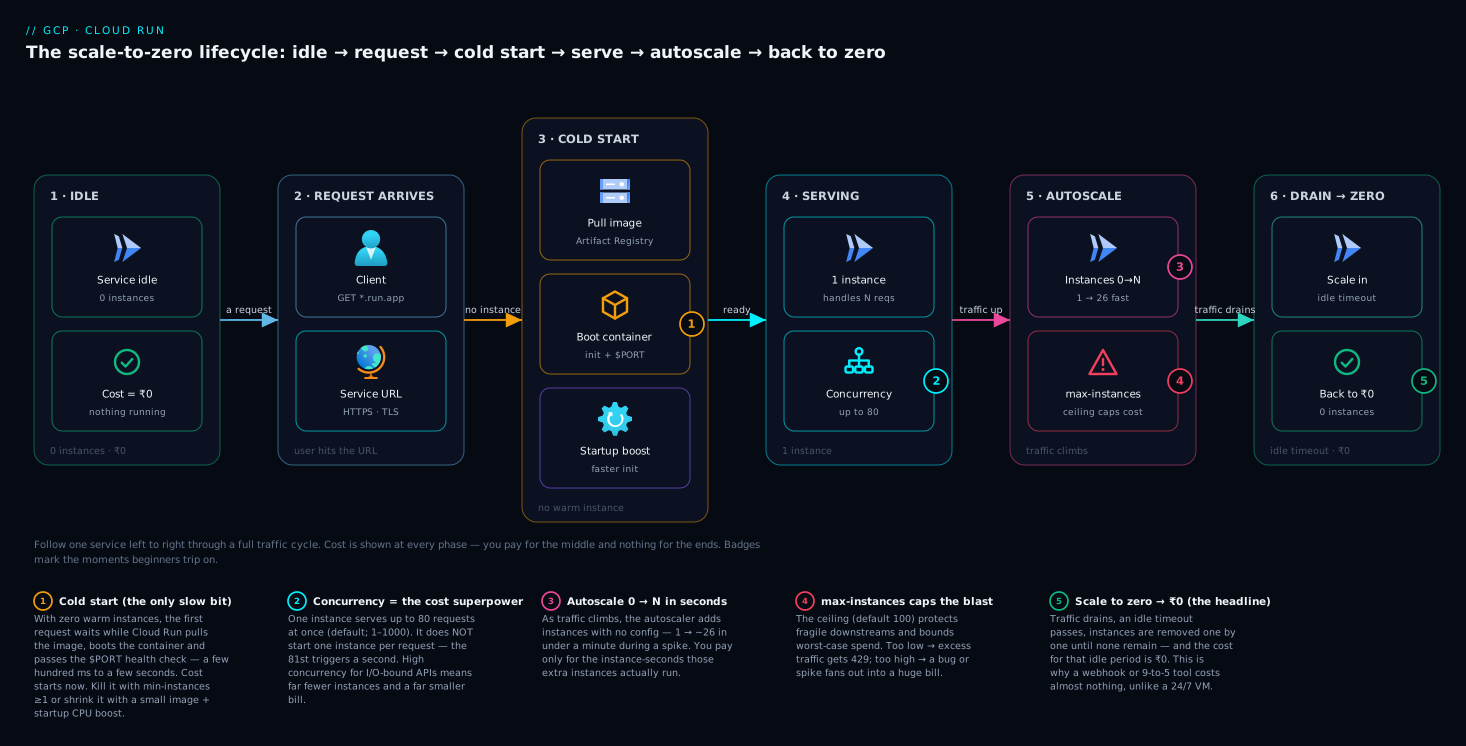
The diagram below tells the scale-to-zero lifecycle left to right — the single idea that defines Cloud Run. It starts at idle (0 instances, ₹0): no traffic, nothing running, no bill. A request arrives at the service URL and, because there’s no warm instance, triggers a cold start — pull the image, boot the container, pass the health check. Now serving: one instance handles up to N concurrent requests (default 80). Traffic climbs and the autoscaler adds instances (0 → many); traffic drains and, after an idle timeout, instances are removed one by one until the service is back to zero at ₹0. The numbered badges mark the moments that trip people up — the cold start, the concurrency multiplier, the autoscale ramp, and the return to zero — and the legend narrates the cost at each phase, which is the whole point: you pay for the middle of this diagram and nothing for the ends.
Real-world scenario
Patanjali Pulse, a fictional D2C wellness brand, runs its order-tracking API with a three-engineer team — a stateless Node.js service that takes an order ID and returns shipment status from a Cloud SQL database and a courier API. Traffic is deeply spiky: ~30 rpm normally, but every Monday at 8am a “your order shipped” blast spikes it to ~2,000 rpm for fifteen minutes as customers tap the tracking link. Originally it ran on one e2-standard-2 VM behind a load balancer — sized for the spike, idle the other 167 hours a week, ₹5,200/month, and still falling over at the worst spikes because one VM couldn’t absorb 2,000 rpm.
The migration was near-trivial: containerise the app (it already listened on a port — they changed it to read process.env.PORT), push to Artifact Registry, gcloud run deploy. They set concurrency 80 (I/O-bound), 512 MiB / 1 CPU, min-instances 0, and max-instances 20 to protect the Cloud SQL connection limit. On a normal day it sits at zero instances, warming one when a request trickles in.
The first Monday blast revealed one wrinkle: scale-to-zero meant the first tracking-link taps hit a cold start (the courier connection alone took ~1.2s cold). The fix was two settings, no code: min-instances 1 so a warm instance always exists, plus a startup CPU boost so cold starts during 1 → 30 scaling stay fast. The spike now scales 1 → ~26 instances in under 30 seconds and falls back to 1 by 8:20am. The bill came to about ₹900/month (~₹600 of it the one always-warm instance) — ~83% cheaper than the VM, with better spike handling and zero servers to patch. The lesson on the wall: “Scale to zero saved the money; one min-instance bought back the latency — two flags, no code.” The before/after:
| Dimension | Old: single VM + LB | New: Cloud Run |
|---|---|---|
| Idle cost (most of the week) | Full VM billed 24/7 | ₹0 (scaled to zero) / one idle min-instance |
| Monday 2,000-rpm spike | One VM, overwhelmed | Autoscaled 1 → ~26 instances cleanly |
| Cold-start latency | N/A (always on) | Removed via min-instances 1 |
| Ops burden | Patch OS, manage LB + TLS | None — fully managed |
| Monthly cost | ~₹5,200 | ~₹900 |
| Migration effort | — | Containerise + read $PORT + one deploy |
Advantages and disadvantages
Cloud Run’s design is a set of deliberate trade-offs. It is spectacular for the workloads it targets and genuinely wrong for a few others. Weigh it honestly:
| Advantages (why it’s great) | Disadvantages (where it bites) |
|---|---|
| Scale to zero — idle services cost ₹0; perfect for spiky/low/dev traffic | Cold starts — first request after idle is slow unless you pay for min-instances |
| No infrastructure — no VMs, no Kubernetes, no LB/TLS wiring to manage | Stateless only — no durable local disk; all state must live elsewhere |
Any container, any language — if it’s a container on $PORT, it runs |
Per-instance request timeout (max 60 min) — not for indefinitely long-lived processes |
| Fast autoscaling — 0 → N in seconds, no config | Less control than GKE — no DaemonSets, custom schedulers, or deep K8s primitives |
| Pay-per-use to 100 ms — bill tracks actual work, not provisioned capacity | Concurrency model must fit — CPU-bound work needs low concurrency, raising cost |
| Revisions + traffic split — instant rollback, easy canary/blue-green | GPU/specialised hardware is limited vs a VM you fully control |
| Built-in HTTPS + custom domains + IAM auth | Cold-start + scale-to-zero can surprise teams who assume always-on |
The advantages dominate for stateless HTTP services with variable or low traffic — where you ship code, not servers, and the occasional cold start is fine (or fixed with one min-instance). The disadvantages dominate for stateful systems, workloads needing fine-grained Kubernetes control or long-running GPU jobs, and anything holding a process open beyond the request model. The summary: Cloud Run is the default for “run my container” — reach for it first, stepping up to GKE or down to Cloud Functions only when a specific need pushes you there.
When to use Cloud Run (and when not to)
The most expensive Cloud Run mistake is using it for the wrong shape of workload — or not using it when it was the obvious fit. Read your workload’s row:
| Your workload | Best fit | Why |
|---|---|---|
| Stateless HTTP/gRPC API, web app, server-rendered site | Cloud Run | The home case — scales, cheap, no ops |
| One small function reacting to an event (file uploaded, message published) | Cloud Functions (2nd gen) | Simplest path; it runs on Cloud Run anyway |
| Container that must run on a schedule or as a batch task | Cloud Run job | Runs to completion, no URL needed |
| Webhook / callback handler firing irregularly | Cloud Run | Scale-to-zero makes idle nearly free |
| Spiky traffic (campaigns, launches, viral) | Cloud Run | Autoscales 0 → N without manual sizing |
| Need full Kubernetes (operators, DaemonSets, service mesh, custom schedulers) | GKE | Cloud Run deliberately hides K8s |
| Many microservices needing rich service-to-service networking & policy | GKE (or Cloud Run + careful design) | K8s primitives earn their keep at scale |
| Stateful service that owns local disk / long-lived in-memory state | Compute Engine / managed service | Cloud Run instances are ephemeral & stateless |
| Long-running daemon with no request boundary (e.g. always-streaming consumer) | GKE / Compute Engine | Beyond the request/timeout model |
| Heavy GPU training jobs running for hours | Compute Engine / GKE / Vertex AI | More hardware control |
| Lift-and-shift of a legacy VM app you can’t containerise | Compute Engine | No container, no Cloud Run |
The decision flow in words: Is it a container (or could be)? No → Compute Engine. Yes → Stateless and request- or task-driven? No (stateful/long-lived daemon) → GKE or a VM. Yes → Need deep Kubernetes control? Yes → GKE. No → Cloud Run (a job if it runs to completion, a service if it serves requests; one tiny function on an event → Cloud Functions). That lands the vast majority of workloads on Cloud Run — exactly why it’s the GCP serverless default.
To make the trade-offs legible, here are the four compute homes side by side on the axes beginners actually weigh. Note how Cloud Run sits deliberately in the middle: more control than Functions, far less operational burden than GKE.
| Axis | Cloud Functions (2nd gen) | Cloud Run | GKE | Compute Engine |
|---|---|---|---|---|
| Unit of deploy | A single function | A container | Pods on a cluster | A VM (you install everything) |
| You manage | Just the function code | The container image | Cluster, nodes, K8s objects | OS, runtime, app, patching |
| Scale to zero | Yes | Yes | No (nodes stay; pods can via KEDA) | No — billed 24/7 |
| Concurrency per instance | Configurable (runs on Cloud Run) | Up to 1000 (default 80) | Whatever you build | Whatever you build |
| Cold starts | Yes | Yes (mitigable) | No (pre-provisioned) | No |
| Kubernetes features (DaemonSets, mesh, operators) | No | No | Yes — the whole point | Roll your own |
| Long-running / stateful | No | Limited (≤60 min request; stateless) | Yes | Yes |
| GPU / special hardware | Limited | Limited | Yes | Full control |
| Ops burden | Lowest | Very low | High | Highest |
| Best one-liner | “One function on an event” | “Run my container, cheaply, no ops” | “I need real Kubernetes” | “Give me a machine” |
Read it top to bottom for any workload and the right home usually falls out: want to own only the function code → Functions; have a container and want it run without operating anything → Cloud Run; needing rows only GKE has (DaemonSets, mesh, stateful sets) is the signal to graduate. For the fuller comparison, see Cloud Run vs GKE vs Compute Engine and GCP Compute Options Compared.
Hands-on lab
Deploy a real Cloud Run service from source in one command, watch it serve, split traffic for a safe canary, then tear it down. This is free-tier-friendly — Cloud Run’s monthly free allowances cover this easily, and we delete everything at the end. Run it in Cloud Shell (it has gcloud and Docker ready).
Step 1 — Set your project and enable the APIs.
export PROJECT_ID=$(gcloud config get-value project)
export REGION=asia-south1   # Mumbai; pick a region near you
gcloud services enable run.googleapis.com artifactregistry.googleapis.com \
  cloudbuild.googleapis.com
Step 2 — Create a tiny app. A minimal Node server that reads $PORT and says hello. Cloud Run will build the container for you from this source — no Dockerfile needed (it uses buildpacks).
mkdir hello-run && cd hello-run
cat > index.js <<'EOF'
const http = require('http');
const port = process.env.PORT || 8080;          // MUST read PORT
http.createServer((req, res) => {
  res.end(`Hello from Cloud Run! Served by ${process.env.K_REVISION}\n`);
}).listen(port, '0.0.0.0', () => console.log(`listening on ${port}`));
EOF
cat > package.json <<'EOF'
{ "name": "hello-run", "version": "1.0.0", "main": "index.js",
  "scripts": { "start": "node index.js" } }
EOF
Step 3 — Deploy with one command. This builds the image, pushes it to Artifact Registry, and creates the service.
gcloud run deploy hello-run \
  --source . \
  --region $REGION \
  --allow-unauthenticated \
  --concurrency 80 \
  --memory 512Mi \
  --cpu 1 \
  --min-instances 0 \
  --max-instances 10
Expected: after a build, a line like Service [hello-run] revision [hello-run-00001-abc] has been deployed and is serving 100 percent of traffic at https://hello-run-xxxxxxxx-el.a.run.app.
Step 4 — Call it and watch scale-from-zero. Hit the URL; the first call may take a second (cold start), the next is instant.
URL=$(gcloud run services describe hello-run --region $REGION --format='value(status.url)')
curl $URL        # first call: cold start; you'll see the revision name
curl $URL        # second call: warm, fast
Step 5 — Ship a v2 and canary 10% of traffic to it. Change the message, deploy without sending traffic, then split.
sed -i 's/Hello from Cloud Run!/Hello from Cloud Run v2!/' index.js
gcloud run deploy hello-run --source . --region $REGION --no-traffic --tag v2
# Send 10% of traffic to the new revision (canary), 90% stays on the old one
gcloud run services update-traffic hello-run --region $REGION \
  --to-tags v2=10
Run curl $URL a dozen times — roughly 1 in 10 responses says v2. That’s a live canary with instant rollback (--to-revisions <old>=100), the revision model paying off. Leave the service idle a few minutes and it scales back to zero — no charge for the idle period with min-instances 0.
Step 6 — Tear it down.
gcloud run services delete hello-run --region $REGION --quiet
cd .. && rm -rf hello-run
What you just proved, step by mapped step:
| Step | What you did | What it proves |
|---|---|---|
| 3 | One gcloud run deploy --source |
No Dockerfile, no cluster, no LB — container to URL in one command |
| 4 | First call slow, second fast | Cold start is real and brief; warm calls are instant |
| 5 | --no-traffic --tag + traffic split |
Immutable revisions enable canary + instant rollback |
Cost note: this entire lab fits inside Cloud Run’s monthly free tier (millions of free requests and a generous slice of free vCPU- and memory-seconds), so it should cost ₹0. Deleting the service stops any possibility of charges.
Common mistakes & troubleshooting
These are the failures every team hits with Cloud Run, almost always in their first week. Symptom → cause → how to confirm → fix.
| # | Symptom | Root cause | How to confirm | Fix |
|---|---|---|---|---|
| 1 | Deploy succeeds but service returns errors / “failed to start and listen on PORT” | Container ignores $PORT or binds 127.0.0.1 |
Cloud Run logs: “the user-provided container failed to start and listen on the port defined by the PORT environment variable” | Read process.env.PORT; bind 0.0.0.0:$PORT |
| 2 | Random slow first requests (~1–3 s) for users | Cold start from scale-to-zero | Latency spikes correlate with gaps in traffic; min-instances=0 |
Set --min-instances 1; trim image; add startup CPU boost |
| 3 | Bill higher than expected | Concurrency too low → too many instances | Many instances for modest traffic; concurrency = 1 | Raise concurrency (default 80) for I/O-bound apps |
| 4 | Requests fail with 429 Too Many Requests under load | Hit max-instances ceiling |
Metrics show instance count pinned at max | Raise --max-instances (and check downstream limits) |
| 5 | Container OOM-killed, request returns 5xx | Memory too small (or big temp files on tmpfs) | Logs: “Memory limit … exceeded”; instance restarts | Increase --memory; stop writing large files locally |
| 6 | 504 / request timeout on long operations | Work exceeds the request timeout | Request runs past configured timeout (default 5 min) | Raise --timeout (max 60 min) or move work to a job |
| 7 | Data “disappears” between requests | Wrote to local disk; instance recycled / different instance | Files present in one request, gone in the next | Persist to Cloud Storage / DB — instances are ephemeral |
| 8 | Callers get 403 Forbidden | Service requires auth; caller lacks run.invoker |
Deployed without --allow-unauthenticated |
Grant roles/run.invoker, or allow unauthenticated for public |
| 9 | Can’t reach a private database / VPC resource | No VPC egress configured | Connection timeouts to private IPs | Add a VPC connector or Direct VPC egress (see Cloud Run in Production) |
| 10 | Database connections exhausted during a spike | Each instance opens its own pool; spike → many instances | DB connection count tracks instance count | Cap --max-instances; use a connection pooler |
| 11 | Background work never finishes / is slow | CPU throttled between requests (default) | Background tasks stall after the response is sent | Set CPU “always allocated,” or do work within the request |
| 12 | New revision deployed but traffic still on old | Used --no-traffic; never shifted traffic |
services describe shows old revision at 100% |
update-traffic --to-latest or --to-revisions |
The three that bite hardest: “Failed to start and listen on PORT” is the number-one first-deploy failure — bind 0.0.0.0:$PORT, not a hardcoded port or 127.0.0.1, or the health check fails even though the app “works” locally. Surprise cold starts are a slow first load after quiet periods; --min-instances 1 is the cheap fix. A surprising bill is almost always concurrency set too low (or default-but-CPU-bound) spinning up far more instances than the traffic warrants — raise concurrency for I/O-bound services, the single biggest lever on the bill.
Best practices
Crisp, production-grade defaults — start here on every service:
- Read
$PORTand bind0.0.0.0. This one line prevents the most common deploy failure. Never hardcode a port. - Stay stateless. Treat the local filesystem as scratch space that vanishes. Every durable thing goes to Cloud SQL, Cloud Storage, Firestore, or Pub/Sub.
- Set concurrency intentionally. Default 80 for I/O-bound APIs; low for CPU-bound. It’s your biggest cost and performance lever — don’t leave it unconsidered.
- Use
min-instancesonly where latency matters. It’s the right fix for cold starts on user-facing services, and waste everywhere else. Most services can stay at 0. - Always set
max-instancesdeliberately. Cap it to protect downstream databases and APIs and to bound your worst-case bill — a spike or a bug shouldn’t fan out to 1000 instances. - Deploy with revisions and shift traffic gradually. Use
--no-traffic+ tags to deploy, then canary a small percentage before going to 100%. Rollback is instant. - Give each service a dedicated, least-privileged service account. Don’t run as the default Compute service account; grant only the roles the service needs.
- Keep images small and in a same-region Artifact Registry. Smaller image = faster cold start; same-region = faster pull.
- Set a sensible request
--timeout. Default is generous; long jobs belong in a Cloud Run job, not a service holding a request open. - Require authentication by default. Deploy private (
--no-allow-unauthenticated) and grantrun.invokerexplicitly; only make services public when they truly are. - Watch the right metrics. Instance count, request latency (p50/p99), CPU/memory utilisation, and cold-start frequency tell you what to tune — wire them up via Cloud Monitoring.
Security notes
Cloud Run is secure-by-default in several ways and footgun-prone in a few. The essentials:
- Authentication (who can call it). Require IAM auth so only callers with
roles/run.invokermay invoke;--allow-unauthenticatedopens the service to the public internet — use it only for genuinely public endpoints. Service-to-service calls authenticate with the caller’s own identity token. - Identity (what it can do). Each instance runs as a service account — give it a dedicated, least-privileged one with only the roles it needs, per IAM least-privilege; avoid the broad default Compute service account.
- Network isolation. Use ingress to lock a service to internal-only or load-balancer-only. For private resources (a private Cloud SQL IP, an internal API), use VPC egress so traffic stays on your network — see Cloud Run in Production.
- Secrets. Never bake secrets into the image or plain env vars; mount them from Secret Manager so they’re encrypted, rotatable and access-controlled.
- Encryption. Traffic to
*.run.appis HTTPS automatically; backing-service data is encrypted at rest by default (with CMEK if you need to hold the keys).
Cost & sizing
Cloud Run’s bill is refreshingly legible once you know the handful of things it charges for. Everything is metered to the 100 millisecond and you pay nothing while scaled to zero. The billable components, and — critically — when the meter is running for each:
| Billed component | Unit | When the meter runs | Driven by which knob |
|---|---|---|---|
| CPU time | vCPU-second | While an instance is active (serving a request; or always, if --no-cpu-throttling) |
--cpu, concurrency, request duration |
| Memory time | GiB-second | Same window as CPU | --memory, concurrency, request duration |
| Requests | per 1M requests | Every request that reaches an instance | Traffic volume |
| Idle min-instance | vCPU-s + GiB-s at a reduced idle rate | Whenever a min-instance is kept warm but not serving |
--min-instances |
| Startup CPU boost | vCPU-second | Only during the startup window, if enabled | --cpu-boost |
| Network egress | per GB | Data leaving Google’s network | Response sizes, external calls |
| VPC connector | per hour + throughput | If you attach a Serverless VPC connector | VPC egress config |
The mental model for the whole bill: you pay for instance-seconds (CPU-s + GiB-s) plus a per-request fee, and instance-seconds only accrue while an instance is alive and (usually) working. That is why the two biggest levers on the bill are concurrency (higher concurrency → fewer instances → fewer instance-seconds) and idle time (scale-to-zero → zero instance-seconds when nobody’s calling). Bigger --cpu/--memory or low concurrency inflates instance-seconds, so right-size them and raise concurrency for I/O-bound apps.
Idle cost, made explicit, because “serverless” makes people assume idle is always free. With min-instances 0 and no traffic, every instance is removed and idle cost is truly ₹0 — the default and the magic. The moment you set min-instances 1, that one warm instance bills at a reduced idle rate (you bought away cold starts). And in the default CPU mode, the gap between requests costs no CPU because CPU is throttled off — unless you set --no-cpu-throttling, in which case a living instance bills full CPU continuously. Every non-zero idle charge is something you opted into for latency or background work. There’s a meaningful monthly free tier that takes the sting out of small services entirely:
| Free-tier allowance | Roughly covers |
|---|---|
| 2 million requests / month | A small API’s entire traffic |
| ~180,000 vCPU-seconds / month | Tens of hours of 1-vCPU active time |
| ~360,000 GiB-seconds / month | Plenty for 256–512 MiB services |
| 1 GB network egress (North America) | Light outbound traffic |
A worked example. Your API does 5 million requests/month, each 200 ms active, on 1 vCPU / 512 MiB, concurrency 80, min-instances 0. Active time = 5,000,000 × 0.2 s = 1,000,000 vCPU-seconds and × 0.5 GiB = 500,000 GiB-seconds. After the free tier (~180k vCPU-s, ~360k GiB-s) you’re billed on ~820,000 vCPU-seconds, ~140,000 GiB-seconds, plus 3 million requests — at published rates, the low hundreds of rupees per month, with idle hours costing ₹0 because the service scaled to zero. Add min-instances 1 for one always-on instance at the idle rate (a few hundred rupees) to kill cold starts.
The same mechanism produces wildly different bills depending on the shape of the workload — which is the real lesson. Four common shapes, same pricing model:
| Workload shape | Traffic pattern | Config | Rough monthly cost | Why |
|---|---|---|---|---|
| Rarely-hit webhook | ~1,000 calls/day, bursty | min 0, 512 MiB |
~₹0 (free tier) | Almost no instance-seconds; idle = ₹0 |
| Internal 9-to-5 tool | Steady weekdays, dead nights/weekends | min 0, 512 MiB |
Tens of ₹ | Pays only during working hours |
| Public API, latency-sensitive | 5M req/mo + must be warm | min 1, 1 vCPU/512 MiB |
Low hundreds of ₹ | Traffic cost + one always-warm instance |
| CPU-bound resizer, concurrency 1 | 1M req/mo, each pegs a core 500 ms | min 0, concurrency 1, 2 vCPU |
Higher | One instance per request → many instance-seconds |
Read the last row against the first: identical Cloud Run, but forcing concurrency to 1 and pinning a core turns a near-free service into a real bill. That’s not Cloud Run being expensive — it’s the concurrency lever working exactly as designed. The intuition to carry away: your bill tracks active request-time, not provisioned capacity — cutting instance-seconds (concurrency) and idle time (scale-to-zero) is how you cut cost. For the full picture, see the Billing & Cost Management deep dive.
Interview & exam questions
Model answers in 2–4 sentences. These map to the Associate Cloud Engineer (ACE) and Professional Cloud Architect (PCA) exams, where Cloud Run is a frequent topic.
-
What is Cloud Run in one sentence? A fully-managed serverless platform that runs stateless containers, autoscaling from zero on incoming requests and billing per use to the 100 ms — you provide a container that listens on
$PORT, Google handles servers, scaling, TLS and load balancing. -
What does “scale to zero” mean and what’s the trade-off? With no traffic, Cloud Run runs zero instances, so compute cost is ₹0; the trade-off is a cold start on the next request, fixed by setting
min-instances ≥ 1at the cost of idle billing. -
What is concurrency and why does it matter for cost? It’s the simultaneous requests one instance handles (default 80). Higher concurrency means fewer instances for the same traffic — the biggest lever on cost; set it high for I/O-bound apps, low only for CPU-bound ones.
-
Cloud Run vs Cloud Functions — when each? Cloud Functions (2nd gen) is for a single event-driven function and actually runs on Cloud Run underneath; Cloud Run is for full containers, multiple routes, any language, and higher concurrency. Choose Functions for “one function on an event,” Cloud Run for “a containerised service.”
-
Cloud Run vs GKE — when each? Cloud Run when you want to run a stateless container without operating Kubernetes; GKE when you need full Kubernetes control — operators, DaemonSets, custom schedulers, service mesh, complex multi-service networking. Cloud Run is the default; GKE is for when its abstraction is too restrictive.
-
What is the difference between a service and a job? A service is request-driven, has a URL, and scales on traffic (APIs, web apps); a job runs a container to completion and exits, triggered manually or on a schedule (batch imports, reports). Use the test “does something call it and wait for a response?”
-
What is the container contract, and why must it be stateless? The container must listen for HTTP on the
PORTenv var (default 8080) bound to0.0.0.0, and hold no durable local state — because instances are created and destroyed freely (including scale-to-zero) and the filesystem is ephemeral in-memory storage. Any language works; durable state goes to Cloud SQL, Cloud Storage or Firestore. -
How do revisions help you deploy safely? Each deploy creates an immutable revision, and you split traffic across revisions by percentage or tag — giving canary releases (10% to the new revision) and instant rollback (100% back to the old) with no rebuild.
-
What causes a 429 from Cloud Run and how do you fix it? The service hit its
max-instancesceiling and can’t start more instances, so excess requests are rejected. Raisemax-instances— but also check downstream systems (like the database) can handle the extra instances. -
How do you eliminate cold starts, and what does it cost? Set
min-instancesto 1+ so Cloud Run always keeps that many warm; requests never hit a zero-instance service. The cost is idle billing at a reduced idle rate — far cheaper than an always-on VM. -
What’s the difference between the two CPU allocation modes? “Allocated during requests” (default) gives CPU only while serving — cheapest, but background work between requests is starved. “Always allocated” keeps CPU continuously — needed for background processing or websockets, at higher cost.
Quick check
Five quick questions — answers below.
- Your Cloud Run service shows random 1–2 second delays on the first request after quiet periods. What’s happening and what’s the one-flag fix?
- You have a CPU-bound image-resizing API and your bill is high. Is your concurrency probably too high or too low — and which way do you change it?
- A teammate writes uploaded files to
/tmpand reads them back in a later request; sometimes they’re missing. Why? - You need to run a containerised database-migration script every night. Service or job?
- Your deploy succeeds but the service is unhealthy with a log line about the
PORTenvironment variable. What did the container do wrong?
Answers
- Cold starts from scale-to-zero — the service idled to zero instances and the next request paid to start one. Set
--min-instances 1to keep a warm instance. - Too high for a CPU-bound workload — requests are fighting over the CPU and forcing inefficiency. Lower concurrency (toward 1) so each instance handles fewer requests cleanly; here more, smaller-load instances is correct.
- The local filesystem is ephemeral and instances are created/destroyed (and a later request may hit a different instance). Files written locally aren’t durable — persist to Cloud Storage or a database.
- A job — it runs to completion and exits, triggered on a schedule (via Cloud Scheduler). A service is for request/response workloads with a URL.
- It didn’t listen on
$PORTon0.0.0.0— it hardcoded a port or bound127.0.0.1, so Cloud Run’s startup health check couldn’t reach it. Readprocess.env.PORTand bind all interfaces.
Glossary
- Cloud Run — Google Cloud’s fully-managed serverless platform for running stateless containers, autoscaling from zero on requests and billing per use.
- Service — A Cloud Run app with a stable HTTPS URL that serves requests; the thing you deploy and point clients at.
- Job — A Cloud Run workload that runs a container to completion and exits; for batch/scheduled tasks, no URL.
- Revision — An immutable snapshot of a service’s image + config created on each deploy; enables traffic splitting (canary, blue-green) and instant rollback.
- Instance — A single running copy of your container that a revision spins up to handle requests; the unit that is billed.
- Concurrency — The maximum simultaneous requests one instance handles (default 80, range 1–1000).
- Cold start — The latency of starting a fresh instance (image pull + process start + app init) when a request hits a service with no warm instance.
- Scale to zero — Cloud Run removing all instances when there’s no traffic, so compute cost is ₹0 during idle.
- Min / max instances — The floor of warm instances always kept (0 by default; set ≥1 to kill cold starts) and the ceiling Cloud Run will ever start (caps cost, protects downstreams).
PORT— The env var Cloud Run injects with the port your container must listen on (default 8080), bound to0.0.0.0.- Stateless — Holding no durable local state between requests; required because instances and their filesystems are ephemeral.
- Ingress — The setting controlling who can reach a service: all traffic, internal-only, or only via a load balancer.
- Service account — The identity an instance uses to call other Google Cloud APIs; should be dedicated and least-privileged per service.
- CPU allocation — Whether an instance gets CPU only during requests (default, cheaper) or always (for background work, pricier).
Next steps
- Go deep on the platform with Google Cloud Run, In Depth: Services, Jobs, Concurrency, Scaling & Traffic — every flag, the full scaling model, and exam mapping.
- Operationalise it with Cloud Run in Production: Services, Jobs, VPC Egress, and Concurrency Tuning for private ingress, VPC egress and tuning under load.
- Compare the alternatives via GCP Cloud Run vs GKE vs Compute Engine and GCP Compute Options Compared to confirm Cloud Run is the right fit.
- Learn the sibling with Google Cloud Functions, In Depth — the event-driven, function-shaped path that runs on Cloud Run under the hood.
- Secure and connect it through GCP IAM and Service Accounts for identity, and wire eventing with GCP Pub/Sub and Event-Driven Architecture.