You already know how to ship on Azure. You can size an App Service plan in your sleep, you know why a VNet peering costs money, and you can spot a missing WEBSITES_PORT from across the room. Now someone hands you a Google Cloud project and says “ship the same thing here.” The instinct is to learn GCP from scratch — but that throws away 90% of what you already know. Every cloud solves the same handful of problems: run code, store bytes, route packets, prove identity, move events, crunch data. The names change; the shapes mostly don’t. This article is the dictionary that maps what you know to what you’re about to use, so you can be productive on Google Cloud Platform (GCP) in an afternoon instead of a quarter.
Here’s the mental model to hold the whole time: Azure and GCP are two cities that grew up speaking different languages but built the same buildings. Both have a “place to run a web app,” a “warehouse for cold files,” a “post office for messages,” and a “town hall that checks your ID.” When you move, you don’t relearn what a post office is — you learn it’s now called Pub/Sub, it’s around a different corner, and it stamps your mail slightly differently. Most of this guide is that street map. The smaller, more important part is the four places where the cities are genuinely laid out differently — identity, networking, resource scope, and billing — because those are where Azure muscle memory quietly misleads you. Get the map and those four differences, and the rest is vocabulary.
By the end you’ll have a service-by-service translation grid to keep open during a build, a clear picture of the four concepts that flip between the clouds, a worked example porting a real three-tier app from Azure to GCP, and copy-pasteable gcloud and Terraform. You’ll still need the deep dives to master any one service — this guide links to them — but you’ll know exactly which service to reach for, every time.
What problem this solves
The pain is concrete and expensive: a competent Azure engineer drops onto a GCP project and loses two weeks not because GCP is hard, but because they’re searching for the wrong words. They look for a “resource group” and find no match (GCP splits that idea into project, folder, and labels). They try to size a “plan” before deploying a container and can’t find the knob (Cloud Run has none — it bills per request). They wire up cross-region VNet peering and feel clever, not realizing a GCP VPC was already global and the peering was pointless. None of this is difficulty — it’s a missing translation layer, and every hour building it by trial-and-error is an hour not shipping.
What breaks without this map: cost surprises (you provision GCP like Azure and pay for idle capacity Cloud Run would have scaled to zero), security mistakes (a broad role granted at the wrong level of the hierarchy), and architecture that fights the platform (replicating Azure’s regional-VNet mesh the global VPC made unnecessary). The teams that struggle aren’t the ones who don’t know GCP — they’re the ones who know Azure so well they assume GCP works the same way and get bitten by the four places it doesn’t.
Who hits this: Azure-first engineers joining a multi-cloud shop, architects scoping a migration or a second cloud for resilience, and anyone holding an Azure cert studying for a GCP one who wants to map new facts onto an existing scaffold. If you’ve ever thought “this must be the GCP version of X” and wished someone would just tell you — this is that someone.
To frame the whole field before we go service-by-service, here are the big-rock domains, the Azure anchor you already know, and the one GCP service that is the “first thing to reach for” in each:
| Domain | The job to be done | Your Azure anchor | First GCP service to reach for | Biggest “it’s different” surprise |
|---|---|---|---|---|
| Run a web app/container | Host an HTTP service | App Service | Cloud Run | No plan to size; scales to zero; pay per request |
| Run a cluster | Managed Kubernetes | AKS | GKE (Autopilot) | Autopilot bills per pod, not per node |
| Run a VM | Raw compute | Virtual Machines | Compute Engine | Per-second billing; automatic sustained-use discounts |
| Object storage | Cheap bulk file store | Blob Storage | Cloud Storage | One global namespace for bucket names |
| Relational DB | Managed SQL | Azure SQL Database | Cloud SQL | You pick the engine (MySQL/Postgres/SQL Server) |
| Analytics warehouse | Query huge datasets | Synapse / Fabric | BigQuery | Serverless; you pay per TB scanned, not per cluster |
| Messaging | Decouple with events | Service Bus | Pub/Sub | At-least-once by default; global by default |
| Identity | Who can do what | Entra ID + RBAC | Cloud IAM | Roles bind to the resource hierarchy, not the resource |
| Network | Private connectivity | VNet | VPC | One VPC is global; subnets are regional |
| Observability | Logs, metrics, traces | Azure Monitor | Cloud Monitoring/Logging | Logs are queried with a filter language, then routed via sinks |
Read that table twice. The left half is recognition (“oh, that’s the thing I already use”); the right-most column is the part that will actually save you. Everything below expands these rows.
Learning objectives
By the end of this article you can:
- Translate any common Azure service to its closest GCP equivalent and, just as importantly, name where the equivalence leaks (where the GCP service is not a drop-in).
- Explain the four concepts that genuinely differ between the clouds — identity model, networking scope, resource hierarchy, and billing model — using a plain analogy for each.
- Choose the right GCP compute service (Cloud Run vs GKE vs Compute Engine vs Cloud Functions) by mapping from the Azure choice you’d have made.
- Stand up a minimal GCP web app + database + bucket with
gcloud, and express the same thing in Terraform. - Port a concrete three-tier Azure app to GCP on paper, component by component, and predict where the surprises are.
- Read GCP’s pricing shape well enough to avoid the classic “I provisioned it like Azure and overpaid” mistake.
- Know which deep-dive to open next for any service you need to actually master.
Prerequisites & where this fits
You should be comfortable on Azure: you’ve deployed an App Service or AKS workload, you understand that a subscription contains resource groups which contain resources, you know what a service principal and RBAC role assignment are, and you’ve drawn a VNet with subnets. You don’t need to know any GCP yet — that’s the point. Basic familiarity with a terminal and reading JSON/YAML helps, because GCP’s CLI (gcloud) and Terraform are how we’ll make the mapping concrete.
This article sits at the very front of the GCP learning path, as a bridge. It assumes the Azure side and hands you off to GCP fundamentals. The natural next stop after this map is GCP Cloud Fundamentals: Resource Hierarchy & Pricing, which goes deep on the structure we’ll only sketch here, and First Steps with gcloud, Console & Cloud Shell for getting hands-on. Think of this guide as the index page: it points at the right chapter for every topic without trying to be every chapter.
A quick orientation on the two CLIs, because you’ll switch between them and the muscle memory differs in small, annoying ways:
| Task | Azure CLI | gcloud CLI |
|---|---|---|
| Log in | az login |
gcloud auth login |
| Set the working scope | az account set --subscription <id> |
gcloud config set project <id> |
| List the thing | az webapp list |
gcloud run services list |
| Create a resource | az <svc> create ... |
gcloud <svc> create ... |
| Output as JSON | --output json (default table) |
--format=json (default human) |
| Filter results | --query "[?...]" (JMESPath) |
--filter="..." + --format |
| Where state lives | Subscription (flat) | Project (inside a hierarchy) |
The biggest adjustment: in Azure your CLI context is a subscription; in GCP it’s a project, living inside a tree of folders and an organization. Set the project first or every command targets the wrong place — the GCP equivalent of forgetting az account set.
Core concepts
Before the service-by-service grid, lock in five mental models. Four of them are the “this is genuinely different” ideas; getting them now means the rest of the article reads as confirmation rather than surprise.
1. The resource hierarchy replaces (and extends) resource groups. Azure’s container tree is shallow: subscription → resource group → resource. GCP’s is deeper: organization → folder(s) → project → resource. The project is the unit you’ll feel most — it’s the billing boundary, the API-enablement boundary, and the default IAM scope, roughly an Azure subscription and a resource group combined. Folders group projects the way management groups do in Azure. Mental model: a GCP project is a sealed workspace with its own walls; Azure resource groups are labelled drawers inside one big room (the subscription). That’s why “what’s the GCP resource group?” has no clean answer — the responsibilities split across project, folder, and labels (free-form key/value tags).
2. Identity binds to the hierarchy, not to the resource. The flip that trips up the most senior Azure people. In Azure RBAC you think “assign this principal the Contributor role on this resource.” In GCP IAM you think “on this project/folder/org, grant this member this role” — the role lands on a node of the hierarchy and flows down to everything beneath it. A service principal becomes a service account; a managed identity becomes a service account attached to the resource. Analogy: Azure RBAC hands out keys to specific rooms; GCP IAM gives a badge that opens a whole wing. You can still scope tightly, but the default unit of thought is the wing (project), not the room. The mechanics live in GCP IAM Fundamentals: Roles, Service Accounts & Policy.
3. The network is global, and the VPC is the surprise. In Azure a VNet is regional — to connect regions you peer VNets and pay for it. In GCP a VPC is global: a single VPC spans every region on Earth, with subnets as the regional pieces inside it. Two VMs in different continents on the same VPC talk over Google’s backbone with private IPs and no peering; firewall rules and routes are VPC-wide. Analogy: an Azure VNet is a building you replicate per city and cable together; a GCP VPC is one global property where every city is already wired into the same private network. This collapses a lot of multi-region plumbing — see Shared VPC & Multi-Project Networking.
4. Billing is consumption-shaped, with automatic discounts. Azure trained you to provision capacity — pick a plan SKU, a VM size, pay whether or not it’s busy. GCP leans into pay for what you use: Cloud Run and Cloud Functions scale to zero and bill per request; BigQuery bills per terabyte scanned; Compute Engine bills per second and automatically applies sustained-use discounts the longer a VM runs, plus deep committed-use discounts if you commit 1 or 3 years. Analogy: Azure plans are like renting an apartment (fixed rent for the space); much of GCP is a metered utility (you pay for the electricity you draw). That’s why “I provisioned it the Azure way” overpays — you bought an apartment when the platform offered a meter.
5. The same six jobs, everywhere. The reassuring one. Underneath the renamed services, both clouds do six things: run code, store objects, run databases, move messages, analyze data, prove identity. Every service below is one of those six jobs wearing a Google name. When you’re lost, ask “which of the six jobs is this?” and the right shelf appears.
The vocabulary, side by side
Pin down the words before the deep grids. This is the fast-lookup card:
| Azure term | GCP term | One-line note on the difference |
|---|---|---|
| Subscription | Project | Project is also the API + billing boundary; sits in a hierarchy |
| Resource group | (no direct match) | Split across project, folder, and labels |
| Management group | Folder | Groups projects for policy + IAM inheritance |
| Region | Region | Same idea; GCP names like us-central1, asia-south1 |
| Availability Zone | Zone | A zone is us-central1-a; some GCP services are zonal, some regional, some global |
| Service principal | Service account | The robot identity your workload runs as |
| Managed identity | Service account (attached) | Attach an SA to a VM/Cloud Run service; no secret to manage |
| RBAC role assignment | IAM policy binding | Binds member→role on a hierarchy node, inherited downward |
| ARM/Bicep template | Deployment Manager / Terraform | Terraform is the de-facto standard on GCP |
| VNet | VPC | VPC is global; subnets are regional |
| NSG | VPC firewall rule | Rules are VPC-scoped with priorities and tags |
| Azure Monitor | Cloud Monitoring + Logging | Logging uses a filter language; route with sinks |
Keep this card open for your first week. Half of “learning GCP” is just stopping the reflex to type az.
The service translation grid
This is the dictionary. Each table covers one domain, with the Azure service, its closest GCP equivalent, and — the load-bearing column — where the equivalence leaks, because a translation that pretends two services are identical will hurt you. Use these as comparison grids, not gospel: the “closest match” is a starting point, and the deep dives refine it.
Compute
The richest domain, and where the Azure→GCP instinct is strongest. The key reframe: Azure’s compute is organized around plans and SKUs; GCP’s is organized around how much you want to manage, from fully serverless (Cloud Run) to raw VMs (Compute Engine).
| Azure service | Closest GCP service | What it’s for | Where the equivalence leaks |
|---|---|---|---|
| App Service (Web Apps) | Cloud Run | Push a container/app, get an HTTPS URL | Cloud Run has no plan; it scales to zero and bills per request. Closer to “App Service + Container Apps” combined |
| Azure Container Apps | Cloud Run | Serverless containers, scale-to-zero | Nearly 1:1; Cloud Run is the single answer for both App Service and ACA |
| Azure Functions | Cloud Functions (2nd gen) | Event-driven functions | 2nd-gen Functions run on Cloud Run under the hood; triggers via Eventarc |
| AKS | GKE | Managed Kubernetes | GKE Autopilot bills per-pod and manages nodes for you — no node pools to babysit |
| Virtual Machines | Compute Engine | Raw VMs | Per-second billing; automatic sustained-use discounts; live-migration during host maintenance |
| VM Scale Sets | Managed Instance Groups (MIGs) | Autoscaling VM fleets | MIGs add regional spread + autohealing as first-class features |
| Azure Batch | Batch / Dataflow | Bulk job processing | For data pipelines specifically, Dataflow (Apache Beam) is often the better fit |
The decision you’ll actually make — “which GCP compute?” — maps cleanly from the Azure decision. Read this as a decision table: find the row that matches what you’d choose on Azure, and the GCP answer is in the third column.
| If on Azure you’d reach for… | …because you want… | On GCP choose… |
|---|---|---|
| App Service / Container Apps | “Just run my container, no infra” | Cloud Run |
| Azure Functions | “Run code on an event, scale to zero” | Cloud Functions (2nd gen) |
| AKS with full control | “Kubernetes, my way, node pools and all” | GKE Standard |
| AKS but tired of managing nodes | “Kubernetes without babysitting nodes” | GKE Autopilot |
| VMs for a legacy/stateful app | “Full OS control, lift-and-shift” | Compute Engine |
| VM Scale Sets | “Autoscaling fleet of identical VMs” | Managed Instance Groups |
The single most useful swap: App Service → Cloud Run. If you’ve sized App Service plans, the new model is “there is no plan.” You deploy a container, set min/max instances, and pay per request plus per-100ms of CPU/memory while a request is in flight. The always-warm worker you bought with a Premium plan + Always On becomes one flag: --min-instances=1. Full picture in Cloud Run vs GKE vs Compute Engine: The Decision and GCP Compute Options Compared.
Storage and databases
Storage translates almost perfectly; databases translate well with one twist (you choose the engine). The reframe: Azure tends to split storage into Blob/File/Queue/Table under one Storage Account; GCP keeps them as separate services, with Cloud Storage owning object storage.
| Azure service | Closest GCP service | What it’s for | Where the equivalence leaks |
|---|---|---|---|
| Blob Storage | Cloud Storage | Object/blob storage | Bucket names are globally unique across all of GCP; no “storage account” wrapper |
| Azure Files | Filestore | Managed NFS/SMB file shares | Filestore is NFS-focused; SMB needs different patterns |
| Azure SQL Database | Cloud SQL (SQL Server / MySQL / Postgres) | Managed relational DB | You pick the engine; for SQL Server compatibility choose the SQL Server edition |
| Azure Database for PostgreSQL/MySQL | Cloud SQL (Postgres/MySQL) | Managed OSS databases | Near 1:1 |
| Azure SQL — Hyperscale / huge scale | AlloyDB (Postgres) or Spanner | High-scale relational | Spanner is globally-distributed, horizontally-scalable SQL — no Azure twin |
| Cosmos DB (NoSQL) | Firestore / Bigtable | NoSQL document / wide-column | Firestore = document (Cosmos Core/Mongo-ish); Bigtable = wide-column (Cosmos Cassandra-ish) |
| Azure Cache for Redis | Memorystore (Redis/Memcached) | In-memory cache | Near 1:1 |
| Azure Table Storage | Bigtable / Firestore | Cheap key-value/wide-column | Table Storage’s closest spiritual match is Bigtable at scale |
Object-storage tiers are where Azure habits transfer cleanly — the names change, the idea doesn’t. Here’s the tier map; treat the right columns as the gotchas to carry over:
| Azure blob tier | GCP storage class | Best for | Minimum-storage gotcha (carries over!) |
|---|---|---|---|
| Hot | Standard | Frequently accessed data | None |
| Cool | Nearline | Accessed < once/month | ~30-day minimum storage duration |
| Cold | Coldline | Accessed < once/quarter | ~90-day minimum storage duration |
| Archive | Archive | Rarely accessed, long-term | ~365-day minimum storage duration; retrieval latency |
If you’ve ever been billed for early deletion on Azure Cool/Archive, the same trap exists on GCP Nearline/Coldline/Archive — delete before the minimum duration and you pay the full term. The lifecycle-policy pattern is identical in spirit; see Cloud Storage Classes & Lifecycle. For databases, Cloud SQL Deep Dive: Engines, HA, Replicas, Backups covers the engine choice and HA model.
Networking
The domain with the biggest conceptual flip (global VPC) but otherwise a clean map. Reframe: stop thinking “regional network I stitch together” and start thinking “one global network I carve into regional subnets.”
| Azure concept | GCP concept | What it does | Where the equivalence leaks |
|---|---|---|---|
| VNet | VPC network | Private network | VPC is global; one VPC spans all regions |
| Subnet | Subnet | Address range in a region | GCP subnets are explicitly regional; the VPC is not |
| NSG (Network Security Group) | VPC firewall rule | Allow/deny traffic | Rules are VPC-wide with priorities; target by network tags or service accounts |
| Route table / UDR | Routes | Custom routing | VPC-scoped; dynamic routes via Cloud Router/BGP |
| VNet peering | VPC Network Peering | Connect two VPCs | Often unnecessary within one VPC since it’s already global |
| Azure Load Balancer (L4) | Network/Passthrough LB | L4 load balancing | Regional, passthrough |
| Application Gateway (L7) | Application Load Balancer | L7 routing, WAF | The Global External ALB is anycast — one IP, served from the nearest edge worldwide |
| Front Door | Global External ALB + Cloud CDN | Global entry + CDN | Cloud CDN plugs into the global LB |
| Azure Firewall | Cloud NAT + firewall rules / Cloud NGFW | Egress control, NAT | Cloud NAT gives outbound without public IPs; no SNAT-port babysitting like App Service |
| ExpressRoute | Cloud Interconnect | Private on-prem link | Near 1:1 |
| VPN Gateway | Cloud VPN (HA VPN) | Site-to-site VPN | HA VPN gives a 99.99% SLA with BGP |
| Private Endpoint | Private Service Connect | Private access to PaaS | PSC is the producer/consumer model for private service access |
The takeaway you’ll keep returning to: on GCP you often don’t need the peering, per-region replication, or global front-end stitching you’d build on Azure — the VPC is global and the External ALB is anycast by default. Detail in Shared VPC & Multi-Project Networking and Cloud Load Balancing Deep Dive.
Identity and security
The flip lives here. Reframe: in Azure you assign roles to resources; in GCP you bind roles to nodes of the hierarchy and they inherit downward.
| Azure concept | GCP concept | What it does | Where the equivalence leaks |
|---|---|---|---|
| Entra ID (Azure AD) | Cloud Identity / Google Workspace | Directory of humans | Federation possible; Cloud Identity is the directory backing IAM |
| Service principal | Service account | Robot identity for an app | The default identity unit for workloads on GCP |
| Managed identity | Service account attached to resource | Keyless workload identity | Attach an SA to a VM/Cloud Run; no secret to rotate |
| RBAC role | IAM role (basic/predefined/custom) | A bundle of permissions | Bound to a hierarchy node, inherited down |
| RBAC role assignment | IAM policy binding | member → role on a scope | Scope = org/folder/project/resource |
| Key Vault | Secret Manager + Cloud KMS | Secrets + keys | Secret Manager for secrets, Cloud KMS for keys; two services, not one |
| Azure Policy | Organization Policy | Guardrails/constraints | Org Policy constraints applied at org/folder/project |
| Defender for Cloud | Security Command Center | Posture + threat detection | SCC is the central security console |
| Conditional Access | IAM Conditions + Access Context Manager | Context-aware access | Condition expressions + VPC Service Controls perimeters |
The mental shift in one sentence: think “what can this member do on this project?” not “who has access to this resource?” Because roles inherit down the tree, a roles/editor grant at the folder level silently applies to every project beneath it — the GCP equivalent of an over-broad assignment at the management-group level. Least-privilege means choosing the right level as much as the right role. Full treatment in IAM Service Accounts & Least Privilege; for keyless CI/CD, Workload Identity Federation for Keyless CI/CD replaces stored service-account JSON.
Data, analytics, messaging and AI
The last grid. Reframe: Azure’s analytics story is consolidating into Fabric/Synapse; GCP’s center of gravity is BigQuery, a serverless warehouse you query without managing a cluster.
| Azure service | Closest GCP service | What it’s for | Where the equivalence leaks |
|---|---|---|---|
| Synapse / Microsoft Fabric | BigQuery | Analytics warehouse | Serverless: pay per TB scanned (or reserved slots); no cluster to size |
| Azure Data Factory | Dataflow / Cloud Composer | ETL/orchestration | Dataflow = Apache Beam streaming+batch; Composer = managed Airflow |
| Event Hubs | Pub/Sub | High-throughput ingestion | Pub/Sub covers both Event Hubs and Service Bus topic roles |
| Service Bus | Pub/Sub | Decoupled messaging | Pub/Sub is at-least-once by default; FIFO needs ordering keys/exactly-once |
| Event Grid | Eventarc | Event routing to handlers | Eventarc routes events into Cloud Run/Functions |
| Azure Stream Analytics | Dataflow | Real-time stream processing | Beam SQL/pipelines instead of the ASA query language |
| Azure ML | Vertex AI | Train/deploy ML models | Vertex is the unified ML platform; AutoML + custom + model garden |
| Azure OpenAI | Vertex AI (Gemini, Model Garden) | Managed foundation models | Gemini family + third-party models via Vertex |
| Azure Databricks | Dataproc / Databricks on GCP | Spark/Hadoop | Dataproc is managed Spark; Databricks also runs on GCP directly |
Two swaps to internalize: Synapse → BigQuery (billing flips from cluster-hours to TB-scanned — see BigQuery: The Analytics Warehouse) and Service Bus → Pub/Sub (the default delivery guarantee changes — Pub/Sub is at-least-once, so FIFO/sessions behavior needs ordering keys or exactly-once turned on; see Pub/Sub: Event-Driven Architecture).
Architecture at a glance
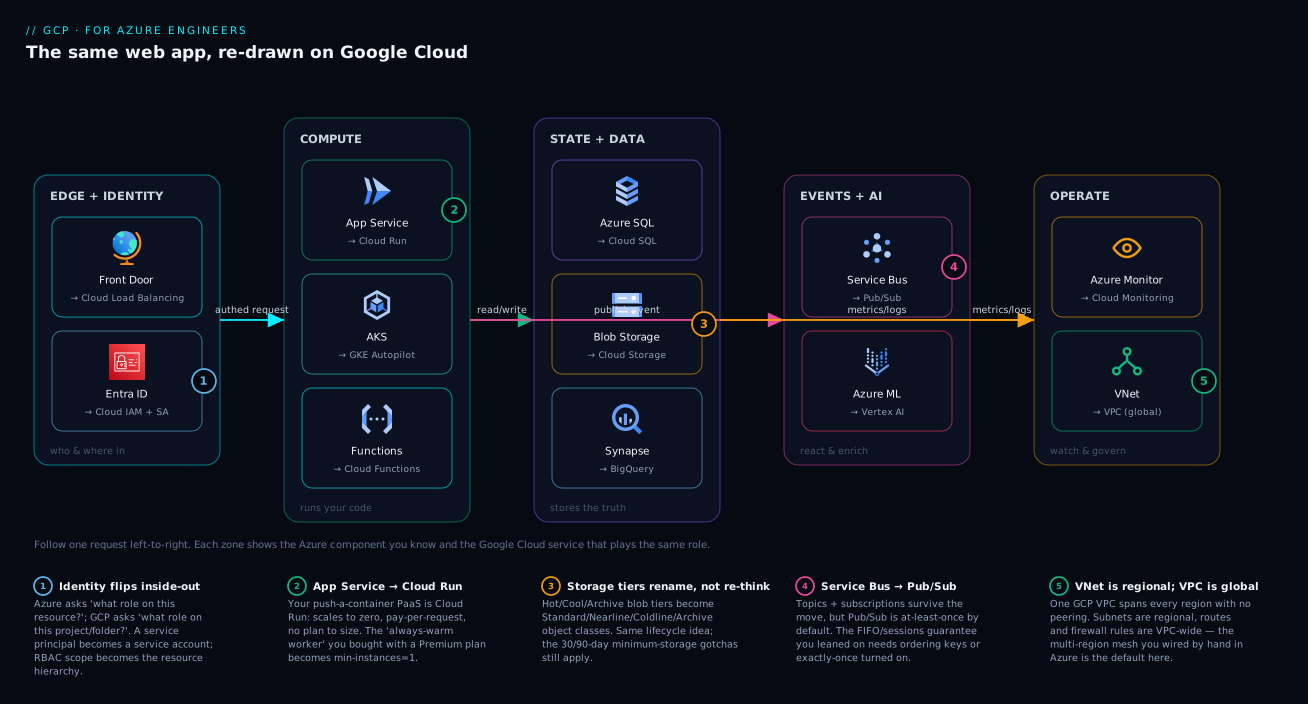
Picture the most ordinary thing you’ve ever built on Azure: a public web app behind Front Door, authenticating users with Entra ID, talking to Azure SQL and Blob Storage, dropping events on Service Bus, with Azure Monitor watching it all. Now re-draw exactly that system on Google Cloud and you get the diagram below — the same shapes, renamed and slightly re-wired. A request comes in through Cloud Load Balancing (your Front Door/App Gateway), carrying an identity proven against Cloud IAM with service accounts (your Entra ID + service principals). It lands on Cloud Run (your App Service), which reads and writes Cloud SQL (Azure SQL) and Cloud Storage (Blob), publishes events to Pub/Sub (Service Bus), and optionally enriches with Vertex AI (Azure ML). Every component streams metrics and logs to Cloud Monitoring and Logging (Azure Monitor), and the whole thing lives inside one global VPC (your VNet, but global).
Walk it left to right and the five numbered markers call out exactly where your Azure intuition needs adjusting — identity flipping inside-out, App Service becoming plan-less Cloud Run, storage tiers renaming but keeping their gotchas, Service Bus’s delivery guarantee changing under Pub/Sub, and the VNet-to-global-VPC jump that deletes a pile of peering. If you can read this one diagram, you can read 80% of GCP architectures — almost every workload is this skeleton with more boxes.
Real-world scenario
NorthStar Retail runs a mid-size e-commerce platform entirely on Azure: an App Service (P1v3 plan, Always On) serving the storefront API, Azure SQL Database for orders, Blob Storage for product images, Service Bus for the order-processing pipeline, Entra ID for staff sign-in, and Azure Monitor for dashboards. After an acquisition, the parent company standardizes on Google Cloud, and Priya — NorthStar’s lead engineer, eight years deep in Azure, zero in GCP — is told to replatform the storefront in a quarter. She starts the way most Azure veterans do: trying to find the GCP “resource group” and the “App Service plan.” She loses three days.
The turning point is when she stops translating word-for-word and applies the six jobs lens plus the four flips. She maps the system in an hour: storefront API → Cloud Run (--min-instances=1 replaces Always On, --max-instances=20 for flash sales); orders DB → Cloud SQL for PostgreSQL (the app’s ORM is portable and Postgres is cheaper at their scale); images → Cloud Storage with a lifecycle rule moving objects older than 90 days to Coldline (she recognizes the minimum-duration gotcha from Azure Cool); order pipeline → Pub/Sub, where flip number four bites — it assumed Service Bus FIFO sessions per customer, so she enables ordering keys on customerId. Staff sign-in federates Entra ID into Cloud Identity, so nobody re-creates accounts. Monitoring moves to Cloud Monitoring with a log sink exporting to BigQuery for the analytics Synapse made expensive.
The flips that bit: (1) Identity — she nearly granted the app’s service account roles/editor at project level out of habit; instead she scoped it to roles/cloudsql.client, roles/storage.objectAdmin on the one bucket, and roles/pubsub.publisher. (2) Networking — she’d budgeted two weeks for cross-region VNet peering for DR; the global VPC made it a non-task. (3) Billing — her first estimate, sized “the Azure way” with always-on capacity, was 40% too high; re-modeling around Cloud Run scale-to-zero for staging and sustained-use discounts brought it well under the Azure bill.
Result: live on GCP in seven weeks, not a quarter. The biggest accelerant wasn’t a GCP feature — it was dropping the literal translation for the map: which of the six jobs, and which of the four flips? The mistake that cost the first three days was assuming GCP was “Azure with different buttons.” Same buildings, different street grid.
Advantages and disadvantages
Approaching GCP through an Azure lens is powerful but has failure modes. The honest trade-off:
| Advantages of the translation approach | Disadvantages / risks |
|---|---|
| You reuse years of architecture instinct instead of starting from zero | You can over-trust a “closest match” that leaks (e.g. assuming Pub/Sub = Service Bus FIFO) |
| Faster time-to-productive — days, not a quarter | You may carry Azure anti-patterns over (per-region VNet replication that GCP made unnecessary) |
| Cost optimization is easier once you see GCP bills per-use | You might provision “the Azure way” and overpay before the model clicks |
| Mapping makes certs easier — new facts hang on an existing scaffold | Some GCP services (Spanner, BigQuery’s serverless model) have no Azure twin and resist translation |
| You spot the four flips and avoid the classic mistakes | Treating GCP as “Azure with new names” hides the genuinely different bits and bites later |
When the translation approach shines: lift-and-shift, multi-cloud parity work, and anything where the GCP service is a near-twin (VMs, VPN, managed Postgres, object storage). When you must stop translating and learn natively: the four flips (identity scope, global networking, hierarchy, billing) and the no-Azure-twin services (Spanner, BigQuery’s pay-per-scan, Autopilot’s per-pod billing). The skill is knowing which mode you’re in.
Hands-on lab
Stand up the GCP side of the translation — a public container app, a managed database, and a bucket — entirely from Cloud Shell, on or near the free tier. This is the “hello world” of the map: App Service → Cloud Run, Azure SQL → Cloud SQL, Blob → Cloud Storage.
1. Set your project (the az account set equivalent).
# Your project is the working scope — set it first, always
gcloud config set project my-demo-project
gcloud config set run/region asia-south1   # pick a region near you
2. Enable the APIs you’ll use. Unlike Azure, GCP requires you to turn services on per project before use:
gcloud services enable run.googleapis.com sqladmin.googleapis.com \
  storage.googleapis.com artifactregistry.googleapis.com
3. Deploy a container to Cloud Run (your App Service). Using a public sample image so there’s nothing to build:
gcloud run deploy storefront \
  --image=us-docker.pkg.dev/cloudrun/container/hello \
  --allow-unauthenticated \
  --min-instances=1 \        # this is your "Always On"
  --max-instances=10 \
  --cpu=1 --memory=512Mi
# Output ends with: Service URL: https://storefront-xxxxx-el.a.run.app
Hit that URL — you have a public HTTPS service with no plan to size. Note the --min-instances=1: that single flag replaces an App Service plan + Always On.
4. Create a managed database (your Azure SQL). Smallest tier, Postgres engine:
gcloud sql instances create orders-db \
  --database-version=POSTGRES_15 \
  --tier=db-f1-micro \          # smallest, cheapest tier
  --region=asia-south1
gcloud sql databases create orders --instance=orders-db
5. Create a bucket (your Blob container) with a lifecycle rule. Bucket names are globally unique — prefix with your project:
gcloud storage buckets create gs://my-demo-project-images \
  --location=asia-south1 \
  --uniform-bucket-level-access
# Add a lifecycle rule: move objects to Coldline after 90 days (the Azure Cool→Cold habit)
cat > /tmp/lifecycle.json <<'EOF'
{ "rule": [
  { "action": {"type":"SetStorageClass","storageClass":"COLDLINE"},
    "condition": {"age":90} }
]}
EOF
gcloud storage buckets update gs://my-demo-project-images --lifecycle-file=/tmp/lifecycle.json
6. The same thing in Terraform (the GCP-native IaC, your Bicep equivalent):
resource "google_cloud_run_v2_service" "storefront" {
  name     = "storefront"
  location = "asia-south1"
  template {
    scaling { min_instance_count = 1, max_instance_count = 10 }
    containers {
      image = "us-docker.pkg.dev/cloudrun/container/hello"
      resources { limits = { cpu = "1", memory = "512Mi" } }
    }
  }
}

resource "google_sql_database_instance" "orders" {
  name             = "orders-db"
  database_version = "POSTGRES_15"
  region           = "asia-south1"
  settings { tier = "db-f1-micro" }
  deletion_protection = false   # demo only
}

resource "google_storage_bucket" "images" {
  name                        = "my-demo-project-images"
  location                    = "asia-south1"
  uniform_bucket_level_access = true
  lifecycle_rule {
    action    { type = "SetStorageClass", storage_class = "COLDLINE" }
    condition { age = 90 }
  }
}
7. Tear it all down (avoid surprise charges — Cloud SQL bills even when idle):
gcloud run services delete storefront --region=asia-south1 --quiet
gcloud sql instances delete orders-db --quiet
gcloud storage rm --recursive gs://my-demo-project-images
You just reproduced an Azure three-tier app’s core on GCP in seven steps. The shapes matched; only the words and a couple of flags changed.
Common mistakes & troubleshooting
The errors Azure engineers make on GCP are remarkably predictable — they almost all come from assuming a flip didn’t happen. Here’s the playbook: symptom, the Azure assumption behind it, how to confirm, and the fix.
| # | Symptom | The Azure assumption behind it | How to confirm | Fix |
|---|---|---|---|---|
| 1 | PERMISSION_DENIED on a brand-new project |
“The service is just there, like in Azure” | gcloud services list --enabled |
gcloud services enable <api>.googleapis.com — APIs are off by default |
| 2 | App can’t reach the DB / bucket despite “having access” | “I gave the principal a role, that’s enough” | gcloud projects get-iam-policy <proj> |
Bind the role to the service account, attach the SA to the Cloud Run service |
| 3 | Granted a role but it applies way too broadly | “Roles scope to the resource” | Check the level of the binding in the IAM policy | Re-bind at project/resource level, not folder/org — roles inherit down |
| 4 | Built VNet peering for a multi-region app; still complex | “Networks are regional, peer them” | gcloud compute networks describe <vpc> |
Use one VPC — it’s global; delete the unnecessary peering |
| 5 | Bucket creation fails: name already taken | “Names are unique within my account” | The error: bucket already exists |
Bucket names are globally unique; prefix with project/org |
| 6 | Cloud Run service returns 403 to callers | “Public by default like a basic App Service” | gcloud run services get-iam-policy <svc> |
Deploy with --allow-unauthenticated or grant roles/run.invoker |
| 7 | Cost is higher than the Azure bill | “Provision capacity up front” | Billing report → per-SKU breakdown | Use scale-to-zero (Cloud Run) for non-prod; let sustained-use discounts apply |
| 8 | Pub/Sub messages arrive out of order / twice | “Service Bus FIFO + exactly-once is default” | Inspect subscription: ordering + delivery settings | Enable ordering keys; turn on exactly-once if needed |
| 9 | gcloud commands hit the wrong place |
“The CLI context is my subscription” | gcloud config list |
gcloud config set project <id> — context is the project |
| 10 | Cloud SQL still billing after the demo | “Stopping the app stops the bill” | gcloud sql instances list |
Delete (or stop) the instance — it bills while it exists |
| 11 | Container won’t start on Cloud Run | “App Service finds my port for me” | Cloud Run logs: “failed to listen on PORT” | Listen on $PORT (env var, default 8080); bind 0.0.0.0 |
| 12 | Org Policy blocks a resource you can create in Azure | “Subscriptions don’t constrain me like this” | gcloud org-policies list --project=<proj> |
Check inherited constraints from folder/org; request an exception |
The pattern to notice: nearly every row is “I assumed GCP behaves like Azure, and the flip caught me.” Once you internalize the four flips — APIs are opt-in, identity binds to the hierarchy, the network is global, billing is per-use — most of these disappear before you make them. For methodical incident work on GCP, Troubleshooting Methodology: IAM, VPC, Compute, GKE is the structured approach.
Best practices
Crisp rules for an Azure engineer going to production on GCP:
- Set the project first, every session.
gcloud config set projectis the newaz account set; more than one outage starts with a command run against the wrong project. - Enable APIs deliberately and track them in IaC. APIs are off by default; put
google_project_servicein Terraform so environments are reproducible. - Bind IAM at the lowest level that works. Prefer a specific resource or project over the folder/org — roles inherit downward. The single highest-leverage security habit.
- Use service accounts, never long-lived keys. Attach an SA to the workload; for CI/CD use Workload Identity Federation. Treat downloaded JSON keys like leaked passwords.
- Lean into scale-to-zero for non-production. Cloud Run and Functions cost nothing idle — use them for dev/staging instead of always-on VMs.
- Use one global VPC carved into regional subnets. Don’t replicate the per-region VNet pattern; let the global network do its job.
- Map storage tiers and their minimum-duration penalties. Set lifecycle rules that respect the 30/90/365-day floors, exactly as on Azure.
- Pick the database engine on purpose. Cloud SQL lets you choose; don’t default to SQL Server out of habit if Postgres is cheaper and the app is portable.
- Model cost the GCP way before you commit. Right-size around consumption and sustained/committed-use discounts, not fixed capacity.
- Use labels for cross-cutting tagging. Cost allocation, environment, owner — labels are your Azure
tags. - Read the one deep dive for any service you’ll run in prod. The map tells you which service; the deep dive keeps you out of trouble.
Security notes
The security model is where Azure habits are most dangerous, so be deliberate:
- Least privilege is about the level, not just the role. A correct role at the wrong hierarchy node (folder instead of project) is an over-grant. Ask “every project under here, or just this one?”
- Prefer predefined roles over basic roles. The basic roles (
roles/owner,roles/editor,roles/viewer) are broad legacy roles, like handing out Owner/Contributor. Use predefined roles (roles/cloudsql.client,roles/storage.objectViewer) scoped to the need. - Keyless everywhere. Attach service accounts to resources; federate CI/CD with Workload Identity Federation — no stored JSON keys to rotate. See Workload Identity Federation for Keyless CI/CD.
- Secrets and keys are two services. Secret Manager for secrets, Cloud KMS for encryption keys (your Key Vault, split). Reference secrets from Cloud Run rather than baking them into images.
- Network isolation via private access. Use Private Service Connect and VPC firewall rules (target by service account or network tag) to keep PaaS traffic private — the Private Endpoints + NSG analog.
- Encryption is on by default; bring CMEK when you must. Data is encrypted at rest automatically; use Cloud KMS customer-managed keys where compliance requires you to hold the key.
- Guardrails via Organization Policy. Constraints like “no public IPs” or “allowed regions” enforce at org/folder/project — your Azure Policy equivalent.
Cost & sizing
The thing that drives the bill on GCP is usage, not provisioned capacity, and that’s the core re-think. Here’s what moves the needle and the rough shape (figures are indicative list prices that vary by region; always confirm in the pricing calculator):
| GCP service | What you pay for | Free-tier / cheap-start angle | Azure-habit trap to avoid |
|---|---|---|---|
| Cloud Run | Per request + per-100ms CPU/memory while serving | Generous monthly free requests; scales to zero | Don’t set high --min-instances on non-prod |
| Compute Engine | Per second; sustained + committed-use discounts | e2-micro free tier in some regions |
Don’t ignore committed-use discounts for steady VMs |
| Cloud SQL | Per-hour for the instance (runs even idle) + storage | db-f1-micro is cheap, not free |
Don’t leave demo instances running — they bill 24/7 |
| Cloud Storage | Per-GB-month by class + operations + egress | 5 GB Standard free/month in some regions | Mind the minimum-duration penalties on Nearline/Coldline |
| BigQuery | Per-TB scanned (on-demand) or per-slot (reserved) | 1 TB queries + 10 GB storage free/month | Don’t SELECT * huge tables — you pay per byte scanned |
| Pub/Sub | Per-GB of message throughput | 10 GB/month free | Fine-grained; rarely the cost driver early on |
| Cloud Functions | Per invocation + compute time | 2M invocations/month free | Scales to zero; cheap for spiky workloads |
A worked example to make the flip concrete. NorthStar’s three non-prod environments ran on Azure as always-on B1 App Service plans plus small Azure SQL databases — a fixed monthly floor paid 24/7, though developers touch them maybe six hours a day. On GCP the same storefronts moved to Cloud Run with --min-instances=0: outside working hours they scale to zero and cost nothing for compute; during the active hours they cost per-request. The databases stayed (they bill while they exist), but the non-prod compute line dropped close to zero. Combined with sustained-use discounts on the steady production Compute Engine VMs, the all-in monthly bill came in roughly 30–40% under the Azure equivalent — not because GCP is intrinsically cheaper, but because the team stopped paying for idle capacity. On Azure you save by right-sizing the plan; on GCP you save by letting the platform charge only when work happens. Billing & Cost Management Deep Dive covers budgets, exports, and discounts.
Interview & exam questions
Useful for the Azure engineer prepping a GCP certification (Cloud Digital Leader, Associate Cloud Engineer, or a Professional track) where mapping from prior Azure knowledge is the fast path.
1. What is the GCP equivalent of an Azure App Service, and how does the billing model differ?
Cloud Run. App Service bills for a provisioned plan (fixed per-hour regardless of traffic); Cloud Run scales to zero and bills per request plus per-100ms of compute while serving. The “Always On” equivalent is --min-instances=1.
2. An Azure resource group has no single GCP equivalent. Explain why. A resource group’s responsibilities are split: the project is the API/billing/IAM boundary (closer to a subscription), folders group projects for policy inheritance (like management groups), and labels provide the free-form tagging. No one GCP object carries all of a resource group’s roles.
3. How does IAM scoping in GCP differ from Azure RBAC? Azure RBAC assigns a role to a principal on a specific resource/RG/subscription. GCP IAM binds a member→role on a node of the resource hierarchy (org/folder/project/resource), and the binding inherits downward to everything beneath it. Least privilege means choosing the right level, not just the right role.
4. Why is GCP networking simpler for multi-region apps than Azure? A GCP VPC is global — one VPC spans all regions, with regional subnets inside it. VMs in different regions on the same VPC communicate privately with no peering. Azure VNets are regional and require peering (and cost) to connect across regions.
5. What replaces an Azure service principal on GCP, and what’s the keyless pattern? A service account. The keyless pattern is to attach the service account to the workload (VM/Cloud Run) so no key file exists, and to use Workload Identity Federation for external/CI-CD identities instead of downloading service-account JSON.
6. Map Azure storage tiers to GCP and name the shared gotcha. Hot→Standard, Cool→Nearline, Cold→Coldline, Archive→Archive. The shared gotcha is minimum storage duration (~30/90/365 days): deleting early still bills for the full minimum term, on both clouds.
7. Service Bus → Pub/Sub: what breaks in a naive port? Pub/Sub is at-least-once by default and not FIFO. Code that relied on Service Bus FIFO sessions or exactly-once must enable ordering keys (for order) and/or exactly-once delivery, or handle duplicates idempotently.
8. What is BigQuery’s analog on Azure, and how does its cost model differ? Synapse/Fabric. BigQuery is serverless: on-demand pricing charges per TB scanned (or per slot-hour if you reserve capacity), with no cluster to provision or pause — versus Synapse’s provisioned/cluster model.
9. Which GCP compute would you pick to replace AKS if your team is tired of managing nodes? GKE Autopilot — it manages nodes for you and bills per running pod rather than per node, removing node-pool sizing while keeping the Kubernetes API.
10. Why might a brand-new GCP project return PERMISSION_DENIED for a service that “just works” on Azure?
On GCP, APIs are disabled by default per project; you must gcloud services enable <api> (or declare it in Terraform) before use. There’s no Azure equivalent of this opt-in step at the subscription level.
11. How does Org Policy relate to Azure Policy? Both enforce guardrails. Organization Policy applies constraints (e.g. allowed regions, no public IPs) at org/folder/project, inheriting downward — the structural twin of Azure Policy with management-group-style inheritance.
12. A steady production VM runs 24/7 on Compute Engine. What discount applies automatically, and what can you add? Sustained-use discounts apply automatically the longer the VM runs in a month. You can add committed-use discounts by committing to 1 or 3 years for a larger, predictable saving — analogous to Azure Reserved Instances.
Quick check
- What single flag on Cloud Run reproduces an App Service plan’s “Always On” warm worker?
- In GCP, does a role bound at the folder level apply to projects beneath it? Why does that matter for least privilege?
- Your bucket creation fails with “already exists” even though you’ve never made one with that name. Why?
- Which is regional and which is global: a GCP subnet, a GCP VPC?
- Name the Azure→GCP messaging swap and the one delivery-guarantee difference to watch.
Answers
--min-instances=1— it keeps at least one warm instance resident so the first request doesn’t pay a cold start.- Yes — IAM roles inherit downward, so a folder-level grant applies to every project under it. It matters because the wrong level is an over-grant even if the role is correct; least privilege is about the level as much as the role.
- Cloud Storage bucket names are globally unique across all of GCP, not per-account. Someone else already owns that name — prefix with your project or org.
- A subnet is regional; a VPC is global. One VPC spans every region, and subnets are its regional slices.
- Service Bus → Pub/Sub. Pub/Sub is at-least-once by default (and not FIFO), so a naive port can deliver duplicates or out-of-order; use ordering keys and/or exactly-once delivery to match Service Bus FIFO behavior.
Glossary
- Project — GCP’s core workspace and the unit of billing, API enablement, and default IAM scope; roughly an Azure subscription + resource group combined.
- Folder — A grouping of projects for shared policy and IAM inheritance; analogous to an Azure management group.
- Resource hierarchy — The org → folder → project → resource tree that IAM and Org Policy flow down through.
- Service account — A robot identity a workload runs as; the GCP equivalent of an Azure service principal / managed identity.
- IAM policy binding — A grant of a role to a member on a hierarchy node, inherited downward; the GCP take on an RBAC role assignment.
- Cloud Run — Serverless container platform that scales to zero and bills per request; the closest match to App Service and Container Apps.
- GKE Autopilot — Managed Kubernetes that runs and bills per pod, removing node management; the AKS analog when you don’t want to manage nodes.
- Compute Engine — GCP virtual machines, billed per second with automatic sustained-use discounts; the Azure VM equivalent.
- VPC (global) — A virtual private network that spans all regions in one network; subnets inside it are regional. Contrast with the regional Azure VNet.
- Cloud Storage — Object storage with Standard/Nearline/Coldline/Archive classes; the Blob Storage equivalent, with globally-unique bucket names.
- Cloud SQL — Managed MySQL/PostgreSQL/SQL Server; the Azure SQL Database / Azure Database for MySQL/Postgres equivalent, with the engine your choice.
- BigQuery — Serverless analytics warehouse billed per TB scanned (or reserved slots); the Synapse/Fabric analog.
- Pub/Sub — Messaging service, at-least-once and global by default; the Service Bus / Event Hubs equivalent.
- Sustained-use discount — An automatic price reduction the longer a Compute Engine VM runs in a month; no Azure reservation purchase required.
- Label — A free-form key/value tag on GCP resources used for cost allocation and organization; the analog to Azure tags.
Next steps
- Go deep on the structure this guide sketched: GCP Cloud Fundamentals: Resource Hierarchy & Pricing.
- Get hands-on with the tooling: First Steps with gcloud, Console & Cloud Shell.
- Master the compute decision you’ll make most: Cloud Run vs GKE vs Compute Engine: The Decision.
- Internalize the identity flip before you grant anything in production: IAM Service Accounts & Least Privilege.
- See the global-network advantage in practice: Shared VPC & Multi-Project Networking.