Quick take: GCP IAM answers one question on every API call — can this principal do this thing on this resource? The surface is simple: who, what, where. The discipline is hard: use service accounts for workloads, predefined roles for humans, custom roles only when nothing fits, and never download a service-account key when the platform can hand your code a short-lived token instead.
A data team gave every engineer the roles/editor (Project Editor) role so nobody had to file an access ticket. Six months later a misconfigured batch script — running under an engineer’s personal account that had Editor — deleted a production BigQuery dataset. The dataset wasn’t backed up the way they assumed. The cleanup took three days, and the post-mortem found the same broad role on forty other principals. The fix was unglamorous and permanent: a service account scoped to that one job, a predefined role that could read and write tables but not delete datasets, bindings at the dataset level instead of the project level, and a monthly review driven by the IAM Recommender. The blast radius went from “the whole project” to “these two tables.”
That story is the whole article in miniature. Identity and Access Management (IAM) is the layer Google Cloud checks before it lets anyone — a human, a virtual machine, a CI/CD pipeline, a Cloud Run service — touch a resource. This guide is for someone who is new to GCP IAM and wants the real mental model, not a glossary. By the end you will know exactly what a principal, a role, a binding and a policy are; the difference between a user and a service account and when to use each; how a VM or a Cloud Run service gets credentials without any key file; how Workload Identity Federation lets GitHub Actions or AWS authenticate to GCP with no downloaded key at all; and how to apply least privilege with conditions, deny policies and the Recommender. Everything is shown with real gcloud commands you can run.
What problem this solves
Every action in Google Cloud is an API call — storage.objects.get, bigquery.tables.delete, compute.instances.start. IAM is the gate in front of every one of them. Without IAM there is no way to say “analysts can read this dataset but not delete it” or “this VM can write to that bucket but touch nothing else.” The platform would be all-or-nothing, and all-or-nothing is how data gets deleted and credentials get stolen.
The pain shows up in three predictable ways when teams skip the discipline. First, over-broad human access. Handing out roles/editor or roles/owner to avoid tickets means any mistake — a fat-fingered gcloud command, a script with a wrong flag — can damage anything in the project. Second, long-lived service-account keys. A key.json file downloaded for a script is a password that never expires, often lands in a Git repo or a Slack message, and grants whatever that service account can do until someone notices. Leaked GCP keys are one of the most common cloud breach vectors. Third, permission drift. Custom roles and project-level bindings accumulate over years; nobody remembers why some-service-account@ has roles/owner, and nobody dares remove it.
Who hits this: essentially everyone running on GCP, but it bites hardest on small teams who optimise for “make it work today” (and grant Editor to everyone), on anyone deploying workloads that call other Google APIs (VMs, GKE pods, Cloud Run, Cloud Functions — all of which need an identity), and on anyone integrating an external system (GitHub Actions, GitLab, an on-prem job, another cloud) that needs to authenticate into GCP. The fix is never “lock it down so hard nobody can work.” It is: give each principal exactly the permissions its job needs, at the smallest scope that makes sense, with credentials that expire on their own.
Learning objectives
By the end of this article you can:
- Name the four moving parts of IAM — principal, role, binding, allow policy — and read a real policy by eye.
- Choose correctly between a user, a group, and a service account, and explain why workloads always get a service account and humans (almost) never do.
- Pick the right kind of role: a basic role (avoid in production), a predefined role (your default), or a custom role (only when nothing predefined fits).
- Explain policy inheritance down the resource hierarchy (organization → folder → project → resource) and why a binding high up is a binding everywhere below.
- Give a workload credentials with no key file — using an attached service account plus the metadata server token on Compute Engine, GKE, Cloud Run and Cloud Functions.
- Let an external system (GitHub Actions, AWS, on-prem) authenticate to GCP using Workload Identity Federation so no service-account key is ever created or downloaded.
- Tighten access with IAM Conditions, block it outright with deny policies, and shrink over-grants using the IAM Recommender.
- Walk through a least-privilege design end to end and apply it with real
gcloudcommands.
Prerequisites & where this fits
You should have a Google Cloud account and a project you can experiment in, the gcloud CLI installed (or use Cloud Shell, which has it pre-installed and pre-authenticated), and the ability to run a command and read its output. You do not need to know any GCP service in depth — we explain each one as it appears. Basic familiarity with the idea of “an API call” and “a JSON document” helps but isn’t required.
IAM sits underneath everything else on GCP. Before you can sensibly grant access you need to understand the GCP Resource Hierarchy Explained: Organization, Folders, Projects, and Why It Runs Everything — because IAM policies attach to nodes in that hierarchy and flow downward. This article is the natural next step after Google Cloud IAM Explained Simply: Members, Roles, and Bindings (Without the Jargon): that piece is the gentle on-ramp; this one is the practitioner’s depth, especially on service accounts and keyless authentication. When access doesn’t work, the companion GCP ‘Permission Denied’? The IAM Troubleshooting Decision Tree That Always Finds It is the debugging playbook. If you are building a multi-team landing zone, GCP Landing Zone: The Foundation Blueprint with Shared VPC and Org Policies shows where IAM design lives at scale.
Here is the one-screen map of where each IAM concept lives, so the rest of the article has a frame:
| Layer | What lives here | You control it with | Example |
|---|---|---|---|
| Identity | Who is making the call | Cloud Identity / Workspace; service accounts | alice@kloudvin.com, etl-runner@proj.iam... |
| Grant | What they may do | A role bound to the principal | roles/storage.objectViewer |
| Scope | Where it applies | The resource the binding sits on | A bucket, a project, a folder |
| Policy | The full set of grants | The allow policy on a resource | The list of all bindings |
| Boundary | What is forbidden regardless | A deny policy | “Nobody may delete buckets” |
| Condition | When/under what context | An IAM Condition on a binding | “Only until 2026-12-31” |
Core concepts
Five ideas make every later section obvious. Read these once; the rest of the article is detail hanging off them.
IAM is a question, asked on every call: “Is this principal allowed to perform this action on this resource?” A principal (the identity — a user, a service account, a group) wants to perform an action (an IAM permission like storage.objects.get) on a resource (a bucket, a VM, a dataset). IAM looks at the policies attached to that resource and its ancestors and answers allow or deny. That’s it. Everything else is how you shape that answer.
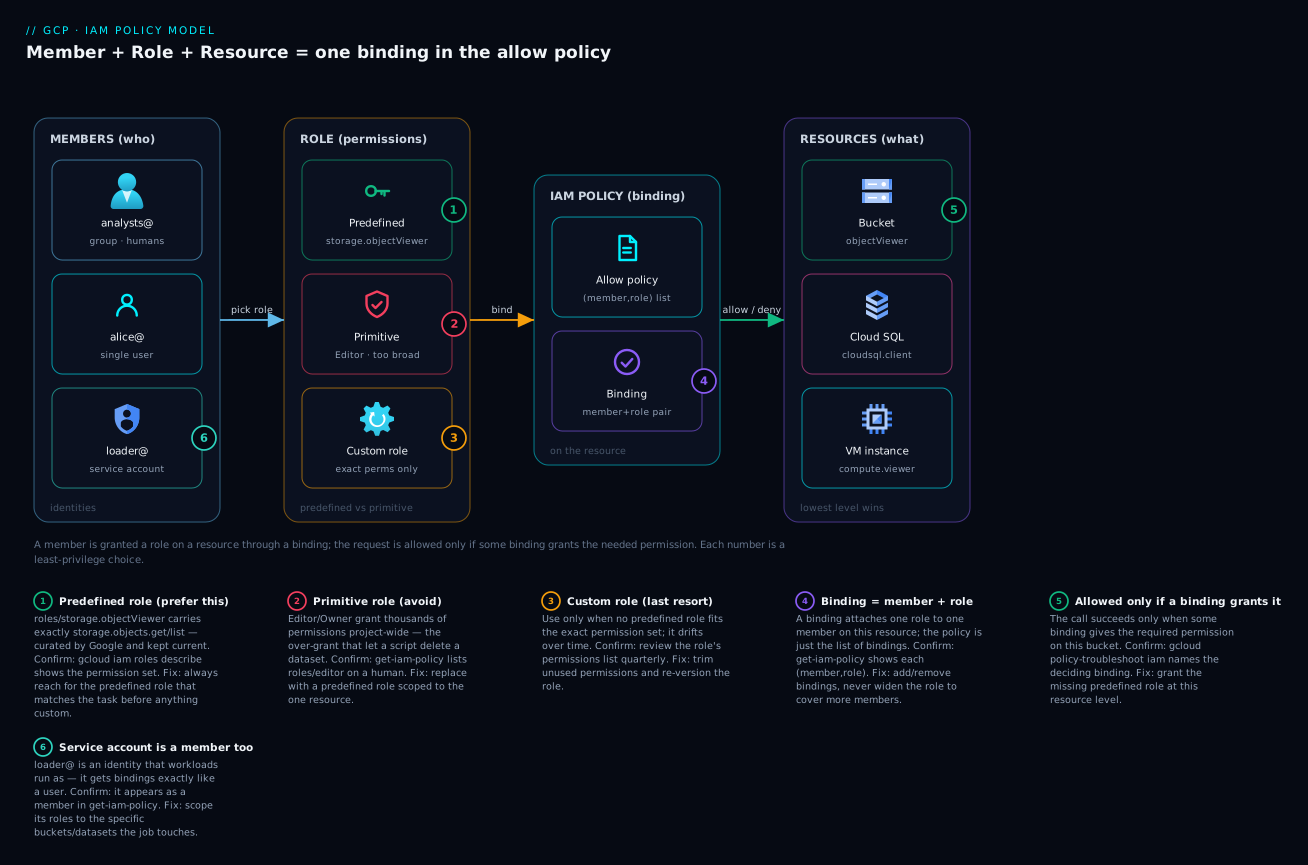
You don’t grant permissions directly — you grant roles, and roles are bundles of permissions. Nobody writes “give Alice storage.objects.get and storage.objects.list.” You give Alice a role — roles/storage.objectViewer — which contains those permissions. A role is just a named collection of permissions. There are three kinds (basic, predefined, custom), and choosing the right kind is half of doing IAM well.
A grant is a binding, and the set of bindings on a resource is its allow policy. A binding glues one role to one or more principals: {members: [Alice, the data-readers group], role: roles/bigquery.dataViewer}. The allow policy (also called the IAM policy) of a resource is simply the list of all its bindings. When you “set IAM,” you are editing this policy document. It is additive — IAM grants are union’d together, there is no “deny” in the allow policy itself (denial is a separate mechanism we cover later).
Policies flow downhill through the resource hierarchy. GCP resources form a tree: organization → folders → projects → individual resources (buckets, VMs, datasets). A policy set on a node applies to that node and everything beneath it. Grant someone roles/viewer at the organization level and they can view every project in the company. Grant roles/storage.objectAdmin at the project level and they can administer objects in every bucket in that project. Effective access at any resource is the union of its own policy plus every ancestor’s policy. This is the single biggest source of “why can they do that?” surprises — the binding isn’t on the resource, it’s three levels up.
Workloads are identities too, and they use service accounts. A human signs in with a password and MFA. A VM, a container, a CI pipeline cannot type a password. So GCP gives non-human workloads their own identity type: a service account. The crucial modern principle is that a well-run workload never holds a key file. Instead it gets a short-lived token automatically — from the metadata server if it runs on GCP, or via Workload Identity Federation if it runs outside GCP. Keys are the legacy fallback you avoid.
The vocabulary in one table
Pin down every term before the deep sections. The glossary at the end repeats these for lookup; this is the mental model side by side:
| Term | One-line definition | Example |
|---|---|---|
| Principal (member) | An identity that can be granted access | user:alice@kloudvin.com, serviceAccount:etl@proj.iam... |
| Permission | The right to call one API method | storage.objects.get |
| Role | A named bundle of permissions | roles/storage.objectViewer |
| Binding | One role attached to one or more principals | {role: …, members: […]} |
| Allow policy | All the bindings on a resource | The resource’s full IAM document |
| Resource | The thing being accessed | A bucket, VM, dataset, project |
| Resource hierarchy | Org → folders → projects → resources | The tree policies inherit down |
| Service account | An identity for a workload, not a person | run-svc@proj.iam.gserviceaccount.com |
| Attached service account | The SA a VM/Cloud Run runs as | The VM’s identity for outbound calls |
| Metadata server | The on-host endpoint that hands out tokens | 169.254.169.254 |
| Workload Identity Federation | External identities → GCP, no key | GitHub Actions assuming a GCP SA |
| IAM Condition | A rule limiting when/where a binding applies | “only on buckets named logs-*” |
| Deny policy | An explicit “forbidden regardless of allows” | “no one deletes datasets” |
| IAM Recommender | The advisor that flags over-broad grants | “remove unused roles/owner” |
Principals: who can be granted access
A principal (the API and docs also say member) is any identity IAM can put in a binding. Knowing the types matters because the prefix you write in a gcloud command — user:, group:, serviceAccount: — declares which type you mean, and choosing the wrong type is a common beginner mistake.
| Principal type | Identifier format | Who/what it represents | Typical use |
|---|---|---|---|
| User | user:alice@kloudvin.com |
One human in Cloud Identity / Workspace | A specific person’s access (prefer via a group) |
| Group | group:data-team@kloudvin.com |
A Google Group of users/SAs | The right way to grant humans — manage membership, not bindings |
| Service account | serviceAccount:etl@proj.iam.gserviceaccount.com |
A workload identity | VMs, Cloud Run, pipelines, automation |
| Domain | domain:kloudvin.com |
Everyone in a Workspace domain | Broad internal sharing (use sparingly) |
allAuthenticatedUsers |
(literal) | Any Google account, anywhere | Almost never — public-ish, still authenticated |
allUsers |
(literal) | Anyone on the internet, no auth | Only truly public assets (a public website bucket) |
| Workload identity pool principal | principal://… / principalSet://… |
A federated external identity (GitHub, AWS) | Keyless access from outside GCP |
Two rules a beginner should internalise immediately. Bind roles to groups, not to individual users. When Alice joins the data team you add her to data-team@kloudvin.com and she inherits every grant the group has; when she leaves you remove her from the group and all access evaporates — no hunting through dozens of resources. Binding directly to user:alice@ means her access is scattered across the project and outlives her. Treat allUsers as radioactive. It means the public internet, unauthenticated. There are legitimate uses (a bucket serving a public static website) but a allUsers binding on anything containing data is how buckets end up in breach headlines.
A note on identifiers you’ll see in policies: every Google account is also internally a numeric ID, and when a user or service account is deleted, IAM may rewrite the binding to deleted:user:…?uid=…. Those stale entries are harmless but worth cleaning up — they’re a sign a principal was removed without its bindings being tidied.
Roles: basic, predefined, and custom
A role is a bundle of permissions. There are exactly three kinds, and the entire art of “right-sized access” is choosing among them.
| Role type | What it is | How many permissions | When to use | The danger |
|---|---|---|---|---|
| Basic (primitive) | The legacy roles/owner, roles/editor, roles/viewer |
Thousands, project-wide | Almost never in production; quick personal sandbox only | Wildly over-broad; Editor can change/destroy nearly everything |
| Predefined | Google-curated roles per service | Tens, scoped to a service | Your default for 95% of grants | Occasionally broader than you’d like — read what it contains |
| Custom | A role you define with a hand-picked permission list | Exactly what you choose | When no predefined role fits and you need tighter scope | You maintain it; it can drift; new API perms aren’t auto-added |
Basic roles — what they really mean (and why to avoid them)
The three basic roles predate fine-grained IAM and are deliberately coarse. They are tempting because they’re easy, and they are the single most common cause of over-privilege.
| Basic role | Roughly what it grants | Why it’s dangerous |
|---|---|---|
roles/viewer |
Read-only across (almost) all services in the scope | Can read every secret-adjacent config, every dataset’s schema, every bucket listing — broad data exposure |
roles/editor |
Viewer + create/modify/delete most resources | Can delete datasets, buckets, VMs, change configs — a script bug is catastrophic |
roles/owner |
Editor + manage IAM (grant roles, including to themselves) | Full control including handing out access — effectively admin of the scope |
The trap with roles/editor: it sounds like “can edit things,” but it can also delete most things and create new resources (which cost money). The trap with roles/owner: it can modify IAM, which means an owner can grant themselves or anyone else any further access — there is no higher privilege to contain them within that scope. Use these only in a throwaway personal project. In any shared or production project, reach for predefined roles.
Predefined roles — your default
Google publishes hundreds of predefined roles, named roles/<service>.<capability>. They follow a readable pattern: viewer (read), dataViewer/objectViewer (read data specifically), admin (full control of that service), and granular ones in between. A few you’ll meet constantly:
| Predefined role | Service | What it lets you do | What it deliberately does NOT do |
|---|---|---|---|
roles/storage.objectViewer |
Cloud Storage | Read objects in a bucket | List buckets, write, delete, change bucket IAM |
roles/storage.objectAdmin |
Cloud Storage | Read/write/delete objects | Delete the bucket itself, change bucket-level IAM |
roles/bigquery.dataViewer |
BigQuery | Read table data and metadata | Run queries that cost money, edit/delete tables |
roles/bigquery.dataEditor |
BigQuery | Read/write table data, create tables | Delete the dataset, manage dataset IAM |
roles/bigquery.jobUser |
BigQuery | Run query/load/export jobs (incurs cost) | See data unless paired with a data role |
roles/run.invoker |
Cloud Run | Call (invoke) a Cloud Run service | Deploy, modify, or read the service config |
roles/cloudsql.client |
Cloud SQL | Connect to an instance | Create/delete instances, manage backups |
roles/logging.viewer |
Cloud Logging | Read logs | Write log-based metrics, manage sinks |
roles/iam.serviceAccountUser |
IAM | “Run as” / attach a service account | Create or delete service accounts |
roles/iam.workloadIdentityUser |
IAM | Let an external identity impersonate an SA | Anything else |
Notice the deliberate gaps in the right-hand column — that’s the whole point. roles/bigquery.dataEditor can write tables but cannot delete the dataset; that single distinction is what would have prevented the incident in the opening story. Always read what a predefined role contains before granting it:
# What permissions does this predefined role actually include?
gcloud iam roles describe roles/bigquery.dataEditor

# Search for roles that contain a specific permission you need
gcloud iam roles list --filter="includedPermissions:bigquery.tables.create" \
  --format="table(name)"
Custom roles — only when nothing fits
A custom role is a permission list you author yourself, living either at the project or organization level. Reach for it only when predefined roles are all too broad and you have a specific, lasting need — not for a one-off.
# Create a custom role: can read AND write objects but explicitly cannot delete them
gcloud iam roles create objectReadWriteNoDelete \
  --project=kloudvin-prod \
  --title="Object Read/Write (no delete)" \
  --description="Read and write GCS objects; cannot delete" \
  --permissions=storage.objects.get,storage.objects.list,storage.objects.create \
  --stage=GA
Custom roles carry real maintenance cost, and a beginner should know the trade-offs before committing:
| Consideration | Predefined role | Custom role |
|---|---|---|
| Who maintains it | Google (new permissions added as services evolve) | You — new API permissions are not auto-added |
| Drift risk | Low | High — easy to leave over-broad or stale |
| Where it can live | Everywhere | Project or organization level only |
| Best for | 95% of grants | A genuinely unique, lasting permission set |
| Audit story | Familiar names reviewers recognise | Reviewers must read your permission list |
Audit custom roles on a schedule — quarterly is a sane default. The most common failure is a custom role that was tight when created, then had permissions piled on over two years until it’s broader than the predefined role you were avoiding.
Bindings and the allow policy
When you “grant access,” you are adding a binding to a resource’s allow policy. A binding is {role, members[], condition?}. The policy is the list of bindings plus an etag (a version stamp that prevents two people clobbering each other’s edits).
The everyday way to add a single binding:
# Grant the data-readers group read access to one dataset's data, at the project level
gcloud projects add-iam-policy-binding kloudvin-prod \
  --member="group:data-readers@kloudvin.com" \
  --role="roles/bigquery.dataViewer"
There is a parallel add-iam-policy-binding / remove-iam-policy-binding for almost every resource type — gcloud storage buckets add-iam-policy-binding, gcloud run services add-iam-policy-binding, and so on — and that scope (project vs bucket vs service) is exactly where the binding lands in the hierarchy. To see the full policy on a resource:
# Read the entire allow policy of a project (every binding)
gcloud projects get-iam-policy kloudvin-prod --format=json
A small real policy reads like this — and once you can read this by eye, IAM stops being mysterious:
{
  "bindings": [
    {
      "role": "roles/bigquery.dataViewer",
      "members": ["group:data-readers@kloudvin.com"]
    },
    {
      "role": "roles/bigquery.dataEditor",
      "members": ["serviceAccount:etl-runner@kloudvin-prod.iam.gserviceaccount.com"]
    },
    {
      "role": "roles/owner",
      "members": ["user:founder@kloudvin.com"]
    }
  ],
  "etag": "BwYF...",
  "version": 1
}
Two operational cautions that save real pain:
| Command | What it does | The gotcha |
|---|---|---|
add-iam-policy-binding |
Adds one binding, leaves the rest alone | Safe for everyday grants — prefer this |
remove-iam-policy-binding |
Removes one binding | Safe; targeted |
set-iam-policy |
Replaces the entire policy with a file you supply | Dangerous — easy to wipe other bindings; needs the current etag to avoid races |
set-iam-policy is for scripted, reviewed, full-policy management (often via Terraform). For learning and day-to-day work, stick to the additive add/remove commands — you cannot accidentally delete someone else’s access with them.
Service accounts: identities for workloads
A service account (SA) is a special kind of principal that represents a workload — an application, a VM, a pipeline — rather than a person. It has an email-shaped identifier ending in .iam.gserviceaccount.com, it can be granted roles like any principal, and other principals can be granted roles on it (because the SA is itself a resource you might want to control who can use). That dual nature — an SA is both an identity you grant to and a resource you grant access over — is the one thing beginners find confusing, so hold onto it.
There are a few flavours of service account, and they are not interchangeable:
| Service account type | Created by | Identifier example | You manage it? | Use it? |
|---|---|---|---|---|
| User-managed SA | You | etl-runner@kloudvin-prod.iam.gserviceaccount.com |
Yes — create, name, grant, delete | Yes — one per workload, scoped tightly |
| Default compute SA | Google (auto, per project) | <num>-compute@developer.gserviceaccount.com |
Mostly hands-off | Avoid for prod — historically very broad (Editor) |
| Default App Engine SA | Google (auto) | <project>@appspot.gserviceaccount.com |
Mostly hands-off | Avoid relying on its defaults |
| Google-managed service agent | service-<num>@gcp-sa-<service>.iam... |
No — Google manages it | Don’t touch — it lets a Google service act for you |
Two of those deserve a warning. The default compute service account is created automatically and, on older projects, was granted the broad roles/editor — meaning every VM created without specifying an SA could, by default, edit the whole project. (Google has tightened newer-project defaults, but you should never rely on the default SA for anything real.) The Google-managed service agents (gcp-sa-*) are how Google’s own services act on your behalf (e.g. so Pub/Sub can push to a subscription); you neither create nor manage these — leave them alone.
Create and configure a user-managed SA like this:
# 1) Create a dedicated SA for one workload
gcloud iam service-accounts create etl-runner \
  --project=kloudvin-prod \
  --display-name="ETL batch runner"

# 2) Grant it ONLY the roles that one workload needs — at the smallest scope
gcloud projects add-iam-policy-binding kloudvin-prod \
  --member="serviceAccount:etl-runner@kloudvin-prod.iam.gserviceaccount.com" \
  --role="roles/bigquery.jobUser"

gcloud storage buckets add-iam-policy-binding gs://kloudvin-etl-staging \
  --member="serviceAccount:etl-runner@kloudvin-prod.iam.gserviceaccount.com" \
  --role="roles/storage.objectAdmin"
Service-account keys — the thing to avoid
A service-account key is a downloaded JSON file containing a private key that lets anything holding the file authenticate as that SA. It works anywhere, never expires by default, and is therefore exactly the kind of credential that leaks into Git, CI logs and laptops. Treat key creation as a last resort:
| Authentication method | Key file? | Expires? | Where it works | Recommendation |
|---|---|---|---|---|
| Attached SA + metadata token | No | Yes (auto-rotated, ~1 h) | Workloads on GCP (CE, GKE, Cloud Run, Functions) | Default for on-GCP workloads |
| Workload Identity Federation | No | Yes (short-lived) | Workloads outside GCP (GitHub, AWS, on-prem) | Default for off-GCP workloads |
| SA impersonation | No | Yes (short-lived) | A human/SA temporarily acting as another SA | Good for admin/break-glass |
| Downloaded SA key (JSON) | Yes | No (unless you rotate) | Anywhere | Last resort — only if nothing above works |
If you have leaked or suspect a leaked key, the response is immediate: disable then delete the key, and rotate anything it could reach. Never re-commit a key to source control. (For the same reason, scan repos and CI for .json credentials before they’re pushed.) The whole point of the next two sections is that you almost never need a key in the first place.
# List keys on an SA (look for old, forgotten, user-managed keys)
gcloud iam service-accounts keys list \
  --iam-account=etl-runner@kloudvin-prod.iam.gserviceaccount.com

# Disable a suspicious key immediately, then delete it
gcloud iam service-accounts keys disable KEY_ID \
  --iam-account=etl-runner@kloudvin-prod.iam.gserviceaccount.com
Keyless on GCP: attached service accounts and the metadata token
Here is the mechanism that makes “no key file” possible for anything running inside Google Cloud, and it’s worth understanding because it feels like magic until you see it.
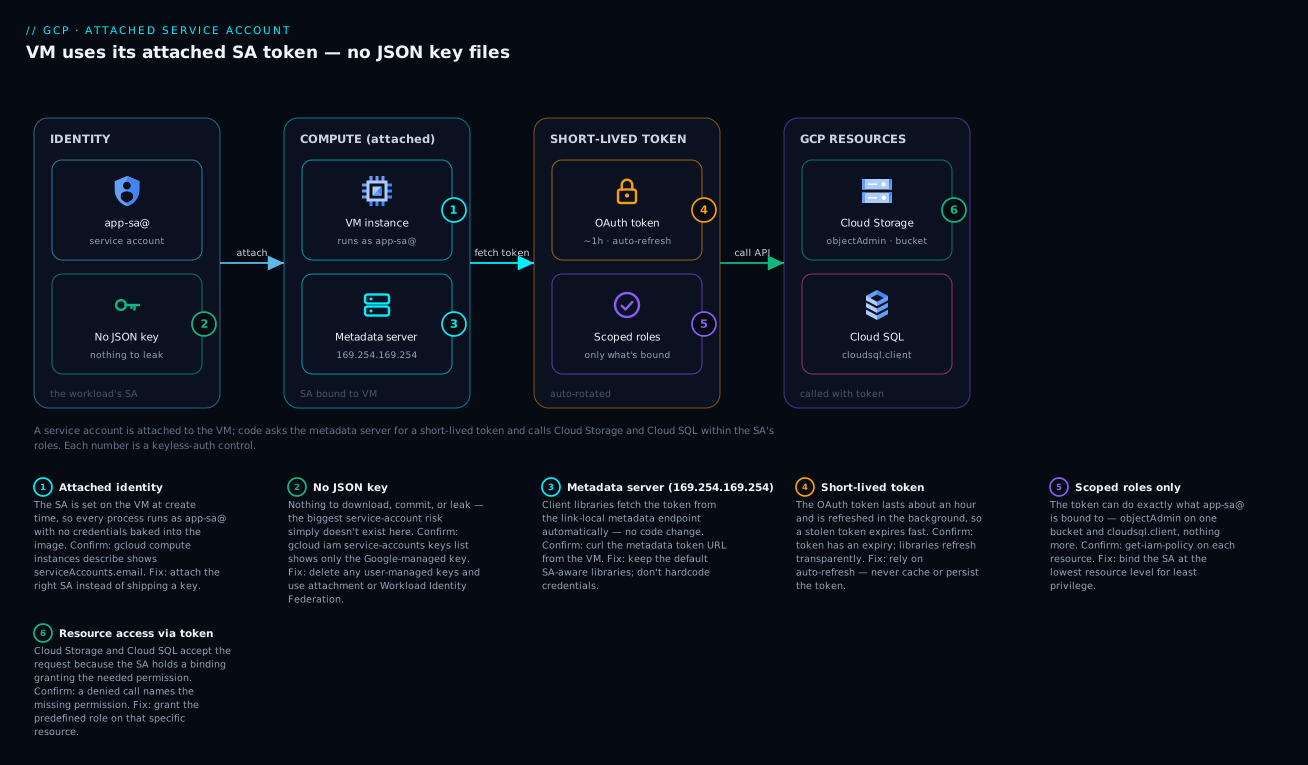
Every Compute Engine VM, GKE node/pod, Cloud Run service and Cloud Function runs as a service account — its attached service account. The platform exposes a special, link-local endpoint called the metadata server at 169.254.169.254 (also reachable as metadata.google.internal). Code running on the workload asks the metadata server for an access token; the metadata server returns a short-lived OAuth token (valid roughly an hour) for the attached SA. The Google client libraries do this automatically via Application Default Credentials (ADC) — you write storage.Client() with no credentials and it Just Works, because under the hood it fetched a token from the metadata server. No file, no secret, and the token rotates itself.
The flow, hop by hop:
| Step | What happens | Who does it |
|---|---|---|
| 1 | A VM is created with an attached SA (--service-account=…) |
You, at deploy time |
| 2 | Your app calls a Google API (e.g. read a GCS object) via a client library | Your code |
| 3 | The library finds no static credentials → asks the metadata server | Google client library (ADC) |
| 4 | The metadata server returns a short-lived token for the attached SA | The platform |
| 5 | The library calls the API with that token; IAM checks the SA’s roles | Library + IAM |
| 6 | ~1 hour later the token expires; the library fetches a fresh one | Automatic |
Attach an SA at create time and grant it least privilege:
# Create a VM that runs AS the etl-runner SA — no key file anywhere
gcloud compute instances create etl-vm \
  --project=kloudvin-prod --zone=asia-south1-a \
  --service-account="etl-runner@kloudvin-prod.iam.gserviceaccount.com" \
  --scopes="https://www.googleapis.com/auth/cloud-platform"
For Cloud Run it’s the same idea — --service-account sets the identity the service runs as:
gcloud run deploy orders-api \
  --image=asia-south1-docker.pkg.dev/kloudvin-prod/apps/orders:1.4.2 \
  --service-account="orders-api-sa@kloudvin-prod.iam.gserviceaccount.com" \
  --region=asia-south1 --no-allow-unauthenticated
Two beginner gotchas live here. Access scopes vs IAM roles (legacy): on Compute Engine there’s an older concept called access scopes that can cap what APIs a VM may call on top of IAM. The modern guidance is to set the broad cloud-platform scope and control access purely with IAM roles on the SA — but if a VM gets PERMISSION_DENIED despite the SA having the role, a too-narrow legacy scope is a classic cause. The actAs permission: to create a VM or deploy a service that runs as an SA, your own identity needs roles/iam.serviceAccountUser (the iam.serviceAccounts.actAs permission) on that SA — otherwise you can’t attach it. That check exists so a low-privilege user can’t “borrow” a high-privilege SA by attaching it to a VM they control.
For GKE specifically, the recommended pattern is GKE Workload Identity, which maps a Kubernetes service account to a Google service account so pods get tokens the same keyless way (covered more in GKE-focused material; the principle is identical — pods get short-lived tokens, never a mounted key).
Keyless from outside GCP: Workload Identity Federation
The metadata-server trick only works inside GCP. So how does a GitHub Actions pipeline, an AWS Lambda, or an on-prem job authenticate to Google Cloud without a downloaded key? The answer — and the single most important “modern security” idea in this article — is Workload Identity Federation (WIF).
WIF lets you tell GCP: “Trust tokens issued by this external identity provider (GitHub’s OIDC, AWS STS, Azure AD, any OIDC/SAML IdP). When an external workload presents a valid token from that provider matching these attributes, let it impersonate this service account and get a short-lived GCP token.” No GCP key is ever created. The external system already has its own identity (GitHub gives each workflow run an OIDC token); WIF exchanges that for temporary GCP credentials.
The pieces:
| WIF component | What it is | Example |
|---|---|---|
| Workload identity pool | A container for external identities | github-pool |
| Pool provider | The trusted IdP + attribute mapping/condition | GitHub OIDC, restricted to repo:kloudvin/app |
| Attribute mapping | Maps IdP token claims → GCP attributes | google.subject = assertion.sub |
| Attribute condition | A filter on which external tokens are accepted | assertion.repository == 'kloudvin/app' |
| Target service account | The GCP SA the external identity may impersonate | deployer@kloudvin-prod.iam... |
workloadIdentityUser binding |
Lets the pool principal impersonate that SA | principalSet://… → SA |
Why this matters versus a key, in plain terms:
| Property | Downloaded SA key | Workload Identity Federation |
|---|---|---|
| A secret file exists | Yes (and can leak) | No file at all |
| Lifetime | Forever (until rotated) | Minutes (short-lived token) |
| Scope of trust | Anyone with the file | Only tokens matching your attribute condition |
| Revocation | Delete the key (if you find it) | Remove the binding / tighten the condition |
| Audit | “the key was used” | “this exact GitHub repo+branch was used” |
Setting it up for GitHub Actions, end to end:
# 1) Create a workload identity pool
gcloud iam workload-identity-pools create github-pool \
  --project=kloudvin-prod --location=global \
  --display-name="GitHub Actions pool"

# 2) Add GitHub's OIDC as a provider, mapping claims and RESTRICTING to one repo
gcloud iam workload-identity-pools providers create-oidc github-provider \
  --project=kloudvin-prod --location=global \
  --workload-identity-pool=github-pool \
  --issuer-uri="https://token.actions.githubusercontent.com" \
  --attribute-mapping="google.subject=assertion.sub,attribute.repository=assertion.repository" \
  --attribute-condition="assertion.repository=='kloudvin/app'"

# 3) Let identities from that repo impersonate the deployer SA (NO key created)
gcloud iam service-accounts add-iam-policy-binding \
  deployer@kloudvin-prod.iam.gserviceaccount.com \
  --project=kloudvin-prod \
  --role="roles/iam.workloadIdentityUser" \
  --member="principalSet://iam.googleapis.com/projects/PROJECT_NUMBER/locations/global/workloadIdentityPools/github-pool/attribute.repository/kloudvin/app"
The attribute condition is the security boundary — assertion.repository=='kloudvin/app' means only workflows from that specific repository are trusted, not “any GitHub repo on the internet.” Forgetting that condition is the dangerous mistake: an unrestricted provider would let any GitHub repository assume your SA. Always scope WIF providers to the exact external identity you intend to trust.
Least privilege: the principle that ties it together
Least privilege means each principal gets exactly the permissions its job requires — no broader role, no broader scope — and nothing more. It’s not a feature you enable; it’s a discipline expressed through every choice above. Translated into concrete habits:
| Least-privilege habit | Over-privileged anti-pattern | What you do instead |
|---|---|---|
| Right role | roles/editor to “make it work” |
The narrowest predefined role that covers the task |
| Right scope | Bind at project (or org) level | Bind on the single bucket/dataset/service |
| Right identity | One shared SA for many jobs | One SA per workload, named for its job |
| Right credential | Downloaded key file | Attached SA + metadata token, or WIF |
| Right lifetime | Permanent grant | Time-bound via an IAM Condition; remove when done |
| Right humans | Direct user: bindings |
Bind to groups; manage membership |
Two practical dimensions of “narrow”: role narrowness (give roles/storage.objectViewer, not roles/storage.admin, when read is all that’s needed) and scope narrowness (grant on gs://one-bucket, not on the whole project). Scope narrowness is the one beginners forget — a perfectly chosen role bound at the project level still grants that capability across every matching resource in the project. The rule of thumb: bind at the lowest node in the hierarchy that still satisfies the requirement. If only one bucket is involved, the binding belongs on that bucket.
IAM Conditions: access only when it makes sense
An IAM Condition is an extra rule attached to a binding that must be true for the grant to apply. It uses CEL (Common Expression Language) and can gate access by resource name/type, by time, by request context, and more. It lets you say “this role, but only on resources named logs-*” or “only until the end of the quarter.”
Common condition shapes a beginner will actually use:
| You want | CEL expression (the --condition expression) |
Use case |
|---|---|---|
| Only certain resources by name | resource.name.startsWith("projects/_/buckets/logs-") |
Scope a broad role to one naming prefix |
| Only a certain resource type | resource.type == "storage.googleapis.com/Bucket" |
Limit to buckets, not other resources |
| Only until a date (temporary) | request.time < timestamp("2026-12-31T00:00:00Z") |
Time-bound / break-glass access |
| Only during business hours | request.time.getHours("Asia/Kolkata") >= 9 && request.time.getHours("Asia/Kolkata") < 18 |
Restrict admin actions to working hours |
A real time-bound grant — exactly how you’d give a contractor read access that expires automatically:
gcloud projects add-iam-policy-binding kloudvin-prod \
  --member="user:contractor@example.com" \
  --role="roles/storage.objectViewer" \
  --condition='expression=request.time < timestamp("2026-12-31T00:00:00Z"),title=temp-until-year-end,description=Contractor read access expiring 2026-12-31'
Things to know before relying on conditions:
| Aspect | Detail |
|---|---|
| Language | CEL — small, safe expression language (string, time, comparison operators) |
| Where it sits | On the binding, not the whole policy — each binding can have its own condition |
| What it can read | resource.* (name, type, service) and request.* (time, and limited context) |
| What it cannot do | It can’t reference arbitrary attributes — only the supported resource/request fields |
| Policy version | Conditional bindings require IAM policy version 3 (the tooling sets this for you) |
| Gotcha | A typo’d condition that’s always false silently denies — test the access after adding |
Conditions are how you make least privilege temporal and contextual, not just “which role.” A time-bound condition on break-glass access is far safer than a permanent owner grant you’ll forget to remove.
Deny policies: an explicit “no” that wins
The allow policy can only grant. To express “no one may do X, regardless of any role they hold,” you use a separate mechanism: a deny policy. Deny rules are evaluated before allows and a matching deny wins — so a deny policy is a hard guardrail that even an Owner cannot bypass (unless explicitly excepted).
| Aspect | Allow policy | Deny policy |
|---|---|---|
| Effect | Grants permissions | Forbids permissions |
| Evaluation order | After deny | First — a matching deny short-circuits the allow |
| Attaches to | Resources (org/folder/project/resource) | Org, folder, or project (set via the Policies API) |
| Typical use | Day-to-day access | Org-wide guardrails (“never delete logs buckets”, “no SA key creation”) |
| Beginner advice | Use constantly | Use sparingly, for true must-never rules |
A deny policy is defined as a JSON document listing denied permissions and the principals it applies to (with optional exceptions and a CEL condition), then attached with gcloud iam policies create. A classic guardrail — nobody may create service-account keys org-wide (because keys are the leak vector) — looks conceptually like:
{
  "displayName": "Block SA key creation",
  "rules": [
    {
      "denyRule": {
        "deniedPrincipals": ["principalSet://goog/public:all"],
        "deniedPermissions": ["iam.googleapis.com/serviceAccountKeys.create"],
        "exceptionPrincipals": ["principalSet://goog/group/break-glass@kloudvin.com"]
      }
    }
  ]
}
The mental model: allow policies say what’s possible; deny policies say what’s forbidden no matter what. Use deny for the handful of rules that must hold even if someone is accidentally over-granted — they’re your seatbelt for IAM mistakes.
IAM Recommender: shrinking over-grants automatically
Over time, grants accumulate and most go partly unused. The IAM Recommender (part of the Policy Intelligence suite) watches actual permission usage over ~90 days and recommends removing or replacing roles that are broader than what a principal actually uses — e.g. “this SA has roles/editor but only ever used storage.objects.*; replace it with roles/storage.objectAdmin.”
| Recommender capability | What it surfaces |
|---|---|
| Role recommendations | “Replace this over-broad role with a narrower one” / “remove this unused role” |
| Lateral movement insights | An SA in project A that could impersonate into project B (risky reach) |
| Policy/permission insights | Unused permissions, large gaps between granted and used |
| Service account insights | Unused service accounts and unused keys you should remove |
Pull recommendations from the CLI and act on the safe ones:
# See IAM role recommendations for a project (what to shrink/remove)
gcloud recommender recommendations list \
  --project=kloudvin-prod \
  --location=global \
  --recommender=google.iam.policy.Recommender \
  --format="table(name, primaryImpact.category, content.overview)"
Use the Recommender as a monthly hygiene pass: review its suggestions, apply the obviously-correct ones (removing genuinely unused roles/owner from a service account is almost always right), and investigate the surprising ones. It is the closest thing to “least privilege on autopilot,” but it’s an advisor — a human still decides, because a permission used once a year would otherwise look removable.
Architecture at a glance
The two diagrams below show the two halves of everything above. The first is the decision flow every request travels: a principal (a user, a group member, or a service account) attempts an action on a resource; IAM gathers the allow policy on that resource plus every ancestor’s policy up the hierarchy (and any deny policy and condition), evaluates whether a binding grants the needed permission, and returns allow or deny. Read it left to right: identity on the left, the policy evaluation in the middle, the resource and the allow/deny verdict on the right. This is the picture to hold in your head whenever you debug “why can(’t) they do that” — the answer is always “what bindings, at what scope, with what conditions, apply to this principal for this resource.”
The second diagram is the service-account-in-action picture — the keyless mechanism from the “attached SA and metadata token” section made concrete. A Compute Engine VM (or Cloud Run service) runs as an attached service account; when its code calls Cloud Storage or Cloud SQL, the Google client library transparently fetches a short-lived token for that SA from the metadata server, and IAM grants or denies each call based on the roles bound to the SA — read access to one bucket, client access to one Cloud SQL instance — with no key file anywhere on the machine. Follow the arrows from the workload, through the attached identity, to each downstream API gated by that identity’s roles.
Real-world scenario
Kloudvin Retail runs a nightly analytics pipeline on GCP. The original setup, built in a hurry, looked like this: a single shared service account, automation@kloudvin-prod.iam.gserviceaccount.com, with roles/editor at the project level; a downloaded automation-key.json checked into the pipeline’s Git repo “temporarily”; and every one of the eight data engineers holding roles/editor on the project so they could “debug.” It worked — until a refactor of the nightly job had a typo in a cleanup step that issued bq rm -r -f against the wrong dataset. Because the job ran as an Editor service account, the delete succeeded. Eleven months of curated tables were gone, and the key.json in Git meant the blast radius was anything Editor could touch, from anywhere.
The remediation was a textbook least-privilege rebuild, and the numbers tell the story. Identity: they created three purpose-built service accounts — etl-loader (loads raw files into BigQuery), etl-transform (runs transformation queries), and report-reader (read-only for the BI tool) — replacing the one shared Editor SA. Roles: etl-loader got roles/bigquery.dataEditor on only the raw dataset plus roles/storage.objectViewer on the ingest bucket; etl-transform got roles/bigquery.jobUser (to run queries) plus roles/bigquery.dataEditor on the analytics dataset only; report-reader got roles/bigquery.dataViewer on analytics and nothing else. Crucially, none of them got dataset-delete permission — bigquery.datasets.delete lives in admin roles they deliberately didn’t grant.
Credentials: the key.json was deleted from Git (and the key disabled then deleted in IAM), history was scrubbed, and the pipeline — which runs on Compute Engine — was switched to attached service accounts so it gets metadata-server tokens with no key file at all. The GitHub Actions deploy job moved to Workload Identity Federation scoped to assertion.repository=='kloudvin/data-pipeline'. Humans: the eight engineers lost their direct roles/editor bindings; instead a data-engineers@kloudvin.com group got roles/bigquery.dataViewer plus roles/bigquery.jobUser for day-to-day work, with a time-bound break-glass condition granting elevated access only when explicitly enabled. A deny policy at the project level now forbids bigquery.datasets.delete for everyone except a tiny break-glass group.
The result, six weeks later: the IAM Recommender showed zero roles/editor or roles/owner on any automation principal, the same typo’d cleanup step (re-run in a test) now fails with PERMISSION_DENIED instead of deleting anything, and a quarterly audit takes an afternoon instead of being impossible. The blast radius of a bug went from “the entire project” to “the specific tables this specific job is allowed to write.” No new product was bought; the fix was discipline.
Advantages and disadvantages
| Advantages of doing IAM well | Disadvantages / costs to be aware of |
|---|---|
| Fine-grained control at org/folder/project/resource level | More bindings to design and reason about than “Editor for all” |
| Service accounts + keyless auth remove long-lived secrets | Initial setup (SAs, WIF, conditions) takes more thought up front |
| Policy inheritance scales governance org-wide | Inheritance can grant unintended access from a high binding |
| Predefined roles are curated and maintained by Google | Some predefined roles are broader than you’d ideally want |
| Conditions and deny policies add temporal/hard guardrails | Custom roles drift and need ongoing maintenance |
| Recommender turns “least privilege” into a measurable practice | Recommender is advisory — still needs human judgement |
Where each matters: inheritance is a double-edged sword — it’s what lets you grant “auditors can view everything” once at the org, and it’s also why a stray roles/editor at the folder level quietly grants Editor across a dozen projects. The skill is to keep broad grants high and rare, and specific grants low and many. Keyless auth is almost pure upside; the only “cost” is learning the metadata-server/WIF model once. Custom roles are where the maintenance burden concentrates — every custom role is a small ongoing liability, which is why “predefined first” is the rule.
Hands-on lab
A from-scratch, free-tier-friendly walkthrough: create a service account, grant it least privilege on one bucket, prove it can read but not delete, add a time-bound human grant, and clean up. Use Cloud Shell (already authenticated) or a local gcloud. Costs are effectively zero (a tiny bucket and a few API calls).
Step 1 — Set your project variable.
export PROJECT=$(gcloud config get-value project)
echo "Using project: $PROJECT"
Step 2 — Create a bucket and a test object.
gcloud storage buckets create gs://${PROJECT}-iam-lab --location=asia-south1
echo "hello least privilege" | gcloud storage cp - gs://${PROJECT}-iam-lab/test.txt
Expected: the bucket is created and test.txt uploads. List it to confirm:
gcloud storage ls gs://${PROJECT}-iam-lab/
# gs://<project>-iam-lab/test.txt
Step 3 — Create a least-privilege service account.
gcloud iam service-accounts create lab-reader \
  --display-name="Lab read-only SA"
Step 4 — Grant it read-only on ONLY this bucket (not the project).
gcloud storage buckets add-iam-policy-binding gs://${PROJECT}-iam-lab \
  --member="serviceAccount:lab-reader@${PROJECT}.iam.gserviceaccount.com" \
  --role="roles/storage.objectViewer"
This is the least-privilege move: objectViewer (read, not write/delete) on one bucket (not the project). Verify the binding landed:
gcloud storage buckets get-iam-policy gs://${PROJECT}-iam-lab \
  --format="table(bindings.role, bindings.members)"
# Expect roles/storage.objectViewer with the lab-reader SA
Step 5 — Prove the boundary by impersonating the SA. Your user can impersonate the SA if you have roles/iam.serviceAccountTokenCreator on it (grant it to yourself for the lab):
ME=$(gcloud config get-value account)
gcloud iam service-accounts add-iam-policy-binding \
  lab-reader@${PROJECT}.iam.gserviceaccount.com \
  --member="user:${ME}" --role="roles/iam.serviceAccountTokenCreator"

# Read AS the SA — should SUCCEED (objectViewer allows read)
gcloud storage cat gs://${PROJECT}-iam-lab/test.txt \
  --impersonate-service-account=lab-reader@${PROJECT}.iam.gserviceaccount.com
# Expected output: hello least privilege

# Delete AS the SA — should FAIL (objectViewer does NOT allow delete)
gcloud storage rm gs://${PROJECT}-iam-lab/test.txt \
  --impersonate-service-account=lab-reader@${PROJECT}.iam.gserviceaccount.com
# Expected: ERROR ... 403 ... does not have storage.objects.delete access
That contrast — read succeeds, delete is denied with a 403 storage.objects.delete error — is least privilege working. The SA can do exactly its job and nothing more.
Step 6 — Add a time-bound human grant (a condition).
gcloud storage buckets add-iam-policy-binding gs://${PROJECT}-iam-lab \
  --member="user:${ME}" \
  --role="roles/storage.objectViewer" \
  --condition='expression=request.time < timestamp("2026-12-31T00:00:00Z"),title=lab-temp,description=Temporary lab read access'
Validation checklist. You created a bucket, made a dedicated read-only SA, bound it on only that bucket, proved read works and delete is blocked, and added a self-expiring human grant. You never created or downloaded a key.
Teardown (so nothing lingers).
gcloud storage rm --recursive gs://${PROJECT}-iam-lab
gcloud iam service-accounts delete \
  lab-reader@${PROJECT}.iam.gserviceaccount.com --quiet
Cost note. A near-empty bucket and a handful of operations cost effectively nothing; deleting the bucket and SA removes everything. There is no per-hour charge for IAM itself.
Common mistakes & troubleshooting
The failures a beginner actually hits, with how to confirm and fix each.
| # | Symptom | Root cause | Confirm (command / where) | Fix |
|---|---|---|---|---|
| 1 | PERMISSION_DENIED despite “having access” |
The role is bound to a group you’re not in, or at a scope below the resource | gcloud projects get-iam-policy $P + check group membership |
Add yourself to the group, or bind the role at the right scope |
| 2 | A VM gets 403 calling an API even though its SA has the role |
Legacy access scope on the VM too narrow | gcloud compute instances describe VM --format="value(serviceAccounts.scopes)" |
Recreate/set scope to cloud-platform; control via IAM roles |
| 3 | “You do not have permission to act as service account” when creating a VM/Cloud Run | Your identity lacks iam.serviceAccounts.actAs on the SA |
The error names the SA | Grant yourself roles/iam.serviceAccountUser on that SA |
| 4 | Access works for you but not for a teammate | You bound user:you instead of a group |
Read the policy; you’ll see your user, not a group | Rebind to a group; add the teammate to it |
| 5 | Granted a role but still denied | Binding has a condition that’s false (typo’d or expired) | get-iam-policy --format=json and read the condition |
Fix/remove the condition; remember version-3 policy |
| 6 | Removed a role but access persists | The principal still has it from an ancestor (folder/org) binding | Check policies at project and folder and org | Remove the binding at the inheriting level |
| 7 | Everyone suddenly can’t do something an Owner should | A deny policy forbids it | gcloud iam policies list --attachment-point … |
Add an exception principal, or scope/remove the deny rule |
| 8 | App works locally but fails on GCP (or vice versa) | Different credentials: local key vs metadata-server ADC | Check GOOGLE_APPLICATION_CREDENTIALS env var presence |
Use ADC/attached SA on GCP; impersonation locally — drop the key |
| 9 | GitHub Actions can’t auth via WIF | Attribute condition doesn’t match the repo, or binding missing | Compare provider attribute-condition to the actual repo claim |
Fix the condition; add the workloadIdentityUser binding for the right principalSet |
| 10 | A binding references deleted:user:…?uid=… |
The principal was deleted but its binding remained | get-iam-policy shows the deleted: prefix |
Remove the stale binding |
| 11 | New SA can’t do anything | You created the SA but never granted it any role | get-iam-policy shows no binding for it |
Add the least-privilege role it needs |
| 12 | Token/credential errors after key rotation | Code still loads an old key file | Look for a key.json path in config/env |
Move to keyless (metadata/WIF); delete the key |
The two most common by far are #1/#6 (inheritance confusion) and #3 (actAs). For inheritance: when access surprises you, always check the whole chain — resource, then project, then folder, then org — because the binding is often not where you’re looking. For actAs: it’s not enough for the SA to have permissions; you need permission to attach it. The companion GCP ‘Permission Denied’? The IAM Troubleshooting Decision Tree That Always Finds It walks the full decision tree for these.
A quick “which scope holds the binding?” check that resolves most mysteries:
# Is the grant on the project, the folder, or the org? Check all three.
gcloud projects get-iam-policy kloudvin-prod --format=json | grep -A2 'role'
gcloud resource-manager folders get-iam-policy FOLDER_ID
gcloud organizations get-iam-policy ORG_ID
Best practices
- Bind roles to Google Groups, not individual users. Manage who’s in the group; access follows membership and disappears when someone leaves.
- Predefined roles first; basic roles essentially never; custom roles only when nothing fits.
roles/ownerandroles/editorbelong in sandboxes, not production. - Grant at the lowest scope that works. One bucket, not the project. Reserve org/folder bindings for genuinely broad, rare needs.
- One service account per workload, named for its job. Never a shared “automation” SA with broad rights across many jobs.
- Go keyless. Attached SA + metadata token on GCP; Workload Identity Federation off GCP. Create a downloaded key only as a true last resort — and if you must, rotate and guard it.
- Scope every WIF provider with an attribute condition to the exact external identity (specific repo/branch/account). Never leave a provider open to “any token.”
- Use IAM Conditions for temporary and contextual access — time-bound break-glass beats a permanent owner grant you’ll forget.
- Use deny policies for must-never rules (no SA-key creation, no deletion of critical buckets) so even an accidental over-grant can’t bypass them.
- Review the IAM Recommender monthly and remove unused roles, unused SAs and unused keys it flags.
- Audit custom roles quarterly for drift; they don’t auto-update and tend to accumulate permissions.
- Never commit keys to source control; scan repos and CI for credential files; rotate immediately on any suspected leak.
- Watch the default compute service account — don’t rely on it; assign explicit, least-privilege SAs to your workloads.
Security notes
IAM is the security layer, so “security notes” here is mostly “do the above, deliberately.” A few points deserve emphasis:
- Least privilege is the whole game. Every avoidable permission is potential blast radius. The cheapest security control on GCP is simply not granting what isn’t needed.
- Long-lived keys are the top leak vector. A downloaded SA key is a non-expiring password. Prefer keyless auth everywhere; a deny policy that blocks
serviceAccountKeys.createorg-wide (with a narrow exception group) is a strong guardrail. actAsand impersonation are privileged.roles/iam.serviceAccountUserandroles/iam.serviceAccountTokenCreatorlet a principal become an SA — granting them widely effectively grants whatever those SAs can do. Treat them as sensitive.- Owner can grant Owner. Anyone with
roles/ownercan escalate themselves and others without limit within that scope. Keep owners to a tiny, audited set; use break-glass with conditions instead of standing owner grants. - Inheritance is a security surface. A broad binding high in the hierarchy silently grants everywhere below. Audit org- and folder-level bindings especially — they’re the ones with the largest reach.
- Deny policies are evaluated first and beat allows. Use them for hard organizational boundaries that must hold regardless of any allow grant.
- Audit with Cloud Audit Logs. IAM changes and (with Data Access logs) API calls are recorded; pair Recommender hygiene with audit-log review for “who granted what, who used what.”
For perimeter-level data-exfiltration protection that complements IAM (stopping data leaving even when IAM would allow it), see GCP VPC Service Controls: Build Data Exfiltration Perimeters.
Cost & sizing
IAM itself is free — there is no charge for principals, roles, bindings, conditions, deny policies, Workload Identity Federation, or using the IAM Recommender. The “cost” of IAM is indirect and entirely about discipline:
| Cost dimension | What it means | How to keep it down |
|---|---|---|
| Operational cost | Time designing/maintaining bindings, SAs, custom roles | Predefined roles + groups; fewer custom roles; Recommender hygiene |
| Risk cost | Blast radius of an over-grant (data loss, breach) | Least privilege; keyless auth; deny guardrails |
| Audit cost | Effort to prove who can do what | Groups + standard roles make audits an afternoon, not a project |
| Indirect $$ | An over-broad SA that can create resources can run up a bill | Scope roles so workloads can’t spin up costly resources by accident |
The free-tier reality: you can build a fully least-privilege IAM design — multiple service accounts, WIF for CI/CD, conditions, deny policies, Recommender reviews — at zero IAM cost, on any project including a free-tier one. The only things that cost money are the resources IAM protects (buckets, VMs, BigQuery jobs), not the access control. There is genuinely no financial reason to skip doing IAM properly; the only investment is thought.
Interview & exam questions
1. What are the four core components of GCP IAM? A principal (the identity), a role (a bundle of permissions), a binding (a role attached to one or more principals), and the allow policy (the full set of bindings on a resource). IAM answers “can this principal perform this action on this resource?” by evaluating that policy plus inherited ones.
2. Difference between basic, predefined, and custom roles — and which to prefer? Basic roles (owner/editor/viewer) are coarse and project-wide — avoid in production. Predefined roles are Google-curated, service-scoped, and the right default for ~95% of grants. Custom roles are hand-authored permission lists for when nothing predefined fits — powerful but you maintain them and they drift.
3. Why bind roles to groups instead of individual users? Access then follows group membership: add a person to the group and they inherit all its grants; remove them and access disappears everywhere at once. Direct user: bindings scatter access across resources and outlive the person, making offboarding and audits error-prone.
4. How does a Compute Engine VM (or Cloud Run service) authenticate to other Google APIs without a key file? It runs as an attached service account; the Google client libraries fetch a short-lived token for that SA from the metadata server (169.254.169.254) via Application Default Credentials. The token auto-rotates (~1 h). No key file exists on the machine.
5. What is Workload Identity Federation and why is it better than a downloaded key? WIF lets an external identity (GitHub OIDC, AWS, on-prem IdP) exchange its own token for short-lived GCP credentials by impersonating an SA — no GCP key is ever created. It’s better because there’s no long-lived secret to leak, trust is scoped by an attribute condition to a specific external identity, and credentials are short-lived.
6. Explain IAM policy inheritance. Resources form a tree (org → folders → projects → resources). A policy on a node applies to that node and everything beneath it; effective access at any resource is the union of its own policy and all ancestor policies. A broad binding high up grants everywhere below — the top cause of “why can they do that?”
7. What’s the difference between an allow policy and a deny policy? An allow policy grants permissions and is purely additive. A deny policy forbids permissions, is evaluated first, and a matching deny beats any allow (even Owner) unless explicitly excepted. Use deny for hard org-wide guardrails like “no one may delete logs buckets.”
8. When and how would you use an IAM Condition? To limit when/where a binding applies — e.g. only on resources named logs-*, only a certain resource type, or only until a date. You attach a CEL expression to the binding (e.g. request.time < timestamp("2026-12-31T00:00:00Z") for time-bound access). Conditional bindings use policy version 3.
9. What does the IAM Recommender do? It analyses ~90 days of actual permission usage and recommends shrinking over-broad grants — replacing a role with a narrower one, removing unused roles/SAs/keys, and flagging lateral-movement risk. It’s advisory; a human applies the safe recommendations.
10. A workload’s service account has the right role but still gets 403. Name two likely causes. (a) A legacy access scope on the VM is too narrow (set it to cloud-platform and control with IAM). (b) The binding is at the wrong scope or via a group the SA isn’t in, or a condition on the binding is false. Also possible: the role lacks the specific permission the call needs.
11. Why is roles/owner especially sensitive? Owner can modify IAM — grant roles, including to itself — so it’s effectively unbounded admin within its scope and can escalate further. Keep owners to a tiny audited set and prefer time-bound break-glass over standing owner grants.
12. What permission lets you attach/run-as a service account, and why does it exist? iam.serviceAccounts.actAs (in roles/iam.serviceAccountUser). It exists so a low-privilege user can’t grab a high-privilege SA by attaching it to a VM or Cloud Run service they control — you must be explicitly allowed to act as that identity.
These map to the Associate Cloud Engineer (managing IAM, service accounts, roles) and Professional Cloud Security Engineer (least privilege, Workload Identity Federation, conditions, deny policies, org guardrails) certifications.
Quick check
- You need an analyst to read a BigQuery dataset but never delete or edit it. Which predefined role, and at what scope should you bind it?
- True or false: a downloaded service-account key is the recommended way to authenticate a Cloud Run service to Cloud Storage.
- A binding you removed at the project level didn’t change someone’s access. What’s the most likely reason?
- What single attribute makes a GitHub-Actions Workload Identity Federation provider safe rather than open to any repo?
- You want to forbid everyone (including owners) from deleting a critical bucket. Allow policy or deny policy?
Answers
roles/bigquery.dataViewer, bound on that dataset (the lowest scope that works), not on the whole project. It allows reading data/metadata but not editing or deleting.- False. The recommended way is keyless: run Cloud Run as an attached service account so it gets short-lived metadata-server tokens. A downloaded key is the last-resort fallback.
- The principal still has the access from an ancestor binding (folder or organization). Effective access is the union of all levels — remove the binding at the level that’s actually granting it.
- The attribute condition scoping the provider to a specific repository (e.g.
assertion.repository=='kloudvin/app'). Without it, any GitHub repo’s token could impersonate your SA. - A deny policy — it’s evaluated first and beats any allow, so it forbids the action regardless of roles (add a narrow exception group for break-glass if needed).
Glossary
- IAM (Identity and Access Management) — the GCP layer that decides, on every API call, whether a principal may perform an action on a resource.
- Principal (member) — an identity that can be granted access: a user, group, service account, domain, or federated external identity.
- Permission — the right to call one API method (e.g.
storage.objects.get); you don’t grant these directly, roles bundle them. - Role — a named bundle of permissions; one of basic, predefined, or custom.
- Basic (primitive) role —
roles/owner,roles/editor,roles/viewer; coarse, project-wide, avoid in production. - Predefined role — a Google-curated, service-scoped role (e.g.
roles/storage.objectViewer); the default choice. - Custom role — a permission list you author at project or org level for when no predefined role fits.
- Binding — one role attached to one or more principals, optionally with a condition.
- Allow policy (IAM policy) — the full set of bindings on a resource; additive; carries an
etag. - Deny policy — a separate mechanism listing forbidden permissions; evaluated before allows and wins.
- Resource hierarchy — organization → folders → projects → resources; policies inherit downward.
- Service account (SA) — an identity for a workload (not a person), ending in
.iam.gserviceaccount.com; both an identity and a resource. - Attached service account — the SA a VM, Cloud Run service, or function runs as, used for its outbound API calls.
- Metadata server — the on-host endpoint (
169.254.169.254) that hands a workload short-lived tokens for its attached SA. - Application Default Credentials (ADC) — the library mechanism that finds credentials automatically (metadata token on GCP, key/impersonation elsewhere).
- Service-account key — a downloaded JSON private key that authenticates as the SA; long-lived, leak-prone; last resort.
- Workload Identity Federation (WIF) — lets external identities (GitHub, AWS, on-prem) impersonate a GCP SA with no key, via a workload identity pool and provider.
- IAM Condition — a CEL expression on a binding limiting when/where it applies (by time, resource name/type, request context).
- IAM Recommender — Policy Intelligence advisor that flags over-broad/unused roles, SAs, and keys based on ~90 days of usage.
actAs/ impersonation —iam.serviceAccounts.actAs(run-as) and token-creator permissions that let a principal become an SA; privileged.
Next steps
You can now design and apply least-privilege IAM, give workloads keyless credentials, and audit grants. Build outward:
- Start here if any of this felt fast: Google Cloud IAM Explained Simply: Members, Roles, and Bindings (Without the Jargon) — the gentle on-ramp to the same concepts.
- When access breaks: GCP ‘Permission Denied’? The IAM Troubleshooting Decision Tree That Always Finds It — the full debugging playbook for
PERMISSION_DENIED. - The foundation IAM attaches to: The GCP Resource Hierarchy Explained: Organization, Folders, Projects, and Why It Runs Everything — understand inheritance properly.
- IAM at scale: GCP Landing Zone: The Foundation Blueprint with Shared VPC and Org Policies — how IAM design lives in a real multi-team org.
- Defence in depth beyond IAM: GCP VPC Service Controls: Build Data Exfiltration Perimeters — stop data leaving even when IAM would allow the call.
- Drive it from the CLI: gcloud CLI Quickstart: The Essential Commands That Cover 90% of Your Day — fluency with the tool every command here uses.