You shipped nothing. You changed nothing. And yet a deploy that worked yesterday now dies with PERMISSION_DENIED, the console tells a user “You do not have permission to view this page”, or a Cloud Run service returns a stark 403 to a caller that has always been allowed. Welcome to the single most common — and most misdiagnosed — failure in Google Cloud IAM, the engine that decides who can do what on which resource. The maddening part is that the error almost never tells you the whole truth on its face. “Permission denied” is the symptom; the cause is one of roughly a dozen distinct things living in completely different places — a missing role, a binding on the wrong resource in the hierarchy, an IAM Condition that evaluated false, an org policy that forbade the action before IAM ever ran, a deny policy that vetoed an otherwise-valid allow, a VPC Service Controls perimeter that blocked the call from the wrong network, a service account that can’t be impersonated, or simply a disabled API.
This article is the decision tree that always finds it. We treat PERMISSION_DENIED not as one bug but as a symptom class with a fan-out of root causes, each confirmed by a specific gcloud command or Console path. You will learn to read the error like an X-ray — pulling the principal (who), the permission (the verb, like storage.objects.get), and the resource (the noun) straight out of it — then walk Google Cloud’s evaluation order in the exact sequence the platform uses: org-policy gate, VPC-SC perimeter, deny policies, then allow policies inherited down the hierarchy with conditions applied along the way. Localise the failure to one stage and the fix is obvious. Guess, and you burn an hour granting roles/owner to a service account that a deny policy was blocking the whole time. By the end you will know — in under two minutes, using gcloud policy-troubleshoot iam, Policy Analyzer, the Console Troubleshooter, and audit logs — whether you face a missing role, a wrong-level grant, a false condition, an org-policy or deny override, a perimeter block, a broken impersonation chain, or a disabled API. Keep the prose for the mental model; keep the tables open at 02:00.
What problem this solves
Google Cloud hides a remarkable amount of machinery behind a one-line error so it can stay secure. A detailed “you’re missing bigquery.tables.getData because the binding on dataset X expired” message handed to an under-privileged caller would itself be a leak — it tells an attacker exactly what to ask for. So the information you need is real and captured (in audit logs, the policy, the org-policy and VPC-SC config), but deliberately not in the red box — and if you don’t know which stage to inspect, you thrash.
What breaks without this knowledge is predictable and expensive. An engineer sees PERMISSION_DENIED and reaches for the biggest hammer — roles/editor or roles/owner. Sometimes it “works,” teaching the worst lesson: now you have an over-privileged principal and the real cause (a deny policy or perimeter) is untouched and will bite again. Other times it doesn’t work — because a deny or org policy sits above IAM allow — and the engineer concludes “IAM is broken” when it is refusing an action a higher gate already forbade. Either way: hours lost, an audit finding created, root cause untouched. It bites hardest on service accounts, multi-project / shared-VPC setups, hierarchy confusion, and anything inside a VPC Service Controls perimeter. The fix is almost never “grant more” — it is “find the stage saying no and make that stage say yes, at the smallest scope.”
To frame the field, every cause class, the question it forces, and the one place to look first:
| Cause class | What’s really happening | First question to ask | First place to look | Most common single cause |
|---|---|---|---|---|
| Missing permission / role | The principal’s roles don’t contain the needed permission | What permission does the error name? | The error string + policy-troubleshoot iam |
A basic role used where a predefined role is needed, or no binding at all |
| Wrong hierarchy level | The grant exists, but on the wrong resource | Where did I grant, vs where is it enforced? | get-iam-policy at project and folder and org |
Granted on project; resource inherits from folder |
| IAM Condition false | A conditional binding didn’t match the request | Is the binding conditional? What’s the condition? | The binding’s condition expression |
Time/IP/resource condition that excluded this request |
| Deny policy veto | An explicit deny overrode the allow | Is there a deny policy on this resource or an ancestor? | gcloud iam policies list-deny ... (deny policies) |
Org-level deny that the allow can’t override |
| Org policy gate | A constraint blocked the action before IAM ran | Is this a configuration refusal, not an access one? | gcloud org-policies list on the resource |
iam.disableServiceAccountKeyCreation, domain-restricted sharing, etc. |
| VPC-SC perimeter | The API call crossed a service-control boundary | Did the request come from the right network/identity? | VPC-SC violation in audit logs / Troubleshooter | Call from outside the perimeter or to a protected service |
| Impersonation chain broken | A principal can’t mint a token for a service account | Who is impersonating whom? | serviceAccountTokenCreator on the target SA |
Missing Token Creator on the impersonated account |
| API disabled / wrong project | The service isn’t enabled, or quota project is wrong | Is the API on in this project? | gcloud services list --enabled |
API not enabled; or gcloud config points at the wrong project |
Learning objectives
By the end of this article you can:
- Read a GCP
PERMISSION_DENIED/ 403 error and extract the three things that matter — the principal, the exact permission (service.resource.verb), and the resource — from the message and the audit log. - Walk Google Cloud’s authorization evaluation order in sequence — org policy → VPC Service Controls → deny policy → allow policy (with conditions, inherited down the hierarchy) — and localise any 403 to the single stage that refused.
- Distinguish an access denial (IAM: you lack a permission) from a configuration denial (org policy: the platform forbids the action regardless of permission) — the most common source of wasted hours.
- Find the exact missing permission and the smallest predefined role that contains it, instead of reaching for basic roles like
roles/editororroles/owner. - Diagnose service-account failures: missing roles on the runtime SA, broken impersonation chains (
roles/iam.serviceAccountTokenCreator), and Workload Identity Federation misconfiguration for keyless CI/CD. - Confirm root cause fast with the real tools —
gcloud policy-troubleshoot iam, Policy Analyzer, the Console Troubleshooter, deny-policy and org-policy listings, and Cloud Audit Logs. - Apply each fix with both
gcloudand Terraform, at the smallest scope that resolves it, and verify the grant actually took effect.
Prerequisites & where this fits
You should already understand the IAM basics: a policy binding is a triple of (member, role, optional condition) on a resource; a role is a named bundle of fine-grained permissions (each shaped service.resource.verb); and resources live in a hierarchy — Organization → Folder → Project → resource — with allow policies inheriting downward. You should be comfortable running gcloud in Cloud Shell and switching the active project with gcloud config set project. If those triples and that hierarchy are fuzzy, read GCP IAM Explained: Members, Roles & Bindings, Simply first.
This sits in the Observability & Troubleshooting track, alongside the broader GCP Troubleshooting Methodology: IAM, VPC, Compute, GKE. It assumes the depth of the GCP IAM Deep Dive: Roles, Policies, Conditions & the Recommender and the hierarchy mechanics from GCP Resource Hierarchy Explained: Org, Folders, Projects. When the cause is a higher gate, lean on GCP Resource Hierarchy & Org-Policy Guardrails, GCP VPC Service Controls: Perimeters & Exfiltration Prevention, and GCP IAM Deny Policies, Conditions & Impersonation Chains.
A quick map of who confirms what during an incident, so you escalate fast:
| Layer | What lives here | Who usually owns it | Denials it can cause |
|---|---|---|---|
| Caller / identity | Which principal is actually making the call | App / platform team | Wrong identity (default SA vs intended SA), expired token |
| API enablement | Is the service turned on in this project | Project owner / platform | SERVICE_DISABLED, accessNotConfigured |
| Org policy | Constraints that forbid configurations | Org admin / security | Refusal regardless of IAM role (config-time) |
| VPC Service Controls | The service perimeter boundary | Security / network | VPC_SERVICE_CONTROLS violation from outside the perimeter |
| Deny policy | Explicit deny rules above allow | Security / org admin | Veto that no allow can override |
| Allow policy (IAM) | Member→role bindings + conditions | Resource owner / app | The classic “missing role” / wrong-level / condition-false |
| Service account | Runtime identity + impersonation | App + platform | Missing Token Creator; under-privileged runtime SA |
Core concepts
Six mental models make every later diagnosis obvious — the playbook is an application of them.
1. The error names the verb, not the fix. Every GCP permission is shaped service.resource.verb — storage.objects.get, iam.serviceAccounts.actAs. A PERMISSION_DENIED almost always names the exact permission the principal lacked — the most valuable clue you have, because it tells you which predefined role to look for (the one that contains it) instead of carpet-bombing with roles/editor. Don’t ask “what role should I give?”; ask “what permission was denied, and what’s the smallest role that holds it?”
2. Authorization is a pipeline, and IAM is only one stage. A request does not just “check IAM.” Google Cloud evaluates several gates in order — org policy, then VPC Service Controls, then deny policy, then the allow policy (with conditions, inherited down the hierarchy) — and any can say no (full sequence in the pipeline table below). Not knowing this order, you’ll inspect IAM bindings for a problem that lives a gate higher, where no amount of role-granting fixes it. “Deny and the gates above it win” is the single biggest unlock in GCP troubleshooting.
3. Allow inherits down; deny and org policy flow down too. A grant at the organization applies to every folder, project, and resource beneath it — so “I don’t see the binding on the project” doesn’t mean the principal lacks access; it might be granted three levels up. The corollary that trips everyone: when access is too broad, the cause is often an inherited grant high in the tree; when access is missing, the fix often belongs at a lower scope than where you first looked.
4. The identity making the call is rarely the one you assume. “Permission denied” frequently means the wrong principal made the request. A workload on Compute Engine or GKE runs as a service account — if you didn’t attach one, the default SA, with different permissions than the human who deployed it. Step one of any 403: confirm which principal actually made this call from authenticationInfo.principalEmail in the audit log, not from assumption.
5. Conditions turn one binding into “sometimes.” A binding can carry a Condition — a CEL expression over request attributes (time, resource name, IP, tag) — granting the role only when true. So a binding can name the right member and role and still not apply. When get-iam-policy shows the binding but access is denied, read the condition field first.
6. Org policy denies configurations; IAM denies actions. This distinction saves more hours than any other. IAM answers “may this principal perform this action?” — access. Org policy answers “is this configuration allowed here at all?” — governance, enforced regardless of your roles, so roles/owner cannot defeat it. When an owner gets PERMISSION_DENIED creating an SA key, suspect org policy — the text hints it, saying the action violates constraint X rather than “you don’t have permission Y.”
The vocabulary in one table
Before the deep sections, pin down every moving part — the mental model side by side:
| Concept | One-line definition | Where it lives | Why it matters to a 403 |
|---|---|---|---|
| Principal (member) | The identity making the call (user, group, SA, federated) | In the binding / token | Wrong principal = denied even with “correct” grants elsewhere |
| Permission | A single service.resource.verb action |
Inside roles | The exact thing denied; tells you which role to grant |
| Role | A named bundle of permissions | Bound to a resource | You grant roles, not permissions; pick the smallest that fits |
| Binding | (member, role, optional condition) in a resource’s allow policy | The resource (inherited down) | The unit of access; may live on an ancestor |
| Deny policy | Explicit deny rules (member + denied permissions) | Resource or ancestor | Overrides allow; checked before allow |
| IAM Condition | CEL expression gating a binding | Inside a binding | Binding present but condition false → still denied |
| Org policy constraint | A governance rule on configurations | Org/folder/project | Refuses an action regardless of IAM role |
| VPC Service Controls | A network perimeter around APIs | Access Context Manager | Blocks calls crossing the boundary, pre-IAM |
| Service account | A non-human identity workloads run as | Project (or attached) | The runtime identity; under-privileged → denied |
| Impersonation | One principal minting a token as an SA | actAs / Token Creator |
Missing Token Creator → “cannot impersonate” |
How to read the error (the X-ray skill)
Every fast diagnosis starts with extracting three facts from the error — who (principal), what verb (permission), on what (resource). The same denial across surfaces, and what to pull from each:
| Surface | What you see | Where the principal is | Where the permission is | Where the resource is |
|---|---|---|---|---|
| REST / JSON API | { "error": { "code": 403, "status": "PERMISSION_DENIED", "message": "Permission 'storage.objects.get' denied on resource ..." } } |
Often implicit (the token); confirm in audit log | In message and sometimes details[].metadata.permission |
In message (“on resource X”) |
gcloud |
ERROR: (gcloud...) ... PERMISSION_DENIED: Permission X denied on resource Y + sometimes “or it may not exist” |
The active gcloud config account |
In the message (Permission X) |
In the message (resource Y) |
| Client library (SDK) | A PermissionDenied / Forbidden exception with the same message and status |
The credential the client used (ADC) | Exception message / error details | Exception message |
| Cloud Console | “You do not have permission…”, “You need additional access”, or a greyed-out action | The signed-in user (top-right) | Often hidden — use the Troubleshooter | The page/resource you’re on |
| Audit log entry | protoPayload.status.code = 7, status.message, authorizationInfo[] |
protoPayload.authenticationInfo.principalEmail |
protoPayload.authorizationInfo[].permission + granted:false |
protoPayload.resourceName |
Two reading notes that save the most time. First, gcloud’s appended “or it may not exist” is not noise: GCP sometimes returns 404 NOT_FOUND when you lack permission to even know a resource exists — a “not found” can be a permission problem in disguise. Second, the audit log is the source of truth for the principal: the Console shows you, but the failing call may have run as a service account or a forgotten gcloud config — always confirm authenticationInfo.principalEmail.
The diagnostic toolkit: what each tool answers
You reach for a small, fixed set of tools — knowing which one answers which question is half the speed:
| Tool | The question it answers | How to reach it | Best for |
|---|---|---|---|
gcloud policy-troubleshoot iam |
Does this principal have this permission on this resource — via which binding, condition, or deny? | CLI / Cloud Shell | The single fastest “why” for an allow-policy (stage 5) denial |
| Policy Analyzer | What can a principal actually do across the hierarchy, considering inheritance? | Console → IAM → Policy Analyzer / Asset Inventory | Auditing effective access; “where does this access even come from?” |
| Console Troubleshooter | Why does the signed-in user lack access to this page/resource, and which permission is missing? | The “You need additional access” / “Why don’t I have access?” prompt | Console denials that hide the permission |
| Cloud Audit Logs | Who actually called, what was denied, and did a perimeter/deny fire? | gcloud logging read / Logs Explorer |
The source of truth for principal + denied permission + VPC-SC violation |
gcloud org-policies list/describe |
Is a configuration constraint refusing this here? | CLI / Console → Org Policies | Confirming a stage-1 (org-policy) refusal |
gcloud iam policies list-deny |
Is an explicit deny vetoing an otherwise-valid allow? | CLI | Confirming a stage-4 (deny-policy) veto |
| IAM Recommender | Which existing grants are over-broad and safe to trim? | Console → IAM (recommendations) | After the fix — shrinking the blast radius you just created |
The authorization pipeline and the decision tree
This is the spine of the whole method. A request is checked by a sequence of gates, and the first one that says no produces your error — so diagnose top to bottom, because checking IAM bindings is pointless if an org policy or perimeter above already refused. The full pipeline — what each stage decides, its denial fingerprint, and how to confirm it:
| Order | Stage | The question it answers | Denial fingerprint | How to confirm |
|---|---|---|---|---|
| 0 | API enabled? | Is this service turned on in this project? | SERVICE_DISABLED / accessNotConfigured |
gcloud services list --enabled |
| 1 | Org policy | Is this configuration allowed here at all? | “violates constraint”, “not allowed by org policy” | gcloud org-policies list --project=… |
| 2 | VPC Service Controls | Did the call cross a protected perimeter? | VPC_SERVICE_CONTROLS, RESOURCES_NOT_IN_SAME_SERVICE_PERIMETER |
VPC-SC unique-id in audit log; Troubleshooter |
| 3 | Context-Aware Access | Does the access level (device/IP) pass? | Access-level denied (BeyondCorp / IAP) | Access Context Manager levels; IAP logs |
| 4 | Deny policy | Is there an explicit deny matching this? | PERMISSION_DENIED with a deny-rule reference |
gcloud iam policies list-deny ... (deny policies) |
| 5 | Allow policy + conditions | Does a role contain the permission, inherited, condition-true? | PERMISSION_DENIED “Permission X denied” |
policy-troubleshoot iam; get-iam-policy at every level |
The crucial mental model: stages 0–4 can refuse before IAM (stage 5) is even consulted, and stages 1–4 cannot be overcome by granting more roles. This is why an owner can be denied — stage 5 would pass, but an org policy (1), perimeter (2), or deny policy (4) refuses first. So: work the pipeline top-down, and grant roles only once you’ve ruled out everything above stage 5.
Now the decision tree — the centrepiece. Walk it top to bottom: the first question that answers YES is your stage — stop, confirm, fix (if every branch fails to the bottom, it’s a plain allow-policy miss).
| Ask in order | If YES, the stage is… | Confirm | Fix (smallest-scope) |
|---|---|---|---|
Error says SERVICE_DISABLED / “API not enabled”? |
API (0) | gcloud services list --enabled --project=PROJECT |
gcloud services enable SERVICE.googleapis.com; set quota project if cross-project |
| Message says “violates constraint” / “not allowed by org policy”? | Org policy (1) | gcloud org-policies list --project=PROJECT; describe the constraint |
Adjust the constraint at the right node, or add an exception (security sign-off) |
Mentions VPC Service Controls / RESOURCES_NOT_IN_SAME_SERVICE_PERIMETER? |
VPC-SC (2) | VPC-SC unique id in audit log; access-context-manager perimeters describe |
Add the project to the perimeter, or an ingress/egress rule for the identity+service |
| An IAP / context-aware “access level” denial? | CAA (3) | Access Context Manager access levels; IAP request logs | Satisfy the access level (corp network/device), or adjust the binding’s condition |
policy-troubleshoot iam reports an explicit deny matched? |
Deny (4) | gcloud iam policies list-deny --attachment-point=… (resource + ancestors) |
Narrow/remove the deny rule, or add the principal to its exception list |
Permission is iam.serviceAccounts.actAs / getAccessToken? |
Impersonation | gcloud iam service-accounts get-iam-policy TARGET_SA (Token Creator?) |
Grant roles/iam.serviceAccountTokenCreator on the target SA to the caller |
| Audit-log principal is not the one you expected? | Wrong principal | authenticationInfo.principalEmail; gcloud config list account |
Attach the intended SA to the workload; or fix gcloud auth |
| No binding grants the permission anywhere up the hierarchy? | Allow miss (5) | gcloud policy-troubleshoot iam RESOURCE --principal-email=… --permission=… |
add-iam-policy-binding with the predefined role that holds the permission |
The binding exists but has a condition that’s false? |
Condition (5) | Read the binding’s condition.expression |
Loosen/extend the CEL, or add an unconditional binding for the needed scope |
Reading the resource hierarchy correctly
Half of all “I granted the role and it still doesn’t work” cases are hierarchy mistakes: the grant is real, but on the wrong resource. Allow policies inherit downward, so a resource’s effective permissions are the union of its bindings plus every ancestor’s. The classic errors: granting on the wrong project, granting on the project when the resource is governed at the folder, or forgetting resource-level policies (per-bucket, per-dataset IAM) exist. Reading and unioning four levels of policy in your head is where mistakes creep in — prefer policy-troubleshoot iam, which names the deciding binding, its role, level, and any condition or deny. The decision rule for where to grant:
| If the principal needs access to… | Grant at… | Why |
|---|---|---|
| One bucket / dataset / topic / SA | That resource | Least privilege; smallest blast radius |
| Everything in one project | The project | Standard workload scope |
| Everything across an environment’s projects | The folder containing them | One binding, inherited; avoids per-project drift |
| Org-wide security/audit duties | The organization | Genuinely org-wide roles only (auditor, security admin) |
| A short-lived or constrained need | Any level, with a condition | Time/resource-bound access without permanent breadth |
Finding the exact missing permission and the smallest role
Once you’ve ruled out the higher gates and confirmed a genuine allow-policy miss (stage 5), the discipline is: find the exact permission denied, then grant the smallest predefined role that contains it — never a basic role as a reflex.
The error usually hands you the permission; when a Console denial hides it, the Troubleshooter (“Why don’t I have access?”) names it. To find which roles contain a permission, filter IAM → Roles by it or run gcloud iam roles describe roles/NAME --format='value(includedPermissions)'. Confirm a role holds the permission before granting it, then grant at the smallest scope — the bucket, not project-wide objectAdmin (the lab below walks this end to end). On role type: basic roles (owner/editor/viewer) are thousands of permissions project-wide — almost never right in prod, an instant audit/CIS finding; predefined roles are the curated default; custom roles are for when no predefined role is tight enough. A trap worth its own table — these pairs look interchangeable, but the left is the over-grant people reach for and the right is what was actually required:
| The role people grant (too broad) | The permission actually needed | The smaller role that holds it |
|---|---|---|
roles/owner |
storage.objects.get |
roles/storage.objectViewer |
roles/editor |
pubsub.topics.publish |
roles/pubsub.publisher |
roles/editor |
cloudsql.instances.connect |
roles/cloudsql.client |
roles/storage.admin |
storage.objects.create |
roles/storage.objectCreator |
roles/bigquery.admin |
bigquery.jobs.create + read |
roles/bigquery.jobUser (+ dataViewer on the dataset) |
roles/iam.serviceAccountAdmin |
iam.serviceAccounts.actAs |
roles/iam.serviceAccountUser |
Service accounts and impersonation: the number-one source
More 403s trace to service accounts than to anything else, because the non-human identity that runs the workload is an afterthought. Three failure shapes, routinely confused:
Shape 1 — the runtime SA is under-privileged. A Cloud Run service, GKE workload, Compute VM, or Cloud Function runs as a service account; if you didn’t specify one, the default SA, with broad legacy permissions or very few. The workload’s permissions matter at call time, not the deploying human’s. Fix: attach a dedicated SA with minimal roles (GCP IAM Service Accounts & Least Privilege).
Shape 2 — the impersonation chain is broken. gcloud --impersonate-service-account=, Terraform’s impersonate_service_account, and many CI flows have one principal mint a short-lived token as a service account, which requires the caller to hold roles/iam.serviceAccountTokenCreator on the target SA. Miss it and you get PERMISSION_DENIED on getAccessToken or actAs. The classic confusion is granting it on the wrong SA or project-wide. Confirm with gcloud iam service-accounts get-iam-policy TARGET_SA; grant on that SA — in Terraform, a google_service_account_iam_member whose member can even be a WIF principalSet://…:
resource "google_service_account_iam_member" "ci_can_impersonate" {
  service_account_id = google_service_account.deploy_sa.name
  role               = "roles/iam.serviceAccountTokenCreator"
  member             = "principalSet://iam.googleapis.com/${var.pool}/attribute.repository/my-org/my-repo"
}
Shape 3 — Workload Identity Federation isn’t wired correctly. For keyless CI/CD, WIF maps an external identity to a GCP SA with no downloaded key. If the attribute mapping or condition doesn’t match the incoming token’s claims, the federated principal never resolves to anything that can actAs the SA — a denial that looks like a missing role but is a mapping mismatch. Depth in GCP Workload Identity Federation: Keyless CI/CD.
The actAs-adjacent roles are constantly mixed up — the table to keep:
| Role | Lets the holder… | Granted on | Use it for |
|---|---|---|---|
roles/iam.serviceAccountUser |
Attach/run as an SA (deploy a workload that runs as it) | The target SA (or project) | Deploying a Cloud Run/GCE/GKE workload that uses the SA |
roles/iam.serviceAccountTokenCreator |
Mint tokens / impersonate the SA | The target SA | --impersonate-service-account, signing, short-lived creds |
roles/iam.serviceAccountAdmin |
Create/delete/manage SAs and their policies | Project | Administering SAs (not for runtime use) |
roles/iam.workloadIdentityUser |
Let an external identity impersonate the SA (WIF) | The target SA | Keyless CI from GitHub/GitLab via federation |
The memorable tell of all these: works locally, fails in the cloud — locally the call runs as your credentials, in the cloud as the SA, so compare gcloud auth list against the runtime SA.
When IAM is innocent: org policy, deny, and VPC-SC
These three stages refuse before IAM and cannot be fixed by granting roles — recognising them stops the over-granting.
Org policy enforces configuration rules. The error says not allowed or violates constraint X, and denies owners just the same. The most commonly-hit constraints:
| Constraint (common) | What it blocks | Typical error moment | Fix path |
|---|---|---|---|
iam.disableServiceAccountKeyCreation |
Creating SA JSON keys | “creating key not allowed” even as owner | Use WIF/impersonation instead; or exempt the project (with sign-off) |
iam.allowedPolicyMemberDomains (domain-restricted sharing) |
Granting to identities outside allowed domains | Adding user:someone@gmail.com is rejected |
Add the domain to the allowlist, or grant only in-domain |
compute.vmExternalIpAccess |
Assigning external IPs to VMs | VM create with external IP denied | Use a NAT / internal-only, or allowlist the VM |
gcp.resourceLocations |
Creating resources outside allowed regions | “location not allowed” on create | Create in an allowed region, or amend the constraint |
storage.publicAccessPrevention |
Making buckets/objects public | allUsers grant rejected |
Serve via signed URLs / authorised access instead |
iam.disableCrossProjectServiceAccountUsage |
Using an SA across project boundaries | Cross-project actAs denied |
Allow it on the project, or co-locate the SA |
gcloud org-policies list --project=PROJECT_ID   # effective policies on the project
gcloud org-policies describe iam.disableServiceAccountKeyCreation \
  --project=PROJECT_ID --effective              # inspect the suspected constraint
Deny policies are explicit denies attached to the org, folder, or project; a deny beats any allow and is evaluated first — so even roles/owner is blocked if a deny rule matches their permission and they aren’t in its exception list. List them with gcloud iam policies list-deny --attachment-point="cloudresourcemanager.googleapis.com/projects/PROJECT_ID" and read the deniedPrincipals, deniedPermissions, and exceptionPrincipals.
VPC Service Controls wraps APIs in a network perimeter to stop data exfiltration; a call from outside the perimeter to a protected service is blocked regardless of IAM. The tell is the literal VPC Service Controls or RESOURCES_NOT_IN_SAME_SERVICE_PERIMETER plus a unique violation id; find the detail with gcloud logging read 'protoPayload.status.details.violations.type="VPC_SERVICE_CONTROLS"' --limit=5. The violation reason tells you which perimeter rule to reach for — they are not interchangeable:
| VPC-SC violation reason | What it means | The right fix |
|---|---|---|
NO_MATCHING_ACCESS_LEVEL |
The caller’s network/identity satisfies no access level on the perimeter | Add an ingress rule for that identity+service, or an access level for its network |
RESOURCES_NOT_IN_SAME_SERVICE_PERIMETER |
Source and target resources live in different perimeters | Put both in one perimeter, or bridge them with a perimeter bridge |
SERVICE_NOT_ALLOWED_FROM_VPC / egress block |
A workload inside the perimeter is calling out to a service the perimeter doesn’t permit | Add an egress rule for the destination service+project |
RESOURCE_NOT_IN_PERIMETER |
The target project isn’t part of the perimeter at all | Add the project to the perimeter (narrowly) |
For all four stages the wrong move is identical — granting more roles does nothing — and the fix-owner is usually security.
Conditions: the binding that grants “sometimes”
A binding can carry an IAM Condition — a CEL expression that must be true for the grant to apply. It shows up in get-iam-policy looking correct, names the right member and role, and still denies access because the request didn’t satisfy the condition — one of the sneakiest 403s precisely because the binding looks present. Read it with gcloud projects get-iam-policy PROJECT_ID --format=json | jq '.bindings[] | select(.condition != null)'. The attributes a condition can test, and the denial each produces:
| Condition attribute (CEL) | Example expression | Grants only when… | The “looks granted but denied” case |
|---|---|---|---|
Time (request.time) |
request.time < timestamp("2026-07-01T00:00:00Z") |
Before the expiry | After the expiry — access silently lapses |
Resource name (resource.name) |
resource.name.startsWith("…/buckets/prod-") |
Resource matches the prefix | A resource outside the prefix |
Resource type (resource.type) |
resource.type == "storage.googleapis.com/Bucket" |
The type matches | A different resource type |
| Request IP / access level | via Access Context Manager level | From an allowed network/device | From outside the allowed context |
Tag (resource.matchTag(...)) |
resource.matchTag("env", "prod") |
The resource carries the tag | An untagged or differently-tagged resource |
# A time-bound grant in Terraform — note: when request.time passes the expiry, access is denied
resource "google_project_iam_member" "temp_break_glass" {
  project = "my-project-id"
  role    = "roles/compute.admin"
  member  = "user:oncall@example.com"
  condition {
    title       = "expires-2026-07-01"
    description  = "Break-glass access, auto-expires"
    expression   = "request.time < timestamp(\"2026-07-01T00:00:00Z\")"
  }
}
Architecture at a glance
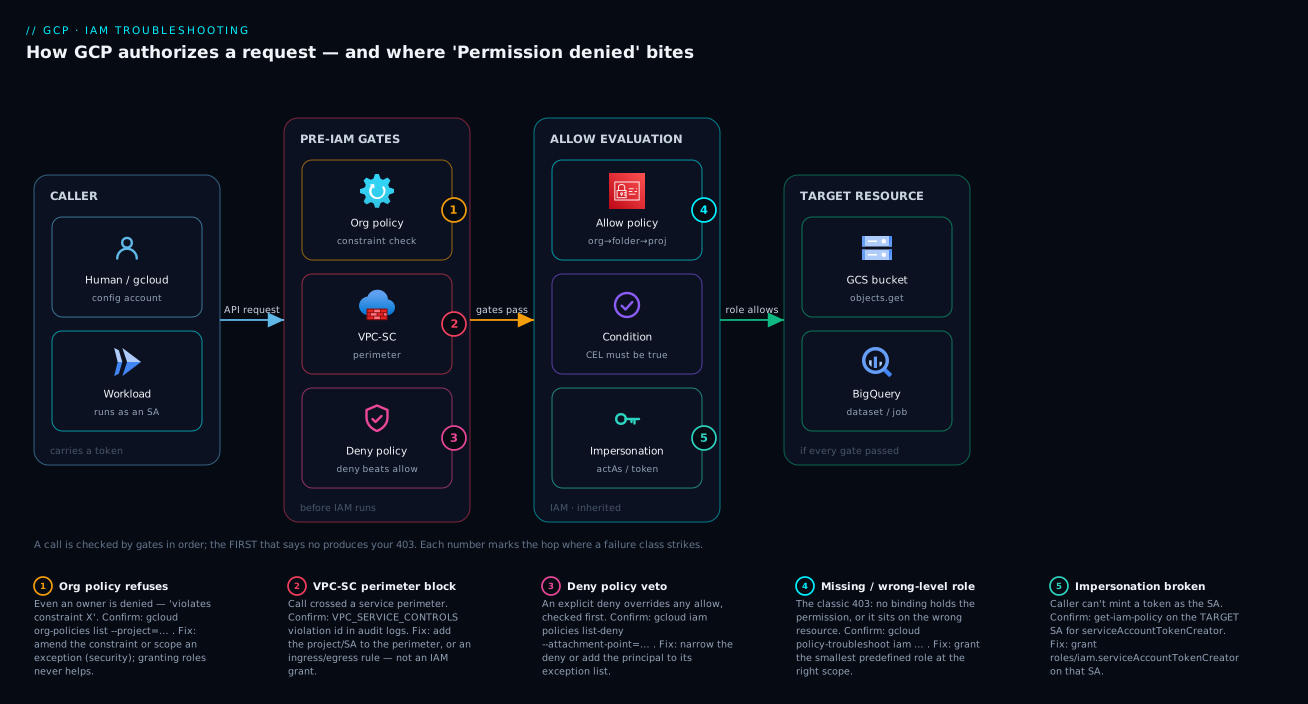
The diagram traces an API call the way Google Cloud actually authorizes it, then maps each failure class to the gate where it bites. Read it left to right. A request leaves a caller — a human via gcloud/Console, or a workload running as a service account — carrying a token, and arrives at the policy engine, which is not one check but a sequence: the org-policy and VPC-SC gates decide whether this configuration and network path are even permitted; then deny policies (an explicit deny wins outright); then the allow-policy evaluation walks the resource hierarchy — org, folder, project, resource — unioning every inherited binding and applying any conditions. Only if every gate passes does the call reach the target resource (a bucket, a Cloud Run service, a BigQuery dataset).
The numbered badges mark where each denial class strikes: blocks at the org-policy or perimeter gate (badges 1–2) happen before IAM is consulted, so granting roles there is futile; a deny-policy veto (badge 3) overrides any allow; a missing or wrong-level grant (badge 4) is the classic IAM miss; and a broken impersonation chain (badge 5) fails when the caller can’t even mint the token to become the SA. The whole method is in the picture: localise the 403 to the leftmost gate that refuses, confirm with that gate’s command, fix it there.
Real-world scenario
Nimbus Logistics runs a parcel-tracking platform on Google Cloud: a Cloud Run API in project nimbus-app-prod, reading and writing a Cloud Storage bucket (gs://nimbus-events-prod) that lives in a separate, security-owned project nimbus-data-prod. The data project sits inside a VPC Service Controls perimeter to satisfy a customer contract about data exfiltration. The platform team is five engineers; the security team owns the org policies and the perimeter. Monthly GCP spend is about ₹220,000.
The incident began after a routine change: security rolled the Cloud Run service onto a new dedicated runtime SA, tracker-run@nimbus-app-prod.iam.gserviceaccount.com, replacing the old default Compute SA. Within minutes the API returned 500s: PERMISSION_DENIED: Permission 'storage.objects.create' denied on resource (or it may not exist). The on-call engineer’s first instinct was textbook-wrong — grant roles/storage.admin at the project level. It didn’t help, so he escalated to storage.admin at the org level — an alarming over-grant — and still the writes failed. An hour gone, and the over-grant had tripped a security alert of its own.
The breakthrough came from walking the pipeline top-down. The audit-log query showed the denial carried a VPC Service Controls violation with a unique id — not a plain IAM miss. The old default SA had worked because, by historical accident, it was referenced in an ingress rule on the data project’s perimeter; the new tracker-run@ SA was not, so every call from nimbus-app-prod into the protected bucket was being blocked at stage 2, before IAM was ever consulted. No storage.admin grant at any level could have worked, because the perimeter refuses the request regardless of roles.
The real fix was small and belonged to security: add the new SA to the perimeter’s ingress policy for the Storage API, and grant it exactly roles/storage.objectCreator on the bucket. The org-level over-grant was reverted the same afternoon and writes resumed immediately. The retro put one line on the wall: “If an owner-level grant doesn’t fix it, the problem isn’t IAM — read the audit log before you grant anything.”
The incident as a timeline, because the order of moves is the lesson:
| Time | Symptom | Action taken | Effect | What it should have been |
|---|---|---|---|---|
| 09:02 | 500s; storage.objects.create denied |
(alert fires) | — | Read the audit log: IAM miss or a gate? |
| 09:08 | Same denial | Grant storage.admin on the project |
No change | Don’t grant before localising the stage |
| 09:25 | Same denial | Escalate to storage.admin at the org |
No change + security alert | Stop — owner-level not helping means not-IAM |
| 09:55 | Root cause found | Audit log shows VPC-SC violation id | Reframed to stage 2 | This was the breakthrough |
| 10:10 | Mitigated | Security adds SA to perimeter ingress rule | Writes resume | Correct fix, correct owner |
| 10:20 | Fixed | Grant objectCreator on the bucket; revert org grant |
Least privilege restored | The actual fix is scoped + at the right gate |
Advantages and disadvantages
GCP’s layered, deny-first, hierarchy-inheriting model is what causes the confusion here — and what makes a 403 diagnosable once you know the pipeline. Weigh it honestly:
| Advantages (why this model helps you) | Disadvantages (why it bites) |
|---|---|
| Every denial is deterministic — the same request always fails the same way; there’s a single deciding gate to find | The one-line error abstracts the deciding gate away; you must dig to learn which of six stages refused |
| The error usually names the exact permission, pointing straight at the smallest role to grant | Console denials often hide the permission, forcing a Troubleshooter round-trip |
policy-troubleshoot iam and Policy Analyzer answer “why” precisely — the deciding binding, level, and condition |
Those tools answer IAM (stage 5); org-policy/VPC-SC/deny each need their own command |
| Inheritance lets one well-placed grant cover a whole folder — less per-project drift | Inheritance also means access can come from three levels up; “not on this resource” doesn’t mean “not granted” |
| Deny policies + org policy + VPC-SC stop over-grants and exfiltration regardless of IAM mistakes | They refuse before IAM, so granting roles can’t fix them — and people waste hours not realising this |
| Conditions enable time-bound and resource-bound least privilege | A condition that quietly evaluated false looks identical to a missing binding |
| Service accounts + WIF give workloads keyless, scoped identities | The runtime SA is an afterthought; impersonation/federation misconfig produces opaque 403s |
Every one of these disadvantages is manageable — but only once you know the gates exist and diagnose them in order. It bites hardest on multi-project / shared-VPC architectures, anything inside a perimeter, and teams on default service accounts.
Hands-on lab
Reproduce a service-account PERMISSION_DENIED, find the exact missing permission with the Troubleshooter, and fix it with the smallest role — free-tier-friendly (a single project, no paid resources). Run in Cloud Shell.
Step 1 — Set up. Confirm the active project (operating on the wrong one is the most common silent failure), then create a roleless service account and a bucket.
export PROJECT_ID="$(gcloud config get-value project)"   # verify this is right!
gcloud iam service-accounts create lab-uploader --display-name="Lab uploader"
export SA="lab-uploader@${PROJECT_ID}.iam.gserviceaccount.com"
export BUCKET="gs://${PROJECT_ID}-iam-lab"
gcloud storage buckets create "$BUCKET" --location=asia-south1
Step 2 — Reproduce the denial. Grant yourself Token Creator to impersonate the SA, then upload as the SA — which has no storage role, so it fails.
gcloud iam service-accounts add-iam-policy-binding "$SA" \
  --member="user:$(gcloud config get-value account)" \
  --role="roles/iam.serviceAccountTokenCreator"
echo "hello" > /tmp/iam-lab.txt
gcloud storage cp /tmp/iam-lab.txt "$BUCKET/iam-lab.txt" --impersonate-service-account="$SA"
# Expected: ERROR ... PERMISSION_DENIED: ... 'storage.objects.create' denied ...
The error names the exact permission — storage.objects.create — which is your whole diagnosis.
Step 3 — Confirm with the Troubleshooter (the “why”).
gcloud policy-troubleshoot iam \
  "//storage.googleapis.com/projects/_/buckets/${PROJECT_ID}-iam-lab" \
  --principal-email="$SA" --permission="storage.objects.create"
# Expected: access = NOT_GRANTED, no binding found that contains it
Step 4 — Grant the smallest role and verify. roles/storage.objectCreator holds storage.objects.create (confirm with gcloud iam roles describe), so grant that, not storage.admin — then the upload succeeds.
gcloud storage buckets add-iam-policy-binding "$BUCKET" \
  --member="serviceAccount:$SA" --role="roles/storage.objectCreator"
gcloud storage cp /tmp/iam-lab.txt "$BUCKET/iam-lab.txt" --impersonate-service-account="$SA"
# Expected: Copying file ... done.
Step 5 — Teardown.
gcloud storage rm -r "$BUCKET"
gcloud iam service-accounts delete "$SA" --quiet && rm -f /tmp/iam-lab.txt
You reproduced the most common 403 (under-privileged SA), read the permission straight from the error, confirmed it with the Troubleshooter, and fixed it with the smallest role — the whole method, end to end.
Common mistakes & troubleshooting
This is the playbook — the centerpiece. Each row is a real failure mode: symptom, root cause, the exact command or Console path that confirms it, and the fix. Scan for your symptom, confirm before you act, fix at the smallest scope. The rows span stage 0 to stage 5.
| # | Symptom (what you see) | Root cause | Confirm (exact command / path) | Fix |
|---|---|---|---|---|
| 1 | PERMISSION_DENIED: Permission 'X.Y.Z' denied on resource |
Principal’s roles don’t contain permission X.Y.Z |
gcloud policy-troubleshoot iam RESOURCE --principal-email=… --permission=X.Y.Z |
Grant the smallest predefined role holding X.Y.Z at the right scope |
| 2 | Granted the role, still denied | Grant is on the wrong hierarchy level | get-iam-policy at project and folder and org for the principal |
Grant where the resource enforces (often the resource or folder), not just the project |
| 3 | Owner is denied; “violates constraint” / “not allowed” | Org policy refuses the configuration | gcloud org-policies list --project=PROJECT; describe the constraint |
Amend the constraint at the right node, or get a scoped exception (security) |
| 4 | Valid allow looks correct, still PERMISSION_DENIED |
A deny policy vetoes it (deny beats allow) | gcloud iam policies list-deny --attachment-point=… on resource + ancestors |
Narrow/remove the deny, or add the principal to its exception list |
| 5 | VPC Service Controls / RESOURCES_NOT_IN_SAME_SERVICE_PERIMETER |
Call crossed a service perimeter | VPC-SC violation id in audit logs; perimeters describe |
Add the project/SA to the perimeter, or create an ingress/egress rule |
| 6 | PERMISSION_DENIED on iam.serviceAccounts.getAccessToken |
Caller lacks Token Creator on the target SA | get-iam-policy on the target SA, look for serviceAccountTokenCreator |
Grant roles/iam.serviceAccountTokenCreator on the target SA |
| 7 | Deploy fails “does not have permission to act as service account” | Deployer lacks serviceAccountUser on the SA |
The error names iam.serviceAccounts.actAs |
Grant roles/iam.serviceAccountUser on the SA to the deployer |
| 8 | SERVICE_DISABLED / accessNotConfigured |
The API isn’t enabled in this project | gcloud services list --enabled --project=PROJECT |
gcloud services enable SERVICE.googleapis.com |
| 9 | Works locally, 403 in the cloud | Cloud runs as a service account, not your creds | Audit log authenticationInfo.principalEmail ≠ you |
Grant the runtime SA the minimal roles your code needs |
| 10 | Binding clearly present, access still denied | An IAM Condition evaluated false | get-iam-policy → read condition.expression; compare to the request |
Loosen/extend the condition, or add an unconditional binding for the scope |
| 11 | CI (GitHub Actions) “unable to impersonate / authenticate” | Workload Identity Federation mapping/condition mismatch | Pool/provider attribute mapping vs the token’s claims | Fix the attribute mapping/condition; grant workloadIdentityUser on the SA |
| 12 | NOT_FOUND on a resource you’re sure exists |
You may lack permission to see it (existence hidden) | policy-troubleshoot iam for a read permission on it |
Grant a viewer-level role; the “404” was a masked 403 |
| 13 | 403 mentions “billing” / “quota project” | Wrong quota/billing project on the request | gcloud config get-value project; check billing link |
Set the correct quota project; link a billing account |
| 14 | Access vanished at a specific time, no change made | A time-bound condition expired, or a temporary grant lapsed | get-iam-policy → condition with a request.time bound |
Extend the condition window or re-grant (ideally with a fresh expiry) |
| 15 | Console: “You need additional access” but CLI works | Different principals: signed-in user vs CLI account/SA | Compare Console user (top-right) with gcloud config list account |
Grant the Console user the role, or use the same principal |
| 16 | Public access (allUsers) grant is rejected |
storage.publicAccessPrevention / iam.allowedPolicyMemberDomains |
gcloud org-policies describe …publicAccessPrevention --effective |
Use signed URLs / authorised access; or amend the org policy (security) |
| 17 | GKE pod denied a GCP API despite a node SA role | Pod uses Workload Identity (KSA→GSA), not the node SA | Check the pod’s KSA→GSA binding, not the node pool | Bind the KSA to the GSA (workloadIdentityUser) and grant the GSA the role |
| 18 | Propagation: just-granted role still 403 for a minute | Eventual consistency of policy changes | Re-run policy-troubleshoot iam; it flips to GRANTED shortly |
Wait briefly and retry; don’t pile on more grants |
Three moves apply to any row above: see who actually called (gcloud logging read 'protoPayload.authorizationInfo.granted=false' --limit=5); learn why a permission is or isn’t granted (gcloud policy-troubleshoot iam …); and check for a higher gate (gcloud org-policies list, gcloud iam policies list-deny …).
Error & reason-code reference
The denial shows up with a small set of status strings and reason codes; map the code to the stage and the fix. The non-obvious ones are the 403 sub-reasons in the JSON details.
Status / reason |
HTTP | Stage | Meaning | First fix |
|---|---|---|---|---|
PERMISSION_DENIED (status code 7) |
403 | Allow (5) | Principal lacks the named permission | Grant smallest role holding it |
IAM_PERMISSION_DENIED |
403 | Allow (5) | Same, surfaced by some APIs | As above |
403 + reason: "accessNotConfigured" |
403 | API (0) | API not enabled / not configured for project | gcloud services enable … |
SERVICE_DISABLED |
403 | API (0) | The service is disabled in the project | Enable the service |
403 + reason: "billingNotEnabled" |
403 | Billing | No billing account linked | Link billing to the project |
403 + reason: "rateLimitExceeded"/quotaExceeded |
403/429 | Quota | Out of quota (not an IAM problem) | Request quota increase / back off |
VPC_SERVICE_CONTROLS (violation) |
403 | VPC-SC (2) | Request blocked by a service perimeter | Add to perimeter / ingress rule |
RESOURCES_NOT_IN_SAME_SERVICE_PERIMETER |
403 | VPC-SC (2) | Cross-perimeter resource access | Place resources in the same perimeter or bridge them |
ORG_POLICY_VIOLATION / “violates constraint” |
403 | Org policy (1) | A constraint forbids the configuration | Amend constraint / scoped exception |
Deny-policy match (in policy-troubleshoot) |
403 | Deny (4) | An explicit deny rule applies | Narrow deny / add exception principal |
actAs / getAccessToken denied |
403 | Impersonation | Caller can’t impersonate the target SA | Grant Token Creator on the target SA |
NOT_FOUND (masked) |
404 | Possibly Allow (5) | May be hidden-existence due to no read access | Grant a viewer role; re-check |
When the surface error is too terse, the audit-log entry is the truth, field by field: status.code = 7 confirms PERMISSION_DENIED; authenticationInfo.principalEmail is the actual principal; authorizationInfo[].permission + granted:false is the denied permission; resourceName is the resource; and a status.details[].violations[].type = VPC_SERVICE_CONTROLS (with violationReason) means a perimeter block at stage 2, not an IAM miss.
Best practices
Crisp, production-grade rules from the pipeline:
- Diagnose top-down, fix bottom-up. Walk the pipeline org-policy → VPC-SC → deny → allow when finding the cause; grant at the smallest scope when fixing it.
- Read the audit log before you grant anything.
authenticationInfo.principalEmailandauthorizationInfo[].permissionare the truth; the red box on screen is a summary. - Grant the smallest predefined role that holds the denied permission. Never reach for
roles/owner/editor/viewerto “unblock” — that creates the next audit finding. - If an owner is denied, it isn’t IAM. Owners have every IAM permission, so an owner-denial means org policy, deny policy, or VPC-SC is refusing above IAM.
- Give every workload a dedicated SA with minimal roles, and use impersonation / Workload Identity Federation instead of keys. Default SAs are a smell; keyless also sidesteps
iam.disableServiceAccountKeyCreation. - Grant at the right level deliberately. Resource or folder for least privilege and least drift; the organization only for genuinely org-wide roles.
- Make conditional grants legible. Give conditions clear titles and expiries; a silent
request.timelapse looks identical to a missing binding. - Manage IAM as code (Terraform), reviewed, and run the Recommender. A bad binding caught in review never becomes a 02:00 incident; the Recommender surfaces over-grants to trim.
- Document your perimeters and deny policies. The app team must know a perimeter or deny exists, or they’ll chase IAM for hours.
Security notes
Troubleshooting 403s is, paradoxically, where most over-privilege is created — under incident pressure someone grants owner “just to unblock” and never reverts it. Hold the line when it’s hardest:
- Least privilege is the whole game. The denied-permission string tells you the minimum role to grant; granting more is the security regression, not the fix. Prefer resource- over project- over folder/org-scoped bindings.
- Guardrails are not obstacles — comply, don’t weaken. When a deny/org policy blocks you, the right response is usually to comply (signed URLs, WIF, an allowed region), not to weaken it. Loosening
publicAccessPreventionor a domain restriction to “fix” a 403 can open an exfiltration path; likewise, adding a project/identity to a perimeter expands what can reach protected data — do it narrowly (specific identity + service), with security. See GCP VPC Service Controls: Perimeters & Exfiltration Prevention. - Avoid service-account keys. Each downloaded key is a long-lived credential that can leak — use impersonation and Workload Identity Federation, and store anything you must keep in Secret Manager (GCP Cloud KMS, CMEK & Envelope Encryption).
- Audit every emergency grant, and separate duties. Pair break-glass grants with a time-bound condition so over-access auto-expires; the app team owns workload IAM while security owns org policy, deny policies, and perimeters — mixing the two is how a 403 fix disables a guardrail org-wide.
Cost & sizing
IAM itself is free — no charge for policies, bindings, roles, conditions, deny policies, org policies, or perimeters. What this topic costs you is indirect:
| Cost driver | How it shows up | Rough magnitude | How to control it |
|---|---|---|---|
| Audit logs storage | Admin Activity logs are free; Data Access logs (needed to see denials in detail) bill via Cloud Logging | Per-GiB ingestion beyond the free tier | Enable Data Access logging selectively; route to a log bucket with sane retention |
| Over-grant remediation | Time + audit findings from owner/editor sprawl |
Engineer-hours; failed compliance scans | Least privilege + Recommender; never grant basic roles to unblock |
| VPC-SC / Access Context Manager | The features are free; the operational cost is design + troubleshooting time | Engineer-hours | Document perimeters; train the app team on the violation signature |
| Wrong-project API usage | Enabling/using an API in the wrong project can incur that project’s charges | Service-dependent | Verify the active/quota project before operating |
| Incident time (the real cost) | Hours lost diagnosing the wrong stage | The expensive line item | This decision tree — localise in minutes, not hours |
The single biggest “cost” of GCP IAM is engineer time spent diagnosing the wrong stage — exactly what the pipeline-ordered method eliminates. The one line item that can run up a bill is Data Access audit logs (needed to see denials in detail; Admin Activity logs, recording policy changes, are on by default and free) — enable them where you need visibility and set retention deliberately. Pair with GCP Cloud Monitoring & Logging: The Operations Suite Deep Dive to alert on granted=false spikes before users report them.
Interview & exam questions
Model answers are 2–4 sentences. These map to the Associate Cloud Engineer (ACE) and Professional Cloud Architect (PCA) exams, which test IAM troubleshooting heavily.
1. A user with roles/owner gets PERMISSION_DENIED creating a service-account key. Why, and how do you fix it?
Owners hold every IAM permission, so this isn’t an allow-policy problem — it’s an org policy (iam.disableServiceAccountKeyCreation) refusing the configuration regardless of role. Use impersonation or Workload Identity Federation instead of keys, or (with security sign-off) scope an exception.
2. You granted a service account roles/storage.objectViewer on the project, but it still can’t read a specific bucket. What’s the first thing to check?
Whether a higher gate is refusing before IAM — most commonly a VPC Service Controls perimeter (a VPC_SERVICE_CONTROLS violation in the audit log), which no IAM grant fixes. Otherwise verify the binding actually applies (right project, no false condition).
3. What is the difference between roles/iam.serviceAccountUser and roles/iam.serviceAccountTokenCreator?
serviceAccountUser lets a principal deploy a workload that runs as the SA (actAs); serviceAccountTokenCreator lets it mint tokens / impersonate the SA. Deploying Cloud Run as an SA needs the former; gcloud --impersonate-service-account needs the latter, on the target SA.
4. In what order does Google Cloud evaluate authorization, and why does the order matter? API enablement → org policy → VPC Service Controls → deny policy → allow policy with conditions (inherited down the hierarchy). The first gate to refuse produces the error, and gates above the allow policy can’t be overcome by granting roles — so you diagnose top-down or grant roles that change nothing.
5. A binding clearly grants the right member the right role, but access is still denied. Name two likely reasons.
Either an IAM Condition on the binding evaluated false (wrong time/IP/resource), or an explicit deny policy on the resource or an ancestor is overriding the allow. Read the binding’s condition.expression and run policy-troubleshoot iam, which surfaces a matched deny.
6. How do you find the exact permission a failed Console action requires when the error doesn’t show it?
Use the IAM Policy Troubleshooter (Console, or gcloud policy-troubleshoot iam) against the resource and the signed-in principal — it reports the deciding permission and binding. The Console’s “Why don’t I have access?” prompt does the same for the current page.
7. A workload works on your laptop but returns 403 in Cloud Run. What changed? The identity: locally it ran as your credentials (ADC), but in Cloud Run as the service’s runtime service account, with different permissions. Grant the runtime SA the minimal roles the code needs.
8. What does “explicit deny beats allow” mean in practice for troubleshooting?
Even a correct allow binding — up to roles/owner — is overridden if a deny policy matches the principal and permission and they aren’t in its exception list. So when an allow looks right but access fails, list deny policies on the resource and its ancestors first.
9. Why might a 404 NOT_FOUND actually be a permission problem?
GCP sometimes hides a resource’s existence from principals who can’t see it, to prevent enumeration — so “not found” can mean “you can’t see it,” not “it’s gone.” Troubleshoot a read permission on the resource; if that’s the miss, grant a viewer role.
10. How does Workload Identity Federation cause 403s, and how do you diagnose it?
If the pool/provider’s attribute mapping or condition doesn’t match the external token’s claims, the federated identity never resolves to a principal that can actAs the SA. Compare the token’s claims to the provider config, and ensure the mapped principal has roles/iam.workloadIdentityUser on the SA.
11. An afternoon-only access pattern stops working overnight with no change deployed. What’s the likely cause?
A time-bound IAM Condition (a request.time expression) whose window has passed, or a temporary/break-glass grant that lapsed. Read the binding’s condition and extend the window or re-grant with a fresh expiry, ideally as code.
Quick check
- A principal with
roles/owneris denied an action. Is the cause more likely IAM allow-policy, or something else? Why? - You see
RESOURCES_NOT_IN_SAME_SERVICE_PERIMETER. Which pipeline stage refused, and will granting an IAM role fix it? - Name the role you grant on the target service account so a caller can impersonate it.
- A binding shows the correct member and role in
get-iam-policy, but access is still denied. What single field do you read next? - Which command answers “does this principal have this permission on this resource, and via which binding?”
Answers
- Something else (org policy, deny policy, or VPC-SC), not IAM allow. An owner already holds every IAM permission, so the allow stage would pass — the refusal must come from a gate above IAM, which roles can’t defeat.
- VPC Service Controls (stage 2). No IAM grant will fix it; you must add the project/identity to the perimeter or create an ingress/egress rule.
roles/iam.serviceAccountTokenCreator, granted on the target SA (for keyless external identities via WIF it’sroles/iam.workloadIdentityUser).- The binding’s
condition(itscondition.expression) — a conditional binding that evaluated false looks exactly like a missing grant. gcloud policy-troubleshoot iam RESOURCE --principal-email=… --permission=…(the Policy Troubleshooter).
Glossary
- Principal (member): the identity making a request (user, group, service account, federated) — found in
authenticationInfo.principalEmail. - Permission: a single fine-grained action shaped
service.resource.verb(e.g.storage.objects.get); the error usually names the one you lack. - Role: a named bundle of permissions — basic (owner/editor/viewer), predefined (per-service), or custom.
- Binding: a triple of (member, role, optional condition) in a resource’s allow policy; the unit of access.
- Allow policy: a resource’s bindings; effective access is the union of it plus every ancestor’s (inheritance).
- Deny policy: explicit deny rules that override any allow; evaluated before the allow policy.
- IAM Condition: a CEL expression on a binding (time, resource name, IP, tag) that must be true for the grant to apply.
- Org policy (constraint): a governance rule that permits/forbids configurations regardless of IAM roles.
- VPC Service Controls: a service perimeter around APIs that blocks calls crossing the boundary, before IAM is consulted.
- Service account (SA): a non-human identity workloads run as; the runtime identity whose permissions matter at call time.
- Impersonation: one principal minting short-lived credentials as an SA, needing
serviceAccountTokenCreatoron the target. - Workload Identity Federation (WIF): mapping an external identity (e.g. a CI provider) to a GCP SA without a key.
- Policy Troubleshooter: the tool (
gcloud policy-troubleshoot iam/ Console) that explains whether and why a principal has a permission.
Next steps
- Master the foundations these diagnoses rest on with GCP IAM Explained: Members, Roles & Bindings, Simply and the GCP IAM Deep Dive: Roles, Policies, Conditions & the Recommender.
- Get the hierarchy right at design time with GCP Resource Hierarchy Explained: Org, Folders, Projects and the guardrails in GCP Resource Hierarchy & Org-Policy Guardrails.
- Go deeper on the gates above IAM: GCP IAM Deny Policies, Conditions & Impersonation Chains and GCP VPC Service Controls: Perimeters & Exfiltration Prevention.
- Kill service-account 403s for good with GCP IAM Service Accounts & Least Privilege and keyless CI via GCP Workload Identity Federation: Keyless CI/CD.
- Broaden the diagnostic muscle beyond IAM with the GCP Troubleshooting Methodology: IAM, VPC, Compute, GKE.