Up to now in this course you have used clusters — deploying workloads, making them production-ready, troubleshooting them. This lesson is about building and running the cluster itself. When you let a cloud provider hand you a managed control plane (EKS, AKS, GKE), an enormous amount of careful engineering is hidden from you: how the API server is made redundant, where the cluster’s data actually lives, how the TLS certificates that hold the whole thing together are issued and rotated, and how you upgrade a live cluster without dropping a single request. The day you self-manage — on-prem, at the edge, in an air-gapped environment, or simply to understand what the managed service is doing for you — all of that becomes your job.
We will use kubeadm, the official, opinionated cluster-bootstrapping tool. kubeadm is not a full installer (it deliberately leaves CNI, OS prep, and infrastructure to you), but it is the reference for how a conformant cluster is assembled, and it is exactly what the CKA exam expects you to drive. By the end you will understand a highly available (HA) control plane built from three or more control-plane nodes behind a load balancer; the crucial choice between stacked and external etcd; how to back up and restore etcd (the single most important operational skill for a self-managed cluster); how to safely take nodes in and out of service; and how to perform a staged, version-skew-aware upgrade of a running cluster. You will do the hands-on parts free and locally so the commands are real, not abstract.
Learning objectives
By the end of this lesson you can:
- Bootstrap a control plane with
kubeadm initand join workers and additional control-plane nodes withkubeadm join, and explain every artefact kubeadm produces (certificates, kubeconfigs, static Pod manifests). - Design a highly available control plane and choose correctly between a stacked etcd and an external etcd topology, justifying the trade-off.
- Explain etcd’s quorum requirement and why control-plane node counts are odd (3, 5, 7), and reason about blast radius.
- Back up etcd with
etcdctl snapshot saveand restore a cluster from that snapshot — the skill that turns a disaster into an inconvenience. - Manage the cluster’s PKI: list certificate expiry, rotate certificates, and rotate the kubelet’s serving and client certs.
- Run the node lifecycle safely —
cordon,drain,uncordon, andtaints/tolerations— for maintenance and decommissioning. - Apply the version-skew policy and perform a staged upgrade (control plane first, then kubelets), and decide when managed Kubernetes is the better call.
Prerequisites & where this fits
You should be comfortable with the control-plane components and the reconciliation loop from Kubernetes Architecture Deep-Dive, and with the workload concepts from Pods, Deployments & Services and the Day-2 readiness checklist. You need a terminal, and for the hands-on lab a free local cluster tool — kind, minikube, or k3d — plus kubectl and etcdctl. This is the Architecture tier of the Kubernetes Zero-to-Hero course: it is where you stop being a consumer of clusters and start being the person who can build, operate, recover, and upgrade one. It is also the densest single block of CKA exam content, so the commands here are worth committing to muscle memory.
A note on honesty before we start: you will almost never hand-build a production cluster the way this lesson does, command by command — you will use a higher-level installer (Cluster API, kubespray, Rancher, or a managed service). But you will be operating, recovering, and upgrading such clusters, and to do that well you must understand the anatomy underneath. That anatomy is the whole point of this lesson.
Core concepts: what a cluster actually is
Strip away the abstractions and a Kubernetes cluster is two things: a control plane that holds the desired state and makes decisions, and a set of worker nodes that run your Pods. The control plane is itself a small set of programs:
| Component | Role | How kubeadm runs it |
|---|---|---|
| kube-apiserver | The front door — the only thing that talks to etcd; everything else talks to it | Static Pod on each control-plane node |
| etcd | The cluster’s database — all state lives here as key/value data | Static Pod (stacked) or separate machines (external) |
| kube-scheduler | Assigns Pods to nodes | Static Pod on each control-plane node (leader-elected) |
| kube-controller-manager | Runs the reconciliation controllers | Static Pod on each control-plane node (leader-elected) |
| kubelet | Node agent — talks to the container runtime via CRI; runs the static Pods above | systemd service on every node |
| kube-proxy | Programs Service networking (iptables/IPVS) | DaemonSet |
Two ideas do most of the heavy lifting in this lesson:
- Static Pods. The control-plane components are run as static Pods — Pods defined by manifest files in
/etc/kubernetes/manifests/that the kubelet watches and runs directly, with no API server or scheduler involved. This is the bootstrap chicken-and-egg solution: the kubelet can run the API server before the API server exists, because static Pods do not need the API server. Edit a file in that directory and the kubelet reacts within seconds — which is also how you will tweak etcd and apiserver flags later. - etcd is the cluster. Every object you have ever created — Deployments, Secrets, RBAC, the lot — is a key in etcd. The API server is stateless; lose every control-plane node but keep a good etcd snapshot and you can rebuild. Lose etcd with no backup and the cluster is gone. This is why etcd backup is the single most important operational task on a self-managed cluster, and why we spend a whole section on it.
Jargon check. Quorum is the minimum number of etcd members that must agree (a majority) for the cluster’s data store to accept writes. PKI (public-key infrastructure) is the set of certificate authorities and certificates that let cluster components prove who they are to each other over TLS. Version skew is the set of rules about how far apart component versions are allowed to drift during an upgrade.
kubeadm: what init and join actually do
kubeadm does the fiddly, security-critical bootstrap and nothing more. It is worth knowing exactly what each command produces, because half of CKA cluster questions are really “do you understand the artefacts kubeadm created?”
kubeadm init on the first control-plane node performs these phases (you can run them individually with kubeadm init phase ...):
- Preflight checks — kernel modules, swap off, ports free, container runtime reachable, correct
cgroupdriver (systemdis the modern default). - Generate the PKI — a self-signed cluster CA at
/etc/kubernetes/pki/, plus the etcd CA, the front-proxy CA, and the service-account signing keypair. Every component cert is signed by one of these. - Write kubeconfigs —
admin.conf(your cluster-admin credential — this is what you copy to~/.kube/config), pluscontroller-manager.conf,scheduler.conf, and the kubelet’s bootstrap config. - Write static Pod manifests to
/etc/kubernetes/manifests/for the apiserver, controller-manager, scheduler, and (in the stacked topology) etcd. The kubelet starts them. - Bootstrap tokens & add-ons — install the cluster DNS (CoreDNS) and kube-proxy, and print a
kubeadm joincommand containing a token and the CA cert hash.
A minimal init for an HA cluster names the load balancer up front so the certificates and kubeconfigs point at the stable address, not at one node:
# On the FIRST control-plane node
sudo kubeadm init \
  --control-plane-endpoint "k8s-api.internal:6443" \  # the LB DNS:port — REQUIRED for HA
  --upload-certs \                                     # stash certs in a Secret so other CP nodes can pull them
  --pod-network-cidr "10.244.0.0/16" \                 # must match your CNI
  --kubernetes-version v1.30.2
--control-plane-endpoint is the make-or-break flag for HA: it bakes the load balancer’s address into every cert and kubeconfig. Omit it and you can never add a second control-plane node without regenerating certificates. --upload-certs puts the control-plane certificates into a short-lived (2-hour) Secret so additional control-plane nodes can fetch them with a --certificate-key instead of you copying files by hand.
kubeadm join comes in two flavours, and the difference is one flag:
# Join a WORKER node
sudo kubeadm join k8s-api.internal:6443 \
  --token <token> \
  --discovery-token-ca-cert-hash sha256:<hash>

# Join an additional CONTROL-PLANE node (note --control-plane + --certificate-key)
sudo kubeadm join k8s-api.internal:6443 \
  --token <token> \
  --discovery-token-ca-cert-hash sha256:<hash> \
  --control-plane \
  --certificate-key <key-from-upload-certs>
The --discovery-token-ca-cert-hash is what stops a worker from being tricked into joining an imposter API server — it pins the cluster CA. Tokens expire after 24 hours by default; regenerate one any time with kubeadm token create --print-join-command.
Designing an HA control plane
A single control-plane node is a single point of failure: lose it and you cannot schedule, scale, or change anything (existing Pods keep running, but the cluster is “frozen”). HA means three or more control-plane nodes so the cluster keeps making decisions through the loss of one. Two things must be made redundant: the API server (stateless, easy — just run several behind a load balancer) and etcd (stateful, the hard part — covered next).
The non-negotiable pieces of an HA control plane:
| Piece | Requirement | Why |
|---|---|---|
| Control-plane nodes | Odd number ≥ 3 (3 is standard; 5 for large/critical) | etcd needs a majority; odd counts maximise fault tolerance per node |
| Load balancer | TCP (layer 4) LB in front of all apiserver :6443 |
Gives one stable --control-plane-endpoint; health-checks out dead apiservers |
| etcd | 3 or 5 members with quorum | The data store must survive a node loss |
| Spread | Across racks/AZs/failure domains | A correlated failure must not take a majority at once |
Why odd numbers and why three? etcd uses the Raft consensus protocol and must have a majority (quorum) of members available to accept writes. The fault tolerance is (n-1)/2 rounded down:
| etcd members | Quorum (majority) | Failures tolerated |
|---|---|---|
| 1 | 1 | 0 |
| 2 | 2 | 0 (worse than 1 — you doubled risk for no gain) |
| 3 | 2 | 1 |
| 4 | 3 | 1 (no better than 3, more overhead) |
| 5 | 3 | 2 |
| 7 | 4 | 3 |
The killer insight in that table: two members tolerate zero failures (you need both, so either dying loses quorum), and four are no more resilient than three. Even numbers buy you nothing but cost and write latency, so you always run an odd number, and three is the sweet spot for most clusters. Beyond seven, write latency (every write must reach a majority) outweighs the extra resilience, so etcd recommends a maximum of seven members.
The load balancer should be layer 4 (TCP), not layer 7, because the API server speaks TLS end-to-end and you do not want the LB terminating it. Its health check should probe /healthz (or /livez) on :6443 so a wedged apiserver is taken out of rotation. On-prem this is commonly HAProxy + keepalived (a virtual IP that floats to a healthy node); in cloud it is a network load balancer.
Stacked vs external etcd: the architecture decision
This is the architecture choice the brief cares about most, and a classic interview question. kubeadm supports two topologies for where etcd runs.
Stacked etcd (the kubeadm default): each control-plane node also runs an etcd member, co-located as a static Pod on the same machine. Three control-plane nodes give you a three-member etcd cluster “for free.”
External etcd: etcd runs on its own dedicated set of machines, separate from the control-plane nodes. The API servers point at this external etcd cluster.
Stacked (3 nodes):                     External (3 + 3 nodes):
┌─────────────┐                        ┌─────────────┐   ┌──────────┐
│ CP1: api,   │                        │ CP1: api,   │   │ etcd-1   │
│   sched,    │                        │   sched,    │──▶│          │
│   ctrl,etcd │                        │   ctrl      │   │ etcd-2   │
├─────────────┤   etcd cluster         ├─────────────┤──▶│          │
│ CP2: ...etcd│   (co-located)         │ CP2: ...    │   │ etcd-3   │
├─────────────┤                        ├─────────────┤──▶│ (own     │
│ CP3: ...etcd│                        │ CP3: ...    │   │  machines)│
└─────────────┘                        └─────────────┘   └──────────┘
The comparison that matters:
| Dimension | Stacked etcd | External etcd |
|---|---|---|
| Machines needed | 3 (CP = etcd) | 6+ (3 CP + 3 etcd) |
| Cost & ops complexity | Lower — fewer machines, kubeadm manages it | Higher — separate cluster to provision, secure, back up, upgrade |
| Blast radius | Losing a node loses an apiserver and an etcd member together | etcd and control-plane failures are decoupled |
| etcd I/O isolation | etcd competes with apiserver for CPU/disk on the same box | etcd gets dedicated, fast disks (it is latency-sensitive) |
| Scaling etcd independently | No — tied to control-plane node count | Yes |
| kubeadm default | Yes | No (you provision etcd first, then point kubeadm at it) |
| Best for | Most clusters; simplicity wins | Large/critical clusters; strict isolation; very high object counts |
The right default is stacked — it is simpler, cheaper, and what most clusters run. Reach for external when you need to isolate etcd’s disk I/O (etcd is acutely sensitive to disk latency — slow disks cause leader elections and cluster-wide slowdowns), when your blast-radius requirements forbid coupling a control-plane failure with an etcd-member failure, or when a very large cluster pushes etcd hard enough to warrant its own tuned hardware. The trade-off is real operational weight: a second cluster to secure (its own TLS), back up, and upgrade.
For external etcd, you set up the etcd cluster yourself (or with kubeadm in etcd-only mode), then feed kubeadm a config file pointing at it:
# kubeadm-config.yaml (external etcd)
apiVersion: kubeadm.k8s.io/v1beta3
kind: ClusterConfiguration
kubernetesVersion: v1.30.2
controlPlaneEndpoint: "k8s-api.internal:6443"
etcd:
  external:
    endpoints:
      - https://10.0.1.10:2379
      - https://10.0.1.11:2379
      - https://10.0.1.12:2379
    caFile: /etc/kubernetes/pki/etcd/ca.crt
    certFile: /etc/kubernetes/pki/apiserver-etcd-client.crt
    keyFile: /etc/kubernetes/pki/apiserver-etcd-client.key
etcd backup and restore: the skill that saves your job
If you remember one thing from this lesson, make it this. An etcd snapshot is the difference between a five-minute recovery and a destroyed cluster. Managed Kubernetes does this for you invisibly; on a self-managed cluster it is your responsibility, and “we never took a backup” is how clusters die permanently.
A snapshot is a point-in-time copy of the entire key-value store — every object in the cluster. Take it with etcdctl, pointing at a live etcd member with that member’s client certificates:
# Back up etcd (run on a control-plane node; v3 API is required)
sudo ETCDCTL_API=3 etcdctl snapshot save /var/backups/etcd-snapshot.db \
  --endpoints=https://127.0.0.1:2379 \
  --cacert=/etc/kubernetes/pki/etcd/ca.crt \
  --cert=/etc/kubernetes/pki/etcd/server.crt \
  --key=/etc/kubernetes/pki/etcd/server.key

# Verify the snapshot is intact and see how many keys it holds
sudo ETCDCTL_API=3 etcdctl snapshot status /var/backups/etcd-snapshot.db --write-out=table
In production you run that on a schedule (a CronJob or a systemd timer), copy the snapshot off the cluster to object storage, and test restoring it periodically — an untested backup is a rumour, not a backup.
Restore is the high-stakes operation. You restore the snapshot into a new data directory and point etcd at it. The exact safe sequence on a single-member (or one-at-a-time) restore:
# 1. STOP the control plane so nothing writes to etcd while you restore.
#    Move the static Pod manifests aside; the kubelet stops the Pods.
sudo mv /etc/kubernetes/manifests/*.yaml /tmp/

# 2. Restore the snapshot into a fresh data directory.
sudo ETCDCTL_API=3 etcdctl snapshot restore /var/backups/etcd-snapshot.db \
  --data-dir=/var/lib/etcd-restored

# 3. Point etcd's static Pod manifest at the new data dir
#    (edit the hostPath volume for etcd-data to /var/lib/etcd-restored),
#    then move the manifests back so the kubelet restarts the control plane.
sudo vi /tmp/etcd.yaml         # change the data dir volume path
sudo mv /tmp/*.yaml /etc/kubernetes/manifests/

# 4. Verify
kubectl get nodes
kubectl get pods -A
The non-obvious rules that trip people up in exams and incidents:
- Restore is not “load into the running cluster.” It rebuilds a data directory. You must stop etcd, restore to a new dir, repoint, restart.
- Restoring rolls the whole cluster back to the snapshot’s moment. Anything created after the snapshot is gone. This is fine for disaster recovery but is not a per-object undo.
- In a multi-member HA etcd, a full restore is a cluster-rebuild operation: you restore on each member with matching
--initial-cluster/--initial-advertise-peer-urlsso they form one new cluster, rather than three lone members. The simplest reliable pattern is restore-to-one then let the others re-sync, but know that the official procedure restores every member from the same snapshot.
Certificate management and rotation
The cluster is held together by TLS. kubeadm generates a cluster CA and issues short-lived (one-year) certificates to the API server, controller-manager, scheduler, etcd, and the kubelets. Certificates that silently expire are one of the most common causes of a “the cluster died overnight” incident — the API server stops trusting its own components and everything grinds to a halt.
Check expiry at any time:
sudo kubeadm certs check-expiration
This prints every certificate, its expiry date, and whether the CA that signed it is externally managed. The good news: kubeadm auto-renews all control-plane certificates on every kubeadm upgrade. A cluster you upgrade at least yearly effectively never sees an expired cert. The trap is the cluster that runs untouched for over a year — those expire and you must renew manually:
# Renew all kubeadm-managed certs (then restart the control-plane static Pods)
sudo kubeadm certs renew all

# Or one at a time, e.g. just the apiserver
sudo kubeadm certs renew apiserver
After renewing you must restart the static Pods (move the manifests out and back, or reboot the kubelet) so they pick up the new certs, and refresh your admin.conf if that was renewed.
The kubelet has its own certificates and is the one place automatic rotation is the norm:
- Client cert rotation (
rotateCertificates: true, on by default): the kubelet automatically renews its client certificate before expiry via the CSR API. This is why worker nodes do not silently fall off after a year even without a cluster upgrade. - Serving cert rotation (
serverTLSBootstrap: true): the kubelet requests a serving cert, but those CSRs require approval — by a controller (cloud providers run one) or manually withkubectl certificate approve. A common gotcha is metrics-server orkubectl logsfailing because kubelet serving CSRs are sitting unapproved.
The one certificate kubeadm cannot auto-rotate is the cluster root CA itself (default ten-year life) — rotating a CA is a deliberate, disruptive operation because every component must re-trust the new CA. Plan it; do not let it surprise you a decade in.
Node lifecycle: cordon, drain, taints
Operating a cluster means routinely taking nodes out of service — to patch the OS, upgrade the kubelet, replace hardware, or decommission. Do it wrong and you cause an outage; do it right and users never notice. The vocabulary:
| Operation | What it does | When |
|---|---|---|
kubectl cordon <node> |
Marks the node unschedulable — no new Pods land, existing Pods stay | First step before maintenance; “stop sending me work” |
kubectl drain <node> |
Cordons and evicts existing Pods (respecting PodDisruptionBudgets) so they reschedule elsewhere | Before reboot/upgrade/decommission |
kubectl uncordon <node> |
Marks the node schedulable again | After maintenance, to return it to the pool |
| Taint | A property on a node that repels Pods unless they carry a matching toleration | Reserve nodes (GPU, control plane); auto-applied on problems |
The safe maintenance sequence is always cordon → drain → do the work → uncordon:
# Take node out of service safely (skip DaemonSets, tolerate emptyDir if you must)
kubectl drain node-3 --ignore-daemonsets --delete-emptydir-data

# ... patch / upgrade / reboot node-3 ...

kubectl uncordon node-3      # put it back in the pool
drain honours PodDisruptionBudgets — if evicting a Pod would breach a PDB, the drain blocks and waits, which is exactly the protection you want (it is why the Day-2 lesson insisted on PDBs). --ignore-daemonsets is almost always required because DaemonSet Pods are managed per-node and are not drained.
Taints and tolerations are the complementary mechanism: a taint repels, a toleration grants permission to ignore that repulsion. Control-plane nodes carry node-role.kubernetes.io/control-plane:NoSchedule so ordinary workloads stay off them. Taints have three effects: NoSchedule (don’t place new Pods), PreferNoSchedule (avoid if possible), and NoExecute (also evict running Pods that don’t tolerate it — this is how Kubernetes evacuates a NotReady node automatically).
kubectl taint nodes gpu-1 dedicated=gpu:NoSchedule     # add
kubectl taint nodes gpu-1 dedicated=gpu:NoSchedule-    # remove (trailing minus)
To decommission a node for good: drain it, then kubectl delete node <name> to remove it from the cluster’s records, then on the node itself kubeadm reset to clean up its kubeadm state.
The version-skew policy and a staged upgrade
Upgrading a live cluster is the operation that most rewards understanding and most punishes guesswork. Two rules govern it: the version-skew policy (how far components may differ) and the upgrade order (control plane before nodes, one minor version at a time).
The version-skew policy for the components you operate:
| Relationship | Allowed skew (Kubernetes ≥ 1.28) | Plain English |
|---|---|---|
| kubelet vs kube-apiserver | kubelet may be up to 3 minor versions older, never newer | Nodes may lag the control plane, but never lead it |
| kube-controller-manager / scheduler vs apiserver | Same minor, or 1 older | Control-plane peers stay close to the apiserver |
| kubectl vs apiserver | Within 1 minor (newer or older) | Your client should be near the server version |
| Across the upgrade | One minor version at a time (1.29 → 1.30, not 1.29 → 1.31) | No skipping minors |
The two load-bearing rules: the control plane is always upgraded first (the apiserver must never be older than the things talking to it), and you never skip a minor version — to go from 1.28 to 1.30 you upgrade to 1.29 first, then 1.30. Patch versions (1.30.1 → 1.30.2) are freely applied.
A safe staged upgrade with kubeadm, control plane first, then workers one node at a time:
# ── FIRST control-plane node ──
# 1. Upgrade the kubeadm binary to the target version (via your package manager), then:
sudo kubeadm upgrade plan                 # shows current vs available, checks skew
sudo kubeadm upgrade apply v1.30.2        # upgrades the control plane components + renews certs

# 2. Drain THIS node, then upgrade the kubelet + kubectl binaries, then:
kubectl drain cp-1 --ignore-daemonsets
sudo systemctl daemon-reload && sudo systemctl restart kubelet
kubectl uncordon cp-1

# ── OTHER control-plane nodes ──
sudo kubeadm upgrade node                 # NOT "apply" — "node" on the rest
# then drain → upgrade kubelet → restart → uncordon, as above

# ── WORKER nodes, one at a time ──
kubectl drain worker-1 --ignore-daemonsets --delete-emptydir-data
#   (on the node) upgrade kubeadm + kubelet + kubectl packages
sudo kubeadm upgrade node
sudo systemctl daemon-reload && sudo systemctl restart kubelet
kubectl uncordon worker-1
The pattern to internalise: kubeadm upgrade apply runs exactly once, on the first control-plane node (it upgrades the cluster’s control-plane components and renews certificates). Every other node — control-plane or worker — uses kubeadm upgrade node. And every node is drained before and uncordoned after its kubelet is restarted, so the rolling upgrade never takes capacity you need. Because the version-skew policy lets kubelets lag the apiserver by up to three minors, draining workers one at a time through a single-minor bump is always safe.
Before any upgrade: take an etcd snapshot. It is your rollback if kubeadm upgrade apply goes wrong.
Managed vs self-managed: choosing well
Everything above is your job only if you self-manage. The honest architect’s question is whether you should.
| Concern | Self-managed (kubeadm/CAPI/kubespray) | Managed (EKS / AKS / GKE) |
|---|---|---|
| Control-plane HA & etcd | You build and operate it | Provider runs it, multi-AZ, with an SLA |
| etcd backup/restore | Your CronJob, your restore drill | Automatic, provider-managed |
| Upgrades | You stage them (this lesson) | One click / one API call; you still upgrade nodes |
| Cert rotation | Your responsibility | Handled by the provider |
| Cost | No control-plane fee (but your machines + your time) | A control-plane fee, but far less ops labour |
| Control & portability | Total — any infra, any version, air-gapped | Constrained to the provider’s offering |
| Best for | On-prem, edge, air-gapped, deep customisation, learning | Almost every cloud workload — let the provider carry the toil |
The default recommendation for a cloud workload is managed: the control plane and etcd are precisely the parts that are hard to run well and have nothing to do with your application’s value. Self-manage when you have a reason the managed offering cannot meet — on-prem or edge with no managed option, an air-gapped environment, a regulatory or customisation requirement, or simply to learn the machinery so you can operate the managed service intelligently. Even then, prefer a higher-level tool (Cluster API, kubespray, Rancher) over raw kubeadm for fleets — but everything those tools do, they do on top of the kubeadm concepts you have just learned.
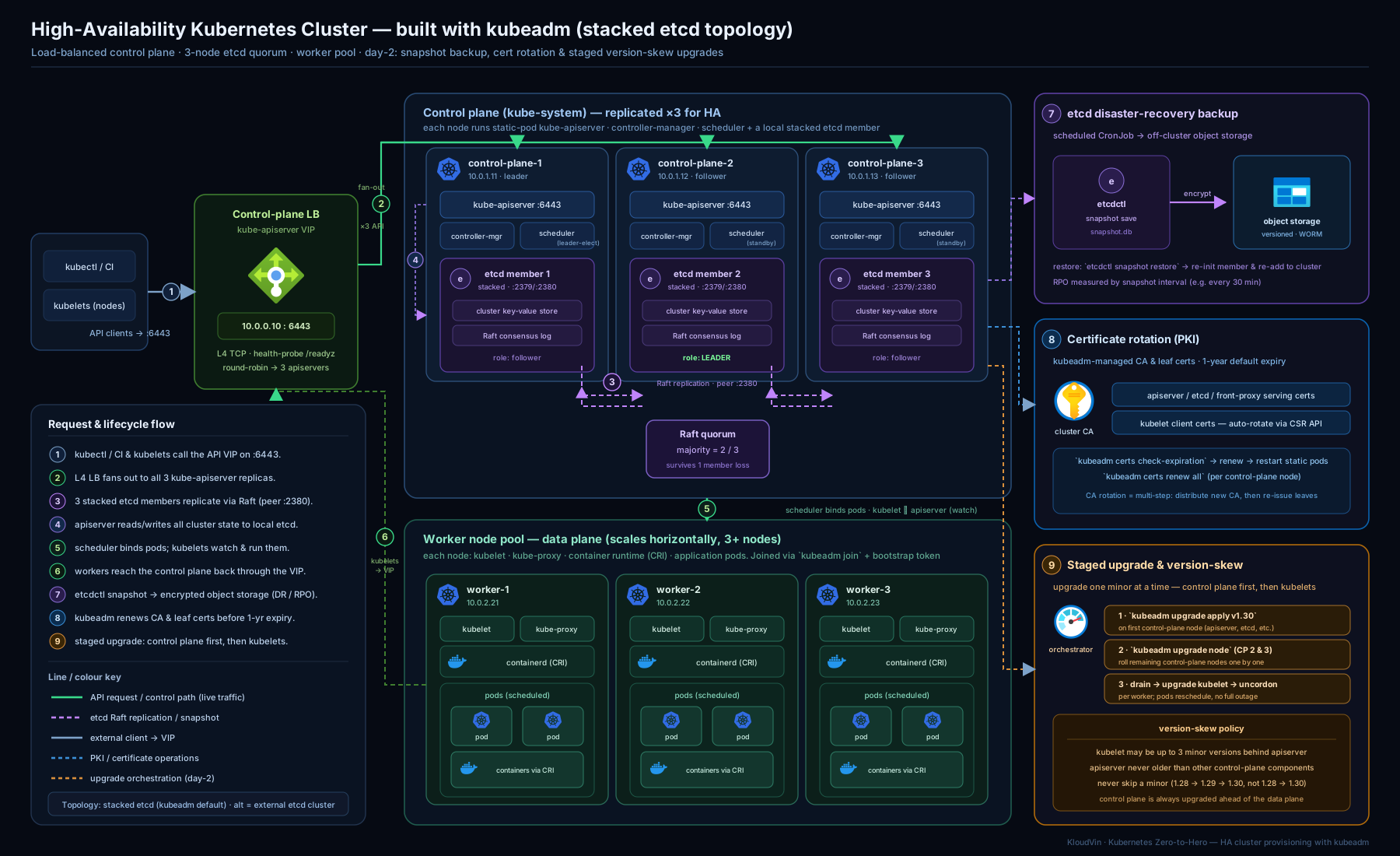
The diagram traces the whole picture: a load balancer fronting three control-plane nodes, the stacked-versus-external etcd split, the certificate authority issuing component certs, the etcd snapshot flowing out to backup storage, and the staged upgrade order arrowing from control plane down to workers.
Hands-on lab
You will not hand-build a multi-node HA cluster in this lab — that needs several machines or VMs. Instead you will create a real multi-node cluster locally with kind (which runs each node as a container), then practise the operational skills that transfer directly to a kubeadm cluster: inspecting the control plane, taking an etcd snapshot, checking certificate expiry, and running the node lifecycle (cordon/drain/uncordon). Everything here is free and runs on your laptop.
Prerequisites: Docker (or Podman), kind, kubectl, and etcdctl installed. Install etcdctl from the etcd release if you do not have it.
Step 1 — Create a multi-node cluster (1 control plane + 2 workers). kind uses kubeadm under the hood, so the artefacts are the real thing.
cat <<'EOF' > kind-ha.yaml
kind: Cluster
apiVersion: kind.x-k8s.io/v1alpha4
nodes:
  - role: control-plane
  - role: worker
  - role: worker
EOF

kind create cluster --name provlab --config kind-ha.yaml
kubectl get nodes -o wide
Expected: three nodes — one control-plane and two worker, all Ready within a minute or two.
Step 2 — See the control plane as static Pods. These are exactly what kubeadm wrote to /etc/kubernetes/manifests/.
kubectl get pods -n kube-system -o wide | grep -E 'etcd|apiserver|scheduler|controller'
Expected: etcd-provlab-control-plane, kube-apiserver-..., kube-scheduler-..., kube-controller-manager-... all Running. Note how etcd is stacked on the control-plane node.
Step 3 — Take an etcd snapshot from inside the control-plane container. This is the production backup command, run against the real etcd.
docker exec provlab-control-plane sh -c '\
  ETCDCTL_API=3 etcdctl snapshot save /tmp/etcd-backup.db \
  --endpoints=https://127.0.0.1:2379 \
  --cacert=/etc/kubernetes/pki/etcd/ca.crt \
  --cert=/etc/kubernetes/pki/etcd/server.crt \
  --key=/etc/kubernetes/pki/etcd/server.key'

# Verify the snapshot and count the keys it holds
docker exec provlab-control-plane sh -c '\
  ETCDCTL_API=3 etcdctl snapshot status /tmp/etcd-backup.db --write-out=table'
Expected: Snapshot saved at /tmp/etcd-backup.db, then a table showing a non-zero TOTAL KEYS — proof you captured live cluster state. In production you would copy this file off the node to object storage.
Step 4 — Check certificate expiry. Run kubeadm’s own check inside the node.
docker exec provlab-control-plane kubeadm certs check-expiration
Expected: a table of certificates (apiserver, etcd, front-proxy, etc.) with expiry roughly one year out and CERTIFICATE AUTHORITY entries about ten years out.
Step 5 — Practise the node lifecycle. Cordon and drain a worker, watch a workload move, then return the node.
kubectl create deployment web --image=nginx --replicas=4
kubectl rollout status deployment/web

kubectl cordon provlab-worker          # no new Pods will land here
kubectl get nodes                      # note SchedulingDisabled on that node

kubectl drain provlab-worker --ignore-daemonsets --delete-emptydir-data
kubectl get pods -o wide               # web Pods have moved off the drained node

kubectl uncordon provlab-worker        # back in the pool
kubectl get nodes
Expected: after drain, no web Pods remain on provlab-worker; after uncordon it is schedulable again.
Validation. You should have: a 3-node cluster, a verified etcd snapshot with a non-zero key count, a certificate-expiry report, and a worker you successfully drained and returned to service — the four operational skills of running a self-managed cluster.
Cleanup.
kind delete cluster --name provlab
rm -f kind-ha.yaml
Cost note. Zero — kind runs entirely in local containers. The identical commands (etcdctl snapshot save, kubeadm certs check-expiration, kubectl drain) are exactly what you run on a real kubeadm cluster; only the host changes.
Common mistakes & troubleshooting
| Symptom | Likely cause | Fix |
|---|---|---|
| Cannot add a second control-plane node | kubeadm init was run without --control-plane-endpoint; certs point at one node |
Rebuild with a load-balancer endpoint, or follow the (painful) cert-regeneration procedure |
| New control-plane join fails with a cert error | The --upload-certs Secret expired (2-hour TTL) |
Re-run sudo kubeadm init phase upload-certs --upload-certs to get a fresh --certificate-key |
| Cluster “froze” overnight; apiserver logs show TLS errors | Certificates expired (cluster untouched > 1 year) | kubeadm certs renew all, restart static Pods, refresh admin.conf |
| etcd cluster unavailable after losing 2 of 3 members | Quorum lost — only a minority remain | Restore from snapshot; you cannot write until a majority is restored — this is why you snapshot |
kubectl drain hangs and never completes |
A PodDisruptionBudget would be violated, or a Pod has no controller | Check kubectl get pdb; add replicas, or use --force for unmanaged Pods (knowingly) |
| Restore “succeeded” but cluster shows old/empty state | Restored into a dir the etcd Pod isn’t using, or didn’t stop the control plane first | Stop control plane, restore to a new dir, repoint the etcd static Pod’s data volume, restart |
kubeadm upgrade apply refuses to run |
Trying to skip a minor version, or kubeadm binary not upgraded first | Upgrade one minor at a time; upgrade the kubeadm package before apply |
metrics-server / kubectl logs fail with cert errors |
kubelet serving CSRs unapproved (serverTLSBootstrap) |
kubectl get csr; approve with kubectl certificate approve <csr> (or run an approver) |
Best practices
- Always set
--control-plane-endpointat init, even for a single-node start, so you can grow to HA later without rebuilding the PKI. - Run an odd number of control-plane/etcd members — three by default, five for large or critical clusters — and spread them across failure domains so one rack/AZ failure cannot take a majority.
- Back up etcd on a schedule, copy snapshots off-cluster, and test restores. An untested backup is not a backup. Snapshot immediately before any upgrade.
- Upgrade regularly (at least every minor, well within the support window) — this keeps you in skew and auto-renews certificates as a side effect.
- Never skip a minor version, and always go control plane → kubelets, draining each node before restarting its kubelet.
- Give etcd fast disks. etcd is disk-latency-sensitive; slow storage causes leader elections and cluster-wide slowdowns. For large clusters, isolate it with external etcd.
- Prefer managed Kubernetes for cloud workloads; self-manage only with a concrete reason, and even then prefer Cluster API / kubespray over hand-running kubeadm for fleets.
- Keep
admin.confsafe — it is a full cluster-admin credential. Issue scoped kubeconfigs for humans and use it only for break-glass.
Security notes
admin.confis god-mode. Anyone holding it is cluster-admin. Store it like a root password, rotate it if exposed, and prefer per-user, RBAC-scoped credentials for day-to-day work.- Protect etcd absolutely. etcd holds every Secret in the cluster, unencrypted by default (base64 is not encryption). Enable encryption at rest (an
EncryptionConfigurationon the apiserver) so Secrets are encrypted in the data store, restrict etcd’s client/peer ports (:2379/:2380) to control-plane nodes only, and treat etcd snapshots as top-secret — a snapshot is a full copy of every credential in your cluster. Encrypt snapshots at rest and in transit. - Rotate bootstrap tokens and keep their TTL short; a leaked join token plus the CA hash lets an attacker enrol a node.
- Pin the CA hash on join (
--discovery-token-ca-cert-hash) so workers cannot be lured into joining an imposter API server. - Watch certificate expiry proactively (alert on
kubeadm certs check-expiration); an expiry is both an outage and, if mishandled by re-issuing carelessly, a security event. - Approve kubelet serving CSRs deliberately — auto-approving every CSR is a foothold; review the node identity behind each request.
Interview & exam questions
-
Why must you run an odd number of etcd members, and why is three the common choice? etcd needs a majority (quorum) to accept writes; fault tolerance is
(n-1)/2. Three tolerates one failure; two tolerates zero (worse than one); four is no better than three. Odd numbers maximise resilience per node, and three is the cost/resilience sweet spot. -
Stacked vs external etcd — what’s the trade-off? Stacked co-locates etcd on the control-plane nodes (simpler, cheaper, kubeadm’s default) but couples a node loss to losing both an apiserver and an etcd member, and etcd shares disk I/O. External runs etcd on dedicated machines (decoupled blast radius, isolated fast disks, independent scaling) at the cost of a second cluster to provision, secure, back up, and upgrade.
-
Walk me through restoring a cluster from an etcd snapshot. Stop the control plane (move static Pod manifests aside),
etcdctl snapshot restoreinto a new data dir, repoint the etcd static Pod’s data volume at that dir, move the manifests back so the kubelet restarts the control plane, then verifykubectl get nodes/pods. The whole cluster rolls back to the snapshot’s moment. -
What does
--control-plane-endpointdo and why is it critical for HA? It bakes the load balancer’s stable address into every certificate and kubeconfig. Without it, the certs point at a single node and you can never add another control-plane node without regenerating the PKI. -
A worker node needs an OS patch with zero disruption — what’s your sequence?
kubectl cordon(stop new Pods) →kubectl drain --ignore-daemonsets(evict, respecting PDBs) → patch/reboot →kubectl uncordon. The drain blocks if it would violate a PodDisruptionBudget. -
Explain the version-skew policy for kubelet vs apiserver. The kubelet may be up to three minor versions older than the apiserver but never newer. Nodes may lag the control plane; they must never lead it.
-
What is the correct order to upgrade a cluster, and which kubeadm command runs where? Control plane first, then workers, one minor at a time.
kubeadm upgrade applyruns once on the first control-plane node; every other node (control-plane or worker) useskubeadm upgrade node. Drain each node before restarting its kubelet. -
What is a static Pod and why does the control plane use them? A Pod defined by a manifest in
/etc/kubernetes/manifests/that the kubelet runs directly, with no apiserver or scheduler. It solves the bootstrap chicken-and-egg: the kubelet can start the API server before the API server exists. -
How does kubeadm handle certificate rotation, and what’s the gotcha? It auto-renews all control-plane certs on every
kubeadm upgrade. The gotcha is a cluster left untouched over a year — its one-year certs expire and you mustkubeadm certs renew allmanually and restart the static Pods. The kubelet rotates its own client cert automatically; serving-cert CSRs need approval. -
What happens if etcd loses quorum, and how do you recover? Writes stop entirely (the store goes read-only / unavailable) until a majority is restored. If you cannot bring members back, you restore from a snapshot — which is precisely why scheduled, tested etcd backups are non-negotiable.
-
Where do Kubernetes Secrets actually live, and how do you protect them? As keys in etcd, base64-encoded but not encrypted by default. Enable encryption at rest via an
EncryptionConfiguration, lock down etcd’s ports to control-plane nodes, and treat etcd snapshots as top-secret copies of every credential. -
When would you choose self-managed over managed Kubernetes? When the managed offering cannot meet a requirement: on-prem/edge/air-gapped environments, strict customisation or regulatory needs, or to learn the machinery. For ordinary cloud workloads, managed is the default — the control plane and etcd are exactly the toil with no application value.
Quick check
- How many etcd-member failures does a five-member cluster tolerate?
- Which single kubeadm command runs only on the first control-plane node during an upgrade?
- What is the difference between
cordonanddrain? - By how many minor versions may a kubelet trail the API server?
- What is the first action you take before starting any cluster upgrade?
Answers
- Two. Quorum of five is three, so it survives losing two.
kubeadm upgrade apply(every other node useskubeadm upgrade node).cordononly marks the node unschedulable (existing Pods stay);drainalso evicts the existing Pods (respecting PDBs) so they reschedule elsewhere.- Three minor versions (older only — never newer than the apiserver).
- Take (and verify) an etcd snapshot so you have a rollback.
Exercise
On the local kind cluster from the lab, simulate a backup-and-recovery drill and a maintenance window:
- Deploy a workload that writes a recognisable object (e.g.
kubectl create configmap before-snap --from-literal=marker=v1). - Take an etcd snapshot (Step 3 of the lab) and copy it out of the container to your host with
docker cp. - Create a second ConfigMap
after-snapso you can prove what a restore would and would not contain. - Run
kubeadm certs check-expirationand note which certificates expire soonest and which CAs last longest. - Drain one worker, confirm your workload’s Pods relocated, then uncordon it.
Write a short paragraph answering: if you restored the snapshot from step 2, which of the two ConfigMaps would survive, and why? What does that tell you about the difference between a backup and an undo? Then state, for your own context, whether you would self-manage or use managed Kubernetes — and the single most important reason.
Certification mapping
This lesson maps to the CKA (Certified Kubernetes Administrator) “Cluster Architecture, Installation & Configuration” domain — the most heavily weighted and the most hands-on part of the exam:
- Manage a highly-available cluster and provision underlying infrastructure to deploy a cluster → the HA design,
kubeadm init --control-plane-endpoint, stacked vs external etcd. - Perform a version upgrade using kubeadm → the staged upgrade and
kubeadm upgrade apply/node. - Implement etcd backup and restore →
etcdctl snapshot save/status/restore(a near-certain exam task — practise it cold). - Manage the lifecycle of nodes → cordon/drain/uncordon, taints/tolerations,
kubeadm join/reset. - Manage role-based access control and certificates → kubeadm PKI,
kubeadm certs renew, kubelet CSR approval.
CKA is a performance exam: do the lab and exercise until etcdctl snapshot save, kubectl drain, and the upgrade sequence are reflex, and use kubeadm --help and the official docs (allowed in the exam) for exact flags under time pressure.
Glossary
- kubeadm — the official tool that bootstraps a conformant Kubernetes control plane and joins nodes; the reference for cluster assembly and the CKA exam tool.
- HA (High Availability) — a control plane built from three or more nodes (plus a load balancer and a quorum of etcd members) so it survives the loss of one node.
- Stacked etcd — etcd co-located as a static Pod on each control-plane node (kubeadm’s default).
- External etcd — etcd run on dedicated machines separate from the control-plane nodes.
- Quorum — the majority of etcd members that must be available for the data store to accept writes; fault tolerance is
(n-1)/2. - Static Pod — a Pod defined by a manifest in
/etc/kubernetes/manifests/and run directly by the kubelet, with no apiserver or scheduler; used to bootstrap the control plane. - PKI — the cluster’s certificate authorities and TLS certificates that let components authenticate to each other.
- etcd snapshot — a point-in-time copy of the entire cluster state taken with
etcdctl snapshot save; the basis of cluster backup/restore. - Cordon / Drain / Uncordon — mark a node unschedulable / evict its Pods / return it to the schedulable pool.
- Taint / Toleration — a node property that repels Pods / a Pod property that permits it to ignore a matching taint.
- Version-skew policy — the rules governing how far component versions may differ (kubelet up to three minors behind the apiserver; one minor per upgrade step).
- Control-plane endpoint — the stable load-balancer address baked into certs and kubeconfigs so the control plane can be made HA.
Next steps
You can now build, recover, and upgrade a cluster. Next, zoom out from a single cluster to the full range of designs in The Kubernetes Architecting Ladder: From a Single Cluster to Multi-Region Mission-Critical, which uses requirements (RTO/RPO, scale) to drive the choice between one cluster and many. To go deeper on the specific failure modes hinted at here — etcd quorum loss, apiserver outages, certificate expiry — see Advanced Kubernetes Troubleshooting: Control-Plane, etcd & Complex Incident RCA. And to apply the multi-AZ, autoscaling, GitOps shape of a real production cluster on a managed platform, revisit Production AKS: Networking & Observability.