The previous lesson taught you per-resource playbooks — a Pod stuck Pending, a Service with no endpoints, a Forbidden from RBAC. Those are the bread and butter of on-call, and they share a comforting property: the blast radius is one workload, and the rest of the cluster keeps humming while you fix it. This lesson is about the other kind of incident — the one where the pager goes off and nothing responds. kubectl get nodes hangs. Every dashboard is red. Three teams are in the war room asking why their services just vanished at the same instant. This is a cluster-level incident, and it demands a different posture: you are no longer debugging a workload, you are debugging the platform that every workload depends on.
These incidents are rarer, but they are the ones that define a career. They are also the ones interviewers for senior and staff roles probe hardest, because they reveal whether you understand Kubernetes as a distributed system — a quorum-based datastore, a set of reconciling controllers, a flat pod network — rather than as a YAML-application tool. In this lesson you will learn a disciplined incident lifecycle so you stay calm and effective under pressure; you will go deep on control-plane and etcd failure modes, the components whose loss takes the whole cluster with it; you will work through five complex, multi-symptom scenarios the way a real responder does — symptom, competing hypotheses, the diagnosis that discriminates between them, and the fix — and you will close the loop with blameless postmortems and corrective and preventive action (CAPA) so the same outage never recurs. Everything is reproducible on a free local cluster.
Learning objectives
By the end of this lesson you will be able to:
- Run a cluster-level incident through a disciplined lifecycle — detect → triage → mitigate → root-cause → prevent — and know why “mitigate before you diagnose” is the senior instinct.
- Diagnose the control-plane failure modes — kube-apiserver down, etcd quorum loss, disk-full and defragmentation, a wedged scheduler or controller-manager, and certificate expiry — and reason about their blast radius.
- Explain etcd’s Raft quorum maths and perform a snapshot backup and restore to recover a cluster whose datastore is lost.
- Work five complex incidents as
symptom → hypotheses → diagnosis → fix: a full apiserver outage, etcd quorum loss, cascading node failures from a bad DaemonSet, a CoreDNS meltdown, and a CNI/upgrade break. - Write a blameless postmortem and turn it into tracked CAPA items that measurably reduce recurrence and time-to-recovery.
Prerequisites & where this fits
This lesson assumes you are fluent with the material in Kubernetes Troubleshooting Playbooks — the observe → isolate → hypothesise → fix → prevent method and the per-area playbooks for Pods, Nodes, Networking, Storage and RBAC. It also leans on the architecture deep-dive: you should already know what kube-apiserver, etcd, the scheduler and the controller-manager each do, and how a kubectl apply flows through admission → etcd → scheduler → kubelet. This is the advanced Troubleshooting lesson in the Kubernetes Zero-to-Hero course, sitting just before the capstone. The labs use free local tooling — kind, minikube or k3d, plus kubectl and (for the etcd work) etcdctl. Nothing to pay for, and kind in particular lets you safely break a control plane and watch the symptoms, which is the only way to internalise this material.
The incident lifecycle: a calm loop under pressure
Per-resource debugging is a tight loop you run alone. A cluster-level incident is a team process under time pressure, often with money and reputation on the line, and the difference between a 10-minute blip and a multi-hour outage is almost never raw technical skill — it is whether the responders followed a disciplined process or thrashed. The lifecycle below is the one used, with local variations, by mature SRE organisations.
| Phase | Goal | What you actually do | The senior instinct |
|---|---|---|---|
| Detect | Know something is wrong, fast | Alerts fire on SLO burn (error rate, latency), apiserver availability, etcd health, node readiness | Alert on symptoms users feel, not just causes; one good “apiserver unreachable” alert beats fifty noisy ones |
| Triage | Size the blast radius; declare severity | Establish scope (one service? one node? whole cluster?), declare an incident, assign an incident commander (IC) | Declare early — it is cheaper to stand down than to scramble late |
| Mitigate | Stop the bleeding for users | Restore service by any safe means — fail over, roll back, scale out, restore from backup | Mitigate before you root-cause. Users do not care why it broke; stop the pain first |
| Root-cause (RCA) | Understand the true cause | Once stable, dig into logs/events/metrics to find the causal chain, not just the trigger | Ask “why” until you reach something systemic, not “human error” |
| Prevent (CAPA) | Make recurrence impossible or cheap | Blameless postmortem → tracked corrective and preventive actions with owners and dates | An incident without follow-through is a rehearsal for the next one |
Three principles separate professionals from heroes:
Mitigate before you root-cause. The single most common failure in a serious incident is an engineer who finds the diagnosis fascinating and spends forty minutes understanding it while customers are down. The right order is: make it work again now (roll back, fail over, restore), then investigate at leisure with the pressure off. A rollback you can do in two minutes beats a perfect fix you will have in two hours.
One incident commander. In a multi-person incident, someone must own coordination — tracking what is known, what is being tried, who is doing what — while others execute. The IC does not have to be the most technical person; they have to keep the loop from devolving into five people independently restarting the same component. Without an IC, two responders will restart etcd at the same moment and make it worse.
A timeline from minute one. Designate a scribe (or a shared doc) and timestamp everything: when the alert fired, what you saw, what you changed, what happened next. You will not remember the order of events an hour later, and the postmortem — and any rollback you need to undo — depends on it.
The rest of this lesson lives mostly in mitigate and root-cause, because that is where cluster incidents are won or lost. But keep the whole loop in mind: every scenario below ends with prevention, not just a fix.
Control-plane and etcd failure modes
Workload incidents are bounded; control-plane incidents are not. Understanding what each control-plane component controls tells you the blast radius the moment you identify which one has failed — and blast radius drives your mitigation. The table is the map you carry into every cluster incident.
| Component | What dies when it dies | What KEEPS working | First diagnostic |
|---|---|---|---|
| kube-apiserver | All kubectl, all controllers, all kubelet→API updates, every admission webhook |
Running pods keep running — kubelet runs them from local state; existing Service/CNI dataplane keeps routing | kubectl get --raw='/readyz?verbose'; static-pod logs via crictl |
| etcd | apiserver (it has nowhere to read/write) → therefore the whole control plane | Same as apiserver: the dataplane survives because it does not read etcd | etcdctl endpoint health/status; etcd member logs |
| kube-scheduler | New Pods stay Pending forever (nothing assigns them a node) |
Already-scheduled pods, all running workloads, the rest of the API | kubectl get pods --field-selector=status.phase=Pending; scheduler logs |
| kube-controller-manager | Reconciliation stops — no new ReplicaSet scaling, node lifecycle, endpoint updates, PV binding | Existing state is frozen but intact; pods keep running | controller-manager logs; watch whether a scaled Deployment actually scales |
| CoreDNS | In-cluster name resolution → cascading app failures that look like app bugs | Anything using IPs directly; external DNS | kubectl -n kube-system get pods -l k8s-app=kube-dns; test resolution from a pod |
| CNI (dataplane) | Pod-to-pod and pod-to-Service networking — new pods get no/bad networking | The API and etcd (different plane); host networking | CNI agent pods/logs; kubectl exec ping between pods |
The pattern worth burning in: the control plane and the dataplane fail independently. A dead apiserver is terrifying — every tool stops — but your customers may not notice for a while, because the kubelets keep running the pods they already have and the kube-proxy/CNI dataplane keeps routing traffic. This is your friend during mitigation: it buys you time. Conversely, a CNI or DNS failure can be invisible to the control plane — kubectl get nodes says everything is Ready and healthy while every user request fails. Always ask which plane you are in.
kube-apiserver failure modes
The apiserver is the single front door to the cluster; when it is unreachable, every control path breaks at once, which makes “everything is down” the least specific symptom in Kubernetes. The common causes, roughly in order of frequency:
- etcd is unavailable. The apiserver is mostly a sophisticated REST front-end for etcd; if it cannot reach a quorum of etcd members, it cannot serve reads or writes and
/readyzfails on theetcdcheck. Most “apiserver down” incidents are really etcd incidents. - TLS certificate expiry. kubeadm-issued certificates default to one year. If a cluster is not upgraded (each
kubeadm upgrade applysilently renews them) and crosses the anniversary, apiserver, etcd-peer and client certs expire and the control plane stops trusting itself. The classic “the cluster died and nobody touched it” outage. - Resource exhaustion on the control-plane node — OOM of the apiserver static pod, or a full disk on the control-plane host (which also threatens etcd).
- An admission webhook outage. A
failurePolicy: Failvalidating/mutating webhook whose backing service is down will reject all matching writes — and if it matches broadly (or matches its own namespace’s pods), it can wedge the cluster. We dissect this in Scenario A. - A bad flag or manifest edit to
/etc/kubernetes/manifests/kube-apiserver.yamlthat makes the static pod crash-loop.
Because the apiserver runs as a static pod on the control-plane node, you cannot debug it through the API (the API is what is broken). You go to the node and use the kubelet’s container runtime directly: sudo crictl ps -a | grep apiserver to find the container, sudo crictl logs <id> to read why it is crash-looping, and sudo cat /var/log/pods/kube-system_kube-apiserver-*/kube-apiserver/*.log for history. The health endpoint, when the process is at least up, is the fastest triage: kubectl get --raw='/readyz?verbose' (or curl -k https://localhost:6443/readyz?verbose on the node) prints a per-check pass/fail list that points straight at the failing subsystem.
etcd failure modes — and why quorum is everything
etcd is the cluster’s only source of truth, and it is a strongly consistent, Raft-based key-value store. “Strongly consistent” is the whole reason Kubernetes is reliable — and the whole reason etcd has a failure mode no stateless component has: loss of quorum.
Raft requires a strict majority of members to agree before any write is committed. For a cluster of N members, quorum is floor(N/2) + 1, and the number of members it can lose while still functioning is floor((N-1)/2):
| etcd members | Quorum needed | Failures tolerated | Notes |
|---|---|---|---|
| 1 | 1 | 0 | Dev only — any loss is total loss |
| 3 | 2 | 1 | The production default — survives one member |
| 5 | 3 | 2 | Larger blast-radius tolerance; more write latency |
| 7 | 4 | 3 | Rarely worth it — coordination cost outweighs the gain |
Two non-obvious truths fall out of this table. First, always run an odd number. A 4-member cluster needs 3 for quorum and tolerates only 1 failure — exactly the same as a 3-member cluster, but with more machines to fail and more replication overhead. Even numbers buy you nothing and cost you write latency. Second, once you lose quorum, etcd stops serving writes entirely — it deliberately refuses rather than risk split-brain — and because the apiserver needs etcd, the whole control plane goes read-then-dead. Recovering a cluster that has lost quorum is a restore operation, not a restart operation, which is why Scenario B is the most important worked example in this lesson.
The other etcd failure modes you must recognise:
- Disk full / slow disk. etcd is exquisitely sensitive to disk latency because every write is
fsync’d. The infamous warnings areetcdserver: request timed outandthe clock difference against peer ... is too high, and slowfsync/backend-commit metrics. etcd needs low-latency disk (SSD/NVMe), a dedicated disk if possible, and headroom under its data quota. - Data quota exceeded. etcd defaults to a backend quota (commonly 2 GiB, often raised to 8 GiB). Cross it and etcd goes into a read-only
NOSPACEalarm — writes fail until you compact history, defragment to reclaim space, and clear the alarm. - Fragmentation. Compaction marks old revisions deletable but does not shrink the file; defragmentation (
etcdctl defrag) physically reclaims it. Defrag briefly blocks the member, so do it one member at a time, never all at once. - Clock skew and network partition between members, which can trigger spurious leader elections and latency spikes.
The everyday etcd commands (run from a control-plane node, pointing at the server certs):
# Set up a reusable alias with the kubeadm cert paths
export ETCDCTL_API=3
e() { sudo ETCDCTL_API=3 etcdctl \
  --endpoints=https://127.0.0.1:2379 \
  --cacert=/etc/kubernetes/pki/etcd/ca.crt \
  --cert=/etc/kubernetes/pki/etcd/server.crt \
  --key=/etc/kubernetes/pki/etcd/server.key "$@"; }

e endpoint health            # is THIS member healthy?
e endpoint status --write-out=table   # leader, db size, raft term/index
e member list --write-out=table       # all members + their peer URLs
e alarm list                 # NOSPACE / CORRUPT alarms (must be empty)
Scheduler, controller-manager and certificate expiry
The scheduler and controller-manager are leader-elected: in an HA control plane only one replica is active and the others stand by, so a single instance crash-looping is usually masked by failover. Their failures are quieter than the apiserver’s:
- Scheduler down: new Pods sit
Pendingwith noFailedScheduling-style activity, while existing pods are untouched. Checkkubectl -n kube-system logs -l component=kube-schedulerand confirm the leader lease is held. - Controller-manager down: reconciliation stalls — a scaled Deployment does not create pods, deleted pods are not replaced, EndpointSlices go stale, PVs do not bind, and the node-lifecycle controller stops evicting pods from dead nodes (so failures do not heal). Confirm by scaling something and watching whether a ReplicaSet acts.
- Certificate expiry deserves its own callout because it is so common and so confusing: it presents as a sudden, total control-plane failure with no deploy or change to blame, and TLS errors (
x509: certificate has expired) in the component logs. Check withsudo kubeadm certs check-expiration, renew withsudo kubeadm certs renew all, then restart the control-plane static pods (move their manifests out of/etc/kubernetes/manifestsand back, or restart the kubelet). The preventive fix is to upgrade at least annually, which renews certs as a side effect.
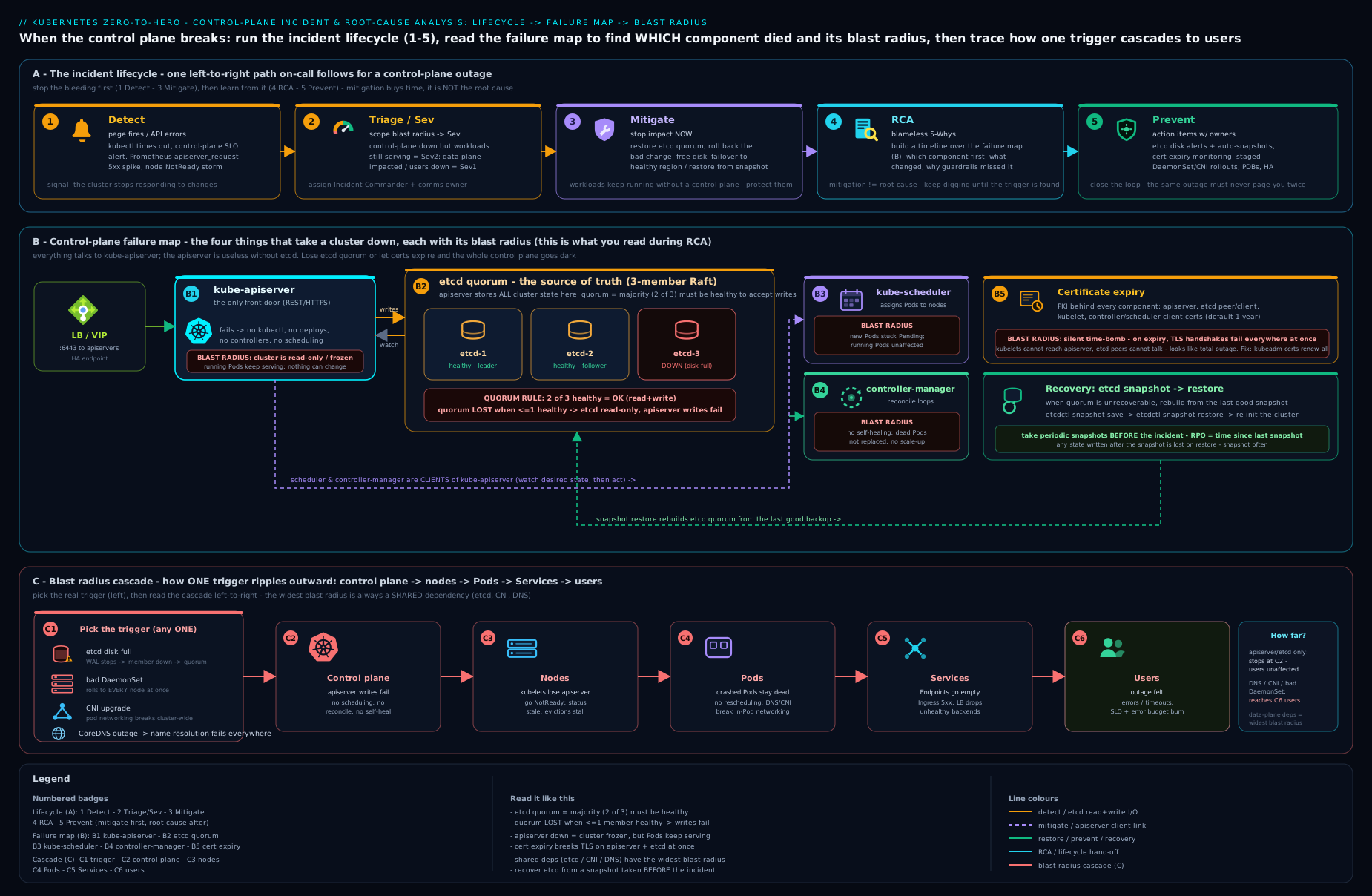
The diagram traces the incident lifecycle across the top and maps each of the five worked scenarios below to the control-plane or dataplane component it attacks, so you can see at a glance which “plane” each incident lives in and which others it spares.
How to work a complex incident
Each scenario below follows the responder’s loop deliberately:
- Symptom — what the pager and the first
kubectlcalls actually show, including the misleading signals. - Hypotheses — the competing explanations, because the skill is discriminating between them, not jumping to one.
- Diagnosis — the specific command or observation that rules hypotheses in or out. A good diagnostic is one whose result is different for each hypothesis.
- Fix — mitigation first (stop the bleeding), then the durable fix, then prevention.
The meta-skill running through all five: isolate the layer, then find the discriminating test. Do not run twenty commands hoping one lights up. Form two or three hypotheses, then choose the single observation that tells them apart.
Scenario A — Full apiserver outage (a webhook wedges the cluster)
Symptom. The pager fires: “Kubernetes API unavailable.” Every kubectl command hangs or returns Unable to connect to the server / error dialing backend. CI/CD deploys fail instantly. Crucially, the customer-facing app is still serving traffic — synthetic checks against the app’s public endpoint are green. kubectl get nodes does not return.
Hypotheses.
- etcd is down, so the apiserver cannot serve (most common root of “API down”).
- The apiserver static pod itself is crash-looping (bad manifest edit, expired cert, OOM, full disk).
- A
failurePolicy: Failadmission webhook is rejecting requests — the control plane is up but refusing work. - Network/load-balancer fault in front of the apiserver (the VIP, not the process).
Diagnosis. Go to a control-plane node — you cannot use the API to debug the API. First, is the process even up and what does it think of itself?
# On the control-plane node
sudo crictl ps -a | grep -E 'apiserver|etcd'      # are the static pods up / crash-looping?
curl -ksS https://127.0.0.1:6443/readyz?verbose   # per-check health, bypassing any LB
This one call discriminates beautifully. If readyz does not respond at all, the process is down → hypothesis 2 (read sudo crictl logs <apiserver-id> — you will see the bad flag, x509: certificate has expired, or an OOM) or hypothesis 1 (the log shows etcd connection failures; confirm with etcdctl endpoint health). If readyz responds but a specific check fails, that check names the culprit. And if readyz is fully ok but kubectl writes still fail with a message like failed calling webhook "x.example.com": ... connection refused — that is hypothesis 3: the API is healthy and is dutifully calling a webhook whose backing service is dead, and with failurePolicy: Fail it rejects the request rather than skip the check.
The webhook case is the subtle, senior one, so make the discriminating test explicit: reads succeed but writes fail, and the error message names a webhook. List them:
kubectl get validatingwebhookconfigurations,mutatingwebhookconfigurations
kubectl get validatingwebhookconfiguration <name> -o yaml | grep -A3 failurePolicy
Fix. Mitigate first. For the webhook wedge, remove the offending webhook configuration so the API stops calling a dead backend — kubectl delete validatingwebhookconfiguration <name> (save it first: kubectl get ... -o yaml > /tmp/wh.yaml). The control plane immediately unblocks. Then bring the webhook’s backing deployment healthy and re-apply the configuration. For hypothesis 2, fix the static pod: revert the bad edit to /etc/kubernetes/manifests/kube-apiserver.yaml (the kubelet restarts it within seconds), renew an expired cert, or free disk. For hypothesis 1, jump to Scenario B. Prevent: never ship a cluster-critical webhook with failurePolicy: Fail and no exclusions — scope it with namespaceSelector/objectSelector to exclude kube-system and the webhook’s own namespace, run the backing service highly available with a tight timeoutSeconds, and consider failurePolicy: Ignore for non-security webhooks. The whole class of “an admission webhook took down the cluster” outages is preventable at design time.
Scenario B — etcd quorum loss and restore from snapshot
This is the incident every senior Kubernetes engineer must be able to handle, because it is the one where the cluster’s truth is gone and a restart will not bring it back.
Symptom. The apiserver is up (the static pod is running) but every request fails with etcdserver: request timed out or the apiserver readyz shows the etcd check failing. In a 3-member etcd cluster, two members are down — perhaps two control-plane nodes died together (a rack/AZ event, or someone “cleaned up” two VMs), or two etcd data directories were corrupted. Running pods continue to serve, but the cluster is frozen: no scaling, no scheduling, no config changes.
Hypotheses.
- Quorum is lost — a majority of etcd members are unavailable, so etcd refuses all writes by design.
- A single member is down (quorum intact) and the symptom is something else — slow disk, an alarm, fragmentation.
- The etcd data is corrupted (a
CORRUPTalarm), not merely unavailable.
Diagnosis. The discriminating test is member health:
# On any surviving control-plane node (using the e() alias from earlier)
e member list --write-out=table          # how many members, which are reachable?
e endpoint health --cluster              # health of EVERY member
e alarm list                             # NOSPACE? CORRUPT?
If member list shows three members but endpoint health --cluster can reach only one, you have lost quorum (hypothesis 1): one of three is below the two needed, so etcd will not serve writes. If all members are reachable but one is slow, you are in hypothesis 2 — different lesson (defrag, clear NOSPACE, fix the disk). A CORRUPT alarm is hypothesis 3 and also points to restore.
Fix. With quorum lost, you have two recovery paths, in order of preference:
Path 1 — restore the lost members (data intact somewhere). If even one member retains good data, you can rebuild quorum by re-adding healthy members to the existing cluster (remove the dead member with etcdctl member remove <id>, then etcdctl member add and start a fresh etcd pointing at the surviving cluster, which streams it the data). This preserves all committed state and is the right move when a transient event killed members but at least one survives with current data.
Path 2 — restore the whole cluster from a snapshot. When data is gone or corrupted on too many members, you restore from your most recent etcd snapshot backup. This is the reason snapshots exist, and the procedure must be muscle memory:
# 1) Take backups proactively (cron, ideally every 15–30 min, shipped off-node):
e snapshot save /var/backups/etcd/snap-$(date +%F-%H%M).db
e snapshot status /var/backups/etcd/snap-...db --write-out=table   # verify it

# 2) RESTORE (disaster recovery). Stop the control plane on ALL control-plane nodes first
#    by moving the static-pod manifests out of /etc/kubernetes/manifests so the kubelet
#    stops apiserver+etcd:
sudo mv /etc/kubernetes/manifests/{etcd,kube-apiserver,kube-controller-manager,kube-scheduler}.yaml /tmp/

# 3) Restore the snapshot into a NEW data dir (do this on each control-plane node with the
#    matching member name/peer URL; for a single-member recovery the flags are simpler):
sudo ETCDCTL_API=3 etcdutl snapshot restore /var/backups/etcd/snap-....db \
  --name=<this-node-name> \
  --initial-cluster=<node1>=https://<ip1>:2380,<node2>=https://<ip2>:2380,<node3>=https://<ip3>:2380 \
  --initial-advertise-peer-urls=https://<this-ip>:2380 \
  --data-dir=/var/lib/etcd-restore

# 4) Point etcd at the restored data dir (edit the etcd static-pod manifest's
#    --data-dir and the hostPath volume to /var/lib/etcd-restore), then move the
#    manifests back so the kubelet restarts the control plane:
sudo mv /tmp/{etcd,kube-apiserver,kube-controller-manager,kube-scheduler}.yaml /etc/kubernetes/manifests/

# 5) Verify
e endpoint status --cluster --write-out=table
kubectl get nodes && kubectl get pods -A
Two warnings that separate a clean restore from a disaster. First, stop the entire control plane before restoring — restoring under a live apiserver, or with some etcd members still up, risks a split cluster. Second, a snapshot restore rewinds the cluster to the snapshot’s moment, so anything created after the last snapshot is gone — which is exactly why backup frequency and off-node storage are the load-bearing preventive controls. Prevent: automate snapshots on a tight schedule, ship them off the control-plane nodes (the backup is worthless if it dies with the nodes), spread etcd members across failure domains/AZs so a single event cannot take a majority, and rehearse this restore on a throwaway cluster until it is boring. An untested backup is a hope, not a control.
Scenario C — Cascading node failures from a bad DaemonSet
Symptom. Someone rolls out a new version of a node-level DaemonSet — a CNI agent, a log shipper, a security agent. Within minutes, nodes start flipping to NotReady one after another, in a slow wave. Pods are evicted from the failing nodes and rescheduled onto the still-healthy ones — which then tip over too, because the same DaemonSet pod lands on them. Capacity shrinks as the wave spreads. This is a cascading failure, and the tell is the progression: it is not all-at-once (which would suggest the control plane) and not one node (which would suggest hardware) — it marches.
Hypotheses.
- The new DaemonSet pod is starving the node — requesting/consuming so much CPU/memory that the kubelet or the node itself degrades (memory pressure → kubelet eviction storms →
NotReady). - The DaemonSet breaks a node-critical function — e.g. a CNI agent update misconfigures networking so the kubelet’s health checks or the node’s connectivity fail.
- The DaemonSet pod is crash-looping and consuming the node’s resources (PLEG/PID pressure, inotify exhaustion, disk filling with restart logs).
- Coincidental infrastructure failure (rule out fast — the timing with the rollout makes it unlikely).
Diagnosis. Correlate the wave with the rollout, then look at what the new pod does to a node before it fails:
kubectl get ds -A                                  # what rolled out, and its rollout status
kubectl rollout history ds/<name> -n <ns>          # confirm a recent change
kubectl get nodes -w                               # watch the wave progress
kubectl describe node <a-just-failed-node>         # Conditions: MemoryPressure? DiskPressure? PIDPressure? kubelet message
kubectl -n <ns> logs <ds-pod-on-failing-node> --previous   # what the new agent does before it kills the node
kubectl top nodes                                  # which nodes are saturating (if metrics still up)
The discriminating observation is on a freshly failed node: describe node Conditions tell you the mechanism — MemoryPressure=True points at hypothesis 1, a kubelet “PLEG is not healthy” or networking error points at 2 or 3 — and the DaemonSet pod’s logs tell you what it did. The progression confirms it is the DaemonSet riding from node to node.
Fix. Mitigate first — and decisively. Stop the wave by halting the rollout and reverting: kubectl rollout undo daemonset/<name> -n <ns>. If the DaemonSet has no healthy previous revision, pause its scheduling so it stops landing on new nodes — patch the DaemonSet with a nodeSelector that matches nothing (e.g. kubectl patch ds <name> -n <ns> -p '{"spec":{"template":{"spec":{"nodeSelector":{"quarantine":"true"}}}}}'), which makes the controller scale its pods to zero without deleting the object. Then recover the dead nodes (kubectl delete pod the wedged agent so the reverted version comes up; reboot nodes that are truly stuck). Prevent: this scenario is the textbook argument for DaemonSet rolling updates with maxUnavailable: 1 (so a bad version only ever touches one node before you notice), resource limits on node agents (so a misbehaving agent cannot starve the kubelet), priorityClassName: system-node-critical used carefully, and canary rollouts — apply the new DaemonSet to one labelled node first, watch it, and only then proceed. A node agent without a memory limit is a cluster-wide outage waiting for a bad release.
Scenario D — DNS meltdown taking down services
Symptom. Multiple unrelated services start failing at once with errors that look like application bugs — connection timeouts, no such host, could not resolve host, database clients unable to find their backend. The control plane is perfectly healthy: kubectl get nodes is all Ready, the apiserver is fine, no deploy went out. The failures correlate not by team but by anything that resolves a name — which is almost everything. This is the signature of a CoreDNS meltdown, and it is insidious precisely because it masquerades as a dozen separate application incidents.
Hypotheses.
- CoreDNS pods are unhealthy — crash-looping, OOMKilled, or scaled to zero — so cluster DNS simply is not answering.
- CoreDNS is overwhelmed — query volume (often amplified by
ndots:5search-domain expansion or a hot-looping client) exceeds capacity, causing timeouts and packet drops. - A CoreDNS config (Corefile) change broke resolution — a bad
forwardto an unreachable upstream, a typo, a removed plugin. - The problem is below DNS — the CNI/dataplane is dropping packets to the DNS Service IP (which would also break non-DNS traffic; test that to discriminate).
Diagnosis. Confirm it really is DNS, then localise to CoreDNS:
kubectl -n kube-system get pods -l k8s-app=kube-dns          # are CoreDNS pods Running/Ready? restarts? OOM?
kubectl -n kube-system describe pod -l k8s-app=kube-dns      # OOMKilled? events?
kubectl -n kube-system logs -l k8s-app=kube-dns | tail       # plugin errors, upstream failures, SERVFAIL
kubectl -n kube-system get cm coredns -o yaml                # the Corefile — did it change?

# The discriminating test: resolve from inside the cluster
kubectl run dnstest --rm -it --image=busybox:1.36 --restart=Never -- \
  sh -c 'nslookup kubernetes.default; nslookup google.com'
The in-cluster nslookup is the key. If it fails for the cluster name (kubernetes.default) but the CoreDNS pods are up, the Corefile or the kube-dns Service is suspect (hypothesis 3). If CoreDNS pods are OOMKilled or restarting, hypothesis 1/2. If resolution works but only external names fail, the forward upstream is broken (hypothesis 3). And if you can resolve nothing and a direct ping <pod-IP> between pods also fails, the problem is the dataplane, not DNS — jump to Scenario E.
Fix. Mitigate: if CoreDNS is OOMKilled or under-provisioned, raise its memory limit and scale it up (kubectl -n kube-system scale deploy coredns --replicas=4 and bump limits); if a Corefile change broke it, revert the ConfigMap (kubectl -n kube-system edit cm coredns or re-apply the previous version) — CoreDNS hot-reloads. If a single client is hammering DNS with a tight retry loop, throttle or restart that client. Prevent: run CoreDNS with adequate replicas and a comfortable memory limit, deploy NodeLocal DNSCache (a per-node DNS cache that slashes load on central CoreDNS and removes a single point of failure), set sane dnsPolicy/ndots to avoid search-domain query amplification, and alert on CoreDNS error rate and latency so the next meltdown pages you before it pages every product team. CoreDNS is shared infrastructure that everything depends on and almost nobody monitors — fix that asymmetry.
Scenario E — A CNI/upgrade breaking pod networking
Symptom. Right after a change — a CNI plugin upgrade, a Kubernetes minor-version upgrade, or a NetworkPolicy/CNI-config edit — newly created pods cannot reach anything: pod-to-pod traffic fails, pod-to-Service fails, sometimes pods are stuck ContainerCreating with failed to setup network for sandbox. Existing, already-running pods may keep working (their networking was wired before the change), which masks the severity — until something reschedules. The control plane is healthy. This is the hardest scenario to triage because “networking is broken” spans several layers.
Hypotheses.
- The CNI DaemonSet is unhealthy after the upgrade — agent crash-looping or a version/CRD mismatch, so new pods get no network.
- A CNI version/Kubernetes version incompatibility — the upgraded CNI does not support the new (or old) cluster version, or a CRD schema changed.
- A NetworkPolicy / CNI config change is now dropping traffic that used to flow (e.g. a default-deny applied without the right allow rules).
- kube-proxy / Service dataplane broke in the upgrade — pod-to-pod works but pod-to-Service (ClusterIP) fails.
Diagnosis. Isolate the layer methodically — pod creation, then pod-to-pod, then pod-to-Service:
kubectl get pods -A -o wide | grep -vE 'Running|Completed'   # ContainerCreating? where?
kubectl describe pod <stuck-pod>                             # "failed to setup network for sandbox"?
kubectl -n kube-system get pods -l k8s-app=<cilium|calico|...>   # is the CNI agent healthy on every node?
kubectl -n kube-system logs <cni-agent-pod>                  # version mismatch, CRD errors, plugin load failure

# Discriminating layer tests, from a debug pod:
kubectl run net1 --image=nicolaka/netshoot --restart=Never -- sleep 3600
kubectl run net2 --image=nicolaka/netshoot --restart=Never -- sleep 3600
kubectl exec net1 -- ping -c2 <net2-pod-IP>      # pod-to-pod  → CNI dataplane
kubectl exec net1 -- curl -m3 <some-clusterIP>:<port>   # pod-to-Service → kube-proxy
The two exec tests are the discriminators. If pod creation fails (failed to setup network for sandbox), the CNI plugin is not functioning on that node → hypothesis 1/2 (read the agent logs for the version/CRD mismatch). If pods create but pod-to-pod ping fails, the CNI dataplane is broken → 1/2/3 (check whether a NetworkPolicy is dropping it: kubectl get netpol -A). If pod-to-pod works but pod-to-ClusterIP fails, it is the Service layer → hypothesis 4 (kube-proxy or the CNI’s kube-proxy replacement).
Fix. Mitigate: if the CNI upgrade is the trigger, roll it back to the known-good version (kubectl rollout undo the CNI DaemonSet, or re-apply the previous manifest/Helm release) — CNI upgrades are exactly the kind of change you must be able to reverse fast. If a NetworkPolicy is the culprit, delete or correct it (kubectl delete netpol <name> -n <ns>). Restart wedged CNI agents and delete stuck-ContainerCreating pods so they re-create with the working network. Prevent: before any CNI or cluster upgrade, check the CNI’s compatibility matrix against the target Kubernetes version — this is the single most common cause of upgrade-day networking breakage; upgrade in a staging cluster first; upgrade the CNI in the correct order relative to the cluster (vendor docs specify which leads); and treat NetworkPolicy changes like code — review them, and roll out default-deny only with the corresponding allow rules in the same change. The version-skew discipline you learned for the control plane applies to the CNI too.
Blameless postmortems and CAPA
An incident you mitigate but never analyse is an incident you will have again. The deliverable that closes the loop is the postmortem, and the non-negotiable adjective is blameless.
Blameless does not mean “no accountability” — it means the postmortem assumes that everyone acted reasonably given the information and tools they had at the time, and it therefore hunts for systemic causes rather than people to punish. The reasoning is hard-nosed, not soft: if your culture punishes the engineer who ran the command that triggered the outage, your engineers will hide information during the next incident — and information is the only thing that gets you to a fast recovery. The honest question is never “who messed up?” but “what about our system let a reasonable person cause this, and why didn’t we catch it sooner?” If the answer to an outage is “human error,” you have stopped one question too early: why was a human able to do that without a guardrail, a review, or a safety net?
A good postmortem has a consistent shape:
| Section | What it captures |
|---|---|
| Summary | One paragraph: what broke, user impact, duration |
| Impact | Quantified — requests failed, customers affected, revenue/SLO error budget burnt, time-to-detect and time-to-recover |
| Timeline | Timestamped facts from detection to resolution (your scribe’s notes) — what was observed, what was changed, what happened |
| Root cause(s) | The causal chain, dug to a systemic level (a “5 whys” often helps) — trigger and the conditions that let it become an outage |
| What went well / what went poorly | Honest assessment of detection, response, tooling, runbooks |
| Action items (CAPA) | Specific, owned, dated corrective and preventive actions — this is the only part that changes the future |
The output that matters is CAPA — Corrective And Preventive Action. Distinguish the two clearly, because mature teams do both:
- Corrective actions fix the specific thing that broke and stop this incident from recurring in the same way: “add
maxUnavailable: 1to the node-agent DaemonSet,” “set a memory limit on CoreDNS,” “scope the admission webhook to exclude kube-system.” - Preventive actions address the class of problem and reduce the impact or detection time of future, different incidents: “add an etcd-quorum alert,” “automate and test etcd snapshot restore quarterly,” “add a pre-upgrade CNI compatibility check to the upgrade runbook,” “require canary for all DaemonSet changes.”
Each CAPA item needs an owner and a due date, and must be tracked in your normal work system, not buried in a doc. The discipline that separates teams that improve from teams that keep getting paged is brutally simple: every serious incident produces tracked action items, and someone reviews them to completion. Two metrics tell you whether it is working — MTTD (mean time to detect) and MTTR (mean time to recover) — and good CAPA bends both downward over time. An action item without an owner and a date is a wish.
Hands-on lab: break and recover a control plane on kind
You will create a multi-node cluster locally and deliberately break it in ways that mirror the scenarios above, then recover it. kind runs each Kubernetes “node” as a container, so you can stop and restart control-plane components safely. Everything here is free.
1. Create a cluster with a dedicated control-plane node.
cat > /tmp/kind-rca.yaml <<'EOF'
kind: Cluster
apiVersion: kind.x-k8s.io/v1alpha4
nodes:
  - role: control-plane
  - role: worker
  - role: worker
EOF
kind create cluster --name rca --config /tmp/kind-rca.yaml
kubectl get nodes        # expect 1 control-plane + 2 workers, all Ready
2. Reproduce Scenario A (apiserver down) and recover. The control-plane container holds the static-pod manifests. Move the apiserver manifest aside and watch the API go away:
docker exec rca-control-plane bash -c \
  'mv /etc/kubernetes/manifests/kube-apiserver.yaml /tmp/ '
sleep 10
kubectl get nodes        # EXPECTED: hangs / "connection refused" — the API is gone
# Look at it the way you would in prod — from the node, via the runtime:
docker exec rca-control-plane crictl ps -a | grep apiserver   # the container is stopping
# Recover: put the manifest back; the kubelet restarts the static pod within ~15s
docker exec rca-control-plane bash -c \
  'mv /tmp/kube-apiserver.yaml /etc/kubernetes/manifests/'
sleep 20
kubectl get nodes        # EXPECTED: responds again, all Ready
You just experienced the defining property of an apiserver outage: while the API was down, your workloads kept running (try docker exec rca-worker crictl ps — the app containers never stopped), proving the control plane and dataplane fail independently.
3. Reproduce Scenario B mechanics (etcd snapshot + restore). Take a snapshot, create something, then confirm a restore would rewind it. (kind runs a single etcd member, which keeps the commands simple while showing the exact procedure.)
# Take a snapshot from inside the etcd static pod
docker exec rca-control-plane bash -c \
 'ETCDCTL_API=3 etcdctl --endpoints=https://127.0.0.1:2379 \
   --cacert=/etc/kubernetes/pki/etcd/ca.crt \
   --cert=/etc/kubernetes/pki/etcd/server.crt \
   --key=/etc/kubernetes/pki/etcd/server.key \
   snapshot save /var/lib/etcd-snap.db && \
  etcdctl snapshot status /var/lib/etcd-snap.db --write-out=table' 2>/dev/null

# Create a marker resource AFTER the snapshot
kubectl create namespace post-snapshot-marker
kubectl get ns post-snapshot-marker        # exists now
The teaching point lands without a destructive full restore: the namespace you created after the snapshot does not exist in /var/lib/etcd-snap.db, so restoring that file would erase it — which is exactly why snapshot frequency and off-node storage are the load-bearing controls. (In a real cluster, the restore would follow the five steps in Scenario B; doing the full destructive restore on kind is an optional stretch, not required for the lab.)
4. Reproduce Scenario D (DNS) — observe and recover. Scale CoreDNS to zero to simulate a meltdown, watch resolution fail, then restore it:
kubectl -n kube-system scale deploy coredns --replicas=0
sleep 5
kubectl run dnstest --rm -it --image=busybox:1.36 --restart=Never -- \
  nslookup kubernetes.default     # EXPECTED: resolution fails / times out
kubectl -n kube-system scale deploy coredns --replicas=2   # mitigate
sleep 15
kubectl run dnstest --rm -it --image=busybox:1.36 --restart=Never -- \
  nslookup kubernetes.default     # EXPECTED: resolves again
Validation. You have seen, hands-on, three things: an apiserver outage that left workloads running, an etcd snapshot that proves restores rewind state, and a DNS outage that broke name resolution while the control plane stayed healthy. kubectl get nodes should be all Ready and kubectl -n kube-system get pods healthy at the end.
Cleanup.
kind delete cluster --name rca
rm -f /tmp/kind-rca.yaml
Cost note. kind, kubectl, etcdctl and the container images are all free and run entirely on your machine. There is no cloud spend at any point in this lab.
Common mistakes & troubleshooting
| Symptom / mistake | Cause | Fix |
|---|---|---|
| Spending 40 min on RCA while users are down | Diagnosing before mitigating | Mitigate first (roll back / fail over / restore), root-cause after |
| “etcd is down, let me restart it” — and it gets worse | Treating quorum loss as a restart problem | Quorum loss is a restore problem (Scenario B), not a restart; never restart members blindly |
| Restoring an etcd snapshot with the control plane still live | Skipping the “stop everything first” step | Move all control-plane static-pod manifests aside on all nodes before restoring |
| Backup existed but was on the dead control-plane node | Snapshots stored on the same host that failed | Ship snapshots off-node; test the restore regularly |
| An admission webhook wedged the whole cluster | failurePolicy: Fail + broad match + dead backend |
Scope with selectors, exclude kube-system, run the backend HA, tight timeout |
| A DaemonSet update took down node after node | No maxUnavailable / no resource limits / no canary |
maxUnavailable: 1, resource limits on node agents, canary to one node first |
| Everything “looks healthy” but apps fail | Dataplane (CNI/DNS) failure invisible to the control plane | Test from inside a pod (resolve a name, ping a pod, curl a ClusterIP) |
| Cluster died overnight, nothing changed | Certificate expiry (1-year kubeadm default) | kubeadm certs check-expiration → renew all → restart static pods; upgrade annually |
| Cannot debug the apiserver because the API is down | Trying to use kubectl to fix kubectl |
Go to the node; use crictl ps/logs and curl …/readyz?verbose |
Best practices
- Mitigate before you root-cause, always. Make recovery (rollback, failover, restore) the fast path; investigate with the pressure off.
- Run an odd number of etcd members (3 or 5) across failure domains, on low-latency dedicated disk, with automated off-node snapshots — and rehearse the restore until it is boring.
- Treat the control plane and dataplane as separate failure domains. When triaging, decide which plane you are in before you act; test the dataplane from inside a pod.
- Make every cluster-critical change reversible and observed: rolling DaemonSet updates with
maxUnavailable: 1, canary node agents, staged upgrades in a non-prod cluster first, and one-command rollbacks. - Check version-skew and CNI compatibility matrices before every upgrade. Most upgrade-day networking outages are a skipped compatibility check.
- Designate an incident commander and keep a timestamped timeline for any multi-person incident.
- Alert on the things that take the whole cluster down: apiserver
readyz, etcd quorum/health/db-size/fsynclatency, certificate expiry (well ahead), CoreDNS error rate, and node-readiness trends. - Run blameless postmortems with owned, dated CAPA, and track MTTD/MTTR so you can prove the loop is closing.
Security notes
Cluster incidents and security incidents overlap, and the response discipline transfers directly. A few security-specific points for this material:
- etcd holds every Secret in the cluster, in plaintext by default. A stolen etcd snapshot is a full credential compromise. Enable encryption at rest for Secrets (an
EncryptionConfigurationon the apiserver), and protect snapshot files (and their off-node storage) with the same rigour you protect production credentials — encrypted at rest, access-controlled, audited. - Lock down etcd’s network and certs. etcd should listen only on the control-plane network with mutual TLS (kubeadm does this by default); never expose client (2379) or peer (2380) ports broadly. Anyone who can talk to etcd is cluster-admin.
- A compromised admission webhook is a control-plane threat, not just an availability one — a malicious or hijacked mutating webhook can inject into every pod. Apply the same
failurePolicy/scoping discipline and supply-chain hygiene to webhooks as to any privileged workload. - Distinguish an outage from an attack during triage. Sudden mass pod evictions, unexpected RBAC changes, or a control-plane component restarting “on its own” can be an intrusion. If RCA cannot find a benign cause, escalate to security and preserve evidence (don’t wipe the etcd member or node you’d need for forensics) before you rebuild. Your audit log (
kube-apiserveraudit policy) is the primary record — make sure it exists before you need it.
Interview & exam questions
1. The whole cluster’s API is unreachable but the customer app is still serving traffic. Walk me through your first five minutes.
Triage from the control-plane node, not the API. Confirm the process and its self-assessment with curl -k …/readyz?verbose and crictl ps -a | grep -E 'apiserver|etcd'. The branch points: no readyz response → apiserver static pod is down (read crictl logs for bad flag / expired cert / OOM); readyz shows the etcd check failing → it’s really an etcd incident; readyz is ok but writes fail naming a webhook → a failurePolicy: Fail webhook with a dead backend. And I’d say why the app still serves: kubelets keep running existing pods and the CNI dataplane keeps routing — control plane and dataplane fail independently. Mitigate first, then root-cause.
2. Explain etcd quorum. In a 3-member cluster, how many failures can you tolerate, and what happens at quorum loss?
Quorum is a strict majority, floor(N/2)+1, so a 3-member cluster needs 2 and tolerates 1 failure. Lose 2 of 3 and you have lost quorum: etcd refuses all writes by design to avoid split-brain, which freezes the control plane (the apiserver can’t write). Recovery is a restore, not a restart — re-add a healthy member if data survives, or restore from a snapshot otherwise. And always run an odd number, because a 4-member cluster also tolerates only 1 failure but with more to go wrong.
3. Your etcd backup strategy — what, how often, where, and how do you know it works?
etcdctl snapshot save on a tight schedule (every 15–30 min), shipped off the control-plane nodes (a backup that dies with the host is useless), encrypted at rest (it contains every Secret), retained per RPO. Crucially, rehearse the restore regularly on a throwaway cluster — an untested backup is a hope. RPO is bounded by snapshot frequency: anything created after the last snapshot is lost on restore.
4. Walk me through restoring a cluster from an etcd snapshot.
Stop the entire control plane first (move all control-plane static-pod manifests out of /etc/kubernetes/manifests on every control-plane node) — restoring under a live apiserver risks a split cluster. Restore the snapshot into a new data dir with etcdutl snapshot restore (supplying member name, initial-cluster and peer URLs), point the etcd static-pod manifest at the new data dir, then move the manifests back so the kubelet restarts the control plane. Verify with etcdctl endpoint status --cluster and kubectl get nodes. The cluster is rewound to the snapshot’s moment.
5. A DaemonSet rollout is taking nodes NotReady one by one. What’s happening and how do you stop it?
A cascading failure: the new node agent is starving or breaking each node (check a freshly failed node’s describe Conditions — MemoryPressure, kubelet/PLEG errors — and the pod’s --previous logs), and as pods reschedule, the same bad agent rides to the next node. Mitigate decisively: kubectl rollout undo, or if there’s no good previous revision, quarantine it with a nodeSelector that matches nothing so it scales to zero. Prevent with maxUnavailable: 1, resource limits on node agents, and canarying to one node first.
6. Services across teams are failing with “no such host,” but the control plane is healthy. Diagnose.
That pattern — many unrelated services, anything that resolves a name, control plane fine — is a CoreDNS meltdown. Confirm with an in-cluster nslookup kubernetes.default; check CoreDNS pods for OOM/restarts, the Corefile for a bad change, and whether a single client is flooding DNS. Mitigate by scaling/raising CoreDNS limits or reverting the Corefile (it hot-reloads). Prevent with NodeLocal DNSCache, adequate replicas/limits, sane ndots, and DNS error-rate alerts.
7. Right after a CNI upgrade, new pods can’t network but old pods are fine. How do you isolate the layer?
Old pods were wired before the change, which masks severity. Isolate by layer: does pod creation fail (failed to setup network for sandbox → CNI plugin/agent broken, often a version/CRD mismatch)? Does pod creation succeed but pod-to-pod ping fail (CNI dataplane or a NetworkPolicy drop)? Does pod-to-pod work but pod-to-ClusterIP fail (kube-proxy/Service layer)? Mitigate by rolling the CNI back to the known-good version. Prevent by checking the CNI/Kubernetes compatibility matrix and upgrading in staging first.
8. What’s the difference between the control plane and the dataplane failing, and why does it matter during an incident?
The control plane (apiserver, etcd, scheduler, controller-manager) makes decisions and stores state; the dataplane (kubelet-run pods, kube-proxy/CNI, CoreDNS for names) carries user traffic. They fail independently: a dead apiserver leaves running pods serving (buys you mitigation time), while a CNI/DNS failure can break every user request while kubectl get nodes says “all Ready.” During triage, deciding which plane you’re in tells you the blast radius and where to look — and reminds you to test the dataplane from inside a pod.
9. A kubeadm cluster died overnight with no changes and x509: certificate has expired in the logs. What happened and how do you fix and prevent it?
kubeadm certificates default to a one-year lifetime; if the cluster isn’t upgraded (each kubeadm upgrade apply renews them) it dies on the anniversary, and the components stop trusting each other. Fix: kubeadm certs check-expiration, kubeadm certs renew all, restart the control-plane static pods. Prevent: upgrade at least annually (which renews as a side effect) and alert on cert expiry well in advance.
10. What makes a postmortem “blameless,” and why is that a hard-nosed engineering decision rather than a soft one? Blameless means assuming everyone acted reasonably with the information they had, and hunting for systemic causes instead of someone to punish. It’s hard-nosed because punishing the person who ran the triggering command teaches everyone to hide information during the next incident — and information is what gets you to a fast recovery. “Human error” is one question short: ask why a human could do that without a guardrail.
11. Corrective vs preventive action — give an example of each from an etcd quorum-loss incident.
Corrective (fix this exact recurrence): spread etcd members across AZs so one rack event can’t take a majority. Preventive (reduce the class / impact of future incidents): add an etcd-quorum and fsync-latency alert, and automate + quarterly-test the snapshot restore. Each needs an owner and a due date, tracked in normal work — and you watch MTTD/MTTR to confirm the loop is closing.
12. How do you debug the apiserver when the apiserver is what’s broken?
You can’t use kubectl to fix kubectl. Go to the control-plane node and use the kubelet’s runtime directly: crictl ps -a | grep apiserver to find the (crash-looping) container, crictl logs <id> for the cause, /var/log/pods/… for history, and curl -k https://127.0.0.1:6443/readyz?verbose for a per-subsystem health breakdown that points straight at the failing check (etcd, a webhook, etc.).
Quick check
- In a 5-member etcd cluster, how many member failures can you tolerate, and why is 5 better than 4?
- You’ve confirmed etcd has lost quorum. Is the recovery a restart or a restore, and what must you do to the control plane before restoring a snapshot?
- The apiserver
readyzreturnsok, yetkubectl applyfails with an error naming a webhook. What’s the cause and the fastest mitigation? - Nodes are flipping
NotReadyone-by-one right after a DaemonSet rollout. Name the single most effective mitigation command. - Many unrelated services fail with “could not resolve host” while
kubectl get nodesis allReady. Which component do you suspect, and what one in-cluster command confirms it?
Answers
- 2 failures (quorum is 3 of 5). Five is better than four because a 4-member cluster also tolerates only 1 failure (quorum 3 of 4) but with more members to fail and more write overhead — always run an odd number.
- A restore, not a restart. Before restoring a snapshot you must stop the entire control plane — move all control-plane static-pod manifests out of
/etc/kubernetes/manifestson every control-plane node — so you don’t restore under a live apiserver and split the cluster. - A
failurePolicy: Failadmission webhook whose backing service is down is rejecting writes (the control plane is healthy and dutifully calling a dead webhook). Fastest mitigation: delete the offending webhook configuration (save it first), then restore the backend and re-apply. kubectl rollout undo daemonset/<name> -n <ns>— revert the bad node agent (or, if there’s no good previous revision, quarantine it with anodeSelectorthat matches nothing so it scales to zero).- CoreDNS (a DNS meltdown — the control plane is healthy but name resolution is dead). Confirm with an in-cluster lookup:
kubectl run dnstest --rm -it --image=busybox:1.36 --restart=Never -- nslookup kubernetes.default.
Exercise
On your kind cluster from the lab, run a full mock incident end-to-end and produce the postmortem:
- Inject a fault you haven’t practised: edit the CoreDNS Corefile (
kubectl -n kube-system edit cm coredns) to forward to an unreachable upstream (e.g.forward . 10.255.255.1), then observe the failure pattern from inside a pod. - Run the lifecycle: play incident commander — keep a timestamped timeline in a text file as you go. Triage (which plane? blast radius?), form hypotheses, choose the discriminating diagnosis, then mitigate (revert the Corefile) and verify recovery.
- Write a one-page blameless postmortem using the table structure in this lesson: summary, impact (estimate MTTD/MTTR from your timeline), timeline, root cause (5 whys to something systemic), what went well/poorly, and CAPA with at least one corrective and one preventive item, each with an owner and a due date.
- Stretch: do the same for the etcd snapshot/restore — take a snapshot, create a marker resource, do the full destructive restore from Scenario B on the kind cluster, and confirm the marker resource is gone (proving the RPO point first-hand).
Self-assess against this rubric: Did you mitigate before fully root-causing? Did your diagnosis use a discriminating test rather than a scattershot? Is your root cause systemic (not “human error”)? Does every CAPA item have an owner and a date?
Certification mapping
| Exam | Where this lesson maps |
|---|---|
| CKA | Cluster Architecture, Installation & Configuration → etcd backup and restore (an exam task), control-plane components and static pods, certificate management, cluster upgrades. Troubleshooting → control-plane failures, node and network troubleshooting. CKA explicitly tests etcdctl snapshot save/restore. |
| CKS | Cluster Hardening and Supply Chain → admission webhooks and their risks, etcd encryption at rest, protecting etcd and snapshots, audit logging, minimising the control-plane attack surface. Monitoring/Runtime → detecting anomalous control-plane behaviour. |
| KCNA / general | Cloud-native architecture and observability concepts: the role of etcd, the control plane vs dataplane distinction, and the SRE incident-response and postmortem discipline. |
For the CKA specifically, practise the etcd snapshot/restore until it is automatic — it is a high-value, time-pressured task, and the procedure (stop control plane → restore to new data dir → repoint → restart → verify) is exactly the one in Scenario B.
Glossary
- Blast radius — the scope of what an incident affects. The first triage question for any cluster incident.
- Blameless postmortem — an incident review that seeks systemic causes rather than individuals to blame, so people share information freely.
- CAPA — Corrective And Preventive Action. Corrective fixes the specific recurrence; preventive reduces the impact/likelihood of the broader class.
- Control plane — the cluster’s brain: kube-apiserver, etcd, kube-scheduler, kube-controller-manager (and cloud-controller-manager).
- Dataplane — the path that carries user traffic: kubelet-run pods, kube-proxy/CNI networking, and CoreDNS for name resolution. Fails independently of the control plane.
- Defragmentation —
etcdctl defrag, which physically reclaims disk space that compaction marked free; run one member at a time. - etcd — Kubernetes’ strongly consistent, Raft-based key-value store; the single source of truth for cluster state.
- Incident commander (IC) — the single person who coordinates a multi-person incident response (not necessarily the most technical).
- MTTD / MTTR — mean time to detect / mean time to recover; the two metrics good incident practice drives down.
- Quorum — the strict majority (
floor(N/2)+1) of etcd members required to commit a write; losing it freezes writes by design. - Raft — the consensus algorithm etcd uses to keep its members in agreement.
- Static pod — a pod managed directly by a node’s kubelet from a manifest on disk (
/etc/kubernetes/manifests), used to run control-plane components; debugged viacrictl, not the API. failurePolicy— an admission webhook setting;Failrejects requests when the webhook is unreachable (can wedge the cluster),Ignorelets them through.
Next steps
You can now handle the incidents that take a whole cluster down — and, just as importantly, you can run the process that turns each one into a permanent improvement. The natural next step is to put everything together: head to the Kubernetes Zero-to-Hero capstone and ship a small, production-shaped platform end to end, then deliberately break it and run these playbooks against your own system. For the durable preventive controls behind several scenarios here, revisit provisioning an HA control plane with etcd backup and upgrades and the day-2 production-readiness checklist — resilient design is what makes incident response rare. And if you are heading for the exams, the CKA/CKS-focused prep kit drills the etcd-restore and troubleshooting tasks under time pressure.