You have built images, learned the control plane, met Pods and Deployments and Services, and run kubectl apply against a local cluster. This is where it all comes together. The capstone is one project: take a small but realistic multi-service application and ship it to a production-shaped cluster — not a toy, but a cluster wearing the same clothes a real one wears. Namespaces with quotas. A front door (Ingress or Gateway API). Config and secrets kept out of images. Autoscaling that reacts to load. A default-deny network. Policy guardrails that reject sloppy manifests. Git as the source of truth, reconciled by Argo CD. And enough observability that you can answer “is it healthy?” without guessing.
You will do all of this free and local on a kind cluster. The point is not to operate a cluster forever — it is to prove, end to end, that you can take an app from a Dockerfile to a self-healing, autoscaling, policy-governed, GitOps-managed deployment, and to leave you with a project you can talk about in an interview and adapt to a real managed cluster (EKS/AKS/GKE) on day one.
Learning objectives
By the end of this capstone you can:
- Decompose a multi-service app into a sound Kubernetes design — namespaces, Deployments/Services, a front door, config/secrets, autoscaling, network policy, and policy guardrails.
- Author and apply production-grade YAML/Helm: health probes, resource requests/limits, an HPA, a default-deny NetworkPolicy, and a Kyverno policy.
- Stand up GitOps with Argo CD so the cluster reconciles from Git, and drive it with
argocdandkubectl. - Add observability (metrics + a dashboard) and use it, plus probes and events, to judge health.
- Verify your work against explicit acceptance criteria, score yourself on a rubric, and produce a presentable capstone deliverable.
- Map every piece to the deeper KloudVin articles and to CKA/CKAD exam objectives so you know where to go next.
Prerequisites & where this fits
This is the final lesson of the Kubernetes Zero-to-Hero course and assumes you’ve done the four fundamentals lessons (or have equivalent hands-on time): containers and Docker, Kubernetes architecture, Pods, Deployments and Services, and kubectl and your first cluster. You need Docker Desktop (or Podman) and kubectl installed; we install kind, helm, and argocd in the lab. Everything runs on your laptop. Each production concept here has a dedicated deep-dive article — this lesson is the integration: it shows how the pieces fit, then points you at the article that goes ten levels deeper on each one.
The brief: what you’re shipping
The application is deliberately small but multi-service, because single-Deployment demos hide every interesting problem (service discovery, network policy, per-service scaling). Three services:
| Service | Role | Talks to | Scales on |
|---|---|---|---|
web |
Stateless HTTP frontend / API | api |
request load (CPU) |
api |
Stateless backend, business logic | cache |
CPU + custom metric |
cache |
In-memory store (Redis-style) | — | fixed (1–2 replicas) |
Traffic enters through a single front door and is routed to web. web calls api over a ClusterIP Service; api calls cache. Config (feature flags, the cache address) comes from a ConfigMap; the cache password comes from a Secret. The whole thing lives in an application namespace with a resource quota, behind a default-deny network where only the intended flows are allowed, and every manifest must pass Kyverno admission checks before it lands. Git holds the desired state; Argo CD makes the cluster match Git.
You can use any three small images you like (a static-content image for web, a tiny HTTP echo for api, redis:7-alpine for cache). The patterns are what matter and what transfer to real workloads.
The design
Here is the target architecture. Read it as the contract you’re building toward.
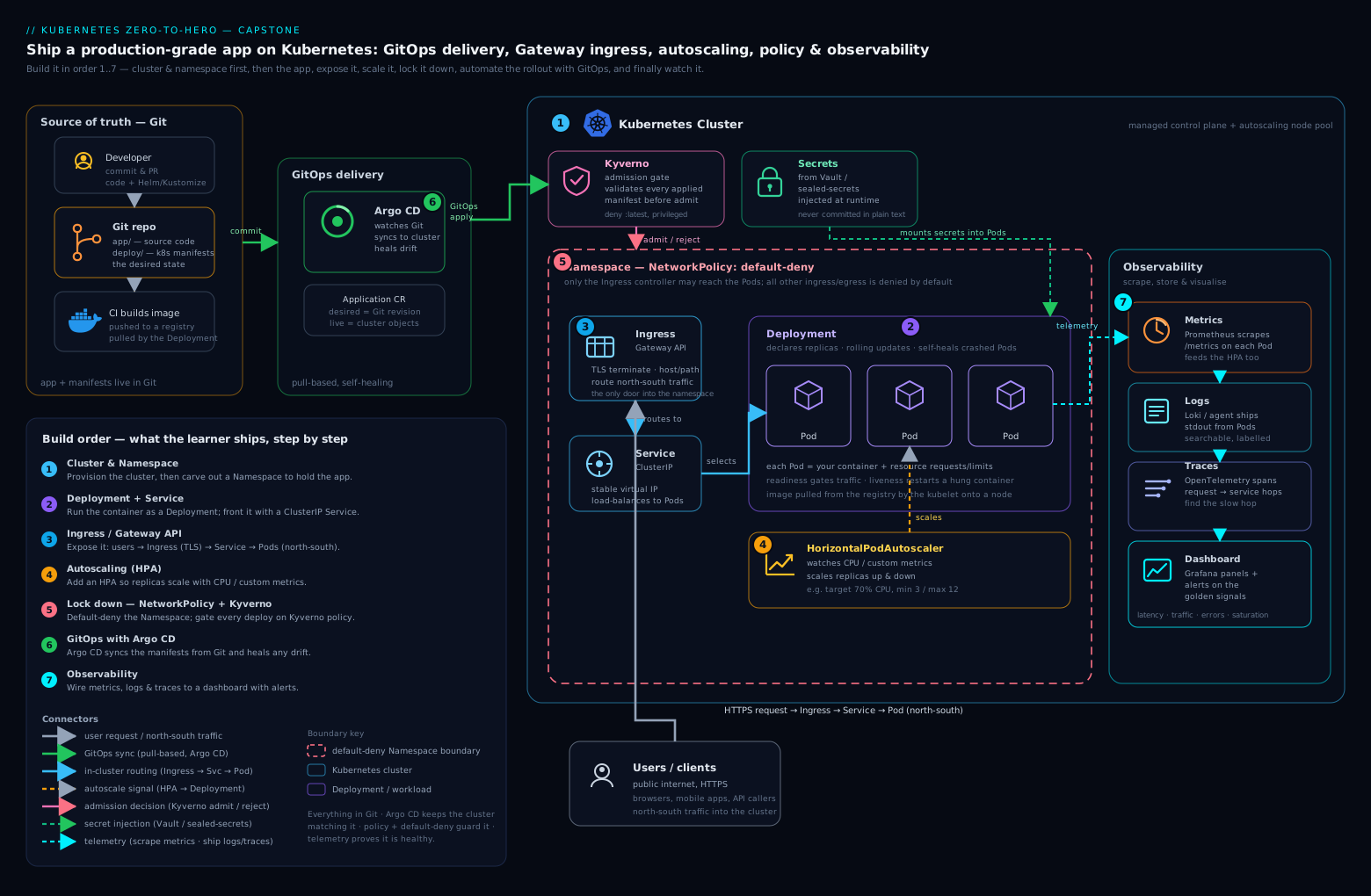
The diagram shows the request path (front door → web → api → cache) sitting inside an application namespace, wrapped by the cross-cutting concerns: a default-deny NetworkPolicy, an HPA on the scalable Deployments, ConfigMap/Secret feeding config, Kyverno gating admission, Argo CD pulling from Git, and Prometheus/Grafana observing. Each labelled piece below is a design decision with a reason.
Namespaces. Put the app in its own namespace (shop) and the platform tooling in theirs (argocd, kyverno, monitoring). Namespaces are the unit of quota, default network policy, and RBAC. Attach a ResourceQuota and a LimitRange to shop so a runaway Deployment can’t starve the node — this is also what makes resource requests mandatory in practice.
Deployments and Services. Each service is a Deployment (stateless, declarative replica count, rolling updates, free rollback) fronted by a ClusterIP Service for stable in-cluster discovery. Only web is reachable from outside, and even then only through the front door — api and cache stay ClusterIP-internal. Every Pod gets liveness, readiness, and startup probes and resource requests + limits; without requests the scheduler is guessing and the HPA has no denominator. (Refresher: Pods, ReplicaSets, Deployments & Services.)
The front door: Ingress or Gateway API. You need one HTTP entry point. The classic choice is an Ingress + an ingress controller (ingress-nginx). The modern, role-oriented successor is the Gateway API: a Gateway (owned by the platform team) plus HTTPRoutes (owned by app teams), which cleanly separates “who runs the load balancer” from “who routes my paths” and supports traffic splitting natively. We use Ingress in the lab for minimum moving parts, and show the Gateway API equivalent so you’ve seen both. Deep dive: Gateway API: HTTPRoute, traffic splitting & migration.
ConfigMaps & Secrets. Non-secret config (cache host, feature flags) goes in a ConfigMap; the cache password goes in a Secret. Both are mounted or injected as env vars, so the same image runs in any environment with different config. Secrets are base64, not encrypted at rest by default — in production you’d layer Sealed Secrets / External Secrets so the secret in Git is encrypted, never plaintext.
Autoscaling (HPA). The web and api Deployments get a HorizontalPodAutoscaler that adds/removes replicas to hold a target CPU utilisation. This is the first of the three autoscaling layers (pods → custom/event metrics → nodes); the capstone uses pod-level CPU HPA, and the deep dive covers KEDA event-driven scaling and node autoscaling. Deep dive: Kubernetes autoscaling: HPA, KEDA & Karpenter.
NetworkPolicy: default-deny. Out of the box every Pod can reach every other Pod and the cloud metadata endpoint — one compromised container away from lateral movement. We flip that: a default-deny policy in shop, then explicit allows for the only intended flows (web→api, api→cache, everything→DNS, web from the ingress controller). Deep dive: Default-deny NetworkPolicies & Cilium L7 rules.
Policy guardrails: Kyverno. “Images from our registry, no :latest, every Pod has resource limits, every namespace gets a default-deny” should be enforced at admission, not in a wiki. Kyverno policies are plain YAML evaluated on every kubectl apply and every Argo sync — they reject non-compliant manifests before they persist. Deep dive: Kyverno policies: image signing, limits & Pod Security and Policy-as-code with Kyverno.
GitOps: Argo CD. Instead of kubectl apply from your laptop, you commit manifests to Git and Argo CD continuously reconciles the cluster toward that desired state — detecting drift, showing sync status, and (optionally) auto-healing. We use a single Application here; the deep dive scales it to app-of-apps, ApplicationSets, and progressive delivery. Deep dive: GitOps at scale with Argo CD.
Observability. You can’t operate what you can’t see. We install kube-prometheus-stack (Prometheus + Grafana) so you have cluster and Pod metrics and a dashboard — enough to watch the HPA react and confirm health. In a real cluster this extends to logs and traces.
For how this exact shape looks on a managed cloud cluster — VPC CNI, IRSA, load balancer controllers, managed node groups — read Enterprise architecture: AWS EKS microservices alongside this lab. The local design maps almost one-to-one.
The staged build plan
Build in stages and validate after each one. Each stage maps to a course lesson (for the basics) or a deep-dive article (for the production concern), so when a stage fights you, you know exactly where to read.
| Stage | You add | Validate | Where to read |
|---|---|---|---|
| 0 | A kind cluster + namespaces, quota, LimitRange |
kubectl get ns, quota shows |
kubectl first cluster |
| 1 | The three Deployments + ClusterIP Services + probes + requests/limits | all Pods Ready, web→api→cache curl works |
Pods/Deployments/Services |
| 2 | ConfigMap + Secret wired into api |
env vars present in Pod | Pods/Deployments/Services |
| 3 | Front door: Ingress (and the Gateway API equivalent) | curl the hostname returns web |
Gateway API |
| 4 | HPA on web + api (metrics-server) |
load test scales replicas up, then down | Autoscaling: HPA/KEDA/Karpenter |
| 5 | Default-deny NetworkPolicy + explicit allows | blocked flow fails, allowed flow works | Default-deny NetworkPolicies |
| 6 | Kyverno + a “require requests/limits, block :latest” policy | a bad manifest is rejected | Kyverno policies |
| 7 | Argo CD reconciling the whole app from Git | edit Git → cluster converges; drift heals | GitOps with Argo CD |
| 8 | Observability (Prometheus + Grafana) | dashboard shows Pods + HPA reacting | (this lesson) |
You don’t have to do all eight in one sitting. A sensible split is stages 0–4 in one session (the app + autoscaling), 5–6 in another (security guardrails), 7–8 in a third (GitOps + observability).
Representative manifests
These are condensed but real. The full set is what you commit to your capstone Git repo. Treat them as patterns to adapt, not copy-paste-and-pray.
A Deployment + Service for api, with the three probes and resource requests/limits that production demands:
apiVersion: apps/v1
kind: Deployment
metadata:
  name: api
  namespace: shop
  labels: { app: api, tier: backend }
spec:
  replicas: 2
  selector:
    matchLabels: { app: api }
  template:
    metadata:
      labels: { app: api, tier: backend }
    spec:
      containers:
        - name: api
          image: ghcr.io/yourorg/api:1.4.0   # pinned tag, never :latest
          ports: [{ containerPort: 8080 }]
          envFrom:
            - configMapRef: { name: api-config }
          env:
            - name: CACHE_PASSWORD
              valueFrom:
                secretKeyRef: { name: cache-auth, key: password }
          resources:
            requests: { cpu: "100m", memory: "128Mi" }
            limits:   { cpu: "500m", memory: "256Mi" }
          startupProbe:                       # gates liveness until app is up
            httpGet: { path: /healthz, port: 8080 }
            failureThreshold: 30
            periodSeconds: 2
          readinessProbe:                     # gates Service traffic
            httpGet: { path: /readyz, port: 8080 }
            periodSeconds: 5
          livenessProbe:                      # restarts a wedged container
            httpGet: { path: /healthz, port: 8080 }
            periodSeconds: 10
---
apiVersion: v1
kind: Service
metadata:
  name: api
  namespace: shop
spec:
  selector: { app: api }   # routes to Pods carrying app=api
  ports: [{ port: 80, targetPort: 8080 }]
  # type defaults to ClusterIP — internal only, which is what we want
The HPA for api (CPU-target; metrics-server must be running):
apiVersion: autoscaling/v2
kind: HorizontalPodAutoscaler
metadata:
  name: api
  namespace: shop
spec:
  scaleTargetRef: { apiVersion: apps/v1, kind: Deployment, name: api }
  minReplicas: 2
  maxReplicas: 10
  metrics:
    - type: Resource
      resource:
        name: cpu
        target: { type: Utilization, averageUtilization: 60 }
  behavior:                       # tame flapping: scale up fast, down slow
    scaleDown:
      stabilizationWindowSeconds: 120
The front door — Ingress first, then the Gateway API equivalent so you’ve seen the modern shape:
apiVersion: networking.k8s.io/v1
kind: Ingress
metadata:
  name: shop
  namespace: shop
spec:
  ingressClassName: nginx
  rules:
    - host: shop.local
      http:
        paths:
          - path: /
            pathType: Prefix
            backend:
              service: { name: web, port: { number: 80 } }
---
# Gateway API equivalent (Gateway owned by platform; HTTPRoute owned by app team)
apiVersion: gateway.networking.k8s.io/v1
kind: HTTPRoute
metadata:
  name: web
  namespace: shop
spec:
  parentRefs: [{ name: shop-gateway, namespace: gateway-system }]
  hostnames: ["shop.local"]
  rules:
    - matches: [{ path: { type: PathPrefix, value: / } }]
      backendRefs: [{ name: web, port: 80 }]
The default-deny + allow NetworkPolicies for shop (apply default-deny first, then the explicit allows — and pair egress-deny with the DNS allow so you don’t break name resolution):
apiVersion: networking.k8s.io/v1
kind: NetworkPolicy
metadata: { name: default-deny, namespace: shop }
spec:
  podSelector: {}                 # selects every Pod in the namespace
  policyTypes: [Ingress, Egress]  # ...and permits nothing
---
apiVersion: networking.k8s.io/v1
kind: NetworkPolicy
metadata: { name: allow-api-from-web, namespace: shop }
spec:
  podSelector: { matchLabels: { app: api } }
  policyTypes: [Ingress]
  ingress:
    - from: [{ podSelector: { matchLabels: { app: web } } }]
      ports: [{ port: 8080 }]
---
apiVersion: networking.k8s.io/v1
kind: NetworkPolicy
metadata: { name: allow-dns-egress, namespace: shop }
spec:
  podSelector: {}
  policyTypes: [Egress]
  egress:
    - to:
        - namespaceSelector: { matchLabels: { kubernetes.io/metadata.name: kube-system } }
      ports:
        - { port: 53, protocol: UDP }
        - { port: 53, protocol: TCP }
A Kyverno policy that rejects Pods without resource limits and bans the :latest tag — the two rules that catch the most mistakes:
apiVersion: kyverno.io/v1
kind: ClusterPolicy
metadata: { name: require-limits-no-latest }
spec:
  validationFailureAction: Enforce   # reject, don't just warn
  rules:
    - name: require-resource-limits
      match: { any: [{ resources: { kinds: [Pod] } }] }
      validate:
        message: "CPU and memory limits are required."
        pattern:
          spec:
            containers:
              - resources:
                  limits: { memory: "?*", cpu: "?*" }
    - name: disallow-latest-tag
      match: { any: [{ resources: { kinds: [Pod] } }] }
      validate:
        message: "Using :latest (or no tag) is not allowed; pin a version."
        pattern:
          spec:
            containers:
              - image: "!*:latest"
The Argo CD Application that ties your Git repo to the cluster — this is the object that makes GitOps real:
apiVersion: argoproj.io/v1alpha1
kind: Application
metadata:
  name: shop
  namespace: argocd
spec:
  project: default
  source:
    repoURL: https://github.com/yourorg/k8s-capstone.git
    targetRevision: main
    path: deploy/shop          # Helm chart or raw manifests live here
  destination:
    server: https://kubernetes.default.svc
    namespace: shop
  syncPolicy:
    automated: { prune: true, selfHeal: true }   # converge + heal drift
    syncOptions: [CreateNamespace=true]
If you’d rather package the app as a Helm chart (recommended once you have three services and per-environment values), keep the same objects but template them, and point Argo CD’s source.path at the chart. The mechanics of writing that chart well — values.schema.json, helper templates, library charts — are in Authoring production-grade Helm charts.
Acceptance criteria
You’re done when all of these are true. This is also your demo script.
kubectl get pods -n shopshowsweb,api,cacheallRunningandReady(probes green).curl -H 'Host: shop.local' http://localhost:8080/reachesweb, which reachesapi, which reachescache(the full chain works through the front door).apireads at least one value from the ConfigMap and the Secret (verify in the Pod’s env).- Under load the HPA scales
api/webup pastminReplicas, then back down after load stops. - The default-deny holds: a disallowed flow (e.g. a debug Pod →
api) is blocked, while the allowedweb→apiflow works. - Applying a deliberately bad manifest (no limits, or
:latest) is rejected by Kyverno with a clear message. - Argo CD shows the app Synced and Healthy; editing Git triggers a sync, and deleting a live object gets self-healed back.
- Grafana shows Pod metrics for
shopand you can watch replica count change during the load test.
Self-assessment rubric
Score each row 0–2 (0 = not done, 1 = works but rough, 2 = production-shaped). 12+/16 = capstone passed.
| Criterion | 0 | 1 | 2 |
|---|---|---|---|
| Workloads | Pods crash/no probes | Run, basic probes | All 3 probes + requests/limits, rolling update verified |
| Networking | NodePort/hacks | Service chain works | ClusterIP discovery + working Ingress/Gateway |
| Config/Secrets | Hardcoded in image | ConfigMap used | ConfigMap and Secret, image is env-agnostic |
| Autoscaling | None | HPA exists | HPA scales up and down under a real load test |
| NetworkPolicy | Flat network | Default-deny only | Default-deny + least-privilege allows, drop proven |
| Policy | None | Kyverno audits | Kyverno enforces, bad manifest rejected |
| GitOps | kubectl apply only |
Argo syncs once | Auto-sync + prune + self-heal, drift heals |
| Observability | None | Metrics installed | Dashboard used to prove health + scaling |
Hands-on lab
We’ll build the spine of the capstone on a free local kind cluster: cluster + namespace, the service chain, an HPA that visibly scales, a default-deny network, a Kyverno guardrail, and Argo CD reconciling from Git. This is the path that demonstrates every concept with the fewest moving parts; the remaining stages (Gateway API, full Helm chart, Grafana dashboards) are yours to add as the exercise.
0. Tools and a cluster with an ingress-ready node
# Install the CLIs (macOS/Homebrew shown; Linux: use the official install scripts)
brew install kind kubectl helm
# Argo CD CLI
brew install argocd
Create a kind cluster whose control-plane node can receive ingress traffic on localhost:
cat > kind-capstone.yaml <<'EOF'
kind: Cluster
apiVersion: kind.x-k8s.io/v1alpha4
nodes:
  - role: control-plane
    kubeadmConfigPatches:
      - |
        kind: InitConfiguration
        nodeRegistration:
          kubeletExtraArgs:
            node-labels: "ingress-ready=true"
    extraPortMappings:
      - { containerPort: 80, hostPort: 8080, protocol: TCP }
EOF

kind create cluster --name capstone --config kind-capstone.yaml
kubectl cluster-info --context kind-capstone
kubectl get nodes
Expected: one node, Ready.
1. Namespace, quota, and the metrics-server (for the HPA)
kubectl create namespace shop

# A quota so a runaway Deployment can't eat the node
cat <<'EOF' | kubectl apply -f -
apiVersion: v1
kind: ResourceQuota
metadata: { name: shop-quota, namespace: shop }
spec:
  hard: { requests.cpu: "2", requests.memory: 2Gi, limits.cpu: "4", limits.memory: 4Gi, pods: "30" }
EOF

# metrics-server provides the CPU metric the HPA reads.
# --kubelet-insecure-tls is REQUIRED on kind (self-signed kubelet certs) — local only.
helm repo add metrics-server https://kubernetes-sigs.github.io/metrics-server/ >/dev/null
helm repo update >/dev/null
helm upgrade --install metrics-server metrics-server/metrics-server \
  -n kube-system --set 'args={--kubelet-insecure-tls}'

kubectl -n kube-system rollout status deploy/metrics-server
kubectl top nodes      # proves metrics are flowing (give it ~30s)
2. The service chain: cache, api, web
We use redis:7-alpine for cache and a tiny echo image for web/api so the lab needs no custom build. Each gets requests/limits (Kyverno will demand them later) and probes.
cat <<'EOF' | kubectl apply -f -
apiVersion: apps/v1
kind: Deployment
metadata: { name: cache, namespace: shop, labels: { app: cache } }
spec:
  replicas: 1
  selector: { matchLabels: { app: cache } }
  template:
    metadata: { labels: { app: cache } }
    spec:
      containers:
        - name: redis
          image: redis:7-alpine
          ports: [{ containerPort: 6379 }]
          readinessProbe: { tcpSocket: { port: 6379 }, periodSeconds: 5 }
          livenessProbe:  { tcpSocket: { port: 6379 }, periodSeconds: 10 }
          resources: { requests: { cpu: 50m, memory: 64Mi }, limits: { cpu: 200m, memory: 128Mi } }
---
apiVersion: v1
kind: Service
metadata: { name: cache, namespace: shop }
spec: { selector: { app: cache }, ports: [{ port: 6379, targetPort: 6379 }] }
---
apiVersion: apps/v1
kind: Deployment
metadata: { name: api, namespace: shop, labels: { app: api } }
spec:
  replicas: 2
  selector: { matchLabels: { app: api } }
  template:
    metadata: { labels: { app: api } }
    spec:
      containers:
        - name: api
          image: hashicorp/http-echo:1.0
          args: ["-text=api-ok", "-listen=:5678"]
          ports: [{ containerPort: 5678 }]
          readinessProbe: { httpGet: { path: /, port: 5678 }, periodSeconds: 5 }
          livenessProbe:  { httpGet: { path: /, port: 5678 }, periodSeconds: 10 }
          resources: { requests: { cpu: 50m, memory: 32Mi }, limits: { cpu: 250m, memory: 64Mi } }
---
apiVersion: v1
kind: Service
metadata: { name: api, namespace: shop }
spec: { selector: { app: api }, ports: [{ port: 80, targetPort: 5678 }] }
---
apiVersion: apps/v1
kind: Deployment
metadata: { name: web, namespace: shop, labels: { app: web } }
spec:
  replicas: 2
  selector: { matchLabels: { app: web } }
  template:
    metadata: { labels: { app: web } }
    spec:
      containers:
        - name: web
          image: hashicorp/http-echo:1.0
          args: ["-text=web-ok", "-listen=:5678"]
          ports: [{ containerPort: 5678 }]
          readinessProbe: { httpGet: { path: /, port: 5678 }, periodSeconds: 5 }
          livenessProbe:  { httpGet: { path: /, port: 5678 }, periodSeconds: 10 }
          resources: { requests: { cpu: 50m, memory: 32Mi }, limits: { cpu: 250m, memory: 64Mi } }
---
apiVersion: v1
kind: Service
metadata: { name: web, namespace: shop }
spec: { selector: { app: web }, ports: [{ port: 80, targetPort: 5678 }] }
EOF

kubectl -n shop rollout status deploy/api
kubectl get pods,svc -n shop
Expected: five Pods Running/Ready (1 cache, 2 api, 2 web), three Services. Prove in-cluster discovery works:
kubectl -n shop run probe --rm -it --image=busybox:1.36 --restart=Never -- \
  wget -qO- http://api.shop.svc.cluster.local
# -> api-ok
3. The front door (ingress-nginx + Ingress)
kubectl apply -f https://raw.githubusercontent.com/kubernetes/ingress-nginx/main/deploy/static/provider/kind/deploy.yaml
kubectl -n ingress-nginx rollout status deploy/ingress-nginx-controller --timeout=120s

cat <<'EOF' | kubectl apply -f -
apiVersion: networking.k8s.io/v1
kind: Ingress
metadata: { name: shop, namespace: shop }
spec:
  ingressClassName: nginx
  rules:
    - host: shop.local
      http:
        paths:
          - { path: /, pathType: Prefix, backend: { service: { name: web, port: { number: 80 } } } }
EOF

# kind maps hostPort 8080 -> node :80 -> ingress controller
curl -s -H 'Host: shop.local' http://localhost:8080/
# -> web-ok
That web-ok through localhost:8080 with the shop.local Host header is acceptance criterion #2: the front door routes to web.
4. Autoscaling that you can watch react
Add an HPA to web, then hammer it and watch replicas climb.
cat <<'EOF' | kubectl apply -f -
apiVersion: autoscaling/v2
kind: HorizontalPodAutoscaler
metadata: { name: web, namespace: shop }
spec:
  scaleTargetRef: { apiVersion: apps/v1, kind: Deployment, name: web }
  minReplicas: 2
  maxReplicas: 10
  metrics:
    - type: Resource
      resource: { name: cpu, target: { type: Utilization, averageUtilization: 50 } }
EOF

# Watch in one terminal:
kubectl get hpa web -n shop -w
In a second terminal, generate load from inside the cluster:
kubectl -n shop run load --image=busybox:1.36 --restart=Never -- \
  /bin/sh -c "while true; do wget -q -O- http://web.shop.svc.cluster.local >/dev/null; done"
Within a minute or two the HPA’s TARGETS column rises above 50% and REPLICAS climbs toward 10. Stop the load and the replicas fall back to 2 after the stabilization window — that up-and-down behaviour is acceptance criterion #4.
kubectl -n shop delete pod load
5. Default-deny network, then prove a drop
Important: kind’s default CNI (kindnet) does not enforce
NetworkPolicy. To make this stage real, create the cluster with Calico (or install Cilium). The quickest path is to recreate kind with the default CNI disabled and apply Calico — or, if you want to keep this cluster, treat this stage as “author + apply” and verify enforcement on a Calico/Cilium cluster. Enforcement detail and the Cilium L7 model are in the default-deny NetworkPolicies deep dive.
# Default-deny everything in shop, then allow only DNS + web->api
cat <<'EOF' | kubectl apply -f -
apiVersion: networking.k8s.io/v1
kind: NetworkPolicy
metadata: { name: default-deny, namespace: shop }
spec: { podSelector: {}, policyTypes: [Ingress, Egress] }
---
apiVersion: networking.k8s.io/v1
kind: NetworkPolicy
metadata: { name: allow-dns, namespace: shop }
spec:
  podSelector: {}
  policyTypes: [Egress]
  egress:
    - to: [{ namespaceSelector: { matchLabels: { kubernetes.io/metadata.name: kube-system } } }]
      ports: [{ port: 53, protocol: UDP }, { port: 53, protocol: TCP }]
---
apiVersion: networking.k8s.io/v1
kind: NetworkPolicy
metadata: { name: allow-web-to-api, namespace: shop }
spec:
  podSelector: { matchLabels: { app: api } }
  policyTypes: [Ingress]
  ingress:
    - from: [{ podSelector: { matchLabels: { app: web } } }]
      ports: [{ port: 5678 }]
EOF
On an enforcing CNI, a debug Pod (no app=web label) should be blocked from api, proving the default-deny — acceptance criterion #5:
# Expect this to TIME OUT / fail on an enforcing CNI:
kubectl -n shop run debug --rm -it --image=busybox:1.36 --restart=Never -- \
  wget -T 5 -qO- http://api.shop.svc.cluster.local || echo "BLOCKED (expected)"
6. A Kyverno guardrail that rejects a bad manifest
helm repo add kyverno https://kyverno.github.io/kyverno/ >/dev/null
helm repo update >/dev/null
helm upgrade --install kyverno kyverno/kyverno -n kyverno --create-namespace
kubectl -n kyverno rollout status deploy/kyverno-admission-controller --timeout=120s

cat <<'EOF' | kubectl apply -f -
apiVersion: kyverno.io/v1
kind: ClusterPolicy
metadata: { name: disallow-latest }
spec:
  validationFailureAction: Enforce
  rules:
    - name: no-latest-tag
      match: { any: [{ resources: { kinds: [Pod] } }] }
      validate:
        message: "Using :latest is not allowed; pin a version."
        pattern: { spec: { containers: [{ image: "!*:latest" }] } }
EOF

# This SHOULD be rejected at admission:
kubectl -n shop run bad --image=nginx:latest --restart=Never
# Error from server: ... policy disallow-latest/no-latest-tag fail: Using :latest is not allowed...
That rejection — the manifest never reaches etcd — is acceptance criterion #6. The full guardrail set (require limits, registry allow-lists, cosign image verification) is in the Kyverno deep dive.
7. GitOps: Argo CD reconciles the app from Git
Install Argo CD, log in, and point an Application at a Git repo containing your manifests (commit the YAML from stage 2 into deploy/shop/ in your own repo first).
kubectl create namespace argocd
kubectl apply -n argocd -f https://raw.githubusercontent.com/argoproj/argo-cd/stable/manifests/install.yaml
kubectl -n argocd rollout status deploy/argocd-server --timeout=180s

# Initial admin password + login via port-forward
kubectl -n argocd port-forward svc/argocd-server 8081:443 >/tmp/argo-pf.log 2>&1 &
PW=$(kubectl -n argocd get secret argocd-initial-admin-secret -o jsonpath='{.data.password}' | base64 -d)
argocd login localhost:8081 --username admin --password "$PW" --insecure

# Register the app (replace repoURL/path with YOUR repo)
argocd app create shop \
  --repo https://github.com/yourorg/k8s-capstone.git \
  --path deploy/shop --revision main \
  --dest-server https://kubernetes.default.svc --dest-namespace shop \
  --sync-policy automated --auto-prune --self-heal --sync-option CreateNamespace=true

argocd app get shop          # STATUS should be Synced / Healthy
Now prove GitOps both ways — acceptance criterion #7:
# Drift heals: delete a live object, Argo recreates it
kubectl -n shop delete deploy web
argocd app wait shop --health    # Argo self-heals it back
kubectl -n shop get deploy web   # it's back

# Change in Git -> cluster converges: bump web replicas in your repo, commit, push, then:
argocd app sync shop
Validation (run the acceptance checklist)
kubectl get pods -n shop                                   # all Ready (#1)
curl -s -H 'Host: shop.local' http://localhost:8080/       # web-ok (#2)
kubectl get hpa -n shop                                     # HPA present (#4)
kubectl get netpol -n shop                                  # default-deny + allows (#5)
kubectl get clusterpolicy                                   # Kyverno enforcing (#6)
argocd app get shop                                         # Synced/Healthy (#7)
Cleanup
# Stop the Argo port-forward, then delete the whole cluster in one shot
kill %1 2>/dev/null || true
kind delete cluster --name capstone
rm -f kind-capstone.yaml
Cost note
Free / local. Everything runs in Docker on your laptop on a kind cluster — no cloud account, no managed control-plane fee, no load balancer charges. kind, kubectl, helm, metrics-server, ingress-nginx, Kyverno, and Argo CD are all open source. kind delete cluster reclaims every resource; the only lasting footprint is the container images cached by Docker (a docker image prune clears those).
Common mistakes & troubleshooting
| Symptom | Likely cause | Fix |
|---|---|---|
HPA shows TARGETS: <unknown>/50% |
No metrics-server, or Pods missing CPU requests |
Install metrics-server (with --kubelet-insecure-tls on kind); ensure every container has resources.requests.cpu. HPA % is computed against requests. |
curl to the Ingress hangs / 404 |
Wrong Host header, controller not ready, or no ingress-ready node label |
Send -H 'Host: shop.local'; wait for the controller rollout; confirm the kind config set ingress-ready=true + the extraPortMappings. |
Service has no endpoints (kubectl get endpoints) |
Service selector doesn’t match Pod labels |
Make the selector exactly match the Pod template labels; Services route by label, not by name. |
| NetworkPolicy seems ignored | kind’s default CNI doesn’t enforce policy | Use Calico/Cilium; with the stock CNI you can author policy but not enforce it. |
| Default-deny breaks everything (DNS fails) | Egress deny applied without a DNS allow | Always pair default-deny egress with an allow to kube-system/CoreDNS on port 53 (UDP+TCP). |
Argo app stuck OutOfSync/Progressing |
A Pod isn’t Ready, or a synced object is rejected by Kyverno | argocd app get shop and kubectl describe the failing object; fix the manifest so it passes admission, then re-sync. |
Pod CrashLoopBackOff |
Bad command/args, or liveness probe failing before app is ready | kubectl logs + kubectl describe pod; add/loosen a startupProbe so liveness doesn’t kill a slow starter. |
Best practices
- Pin image tags, never
:latest.:latestmakes rollouts non-deterministic and rollback meaningless. Pin a version (or digest) and let Kyverno enforce it. - Always set requests and limits. Requests drive scheduling and HPA math; limits cap blast radius. A
LimitRangegives sane defaults so no Pod slips through bare. - Probe all three. Readiness gates traffic, liveness restarts wedged containers, startup protects slow starters from premature liveness kills.
- Default-deny, then allow. Start from zero connectivity and add named flows; never run a flat pod network in anything resembling production.
- Let Git be the source of truth. Once Argo CD is in place, stop
kubectl apply-ing changes — edit Git and let reconciliation converge, so the cluster and the repo never diverge. - Enforce policy at admission, not in review. A Kyverno
Enforcerule catches the mistake the code reviewer missed, on every apply and every sync. - Validate per stage. Don’t stack stage 5 on a broken stage 2. Each
rollout status/curl/argocd app getis a checkpoint.
Security notes
- Secrets aren’t encrypted by default. A
Secretis base64, readable by anyone withget secret. Lock it down with RBAC, and for GitOps use Sealed Secrets / External Secrets so the value committed to Git is encrypted, never plaintext. - Block the metadata endpoint. Your default-deny egress should keep workloads away from
169.254.169.254so a compromised Pod can’t pull node credentials (SSRF). On a managed cluster this is how you stop credential theft. - Apply Pod Security / restricted defaults. Drop capabilities, run as non-root,
readOnlyRootFilesystemwhere possible. Kyverno (or Pod Security Admission) can enforce the restricted profile cluster-wide. See Kyverno policies & Pod Security. - Least-privilege RBAC. Argo CD and your CI hold powerful credentials — scope them to the namespaces and verbs they actually need, not
cluster-admin. - Verify image provenance. In a hardened pipeline, Kyverno’s
verifyImageschecks a cosign signature at admission so only signed images from your registry run.
Quick check
- Why does an HPA need resource requests on the Pods it targets?
- You apply a
default-denyegress policy and suddenly every Pod fails to resolve DNS. What did you forget? - What is the difference between an Ingress and the Gateway API’s
Gateway+HTTPRoutesplit, in terms of ownership? - With Argo CD
selfHeal: true, what happens if someone runskubectl delete deploy webdirectly on the cluster? - A teammate’s manifest uses
image: app:latest. Where in the capstone is this caught, and before or after it’s stored in etcd?
Answers
- The HPA computes utilisation as actual CPU ÷ requested CPU. With no request there’s no denominator, so the target metric reads
<unknown>and the HPA can’t scale. Requests are also what the scheduler uses to place Pods. - The DNS allow.
default-denywithpolicyTypes: [Egress]blocks all egress, including the Pod’s lookups to CoreDNS. Pair it with an egress allow tokube-system/CoreDNS on port 53 (UDP and TCP). - An Ingress is one object that mixes “run the load balancer” and “route my paths,” typically owned by whoever installed the controller. The Gateway API splits them: the Gateway (listeners, the actual LB) is owned by the platform team, while HTTPRoutes (path/host routing) are owned by app teams and reference the Gateway — cleaner multi-team boundaries and native traffic splitting.
- Argo CD detects the drift (live state no longer matches Git) and recreates the Deployment to match the desired state in the repo. Self-heal makes the cluster converge back automatically.
- At admission, by the Kyverno
disallow-latestpolicy — the API server calls Kyverno’s webhook before persisting the object, so a rejected manifest never reaches etcd.
Exercise
Extend the capstone with three additions, committing each to your Git repo so Argo CD applies it:
- Gateway API front door. Install a Gateway API implementation, replace the Ingress with a
Gateway+HTTPRoute, and add a secondHTTPRouterule that splits 10% of traffic to aweb-v2Deployment (a canary). Use Gateway API: traffic splitting. - Package as Helm + a values schema. Convert the raw manifests into a Helm chart with a
values.yaml(replica counts, image tags, the cache host) and avalues.schema.jsonthat fails fast on bad input. Point Argo CD at the chart. Follow Authoring production-grade Helm charts. - Add a second guardrail + a dashboard. Add a Kyverno rule requiring resource limits (not just banning
:latest), prove it rejects a bad Pod, then installkube-prometheus-stackand open a Grafana dashboard showingshopPod CPU and the HPA replica count during a load test.
Write up a one-page “capstone deliverable”: the repo link, a screenshot of argocd app get shop Synced/Healthy, your acceptance-criteria checklist ticked off, and your rubric score. That artefact is what you show in an interview.
Interview questions
Q: Walk me through what happens, end to end, when you push a manifest change to the Git repo Argo CD watches.
Argo CD polls (or is webhook-notified of) the repo, renders the desired manifests, and diffs them against live cluster state. On a difference it syncs — applying the changed objects through the API server, which runs them past admission (Kyverno) before persisting to etcd; controllers then reconcile actual state (scheduler places new Pods, kubelet starts them). With selfHeal, any out-of-band drift is corrected back to Git too. Net effect: Git is the single source of truth and the cluster continuously converges to it.
Q: How does an HPA decide how many replicas to run, and what are its failure modes?
For a CPU target it computes desiredReplicas = ceil(currentReplicas × currentUtilisation / targetUtilisation), clamped to min/max. Failure modes: no metrics-server (metric <unknown>), no resource requests (no denominator), and flapping when load is spiky — tamed with behavior.scaleDown.stabilizationWindowSeconds. It scales pods only; node capacity is a separate layer (Cluster Autoscaler/Karpenter).
Q: A Service has no endpoints and traffic fails. How do you debug it?
kubectl get endpoints <svc> — empty means the Service’s label selector matches no Ready Pods. Check the selector against the Pod template labels (Services route by label, not name) and check the Pods are actually Ready (a failing readiness probe pulls a Pod out of endpoints). Then kubectl describe svc and kubectl get pods --show-labels.
Q: Why “default-deny then allow,” and what’s the one rule people always forget? Default-allow means one compromised Pod can reach everything — lateral movement. Default-deny inverts the posture: nothing is permitted until you write an explicit allow, so the network encodes intent. The forgotten rule is DNS egress — deny-all egress silently breaks CoreDNS lookups, so you must allow port 53 to kube-system.
Q: How is Kyverno different from “just review the YAML in the PR”? PR review is best-effort and human; Kyverno runs in the admission path on every apply and every Argo sync, so it’s deterministic and unbypassable. It can validate (reject), mutate (add defaults like dropped capabilities), and generate (e.g. a default-deny NetworkPolicy per new namespace) — guardrails code review can’t provide.
Q: Your app works on kind but you’re moving it to EKS. What changes, and what doesn’t?
The workloads, Services, HPA, NetworkPolicies, Kyverno policies, and Argo CD app are largely portable. What changes is the substrate: a managed control plane, the VPC CNI for pod networking, IRSA/Pod Identity for cloud IAM, an AWS Load Balancer Controller backing your Ingress/Gateway, real LoadBalancer Services, and managed node groups or Karpenter for capacity. See Enterprise architecture: AWS EKS microservices.
Certification mapping
This capstone is a hands-on rehearsal for the practical exams.
- CKAD (Certified Kubernetes Application Developer): Deployments, Services, ConfigMaps/Secrets, probes, resource requests/limits, rolling updates/rollback, and Ingress are core CKAD domains — the entire stage 1–3 build is CKAD muscle memory. Practising fast, correct manifests under time pressure is exactly the exam.
- CKA (Certified Kubernetes Administrator): Cluster bootstrap, namespaces/quotas, networking (Services, NetworkPolicy, DNS), troubleshooting (no-endpoints, CrashLoop, stuck rollouts), and workload scheduling map to CKA. The troubleshooting table above mirrors CKA scenario tasks.
- CKS (Certified Kubernetes Security Specialist): Default-deny NetworkPolicies, admission control with Kyverno, Pod Security/restricted, secret handling, and supply-chain (image provenance) are CKS territory — stages 5–6 plus the security notes.
- KCNA (Kubernetes and Cloud Native Associate): The conceptual map (control plane, objects, GitOps, observability) underpins this whole lesson and is tested at the KCNA level.
The next lesson is the full exam roadmap: Kubernetes Interview & Certification Prep.
Glossary
- Capstone — an integrative final project that exercises every concept from the course at once, end to end.
- Production-shaped — a cluster/app carrying the same structural concerns as production (quotas, probes, autoscaling, network policy, policy, GitOps, observability) even when it runs locally.
- HPA (HorizontalPodAutoscaler) — controller that adds/removes Pod replicas to hold a target metric (here, CPU utilisation).
- NetworkPolicy — namespaced object defining allowed Pod traffic; additive allow-lists, so you restrict by selecting Pods and permitting nothing (default-deny).
- Default-deny — a baseline policy that blocks all ingress/egress for a namespace, after which only explicit allows let traffic through.
- Kyverno — a policy-as-code engine that validates, mutates, and generates Kubernetes resources at admission time using YAML policies.
- GitOps — operating model where Git is the source of truth and a controller (Argo CD) continuously reconciles the cluster to match it.
- Argo CD — a GitOps controller that syncs cluster state from a Git repo, with drift detection, sync status, and self-heal.
- Ingress / Gateway API — the cluster’s HTTP front door; Ingress is the classic single object, Gateway API splits Gateway (platform) from HTTPRoute (app team).
- metrics-server — lightweight aggregator that supplies CPU/memory metrics for
kubectl topand the HPA.
Next steps
You shipped it. The natural next move is to turn this hands-on confidence into interview answers and a certification plan: continue to Kubernetes Interview & Certification Prep: KCNA / CKAD / CKA / CKS Roadmap.
Then go deeper on each pillar you just touched:
- GitOps at Scale with Argo CD: App-of-Apps, ApplicationSets & Progressive Delivery — grow the single Application into a fleet.
- Kubernetes Autoscaling in Depth: HPA, KEDA & Karpenter — add event-driven scaling and node autoscaling.
- Designing Zero-Trust Pod Networking: Default-Deny & Cilium L7 Rules — enforce policy with an L7-aware CNI.
- Policy-as-Code with Kyverno: image signing, limits & Pod Security — extend the guardrails to full supply-chain enforcement.
- Enterprise Architecture: AWS EKS Microservices — see this exact shape on a real managed cloud cluster.