You have worked through the course, deployed apps to a local cluster, broken things, and fixed them. Now you want two outcomes: pass a Kubernetes interview without freezing on the “a pod is stuck, what do you do?” question, and turn that knowledge into a certification that hiring managers actually recognise. This lesson is the bridge. It maps the four CNCF certifications to where you are, points each exam topic back to a lesson you have already done, and then drills the questions interviewers really ask — with model answers you can say out loud.
The most important thing to internalise up front: the CKAD, CKA, and CKS are hands-on, terminal exams. There are no multiple-choice questions. You are dropped into a live cluster and told to make something work, fast. So is a good technical interview, really — the strongest answers describe a procedure, not a definition. We will practise both.
Learning objectives
By the end of this lesson you will be able to:
- Choose the right certification for your role and explain the KCNA → CKAD/CKA → CKS ladder, including the hands-on exam format and tooling.
- Map every major exam domain to a specific course lesson so your study plan has no blind spots.
- Answer the five classic troubleshooting interview questions (crashing pod, Service with no endpoints, pending pod, RBAC denied, stuck rollout) with a structured, procedural method.
- Apply exam-day techniques —
kubectlaliases,--dry-run=client -o yaml, fastkubectl explain, and time management — that turn a 2-hour practical into a manageable one. - Run a mock troubleshooting drill on a free local cluster and self-assess against a rubric.
Prerequisites & where this fits
This is the final lesson of the Kubernetes Zero-to-Hero course. It assumes you have done the fundamentals — containers and images, the control-plane/node architecture, the core objects (Pods, Deployments, Services), and the kubectl apply workflow — and ideally the capstone, where you shipped a small multi-service app with autoscaling, network policy, and GitOps. You do not need to memorise anything new here. The goal is to consolidate what you know into interview- and exam-ready form. Everything in the labs uses free, local tooling: Docker (or Podman) plus a local cluster with kind, minikube, or k3d. Nothing to pay for.
The CNCF certification ladder
The Cloud Native Computing Foundation (CNCF) and the Linux Foundation run a coherent ladder of Kubernetes certifications. Think of it as one entry-level knowledge check, two role-based practical exams, and one advanced security specialisation.
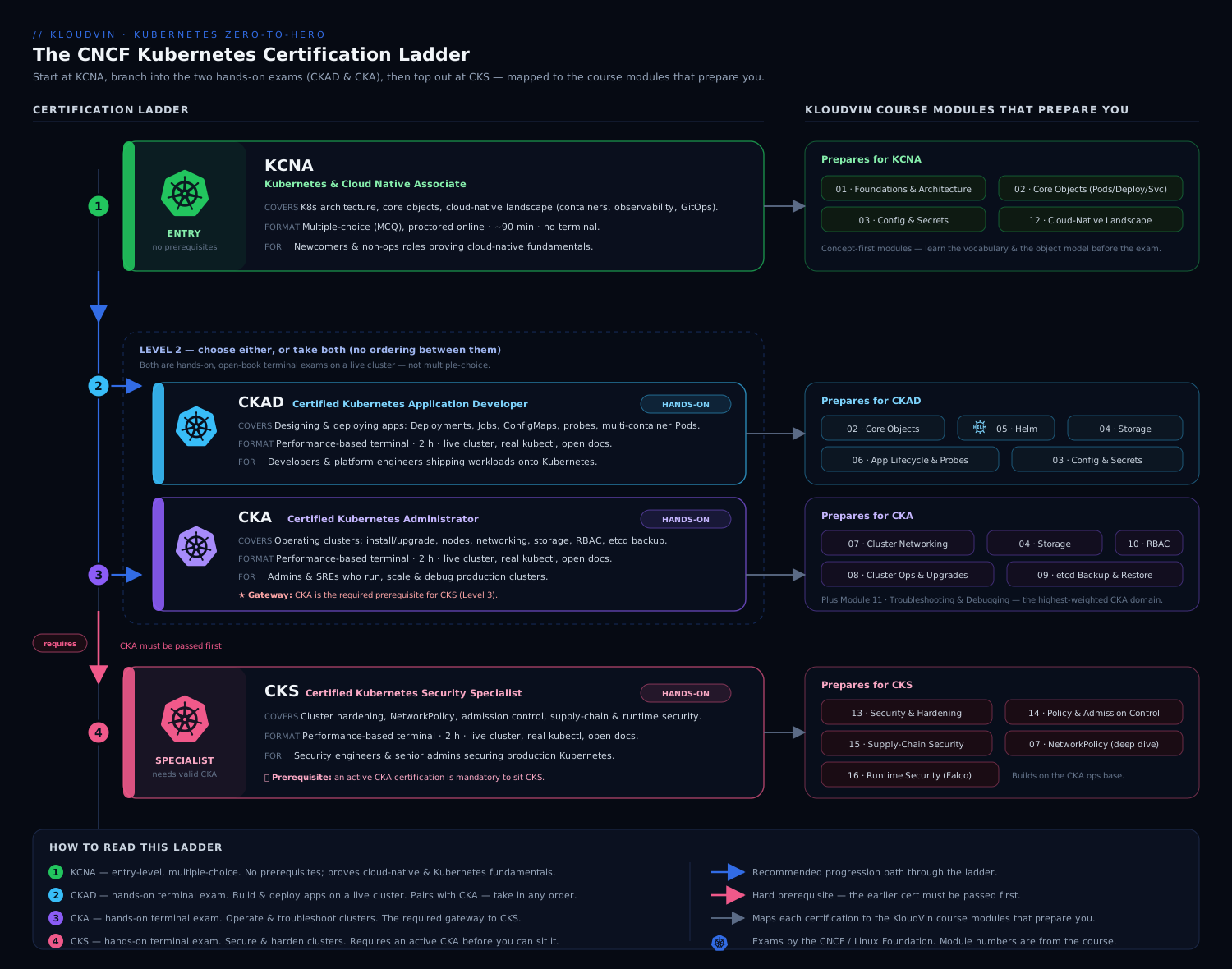
The diagram above shows the progression and the gating: KCNA is the optional on-ramp, CKAD and CKA are the two parallel role-based exams most people target, and CKS sits on top — and crucially, you must hold a current CKA before you are allowed to sit the CKS.
| Cert | Full name | Format | Length | Passing | Who it’s for |
|---|---|---|---|---|---|
| KCNA | Kubernetes and Cloud Native Associate | Multiple choice (proctored, online) | 90 min | ~75% | Newcomers, managers, career-switchers wanting a credible foundation |
| CKAD | Certified Kubernetes Application Developer | Hands-on, live cluster terminal | 2 hours | 66% | Developers who deploy to and run on Kubernetes |
| CKA | Certified Kubernetes Administrator | Hands-on, live cluster terminal | 2 hours | 66% | Operators / platform / SRE who run clusters |
| CKS | Certified Kubernetes Security Specialist | Hands-on, live cluster terminal | 2 hours | 67% | Security-focused engineers hardening clusters (requires active CKA) |
A few details that matter for planning:
- The practical exams are open-book — for one specific book. During CKAD/CKA/CKS you may keep the official Kubernetes documentation (
kubernetes.io/docs, plus a small allow-list like the Helm and Trivy docs for CKS) open in a second browser tab. You may not use Google, blogs, ChatGPT, or your own notes. This is why fast in-cluster lookup (kubectl explain,kubectl -h) and bookmarking the docs beforehand is a real exam skill. - They are performance-based and time-boxed. You SSH-style into a set of clusters and complete ~15–20 weighted tasks. Each task tells you which cluster context to use — switching context with
kubectl config use-contextis the very first thing you do per question. - Certifications expire after two years and the exam tracks the recent Kubernetes releases, so the curriculum is a moving target. Always check the current curriculum PDF on the Linux Foundation training site before you book.
Which one should you take first?
For most engineers coming out of this course, the honest answer is: CKAD or CKA — skip straight to a hands-on exam, because that is what proves you can do the job and it is what this course trained you for. KCNA is worthwhile if you want a low-stakes confidence builder, you are non-technical-but-adjacent (a manager or PM), or your employer reimburses it. Pick CKAD if you spend your day writing app manifests, Helm charts, and debugging your own workloads; pick CKA if you operate clusters — nodes, etcd, upgrades, RBAC, networking. Then, if security is your path, do CKS last.
Topic-to-lesson map
Here is the payoff for finishing the course: nearly every exam domain is something you have already practised. Use this table to find your weak spots and re-read the matching lesson before exam day.
| Exam domain | Certs | Where you learned it in this course |
|---|---|---|
| Containers, images, layers, registries | KCNA, CKAD | Containers & Docker Basics |
| Control plane, nodes, etcd, kubelet, the reconciliation loop | KCNA, CKA | What Is Kubernetes? Architecture |
| Pods, ReplicaSets, Deployments, rolling updates & rollback | KCNA, CKAD, CKA | Pods, Deployments & Services |
| Services, ClusterIP/NodePort/LoadBalancer, label selectors | CKAD, CKA | Pods, Deployments & Services |
| ConfigMaps, Secrets, namespaces | CKAD, CKA | Pods, Deployments & Services |
kubectl, kubeconfig/contexts, imperative vs declarative, logs/exec/port-forward |
CKAD, CKA | kubectl First Steps |
| Health probes, resource requests/limits, autoscaling (HPA) | CKAD, CKA | Capstone + Autoscaling: HPA, KEDA, Karpenter |
| Ingress / Gateway API, traffic routing | CKAD, CKA | Gateway API: HTTPRoute & traffic splitting |
| RBAC, least privilege, ServiceAccounts | CKA, CKS | Least-Privilege RBAC design |
| NetworkPolicy, default-deny, zero-trust pod networking | CKS | Default-Deny NetworkPolicies & Cilium |
| Pod Security Admission, supply-chain, image signing, policy-as-code | CKS | Kyverno policy-as-code + Pod Security Admission |
| GitOps deployment workflow | (job skill) | GitOps with Argo CD |
The two CKA-only gaps the course touches only lightly are cluster lifecycle (kubeadm upgrades, etcd backup/restore) and node troubleshooting (a down kubelet, full disk). Those are pure exam-prep topics — practise them directly against the official docs, because they rarely come up day-to-day on a managed cluster like AKS or EKS.
How to think in a Kubernetes interview
Before the question bank, internalise the meta-skill. Almost every Kubernetes troubleshooting question — in an interview and on the exam — yields to the same loop:
- Describe the object, top-down:
kubectl getto see status, thenkubectl describeto read the Events at the bottom. Events are where Kubernetes tells you, in plain English, why it is unhappy. - Read the logs if the container actually started:
kubectl logs <pod>, andkubectl logs <pod> --previousfor the crashed instance. - Follow the chain of ownership: Deployment → ReplicaSet → Pod → Node, and Service → Endpoints → Pod. Most “it doesn’t work” problems are a broken link in one of those chains.
Say that loop out loud in interviews. Interviewers are not grading whether you memorised a flag — they are grading whether you have a method that does not panic. “First I’d describe the pod and read the events, then check logs with --previous…” beats any amount of trivia.
Interview questions (with model answers)
These five scenarios cover the overwhelming majority of “debug this” interview rounds and CKA/CKAD troubleshooting tasks. For each: the symptom, how to diagnose, and the likely fixes.
1. “A pod keeps restarting — CrashLoopBackOff. Walk me through it.”
Model answer. CrashLoopBackOff means the container starts, exits, and Kubernetes keeps restarting it with an increasing back-off delay — so the problem is the container process, not scheduling. My procedure:
kubectl describe pod <pod>          # check Events + Last State + exit code
kubectl logs <pod> --previous       # logs from the crashed instance, not the restarting one
I read the exit code first. Exit Code 1 (or any non-zero app error) means the application itself crashed — bad config, a missing env var or Secret, a database it can’t reach, an unhandled exception on startup; the logs will say which. Exit Code 137 means it was OOM-killed (SIGKILL after exceeding its memory limit) — I’d raise the memory limit or fix the leak. Exit Code 127 means “command not found” — a bad command/args or an entrypoint that isn’t in the image. A subtle one: if a liveness probe is failing, the kubelet kills and restarts the container even though the app is fine — so I always check whether the probe’s path/port/initialDelaySeconds are realistic. Fix follows the cause: correct the config/Secret, fix the image entrypoint, bump memory, or loosen the probe.
2. “I created a Service but nothing reaches it. The Service has no endpoints.”
Model answer. “No endpoints” almost always means the Service’s selector doesn’t match any running, ready pods. The Service is just a label query; if the query returns nothing, there is nowhere to route. I check the chain:
kubectl get endpoints <svc>                 # empty (or <none>) confirms it
kubectl describe svc <svc>                   # note the Selector
kubectl get pods --show-labels               # do any pod labels match that selector?
The usual causes, in order of frequency: (1) selector/label mismatch — e.g. the Service selects app=web but the Deployment’s pod template labels them app=frontend; (2) the pods exist but are not Ready, because a readiness probe is failing — an unready pod is deliberately removed from endpoints, which is the system working as designed; (3) targetPort mismatch — the Service forwards to a container port the app isn’t actually listening on, so endpoints populate but connections still fail. Fix: align the labels (or the selector), get the readiness probe passing, and confirm targetPort equals the real containerPort.
3. “A pod is stuck in Pending and never schedules.”
Model answer. Pending means the scheduler hasn’t been able to place it on a node, so this is a scheduling problem, not an application one. The events tell you exactly why:
kubectl describe pod <pod> # the Events line says e.g. "0/3 nodes are available: ..."
The common reasons the scheduler reports: (1) insufficient resources — “Insufficient cpu/memory”; the pod’s requests exceed what any node has free, so I’d lower the requests or add/scale nodes; (2) taints with no matching toleration — “node(s) had untolerated taint”; add the right toleration or target a different node pool; (3) node affinity / nodeSelector matches nothing — the constraint is too strict; (4) an unbound PersistentVolumeClaim — the pod is waiting on storage that can’t be provisioned (no matching PV or StorageClass); (5) all nodes cordoned/unschedulable. The fix is dictated by the message — and the headline lesson for the interviewer is that you let describe tell you, rather than guessing.
4. “A user (or a CI pipeline) gets Error from server (Forbidden). Diagnose the RBAC.”
Model answer. RBAC in Kubernetes is purely additive with no deny rules, so Forbidden simply means no RoleBinding or ClusterRoleBinding grants this subject that verb on that resource in that namespace. I don’t guess — I ask the API server with kubectl auth can-i:
kubectl auth can-i create deployments -n team-payments \
  --as system:serviceaccount:team-payments:ci-deployer
That impersonation (--as, and --as-group for groups) reproduces the exact decision. Then I locate the gap: confirm which Role/ClusterRole grants the missing apiGroup/resource/verb, and check that a binding actually ties it to this subject in the right namespace — a frequent bug is a Role and RoleBinding created in default when the workload runs in another namespace. The fix is least-privilege: add the specific verb to a scoped Role and bind it with a RoleBinding, rather than reaching for cluster-admin. (I’d reference the Least-Privilege RBAC approach here.) The trap to call out: a RoleBinding referencing a ClusterRole grants those permissions only in the binding’s namespace, which surprises people.
5. “A Deployment rollout is stuck — kubectl rollout status never completes.”
Model answer. A stuck rollout means the new ReplicaSet’s pods aren’t becoming Ready, so the Deployment won’t finish swapping the old ones out. I look at it from both ends:
kubectl rollout status deployment/<name>     # confirms it's wedged
kubectl get rs -l app=<name>                  # old vs new ReplicaSet, desired/current/ready
kubectl describe deployment <name>            # conditions: Progressing / Available
kubectl get pods -l app=<name>                # what state are the NEW pods in?
The new pods being stuck points at the real failure, which is usually one of the scenarios above: a bad image tag (ImagePullBackOff), a crash on startup (CrashLoopBackOff), a failing readiness probe (pods never go Ready so the rollout waits forever), or Pending due to resources. There’s also a quota angle: with the default RollingUpdate strategy and maxSurge, the new pods need headroom — if a ResourceQuota or node capacity blocks the surge, the rollout stalls. I diagnose the new pods, fix the underlying cause, and if I need to stop the bleeding immediately I roll back: kubectl rollout undo deployment/<name>. Mentioning kubectl rollout undo unprompted signals you’ve operated this in anger.
A sixth question shows up constantly: “imperative vs declarative — which and why?” Strong answer: declarative (
kubectl apply -fagainst version-controlled YAML, ideally via GitOps) is the production default because it’s reproducible, reviewable, and self-documenting. Imperativekubectl create/run/exposeis for speed — scaffolding, quick debugging, and especially the exam, where you generate YAML fast with--dry-run=client -o yamland then edit it.
Exam-day tips
The CKAD/CKA/CKS are won on speed and accuracy under time pressure. The knowledge is necessary but not sufficient — these mechanics are what separate a pass from a near-miss.
Set up your aliases in the first 60 seconds. Every cluster gives you a fresh shell. Type this once and save minutes across 17 questions:
alias k=kubectl
export do="--dry-run=client -o yaml"   # "do" = dry-run output
export now="--force --grace-period=0"  # delete pods instantly
source <(kubectl completion bash)      # tab-completion
complete -o default -F __start_kubectl k
Generate, don’t type, YAML. Hand-writing manifests is slow and typo-prone. Scaffold with the imperative generators plus $do, then edit:
k run nginx --image=nginx $do > pod.yaml
k create deployment web --image=nginx --replicas=3 $do > deploy.yaml
k create svc clusterip web --tcp=80:8080 $do > svc.yaml
k create cronjob hello --image=busybox --schedule="*/1 * * * *" $do -- echo hi > cj.yaml
Use kubectl explain instead of guessing field names. It works offline, inside the exam: k explain pod.spec.containers.resources or k explain deployment.spec.strategy --recursive gives you the exact schema. This is faster than hunting through the docs tab.
Manage time ruthlessly. There are ~15–20 weighted tasks in 2 hours — roughly 6–7 minutes each, but the weights differ. Read the weight on each question. Triage: skip anything you can’t crack in ~2 minutes and flag it; bank the easy points first. A 2% question and a 13% question both cost you time — do the 13% ones. Always run kubectl config use-context <ctx> from the question prompt before you touch anything, and after a change, verify it (k get, k rollout status) — a task that “looks done” but didn’t apply earns zero.
Bookmark the docs you’ll actually open: the YAML examples for Pods, Deployments, Services, Ingress, PV/PVC, NetworkPolicy, and (for CKS) Pod Security and the Trivy/Falco pages. In the exam you copy-paste-and-edit from these constantly. Knowing where a snippet lives is a graded skill in disguise.
Common mistakes & troubleshooting
These trip people up both in interviews and on the exam itself.
| Symptom / mistake | Cause | Fix |
|---|---|---|
| Edited a manifest but nothing changed | Forgot to kubectl apply it, or applied in the wrong context |
Re-apply; run kubectl config current-context first, every time |
| “Why no endpoints?” panic | Reading the Service in isolation | Always check kubectl get endpoints + pod labels + readiness together |
| Burned 15 min hand-typing YAML | Not using generators | <cmd> --dry-run=client -o yaml > f.yaml, then edit |
logs shows nothing useful on a crash |
Reading the current (restarting) container | Use kubectl logs <pod> --previous |
Widened RBAC to cluster-admin to “make it work” |
Treating Forbidden as a blocker, not a diagnosis | kubectl auth can-i ... --as ..., then grant the specific verb |
| Rollout “stuck” but you only looked at the Deployment | The new pods are the real problem | kubectl get pods -l app=<name> and diagnose those |
Best practices
- Practise on a real keyboard against a real cluster, not flashcards. The exam is muscle memory. Spin up kind/minikube nightly and time yourself.
- Learn the failure modes deliberately. Deploy a broken Service, a crashing pod, a too-tight RBAC role on purpose, then fix them. You remember what you’ve debugged.
- Default to declarative + GitOps for anything real; keep imperative generators for speed and exams.
- Re-read the curriculum PDF the week before booking — domains and weights shift with releases.
- In interviews, narrate your method (
describe→ events → logs → ownership chain). The procedure is the answer.
Security notes
The CKS deserves a specific mention because its mindset differs from CKA/CKAD: it assumes the cluster is already compromised and asks how you’d limit the blast radius. The recurring themes are least-privilege RBAC (no standing cluster-admin, scoped Roles, auth can-i audits), default-deny NetworkPolicies so a popped pod can’t talk laterally, Pod Security Admission at restricted to stop privileged/host-mounting pods, supply-chain controls (image signing, scanning with Trivy, admission policy with Kyverno/Gatekeeper), and runtime detection with Falco. If you’re heading for CKS, treat the security lessons in this course as core, not optional — start with default-deny networking and Kyverno policy-as-code.
Quick check
- Which Kubernetes certifications are hands-on terminal exams, and which is multiple choice?
- Your Service has no endpoints. What is the single most likely cause, and what one command confirms it?
- A pod is
Pending. Which singlekubectlcommand tells you why, and where in its output do you look? - What does
--dry-run=client -o yamldo, and why is it the most important flag on exam day? - RBAC has no deny rules. Given that, what does an
Error: Forbiddenactually mean, and how do you reproduce the decision for a specific ServiceAccount?
Answers
- CKAD, CKA, and CKS are hands-on, live-cluster terminal exams. KCNA is multiple choice. (CKS additionally requires an active CKA before you may sit it.)
- The selector doesn’t match any ready pods (label mismatch, or pods not Ready). Confirm with
kubectl get endpoints <svc>(empty), then comparekubectl describe svc <svc>Selector againstkubectl get pods --show-labels. kubectl describe pod <pod>— read the Events section at the bottom; it states the scheduling reason verbatim (e.g. “Insufficient cpu”, “untolerated taint”, unbound PVC).- It renders a manifest locally without contacting the API server and prints it as YAML — so you scaffold a correct object instantly (
> file.yaml) and edit, instead of hand-typing. On the exam it’s the fastest path to nearly any “create an X” task. - It means no binding grants that subject the verb/resource/namespace combination — access is purely additive, so the permission was simply never granted. Reproduce it with
kubectl auth can-i <verb> <resource> -n <ns> --as system:serviceaccount:<ns>:<sa>.
Exercise
Mock troubleshooting drill (timed, free, local). Recreate the five interview scenarios on a local cluster and fix each one against the clock — this is the single best exam rehearsal.
-
Create a local cluster (free / local):
kind create cluster --name cka-drill kubectl config use-context kind-cka-drill -
Break things on purpose. Apply a small manifest that contains four planted faults: a Deployment whose container uses a non-existent image tag (
nginx:doesnotexist→ImagePullBackOff); a Service whose selector isapp=webwhile the pod template labels areapp=frontend(→ no endpoints); a pod requestingcpu: "64"(→Pending, insufficient resources); and a Deployment with a liveness probe pointing at the wrong port (→CrashLoopBackOff-style restarts). -
Diagnose each, narrating the loop:
kubectl get→kubectl describe(read Events) →kubectl logs --previous. Write down the root cause for each before you touch the fix. Time yourself: aim for under 6 minutes per fault. -
Fix and verify: correct the image tag, align the Service selector to the pod labels, lower the CPU request, fix the probe port. Verify with
kubectl get endpoints,kubectl rollout status, andkubectl get pods(allRunning/Ready). -
Self-assess against this rubric:
Criterion Target Found root cause from describe/logs(not by guessing)All 4 Fixed each via an edited manifest, then re-applied All 4 Verified Ready/endpoints after each fix All 4 Whole drill completed Under 25 minutes -
Cleanup (so you pay nothing and leave no clusters running):
kind delete cluster --name cka-drill
Cost note: free / local. kind runs the whole cluster in Docker on your laptop — no cloud account, no charges.
Certification mapping
This lesson is the meta-lesson for the whole certification ladder, so the mapping is the ladder itself:
- KCNA — validates that you can talk about everything in this lesson: the architecture, the object model, the cert ladder. A good first credential; pure recall.
- CKAD — the developer practical. Reuses the topic map’s app-facing rows: Pods/Deployments/Services, ConfigMaps/Secrets, probes & resources, the imperative generators, and fast troubleshooting of your own workloads (questions 1, 2, 5 above).
- CKA — the administrator practical. Adds cluster lifecycle (kubeadm upgrades, etcd backup/restore), node and control-plane troubleshooting, RBAC (question 4), and networking/Services internals (question 3). The single most exam-specific gaps versus this course are etcd and node repair — drill those directly.
- CKS — the security specialist. Builds on a current CKA with default-deny NetworkPolicies, Pod Security Admission, RBAC hardening, supply-chain (image signing, Trivy/SBOM), and runtime detection (Falco). See the Security notes above for the lesson trail.
Glossary
- CNCF — Cloud Native Computing Foundation; the body (with the Linux Foundation) that defines and administers these certifications.
- Performance-based / hands-on exam — an exam where you complete real tasks in a live cluster from a terminal, rather than answering multiple-choice questions.
CrashLoopBackOff— a pod state where the container repeatedly starts, exits, and is restarted with an increasing delay; the app/process is failing, not scheduling.- Endpoints — the list of ready pod IPs a Service routes to, derived from its label selector; “no endpoints” means the selector matched nothing ready.
Pending— a pod that the scheduler has not yet placed on a node, almost always due to resources, taints, affinity, or unbound storage.- RBAC (Role-Based Access Control) — Kubernetes authorization built from Roles/ClusterRoles and (Cluster)RoleBindings; purely additive, with no deny rules.
kubectl auth can-i— a command that asks the API server whether a subject is allowed an action; with--asit impersonates a user/ServiceAccount to reproduce a decision.--dry-run=client -o yaml— renders a manifest locally without creating the object, used to scaffold YAML quickly.- Liveness / readiness probe — health checks; a failing liveness probe restarts the container, a failing readiness probe removes the pod from Service endpoints.
- Context (kubeconfig) — a named cluster + user + namespace tuple;
kubectl config use-contextswitches which cluster your commands target — the first move on every exam question.
Next steps
You’ve finished the Kubernetes Zero-to-Hero course. To keep going beyond the certifications and into production-grade, real-world Kubernetes, read these next:
- Azure Enterprise Architecture: Production Microservices on AKS — see every course concept assembled into a real managed-cluster reference architecture.
- Designing Zero-Trust Pod Networking: Default-Deny NetworkPolicies and Cilium L7-Aware Rules — the deep dive behind the CKS networking domain.
- GitOps at Scale with Argo CD: App-of-Apps, ApplicationSets & Progressive Delivery — the declarative deployment workflow that hiring managers increasingly expect.