You have done the work. You understand the control plane, you have shipped apps to a cluster, you have broken pods and fixed them, written NetworkPolicies and RBAC, and architected for resilience. This final lesson turns that knowledge into a credential. It is a complete, free exam-readiness kit for the four CNCF Kubernetes certifications — KCNA, CKAD, CKA, and CKS — and it is built around one uncomfortable truth that catches well-prepared engineers off guard every week: three of these four exams are not knowledge tests. They are typing tests.
The CKAD, CKA, and CKS are hands-on, performance-based, terminal exams. There are no multiple-choice questions. A remote proctor watches you through your webcam while you are dropped into a set of live clusters and told to make ~15–20 things work, fast, in roughly two hours. People who could pass a written Kubernetes exam in their sleep fail these because they cannot author a hardened Deployment from memory in ninety seconds, because they hand-write YAML that kubectl could have generated for them, or because they spend four minutes hunting for a flag that kubectl explain would have surfaced in five seconds. This kit fixes that. We will go domain by domain with the official weightings so you know where the marks are, drill a bank of scenario tasks with full worked solutions, and give you a per-exam speed cheat sheet you can internalise the night before.
Learning objectives
By the end of this lesson you will be able to:
- Choose the right certification for your role and explain the KCNA → CKAD/CKA → CKS ladder, the prerequisite chain, and the format of each exam.
- Recite the curriculum domains and their weightings for all four certs, and self-assess where your marks will come from.
- Configure a terminal for speed — the
kalias,kubectl explain,--dry-run=client -o yamlimperative generators, and Vim settings — and explain why this is itself an exam skill. - Work a bank of scenario practice tasks (Deployment + Service, broken-pod triage, NetworkPolicy, RBAC, PVC, scheduling, etcd backup, CKS hardening) with worked
kubectl/YAML solutions and the verification step for each. - Plan time management, use the killer.sh simulator correctly, and execute the exam-day logistics (ID, room scan, PSI/PearsonVUE environment) without surprises.
Prerequisites & where this fits
This is the closing lesson of the Kubernetes Zero-to-Hero course. It assumes you have done the fundamentals — containers and images, the control-plane and node architecture, the core objects and the kubectl apply workflow — and ideally the portfolio projects ladder and the troubleshooting playbooks. You do not need to learn anything genuinely new here; the job of this lesson is to consolidate and speed up what you already know. Everything in the practice tasks runs on free, local tooling — Docker or Podman plus a local cluster with kind, minikube, or k3d — so the entire kit costs nothing to work through.
The CNCF certification ladder
The Cloud Native Computing Foundation (CNCF) and the Linux Foundation run a coherent ladder: one entry-level written check, two role-based practical exams, and one advanced security specialisation that sits on top.
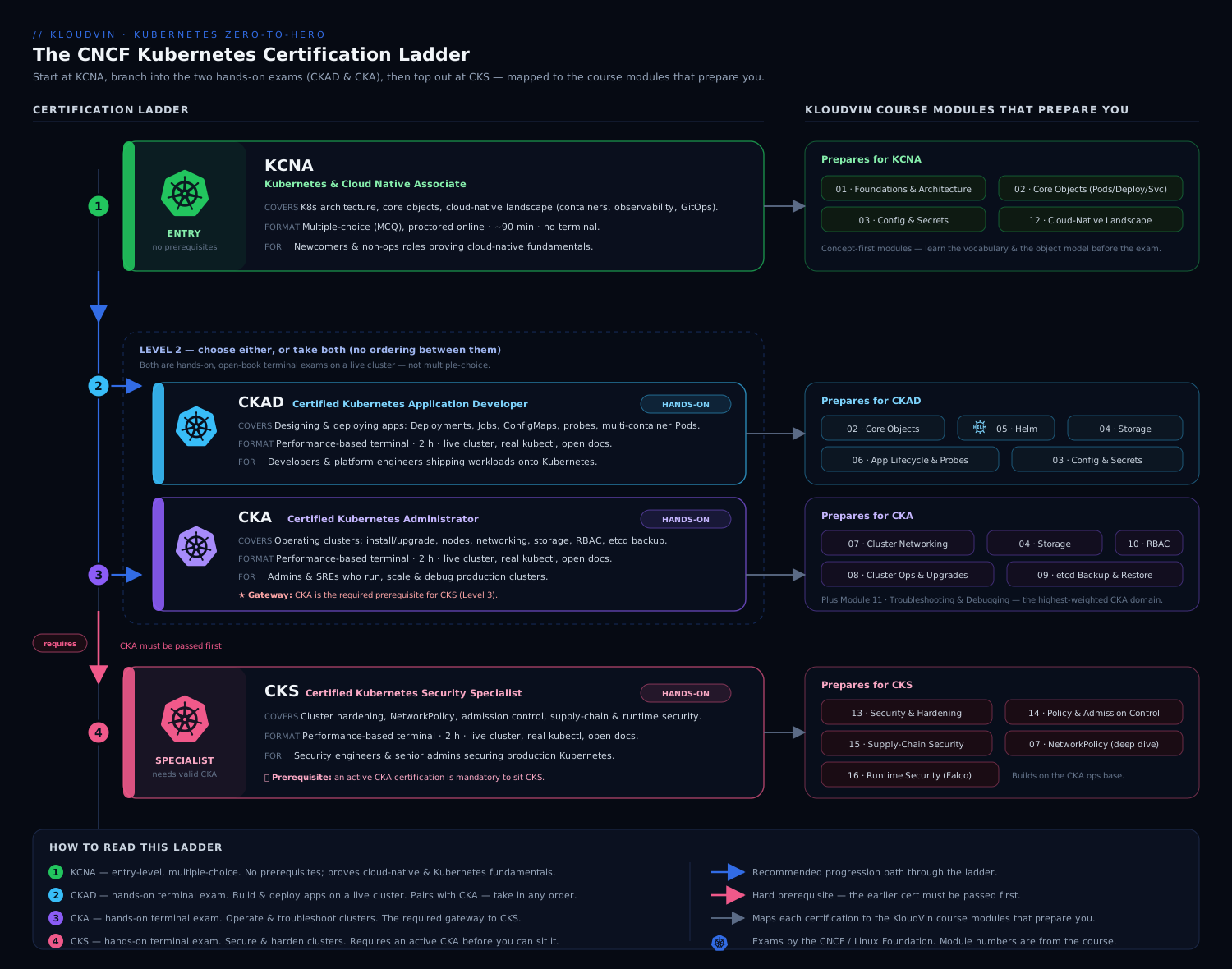
The diagram shows the progression and the one hard gate that trips people up: KCNA is the optional on-ramp, CKAD and CKA are the two parallel role-based exams most people target, and CKS sits above them — and you must hold a current, in-date CKA before you are allowed to register for the CKS. Everything else on the ladder is a free choice.
| Cert | Full name | Format | Length | Passing | Prerequisite | Who it’s for |
|---|---|---|---|---|---|---|
| KCNA | Kubernetes and Cloud Native Associate | Multiple choice (60 Q, proctored online) | 90 min | 75% | None | Newcomers, managers, career-switchers, a credible foundation |
| CKAD | Certified Kubernetes Application Developer | Hands-on, live-cluster terminal | 2 hours | 66% | None | Developers who deploy to and run on Kubernetes |
| CKA | Certified Kubernetes Administrator | Hands-on, live-cluster terminal | 2 hours | 66% | None | Operators / platform / SRE who run clusters |
| CKS | Certified Kubernetes Security Specialist | Hands-on, live-cluster terminal | 2 hours | 67% | Active CKA | Security engineers hardening clusters |
Planning facts that change how you study:
- The practical exams are open-book — for one specific book. During CKAD/CKA/CKS you may keep the official Kubernetes documentation (
kubernetes.io/docsand its sub-domains, plus thekubernetes.io/blog) open in one extra browser tab managed by the exam’s built-in browser. CKS additionally allows a small allow-list: Trivy, Falco, App Armor (Ubuntu Server docs), Sysdig, and the Kubernetes GitHub. You may not use Google, Stack Overflow, ChatGPT, your own notes, or any other site. This is exactly why fast in-cluster lookup (kubectl explain,kubectl -h) and pre-bookmarking the docs is a genuine exam skill, not a nicety. - They are performance-based and time-boxed. You operate a set of clusters and complete ~15–20 weighted tasks. Each task names the cluster context to use — switching with
kubectl config use-context <ctx>is the very first thing you do on every single question. Forgetting this is the single most common way to get a correct answer marked zero, because you built it on the wrong cluster. - Each practical now ships a flag-based notepad and copyable command snippets in the exam UI, and a
PSI/PearsonVUE-style secure browser. The interface evolves; always read the current “Important Instructions” PDF linked from your exam confirmation. - One free retake is included with each Linux Foundation exam purchase — a safety net worth remembering, but not a plan.
- Certifications are valid for two years and track recent Kubernetes releases (currently the v1.30+ line), so the curriculum is a moving target. Always download the current curriculum PDF from the Linux Foundation training site before you book — the weightings below are the present split but they do shift between revisions.
Which one should you take first?
For most engineers leaving this course the honest answer is CKAD or CKA — go straight to a hands-on exam, because that is what proves you can do the job and it is what this course trained you for. Take KCNA if you want a low-stakes confidence builder, you are technical-adjacent (a manager or PM), or your employer reimburses it. Pick CKAD if your day is app manifests, Helm, config and debugging your own workloads; pick CKA if you operate clusters — nodes, etcd, upgrades, RBAC, cluster networking. Then, if security is your path, do CKS last (you will need the CKA first anyway).
KCNA — domain checklist & weightings
KCNA is the only multiple-choice exam here: 60 questions, 90 minutes, 75% to pass, online-proctored. It is broad and shallow — it tests that you understand the ecosystem, not that you can operate it. The weightings are heavily front-loaded onto Kubernetes fundamentals, so that is where to spend your time.
| Domain | Weight | What it covers — your checklist |
|---|---|---|
| Kubernetes Fundamentals | 46% | Resources (Pods, Deployments, Services, namespaces), the API, the architecture (control plane vs nodes, kubelet, kube-proxy, etcd), scheduling basics, containers & the container runtime via CRI, kubectl basics |
| Container Orchestration | 22% | Why orchestration, runtime interfaces (CRI/CNI/CSI), container networking & service discovery, storage, security basics (the 4Cs) |
| Cloud Native Architecture | 16% | Autoscaling, serverless, community/governance, roles & personas, open standards, the 12-factor app, CNCF project landscape |
| Cloud Native Observability | 8% | Telemetry vs observability, Prometheus, metrics/logs/traces, cost management basics |
| Cloud Native Application Delivery | 8% | CI/CD fundamentals, GitOps (Argo CD/Flux), the delivery pipeline |
KCNA needs no terminal skill — it rewards reading. Work the official curriculum, skim the architecture lesson, and learn the CNCF landscape (which project does service mesh, which does GitOps, which does policy). The free KCNA simulator from killer.sh that ships with the exam is multiple-choice and a faithful gauge; if you clear it comfortably, sit the exam.
CKAD — domain checklist & weightings
CKAD is the developer’s practical: can you design, build, configure, observe and expose an application on Kubernetes? Two hours, ~16 tasks, 66% to pass. The biggest single bucket is application configuration and security, and services & networking is bigger than people expect — do not neglect it.
| Domain | Weight | Your checklist of skills to drill |
|---|---|---|
| Application Design and Build | 20% | Multi-container Pods (sidecar/init/ambassador/adapter), define & build a container image, jobs & cronjobs, multi-container patterns, volumes (emptyDir/hostPath/PVC) |
| Application Deployment | 20% | Deployment rolling updates & rollbacks, deployment strategies (blue-green/canary at the manifest level), Helm basics, Kustomize basics, declarative config |
| Application Observability & Maintenance | 15% | Liveness/readiness/startup probes, kubectl logs/describe/events, debugging, the API deprecation cycle, monitoring basics |
| Application Environment, Config & Security | 25% | ConfigMaps & Secrets, securityContext, resource requests/limits & quotas, ServiceAccounts, basic RBAC, admission control awareness, CRDs/operators awareness |
| Services & Networking | 20% | Services (ClusterIP/NodePort/LoadBalancer), Ingress, NetworkPolicies, port exposure, DNS |
CKAD lives almost entirely in imperative kubectl plus quick YAML edits. If you can fluently kubectl create deployment ... --dry-run=client -o yaml, edit the result, and kubectl expose it, you have most of the marks. The worked tasks below are weighted towards exactly these skills.
CKA — domain checklist & weightings
CKA is the operator’s practical: can you stand up, configure, secure, upgrade and troubleshoot a cluster? Two hours, ~17 tasks, 66% to pass. The headline number every CKA candidate must internalise is that Troubleshooting is 30% — almost a third of the exam — followed by cluster architecture and networking. Storage is small but easy marks.
| Domain | Weight | Your checklist of skills to drill |
|---|---|---|
| Troubleshooting | 30% | Cluster & node failures, kubelet/systemd issues, control-plane component failures, networking failures, monitoring cluster components & application logs, evaluating resource usage |
| Cluster Architecture, Installation & Configuration | 25% | RBAC, kubeadm install/join, manage a highly-available control plane, etcd backup & restore, version upgrades, manage TLS certificates, Helm/Kustomize for install, CRDs/operators |
| Services & Networking | 20% | Pod connectivity, NetworkPolicies, Services & endpoints, Ingress & Gateway API, CoreDNS, choose & use a CNI |
| Workloads & Scheduling | 15% | Deployments & rolling updates, ConfigMaps/Secrets, scaling, self-healing, scheduling (affinity, taints/tolerations, node selectors), resource limits, Helm |
| Storage | 10% | StorageClasses, PVs/PVCs, access modes, reclaim policies, volume types, dynamic provisioning |
CKA is where kubeadm, etcdctl snapshot, kubectl drain/cordon, static pod manifests in /etc/kubernetes/manifests, and reading the kubelet’s journalctl -u kubelet become muscle memory. Several tasks below target the high-value CKA skills directly.
CKS — domain checklist & weightings
CKS is the security specialist’s practical and the only one with a prerequisite (an active CKA). Two hours, ~16 tasks, 67% to pass. It assumes you can already operate a cluster; it tests whether you can harden one. The marks are spread fairly evenly, with supply-chain, microservice hardening, and runtime/monitoring each a fifth.
| Domain | Weight | Your checklist of skills to drill |
|---|---|---|
| Cluster Setup | 15% | NetworkPolicies, CIS benchmarks with kube-bench, ingress TLS, protect node metadata & endpoints, verify platform binaries |
| Cluster Hardening | 15% | Restrict API access, RBAC least privilege, ServiceAccount hygiene (automountServiceAccountToken: false), update Kubernetes frequently |
| System Hardening | 10% | Minimise host OS footprint & IAM, minimise external access, AppArmor/seccomp, kernel hardening |
| Minimise Microservice Vulnerabilities | 20% | securityContext, Pod Security Admission (baseline/restricted), OPA/Gatekeeper or Kyverno, secrets management, mTLS / service mesh, runtime sandboxes (gVisor/Kata via RuntimeClass) |
| Supply Chain Security | 20% | Minimise base image footprint, image signing & SBOM (Cosign), static analysis (kubesec, Checkov), scan images for known CVEs (Trivy), allowed registries |
| Monitoring, Logging & Runtime Security | 20% | Behavioural analytics & Falco, detect threats, immutability of containers at runtime, audit logging |
CKS rewards depth in a few free tools — Trivy (image scanning), Falco (runtime detection), kube-bench (CIS), AppArmor/seccomp profiles, and Pod Security Admission. The KloudVin deep-dives on RBAC least privilege, NetworkPolicies, Pod Security Admission and the image supply chain map almost one-to-one onto these CKS domains.
Why these are typing tests: set up for speed
This is the most important section in the kit. On CKAD/CKA/CKS your score is a function of how many weighted tasks you finish correctly in 120 minutes. Knowledge gets you to the right answer; speed gets you to enough answers. Three habits separate passers from failers.
1. The k alias and completion. The first thing you type in the exam terminal — before reading any question — is the alias setup. The official docs explicitly permit it and it is already in ~/.bashrc on current exam images, but type it anyway so it is loaded in your shell:
alias k=kubectl
# enable completion for the alias too:
source <(kubectl completion bash)
complete -o default -F __start_kubectl k
# a few that save real seconds:
export do="--dry-run=client -o yaml"   # k create deploy web --image=nginx $do
export now="--force --grace-period=0"  # k delete pod x $now   (fast delete)
Now k get po, k describe po <tab>, and k create deploy web --image=nginx $do > web.yaml all work. The $do and $now exports are the single biggest time-savers in the toolkit — every “create X” task becomes generate the YAML, tweak two lines, apply.
2. kubectl explain instead of hunting the docs. You are allowed the docs in one tab, but tab-switching and searching is slow. For field questions (“what is the key under spec.template.spec for the grace period?”) kubectl explain is faster and never times out:
k explain pod.spec.containers.securityContext           # one level
k explain pod.spec --recursive | grep -i tolerationSec  # search the whole tree
k explain networkpolicy.spec.ingress.from
3. Imperative generators, not hand-written YAML. Almost nothing in CKAD/CKA should be typed from a blank file. Memorise this generator table — it is the spine of the practical exams:
| You need | Imperative command (then edit + apply) |
|---|---|
| Pod | k run nginx --image=nginx $do > pod.yaml |
| Deployment | k create deploy web --image=nginx --replicas=3 $do > d.yaml |
| Service for a Deployment | k expose deploy web --port=80 --target-port=8080 $do > svc.yaml |
| NodePort Service | k create svc nodeport web --tcp=80:8080 $do > svc.yaml |
| ConfigMap (literals) | k create cm app --from-literal=ENV=prod $do > cm.yaml |
| Secret (generic) | k create secret generic db --from-literal=pw=s3cr3t $do > sec.yaml |
| Job / CronJob | k create job pi --image=perl -- perl -e 'print 1' $do · k create cronjob c --image=busybox --schedule="*/1 * * * *" -- date $do |
| RBAC Role | k create role r --verb=get,list,watch --resource=pods $do > role.yaml |
| RoleBinding | k create rolebinding rb --role=r --serviceaccount=ns:sa $do > rb.yaml |
| ServiceAccount | k create sa app $do > sa.yaml |
| Namespace | k create ns dev $do > ns.yaml |
| Quick run-and-test | k run tmp --image=busybox --rm -it --restart=Never -- sh |
NetworkPolicies, PersistentVolumeClaims, PodSecurity, and Ingress have no clean imperative generator — for those, copy the nearest example from the docs and edit it. Bookmark those specific doc pages before exam day. And whatever you build, finish with --dry-run=server or a k get/k describe to verify before moving on.
One more speed lever: a sane Vim. Put this in ~/.vimrc at the start of the exam so YAML edits do not fight you:
set tabstop=2 shiftwidth=2 expandtab
set number
Practice task bank — worked solutions
This is the drill. Each task is the shape of a real exam question; do it on a local kind/minikube/k3d cluster, against the clock, then check yourself. Solutions favour the imperative-then-edit method and always include the verification step — on the exam, an unverified task is a guess.
Run these on a throwaway cluster:
kind create cluster --name prep(orminikube start). Tear down at the end withkind delete cluster --name prep.
Task 1 — Deployment + Service (CKAD/CKA core)
Create a Deployment web in namespace app with image nginx:1.27, 3 replicas, container port 80, and expose it as a ClusterIP Service on port 80.
k create ns app
k create deploy web -n app --image=nginx:1.27 --replicas=3 --port=80 $do > web.yaml
k apply -f web.yaml
k expose deploy web -n app --port=80 --target-port=80
# verify:
k get deploy,svc,ep -n app
k get po -n app -l app=web -o wide
Verification you would expect: the Deployment shows 3/3 ready, the Service has a ClusterIP, and k get ep web -n app lists three endpoint IPs (an empty endpoints list is the classic “Service selector doesn’t match” bug — see Task 4).
Task 2 — Fix a broken Pod (CKA troubleshooting, 30%)
A Pod db in namespace data is not running. Diagnose and fix it. This is the most common exam shape. Use the same method every time: describe → read Events → identify the layer → fix.
k get po db -n data            # note STATUS: CrashLoopBackOff? ImagePullBackOff? Pending?
k describe po db -n data       # READ THE EVENTS at the bottom — they almost always name the cause
k logs db -n data --previous   # for CrashLoopBackOff, the previous container's logs
Common causes and the fix:
| STATUS / Event | Root cause | Fix |
|---|---|---|
ImagePullBackOff / ErrImagePull |
Wrong image name/tag, or private registry without imagePullSecrets |
Correct the image; or k create secret docker-registry + reference it |
CrashLoopBackOff |
App exits immediately (bad command/args, missing env/config) | k logs --previous; fix command/args or the missing ConfigMap/Secret |
Pending (no events about scheduling) |
Unbound PVC | k get pvc -n data — provision a matching PV/StorageClass (Task 6) |
Pending + “0/ nodes available: insufficient cpu/memory” |
Requests exceed node capacity | Lower resources.requests, or add capacity |
Pending + “node(s) had untolerated taint” |
Taint with no matching toleration | Add a toleration, or remove the taint (Task 7) |
0/1 Running but not Ready |
Failing readiness probe | k describe the probe; fix the endpoint/port or the app |
The exam grades the running, correct Pod, not your diagnosis — but the diagnosis is how you get there fast.
Task 3 — NetworkPolicy: default-deny + allow (CKAD/CKA/CKS)
In namespace secure, deny all ingress to every Pod, then allow ingress to Pods labelled app=api on TCP 8080 only from Pods labelled role=frontend. There is no imperative generator — start from the docs example and edit. Two manifests:
# 1) default-deny all ingress in the namespace
apiVersion: networking.k8s.io/v1
kind: NetworkPolicy
metadata:
  name: default-deny-ingress
  namespace: secure
spec:
  podSelector: {}            # selects ALL pods in the namespace
  policyTypes: ["Ingress"]   # with no ingress rules => deny all ingress
---
# 2) allow frontend -> api:8080
apiVersion: networking.k8s.io/v1
kind: NetworkPolicy
metadata:
  name: allow-frontend-to-api
  namespace: secure
spec:
  podSelector:
    matchLabels: { app: api }
  policyTypes: ["Ingress"]
  ingress:
    - from:
        - podSelector:
            matchLabels: { role: frontend }
      ports:
        - protocol: TCP
          port: 8080
k apply -f netpol.yaml
# verify (kind ships a CNI without policy enforcement by default — use a policy-capable CNI):
k run fe --image=nicolaka/netshoot -n secure --labels=role=frontend --rm -it -- \
  sh -c 'nc -zv api 8080'   # should succeed
k run x --image=nicolaka/netshoot -n secure --rm -it -- \
  sh -c 'nc -zv api 8080'   # should be blocked
Exam gotcha: NetworkPolicy is additive — the default-deny plus the allow together produce “only frontend may reach api”. Forgetting policyTypes or leaving ingress: [] off changes the meaning entirely. (On a real kind cluster, install Calico or Cilium to actually enforce policy; the default kindnet CNI does not.)
Task 4 — Service has no endpoints (CKA/CKAD networking)
Users report a Service web returns connection refused. The Pods are Running. The textbook symptom of a selector mismatch.
k get ep web -n app                 # EMPTY endpoints => selector doesn't match any Pod
k get svc web -n app -o jsonpath='{.spec.selector}'; echo
k get po -n app --show-labels       # compare the Pod labels to the selector
If the Service selector is app=web but the Pods are labelled app=webapp, fix one side:
k label po -l app=webapp -n app app=web --overwrite   # or edit the Service selector
k get ep web -n app                                    # now lists Pod IPs
If endpoints exist but it still fails, check the targetPort matches the container’s real port, and that a readiness probe is not keeping Pods out of the endpoints list (k get ep only includes Ready Pods).
Task 5 — RBAC: a least-privilege Role for a ServiceAccount (CKA/CKS)
Create a ServiceAccount deployer in namespace app, a Role that allows only get/list/watch on Pods and create/get/list on Deployments, and bind them.
k create sa deployer -n app
k create role deployer-role -n app \
  --verb=get,list,watch --resource=pods \
  --verb=create,get,list --resource=deployments $do > role.yaml
k apply -f role.yaml
k create rolebinding deployer-rb -n app \
  --role=deployer-role --serviceaccount=app:deployer
# verify with `auth can-i` impersonating the ServiceAccount:
k auth can-i list pods -n app --as=system:serviceaccount:app:deployer        # yes
k auth can-i delete pods -n app --as=system:serviceaccount:app:deployer      # no
k auth can-i create deployments -n app --as=system:serviceaccount:app:deployer  # yes
kubectl auth can-i ... --as=... is the fastest way to prove an RBAC task is correct — memorise it. For a cluster-wide version, swap role→clusterrole and rolebinding→clusterrolebinding. The KloudVin RBAC least-privilege deep-dive covers aggregation and the resourceNames trick if you want more depth.
Task 6 — PersistentVolumeClaim bound to a Pod (CKAD/CKA storage)
Create a 1Gi PVC data (access mode ReadWriteOnce, StorageClass standard) in namespace app and mount it in a Pod at /data. No imperative generator — edit YAML.
apiVersion: v1
kind: PersistentVolumeClaim
metadata: { name: data, namespace: app }
spec:
  accessModes: ["ReadWriteOnce"]
  storageClassName: standard
  resources:
    requests:
      storage: 1Gi
---
apiVersion: v1
kind: Pod
metadata: { name: app, namespace: app }
spec:
  containers:
    - name: app
      image: busybox
      command: ["sh", "-c", "sleep 3600"]
      volumeMounts:
        - { name: vol, mountPath: /data }
  volumes:
    - name: vol
      persistentVolumeClaim:
        claimName: data
k apply -f pvc.yaml
k get pvc data -n app          # STATUS should become Bound (kind/minikube ship a default provisioner)
k exec -n app app -- sh -c 'echo hi > /data/f && cat /data/f'
Gotcha: if the PVC stays Pending, the named StorageClass doesn’t exist or has no provisioner. k get sc to see what’s available; on kind the default is standard (rancher local-path), on minikube it’s standard (hostpath). Match the task’s StorageClass exactly.
Task 7 — Scheduling: taint a node, tolerate it, and pin a Pod (CKA workloads)
Taint node worker-1 with gpu=true:NoSchedule, then schedule a Pod cuda only onto that node.
k taint node worker-1 gpu=true:NoSchedule
k label node worker-1 accelerator=gpu   # for the nodeSelector half
apiVersion: v1
kind: Pod
metadata: { name: cuda }
spec:
  nodeSelector: { accelerator: gpu }      # land it on the gpu node
  tolerations:                            # tolerate the taint so it's allowed there
    - key: gpu
      operator: Equal
      value: "true"
      effect: NoSchedule
  containers:
    - { name: cuda, image: nginx }
k apply -f cuda.yaml
k get po cuda -o wide        # NODE column should be worker-1
# to remove the taint later (note the trailing minus):
k taint node worker-1 gpu=true:NoSchedule-
Exam point an interviewer also loves: a toleration only allows a Pod onto a tainted node — it does not attract it. To guarantee placement you also need a nodeSelector or node affinity, which is why this task uses both.
Task 8 — etcd snapshot backup & restore (CKA, high-value)
Back up etcd to /opt/etcd-backup.db, then restore it. A near-certain CKA task. On a kubeadm control-plane node the certs live under /etc/kubernetes/pki/etcd:
ETCDCTL_API=3 etcdctl snapshot save /opt/etcd-backup.db \
  --endpoints=https://127.0.0.1:2379 \
  --cacert=/etc/kubernetes/pki/etcd/ca.crt \
  --cert=/etc/kubernetes/pki/etcd/server.crt \
  --key=/etc/kubernetes/pki/etcd/server.key
ETCDCTL_API=3 etcdctl snapshot status /opt/etcd-backup.db --write-out=table   # verify

# restore into a NEW data dir, then point static-pod etcd at it:
ETCDCTL_API=3 etcdctl snapshot restore /opt/etcd-backup.db \
  --data-dir=/var/lib/etcd-restore
# edit /etc/kubernetes/manifests/etcd.yaml: change the hostPath volume for the
# data dir from /var/lib/etcd to /var/lib/etcd-restore, then let the kubelet
# recreate the static pod.
The exam supplies the exact endpoint and cert paths in the question — read them, do not assume. The restore half trips people because they forget that etcd runs as a static pod: you change /etc/kubernetes/manifests/etcd.yaml and the kubelet restarts it; you do not kubectl edit it.
Task 9 — Multi-container Pod: a sidecar (CKAD design, 20%)
Run a Pod with an app container web (nginx) and a sidecar log (busybox) that tails a shared log file, sharing an emptyDir.
apiVersion: v1
kind: Pod
metadata: { name: web-with-sidecar }
spec:
  volumes:
    - name: logs
      emptyDir: {}
  containers:
    - name: web
      image: nginx
      volumeMounts: [{ name: logs, mountPath: /var/log/nginx }]
    - name: log
      image: busybox
      command: ["sh", "-c", "tail -F /var/log/nginx/access.log"]
      volumeMounts: [{ name: logs, mountPath: /var/log/nginx }]
k apply -f sidecar.yaml
k get po web-with-sidecar          # READY should be 2/2
k logs web-with-sidecar -c log     # the sidecar's view
Know the four multi-container patterns by name for CKAD: sidecar (augments the main app), init container (runs to completion before the app starts), ambassador (proxies outbound), adapter (reshapes the app’s output). On v1.29+ a true native sidecar is an init container with restartPolicy: Always — worth knowing if the question specifies “sidecar that starts before and stops after the main container”.
Task 10 — Probes + resources: a production-grade container spec (CKAD config, CKA workloads)
Add a liveness probe (HTTP /healthz on 8080, start after 10s), a readiness probe (TCP 8080), and resource requests/limits to a Deployment.
# inside spec.template.spec.containers[0]:
livenessProbe:
  httpGet: { path: /healthz, port: 8080 }
  initialDelaySeconds: 10
  periodSeconds: 10
readinessProbe:
  tcpSocket: { port: 8080 }
  periodSeconds: 5
resources:
  requests: { cpu: "100m", memory: "128Mi" }
  limits:   { cpu: "500m", memory: "256Mi" }
k apply -f deploy.yaml
k describe deploy web | grep -A3 -i liveness
k get po -l app=web      # confirm pods go Ready (readiness passing) and don't restart-loop (liveness OK)
Use k explain pod.spec.containers.livenessProbe --recursive if you blank on a field name — faster than the docs tab.
Task 11 — CKS: enforce restricted Pod Security & a hardened securityContext
Label namespace prod to enforce the restricted Pod Security Standard, and make a Pod compliant (non-root, no privilege escalation, read-only root FS, drop all capabilities).
k label ns prod \
  pod-security.kubernetes.io/enforce=restricted \
  pod-security.kubernetes.io/enforce-version=latest
apiVersion: v1
kind: Pod
metadata: { name: hardened, namespace: prod }
spec:
  securityContext:
    runAsNonRoot: true
    runAsUser: 1000
    seccompProfile: { type: RuntimeDefault }
  containers:
    - name: app
      image: nginxinc/nginx-unprivileged
      securityContext:
        allowPrivilegeEscalation: false
        readOnlyRootFilesystem: true
        capabilities:
          drop: ["ALL"]
k apply -f hardened.yaml
k get po -n prod              # a non-compliant pod is REJECTED at admission with a clear message
This is the heart of CKS’s 20% “minimise microservice vulnerabilities” domain. If a Pod is rejected, the admission error tells you exactly which field violates restricted — read it and fix that field. The Pod Security Admission deep-dive covers warn/audit modes and migration.
Task 12 — CKS: scan an image with Trivy and tighten host access
Scan myapp:1.0 for HIGH/CRITICAL CVEs with Trivy, and disable the default ServiceAccount token automount in namespace prod.
trivy image --severity HIGH,CRITICAL --exit-code 1 myapp:1.0   # non-zero exit if any found
# stop auto-mounting SA tokens where pods don't need API access:
k patch sa default -n prod -p '{"automountServiceAccountToken": false}'
Trivy (image scanning), kube-bench (CIS benchmark), Falco (runtime detection) and AppArmor/seccomp profiles are the CKS toolset — install and play with each on a local cluster before the exam, because the question will assume you know the CLI flags. The image supply-chain deep-dive covers Cosign signing and SBOMs for the supply-chain domain.
Time management
Two hours, ~16–17 tasks. The arithmetic is unforgiving: that is roughly 7 minutes per task, and some tasks are worth 2% while others are worth 13%. Work it like an exam, not a project.
- Read the weight on every task — the exam shows each task’s percentage. Do the cheap, high-value, familiar ones first; the order is yours to choose.
use-contextfirst, every time. Make it a reflex: read the task, copy the context command from the task text, run it, then start.- Flag and skip. If a task isn’t yielding in ~8 minutes, flag it in the exam UI and move on. A 4% task you’re stuck on is costing you two 7% tasks you could finish.
- Verify, then leave it. A quick
k get/describe/auth can-iproves it works. Do not gold-plate a task that already passes. - Budget the last 10 minutes to revisit flagged tasks and re-check anything you rushed. Confirm you didn’t leave a half-applied manifest.
- Don’t hand-write what
kubectlcan generate. Every minute saved on Task 1’s boilerplate is a minute for Task 9’s troubleshooting.
The killer.sh simulator
Every CKAD/CKA/CKS purchase from the Linux Foundation includes two free sessions of the killer.sh simulator — and using it well is the highest-leverage thing you can do.
- It is deliberately harder than the real exam. killer.sh packs more and tougher tasks into the same two hours; the widely shared rule of thumb is that if you can comfortably clear killer.sh, the real exam will feel easier. Do not panic if your first attempt is rough.
- Each session is active for 36 hours from first start, and you can reset the environment as many times as you like within that window — so the right pattern is: attempt it cold once under exam conditions to gauge yourself, then re-run it as many times as needed to drill the tasks until every solution is automatic.
- Study the provided solutions. killer.sh ships a full worked answer for every task; the value is as much in reading those as in the first attempt.
- It is the real exam interface (same terminal, same remote-desktop feel), so it doubles as your rehearsal for the environment — the copy/paste quirks, the docs tab, the flagging UI.
Treat your two sessions as gold: don’t burn the first one casually months out. Use the first ~2–3 weeks before the exam, fix your weak domains, and use the second in the final week as a confidence check.
Exam-day logistics
The exams are delivered online through PSI’s secure browser (the platform has shifted between PSI and PearsonVUE over time — your confirmation email names the current one). Surprises here cost real time and, at worst, a voided exam. Walk in prepared.
| Step | What to do | Gotcha |
|---|---|---|
| Before booking | Run the system check from your confirmation email on the exact machine + network you’ll use | Corporate laptops/VPNs and locked-down browsers fail the secure-browser check — use a personal machine |
| ID | Have a valid, non-expired government photo ID; the name must match your Linux Foundation profile exactly | A mismatched or expired ID is the most common day-of rejection |
| Environment | A quiet, private room; a clear desk (no notes, no second monitor, no phone, no watch); good lighting | The proctor will make you do a 360° webcam room scan and show under the desk |
| Hardware | A working webcam + microphone; a single screen (external monitors must be unplugged) | Dual-monitor setups are a frequent disqualifier — unplug and put away |
| Check-in | Log in ~30 minutes early; check-in, ID verification and room scan take time | Late check-in eats into your exam clock |
| During | Use the in-exam notepad and the one permitted docs tab; webcam stays on and you stay in frame | Looking off-screen repeatedly, or anyone entering the room, can pause or void the exam |
| Breaks | One short break is typically allowed; the clock and webcam keep running | You cannot leave the camera’s view freely — plan accordingly |
| Results | Delivered by email, typically within 24 hours; the digital badge follows | The score report shows per-domain performance — useful if you need the free retake |
Two non-obvious tips: disable any clipboard manager and translation extension before the secure browser refuses to launch, and bookmark your handful of go-to docs pages (NetworkPolicy example, PV/PVC example, securityContext, Ingress, the kubeadm upgrade page) in a fresh browser profile so the one permitted tab lands you on the right page in one click.
Per-exam speed cheat sheets
One page per exam — the commands and facts to have at your fingertips the night before.
KCNA cheat sheet (written)
- 60 MCQs · 90 min · 75% · no terminal. Reward: breadth.
- Spend time on Kubernetes Fundamentals (46%): architecture, the core objects, CRI/CNI/CSI.
- Know the CNCF landscape by category: service mesh (Istio/Linkerd), GitOps (Argo CD/Flux), policy (OPA/Kyverno), observability (Prometheus), runtime (containerd/CRI-O).
- Know the 4Cs of cloud-native security, the 12-factor app, and what HPA/serverless are.
CKAD cheat sheet (hands-on)
alias k=kubectl; export do="--dry-run=client -o yaml"; export now="--force --grace-period=0"
k run / k create deploy / k expose / k create cm / k create secret / k create job   # generators
k set image deploy/web web=nginx:1.27        # rolling update
k rollout status|undo|history deploy/web     # rollouts
k scale deploy/web --replicas=5
k label / k annotate ... --overwrite
k logs -f / k logs --previous / k exec -it ... -- sh
k explain <res>.spec --recursive | grep -i <field>
- Heaviest domains: Config & Security (25%), then Design/Deployment/Networking (20% each).
- No generator for NetworkPolicy / PVC / Ingress / PodSecurity — copy from docs, edit.
- Always
k get/k describeto verify; alwaysuse-contextfirst.
CKA cheat sheet (hands-on)
# nodes & lifecycle
k drain <node> --ignore-daemonsets --delete-emptydir-data ; k cordon/uncordon <node>
k taint node <n> key=val:NoSchedule[-]
journalctl -u kubelet -f ; systemctl status kubelet     # node/kubelet debug
ls /etc/kubernetes/manifests   # static pods: apiserver, etcd, scheduler, controller-manager
# etcd backup/restore (paths come from the task!)
ETCDCTL_API=3 etcdctl snapshot save/restore ... --cacert/--cert/--key ...
# upgrade (per node): drain -> apt install kubeadm=X -> kubeadm upgrade apply/node -> kubelet -> uncordon
k get ep <svc>   # empty == selector mismatch
k auth can-i <verb> <res> --as=system:serviceaccount:<ns>:<sa>
- Heaviest domain by far: Troubleshooting (30%) —
describe/events/logsis your loop. Then Architecture (25%), Networking (20%). - etcd is a static pod: fix it via
/etc/kubernetes/manifests, notkubectl edit.
CKS cheat sheet (hands-on, requires CKA)
trivy image --severity HIGH,CRITICAL --exit-code 1 <img>     # supply chain
kube-bench run --targets master,node                          # CIS benchmark
k label ns <ns> pod-security.kubernetes.io/enforce=restricted # Pod Security Admission
k patch sa default -n <ns> -p '{"automountServiceAccountToken": false}'  # SA hygiene
# securityContext: runAsNonRoot, allowPrivilegeEscalation:false, readOnlyRootFilesystem:true,
#                  capabilities.drop:[ALL], seccompProfile.type:RuntimeDefault
# AppArmor: container.apparmor.security.beta.kubernetes.io/<container>: localhost/<profile>
# audit policy file -> kube-apiserver --audit-policy-file= / --audit-log-path=
# Falco: runtime threat detection; check /etc/falco/falco_rules.yaml
- Even spread; biggest are Microservice hardening / Supply chain / Runtime (20% each).
- Allowed extra docs: Trivy, Falco, AppArmor, Sysdig + k8s docs — bookmark them.
Common mistakes & troubleshooting
| Symptom in your prep / exam | Cause | Fix |
|---|---|---|
| Correct answer marked zero | Built on the wrong cluster | kubectl config use-context <ctx> as the first action of every task |
| Running out of time | Hand-writing YAML from scratch | Use the generator table + $do; copy docs examples for NetworkPolicy/PVC |
k alias / completion not working |
Shell didn’t source it | Re-run the alias + complete -F __start_kubectl k block at the start |
| NetworkPolicy “doesn’t work” locally | kind’s default CNI doesn’t enforce policy | Install Calico/Cilium on the practice cluster; on the exam it’s enforced |
| Service returns connection refused | Empty endpoints (selector mismatch) or wrong targetPort |
k get ep; align Service selector ↔ Pod labels; check targetPort |
| etcd restore “didn’t take” | Edited it with kubectl edit |
etcd is a static pod — change /etc/kubernetes/manifests/etcd.yaml |
Pod rejected in a restricted namespace |
Missing securityContext fields | Add runAsNonRoot, drop ALL caps, allowPrivilegeEscalation:false, seccomp |
| Secure browser won’t launch on exam day | Clipboard/translation extensions, VPN, dual monitors | Personal machine, single screen, extensions off, off VPN; system-check beforehand |
Best practices
- Practise against the clock from day one. Knowing the answer slowly is failing slowly. Re-do the task bank until each solution is automatic.
- Make
use-contextandverifyreflexes, not afterthoughts — they are the two habits that convert knowledge into marks. - Learn the imperative generators cold. They are the difference between finishing 16 tasks and finishing 11.
- Bookmark a tight set of docs pages in a clean browser profile; you get one tab, make it land on the right page in one click.
- Burn killer.sh deliberately: one cold run to gauge, repeated runs to drill, the second session in the final week.
- Map your weak domains to the deep-dive lessons (RBAC, NetworkPolicies, Pod Security, troubleshooting) and re-read only those — don’t re-read what you already pass.
Security notes
The CKS is itself a security exam, so most of the kit’s security content lives in its domain checklist and Tasks 11–12. Two meta-points worth stating plainly. First, the exam’s open-tab policy is strict and enforced by a remote proctor — using any disallowed resource (a second machine, a phone, your notes, an AI assistant) is grounds for a voided result and a possible ban, so build the habit of relying only on kubectl explain and the one permitted docs tab. Second, when you practise the CKS tasks locally, treat the tools as you would in production: a default-deny NetworkPolicy plus least-privilege RBAC plus automountServiceAccountToken: false plus a restricted Pod Security namespace is the baseline you should be able to stand up from memory — not just to pass, but because it is genuinely the right way to run a cluster.
Interview & exam questions
These mirror both the practical tasks and what interviewers probe when they see a CNCF cert on your CV. Say the answers out loud — fluency is the point.
- Which Kubernetes exams are hands-on, and what does that change about how you prepare? CKAD, CKA and CKS are hands-on, performance-based terminal exams (KCNA is multiple-choice). It means you prepare by doing tasks against the clock, not by reading — and that
kubectlspeed (alias, generators,explain) is itself a graded skill. - What is the prerequisite chain? None for KCNA, CKAD, or CKA. CKS requires an active, in-date CKA.
- Which domain is heaviest on the CKA, and why does that shape your study? Troubleshooting at 30% — nearly a third. You drill the
get→describe→events→logsloop and the symptom→cause→fix table until it’s automatic. - You create a Service but it returns connection refused; the Pods are Running. First move?
kubectl get endpoints <svc>. Empty endpoints means the Service selector doesn’t match the Pod labels (or the Pods aren’t Ready); align them. If endpoints exist, checktargetPort. - Walk me through backing up and restoring etcd on a kubeadm cluster.
ETCDCTL_API=3 etcdctl snapshot savewith the--cacert/--cert/--keyfrom/etc/kubernetes/pki/etcd; verify withsnapshot status. Restore withsnapshot restore --data-dir=<new>, then edit/etc/kubernetes/manifests/etcd.yamlto point at the new data dir — etcd is a static pod, so the kubelet restarts it. - A toleration vs a nodeSelector — what’s the difference? A toleration only allows a Pod onto a tainted node; it doesn’t attract it. To place a Pod on a specific node you also need a nodeSelector or node affinity. Taints repel; selectors/affinity attract.
- How do you quickly prove an RBAC change is correct?
kubectl auth can-i <verb> <resource> --as=system:serviceaccount:<ns>:<sa>— it returns yes/no without needing to deploy anything. - You’re told to create a Deployment and Service. Do you write YAML by hand? No —
k create deploy ... $do > d.yaml, edit, apply, thenk expose. Generators first; hand-write only what has no generator (NetworkPolicy, PVC, Ingress, PodSecurity), copying from the docs. - What makes a Pod compliant with the
restrictedPod Security Standard?runAsNonRoot: true,allowPrivilegeEscalation: false,readOnlyRootFilesystem: true, dropALLcapabilities, andseccompProfile.type: RuntimeDefault. The admission error names the exact violating field. - What’s the single most common way to lose marks on a correct answer? Building it on the wrong cluster.
kubectl config use-contextis the first action of every task. - What tools should you be fluent with for the CKS? Trivy (image CVE scanning), kube-bench (CIS), Falco (runtime detection), AppArmor/seccomp profiles, Pod Security Admission, and Cosign for signing — all free.
- How hard is killer.sh relative to the real exam, and how should you use it? Deliberately harder. Use one of the two included sessions cold to gauge yourself, then reset and re-run to drill until every solution is automatic; save the second session for the final week.
Quick check
- Which of the four certs is not a hands-on terminal exam?
- What command do you run first on every task in a practical exam?
- Name the two
kubectlgenerators you’d use to create a Deployment and then expose it. - On a kubeadm cluster, how do you point restored etcd at its new data directory?
- Which CKA domain carries the most weight?
Answers: (1) KCNA — it’s multiple-choice; CKAD/CKA/CKS are hands-on. (2) kubectl config use-context <ctx> — to be on the cluster the task names. (3) k create deploy web --image=... $do then k expose deploy web --port=.... (4) Edit the etcd static pod manifest /etc/kubernetes/manifests/etcd.yaml to mount the new --data-dir; the kubelet restarts it. (5) Troubleshooting (30%).
Exercise
Stand up a fresh local cluster and run a timed mock: set a 60-minute timer and complete Tasks 1, 2, 3, 5, 8, 10 and 11 from the bank back-to-back, applying the exam discipline — use-context/namespace first, generators over hand-written YAML, a k get/describe/auth can-i verification on each, and flag-and-skip anything that stalls past 8 minutes. Score yourself: a task counts only if your verification passes. If you clear five of the seven inside the hour with everything verified, you are tracking towards a pass; if not, note which domains cost you the time, re-read the matching deep-dive lesson, and re-run the mock two days later. Then book your two killer.sh sessions around the same discipline.
Certification mapping
This lesson is the meta-lesson for the whole CNCF ladder, so the mapping is the kit itself:
- KCNA — the written domain checklist above; pair with the architecture and core objects lessons.
- CKAD — the generator table + Tasks 1, 3, 6, 9, 10; config/security is the heaviest domain.
- CKA — Tasks 2, 4, 5, 7, 8 + the provisioning and troubleshooting lessons; Troubleshooting is 30%.
- CKS — Tasks 11–12 + the RBAC, NetworkPolicy, Pod Security and supply-chain deep-dives; requires an active CKA.
Glossary
- CNCF — Cloud Native Computing Foundation; stewards Kubernetes and runs the certification programme with the Linux Foundation.
- KCNA / CKAD / CKA / CKS — the four CNCF Kubernetes certs: associate (written), application developer, administrator, and security specialist (the last three hands-on).
- Performance-based exam — a test where you complete real tasks in a live environment rather than answering questions; CKAD/CKA/CKS are performance-based.
kalias —alias k=kubectl; the standard shorthand, with shell completion wired to it, used to save keystrokes under exam time pressure.- Imperative generator — a
kubectl create/run/exposecommand with--dry-run=client -o yamlthat emits a manifest to edit, instead of hand-writing YAML. kubectl explain— built-in field documentation (k explain <resource>.spec --recursive) used to look up manifest fields without leaving the terminal.- killer.sh — the official exam simulator (two sessions included with CKAD/CKA/CKS), deliberately harder than the real exam, used to rehearse the interface and drill tasks.
- Static pod — a Pod managed directly by the kubelet from a manifest in
/etc/kubernetes/manifests(etcd, apiserver, scheduler, controller-manager on kubeadm); edited on disk, not via the API. - Pod Security Admission — the built-in admission controller enforcing the
privileged/baseline/restrictedstandards via namespace labels. - Trivy / Falco / kube-bench — the free CKS toolset: image CVE scanning, runtime threat detection, and CIS-benchmark checking respectively.
Next steps
That completes the Kubernetes Zero-to-Hero course — you have gone from a first container to architecting and operating production clusters, and now to a concrete plan for proving it with a CNCF credential. The path from here is simple: pick your exam (CKAD or CKA for most people), work the task bank in this kit against the clock until the solutions are automatic, re-read only the deep-dive lessons covering your weak domains, burn your two killer.sh sessions, and book the exam. Then add the badge to your CV and revisit the portfolio projects ladder to turn the credential into demonstrable, job-ready work. Good luck — you’re ready.