The difference between an engineer who has run Kubernetes for a year and one who is still nervous around it is rarely knowledge of obscure features. It is a method. When a pod is stuck and a manager is asking for an ETA, the strong engineer does not guess — they run a short, fixed sequence of commands that narrows the problem to one layer, form a hypothesis, prove it, fix it, and verify. Everyone else restarts things and hopes.
This lesson gives you that method and then turns it into playbooks: for each common failure you will get a table of symptom → likely cause → the diagnostic command that confirms it → the fix. We cover the failures you genuinely hit in production and on the CKA/CKS exams — pods that crash-loop, fail to pull images, get OOM-killed, sit Pending or get Evicted; nodes that go NotReady; Services with no endpoints, DNS that fails, NetworkPolicies that silently drop traffic, and Ingress controllers returning 502; storage that never binds or never mounts; and the RBAC Forbidden and admission-webhook denials that block deploys. By the end you will diagnose any of these on a free local cluster without guessing.
Learning objectives
By the end of this lesson you can:
- Apply a repeatable troubleshooting loop — observe, isolate the layer, compare desired vs actual, hypothesise, fix, verify, prevent — to any Kubernetes failure.
- Drive the four core diagnostic commands (
kubectl get,describe,logs, and events) fluently, and know exactly which one answers which question. - Diagnose every common Pod failure:
CrashLoopBackOff,ImagePullBackOff,OOMKilled,Pending, andEvicted. - Triage a NotReady node and the node-pressure conditions (
MemoryPressure,DiskPressure,PIDPressure) behind it. - Debug Service/DNS/NetworkPolicy/Ingress problems — “no endpoints”, CoreDNS failures, default-deny drops, and Ingress 502s.
- Fix storage failures — a
PendingPVC, mount/attach errors, and access-mode mismatches — and RBAC/admission denials.
Prerequisites & where this fits
You need a working kubectl, a cluster you can break (a free local one is ideal — kind, minikube, or k3d), and the core object model from earlier in the course: Pods, ReplicaSets, Deployments & Services and the control-plane/node architecture. It also helps to have met RBAC, NetworkPolicies, and CSI storage, though we re-explain each failure from first principles. This is the Troubleshooting lesson of the Kubernetes Zero-to-Hero course: the bridge between knowing the objects and operating them under pressure. The next lesson steps up to cluster-level incidents and root-cause analysis. Everything here runs on free, local tooling — no cloud account, no charges.
The method: a loop, not a guess
Almost every Kubernetes problem yields to the same six-step loop. The discipline is to follow it in order rather than jumping to a fix you have used before.
- Observe. Look at reality before forming any opinion.
kubectl getfor the high-level state, thenkubectl describefor the detail and Events, thenkubectl logsfor what the app itself said. Read the cluster’s own event stream withkubectl get events --sort-by=.lastTimestamp. Resist the urge to change anything yet. - Isolate the layer. Kubernetes is layered — scheduling → image/runtime → application → networking → storage → policy/auth. Decide which layer the symptom lives in. A pod that never gets a node is a scheduling problem; a pod that runs but a Service can’t reach it is a networking problem. Naming the layer eliminates 80% of the search space.
- Compare desired vs actual. Kubernetes is declarative: every controller is trying to make actual match desired. Most bugs are a gap between the two — a Service selector that doesn’t match the pod labels, a replica count that the scheduler can’t satisfy, an image tag that doesn’t exist. Put the spec next to the live state and look for the mismatch.
- Form one hypothesis. State it as a falsifiable sentence: “the Service has no endpoints because its selector is
app=webbut the pods are labelledapp=frontend.” A vague hunch (“networking is broken”) cannot be tested; a specific claim can. - Fix — the smallest change that tests the hypothesis. Edit the manifest and re-apply (
kubectl apply -f), not a manual hot-patch you’ll forget. If the fix proves the hypothesis, you’ve also found the root cause. If it doesn’t, you’ve cheaply eliminated one possibility — go back to step 4. - Verify, then prevent. Confirm the symptom is gone, not just that “it looks better”:
kubectl get podsallRunning/Ready,kubectl get endpointspopulated,kubectl rollout statuscomplete. Then ask the prevention question: what guardrail (a probe, a resource request, a default-deny policy with the right allow-rule, a CI check) stops this recurring?
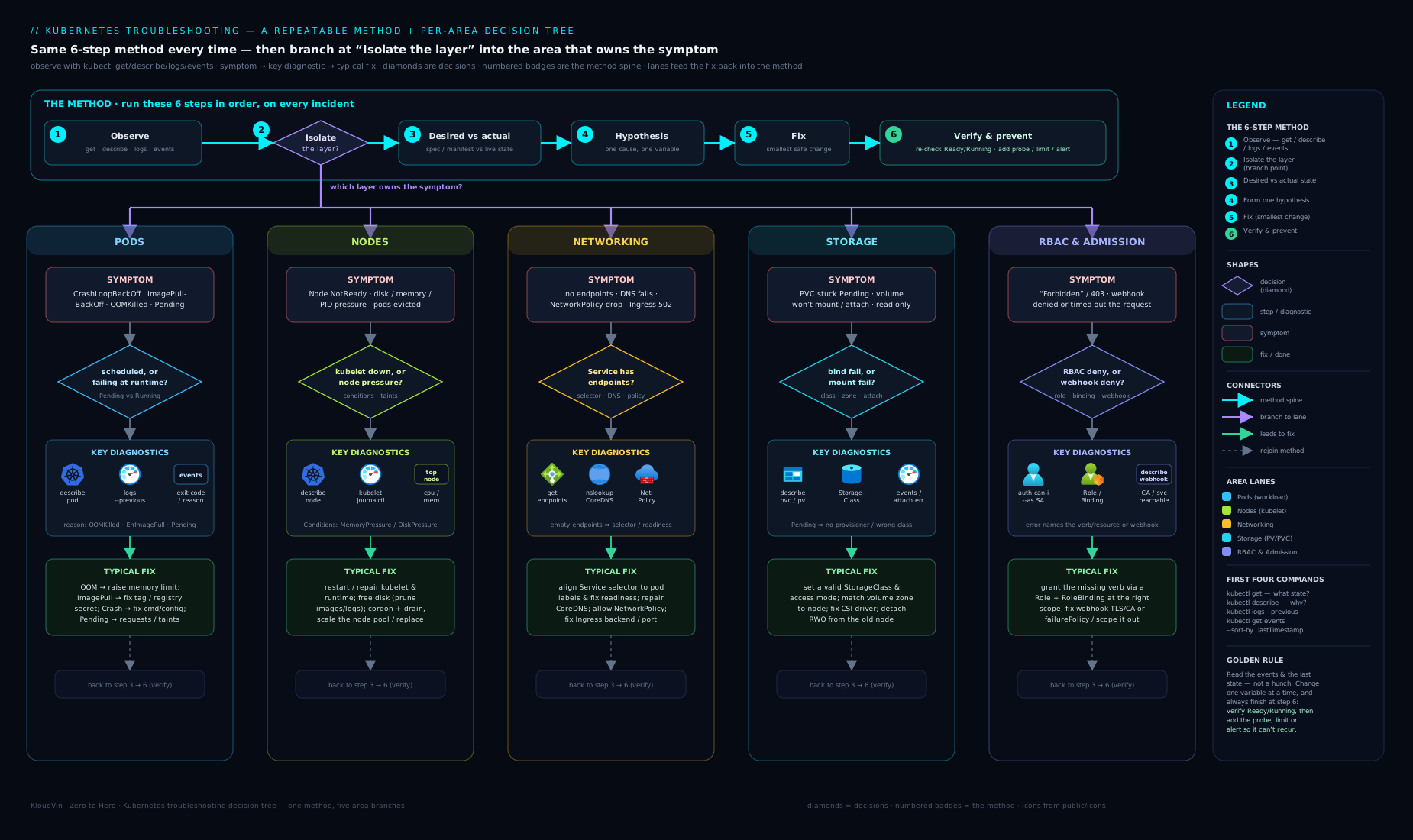
The decision tree above encodes step 2: start from the symptom at the top, branch on “is the pod scheduled / running / reachable?”, and each leaf points you at the playbook below. When you are under pressure, walking the tree keeps you honest about which layer you are in before you touch anything.
The four commands that answer everything
You can solve the large majority of problems with four commands. Know precisely what each one tells you — this is what stops the flailing.
| Command | Question it answers | Where to look |
|---|---|---|
kubectl get <resource> -o wide |
What is the high-level state? Which node, which IP, how many ready? | STATUS, RESTARTS, READY, NODE columns |
kubectl describe <resource> |
Why is it in that state? | The Events section at the bottom — it states reasons verbatim |
kubectl logs <pod> [-c <container>] [--previous] |
What did the application itself say? | App stdout/stderr; --previous shows the last crashed container |
kubectl get events --sort-by=.lastTimestamp |
What has the cluster been doing recently, across objects? | Chronological reasons: scheduling, pulls, probe failures, evictions |
A few high-leverage habits: alias kubectl to k and turn on completion; use -o wide by default so you always see the node and IP; reach for --previous the instant you see RESTARTS > 0; and remember that describe reads Events from the API, but they expire (~1 hour) — for older history use kubectl get events or your logging stack. For deeper inspection, kubectl get <res> -o yaml shows the full live object including .status, and kubectl debug (ephemeral containers, GA since v1.25) lets you attach a toolbox container to a running or distroless pod without rebuilding the image.
Pods: the workload-level playbook
Most incidents are pod-level, and the STATUS column plus kubectl describe Events almost always name the cause. The mental split is scheduling vs runtime vs application: Pending is scheduling (the pod has no node yet); ImagePullBackOff is runtime (the node can’t get the image); CrashLoopBackOff and OOMKilled are application/resource (the container started and then died); Evicted is node pressure pushing a pod off after it ran.
Symptom (STATUS / signal) |
Likely cause | Diagnostic command | Fix |
|---|---|---|---|
CrashLoopBackOff |
App exits non-zero on start (bad config, missing env/secret, failed migration, wrong command), or a too-aggressive liveness probe kills it before it’s ready | kubectl logs <pod> --previous; kubectl describe pod <pod> (exit code, Last State: Terminated, probe events) |
Fix the app error the logs show (supply the env/Secret/ConfigMap, correct the command/args); if it’s the probe, fix the probe target/port or add a startupProbe so slow starts aren’t killed |
ImagePullBackOff / ErrImagePull |
Image name/tag typo, tag doesn’t exist, private registry without imagePullSecrets, registry rate-limited, or wrong architecture |
kubectl describe pod <pod> — Events show the exact pull error (manifest unknown, unauthorized, 429 Too Many Requests) |
Correct the image/tag; add an imagePullSecret (kubectl create secret docker-registry …) and reference it on the pod/ServiceAccount; for rate limits, authenticate or use a pull-through cache |
OOMKilled (in Last State, exit code 137) |
Container exceeded its memory limit (or the node ran out and the kernel OOM-killer chose it) | kubectl describe pod <pod> → Last State: Terminated, Reason: OOMKilled; kubectl top pod <pod> |
Raise the memory limit (and set a matching request); fix the app’s leak/heap; right-size with VPA recommendations — don’t just keep bumping the limit blindly |
Pending |
Scheduler can’t place it: insufficient CPU/memory on any node, an untolerated taint, unsatisfiable node/pod affinity or topology spread, or an unbound PVC | kubectl describe pod <pod> — Events: “Insufficient cpu/memory”, “had untolerated taint”, “didn’t match node selector”, “had volume node affinity conflict” |
Lower the request, add a toleration/the right nodeSelector/label, add capacity (or let Cluster Autoscaler), or fix the PVC (see Storage). kubectl get nodes -o wide and kubectl describe node show allocatable headroom |
Pending with “0/N nodes available” and no obvious resource line |
No schedulable nodes (all cordoned/NotReady), or pod requests a resource (GPU, specific zone) nothing offers | kubectl get nodes; kubectl describe pod Events |
Uncordon/repair nodes (see Nodes); relax the constraint or provision matching capacity |
Evicted (pod text shows “The node was low on resource: …”) |
Node pressure — DiskPressure/MemoryPressure triggered the kubelet to evict lower-priority/over-request pods |
kubectl get pod <pod> -o yaml → status.message; kubectl describe node <node> (Conditions) |
Clear node pressure (free disk/images, fix the noisy pod); set proper requests and a sensible PriorityClass so critical pods aren’t evicted first; delete the dead Evicted objects (kubectl delete pod --field-selector status.phase=Failed) |
Init:Error / Init:CrashLoopBackOff |
An init container is failing (waiting on a dependency, bad migration, missing config) | kubectl logs <pod> -c <init-container>; kubectl describe pod shows which init step is stuck |
Fix that init container’s command/config or the dependency it waits for; init containers run to completion in order before app containers start |
ContainerCreating (stuck) |
Volume not attaching/mounting, missing Secret/ConfigMap referenced as a volume, CNI not assigning an IP, or image still pulling | kubectl describe pod <pod> — Events name it (FailedMount, FailedCreatePodSandBox, secret “not found”) |
Create the missing Secret/ConfigMap; resolve the volume issue (see Storage); check CNI health on the node |
Completed but expected to keep running |
Container’s main process exited 0 (script finished, wrong command, ran as a one-shot) |
kubectl logs <pod>; check spec.containers[].command |
Make it a long-running process or use a Job/CronJob if it’s genuinely one-shot |
Pod Running but not Ready (0/1) |
Readiness probe failing — app up but not serving, dependency down, wrong probe path/port | kubectl describe pod <pod> (Readiness probe events); kubectl logs <pod> |
Fix the probe target or the dependency; a failing readiness probe (correctly) keeps the pod out of Service endpoints — that is the link to “no endpoints” below |
Terminating (stuck for minutes) |
A finalizer is blocking deletion, or the node is gone and the pod is orphaned | kubectl get pod <pod> -o yaml → metadata.finalizers, deletionTimestamp |
Resolve/remove the finalizer’s owner; for a dead node, kubectl delete pod --grace-period=0 --force (last resort) |
Two reflexes worth burning in. First, --previous for any crash: CrashLoopBackOff means the container already died and restarted, so the current container has no useful logs — kubectl logs <pod> --previous shows the failed run. Second, exit codes are a shortcut: 137 is SIGKILL (usually OOM or a liveness kill), 143 is SIGTERM (graceful shutdown), 1/2 are generic app errors, and 126/127 mean the command isn’t executable / not found.
Nodes: when the machine, not the pod, is the problem
When many pods on one node misbehave at once — evictions, ContainerCreating, sudden NotReady pods — suspect the node, not the workloads. A node has a small set of Conditions the kubelet reports, and reading them is the whole game.
| Symptom | Likely cause | Diagnostic command | Fix |
|---|---|---|---|
Node NotReady |
kubelet stopped/crashed, lost API-server connectivity, CNI not ready, or the host is down | kubectl describe node <node> (Conditions, last heartbeat); on the host: systemctl status kubelet, journalctl -u kubelet |
Restart/repair the kubelet; fix networking to the control plane; reinstall/repair the CNI; if hardware, drain and replace |
MemoryPressure = True |
Node out of allocatable memory; kubelet starts evicting | kubectl describe node <node>; kubectl top node |
Reduce load (evict/reschedule), set proper requests, add nodes; find the offender with kubectl top pod -A --sort-by=memory |
DiskPressure = True |
Disk/inode exhaustion — often image bloat or container logs filling the disk | kubectl describe node <node>; on host df -h, crictl images |
kubelet garbage-collects images/containers automatically; if not enough, prune images, rotate logs, grow the disk, move /var/lib/containerd to bigger storage |
PIDPressure = True |
Too many processes/threads on the node (a fork bomb or a leaky workload) | kubectl describe node <node> |
Find and fix the offending pod; set pod PID limits; add capacity |
Pods Evicted en masse on one node |
The pressure conditions above triggered kubelet eviction by priority/over-request | kubectl get pods -A -o wide | grep Evicted; node Conditions |
Resolve the pressure; set requests + PriorityClass so critical pods survive |
Node Ready but SchedulingDisabled |
The node was cordoned (often left over from a drain/upgrade) | kubectl get nodes (shows SchedulingDisabled) |
kubectl uncordon <node> once it’s healthy |
| New pods avoid a node | A taint (e.g. node.kubernetes.io/disk-pressure, or a custom one) repels pods without the matching toleration |
kubectl describe node <node> (Taints) |
Remove the taint if stale, or add the toleration to pods that should run there |
| Whole node’s pods unreachable | Node-level network/CNI failure, or the node is partitioned from the cluster network | kubectl get nodes -o wide; check CNI DaemonSet pods on that node (kubectl get pods -n kube-system -o wide) |
Restart/repair the CNI agent on the node; check the underlying network/security groups |
A clean repair sequence for a node you need to take out of rotation safely: cordon → drain → fix → uncordon. kubectl cordon <node> stops new pods landing; kubectl drain <node> --ignore-daemonsets --delete-emptydir-data evicts the existing ones respecting PodDisruptionBudgets; you fix or reboot the host; then kubectl uncordon <node> returns it to service. Skipping cordon means new pods keep landing on a sick node while you work on it.
Networking: Services, DNS, NetworkPolicy & Ingress
Networking is where troubleshooting gets subtle, because there are several independent layers — Service-to-pod selection, cluster DNS, NetworkPolicy, and (north-south) Ingress — and a failure in any one looks like “it can’t connect”. Isolate the layer first.
| Symptom | Likely cause | Diagnostic command | Fix |
|---|---|---|---|
| Service has no endpoints (connections refused/time out) | Service selector doesn’t match any pod labels, or matching pods aren’t Ready (failing readiness), or targetPort is wrong |
kubectl get endpointslices -l kubernetes.io/service-name=<svc> (or kubectl get endpoints <svc>) shows empty; compare kubectl describe svc <svc> Selector with kubectl get pods --show-labels |
Align the selector to the pod labels (or vice versa); fix readiness so pods become Ready; correct targetPort to the container’s actual port |
| Endpoints exist but still can’t connect | targetPort/containerPort mismatch, app listening on 127.0.0.1 not 0.0.0.0, or a NetworkPolicy dropping it |
kubectl exec <client-pod> -- curl -sS <svc>:<port>; kubectl debug a netshoot pod; check the app’s bind address |
Fix the port mapping; make the app listen on 0.0.0.0; check policies (below) |
DNS resolution fails (Name or service not found) |
CoreDNS down/overloaded, wrong dnsPolicy, or a NetworkPolicy blocking egress to kube-dns on port 53 |
kubectl run -it --rm dnsutils --image=registry.k8s.io/e2e-test-images/agnhost:2.45 -- nslookup kubernetes.default; kubectl get pods -n kube-system -l k8s-app=kube-dns; kubectl logs -n kube-system -l k8s-app=kube-dns |
Restore CoreDNS (scale/resources/restart); allow egress to kube-dns (UDP+TCP 53) in your NetworkPolicy; verify /etc/resolv.conf search domains |
| Cross-namespace name doesn’t resolve | Using a short name across namespaces | nslookup <svc>.<ns>.svc.cluster.local from a client pod |
Use the FQDN <svc>.<namespace>.svc.cluster.local (short names only resolve within the same namespace) |
| NetworkPolicy silently drops traffic | A default-deny policy is in effect with no matching allow rule; CNI doesn’t enforce policy; or egress (incl. DNS) not allowed | kubectl get networkpolicy -A; kubectl describe networkpolicy <np>; test with/without the policy (kubectl exec … curl) |
Add an explicit ingress/egress allow rule (remember DNS egress on 53); confirm your CNI enforces NetworkPolicy (flannel doesn’t; Calico/Cilium do) |
| Policy “applied” but has no effect | CNI plugin doesn’t support NetworkPolicy | kubectl get pods -n kube-system (which CNI?); CNI docs |
Switch to/confirm a policy-enforcing CNI (Calico, Cilium) — the API object is accepted even if nothing enforces it |
| Ingress 502 / 503 Bad Gateway | Backend Service has no endpoints or wrong port, app not Ready, controller can’t reach pods, or backend protocol mismatch (HTTP vs HTTPS) | kubectl get endpointslices for the backend Service; kubectl logs -n <ns> <ingress-controller-pod>; kubectl describe ingress <ing> |
Fix the backend (endpoints/port/readiness as above — a 502 is usually the Service behind it, not the Ingress); set the backend-protocol annotation if the app speaks HTTPS |
| Ingress 404 / wrong backend | Host/path rules don’t match, missing ingressClassName, or no default backend |
kubectl describe ingress <ing> (rules); controller logs |
Correct host/path rules; set ingressClassName; ensure the controller watches that class |
External traffic never arrives (LoadBalancer Service <pending>) |
No cloud LB provisioner (bare-metal/local), or quota/permission issue | kubectl describe svc <svc> (Events) |
Install MetalLB (bare-metal) or use NodePort/port-forward locally; check cloud quotas/IAM in cloud |
The single most common networking bug, by a wide margin, is “no endpoints” — and it is always one of three things: the selector doesn’t match the labels, the pods aren’t Ready, or the port is wrong. Make kubectl get endpointslices (or kubectl get endpoints <svc>) your first move on any “can’t connect” report; an empty endpoint list instantly tells you the problem is selection/readiness, while a populated list pushes you toward policy or ports.
Storage: PVCs, mounts & access modes
Storage failures cluster at two moments: binding (a PersistentVolumeClaim that never gets a PersistentVolume) and mounting (a bound PVC that won’t attach to the node). The split tells you where to look — kubectl get pvc for binding, the pod’s Events for mounting.
| Symptom | Likely cause | Diagnostic command | Fix |
|---|---|---|---|
PVC stuck Pending |
No default StorageClass and none named; no matching PV for static provisioning; requested size/access mode unavailable | kubectl describe pvc <pvc> (Events: “no persistent volumes available”, “no storage class”); kubectl get storageclass |
Set/name a StorageClass (storageClassName); mark one default (storageclass.kubernetes.io/is-default-class: "true"); for static PVs, create a PV that matches size + access mode |
PVC Pending with WaitForFirstConsumer |
StorageClass uses volume binding mode WaitForFirstConsumer — binds only once a pod schedules |
kubectl describe pvc <pvc> (normal “waiting for first consumer”) |
This is expected; create/schedule the pod that uses it and it binds (avoids zone mismatch) |
Pod stuck ContainerCreating with FailedMount |
Volume can’t attach/mount: wrong zone (PV in a different AZ than the node), CSI driver issue, or fs problem | kubectl describe pod <pod> (Events: FailedAttachVolume, FailedMount, “volume node affinity conflict”) |
Match pod scheduling to the volume’s zone (topology); check the CSI driver pods (kubectl get pods -n kube-system); for zone conflict use WaitForFirstConsumer |
Multi-Attach error on FailedMount |
A ReadWriteOnce volume is being attached to a second node (e.g. rolling update before the old pod detaches) |
kubectl describe pod <pod> (“Multi-Attach error for volume”) |
Use Recreate strategy for RWO volumes, or a ReadWriteMany storage class if you truly need multi-node access; wait for the old pod to fully terminate |
| App can’t write (read-only filesystem) | Wrong access mode, volume mounted readOnly: true, or fsGroup/permissions wrong |
kubectl get pvc <pvc> (access mode); pod volumeMounts (readOnly); kubectl exec … ls -ld <path> |
Use the right access mode (RWO/ROX/RWX), drop readOnly, set securityContext.fsGroup so the app’s user owns the mount |
| Two pods can’t share a volume | Storage class only supports RWO, not RWX | kubectl get pvc (access modes); StorageClass/provisioner capability |
Use an RWX-capable backend (NFS/CephFS/Azure Files); most block storage is RWO only |
PVC won’t delete / stuck Terminating |
A pod still uses it, or a finalizer (kubernetes.io/pvc-protection) holds it |
kubectl describe pvc <pvc> (finalizers, “still being used by pod”) |
Delete the consuming pod first; the protection finalizer releases once nothing mounts it |
| Data gone after pod restart | Used emptyDir (ephemeral) or a Deployment instead of a StatefulSet for stateful data |
Inspect volumes (emptyDir vs PVC) |
Use a PVC (and a StatefulSet with volumeClaimTemplates) for data that must survive restarts/rescheduling |
The reflex: kubectl get pvc first. Bound means binding succeeded and any remaining failure is at mount time (look at the pod’s Events). Pending means binding failed and you look at StorageClasses and describe pvc. That one branch saves you from debugging mounts when the volume never even bound.
RBAC & admission: when the API server says no
These failures are different in flavour — the cluster is working, it is refusing you. The two sources are authorization (RBAC says you lack permission) and admission control (a validating/mutating webhook or a policy engine rejects the object). Crucially, RBAC is purely additive: there are no deny rules, so Forbidden always means a permission was never granted, not that something explicitly blocked you.
| Symptom | Likely cause | Diagnostic command | Fix |
|---|---|---|---|
Error … is forbidden: User "X" cannot <verb> <resource> |
No Role/ClusterRole grants that subject the verb+resource (+namespace) — permission simply not granted | kubectl auth can-i <verb> <resource> -n <ns> --as <user> (or --as system:serviceaccount:<ns>:<sa>) returns no |
Create/extend a Role/ClusterRole with the verb+resource and bind it (RoleBinding/ClusterRoleBinding) to the subject |
| A pod’s app gets 403 from the Kubernetes API | The pod’s ServiceAccount lacks RBAC (or you assumed default SA has rights — it has almost none) |
kubectl auth can-i <verb> <resource> --as system:serviceaccount:<ns>:<sa>; check serviceAccountName on the pod |
Bind a Role to that ServiceAccount; set serviceAccountName explicitly; grant least privilege, not cluster-admin |
Forbidden only in one namespace |
You bound a Role (namespaced) where you needed cluster-wide, or bound in the wrong namespace | kubectl get rolebinding,clusterrolebinding -A -o wide | grep <subject> |
Use a ClusterRole + ClusterRoleBinding for cluster-wide, or add a RoleBinding in the missing namespace |
| Can read but not modify (get works, create/delete forbidden) | Role grants only read verbs (get/list/watch), missing create/update/patch/delete |
kubectl auth can-i --list -n <ns> --as <subject> (lists everything the subject can do) |
Add the write verbs to the Role |
admission webhook "…" denied the request |
A validating webhook/policy engine (Kyverno, Gatekeeper/OPA) rejected the object for violating a policy | The error message names the webhook and reason; kubectl get validatingwebhookconfigurations; engine logs/policy reports |
Make the manifest comply (add the required label/securityContext/etc.), or fix/exempt the policy if it’s wrong |
Everything fails with Internal error … webhook … connection refused/timeout |
A webhook’s backing Service/pod is down and its failurePolicy: Fail blocks all matching API calls |
kubectl get pods -n <webhook-ns>; kubectl describe validatingwebhookconfiguration <name> |
Restore the webhook’s pod/Service; as a break-glass, scope or temporarily remove the webhook config (it can wedge the whole cluster) |
| Object created but mutated unexpectedly (extra labels/sidecar) | A mutating webhook (e.g. a mesh injector, Kyverno mutate) changed it on admission | kubectl get mutatingwebhookconfigurations; compare submitted vs stored object |
Expected behaviour if intended; otherwise adjust/exempt the mutating policy |
Pod rejected: violates PodSecurity "restricted" |
Pod Security Admission is enforcing a standard the pod doesn’t meet | kubectl get ns <ns> --show-labels (pod-security.kubernetes.io/enforce=…); error names the violation |
Add the required securityContext (drop capabilities, runAsNonRoot, seccomp), or relax the namespace label if appropriate |
The one command to internalise here is kubectl auth can-i. With --as it impersonates a user or ServiceAccount and asks the API server whether an action is allowed — so you can reproduce a Forbidden decision exactly, for the precise subject and namespace, without redeploying anything. kubectl auth can-i --list --as system:serviceaccount:<ns>:<sa> dumps everything that subject can do, which makes “what’s missing?” obvious.
Hands-on lab: break it, diagnose it, fix it
You’ll plant several classic faults on a free local cluster, then walk each through the loop. Everything here is local — no cloud account, no charges.
1. Create a cluster (free / local):
kind create cluster --name ts-lab
kubectl config use-context kind-ts-lab
kubectl get nodes          # Expect: one node, STATUS Ready
2. Fault A — ImagePullBackOff. Deploy a bad image tag:
kubectl create deployment web --image=nginx:doesnotexist
kubectl get pods                       # STATUS: ImagePullBackOff / ErrImagePull
kubectl describe pod -l app=web | sed -n '/Events/,$p'   # Events name the pull error
Fix it by setting a real tag, then verify:
kubectl set image deployment/web nginx=nginx:1.27
kubectl rollout status deployment/web                    # successfully rolled out
kubectl get pods                                         # Running / 1/1 Ready
3. Fault B — Service with no endpoints. Create a Service whose selector is wrong:
kubectl expose deployment web --port=80 --selector=app=frontend   # mismatched on purpose
kubectl get endpoints web              # <none>  ← the tell
kubectl describe svc web | grep Selector
kubectl get pods --show-labels         # pods are app=web, not app=frontend
Fix by aligning the selector and confirm endpoints appear:
kubectl patch svc web -p '{"spec":{"selector":{"app":"web"}}}'
kubectl get endpoints web              # now lists a pod IP:80
kubectl run probe --rm -it --image=busybox:1.36 --restart=Never -- wget -qO- web   # serves HTML
4. Fault C — CrashLoopBackOff. Run a container that exits immediately:
kubectl run crasher --image=busybox:1.36 -- /bin/sh -c "echo starting; exit 1"
kubectl get pod crasher                # CrashLoopBackOff, RESTARTS climbing
kubectl logs crasher --previous        # 'starting' — the last crashed run
kubectl describe pod crasher | grep -A2 "Last State"   # Terminated, Exit Code: 1
The fix is to correct the command so the process stays up (here, run a long-lived process); the lesson is the --previous reflex.
5. Fault D — Pending (unschedulable). Request more CPU than the node has:
kubectl run hog --image=nginx:1.27 --overrides='{"spec":{"containers":[{"name":"hog","image":"nginx:1.27","resources":{"requests":{"cpu":"64"}}}]}}'
kubectl get pod hog                     # Pending
kubectl describe pod hog | grep -A3 Events   # "Insufficient cpu"
Fix by lowering the request (kubectl delete pod hog then recreate with cpu: 100m) and watch it schedule.
6. Fault E — PVC Pending (no StorageClass match). Request an impossible class:
kubectl apply -f - <<'EOF'
apiVersion: v1
kind: PersistentVolumeClaim
metadata: { name: stuck }
spec:
  accessModes: ["ReadWriteOnce"]
  storageClassName: nonexistent
  resources: { requests: { storage: 1Gi } }
EOF
kubectl get pvc stuck                   # Pending
kubectl describe pvc stuck | grep -A3 Events    # no storage class / no volumes
kubectl get storageclass                # kind ships 'standard' (default)
Fix by using the real default class (storageClassName: standard, or omit it) and re-apply; the PVC binds.
Validation. A clean run shows: each fault reproduced with the exact STATUS/Event the playbook predicts; each diagnosis made from describe/logs/endpoints (not guessing); and each fix verified (Running/Ready, endpoints populated, Bound).
Cleanup (so nothing is left running):
kind delete cluster --name ts-lab
Cost note: free / local. kind runs the entire cluster in Docker on your laptop — no cloud account, no charges.
Common mistakes & troubleshooting
A meta-table — the mistakes engineers make while troubleshooting, which keep them stuck:
| Mistake | Why it bites | Do this instead |
|---|---|---|
Reading logs without --previous on a crash-loop |
The current container is fresh; the failed run’s logs are gone | kubectl logs <pod> --previous whenever RESTARTS > 0 |
Ignoring the Events section of describe |
Kubernetes literally tells you the reason there | Always scroll to Events first; add kubectl get events --sort-by=.lastTimestamp |
| Restarting/deleting pods before diagnosing | Destroys the evidence (and may “fix” it without you learning the cause) | Diagnose first; reproduce in the lab if you must |
Assuming the default ServiceAccount has permissions |
It has almost none; in-cluster API calls 403 | Bind a least-privilege Role to an explicit SA |
| Forgetting DNS egress in a default-deny NetworkPolicy | Everything “can’t resolve”; looks like DNS is broken | Always add egress to kube-dns on UDP+TCP 53 |
| Blaming the Ingress for a 502 | The 502 almost always means the backend Service has no endpoints | Check kubectl get endpointslices for the backend first |
| Bumping memory limits to “fix” OOMKilled forever | Masks a leak; wastes capacity | Set request+limit, then fix the app / right-size with VPA |
| Debugging a mount when the PVC never bound | Wrong layer entirely | kubectl get pvc first: Pending = binding, Bound = mount |
Best practices
- Make failures legible before they happen. Set resource requests and limits so the scheduler and OOM behaviour are predictable; add readiness, liveness, and startup probes so “up” means “serving” and slow starts aren’t killed.
- Standardise the loop. Teach the team the six steps and the four commands; put a one-page runbook (this lesson’s tables) in your repo so on-call doesn’t improvise at 3 a.m.
- Keep events. API Events expire in ~1 hour — ship them and pod logs to a logging stack so you can investigate after the pod is gone. Add
kube-state-metricsand alert onCrashLoopBackOff,Pendingage, and node Conditions. - Use
kubectl debug(ephemeral containers) to attach a toolbox to distroless/running pods instead of baking debug tools into production images. - Default-deny, then allow. Run NetworkPolicies default-deny with explicit allows (including DNS) so connectivity is intentional and “no route” is a known state, not a mystery.
- Right-size from data. Use VPA recommendations (even in recommend-only mode) to set requests/limits, so you stop the OOM-bump cycle.
Security notes
Troubleshooting touches the cluster’s trust boundaries, so do it safely. kubectl exec/debug into a pod is privileged access to that workload — gate it with RBAC and audit it; on the CKS exam and in production, the ability to exec is a real escalation path. Be careful with --grace-period=0 --force deletes: they remove the API object even if the pod still runs on a partitioned node, which can cause split-brain for stateful apps — use it only when you’ve confirmed the node is truly gone. Treat admission webhooks as cluster-critical: a webhook with failurePolicy: Fail whose backend is down can wedge all matching API operations, so monitor webhook health and know the break-glass (scope or remove the webhook config). When you debug RBAC, resist the temptation to grant cluster-admin to make the error go away — reproduce with kubectl auth can-i --as and grant the minimum verb/resource. And never paste Secrets into logs or tickets while debugging (kubectl get secret -o yaml is base64, not encryption). These themes are developed in RBAC least-privilege design, Pod Security Admission, and default-deny NetworkPolicies.
Interview & exam questions
- A pod is in
CrashLoopBackOff. Walk me through your steps.kubectl get podsto see RESTARTS;kubectl describe podfor Events and theLast Stateexit code;kubectl logs <pod> --previousfor the failed run’s output. Decide: is it the app exiting non-zero (fix config/command/env) or a liveness probe killing it (fix the probe / add a startupProbe)? Fix the manifest, re-apply,kubectl rollout status. - What’s the difference between
ImagePullBackOffandCrashLoopBackOff?ImagePullBackOffis a runtime/pull problem — the node never got the image (bad tag, auth, rate limit); the container never started.CrashLoopBackOffmeans the image pulled and the container started then exited repeatedly — an application/config problem.describeEvents distinguish them immediately. - A Service has no endpoints. What’s the single most likely cause and the one command that confirms it? The selector doesn’t match any Ready pods (label mismatch or failing readiness). Confirm with
kubectl get endpoints <svc>(empty), then comparekubectl describe svcSelector againstkubectl get pods --show-labels. - An app gets
403 Forbiddenfrom the Kubernetes API. RBAC has no deny rules — so what does that error actually mean, and how do you reproduce it? Since RBAC is purely additive,Forbiddenmeans no binding ever granted that subject the verb/resource/namespace. Reproduce withkubectl auth can-i <verb> <resource> -n <ns> --as system:serviceaccount:<ns>:<sa>; fix by binding a least-privilege Role to that ServiceAccount. - A pod is
Pending. Which one command tells you why, and where do you read it?kubectl describe pod <pod>— the Events section states the scheduling reason verbatim (“Insufficient cpu”, “untolerated taint”, “didn’t match node selector”, “volume node affinity conflict”). OOMKilled— what happened and what’s the exit code? The container exceeded its memory limit (or the node OOM-killer chose it); exit code 137 (SIGKILL), shown inLast State: Terminated, Reason: OOMKilled. Fix by setting an adequate memory request+limit and addressing the app’s memory use — not by bumping the limit forever.- Your Ingress returns 502. Where do you look first? At the backend Service’s endpoints (
kubectl get endpointslices), because a 502 almost always means the controller has no healthy backend — pods not Ready, wrongtargetPort, or empty selector. Only after that do you suspect the Ingress rules, class, or backend protocol. - DNS lookups fail inside pods. How do you debug it? Run a test pod and
nslookup kubernetes.default; check CoreDNS (kubectl get pods -n kube-system -l k8s-app=kube-dnsand its logs). A frequent cause is a default-deny NetworkPolicy with no DNS egress — add egress to kube-dns on UDP+TCP 53. - A PVC is stuck
Pending. What are the usual causes? No default/named StorageClass, no matching static PV (size/access mode), orWaitForFirstConsumer(expected until a pod schedules).kubectl describe pvcEvents andkubectl get storageclasstell you which. - You see
Multi-Attach erroron a pod’s volume during a rolling update. Why? AReadWriteOncevolume can attach to only one node; aRollingUpdatetried to start the new pod (new node) before the old pod detached. Use theRecreatestrategy for RWO volumes, or an RWX storage class if multi-node access is genuinely required. - What does
kubectl debuggive you thatkubectl execdoesn’t? Ephemeral containers — you attach a toolbox image to a running pod (including distroless images with no shell) or create a debug copy, without rebuilding or restarting the workload. Ideal for production pods that ship without debug tools. - How do you safely take a node out of service to repair it, without disrupting workloads?
kubectl cordon(stop new pods) →kubectl drain --ignore-daemonsets --delete-emptydir-data(evict existing, respecting PodDisruptionBudgets) → fix/reboot →kubectl uncordon. Skipping cordon lets new pods keep landing on the sick node.
Quick check
- A container has
RESTARTS: 7. Which single flag onkubectl logsshows you why it last died, and why? kubectl get endpoints my-svcprints<none>. Name the two most likely causes and the command that distinguishes them.- A pod shows
Last State: Terminated, Reason: OOMKilled, Exit Code: 137. What’s the cause, and what’s the right fix (not the lazy one)? - RBAC has no deny rules. Given that, what does
Error: forbiddenalways mean, and which command reproduces the decision for a specific ServiceAccount? - Your
kubectl get pvcshowsPending. Are you looking at a binding or a mount problem, and which two things do you check?
Answers
--previous—kubectl logs <pod> --previousshows the last crashed container’s output; the current container is a fresh restart with no useful logs.- Either the selector doesn’t match the pod labels, or the pods aren’t Ready (failing readiness). Distinguish by comparing
kubectl describe svc my-svcSelector withkubectl get pods --show-labels(label mismatch) versuskubectl get pods(none Ready). - The container exceeded its memory limit (exit 137 = SIGKILL by the OOM-killer). The right fix is to set an adequate memory request + limit and address the app’s memory use (leak/heap), right-sizing from VPA data — not just raising the limit until it stops.
- Because RBAC is purely additive, it means no binding ever granted that subject the verb/resource/namespace — the permission was simply never created. Reproduce with
kubectl auth can-i <verb> <resource> -n <ns> --as system:serviceaccount:<ns>:<sa>. - A binding problem (the PV never attached because the claim never bound). Check
kubectl describe pvcEvents andkubectl get storageclass(missing default/named class, no matching PV, or expectedWaitForFirstConsumer).Boundwould mean you’d instead debug the mount via the pod’s Events.
Exercise
Build your own break-and-fix runbook (timed, free, local). On a fresh kind cluster, plant one fault per layer and prove you can diagnose each from observation alone.
-
Create the cluster (
kind create cluster --name runbook). -
Plant five faults, one per layer: Pod (a wrong image tag →
ImagePullBackOff), Node (cordon the node, then deploy something →Pending), Networking (a Service with a deliberately mismatched selector → no endpoints), Storage (a PVC with a non-existentstorageClassName→Pending), and RBAC (a pod using a ServiceAccount with no permissions calling the API →403). -
For each, write down the layer, the diagnostic command, the exact Event/error, the root cause, and the fix — before you fix it. Time yourself: under 6 minutes per fault.
-
Fix each via an edited manifest re-applied (not a manual hot-patch), and verify (
Running/Ready,endpointspopulated,Bound,auth can-i … yes). -
Self-assess:
Criterion Target Identified the correct layer before touching anything All 5 Found root cause from describe/logs/endpoints/auth can-i(not guessing)All 5 Fixed via edited manifest, re-applied All 5 Verified the symptom is actually gone All 5 Whole drill completed Under 30 minutes -
Cleanup:
kind delete cluster --name runbook.
Cost note: free / local — the whole exercise runs in Docker on your laptop.
Certification mapping
- CKA — troubleshooting is the single largest domain (~30%) of the exam. This lesson is core: node
NotReadytriage, Service/endpoint and DNS debugging, PVC/storage failures, and RBACForbiddenreproduction withkubectl auth can-iall appear as live-cluster tasks. The cordon/drain/uncordon and “fix the broken pod” patterns are exam staples. - CKAD — the app-facing half: diagnosing
CrashLoopBackOff/ImagePullBackOff/OOMKilled, probes vs readiness/endpoints, ConfigMap/Secret wiring, and using--previousanddescribefast. Speed on these is the exam. - CKS — the security-adjacent failures: Pod Security Admission rejections, admission-webhook denials (Kyverno/Gatekeeper), default-deny NetworkPolicy drops (including DNS egress), and least-privilege RBAC. Knowing how a webhook with
failurePolicy: Failcan wedge the cluster is exactly the operational-security thinking CKS probes.
Glossary
CrashLoopBackOff— a pod state where the container repeatedly starts, exits, and is restarted with increasing back-off delay; an application/probe problem, not scheduling.ImagePullBackOff/ErrImagePull— the node cannot pull the image (bad tag, missingimagePullSecret, registry rate limit, wrong arch); the container never starts.OOMKilled— the container was killed (SIGKILL, exit 137) for exceeding its memory limit or under node memory pressure.Pending— the scheduler has not placed the pod on a node, usually due to resources, taints, affinity/topology, or an unbound PVC.Evicted— the kubelet removed a running pod because of node pressure (disk/memory/PID), by priority and over-request.- Node Conditions — kubelet-reported node health flags:
Ready,MemoryPressure,DiskPressure,PIDPressure. - Cordon / drain / uncordon — mark a node unschedulable / evict its pods (respecting PDBs) / return it to service.
- Endpoints / EndpointSlice — the list of Ready pod IPs a Service routes to, derived from its label selector; “no endpoints” means the selector matched nothing Ready.
- CoreDNS — the cluster DNS server (in
kube-system); failures or blocked egress to it on port 53 break in-cluster name resolution. - NetworkPolicy — namespaced ingress/egress firewall rules for pods; enforced only by a policy-capable CNI (Calico, Cilium), additive allows on top of default-deny.
- PVC / PV / StorageClass — a claim for storage / the provisioned volume / the template that dynamically provisions PVs; a
PendingPVC means binding hasn’t happened. - Access modes —
ReadWriteOnce(one node),ReadOnlyMany,ReadWriteMany(multi-node) — the cause ofMulti-Attacherrors when mismatched. - RBAC — Role-Based Access Control; Roles/ClusterRoles + (Cluster)RoleBindings, purely additive with no deny rules.
kubectl auth can-i— asks the API server whether a subject may perform an action; with--asit impersonates a user/ServiceAccount to reproduce a decision.- Admission webhook — a validating/mutating HTTP callback (or policy engine like Kyverno/Gatekeeper) that can reject or modify objects on creation; a
Failpolicy with a dead backend can block all matching API calls. - Ephemeral container /
kubectl debug— a temporary toolbox container attached to a running pod for debugging, including distroless images with no shell.
Next steps
You can now diagnose the everyday failures across every layer. The next lesson steps up from “a pod is broken” to “the cluster is broken” — control-plane and etcd incidents, and structured root-cause analysis:
- Advanced Kubernetes Troubleshooting: Control-Plane, etcd & Complex Incident RCA — apiserver outages, etcd quorum loss and restore, cascading failures, and blameless postmortems.
- Kubernetes RBAC: Least-Privilege Design — the deep dive behind the RBAC/admission playbook.
- Designing Zero-Trust Pod Networking: Default-Deny NetworkPolicies and Cilium L7-Aware Rules — so “NetworkPolicy dropped it” is always a known state, not a mystery.
- Kubernetes Interview & Certification Prep: KCNA / CKAD / CKA / CKS Roadmap — turn this troubleshooting fluency into a certification.