In a nutshell
Granting someone access to a BigQuery table with plain IAM is all-or-nothing: the same badge that lets an analyst read aggregate revenue also hands them every customer’s ssn, email, and raw row. Fine-grained access control fixes that by adding four locks inside the table, so a single governed copy can serve everyone at the right level of detail — no leaked PII, no per-team shadow copies drifting out of sync.
Picture your table as a bank’s central records room. IAM is the badge that gets you through the door. Once inside, four more controls decide what you can actually read:
- Column-level security locks specific drawers — the
ssnandibancolumns — so only cleared staff can open them. - Dynamic data masking is a photocopier at the door that blacks out all but the last four digits for everyone else, at query time.
- Row-level security is a clerk who hands you only the folders for the region you are allowed to serve.
- Authorized views are a receptionist who fetches a pre-summarised report, so other teams never step inside the room at all.
Every read is written to a sign-in sheet (audit logs). The golden rule: these locks only ever subtract — they can never grant more than your IAM badge already allows. That single property is what makes the whole stack safe to reason about.
Level: Advanced · Time: ~30 min · You’ll need: comfort with BigQuery datasets, tables, and queries, plus IAM roles, members, and bindings.
Prerequisites: the BigQuery deep dive for datasets, tables, and query basics, and IAM fundamentals for how roles, members, and bindings compose. The IAM deep dive helps if you want to combine these controls with IAM conditions.
After this lesson you can:
- Explain BigQuery’s access layers and why they compose as a restrictive AND, not an additive OR.
- Build a Data Catalog taxonomy and gate sensitive columns with policy tags (column-level security).
- Add dynamic data masking so one group sees raw values and another sees a masked form of the same column.
- Write row access policies for residency and multi-tenant isolation — with a deliberate admin escape hatch.
- Share curated slices across teams with authorized views, datasets, and routines, without copying data.
- Prove the whole thing to an auditor with
INFORMATION_SCHEMAand Cloud Audit Logs.
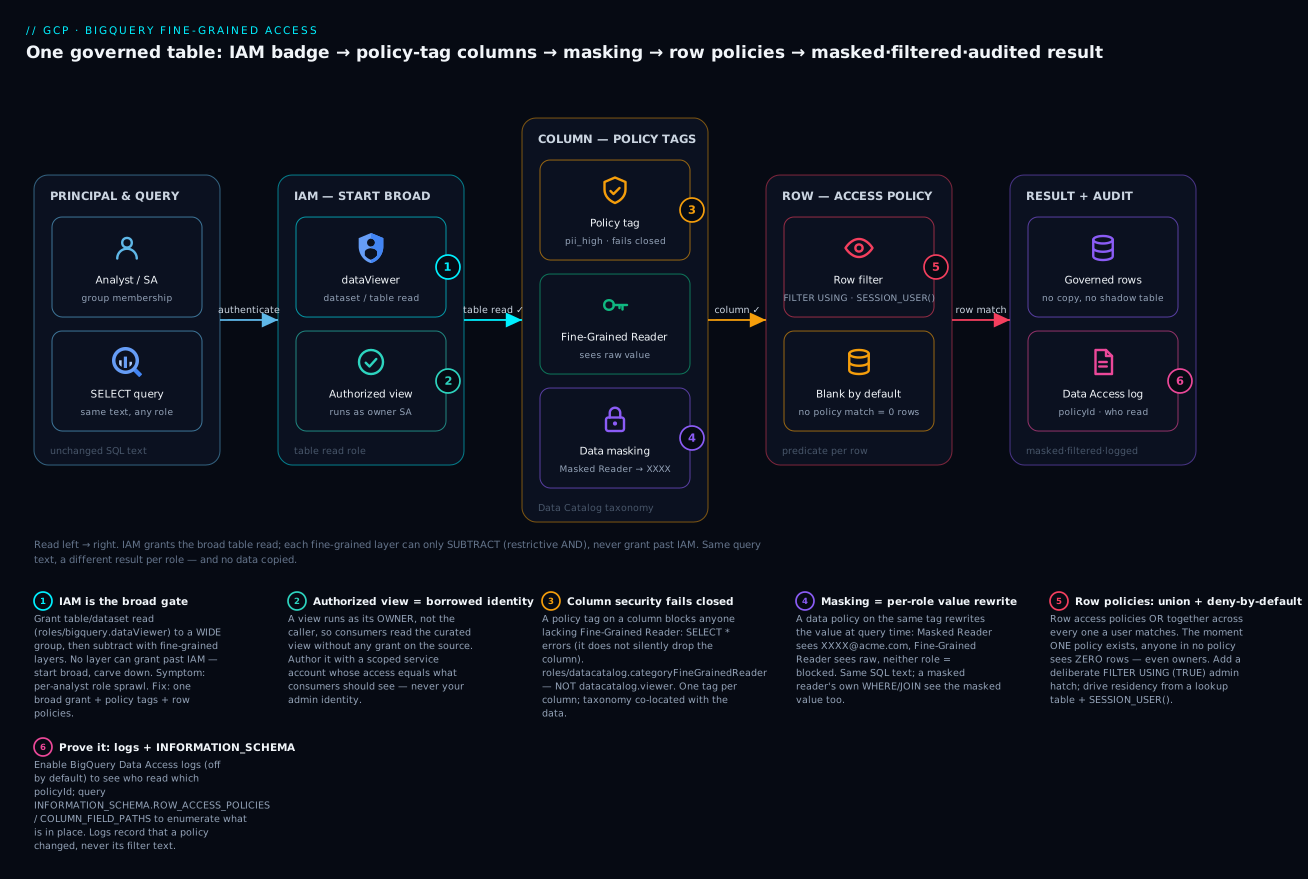
Read left → right: a query carries the caller’s identity through the broad IAM gate, then each fine-grained layer — policy-tag column security, dynamic masking, and row access policies — can only subtract what the badge already allows, before results land masked, filtered, and written to the audit log.
Dataset-level IAM is a blunt instrument. roles/bigquery.dataViewer on a dataset is all-or-nothing: the analyst who needs aggregate revenue also gets raw ssn, email, and every customer’s row regardless of region. Compliance teams hate it, and “just make another copy with the PII stripped out” is how you end up with twelve drifting shadow tables nobody can audit.
BigQuery’s answer is a stack of fine-grained controls that layer on top of IAM without copying data: policy tags for column-level security, dynamic data masking for partial exposure, row access policies for tenant and region filtering, and authorized views, datasets, and routines for controlled cross-dataset sharing. This guide builds them in the order you should actually deploy them, ending with a governed analytics zone you can hand to auditors.
1. Understand the access-control layers and their evaluation order
Before writing a single command, get the mental model right. BigQuery evaluates access in layers, and they compose rather than override:
| Layer | Granularity | Mechanism | Failure mode if misused |
|---|---|---|---|
| IAM | Project / dataset / table | roles/bigquery.dataViewer, custom roles |
Over-broad grants, all-or-nothing |
| Authorized views/datasets | Query surface | View runs as its owner, not the caller | Forgotten authorization = Access Denied |
| Column-level security | Column | Policy tags on a Data Catalog taxonomy | Tag without reader role blocks the column |
| Data masking | Column (value transform) | Data policy bound to a policy tag | Wrong role precedence leaks raw values |
| Row-level security | Row | Row access policies with predicates | Missing GRANT TO (... ) hides all rows |
The rule that trips people up: column-level security and row-level security are restrictive, not additive. A user must hold a table read role (via IAM) and the relevant fine-grained reader role (via the policy tag) and match a row access policy (or the table has none) to see a value. Any layer can subtract access; none can grant past IAM. Start broad with IAM, then carve down.
Design principle: grant table read to a wide group, then use policy tags and row policies to subtract sensitive columns and rows. This keeps the IAM surface small and pushes the nuance into governed, auditable objects.
Here is the composition made concrete for one row of customers, where email carries a masked policy tag and the table has an EU-only row policy:
| Principal | Table read (IAM) | Fine-Grained Reader on tag | In an EU row policy | Result of SELECT email on an EU row |
|---|---|---|---|---|
| Admin (owner, no fine-grained roles) | ✓ | ✗ | ✗ | 0 rows — a row policy exists and they match none |
| EU analyst (masked) | ✓ | ✗ | ✓ | XXXXX@acme.com — row visible, value masked |
| EU fraud (cleared) | ✓ | ✓ | ✓ | jane@acme.com — raw |
| US analyst | ✓ | ✓ | ✗ | 0 rows — cleared on the column, but no matching row |
Read every row as an AND: miss any required layer and you lose access to that value, or that row. Notice the project owner in the first line — ownership does not exempt you from row-level security, which is exactly why “my dashboard went blank after I added one policy” is such a common incident.
2. Build a Data Catalog taxonomy for column-level security
Column-level security is driven by policy tags organized in a taxonomy. The taxonomy is the classification hierarchy (“PII > high”, “PII > low”, “Financial”); the policy tag is what you attach to a column. Enforce the taxonomy so tags actually gate access.
Create the taxonomy and tags in the same region as the data (a taxonomy in us cannot tag a table in eu):
# Create the taxonomy with access control enforced
gcloud data-catalog taxonomies create \
  --location=us \
  --display-name="Data Sensitivity" \
  --description="Column classification for analytics zone" \
  --activated-policy-types=FINE_GRAINED_ACCESS_CONTROL \
  --project=acme-data-prod

# Capture the taxonomy resource ID it returns, then add policy tags
export TAXONOMY="projects/acme-data-prod/locations/us/taxonomies/1234567890123456789"

gcloud data-catalog taxonomies policy-tags create \
  --taxonomy="$TAXONOMY" \
  --location=us \
  --display-name="pii_high"

gcloud data-catalog taxonomies policy-tags create \
  --taxonomy="$TAXONOMY" \
  --location=us \
  --display-name="pii_low"
Grant the Fine-Grained Reader role on the policy tag (not the dataset) to the principals allowed to read tagged columns in the clear. This is the only role that lets a query return a tagged column’s raw value:
# Grant fine-grained read on a single policy tag
gcloud data-catalog taxonomies policy-tags add-iam-policy-binding \
  "projects/acme-data-prod/locations/us/taxonomies/1234567890123456789/policyTags/pii_high_tag_id" \
  --member="group:pii-cleared@acme.com" \
  --role="roles/datacatalog.categoryFineGrainedReader"
The role lives in the
datacatalognamespace even though you consume it in BigQuery:roles/datacatalog.categoryFineGrainedReader. Do not confuse it withroles/datacatalog.viewer, which does nothing for column access.
3. Attach policy tags to columns
You cannot set policy tags in a CREATE TABLE DDL statement. Apply them by patching the table schema with bq update (or tables.patch via the API / Terraform). Export the current schema, add the policyTags block to the sensitive columns, and push it back:
bq show --schema --format=prettyjson acme-data-prod:raw.customers > schema.json
Edit the columns you want to protect so they carry the tag resource name:
[
  { "name": "customer_id", "type": "INT64" },
  {
    "name": "email",
    "type": "STRING",
    "policyTags": {
      "names": ["projects/acme-data-prod/locations/us/taxonomies/1234567890123456789/policyTags/pii_high_tag_id"]
    }
  },
  {
    "name": "ssn",
    "type": "STRING",
    "policyTags": {
      "names": ["projects/acme-data-prod/locations/us/taxonomies/1234567890123456789/policyTags/pii_high_tag_id"]
    }
  },
  { "name": "country", "type": "STRING" }
]
bq update acme-data-prod:raw.customers schema.json
A column carries at most one policy tag. From this moment, anyone without Fine-Grained Reader on pii_high who runs SELECT * gets Access Denied: ... due to column-level security, while SELECT customer_id, country succeeds. Column-level security fails closed: the query errors rather than silently dropping columns, which is what you want for a hard boundary.
4. Add dynamic data masking instead of blocking
Hard blocking is right for ssn. But many use cases want the analyst to see a masked form of email for joins and bucketing without exposing the real address. That is dynamic data masking: a data policy bound to a policy tag that rewrites the value at query time based on the caller’s role.
Masking introduces a second role. With both roles in play on the same tag, precedence matters:
- Fine-Grained Reader (
roles/datacatalog.categoryFineGrainedReader) sees the raw value. - Masked Reader (
roles/bigquerydatapolicy.maskedReader) sees the masked value. - A user with neither, on a tagged column, is blocked (column-level security).
Create a data policy on the tag and pick a predefined masking rule. The built-in rules are: Nullify, Default masking value, SHA-256 hash, Random (salted) hash, Email mask, Date year mask, First four characters, Last four characters, and Custom routine.
| Masking rule | What a Masked Reader sees | Typical use |
|---|---|---|
| Nullify | NULL |
Hard-hide while keeping the column’s shape for schema stability |
| Default masking value | Type default (0, empty string, epoch date) |
Non-null placeholder for BI tools that choke on NULL |
| SHA-256 hash | 64-hex digest of the value | Deterministic pseudonymous join key across tables |
| Random (salted) hash | Different digest each run | Anonymised value that must not stay join-correlatable |
| Email mask | XXXXX@domain.com (keeps the domain) |
Domain-level bucketing without the local part |
| Date year mask | Year kept, month/day zeroed (2026-01-01) |
Cohort or age analysis without exact DOB |
| First four / Last four characters | 1234XXXX / XXXX6789 |
Card BIN or account tail for support workflows |
| Custom routine | Whatever your UDF returns | Format-preserving or region-specific redaction (below) |
A tagged column can carry a masking rule and the hard block at once: Fine-Grained Reader → raw, Masked Reader → the rule above, everyone else → column-level-security block. The rule you pick is what the broad group gets, so choose the least revealing form that still lets their queries work.
# Email mask: keeps the domain, replaces the local part (e.g. XXXXX@acme.com)
gcloud data-catalog policy-tags create-data-policy \
  --location=us \
  --data-policy-id=mask_email_policy \
  --policy-tag="projects/acme-data-prod/locations/us/taxonomies/1234567890123456789/policyTags/pii_low_tag_id" \
  --data-policy-type=DATA_MASKING_POLICY \
  --masking-expression=EMAIL_MASK \
  --project=acme-data-prod

# Grant Masked Reader to the broad analyst group on the masked tag
gcloud data-catalog policy-tags add-iam-policy-binding \
  "projects/acme-data-prod/locations/us/taxonomies/1234567890123456789/policyTags/pii_low_tag_id" \
  --member="group:analysts@acme.com" \
  --role="roles/bigquerydatapolicy.maskedReader"
The query text never changes. An analyst runs SELECT email FROM raw.customers and receives XXXXX@acme.com; a cleared user runs the same statement and receives the real address. No view, no copy.
Masking gotcha: a masked column can still be used in
WHERE,GROUP BY, andJOIN, but the predicate operates on the masked value for a Masked Reader.WHERE email = 'jane@acme.com'returns nothing for them because they only ever seeXXXXX@acme.com. Tell your analysts, or they will file a bug against you.
Routine-based (custom) masking
When the built-in rules do not fit, point the data policy at a custom masking routine – a SQL UDF that takes the column value and returns the masked form. This is how you implement format-preserving masks, partial card numbers, or region-specific redaction.
-- A deterministic partial-mask UDF: show last 4, redact the rest
CREATE FUNCTION `acme-data-prod.masking.last4` (val STRING)
RETURNS STRING
OPTIONS (data_governance_type = 'DATA_MASKING')
AS (
  CONCAT(REPEAT('X', GREATEST(LENGTH(val) - 4, 0)), RIGHT(val, 4))
);
The OPTIONS (data_governance_type = 'DATA_MASKING') clause is mandatory – BigQuery refuses to bind a routine to a data policy without it, which prevents an arbitrary UDF from being smuggled into the masking path. Bind it by setting the data policy type to the routine instead of a predefined expression, then grant Masked Reader as before.
5. Filter rows with row access policies
Column controls protect what fields; row access policies protect which rows. They are the right tool for regional data residency and multi-tenant isolation. The DDL is a first-class statement – no schema editing:
-- EU analysts see only EU rows
CREATE ROW ACCESS POLICY eu_rows
ON `acme-data-prod.raw.customers`
GRANT TO ('group:eu-analysts@acme.com')
FILTER USING (country IN ('FR', 'DE', 'ES', 'IT'));

-- US analysts see only US rows
CREATE ROW ACCESS POLICY us_rows
ON `acme-data-prod.raw.customers`
GRANT TO ('group:us-analysts@acme.com')
FILTER USING (country = 'US');
Two behaviors define correct predicate design:
- Policies are a union (OR) across all policies a user matches. If a user is in both groups, they see EU and US rows.
- The moment a table has at least one row access policy, any user who is not in any policy’s grantee list sees zero rows – even a project owner. This is the most common “my dashboard went blank” incident. Add a deliberate escape hatch for admins:
CREATE ROW ACCESS POLICY admin_all
ON `acme-data-prod.raw.customers`
GRANT TO ('group:data-admins@acme.com')
FILTER USING (TRUE);
For scale, drive the predicate from a mapping table instead of hardcoding groups – one policy that resolves the caller’s allowed regions with SESSION_USER():
CREATE ROW ACCESS POLICY region_by_lookup
ON `acme-data-prod.raw.customers`
GRANT TO ('group:all-analysts@acme.com')
FILTER USING (
  country IN (
    SELECT region_code
    FROM `acme-data-prod.security.user_region_map`
    WHERE user_email = SESSION_USER()
  )
);
Now onboarding a region is an INSERT into a table, not a DDL change reviewed by three people. SESSION_USER() returns the email of the principal running the query, evaluated per query.
6. Share across datasets with authorized views, datasets, and routines
Fine-grained controls live on the source table. To expose a curated slice to another team or project without granting them access to the raw dataset, use authorized views. An authorized view runs with the view’s identity, so consumers need read on the view’s dataset only – never on the source:
-- Curated, pre-aggregated view in a separate "marts" dataset
CREATE VIEW `acme-data-prod.marts.customer_summary` AS
SELECT country, COUNT(*) AS customers, APPROX_COUNT_DISTINCT(email) AS distinct_emails
FROM `acme-data-prod.raw.customers`
GROUP BY country;
Then authorize the view on the source dataset. Prefer authorized datasets, which authorize every view in marts at once and survive new views without re-running grants:
# Authorize the entire marts dataset against the raw dataset (one-time)
bq update --source_dataset=acme-data-prod:marts acme-data-prod:raw
Consumers get roles/bigquery.dataViewer on marts and can query customer_summary, but SELECT * FROM raw.customers returns Access Denied. Because the view’s identity reads the source, row access policies and column masks on raw.customers still apply as the view owner – so author the view with a service account whose grants reflect exactly what consumers should see, not your own admin identity.
For logic that must touch raw data behind a tighter contract, authorized routines (UDFs and stored procedures) do the same for callable code: the routine reads the protected table, the caller cannot.
CREATE FUNCTION `acme-data-prod.marts.risk_score`(cust_id INT64)
RETURNS FLOAT64
AS (
  (SELECT some_score FROM `acme-data-prod.raw.customers` WHERE customer_id = cust_id)
);
# Authorize the routine against the source dataset
bq update --source_dataset=acme-data-prod:marts acme-data-prod:raw
Security warning, straight from the docs: an authorized stored procedure can run DDL and DML. A caller granted execute can create, modify, or delete objects in the source dataset, bypassing the IAM they would normally hit. Treat authorized stored procedures as a privilege boundary – code review them like production infra, and prefer authorized views or table-valued/scalar UDFs (which only read) when you do not need write side effects. Remote functions (Cloud Run / Cloud Functions endpoints) extend this same controlled-path idea outside SQL, but you own the egress and authentication on the remote side, so scope their service accounts tightly.
7. Audit who can see what, and who did
Controls you cannot prove are controls auditors reject. Three sources together give full coverage.
Enumerate the policies in place with INFORMATION_SCHEMA:
-- Every row access policy on tables in a dataset
SELECT table_name, row_access_policy_name, creation_time, last_modified_time
FROM `acme-data-prod.raw`.INFORMATION_SCHEMA.ROW_ACCESS_POLICIES
ORDER BY table_name;
-- Which columns carry a policy tag (look for non-null policy_tags)
SELECT table_name, column_name, policy_tags
FROM `acme-data-prod.raw`.INFORMATION_SCHEMA.COLUMNS
WHERE policy_tags IS NOT NULL;
See who actually read sensitive data via Cloud Audit Logs. Turn on Data Access logs for BigQuery (they are off by default and do incur cost), then query the read events. The policy tags referenced by a query are recorded, so you can answer “who touched pii_high last month”:
resource.type="bigquery_dataset"
logName:"cloudaudit.googleapis.com%2Fdata_access"
protoPayload.metadata.tableDataRead.policyId:*
Audit caveat to set expectations: creating and deleting a row access policy is logged (the policy name appears), but the
filter_expressionandgrantee_listare deliberately omitted from the log because they can contain sensitive identifiers. Listing/viewing policies is not logged at all. So Cloud Logging tells you a policy changed and who changed it – to know what it now says, you must readINFORMATION_SCHEMAor the DDL. Pair a scheduled query overROW_ACCESS_POLICIESwith the audit log to reconstruct the full picture.
Enterprise scenario
A European retail bank ran a single customers table feeding both a fraud team and a marketing analytics team. GDPR and the bank’s data-residency policy demanded three things at once: marketing must never see raw iban or national_id; analysts in each country may only see that country’s customers; and fraud investigators need raw values but every access must be auditable. The platform team’s first instinct – maintain a masked copy per country – collapsed under drift: thirteen tables, nightly copy jobs, and a reconciliation backlog that itself became a compliance finding.
They rebuilt it as a single governed table with layered controls. iban and national_id got the pii_high tag with a DATA_MASKING_POLICY (last-four custom routine) for marketing’s Masked Reader role, and Fine-Grained Reader granted only to the fraud group. Residency was a lookup-driven row access policy keyed on SESSION_USER(), so adding a country was an INSERT, not a migration. Marketing consumed everything through an authorized dataset of pre-aggregated views, never touching raw. The decisive simplification was the lookup-driven predicate – it killed the thirteen-table sprawl outright:
CREATE ROW ACCESS POLICY residency
ON `bank-prod.raw.customers`
GRANT TO ('group:country-analysts@bank.eu')
FILTER USING (
  country_code IN (
    SELECT country_code
    FROM `bank-prod.security.analyst_residency`
    WHERE user_email = SESSION_USER()
  )
);
Data Access logs scoped to policyId gave the auditor a clean monthly report of every raw-PII read, and the masked-versus-raw split fell straight out of IAM role membership. Thirteen tables became one, the copy pipeline was deleted, and the next audit closed with no findings on access control.
Going deeper
The exact precedence, and why “restrictive” is the whole game
Walk a SELECT through the engine in order. IAM decides whether you may touch the table at all; fail here and nothing else runs. If a selected column carries a policy tag, column-level security checks your role on that tag: Fine-Grained Reader returns the raw value, Masked Reader returns the masked value, and neither role fails the query closed. Then row access policies filter the rows: you see the union of every policy you match, and zero rows if the table has policies and you match none. The masking transform is applied to whatever rows survive. Nothing in this chain can widen access — IAM is a hard ceiling and every later layer only subtracts. That is why “restrictive AND” is not a slogan: it is the guarantee that lets you grant dataViewer to a broad group and sleep at night.
Two consequences fall out of that design and matter in production:
SELECT * EXCEPT(ssn, email)is a feature, not a bypass. A user without Fine-Grained Reader can run the query by excluding the tagged columns — they never read the protected value, they just avoid the fail-closed error. This is the pattern to teach analysts, instead of blanketSELECT *.- You cannot exfiltrate around a column block by copying the table. A table copy or
EXPORT DATAneeds read on all columns, so a user blocked on any tagged column cannot copy or export the whole table — the controlled path is the only path. Likewise, results from a query touching a row- or column-secured table are not served from another user’s cache: the cache key includes the caller, so one person’s raw result can never leak into another’s masked session.
Data Catalog is now Dataplex Universal Catalog
Google is consolidating Data Catalog’s cataloging capabilities into Dataplex Universal Catalog. For this lesson the practical impact is small: policy-tag taxonomies, the roles/datacatalog.categoryFineGrainedReader role, and the gcloud data-catalog taxonomies command surface all continue to work, and BigQuery column-level security is unchanged. What moves is the console — you now find and manage taxonomies under Dataplex rather than the standalone Data Catalog UI. Automation that references taxonomies by resource name (projects/.../locations/.../taxonomies/...) is unaffected. Treat any tutorial that says “open Data Catalog” as “open the taxonomy manager, now under Dataplex.”
Limits that bite at scale
Design to the documented ceilings, not to a demo:
- One policy tag per column, and a taxonomy hierarchy is at most 5 levels deep with a cap on the number of policy tags per taxonomy (in the low hundreds — check the current quota before you model a giant classification tree). If you need “PII and Financial” on one column, model a combined tag, not two.
- Region co-location is absolute. The taxonomy must live in the same location as the tables it protects; a
ustaxonomy cannot tag aneutable. Multi-region datasets (US,EU) pair with taxonomies in the matching multi-region. - Row access policy predicates run on every query. A predicate on a partitioning or clustering column lets BigQuery prune — it reads only the matching partitions/blocks. A predicate on an arbitrary column (or a subquery against a lookup table) forces a scan-then-filter: correct, but you are billed for the bytes scanned before the filter. Cluster or partition on the residency/tenant key when you can.
- Lookup-driven predicates re-run the subquery for each query. Keep the mapping table small and clustered on
user_email; it is read on every access.
Cost and performance nuances
Masking and row filtering are read-time transforms, so they do not reduce the bytes a query scans — a masked SELECT email still scans the full email column and bills for it. The only lever that lowers cost is pruning: partition/cluster on the row-policy key so the filter eliminates partitions before the scan. And because secured tables bypass the shared results cache, dashboards that fan out many identical queries across users lose cache benefit — front them with a BI Engine reservation or a pre-aggregated authorized view instead of hammering the raw table per user.
Terraform and automation reality
Most of this stack is first-class in the Google Terraform provider — google_data_catalog_taxonomy, google_data_catalog_policy_tag, google_bigquery_datapolicy_data_policy, and policy_tags inside a google_bigquery_table schema. The gap is row access policies: there is no stable first-class resource for them, so provision them with a google_bigquery_job that runs the CREATE ROW ACCESS POLICY DDL (or apply the DDL through your pipeline / the API). Version the DDL in the same module as the table so the policy and its table never drift apart, and keep the admin FILTER USING (TRUE) policy in code so a terraform apply can never accidentally lock every human out.
Enumerate policy tags across nested fields
INFORMATION_SCHEMA.COLUMN_FIELD_PATHS carries a policy_tags column and, unlike a flat column listing, it walks into STRUCT and ARRAY<STRUCT> sub-fields — so it catches a tag buried on address.national_id that a top-level scan would miss:
-- Every tagged field, including nested STRUCT sub-fields
SELECT table_name, field_path, data_type, policy_tags
FROM `acme-data-prod.raw`.INFORMATION_SCHEMA.COLUMN_FIELD_PATHS
WHERE policy_tags IS NOT NULL
ORDER BY table_name, field_path;
Schedule this alongside the ROW_ACCESS_POLICIES query from Section 7 and you have a self-updating inventory of every fine-grained control in the dataset — the artifact auditors actually want.
Where fine-grained access stops — reach for a perimeter
Column and row controls govern what a permitted principal sees inside a table. They do nothing about a fully-cleared insider copying data to a personal project, or credentials leaking outside your org. That is a perimeter problem: pair this stack with VPC Service Controls to stop BigQuery data from leaving a service perimeter, and with IAM deny policies / conditions to bound who can even attempt access. Fine-grained access is defense in depth within the data; a perimeter is defense in depth around it. Real governance needs both.
Verify
Validate each layer as a non-privileged principal – impersonate a test service account that holds only table read, not the fine-grained roles. Self-testing as an owner hides every restriction.
# Impersonate a least-privilege identity for the checks below
gcloud config set auth/impersonate_service_account test-analyst@acme-data-prod.iam.gserviceaccount.com
- Column block:
SELECT ssn FROM raw.customers LIMIT 1returnsAccess Denied: ... column-level securityfor a user without Fine-Grained Reader. - Masking:
SELECT email FROM raw.customers LIMIT 1returns the masked form (XXXXX@acme.com) for a Masked Reader and the raw value for a Fine-Grained Reader. - Row filter: a EU-group identity running
SELECT DISTINCT country FROM raw.customersreturns only EU countries; an ungranted identity returns zero rows. - Authorized view: the consumer can
SELECT * FROM marts.customer_summarybut getsAccess Deniedonraw.customers. - Audit trail: after a test read, the Data Access log shows a
tableDataReadentry with the expectedpolicyId.
# Reset impersonation when done
gcloud config unset auth/impersonate_service_account
Common beginner mistakes
- “
SELECT *will just drop the columns I can’t see.” No — column-level security fails closed.SELECT *on a table with a tagged column errors for a non-cleared user; it does not silently return the other columns. Right model: select explicit columns, useSELECT * EXCEPT(tagged_col), or get the Fine-Grained Reader role. - “I gave them
datacatalog.viewer, so they can read the tagged column.” That role browses the catalog; it grants nothing for column access. The only role that returns a tagged column’s raw value isroles/datacatalog.categoryFineGrainedReader, granted on the policy tag, not on the dataset. - “Masking hides the value everywhere, so my own
WHERE email = ...will still work.” Masking is per-role and applied at read time. As a Masked Reader you only ever seeXXXXX@acme.com, so filtering or joining on the real address returns nothing. Masking also does not reduce bytes scanned or cost — the full column is still read. - “Adding one row access policy only affects that one group.” The instant a table has any row access policy, it flips to deny-by-default for everyone not named in a policy — including project owners. That is the classic blank-dashboard outage. Always add a deliberate admin
FILTER USING (TRUE)escape hatch. - “An authorized view runs as whoever queries it.” It runs as the view’s identity (its owner). Author it with a scoped service account whose grants equal what consumers should see — never your own admin identity, or you will expose more than you intended.
- “A policy tag in
uscan protect my table ineu.” Taxonomies and the tables they tag must be co-located. Create the taxonomy in the data’s region, or the tag simply cannot be attached. - “I’ll set the policy tags right in my
CREATE TABLE.” You can’t — DDL has no policy-tag syntax. Apply tags by patching the schema withbq update, the API, or Terraform after the table exists. - “The audit log will show me what a deleted row policy filtered on.” It won’t. The
filter_expressionandgrantee_listare deliberately omitted from logs; you get that a policy changed and who changed it, not its text. Reconstruct the “what” fromINFORMATION_SCHEMAor version-controlled DDL.
Practice challenges
Work these against a scratch dataset. Each has a worked solution and the one-line reason it matters.
Challenge 1 — Enforce a taxonomy (beginner)
Create a taxonomy called Data Sensitivity in the us location with fine-grained access enforced, then add a pii_high policy tag. Why does the enforcement flag matter?
<details> <summary>Solution</summary>
gcloud data-catalog taxonomies create \
  --location=us --display-name="Data Sensitivity" \
  --activated-policy-types=FINE_GRAINED_ACCESS_CONTROL \
  --project=acme-data-prod

export TAXONOMY="projects/acme-data-prod/locations/us/taxonomies/<ID-RETURNED>"

gcloud data-catalog taxonomies policy-tags create \
  --taxonomy="$TAXONOMY" --location=us --display-name="pii_high"
Why: without --activated-policy-types=FINE_GRAINED_ACCESS_CONTROL the tags are just labels — they classify columns but never gate access. Enforcement is what turns a taxonomy into a security control.
</details>
Challenge 2 — Predict and unblock (beginner)
ssn on raw.customers carries pii_high. A user with table read but no Fine-Grained Reader runs each of these. Which succeed, and how would you let them run their reporting query without the raw column?
SELECT * FROM raw.customers LIMIT 10;                 -- (a)
SELECT customer_id, country FROM raw.customers;       -- (b)
SELECT ssn FROM raw.customers;                        -- (c)
<details> <summary>Solution</summary>
- (a) fails —
Access Denied: ... column-level security, because*includes the taggedssn. - (b) succeeds — no tagged column is selected.
- © fails — it directly selects the tagged column.
To let them keep a wildcard-style query, exclude the tagged column:
SELECT * EXCEPT(ssn) FROM raw.customers LIMIT 10;
Why: column-level security fails closed on selection, so excluding the tag (or listing safe columns) runs cleanly without ever exposing the protected value. </details>
Challenge 3 — Custom last-four masking (intermediate)
Marketing should see only the last four characters of phone. Write the masking UDF and explain the one clause without which BigQuery refuses to bind it.
<details> <summary>Solution</summary>
CREATE FUNCTION `acme-data-prod.masking.last4` (val STRING)
RETURNS STRING
OPTIONS (data_governance_type = 'DATA_MASKING')
AS (
  CONCAT(REPEAT('X', GREATEST(LENGTH(val) - 4, 0)), RIGHT(val, 4))
);
Then set the data policy’s type to this routine (instead of a predefined expression) and grant roles/bigquerydatapolicy.maskedReader to group:analysts@acme.com on the tag.
Why: OPTIONS (data_governance_type = 'DATA_MASKING') is mandatory — it marks the function as a sanctioned masking routine so an arbitrary UDF can’t be smuggled into the read path.
</details>
Challenge 4 — Residency with an escape hatch (intermediate)
Give EU analysts EU rows only, and make sure group:data-admins@acme.com never loses access. Which of the two policies prevents the blank-dashboard outage, and why?
<details> <summary>Solution</summary>
CREATE ROW ACCESS POLICY eu_rows
ON `acme-data-prod.raw.customers`
GRANT TO ('group:eu-analysts@acme.com')
FILTER USING (country IN ('FR','DE','ES','IT'));

CREATE ROW ACCESS POLICY admin_all
ON `acme-data-prod.raw.customers`
GRANT TO ('group:data-admins@acme.com')
FILTER USING (TRUE);
Why: the instant eu_rows exists, everyone not in a policy — admins included — drops to zero rows. admin_all with FILTER USING (TRUE) is the deliberate escape hatch that keeps operators (and dashboards owned by them) working.
</details>
Challenge 5 — Kill the hardcoded groups (advanced)
Replace a sprawl of one-policy-per-country with a single lookup-driven policy so onboarding a region is an INSERT. Sketch the mapping table and the policy.
<details> <summary>Solution</summary>
-- Mapping table (cluster on user_email for cheap lookups)
CREATE TABLE `acme-data-prod.security.user_region_map` (
  user_email STRING, region_code STRING
) CLUSTER BY user_email;

CREATE ROW ACCESS POLICY region_by_lookup
ON `acme-data-prod.raw.customers`
GRANT TO ('group:all-analysts@acme.com')
FILTER USING (
  country IN (
    SELECT region_code
    FROM `acme-data-prod.security.user_region_map`
    WHERE user_email = SESSION_USER()
  )
);
Why: SESSION_USER() resolves the caller per query, so access follows the data in the table. Adding a country is an INSERT, not a reviewed DDL change — and there is one policy to audit, not thirty.
</details>
Challenge 6 — Curated cross-project share (advanced)
Expose a country-level aggregate of raw.customers to a separate analytics project, authored by a scoped service account, with zero access to raw rows. Then prove a consumer is blocked on the source and enumerate what’s protecting it.
<details> <summary>Solution</summary>
-- 1. Curated view in a marts dataset, created by a scoped SA
CREATE VIEW `acme-data-prod.marts.customer_summary` AS
SELECT country, COUNT(*) AS customers
FROM `acme-data-prod.raw.customers`
GROUP BY country;
# 2. Authorize the whole marts dataset against raw (survives new views)
bq update --source_dataset=acme-data-prod:marts acme-data-prod:raw

# 3. Grant consumers read on marts ONLY
bq add-iam-policy-binding \
  --member="group:partner-analysts@other.com" \
  --role="roles/bigquery.dataViewer" acme-data-prod:marts
-- 4. Prove the block + inventory the controls
SELECT * FROM `acme-data-prod.raw.customers` LIMIT 1;   -- Access Denied for consumers

SELECT table_name, row_access_policy_name
FROM `acme-data-prod.raw`.INFORMATION_SCHEMA.ROW_ACCESS_POLICIES;

SELECT table_name, field_path, policy_tags
FROM `acme-data-prod.raw`.INFORMATION_SCHEMA.COLUMN_FIELD_PATHS
WHERE policy_tags IS NOT NULL;
Why: the authorized dataset lets the view read raw as its owner SA, so consumers query the aggregate without any grant on the source — and INFORMATION_SCHEMA gives the auditor a live inventory of every row and column control in one place.
</details>
Checklist
Glossary
- Policy tag — a label from a taxonomy that you attach to a column to enforce column-level security. A column carries at most one.
- Taxonomy — the classification hierarchy (e.g.
PII > high,Financial) that holds policy tags. Created per region and enforced so its tags gate access. - Data Catalog / Dataplex Universal Catalog — the service that hosts taxonomies and policy tags. Cataloging is consolidating into Dataplex; the taxonomy mechanism and roles are unchanged.
- Column-level security (CLS) — restricting which columns a principal can read, enforced by policy tags. Fails closed: a blocked query errors rather than dropping the column.
- Fine-Grained Reader —
roles/datacatalog.categoryFineGrainedReader, granted on a policy tag; the only role that returns a tagged column’s raw value. - Data policy — an object bound to a policy tag that defines a masking rule (predefined or a custom routine).
- Dynamic data masking — rewriting a column’s value at query time based on the caller’s role, without changing the stored data or the query text.
- Masked Reader —
roles/bigquerydatapolicy.maskedReader, granted on a tag; returns the masked form of the column. - Row-level security (RLS) — restricting which rows a principal can read, enforced by row access policies.
- Row access policy — a first-class DDL object (
CREATE ROW ACCESS POLICY) with aGRANT TOgrantee list and aFILTER USINGpredicate. Policies OR together; any policy on a table means unmatched users see zero rows. FILTER USING/GRANT TO— the predicate that selects visible rows, and the principals a row access policy applies to.SESSION_USER()— a function returning the email of the principal running the query; the key to lookup-table-driven, self-service residency policies.- Authorized view — a view another dataset trusts to read a source table on its owner’s behalf, so consumers query the view without access to the source.
- Authorized dataset — authorizes every view in a dataset against a source at once, so new views don’t need re-authorizing.
- Authorized routine — a UDF or stored procedure trusted to read a source table on the caller’s behalf; note stored procedures can run DDL/DML.
- Remote function — a UDF backed by a Cloud Run / Cloud Functions endpoint, extending the controlled-path idea outside SQL (you own its egress and auth).
data_governance_type = 'DATA_MASKING'— the mandatory function option that marks a UDF as a sanctioned masking routine, without which it cannot bind to a data policy.INFORMATION_SCHEMA— read-only metadata views (ROW_ACCESS_POLICIES,COLUMN_FIELD_PATHS, …) used to enumerate the controls in place.- Data Access audit logs — Cloud Audit Logs for data reads/writes (off by default for BigQuery); record who read which
policyId. - Restrictive vs additive — fine-grained controls only subtract access; none can grant past IAM. This “restrictive AND” is what makes the layered model safe to reason about.