In a nutshell
A lakehouse ends the oldest fight in data platforms: warehouse versus lake. A data warehouse is tidy and fast but rigid and expensive — a curated store where nothing is queryable until it has been modeled and loaded. A data lake is cheap and open but ungoverned and untrusted — a vast pile of files anyone can dump into and nobody can quite find or believe. For twenty years teams ran both, side by side, and paid a tax for it: the two had different doors, different security, and different formats, so every time warehouse data was needed in a notebook (or lake data in a dashboard) somebody made a copy — and every copy immediately started to drift. A lakehouse knocks down the wall between the two: it keeps the lake’s cheap, open storage and lays the warehouse’s management, transactions, and governance directly on top of it, so there is one physical copy of the data, queried in place by everyone, governed once.
Think of your company’s data as the books in a library. The old split was two buildings. One was a tidy bookshop (the warehouse): a few curated titles, shelved, labelled, instantly findable — but nothing reaches a shelf until a clerk processes it, and the shop only stocks what it chose to stock. The other was a warehouse of unsorted crates out back (the lake): cheap to dump anything into, but a nightmare to search or trust. Analysts shopped the bookshop; data scientists rummaged the crates; and because the two buildings had different doors and different rules, anyone who needed something from the other building photocopied it and took the copy home. Six months later there are four scribbled-on photocopies of the same book and nobody knows which one is right — which is exactly the “how many customers do we have?” argument that opens every quarterly review.
A lakehouse is one building. It keeps the cheap crates (open-format files in Cloud Storage) and lays the bookshop’s labelling, checkout desk, and security guard directly over them, so the raw crates and the curated shelves live under one checkout desk and one guard. Everyone — the SQL analyst, the Spark data scientist, the BI dashboard — reads the same physical copy at the same desk, and the guard (BigLake) checks each person’s card and hands back only the pages they are cleared to see. No photocopies, no drift, one card catalogue (Dataplex) for the whole building, and a librarian who can tell you exactly where any page came from (lineage).
On Google Cloud this maps cleanly: BigQuery is the compute, Cloud Storage is the cheap open storage, BigLake unifies the two under one security model so no one copies to query, open table formats (Apache Iceberg) give the lake files transactions and time travel, Dataplex is the governance and catalog plane, and Looker serves one certified set of metrics. The rest of this lesson makes each of those concrete, from one analytics team on a few terabytes to a regulated multinational on petabytes.
Level: Advanced · Time: ~60 min
Prerequisites. You should be comfortable with BigQuery datasets and tables, Cloud Storage buckets and objects, IAM basics (roles, groups, service accounts), and the plain-English idea of a data warehouse versus a data lake. Knowing what Parquet and columnar storage are helps. Dataflow / Apache Beam, Apache Iceberg, and Dataplex are each introduced here — no prior exposure assumed. If you want the deeper mechanics of the building blocks, the sibling lessons BigQuery deep dive and Dataflow deep dive go one level down.
After this lesson you can:
- Explain the difference between a warehouse, a lake, and a lakehouse, and say precisely which problem each one solves.
- Describe how BigQuery compute over Cloud Storage, unified by BigLake, makes one physical copy queryable by SQL, Spark, and BI alike — with no export.
- Lay out the medallion (bronze / silver / gold) layering on Dataplex zones, and say why you land raw immutably and transform forward.
- Choose between a BigLake Iceberg table (mutable, BigQuery-managed, ACID) and a read-only external Iceberg table, and know when each is right.
- Use time travel and table snapshots to recover from a bad
MERGE— on both native and Iceberg tables. - Let Spark on Dataproc read the same Iceberg tables BigQuery writes, through the BigLake metastore — one copy, many engines.
- Decide when a plain BigQuery warehouse is enough, when the full lakehouse earns its keep, and when to escalate to a data mesh.
Nearly every enterprise data platform fails in the same way, and it is not a technology failure — it is a copies failure. The warehouse has a dim_customer. The data-science team exported a parquet snapshot of it into a bucket six months ago. The marketing stack has a third version, deduplicated by different rules. Finance runs a fourth in a spreadsheet. Three of the four disagree about how many customers there are, and the quarterly business review burns its first twenty minutes arguing about which number is real instead of what to do about it. Underneath, the same physical fact — a customer — has been copied, transformed, and diverged across four systems because the warehouse and the lake were two different worlds with two different access models, and the only way to get warehouse data into a notebook was to extract it. The lakehouse on Google Cloud is the architecture that ends the copying: it makes one physical copy of the data in Cloud Storage and BigQuery’s native storage queryable, with one access model, by the SQL analyst, the Spark data scientist, and the BI tool alike — so there is exactly one dim_customer, governed once, and every persona reads that. The pattern scales down to one analytics team on a few terabytes and up to a regulated multinational on petabytes across dozens of domain teams; what changes is the number of datasets, the strictness of the policy tags, and the reservation size, not the shape.
This article is a reference architecture in the spirit of the Google Cloud Architecture Center: it picks real services — BigQuery, Dataflow, Dataplex, Cloud Storage, BigLake, and Looker — wires them end to end, and makes the trade-off calls explicit. The running example is a mid-market company, but the design genuinely spans from a single team to a large enterprise without changing its bones.
The business scenario
Picture a company anywhere on the small-to-large spectrum — the symptoms are remarkably consistent regardless of size, because they come from the structure of the old split between warehouse and lake, not from scale:
- The warehouse and the lake are two separate kingdoms. The warehouse (Teradata, on-prem SQL Server, an early BigQuery silo, or a Redshift cluster) holds the curated, governed, SQL-queryable data. The “data lake” is a pile of CSV and parquet in object storage that the data scientists use. There is no shared access model, so getting warehouse data to a notebook means an extract — and every extract is a new, ungoverned, immediately-stale copy. The two kingdoms drift, and the drift is the problem.
- Data is duplicated and divergent. Because every consumer copies, the same logical entity exists in five places with five subtly different cleansing rules. Headcounts, revenue-per-customer, and churn all disagree depending on which copy you started from, so nobody trusts the number that contradicts theirs, and “whose number is right?” has no authoritative answer.
- Batch is too slow; streaming is bolted on the side. The warehouse loads at 02:00. By the time a stockout, a fraud pattern, or a SLA breach reaches a dashboard, the event is hours stale. Someone wired a separate Kafka→bucket→notebook path for the one use case that had to be fresh, and now there are two pipelines computing what should be the same metric, and they diverge.
- Governance is a spreadsheet and a prayer. Nobody can state with confidence which tables contain PII, who can read them, or what feeds the board’s revenue figure. A regulator or an acquirer’s due-diligence team asks for data lineage and a data catalog, and the honest answer is tribal knowledge in someone’s head and a stale wiki page.
- Cost is opaque, lumpy, and welded. The legacy warehouse is sized for the month-end peak and idles the other 28 days; storage and compute are bought as one bundle, so you pay for compute just to hold cold data. When the bill spikes, no one can attribute it to a team, a query, or a dataset.
- The skills split is real and forcing one engine pleases no one. SQL analysts want standard SQL and a governed BI tool. Data scientists want Python, Spark, and notebooks. Data engineers want declarative pipelines. ML teams want feature tables. Marching all of them through one engine on one copy-via-export model satisfies none of them and multiplies the copies.
The outcome the lakehouse is chartered to deliver is precise: one governed copy of the data — open formats on cheap object storage plus BigQuery’s columnar store — queryable by every persona in their preferred tool, fresh enough for operational decisions, with a real catalog, automated data-quality checks, column-level access control, end-to-end lineage, and a cost model that attributes spend to the team that caused it. Concretely: a single certified revenue figure; a fraud or stockout signal visible in minutes not hours; month-end close that does not need a six-hour batch window; a self-service catalog where an analyst can discover and request access to a trustworthy dataset; and a lineage graph an auditor can follow from a raw file to the cell in the board deck. The non-goals matter too: this is not an OLTP system (BigQuery is an analytical engine, not your application database), and it is not a real-time sub-second serving store for an app (that is Bigtable/Spanner territory). It is the analytical plane of the enterprise — the place all the data converges, is governed once, and is served to everyone.
Architecture overview
The organizing idea is one storage substrate, many engines, one governance plane. Data lands and lives in Cloud Storage (open formats — Parquet, ORC, Iceberg, Delta) and in BigQuery’s managed storage; BigQuery via BigLake presents both as ordinary SQL tables with one security model; Dataflow handles all movement and transformation for both streaming and batch with the same code; Dataplex wraps the whole estate with catalog, data quality, and governance; and Looker serves a single governed semantic layer to the business. Governance is not a final step bolted on the right — it is a plane that wraps the entire flow.
The data path moves left-to-right through five planes — ingest, store, transform, serve, govern — and the deliberate design decision is that no consumer ever copies data out to query it; they all point at the same lake-and-warehouse storage through BigLake.
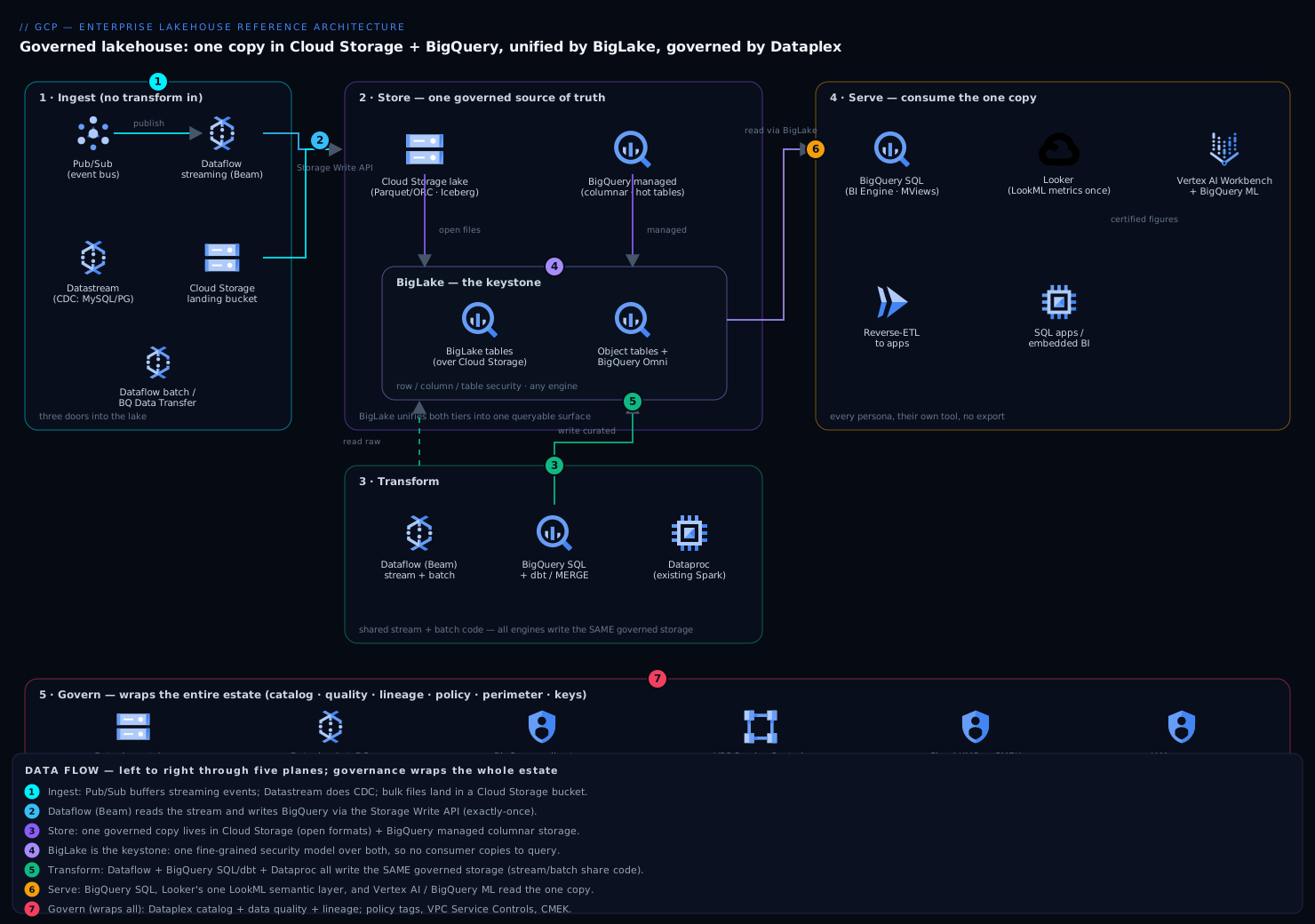
Reading the diagram (left to right): data enters through the three ingest doors on the left (streaming via Pub/Sub + Dataflow, CDC via Datastream, batch via Cloud Storage), converges on the single governed store in the middle (Cloud Storage open files + BigQuery managed storage, fused into one queryable surface by BigLake), is transformed in place by Dataflow / BigQuery SQL / Dataproc, and fans out on the right to every consumer (BigQuery, Looker, Vertex AI, BigQuery ML) — while the Dataplex + policy-tags + VPC-SC + CMEK governance band runs underneath the whole flow, because governance wraps the estate rather than sitting at the end of it.
1. Ingest. Source data arrives through three doors, and none of them transform data on the way in:
- Streaming events (clickstream, IoT, application telemetry, CDC from operational databases) publish to Pub/Sub, and a Dataflow streaming job (Apache Beam) reads the topic and writes to BigQuery via the Storage Write API (exactly-once) and/or to Cloud Storage. Datastream handles change-data-capture from MySQL/PostgreSQL/Oracle into the lake with low latency.
- Batch and bulk loads (nightly extracts, SaaS exports, partner files, historical backfills) land first in a Cloud Storage landing bucket; a Dataflow batch job or a BigQuery load picks them up. BigQuery Data Transfer Service schedules recurring SaaS and cross-cloud imports.
- Federated, no-copy sources stay where they are: BigLake external tables and BigQuery Omni let BigQuery query data already sitting in Cloud Storage (or even in S3/Azure Blob) in place, so some data never moves at all.
2. Store — the source of truth. Everything converges on two tiers of storage that BigLake unifies into one queryable surface:
- Cloud Storage holds open-format files (Parquet/ORC, plus Apache Iceberg or Delta tables) — the raw and the open-table-format data, organized as Dataplex zones (a raw zone for faithful-to-source landing, a curated zone for cleaned/conformed/typed data). This is the cheap, open, engine-agnostic layer that Spark, Trino, or anything else can also read.
- BigQuery managed storage holds the high-value, heavily-queried curated and business tables in BigQuery’s optimized columnar format with clustering, partitioning, and the fastest query path.
- BigLake is the keystone: it puts a single fine-grained security model (row-, column-, and table-level access, enforced regardless of engine) over both the Cloud Storage files and BigQuery tables, so an analyst’s
SELECTand a Spark job’s read see the same table, the same columns they are permitted to see, and the same governed copy. There is no second copy and no second access model. Object tables even let BigQuery query unstructured data (images, PDFs) in Cloud Storage as rows, which is what feeds multimodal ML and the increasingly common “join your documents to your warehouse” use cases.
This storage substrate is the centre of gravity; every other component points at it.
3. Transform. Dataflow (managed Apache Beam) is the unified processing engine, and the single most important property is that one Beam pipeline expresses both the streaming and the batch path, so the two physically cannot drift. Streaming jobs read Pub/Sub, apply windowing, enrichment, and quality rules, and MERGE/append into the curated tier with exactly-once semantics; batch jobs do the heavier historical transforms and backfills. Where teams prefer SQL-first transformation, BigQuery itself is the transform engine — scheduled queries, MERGE statements, materialized views, and dbt building curated and business tables in-warehouse. Where teams have existing Spark, Dataproc (or BigQuery’s Spark integration) reads the same BigLake tables. The point is that all of these write to the same governed storage; the engine is a preference, not a fork in the source of truth. Orchestration is Cloud Composer (managed Airflow) or Cloud Workflows for lighter DAGs.
4. Serve. Consumption fans out from the one copy:
- SQL analysts and applications query BigQuery directly (standard SQL, BI Engine acceleration, materialized views).
- Business users consume Looker, whose LookML semantic layer defines metrics once (revenue, churn, margin) on top of BigQuery, so every dashboard, every embedded report, and every
Explorecomputes the certified figure the same way — this is what kills the “two dashboards, two revenue numbers” problem at the modeling layer. - Data scientists read the same BigLake tables from notebooks (Vertex AI Workbench), train with BigQuery ML (SQL-native models) or Vertex AI, and never export a copy.
- Reverse-ETL and apps pull governed Gold/business tables back into operational systems.
5. Govern (wrapping everything). Dataplex is the governance plane across the entire estate: it provides the unified data catalog (auto-discovered metadata for BigQuery datasets and Cloud Storage assets, searchable by every persona), automated data-quality scans (rule-based and recommended), data profiling, data lineage (column-level, captured automatically from BigQuery and Dataflow), and business-domain organization (lakes → zones → assets that map to your business domains). Policy is enforced by BigQuery policy tags (taxonomies driving column-level access — e.g., a pii.email tag that only a named group can read), VPC Service Controls (a service perimeter that stops data from being exfiltrated to projects outside the boundary), and CMEK encryption. Lineage plus the catalog plus policy tags are exactly the three artifacts the auditor and the acquirer ask for.
The mental model: Cloud Storage and BigQuery hold one physical copy; BigLake makes both queryable under one security model so no one ever copies to query; Dataflow moves and transforms everything with shared streaming/batch code; Dataplex catalogs, quality-checks, and lineage-tracks the whole thing; and Looker serves one certified semantic layer to the business. One copy, one access model, one set of metrics — read by everyone.
Lakehouse vs. warehouse vs. lake
These three words get thrown around interchangeably, and the confusion is expensive because they are not three products — they are three answers to the same question (“where does analytical data live and who can trust it?”), each solving the previous one’s biggest flaw. The honest way to hold them in your head: a warehouse is optimized for trust and speed at the cost of flexibility and money; a lake is optimized for flexibility and cost at the expense of trust; a lakehouse is the deliberate attempt to keep the lake’s storage economics and the warehouse’s management and governance, by putting a metadata-and-security layer over open files so one copy serves both worlds.
| Dimension | Data warehouse | Data lake | Lakehouse (on GCP) |
|---|---|---|---|
| What it stores | Modeled, typed tables | Raw files, any format | Both — open files and managed tables, one surface |
| Schema | Schema-on-write (curated up front) | Schema-on-read (figure it out later) | Both, per Dataplex zone |
| File format | Proprietary columnar | Open (Parquet/ORC/JSON/Avro) | Open (Parquet + Iceberg) and BigQuery columnar |
| Compute | Coupled to storage | Bring-your-own engine | Decoupled — BigQuery/Spark/Trino over the same storage |
| Mutability / ACID | Full DML, ACID | Append-only, no transactions | ACID DML on the lake via Iceberg |
| Time travel | Yes (within a window) | No | Yes — native window and Iceberg snapshots |
| Governance | Central, fine-grained | Frequently weak → “swamp” | Fine-grained across engines (BigLake + Dataplex) |
| Who uses it | SQL analysts, BI | Data scientists, ML | Everyone — one governed copy |
| Cost model | Storage + compute bundled | Cheap storage, DIY compute | Cheap storage + pay-per-query compute (decoupled) |
| What breaks first at scale | Cost of holding cold data; rigidity | Trust and discoverability (the swamp) | Nothing structural — you tune reservations and partitioning |
| Best fit | Curated BI on structured data | Cheap retention, ML feature sourcing | One governed copy for every persona |
The single insight to carry away: a lakehouse is not a fourth thing you buy instead of the other two — it reuses both. The curated tables in BigQuery managed storage are a warehouse; the open Parquet/Iceberg files in Cloud Storage are a lake; BigLake is the layer that makes them one queryable surface with one security model, which is the specific ingredient a plain “warehouse plus a lake next to it” is missing. Take BigLake away and you are back to two kingdoms and the copy-to-query tax. That is why, later, the anti-pattern “just give the data scientists raw bucket access” is fatal: it quietly deletes the very thing that makes the arrangement a lakehouse rather than a lake sitting awkwardly beside a warehouse.
When is each the right call? Reach for a plain warehouse (BigQuery + scheduled queries + a BI tool, and nothing else) when all your data is structured, all your consumers speak SQL, and you have no open-format or multi-engine pressure — that really is enough, and adding the rest is over-engineering. Reach for the full lakehouse the moment you have open-format data, more than one processing engine, streaming and batch, or governance pressure (PII, audit, lineage). And when the bottleneck stops being technology and becomes ownership — many autonomous domain teams each wanting to own and publish their own data — escalate to a data mesh, which is this same lakehouse pattern, federated across domains.
The medallion pattern and open table formats
Two ideas turn “files in a bucket” into a trustworthy lakehouse: a layering discipline (the medallion pattern) and an open table format (Apache Iceberg). They solve different problems — the medallion pattern is about organization and recoverability, Iceberg is about transactions and correctness on open files — and a real lakehouse uses both.
The medallion (bronze / silver / gold) pattern is a promotion pipeline: data flows through three progressively-cleaner layers, and you only ever transform forward, never edit in place. On GCP these layers are Dataplex zones (introduced above), not just folder names, so governance, discovery, quality scans, and lineage attach to each layer physically.
| Layer (medallion) | Dataplex zone | What lives here | Written by | Read by |
|---|---|---|---|---|
| Bronze | raw zone | Faithful-to-source, immutable landing — exactly as it arrived, nothing cleaned or dropped | Ingestion (Datastream CDC, Dataflow, Cloud Storage loads) | Reprocessing jobs only |
| Silver | curated zone | Cleaned, typed, deduplicated, conformed, joined to reference data | Dataflow / dbt / BigQuery SQL | Data scientists, feature pipelines, gold builders |
| Gold | business/serving | Aggregated, metric-ready, business-conformed tables the BI layer trusts | dbt / scheduled MERGE |
Looker, analysts, reverse-ETL, apps |
The load-bearing rule is land bronze immutably and transform forward. Because bronze is a faithful, never-edited copy of what arrived, any downstream mistake is recoverable: a bad silver transform, a wrong dedup rule, a schema bug — you fix the code and re-run from bronze, and because the transforms are idempotent you get a correct silver and gold back. If instead you “clean on ingest” and keep no raw copy, a bad transform is unrecoverable and you have lost the source of truth. This is also why bronze is cheap Cloud Storage: it is written once, read rarely, and tiered to Nearline/Coldline by Autoclass. (Databricks popularized the bronze/silver/gold names; on GCP the mechanism is Dataplex zones, and this article’s existing raw/curated/gold vocabulary maps one-to-one onto bronze/silver/gold.)
Open table formats solve a different, subtler problem: a folder of Parquet files is not a table. If two jobs write to it at once you can get half-written, corrupt reads; there is no atomic “replace these rows”; adding a column or renaming one means rewriting everything; and there is no way to ask “what did this look like yesterday?”. Apache Iceberg fixes all of that by adding a metadata layer over the Parquet files — a tree of snapshots, manifests, and manifest lists that records exactly which files make up the table at each point in time. That metadata is what buys you:
- ACID transactions — a write produces a new snapshot atomically; readers never see a half-applied change, and concurrent writers do not corrupt each other.
- Time travel — every snapshot is retained (until expired), so you can query the table as of any past snapshot to recover from a bad load or audit a historical value.
- Schema and partition evolution — add, drop, or rename columns, and even change the partitioning, without rewriting the data files.
- Engine independence — the metadata is an open standard, so BigQuery, Spark, Trino, Flink, and Snowflake can all read (and, with a shared catalog, write) the same table.
On Google Cloud there are two flavours of Iceberg table, and choosing correctly is the crux of the open lakehouse:
- BigLake Iceberg tables in BigQuery (BigQuery-managed) — BigQuery owns the table: full DML (
INSERT/UPDATE/DELETE/MERGE), streaming ingest via the Storage Write API, automatic compaction and metadata management, ACID and time travel — while the data and the Iceberg metadata sit in your own Cloud Storage bucket in the open Iceberg format, so Spark and Trino can read the very same table. This is the mutable, enterprise-managed open table: you get warehouse ergonomics on open lake storage. - Read-only external Iceberg tables — an external engine (a Spark or Flink job) owns and writes the Iceberg table, and BigQuery reads it (by pointing at the current metadata file, or through a catalog). Use this when another platform is the writer and BigQuery is one of several readers.
Creating a BigQuery-managed BigLake Iceberg table is ordinary DDL — note the table_format = 'ICEBERG' and the connection that supplies the delegated service account:
-- Mutable, ACID, open Iceberg table — data + metadata in YOUR GCS bucket
CREATE TABLE lakehouse.curated.orders (
  order_id     INT64,
  order_ts     TIMESTAMP,
  customer_id  STRING,
  order_amount NUMERIC
)
WITH CONNECTION `europe-west2.biglake-curated`
OPTIONS (
  file_format  = 'PARQUET',
  table_format = 'ICEBERG',
  storage_uri  = 'gs://kv-lakehouse-curated/iceberg/orders'
);

-- It behaves like a warehouse table: an ACID MERGE straight onto the lake
MERGE lakehouse.curated.orders T
USING staging.orders_delta S
ON T.order_id = S.order_id
WHEN MATCHED     THEN UPDATE SET order_amount = S.order_amount
WHEN NOT MATCHED THEN INSERT ROW;

-- ...and it time-travels: read it as of 6 hours ago to check a suspected bad load
SELECT COUNT(*), SUM(order_amount)
FROM lakehouse.curated.orders
FOR SYSTEM_TIME AS OF TIMESTAMP_SUB(CURRENT_TIMESTAMP(), INTERVAL 6 HOUR);
That single table is the whole lakehouse thesis in miniature: it is open (Iceberg/Parquet in your bucket, readable by Spark), mutable and transactional (ACID MERGE), time-travelling (recover a bad load without a backup restore), governed (BigLake enforces column and row policy on it), and one copy (no export). A plain gs://.../orders/*.parquet folder gives you none of those four — it is exactly why “just drop Parquet in a bucket” is a lake, not a lakehouse.
Component breakdown
| Component | GCP service | What it does | Why it’s here / key configuration choices |
|---|---|---|---|
| Streaming ingest | Pub/Sub + Dataflow + Datastream | Durable event bus; managed Beam streaming; CDC from databases | Pub/Sub as the decoupling buffer; Dataflow streaming with the BigQuery Storage Write API for exactly-once; Datastream for low-latency CDC into the lake; schema enforced at the edge, not transformed on ingest |
| Batch / bulk ingest | Cloud Storage + Dataflow + BQ Data Transfer Service | Landing zone for files; managed batch ETL; scheduled SaaS/cross-cloud imports | Land raw first (immutable), then transform; Data Transfer Service for recurring SaaS feeds; dual-region or multi-region buckets for the landing/raw tier; Autoclass for tiering |
| Lake storage (open) | Cloud Storage | Cheap, open-format, engine-agnostic data — raw + open tables | Parquet/ORC + Apache Iceberg/Delta; organized as Dataplex raw/curated zones; uniform bucket-level access; lifecycle rules; CMEK; this is the layer non-BigQuery engines (Spark/Trino) also read |
| Warehouse storage (managed) | BigQuery (managed storage) | Optimized columnar store for high-value, hot, heavily-queried tables | Partition (by ingestion date or an event-time column) + cluster (on high-cardinality filter keys) every large table; time-travel (7-day default, configurable); the fastest query path for serving |
| Unified table & security layer | BigLake | One queryable surface + one fine-grained security model over CS and BigQuery | BigLake tables over Cloud Storage with row/column/table-level access enforced by any engine; object tables for unstructured data; BigQuery Omni to query S3/Azure in place — the keystone that means no copy to query |
| Transform / processing | Dataflow (Apache Beam) — and BigQuery SQL / dbt / Dataproc | Streaming + batch transformation with shared code; in-warehouse SQL transforms | One Beam pipeline for stream + batch so they cannot drift; Flexible Resource Scheduling / Streaming Engine; dbt or scheduled MERGE for SQL-first teams; Dataproc for existing Spark on the same BigLake tables |
| Orchestration | Cloud Composer (Airflow) / Cloud Workflows | Schedules and sequences pipelines and quality gates | Composer for complex DAGs and dependencies; Workflows for lightweight serverless orchestration; quality gates between zones (raw→curated only if checks pass) |
| Governance plane | Dataplex | Catalog, data quality, profiling, lineage, business-domain org | Dataplex lakes → zones → assets mapped to domains; auto data discovery; AutoDQ data-quality scans; column-level lineage (auto from BigQuery + Dataflow); the catalog every persona searches |
| Access policy & encryption | BigQuery policy tags + VPC Service Controls + Cloud KMS | Column-level access by taxonomy; exfiltration perimeter; CMEK | Policy-tag taxonomies (e.g., pii.*) bound to IAM groups for column-level control; VPC-SC perimeter around the data projects; CMEK on BigQuery, Cloud Storage, Dataflow |
| BI / semantic layer | Looker (LookML) | One governed metric definitions layer served to the business | LookML defines metrics once on top of BigQuery; governed Explores, embedded analytics, and scheduled delivery; BI Engine to accelerate dashboards; kills “two numbers” at the modeling layer |
| ML / data science | BigQuery ML + Vertex AI Workbench | SQL-native and notebook ML on the same governed copy | BigQuery ML (CREATE MODEL in SQL) for analysts; Vertex AI notebooks read BigLake tables directly — no export, models trained on the certified data |
| Identity & org | IAM + Resource Manager + Service Accounts | Least-privilege access; project/folder hierarchy | Folders per domain/environment; service accounts per pipeline (no user keys); IAM Conditions + groups, not individual grants; reads governed by BigLake/policy tags, not raw bucket ACLs |
A few choices deserve the “why,” because they are exactly where a naive “warehouse plus a lake” quietly betrays you.
Why BigLake is the keystone, not an optional add-on. The entire premise — one copy, queried by everyone, governed once — collapses without a layer that puts a single fine-grained security model over both the object-store files and the warehouse tables. The naive alternative is to grant data scientists raw storage.objects.get on the bucket so their Spark jobs can read the parquet directly. The moment you do that, you have two access models (BigQuery’s row/column policies for analysts, and coarse bucket IAM for everyone else), the column-level PII controls you built in BigQuery are trivially bypassed by reading the underlying files, and your audit story has a hole you can drive a truck through. BigLake closes the hole: it enforces table-, row-, and column-level access on the Cloud Storage data itself, for whatever engine reads it, using delegated service-account credentials so consumers never get raw object access. That is what makes “let the data scientists read the same governed copy” safe, and it is the difference between a lakehouse and a lake with a warehouse next to it.
Why metrics live in LookML, not in dashboards. The “two dashboards show different revenue” problem is almost never a data problem — it is a definition problem. Two analysts wrote two slightly different SUM(...) with two slightly different filters in two BI tools. If you certify the storage but let every dashboard re-derive metrics ad hoc, the divergence simply moves from the data layer to the presentation layer and you have solved nothing. Defining revenue, churn, margin, and active-customer once in LookML — a version-controlled, reviewed semantic model on top of BigQuery — means every Explore, every dashboard, and every embedded report computes the same number the same way. The certified figure is enforced at the modeling layer, which is the only place it can actually be enforced.
Why partition and cluster every large BigQuery table — it is a cost control, not just performance. BigQuery’s on-demand pricing bills by bytes scanned. An unpartitioned, unclustered table means every query that filters on a date or a customer ID still scans the entire table — you pay full price for data you immediately discard, and a single careless SELECT * on a 50 TB table is a five-figure surprise. Partitioning (by ingestion time or an event-time column) prunes whole date ranges before scanning; clustering (on the high-cardinality keys you filter and join on) prunes within partitions. The combination routinely cuts bytes-scanned — and therefore cost and latency — by an order of magnitude. This is the single highest-leverage configuration choice in the warehouse tier, and skipping it is the most common reason a BigQuery bill spirals.
Why Dataplex zones, not just folders in a bucket. A raw/, curated/, gold/ folder convention in a bucket is documentation — nothing enforces it, nothing scans it, and nothing tells an analyst what is in it. Dataplex zones turn that convention into a managed construct: assets in a zone are auto-discovered and cataloged, data-quality and profiling scans run against them, lineage is captured, and the raw→curated promotion can be gated on quality checks passing. The zone is where governance actually attaches to the physical data, which is what turns a data lake into something other than a data swamp.
Why exactly-once on the streaming write path. A fraud or revenue signal computed from a stream that double-counts events is worse than no signal — it is a wrong signal that people trust. Dataflow writing to BigQuery via the Storage Write API with exactly-once semantics (rather than legacy streaming inserts or at-least-once file drops) means the curated table is correct even across worker restarts and retries, so the same metric computed on the stream and on the batch backfill agree. Without it, the streaming path silently diverges from the batch path and re-creates the exact “two pipelines, two numbers” problem the architecture exists to eliminate.
Implementation guidance
Provision in layers, each with its own Terraform stack and state, so the long-lived foundation (org hierarchy, perimeter, KMS) and the faster-moving data products (datasets, pipelines, dashboards) evolve independently. Terraform is the natural choice on Google Cloud (Config Connector / KCC and the Cloud Foundation Toolkit blueprints are equally valid; on multi-cloud teams Terraform wins). The layering matters more than the tool:
- Layer 0 — Foundation & security (platform). Resource-Manager folders (per environment and per domain), the analytics projects, VPC Service Controls perimeter and access levels, Cloud KMS keyrings/keys for CMEK, org policies (deny public buckets, restrict service-account key creation, restrict locations), and the policy-tag taxonomies (
pii.*,confidential.*) bound to IAM groups. Long-lived; changes rarely. - Layer 1 — Storage substrate (platform/data-platform). Cloud Storage buckets (landing/raw/curated, multi- or dual-region, uniform bucket-level access, lifecycle + Autoclass), the Dataplex lake, zones, and asset attachments, BigQuery datasets, and the BigLake connection + tables. Stateful; treat with care (
prevent_destroyon data buckets and datasets). - Layer 2 — Pipelines & transform (data engineering). Pub/Sub topics/subscriptions, Datastream streams, Dataflow jobs (deployed as Flex Templates), Cloud Composer environment and DAGs, dbt project, scheduled queries, Dataplex data-quality scans. Deploys often.
- Layer 3 — Serve (analytics). Looker instance/connection and the LookML project (version-controlled in its own repo), BigQuery authorized views and BI Engine reservation, Vertex AI Workbench instances.
A representative Terraform skeleton for the storage substrate and the BigLake-over-Cloud-Storage governance keystone (Layer 1) — note the policy-tag taxonomy, the BigLake connection that delegates access, and the partitioned/clustered managed table:
# --- Policy-tag taxonomy: column-level access by classification ---
resource "google_data_catalog_taxonomy" "pii" {
  display_name           = "pii"
  region                 = "europe-west2"
  activated_policy_types = ["FINE_GRAINED_ACCESS_CONTROL"]
}

resource "google_data_catalog_policy_tag" "email" {
  taxonomy     = google_data_catalog_taxonomy.pii.id
  display_name = "pii.email"
}

# Only the named group may read columns tagged pii.email
resource "google_data_catalog_policy_tag_iam_member" "email_readers" {
  policy_tag = google_data_catalog_policy_tag.email.name
  role       = "roles/datacatalog.categoryFineGrainedReader"
  member     = "group:pii-approved@kloudvin.com"
}

# --- Curated-zone bucket: open formats, governed, CMEK, no public access ---
resource "google_storage_bucket" "curated" {
  name                        = "kv-lakehouse-curated"
  location                    = "EU"            # multi-region for the lake tier
  uniform_bucket_level_access = true            # IAM only, no legacy ACLs
  encryption { default_kms_key_name = google_kms_crypto_key.lake.id }
  autoclass { enabled = true }                  # auto tiering of cold data
  lifecycle { prevent_destroy = true }
}

# --- BigLake connection: consumers read via THIS SA, never raw bucket access ---
resource "google_bigquery_connection" "biglake" {
  connection_id = "biglake-curated"
  location      = "EU"
  cloud_resource {}                             # creates a delegated service account
}

# Grant the connection's delegated SA read on the bucket (NOT the end users)
resource "google_storage_bucket_iam_member" "biglake_reads" {
  bucket = google_storage_bucket.curated.name
  role   = "roles/storage.objectViewer"
  member = "serviceAccount:${google_bigquery_connection.biglake.cloud_resource[0].service_account_id}"
}

# --- BigLake table over Cloud Storage: queried as SQL, governed by BigLake ---
resource "google_bigquery_table" "events_external" {
  dataset_id          = google_bigquery_dataset.curated.dataset_id
  table_id            = "events"
  deletion_protection = true
  external_data_configuration {
    autodetect    = false
    connection_id = google_bigquery_connection.biglake.name   # makes it a BigLake table
    source_format = "PARQUET"
    source_uris   = ["gs://${google_storage_bucket.curated.name}/events/*"]
    # Apache Iceberg / Hive partitioning configured here for open-table-format data
  }
}

# --- Managed high-value table: PARTITION + CLUSTER (the cost/perf lever) + CMEK ---
resource "google_bigquery_table" "fact_orders" {
  dataset_id          = google_bigquery_dataset.gold.dataset_id
  table_id            = "fact_orders"
  deletion_protection = true
  time_partitioning { type = "DAY"  field = "order_ts" }   # prune by date
  clustering          = ["customer_id", "store_id"]        # prune within partitions
  encryption_configuration { kms_key_name = google_kms_crypto_key.bq.id }
  schema = file("${path.module}/schemas/fact_orders.json") # email column carries policy tag
}
A representative Dataflow streaming pipeline + Dataplex data-quality wiring (Layer 2) — the Flex Template job and the AutoDQ scan that gates the curated zone:
# --- Dataflow streaming job (Flex Template): Pub/Sub -> BigQuery, exactly-once ---
resource "google_dataflow_flex_template_job" "stream_to_bq" {
  provider                = google-beta
  name                    = "events-stream-to-bq"
  container_spec_gcs_path = "gs://kv-templates/events-stream.json"
  parameters = {
    inputSubscription = google_pubsub_subscription.events.id
    outputTable       = "${var.project}:curated.events"   # Storage Write API, exactly-once
    # streaming engine + autoscaling configured via additional parameters
  }
  on_delete = "drain"   # drain in-flight data on teardown, never lose events
}

# --- Dataplex data-quality scan: raw -> curated promotion gate ---
resource "google_dataplex_datascan" "events_dq" {
  location     = "europe-west2"
  data_scan_id = "events-quality"
  data { resource = google_bigquery_table.events_external.id }
  data_quality_spec {
    rules {
      column      = "customer_id"
      dimension   = "COMPLETENESS"
      non_null_expectation {}
    }
    rules {
      column            = "order_amount"
      dimension         = "VALIDITY"
      range_expectation { min_value = "0" }
    }
  }
  execution_spec { trigger { on_demand {} } }   # invoked by Composer between zones
}
Networking and identity wiring, the load-bearing rules:
- VPC Service Controls is the data-exfiltration boundary. Put the analytics projects (BigQuery, Cloud Storage, Dataflow, Dataplex) inside a service perimeter. Now even a leaked, over-privileged credential cannot copy a BigQuery table to a bucket in a project outside the perimeter, and
bq extractto an external project is denied. Define access levels (corporate IP ranges, device trust via Access Context Manager) for the humans and ingress/egress rules for the few legitimate cross-perimeter flows (e.g., reads from a partner project). This is the control that turns “we trust our IAM” into “exfiltration is structurally blocked.” - Private connectivity, no public data paths. Reach BigQuery, Cloud Storage, and Dataflow over Private Google Access / Private Service Connect from your VPC; Dataflow workers run with no external IPs in your subnetwork. Datastream connects to source databases over private connectivity (VPC peering / PSC), never the public internet. The data plane never traverses a public path.
- Identity is service-account-scoped and key-less. Every pipeline runs under its own least-privilege service account (the Dataflow job’s SA can write one dataset and read one subscription; the Composer SA can trigger jobs; the BigLake connection’s delegated SA reads one bucket). Humans get access through IAM groups (
analysts@,data-eng@,pii-approved@), never individual grants, and never via downloaded service-account keys (block key creation with an org policy; use Workload Identity Federation for any external CI). Reads of governed data go through BigLake and policy tags, not raw bucket ACLs — uniform bucket-level access removes legacy ACLs entirely so there is one place access is decided. - Column-level access is enforced by policy tags, end to end. The
email/ssn/dobcolumns carry policy tags from thepii.*taxonomy; onlypii-approved@holds the fine-grained-reader role on those tags. An analyst inanalysts@queryingSELECT *simply does not get those columns back — across BigQuery and BigLake-governed Cloud Storage data — and you did not have to build separate masked views per audience. (The exact behaviour ofSELECT *on a tagged column — error versus mask — is a common surprise; see Going deeper.)
Deployment: ship Dataflow pipelines as Flex Templates (containerized, versioned, parameterized) promoted dev→staging→prod through CI; manage LookML in its own Git repo with the standard Looker dev→production validation and deploy flow; manage dbt models in CI with tests; and keep all infrastructure in the Terraform layers above so every production change is a reviewed, attributed, revertable commit.
Enterprise considerations
Security and Zero Trust. Apply Zero Trust at the data plane, not just the network. Perimeter: VPC Service Controls wraps the analytics projects so data cannot be exfiltrated to projects outside the boundary — the single most important control in a data platform, because the threat is rarely “break in” and usually “copy out.” Identity: least-privilege service accounts per pipeline, human access via groups with IAM Conditions, no downloaded keys, Workload Identity Federation for external systems. Data-level access: policy tags drive column-level masking/denial for PII, row-level security scopes tenants and regions, and BigLake enforces all of it across engines so the data scientist’s Spark job is bound by the same rules as the analyst’s SQL — there is no back door through raw object access. Encryption: CMEK on BigQuery, Cloud Storage, and Dataflow (with Cloud EKM / external key manager if you must hold keys outside Google), TLS in transit everywhere. Posture: Security Command Center for misconfiguration and threat findings, Cloud Audit Logs (Data Access logs on BigQuery and Cloud Storage) feeding a SIEM, and Sensitive Data Protection (Cloud DLP) to discover and classify PII automatically and auto-apply policy tags — so classification is continuous, not a one-time spreadsheet. The blast radius of a compromised analyst credential is bounded by their groups, the columns their policy tags allow, and a perimeter that forbids copying the data out.
Cost optimization (FinOps). The lakehouse’s core economic win is decoupled storage and compute — you store petabytes cheaply in Cloud Storage and BigQuery storage and pay for compute only when you query. Beyond that: (1) partition + cluster every large table — the highest-leverage lever, cutting bytes-scanned (and on-demand cost) by an order of magnitude; (2) choose the right compute pricing model — on-demand (per-TB-scanned) for unpredictable/low volume, BigQuery editions with slot reservations + autoscaling for steady high volume (committed slots cut the rate, autoscaling absorbs spikes, and idle-slot sharing across reservations recovers waste); (3) storage tiering — Autoclass and lifecycle rules move cold lake data to Nearline/Coldline/Archive automatically, and BigQuery’s long-term storage pricing halves the rate on partitions untouched for 90 days; (4) materialized views and BI Engine so repeated dashboard queries hit a cheap cached layer instead of re-scanning; (5) maximum-bytes-billed guards and custom quotas per project to make a runaway SELECT * fail instead of bankrupt; (6) per-team cost attribution via labels on datasets/jobs and BigQuery’s INFORMATION_SCHEMA job stats, exposed as a chargeback dashboard in Looker so each domain sees the cost of its own queries. Dataflow costs drop with Flexible Resource Scheduling (batch on cheaper preemptible-backed capacity) and right-sized Streaming Engine autoscaling. The catalog itself saves money: discoverable, certified datasets stop teams rebuilding (and re-paying for) data that already exists.
Scalability. Independent axes, which is the whole point of decoupling. Storage scales effectively without limit (Cloud Storage and BigQuery storage are managed and elastic — petabytes are routine). Query compute scales by slots: on-demand absorbs bursts automatically, and reservations with autoscaling add slots within a ceiling for predictable heavy workloads — no cluster to resize. Streaming throughput scales by Dataflow autoscaling (the Streaming Engine adds workers as Pub/Sub backlog grows) and Pub/Sub scales horizontally with no provisioning. Concurrency scales because BigQuery’s serving is multi-tenant and reservations isolate noisy workloads from interactive analysts. The architectural discipline that keeps it scaling: partition/cluster so big tables stay cheap to query, separate reservations for ETL vs interactive vs BI so a heavy batch job cannot starve a dashboard, and materialized views / BI Engine to keep the hot serving path off raw scans.
Reliability and DR (RTO/RPO). Most of this stack is regional managed service with built-in redundancy — BigQuery, Cloud Storage (regional/dual/multi-region), Pub/Sub, and Dataflow are highly available within their region by design, so single-zone failures are non-events you do not operate. The deliberate DR decisions are about location and recovery of data and pipelines: (1) Storage durability and locality — choose dual-region or multi-region buckets for the raw/curated lake so the data survives a regional event with synchronous-ish replication (your data-layer RPO is near-zero for multi-region storage); for BigQuery, use cross-region dataset replication / managed disaster recovery or scheduled cross-region copies of critical datasets (RPO = replication lag or copy cadence). (2) Pipeline recoverability — because everything is Terraform + Flex Templates + LookML in Git, standing the platform back up in a second region is terraform apply + redeploy templates, and your RTO is “re-point ingestion + apply IaC in the DR region,” realistically tens of minutes to a few hours depending on how much you pre-stage. (3) Reprocessing as recovery — the raw zone is immutable and faithful to source, so a corrupted curated table is recovered by re-running the (idempotent) Dataflow/dbt transforms from raw, and BigQuery time travel (7 days) plus table snapshots recover from accidental deletes/bad merges within the window. The reliability discipline that makes this real is rehearsal: a DR game day that restores critical datasets to the second region and reprocesses from raw, and confirms the certified numbers reconcile.
Observability. Watch the platform on three fronts. Pipeline health: Cloud Monitoring on Dataflow (system lag, data freshness, watermark, backlog bytes, worker autoscaling), Pub/Sub (oldest-unacked-message age, subscription backlog), and Datastream freshness — alert on data freshness and backlog, the leading indicators that the stream is falling behind. Query and cost health: BigQuery INFORMATION_SCHEMA.JOBS for bytes-scanned, slot-ms, and the most expensive queries; alarms on reservation slot utilization and on any single job exceeding a bytes-billed threshold. Data health: Dataplex data-quality scan results (completeness, validity, freshness, uniqueness) and profiling trends — a quality-rule failure should block the promotion from raw to curated, not silently publish bad data, and should page the owning team. Lineage in Dataplex is the debugging tool: when a number looks wrong, follow the column-level lineage from the dashboard back through the transforms to the raw file. Alert on symptoms that matter to consumers — stale data, failed quality gates, a dashboard’s source table not refreshed — not raw infrastructure metrics.
Governance. Enforce, do not document. Dataplex is the governance system of record: lakes/zones/assets mapped to business domains, automated discovery and cataloging so every dataset is findable, data-quality scans as gates, and column-level lineage captured automatically. Policy-tag taxonomies make data classification operational (a column tagged pii.email is access-controlled everywhere, automatically), and Cloud DLP auto-discovers and tags new PII so classification keeps up with new data. Data contracts — schema + quality expectations declared per dataset and enforced by Dataplex scans — make a producing team accountable for what they publish. Land the platform in a governed resource hierarchy with org policies asserting the invariants (no public buckets, no SA keys, location restrictions, CMEK required), and treat the Terraform / LookML / dbt PR history as the change-management record — every production change to a pipeline, a metric, or an access policy is a reviewed, attributed, revertable commit, which is exactly what an auditor and an acquirer’s due-diligence team ask for and exactly what “export a copy and tweak it in a notebook” never provides. This is also the substrate for data-mesh operating models: each domain owns its zone, datasets, and contracts, while Dataplex provides the federated catalog and the central platform team provides the paved road.
Reference enterprise example
Tideford Grocers is a (fictional) mid-market grocery and e-commerce chain — roughly 420 stores, a growing online business, ~30 TB of curated data growing several TB a quarter, and a data team of about fourteen split across one platform squad and three domain squads (retail/stores, e-commerce, supply chain). They ran a legacy on-prem warehouse that loaded overnight, plus a Cloud Storage “lake” the data-science team filled with parquet exports. The breaking point was a board meeting where three slides — store revenue, e-commerce revenue, and total revenue — did not add up because each was built from a different copy of the orders data with different return-handling logic. In parallel, a supplier-data-sharing agreement required them to prove data lineage and PII access controls, which the spreadsheet-and-wiki status quo could not.
What they built. One governed lakehouse in europe-west2 (London), organized as a Dataplex lake with raw and curated zones and a gold/business layer. Ingest came through three doors: Datastream CDC from the operational MySQL order database into the raw zone; Pub/Sub + Dataflow streaming for clickstream and store point-of-sale events (writing to BigQuery via the Storage Write API, exactly-once); and Cloud Storage landing for nightly supplier and ERP extracts. Raw lived as Parquet in Cloud Storage; the high-value, heavily-queried order, inventory, and customer tables lived in BigQuery managed storage, every large table partitioned by event date and clustered on customer_id/store_id. The data-science team’s parquet — previously read with raw bucket access — was converted to BigLake tables, so their Vertex AI notebooks and Spark on Dataproc now read the same governed copy as the analysts, with PII columns (email, loyalty_id) carrying policy tags that only the pii-approved@ group could read. Transformation was Dataflow for the streaming/CDC path and dbt-on-BigQuery for the SQL-first batch models, orchestrated by Cloud Composer, with Dataplex data-quality scans gating every raw→curated promotion. Serving consolidated on Looker: revenue, returns-adjusted net revenue, basket size, and active-customer were each defined once in LookML, so the three board slides finally drew from one definition. The whole estate sat inside a VPC Service Controls perimeter with CMEK on BigQuery/Cloud Storage/Dataflow, Dataflow workers on no external IPs, and Datastream over private connectivity.
The numbers and decisions. Roughly $11,500/month all-in: ~$2,100 BigQuery storage (active + long-term, the bulk of the 30 TB) and Cloud Storage (with Autoclass tiering cold raw data); ~$4,200 BigQuery compute on a standard-edition reservation with autoscaling (they moved off pure on-demand once query volume became predictable, committing a slot baseline and autoscaling for the morning analyst rush and month-end); ~$2,400 Dataflow (streaming Engine for the always-on POS/clickstream jobs plus batch with Flexible Resource Scheduling); ~$1,300 Looker; ~$900 Dataplex scans, Datastream, Pub/Sub, Composer, and the rest; with maximum-bytes-billed guards and per-project quotas capping runaway queries. They debated pure on-demand vs reservations and chose reservations once INFORMATION_SCHEMA showed steady weekday slot demand — it cut the effective compute rate roughly a third while autoscaling kept month-end from queuing. They debated giving data scientists raw bucket access “to keep it simple” and rejected it outright — BigLake was the keystone that let them share one copy and keep the PII controls, and it was the control that satisfied the supplier agreement’s audit clause. They debated a second BI tool for the data team and standardized on Looker’s semantic layer specifically to stop metric divergence at the source.
The outcome. The three-slides-don’t-add-up problem became structurally impossible: revenue is one LookML definition, and store + e-commerce now reconcile to total by construction — the next board review spent its time on why e-commerce growth slowed, not on which number was right. The fraud-and-stockout latency collapsed from “tomorrow’s batch” to under three minutes on the streaming path (POS events to a Looker tile), and because the streaming and batch metrics share definitions and the stream is exactly-once, the operational dashboard and the next-day reconciliation agree. The supplier data-sharing audit, previously a multi-week scramble, was satisfied by exporting Dataplex column-level lineage (raw file → dbt model → certified table → dashboard) and the policy-tag access report showing exactly who could read email/loyalty_id — a half-day exercise. A SELECT * that previously would have scanned a 12 TB orders table now prunes to a single day’s partition and a clustered customer range, and the maximum-bytes-billed guard caught two genuinely runaway exploratory queries before they cost anything. For DR, the raw zone is multi-region and immutable and the platform is entirely Terraform + Flex Templates + LookML-in-Git; a rehearsed recovery — replicate critical BigQuery datasets to a second region, terraform apply, redeploy templates, and reprocess curated from raw — measured an RTO of ~2 hours with a data-layer RPO near zero for the multi-region storage and minutes for the replicated warehouse tables. Net: one governed copy of the data, served fresh to every persona in their own tool, with the lineage and access controls an auditor accepts — operated by a team of fourteen for a bit over $11k/month.
When to use it
Use this architecture when you need a single analytical plane for the enterprise — one governed copy of the data, queryable by SQL analysts, data scientists, and BI tools alike, fresh enough for operational decisions, with a real catalog, lineage, and column-level governance. It is the correct default when you are tired of the warehouse-versus-lake split and the copy-to-query tax it imposes: it scales down to one analytics team on a few terabytes who want BigQuery + Looker + a little governance, and up to a regulated multinational running a data mesh of dozens of domains behind one Dataplex catalog and one VPC-SC perimeter — the diagram is the same; only the dataset count, policy-tag strictness, and reservation size change. The prerequisites are modest: a willingness to land raw and transform forward (so reprocessing is always possible), to govern through BigLake and policy tags rather than raw bucket ACLs, and to define metrics once in a semantic layer.
Trade-offs to accept going in. This is an analytical platform, not an OLTP database — BigQuery is built for scans and aggregations, not single-row lookups at thousands of QPS, and trying to back an application’s transactional reads with it is the classic mismatch (use Spanner/Cloud SQL/Bigtable for that and let it feed the lakehouse). You are accepting a bytes-scanned cost model that punishes un-partitioned tables and careless SELECT * — a discipline you must enforce with guards and culture, or the bill surprises you. And BigLake/policy-tag governance is non-optional for the safety story; if your organization cannot resist handing out raw bucket access, you do not have a lakehouse, you have a lake with a warehouse next to it and the same divergence problem you started with.
Anti-patterns that quietly defeat the design:
- Raw bucket access for “the data scientists.” The single most common failure. Granting
storage.objects.getso Spark can read the underlying parquet bypasses every BigQuery column policy you built and re-creates two access models. Govern through BigLake; consumers read via the delegated connection, never raw objects. - No partitioning or clustering “we’ll add it later.” Every query then scans the whole table, latency and cost explode, and one
SELECT *is a five-figure surprise. Partition + cluster every large table from creation — it is the highest-leverage choice you make. - Metrics defined in dashboards instead of a semantic layer. Certifying the storage but letting each dashboard re-derive revenue just moves divergence to the presentation layer. Define metrics once in LookML (or an equivalent semantic model).
- A separate streaming pipeline that re-implements the batch logic. Two pipelines for the same metric will drift and re-create the “two numbers” problem. Share transformation logic (one Beam pipeline, or the same dbt models fed by both paths) and use exactly-once writes so stream and batch reconcile.
- A
gold/curated/rawfolder convention with nothing enforcing it. Folders are documentation; a swamp forms within a quarter. Use Dataplex zones so discovery, quality scans, lineage, and promotion gates actually attach to the data. - No exfiltration boundary. Trusting IAM alone means one over-privileged credential can copy the warehouse to an external project. Wrap the data projects in VPC Service Controls so copying out is structurally blocked.
- Transforming on ingest with no immutable raw. If you clean data as it lands and keep no faithful raw copy, a bad transform is unrecoverable and reprocessing is impossible. Land raw immutably; transform forward.
Alternatives, in increasing capability and operational cost: (1) BigQuery alone — for a team that lives entirely in SQL on structured data, BigQuery + scheduled queries + a BI tool is a lakehouse-lite and may be all you need; add the rest only when you have open-format data, multiple engines, or governance pressure. (2) This article — BigQuery + BigLake + Cloud Storage + Dataflow + Dataplex + Looker — the governed lakehouse: one copy, many engines, one governance plane, the workhorse default for an enterprise analytical platform. (3) The same shape with open table formats front-and-center — BigQuery’s Iceberg/BigLake tables as the system of record so non-Google engines (Spark, Trino, Snowflake) share the exact same tables, when true multi-engine/open-format interoperability is a hard requirement. (4) Databricks or Snowflake on GCP — a third-party lakehouse/warehouse if you are standardizing a multi-cloud data platform on one vendor; you trade the deep native integration (BigLake, Dataplex, policy tags, BigQuery ML) for cross-cloud portability. (5) A full data mesh — this same architecture, federated, with each domain owning its Dataplex zone, datasets, and data contracts and the platform team providing the paved road — when organizational scale (many autonomous domain teams) outgrows a single central data team. Pick the lowest tier that meets your governance, freshness, and multi-engine requirements; most teams reach for a third-party platform or a full mesh when native BigQuery + BigLake + Dataplex with disciplined partitioning and one semantic layer would have done — and the platform you can actually govern and rehearse beats the one you merely drew.
Going deeper
Everything above is the shape and the “why.” This section is the production detail — the current BigLake/Iceberg surface, the mechanics of what BigLake enforces, and the caveats — that separates a lakehouse that demos from one that survives an audit, a scale-up, and a multi-engine team.
The BigLake Iceberg surface: three tables that look alike
Beginners meet “BigLake table,” “external table,” and “Iceberg table” and assume they are synonyms. They are three distinct objects with very different powers, and picking the wrong one is the most common design error in an open lakehouse. Hold this table in your head:
| Plain external table | Read-only external Iceberg table | BigLake Iceberg table (BigQuery-managed) | |
|---|---|---|---|
| Who writes the data | Any engine drops files | An external engine (Spark/Flink) writes Iceberg | BigQuery (DML + Storage Write API) |
| BigQuery can DML it | No — read-only | No — read-only | Yes — INSERT/UPDATE/DELETE/MERGE |
| ACID / snapshots | No | Yes (Iceberg) | Yes (Iceberg) |
| Time travel | No | Yes | Yes (FOR SYSTEM_TIME AS OF) |
| Streaming ingest | No | No | Yes (Storage Write API, exactly-once) |
| Governed by BigLake (col/row) | Yes, if created WITH CONNECTION |
Yes | Yes |
| Metadata owner | None (just files) | An external catalog | BigQuery (exports Iceberg metadata for others) |
| Reach for it when | A quick read over dropped files | Spark owns the table; BQ is a reader | BQ owns a mutable open table others also read |
The decision rule: if BigQuery is the writer and you want warehouse ergonomics (transactions, streaming, MERGE) on open storage that Spark can also read, use a BigLake Iceberg table (managed). If another engine is the writer and BigQuery is one of several readers, use a read-only external Iceberg table pointing at that engine’s catalog or metadata file. Use a plain external table only for throwaway reads of files you do not need to mutate or govern with transactions. Note the footnote that trips people up: an external table is only BigLake-governed (row/column policy enforced) if you create it WITH CONNECTION — a bare external table with no connection is just a read path with coarse bucket IAM, which is the hole BigLake exists to close.
A read-only external Iceberg table points BigQuery at the metadata another engine produced:
-- BigQuery READS an Iceberg table that Spark/Flink writes and owns
CREATE EXTERNAL TABLE lakehouse.raw.sensor_iceberg
WITH CONNECTION `europe-west2.biglake-curated`
OPTIONS (
  format = 'ICEBERG',
  uris   = ['gs://kv-lakehouse-raw/sensor/metadata/v0001234.metadata.json']
);
BigLake metastore and true multi-engine interop
“Spark and BigQuery read the same table” only works if they share a catalog — the service that maps a table name to its current Iceberg metadata pointer. Pointing a Spark job at a raw metadata.json path works for a snapshot in time, but it does not see BigQuery’s latest commit, and two writers without a shared catalog will corrupt each other. The current answer on GCP is BigLake metastore — a serverless, fully managed, Iceberg-compatible catalog that exposes an Iceberg REST Catalog endpoint, so BigQuery and any Iceberg-compatible engine (Spark on Dataproc or Dataproc Serverless, Trino, Flink, even Snowflake) resolve, commit to, and read the same tables. Dataproc jobs configure the Iceberg Spark catalog to talk to BigLake metastore, and they then see exactly what BigQuery’s MERGE just wrote — one copy, many engines, one commit log. (The older Dataproc Metastore, a managed Hive Metastore, is the heavier, VM-backed alternative and still valid for Hive-centric estates; BigLake metastore is the serverless, Iceberg-native direction. The exact Spark catalog properties are in flux as the REST-catalog surface matures — confirm the current property names against the live BigLake metastore docs before wiring a production job.)
Two mechanical points worth internalizing: (1) reads from Spark for heavy scans should go through the BigQuery Storage Read API (columnar, parallel, filter-and-column pushdown) rather than exporting — it is the read-side analogue of the Storage Write API and the reason “Spark on the same copy” is fast, not just possible. (2) Interop is governed interop: because the Spark read still goes through the BigLake connection’s delegated service account, the same column and row policy applies — a Spark job run by someone lacking the pii.email reader role does not get that column back, exactly as in BigQuery. That is the property a plain “give Spark bucket access” approach can never provide.
What BigLake actually enforces (and how)
BigLake’s magic is credential delegation with policy interposition. When you create a cloud_resource connection, GCP mints a delegated service account; you grant that SA (not your users) read on the bucket. A consumer’s query never touches the object with their own credentials — BigQuery reads the files on their behalf through the delegated SA, and applies the table’s row filters and column policy tags to the result before returning it. So three things are true at once: the user cannot gsutil cp the underlying files (they have no bucket IAM), the column/row policy is enforced regardless of which engine issued the read, and there is exactly one copy. BigLake also maintains metadata caching (file listings and, for BigLake tables, statistics) so that querying millions of objects does not pay a per-query listing tax — a real performance lever on large external tables, with a staleness window you configure against how often the underlying files change. The deep mechanics of the column/row policy itself live in BigQuery fine-grained access.
A subtle correctness point that surprises everyone: policy tags alone deny; they do not silently drop. If a user lacks the fine-grained reader role for a tag on a column, a bare SELECT * fails with an error naming the column — it does not quietly omit it. To succeed they must either SELECT * EXCEPT(email) (never touch the protected column) or you must attach dynamic data masking to the tag (hash/null/default) and grant the masked-reader role, after which SELECT * returns the masked value instead of erroring. “The analyst just doesn’t see the PII column” is therefore only true when you have added masking; with plain column ACLs, SELECT * errors. Decide per column which behaviour you want — masking keeps dashboards from breaking, hard denial is stricter.
Exactly-once on the write path, in detail
“Exactly-once” is the property that lets the streaming and batch numbers agree, and the Storage Write API delivers it with stream offsets: a writer creates a stream, appends rows at explicit offsets, and BigQuery deduplicates on those offsets across retries and worker restarts, then a commit makes a batch of appends atomically visible. This beats the two legacy approaches it replaces — the old tabledata.insertAll streaming inserts were at-least-once (duplicates possible) and file-load-based paths are batchy — and it is why a Dataflow job writing via Storage Write API to the curated table stays correct even when a worker dies mid-flight. The on_delete = "drain" on the Flex Template job matters for the same reason: draining lets in-flight windows finish and commit rather than dropping events on teardown.
Partition, cluster, and the bytes-scanned bill — the internals
On-demand BigQuery bills bytes scanned, not rows returned, decided at query planning from column and partition metadata — which is why LIMIT 10 on a 50 TB unpartitioned table still scans 50 TB (the limit applies after the scan). Partition pruning eliminates whole partitions when the WHERE filters the partition column with a literal or a constant expression; clustering sorts data within each partition on your cluster keys so a filter on them reads only the relevant blocks (block pruning), and it also speeds joins and aggregations on those keys. Prove the effect before you run anything expensive with a dry run (bq query --dry_run returns the bytes it would scan for free), and cap the downside with maximum_bytes_billed so a careless query fails instead of costing five figures. Two more levers: partitions untouched for 90 days automatically fall to long-term storage at roughly half the active rate (no action needed), and require_partition_filter on a partitioned table refuses any query that forgets the partition predicate — a guardrail that makes pruning mandatory. The full slot/pricing model is in BigQuery deep dive.
Time travel, snapshots, and how recovery actually works
Three distinct recovery mechanisms, each for a different failure: (1) Time travel — native BigQuery tables retain change history for a configurable window (default 7 days, minimum 2), queryable with FOR SYSTEM_TIME AS OF, so a bad MERGE is undone by reading the pre-incident state and overwriting; BigLake Iceberg tables get the same via retained Iceberg snapshots. (2) Table snapshots — a cheap, point-in-time, read-only clone (CREATE SNAPSHOT TABLE ... CLONE ...) that persists beyond the time-travel window with its own expiration, for “keep month-end forever” needs; it stores only the delta, so it is inexpensive. (3) Reprocess from raw — the ultimate backstop: because bronze is immutable and the transforms are idempotent, you rebuild silver/gold from source when the corruption predates your time-travel window. For Iceberg tables specifically, mind snapshot expiry and compaction — old snapshots (and their orphaned data files) must be expired/compacted to reclaim storage, and the expiry horizon is your Iceberg time-travel horizon, so set it against your recovery requirement, not by accident.
The catalog is moving: Dataplex Universal Catalog
A live API caveat to verify before you build: Google has consolidated the standalone Data Catalog into Dataplex Universal Catalog, and the standalone Data Catalog API/console is being retired (announced for early 2026) — discovery, tag templates, and policy-tag management now live under Dataplex. Policy tags themselves remain the column-security mechanism, and the Terraform google_data_catalog_* resources still provision taxonomies and tags today, but the console path and some API names are in flight, and the metadata model is evolving toward Aspects / Aspect Types (richer, typed metadata). This is exactly the kind of surface to confirm against current docs rather than trust from memory — the shape of the architecture does not change, but the resource names might.
Quotas and limits that shape the design
Design limits, not just performance tuning: a partitioned table caps at 10,000 partitions (daily partitioning over ~27 years, or a reason to partition by month/year for very long histories), a single policy-tag taxonomy caps at ~100 tags with shallow hierarchy (so classify on a handful of classes, never per-column), external/BigLake tables carry per-query object-count and metadata limits (why metadata caching matters at scale), and BigQuery enforces per-project concurrent-query and slot limits that reservations exist to manage. The recurring lesson: these caps are deliberate nudges toward the right design — few classifications, sane partition granularity, reservations for isolation — so check the current published quotas before you design something that assumes headroom that is not there.
Practice challenges
Work these in order — each builds on the last, walking a single orders dataset from a raw bucket to a governed, mutable, multi-engine lakehouse table. Commands are real and schema-correct against the current gcloud / bq / BigQuery-SQL / Terraform surface; replace every placeholder (PROJECT_ID, bucket names, group emails, connection/taxonomy IDs) with your own. No live project is assumed — treat any output as representative.
1 (Beginner) — Lay out the medallion zones.
Stand up a Dataplex lake retail-lake in europe-west2 with a raw zone (bronze, for Cloud Storage landing) and a curated zone (silver, for BigQuery products).
<details> <summary>Solution</summary>
gcloud dataplex lakes create retail-lake \
  --project=PROJECT_ID --location=europe-west2 \
  --display-name="Retail lakehouse"

gcloud dataplex zones create raw \
  --project=PROJECT_ID --location=europe-west2 --lake=retail-lake \
  --type=RAW --resource-location-type=SINGLE_REGION \
  --display-name="Bronze / raw landing"

gcloud dataplex zones create curated \
  --project=PROJECT_ID --location=europe-west2 --lake=retail-lake \
  --type=CURATED --resource-location-type=SINGLE_REGION \
  --display-name="Silver / curated"
Why: the lake is the domain container and zones make the medallion layering a managed construct (discovery, DQ, lineage attach here) rather than folder-name documentation. </details>
2 (Beginner) — Make a bucket of Parquet queryable as a governed BigLake table.
You have gs://kv-lakehouse-raw/events/*.parquet. Create a BigLake connection and an external table over it WITH CONNECTION so it is governed, not just readable.
<details> <summary>Solution</summary>
# 1) Create the BigLake connection (mints a delegated service account)
bq mk --connection --location=europe-west2 --project_id=PROJECT_ID \
  --connection_type=CLOUD_RESOURCE biglake-curated

# 2) Grant the connection's delegated SA read on the bucket (find it via:)
bq show --connection PROJECT_ID.europe-west2.biglake-curated
gcloud storage buckets add-iam-policy-binding gs://kv-lakehouse-raw \
  --member="serviceAccount:DELEGATED_SA@..." --role=roles/storage.objectViewer
-- 3) The table is BigLake-governed ONLY because of WITH CONNECTION
CREATE EXTERNAL TABLE lakehouse.raw.events
WITH CONNECTION `europe-west2.biglake-curated`
OPTIONS (
  format = 'PARQUET',
  uris   = ['gs://kv-lakehouse-raw/events/*.parquet']
);
Why: WITH CONNECTION is the difference between a governed BigLake table (row/column policy enforced, users have no raw bucket access) and a bare external table with coarse bucket IAM — the exact hole BigLake exists to close.
</details>
3 (Intermediate) — Create a mutable, ACID BigLake Iceberg table and MERGE into it.
Promote to silver: a BigQuery-managed Iceberg table you can MERGE into, with data and metadata in your own bucket.
<details> <summary>Solution</summary>
CREATE TABLE lakehouse.curated.orders (
  order_id     INT64,
  order_ts     TIMESTAMP,
  customer_id  STRING,
  order_amount NUMERIC
)
WITH CONNECTION `europe-west2.biglake-curated`
OPTIONS (
  file_format  = 'PARQUET',
  table_format = 'ICEBERG',
  storage_uri  = 'gs://kv-lakehouse-curated/iceberg/orders'
);

MERGE lakehouse.curated.orders T
USING lakehouse.raw.orders_delta S
ON T.order_id = S.order_id
WHEN MATCHED     THEN UPDATE SET order_amount = S.order_amount
WHEN NOT MATCHED THEN INSERT ROW;
Why: table_format = 'ICEBERG' gives you warehouse ergonomics (ACID MERGE, streaming, time travel) on open storage Spark can also read — the single object that makes the lakehouse a lakehouse and not a lake.
</details>
4 (Intermediate) — Recover from a bad load with time travel and a snapshot.
A wrong MERGE corrupted orders ten minutes ago. Inspect the good state, restore it, and take a durable snapshot for the auditor.
<details> <summary>Solution</summary>
-- Inspect the pre-incident state (no restore yet)
SELECT COUNT(*), SUM(order_amount)
FROM lakehouse.curated.orders
FOR SYSTEM_TIME AS OF TIMESTAMP_SUB(CURRENT_TIMESTAMP(), INTERVAL 15 MINUTE);

-- Restore by overwriting from the good point in time
CREATE OR REPLACE TABLE lakehouse.curated.orders AS
SELECT * FROM lakehouse.curated.orders
FOR SYSTEM_TIME AS OF TIMESTAMP_SUB(CURRENT_TIMESTAMP(), INTERVAL 15 MINUTE);

-- Durable point-in-time snapshot that outlives the 7-day time-travel window
CREATE SNAPSHOT TABLE lakehouse.curated.orders_snap_2026_07_19
CLONE lakehouse.curated.orders
OPTIONS (expiration_timestamp = TIMESTAMP_ADD(CURRENT_TIMESTAMP(), INTERVAL 30 DAY));
Why: time travel undoes mistakes within the retention window with no backup restore; a table snapshot is a cheap delta clone that persists beyond it — two different recovery horizons, both without copying the data out. </details>
5 (Advanced) — Partition, cluster, and prove the pruning before you pay.
Build the gold fact_orders partitioned by day and clustered on customer/store, then use a dry run to confirm a filtered query scans far less than the whole table, and cap the blast radius.
<details> <summary>Solution</summary>
CREATE TABLE lakehouse.gold.fact_orders (
  order_id INT64, order_ts TIMESTAMP, customer_id STRING,
  store_id STRING, order_amount NUMERIC
)
PARTITION BY DATE(order_ts)
CLUSTER BY customer_id, store_id
OPTIONS (require_partition_filter = TRUE);   -- refuse queries that forget the filter
# Dry run: prints bytes it WOULD scan, runs nothing, costs nothing
bq query --use_legacy_sql=false --dry_run \
'SELECT SUM(order_amount) FROM `lakehouse.gold.fact_orders`
 WHERE DATE(order_ts) = "2026-07-18" AND customer_id = "C-12345"'

# Same query with a hard guard: fails instead of scanning more than ~1 GB
bq query --use_legacy_sql=false --maximum_bytes_billed=1000000000 \
'SELECT SUM(order_amount) FROM `lakehouse.gold.fact_orders`
 WHERE DATE(order_ts) = "2026-07-18" AND customer_id = "C-12345"'
Why: partition + cluster is the highest-leverage cost/perf lever in the warehouse tier (order-of-magnitude fewer bytes scanned); --dry_run proves it for free and --maximum_bytes_billed + require_partition_filter turn “we’ll be careful” into an enforced guardrail.
</details>
6 (Advanced) — Read the same Iceberg table from Spark, and gate the promotion on quality.
Let a Dataproc Serverless Spark job read the same orders Iceberg table via the BigLake metastore catalog, and add a Dataplex data-quality scan that must pass before raw→curated promotion.
<details> <summary>Solution</summary>
# Spark on Dataproc Serverless reading the SAME Iceberg table BigQuery writes.
# The Iceberg catalog properties point at BigLake metastore's REST endpoint.
# (Representative — confirm current catalog property names against BigLake metastore docs.)
gcloud dataproc batches submit pyspark read_orders.py \
  --project=PROJECT_ID --region=europe-west2 --version=2.2 \
  --properties=\
"spark.sql.catalog.lh=org.apache.iceberg.spark.SparkCatalog,"\
"spark.sql.catalog.lh.type=rest,"\
"spark.sql.catalog.lh.uri=https://biglakemetastore.googleapis.com/iceberg/v1/restcatalog,"\
"spark.sql.catalog.lh.warehouse=gs://kv-lakehouse-curated/iceberg,"\
"spark.sql.extensions=org.apache.iceberg.spark.extensions.IcebergSparkSessionExtensions"
# dq-rules.yaml — the raw->curated gate
rules:
  - column: customer_id
    dimension: COMPLETENESS
    nonNullExpectation: {}
    threshold: 1.0
  - column: order_amount
    dimension: VALIDITY
    rangeExpectation: { minValue: "0" }
    threshold: 0.99
gcloud dataplex datascans create data-quality orders-dq \
  --project=PROJECT_ID --location=europe-west2 \
  --data-source-resource="//bigquery.googleapis.com/projects/PROJECT_ID/datasets/curated/tables/orders" \
  --data-quality-spec-file=dq-rules.yaml

gcloud dataplex datascans run orders-dq --project=PROJECT_ID --location=europe-west2
# In Composer/CI: read the job result and only promote (publish gold) if it passed.
Why: a shared catalog is what makes “Spark and BigQuery on one copy” real (not two divergent copies), and the read stays governed by the same BigLake policy tags; gating promotion on a Dataplex scan makes “data as a product” an executable quality contract, not a wiki promise. </details>
Common beginner mistakes
Distinct from the architectural anti-patterns in When to use it — these are the conceptual traps that trip up people new to the lakehouse and to GCP’s data services.
- Thinking “lakehouse” is a product you turn on. There is no “Lakehouse” button. A lakehouse is a pattern — one governed copy — assembled from ordinary services (BigQuery, Cloud Storage, BigLake, Dataplex, Looker). If you go looking for a toggle you have misunderstood it; the work is in the wiring (BigLake over the storage, policy tags, medallion zones), not in enabling an API.
- Believing a folder of Parquet is a “table.” A
gs://.../orders/*.parquetfolder has no atomicity, no schema evolution, no time travel, and concurrent writers can corrupt it. That is a lake, not a lakehouse table. You get table semantics only by adding an open table format (Iceberg) — that metadata layer is precisely the difference. - Confusing the two Iceberg tables. A read-only external Iceberg table (another engine writes it) and a BigLake managed Iceberg table (BigQuery writes it, with DML and streaming) look similar in DDL but have opposite write models. Trying to
MERGEinto a read-only external table fails; expecting Spark to be the writer of a BQ-managed table misunderstands who owns the commits. Decide who writes first. - Assuming
SELECT *silently hides PII columns. As covered in Going deeper, plain policy tags error on a protected column; only dynamic data masking letsSELECT *succeed with a masked value. Beginners writeSELECT *, get an access error, and conclude security is broken — it is working exactly as designed. UseSELECT * EXCEPT(col)or add masking. - Granting raw bucket access “just for the data scientists.” This is the single most common way a lakehouse silently degrades into “a lake next to a warehouse.” Reading the underlying files with bucket IAM bypasses every column policy you built. Route all reads through BigLake (and, for Spark, the shared catalog), never raw objects.
- Skipping partitioning/clustering because the table is small “for now.” Tables grow; retrofitting partitioning means a rewrite. Partition and cluster large tables at creation, and add
require_partition_filter— it is far cheaper than discovering a five-figureSELECT *later. - Cleaning data on ingest and keeping no raw copy. If you transform as data lands and never keep bronze, a bad transform is unrecoverable — you have destroyed your source of truth. Land raw immutably, transform forward; reprocessing from bronze is your ultimate backstop, and it only exists if bronze exists.
- Reaching for a data mesh when you have one team. A mesh is for many autonomous domains; with a single analytics team it is pure overhead. The lakehouse (one governed copy, one team) is the simpler right answer — escalate only when ownership itself needs to decentralize.
Glossary
- Lakehouse — an architecture that puts warehouse-style management, transactions, and governance directly over a data lake’s cheap open storage, so one physical copy serves SQL analysts, data scientists, and BI alike, governed once. On GCP: BigQuery + BigLake over Cloud Storage.
- Data warehouse — a store of curated, modeled, typed tables optimized for fast, trusted SQL/BI; schema-on-write, historically storage and compute bundled. BigQuery managed storage plays this role here.
- Data lake — cheap object storage holding raw files in open formats; schema-on-read, flexible but ungoverned and prone to becoming a “swamp.” Cloud Storage plays this role here.
- BigQuery — Google’s serverless analytical (OLAP) engine and columnar managed storage; the compute plane of the lakehouse, billed by bytes scanned (on-demand) or by slot reservations.
- BigLake — the layer that unifies Cloud Storage files and BigQuery tables under one fine-grained security model, enforced across engines via a delegated service account so consumers never get raw object access. The keystone that makes it a lakehouse.
- BigLake connection — a
CLOUD_RESOURCEconnection that mints a delegated service account; you grant it (not users) bucket access, and it is what makes an external table BigLake-governed. - BigLake Iceberg table (managed) — a BigQuery-managed Apache Iceberg table: full DML, streaming ingest, ACID, and time travel, with data and Iceberg metadata stored openly in your Cloud Storage bucket so other engines can read it.
- Read-only external Iceberg table — an Iceberg table written and owned by an external engine (Spark/Flink) that BigQuery reads via its metadata file or a shared catalog.
- Apache Iceberg — an open table format that adds a metadata layer (snapshots, manifests) over Parquet files, giving ACID transactions, time travel, schema/partition evolution, and multi-engine access.
- Open table format — the general category (Iceberg, Delta, Hudi) that turns a folder of files into a transactional, versioned table.
- BigLake metastore — a serverless, fully managed, Iceberg-compatible catalog with an Iceberg REST endpoint, so BigQuery, Spark, Trino, and Flink resolve and commit to the same tables. (Dataproc Metastore is the older, VM-backed Hive alternative.)
- Medallion (bronze / silver / gold) — the layering discipline: bronze = immutable raw landing, silver = cleaned/conformed, gold = aggregated/metric-ready; you always transform forward, never edit in place. On GCP, Dataplex zones.
- Time travel — querying a table as it existed at a past instant (
FOR SYSTEM_TIME AS OF); native BigQuery retains a 2–7 day window, Iceberg tables use retained snapshots. - Table snapshot — a cheap, read-only, point-in-time clone (
CREATE SNAPSHOT TABLE ... CLONE) that persists beyond the time-travel window with its own expiration. - Storage Write API — BigQuery’s high-throughput streaming ingest API with exactly-once semantics via stream offsets; what keeps streaming and batch numbers in agreement.
- Partitioning — splitting a table by a date/ingestion column so queries prune whole partitions before scanning — a cost control, since BigQuery bills bytes scanned.
- Clustering — sorting data within partitions on high-cardinality keys so filters and joins on them read fewer blocks.
- Dataflow — managed Apache Beam; the unified engine where one pipeline expresses both streaming and batch, so the two cannot drift.
- Dataplex — GCP’s data-fabric and governance plane: lakes → zones → assets, auto-discovery, data-quality scans, profiling, and column-level lineage over BigQuery and Cloud Storage.
- Dataplex zone — a tier inside a lake (raw / curated), the managed construct the medallion layers map onto.
- Dataplex Universal Catalog — the org-wide discovery/metadata/policy plane (the consolidation of the standalone Data Catalog into Dataplex; the old Data Catalog API is being retired).
- Policy tag — a column-level access classification (e.g.
pii.email) in a BigQuery taxonomy; grant the fine-grained reader role on the tag, not on individual columns. - Dynamic data masking — a rule on a policy tag returning a masked value (hash/null/default) so
SELECT *succeeds for masked-readers instead of erroring. - Row-level security — a SQL predicate bound to a group that filters which rows a consumer sees, with no copy.
- Object table — a BigQuery table over unstructured Cloud Storage data (images, PDFs) exposed as rows, feeding multimodal ML.
- BigQuery Omni — querying data in S3 or Azure Blob in place from BigQuery, no copy across clouds.
- Storage Read API — BigQuery’s high-throughput, columnar, parallel read path (with filter/column pushdown) that external engines like Spark use to read the governed copy fast.
- LookML — Looker’s version-controlled semantic layer where metrics (revenue, churn, margin) are defined once on top of BigQuery, killing “two dashboards, two numbers.”
- VPC Service Controls (VPC-SC) — a service perimeter around the data projects that structurally blocks exfiltration to projects outside the boundary, even with valid credentials.
- CMEK — customer-managed encryption keys (Cloud KMS) on BigQuery, Cloud Storage, and Dataflow, so you hold the key material.
maximum_bytes_billed— a per-query cap that makes a runaway scan fail instead of running up a huge bill; paired withrequire_partition_filteras a cost guardrail.- Data mesh — the federated evolution of this pattern where each business domain owns and publishes its own data products; escalate to it when ownership, not technology, is the bottleneck.