In a nutshell
Every project on Google Cloud writes its own logs into its own short-lived drawer, and by default that drawer is emptied every 30 days. That is fine for one team debugging one app. It is a disaster the day a regulator asks “prove who read this patient’s record eight months ago, and prove nobody quietly edited the log.” A centralized logging lake solves that by copying the logs — the instant they are written, across every project in the whole organization — into one governed place the application teams cannot touch, where you keep them, secure them, and search them on your own terms.
Picture a bank with two hundred branches. Each branch scribbles its transactions on slips and tosses last month’s slips in the bin. The regulator’s demand is simple and brutal: every slip, from every branch, copied the moment it is written, into one central vault the branch managers cannot open. Inside that vault you want three things — a fast card-index so investigators can find any slip in seconds (that is BigQuery), a sealed strong-room where slips are locked away for seven years and physically cannot be altered or shredded early (that is Cloud Storage with Bucket Lock), and a live feed to the security desk so the guards see suspicious activity as it happens (that is Pub/Sub into your SIEM). The logging lake is that vault, built out of managed GCP services.
The one design decision that makes it all work is where you place the capture. Instead of asking two hundred teams to each remember to wire up their own export (they won’t, and the one they forget is the one the auditor asks about), you define a single aggregated log sink at the organization node with --include-children. From that moment every current project — and every project anyone creates next year — is in scope automatically. Coverage stops being a hope and becomes a property of the org hierarchy.
This lesson builds that lake end to end: the org sink and its writer identity, the BigQuery/Cloud Storage/Pub/Sub fan-out, log views and field-level access so analysts see only what they should, immutable retention with Bucket Lock, exclusion filters that keep the bill sane, querying with Log Analytics, and finally a map from these mechanisms to the actual clauses a HIPAA, PCI, or SOC 2 auditor will hold you to.
Level: Advanced · Time: ~40 min read
Before you start
This is an advanced, architecture-level lesson. You will get the most out of it if you are already comfortable with a few building blocks:
- How Cloud Logging routes entries — sinks, filters, and log buckets. If that is fuzzy, read Cloud Monitoring & Logging: the Operations Suite deep dive first.
- VPC Service Controls — perimeters and access levels, covered in VPC Service Controls: perimeters & exfiltration prevention.
- Cloud Storage retention & Bucket Lock, covered in Cloud Storage data protection: retention, soft delete, replication.
- IAM basics — roles, service accounts, and conditions — plus a working knowledge of the GCP resource hierarchy (organization → folders → projects).
After this lesson you will be able to:
- Design and provision an aggregated organization-level log sink that captures every current and future project with one definition.
- Fan a single capture stage out to BigQuery, Cloud Storage, and Pub/Sub, each retained and secured on its own schedule.
- Make a compliance archive provably immutable with a locked retention policy (WORM) and tier its cost down over seven years.
- Enforce least-privilege reading with log views and field-level / column-level access, not just least-privilege writing.
- Query the lake with Log Analytics and a linked BigQuery dataset, and tune exclusion filters so cost tracks signal.
- Map each control to a compliance requirement so an auditor, a CISO, and a SOC lead all sign off.
A mid-sized health-insurance payer — a few thousand employees, two hundred GCP projects spread across claims processing, a member portal, an actuarial data platform, and a sprawl of analytics sandboxes — fails a HIPAA readiness audit on a single finding: they cannot prove who read a member’s PHI six months ago, and they cannot prove the access log was not altered. Logs existed, technically. Each team had Cloud Logging switched on in its own project, each with its own retention, its own half-configured exporter, and a default 30-day bucket that had long since rolled over the window the auditor asked about. When the SOC chased a suspected data-exfiltration alert, an analyst spent two days federating queries across forty projects by hand because there was no single place the logs lived. The CISO’s mandate after that audit is blunt: one tamper-evident logging lake for the whole organization, seven-year retention on the records that matter, and the SOC querying from one console instead of forty. This article is the reference architecture for building exactly that on Google Cloud — an org-wide, immutable, perimeter-protected logging lake that a HIPAA auditor and a SOC lead will both sign off on.
The pressures here are the ones every regulated logging program runs into. Compliance means certain log classes — admin activity, data access, who-touched-what on PHI — must be retained for years, provably unmodified, and produced on demand. Scale means two hundred projects emitting tens of terabytes of logs a month, and a logging design that works for one project quietly falls over at two hundred. Cost means you cannot keep every debug line in a hot, queryable store for seven years without the bill becoming the story. And investigation speed means when an alert fires, the SOC needs to pivot across the entire estate in seconds, not federate by hand across projects. A centralized logging lake — logs routed out of every project into a small set of governed, long-lived sinks — satisfies all four at once. The logs leave the noisy, short-lived project buckets and land in stores you control, secure, and retain on your terms.
Why not the obvious shortcuts
The naive fixes each fail predictably, and naming why matters because someone on the project will propose all three.
Leaving logs in each project’s _Default bucket is where everyone starts and why the audit failed: retention is per-project and easily overridden, a project owner can delete the bucket and the evidence with it, and there is no cross-project query. Bumping every project’s bucket to 365-day or custom retention keeps everything hot and queryable forever, multiplies storage spend across two hundred projects, and still leaves the data sitting inside the very projects whose owners you are trying to audit — the fox guarding the henhouse. Pointing every project’s Logging agent directly at Splunk floods the SOC’s licensed ingestion with raw debug noise, couples your retention story to a third-party tool’s storage tier, and gives you nothing queryable inside GCP for the analytics and cost teams who also need logs.
A logging lake threads the needle. Logs are routed at the organization level, the moment they are written, into a dedicated, locked-down logging project the application teams cannot touch. There they fan out by purpose: a BigQuery dataset for fast SQL investigation and analytics, a Cloud Storage bucket for cheap, immutable, long-horizon compliance archive, and a filtered, security-relevant subset exported onward to the SOC’s SIEM. Routing is also the natural choke point to enforce the things auditors care about — immutability, retention, and a perimeter the data cannot leak past.
Architecture overview
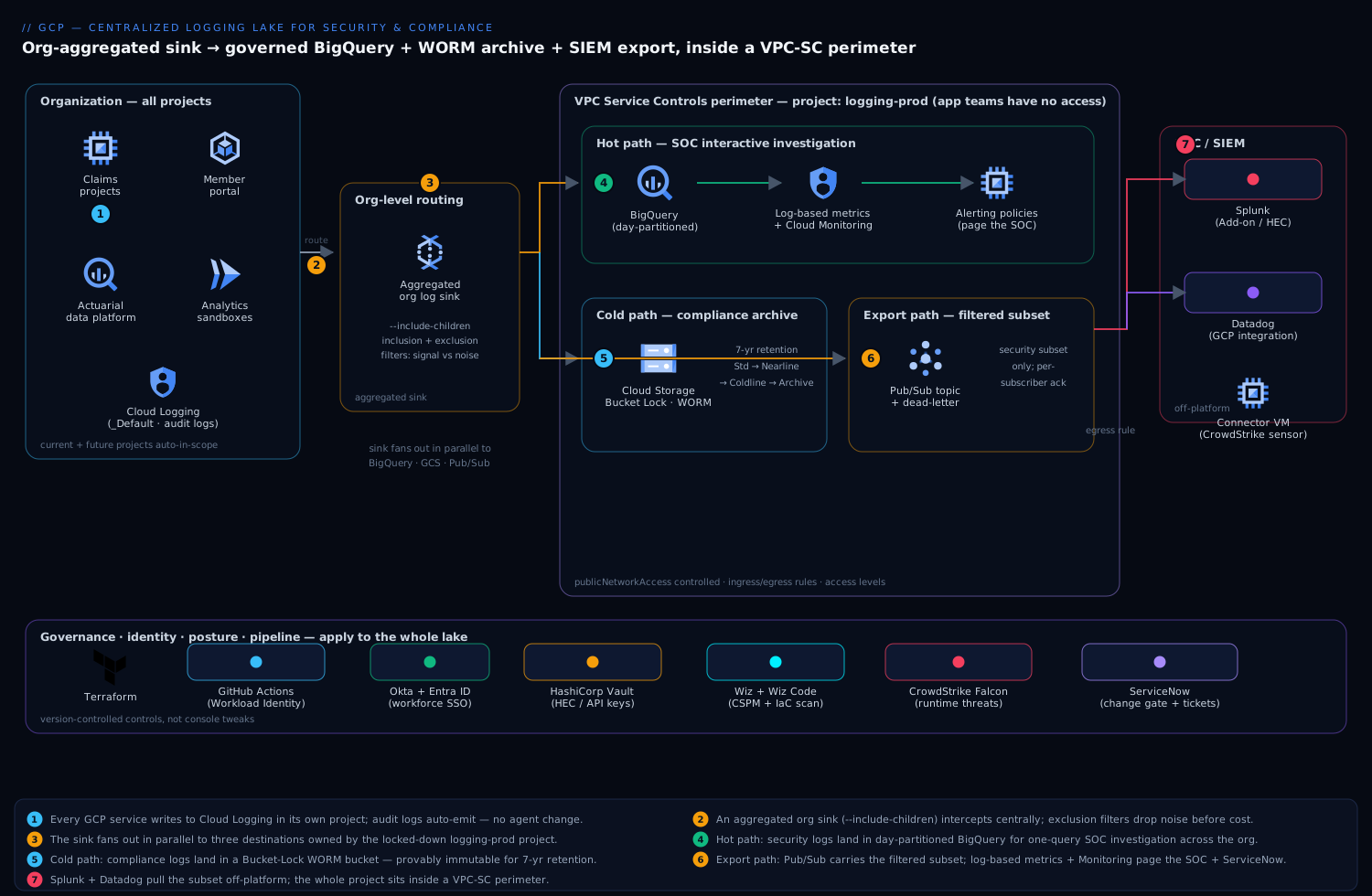
Read it left to right: every project’s logs are intercepted by one aggregated sink at the organization node, which fans them into the locked-down logging-prod project — BigQuery for fast SOC queries, a Bucket-Locked Cloud Storage archive for seven-year immutable retention, and a Pub/Sub topic that feeds Splunk and Datadog — with the entire destination project sealed inside a VPC Service Controls perimeter.
The platform has one defining property the auditor cares about most: logs are captured by an aggregated sink at the organization node, so every current and future project is in scope automatically, and the destinations live in a separate project that application teams have no write or delete rights to. A new analytics sandbox spun up next quarter is covered the day it is created — nobody has to remember to wire it in. That single design decision is what turns “logs existed, technically” into “the whole estate, provably, by construction.”
Think of the lake as one capture stage feeding three independent fan-out paths that live on different schedules and serve different masters: a hot path for the SOC’s interactive hunting, a cold path for the compliance archive, and an export path to the SIEM. Keeping them separate in your head is the first step to operating this well.
Capture and routing, following the data flow:
- Every GCP service and workload writes to Cloud Logging in its own project as it always did — no agent change, no application change. Admin Activity and (where enabled) Data Access audit logs are emitted automatically by the platform.
- An aggregated log sink defined on the organization (with
--include-children) intercepts those entries centrally. Its inclusion filter decides what is in scope; its exclusion filters drop the high-volume, low-value noise — load-balancer health checks, verbose GKE system chatter, Dataflow per-element debug — before it costs anything downstream. This filter is the single most important cost-and-signal lever in the whole design. - The sink routes matching entries, in parallel, to a set of destinations owned by a dedicated
logging-prodproject: a BigQuery dataset, a Cloud Storage bucket, and a Pub/Sub topic. Each sink writes with a Google-managed service-account identity that is granted write access only on those specific destinations.
Hot path (SOC investigation), into BigQuery:
- Security-relevant logs land in a BigQuery dataset using partitioned tables (day-partitioned on the entry timestamp). The SOC queries one place with SQL — “every
getIamPolicyandbigquery.tables.getDataagainst the claims dataset by principal X in the last 90 days” is a single query across the entire org, not a two-day federation exercise. - Log-based metrics count specific patterns as they arrive — failed authentications, IAM grants of primitive roles, VPC firewall changes, access to PHI-bearing datasets. These metrics feed Cloud Monitoring alerting policies that page the SOC and auto-open an incident.
Cold path (compliance archive), into Cloud Storage:
- The compliance-class logs are also routed to a Cloud Storage bucket configured with Bucket Lock and a retention policy, making the objects WORM (write-once-read-many) — provably immutable for the retention horizon, which is the specific control the HIPAA auditor asked for. A lifecycle rule tiers objects from Standard to Nearline to Coldline to Archive as they age, so seven-year retention does not mean seven years at hot-storage prices.
Export path (SOC SIEM), via Pub/Sub:
- A Pub/Sub topic carries the filtered, security-relevant subset off-platform. Splunk pulls it through the Splunk Add-on for GCP (or HEC via Dataflow), and Datadog ingests the same stream through its GCP Pub/Sub integration. The SOC keeps its existing SIEM workflows and correlation rules; GCP keeps the authoritative, retained copy. Crucially, only the filtered subset is exported, so the SIEM’s licensed ingestion is not drowned in debug noise.
The entire logging-prod project — BigQuery, the bucket, Pub/Sub — sits inside a VPC Service Controls perimeter, so even a principal holding valid IAM credentials cannot exfiltrate the lake to a project or network outside the perimeter.
Component breakdown
| Component | Service / tool | Role in the platform | Key configuration choices |
|---|---|---|---|
| Capture | Cloud Logging | Per-project log generation; org-level routing | Org-level aggregated sink with --include-children; exclusion filters for noise |
| Hot store | BigQuery | Fast SQL investigation + analytics on logs | Day-partitioned tables; partition-expiry on the hot window; column-level access on PHI fields |
| Cold store | Cloud Storage | Immutable long-horizon compliance archive | Bucket Lock WORM retention (7 yr); lifecycle tiering Standard→Nearline→Coldline→Archive |
| Export bus | Pub/Sub | Decoupled fan-out to the SOC SIEM | Filtered security subset only; dead-letter topic; per-subscriber ack |
| Detections | Log-based metrics + Cloud Monitoring | Turn log patterns into counters, then alerts | Counter/distribution metrics; alerting policies; notification to ServiceNow + SOC |
| Perimeter | VPC Service Controls | Stop exfiltration of the lake even with valid creds | Perimeter around logging-prod; ingress/egress rules; access levels |
| Identity / SSO | Okta + Entra ID | Workforce SSO for console + SOC access | Okta as workforce IdP federated to Cloud Identity / Entra; group-driven IAM |
| Secrets | HashiCorp Vault | Splunk HEC tokens, Datadog API keys, exporter creds | Short-lived dynamic secrets; GCP auth method; no static keys in pipelines |
| SIEM / SOC | Splunk + Datadog | Correlation, dashboards, analyst hunting off-platform | Pub/Sub pull (Splunk Add-on / HEC); Datadog GCP integration |
| CSPM / posture | Wiz + Wiz Code | Verify the lake’s own config + catch logging drift | Agentless scan of logging-prod; alert if a sink is deleted or a bucket loses WORM; Wiz Code checks the Terraform |
| Runtime security | CrowdStrike Falcon | Runtime threat detection on exporter/agent VMs | Sensor on any Dataflow worker / connector VM; detections to the SOC |
| ITSM | ServiceNow | Incident records + change gate for sink/retention edits | Auto-ticket on a detection; change approval before any sink or retention policy change |
| CI / IaC | GitHub Actions + Terraform | Pipeline + infra as code for the whole lake | Workload Identity Federation (no stored keys); Wiz Code policy gate before apply |
A few of these choices deserve the why, because they are the ones teams get wrong.
Why an aggregated org-level sink, not a sink per project. A per-project sink is one more thing every team must remember to create, configure identically, and not delete — and the project they forgot is exactly the one the auditor asks about. An aggregated sink at the organization node captures every descendant project, including ones that do not exist yet, with one definition you control centrally. Coverage becomes a property of the org hierarchy, not a hope that two hundred teams each did the right thing. (A folder-level sink is the same idea scoped to a business unit when you need that granularity.)
Why two destinations, BigQuery and Cloud Storage, not one. They answer different questions and have opposite cost curves. BigQuery is for speed: ad-hoc SQL across the estate during an active investigation, where you query the recent hot window constantly. Cloud Storage is for endurance: a cheap, immutable archive you touch rarely but must keep for years and prove untouched. Trying to serve both from BigQuery means paying hot-store prices for a seven-year cold archive; trying to serve both from Storage means no interactive querying when the SOC is mid-incident. Route to both, retain each on its own schedule.
Why Bucket Lock specifically. “Retention” in most systems is a setting an admin can quietly shorten. Bucket Lock makes the retention policy itself immutable once locked — not even a project owner or org admin can delete a covered object before its retention expires, and the lock cannot be removed. That is the precise property an auditor means by “tamper-evident,” and it is why the compliance copy lives in a locked GCS bucket rather than in a BigQuery table whose rows are, in principle, deletable.
Implementation guidance
Provision with Terraform, and treat the org-level sink and the perimeter as the first deliverables. Build the destinations and their protections before you turn the firehose on, so the first log entry that arrives is already immutable and inside the perimeter.
- A dedicated
logging-prodproject in a locked-down folder, with application teams holding no roles on it. - The BigQuery dataset (partitioned-table routing) and the Cloud Storage bucket with a retention policy you then lock.
- The aggregated organization sink with its inclusion and exclusion filters, granted write access to each destination.
- A VPC Service Controls perimeter around
logging-prod, with explicit ingress rules for the SOC’s analyst access level and egress rules for the Pub/Sub export. - The Pub/Sub topic, subscriptions, and the Splunk/Datadog wiring.
A minimal Terraform shape for the org sink communicates the intent — capture everything below the org, drop the noise, route to all three destinations:
resource "google_logging_organization_sink" "lake" {
  name             = "org-logging-lake"
  org_id           = var.org_id
  include_children = true   # every current + future project is in scope

  destination = "bigquery.googleapis.com/projects/logging-prod/datasets/security_logs"

  # keep audit + security signal; drop high-volume, low-value noise
  filter = <<-EOT
    logName:"cloudaudit.googleapis.com"
    OR severity>=WARNING
    NOT protoPayload.serviceName="k8s.io"
    NOT resource.type="http_load_balancer" AND httpRequest.status=200
  EOT
}
The Cloud Storage retention lock that makes the archive WORM is the line the auditor will literally ask to see:
resource "google_storage_bucket" "compliance_archive" {
  name     = "kv-logging-compliance-archive"
  project  = "logging-prod"
  location = "asia-south1"

  retention_policy {
    retention_period = 220752000   # 7 years, in seconds
    is_locked        = true        # WORM: policy can never be shortened or removed
  }
  lifecycle_rule {                 # tier down as objects age, keep the bill sane
    condition { age = 90 }
    action { type = "SetStorageClass"  storage_class = "COLDLINE" }
  }
}
The pipeline that applies all of this runs in GitHub Actions, authenticating to GCP via Workload Identity Federation so there is no stored service-account key to leak — a hard lesson the platform team intends never to repeat. Wiz Code scans the Terraform in the pull request and fails the build if a sink is removed, a retention lock is dropped, or the perimeter is widened, so a regression is caught before it ever applies. As an alternative to a single aggregated sink, some teams converge per-team logs first with the Logging agent / Ops Agent on legacy VMs; here, native routing keeps it simpler and agent-free for everything cloud-native.
Identity: federate the humans, kill the keys. SOC analysts and platform engineers reach the logging console and BigQuery through Okta as the workforce IdP, federated to Cloud Identity / Entra ID, so access is driven by group membership and conditional-access policy, not individual grants — an analyst in the soc-investigators group gets read on the BigQuery dataset and nothing else. The residual machine secrets that are not covered by Workload Identity — the Splunk HEC token, the Datadog API key, third-party connector credentials — live in HashiCorp Vault, issued as short-lived dynamic secrets through Vault’s GCP auth method, so nothing long-lived sits in a pipeline variable or a connector’s config.
Schema and partitioning. Route to BigQuery in partitioned-table mode (one schema, day-partitioned) rather than the legacy per-day sharded tables — partition pruning makes “last 90 days for principal X” cheap, and a partition-expiration setting drops the hot window automatically so BigQuery stays the fast store, not a second seven-year archive. Apply column-level access controls (policy tags via Data Catalog) on any field that can carry PHI or PII inside a log payload, so even an authorized analyst sees those columns only with explicit clearance.
Wiring the writer identity — the step that silently breaks the lake
There is one operational detail that trips up almost every first build, so it is worth doing by hand once before you let Terraform own it. A sink does not write with your credentials; the Log Router creates a dedicated, Google-managed writer identity (a service account) for each sink, and that identity must be granted write access on the destination. Miss this and the sink is created “successfully,” shows green in the console, and quietly routes nothing.
# Create the aggregated org sink (imperative equivalent of the Terraform above)
gcloud logging sinks create org-logging-lake \
  bigquery.googleapis.com/projects/logging-prod/datasets/security_logs \
  --organization=ORGANIZATION_ID \
  --include-children \
  --log-filter='logName:"cloudaudit.googleapis.com" OR severity>=WARNING'

# Read back the writer identity the router just minted for this sink
gcloud logging sinks describe org-logging-lake \
  --organization=ORGANIZATION_ID \
  --format='value(writerIdentity)'
# → serviceAccount:o1234567890-1234@gcp-sa-logging.iam.gserviceaccount.com  (representative)

# Grant THAT identity write access on each destination (BigQuery shown)
gcloud projects add-iam-policy-binding logging-prod \
  --member='serviceAccount:o1234567890-1234@gcp-sa-logging.iam.gserviceaccount.com' \
  --role='roles/bigquery.dataEditor'
For the Cloud Storage and Pub/Sub destinations the same identity needs roles/storage.objectCreator and roles/pubsub.publisher respectively. Add exclusions to the same sink to shed noise at the source — remembering (see Going deeper) that this trims what the sink routes, not what each project stores locally:
gcloud logging sinks update org-logging-lake \
  --organization=ORGANIZATION_ID \
  --add-exclusion='name=drop-lb-health-200s,filter=resource.type="http_load_balancer" AND httpRequest.status=200' \
  --add-exclusion='name=drop-gke-system,filter=resource.type="k8s_container" AND severity<WARNING'
Turn on the logs the auditor actually wants — Data Access
Here is the trap that fails HIPAA audits: Admin Activity audit logs are always on and free, but Data Access audit logs — the who-read-which-PHI record the whole project exists to capture — are off by default for almost every service. You enable them in the organization’s IAM policy via auditConfigs. Capture this in Terraform (google_organization_iam_audit_config), but the shape of the underlying policy is worth seeing plainly:
# Fragment of the org IAM policy — turns on Data Access logging where PHI lives
auditConfigs:
- service: bigquery.googleapis.com
  auditLogConfigs:
  - logType: DATA_READ
  - logType: DATA_WRITE
- service: storage.googleapis.com
  auditLogConfigs:
  - logType: DATA_READ
  - logType: DATA_WRITE
- service: healthcare.googleapis.com
  auditLogConfigs:
  - logType: DATA_READ
    exemptedMembers:                     # keep a noisy ETL SA out of the record
    - serviceAccount:etl-batch@logging-prod.iam.gserviceaccount.com
Enable it selectively — Data Access on every service across two hundred projects is a genuinely large, genuinely expensive firehose. Turn it on for the services that touch regulated data (here BigQuery, Cloud Storage, the Healthcare API), pair it with an Org Policy that denies turning it back off, and let Wiz independently verify the policy is holding.
Log views and field-level access
Least-privilege writing — application teams cannot touch logging-prod — is only half the control. The auditor also asks who can read the lake, and “the whole soc-investigators group can read every log entry including raw PHI payloads” is the wrong answer. Two mechanisms give you least-privilege reading.
Log views scope which log entries a principal can read inside a log bucket, by filter. A log bucket has a default view (_AllLogs), but you create additional views that expose only a slice — say, everything except Data Access logs for the most sensitive dataset — and grant a group access to that view only:
# A view that hides Data Access reads on the crown-jewel claims dataset
gcloud logging views create soc-standard \
  --bucket=security-bucket --location=asia-south1 \
  --log-filter='NOT (logName:"cloudaudit.googleapis.com%2Fdata_access"
                     AND resource.labels.dataset_id="claims_phi")'

# Grant the SOC group the viewAccessor role, CONDITIONED to just this view
gcloud projects add-iam-policy-binding logging-prod \
  --member='group:soc-investigators@example.com' \
  --role='roles/logging.viewAccessor' \
  --condition='expression=resource.name.endsWith("views/soc-standard"),title=soc-standard-only'
The IAM condition is what makes it real: without it, roles/logging.viewAccessor at the project level would grant access to all views in the bucket, defeating the purpose. A smaller phi-cleared group gets a second binding to the unrestricted _AllLogs view when an investigation genuinely needs the raw payloads — and that grant is itself logged.
Field-level access goes one level finer. Log views support restricting specific LogEntry fields, so a reader of a view can see the entry exists and its metadata but not a nominated payload field that can carry a member ID or diagnosis. On the BigQuery side, the equivalent is column-level security with policy tags: you attach a policy tag (from a Data Catalog taxonomy) to the sensitive column, and only principals granted the Fine-Grained Reader role on that tag see the values — everyone else’s query returns the row with that column masked or denied.
// A column in the BigQuery routing schema, tagged so only cleared analysts read it
{
  "name": "principalEmail",
  "type": "STRING",
  "policyTags": {
    "names": ["projects/logging-prod/locations/asia-south1/taxonomies/1122334455/policyTags/6677889900"]
  }
}
The mechanics of BigQuery row/column security and data masking are worth a lesson of their own — see BigQuery fine-grained access: row, column & data masking. The key mental shift for the lake: access is a spectrum, not a switch. An analyst can be allowed to know a PHI record was accessed (metadata) without being allowed to read the record’s contents, and log views plus policy tags are how you draw that line.
Querying the lake with Log Analytics
Routing to BigQuery gives you SQL, but there is a second, complementary way to query that many teams miss: Log Analytics. You upgrade a log bucket to be analytics-enabled, and you can then run GoogleSQL directly against the logs in that bucket — no separate export, no second copy — from the Log Analytics page. Optionally you create a linked BigQuery dataset so the same logs are queryable from BigQuery and can be joined with your other tables.
# Upgrade the bucket in-place so its logs are SQL-queryable via Log Analytics
gcloud logging buckets update security-bucket \
  --location=asia-south1 --enable-analytics

# Expose it to BigQuery as a linked (read-only) dataset for joins
gcloud logging links create security_link \
  --bucket=security-bucket --location=asia-south1 \
  --description='Linked dataset for the security log bucket'
The one subtlety that saves hours of confusion: Log Analytics and a BigQuery routing sink expose different schemas for the same audit log. The BigQuery export schema (what a sink writes) flattens fields under protopayload_auditlog, while the Log Analytics schema nests them under proto_payload.audit_log. Same event, two column shapes. A Log Analytics query for every IAM policy change in the last 90 days looks like this:
-- Log Analytics schema (bucket queried in-place)
SELECT
  timestamp,
  proto_payload.audit_log.authentication_info.principal_email AS principal,
  proto_payload.audit_log.method_name                          AS method,
  resource.type
FROM
  `logging-prod.global._Default._AllLogs`
WHERE
  proto_payload.audit_log.method_name = 'SetIamPolicy'
  AND timestamp > TIMESTAMP_SUB(CURRENT_TIMESTAMP(), INTERVAL 90 DAY)
ORDER BY timestamp DESC
LIMIT 100;
The equivalent against a BigQuery routing sink’s partitioned table uses the export schema and, crucially, filters on the partition column so you scan only the days you need:
-- BigQuery export schema (sink-routed partitioned table)
SELECT
  timestamp,
  protopayload_auditlog.authenticationInfo.principalEmail AS principal,
  protopayload_auditlog.methodName                        AS method
FROM
  `logging-prod.security_logs.cloudaudit_googleapis_com_activity`
WHERE
  DATE(timestamp) BETWEEN DATE_SUB(CURRENT_DATE(), INTERVAL 90 DAY) AND CURRENT_DATE()
  AND protopayload_auditlog.methodName = 'SetIamPolicy'
ORDER BY timestamp DESC;
When to use which. Log Analytics is the fast, zero-plumbing path for interactive investigation directly on a bucket, and it is the natural home for the org’s _Default/security buckets. A dedicated BigQuery routing dataset is the right choice when you need long partition retention, joins against reference tables (asset inventory, HR data for principal enrichment), scheduled queries, or BI dashboards. Most mature lakes run both: Log Analytics for the analyst mid-incident, a routed BigQuery dataset for the analytics and detection-engineering teams.
Enterprise considerations
Security & Zero Trust. The lake is Zero Trust by construction: the destinations live in a project application teams cannot write to, access is identity-based and least-privilege per dataset, and the whole logging-prod project is wrapped in a VPC Service Controls perimeter so a stolen credential cannot copy the logs to an outside project or pull them down to an off-network machine. Layer on top: (a) Bucket Lock WORM retention as the immutability backstop the auditor signs; (b) Wiz running continuous CSPM against logging-prod itself, alerting the instant a sink is deleted, a bucket loses its retention lock, or an IAM binding widens access — the posture check behind the policy controls; © CrowdStrike Falcon sensors on any Dataflow worker or connector VM in the export path for runtime threat detection feeding the SOC; (d) an Org Policy that denies turning off Data Access audit logging, with Wiz independently verifying the policy is actually holding; (e) a detection (a burst of failed auth, a primitive-role grant, an unexpected egress) auto-raises a ServiceNow incident so the SOC has a ticket, not just a dashboard tile. Any change to a sink or a retention policy passes through a ServiceNow change gate first — you do not want the audit evidence reconfigured silently.
Cost optimization. Log volume dominates and grows with the estate, so engineer for it from day one. The principle: spend on signal, archive everything, query nothing twice.
| Lever | Mechanism | Typical effect |
|---|---|---|
| Exclusion filters at the sink | Drop health checks, verbose system logs before they route | Cuts ingested volume 40–70% on a noisy estate |
| Tiered GCS lifecycle | Standard→Nearline→Coldline→Archive as objects age | Slashes 7-yr archive cost vs. all-hot storage |
| BigQuery partition expiry | Keep only the hot investigation window queryable | Stops BQ becoming a second long-term archive |
| Export only the filtered subset | Pub/Sub carries security logs, not all logs | Protects the SOC’s licensed SIEM ingestion |
Don’t pay to store _Default twice |
Shrink per-project bucket retention once the lake holds the record | Removes duplicate retention spend across 200 projects |
The biggest single win is the exclusion filter: every gigabyte you drop at the sink is a gigabyte you do not ingest into BigQuery, archive in GCS, and push to Splunk. Tune it deliberately, and review it as workloads change.
Scalability. Each path scales independently. The aggregated sink and Cloud Logging routing are managed and absorb org-wide volume without your intervention. BigQuery scales storage and query compute separately — partitioning keeps investigation queries fast as the dataset grows into the hundreds of terabytes. Cloud Storage is effectively unbounded for the archive. The component to watch is the Pub/Sub export: size subscriptions and ack deadlines for the SIEM’s pull rate, add a dead-letter topic so a Splunk outage does not silently drop security logs, and let messages buffer in Pub/Sub (up to its retention) while the SIEM catches up rather than backpressuring the lake.
Failure modes, and what each one looks like. Name them before they page you.
- A sink silently stops routing — a misconfigured destination IAM grant or a deleted dataset, and entries quietly stop landing while everything looks green. Mitigation: a log-based metric on the sink’s own routing volume with a Monitoring alert if it drops to zero, plus Wiz watching for sink deletion.
- An exclusion filter too aggressive — someone tunes for cost and accidentally drops a security-relevant class, and the SOC is blind to it without knowing. Mitigation: treat the filter as reviewed, version-controlled code in Terraform with a change gate, never an ad-hoc console edit.
- The Pub/Sub export backs up — Splunk is down and the subscription’s backlog grows toward its retention limit, risking dropped security logs. Mitigation: a dead-letter topic, alerting on subscription backlog age, and the reassurance that the authoritative copy is already safe in BigQuery and GCS regardless.
- VPC-SC blocks a legitimate query — a new analyst’s network or an automated job is outside the perimeter and every call returns a confusing
403. Mitigation: model the SOC’s access level and any service ingress explicitly, and test perimeter rules in dry-run mode before enforcing. - A region outage — see DR below.
Reliability & DR (RTO/RPO). Decide the numbers per store. The Cloud Storage archive is the durable source of truth — use dual-region or multi-region buckets so the compliance copy survives a single region loss with near-zero RPO; this is the copy that must never be lost. BigQuery datasets are regional, so for the hot path either run cross-region copy jobs or accept that an investigation may briefly fall back to the GCS archive during a regional event — the logs are not lost, just temporarily not in the fast store. Pub/Sub buffers the export through short SIEM outages on its own. A pragmatic target for this lake: RPO near-zero for the archive (the audit evidence), RTO of an hour for restoring fast BigQuery investigation in the paired region, with the GCS archive as the guarantee that nothing is ever truly gone.
Observability. The lake must watch itself. Emit a log-based metric on routed-entry volume per sink and alert if it flatlines — a logging pipeline that has silently stopped is worse than no pipeline, because everyone assumes it is working. Track BigQuery query cost and slot usage so investigation spend does not surprise the CFO, GCS object age distribution so you can prove the lifecycle tiering is working, and Pub/Sub subscription backlog as the early-warning on a SIEM export falling behind. The same Datadog that receives the security export is a natural home for these meta-metrics, giving the platform team one dashboard for the health of the logging program itself.
Governance. Define what is captured, retained, and for how long as version-controlled Terraform, reviewed and revertable — the filter and the retention period are compliance controls, not config you tweak in a console. Apply Org Policy to deny disabling audit logs and to require the aggregated sink stays in place, with Wiz as the independent verifier that the controls are real. Document the data-residency posture (here, datasets and buckets pinned to asia-south1 to keep member data in-country) and keep a right-to-be-forgotten path in mind — log payloads can contain personal data, so the column-level controls and a defined redaction process matter under the same regime that started this project.
Explicit tradeoffs
Accept these or do not build it. A centralized lake adds real moving parts — an org-level sink to own, three destinations to keep healthy, a perimeter that will occasionally block something legitimate, and a filter you must tune and keep tuned or you either drown in cost or go blind to a threat. Centralizing also concentrates risk: the logging-prod project becomes a high-value target and a single point of failure, which is exactly why the VPC-SC perimeter, the least-privilege IAM, and the Wiz posture monitoring are non-negotiable rather than nice-to-have. The Bucket Lock that makes auditors happy is a one-way door — once locked you cannot delete those objects early even if you want to, even if they were written by mistake, so you size the retention window carefully and accept paying to store some volume you would rather not. And the Okta-to-Cloud-Identity federation adds a hop the single-IdP shops will not need.
The alternatives, and when they win. If you are a single small project, the built-in _Default bucket with extended retention is genuinely enough — this whole architecture is overkill until you have an estate to federate. If your only consumer is the SOC and you have no in-GCP analytics need, you could route straight to Splunk/Datadog and skip BigQuery — but you lose the cheap immutable archive and the in-platform query, and you couple your retention story to a vendor. If you want a batteries-included security analytics layer rather than raw logs, Google Security Operations (Chronicle) ingests and retains security telemetry with detection content built in, and composes nicely as a consumer of this same routing. And if logs are mostly operational, not compliance-driven, a lighter Log Analytics / Log Buckets setup without the WORM archive and the perimeter is the proportionate choice. Graduate to this full lake when regulation, estate size, residency, or an auditor’s “prove it” make the others insufficient.
Mapping to compliance requirements
The point of every mechanism above is to answer a specific line in a specific framework. When the auditor arrives, you do not want to explain your architecture — you want to point at the control that satisfies their clause. This is the map (the exact retention numbers vary by regime and interpretation; these are the values regulated teams commonly implement).
| Requirement (regime) | What it demands | Lake mechanism that satisfies it |
|---|---|---|
| Audit controls (HIPAA §164.312(b)) | Record and examine activity in systems holding ePHI | Data Access audit logs enabled on PHI-bearing services → aggregated org sink → lake |
| Integrity / tamper-evidence (HIPAA §164.312©) | Prove records were not altered or destroyed | Bucket Lock WORM archive + Wiz drift detection on the retention lock |
| Retention of documentation (HIPAA §164.316(b)) | Retain required records ~6 years | 7-year locked retention policy on the GCS archive (headroom over the minimum) |
| Log all access (PCI DSS Req. 10.2) | Capture user access to cardholder data & admin actions | Org-level capture of Admin Activity + Data Access logs, no per-project gaps |
| Protect logs from alteration (PCI DSS Req. 10.5) | Audit trails cannot be modified | WORM archive + logging-prod isolation + VPC Service Controls perimeter |
| Retain audit history (PCI DSS Req. 10.5.1) | ~12 months retained, ~3 months immediately available | GCS archive for 12+ months; BigQuery/Log Analytics hot window for the recent quarter |
| Monitoring (SOC 2 CC7.2) | Detect and respond to anomalies | Log-based metrics → Cloud Monitoring alerts → ServiceNow + SIEM |
| Logical access (SOC 2 CC6.1) | Least-privilege access to sensitive data | Log views + field-level / column-level access + group-driven IAM |
| Data residency / GDPR | Keep personal data in-region; support erasure | Datasets & buckets pinned to asia-south1; policy tags + redaction path for RTBF |
Two habits make this map hold up under scrutiny. First, keep it version-controlled next to the Terraform — when a control changes, the mapping changes in the same pull request, so the evidence never drifts from the architecture. Second, let Wiz be the independent witness: the auditor trusts “an external posture tool continuously verifies the sink exists, the lock is on, and audit logging is not disabled” far more than a screenshot from the team being audited.
Going deeper
This section is for the reader who will operate the lake and needs the internals — the behaviors that are not obvious from the happy-path setup and that cause the 2 a.m. confusion.
How routing actually works, and what the org sink does not do. Every project has two special log buckets you did not create: _Required (holds Admin Activity, System Event, and Access Transparency logs; a fixed ~400-day retention; cannot be edited, disabled, or deleted; free) and _Default (everything else; 30-day retention by default; editable). Your aggregated org sink is an additional, parallel route — it does not intercept or divert; the same entries still land in each generating project’s own _Required/_Default buckets. A single log entry can match many sinks (the project’s _Default sink, your org sink, a team’s folder sink) and is routed to all of them independently — sinks have no ordering and do not consume each other’s matches. The practical consequence, and the most common misconception on the whole topic: adding an exclusion to your org sink shrinks what the lake ingests, but it does nothing to the per-project _Default storage bill. Reducing that is a separate lever — shorten _Default retention or add exclusions to each project’s _Default sink (fleet-wide via Terraform or an org-level configuration).
Writer identities and cross-project grants. The Log Router mints a per-sink service account (the writerIdentity) and you must grant it write access on the destination — roles/bigquery.dataEditor, roles/storage.objectCreator, or roles/pubsub.publisher. For an org sink writing into a different project (logging-prod), that grant is a cross-project binding, and forgetting it is the number-one reason a freshly built lake “routes nothing” while looking healthy. When you need a stable identity across teardown/rebuild, --custom-writer-identity lets you supply your own service account instead of the generated one.
BigQuery export: partitioned vs. sharded, and the schema you get. Choose partitioned tables (use_partitioned_tables = true), not the legacy date-sharded tables (cloudaudit_..._20260710). Partitioned tables are day-partitioned on timestamp; partition pruning makes windowed queries cheap and a partition-expiration setting on the dataset/table drops the hot window automatically so BigQuery never silently becomes your seven-year archive. Loads are near-real-time (streaming inserts), so expect entries within seconds, not the minutes of a batch export. And remember the two schema shapes from the querying section — protopayload_auditlog.* for sink exports vs. proto_payload.audit_log.* for Log Analytics — because a query copied from one will not run against the other.
CMEK: encrypt the lake with your own keys. For a regulated estate you often must hold the encryption keys. Log buckets support customer-managed encryption (gcloud logging buckets update BUCKET --location=LOC --cmek-kms-key-name=...), as do the BigQuery dataset and the GCS bucket. Put the Cloud KMS keyring in a separate project inside the perimeter, and understand the coupling this creates: if the key is disabled or destroyed, reads against the encrypted store fail — key availability becomes part of your DR plan, and key-destruction becomes a change-gated, WORM-aware decision.
Quotas, limits, and entry sizing. There is a per-resource limit on the number of sinks (in the low hundreds per project/folder/org), which is another reason to consolidate into an aggregated sink rather than proliferate. Individual log entries have a maximum size (256 KB), above which they are truncated — relevant if a service logs large payloads you were counting on for evidence. Writer-identity propagation after a grant can take a short while, so a sink that “isn’t routing” immediately after setup may just need a few minutes.
VPC Service Controls nuances specific to a logging lake. The perimeter protects the destination services (BigQuery, Cloud Storage, Pub/Sub) — routing into the lake from projects across the org needs those source projects either inside the same perimeter or covered by an appropriate ingress rule, and a common early failure is the sink writing across a perimeter boundary without one. Model the SOC’s analyst network as an explicit access level, add an egress rule for the Pub/Sub export off-platform, and always roll the perimeter out in dry-run mode first: dry-run logs what would be blocked without actually blocking it, so you find the legitimate flows before they turn into a wall of 403s. For the full treatment see VPC Service Controls: perimeters & exfiltration prevention.
Bucket Lock edge cases you must internalize before you lock. A locked retention policy can be increased but never decreased or removed. Covered objects cannot be deleted or overwritten until each one’s age exceeds the retention period — and you cannot delete the bucket itself until every object has aged out. Retention (a bucket-wide floor) is distinct from holds: an event-based hold or temporary hold pins an individual object indefinitely regardless of the retention clock, which is how you preserve a specific object under legal hold beyond the normal window. Because the lock is irreversible, the retention number is a one-way business decision — size it against the longest obligation across every regime you serve, then add headroom.
Practice challenges
Work these in order; each builds on the last. Every solution is real and schema-correct — but with no live org/credentials here, treat the output as representative and substitute your own ORGANIZATION_ID, project IDs, and service-account emails.
1. (Beginner) Create the aggregated capture. Create an organization-level sink named org-logging-lake that captures every current and future project and routes audit logs plus anything at WARNING or above to the BigQuery dataset logging-prod:security_logs.
<details><summary>Solution</summary>
gcloud logging sinks create org-logging-lake \
  bigquery.googleapis.com/projects/logging-prod/datasets/security_logs \
  --organization=ORGANIZATION_ID \
  --include-children \
  --log-filter='logName:"cloudaudit.googleapis.com" OR severity>=WARNING'
Why: --organization + --include-children is what makes one definition cover the whole hierarchy, including projects that do not exist yet — coverage by construction, not by remembering.
</details>
2. (Beginner→Intermediate) Make it actually route. The sink from challenge 1 shows green but nothing lands in BigQuery. Find the sink’s writer identity and grant it the access it needs.
<details><summary>Solution</summary>
WI=$(gcloud logging sinks describe org-logging-lake \
       --organization=ORGANIZATION_ID --format='value(writerIdentity)')

gcloud projects add-iam-policy-binding logging-prod \
  --member="$WI" --role='roles/bigquery.dataEditor'
Why: a sink writes with its own Google-managed writer identity, not yours; until that identity can write to the destination the sink routes nothing while looking healthy. (Use roles/storage.objectCreator / roles/pubsub.publisher for the other destinations.)
</details>
3. (Intermediate) Shed the noise — and know its limit. Add exclusions to org-logging-lake that drop load-balancer health-check 200s and sub-WARNING GKE container logs. Then answer: does this reduce the per-project _Default storage bill?
<details><summary>Solution</summary>
gcloud logging sinks update org-logging-lake --organization=ORGANIZATION_ID \
  --add-exclusion='name=drop-lb-health-200s,filter=resource.type="http_load_balancer" AND httpRequest.status=200' \
  --add-exclusion='name=drop-gke-noise,filter=resource.type="k8s_container" AND severity<WARNING'
Why: exclusions trim only what this sink routes (saving BigQuery/GCS/Pub/Sub ingest); the same entries still land in each project’s own _Default bucket. Cutting that bill is a separate lever — shorten _Default retention or exclude at the project’s _Default sink.
</details>
4. (Intermediate→Advanced) Make the archive tamper-evident. Give the compliance bucket a 7-year retention policy, then lock it, then tier objects to Coldline after 90 days. What can you no longer do once the lock is on?
<details><summary>Solution</summary>
gcloud storage buckets update gs://kv-logging-compliance-archive --retention-period=7y
gcloud storage buckets update gs://kv-logging-compliance-archive --lock-retention-period
gcloud storage buckets update gs://kv-logging-compliance-archive \
  --lifecycle-file=lifecycle.json   # rule: age>=90 → SetStorageClass COLDLINE
Why: locking makes the retention policy immutable (WORM) — the exact “cannot be altered or deleted early” control the auditor wants. Afterward you cannot shorten retention, remove the lock, delete a covered object before it ages out, or delete the bucket until all objects expire. You can still increase retention. </details>
5. (Advanced) Query without a second copy. Enable Log Analytics on the security-bucket, link it to BigQuery, and write a query returning every SetIamPolicy call in the last 90 days with the acting principal.
<details><summary>Solution</summary>
gcloud logging buckets update security-bucket --location=asia-south1 --enable-analytics
gcloud logging links create security_link --bucket=security-bucket --location=asia-south1
SELECT timestamp,
       proto_payload.audit_log.authentication_info.principal_email AS principal,
       proto_payload.audit_log.method_name AS method
FROM `logging-prod.asia-south1.security-bucket._AllLogs`
WHERE proto_payload.audit_log.method_name = 'SetIamPolicy'
  AND timestamp > TIMESTAMP_SUB(CURRENT_TIMESTAMP(), INTERVAL 90 DAY)
ORDER BY timestamp DESC;
Why: Log Analytics queries the bucket in place (no export, no duplicate storage), and the linked dataset lets BigQuery join it with other tables. Note the proto_payload.audit_log.* schema — different from a routing sink’s protopayload_auditlog.*.
</details>
6. (Advanced) Least-privilege reading. The soc-investigators group must read logs but must not see Data Access entries for the claims_phi dataset. Build a log view that excludes them and grant the group access to that view only; then note how you would protect the principalEmail column in BigQuery.
<details><summary>Solution</summary>
gcloud logging views create soc-standard \
  --bucket=security-bucket --location=asia-south1 \
  --log-filter='NOT (logName:"cloudaudit.googleapis.com%2Fdata_access" AND resource.labels.dataset_id="claims_phi")'

gcloud projects add-iam-policy-binding logging-prod \
  --member='group:soc-investigators@example.com' \
  --role='roles/logging.viewAccessor' \
  --condition='expression=resource.name.endsWith("views/soc-standard"),title=soc-standard-only'
Why: the IAM condition pins the grant to one view — without it, viewAccessor would expose every view in the bucket. For the BigQuery column, attach a Data Catalog policy tag to principalEmail so only holders of the Fine-Grained Reader role on that tag see the values. Reading is a spectrum, controlled independently of writing.
</details>
Common beginner mistakes
- “The org sink’s exclusion filter will cut our per-project log-storage bill.” It will not. The aggregated sink is an additive route; excluding an entry stops it reaching the lake but the same entry still lands in the generating project’s
_Defaultbucket. Right model: routing (org sink) and per-project retention (_Default) are two independent dials — turn both. - “Bucket Lock is a retention setting we can change later.” It is a one-way door. Once locked you cannot shorten it, remove it, or delete covered objects before they age out — not even as org admin. Size the window against your longest obligation before you lock, and expect to store some volume you would rather not.
- “BigQuery can be our seven-year archive too.” BigQuery is hot-priced and its rows are, in principle, deletable — so it is neither cheap nor tamper-evident for the long haul. Use BigQuery for the fast recent window and the Bucket-Locked GCS copy as the immutable record.
- “Admin Activity and Data Access logs are both on by default.” Only Admin Activity is (and it is free). Data Access logs — the who-read-which-PHI evidence the whole project exists to capture — are off until you enable them per service in the org’s
auditConfigs. Miss this and the exact record the auditor asks for was never written. - “The sink writes with my credentials.” No — each sink has its own Google-managed writer identity you must grant on the destination. Skip the grant and the sink is created “successfully” and silently routes nothing.
- “VPC-SC is redundant if IAM is already least-privilege.” They defend different attacks. IAM decides who is allowed; VPC-SC decides from where, so a valid, non-malicious-looking credential used from outside the perimeter is still blocked. That second wall is the whole point — model the analyst access level instead of widening the perimeter to make a
403go away. - “Column-level access encrypts or hides PHI from everyone.” Policy tags enforce least privilege by role, not encryption — an analyst with the Fine-Grained Reader role still sees the values. It draws a line between who may see that a record was accessed and who may read its contents; it is not a substitute for CMEK or redaction.
- “One big sink into BigQuery satisfies compliance.” BigQuery alone gives you speed but neither immutability nor a cheap long archive, and nothing stops an insider in
logging-prod. Compliance needs the combination — WORM archive, the isolated locked-down project, and the perimeter.
Glossary
- Aggregated sink — a log sink defined on an organization or folder that, with
--include-children, captures logs from every descendant project (present and future) with a single definition. --include-children— the flag that makes a folder/org sink recurse into all descendant resources; without it the sink only captures the resource it is attached to.- Log Router — the Cloud Logging component that evaluates every entry against all sinks and routes matches to their destinations; sinks are unordered and evaluated independently.
- Writer identity — the Google-managed service account the Log Router uses to write a given sink’s entries to its destination; must be granted write access on that destination or the sink routes nothing.
_Requiredbucket — a per-project log bucket holding Admin Activity, System Event, and Access Transparency logs; fixed ~400-day retention, free, cannot be modified or deleted._Defaultbucket — the per-project catch-all log bucket; 30-day default retention, editable — the one that “rolls over” and loses evidence if you rely on it for compliance.- Log view — a filtered window onto a log bucket that limits which entries a principal can read; combined with an IAM condition it scopes read access to a slice of the logs.
- Field-level access / restricted fields — restricting specific
LogEntryfields within a log view so a reader sees an entry’s existence and metadata but not a nominated sensitive payload field. - Policy tag / column-level security — a Data Catalog tag attached to a BigQuery column so only principals with the Fine-Grained Reader role on that tag can read the column’s values.
- Log-based metric — a counter or distribution derived from log entries matching a filter (e.g., failed auths, primitive-role grants) that can drive Cloud Monitoring alerts.
- Exclusion filter — a rule on a sink (or bucket) that drops matching entries before they are routed/stored; the primary cost-and-signal lever, and the thing most easily mis-tuned.
- Inclusion filter — the sink’s positive filter defining what is in scope to route in the first place.
- Log Analytics — an upgrade to a log bucket that makes its contents queryable in place with GoogleSQL, without a separate export; uses the
proto_payload.audit_log.*schema. - Linked BigQuery dataset — a read-only BigQuery view over a Log Analytics-enabled bucket, letting you query and join the logs from BigQuery.
- Partitioned table — a BigQuery table split by day on the entry timestamp; partition pruning keeps windowed queries cheap and partition-expiration bounds the hot window.
- Bucket Lock — a Cloud Storage feature that makes a bucket’s retention policy immutable once locked; the basis of the lake’s tamper-evidence.
- WORM (write-once-read-many) — data that can be written and read but not altered or deleted for its retention period; what Bucket Lock produces.
- Retention policy — a bucket-wide minimum age before any object may be deleted or overwritten; can be increased after locking but never decreased.
- Lifecycle rule / storage class — automated tiering of objects across Standard → Nearline → Coldline → Archive as they age, cutting long-term archive cost.
- Dead-letter topic — a Pub/Sub topic that captures messages a subscriber repeatedly fails to acknowledge, so a SIEM outage does not silently drop security logs.
- VPC Service Controls (VPC-SC) / perimeter — a boundary around a set of projects/services that blocks data movement across it even with valid IAM credentials, preventing exfiltration.
- Access level — a VPC-SC condition (IP range, device, identity) that defines a trusted context allowed to reach services inside the perimeter, e.g., the SOC analyst network.
- Admin Activity vs. Data Access audit logs — Admin Activity (configuration changes) is always on and free; Data Access (who read/wrote data) is off by default and must be enabled in
auditConfigs. - CMEK (customer-managed encryption key) — a Cloud KMS key you own and control used to encrypt the log buckets, BigQuery dataset, and GCS archive; key availability becomes part of DR.
- RPO / RTO — Recovery Point Objective (how much data you can afford to lose) and Recovery Time Objective (how fast you must restore); near-zero RPO for the archive, ~1-hour RTO for hot BigQuery here.
The shape of the win
For the payer, the payoff is not “we turned on logging.” It is that when the next auditor asks “show me every access to this member’s PHI in the last seven years, and prove the record was not altered,” the compliance team runs one BigQuery query against the lake, points to the Bucket Lock retention on the immutable archive as proof of tamper-evidence, and the finding closes in an afternoon instead of failing the audit. And when the SOC’s next exfiltration alert fires, an analyst pivots across all two hundred projects from one console in seconds — not two days of hand-federation — because the logs already live in one governed place, already filtered to signal, already streaming to Splunk and Datadog. Everything upstream — the org-level aggregated sink, the BigQuery-and-GCS split, the VPC Service Controls perimeter, the Vault-held export tokens, the Wiz posture checks, the ServiceNow change gate — exists to make an auditor, a CISO, and a SOC lead each say yes. The architecture here is the destination; start with a single folder if you must, but this is where a regulated, at-scale “centralize our logs” has to land.