In a nutshell
Multi-tenant SaaS means one running system serves many separate customers — “tenants” — at once, the way one apartment building houses many families under one roof, one set of pipes, and one superintendent. Each family gets its own locked unit; nobody can wander into a neighbour’s apartment; but the building is maintained once, not rebuilt per family. Moodle is the world’s most widely used open-source LMS (Learning Management System) — the software that hosts courses, quizzes, and completion records. This lesson is about running one Moodle platform that serves 180 corporate customers, where every customer sees their own branded learning portal and — critically — their learners’ data is walled off from every other customer’s.
The whole design turns on one question every SaaS builder faces: how much do you share, and how much do you keep separate? Share everything (one database for all tenants) and it is cheap, but a single bug leaks Customer A’s learners to Customer B. Separate everything (a whole server per customer) and it is perfectly isolated, but you are back to patching 180 machines by hand. The art is choosing what to pool and what to silo — and for a training vendor whose entire sales pitch is “your employees’ records are safe with us,” the answer is pool the compute, silo the data: all customers share one pool of Moodle servers (patch once), but each customer gets its own database on Cloud SQL, its own file store, and its own cache namespace. A customer’s data isolation is then a hard fact of which database the request is wired to, not a filter the code has to remember on every read.
If words like Cloud SQL, GKE, read replica, or noisy neighbour are new, do not worry — every one is defined plainly in the Glossary at the end, the sections below build the ideas from zero, and the Practice challenges let you try each one yourself before you build anything.
Level: Intermediate · Time: ~41 min
Before you start, it helps to be comfortable with containers and Kubernetes basics (pods, services, autoscaling), with the idea of a managed relational database, and with reading a little Terraform and YAML. You need no prior Moodle or multi-tenancy experience — we build the tenancy concepts from the ground up. Three sibling lessons line up directly beneath this one if you want to shore up the foundations first: GKE Deep Dive — Autopilot, Standard, Node Pools, Networking, Cloud SQL — HA, Read Replicas, Private Connectivity, and Memorystore Deep Dive — Redis, Memcached, Clusters.
After this lesson you will be able to:
- Place any SaaS design on the silo → bridge → pool tenancy spectrum, and explain the isolation-versus-density trade-off each point makes;
- Say precisely why database-per-tenant — not schema-per-tenant or a shared
tenantidcolumn — is the right data model for a B2B LMS, and what MySQL’s “schema = database” quirk means for that choice; - Trace how a request is routed from a tenant hostname to that tenant’s isolated database, files, and cache, with no per-query filtering;
- Reason about the connection-count ceiling that database-per-tenant plus pooled pods creates, and name the pooling and cell-routing patterns that tame it;
- Control a noisy-neighbour tenant on a shared Cloud SQL instance, and perform a per-tenant backup and point-in-time restore without touching any other tenant.
A corporate-training company — call it the kind of vendor that sells “compliance and upskilling courses, branded as your own LMS” to 180 enterprise customers — has hit the wall its founders always knew was coming. Each customer today gets a hand-built Moodle on its own VM, and the platform team is now drowning: 180 servers to patch every time Moodle ships a security release, 180 cron jobs that nobody is quite sure are running, and a sales team promising a new client a live, branded learning portal “by Monday” while provisioning actually takes nine working days. The board’s ask is blunt: turn this into a real SaaS — one platform, many tenants, onboard a customer in under an hour, isolate every customer’s learner data hard enough to pass their security questionnaires, and survive the Monday-morning login stampede when a Fortune-500 client assigns mandatory compliance training to 40,000 staff at once. The constraint is equally blunt: a breach where Customer A can see Customer B’s learners is an extinction-level event for a B2B training vendor, and the finance team wants a per-customer cost number so they can price each contract. This article is the reference architecture for that platform on Google Cloud — Moodle run as a genuinely multi-tenant SaaS on GKE, with the isolation, identity, and observability a B2B buyer’s procurement team will actually sign off on.
The pressures here are the classic SaaS-platform pressures, sharpened by the fact that the workload is an LMS. Isolation is the existential one: training data is employee PII (names, completion records, sometimes disciplinary-linked courses), and the whole sales motion depends on telling each enterprise buyer “your learners’ data lives in its own database, not commingled.” Elasticity matters because LMS load is brutally spiky — quiet for weeks, then one customer opens an exam window or a compliance deadline lands and a single tenant goes from 50 to 40,000 concurrent users in minutes. Per-tenant cost visibility is a commercial requirement, not a nicety: with 180 tenants on shared compute, finance cannot price a renewal without knowing what each tenant actually consumes. And operational leverage is the entire reason to do this at all — the platform team has to patch Moodle once and have it apply to every tenant, not 180 times.
Why not the obvious shortcuts
Three tempting designs each fail in a way someone on the project will have to be talked out of.
One giant shared Moodle with a tenant column (pooled everything, soft isolation by a tenantid filter in application code) is the cheapest to run and the easiest to breach. Moodle was not built as a multi-tenant application; bolting tenancy onto its data model means every query in a 4-million-line codebase must remember to filter, and a single missed WHERE tenantid = ? leaks one customer’s learners to another. No enterprise security questionnaire survives “isolation is enforced by us remembering to filter.”
A VM per tenant (full silo, what they have today) gives perfect isolation and zero leverage — it is exactly the 180-server patching treadmill the board is trying to escape, and it scales the ops headcount linearly with sales.
A separate Kubernetes cluster per tenant is silo isolation with a Kubernetes bill: 180 control planes, 180 ingress stacks, 180 node pools mostly sitting idle. The isolation is real but the economics are upside down for tenants that are individually small.
The design that threads the needle is pooled compute, siloed data: all tenants share a single GKE cluster and a pool of Moodle pods, but each tenant gets its own Cloud SQL database, its own moodledata directory on Filestore, and its own logical cache space in Memorystore. Compute is shared for leverage; the data — the thing that actually has to be isolated to pass procurement — is physically separated per tenant. One Moodle codebase to patch, but a learner from Customer A literally cannot be returned by a query against Customer B’s database, because it is a different database with different credentials the pod only obtains after it has authenticated the tenant.
The tenancy spectrum: silo, pool, and bridge
Every multi-tenant decision in this design is a point on one spectrum, and naming it makes the rest of the architecture obvious. The SaaS world describes tenancy with three words — silo, pool, and bridge — and everywhere they appear they trade the same two things against each other: isolation (how hard the wall between tenants is) versus density (how many tenants you can pack onto one set of resources, i.e. cost).
- Silo — each tenant gets dedicated resources: a whole VM per customer, or a whole database instance per customer. Isolation is maximal (a neighbour cannot even reach your resource), density is minimal (you pay per-tenant overhead), and operational leverage is poor (you patch each silo). This is the training vendor’s current pain: 180 VMs.
- Pool — all tenants share resources, separated only by a label in software: one database, one set of tables, a
tenantidcolumn on every row, and application code that must remember to filter by it. Density is maximal (one cheap stack for everyone); isolation is minimal and procedural — one missingWHERE tenantid = ?crosses customers. - Bridge — a deliberate mix: share some layers, silo others. Pool the expensive-to-duplicate, easy-to-share layer (compute), and silo the layer that actually has to be isolated to pass procurement (the data). This is the design in this lesson.
For the data layer specifically, the spectrum has well-known rungs:
| Data model | Where it sits | Isolation | Density / cost | Fits a B2B LMS? |
|---|---|---|---|---|
Shared schema + tenantid column |
Pool | Weakest — a query bug crosses tenants | Highest — one database for all | No — Moodle is not tenant-aware; procurement rejects “we remember to filter” |
| Schema-per-tenant (separate namespace, shared database) | Bridge | Medium — separate namespace, shared instance and credentials | High | Only where a schema is a real boundary (see the MySQL caveat) |
| Database-per-tenant (own database, own credentials) | Silo at the data layer | Strong — different database, different credentials | Lower — per-database overhead, connection cost | Yes — the honest answer to “is our data isolated?” |
| Instance-per-tenant (own Cloud SQL instance) | Full silo | Strongest — no shared CPU, RAM, or connections | Lowest — an instance bill per tenant | For premium / large tenants only |
The MySQL caveat that trips teams up. This platform runs Cloud SQL for MySQL, and in MySQL a schema and a database are the same object — CREATE SCHEMA is literally a synonym for CREATE DATABASE. So on MySQL there is no distinct “schema-per-tenant” middle rung: “schema-per-tenant” is “database-per-tenant.” The real, meaningful spectrum for Cloud SQL for MySQL is therefore: shared-schema-with-tenantid (pool) → many tenant databases on one shared instance (bridge) → one dedicated instance per tenant (silo). (On PostgreSQL a database contains schemas, so schema-per-tenant is a genuine, distinct middle option — worth knowing if you ever port the pattern.)
That collapse is why the design’s real knob is how many tenant databases you pack onto an instance, not schema versus database: small tenants share an instance (bridge, for density), premium tenants get a dedicated instance (silo, for isolation and noisy-neighbour immunity), and nobody is ever in the pool. The whole architecture reduces to one sentence: pool the GKE compute, bridge the Cloud SQL data (siloing it per premium tenant), and never pool the data.
Architecture overview
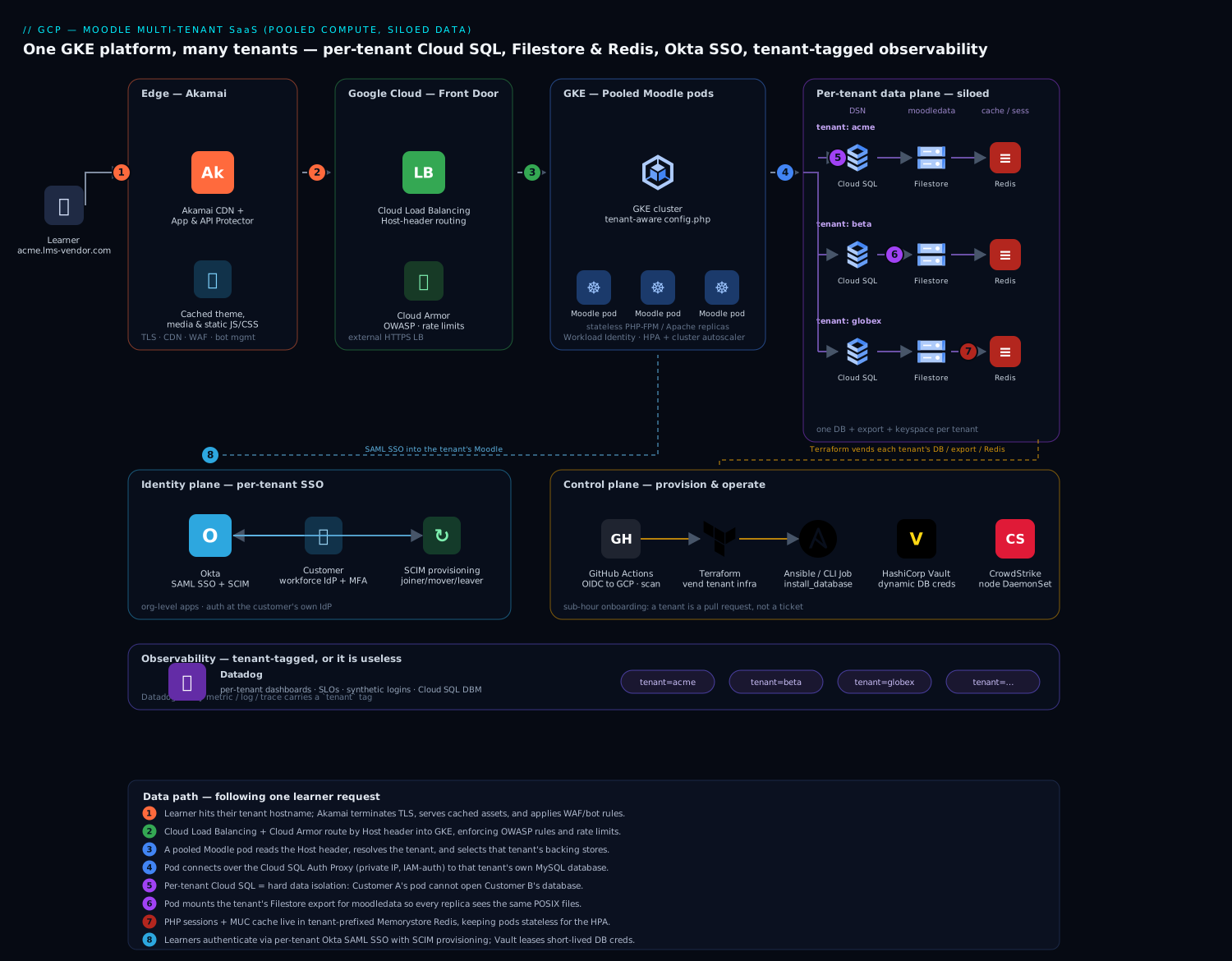
The diagram follows one learner request from its tenant hostname at the Akamai edge, through Cloud Load Balancing and Cloud Armor into the pooled Moodle pods on GKE, and then fans it out to that single tenant’s isolated backing stores — its own Cloud SQL database, its own Filestore export, and its own tenant-prefixed Memorystore keyspace — while the control plane (Terraform, Okta, Vault) vends and secures each tenant alongside it.
The platform runs two distinct planes that share a cluster but live on different schedules: a data plane that serves learners (the running Moodle), and a control plane that onboards and operates tenants (provisioning, patching, billing). Keeping them separate in your head is the first step to operating this well, because they fail differently and scale differently.
The defining property of the topology is tenant routing at the edge driving credential selection at the core. A learner reaches acme.lms-vendor.com; that hostname is the tenant identity, and it determines — deterministically, with no per-query filtering — which Cloud SQL database, which Filestore export, and which Redis keyspace the serving pod uses for that request. Isolation is a property of which backing store the request is wired to, established once at the front door, not a filter the application has to remember on every read.
Data path, following a learner request:
- A learner hits the platform at their tenant hostname. Traffic terminates at Akamai at the edge — TLS, global anycast, CDN for Moodle’s static theme/JS/CSS assets and course media, and App & API Protector WAF to absorb the credential-stuffing and bot traffic an internet-facing LMS attracts. Akamai’s origin is the GCP load balancer.
- Cloud Load Balancing (external HTTPS) with Cloud Armor fronts the GKE cluster, terminating the connection from Akamai, enforcing rate limits and OWASP rules as defense-in-depth, and routing by Host header through the GKE Gateway / Ingress to the Moodle service.
- The request lands on a Moodle pod on GKE. The pod reads the
Hostheader, resolves it to a tenant, and selects that tenant’s database DSN, moodledata path, and Redis prefix from its tenant-config map. Moodle’s ownconfig.phpis templated to be tenant-aware: the bootstrap picks the connection by hostname before any course or user data is touched. - For dynamic data, the pod connects to that tenant’s Cloud SQL for MySQL database over the Cloud SQL Auth Proxy (private IP, IAM-authenticated), so the credential is short-lived and the connection never crosses the public internet.
- For files — uploaded assignments, SCORM packages, course backups, the
moodledataroot Moodle cannot run without — the pod mounts the tenant’s Filestore export, a shared POSIX filesystem so every pod replica sees the same files (the thing a plain block volume cannot give you across replicas). - For sessions and caching — Moodle’s MUC (Muc) application cache and PHP sessions — the pod talks to Memorystore for Redis using a tenant-scoped key prefix, so a cache flush or a session lookup for one tenant cannot touch another’s. Session state in Redis is also what lets any pod serve any of a tenant’s users, which is what makes horizontal scaling work.
Identity path: learners and trainers do not get Moodle-local passwords. Each enterprise tenant federates its own workforce IdP into Okta, and Okta brokers SAML SSO into that tenant’s Moodle plus SCIM provisioning so joiners/movers/leavers in the customer’s HR system create, update, and deactivate Moodle accounts automatically. Org-level Okta means Customer A’s identity configuration is wholly separate from Customer B’s; a user authenticated against Acme’s IdP can only ever land in Acme’s Moodle.
Control path (onboarding a tenant): a sales-completed deal triggers a provisioning workflow — Terraform stands up the tenant’s Cloud SQL database, Filestore export, Redis namespace, DNS record, and Okta SAML/SCIM app; Ansible (or a Moodle CLI Job) runs the Moodle install against the new database, seeds the org theme and admin, and registers the tenant in the platform’s tenant registry. What was nine days of manual work becomes a sub-hour pipeline.
Component breakdown
| Component | Service / tool | Role in the platform | Key configuration choices |
|---|---|---|---|
| Edge | Akamai | TLS, anycast, CDN for static assets/media, WAF, bot mitigation | Cache Moodle theme/pluginfile assets; bot rules for credential stuffing; origin = GCLB |
| L7 LB / WAF | Cloud Load Balancing + Cloud Armor | Host-based routing into GKE, OWASP rules, rate limiting | Host-header routing per tenant; Armor preconfigured WAF rules; per-tenant rate ceilings |
| Compute | GKE (Moodle pods) | Pooled, tenant-aware PHP-FPM/Apache Moodle workers | Tenant-aware config.php; HPA on CPU + concurrency; Workload Identity |
| Per-tenant DB | Cloud SQL for MySQL | One database (or instance) per tenant — hard data isolation | Private IP; Auth Proxy; HA (regional) for premium tenants; PITR enabled |
| Shared files | Filestore | Per-tenant moodledata on a POSIX share all replicas mount |
Export per tenant; Enterprise tier for HA tenants; snapshot schedule |
| Cache & sessions | Memorystore for Redis | MUC application cache + PHP sessions, tenant-prefixed | Key prefix per tenant; Standard HA tier; maxmemory-policy allkeys-lru for cache, separate instance for sessions |
| Identity / SSO | Okta | Per-tenant SAML SSO + SCIM provisioning and deprovisioning | Org-level apps; SCIM JIT; deactivate-on-leaver; MFA at the tenant’s IdP |
| Provisioning | Terraform + Ansible | Vend per-tenant infra and run the Moodle install | Tenant module; pipeline-driven; state per environment |
| Observability | Datadog | Per-tenant performance dashboards, SLOs, alerts | tenant tag on every metric/log/trace; per-tenant dashboards & monitors; DBM on Cloud SQL |
| Secrets | HashiCorp Vault | Per-tenant DB credentials, SAML signing keys, API tokens | Dynamic MySQL creds per tenant; short leases; GKE auth method |
| Async work | GKE CronJobs / Jobs | Moodle cron and scheduled tasks, run per tenant | One schedule per tenant DB; backups; SCORM/grade processing |
| CI / IaC | GitHub Actions | Build the Moodle image, run the tenant pipeline, deploy | OIDC to GCP (no stored keys); image scan; canary one tenant first |
| Runtime security | CrowdStrike Falcon | Runtime threat detection on GKE nodes | Sensor as DaemonSet; detections to the SOC |
A few of these choices deserve the why, because they are the ones teams get wrong.
Why a database per tenant, not a schema or a row filter. This is the single most important decision in the design, and it is driven by procurement, not engineering taste. A B2B training buyer’s security team will ask “is our data physically isolated from your other customers?” and the only answer that wins the deal is “yes — separate database, separate credentials, your pod cannot even open a connection to another tenant’s data.” A shared schema with a tenantid column cannot make that claim honestly. The tradeoff is real and discussed below (connection count, per-DB overhead), but for a vendor whose business is trust, database-per-tenant is the price of entry. For very small tenants you can pack many databases onto one Cloud SQL instance to control cost; for large or premium tenants, give them a dedicated instance so a noisy neighbor cannot starve them.
Why Filestore and not a bucket or a block disk for moodledata. Moodle assumes a POSIX moodledata directory and writes to it constantly — session files (if not in Redis), caches, uploaded files, course backups. A block disk (Persistent Disk) cannot be mounted read-write by multiple pods at once, so it breaks the moment you scale past one replica. Cloud Storage is object, not POSIX, and Moodle’s core file API expects a filesystem. Filestore is a managed NFS share: every Moodle pod for a tenant mounts the same moodledata, so a file uploaded by a request served on pod 3 is instantly visible to pod 7. You can offload the served files to GCS via a Moodle object-storage plugin later for cost, but the live moodledata wants Filestore.
Why Redis carries sessions, not the pods. If sessions lived on a pod’s local disk, a learner would have to be pinned to one pod (sticky sessions) and would be logged out whenever that pod was rescheduled — fatal during an exam. Putting PHP sessions and the MUC cache in Memorystore for Redis makes the pods stateless: any replica can serve any of a tenant’s requests, the HPA can add and remove pods freely under exam load, and a node failure does not log anyone out. The tenant key-prefix keeps one tenant’s cache invalidations and session reads from ever touching another’s.
Tenant isolation: defense in depth
Isolation is the product, so it is enforced at every layer rather than trusted to any single control:
| Layer | Isolation mechanism | What a failure here would mean |
|---|---|---|
| Network / edge | Per-tenant hostname; Cloud Armor per-tenant rate rules | A flood against one tenant cannot drown the others |
| Data | Separate Cloud SQL database + separate credentials per tenant | Customer A’s pod cannot connect to Customer B’s data, full stop |
| Files | Separate Filestore export per tenant | One tenant’s moodledata is a different mount, not a subfolder to mis-path into |
| Cache / sessions | Tenant key-prefix in Redis (or separate instances for premium) | A cache flush or session lookup is scoped to one tenant |
| Identity | Org-level Okta SAML/SCIM per tenant | A user authenticated for Acme can only land in Acme’s Moodle |
| Secrets | Vault dynamic DB creds leased per tenant | A leaked credential is short-lived and scoped to one tenant’s database |
| Observability | tenant tag on every metric/log/trace |
Per-tenant blast-radius is visible, and one tenant’s noise is separable |
The principle is that isolation is structural — a property of which database the request is wired to and which credential the pod holds — not procedural, never “the code remembered to filter.” The serving pod obtains a tenant’s database credential from HashiCorp Vault after it has resolved the tenant from the hostname, using Vault’s dynamic MySQL secrets engine so the credential is generated on demand, scoped to that one tenant’s database, and leased for minutes. A pod handling an Acme request never holds a credential that would open Beta Corp’s database.
Implementation guidance
Make Moodle tenant-aware at bootstrap. The heart of the data-plane is a config.php that resolves the tenant from the request host before touching any data. Keep the per-tenant facts in a config map (or a tiny lookup the pod caches), and pull the database password from Vault, never from the manifest:
<?php
// Resolve tenant from the Host header set by the load balancer.
$host   = $_SERVER['HTTP_HOST'] ?? 'default';
$tenant = require('/etc/moodle/tenant-map.php')[$host] ?? null;
if ($tenant === null) { http_response_code(404); exit; }

$CFG->dbtype   = 'mysqli';
$CFG->dbhost   = '127.0.0.1';                 // Cloud SQL Auth Proxy sidecar
$CFG->dbname   = $tenant['db'];               // per-tenant database
$CFG->dbuser   = $tenant['db_user'];          // per-tenant user
$CFG->dbpass   = getenv('TENANT_DB_PASS');    // injected by Vault Agent, short-lived

$CFG->dataroot = $tenant['dataroot'];         // per-tenant Filestore export mount
$CFG->wwwroot  = 'https://' . $host;

// Tenant-scoped Redis: prefix isolates cache + sessions per tenant.
$CFG->session_handler_class = '\core\session\redis';
$CFG->session_redis_host    = $tenant['redis_host'];
$CFG->session_redis_prefix  = $tenant['id'] . ':sess:';
Provision a tenant as code. Onboarding is a Terraform module invoked per tenant, so a new customer is a pull request, not a ticket queue. The module’s shape communicates the intent — one database, one export, one Okta app, all stamped with the tenant id:
module "tenant" {
  source      = "./modules/moodle-tenant"
  tenant_id   = "acme"
  hostname    = "acme.lms-vendor.com"
  db_instance = google_sql_database_instance.shared_pool_a.name  # pack small tenants
  db_tier     = "small"        # premium tenants get a dedicated HA instance instead
  filestore   = "shared"       # or a dedicated export for large tenants
  redis_prefix = "acme"
  okta_app    = "saml-scim"    # provisions the per-tenant Okta SAML + SCIM app
}
The pipeline that applies this runs in GitHub Actions, authenticating to GCP via OIDC (Workload Identity Federation) so there is no long-lived service-account key to leak — a lesson the platform team intends never to repeat. After Terraform, an Ansible play (or a Moodle CLI Job) runs admin/cli/install_database.php against the new database, applies the tenant’s theme and admin, wires the Okta SAML auth plugin, and registers the tenant in the registry the load balancer routes from. A canary step brings up the tenant, runs a synthetic login through Datadog, and only then flips DNS live.
Patch once, roll everywhere — carefully. The operational payoff of pooled compute is that a Moodle security release is a single new container image. But the database schema upgrade Moodle runs on first hit after an upgrade must run per tenant database, and it must not run 180 times simultaneously and saturate Cloud SQL. The pattern: build and scan the new image in GitHub Actions, deploy it to a canary tenant first, run the schema upgrade as a controlled Job against that one database, validate, then roll the image fleet-wide and drive the per-tenant admin/cli/upgrade.php in batches (a few tenants at a time) rather than letting every pod stampede the upgrade on its own.
Enterprise considerations
Security & Zero Trust. The platform is identity-first and least-privilege by construction: pods authenticate to Cloud SQL with Workload Identity and the Auth Proxy (no static DB password in any manifest), tenant database credentials are Vault-issued, short-lived, and scoped to one database, and every tenant data-plane connection rides private IP, never the public internet. Human access to a tenant’s Moodle is Okta SAML only, with the customer’s own MFA and conditional access enforced at their IdP, and SCIM deprovisioning is the control that actually matters for an LMS — when a customer offboards an employee, that learner’s Moodle account deactivates automatically, closing the “ex-employee still has training-portal access” gap that manual user management always leaves open. Layer on CrowdStrike Falcon as a DaemonSet for runtime threat detection on the GKE nodes, feeding the SOC, and use Cloud Armor plus Akamai’s bot management to blunt the credential-stuffing that any internet-facing learner login attracts. Secrets — per-tenant DB creds, SAML signing keys, SCIM bearer tokens — live in Vault, never in a Kubernetes Secret.
Per-tenant cost visibility. Finance needs a number per tenant, and the architecture is built to give it. The siloed costs (each tenant’s Cloud SQL database, its Filestore export, its Redis allocation) are directly attributable. The shared cost (the GKE compute pool, the load balancer, Akamai) is allocated by usage: tag every metric, log, and trace with tenant and let Datadog apportion shared compute by each tenant’s share of CPU-seconds and request volume.
| Cost lever | Mechanism | Typical effect |
|---|---|---|
| Tenant packing | Many small-tenant databases on one Cloud SQL instance | Avoids paying instance overhead per small customer |
| Tiered tenancy | Dedicated HA instance only for premium/large tenants | Cost matches the contract value |
| Cluster autoscaling | GKE scales nodes down between spikes; spot nodes for async/cron | Pay for exam-day peaks, not the quiet weeks |
| CDN offload | Akamai caches theme/media; GCS object plugin for served files | Cuts origin egress and pod load |
| Right-sized Memorystore | Separate small session instance vs larger cache instance | Stop over-provisioning one Redis for both jobs |
Tag-based showback per tenant, surfaced in Datadog, is what lets the renewal conversation be “this customer costs us X to serve” instead of a guess.
Scalability — the exam-day stampede. LMS load is the textbook spiky workload, and each tier scales independently to absorb it. The GKE HPA scales Moodle pods on CPU and concurrent-request metrics, and because sessions live in Redis the new pods are immediately useful — any pod serves any user. The cluster autoscaler adds nodes (including spot nodes for tolerant async work) when a tenant opens an exam window. Cloud SQL read replicas absorb the read-heavy load of thousands of learners pulling course content and quiz questions; Moodle’s dbhandlesoptions/read-replica support directs reads to replicas and writes (quiz submissions, grades) to the primary. Memorystore scales by tier and by sharding the heaviest tenants onto their own instance. The natural ceiling is per-tenant Cloud SQL write throughput during a synchronized quiz submission burst — which is why premium tenants expecting 40,000 simultaneous learners get a dedicated, vertically generous instance and a tested capacity plan, not a slice of a shared one.
Failure modes, and what each one looks like. Name them before they page you.
- A noisy-neighbor tenant on a shared Cloud SQL instance — one customer’s exam-day load starves the small tenants packed alongside it. Mitigation: per-tenant rate limits at Cloud Armor, connection caps per tenant DB user, and a “graduate to dedicated instance” trigger when a tenant crosses a usage threshold.
- Filestore as a single point of failure for a tenant — if a tenant’s export degrades, every pod serving that tenant loses
moodledata. Mitigation: Enterprise-tier Filestore (HA) for premium tenants, scheduled snapshots, and a documented restore. - Cloud SQL connection exhaustion — database-per-tenant multiplies connections, and pooled pods can blow past
max_connections. Mitigation: a connection pooler (ProxySQL/PgBouncer-equivalent) or tight per-pod pool sizing, and packing fewer tenants per instance than the connection math allows. - A schema upgrade run fleet-wide at once — every pod racing
upgrade.phpsaturates databases and corrupts nobody but pages everybody. Mitigation: canary-then-batch upgrades driven by the control plane, never by pod startup. - A cross-tenant config error — a mis-mapped hostname routes Acme’s traffic at Beta’s database. Mitigation: the tenant map is generated by Terraform (not hand-edited), validated in CI, and a synthetic per-tenant login in Datadog catches a mis-route before users do.
Reliability & DR (RTO/RPO). Decide the numbers per tenant tier, because a free-trial tenant and a flagship enterprise do not deserve the same spend. Premium tenants get regional (HA) Cloud SQL with automatic failover and point-in-time recovery (binlog) for a low RPO, Enterprise Filestore with snapshots, and Standard-tier Memorystore with replication. Standard tenants get zonal Cloud SQL with daily backups + PITR and basic Filestore snapshots. A pragmatic target: RTO 30 minutes, RPO 15 minutes for premium tenants; RTO a few hours, RPO 24 hours for standard tenants, with backups for every tenant tested by an automated monthly restore into a scratch project. Because tenants are independent, a DR event is almost always scoped to one tenant’s stores, not the whole platform — which is itself a resilience win over the shared-everything design.
Observability — per-tenant or it is useless. The single most important observability decision is to tag everything with tenant at the source, so Datadog can slice every metric, log, and trace by customer. Build a per-tenant dashboard (p95 page latency, login success rate, active learners, quiz-submission rate, Cloud SQL query latency via Database Monitoring) and per-tenant SLOs and monitors, so when Acme’s training manager emails “the platform is slow,” support pulls up Acme’s dashboard and sees whether it is Acme’s database, Acme’s exam spike, or the shared cluster — in seconds, not after an hour of log-grepping a shared stream. Synthetic logins per tenant catch a broken SAML config or a mis-routed hostname before the customer does. Cloud SQL Database Monitoring surfaces the slow queries Moodle is notorious for under load, attributed to the right tenant.
Governance. Pin the Moodle image to an explicit, scanned version and promote it through the canary-then-batch process — never a floating latest. Keep config.php templates, the Terraform tenant module, and the Okta app definitions in version control so a tenant’s entire configuration is reviewable and revertable. Apply org-level GCP policy to deny public IP on Cloud SQL and require Workload Identity, with the CI pipeline running Checkov/Wiz Code-style IaC scanning on the tenant module so a misconfiguration is caught at pull-request time rather than in production.
Explicit tradeoffs
Accept these or do not build it. Database-per-tenant is the right isolation story and it is genuinely more expensive and more complex than a shared schema: more instances (or careful packing) to manage, a real connection-count problem to engineer around, and per-tenant backups and upgrades to orchestrate. Pooled compute gives you patch-once leverage but reintroduces the noisy-neighbor problem that a VM-per-tenant world did not have, so you pay for it in rate limits, connection caps, and tenant-tiering logic. The control plane — the Terraform tenant module, the canary-and-batch upgrade machinery, the tenant registry the router reads — is real software you must build and maintain before the SaaS economics arrive; for the first handful of tenants it is pure overhead, and it only pays back at scale. And running Moodle, an application never designed to be multi-tenant, as a multi-tenant SaaS means you are imposing tenancy from the outside (hostname routing, per-tenant backing stores) rather than getting it from the app, which puts the burden of correctness on the platform, not on Moodle.
The alternatives, and when they win. If you have only a few large, well-funded customers, a dedicated stack per tenant (the silo model, automated with the same Terraform) is simpler to reason about and isolates perfectly — the leverage loss only hurts once tenant count climbs. If your customers are tiny and price-sensitive and your data-sensitivity bar is lower, a fully pooled shared Moodle with application-level tenancy (or one of the Moodle “multi-tenancy” plugins / Moodle Workplace) is cheaper to run — but be honest that you are trading away the isolation story your enterprise buyers will demand. And if learning content delivery, not the full LMS feature set, is the actual need, a headless content platform sidesteps Moodle’s tenancy awkwardness entirely. Graduate to this pooled-compute, siloed-data GKE platform when you have enough tenants that patch-once leverage matters, and customers whose procurement teams demand provable per-tenant data isolation.
The shape of the win
For the training vendor, the payoff is not “Moodle in Kubernetes.” It is that sales closes a Fortune-500 deal on Tuesday, a Terraform pipeline stands up bigclient.lms-vendor.com with its own database, its own files, and its own Okta SSO before the kickoff call on Wednesday, 40,000 of the client’s staff log in for mandatory compliance training on Monday without a stampede taking down anyone else’s portal, and when the client’s security team sends the inevitable questionnaire, the honest answer to “is our learners’ data isolated from your other customers” is yes, in its own database with its own credentials your platform cannot cross. That last answer is the one that wins enterprise B2B deals. Everything upstream — the per-tenant Cloud SQL, the Filestore exports, the tenant-prefixed Redis, the org-level Okta, the Vault-leased credentials, the tenant-tagged Datadog dashboards — exists to let that vendor onboard fast, isolate hard, and price honestly. The architecture here is the destination; start with a handful of tenants on the same pattern, but this is where a real Moodle SaaS has to land.
Going deeper
Everything above is the architecture. This section is the mechanism — the parts an experienced platform engineer has to reason about precisely to run database-per-tenant at scale without it quietly falling over.
The connection-count ceiling (the tax nobody prices in)
Database-per-tenant multiplies the one resource a database guards most jealously: connections. Cloud SQL for MySQL caps concurrent connections via the max_connections flag, which scales with instance memory — a small instance permits a few hundred, a large one a few thousand. Now count what pooled, stateless pods actually open. If any pod can serve any tenant (the load balancer routes by hostname to any replica), then in the worst case every one of P Moodle pods holds a pool of C connections to every one of T tenant databases on a shared instance — the instance sees up to P × T × C connections, and PHP-FPM’s process-per-request model makes C uncomfortably large. Twenty pods, forty tenants packed on one instance, a pool of five each, and you are asking for 4,000 connections from an instance that may allow 4,000 total — with nothing left for cron, backups, or the DBA’s session.
Three levers keep this under the ceiling:
- Cap each tenant’s app user so no single tenant can consume the whole budget — MySQL enforces this per account:
-- run once per tenant, at provisioning time ALTER USER 'acme_app'@'%' WITH MAX_USER_CONNECTIONS 50; - Put a MySQL-aware pooler in front of Cloud SQL. A pooler such as ProxySQL multiplexes thousands of short-lived client connections onto a small, warm set of backend connections, so the pods’ churn never reaches
max_connections. (Cloud SQL’s own managed connection pooling is PgBouncer-based and covers PostgreSQL; on MySQL, ProxySQL as a sidecar or a small deployment is the common answer.) - Pack fewer tenants per instance than the raw connection math allows, and raise the ceiling deliberately rather than discovering it at exam time:
gcloud sql instances patch shared-pool-a \
  --database-flags=max_connections=4000,max_user_connections=200
Cell-based routing — bounding both the connections and the blast radius
The deeper fix for the connection explosion and the blast radius is cell-based (a.k.a. sharded) routing: instead of “any pod serves any tenant,” you partition tenants into cells, each cell a dedicated pod deployment plus a bounded set of tenant databases. A pod in cell 3 only ever connects to cell 3’s tenants, so connections are P_cell × T_cell × C, not P × T × C, and a cell-wide incident takes down a known slice of tenants rather than all of them. The load balancer routes a hostname to its cell’s service. Cells are how large SaaS platforms keep database-per-tenant tractable past a few dozen tenants — the price is a routing layer that must know each tenant’s cell, which (like the tenant map) is generated, never hand-edited.
Routing a request to the right tenant, precisely
Isolation begins at routing, so the routing must be deterministic and un-bypassable. The chain is Host header → tenant registry → connection descriptor. The load balancer preserves the tenant hostname; the Moodle bootstrap resolves it to a tenant record (database name, user, Filestore path, Redis prefix, and — in a cell design — the cell) from a generated map it caches in memory; an unknown host is refused, never defaulted:
$host   = $_SERVER['HTTP_HOST'] ?? '';
$tenant = require('/etc/moodle/tenant-map.php')[$host] ?? null;
if ($tenant === null) {          // fail closed — never fall back to a "default" tenant
    http_response_code(404);
    exit;
}
Two properties make this safe. It fails closed — an unrecognised or mistyped hostname gets a 404, not another tenant’s data. And the map is generated by Terraform and validated in CI, never hand-edited, because a single wrong line here is the one config error that routes Acme’s traffic at Beta’s database. A per-tenant synthetic login (a Datadog synthetic that logs into each hostname and asserts it landed in the right org) catches a mis-route within minutes, before a human does.
Scaling Cloud SQL under the exam-day stampede
When a tenant opens an exam window, load is overwhelmingly reads — thousands of learners pulling course pages and quiz questions — with a sharp write spike at submission. The two need different tools:
- Reads → replicas. Add a read replica for the tenant’s instance and point Moodle’s read traffic at it. Creating a replica is one command:
Moodle has native read/write splitting — declare the replica read-only and Moodle sendsgcloud sql instances create acme-replica-1 \ --master-instance-name=acme-primary \ --region=asia-south1 \ --tier=db-custom-4-16384SELECTs there and writes to the primary:$CFG->dboptions['readonly'] = [ 'instance' => ['127.0.0.1:3307'], // Auth Proxy → read replica 'latency' => 0.2, // tolerate up to ~200ms replica lag ]; - Writes → a bigger primary, not more replicas. Replicas do nothing for the quiz-submission write burst; that lands on the primary. A premium tenant expecting 40,000 simultaneous submissions gets a vertically generous primary and a tested capacity plan, because the natural ceiling of the whole platform is per-tenant write throughput during a synchronized submission — which is exactly why premium tenants are siloed onto their own instance instead of sharing.
- Connections → the pooler, as above, so replica reads and primary writes both flow through a bounded connection set rather than a per-pod free-for-all.
Noisy-neighbour control on a shared (bridge) instance
On a bridge instance — many small tenants together — one customer’s exam can starve the rest. Defense is layered: per-tenant MAX_USER_CONNECTIONS (above) so one tenant cannot eat the connection budget; Cloud Armor per-tenant rate limits at the edge so a flood against one hostname cannot saturate the shared pods; and a “graduate to dedicated instance” trigger — when a tenant’s CPU, active connections, or QPS crosses a threshold for N days, the onboarding pipeline re-provisions it onto its own instance (silo) and cuts the tenant map over. The signal to watch is Cloud SQL CPU and active-connection utilisation tagged by tenant in Datadog; the graduation is a routine, pre-scripted migration, not a 2 a.m. incident.
Per-tenant backup and point-in-time restore
Because each tenant is its own database (often its own instance), backup and restore are per-tenant by construction — you can rewind one customer to 4:29 a.m. without touching anyone else, which the shared-everything design can never do. Enable automated backups and point-in-time recovery (binary logging) on the instance, then:
# On-demand backup before a risky tenant migration
gcloud sql backups create --instance=acme-primary

# Recover a tenant to a moment just before a bad bulk-import,
# into a NEW instance so the live tenant keeps serving
gcloud sql instances clone acme-primary acme-restored \
  --point-in-time='2026-07-19T04:29:00.000Z'
The critical choice is clone, not in-place restore: gcloud sql instances clone --point-in-time builds a new instance from the source’s binlogs, so you can inspect or extract the recovered data and cut the tenant map over deliberately — whereas gcloud sql backups restore overwrites the target instance’s data, which is exactly what you do not want mid-incident. Every tenant tier’s backups are proven by an automated monthly restore into a scratch project; an untested backup is a hope, not a control.
Onboarding automation that is idempotent and safe
Onboarding is real, standing software, and its cardinal property is idempotency — running it twice must converge, not duplicate. Terraform gives this for free (its state reconciles desired versus actual), which is the deeper reason the tenant module is Terraform and the tenant map is generated from that state rather than appended to by an ad-hoc script. The safe onboarding sequence:
- Plan the tenant module (
terraform plan) — a new customer is a reviewable pull request, not a ticket. - Apply: create the tenant database (on a shared instance for small tenants, a dedicated one for premium), the Filestore export, the Redis prefix, the DNS record, and the Okta SAML/SCIM app — all stamped with the tenant id.
- Install Moodle against the new database (
admin/cli/install_database.php), seed the org theme and admin, wire the Okta auth plugin. - Register the tenant in the generated tenant map the router reads, and re-validate the whole map in CI (fail the pipeline on a duplicate hostname or a collision).
- Canary: bring the tenant up dark, run a synthetic login through Datadog, and only then flip DNS live.
The keyless leg of this — GitHub Actions authenticating to GCP with no stored service-account key — is Workload Identity Federation; it is worth doing from day one so onboarding never depends on a long-lived key someone can leak (see Workload Identity Federation — Keyless CI/CD).
Practice challenges
Work these in order — the first three build intuition, the middle two are the hands-on scaling and safety patterns, and the last is the operational edge that separates a demo from a platform that survives an audit. Try each before opening the solution.
1 — Place them on the spectrum (Beginner). Three teams propose data models: (a) one shared set of tables for all customers with a tenantid column on every row; (b) a separate database per customer with its own credentials; © a separate Cloud SQL instance per customer. Name each as silo / pool / bridge and rank them by isolation.
<details><summary>Solution</summary>
(a) Pool — shared schema with a discriminator column; weakest isolation, because a query bug crosses tenants. (b) Bridge / data-layer silo — database-per-tenant on a shared instance; strong isolation (separate database and credentials) at moderate density. © Full silo — instance-per-tenant; strongest isolation (no shared CPU, RAM, or connections) at the lowest density and highest cost. Isolation: c > b > a. Density / cost-efficiency: a > b > c. Why it matters: isolation and density are the two ends of one spectrum — you buy one with the other — and a B2B LMS pays for (b), graduating premium tenants to ©.
</details>
2 — The MySQL schema trap (Beginner → Intermediate). A teammate says, “let’s use schema-per-tenant as a lighter-weight middle ground than database-per-tenant on our Cloud SQL for MySQL instance.” What is wrong with that sentence?
<details><summary>Solution</summary>
In MySQL a schema is a database — CREATE SCHEMA is a synonym for CREATE DATABASE — so “schema-per-tenant” and “database-per-tenant” are the same thing; there is no lighter middle rung on MySQL. The real middle ground is many tenant databases on one shared instance versus one dedicated instance per tenant. (On PostgreSQL, where a database contains schemas, schema-per-tenant would be a genuine, distinct option.) Why it matters: the engine’s data model decides which isolation rungs actually exist — the vocabulary does not transfer blindly between databases.
</details>
3 — Why Filestore, not a Persistent Disk (Beginner). A new engineer mounts moodledata on a Persistent Disk and it works — until they scale Moodle to two replicas and uploads start vanishing. Give the one-sentence cause and the fix.
<details><summary>Solution</summary>
A Persistent Disk is ReadWriteOnce — only one node can mount it read-write, so replica 2 cannot see files replica 1 wrote; mount moodledata on Filestore (managed NFS, ReadWriteMany) so every pod shares one POSIX filesystem. Why it matters: pooled, stateless pods require shared storage — a block disk breaks at the second replica, and object storage (GCS) is not POSIX enough for Moodle’s live data root.
</details>
4 — Cap a noisy neighbour (Intermediate). One tenant on a shared instance keeps exhausting connections during its exams, starving the others. Write the one MySQL statement that fences it in, and say why this beats “ask them to be gentler.”
<details><summary>Solution</summary>
ALTER USER 'acme_app'@'%' WITH MAX_USER_CONNECTIONS 50;
Caps that tenant’s app account to 50 concurrent connections, so it physically cannot consume the shared instance’s whole max_connections budget no matter how busy its exam gets. Why it matters: isolation must be structural (an enforced limit), never a polite request — per-tenant connection caps are exactly what make a shared “bridge” instance safe to pack.
</details>
5 — Scale reads for an exam, and know the limit (Intermediate). A premium tenant’s primary is CPU-bound on reads during exams. Add read capacity with one gcloud command, then say in one line why this will not help the submission spike.
<details><summary>Solution</summary>
gcloud sql instances create acme-replica-1 \
  --master-instance-name=acme-primary \
  --region=asia-south1
A read replica absorbs the SELECT-heavy course- and quiz-page load (Moodle routes reads to it via $CFG->dboptions['readonly']). It will not help the submission spike because writes — quiz submissions, grade updates — always go to the primary; that burst needs a vertically larger primary, not more replicas. Why it matters: replicas scale reads only, so you must know which half of the workload you are scaling before you reach for one.
</details>
6 — Rewind one tenant to 4:29 a.m. (Advanced). A bad bulk grade-import corrupted one tenant’s data at 04:30. You must recover that tenant to 04:29 without affecting any other tenant, and without overwriting the live instance while you investigate. Which command, and why not gcloud sql backups restore?
<details><summary>Solution</summary>
gcloud sql instances clone acme-primary acme-restored \
  --point-in-time='2026-07-19T04:29:00.000Z'
clone --point-in-time builds a new instance from the primary’s binary logs (PITR must be enabled), so the live tenant keeps serving while you inspect or extract the recovered data and cut over deliberately. gcloud sql backups restore overwrites the target instance — destructive, and exactly wrong mid-incident. Because each tenant is its own database, this rewind touches only that one customer. Why it matters: database-per-tenant is what makes per-tenant, point-in-time recovery possible at all — the shared-everything design cannot rewind one customer without rewinding them all.
</details>
Common beginner mistakes
- “Multi-tenant means one database with a
tenantidcolumn.” That is the pool extreme — cheapest to run, easiest to breach, because one missingWHERE tenantid = ?leaks Customer A’s learners to Customer B. Worse, Moodle was never built to be tenant-aware, so there is notenantidon its hundreds of tables to filter by in the first place. For a vendor whose product is trust, the entry price is database-per-tenant; pool the compute, never the data. - “On MySQL, schema-per-tenant is a lighter middle option.” In MySQL a schema is a database (
CREATE SCHEMA≡CREATE DATABASE), so there is no separate middle rung — schema-per-tenant is database-per-tenant. The real knob is how many tenant databases you pack per instance, and when to graduate a tenant to its own instance. (This only differs on engines like PostgreSQL, where a database contains schemas.) - “Database-per-tenant, so we’re fully isolated — done.” Separate databases isolate the data, but tenants sharing an instance still share CPU, RAM, and the
max_connectionsbudget — that is the noisy-neighbour surface. Real isolation is defense-in-depth: per-tenant connection caps, edge rate limits, and a graduate-to-dedicated trigger, layered on top of the separate database. - “Put
moodledataon a Persistent Disk.” A Persistent Disk is ReadWriteOnce; the moment you run a second Moodle replica, the two cannot share it and files go missing.moodledataneeds Filestore (ReadWriteMany NFS) so every pod sees the same files. Object storage (GCS) is not a substitute for the livemoodledataeither — Moodle’s core file API expects POSIX. - “Pin each user to one pod with sticky sessions.” Sticky sessions log a learner out the instant their pod is rescheduled — fatal mid-exam — and they defeat the autoscaler. Put PHP sessions in Memorystore for Redis so pods are stateless and any replica can serve any of a tenant’s users; that statelessness is what makes exam-day scaling work at all.
- “Read replicas speed up everything, including submissions.” Replicas scale reads only. The quiz-submission burst is writes, and every write goes to the primary, so more replicas do nothing for it. Scale the submission spike with a bigger primary (and silo premium tenants onto their own instance); use replicas for the course-page read flood.
- “One big shared Cloud SQL and one big Redis is simpler.” It reintroduces exactly the shared-fate blast radius and noisy-neighbour problem the isolation story exists to remove — one tenant’s exam can now degrade everyone, and you can no longer restore, rate-limit, or cost-attribute a single customer. The per-tenant databases, tenant-prefixed Redis, and tiering are the point, not incidental complexity.
- “Onboarding is a quick script we run once.” Onboarding is standing software, and it must be idempotent — a rerun has to converge, not create a second database or a duplicate Okta app. Model it as a Terraform module (state reconciles desired versus actual) and generate the tenant map from that state; hand-editing the map is how Acme’s traffic ends up pointed at Beta’s database.
Glossary
| Term | Plain-language meaning |
|---|---|
| Multi-tenant SaaS | One running system serving many separate customers (tenants) at once, sharing some layers and isolating others. |
| Tenant | One customer of the platform — here, one enterprise whose learners use their own branded Moodle. |
| LMS / Moodle | Learning Management System — software that hosts courses, quizzes, and completion records. Moodle is the leading open-source LMS. |
| Silo model | Each tenant gets dedicated resources (its own instance or VM). Maximum isolation, minimum density (cost per tenant). |
| Pool model | All tenants share resources, separated only by a software label (a tenantid column). Maximum density, minimum isolation. |
| Bridge model | A deliberate mix — pool the cheap-to-share layer (compute), silo the layer that must be isolated (data). This design. |
| Database-per-tenant | Each tenant gets its own database with its own credentials — the data model this platform uses for hard isolation. |
| Schema-per-tenant | A separate namespace per tenant inside a shared database. On MySQL a schema is a database, so this collapses into database-per-tenant; on PostgreSQL it is a distinct middle option. |
Shared schema / tenantid column |
One set of tables for all tenants plus a discriminator column; the pool data model. Isolation depends on every query filtering correctly. |
| Tenant isolation | Keeping one customer’s data and load away from another’s. Structural isolation (which database the request is wired to) beats procedural (remembering to filter). |
| Noisy neighbour | One tenant’s load (an exam spike) degrading others that share a resource. Controlled with connection caps, rate limits, and tiering. |
| Cloud SQL | GCP’s managed relational database (MySQL, PostgreSQL, SQL Server). Here, MySQL, one database per tenant. |
| Read replica | A read-only copy of a database that absorbs SELECT load; writes still go to the primary. Scales reads, not writes. |
| Connection pooling | Multiplexing many short-lived client connections onto a small set of warm database connections (e.g. ProxySQL for MySQL) to stay under max_connections. |
max_connections / MAX_USER_CONNECTIONS |
The instance-wide cap on concurrent connections, and the per-account cap that fences a single tenant in. |
| PITR (point-in-time recovery) | Rewinding a database to an exact past moment using binary logs — here, per tenant, via gcloud sql instances clone --point-in-time. |
| Filestore | GCP’s managed NFS (ReadWriteMany) file share; hosts each tenant’s moodledata so every pod sees the same files. |
moodledata |
Moodle’s POSIX data directory (uploads, caches, course backups) that the application cannot run without. |
| Memorystore / Redis | GCP’s managed Redis; holds Moodle’s cache and PHP sessions, tenant-prefixed so pods can be stateless. |
| MUC | Moodle Universal Cache — Moodle’s application cache layer, backed here by Redis. |
| GKE | Google Kubernetes Engine — the managed Kubernetes running the pooled Moodle pods. |
| HPA / cluster autoscaler | The Horizontal Pod Autoscaler adds/removes pods on load; the cluster autoscaler adds/removes nodes beneath them. |
| Cloud SQL Auth Proxy | A sidecar that opens a secure, IAM-authenticated, private connection to Cloud SQL so no static DB password crosses the network. |
| Cell-based architecture | Partitioning tenants into isolated “cells” (a pod deployment plus a bounded set of databases) so connections and failures are bounded per cell. |
| Control plane vs data plane | The control plane onboards, patches, and bills tenants; the data plane serves learners. They scale and fail differently. |
| Tenant registry / tenant map | The generated lookup from hostname → tenant’s database, files, cache (and cell). Generated by Terraform, validated in CI, never hand-edited. |
| Showback | Attributing shared and dedicated cost to each tenant (via a tenant tag) so finance can price a renewal. |
| RTO / RPO | Recovery Time Objective (how fast you restore) and Recovery Point Objective (how much data you can lose) — set per tenant tier. |
| Blast radius | How many tenants a single failure can affect — minimised by per-tenant stores and cell-based routing. |
| Workload Identity / WIF | Keyless authentication: pods (Workload Identity) and CI (Workload Identity Federation) get short-lived credentials with no stored key. |
| Okta / SAML / SCIM | The identity broker (Okta), the SSO protocol (SAML), and the user-provisioning protocol (SCIM) that create and deactivate learner accounts per tenant. |
| Cloud Armor / Akamai / WAF | Edge protections: Cloud Armor (GCP WAF + rate limiting) and Akamai (CDN, TLS, bot mitigation) blunt floods and credential stuffing. |
| HashiCorp Vault | Secrets manager issuing short-lived, per-tenant database credentials, so a leaked secret is scoped and expires fast. |