A recommendation engine is the single highest-leverage piece of machine learning most retailers ever ship. Done well, it lifts revenue per session by double digits without touching acquisition spend. Done badly, it recommends the umbrella the customer already bought, tanks page-load latency, and quietly trains itself on a feedback loop of its own bad guesses. This article is a complete, reusable GCP reference architecture for getting it right — from the first clickstream event to the ranked carousel that renders on the product page, and the Looker dashboards the merchandising team actually trusts.
In a nutshell
Think of the best sales associate in a physical store. They remember what you browsed last visit, they notice what’s in your hand right now, they know what’s actually on the shelf behind them, and — in the two seconds before you drift off — they suggest the one thing you’re most likely to want next. A recommendation engine is that associate, except it does the job for millions of shoppers at once, personalises for people it has never met, and returns its answer in roughly the time it takes a web page to paint (well under a tenth of a second).
This lesson is not about one magic service or one model. It is a reference architecture — a proven blueprint of how a dozen GCP services fit together so the whole thing is fresh, fast, cheap enough, and measurable. The trick is to see it as four cooperating parts: an ingestion plane that catches every click, an analytics/feature plane (BigQuery) that turns raw clicks into signals, a serving plane that ranks products in milliseconds, and an insight plane (Looker) that proves it made money. Data flows left to right through all four.
The reassuring part for a beginner: you do not need to be a machine-learning researcher to build this. The fastest path uses Google’s managed retail recommender (Vertex AI Search for commerce, formerly Recommendations AI), which handles the genuinely hard ML — cold-start, freshness, ranking — for you. You wire up the plumbing (events in, catalogue in, recommendations out) and let the managed model do the science. The lesson also covers the custom path (a two-tower model on Vertex AI) for when your business logic outgrows the managed box.
Level: Advanced · Time: ~34 min
Prerequisites — helpful to have first. You’ll get the most from this if you’re comfortable with GCP fundamentals (projects, IAM, service accounts) and have met the four building blocks below at least once. Each has a dedicated deep-dive in this course:
- Pub/Sub deep dive — the event bus that catches every click.
- Dataflow (Apache Beam) deep dive — the streaming pipeline that validates and routes events.
- BigQuery deep dive — the warehouse that doubles as the feature engine.
- Vertex AI Pipelines / MLOps guide — how the custom model is trained and shipped.
After this lesson you’ll be able to:
- Explain the four planes and defend why events go to Pub/Sub before BigQuery.
- Choose between the managed recommender and a custom two-tower model — and justify the call.
- Design the single event contract that keeps analytics and the model in agreement.
- Set a realistic latency budget and explain what each millisecond buys.
- Keep recommendations fresh and in-stock without caching yourself into staleness.
- Build the A/B framework that turns “it feels better” into “+11.3% revenue per visit”.
The business scenario
Picture a mid-market omnichannel retailer — call the segment “₹500 crore to ₹5,000 crore annual GMV.” They sell across a web storefront, native mobile apps, and a few hundred physical stores with a loyalty programme that ties the channels together. They already have a data warehouse, a tag manager firing clickstream events, and a product catalogue that changes daily as SKUs go in and out of stock. What they do not have is a recommendation system that earns its keep.
The symptoms are familiar across the whole size range, from a single-brand DTC shop to a large multi-banner group:
- Generic merchandising. The homepage shows the same “Top Sellers” rail to every visitor. Conversion on that rail is mediocre because it ignores who is looking.
- Cold-start everywhere. New SKUs launch with zero interaction history and get buried. New or logged-out visitors get nothing personalised at all.
- Stale recommendations. A batch job recomputes “customers also bought” nightly, so a customer who put a tent in their cart at 10am still sees camping chairs recommended at 8pm — long after they checked out.
- No measurable lift. Nobody can answer “what did recommendations earn us last quarter?” because there is no clean attribution and no experiment framework.
- Catalogue drift. Recommendations surface out-of-stock or discontinued items because the model’s view of the catalogue is days behind reality.
The business goal is concrete and modest enough to be credible: increase revenue per visit by serving relevant, fresh, in-stock recommendations on the homepage, product detail page (PDP), cart, and post-purchase email — and prove the lift with a clean A/B framework. The technical goal is a system that ingests behavioural events in near-real-time, keeps a unified view of customer and catalogue, serves a ranked list in well under 100 ms at the edge, and gives merchandisers a Looker cockpit to monitor and steer it.
GCP is a natural fit here because the hard parts — a managed recommender that handles cold-start, a warehouse that doubles as a feature store, and a streaming bus — are first-party services that integrate without glue code you have to maintain.
Architecture overview
The system is best understood as four planes that share data but scale and fail independently: an ingestion plane, an analytics/feature plane, a serving plane, and a insight plane. Picture the diagram as a left-to-right flow with a vertical “data backbone” running through the middle.
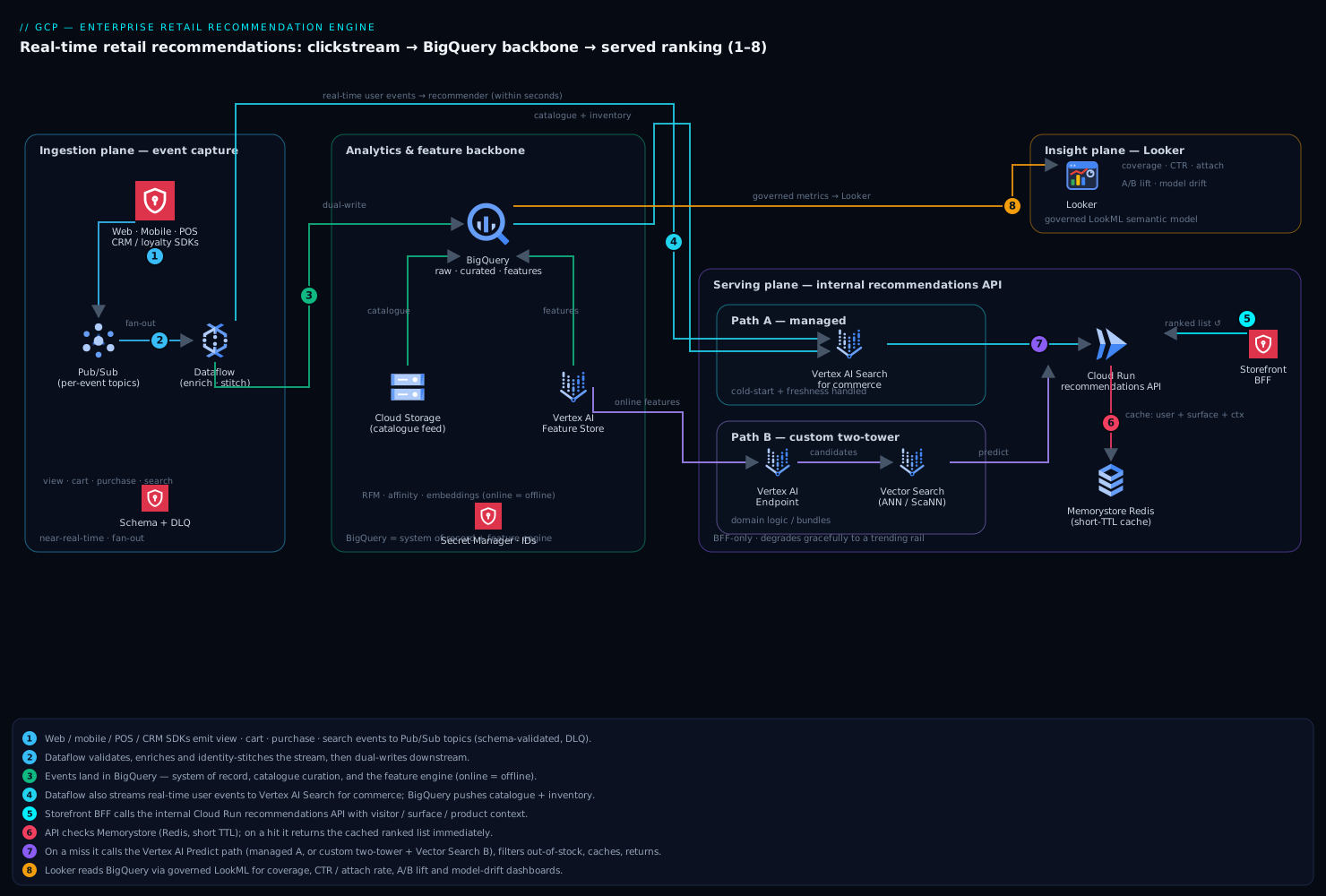
Reading the diagram — the request path, 1 → 8. When a shopper opens a product page:
- The storefront’s BFF (backend-for-frontend) calls the internal recommendations API (Cloud Run) with the visitor/user ID, the surface (“PDP”), and the current product context.
- The API computes a cache key and checks Memorystore (Redis).
- On a hit, it returns the cached ranking immediately — the single-digit-millisecond happy path.
- On a miss, it calls the Vertex AI Predict endpoint (the managed Search-for-commerce serving config, or the custom endpoint).
- Candidate products are filtered against a near-live in-stock set so nothing out-of-stock is ever shown.
- The ranked, filtered list is written back to Redis with a short TTL and returned to the BFF, which paints the carousel.
- Meanwhile the view event the shopper just generated flows through Pub/Sub → Dataflow → BigQuery and into the recommender, so the very next call reflects what they just did.
- Looker reads BigQuery to show coverage, click-through, attach rate, A/B results, and drift.
Ingestion (left edge). Every customer touchpoint — web SDK, mobile SDK, server-side checkout service, in-store POS, and the loyalty CRM — emits structured events. View, add-to-cart, purchase, and search events flow into Pub/Sub topics. Pub/Sub is the shock absorber: it decouples bursty client traffic from downstream processing and fans the same event stream out to multiple consumers. A Dataflow streaming pipeline subscribes, validates and enriches events (resolving anonymous IDs to loyalty IDs where possible), and writes them two places at once: into BigQuery for analytics, and into Vertex AI Search for commerce (the service formerly branded Recommendations AI) as real-time user events so the model sees behaviour within seconds.
Analytics and features (centre — the backbone). BigQuery is the gravitational centre of the architecture. It is the system of record for raw events, the place where the product catalogue is curated and joined to inventory, and the engine that computes engineered features (recency/frequency/monetary aggregates, category affinity, session embeddings). A scheduled BigQuery pipeline publishes the cleaned product catalogue to Vertex AI Search for commerce. The same BigQuery features feed a Vertex AI Feature Store so that custom models can be trained and served on consistent online/offline features.
Serving (right side). Two complementary serving paths exist, and choosing between them is the central architectural decision (covered in When to use it). Path A is the managed Vertex AI Search for commerce / Recommendations AI Predict API: you call a serving config (e.g. “recommended for you”, “frequently bought together”, “others you may like”) and it returns a ranked, optionally personalised list, handling cold-start and freshness internally. Path B is a custom two-tower model trained in Vertex AI, deployed to a Vertex AI Endpoint, with a Vertex AI Vector Search index for fast approximate-nearest-neighbour candidate retrieval and a re-ranking model on top. Both paths sit behind an internal recommendations API (Cloud Run) that the storefront’s BFF (backend-for-frontend) calls; results are cached in Memorystore (Redis) keyed by user + surface + context, with a short TTL to keep them fresh.
Insight (top-right). Looker sits on top of BigQuery via a governed semantic model (LookML). Merchandisers and analysts get dashboards for recommendation coverage, click-through and attach rate by surface, A/B experiment results, and model drift. Looker’s modelling layer is what turns the raw event tables into trustworthy, consistent metrics that the business and the data-science team agree on.
The end-to-end request path for a personalised carousel: the browser requests a PDP, the BFF calls the Cloud Run recommendations API with the user/visitor ID, surface, and current product context, the API checks Redis, on a miss it calls the Vertex AI Predict endpoint, filters the candidates against a live in-stock set, writes the result to Redis, and returns it. Meanwhile the view event the customer just generated is already flowing through Pub/Sub into both BigQuery and the recommender, so the next call reflects what they just did.
Component breakdown
| Component | GCP Service | Role in the architecture | Key configuration choices |
|---|---|---|---|
| Event bus | Pub/Sub | Durable, fan-out ingestion of all behavioural events | Separate topics per event type; schema-validated messages; dead-letter topic; ordering keys only where strictly needed |
| Stream processing | Dataflow (Apache Beam) | Validate, enrich, deduplicate, identity-stitch, dual-write | Streaming engine; exactly-once to BigQuery via Storage Write API; windowed dedup; DLQ for malformed events |
| Warehouse / feature engine | BigQuery | System of record, catalogue curation, feature computation, A/B analytics | Partition event tables by date, cluster by user/product; BI Engine reservation for Looker; scheduled queries for feature refresh |
| Managed recommender | Vertex AI Search for commerce (Recommendations AI) | Cold-start-safe, freshness-aware personalised recommendations | Import catalogue + user events; choose model type per surface; set optimisation objective (CTR / revenue / conversion) |
| Custom modelling | Vertex AI (Training, Endpoints, Feature Store) | Two-tower retrieval + re-ranker when business logic exceeds the managed model | Custom training on TFX/Keras; online Feature Store; autoscaling endpoints with min replicas for latency |
| Candidate retrieval | Vertex AI Vector Search | Millisecond ANN lookup over item embeddings for the custom path | ScaNN index; tuned leaf_node_embedding_count; deployed index with autoscaling |
| Serving API | Cloud Run | Stateless recommendations service: cache, fallback, business filters | Min instances to avoid cold starts; concurrency tuned; per-surface fallback rails |
| Online cache | Memorystore for Redis | Sub-millisecond cache of computed recommendation lists | Short TTL (30–120 s); key = visitor+surface+context hash; Standard HA tier |
| Inventory / catalogue source | BigQuery + Cloud Storage | Authoritative product + inventory feed | Hourly inventory delta; full catalogue reconcile daily |
| Insight & governance | Looker | Semantic model, dashboards, experiment readouts, drift monitoring | LookML metrics; row-level access; PDTs for heavy aggregates |
| Secrets & config | Secret Manager | API keys, model/serving-config IDs, connection strings | Versioned secrets; accessed via workload identity, never baked into images |
A few components deserve a closer look.
Pub/Sub as the decoupler. The reason events go to Pub/Sub first, rather than straight to BigQuery, is resilience and fan-out. A flash sale can 10x event volume in seconds; Pub/Sub absorbs that without back-pressuring the storefront, and the same stream feeds Dataflow, the recommender, and any future consumer (fraud, real-time inventory) without re-instrumenting clients. The dead-letter topic ensures a single malformed event schema deploy doesn’t silently drop data.
BigQuery as both warehouse and feature engine. This is the design choice that keeps the architecture lean. Rather than standing up a separate feature platform, the engineered features (RFM aggregates, 30-day category affinity, trending-in-your-region signals) are SQL on partitioned, clustered event tables. For the custom-model path those features are materialised into Vertex AI Feature Store so that the exact same feature definitions are available at training time (offline) and serving time (online), eliminating training/serving skew — the most common cause of “the model looked great in the notebook and flopped in production.”
The managed recommender’s surface model. Vertex AI Search for commerce maps to retail surfaces directly: “Recommended for You” (homepage, personalised), “Others You May Like” and “Similar Items” (PDP), “Frequently Bought Together” (cart/PDP), and “Recently Viewed”. Each is a serving config backed by a model with an explicit business objective. Picking revenue per session vs click-through rate as the objective materially changes behaviour — CTR optimisation can over-favour cheap, high-engagement items, so cart and PDP surfaces usually optimise for conversion/revenue while discovery surfaces optimise for engagement.
Memorystore with deliberately short TTLs. Caching recommendations is in tension with freshness. The resolution is a short TTL (tens of seconds) plus cache keys that include behavioural context, so a customer who just added an item gets a fresh computation while a thundering herd on a popular PDP is still absorbed. The cache exists for tail-latency protection and cost control, not to serve stale results for minutes.
Implementation guidance
Project and environment layout. Use a multi-project structure governed by Terraform and an organisation hierarchy: a host project for shared VPC and DNS, plus dev / staging / prod service projects. Recommendation workloads live in the service projects; BigQuery datasets for raw, curated, and feature layers are separated so IAM can grant analysts curated access without exposing raw PII. A dedicated looker connection service account reads only the curated and feature datasets.
Infrastructure as Code. Terraform is the right default on GCP (Deployment Manager is effectively legacy; Config Connector/KCC is an option if you are all-in on GKE/Kubernetes, but Terraform is more common for this mix). Structure it as composable modules:
pubsub— topics, schemas, subscriptions, DLQ, and IAM bindings.bigquery— datasets, partitioned/clustered table definitions, scheduled queries, BI Engine reservation, and authorised views that expose curated tables without copying data.dataflow— Flex Template job, with the pipeline image built separately in CI; pass topic/subscription and dataset names as parameters.vertex_ai— the Search-for-commerce data store and serving configs; for the custom path, the endpoint, Vector Search index, and Feature Store. Note that some Vertex AI Search for commerce resources are provisioned via API/gcloudrather than mature Terraform resources — wrap those in anull_resource/local-execor a small provisioning job and keep the IDs in Secret Manager.cloud_run— the recommendations service, with min instances, concurrency, VPC connector, and the service account.memorystore— Redis Standard HA instance on the shared VPC.looker— typically configured outside Terraform (LookML in its own Git repo with CI validation), but the BigQuery connection service account and IAM are Terraformed.
Keep all model IDs, serving-config IDs, and connection strings in Secret Manager, referenced by Terraform outputs — never hard-code them in the Cloud Run image.
Networking. Run a Shared VPC from the host project. Cloud Run uses a Serverless VPC Access connector to reach Memorystore and any private endpoints. Enable Private Service Connect / Private Google Access so traffic to BigQuery, Pub/Sub, and Vertex AI stays on Google’s backbone rather than the public internet. Front the public-facing storefront with the Global External Application Load Balancer and Cloud Armor (WAF + rate limiting); the recommendations API itself is internal and is only reached by the BFF, not exposed directly to browsers. Put VPC Service Controls around the analytics projects to create a perimeter that prevents data exfiltration from BigQuery/Vertex AI even with valid credentials.
Identity wiring. Every workload uses a dedicated, least-privilege service account; no service account keys — use workload identity (for GKE) or the attached runtime service account (for Cloud Run/Dataflow). Concretely: the Dataflow SA gets pubsub.subscriber + bigquery.dataEditor (on the raw dataset only) + the Retail event-write role; the Cloud Run SA gets the Vertex AI predict/Retail user role, redis access, and secretmanager.secretAccessor; the Looker SA gets bigquery.dataViewer on curated/feature datasets plus bigquery.jobUser. Human access is via Google Groups bound to IAM roles, never individual grants, so onboarding/offboarding is a group membership change.
Event contract. Standardise on a single event schema (validated by Pub/Sub schemas) carrying visitor_id, optional user_id (loyalty), event_type, product_details, session_id, timestamp, and channel. This is the contract both BigQuery analytics and the Retail user-event API consume, so investing in it up front avoids divergent event definitions later.
CI/CD. Cloud Build (or GitHub Actions) builds the Dataflow and Cloud Run images, runs terraform plan on PRs with manual approval to apply to prod, and runs LookML validation against a Looker dev branch. Model retraining is orchestrated by Vertex AI Pipelines on a schedule, with the managed recommender retraining automatically as fresh events arrive.
Worked example: wiring one path end to end
The prose above is the blueprint; here is what the load-bearing pieces actually look like. Nothing below needs a running project to read — all IDs are placeholders — but every command and schema is real and schema-correct, so you can adapt them directly.
1. The event contract, as a Pub/Sub Avro schema. One schema, registered once, every client obeys it. This is the single most important artefact in the whole system:
{
  "type": "record",
  "name": "RetailEvent",
  "namespace": "com.example.retail",
  "fields": [
    { "name": "visitor_id", "type": "string" },
    { "name": "user_id", "type": ["null", "string"], "default": null },
    { "name": "event_type", "type": { "type": "enum", "name": "EventType",
        "symbols": ["view", "add_to_cart", "purchase", "search", "detail_page_view"] } },
    { "name": "session_id", "type": "string" },
    { "name": "event_ts", "type": { "type": "long", "logicalType": "timestamp-micros" } },
    { "name": "channel", "type": { "type": "enum", "name": "Channel",
        "symbols": ["web", "ios", "android", "pos"] } },
    { "name": "product_ids", "type": { "type": "array", "items": "string" }, "default": [] },
    { "name": "search_query", "type": ["null", "string"], "default": null },
    { "name": "revenue_micros", "type": ["null", "long"], "default": null }
  ]
}
2. Register the schema and the schema-validated topics. Bind every topic to that one schema, so a client that emits a malformed event is rejected at publish time — long before it can poison BigQuery or the model:
# Register the event contract (Avro) once
gcloud pubsub schemas create retail-event \
  --type=avro \
  --definition-file=retail-event.avsc

# One topic per event type, all validated by the same schema, JSON on the wire
for ev in view add-to-cart purchase search; do
  gcloud pubsub topics create "events-${ev}" \
    --schema=retail-event \
    --message-encoding=json
done

# A dead-letter topic + a subscription that quarantines poison messages
gcloud pubsub topics create events-dlq

gcloud pubsub subscriptions create dataflow-view-sub \
  --topic=events-view \
  --dead-letter-topic=events-dlq \
  --max-delivery-attempts=5 \
  --ack-deadline=30
IAM gotcha: for the dead-letter topic to work, the Pub/Sub service agent (
service-PROJECT_NUMBER@gcp-sa-pubsub.iam.gserviceaccount.com) needsroles/pubsub.publisheronevents-dlqandroles/pubsub.subscriberon the source subscription. Forget this and messages that exceedmax-delivery-attemptsare simply redelivered forever instead of being quarantined.
3. The BigQuery backbone — partitioned and clustered. The single choice that keeps feature queries scanning kilobytes instead of terabytes. require_partition_filter makes it a hard rule that every query names a date range:
CREATE TABLE IF NOT EXISTS retail_raw.events (
  visitor_id     STRING    NOT NULL,
  user_id        STRING,
  event_type     STRING    NOT NULL,
  session_id     STRING,
  event_ts       TIMESTAMP NOT NULL,
  channel        STRING,
  product_ids    ARRAY<STRING>,
  search_query   STRING,
  revenue_micros INT64
)
PARTITION BY DATE(event_ts)
CLUSTER BY user_id, event_type
OPTIONS (
  partition_expiration_days = 400,
  require_partition_filter  = TRUE
);
4. Features as SQL, refreshed by a scheduled query. No separate feature platform — recency/frequency/monetary (RFM) signals are just an aggregate over the clustered table. The WHERE DATE(event_ts) … clause both satisfies require_partition_filter and prunes the scan to the last 90 partitions:
CREATE OR REPLACE TABLE retail_features.user_rfm
CLUSTER BY user_id AS
SELECT
  user_id,
  DATE_DIFF(CURRENT_DATE(), DATE(MAX(event_ts)), DAY)                 AS recency_days,
  COUNTIF(event_type = 'purchase')                                   AS frequency_90d,
  ROUND(SUM(IF(event_type = 'purchase', revenue_micros, 0)) / 1e6, 2) AS monetary_inr
FROM retail_raw.events
WHERE DATE(event_ts) >= DATE_SUB(CURRENT_DATE(), INTERVAL 90 DAY)
  AND user_id IS NOT NULL
GROUP BY user_id;
5. The serving API on Cloud Run — kept warm. --min-instances hides cold starts, internal-only ingress keeps it off the public internet, and the serving-config ID comes from Secret Manager, never the image:
gcloud run deploy recommendations-api \
  --image=asia-south1-docker.pkg.dev/PROJECT_ID/reco/recommendations-api:1.4.0 \
  --region=asia-south1 \
  --no-allow-unauthenticated \
  --min-instances=3 --max-instances=100 \
  --concurrency=80 --cpu=2 --memory=1Gi \
  --vpc-connector=reco-connector \
  --vpc-egress=private-ranges-only \
  --service-account=reco-api@PROJECT_ID.iam.gserviceaccount.com \
  --set-secrets=SERVING_CONFIG_ID=reco-serving-config:latest
6. The same resources in Terraform. In production you would not click these into being; you would declare them. A representative slice of the module set:
# Pub/Sub: the schema and a topic bound to it
resource "google_pubsub_schema" "retail_event" {
  name       = "retail-event"
  type       = "AVRO"
  definition = file("${path.module}/schemas/retail-event.avsc")
}

resource "google_pubsub_topic" "events_view" {
  name = "events-view"
  schema_settings {
    schema   = google_pubsub_schema.retail_event.id
    encoding = "JSON"
  }
}

# BigQuery: partitioned + clustered raw event table
resource "google_bigquery_table" "events" {
  dataset_id          = google_bigquery_dataset.raw.dataset_id
  table_id            = "events"
  deletion_protection = true

  time_partitioning {
    type          = "DAY"
    field         = "event_ts"
    expiration_ms = 400 * 24 * 60 * 60 * 1000
  }
  clustering = ["user_id", "event_type"]
  schema     = file("${path.module}/schemas/events-bq.json")
}

# Cloud Run: warm serving, internal ingress, private egress
resource "google_cloud_run_v2_service" "reco_api" {
  name     = "recommendations-api"
  location = "asia-south1"
  ingress  = "INGRESS_TRAFFIC_INTERNAL_LOAD_BALANCER"

  template {
    service_account = google_service_account.reco_api.email
    scaling {
      min_instance_count = 3
      max_instance_count = 100
    }
    max_instance_request_concurrency = 80
    containers {
      image = "asia-south1-docker.pkg.dev/${var.project_id}/reco/recommendations-api:1.4.0"
      resources {
        limits = { cpu = "2", memory = "1Gi" }
      }
    }
    vpc_access {
      connector = google_vpc_access_connector.reco.id
      egress    = "PRIVATE_RANGES_ONLY"
    }
  }
}

# Memorystore: HA Redis on the shared VPC
resource "google_redis_instance" "reco_cache" {
  name               = "reco-cache"
  tier               = "STANDARD_HA"
  memory_size_gb     = 5
  region             = "asia-south1"
  authorized_network = var.shared_vpc_self_link
  redis_version      = "REDIS_7_0"
}
That is the skeleton: an event contract enforced at the edge, a warehouse that can’t be queried carelessly, a warm serving tier, and an HA cache — all declared as code. Everything in Going deeper is about what happens inside those boxes.
Enterprise considerations
Security and Zero Trust. The perimeter is defence-in-depth: Cloud Armor at the edge, an internal-only recommendations API, Shared VPC with private connectivity to all data services, and VPC Service Controls around the analytics estate. Identity is the new perimeter — every call is authenticated with a least-privilege service account and authorised per-dataset; no long-lived keys. PII handling matters because behavioural data is personal: use BigQuery column-level access and dynamic data masking so analysts see hashed user IDs unless they have explicit need, apply Sensitive Data Protection (DLP) to scan for accidental PII in event payloads, and keep raw and curated datasets in separate IAM domains. CMEK (customer-managed keys via Cloud KMS) encrypts BigQuery, Pub/Sub, and Storage where compliance requires key control. Audit everything with Cloud Audit Logs exported to a locked log sink.
Cost optimisation. The largest line items are BigQuery and Vertex AI serving. Tactics that move the needle: partition and cluster event tables so feature queries scan kilobytes not terabytes; consider BigQuery editions with slot reservations + autoscaling once on-demand spend is predictable; use a BI Engine reservation so Looker dashboards hit cache rather than re-scanning; set Cloud Run min instances just high enough to hide cold starts (latency vs idle cost trade-off); keep Memorystore right-sized — a high cache hit rate directly reduces Vertex AI Predict calls, which are billed per request. Lifecycle-tier raw events to colder storage after the feature window. For the custom model, batch predictions where real-time isn’t required and reserve online endpoints for the surfaces that truly need sub-100 ms.
Scalability. Each plane scales independently. Pub/Sub and BigQuery are effectively limitless for this workload; Dataflow autoscales workers to event volume; Cloud Run scales to traffic with concurrency tuning; Vertex AI endpoints autoscale on QPS (set a sensible min/max). The Redis cache flattens read amplification on hot products. The architecture comfortably spans a single-brand shop doing thousands of events a day to a large group doing tens of thousands of events a second during a sale, with the only changes being reservation sizes and replica counts.
Reliability and DR (RTO/RPO). Pub/Sub retains and replays messages, so a downstream outage doesn’t lose data (effective RPO near zero for events in flight; default retention up to 7 days). BigQuery is regional with automatic replication and supports cross-region dataset copies and time-travel (7-day) for recovery from bad writes — for stricter DR, configure scheduled cross-region copies of curated/feature datasets. The serving plane is designed to degrade gracefully: if the Vertex AI endpoint is unavailable, the Cloud Run API falls back to a cached or BigQuery-derived “popular in category / trending” rail so the page never renders empty — this is the most important reliability property, because a broken recommender should be invisible to the shopper. Target RTO < 1 hour for full personalised serving (failover region for endpoints) and RTO near zero for a degraded-but-functional experience via fallback rails. Run the serving plane multi-region behind the global load balancer for true high availability.
Observability. Use Cloud Monitoring/Logging/Trace for golden signals on the serving path: recommendation API p50/p95/p99 latency, cache hit ratio, Vertex AI Predict error rate, and Dataflow system lag (the freshness SLO — how many seconds between event and model visibility). Business observability lives in Looker: coverage (what fraction of sessions got a recommendation), CTR and attach rate per surface, revenue attributed to recommendations, and model drift indicators (shifts in recommended-category distribution). Alert on data-freshness lag and on a drop in recommendation coverage — both are leading indicators of customer-visible degradation.
Governance. Catalogue the estate in Dataplex / Data Catalog with tags for PII and data domains. Looker’s semantic layer is the governance keystone: defining “attach rate” and “recommendation-attributed revenue” once in LookML means finance, merchandising, and data science argue about strategy, not about whose number is right. Enforce row-level security in Looker so a banner manager sees only their banner. Keep an experiment registry so every A/B test’s design, dates, and result are recorded and recommendation changes are tied to measured lift, not vibes.
Reference enterprise example
Company: Saanjh Living — a fictional ₹1,800-crore-GMV omnichannel home and lifestyle retailer (furniture, decor, kitchenware) with a web store, iOS/Android apps, 140 stores, and a 6-million-member loyalty programme. Catalogue: ~90,000 active SKUs with high churn (seasonal decor, fast-moving kitchenware). Pain: the homepage showed identical top-sellers to everyone, PDP cross-sell was a static “you may also like” curated by hand, and merchandising couldn’t quantify recommendation impact.
What they built. Saanjh adopted the managed path first (Path A) to get to value fast. Web and app SDKs and the checkout service publish to four Pub/Sub topics (view, add_to_cart, purchase, search) averaging ~9,000 events/sec at peak (Diwali) and ~1,200/sec on a normal weekday. A Dataflow streaming job dual-writes to a partitioned/clustered BigQuery events_raw dataset and to Vertex AI Search for commerce as user events. A nightly BigQuery scheduled query reconciles the full catalogue and an hourly query pushes inventory deltas, so the recommender never surfaces out-of-stock SKUs. Surfaces: “Recommended for You” on home (objective: CTR), “Frequently Bought Together” on cart (objective: revenue), “Similar Items” on PDP (objective: conversion).
The Cloud Run recommendations API (min 3 instances per region, two regions) sits behind the app BFF, caches in Memorystore with a 60-second TTL, and falls back to a BigQuery “trending in category” rail on any endpoint error. Looker, with a 200-slot BI Engine reservation, gives merchandising a daily cockpit and powers the A/B readout.
Decisions and numbers.
- Build vs managed: they explicitly chose the managed recommender over a custom two-tower model for the first year — engineering capacity was the constraint, and the managed model’s cold-start handling solved their seasonal-SKU problem out of the box. They reserved the custom path for a later “complete the room” bundle recommender that needs domain logic the managed model can’t express.
- Freshness SLO: event-to-recommendation lag held under 8 seconds (Dataflow system lag), versus the previous nightly batch — so a customer browsing dining tables saw matching chairs in the same session.
- Cost: monthly run-rate landed around mid five-figures INR for BigQuery + Vertex AI + Cloud Run + Memorystore at normal traffic, scaling with sale-day volume — a rounding error against the revenue it moved.
- A/B result: a 4-week 50/50 test (managed recommendations vs the old static rails) on the home and cart surfaces showed a +11.3% revenue per visit and a +18% cart attach rate on the treated cohort, with the cart “frequently bought together” surface driving most of the lift. Coverage went from ~35% of sessions (logged-in only, batch) to ~96% (including logged-out visitors via the managed model’s anonymous personalisation).
Outcome. Saanjh rolled the treatment to 100%, kept the A/B framework permanently to gate future model changes, and the merchandising team now steers objectives per surface from a Looker dashboard rather than filing tickets. The fallback rail proved its worth during a regional Vertex AI hiccup — shoppers saw “trending” recommendations and never knew the personalised model had blipped. Twelve months in, they began the custom Vector Search bundle recommender as Phase 2, reusing the same Pub/Sub + BigQuery + Feature Store backbone with zero re-instrumentation.
When to use it
Use this architecture when you have meaningful behavioural volume (thousands of events a day and up), a catalogue that changes faster than nightly batch can track, multiple surfaces to personalise, and a real need to prove lift. It scales down to a single-brand DTC store (drop the multi-region serving and the custom path) and up to a large multi-banner group (add Vector Search, per-banner Looker row-level security, and reserved slots).
Prefer the managed Vertex AI Search for commerce path when you want fast time-to-value, your team is small, and cold-start + freshness are your hard problems — it handles all three without you owning a model lifecycle. Reach for the custom Vertex AI two-tower + Vector Search path when the business logic is genuinely beyond a catalogue recommender: bundle/“complete the look” reasoning, multi-objective ranking that blends margin and inventory-clearance goals, or recommendations over a non-product entity (content, services). You can run both side by side — managed for the standard surfaces, custom for the differentiated one — on the same data backbone.
Anti-patterns to avoid:
- Skipping the event contract. Divergent event schemas per client is the failure that quietly poisons both analytics and the model. Define one schema, validate it in Pub/Sub.
- Caching for minutes to save money. Long TTLs defeat the entire point of real-time personalisation; protect latency with short TTLs and context-aware keys, not stale results.
- No fallback rail. An empty carousel is worse than a generic one. The Cloud Run API must always degrade to a popular/trending list.
- Training/serving skew. Computing features differently for training (offline SQL) and serving (online code) silently destroys model quality — this is exactly what Vertex AI Feature Store exists to prevent.
- Optimising every surface for CTR. Cart and PDP should usually optimise for revenue/conversion; blanket CTR optimisation over-promotes cheap, clicky items and can lower basket value.
- Letting recommendations surface out-of-stock items. Always filter candidates against a near-live inventory set before serving.
Alternatives. If you are already deep in a different stack, the equivalent patterns are Amazon Personalize + Kinesis + Redshift + QuickSight on AWS, or Azure Personalizer/Azure AI + Event Hubs + Synapse/Fabric + Power BI on Azure. The GCP version’s distinctive strength is that BigQuery doubles as warehouse and feature engine and the managed retail recommender removes the hardest ML lifecycle work — which is precisely why it is the pragmatic default for retailers who want lift, not a research project. For very small catalogues or low traffic, a simpler heuristic (“bought together” computed in BigQuery and served from Redis) may be all you need until volume justifies the full engine.
Going deeper
This section is for the reader who has to operate the thing, not just draw it. It unpacks the four questions that decide whether the architecture actually works in production: where the latency goes, how the custom model really works, why the ingest is exactly-once, and what it costs.
The latency budget, millisecond by millisecond
“Under 100 ms” is not a wish; it is a budget you spend. The number that matters is p99 (the slowest 1% of requests), not the average — because a shopper on a slow request is still a real shopper, and tail latency is what shows up as jank in the carousel. Here is a representative budget for the cache-miss path (the hit path is a fraction of this):
| Step | Typical spend (p99) | What buys it down |
|---|---|---|
| Load balancer + BFF hop | ~5–10 ms | Regional LB; BFF co-located with the API |
| Cloud Run request handling | ~3–8 ms | min-instances (no cold start); tuned concurrency |
| Redis cache lookup | ~1–3 ms | Same-region Memorystore, HA tier |
| Vertex AI Predict (miss only) | ~30–60 ms | Warm endpoint / managed serving config; min-replicas |
| Inventory / business filter | ~2–5 ms | In-memory in-stock set, refreshed async |
| Serialise + return | ~2–4 ms | Compact payload; only the fields the UI needs |
Three levers dominate. min-instances on Cloud Run removes the cold-start tax that would otherwise add hundreds of milliseconds to the unlucky first request after a scale-up. A warm Vertex AI endpoint (min replicas ≥ 1, or the always-warm managed serving config) is the single biggest line item — this is why you never let a busy surface scale its endpoint to zero. The cache is what keeps the expensive Predict call off the critical path for the 70–90% of requests that hit it; a 5-point improvement in hit ratio can shave real money off the Vertex bill and pull the p99 down, because hits skip the two slowest rows entirely.
A representative managed Predict request (Retail API) — this is what step 4 of the diagram sends:
{
  "userEvent": {
    "eventType": "detail-page-view",
    "visitorId": "gv-8f2c9d14ab",
    "productDetails": [{ "product": { "id": "SKU-77413" } }]
  },
  "pageSize": 20,
  "params": { "returnProduct": true, "priceRerankLevel": "low-price-reranking", "diversityLevel": "medium-diversity" },
  "filter": "filterOutOfStockItems"
}
Note the "filter": "filterOutOfStockItems" — the managed recommender can enforce the in-stock rule for you if your catalogue’s availability is kept current, and priceRerankLevel/diversityLevel are the dials that trade revenue against discovery without retraining anything.
How the custom two-tower model actually works
When the managed model isn’t expressive enough, the custom path is almost always a two-tower architecture. The name is literal: two neural networks trained together.
- The query tower takes everything you know about the context — the user’s RFM features, recent session, the current product, time of day — and produces a single vector (an “embedding”).
- The item tower takes everything about a candidate product — category, price band, brand, historical engagement — and produces a vector in the same space.
- Training nudges the two towers so that a user vector lands close (high dot-product / cosine similarity) to the vectors of items they actually engaged with, and far from ones they ignored. A common trick is in-batch negatives: every other item in the training batch is treated as a “not chosen” example, which makes training cheap and effective.
The payoff comes at serving time. You pre-compute every item’s embedding once and load them into Vertex AI Vector Search. At request time you only have to embed the query (fast) and ask Vector Search for the nearest item vectors (also fast). A small re-ranker then reorders those few hundred candidates using richer features and business rules (margin, inventory clearance, diversity). Retrieval is cheap and approximate; ranking is expensive and precise — so you do the cheap thing over millions of items and the expensive thing over a few hundred.
Vector Search / ScaNN internals — why it’s fast
Comparing a query vector to millions of item vectors exactly would blow the latency budget. Vector Search uses approximate nearest neighbour (ANN) via Google’s ScaNN algorithm, which trades a sliver of recall for a huge latency win. Mentally: the index partitions the embedding space into “leaf” buckets; at query time it only searches the handful of buckets nearest the query rather than every vector. Two knobs govern the trade-off:
leaf_node_embedding_count— how many vectors live in each leaf. Bigger leaves = fewer, coarser buckets.leaf_nodes_to_search_percent— what fraction of leaves to actually scan per query. Higher = better recall, higher latency.
Tune these against a recall@k vs latency curve on your own data; there is no universal best. Index updates come in two flavours — batch (rebuild periodically) and streaming (upsert embeddings continuously) — and for a fast-churning catalogue you want streaming so a new SKU is retrievable within minutes, not the next rebuild.
Exactly-once ingest, and why it matters
If a purchase event is counted twice, your attribution is wrong and finance stops trusting the dashboard. The old path — legacy streaming inserts (tabledata.insertAll) — was at-least-once with best-effort dedup. The modern path is the BigQuery Storage Write API, which Dataflow uses to get exactly-once semantics: each row is committed once even if a worker retries. In Beam terms you use the Storage Write API sink in EXACTLY_ONCE mode; combine it with a windowed dedup on a stable event ID for defence in depth. This is unglamorous plumbing, but “the numbers are trustworthy” is the entire reason the insight plane exists.
Cold-start, without the guesswork
Cold-start is two distinct problems. New items have no interaction history, so the model leans on content features (category, brand, price, text/image embeddings) and popularity priors until real signal accrues. New/anonymous users get session-based personalisation keyed on visitor_id — the events from the last few minutes are often more predictive than a stale profile anyway. A mature system also runs a little exploration (an epsilon-greedy or contextual-bandit slice) so fresh SKUs get some impressions and can earn their way up, rather than being buried forever by a rich-get-richer feedback loop. The managed recommender does most of this internally; on the custom path you build it yourself.
Cost math you control
Two levers dwarf the rest. BigQuery on-demand is billed by bytes scanned (per-TiB, region-dependent), which is why partition + cluster is not a nicety — it is the cost model. A require_partition_filter table with 400 daily partitions means a 90-day feature query scans roughly 90/400 ≈ 22% of the table; without the filter, a careless SELECT scans 100% and costs ~4.5× more for the same answer. Cluster on the columns you filter/group by and BigQuery prunes further within each partition. Once spend is predictable, move to slot reservations with autoscaling to cap it. Vertex serving is billed per prediction / per node-hour, so cache hit ratio is a direct cost lever: every cache hit is a Predict call you didn’t pay for. Reserve online endpoints for the surfaces that truly need sub-100 ms and run everything else — email recommendations, overnight bundle refreshes — as batch prediction, which is far cheaper per item.
Quotas, IAM, and API caveats worth knowing before you commit
- Branding/GA: “Recommendations AI” is now Vertex AI Search for commerce (Retail API), and it is GA. Some of its resources are not first-class Terraform types yet — provision the catalog/serving-configs via API/
gcloudand store the IDs in Secret Manager, as the module list above notes. - Quality ramp: the managed recommender needs a catalogue import + a warm-up window of real user events before predictions are good. Budget days, not minutes, before an A/B test is fair.
- Quotas to pre-check: Pub/Sub per-region publish throughput, Vertex AI online prediction QPS (request an increase before a sale, not during), Vector Search index build time, and BigQuery concurrent-query / slot limits. These are the ones that bite on peak day.
- IAM sharp edges: the Pub/Sub service agent needs publisher/subscriber on the DLQ pair (above); Dataflow distinguishes the worker SA from the launcher/controller identity; prefer BigQuery authorised views to hand analysts curated data without copying it; the Retail API has its own roles (
roles/retail.editorto import and configure,roles/retail.viewerto read).
Practice challenges
Work these top to bottom — they escalate from “wire one box” to “design a degradation strategy”. Every solution is real and schema-correct; adapt the placeholders.
1. (Beginner) Register the event contract and a validated topic. Register the Avro schema retail-event and create a events-view topic that rejects any message not matching it, with JSON on the wire.
<details> <summary>Solution</summary>
gcloud pubsub schemas create retail-event \
  --type=avro --definition-file=retail-event.avsc

gcloud pubsub topics create events-view \
  --schema=retail-event --message-encoding=json
Why: binding the topic to a schema moves validation to publish time, so a broken client fails loudly at the edge instead of silently corrupting BigQuery and the model downstream. </details>
2. (Beginner) Create a cost-safe event table. Create retail_raw.events partitioned by event date, clustered by user_id, event_type, that refuses to run a query without a partition filter.
<details> <summary>Solution</summary>
CREATE TABLE retail_raw.events (
  visitor_id STRING NOT NULL, user_id STRING, event_type STRING NOT NULL,
  session_id STRING, event_ts TIMESTAMP NOT NULL, channel STRING,
  product_ids ARRAY<STRING>, search_query STRING, revenue_micros INT64
)
PARTITION BY DATE(event_ts)
CLUSTER BY user_id, event_type
OPTIONS (require_partition_filter = TRUE, partition_expiration_days = 400);
Why: require_partition_filter = TRUE makes an accidental full-table scan impossible, which is the cheapest insurance policy in the whole architecture.
</details>
3. (Intermediate) Build the RFM feature table. Write a scheduled-query statement that materialises 90-day recency, purchase frequency, and monetary value per user_id — and make sure it prunes the scan.
<details> <summary>Solution</summary>
CREATE OR REPLACE TABLE retail_features.user_rfm CLUSTER BY user_id AS
SELECT
  user_id,
  DATE_DIFF(CURRENT_DATE(), DATE(MAX(event_ts)), DAY)                  AS recency_days,
  COUNTIF(event_type = 'purchase')                                    AS frequency_90d,
  ROUND(SUM(IF(event_type='purchase', revenue_micros, 0))/1e6, 2)      AS monetary_inr
FROM retail_raw.events
WHERE DATE(event_ts) >= DATE_SUB(CURRENT_DATE(), INTERVAL 90 DAY)
  AND user_id IS NOT NULL
GROUP BY user_id;
Why: the WHERE DATE(event_ts) … predicate both satisfies require_partition_filter and limits the scan to ~90 partitions, so the feature refresh reads a slice, not the whole history.
</details>
4. (Intermediate) Deploy a warm, internal serving API. Deploy recommendations-api on Cloud Run with 3 warm instances, reachable only via the internal load balancer, egressing privately to reach Memorystore. State the trade-off min-instances represents.
<details> <summary>Solution</summary>
gcloud run deploy recommendations-api \
  --image=asia-south1-docker.pkg.dev/PROJECT_ID/reco/recommendations-api:1.4.0 \
  --region=asia-south1 --no-allow-unauthenticated \
  --min-instances=3 --max-instances=100 --concurrency=80 \
  --vpc-connector=reco-connector --vpc-egress=private-ranges-only \
  --service-account=reco-api@PROJECT_ID.iam.gserviceaccount.com
Why: min-instances=3 pays idle-instance cost around the clock to buy away cold-start latency on the critical path — the classic latency-vs-cost dial. Internal ingress keeps the API off the public internet; only the BFF can reach it.
</details>
5. (Advanced) Design cache keys and TTL. Propose a Redis key scheme and TTL that keeps a just-active shopper’s results fresh, absorbs a thundering herd on a hot PDP, and never serves an out-of-stock item from cache.
<details> <summary>Solution</summary>
Key = hash(visitor_id : surface : product_context : inventory_epoch), TTL 30–90 s, plus request coalescing (single-flight) so concurrent misses for the same key trigger one Predict call, not thousands.
Why: including behavioural product_context means a shopper who just acted gets a fresh computation, while a shared hot key still collapses the herd; folding an inventory_epoch into the key invalidates the entry the moment stock changes, so the cache can’t outlive the catalogue.
</details>
6. (Advanced) Add a graceful-degradation fallback. Sketch the serving logic and the BigQuery query for a “trending in category” rail that renders when the Vertex endpoint errors, so the carousel is never empty.
<details> <summary>Solution</summary>
Serving logic: try Redis → try Vertex Predict → on error/timeout, serve trending_by_category[category] (a small table refreshed every few minutes and held in memory / Redis). The trending query:
CREATE OR REPLACE TABLE retail_features.trending_by_category CLUSTER BY category AS
SELECT category, product_id,
       COUNT(*) AS interactions_24h,
       RANK() OVER (PARTITION BY category ORDER BY COUNT(*) DESC) AS rnk
FROM retail_raw.events e
JOIN retail_catalog.products p USING (product_id)
WHERE DATE(e.event_ts) >= DATE_SUB(CURRENT_DATE(), INTERVAL 1 DAY)
  AND p.in_stock
GROUP BY category, product_id
QUALIFY rnk <= 50;
Why: a generic-but-relevant rail is strictly better than an empty one; because it’s precomputed and in-stock-filtered, the fallback adds negligible latency and can never surface an unavailable SKU. This is the reliability property that makes a recommender outage invisible to shoppers. </details>
Common beginner mistakes
These are the misconceptions that lead people astray — the wrong mental model, and the right one to replace it with. (They complement the terse anti-pattern list under When to use it.)
-
“A recommendation engine is basically one ML model.” It’s tempting because the model is the interesting part. Right model: the model is the smallest part. This is a data-pipeline-plus-serving-system where 90% of the work is ingesting clean events, computing consistent features, serving in a latency budget, and proving lift. Get the plumbing right and even a mediocre model earns money; get it wrong and the best model can’t.
-
“Just send the events straight to BigQuery — why add Pub/Sub?” A direct write looks simpler. Right model: Pub/Sub is the shock absorber and the fan-out point. Without it, a flash sale back-pressures your storefront, and every new consumer (the recommender, fraud, inventory) means re-instrumenting clients. The bus decouples producers from consumers so each scales and fails alone.
-
“Cache recommendations for a while — it saves money.” True, and it also destroys the product. Right model: the cache exists for tail-latency protection, not staleness. Use a short TTL (tens of seconds) and context-aware keys so a shopper who just acted gets fresh results while hot keys still absorb the herd.
-
“I’ll compute features one way for training and another for serving — same idea, right?” This is training/serving skew, and it silently wrecks model quality — the model looks great in the notebook and flops live. Right model: define each feature once and serve the identical definition online and offline. That is precisely what Vertex AI Feature Store exists to guarantee.
-
“Optimise every surface for click-through — clicks are good.” Clicks feel like the obvious success metric. Right model: the objective belongs to the surface. CTR optimisation over-promotes cheap, clicky items and can lower basket value; cart and PDP should usually optimise revenue/conversion, while discovery rails optimise engagement.
-
“Personalisation needs the shopper to be logged in.” So logged-out visitors get the generic rail. Right model: anonymous personalisation on
visitor_idcovers the majority of traffic — often the last few minutes of session behaviour predict better than a stale profile. Saanjh’s coverage jumped from ~35% to ~96% precisely by personalising anonymous visitors. -
“If the model errors, showing nothing is safe.” An empty carousel feels harmless. Right model: an empty rail is worse than a generic one — it looks broken. The serving API must always degrade to a precomputed “trending / popular in category” rail so an outage is invisible to the shopper.
Glossary
- Reference architecture — a reusable blueprint of how services fit together to solve a class of problem, meant to be adapted, not copied verbatim.
- Plane — one of the four independently-scaling layers here: ingestion, analytics/feature, serving, insight.
- Clickstream — the ordered stream of a user’s actions (views, clicks, add-to-carts, purchases, searches).
- Pub/Sub — Google’s managed message bus; producers publish to a topic, consumers read via a subscription.
- Dead-letter topic (DLQ) — where messages that repeatedly fail processing are quarantined instead of being lost or retried forever.
- Dataflow / Apache Beam — GCP’s managed stream/batch processing service and the SDK it runs; here it validates, enriches, and dual-writes events.
- BigQuery — GCP’s serverless data warehouse; here it is also the feature engine.
- Partitioning / clustering — splitting a table by date (partition) and sorting within partitions by column (cluster) so queries scan far less data.
require_partition_filter— a table option that rejects any query lacking a partition predicate, preventing accidental full scans.- Feature / feature engineering — a signal derived from raw data (e.g. “purchases in 90 days”) that a model consumes; the work of computing them.
- RFM — Recency, Frequency, Monetary: three classic per-customer features summarising how recently, how often, and how much they buy.
- Feature Store — a system that serves the same feature values for training (offline) and serving (online) to prevent skew; here, Vertex AI Feature Store.
- Training/serving skew — the bug where features differ between training and serving, quietly degrading a model in production.
- Vertex AI — GCP’s unified ML platform (training, endpoints, feature store, vector search, pipelines).
- Vertex AI Search for commerce (Recommendations AI) — the managed retail recommender that handles cold-start, freshness, and ranking for you.
- Serving config — a named managed-recommender configuration tied to a surface and a business objective (e.g. “recommended-for-you”, optimise CTR).
- Two-tower model — a custom retrieval model with a query tower (user/context) and item tower that learn embeddings in a shared space.
- Embedding — a vector of numbers representing an item or context so that “similar” things are geometrically close.
- ANN / Vector Search / ScaNN — approximate nearest-neighbour search and Google’s algorithm for it; finds close embeddings fast without an exact scan.
- Candidate retrieval vs re-ranking — the cheap first pass that narrows millions of items to hundreds, then the expensive precise pass that orders them.
- Cold-start — the problem of recommending for new items or new/anonymous users that lack interaction history.
- Cloud Run — GCP’s serverless container platform; hosts the stateless recommendations API.
- BFF (backend-for-frontend) — a per-client backend that calls internal services (like the recommendations API) and shapes responses for the UI.
- Memorystore / Redis — GCP’s managed in-memory cache; here it holds computed recommendation lists.
- TTL (time-to-live) — how long a cached entry stays valid before it expires.
- Cache hit ratio — the fraction of requests served from cache; higher means lower latency and fewer paid Predict calls.
- Looker / LookML — GCP’s BI platform and its modelling language; the governed semantic layer that defines metrics once.
- A/B test — a controlled experiment splitting traffic between old and new behaviour to measure real lift.
- Attach rate — the share of orders (or sessions) where a recommended item was added; a core cross-sell metric.
- Coverage — the fraction of sessions that received any recommendation at all.
- Model drift — a gradual shift in inputs or outputs (e.g. recommended-category mix) signalling the model needs attention.
- Storage Write API — BigQuery’s modern high-throughput ingestion API that gives Dataflow exactly-once writes.
- p50 / p95 / p99 — latency percentiles; p99 is the slowest 1% of requests and the number tail-latency SLOs target.
- QPS — queries per second; the load unit Vertex endpoints and quotas are sized against.
- RTO / RPO — Recovery Time Objective (how fast you restore service) and Recovery Point Objective (how much data you can afford to lose).
- CMEK — Customer-Managed Encryption Keys (via Cloud KMS) for compliance that requires you to control the keys.
- VPC Service Controls — a data-exfiltration perimeter around services like BigQuery and Vertex AI, effective even against valid but misused credentials.